Best Facility Management Software

How Many Facility Management Software Products Does G2 Track?

Total Products under this Category: 247

Category Stats (Aug 2026)

  • Average Rating: 4.35/5 The average rating of products in this category, based on all submitted ratings
  • Top Trending Product: Spacewell Workplace (+15.0%) - Among all products in this category, Spacewell Workplace recorded the largest rating increase compared to last month

Last updated: August 04, 2026

How Does G2 Rank Facility Management Software Products?

Why You Can Trust G2's Software Rankings:

  • 30 Analysts and Data Experts
  • 7,700+ Authentic Reviews
  • 247+ Products
  • Unbiased Rankings

G2's software rankings are built on verified user reviews, rigorous moderation, and a consistent research methodology maintained by a team of analysts and data experts. Each product is measured using the same transparent criteria, with no paid placement or vendor influence. While reviews reflect real user experiences, which can be subjective, they offer valuable insight into how software performs in the hands of professionals. Together, these inputs power the G2 Score, a standardized way to compare tools within every category.

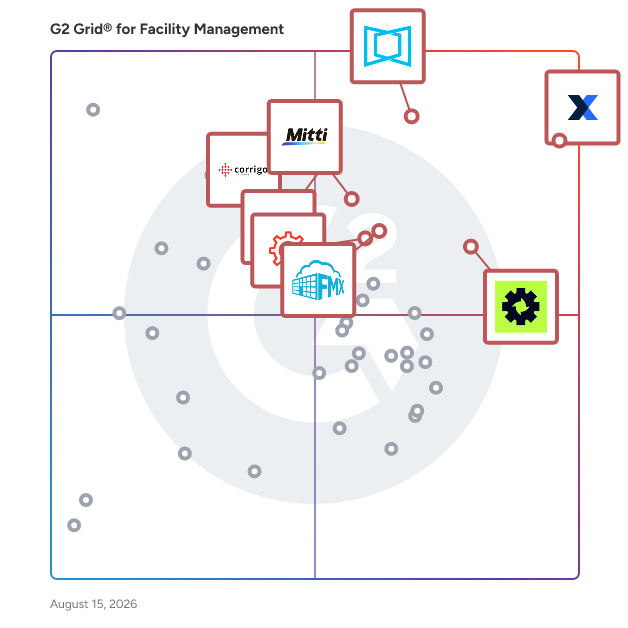
G2 Grid® for Facility Management Software

G2 Grid® for Facility Management Software plotting products by satisfaction and market presence

Highlighted products: MaintainX, ServiceChannel, Limble, Mitti (by SafetyCulture), Corrigo, Accruent Maintenance Connection, FMX, and UpKeep.

Underlying data: [Grid® JSON](https://www.g2.com/categories/facility-management/grids.json?focus%5B%5D=maintainx&focus%5B%5D=servicechannel&focus%5B%5D=limble&focus%5B%5D=safetyculturehq&focus%5B%5D=corrigo&focus%5B%5D=accruent-maintenance-connection&focus%5B%5D=fmx&focus%5B%5D=upkeep)

Sponsored

FMX

FMX: CMMS and Facilities Operations Software for Education, Government, and Commercial Organizations FMX is a cloud-based Computerized Maintenance Management System (CMMS) and facilities management platform designed to help organizations across K-12 and higher education, property management, manufacturing, state and local government, healthcare, hospitality, and faith-based organizations improve operational efficiency, extend asset lifespan, and make data-driven decisions about capital investments. What FMX Does FMX centralizes work order management, preventive maintenance scheduling, asset tracking, fleet management, warehouse management, IT management, capital planning, event management, and rental and reservation management into a single, configurable platform. It is purpose-built for facility and maintenance teams who need actionable data to prioritize work, justify budgets, and demonstrate their department's impact to leadership. Core Capabilities - Work Order Management: Facility staff and end users can submit maintenance requests through intuitive, configurable forms on any device. Technicians resolve tickets in the field via mobile app, logging labor time, parts used, and costs. All resolution data rolls up automatically to asset-level reporting. - Preventive Maintenance: Schedule time-based or meter-based PMs for any asset or piece of equipment. Attach unique inspection checklists to each task to reduce process variation, ensure compliance, and extend equipment lifespan. - Asset Management: Maintain a complete digital record of every asset, including location, condition, acquisition cost, expected useful life, and associated documents, images, and service history, in one searchable system of record. - Capital Planning and Forecasting: FMX's capital planning dashboard aggregates asset data to project replacement timelines and costs by year. Facilities directors can model multiple budget scenarios, identify funding gaps, and present defensible capital expenditure forecasts to finance and leadership. - Mapping: Visualize assets, work orders, inventory and spaces on custom floor plan or geo-based maps. Color-coded pins mark exact locations while active work orders and PMs display geographically so technicians can plan efficient routes. Community members can report issues through a public, map-based portal without an FMX account. - Rental and Reservation Management: Allow staff and community members to book rooms, spaces, and equipment directly through FMX. Manage event logistics, coordinate cross-departmental needs, and process payments, all in one system. - Inventory and Parts Management: Manage parts, supplies, and consumables across one or multiple storerooms. Technicians log parts used directly on work orders, triggering automatic inventory deductions. Low-stock alerts, reorder thresholds, and vendor records keep critical parts available and purchasing workflows on track. - Fleet Management: Track and maintain vehicles alongside facility assets in a single system. Schedule meter-based or time-based PMs for vehicles, log mileage and fuel usage, manage repair history, and control fleet-related costs without managing a separate system. - IT Asset Management: Extend request and asset tracking beyond physical facilities to IT. Staff can submit technology-related service requests, IT teams can manage hardware and software asset records, and all IT work flows through the same configurable platform used for facilities operations. - Reporting and Analytics: Generate configurable reports and dashboards across work orders, assets, labor, costs, and maintenance history. Facilities directors can track team performance, identify recurring issues, and pull the operational data needed to justify budgets and support leadership decisions. Who Uses FMX - K-12 and higher education: School districts and universities use FMX to manage facilities across multiple campuses, streamline community requests, coordinate events, and meet compliance requirements. - Property management: Commercial and residential property managers use FMX to track tenant work orders, manage preventive maintenance across properties, and reduce deferred maintenance costs. - Manufacturing: Facilities and maintenance teams in manufacturing environments use FMX to reduce equipment downtime, enforce PM schedules, and support audit-ready record-keeping. - State and local government: Municipal and county facilities teams use FMX to manage public buildings, parks, and infrastructure, improving service request transparency, maintaining compliance documentation, and making the case for capital budget allocations to elected officials and administrators. - Other private sector organizations: Healthcare systems, faith-based organizations, hospitality groups, and other multi-site commercial organizations use FMX to centralize facilities operations, reduce equipment downtime, manage work across locations, and generate the reporting needed to control costs and support budget decisions. Key Differentiators - Intuitive, easy-to-use interface that drives adoption across both maintenance teams and non-technical staff - One configurable platform for facilities, maintenance, IT, and fleet teams to manage their operations, assets, and long-range planning without stitching together multiple systems - Mobile experience built for technicians in the field - Built-in reporting that surfaces the data facility leaders need to advocate for their teams and budgets - Fast implementation with dedicated onboarding support - Highly configurable without IT involvement - Outstanding customer service reflected in a 98% customer satisfaction rating, 97% renewal rate, and 2-hour support response time Bottom Line FMX moves facility, maintenance, IT, and fleet teams from reactive to proactive operations, giving them one platform to manage work, events, and long-range planning while controlling costs and demonstrating their department's impact to leadership. With a 98% customer satisfaction rating and 97% renewal rate, it is a proven choice for organizations in K-12 and higher education, state and local government, property management, manufacturing, healthcare, hospitality, and faith-based organizations.

Visit website

MaintainX

MaintainX is an AI-powered, mobile-first maintenance and asset management platform built for the new industrial workforce. It empowers frontline teams to manage maintenance, assets, parts inventory, and purchase orders more efficiently, reducing unplanned downtime and boosting operational efficiency. MaintainX manages over 50 million work orders across 10 million assets. It’s used by hundreds of thousands of workers globally, and serves some of the world’s largest enterprises, including Univar, Cintas, Michaels, Duracell, Titan America, Dollar General, Magna, and many more. The MaintainX platform leverages AI and IT/OT connections to create a unified and accessible record of asset and work data, providing real-time insights that drive proactive maintenance and operational excellence for 13,000+ customers. By combining intuitive design, enterprise scalability, and AI-driven workflows, MaintainX enables customers to achieve measurable results: 32% reduction in unplanned downtime 34% reduction in parts inventory costs 38% increase in equipment uptime 53% increase in work order completion *Averages reported by MaintainX customers, 2026. To learn more, visit www.getmaintainx.com.

Average Rating: 4.8/5.0

Total Reviews: 1,538

How Do G2 Users Rate MaintainX?

  • Has the product been a good partner in doing business?: 9.6/10 (Category avg: 9.0/10)
  • Maintenance Planning: 9.3/10 (Category avg: 8.6/10)
  • Reporting & Dashboards: 8.8/10 (Category avg: 8.3/10)
  • Service Request Portal: 8.9/10 (Category avg: 8.5/10)

Who Is the Company Behind MaintainX?

  • Seller: MaintainX
  • Company Website:
  • Year Founded: 2018
  • HQ Location: San Francisco, California
  • Twitter: @maintainx
    891 Twitter followers
  • LinkedIn® Page: www.linkedin.com
    966 employees on LinkedIn®

Who Uses This Product?

  • Who Uses This: Maintenance Manager, Facilities Manager
  • Top Industries: Manufacturing, Facilities Services
  • Company Size: 50% Medium, 41% Small

What Do G2 Reviewers Say About MaintainX?

AI-generated summary from verified user reviews

Pros
  • Users find MaintainX to be incredibly intuitive and user-friendly, making it easy for everyone to navigate.
  • Users praise the excellent customer support of MaintainX, appreciating the hands-on approach and guidance during implementation.
  • Users value the efficient work order management of MaintainX, enhancing communication and streamlining maintenance tasks.
  • Users love the user-friendly interface of MaintainX, enhancing accessibility and integration across all devices seamlessly.
  • Users find MaintainX enhances efficiency by streamlining communication and operational procedures, boosting overall productivity.
Cons
  • Users find the missing features of MaintainX limiting, particularly for inventory management and integrations like NetSuite.
  • Users report work order issues due to poor integration, difficulty in information retrieval, and lack of prioritization.
  • Users express a desire for more flexible customization options in MaintainX to better fit unique workflow needs.
  • Users find that limited features of MaintainX hinder functionality, making it challenging for diverse use cases.
  • Users find the work order management interface cluttered and lacking flexibility, impacting their workflow efficiency.

What Are Recent G2 Reviews of MaintainX?

What Are G2 Users Discussing About MaintainX?

ServiceChannel

ServiceChannel is the #1 facilities management system, helping you deliver an outstanding customer experience at every location. Over 600 leading global brands use ServiceChannel daily to conduct business with 70,000+ contractors at 330,000+ locations in 66 countries. Our service provider marketplace helps you source top providers in every market based on proven performance while optimizing for the metrics you care most about, such as speed and cost. By automating the work order process with Managed Services, you can keep your locations in top-notch shape and keep your customers happy.

Average Rating: 4.2/5.0

Total Reviews: 146

How Do G2 Users Rate ServiceChannel?

  • Has the product been a good partner in doing business?: 8.3/10 (Category avg: 9.0/10)
  • Maintenance Planning: 8.4/10 (Category avg: 8.6/10)
  • Reporting & Dashboards: 7.6/10 (Category avg: 8.3/10)
  • Service Request Portal: 8.3/10 (Category avg: 8.5/10)

Who Is the Company Behind ServiceChannel?

  • Seller: ServiceChannel
  • Company Website:
  • Year Founded: 1999
  • HQ Location: Greenville, SC
  • Twitter: @ServiceChannel
    1,141 Twitter followers
  • LinkedIn® Page: www.linkedin.com
    433 employees on LinkedIn®

Who Uses This Product?

  • Who Uses This: Project Manager
  • Top Industries: Retail, Facilities Services
  • Company Size: 46% Large, 33% Small

What Do G2 Reviewers Say About ServiceChannel?

AI-generated summary from verified user reviews

Pros
  • Users appreciate the ease of use of ServiceChannel, making operations straightforward and efficient for various tasks.
  • Users value the efficiency of ServiceChannel, highlighting its intuitive interface and seamless operations for daily tasks.
  • Users find ServiceChannel to have a user-friendly interface, enhancing communication and streamlining workflow efficiently.
  • Users love the easy initial setup of ServiceChannel, leading to a smooth experience and efficient operations.
  • Users appreciate the efficient management of work orders with quick uploads, automation, and comprehensive tracking features.
Cons
  • Users face work order issues with unclear service requests and complications in clocking in, impacting efficiency and fairness.
  • Users find the interface design poor, reporting struggles with usability and complicated workflows that hinder productivity.
  • Users experience slow performance with ServiceChannel, noting delayed responses and system refresh times that hinder usability.
  • Users often find the complexity of terminologies and processes in ServiceChannel challenging, hindering their overall experience.
  • Users face poor customer support with slow response times and challenges in managing work orders effectively.

What Are Recent G2 Reviews of ServiceChannel?

What Are G2 Users Discussing About ServiceChannel?

Limble

Limble is a mobile-first CMMS (Computerized Maintenance Management System) that helps teams take control of their maintenance operations, no paperwork, no chaos, no guesswork. From preventive maintenance to spare parts inventory, Limble gives maintenance teams the clarity and control they need to get more done, with less stress. Trusted by over 50,000 maintenance professionals at companies like Nike, Sony, Mitsubishi, General Mills, and Unilever, and recipient of 40+ G2 Winter 2026 awards, like Easiest To Do Business With and Best Usability. Limble helps you: Eliminate 100% of your paper clutter with a fully mobile experience Boost team productivity by 41% with smart task scheduling and prioritization Cut equipment downtime by 37% with preventive and predictive maintenance Reduce spare parts costs by 29% with built-in inventory management Extend asset lifespan by 23% using powerful EAM capabilities Key Features: Work Request Portal Automated Preventive & Predictive Maintenance Interactive SOP Checklists Mobile Work Order Management Asset & Spare Parts Tracking Purchasing & Vendor Management Custom Dashboards & Reports 24/7 Tech Support with a Dedicated Rep

Average Rating: 4.8/5.0

Total Reviews: 684

How Do G2 Users Rate Limble?

  • Has the product been a good partner in doing business?: 9.8/10 (Category avg: 9.0/10)
  • Maintenance Planning: 9.3/10 (Category avg: 8.6/10)
  • Reporting & Dashboards: 9.1/10 (Category avg: 8.3/10)
  • Service Request Portal: 9.2/10 (Category avg: 8.5/10)

Who Is the Company Behind Limble?

  • Seller: Limble
  • Company Website:
  • Year Founded: 2015
  • HQ Location: Lehi, UT
  • Twitter: @LimbleCMMS
    461 Twitter followers
  • LinkedIn® Page: www.linkedin.com
    240 employees on LinkedIn®

Who Uses This Product?

  • Who Uses This: Maintenance Manager, Maintenance Supervisor
  • Top Industries: Manufacturing, Food Production
  • Company Size: 56% Medium, 30% Small

What Do G2 Reviewers Say About Limble?

AI-generated summary from verified user reviews

Pros
  • Users find the ease of use of Limble exceptional, especially for frequent daily tasks and parts management.
  • Users value the effective customer support of Limble, appreciating quick resolutions that minimize downtime and enhance usability.
  • Users highlight Limble's implementation ease, noting its intuitive setup and quick onboarding process for new users.
  • Users appreciate Limble's intuitive design, making it easy for anyone to use with minimal training required.
  • Users value the efficiency of Limble, enjoying its user-friendly design and responsive support for seamless operations.
Cons
  • Users note the missing features in Limble, such as weak reporting and lack of multi-currency support.
  • Users find the reporting system and functionality limited, affecting the overall efficiency of asset management and maintenance.
  • Users find the limited customization options frustrating, making it hard to tailor reports and schedules effectively.
  • Users find the learning curve steep with setup and customization, requiring time to navigate the system effectively.
  • Users experience data management issues with scheduling and customization in Limble, which can complicate asset setup.

What Are Recent G2 Reviews of Limble?

What Are G2 Users Discussing About Limble?

Mitti (by SafetyCulture)

Mitti (by SafetyCulture) is the operations system for every site, shift and standard. Trusted by over 80,000 organisations, Mitti brings your people, training records and workflows into one operating picture. From the frontline to the boardroom, it gives everyone a clear understanding of who's trained and ready for the shift ahead, highlights what needs attention and recommends what to do next. Every course completed, skill verified and action taken becomes intelligence your teams can use to improve every day.

Average Rating: 4.6/5.0

Total Reviews: 258

How Do G2 Users Rate Mitti (by SafetyCulture)?

  • Has the product been a good partner in doing business?: 8.8/10 (Category avg: 9.0/10)
  • Maintenance Planning: 8.2/10 (Category avg: 8.6/10)
  • Reporting & Dashboards: 8.4/10 (Category avg: 8.3/10)
  • Service Request Portal: 7.8/10 (Category avg: 8.5/10)

Who Is the Company Behind Mitti (by SafetyCulture)?

  • Seller: Mitti
  • Company Website:
  • Year Founded: 2004
  • HQ Location: Surry Hills, New South Wales
  • Twitter: @SafetyCultureHQ
    4,867 Twitter followers
  • LinkedIn® Page: www.linkedin.com
    878 employees on LinkedIn®

Who Uses This Product?

  • Top Industries: Construction, Manufacturing
  • Company Size: 44% Small, 42% Medium

What Do G2 Reviewers Say About Mitti (by SafetyCulture)?

AI-generated summary from verified user reviews

Pros
  • Users appreciate the ease of use of SafetyCulture, allowing quick access and management from any mobile device.
  • Users commend SafetyCulture for its efficiency improvement, significantly streamlining information flow and enhancing productivity.
  • Users praise the efficiency of SafetyCulture for streamlining information flow and keeping updates readily available.
  • Users appreciate the ease of access and manageability of SafetyCulture, enhancing employee safety with quick surveys and reports.
  • Users value the high customizability of SafetyCulture, allowing easy creation and management of tailored checklists for projects.
Cons
  • Users find the missing features in SafetyCulture limiting, especially regarding advanced reporting and integration capabilities.
  • Users find the learning curve steep, particularly in customizing reports and navigating advanced features efficiently.
  • Users find limited customization options for reports and dashboards, which restrict flexibility for tailored needs.
  • Users experience a significant learning curve with SafetyCulture, finding it difficult to navigate its complex modules and features.
  • Users experience a significant learning curve with SafetyCulture, finding it challenging to master its features and interface.

What Are Recent G2 Reviews of Mitti (by SafetyCulture)?

What Are G2 Users Discussing About Mitti (by SafetyCulture)?

Corrigo

The World's Most Intelligent Facilities Run on Corrigo CMMS. Corrigo is the world's most powerful and proven CMMS solution. Corrigo helps Facility Managers move from the chaos of high-volume, reactive facilities maintenance to strategic preventive maintenance. Whether it's Work Order Management, Asset Management, or Service Provider Management, Corrigo turns facilities from cost centers into value drivers. Corrigo is deployed across 1 million properties in over 160 countries, processing 23M+ work orders annually, representing $8.5B in transactional spend. Corrigo connects facility managers to a private network of more than 70K+ service provider connections in network to ensure quality service that's delivered on-time and on-budget. Corrigo’s promise to the market is to transform facilities management from reactive maintenance to strategic, data-driven operations. Corrigo offers: • Industry-specific best practice templates • Scalable, configurable AI-enabled workflows • Mobile-first, analytics-driven decisioning • Robust system integrations creating the ultimate single pane of glass for FM • Managed services & asset tagging delivering complete visibility and data-driven decisions Corrigo empowers businesses to transform their facility operations with: • Proactive maintenance automation that prevents costly breakdowns and extends asset life • Real-time mobile connectivity for seamless team, technician, and vendor communication • Smart task routing that matches technician skills to jobs for maximum efficiency • Performance-driven dispatch with built-in SLA tracking and compliance monitoring • Streamlined financial management through integrated invoicing and warranty tracking Corrigo transforms facilities management from reactive firefighting into strategic asset optimization. Advanced analytics turn your operational data into actionable insights that cut costs, extend asset life, and improve performance across your entire portfolio. Predictive intelligence identifies maintenance issues before they become expensive problems, while real-time dashboards give you the visibility to make data-driven decisions that directly impact your bottom line. Complete mobile functionality ensures your team stays connected whether in boardrooms or boiler rooms. Seamless integrations eliminate data silos, creating a unified platform that works with your existing technology stack.

Average Rating: 4.5/5.0

Total Reviews: 140

How Do G2 Users Rate Corrigo?

  • Has the product been a good partner in doing business?: 9.1/10 (Category avg: 9.0/10)
  • Maintenance Planning: 8.4/10 (Category avg: 8.6/10)
  • Reporting & Dashboards: 7.9/10 (Category avg: 8.3/10)
  • Service Request Portal: 8.5/10 (Category avg: 8.5/10)

Who Is the Company Behind Corrigo?

  • Seller: Jones Lang Lasalle, IP
  • Company Website:
  • HQ Location: Chicago, Illinois, United States
  • Twitter: @JLLGTASubOffice
  • LinkedIn® Page: www.linkedin.com
    100,540 employees on LinkedIn®
  • Ownership: NYSE: JLL

Who Uses This Product?

  • Who Uses This: Facilities Manager
  • Top Industries: Facilities Services, Restaurants
  • Company Size: 43% Medium, 38% Large

What Do G2 Reviewers Say About Corrigo?

AI-generated summary from verified user reviews

Pros
  • Users appreciate the ease of use of Corrigo, finding it intuitive and simple to learn for daily operations.
  • Users appreciate the real-time work order tracking with Corrigo, facilitating easy communication and streamlined processes.
  • Users commend quick and knowledgeable customer support, enhancing their experience and facilitating effective facility management.
  • Users value the tracking efficiency of Corrigo, which boosts asset management and informed decision-making throughout operations.
  • Users appreciate the user-friendly interface of Corrigo, making it easy for all teams to utilize effectively.
Cons
  • Users find the interface unappealing and experience navigation challenges due to disconnected features and limited editing options.
  • Users face customization difficulties, as adjustments affect all sites and editing properties is limited.
  • Users find the learning curve steep, often feeling overwhelmed despite long-term use and extensive capabilities of Corrigo.
  • Users note a lack of important features in Corrigo, making the system less intuitive and challenging to customize.
  • Users experience poor customer support from Corrigo, often facing escalated issues without effective resolutions from the staff.

What Are Recent G2 Reviews of Corrigo?

What Are G2 Users Discussing About Corrigo?

Accruent Maintenance Connection

Maintenance Connection is a Computerized Maintenance Management System (CMMS) that provides a comprehensive solution for maintenance professionals to manage work orders, track assets, schedule maintenance, and record asset history. The software is designed to help organizations streamline their maintenance operations, improve asset performance, and reduce maintenance costs. Maintenance Connection offers features such as preventive maintenance scheduling, inventory management, detailed reporting, and analytics. It can be used across a broad range of industries, including manufacturing, healthcare, facility management, and more. The solution helps ensure equipment reliability and compliance with industry standards. The platform is available as a cloud-based service, providing remote access and real-time data updates, or Maintenance Connection can be deployed on-premises, depending on the needs of the organization. Maintenance Connection is known for its user-friendly interface and ability to seamlessly integrate with other enterprise systems, providing a centralized hub for all maintenance-related activities. The solution's ease of use, scalability, and proven track record are among the reasons why thousands of maintenance and reliability professionals spread over more than 75 countries trust Maintenance Connection. Why Choose Maintenance Connection for your Organization? Cut Costs and Maximize Operational Efficiency. Maintenance Connection makes it simple to replace reactive maintenance practices with proactive processes, helping to reduce costly breakdowns and unplanned downtime. Accelerate Digital Transformation. Maintenance Connection helps your organization to instantly modernize outdated processes and systems with user-friendly features such as smart work order creation and management, inventory management and asset tracking, and simple integration with many leading third-party solutions. Industry-Leading Support and Continued Innovation. Maintenance Connection is available in more than 20 industries and offers cloud or on-premises deployment. The platform can be accessed from any device and each subscription comes with a dedicated account executive, unlimited technical support, and access to updates and improvements as the Accruent team continues to innovate to add new features and integrations. Achieve Flexibility and Mobility. Maintenance Connection allows teams to work from anywhere at any time, including performing key tasks offline like managing work orders, accessing information, and sharing standardized data across all locations. Pair with Other Accruent Solutions for Unmatched Performance. Maintenance Connection easily integrates with Accruent’s other industry-leading products, such as EDMS document management solution Meridian, helping manufacturers boost efficiency and unlock the full potential of their solutions. Consolidate Data and Gain Actionable Insights. Maintenance Connection helps consolidate data from legacy systems and paper records, providing you with real-time visibility over your assets and facilities, and making it easy to improve big-picture processes. Transform maintenance and asset management in your organization with Maintenance Connection.

Average Rating: 4.4/5.0

Total Reviews: 73

How Do G2 Users Rate Accruent Maintenance Connection?

  • Has the product been a good partner in doing business?: 9.2/10 (Category avg: 9.0/10)
  • Maintenance Planning: 10.0/10 (Category avg: 8.6/10)
  • Reporting & Dashboards: 10.0/10 (Category avg: 8.3/10)

Who Is the Company Behind Accruent Maintenance Connection?

  • Seller: Accruent
  • Company Website:
  • Year Founded: 1995
  • HQ Location: Austin, TX
  • Twitter: @AccruentLLC
    1,296 Twitter followers
  • LinkedIn® Page: www.linkedin.com
    1,041 employees on LinkedIn®

Who Uses This Product?

  • Top Industries: Hospital & Health Care
  • Company Size: 48% Medium, 38% Large

What Do G2 Reviewers Say About Accruent Maintenance Connection?

AI-generated summary from verified user reviews

Pros
  • Users value the ease of use of Accruent Maintenance Connection, appreciating its intuitive and user-friendly interface.
  • Users appreciate the comprehensive and user-friendly asset management features of Accruent Maintenance Connection for efficient maintenance management.
  • Users value the comprehensive and user-friendly inventory management features of Accruent Maintenance Connection for effective maintenance control.
  • Users value the comprehensive tracking features of Accruent Maintenance Connection, enhancing their maintenance management efficiency.
  • Users value the intuitive work order management in Accruent Maintenance Connection, enhancing their maintenance workflow efficiency.
Cons
  • Users find the expensive licensing costs restrictive, as each user requires a separate license and multiple cost codes are limited.
  • Users find the poor reporting tools challenging, with unclear outputs and a complicated customization process.
  • Users find creating reports tricky due to the system's complex customization options, which can complicate the process.
  • Users report implementation delays for on-prem customers, causing frustration compared to the cloud version of Maintenance Connection.
  • Users often face printing issues with Accruent Maintenance Connection, leading to unclear and blurry reports.

What Are Recent G2 Reviews of Accruent Maintenance Connection?

What Are G2 Users Discussing About Accruent Maintenance Connection?

FMX

FMX: CMMS and Facilities Operations Software for Education, Government, and Commercial Organizations FMX is a cloud-based Computerized Maintenance Management System (CMMS) and facilities management platform designed to help organizations across K-12 and higher education, property management, manufacturing, state and local government, healthcare, hospitality, and faith-based organizations improve operational efficiency, extend asset lifespan, and make data-driven decisions about capital investments. What FMX Does FMX centralizes work order management, preventive maintenance scheduling, asset tracking, fleet management, warehouse management, IT management, capital planning, event management, and rental and reservation management into a single, configurable platform. It is purpose-built for facility and maintenance teams who need actionable data to prioritize work, justify budgets, and demonstrate their department's impact to leadership. Core Capabilities - Work Order Management: Facility staff and end users can submit maintenance requests through intuitive, configurable forms on any device. Technicians resolve tickets in the field via mobile app, logging labor time, parts used, and costs. All resolution data rolls up automatically to asset-level reporting. - Preventive Maintenance: Schedule time-based or meter-based PMs for any asset or piece of equipment. Attach unique inspection checklists to each task to reduce process variation, ensure compliance, and extend equipment lifespan. - Asset Management: Maintain a complete digital record of every asset, including location, condition, acquisition cost, expected useful life, and associated documents, images, and service history, in one searchable system of record. - Capital Planning and Forecasting: FMX's capital planning dashboard aggregates asset data to project replacement timelines and costs by year. Facilities directors can model multiple budget scenarios, identify funding gaps, and present defensible capital expenditure forecasts to finance and leadership. - Mapping: Visualize assets, work orders, inventory and spaces on custom floor plan or geo-based maps. Color-coded pins mark exact locations while active work orders and PMs display geographically so technicians can plan efficient routes. Community members can report issues through a public, map-based portal without an FMX account. - Rental and Reservation Management: Allow staff and community members to book rooms, spaces, and equipment directly through FMX. Manage event logistics, coordinate cross-departmental needs, and process payments, all in one system. - Inventory and Parts Management: Manage parts, supplies, and consumables across one or multiple storerooms. Technicians log parts used directly on work orders, triggering automatic inventory deductions. Low-stock alerts, reorder thresholds, and vendor records keep critical parts available and purchasing workflows on track. - Fleet Management: Track and maintain vehicles alongside facility assets in a single system. Schedule meter-based or time-based PMs for vehicles, log mileage and fuel usage, manage repair history, and control fleet-related costs without managing a separate system. - IT Asset Management: Extend request and asset tracking beyond physical facilities to IT. Staff can submit technology-related service requests, IT teams can manage hardware and software asset records, and all IT work flows through the same configurable platform used for facilities operations. - Reporting and Analytics: Generate configurable reports and dashboards across work orders, assets, labor, costs, and maintenance history. Facilities directors can track team performance, identify recurring issues, and pull the operational data needed to justify budgets and support leadership decisions. Who Uses FMX - K-12 and higher education: School districts and universities use FMX to manage facilities across multiple campuses, streamline community requests, coordinate events, and meet compliance requirements. - Property management: Commercial and residential property managers use FMX to track tenant work orders, manage preventive maintenance across properties, and reduce deferred maintenance costs. - Manufacturing: Facilities and maintenance teams in manufacturing environments use FMX to reduce equipment downtime, enforce PM schedules, and support audit-ready record-keeping. - State and local government: Municipal and county facilities teams use FMX to manage public buildings, parks, and infrastructure, improving service request transparency, maintaining compliance documentation, and making the case for capital budget allocations to elected officials and administrators. - Other private sector organizations: Healthcare systems, faith-based organizations, hospitality groups, and other multi-site commercial organizations use FMX to centralize facilities operations, reduce equipment downtime, manage work across locations, and generate the reporting needed to control costs and support budget decisions. Key Differentiators - Intuitive, easy-to-use interface that drives adoption across both maintenance teams and non-technical staff - One configurable platform for facilities, maintenance, IT, and fleet teams to manage their operations, assets, and long-range planning without stitching together multiple systems - Mobile experience built for technicians in the field - Built-in reporting that surfaces the data facility leaders need to advocate for their teams and budgets - Fast implementation with dedicated onboarding support - Highly configurable without IT involvement - Outstanding customer service reflected in a 98% customer satisfaction rating, 97% renewal rate, and 2-hour support response time Bottom Line FMX moves facility, maintenance, IT, and fleet teams from reactive to proactive operations, giving them one platform to manage work, events, and long-range planning while controlling costs and demonstrating their department's impact to leadership. With a 98% customer satisfaction rating and 97% renewal rate, it is a proven choice for organizations in K-12 and higher education, state and local government, property management, manufacturing, healthcare, hospitality, and faith-based organizations.

Average Rating: 4.8/5.0

Total Reviews: 44

How Do G2 Users Rate FMX?

  • Has the product been a good partner in doing business?: 9.3/10 (Category avg: 9.0/10)
  • Maintenance Planning: 8.8/10 (Category avg: 8.6/10)
  • Reporting & Dashboards: 6.8/10 (Category avg: 8.3/10)
  • Service Request Portal: 8.5/10 (Category avg: 8.5/10)

Who Is the Company Behind FMX?

  • Seller: Facilities Management eXpress
  • Company Website:
  • Year Founded: 2012
  • HQ Location: Grandview Heights, Ohio
  • Twitter: @FMXpress
    189 Twitter followers
  • LinkedIn® Page: www.linkedin.com
    225 employees on LinkedIn®

Who Uses This Product?

  • Top Industries: Education Management, Primary/Secondary Education
  • Company Size: 82% Medium, 9% Small

What Do G2 Reviewers Say About FMX?

AI-generated summary from verified user reviews

Pros
  • Users find FMX to be very easy to use, appreciating its quick access to features and user-friendly interface.
  • Users praise the outstanding customer support of FMX, noting prompt responses and seamless implementation experiences.
  • Users value the easy-to-use calendar and real-time work order management, enhancing efficiency in task management.
  • Users love the high customizability of FMX, allowing tailored experiences for diverse needs and preferences.
  • Users commend the efficiency of FMX for streamlining facility management and boosting productivity seamlessly.
Cons
  • Users find FMX to have feature overload, complicating implementation and leading to frustration with support and updates.
  • Users find FMX lacking in essential features and flexibility, impacting their ability to manage requests efficiently.
  • Users report frequent work order issues due to poor customer support and lack of timely improvements from FMX.
  • Users find FMX to be very expensive, particularly challenging for smaller schools with budget constraints.
  • Users experience implementation delays that could improve with better customer support options during startup.

What Are Recent G2 Reviews of FMX?

What Are G2 Users Discussing About FMX?

UpKeep

UpKeep is the CMMS platform trusted by 4,000+ companies - from small operations to global giants like McDonald’s, Caterpillar, and Chevron to manage maintenance, safety, and reliability. UpKeep provides a singular platform to extend asset life and reduce downtime making it the preferred solution for leaders in manufacturing, food & beverage, healthcare, and facilities management. * Unified CMMS: Centralize your asset registry, work orders, parts, inventory, checklists, inspections, and reporting in one place. * Edge IIoT sensors: Connect your physical assets to the cloud with remote sensors that trigger automated work orders based on real-time machine health and anomalies. * Technician-First Design: Built to support front-line teams where they work with intuitive mobile tools, like voice-to-note CAPA reporting, that maximize wrench time. * AI & Customization: Built-in AI tools accelerate data processing, while Studio allow you to build custom app workflows tailored entirely to your business logic. * Safety & Compliance: Mitigate risk with native modules for LMS safety training and EHS compliance designed to keep your operations permanently audit-ready By bringing asset operations into a single, unified platform, UpKeep CMMS empowers teams to drive a 26%+ decrease in downtime and an 11% increase in asset life.

Average Rating: 4.5/5.0

Total Reviews: 1,096

How Do G2 Users Rate UpKeep?

  • Has the product been a good partner in doing business?: 9.0/10 (Category avg: 9.0/10)
  • Maintenance Planning: 8.8/10 (Category avg: 8.6/10)
  • Reporting & Dashboards: 8.3/10 (Category avg: 8.3/10)
  • Service Request Portal: 8.3/10 (Category avg: 8.5/10)

Who Is the Company Behind UpKeep?

  • Seller: UpKeep
  • Company Website:
  • Year Founded: 2014
  • HQ Location: Los Angeles, CA
  • Twitter: @OnUpKeep
    4,547 Twitter followers
  • LinkedIn® Page: www.linkedin.com
    156 employees on LinkedIn®

Who Uses This Product?

  • Who Uses This: Maintenance Manager, Facilities Manager
  • Top Industries: Facilities Services, Hospitality
  • Company Size: 50% Medium, 43% Small

What Do G2 Reviewers Say About UpKeep?

AI-generated summary from verified user reviews

Pros
  • Users value the ease of use of UpKeep, finding it simple to navigate and efficiently manage work orders.
  • Users value the efficient work order management of UpKeep, enhancing communication and streamlining workflow effectively.
  • Users appreciate the intuitive setup of UpKeep, ensuring a seamless and efficient maintenance management experience.
  • Users value the maintenance efficiency of UpKeep, enhancing control and tracking of facility assets effectively.
  • Users admire the efficiency of UpKeep, which streamlines communication and task management, making operations smoother and more organized.
Cons
  • Users experience work order issues such as slow loading times, inaccurate task listings, and problematic date changes.
  • Users feel the absence of essential features hinders integration and usability, affecting overall satisfaction with UpKeep.
  • Users find the slow performance of UpKeep frustrating, especially when executing commands or managing work orders.
  • Users report software bugs that cause frustrating glitches and inconsistencies, impacting functionality and user experience.
  • Users find UpKeep expensive, especially for smaller organizations needing multiple licenses, as costs can quickly accumulate.

What Are Recent G2 Reviews of UpKeep?

What Are G2 Users Discussing About UpKeep?

eMaint

eMaint is a configurable, enterprise-scale Computerized Maintenance Management System (CMMS) and Enterprise Asset Management (EAM) solution designed to assist organizations in standardizing maintenance practices across multiple sites. Its primary focus is to enhance operational uptime and maintain audit readiness without disrupting the workflow of technicians. By providing a centralized platform, eMaint ensures that maintenance processes are streamlined and efficient, catering to the specific needs of diverse industries. Targeted at multi-site operations, eMaint addresses the common challenge of data silos that can hinder effective maintenance management. The platform enforces governance and facilitates consistent processes and reporting across global facilities while still allowing for local flexibility. This adaptability makes eMaint suitable for various sectors, including regulated industries such as life sciences, automotive, oil and gas, energy, and food and beverage, where compliance and traceability are paramount. With features like built-in audit trails, e-signatures compliant with 21 CFR Part 11, and validation support, eMaint enables teams to maintain continuous audit readiness and mitigate risks associated with non-compliance. One of the standout features of eMaint is its ability to adapt to real-world maintenance processes. The platform offers configurable workflows, mobile tools, and role-based dashboards, which contribute to strong technician adoption and precise data capture. This flexibility allows organizations to tailor the system to their specific operational needs, ensuring that maintenance activities are conducted efficiently and effectively. The user-friendly interface and mobile capabilities empower technicians to access vital information and complete tasks on the go, further enhancing productivity. Additionally, eMaint is backed by Fluke and Fortive, providing users with an open and connected ecosystem that integrates seamlessly with ERP, IoT, and other enterprise systems. This connectivity enables organizations to transition from reactive to proactive maintenance strategies, ultimately leading to improved asset reliability and performance. The combination of advanced technology, industry expertise, and ongoing support positions eMaint as a comprehensive solution for organizations looking to enhance their maintenance operations and scale reliability with confidence.

Average Rating: 4.5/5.0

Total Reviews: 290

How Do G2 Users Rate eMaint?

  • Has the product been a good partner in doing business?: 9.1/10 (Category avg: 9.0/10)
  • Maintenance Planning: 8.1/10 (Category avg: 8.6/10)
  • Reporting & Dashboards: 7.8/10 (Category avg: 8.3/10)
  • Service Request Portal: 8.0/10 (Category avg: 8.5/10)

Who Is the Company Behind eMaint?

  • Seller: Fluke Corporation
  • Company Website:
  • Year Founded: 1948
  • HQ Location: Everett, WA
  • Twitter: @emaintCMMS
    1,279 Twitter followers
  • LinkedIn® Page: www.linkedin.com
    3,297 employees on LinkedIn®

Who Uses This Product?

  • Who Uses This: Maintenance Manager, Facilities Manager
  • Top Industries: Manufacturing, Food Production
  • Company Size: 52% Medium, 25% Small

What Do G2 Reviewers Say About eMaint?

AI-generated summary from verified user reviews

Pros
  • Users praise the ease of use of eMaint, appreciating its intuitive navigation and user-friendly interface.
  • Users favor the customizability of eMaint, enhancing insights into maintenance and production operations effectively.
  • Users value the customization options in eMaint, enabling tailored solutions for improved maintenance and production insights.
  • Users value the centralized data management of eMaint, enhancing asset tracking and simplifying maintenance operations effectively.
  • Users value the centralized work order management in eMaint, enhancing functionality, visibility, and resource allocation.
Cons
  • Users note feature limitations in eMaint, as some desired functionalities are outdated or not yet available.
  • Users note the limited features of eMaint, particularly in form development and configurable field constraints.
  • Users find the complexity of eMaint's interface and features challenging, hindering ease of use and learning.
  • Users find missing features in eMaint, including limited forms, configurable fields, and outdated function editor accessibility.
  • Users find poor reporting capabilities in eMaint, as output formats are limited and lack necessary upgrades.

What Are Recent G2 Reviews of eMaint?

What Are G2 Users Discussing About eMaint?

FacilityOS

FacilityOS is a global leader in facility, asset and visitor management. The integrated FacilityOS platform is supported by robust reporting, turnkey onboarding, and extensive configurability and empowers organizations to streamline and automate operations to achieve regulatory compliance, enforce safety protocols, and drive site security requirements. FacilityOS is comprised of interoperable modules for visitor management, emergency and evacuation management, contractor compliance management, asset and logistics management, and PIAM and access control. Each FacilityOS module can function independently or in combination to maximize the platform's impact. Visitor Management Pre-loaded and pre-configured on enterprise-level hardware, VisitorOS is uniquely placed to meet the specific needs of your organization and its critical entry points. Keeping your people safe and company in compliance has never been easier. Emergency and Evacuation Management EmergencyOS improves the efficiency and speed of your evacuations and optimizes emergency management preparedness. Reduce risk, minimize downtime, and avoid costly penalties with digitized emergency alerts, evacuations and reporting. Contractor Compliance Management ContractorOS is a powerful compliance management solution that centralizes contractor and vendor oversight. By automating document collection, approvals, and tracking, it reduces administrative burden and ensures compliance across all facilities. Asset and Logistics Management Designed to optimize chain of custody processes, LogisticsOS combines user-friendly functionality with powerful tracking and clear audit trails to help eliminate lost items and improve accountability across your organization. Physical Identity and Access Management SecurityOS extends the benefits of Access Control to visitors, contractors and other temporary guests enabling you to securely issue, track and manage physical facility access. Streamline and automate permission provisioning while increasing control and visibility. Powered by proven technology, people and processes, FacilityOS is reimagining how organizations can keep their people and their facilities safe, secure and compliant.

Average Rating: 4.7/5.0

Total Reviews: 261

How Do G2 Users Rate FacilityOS?

  • Has the product been a good partner in doing business?: 9.7/10 (Category avg: 9.0/10)
  • Maintenance Planning: 7.0/10 (Category avg: 8.6/10)
  • Reporting & Dashboards: 8.1/10 (Category avg: 8.3/10)
  • Service Request Portal: 6.9/10 (Category avg: 8.5/10)

Who Is the Company Behind FacilityOS?

  • Seller: FacilityOS
  • Company Website:
  • Year Founded: 2014
  • HQ Location: North York, Ontario
  • LinkedIn® Page: www.linkedin.com
    208 employees on LinkedIn®

Who Uses This Product?

  • Who Uses This: Security Manager
  • Top Industries: Manufacturing, Food Production
  • Company Size: 64% Medium, 26% Large

What Do G2 Reviewers Say About FacilityOS?

AI-generated summary from verified user reviews

Pros
  • Users value the ease of use of FacilityOS, enjoying its user-friendly interface and seamless integration features.
  • Users commend the exceptional customer support from FacilityOS, praising the helpfulness and customization provided by the team.
  • Users appreciate the ease of tracking office attendance and simple guest sign-in process with FacilityOS.
  • Users highlight the ease of implementation for FacilityOS, making it a user-friendly experience from start to finish.
  • Users commend the easy setup of FacilityOS, highlighting its reliability and straightforward implementation process.
Cons
  • Users find the limited features of FacilityOS inadequate for efficiently managing large groups during sign-in processes.
  • Users find the limited functionality of FacilityOS challenging for managing large groups efficiently during sign-in processes.
  • Users experience access issues with unclear sign-out buttons and occasional login difficulties, affecting the overall usability.
  • Users experience connectivity issues with FacilityOS, affecting the reliability of printer and WiFi connections.
  • Users find FacilityOS to be expensive, especially in high traffic areas requiring multiple kiosks for functionality.

What Are Recent G2 Reviews of FacilityOS?

WebTMA

WebTMA is an enterprise CMMS and enterprise asset management (EAM) platform built for mid-size to large organizations managing complex, multi-site facilities and maintenance operations across sectors such as healthcare, education, manufacturing, retail, government, and more. Backed by more than 30 years of industry experience, WebTMA provides real-time visibility, mobile access, and configurable tools for managing work orders, preventive maintenance, asset lifecycles, and compliance—adapting to how organizations operate rather than forcing rigid workflows. Key capabilities and benefits: • Asset & Maintenance Management • Mobile Workforce Enablement • Work Order Management • Inventory & Procurement Control • Reporting & Capital Planning Learn more at tmasystems.com

Average Rating: 4.5/5.0

Total Reviews: 36

How Do G2 Users Rate WebTMA?

  • Has the product been a good partner in doing business?: 9.7/10 (Category avg: 9.0/10)
  • Maintenance Planning: 9.8/10 (Category avg: 8.6/10)
  • Reporting & Dashboards: 9.6/10 (Category avg: 8.3/10)
  • Service Request Portal: 9.7/10 (Category avg: 8.5/10)

Who Is the Company Behind WebTMA?

  • Seller: TMA Systems
  • Year Founded: 1988
  • HQ Location: Tulsa, Oklahoma
  • Twitter: @TMA_Systems
    120 Twitter followers
  • LinkedIn® Page: www.linkedin.com
    221 employees on LinkedIn®

Who Uses This Product?

  • Top Industries: Higher Education, Facilities Services
  • Company Size: 53% Medium, 39% Large

What Do G2 Reviewers Say About WebTMA?

AI-generated summary from verified user reviews

Pros
  • Users find WebTMA very easy to use, enabling quick access to work orders and efficient reporting.
  • Users praise the responsive and helpful customer support of WebTMA, enhancing their overall experience significantly.
  • Users appreciate the reporting capabilities of WebTMA, valuing its ease of use and comprehensive options.
  • Users find WebTMA's tracking ease invaluable, enabling efficient management and quick access to work orders.
  • Users find WebTMA to be an affordable solution that delivers great value for facilities management needs.
Cons
  • Users find asset management issues arise due to the lack of meter integration in work orders for easy reference.
  • Users face billing problems due to vague SLAs, slow ticket resolutions, and limited reporting capabilities, complicating their experience.
  • Users face challenges with bugs and slow ticket resolutions, leading to frustrations with the overall WebTMA experience.
  • Users face significant complexity due to vague SLAs, slow ticket resolutions, and limited reporting capabilities in WebTMA.
  • Users report data inaccuracy issues in WebTMA, causing delays and confusion due to vague SLAs and limited reporting.

What Are Recent G2 Reviews of WebTMA?

Cryotos

Cryotos is an advanced, AI-powered Computerized Maintenance Management System (CMMS) solution designed to assist modern maintenance teams in achieving peak operational efficiency. This innovative software enables users to effectively plan, track, and optimize their facilities, assets, and work orders, ultimately aiming to reduce downtime, enhance asset longevity, and maximize overall performance. Targeted primarily at maintenance teams across various industries, Cryotos caters to organizations that prioritize efficiency and reliability in their operations. The software is particularly beneficial for facilities managers, maintenance technicians, and operational leaders who need a robust tool to streamline their maintenance processes. With its comprehensive features, Cryotos addresses a wide range of use cases, from proactive maintenance scheduling to advanced workflow automation, ensuring that teams can respond swiftly to maintenance needs and compliance requirements. One of the standout features of Cryotos is its built-in AI knowledge base, which provides instant answers to complex maintenance queries. This capability significantly reduces the time spent searching for information, allowing maintenance teams to resolve issues more quickly and efficiently. Additionally, the software supports seamless integration with existing ERP systems, PLCs, and Overall Equipment Effectiveness (OEE) tools, further enhancing its utility in diverse operational environments. Cryotos offers a comprehensive suite of features designed to optimize maintenance operations. These include proactive maintenance scheduling and execution, advanced workflow automation, and full asset lifecycle tracking. The powerful Maintenance, Repair, and Operations (MRO) inventory control system manages everything from purchasing to issuance, ensuring that teams have the necessary resources at their fingertips. Furthermore, customizable business intelligence (BI) dashboards and reports provide valuable insights into operational performance, enabling data-driven decision-making. The built-in Kaizen system fosters a culture of continuous improvement, allowing organizations to refine their processes and enhance efficiency over time. By leveraging these features, Cryotos empowers maintenance teams to work smarter, reduce costs, and achieve measurable results. The integration of AI technology not only streamlines operations but also positions organizations to adapt to evolving maintenance challenges, making Cryotos a vital tool for any maintenance-focused organization.

Average Rating: 4.6/5.0

Total Reviews: 346

How Do G2 Users Rate Cryotos?

  • Has the product been a good partner in doing business?: 9.4/10 (Category avg: 9.0/10)
  • Maintenance Planning: 9.3/10 (Category avg: 8.6/10)
  • Reporting & Dashboards: 9.2/10 (Category avg: 8.3/10)
  • Service Request Portal: 9.1/10 (Category avg: 8.5/10)

Who Is the Company Behind Cryotos?

  • Seller: PiqoTech
  • Company Website:
  • Year Founded: 2013
  • HQ Location: Katy, US
  • Twitter: @cryotos
    31 Twitter followers
  • LinkedIn® Page: www.linkedin.com
    16 employees on LinkedIn®

Who Uses This Product?

  • Top Industries: Manufacturing, Chemicals
  • Company Size: 20% Medium, 8% Small

What Do G2 Reviewers Say About Cryotos?

AI-generated summary from verified user reviews

Pros
  • Users value the user-friendly interface of Cryotos, praising its easy navigation and overall usability.
  • Users value the easy tracking capabilities of Cryotos, enhancing visibility and efficiency in maintenance tasks.
  • Users appreciate the efficient task management of Cryotos, enabling timely data capture and smooth machine maintenance.
  • Users value the maintenance efficiency of Cryotos, praising its ease of use and timely data capturing for machine upkeep.
  • Users praise Cryotos for its user-friendly work order management and advanced tracking features that enhance maintenance insights.
Cons
  • Users experience slow performance with Cryotos, facing issues like lag and errors during use.
  • Users experience minor software bugs that can lead to data loss and affect their overall experience.
  • Users find the feature limitations in Cryotos frustrating, especially regarding editing calibration data and dashboard charts.
  • Users find the user interface cluttered and confusing, leading to difficulties in navigating features and updates.
  • Users experience significant bug issues with Cryotos, impacting functionality and resolving queries can be slow.

What Are Recent G2 Reviews of Cryotos?

OfficeSpace Software

Rated #1 for Enterprise Space Management, Desk Booking, and Room Booking, OfficeSpace is the leading AI Operating System for the Built World, defining a new category of workplace software. The OfficeSpace platform, enhanced with AI Canvas, empowers more than 1,800 organizations worldwide to plan, operate, and experience their built world within a single intelligent system. OfficeSpace helps organizations optimize space utilization, right-size real estate portfolios, manage assets across their lifecycle, streamline maintenance, and deliver intuitive, human-centered workplace experiences. OfficeSpace comes fully integrated out of the box with workplace tools like Microsoft, Google, Slack, and Zoom, and securely connects data from Wi-Fi, badge systems, and sensors to provide a unified system of record and action for the built world.

Average Rating: 4.7/5.0

Total Reviews: 125

How Do G2 Users Rate OfficeSpace Software?

  • Has the product been a good partner in doing business?: 9.5/10 (Category avg: 9.0/10)
  • Maintenance Planning: 8.3/10 (Category avg: 8.6/10)
  • Reporting & Dashboards: 10.0/10 (Category avg: 8.3/10)
  • Service Request Portal: 9.4/10 (Category avg: 8.5/10)

Who Is the Company Behind OfficeSpace Software?

  • Seller: OfficeSpace Software
  • Company Website:
  • Year Founded: 2006
  • HQ Location: Alpharetta, Georgia
  • Twitter: @OfficeSpaceSw
    1,882 Twitter followers
  • LinkedIn® Page: www.linkedin.com
    240 employees on LinkedIn®

Who Uses This Product?

  • Top Industries: Computer Software, Financial Services
  • Company Size: 50% Medium, 48% Large

What Do G2 Reviewers Say About OfficeSpace Software?

AI-generated summary from verified user reviews

Pros
  • Users find OfficeSpace Software to have a user-friendly interface, making it incredibly easy for everyone to adopt.
  • Users find OfficeSpace Software to be extremely intuitive, facilitating ease of use for all stakeholders involved.
  • Users commend the accessible customer support of OfficeSpace, ensuring constant guidance and smooth software optimization.
  • Users value the intuitive functionality of OfficeSpace Software, enhancing workspace management and providing excellent customer support.
  • Users value the organization and ease of use of OfficeSpace, streamlining workspace management and enhancing team productivity.
Cons
  • Users note the need for improved missing features, particularly in asset tracking and enhanced hybrid options.
  • Users find limited customization options in OfficeSpace Software, wishing for more direct features and flexibility.
  • Users experience booking issues due to inconvenient data separation and lack of calendar visibility during room reservations.
  • Users face check-in issues due to reliance on third-party vendors and difficulties with seat visibility and timing.
  • Users feel frustrated by the insufficient details available when hovering over cubicles in OfficeSpace Software.

What Are Recent G2 Reviews of OfficeSpace Software?

What Are G2 Users Discussing About OfficeSpace Software?

Ecotrak

Ecotrak is a top-rated platform designed to simplify facilities, asset and project management for multi-site businesses. Founded in 2018 and headquartered in Irvine, California, we are on a mission to empower people with actionable information to make better business decisions. Our cloud-based platform is increasing efficiency, reducing repair & maintenance spend and helping businesses grow & scale quickly. Learn more at ecotrak.com.

Average Rating: 4.8/5.0

Total Reviews: 15

How Do G2 Users Rate Ecotrak?

  • Has the product been a good partner in doing business?: 10.0/10 (Category avg: 9.0/10)
  • Maintenance Planning: 8.9/10 (Category avg: 8.6/10)
  • Reporting & Dashboards: 9.2/10 (Category avg: 8.3/10)
  • Service Request Portal: 10.0/10 (Category avg: 8.5/10)

Who Is the Company Behind Ecotrak?

  • Seller: Ecotrak
  • Company Website:
  • Year Founded: 2018
  • HQ Location: Irvine, US
  • Twitter: @EcoTrakFM
    166 Twitter followers
  • LinkedIn® Page: www.linkedin.com
    67 employees on LinkedIn®

Who Uses This Product?

  • Top Industries: Restaurants
  • Company Size: 44% Large, 31% Medium

What Do G2 Reviewers Say About Ecotrak?

AI-generated summary from verified user reviews

Pros
  • Users commend Ecotrak for its efficient asset management, streamlining processes and improving overall productivity effortlessly.
  • Users commend the excellent customer support from Ecotrak, consistently finding assistance prompt and helpful.
  • Users find Ecotrak to be incredibly user-friendly, enabling efficient tracking of service requests and asset management.
  • Users commend Ecotrak for its efficiency in streamlining processes and enhancing productivity in facility management.
  • Users highlight the increased productivity with Ecotrak, enjoying streamlined processes and efficient facility management.

What Are Recent G2 Reviews of Ecotrak?

Spacewell Workplace

Spacewell is a comprehensive software solution designed to enhance the management and operation of buildings throughout their use phase. As part of the Nemetschek Group, a leader in digital transformation within the architecture, engineering, construction, and operations (AEC/O) industry, Spacewell focuses on improving the performance and sustainability of building portfolios. Its innovative technology supports real estate, energy, workplace, and facility managers in creating environments that promote productivity, wellbeing, and service quality for occupants. The target audience for Spacewell includes professionals in real estate management, facility management, and energy management sectors. These users face the challenge of optimizing building performance while ensuring occupant satisfaction and sustainability. Spacewell Workplace, formerly Axxerion, Cobundu and MCS, addresses these needs by providing tools that leverage real-time Internet of Things (IoT) sensor data. This data enables facility managers to monitor various aspects of building performance, including indoor air quality, energy efficiency, and space utilization. By utilizing these insights, managers can make informed decisions that enhance comfort and well-being for building users. Spacewell's solutions are distinguished by their usability and breadth, making them well-suited for an increasingly occupant-driven real estate market. By focusing on the use phase of buildings, Spacewell empowers managers to create spaces that are not only efficient but also conducive to the well-being of their occupants. The integration of real-time data and AI-driven insights positions Spacewell as a valuable partner for organizations aiming to navigate the complexities of modern building management and sustainability initiatives.

Average Rating: 4.7/5.0

Total Reviews: 18

How Do G2 Users Rate Spacewell Workplace?

  • Has the product been a good partner in doing business?: 8.9/10 (Category avg: 9.0/10)
  • Maintenance Planning: 10.0/10 (Category avg: 8.6/10)
  • Reporting & Dashboards: 8.3/10 (Category avg: 8.3/10)
  • Service Request Portal: 9.4/10 (Category avg: 8.5/10)

Who Is the Company Behind Spacewell Workplace?

  • Seller: Spacewell
  • Company Website:
  • Year Founded: 2013
  • HQ Location: Spacewell, Antwerp, Belgium
  • LinkedIn® Page: www.linkedin.com
    7 employees on LinkedIn®

Who Uses This Product?

  • Top Industries: Human Resources
  • Company Size: 78% Large, 11% Medium

What Are Recent G2 Reviews of Spacewell Workplace?

What Are G2 Users Discussing About Spacewell Workplace?

Nathan Calabrese
NC
Researched and written by Nathan Calabrese
Updated March 7, 2025

Learn More About Facility Management Software

What is Facility Management Software?

Facility management software helps companies manage the lifecycle of industrial buildings such as warehouses, distribution centers, manufacturing locations, oil refineries, or processing plants. This type of software provides workflows to identify and monitor all the facilities used by a company. It also assists maintenance teams in defining and implementing inspections and repairs to maintain each location in good condition.

Unlike generic maintenance management software such as computerized maintenance management systems (CMMS) and enterprise asset management (EAM) software, a facility management system focuses exclusively on facilities maintenance. This type of software should not be confused with property management software specific to the real estate industry.

What Types of Facility Management Software Exist?

Facility management software can be categorized based on how it's sold, deployed, and used. 

Standalone or part of EAM

Many EAM and CMMS software solutions include features for facility management, but there are also systems designed specifically for this.

Cloud or on-premises

While most facility management solutions are cloud-based, some legacy systems are hosted on the customer's premises. In some cases, facility management software can be deployed both on-premises and as a software as a service (SaaS) model.

Agnostic or industry specific

Most facility management solutions provide features for multiple industries, but some systems focus on only one sector, such as retail, manufacturing, or healthcare.

What are the Common Features of Facility Management Software?

The following are some core features of facility management software which help companies optimize the use of their facilities:

Asset management: As opposed to CMMS and EAM software, which focus on fixed assets, facility management software focuses on building and built structures that a company can use to perform operations. Each building has several systems embedded in its structure, such as ventilation, air conditioning, and electric.

Work order management: Facility maintenance requires operations such as inspections and repairs, managed using work orders. Work orders define what type of activity should be performed, how, and by whom. Technicians get orders assigned to them based on their qualifications and availability. Managers schedule and monitor the progress of all orders by a team, location, or employee.

Cost and spend tracking: Facility management software helps users track maintenance costs such as the time spent by technicians on various operations and the cost of the spare parts and consumables required to maintain facilities. A few examples are industrial lighting equipment or construction materials needed to repair buildings.

Procurement and vendor management: Facility managers work with suppliers of parts and accessories and sometimes outsource some maintenance operations to other companies. It is therefore critical for them to find reliable and affordable vendors that provide high-quality products and services.

Analytics: Metrics and analytics help facility managers monitor the efficiency of the maintenance activities and track their costs. Facility management software can also use data captured by sensors and meters across multiple locations.

What are the Benefits of Facility Management Software?

Using software to manage facilities has multiple benefits, the most important being:

Maintenance costs reduction: Using a software to plan maintenance operations can improve resource allocation and employee productivity, translating into cost reductions. Some cost savings include reduced response time for service requests and increased facility uptime.

Improve operations: Maintaining facilities can be a daunting task, especially when companies own multiple locations scattered around the country or even the globe. Functionality like inventory management and maintenance scheduling makes it easier for facility managers to plan and manage operations.

Optimize facility performance: Facility management software can reduce downtime and disruptions in facilities, which leads to better performance and increased productivity. For instance, a warehouse that cannot be used at full capacity harms the ability of the company to ship and receive products quickly.

Who Uses Facility Management Software?

Facilities managers: Fixed assets managers rely on facility management data to identify potential issues and proactively schedule maintenance. Managers use this type of software to create and implement a maintenance program, which defines maintenance schedules and work order processes.

Technicians: The maintenance team members perform operations such as inspections and repairs to prevent or fix issues related to facilities. A few examples are replacing HVAC components or consolidating the structure of the building.

Capital project managers: Investing in new facilities can be very costly, and companies need to make sure that they maximize their investment. Since building a facility is a capital project, the project managers need to ensure that the building is used at optimal capacity.

What are the Alternatives to Facility Management Software?

Alternatives to facility management software can replace this type of software, either partially or completely:

CMMS: While CMMS focuses mainly on fixed assets such as industrial equipment, this type of software often includes features for facility management. CMMS usually focuses on small and medium companies that need to manage fewer facilities with a low level of complexity. For instance, a small warehouse is much easier to maintain than a distribution center, and CMMS can be a good option for the former but not for the latter.

Enterprise asset management (EAM) software: EAM provides advanced features for asset and facility management, which are geared towards complex industries such as oil and gas, mining, chemicals, and pharmaceuticals.

Software Related to Facility Management Software

Related solutions that can be used together with facility management software include:

Asset tracking software: Asset tracking refers to small tools used to maintain facilities, such as mobile devices, or cleaning and disinfecting equipment. Companies operating multiple facilities may use hundreds of tools for maintenance, which is why it's crucial to integrate with asset tracking software.

Asset performance management software: This software helps companies optimize the use of any type of asset, from equipment and heavy machinery to industrial facilities and warehouses. While facility management software includes analytics to track performance, asset performance management software uses machine learning to provide advanced insights and forecasting.

Retail space planning software: Retail space management, also known as planogram software, helps retailers optimize physical stores and their components, such as shelves and racks. Since facility management does not always include planogram features, retailers may need to use retail space planning solutions.

IWMS: Integrated workplace management systems (IWMS) streamline and automate maintenance activities for office spaces. Since facilities usually include offices for administrative personnel, IWMS and facility management software need to be used together.

Challenges with Facility Management Software

Software solutions can come with their own set of challenges. 

Old technology: The efficiency of facility management software can be hammered by old technology used by buyers. For instance, the lack of intelligent sensors makes it impossible to identify issues such as tailgating. Also, legacy enterprise software isn't always user friendly and does not provide real-time data.

Integration: Facility management software needs to integrate with multiple types of software, such as accounting, ERP systems, field service management, or CMMS and EAM software.

Which Companies Should Buy Facility Management Software?

Any company that owns or manages facilities can benefit from using this type of software, but facility management software is mostly beneficial to the following types of companies:

Manufacturers: Most manufacturers have at least one production location, which usually includes a warehouse used to store raw materials and finished products.

Retailers: Retail companies need to manage two major types of facilities—stores and warehouses. While stores usually have a warehouse, retailers can have facilities scattered across multiple locations in multiple countries.

Logistics companies: Since warehousing is a critical part of supply chain management, logistics companies need to ensure that all their locations are optimized to help with the storage, shipping, and receiving of goods.

Service providers: Many companies that own facilities opt to outsource maintenance to specialized service providers. These services companies use facility management software to maintain locations on behalf of their customers.

How to Buy Facility Management Software

Requirements Gathering (RFI/RFP) for Facility Management Software

A good requirements list should include all the functionality needed by the buyer to manage facilities efficiently. Requirements need to be detailed enough to cover the specific needs of the buyers and not too generic. For instance, maintenance cost tracking is too vague and should clarify which types of costs the buyer needs to track and how.

Compare Facility Management Products

Create a long list

A long list should include all solutions that provide facility management functionality, either as a standalone product or as part of a more extensive system. Buyers that do not need to manage fixed assets should focus exclusively on software for facility management.

Create a short list

A shortlist can be created by eliminating products from the long list using high-level criteria such as the delivery model. Buyers who only want a cloud solution should exclude products that need to be hosted on their promises. Industry-specific functionality can also be used to eliminate products. For instance, a retailer should consider only products that provide features for their industry and exclude solutions that include generic functionality.

Conduct demos

Demos should follow a predefined script that simulates the maintenance processes of the buyer. To ensure that the demo results can be compared objectively, buyers should use the same script for all vendors shortlisted. Also, the selection team members attending the demos should rate each criteria using a consistent system. 

Finally, the critical functionality should have higher importance than generic requirements. For instance, space planning is essential for retailers, while integration with accounting is not mandatory. It is also essential to evaluate how intuitive the software is, which KPIs and analytics it provides, and how it can be used on mobile devices.

Selection of Facility Management Software

Choose a selection team

The selection team includes at least one executive, such as the chief operations officer, who is usually the project's main sponsor. This means that they are in charge of defining the scope of the selection project, obtaining and managing the budget required for the acquisition, and monitoring the progress of all selection stages.

Negotiation

Negotiating with vendors can be difficult, especially when they provide similar software. In this case, the main differentiators between vendors are the price of the software and their ability to support the buyers during and after the implementation. When choosing between solutions with similar functionality and pricing, factors like customer support can be the deciding factor.

Final decision

The final decision should consider all the factors mentioned above but give a higher priority to the requirements that matter most for the buyer. For example, a retailer should focus more on functionality for space planning, while wholesalers are more concerned about managing dozens or hundreds of warehouses and distribution centers.

What Does Facility Management Software Cost?

License pricing can vary depending on the delivery model. Perpetual licenses are required for on-premises software, while cloud or SaaS solutions are sold as a subscription model. Perpetual licenses are more expensive but don't need to be renewed, and subscriptions are more affordable, but their cumulative cost can be substantial in the long run. Other costs are related to professional services such as implementation or business process reengineering. While basic customer support is usually included, buyers typically need to pay more for 24/7 or global support.

Return on Investment (ROI)

Buyers can track the ROI of the software by comparing its costs and benefits. Since the initial cost of the software can be significant and benefits aren't realized immediately, it may take one to three years for the software to generate a positive ROI.

Implementation of Facility Management Software

How is Facility Management Software Implemented?

Implementing a facility management solution should start with a discovery process to ensure that the vendor clearly understands what features are needed in which location. While this process is straightforward when the buyer has fewer locations, it gets much more complicated when the company uses multiple facilities.

Who is Responsible for Facility Management Software Implementation?

The selection team is usually in charge of the implementation process since they already have a pretty good idea of what the company needs and how the new software can help. While simple implementations can be done internally, complex deployments require the involvement of vendors or its partners, external consultants, or project managers.

What Does the Implementation Process Look Like for Facility Management Software?

Facility management software implementation can vary significantly based on the number and type of facilities. A phased approach is recommended for multiple locations, while complex industrial facilities require a project management team and a clearly defined schedule.

When Should You Implement Facility Management Software?

For new facilities, the implementation of the software should be done before the company starts using the buildings. New facilities are rare, and most of the time, software needs to be deployed in existing locations, which usually have some kind of software or a mix of solutions for maintenance. In this case, facility management should be implemented when facilities are either closed for maintenance or during the idlest season.