Microsoft Word

By Microsoft

4.7/5(2,063)
4.7 out of 5 stars

How would you rate your experience with Microsoft Word?

Microsoft Word Reviews & Product Details

Profile Status

This profile is currently managed by Microsoft Word but has limited features.

Are you part of the Microsoft Word team? Upgrade your plan to enhance your branding and engage with visitors to your profile!

Value at a Glance

Averages based on real user reviews.

Time to Implement

3 months

Return on Investment

13 months

User Insights

Average based on 2063 real user reviews.

Implementation Time

3 months

Perceived Cost

$$$$$

Microsoft Word Media

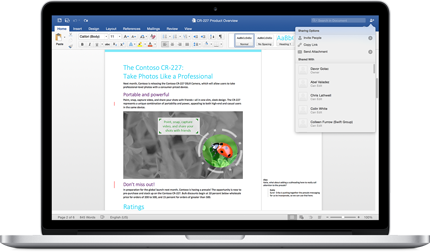
Microsoft Word Demo - Microsoft Word
Microsoft Word
Microsoft Word Demo - Microsoft Word
Microsoft Word
Microsoft Word Demo - Microsoft Word
Microsoft Word

Microsoft Word Reviews (1,752)

View 5 Video Reviews
Reviews

Microsoft Word Reviews (1,752)

View 5 Video Reviews
4.7
2,063 reviews

What do users say?

Generated using AI from real user reviews
Users consistently praise Microsoft Word for its user-friendly interface and powerful formatting tools, which make creating professional documents straightforward and efficient. The seamless integration with Microsoft 365 enhances collaboration, allowing for easy sharing and real-time editing. However, some users note that formatting can become inconsistent when documents are shared across different devices or versions.

Pros & Cons

Generated from real user reviews
View All Pros and Cons
Search reviews
Clear Results
Filter Reviews
Clear Results
G2 reviews are authentic and verified.
Siddesh C.
SC
Siddesh C.
Product Manager
Computer Software
Enterprise (> 1000 emp.)
"Microsoft Word Helps Me Keep Product Documentation Well Organised"
4.5/5
What do you like best about Microsoft Word?

I use Microsoft Word every day to prepare market research reports, product requirement documents, feature specifications, and business proposals for our team. For projects like Flipkart Minutes, it helps me organise large documents with headings, tables of contents, diagrams, and screenshots while keeping everything easy to review. Track Changes and Comments make it simple to collect feedback from engineering and business stakeholders before finalising requirements. Review collected by and hosted on G2.com.

What do you dislike about Microsoft Word?

When working on long documents with multiple sections, tables, and images, formatting sometimes needs manual adjustments to keep everything aligned. Documents with frequent edits and tracked changes can also become slightly slower to manage, especially during multiple review cycles. Review collected by and hosted on G2.com.
Vishaka C.
VC
Vishaka C.
Full Stack Developer
Computer Software
Small-Business (50 or fewer emp.)
"Microsoft Word Keeps Our Project Documentation Organized"
4.5/5
What do you like best about Microsoft Word?

I use Microsoft Word every day at work while creating documentation for our LocalConnect project at Mavertech Technology. Before development starts, I prepare market research reports, feature planning documents, business requirements and project documentation in Word. I also rely on headings, styles, tables, comments and Track Changes to keep documents organised and make team reviews much easier. Review collected by and hosted on G2.com.

What do you dislike about Microsoft Word?

Most of my work documents are fairly detailed, so once they grow to 30–40 pages with tables, diagrams and screenshots, keeping the formatting consistent can become time-consuming. I also wish some advanced layout and styling options were easier to find, especially when updating large project documents. Review collected by and hosted on G2.com.

Kunal  S.
KS
Kunal S.
Product Operations Associate
Computer Software
Small-Business (50 or fewer emp.)
"Reliable Document Creation and Collaboration"
4.5/5
What do you like best about Microsoft Word?

I use Microsoft Word every day for creating reports, documentation, meeting notes, and project proposals. The formatting tools are easy to use, and features like styles, templates, tables, spell check, comments, and Track Changes make collaborating with teammates much more efficient. I also like that documents sync through OneDrive, allowing me to access and edit files from different devices without losing my work. Overall, it saves time and helps me create professional-looking documents quickly. Review collected by and hosted on G2.com.

What do you dislike about Microsoft Word?

Microsoft Word can become slow when working with very large documents that contain many images, tables, or tracked changes. Formatting can occasionally shift when documents are opened on different devices or older versions of Word, requiring extra adjustments. I would also like to see better real-time collaboration performance and more advanced design and layout tools built into the desktop version. Review collected by and hosted on G2.com.

Lina H.
LH
Lina H.
OFFICE MGR, STAFF ACCOUNTANT, NOTARY
Small-Business (50 or fewer emp.)
"Intuitive Formatting and Collaboration Tools That Save Hours"
4.5/5
What do you like best about Microsoft Word?

The most helpful aspect of Microsoft Word is its robust set of formatting tools combined with a highly intuitive interface. Features like Track Changes and seamless cloud integration save me hours each week when collaborating and reviewing documents with my team. Additionally, the vast library of built-in templates allows me to quickly draft professional reports and letters without having to start from scratch. Review collected by and hosted on G2.com.

What do you dislike about Microsoft Word?

The most frustrating aspect of Microsoft Word is how difficult it can sometimes be to manage image placement and formatting. Often, inserting or moving a single image can unexpectedly disrupt the layout of the entire document. Additionally, the software can occasionally become sluggish when working with very long, complex documents that contain multiple high-resolution graphics or intricate tables. A more intuitive and stable image anchoring system would greatly improve the overall user experience. Review collected by and hosted on G2.com.

Sree K.
SK
Sree K.
Software Development Engineer in Test III
Computer Software
Mid-Market (51-1000 emp.)
"Microsoft Word: Dependable, Polished, and Built for Efficient Collaboration"
5/5
What do you like best about Microsoft Word?

What I like most about Microsoft Word is how dependable it is for creating and editing documents of all sizes. Whether I’m writing technical documentation, preparing reports, creating process guides, drafting meeting notes, or reviewing documents shared by others, Word keeps all the formatting and editing tools I need in one place. The interface is familiar and well organized, so it’s easy to find the features I use most, and I rarely have to spend time digging through menus. Tools like styles, templates, comments, Track Changes, and the navigation pane make working with longer documents noticeably more efficient.

Another major strength is how well Microsoft Word fits into the broader Microsoft ecosystem. It integrates smoothly with OneDrive, Outlook, Teams, and other Microsoft 365 applications, which makes collaboration, sharing, and accessing files across devices straightforward. Performance has also been consistently reliable. Even with large documents that include tables, images, or diagrams, the app stays responsive, and AutoSave adds peace of mind by reducing the risk of losing work. Collaboration features such as real-time co-authoring and version history also make it easier to review changes and keep shared documents up to date.

From a value standpoint, Microsoft Word continues to earn its place as a core productivity tool because it brings document creation, collaboration, and formatting together in a single application. Getting started is simple since most users already recognize the interface, and Microsoft offers extensive documentation, tutorials, and community support for anyone who wants to go deeper into advanced features. While many of its capabilities may be more than casual users ever need, they don’t interfere with everyday tasks. Overall, Microsoft Word remains a reliable, polished, and highly capable application that handles everything from quick notes to complex professional reports with ease. Review collected by and hosted on G2.com.

What do you dislike about Microsoft Word?

One thing I dislike about Microsoft Word is that, after accumulating so many features over the years, some of the more advanced options can be surprisingly hard to locate. The Ribbon interface is great for everyday editing, but when I’m trying to find a specific formatting tool or a particular page layout setting, it can take more clicks than I expect. I’ve also run into situations where formatting changes after copying content from other applications, which means I have to do a bit of cleanup to get the document looking consistent again.

Another minor drawback is performance with very large documents. When a file includes lots of images, tables, or complex formatting, Word can occasionally feel slower to edit—especially if Track Changes is being used heavily. Collaboration is generally excellent, but when multiple people are editing at the same time, formatting conflicts or version differences can still pop up and sometimes need to be resolved manually. It doesn’t happen often, but when it does, it can interrupt the flow of editing.

From a licensing perspective, Microsoft Word is part of the Microsoft 365 ecosystem, so getting the latest features typically requires an active subscription. I still think it offers good value given its capabilities and integrations, but the subscription model won’t be ideal for everyone—particularly for people with very basic document-editing needs. Overall, these are relatively minor issues, and they don’t outweigh the reliability, compatibility, and productivity benefits Microsoft Word provides for me on a daily basis. Review collected by and hosted on G2.com.

Fusberta D.
FD
Fusberta D.
Educational Content
Small-Business (50 or fewer emp.)
"Word Is My Reliable Final Stop for Important Documents"
4.5/5
What do you like best about Microsoft Word?

I don't think Word has ever been my favorite piece of software. It's just the one I always end up opening. Every time I try writing something important somewhere else, sooner or later I copy it back into Word before I'm done.

It's kind of become my "final stop" for anything that actually matters. Contracts, resumes, reports, long documents... if I care about how it's going to look when someone else opens it, it usually ends up in Word. I also like that after all these years I barely have to think about where things are. My hands just kind of know what to click. Review collected by and hosted on G2.com.

What do you dislike about Microsoft Word?

The one thing that still catches me off guard is formatting. I'll be writing for half an hour, everything looks fine, then I change one small thing and suddenly the spacing, numbering, or page layout decides to do its own thing. It's almost like Word has its own opinion sometimes. Most of the time it's easy to fix, but every now and then I still end up thinking, "Seriously... what just happened?" Review collected by and hosted on G2.com.

Kunal W.
KW
Kunal W.
Small-Business (50 or fewer emp.)
"Reliable Daily Workhorse for Reports and Real-Time Collaboration"
4.5/5
What do you like best about Microsoft Word?

We use Microsoft Word almost every day in our workplace for preparing reports, technical documentation, meeting notes, and client-facing documents. The formatting tools are reliable, and real-time collaboration through Microsoft 365 makes it easy for our team to review and update files together. I also like the built-in templates, spell check, and track changes feature, which save time during document reviews. Overall, it's a dependable tool that fits well into our daily workflow. Review collected by and hosted on G2.com.

What do you dislike about Microsoft Word?

One thing I don't like is that large documents with lots of images or tables can sometimes become slow to edit. Formatting may also change unexpectedly when a file is shared between different versions or opened on another device. While the collaboration features have improved, I occasionally notice syncing delays when multiple people are editing the same document. These issues aren't frequent, but they can interrupt the workflow on busy workdays. Review collected by and hosted on G2.com.

Narottam K.
NK
Narottam K.
Student
Small-Business (50 or fewer emp.)
"Microsoft Word: A Smarter Way to Create, Edit, and Collaborate"
5/5
What do you like best about Microsoft Word?

It connects seamlessly with Microsoft 365 apps like Excel, PowerPoint, Outlook, OneDrive, and Teams, making it easy to share, collaborate, and embed content across tools. It handles everything from quick notes to large, complex documents efficiently, with dependable autosave, collaboration features, and solid formatting capabilities.

As part of a Microsoft 365 subscription, it offers strong value by providing a comprehensive document creation and collaboration solution that’s widely used across businesses, schools, and organizations.

The familiar interface, extensive documentation, built-in help, tutorials, and a large user community make it easy for new users to get started and for experienced users to troubleshoot and find answers quickly. Microsoft Copilot enhances Word by helping draft, rewrite, summarize, adjust tone, and generate content, while built-in spelling, grammar, and style suggestions help improve overall writing quality. Review collected by and hosted on G2.com.

What do you dislike about Microsoft Word?

It works best within the Microsoft ecosystem; integrations with some third-party platforms and non-Microsoft collaboration tools can feel less seamless. Large or heavily formatted documents may start to run slowly, and formatting inconsistencies can show up when sharing files across different versions or applications. Many advanced capabilities also require a paid Microsoft 365 subscription, which may be more than casual users actually need. Review collected by and hosted on G2.com.

Krishna Pranab C.
KC
Krishna Pranab C.
Production Engineer
Small-Business (50 or fewer emp.)
"Powerful Word Processor with Excellent Collaboration Features"
5/5
What do you like best about Microsoft Word?

Microsoft Word is my preferred word processor because it combines an intuitive UI/UX with powerful document editing features, making it suitable for both beginners and professionals. It integrates seamlessly with Microsoft 365 applications like Excel, PowerPoint, Outlook, Teams, OneDrive, and SharePoint, enabling smooth collaboration and cloud-based file access. Its performance is fast, stable, and reliable, even when working with large documents containing tables, images, and references. From a pricing/ROI perspective, the Microsoft 365 subscription offers excellent value through regular updates, cloud storage, and cross-device access. Microsoft also provides extensive support and onboarding through templates, tutorials, documentation, and an active community, making it easy for new users to get started. Additionally, AI-powered features through Microsoft Copilot help draft, summarize, rewrite, and improve documents, significantly boosting productivity and reducing the time required to create high-quality content. Review collected by and hosted on G2.com.

What do you dislike about Microsoft Word?

Microsoft Word is a powerful application, but it has a few drawbacks. Complex formatting can sometimes become inconsistent, especially when documents are shared across different versions or imported from other word processors. Large files with many images or advanced formatting may occasionally experience performance slowdowns. While Microsoft 365 offers excellent features, the subscription cost may not be ideal for users who only need basic document editing. Some advanced tools and settings also have a learning curve for new users. Additionally, AI features like Microsoft Copilot are highly useful but require eligible subscriptions and are not available to all users, limiting access to some of the latest productivity enhancements. Overall, these limitations are relatively minor compared to the application's extensive functionality and reliability. Review collected by and hosted on G2.com.

Furkan A.
FA
Furkan A.
Data scientist
Computer Software
Mid-Market (51-1000 emp.)
"Writing Made Simple and Stress-Free with Microsoft Word"
5/5
What do you like best about Microsoft Word?

What I like best about Microsoft Word is that it makes writing feel simple, no matter what I'm working on. I have been using it for a long time for different purposes like creating resumes, writing reports, making project documents, taking notes, and even drafting emails before sending them. Every time I open Word, I know exactly where to start because the layout is clean and easy to understand. I remember that when I first started using Microsoft Word, I didn't know much about document formatting. Still, I was able to learn it without watching long tutorials. If I wanted to make a heading bigger, add bullet points, insert a table, or place an image in my document, I could do it just by exploring the options. Everything is clearly labeled, so it doesn't feel confusing even for someone who is new. One feature that has helped me a lot is the spelling and grammar checker. Sometimes I type quickly and make small mistakes without noticing them. Word points out those mistakes, which helps me correct them before sharing my document. It has saved me from many typing errors, especially when preparing important documents. I also like that I can make my documents look clean and professional without putting in too much effort. There are built-in styles, fonts, and formatting options that help organize the content nicely. Even a simple document looks much better after using these tools, and I don't need any special skills to make it presentable. Another thing I really appreciate is that my work gets saved automatically when I'm signed in with my Microsoft account. Earlier, I was always worried about losing my work if my laptop suddenly turned off or the application closed by mistake. Now I feel much more relaxed because I know my document is usually saved and I can continue from where I left off. I like most about Microsoft Word is not just one feature. It is the way it makes writing comfortable and stress-free. Whether I need to write something short or prepare a long document, I can focus on my ideas instead of worrying about formatting or complicated tools. It has become one of those applications that I naturally open whenever I need to write something important. Review collected by and hosted on G2.com.

What do you dislike about Microsoft Word?

Microsoft Word has been very reliable for me, but there are a few things that I think could be better. One thing I notice is that sometimes there are so many options on the toolbar that it feels a little overwhelming. I mostly use Word for writing documents, so I don't need every feature. When I was new to the software, it took me some time to understand where certain tools were because there were many menus and buttons. Another small issue is that when I open documents created in a different version of Word or in another word processor, the formatting sometimes changes. The font size, spacing, or alignment may not look exactly the same, so I have to spend a few minutes fixing everything before I can use the document. I also feel that some advanced features are difficult to understand without searching online. Word offers many useful tools, but beginners may not know what they do or how to use them properly. A few simple tips or guided explanations inside the application would make learning easier. Sometimes, when I'm working on a very large document with many images, tables, or pages, Word can become a little slower than usual. It doesn't happen often, but I have noticed it while working on bigger files. These are not major problems, and they don't stop me from using Microsoft Word. They are just small things that I think could be improved. Overall, my experience has been positive, and I still choose Word whenever I need to create an important document because it is easy to trust and gets the job done well. Review collected by and hosted on G2.com.

Questions about Microsoft Word? Ask real users or explore answers from the community

Get practical answers, real workflows, and honest pros and cons from the G2 community or share your insights.

GU
Guest User
Last activity 3 months ago

What are 3 new features in Microsoft Word?

Emmanuella A.
EA
Emmanuella Amoah
Last activity about 2 months ago

How do Microsoft Word’s tools help you type and edit documents faster?

Pricing Insights

Averages based on real user reviews.

Time to Implement

3 months

Return on Investment

13 months

Average Discount

10%

Microsoft Word Comparisons
Microsoft Word Features
Calendar
Website
Applications
Revision History
Suggestion Mode
Document Editor
Export
Import
Web Publishing
Multi-User Collaboration
Real-Time Communication
Product Avatar Image
Microsoft Word
4.7/5(2,063)