Microsoft Word

By Microsoft

4.7/5(2,063)
4.7 out of 5 stars

How would you rate your experience with Microsoft Word?

Microsoft Word Reviews & Product Details

Profile Status

This profile is currently managed by Microsoft Word but has limited features.

Are you part of the Microsoft Word team? Upgrade your plan to enhance your branding and engage with visitors to your profile!

Value at a Glance

Averages based on real user reviews.

Time to Implement

3 months

Return on Investment

13 months

User Insights

Average based on 2063 real user reviews.

Implementation Time

3 months

Perceived Cost

$$$$$

Microsoft Word Media

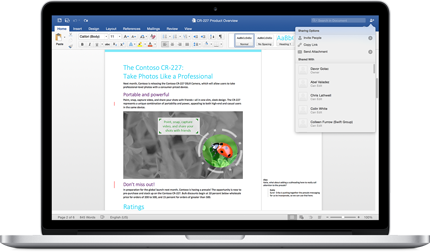
Microsoft Word Demo - Microsoft Word
Microsoft Word
Microsoft Word Demo - Microsoft Word
Microsoft Word
Microsoft Word Demo - Microsoft Word
Microsoft Word

Microsoft Word Reviews (268)

View 5 Video Reviews
Reviews

Microsoft Word Reviews (268)

View 5 Video Reviews
4.7
2,063 reviews

What do users say?

Generated using AI from real user reviews
Users consistently praise Microsoft Word for its user-friendly interface and powerful formatting tools, which make creating professional documents straightforward and efficient. The seamless integration with Microsoft 365 enhances collaboration, allowing for easy sharing and real-time editing. However, some users note that formatting can become inconsistent when documents are shared across different devices or versions.

Pros & Cons

Generated from real user reviews
View All Pros and Cons
Search reviews
Clear Results
Filter Reviews
Clear Results
G2 reviews are authentic and verified.
Francisco Javier S.
FS
Francisco Javier S.
Product Manager
Chemicals
Mid-Market (51-1000 emp.)
"The undisputed industry standard for text creation, though formatting can be temperamental"
3.5/5
What do you like best about Microsoft Word?

The sheer depth of its editing and review tools is unmatched. Features like Track Changes, nesting comments, and the advanced spellchecker are essential for my daily editing workflow. I also highly appreciate the robust version history on cloud-saved documents, which allows me to revert back to previous drafts seamlessly whenever a client changes their mind. Review collected by and hosted on G2.com.

What do you dislike about Microsoft Word?

Handling image placement and complex layouts is still a nightmare. If you insert a single picture or try to adjust a margin slightly, the entire document layout can break, shifting text and tables completely out of place for no apparent reason. It also feels a bit bloated now, taking longer to launch than modern, lightweight markdown editors. Review collected by and hosted on G2.com.

Jayesh W.
JW
Jayesh W.
Software Engineer II
Computer Software
Enterprise (> 1000 emp.)
"Keeps Long Business Documents Structured with Powerful Styles and Review Tools"
4/5
What do you like best about Microsoft Word?

Microsoft Word is the main tool I use for preparing internal business documents and research reports at work. For longer documents, I depend on heading styles, page layout controls, tables, automatic table of contents, comments, and track changes while reviewing drafts with teammates. It keeps the document well structured from the first draft through the final version, even after multiple revisions. Review collected by and hosted on G2.com.

What do you dislike about Microsoft Word?

Large documents with many images, diagrams, and formatting elements can become slower over time. Also, content copied from different sources sometimes brings inconsistent formatting, so I usually spend a little time cleaning it up before sharing the final document. Review collected by and hosted on G2.com.

Hemant J.
HJ
Hemant J.
Software Engineer
Computer Software
Enterprise (> 1000 emp.)
"Reliable for Professional Documentation and Project Reports"
4/5
What do you like best about Microsoft Word?

Microsoft Word is the primary tool I use for preparing project documentation, market research reports, meeting notes, and proposal documents as part of my work. I rely on its formatting tools, headings, tables, and page layout options to create structured documents that are easy to review and share with stakeholders. Exporting finalized documents to PDF helps preserve formatting when circulating reports, and the familiar interface makes updating large documents quick and efficient. Review collected by and hosted on G2.com.

What do you dislike about Microsoft Word?

When working on lengthy project reports with multiple tables and images, I occasionally notice slower performance, especially during formatting or navigation. Minor formatting differences can also appear when documents are opened in different versions of Word, so I usually do a quick review before sharing finalized documents with colleagues or stakeholders. Review collected by and hosted on G2.com.

Jay S.
JS
Jay S.
Software Engineer
Information Technology and Services
Enterprise (> 1000 emp.)
"Well suited for creating and reviewing technical documents"
4/5
What do you like best about Microsoft Word?

I use Microsoft Word to prepare technical documentation, API notes, and release documents that are shared with product and QA teams. Track Changes and Comments make it easy to review updates without maintaining multiple copies. It also handles tables and screenshots well, which helps when documenting backend workflows. Review collected by and hosted on G2.com.

What do you dislike about Microsoft Word?

One thing I don't like is that formatting can sometimes become inconsistent when multiple people edit the same document or when content is copied from different sources. Large documents with several images or tables can also feel slower to work with. I also wish finding some advanced formatting options was more intuitive. Review collected by and hosted on G2.com.

SR
Sameer R.
Operations - Executive
Enterprise (> 1000 emp.)
""Word Makes Document Creation Fast and Professional""
4/5
What do you like best about Microsoft Word?

I use Microsoft Word for creating reports, SOPs, score sheets and official work documents. Few things I like most:

- Formatting tools like headings, tables and fonts make documents look clean and professional

- Ready made templates save time when creating reports or SOPs from scratch

- Track Changes helps revise and update SOPs without losing previous versions

- Export to PDF lets me share documents without any formatting issues

- OneDrive sync lets me access and edit documents from anywhere Review collected by and hosted on G2.com.

What do you dislike about Microsoft Word?

Sometimes formatting breaks when opening a document on a different device or version, which can be a bit frustrating when sharing important reports and SOPs. Review collected by and hosted on G2.com.

Michael M.
MM
Michael M.
Help Desk
Mid-Market (51-1000 emp.)
"Easy Professional Document Creation with Powerful Tools"
4/5
What do you like best about Microsoft Word?

What I like best about Microsoft Word is how easy it is to create, edit, and format documents professionally. I also appreciate the wide range of tools it offers, such as templates, spell check, and collaboration features, which make working on assignments and projects much more efficient. Review collected by and hosted on G2.com.

What do you dislike about Microsoft Word?

One thing I dislike about Microsoft Word is that it can sometimes feel overwhelming because of the large number of features and settings. I’ve also experienced occasional formatting issues when sharing documents between different devices or software versions. Review collected by and hosted on G2.com.

Verified User in Publishing
UP
Verified User in Publishing
Small-Business (50 or fewer emp.)
"Microsoft Word - Good Publishing Tool"
4/5
What do you like best about Microsoft Word?

The review feature of tracking changes and adding review comments is the best environment I have liked to use in the peer review process. That supports multi-author collaboration, allowing them to see edits, and at the same time accept or reject the changes with a note as feedback or a suggestion to the editor user. The editing of a common document by multiple hands is possible without leaving the original content. The sharing of a piece of a document and folders through OneDrive or SharePoint is possible now. Review collected by and hosted on G2.com.

What do you dislike about Microsoft Word?

I found that the speed issue when working in real-time on long/heavy documents, especially those having numerous templated styles, as well as predefined form fields and new content controls, including macros. This led to formatting and refreshing issues when working with complex layouts and rich media content. The fear of losing the expected outcome due to formatting inconsistencies. Review collected by and hosted on G2.com.

Jon M.
JM
Jon M.
Freelance Author and Contributing Writer
Small-Business (50 or fewer emp.)
"Why Microsoft Word is the industry standard for All Things Writing!"
4/5
What do you like best about Microsoft Word?

It has been refined and updated over its long history. It is intuitive to use. For example, if you want to insert hyperlinks, references, etc. (like if you are doing a research paper or an article for publication), it takes only a few button clicks to add links, pictures, etc., to your piece of writing. One can literally click a button and begin writing. Formatting, i.e., text size, indentation, paragraph spacing, etc., is straightforward to use. Also, its spell checker now checks for correct grammar usage, instead of merely misspelled words. It is like having a simpler version of Grammarly at your fingertips. Microsoft Word has many templates for creating ANY writing, whether it is a job resume, a business letter, a flyer for a business or an event, etc. The templates are literally available at the push of a button and are incredibly simple to use. Review collected by and hosted on G2.com.

What do you dislike about Microsoft Word?

The least helpful aspect of Microsoft Word is that little, innocuous actions can sometimes be more complicated than they need to be. For example, if your document has an extra page or two that needs to be deleted, you need to perform a sequence to delete those pages. The sequence itself is straightforward: Highlight the page you want, press a button, and then type the page number you want deleted into a window. The problem is that often it doesn't work. Please repeat the process multiple times. Or, if you wish to copy and paste text from the web into a document, it often does weird things, like keep the newly pasted text highlighted in a darkened color, which is difficult to remove. You frequently end up typing the text yourself, which wastes crucial time and eliminates the convenience of copying and pasting. In summary, its little actions that one needs to do [while using the software] that can sometimes be more difficult than they need to be. Review collected by and hosted on G2.com.

Debra M.
DM
Debra M.
Owner Operator
Accounting
Small-Business (50 or fewer emp.)
"Fast, Affordable Word Processing with Seamless Microsoft Office Integration"
4/5
What do you like best about Microsoft Word?

It's always been my goto for word processing mostly do to it's speed, but as a Microsoft Office product it easily integrates with all the Office products and the available templates are massive, all at a fairly low price. Review collected by and hosted on G2.com.

What do you dislike about Microsoft Word?

The only real downside is it does take up a larger amount of memory to run than some other word processing products. Review collected by and hosted on G2.com.

Muzammil P.
MP
Muzammil P.
Student
Computer Software
Small-Business (50 or fewer emp.)
Guest users or non-business users of the software, not included in G2 scores.
"Microsoft Word : A Helpful Necessity"
4/5
What do you like best about Microsoft Word?

It help create and edit documents in a professional way Review collected by and hosted on G2.com.

What do you dislike about Microsoft Word?

Microsoft Word can feel bloated and slow sometimes, with formatting issues, confusing menus, and unexpected layout changes during editing. Review collected by and hosted on G2.com.

Questions about Microsoft Word? Ask real users or explore answers from the community

Get practical answers, real workflows, and honest pros and cons from the G2 community or share your insights.

Emmanuella A.
EA
Emmanuella Amoah
Last activity about 2 months ago

How do Microsoft Word’s tools help you type and edit documents faster?

GU
Guest User
Last activity 3 months ago

What are 3 new features in Microsoft Word?

Pricing Insights

Averages based on real user reviews.

Time to Implement

3 months

Return on Investment

13 months

Average Discount

10%

Microsoft Word Comparisons
Microsoft Word Features
Calendar
Website
Applications
Revision History
Suggestion Mode
Document Editor
Export
Import
Web Publishing
Multi-User Collaboration
Real-Time Communication
Product Avatar Image
Microsoft Word
4.7/5(2,063)