Introducing G2.ai, the future of software buying.Try now

Best Patient Relationship Management (PRM) Software

Emma Stein
ES
Researched and written by Emma Stein

Patient relationship management (PRM) software, also known as healthcare customer relationship management (CRM) software, optimizes and supports the entire patient care journey, enables the effective flow of information within healthcare systems, and increases and nurtures patient engagement. In general terms, PRM is CRM for healthcare; in actuality, PRM is more closely related to a healthcare version of customer journey analytics software, orchestrating and managing the patient experience from referral to advocate. PRM software enables patient-centric care by improving access and communication that ultimately improves patient outcomes, provider-patient relationships, and greater staff efficiency.

PRM software enhances and centralizes the data and functionality of electronic health records (EHRs) software and patient engagement software. Significant benefits of PRM software include the aggregating of all medical records and the encouragement and emphasis of active patient participation towards their health. By leveraging PRM software, health systems and organizations can better enforce value-based care, performance, and reimbursement efforts, without compromising their delivery of quality care.

To qualify for inclusion in the Patient Relationship Management (PRM) category, a product must:

Capture, update, consolidate, and share or provide access to patient health information from a variety of patient information systems
Facilitate the patient information management, synchronization, and flow within a healthcare system
Enable meaningful patient-provider interactions, including the capture of patient feedback and sentiment regarding delivery of care
Track patient journeys through clinical documentation, records management, and case updates
Extend beyond the traditional offerings of a healthcare organization to support patients in between care episodes
Show More
Show Less

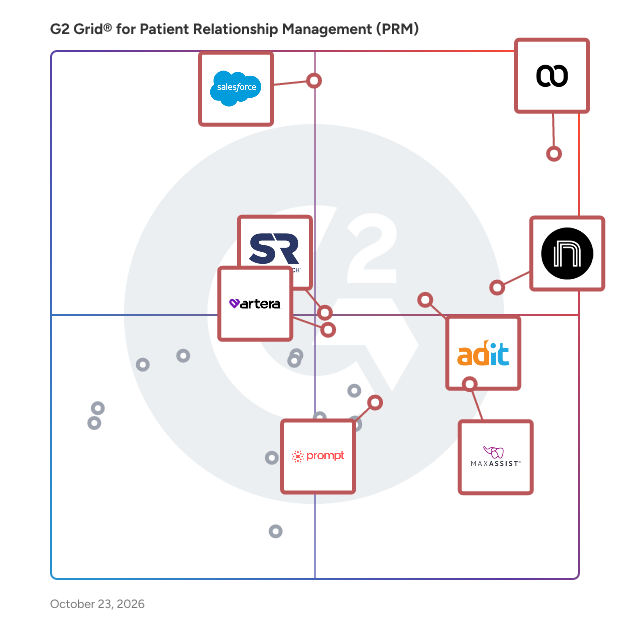
Best Patient Relationship Management (PRM) Software At A Glance

Leader:
Highest Performer:
Easiest to Use:
Top Trending:
Best Free Software:
Show LessShow More
Easiest to Use:
Top Trending:
Best Free Software:

G2 takes pride in showing unbiased reviews on user satisfaction in our ratings and reports. We do not allow paid placements in any of our ratings, rankings, or reports. Learn about our scoring methodologies.

Coming Soon
Get Trending Patient Relationship Management (PRM) Products in Your Inbox

A weekly snapshot of rising stars, new launches, and what everyone's buzzing about.

Sample Trending Products Newsletter
No filters applied
73 Listings in Patient Relationship Management (PRM) Available
(425)4.6 out of 5
Optimized for quick response
1st Easiest To Use in Patient Relationship Management (PRM) software
Save to My Lists
Entry Level Price:Starting at $249.00
  • Overview
    Expand/Collapse Overview
  • Product Description
    How are these determined?Information
    This description is provided by the seller.

    Weave is the all-in-one experience platform for small- and medium-sized healthcare businesses. From the first phone call to the final invoice and every touchpoint in between, Weave connects the entire

    Users
    • Office Manager
    • Owner
    Industries
    • Medical Practice
    • Hospital & Health Care
    Market Segment
    • 92% Small-Business
    • 6% Mid-Market
  • Pros and Cons
    Expand/Collapse Pros and Cons
  • Weave Pros and Cons
    How are these determined?Information
    Pros and Cons are compiled from review feedback and grouped into themes to provide an easy-to-understand summary of user reviews.
    Pros
    Ease of Use
    70
    Communication
    69
    Patient Communication
    68
    Text Messaging
    65
    Texting Communication
    52
    Cons
    Technical Issues
    35
    Communication Issues
    22
    Connectivity Issues
    22
    Software Bugs
    20
    Messaging Issues
    19
  • User Satisfaction
    Expand/Collapse User Satisfaction
  • Weave features and usability ratings that predict user satisfaction
    9.2
    Has the product been a good partner in doing business?
    Average: 9.3
    8.4
    Records Management
    Average: 8.8
    8.9
    Patient Case Management
    Average: 8.9
    9.4
    Patient Experience Management
    Average: 9.1
  • Seller Details
    Expand/Collapse Seller Details
  • Seller Details
    Seller
    Weave
    Company Website
    Year Founded
    2008
    HQ Location
    Lehi, Utah
    Twitter
    @getweave
    2,039 Twitter followers
    LinkedIn® Page
    www.linkedin.com
    1,084 employees on LinkedIn®
Product Description
How are these determined?Information
This description is provided by the seller.

Weave is the all-in-one experience platform for small- and medium-sized healthcare businesses. From the first phone call to the final invoice and every touchpoint in between, Weave connects the entire

Users
  • Office Manager
  • Owner
Industries
  • Medical Practice
  • Hospital & Health Care
Market Segment
  • 92% Small-Business
  • 6% Mid-Market
Weave Pros and Cons
How are these determined?Information
Pros and Cons are compiled from review feedback and grouped into themes to provide an easy-to-understand summary of user reviews.
Pros
Ease of Use
70
Communication
69
Patient Communication
68
Text Messaging
65
Texting Communication
52
Cons
Technical Issues
35
Communication Issues
22
Connectivity Issues
22
Software Bugs
20
Messaging Issues
19
Weave features and usability ratings that predict user satisfaction
9.2
Has the product been a good partner in doing business?
Average: 9.3
8.4
Records Management
Average: 8.8
8.9
Patient Case Management
Average: 8.9
9.4
Patient Experience Management
Average: 9.1
Seller Details
Seller
Weave
Company Website
Year Founded
2008
HQ Location
Lehi, Utah
Twitter
@getweave
2,039 Twitter followers
LinkedIn® Page
www.linkedin.com
1,084 employees on LinkedIn®
(104)4.9 out of 5
2nd Easiest To Use in Patient Relationship Management (PRM) software
Save to My Lists
  • Overview
    Expand/Collapse Overview
  • Product Description
    How are these determined?Information
    This description is provided by the seller.

    We are here to empower dental practices to streamline workflows, enhance patient communications, and drive sustainable growth. Practice by Numbers makes practice management easier, enabling dental

    Users
    • Office Manager
    • Owner
    Industries
    • Hospital & Health Care
    • Health, Wellness and Fitness
    Market Segment
    • 95% Small-Business
    • 5% Mid-Market
  • Pros and Cons
    Expand/Collapse Pros and Cons
  • Practice by Numbers Pros and Cons
    How are these determined?Information
    Pros and Cons are compiled from review feedback and grouped into themes to provide an easy-to-understand summary of user reviews.
    Pros
    Customer Support
    31
    Features
    31
    Ease of Use
    30
    Communication
    23
    Efficiency
    19
    Cons
    Customer Service Issues
    8
    Limited Features
    7
    Connectivity Issues
    3
    Integration Issues
    3
    Limited Customization
    3
  • User Satisfaction
    Expand/Collapse User Satisfaction
  • Practice by Numbers features and usability ratings that predict user satisfaction
    9.6
    Has the product been a good partner in doing business?
    Average: 9.3
    9.1
    Records Management
    Average: 8.8
    8.9
    Patient Case Management
    Average: 8.9
    9.3
    Patient Experience Management
    Average: 9.1
  • Seller Details
    Expand/Collapse Seller Details
  • Seller Details
    Company Website
    Year Founded
    2015
    HQ Location
    Redmond, US
    LinkedIn® Page
    www.linkedin.com
    84 employees on LinkedIn®
Product Description
How are these determined?Information
This description is provided by the seller.

We are here to empower dental practices to streamline workflows, enhance patient communications, and drive sustainable growth. Practice by Numbers makes practice management easier, enabling dental

Users
  • Office Manager
  • Owner
Industries
  • Hospital & Health Care
  • Health, Wellness and Fitness
Market Segment
  • 95% Small-Business
  • 5% Mid-Market
Practice by Numbers Pros and Cons
How are these determined?Information
Pros and Cons are compiled from review feedback and grouped into themes to provide an easy-to-understand summary of user reviews.
Pros
Customer Support
31
Features
31
Ease of Use
30
Communication
23
Efficiency
19
Cons
Customer Service Issues
8
Limited Features
7
Connectivity Issues
3
Integration Issues
3
Limited Customization
3
Practice by Numbers features and usability ratings that predict user satisfaction
9.6
Has the product been a good partner in doing business?
Average: 9.3
9.1
Records Management
Average: 8.8
8.9
Patient Case Management
Average: 8.9
9.3
Patient Experience Management
Average: 9.1
Seller Details
Company Website
Year Founded
2015
HQ Location
Redmond, US
LinkedIn® Page
www.linkedin.com
84 employees on LinkedIn®

This is how G2 Deals can help you:

  • Easily shop for curated – and trusted – software
  • Own your own software buying journey
  • Discover exclusive deals on software
(84)4.8 out of 5
Optimized for quick response
3rd Easiest To Use in Patient Relationship Management (PRM) software
Save to My Lists
Entry Level Price:Contact Us
  • Overview
    Expand/Collapse Overview
  • Product Description
    How are these determined?Information
    This description is provided by the seller.

    NexHealth is the patient experience platform that provides true practice automation. We help you eliminate the tedious tasks that slows your team down and keeps them tied to the front desk. Our propri

    Users
    • Office Manager
    Industries
    • Hospital & Health Care
    • Medical Practice
    Market Segment
    • 87% Small-Business
    • 12% Mid-Market
  • Pros and Cons
    Expand/Collapse Pros and Cons
  • NexHealth Pros and Cons
    How are these determined?Information
    Pros and Cons are compiled from review feedback and grouped into themes to provide an easy-to-understand summary of user reviews.
    Pros
    Ease of Use
    21
    Customer Support
    8
    Online Forms
    8
    Patient Communication
    8
    Product Satisfaction
    7
    Cons
    Limited Features
    3
    Messaging Issues
    3
    Technical Issues
    3
    Appointment Management
    2
    Difficult Navigation
    2
  • User Satisfaction
    Expand/Collapse User Satisfaction
  • NexHealth features and usability ratings that predict user satisfaction
    9.7
    Has the product been a good partner in doing business?
    Average: 9.3
    7.9
    Records Management
    Average: 8.8
    8.7
    Patient Case Management
    Average: 8.9
    9.4
    Patient Experience Management
    Average: 9.1
  • Seller Details
    Expand/Collapse Seller Details
  • Seller Details
    Company Website
    Year Founded
    2017
    HQ Location
    San Francisco, California
    Twitter
    @nexhealthHQ
    2,158 Twitter followers
    LinkedIn® Page
    www.linkedin.com
    217 employees on LinkedIn®
Product Description
How are these determined?Information
This description is provided by the seller.

NexHealth is the patient experience platform that provides true practice automation. We help you eliminate the tedious tasks that slows your team down and keeps them tied to the front desk. Our propri

Users
  • Office Manager
Industries
  • Hospital & Health Care
  • Medical Practice
Market Segment
  • 87% Small-Business
  • 12% Mid-Market
NexHealth Pros and Cons
How are these determined?Information
Pros and Cons are compiled from review feedback and grouped into themes to provide an easy-to-understand summary of user reviews.
Pros
Ease of Use
21
Customer Support
8
Online Forms
8
Patient Communication
8
Product Satisfaction
7
Cons
Limited Features
3
Messaging Issues
3
Technical Issues
3
Appointment Management
2
Difficult Navigation
2
NexHealth features and usability ratings that predict user satisfaction
9.7
Has the product been a good partner in doing business?
Average: 9.3
7.9
Records Management
Average: 8.8
8.7
Patient Case Management
Average: 8.9
9.4
Patient Experience Management
Average: 9.1
Seller Details
Company Website
Year Founded
2017
HQ Location
San Francisco, California
Twitter
@nexhealthHQ
2,158 Twitter followers
LinkedIn® Page
www.linkedin.com
217 employees on LinkedIn®
(35)3.8 out of 5
View top Consulting Services for Salesforce Health Cloud
Save to My Lists
  • Overview
    Expand/Collapse Overview
  • Product Description
    How are these determined?Information
    This description is provided by the seller.

    Health Cloud is the trusted, connected platform to power the business of health and life sciences. By bringing together clinical and non-clinical data into a single source of truth, Health Cloud helps

    Users
    No information available
    Industries
    • Hospital & Health Care
    Market Segment
    • 46% Enterprise
    • 34% Mid-Market
  • User Satisfaction
    Expand/Collapse User Satisfaction
  • Salesforce Health Cloud features and usability ratings that predict user satisfaction
    8.8
    Has the product been a good partner in doing business?
    Average: 9.3
    9.7
    Records Management
    Average: 8.8
    9.0
    Patient Case Management
    Average: 8.9
    9.7
    Patient Experience Management
    Average: 9.1
  • Seller Details
    Expand/Collapse Seller Details
  • Seller Details
    Year Founded
    1999
    HQ Location
    San Francisco, CA
    Twitter
    @salesforce
    578,204 Twitter followers
    LinkedIn® Page
    www.linkedin.com
    86,064 employees on LinkedIn®
    Ownership
    NYSE:CRM
Product Description
How are these determined?Information
This description is provided by the seller.

Health Cloud is the trusted, connected platform to power the business of health and life sciences. By bringing together clinical and non-clinical data into a single source of truth, Health Cloud helps

Users
No information available
Industries
  • Hospital & Health Care
Market Segment
  • 46% Enterprise
  • 34% Mid-Market
Salesforce Health Cloud features and usability ratings that predict user satisfaction
8.8
Has the product been a good partner in doing business?
Average: 9.3
9.7
Records Management
Average: 8.8
9.0
Patient Case Management
Average: 8.9
9.7
Patient Experience Management
Average: 9.1
Seller Details
Year Founded
1999
HQ Location
San Francisco, CA
Twitter
@salesforce
578,204 Twitter followers
LinkedIn® Page
www.linkedin.com
86,064 employees on LinkedIn®
Ownership
NYSE:CRM
(103)4.4 out of 5
6th Easiest To Use in Patient Relationship Management (PRM) software
Save to My Lists
  • Overview
    Expand/Collapse Overview
  • Product Description
    How are these determined?Information
    This description is provided by the seller.

    With over 470k users, 68k physicians, 150 million patients and 150+ EHR integrations, Updox empowers physicians, pharmacists and other healthcare providers and staff to be more efficient and effective

    Users
    • Medical Assistant
    • Office Manager
    Industries
    • Medical Practice
    • Hospital & Health Care
    Market Segment
    • 85% Small-Business
    • 9% Mid-Market
  • Pros and Cons
    Expand/Collapse Pros and Cons
  • Updox Pros and Cons
    How are these determined?Information
    Pros and Cons are compiled from review feedback and grouped into themes to provide an easy-to-understand summary of user reviews.
    Pros
    Efficiency
    2
    Time-saving
    2
    Affordable
    1
    Ease of Use
    1
    Faxing Ease
    1
    Cons
    Billing Issues
    2
    Customer Service Issues
    2
    Poor Customer Support
    2
    Technical Issues
    2
    Connectivity Issues
    1
  • User Satisfaction
    Expand/Collapse User Satisfaction
  • Updox features and usability ratings that predict user satisfaction
    8.9
    Has the product been a good partner in doing business?
    Average: 9.3
    9.6
    Records Management
    Average: 8.8
    9.5
    Patient Case Management
    Average: 8.9
    9.0
    Patient Experience Management
    Average: 9.1
  • Seller Details
    Expand/Collapse Seller Details
  • Seller Details
    Seller
    EverPro
    Year Founded
    2016
    HQ Location
    Denver, US
    LinkedIn® Page
    www.linkedin.com
    1,769 employees on LinkedIn®
    Ownership
    NASDAQ: EVCM
Product Description
How are these determined?Information
This description is provided by the seller.

With over 470k users, 68k physicians, 150 million patients and 150+ EHR integrations, Updox empowers physicians, pharmacists and other healthcare providers and staff to be more efficient and effective

Users
  • Medical Assistant
  • Office Manager
Industries
  • Medical Practice
  • Hospital & Health Care
Market Segment
  • 85% Small-Business
  • 9% Mid-Market
Updox Pros and Cons
How are these determined?Information
Pros and Cons are compiled from review feedback and grouped into themes to provide an easy-to-understand summary of user reviews.
Pros
Efficiency
2
Time-saving
2
Affordable
1
Ease of Use
1
Faxing Ease
1
Cons
Billing Issues
2
Customer Service Issues
2
Poor Customer Support
2
Technical Issues
2
Connectivity Issues
1
Updox features and usability ratings that predict user satisfaction
8.9
Has the product been a good partner in doing business?
Average: 9.3
9.6
Records Management
Average: 8.8
9.5
Patient Case Management
Average: 8.9
9.0
Patient Experience Management
Average: 9.1
Seller Details
Seller
EverPro
Year Founded
2016
HQ Location
Denver, US
LinkedIn® Page
www.linkedin.com
1,769 employees on LinkedIn®
Ownership
NASDAQ: EVCM
(170)4.8 out of 5
Optimized for quick response
4th Easiest To Use in Patient Relationship Management (PRM) software
Save to My Lists
Entry Level Price:Starting at $300.00
  • Overview
    Expand/Collapse Overview
  • Product Description
    How are these determined?Information
    This description is provided by the seller.

    OhMD is a HIPAA-compliant omni-channel patient communication platform designed to reduce high inbound call volume for physician practices. OhMD brings AI-driven and human-led conversations together ac

    Users
    • Office Manager
    • Medical Assistant
    Industries
    • Medical Practice
    • Hospital & Health Care
    Market Segment
    • 54% Small-Business
    • 45% Mid-Market
  • Pros and Cons
    Expand/Collapse Pros and Cons
  • OhMD Pros and Cons
    How are these determined?Information
    Pros and Cons are compiled from review feedback and grouped into themes to provide an easy-to-understand summary of user reviews.
    Pros
    Communication
    25
    Patient Communication
    22
    Ease of Use
    18
    Texting Feature
    18
    Customer Communication
    12
    Cons
    Messaging Issues
    9
    Limited Messaging Features
    7
    Limited Features
    6
    Missing Features
    5
    Technical Issues
    5
  • User Satisfaction
    Expand/Collapse User Satisfaction
  • OhMD features and usability ratings that predict user satisfaction
    9.6
    Has the product been a good partner in doing business?
    Average: 9.3
    9.2
    Records Management
    Average: 8.8
    9.7
    Patient Case Management
    Average: 8.9
    9.7
    Patient Experience Management
    Average: 9.1
  • Seller Details
    Expand/Collapse Seller Details
  • Seller Details
    Seller
    OhMD
    Company Website
    Year Founded
    2016
    HQ Location
    Burlington, Vermont
    LinkedIn® Page
    www.linkedin.com
    45 employees on LinkedIn®
Product Description
How are these determined?Information
This description is provided by the seller.

OhMD is a HIPAA-compliant omni-channel patient communication platform designed to reduce high inbound call volume for physician practices. OhMD brings AI-driven and human-led conversations together ac

Users
  • Office Manager
  • Medical Assistant
Industries
  • Medical Practice
  • Hospital & Health Care
Market Segment
  • 54% Small-Business
  • 45% Mid-Market
OhMD Pros and Cons
How are these determined?Information
Pros and Cons are compiled from review feedback and grouped into themes to provide an easy-to-understand summary of user reviews.
Pros
Communication
25
Patient Communication
22
Ease of Use
18
Texting Feature
18
Customer Communication
12
Cons
Messaging Issues
9
Limited Messaging Features
7
Limited Features
6
Missing Features
5
Technical Issues
5
OhMD features and usability ratings that predict user satisfaction
9.6
Has the product been a good partner in doing business?
Average: 9.3
9.2
Records Management
Average: 8.8
9.7
Patient Case Management
Average: 8.9
9.7
Patient Experience Management
Average: 9.1
Seller Details
Seller
OhMD
Company Website
Year Founded
2016
HQ Location
Burlington, Vermont
LinkedIn® Page
www.linkedin.com
45 employees on LinkedIn®
(136)4.7 out of 5
5th Easiest To Use in Patient Relationship Management (PRM) software
Save to My Lists
  • Overview
    Expand/Collapse Overview
  • Product Description
    How are these determined?Information
    This description is provided by the seller.

    RevenueWell is a dental marketing and communication platform that gives busy dental practices the smart, easy-to-use tools they need to attract new patients, streamline communication, and grow product

    Users
    • Office Manager
    Industries
    • Medical Practice
    • Hospital & Health Care
    Market Segment
    • 94% Small-Business
    • 5% Mid-Market
  • Pros and Cons
    Expand/Collapse Pros and Cons
  • RevenueWell Pros and Cons
    How are these determined?Information
    Pros and Cons are compiled from review feedback and grouped into themes to provide an easy-to-understand summary of user reviews.
    Pros
    Ease of Use
    8
    Reminders
    8
    Confirmation Automation
    7
    Efficiency
    7
    Patient Communication
    7
    Cons
    Technical Issues
    4
    Billing Issues
    3
    Messaging Issues
    3
    Connectivity Issues
    2
    Customer Service Issues
    2
  • User Satisfaction
    Expand/Collapse User Satisfaction
  • RevenueWell features and usability ratings that predict user satisfaction
    9.6
    Has the product been a good partner in doing business?
    Average: 9.3
    9.6
    Records Management
    Average: 8.8
    9.6
    Patient Case Management
    Average: 8.9
    9.6
    Patient Experience Management
    Average: 9.1
  • Seller Details
    Expand/Collapse Seller Details
  • Seller Details
    Company Website
    Year Founded
    2010
    HQ Location
    Chicago, Illinois
    Twitter
    @RevenueWell
    1,162 Twitter followers
    LinkedIn® Page
    www.linkedin.com
    163 employees on LinkedIn®
Product Description
How are these determined?Information
This description is provided by the seller.

RevenueWell is a dental marketing and communication platform that gives busy dental practices the smart, easy-to-use tools they need to attract new patients, streamline communication, and grow product

Users
  • Office Manager
Industries
  • Medical Practice
  • Hospital & Health Care
Market Segment
  • 94% Small-Business
  • 5% Mid-Market
RevenueWell Pros and Cons
How are these determined?Information
Pros and Cons are compiled from review feedback and grouped into themes to provide an easy-to-understand summary of user reviews.
Pros
Ease of Use
8
Reminders
8
Confirmation Automation
7
Efficiency
7
Patient Communication
7
Cons
Technical Issues
4
Billing Issues
3
Messaging Issues
3
Connectivity Issues
2
Customer Service Issues
2
RevenueWell features and usability ratings that predict user satisfaction
9.6
Has the product been a good partner in doing business?
Average: 9.3
9.6
Records Management
Average: 8.8
9.6
Patient Case Management
Average: 8.9
9.6
Patient Experience Management
Average: 9.1
Seller Details
Company Website
Year Founded
2010
HQ Location
Chicago, Illinois
Twitter
@RevenueWell
1,162 Twitter followers
LinkedIn® Page
www.linkedin.com
163 employees on LinkedIn®
(162)4.4 out of 5
12th Easiest To Use in Patient Relationship Management (PRM) software
Save to My Lists
Entry Level Price:Starting at $99.00
  • Overview
    Expand/Collapse Overview
  • Product Description
    How are these determined?Information
    This description is provided by the seller.

    WebPT empowers rehab therapists to better engage patients, improve care, and achieve scalable growth with solutions to help manage every aspect of their practice. As the industry’s most innovative, co

    Users
    • Physical Therapist
    • Office Manager
    Industries
    • Medical Practice
    • Health, Wellness and Fitness
    Market Segment
    • 81% Small-Business
    • 17% Mid-Market
  • Pros and Cons
    Expand/Collapse Pros and Cons
  • WebPT Pros and Cons
    How are these determined?Information
    Pros and Cons are compiled from review feedback and grouped into themes to provide an easy-to-understand summary of user reviews.
    Pros
    Ease of Use
    5
    Documentation
    2
    Efficiency
    2
    Helpful
    2
    Communication
    1
    Cons
    Data Management Issues
    3
    System Instability
    3
    Technical Issues
    3
    Data Duplication
    2
    Slow Loading
    2
  • User Satisfaction
    Expand/Collapse User Satisfaction
  • WebPT features and usability ratings that predict user satisfaction
    9.4
    Has the product been a good partner in doing business?
    Average: 9.3
    9.2
    Records Management
    Average: 8.8
    8.8
    Patient Case Management
    Average: 8.9
    9.4
    Patient Experience Management
    Average: 9.1
  • Seller Details
    Expand/Collapse Seller Details
  • Seller Details
    Seller
    WebPT
    Year Founded
    2008
    HQ Location
    Phoenix, AZ
    Twitter
    @WebPT
    15,771 Twitter followers
    LinkedIn® Page
    www.linkedin.com
    911 employees on LinkedIn®
Product Description
How are these determined?Information
This description is provided by the seller.

WebPT empowers rehab therapists to better engage patients, improve care, and achieve scalable growth with solutions to help manage every aspect of their practice. As the industry’s most innovative, co

Users
  • Physical Therapist
  • Office Manager
Industries
  • Medical Practice
  • Health, Wellness and Fitness
Market Segment
  • 81% Small-Business
  • 17% Mid-Market
WebPT Pros and Cons
How are these determined?Information
Pros and Cons are compiled from review feedback and grouped into themes to provide an easy-to-understand summary of user reviews.
Pros
Ease of Use
5
Documentation
2
Efficiency
2
Helpful
2
Communication
1
Cons
Data Management Issues
3
System Instability
3
Technical Issues
3
Data Duplication
2
Slow Loading
2
WebPT features and usability ratings that predict user satisfaction
9.4
Has the product been a good partner in doing business?
Average: 9.3
9.2
Records Management
Average: 8.8
8.8
Patient Case Management
Average: 8.9
9.4
Patient Experience Management
Average: 9.1
Seller Details
Seller
WebPT
Year Founded
2008
HQ Location
Phoenix, AZ
Twitter
@WebPT
15,771 Twitter followers
LinkedIn® Page
www.linkedin.com
911 employees on LinkedIn®
(194)4.7 out of 5
10th Easiest To Use in Patient Relationship Management (PRM) software
Save to My Lists
  • Overview
    Expand/Collapse Overview
  • Product Description
    How are these determined?Information
    This description is provided by the seller.

    MaxAssist® is an AI-powered platform designed for dental practices to enhance patient engagement and streamline daily operations. Built by dental professionals, it integrates multiple features to supp

    Users
    • Office Manager
    • Dentist
    Industries
    • Hospital & Health Care
    • Health, Wellness and Fitness
    Market Segment
    • 92% Small-Business
    • 7% Mid-Market
  • Pros and Cons
    Expand/Collapse Pros and Cons
  • MaxAssist Pros and Cons
    How are these determined?Information
    Pros and Cons are compiled from review feedback and grouped into themes to provide an easy-to-understand summary of user reviews.
    Pros
    Ease of Use
    11
    Patient Communication
    9
    Reminders
    9
    Messaging Management
    8
    Time-saving
    7
    Cons
    Messaging Issues
    7
    Integration Issues
    4
    Limited Customization
    4
    System Usability
    4
    Limited Features
    3
  • User Satisfaction
    Expand/Collapse User Satisfaction
  • MaxAssist features and usability ratings that predict user satisfaction
    9.2
    Has the product been a good partner in doing business?
    Average: 9.3
    8.2
    Records Management
    Average: 8.8
    8.4
    Patient Case Management
    Average: 8.9
    8.7
    Patient Experience Management
    Average: 9.1
  • Seller Details
    Expand/Collapse Seller Details
  • Seller Details
    Seller
    MaxAssist
    Company Website
    Year Founded
    2013
    HQ Location
    Calgary, Alberta
    LinkedIn® Page
    www.linkedin.com
    65 employees on LinkedIn®
Product Description
How are these determined?Information
This description is provided by the seller.

MaxAssist® is an AI-powered platform designed for dental practices to enhance patient engagement and streamline daily operations. Built by dental professionals, it integrates multiple features to supp

Users
  • Office Manager
  • Dentist
Industries
  • Hospital & Health Care
  • Health, Wellness and Fitness
Market Segment
  • 92% Small-Business
  • 7% Mid-Market
MaxAssist Pros and Cons
How are these determined?Information
Pros and Cons are compiled from review feedback and grouped into themes to provide an easy-to-understand summary of user reviews.
Pros
Ease of Use
11
Patient Communication
9
Reminders
9
Messaging Management
8
Time-saving
7
Cons
Messaging Issues
7
Integration Issues
4
Limited Customization
4
System Usability
4
Limited Features
3
MaxAssist features and usability ratings that predict user satisfaction
9.2
Has the product been a good partner in doing business?
Average: 9.3
8.2
Records Management
Average: 8.8
8.4
Patient Case Management
Average: 8.9
8.7
Patient Experience Management
Average: 9.1
Seller Details
Seller
MaxAssist
Company Website
Year Founded
2013
HQ Location
Calgary, Alberta
LinkedIn® Page
www.linkedin.com
65 employees on LinkedIn®
(167)4.3 out of 5
8th Easiest To Use in Patient Relationship Management (PRM) software
Save to My Lists
  • Overview
    Expand/Collapse Overview
  • Product Description
    How are these determined?Information
    This description is provided by the seller.

    Accelerate your revenue cycle with a unified, customizable patient messaging solution that streamlines the patient journey from first appointment to final payment. Solutionreach is the easy-to-use

    Users
    • Office Manager
    Industries
    • Medical Practice
    • Hospital & Health Care
    Market Segment
    • 89% Small-Business
    • 10% Mid-Market
  • Pros and Cons
    Expand/Collapse Pros and Cons
  • Solutionreach Pros and Cons
    How are these determined?Information
    Pros and Cons are compiled from review feedback and grouped into themes to provide an easy-to-understand summary of user reviews.
    Pros
    Appointment Scheduling
    1
    Client Management
    1
    Communication
    1
    Communication Ease
    1
    Communication Efficiency
    1
    Cons
    Frequent Updates
    1
    Inconvenience
    1
    Inefficient Updates
    1
    Payment Issues
    1
    Update Issues
    1
  • User Satisfaction
    Expand/Collapse User Satisfaction
  • Solutionreach features and usability ratings that predict user satisfaction
    8.4
    Has the product been a good partner in doing business?
    Average: 9.3
    4.2
    Records Management
    Average: 8.8
    5.0
    Patient Case Management
    Average: 8.9
    8.3
    Patient Experience Management
    Average: 9.1
  • Seller Details
    Expand/Collapse Seller Details
  • Seller Details
    Year Founded
    2000
    HQ Location
    Lehi, UT
    Twitter
    @solutionreach
    1,839 Twitter followers
    LinkedIn® Page
    www.linkedin.com
    329 employees on LinkedIn®
Product Description
How are these determined?Information
This description is provided by the seller.

Accelerate your revenue cycle with a unified, customizable patient messaging solution that streamlines the patient journey from first appointment to final payment. Solutionreach is the easy-to-use

Users
  • Office Manager
Industries
  • Medical Practice
  • Hospital & Health Care
Market Segment
  • 89% Small-Business
  • 10% Mid-Market
Solutionreach Pros and Cons
How are these determined?Information
Pros and Cons are compiled from review feedback and grouped into themes to provide an easy-to-understand summary of user reviews.
Pros
Appointment Scheduling
1
Client Management
1
Communication
1
Communication Ease
1
Communication Efficiency
1
Cons
Frequent Updates
1
Inconvenience
1
Inefficient Updates
1
Payment Issues
1
Update Issues
1
Solutionreach features and usability ratings that predict user satisfaction
8.4
Has the product been a good partner in doing business?
Average: 9.3
4.2
Records Management
Average: 8.8
5.0
Patient Case Management
Average: 8.9
8.3
Patient Experience Management
Average: 9.1
Seller Details
Year Founded
2000
HQ Location
Lehi, UT
Twitter
@solutionreach
1,839 Twitter followers
LinkedIn® Page
www.linkedin.com
329 employees on LinkedIn®
  • Overview
    Expand/Collapse Overview
  • Product Description
    How are these determined?Information
    This description is provided by the seller.

    Sterlo Care is a unified healthcare solution developed on a low-code platform, helping hospitals improve service, quality & compliance, and streamline the operations of all departments. It seamles

    Users
    No information available
    Industries
    • Hospital & Health Care
    Market Segment
    • 83% Enterprise
    • 17% Mid-Market
  • Pros and Cons
    Expand/Collapse Pros and Cons
  • sterloCare Pros and Cons
    How are these determined?Information
    Pros and Cons are compiled from review feedback and grouped into themes to provide an easy-to-understand summary of user reviews.
    Pros
    Ease of Use
    12
    Customer Support
    10
    Efficiency
    8
    Patient Care
    7
    Intuitive
    6
    Cons
    Excessive Notifications
    1
    Messaging Issues
    1
    Notification Issues
    1
    Notification Problems
    1
  • User Satisfaction
    Expand/Collapse User Satisfaction
  • sterloCare features and usability ratings that predict user satisfaction
    0.0
    No information available
    9.3
    Records Management
    Average: 8.8
    9.1
    Patient Case Management
    Average: 8.9
    9.2
    Patient Experience Management
    Average: 9.1
  • Seller Details
    Expand/Collapse Seller Details
  • Seller Details
    Seller
    sterlo
    Year Founded
    2019
    HQ Location
    Erode, IN
    LinkedIn® Page
    www.linkedin.com
    10 employees on LinkedIn®
Product Description
How are these determined?Information
This description is provided by the seller.

Sterlo Care is a unified healthcare solution developed on a low-code platform, helping hospitals improve service, quality & compliance, and streamline the operations of all departments. It seamles

Users
No information available
Industries
  • Hospital & Health Care
Market Segment
  • 83% Enterprise
  • 17% Mid-Market
sterloCare Pros and Cons
How are these determined?Information
Pros and Cons are compiled from review feedback and grouped into themes to provide an easy-to-understand summary of user reviews.
Pros
Ease of Use
12
Customer Support
10
Efficiency
8
Patient Care
7
Intuitive
6
Cons
Excessive Notifications
1
Messaging Issues
1
Notification Issues
1
Notification Problems
1
sterloCare features and usability ratings that predict user satisfaction
0.0
No information available
9.3
Records Management
Average: 8.8
9.1
Patient Case Management
Average: 8.9
9.2
Patient Experience Management
Average: 9.1
Seller Details
Seller
sterlo
Year Founded
2019
HQ Location
Erode, IN
LinkedIn® Page
www.linkedin.com
10 employees on LinkedIn®
(244)4.1 out of 5
Optimized for quick response
7th Easiest To Use in Patient Relationship Management (PRM) software
Save to My Lists
Entry Level Price:Contact Us
  • Overview
    Expand/Collapse Overview
  • Product Description
    How are these determined?Information
    This description is provided by the seller.

    Looking to harness the full power of the Tebra platform? Our practice success platform includes a certified electronic health record solution built to empower today’s providers with robust clinical ch

    Users
    • Owner
    • Office Manager
    Industries
    • Medical Practice
    • Hospital & Health Care
    Market Segment
    • 88% Small-Business
    • 10% Mid-Market
    User Sentiment
    How are these determined?Information
    These insights, currently in beta, are compiled from user reviews and grouped to display a high-level overview of the software.
    • Tebra is a software that integrates with other EHR software and serves as a practice management tool with features for billing, patient engagement, and reporting.
    • Reviewers frequently mention the user-friendliness of Tebra, its efficient management of claims, the ease of billing and posting payments, and the robust support it has provided for over fifteen years.
    • Reviewers experienced issues with the cost of using Tebra, the time-consuming process of implementing significant software changes, the lack of customization, and the need to manually compile information from multiple reports.
  • Pros and Cons
    Expand/Collapse Pros and Cons
  • Tebra (previously Kareo + PatientPop) Pros and Cons
    How are these determined?Information
    Pros and Cons are compiled from review feedback and grouped into themes to provide an easy-to-understand summary of user reviews.
    Pros
    Ease of Use
    7
    Customer Support
    4
    Helpful
    4
    Appointment Scheduling
    3
    Billing
    3
    Cons
    Inadequate Reporting
    4
    Inefficient Reporting
    3
    Limited Features
    3
    Poor Reporting
    3
    Customer Service Issues
    2
  • User Satisfaction
    Expand/Collapse User Satisfaction
  • Tebra (previously Kareo + PatientPop) features and usability ratings that predict user satisfaction
    8.2
    Has the product been a good partner in doing business?
    Average: 9.3
    9.7
    Records Management
    Average: 8.8
    9.7
    Patient Case Management
    Average: 8.9
    9.0
    Patient Experience Management
    Average: 9.1
  • Seller Details
    Expand/Collapse Seller Details
  • Seller Details
    Seller
    Tebra
    Company Website
    HQ Location
    Corona del Mar, US
    Twitter
    @TebraOfficial
    11,041 Twitter followers
    LinkedIn® Page
    www.linkedin.com
    1,054 employees on LinkedIn®
Product Description
How are these determined?Information
This description is provided by the seller.

Looking to harness the full power of the Tebra platform? Our practice success platform includes a certified electronic health record solution built to empower today’s providers with robust clinical ch

Users
  • Owner
  • Office Manager
Industries
  • Medical Practice
  • Hospital & Health Care
Market Segment
  • 88% Small-Business
  • 10% Mid-Market
User Sentiment
How are these determined?Information
These insights, currently in beta, are compiled from user reviews and grouped to display a high-level overview of the software.
  • Tebra is a software that integrates with other EHR software and serves as a practice management tool with features for billing, patient engagement, and reporting.
  • Reviewers frequently mention the user-friendliness of Tebra, its efficient management of claims, the ease of billing and posting payments, and the robust support it has provided for over fifteen years.
  • Reviewers experienced issues with the cost of using Tebra, the time-consuming process of implementing significant software changes, the lack of customization, and the need to manually compile information from multiple reports.
Tebra (previously Kareo + PatientPop) Pros and Cons
How are these determined?Information
Pros and Cons are compiled from review feedback and grouped into themes to provide an easy-to-understand summary of user reviews.
Pros
Ease of Use
7
Customer Support
4
Helpful
4
Appointment Scheduling
3
Billing
3
Cons
Inadequate Reporting
4
Inefficient Reporting
3
Limited Features
3
Poor Reporting
3
Customer Service Issues
2
Tebra (previously Kareo + PatientPop) features and usability ratings that predict user satisfaction
8.2
Has the product been a good partner in doing business?
Average: 9.3
9.7
Records Management
Average: 8.8
9.7
Patient Case Management
Average: 8.9
9.0
Patient Experience Management
Average: 9.1
Seller Details
Seller
Tebra
Company Website
HQ Location
Corona del Mar, US
Twitter
@TebraOfficial
11,041 Twitter followers
LinkedIn® Page
www.linkedin.com
1,054 employees on LinkedIn®
(118)4.2 out of 5
13th Easiest To Use in Patient Relationship Management (PRM) software
Save to My Lists
  • Overview
    Expand/Collapse Overview
  • Product Description
    How are these determined?Information
    This description is provided by the seller.

    Raintree is a comprehensive rehabilitation and physical therapy software solution designed to assist enterprise and large therapy provider organizations in managing patient care and business operation

    Users
    No information available
    Industries
    • Hospital & Health Care
    • Medical Practice
    Market Segment
    • 47% Mid-Market
    • 40% Small-Business
    User Sentiment
    How are these determined?Information
    These insights, currently in beta, are compiled from user reviews and grouped to display a high-level overview of the software.
    • Raintree is a customizable, template-driven electronic medical record (EMR) system that aims to improve efficiency in medical practices by integrating various features such as scheduling, billing, and documentation.
    • Reviewers frequently mention the system's versatility, its ability to automate processes, and its continuous improvements, particularly in billing and collections, as well as the convenience of having all necessary information in one place.
    • Users mentioned that the system can be clunky and complex, with a steep learning curve for new users, and that customizations can be expensive and sometimes limit the ability to integrate updates, also the visual appeal of the system is considered outdated by some users.
  • Pros and Cons
    Expand/Collapse Pros and Cons
  • Raintree Systems Pros and Cons
    How are these determined?Information
    Pros and Cons are compiled from review feedback and grouped into themes to provide an easy-to-understand summary of user reviews.
    Pros
    Features
    18
    Ease of Use
    17
    Efficiency
    16
    Helpful
    12
    Business Efficiency
    9
    Cons
    Not User-Friendly
    14
    Poor Usability
    13
    System Usability
    11
    Navigation Difficulty
    9
    Difficult Navigation
    8
  • User Satisfaction
    Expand/Collapse User Satisfaction
  • Raintree Systems features and usability ratings that predict user satisfaction
    8.2
    Has the product been a good partner in doing business?
    Average: 9.3
    8.1
    Records Management
    Average: 8.8
    8.0
    Patient Case Management
    Average: 8.9
    7.4
    Patient Experience Management
    Average: 9.1
  • Seller Details
    Expand/Collapse Seller Details
  • Seller Details
    Company Website
    Year Founded
    1983
    HQ Location
    Temecula, CA
    LinkedIn® Page
    www.linkedin.com
    258 employees on LinkedIn®
Product Description
How are these determined?Information
This description is provided by the seller.

Raintree is a comprehensive rehabilitation and physical therapy software solution designed to assist enterprise and large therapy provider organizations in managing patient care and business operation

Users
No information available
Industries
  • Hospital & Health Care
  • Medical Practice
Market Segment
  • 47% Mid-Market
  • 40% Small-Business
User Sentiment
How are these determined?Information
These insights, currently in beta, are compiled from user reviews and grouped to display a high-level overview of the software.
  • Raintree is a customizable, template-driven electronic medical record (EMR) system that aims to improve efficiency in medical practices by integrating various features such as scheduling, billing, and documentation.
  • Reviewers frequently mention the system's versatility, its ability to automate processes, and its continuous improvements, particularly in billing and collections, as well as the convenience of having all necessary information in one place.
  • Users mentioned that the system can be clunky and complex, with a steep learning curve for new users, and that customizations can be expensive and sometimes limit the ability to integrate updates, also the visual appeal of the system is considered outdated by some users.
Raintree Systems Pros and Cons
How are these determined?Information
Pros and Cons are compiled from review feedback and grouped into themes to provide an easy-to-understand summary of user reviews.
Pros
Features
18
Ease of Use
17
Efficiency
16
Helpful
12
Business Efficiency
9
Cons
Not User-Friendly
14
Poor Usability
13
System Usability
11
Navigation Difficulty
9
Difficult Navigation
8
Raintree Systems features and usability ratings that predict user satisfaction
8.2
Has the product been a good partner in doing business?
Average: 9.3
8.1
Records Management
Average: 8.8
8.0
Patient Case Management
Average: 8.9
7.4
Patient Experience Management
Average: 9.1
Seller Details
Company Website
Year Founded
1983
HQ Location
Temecula, CA
LinkedIn® Page
www.linkedin.com
258 employees on LinkedIn®
(27)4.9 out of 5
11th Easiest To Use in Patient Relationship Management (PRM) software
Save to My Lists
  • Overview
    Expand/Collapse Overview
  • Product Description
    How are these determined?Information
    This description is provided by the seller.

    Dental Intelligence Engagement makes managing your patient communications is finally as effective and simple as you’ve always wanted it to be. This modern, touchless solution prioritizes the patient e

    Users
    • Office Manager
    Industries
    • Hospital & Health Care
    • Medical Practice
    Market Segment
    • 93% Small-Business
  • Pros and Cons
    Expand/Collapse Pros and Cons
  • Dental Intelligence Engagement Pros and Cons
    How are these determined?Information
    Pros and Cons are compiled from review feedback and grouped into themes to provide an easy-to-understand summary of user reviews.
    Pros
    Scheduling Efficiency
    1
    Tracking
    1
    Cons
    This product has not yet received any negative sentiments.
  • User Satisfaction
    Expand/Collapse User Satisfaction
  • Dental Intelligence Engagement features and usability ratings that predict user satisfaction
    9.4
    Has the product been a good partner in doing business?
    Average: 9.3
    0.0
    No information available
    8.3
    Patient Case Management
    Average: 8.9
    9.0
    Patient Experience Management
    Average: 9.1
  • Seller Details
    Expand/Collapse Seller Details
  • Seller Details
    Year Founded
    2011
    HQ Location
    Pleasant Grove, Utah
    Twitter
    @dental_intel
    1,415 Twitter followers
    LinkedIn® Page
    www.linkedin.com
    3 employees on LinkedIn®
Product Description
How are these determined?Information
This description is provided by the seller.

Dental Intelligence Engagement makes managing your patient communications is finally as effective and simple as you’ve always wanted it to be. This modern, touchless solution prioritizes the patient e

Users
  • Office Manager
Industries
  • Hospital & Health Care
  • Medical Practice
Market Segment
  • 93% Small-Business
Dental Intelligence Engagement Pros and Cons
How are these determined?Information
Pros and Cons are compiled from review feedback and grouped into themes to provide an easy-to-understand summary of user reviews.
Pros
Scheduling Efficiency
1
Tracking
1
Cons
This product has not yet received any negative sentiments.
Dental Intelligence Engagement features and usability ratings that predict user satisfaction
9.4
Has the product been a good partner in doing business?
Average: 9.3
0.0
No information available
8.3
Patient Case Management
Average: 8.9
9.0
Patient Experience Management
Average: 9.1
Seller Details
Year Founded
2011
HQ Location
Pleasant Grove, Utah
Twitter
@dental_intel
1,415 Twitter followers
LinkedIn® Page
www.linkedin.com
3 employees on LinkedIn®
(53)4.8 out of 5
9th Easiest To Use in Patient Relationship Management (PRM) software
Save to My Lists
Entry Level Price:Contact Us
  • Overview
    Expand/Collapse Overview
  • Product Description
    How are these determined?Information
    This description is provided by the seller.

    Rhinogram's digital communication & virtual care platform is designed for strategic healthcare facilities looking to reduce call volume, improve staff efficiency, and acquire new patients while pr

    Users
    No information available
    Industries
    • Hospital & Health Care
    • Medical Practice
    Market Segment
    • 91% Small-Business
    • 8% Mid-Market
  • User Satisfaction
    Expand/Collapse User Satisfaction
  • Rhinogram features and usability ratings that predict user satisfaction
    9.6
    Has the product been a good partner in doing business?
    Average: 9.3
    9.2
    Records Management
    Average: 8.8
    9.5
    Patient Case Management
    Average: 8.9
    9.2
    Patient Experience Management
    Average: 9.1
  • Seller Details
    Expand/Collapse Seller Details
  • Seller Details
    Seller
    Rhinogram
    Year Founded
    2015
    HQ Location
    Chattanooga, US
    Twitter
    @rhinogram
    626 Twitter followers
    LinkedIn® Page
    www.linkedin.com
    20 employees on LinkedIn®
Product Description
How are these determined?Information
This description is provided by the seller.

Rhinogram's digital communication & virtual care platform is designed for strategic healthcare facilities looking to reduce call volume, improve staff efficiency, and acquire new patients while pr

Users
No information available
Industries
  • Hospital & Health Care
  • Medical Practice
Market Segment
  • 91% Small-Business
  • 8% Mid-Market
Rhinogram features and usability ratings that predict user satisfaction
9.6
Has the product been a good partner in doing business?
Average: 9.3
9.2
Records Management
Average: 8.8
9.5
Patient Case Management
Average: 8.9
9.2
Patient Experience Management
Average: 9.1
Seller Details
Seller
Rhinogram
Year Founded
2015
HQ Location
Chattanooga, US
Twitter
@rhinogram
626 Twitter followers
LinkedIn® Page
www.linkedin.com
20 employees on LinkedIn®

Learn More About Patient Relationship Management (PRM) Software

What is Patient Relationship Management (PRM) Software?

Patient relationship management (PRM) software, also known as healthcare customer relationship management software, optimizes and supports the entire patient care journey, enables the effective flow of information within healthcare systems, and increases and nurtures patient engagement. PRM is more closely related to a healthcare version of customer journey analytics software—orchestrating and managing the patient experience from referral to advocate. PRM software enables patient-centric care by improving access and communication that ultimately improves patient outcomes, provider-patient relationships, and increases staff efficiency.

PRM software enhances and centralizes the data and functionality of electronic health records (EHR) software and patient engagement software. Significant benefits of PRM software include the aggregation of all medical records and the encouragement and emphasis of active patient participation towards their health. By leveraging PRM software, health systems and organizations can better enforce value-based care, performance, and reimbursement efforts, without compromising their delivery of quality care. 

What are the Common Features of Patient Relationship Management (PRM) Software?

The following are some core features within PRM software that can help users engage with more patients and run a more efficient practice. 

Texting: Texting is a preferred method of communication with many consumers. The PRM software should include a texting feature to reach patients wherever they are. Buyers should look for features like bulk texting, two-way texting, appointment reminders, and clinic review requests. 

Appointment reminders: PRM software can prevent missed appointments with customized appointment reminders to reach patients via text, email, and phone. The solution may also provide flexibility to schedule reminders at a cadence that works for both the providers and the patients. 

Online scheduling: Online scheduling is a preferred method of scheduling for many consumers. Medical practices can provide patients with easy scheduling options to allow patients to select the best appointment for their schedules. The PRM software can integrate with a practice scheduling system so users can accept, flag, or reschedule appointments. 

Digital check-in: Contactless appointment check-in creates a safe environment for patients and medical practice staff. A digital check-in process includes appointment reminders, screening forms, text alerts, and allows patients to verify and make changes to their information. 

Patient portal: A portal allows medical providers to easily engage with patients. A patient portal should include elements like appointment scheduling, secure messaging, online bill pay, patient registration, clinical summaries, test results, and patient education opportunities. 

Integrated social media: Healthcare practices can continue to engage with current patients and attract new patients on social media. They can post practice updates, events, education information, and testimonials in the patient portal and then automatically share on social media to increase engagement. 

Email marketing: It is important to remain relevant and top-of-mind to patients. Regular outreach through newsletters or focused campaigns can help a provider showcase achievements and deliver relevant messages to patients. The PRM software should offer email audience segmentation, complete history of campaigns, and email performance metrics. 

Recall messaging: Inactive patients are a common concern for many medical practices. It’s a good strategy to re engage dormant patients through outreach. A PRM solution must support automated recall messaging to let patients know when to schedule annual check-ups or other appointments. Automated recall reminders sent via email, text, and phone are necessary to reconnect with disengaged patients.

What are the Benefits of Patient Relationship Management (PRM) Software?

Leverage patient feedback: Feedback from patients provides valuable information about what patients think about the healthcare services. Examining patient satisfaction rates will give insight into what is working well and what needs improvement in the way care is delivered and how the practice is managed. 

Track patient journey: A patient journey is the process that patients go through when they undergo treatment. This consists of several stages (pre-, during, and post-visit), where each stage consists of one or more touchpoints. Patients may see multiple providers within the same network. A PRM will establish a streamlined approach to tracking or mapping the patient journey, which is a blueprint of the touchpoints a patient goes through in their healthcare journey. 

Improved patient outcomes: A PRM software will allow patients to be more engaged in their care journey. Patients will have more open and consistent communication with providers, which will help them feel more comfortable and empowered. 

Improved patient communication: A PRM solution provides multiple methods for communication with patients. The software helps to automate and centralize communications and reach patients through their preferred method--text, email, or phone. 

Reduce no-shows: Providing a quick and courteous reminder to patients about upcoming appointments may help improve patient loyalty. Many patients rely on reminders because of convenience. The automatic reminders allow patients to confirm, cancel, or reschedule appointments. These messages will save the practice time and money.

Increased patient engagement: A PRM system creates opportunities to connect with patients regularly. With the help of PRM tools, medical practices will be positioned to be patient forward and focused on personalized care. Through continuous communication, patients will be actively engaged in gathering information and making decisions about their treatment options. More engaged patients lead to higher patient retention.

Improved clinic reputation: PRM tools allow users to find out what people are saying about their medical practice. The software helps prioritize the patient experience by distributing surveys, responding to negative reviews, committing to evaluation and analyzing patient outcomes, and building a strong social media presence. 

Eliminate administrative burden: There are many admin tasks associated with patient relationship management. Utilizing a system will eliminate paperwork and the costly, time-consuming manual work typically associated with patient management, such as manually sending emails and making individual phone calls. 

Who Uses Patient Relationship Management (PRM) Software?

Healthcare providers: Healthcare providers can utilize PRM software to communicate with patients via secure messages, add post-visit notes, keep track of patients’ medications and medical issues, and monitor the patient journey. 

Medical office staff: Healthcare support staff can utilize PRM software to manage appointments, prescriptions, notes, and other patient-related data. There should be an option to create and maintain a comprehensive and detailed patient profile that can be used for follow-ups and communication. 

Patients: Patients can utilize the PRM to play an active role in their healthcare journey, including sending messages to their care team, scheduling appointments, reviewing test results, and updating their personal information. 

Software Related to Patient Relationship Management (PRM) Software

Related solutions that can be used together with patient relationship management include:

EHR software: Electronic health records (EHR), also known as electronic medical records (EMR), are real-time digital versions of patient medical information. EHR software allows medical professionals across multiple healthcare organizations to access, input, and adjust patient data. It also allows patients to log on to their profiles so they can stay up to date on their medical records. Since EHR software is designed to share information with multiple healthcare providers, like pharmacies and laboratories, a patient’s profile can have information from all of the professionals involved in the patient’s care. When medical professionals use an EHR, they have a more holistic view of the patient’s health and will be able to more effectively serve their patients.

Patient engagement software: Patient engagement software facilitates the encouragement of a patient’s active participation in the maintenance of their health, the building of a collaborative patient-doctor relationship, and the improvement of the overall patient experience. Hospitals, medical practices, and other healthcare organizations are increasingly becoming subject to the same kinds of expectations that retail and hospitality industries deal with; as a result, patients expect compassion, acknowledgment, immediate communication, and easy access to information from their healthcare providers.

Patient scheduling software: Hospitals and health centers require patient scheduling software to manage patient appointments, automate administrative workflows, and allocate medical staff accordingly. This type of software includes scheduling algorithms that are meant to reduce patient wait time. It also handles the communication between patients and the medical personnel to confirm scheduled examination and treatment sessions.

Patient intake software: A patient intake software facilitates efficient and proactive capturing of patient data before a patient's medical appointment. Patient intake solutions minimize the time patients spend on registration, reduces any mistakes due to handwritten data, protects patient privacy, and simplifies the integration of patient data into the EHR. Both medical staff and patients, established and new, benefit from the software. With patient intake software, process bottlenecks are eased, satisfaction is raised, workload is reduced, and productivity is increased.

Interactive patient care software: Interactive patient care (IPC) systems allow healthcare providers to engage, entertain, and educate patients across the care via tablets, multimedia devices, in-room TVs, and online patient portals. IPC solutions initially referred to the caregiver communications and resources provided to the patient at the physical bedside, but the solutions have evolved to include educational resources that the patient and their family could access even after discharge from the hospital. Patients benefit from IPC systems’ ability to diminish their isolation, loneliness, and confusion. In turn, IPC systems help hospitals and healthcare organizations improve patient outcomes and care quality, as well as diminish readmission rates.

Patient case management software: Patient case management software improves quality of care and, ultimately, patient experience by optimizing the coordination of care across a hospital, practice, or ancillary care clinic. Patient case management software centralizes aspects of patient care such as scheduling, charting, treatment planning, and medical billing to accurately determine the health status of a patient. Case managers can utilize patient case management software to facilitate clinical communication and collaboration, as well as deliver better post-discharge care. Therefore, patients too benefit from effective patient case management software, which can offer them personalized services tools similar to an IPC system that they would have had access to during treatment.

Challenges with Patient Relationship Management (PRM) Software

Integrations: Patient relationship management solutions often have integrations with a variety of other external applications. This option will save administrators time on manually transferring data back and forth through third-party applications. Vendors may also charge for additional integrations.

Data migration: It can be difficult to move data from one product to another due to the exclusivity of the vendor’s hosted platform. Users may face difficulty in migrating their data successfully. Questions about data migration should be addressed in vendor demos and discussions. 

Security: Healthcare organizations need to have a proactive approach to security because cybersecurity threats are real. People can be the greatest asset to preventing cybercrime. Leaders need to train all employees on security issues. Data breaches can cause serious issues for the reputation of an organization and result in fines due to HIPAA compliance failure. 

Training and onboarding: Like any piece of technology, effective training courses and onboarding will speed up the adoption of the patient relationship management software. The quicker practitioners and administrators become comfortable with the software, the more empowered they will feel when utilizing and communicating about the solution. Regular training will also reduce any wrong use, insufficient documentation, or miscommunication. Training will benefit staff when it comes to professional development training courses, competency building, and maintaining compliance. 

How to buy Patient Relationship Management (PRM) Software

Requirements Gathering (RFI/RFP) for Patient Relationship Management (PRM) Software

There are many issues to consider when choosing a patient relationship management software. There are unique needs to be considered when assessing software to purchase—size and team member count, onboarding process, software cost, vendor customer support options, mobile compatibility, and customization are some of them. Buyers must determine what set of features will help the users be more efficient and meet the needs of the claims management process. 

Compare Patient Relationship Management (PRM) Products

Create a long list

An initial list of potential patient relationship management solutions should include any products that meet the basic feature requirements. At this point, buyers should be aiming to get a sense of the options that meet their essential needs.

Create a short list

After a long list has been created, it’s time to look at each product in more detail to determine if it will meet the needs of the healthcare providers interested in purchasing this software. This should include evaluating additional features of each product beyond the ones identified as essential to determine if additional functionality would provide more value, efficiencies, and compliance requirements. Scalability is particularly important and determining if new features can be added in the future, such as more users or more courses. 

Conduct demos

Demos are a great opportunity for buyers to see how the software works. Only the shortlisted vendors should be invited to demonstrate their solutions. Demos should be performed live, using the system, and not through slide decks and screenshots. All vendors should follow a predetermined scenario that simulates the business processes of the buyer. Buyers should request to see a walkthrough from the perspective of all users to understand how the interface looks for both sides and ensure it is user friendly for everyone. 

When narrowing down the list of vendors, buyers should consider questions such as:

  • How does the pricing model for this product work? Are there capital and recurring costs? What are the annual licensing and maintenance costs? 
  • How well known is the vendor? Do they have a sizable amount of clientele in the healthcare industry?
  • Can specific user restrictions be assigned depending on user type?
  • How well does the patient relationship management software work on mobile devices?
  • How easily can the patient relationship management software be grown to support a larger number of users and content?
  • Is the software compliant with healthcare security and privacy protocols and regulations? 
  • Is there a disaster recovery plan? Where are the servers hosted?

Selection of Patient Relationship Management (PRM) Software

Choose a selection team

To choose a selection team, decision makers need to involve subject matter experts from all teams that will use the system. For any organization, this will likely involve healthcare practitioners, office staff, claims management employees, and decision makers. An IT administrator should also be present to weigh in on technical concerns with the products. The selection team should be a representation of the people who will use the system. 

Negotiation

After narrowing in on the preferred product, it’s time to negotiate a pricing package. Buyers must consider the pricing model of the software such as, whether the seller charges a flat monthly fee or, more commonly, charges a fee based on how many user seats the buyer needs. Buyers should also note if they can negotiate to add more user seats to a package that would otherwise meet their needs. They might also consider negotiating a discount in exchange for signing a multi-year contract. 

Final decision

The final decision should rest with the primary users of the software, such as managers and their employees. All parties should consider whether the software is easy to use, easy to implement, improves operational efficiency, and allows for a better patient experience.