


Introducing G2.ai, the future of software buying.Try now

Docusign CLM Reviews & Product Details

Value at a Glance

Averages based on real user reviews.

Time to Implement

3 months

Docusign CLM Media

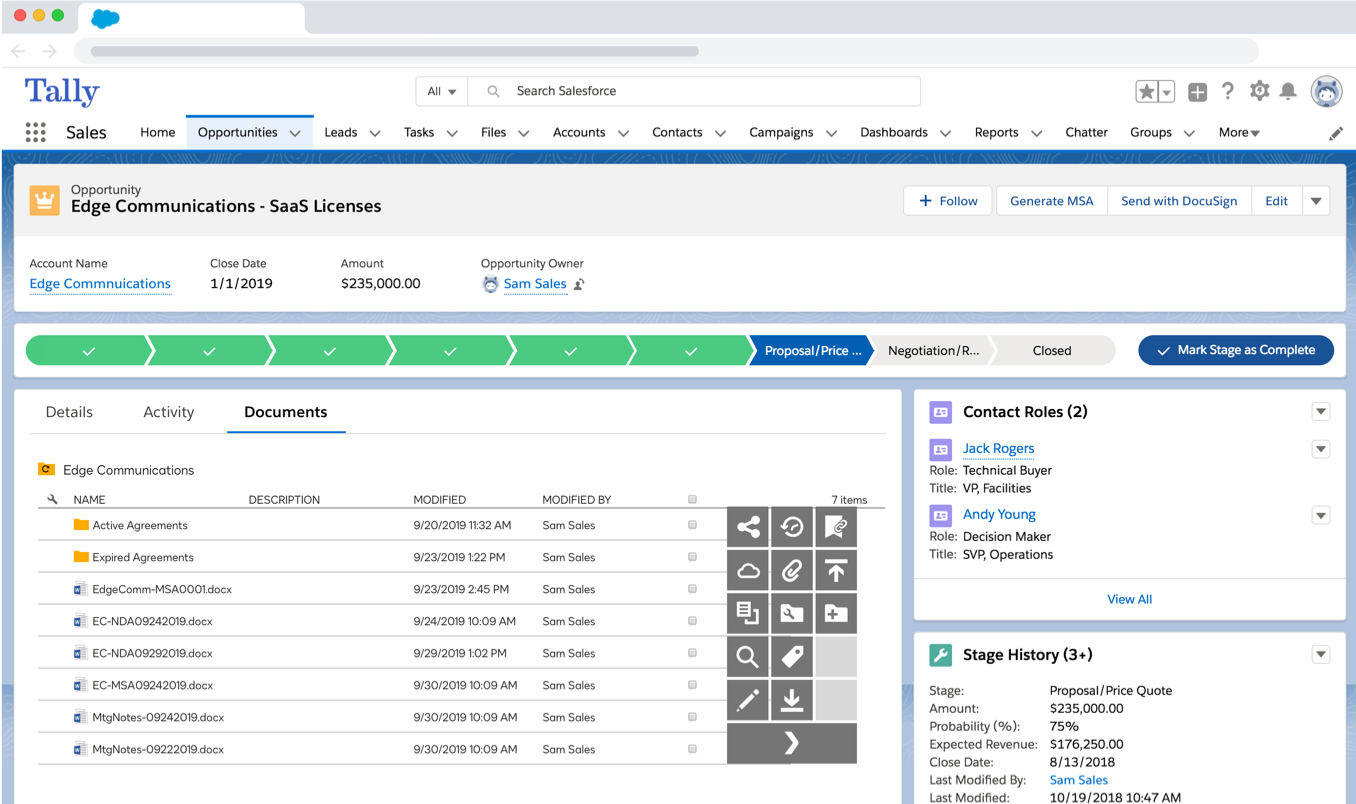
Docusign CLM Demo - Manage and interact with agreements directly on your Opportunities.
Manage and interact with agreements directly on your Opportunities.
Docusign CLM Demo - Generate new agreements from predefined templates.
Generate new agreements from predefined templates.
Docusign CLM Demo - Merge Salesforce data into contract with simple forms.
Merge Salesforce data into contract with simple forms.
Docusign CLM Demo - Review and approve from any location or device.
Review and approve from any location or device.
Docusign CLM Demo - Create workflows for collaboration and review.
Create workflows for collaboration and review.
Docusign CLM Demo - Centralize negotiation, redlining and version control.
Centralize negotiation, redlining and version control.
Product Avatar Image

Have you used Docusign CLM before?

Answer a few questions to help the Docusign CLM community

Docusign CLM Reviews (483)

Reviews

Docusign CLM Reviews (483)

4.3
483 reviews

Review Summary

Generated using AI from real user reviews
Users consistently praise the ease of use and intuitive interface of Docusign CLM, highlighting how it simplifies document signing and management. Many appreciate its ability to streamline workflows and enhance productivity, making it a reliable choice for remote signing. However, some users note that the platform can be pricey and may require a learning curve for new users.

Pros & Cons

Generated from real user reviews
View All Pros and Cons
Search reviews
Filter Reviews
Clear Results
G2 reviews are authentic and verified.
SS
P2P Analyst
Mid-Market (51-1000 emp.)
"Centralized Contracts, Inbuilt approval Workflow"
What do you like best about Docusign CLM?

It helps to create centralized contract for all parties including logistics parties, suppliers and IT vendors. Many contracts can be generated from a master contract where I just need to change the vendor name and rate. This saves lots of time in copying contracts for similar vendors. Sharing the contract online over email and the user can just click and proceed next for reviewing and digitally signing the contract. user has option to select calligraphy format signature with first name, last name or initials. Signing authority can also upload png image of the signature. I get alert few weeks ago before contract expiration. Overall good features for contract management in procurement function. Review collected by and hosted on G2.com.

What do you dislike about Docusign CLM?

Integration can be challenging if you are integrating with other Supplier management system like SAP Ariba or some Procurement applications like Coupa. The email likn after completion expires soon.I think email link should not expire till the contract is in effect. Review collected by and hosted on G2.com.

SL
IT Manager
Computer & Network Security
Mid-Market (51-1000 emp.)
"Organized, Automated Contract Management With High Visibility"
What do you like best about Docusign CLM?

Docusign CLM is organized in matters contract management, proper drafting and vibrant negotiation for easy execution

Most of contract management tasks like approvals are automated to enhance quality services and save on time

Docusign CLM integrates with other e-Signature solutions and this makes documents legally binding

The app shows the exact position a contract is in it’s cycle, demonstrating high visibility Review collected by and hosted on G2.com.

What do you dislike about Docusign CLM?

Docusign CLM is completely powerful, but the tool needs a comprehensive set up that can be draining

The price for Docusign is premium and the implementation process is demanding Review collected by and hosted on G2.com.

DK
Director
Small-Business (50 or fewer emp.)
"Saves Time with Secure Effortless Document Handling"
What do you like best about Docusign CLM?

I like that Docusign CLM saves my contacts and templates, which makes it easy to use and quick. It saves me time because I don't need to start from scratch every time I use it. Review collected by and hosted on G2.com.

What do you dislike about Docusign CLM?

My only complaint is that Docusign CLM logs you out after about ten minutes of not being used. So while I'm doing other things, I go back, and I'm logged out. Sometimes it takes a while to sign back in, needing the PIN and secure, but it's understandable because it needs to be secure. Review collected by and hosted on G2.com.

PU
Sr Legal Officer
Information Technology and Services
Enterprise (> 1000 emp.)
"Automated Workflow Excellence with Reliable E-Signatures"
What do you like best about Docusign CLM?

I really appreciate how DocuSign CLM is considered the gold standard for reliability and is recognized globally. We mainly use it for end-to-end contract automation, which is fantastic, especially when moving from simple signatures to a full lifecycle. The initial integration process is seamless, thanks to the automated workflow engine and centralized repository. It provides a frictionless experience, making the transition from drafting to execution feel like one continuous motion. The drag-and-drop feature, majorly used for routing contracts, is incredibly satisfying as it automatically manages contracts from sales to other departments like finance and legal. I find the navigator feature great for organization, acting as our primary digital filing cabinet, and it automatically extracts data, which is a huge plus. I use the compare feature to visualize every single change instantly, highlighting additions in green and deletions in red between versions, which is helpful for spotting changes in long contracts. Review collected by and hosted on G2.com.

What do you dislike about Docusign CLM?

I find the lack of live co-authoring like Google Docs or OneFlow to be a downside, as it would be great to edit content in real-time with others. Also, the native PDF editing could be improved. Currently, it's a bit cumbersome because you have to edit the text elsewhere, like in a Word document, and then re-upload it. A better native PDF editor in Docusign CLM would save a lot of time. Review collected by and hosted on G2.com.

Tony C.
TC
Platform Software Engineer
Small-Business (50 or fewer emp.)
"Intuitive Setup with Versatile Document Signing"
What do you like best about Docusign CLM?

I like the features that allow each party to create their documents and create fields to be signed regardless of the kind of documents and the kind of devices each party has. They are easy to use as one person could use their phone and log in to the browser and use the website to create the document while the other person can use a normal laptop to do all of those tasks. It's also convenient that they can complete a signature using their phone or laptop, whether they are indoors or outside. The setup is very straightforward, and the layout and UI are easy to use and understand, requiring no prior technical experience. Review collected by and hosted on G2.com.

What do you dislike about Docusign CLM?

I think the subscription is a big hassle because you have to pay in order to create a document. However, signing a document doesn't require you to have a subscribed account. Review collected by and hosted on G2.com.

AC
Homebound Case Manager
Small-Business (50 or fewer emp.)
"Efficient Client Paperwork Management with DocuSign CLM"
What do you like best about Docusign CLM?

I like that DocuSign CLM provides tracking and notifications to both the client and me. When I send a document out, I know where it is and what its status is. I can control the document by either resending, editing, and more, which makes it very convenient for me to complete my paperwork. With tracking, I can see whether the client has received the document that needs to be signed and whether they've completed it. Since I have multiple clients on my caseload, I can keep track of all of them at once, which is very helpful for time management and efficient processing of paperwork. Review collected by and hosted on G2.com.

What do you dislike about Docusign CLM?

If I need to redo a DocuSign form and I had edited the fields in DocuSign, I'd have to start from a fresh template or document if I wanted to edit those fields after sending the form out. Review collected by and hosted on G2.com.

Cynthia J.
CJ
Realtor.
Small-Business (50 or fewer emp.)
"Effortless Signing, Time-Saving Powerhouse"
What do you like best about Docusign CLM?

I like DocuSign CLM because it's easy and convenient for getting signatures without having to meet in person or exchange emails. The saved signature feature is great since I don't have to do a new one each time. The steps are quick and the instructions are straightforward, letting me just press send or complete, and it's done. The initial setup was simple too, just getting the signature the way I wanted. Easy access to DocuSign CLM saves a lot of time and lets me get paperwork back to the sender quickly, sometimes within minutes. Review collected by and hosted on G2.com.

What do you dislike about Docusign CLM?

The only thing that could be improved is sometimes it's hard to get your signature on the exact line. For the most part, that's probably happened one time for me. Review collected by and hosted on G2.com.

"Simplifies Signatures Across Borders with Ease"
What do you like best about Docusign CLM?

I appreciate how user-friendly Docusign CLM is, even if you've never used it before, as it guides you through to where you need to be once you click the link. I love that I can 'set it and forget it,' meaning I can set up everything from the initial submission, give it prompts on how I want the requests sent, and then see the finished product at the end of it. The initial setup was very easy, as our procurement team had no issues setting up our accounts. It was a game-changer as it allows us to get signatures across businesses and countries, and it's a certified, acceptable medium that's beneficial when someone is not in the office, or by their laptop, especially in urgent matters. Review collected by and hosted on G2.com.

What do you dislike about Docusign CLM?

I don't like that I have to recall the entire document if there is an error. It would be nice if I could just fix the error, notify the recipients and continue. This is particularly frustrating if the error doesn't affect the outcome. Review collected by and hosted on G2.com.

George C.
GC
Sales Executive
"Effortless Contract Management, Streamlined Signing Process"
What do you like best about Docusign CLM?

I like Docusign CLM because it's simple and direct, with nothing overly complicated about it. Its guided signing journey is especially useful because customers know exactly where they need to read and sign, without having to look through every single page. This feature increases the signature rate at the end of a sales cycle. Additionally, the initial setup was really easy and took me just a few minutes. Review collected by and hosted on G2.com.

What do you dislike about Docusign CLM?

The main thing I've noticed over the years is flexibility in templates. Sometimes, if there's a preloaded template perhaps from sales ops, it can be a bit difficult to have to delete the template and then add your own one in and figure out where things to be signed. Review collected by and hosted on G2.com.

Isabele M.
IM
Customer Support Associate
Small-Business (50 or fewer emp.)
"Effortless Digital Signing and Seamless Contract Management"
What do you like best about Docusign CLM?

This platform is very easy to use, and typically, anyone who receives a contract or document to sign digitally through it can do so without any trouble. Additionally, managing contracts is straightforward and intuitive. The platform is also integrative, which helps make it an efficient and fast solution. Review collected by and hosted on G2.com.

What do you dislike about Docusign CLM?

Once you become familiar with how to use and access all the features, the app feels very intuitive. However, it can be a bit challenging to manage and set up at first. Review collected by and hosted on G2.com.

Pricing Insights

Averages based on real user reviews.

Time to Implement

3 months

Return on Investment

14 months

Average Discount

12%

Docusign CLM Comparisons
Product Avatar Image
Icertis Contract Management Software
Compare Now
Product Avatar Image
Microsoft SharePoint
Compare Now
Product Avatar Image
Conga CLM
Compare Now
Docusign CLM Features
Contract Creation
Contract Templates
Contract Editing
Software
Documents
Automation
Workflow
Product Avatar Image
Docusign CLM