# Best Org Chart Software

*By [Grace Savides](https://research.g2.com/insights/author/grace-savides)*


Org chart software allows users to create organizational charts of all employees within a company. These tools are designed to facilitate improved internal communications within an organization by offering awareness of current employees. Org charts also help define individual roles in the company and cross-team connections. These solutions often work in tandem with [workforce management software](https://www.g2.com/categories/workforce-management), which HR teams use to plan, manage, and track employee work.

The [best org chart software](https://learn.g2.com/best-org-chart-software) offers a variety of ways to create and design the chart itself. Many tools come with prebuilt templates and designs to help speed up the creation process. These solutions also enable users to upload employee rosters to create an employee directory with full-text search capabilities, with options to upload individual names on an as-needed basis or import a list in bulk from [spreadsheets software](https://www.g2.com/categories/spreadsheets). These tools should allow users to indicate specific roles, departments, and more, as well as enable the publication and updating of organizational charts as a business grows.

Org chart software should not be confused with [diagramming software](https://www.g2.com/categories/diagramming), as diagramming tools can be used to create a number of different charts; org chart solutions are solely intended to create organizational charts.

To qualify for inclusion in the Org Chart category, a product must:

- Include the specific functionality to create business organizational charts
- Allow users to upload employee roster lists
- Offer custom org chart design options
- Enable users to publish and update org charts as needed


## Top Org Chart Software at a Glance
| # | Product | Rating | Best For | What Users Say |
|---|---------|--------|----------|----------------|
| 1 | [Lucid Visual Collaboration Suite](https://www.g2.com/products/lucid-software-inc-lucid-visual-collaboration-suite/reviews) | 4.5/5.0 (8,607 reviews) | Real-time org charts with visual workflow mapping | "[Lucid Makes Complex Customer Service Workflows Easy to Document and Standardize](https://www.g2.com/survey_responses/lucid-visual-collaboration-suite-review-12993204)" |
| 2 | [Miro](https://www.g2.com/products/miro/reviews) | 4.6/5.0 (13,064 reviews) | Living org charts with real-time team collaboration | "[Infinite Canvas and Templates Make Daily Collaboration Effortless](https://www.g2.com/survey_responses/miro-review-13033124)" |
| 3 | [Atlassian Atlas](https://www.g2.com/products/atlassian-atlas/reviews) | 4.4/5.0 (52 reviews) | Cross-team project visibility inside Atlassian ecosystem | "[Easy Task Assignment and Progress Tracking for Teams](https://www.g2.com/survey_responses/atlassian-atlas-review-12688203)" |
| 4 | [Visio](https://www.g2.com/products/visio/reviews) | 4.2/5.0 (676 reviews) | Microsoft-native org charts and process diagrams | "[Simple Yet Effective for Process Mapping](https://www.g2.com/survey_responses/visio-review-12868162)" |
| 5 | [Personio](https://www.g2.com/products/personio/reviews) | 4.4/5.0 (846 reviews) | All-in-one HRIS with visual org chart | "[Effortless HR Self-Service](https://www.g2.com/survey_responses/personio-review-13002993)" |
| 6 | [OrgChart](https://www.g2.com/products/orgchart/reviews) | 4.5/5.0 (286 reviews) | HRIS-synced org charts with workforce planning | "[Custom Department Charts That Make Staffing Decisions Easier](https://www.g2.com/survey_responses/orgchart-review-12609419)" |
| 7 | [Sift](https://www.g2.com/products/sift-sift/reviews) | 4.8/5.0 (477 reviews) | People discovery and org navigation in large enterprises | "[User-Friendly Interface, Invaluable Insights](https://www.g2.com/survey_responses/sift-review-12628729)" |
| 8 | [Workleap](https://www.g2.com/products/workleap/reviews) | 4.3/5.0 (1,058 reviews) | — | "[Workleap: Intuitive All-in-One Platform for Engagement, Performance, and Feedback](https://www.g2.com/survey_responses/workleap-review-12735487)" |
| 9 | [ChartHop](https://www.g2.com/products/charthop/reviews) | 4.3/5.0 (165 reviews) | Headcount planning with scenario modeling and compensation | "[Essential for Navigating Team Structures](https://www.g2.com/survey_responses/charthop-review-12643058)" |
| 10 | [SmartDraw](https://www.g2.com/products/smartdraw/reviews) | 4.5/5.0 (384 reviews) | CSV-automated org charts with formatting consistency | "[Clean, Easy-to-Use Interface That Streamlines Team Collaboration](https://www.g2.com/survey_responses/smartdraw-review-12917764)" |

---
## What Are the Most Common Questions About Org Chart Software?
*AI-generated · Last updated: May 26, 2026*
### Which vendor offers drag-and-drop org chart editing features?
Based on G2 reviews, Lucid Visual Collaboration Suite is frequently described as easy to edit with drag-and-drop tools for org charts and related diagrams. According to verified users, the interface helps teams quickly build, adjust, and share org structures, with reviewers also mentioning templates, collaboration, and AI-assisted creation. G2 reviewers mention that some users needed a little time to learn more advanced features, but the overall sentiment points to flexible editing and straightforward navigation for day-to-day org chart updates. Miro reviewers also mention ease of use for creating organization charts, though some note drag-and-drop limitations in that specific use case.


### What platform provides analytics on workforce distribution?
Based on G2 reviews, several products help teams analyze workforce distribution visually rather than through deep standalone analytics. OrgChart reviewers mention planning, budget, compensation, and future-state workforce views that help leaders understand headcount, department structure, and hiring needs across the organization. According to verified users, TeamOhana is also used to track current and forecasted headcount, vacancies, and workforce planning data in one place. G2 reviewers mention that these tools are especially helpful when organizations need a current snapshot of where people sit, where gaps exist, and how staffing changes may affect planning and resource allocation.


### Which org chart software supports secure sharing with stakeholders?
Based on G2 reviews, OrgChart is commonly mentioned for sharing organizational views with different audiences while keeping information current through HRIS connections. According to verified users, teams use it to publish charts company-wide, share links, create different views for different populations, and support reporting for leadership and stakeholders. G2 reviewers mention security setup and access controls as part of implementation, especially when sensitive HR information is involved. Reviews also note that ChartHop and Lucid Visual Collaboration Suite support sharing and collaboration, but OrgChart stands out in the review set for stakeholder visibility paired with controlled access and HR-connected chart management.


### What is the best platform for creating dynamic org charts?
Based on G2 reviews, Lucid Visual Collaboration Suite appears as the strongest recent option for creating dynamic org charts because it has the highest recent review volume among eligible products in this dataset. According to verified users, Lucid supports quick org chart creation with templates, AI prompts, real-time collaboration, and easy sharing, making it useful for both planning and ongoing updates. G2 reviewers mention that teams use it for reorganizational planning, staffing visibility, and building a single source of truth for organizational structures. Some users note pricing concerns or a learning curve for advanced features, but reviews consistently highlight flexibility and speed for changing org chart needs.

**Here are some of the top-rated products on G2:**

- [Lucid Visual Collaboration Suite](https://www.g2.com/products/lucid-software-inc-lucid-visual-collaboration-suite) – used for org charts, reorg planning, templates, and collaborative editing
- [OrgChart](https://www.g2.com/products/orgchart) – suited for HRIS-connected org charts with planning and live update workflows
- [Miro](https://www.g2.com/products/miro) – helpful for organization charts, team structure views, and collaborative whiteboarding


### Which platform supports multi-location organizational structures?
Based on G2 reviews, OneDirectory, Sift, and GoProfiles all show evidence of helping employees understand people across offices and locations. According to verified users, OneDirectory makes it easier to find coworkers by department or location and supports company-wide directories with reporting structure visibility. G2 reviewers mention that Sift helps users locate coworkers, office details, and reporting lines, while GoProfiles is valued for showing where teammates are based and helping remote teams navigate org structures across time zones. In this review set, these tools are most clearly associated with multi-location visibility rather than simple static chart creation alone.


### What tool integrates org charts with HR management systems?
Based on G2 reviews, OrgChart is the clearest fit for teams that want org charts connected directly to HR management systems. According to verified users, reviewers repeatedly mention integrations with ADP, Workday, UKG, Dayforce, and other HRIS tools to keep organizational charts current without manual rebuilding. G2 reviewers mention that these integrations reduce administrative effort, improve reporting, and support workforce planning, mergers, and leadership visibility. Some reviews note that setup details or certain integrations can take extra work, but the recurring theme is that OrgChart helps organizations replace spreadsheets, slides, or manual charts with a more automated HR-connected source of truth.


### What is the top-rated org chart tool for large enterprises?
Based on G2 reviews, large organizations appear to favor tools that combine org visibility with integrations, planning, and collaboration. According to verified users, OrgChart is used for global visibility, multiple business units, workforce planning, and sharing live organizational views from connected HR systems. G2 reviewers also mention Lucid Visual Collaboration Suite for enterprise documentation, process mapping, and collaborative org chart creation, while Miro is praised for large-team collaboration and centralizing organizational information. Reviews suggest the best fit depends on whether the priority is formal HR-connected structure management or broader collaborative diagramming, but OrgChart and Lucid appear most consistently aligned with complex enterprise use cases.

**Here are some of the top-rated products on G2:**

- [OrgChart](https://www.g2.com/products/orgchart) – used for global visibility, HRIS-connected charts, and workforce planning
- [Lucid Visual Collaboration Suite](https://www.g2.com/products/lucid-software-inc-lucid-visual-collaboration-suite) – supports collaborative org charts, reorg planning, and cross-functional documentation
- [Miro](https://www.g2.com/products/miro) – used by distributed teams for organization charts, shared planning, and centralized information


### Which vendor provides real-time updates for organizational changes?
Based on G2 reviews, OrgChart is the vendor most often associated with real-time or near-real-time organizational updates. According to verified users, integrations with systems like ADP, UKG, Dayforce, and Workday help teams avoid manual revisions and keep charts aligned with current headcount and reporting changes. G2 reviewers mention that this is especially useful during reorganizations, staffing changes, mergers, and ongoing workforce planning. Several reviews highlight live or automated refreshes as a major time saver compared with spreadsheets, PowerPoint, Adobe, or Visio. The recurring buyer takeaway is that OrgChart is built to reduce lag between HR system changes and visible organizational structure updates.


### Which org chart software offers the most customizable visual layouts?
Based on G2 reviews, OrgChart, Lucid Visual Collaboration Suite, and OneDirectory all receive praise for flexible visual presentation, though they emphasize different strengths. According to verified users, OrgChart offers multiple views, custom chart outputs, formatting options, and tailored displays for different audiences. G2 reviewers mention that Lucid Visual Collaboration Suite stands out for templates, diagram customization, and collaborative editing, while OneDirectory is praised for polished profile displays and an easy-to-use live org chart. Reviews suggest OrgChart is strongest when buyers need many presentation formats and audience-specific views, while Lucid is a strong option for teams that want more freeform editing and visual collaboration.


### What is the most cost-effective org chart tool for SMBs?
Based on G2 reviews, Lucid Visual Collaboration Suite and Miro are the most grounded options for SMB buyers looking for a cost-effective org chart tool in this dataset. According to verified users, Lucid is described in several reviews as cost-effective, workable for smaller teams, and valuable because templates, collaboration, and org chart creation save time. G2 reviewers also mention Miro as easy to learn and useful for organization charts, brainstorming, and shared planning, though some users still call pricing expensive. Reviews for OrgChart emphasize time savings and automation, but they focus more on HRIS-driven org management than affordability. Buyer fit depends on whether lower-friction collaboration or deeper org administration matters most.

**Here are some of the top-rated products on G2:**

- [Lucid Visual Collaboration Suite](https://www.g2.com/products/lucid-software-inc-lucid-visual-collaboration-suite) – good for small teams needing templates, collaboration, and flexible org chart creation
- [Miro](https://www.g2.com/products/miro) – helpful for easy collaboration, organization charts, and visual planning in one workspace
- [OrgChart](https://www.g2.com/products/orgchart) – useful when SMBs want HRIS-connected org charts and less manual upkeep


## How Many Org Chart Software Products Does G2 Track?
**Total Products under this Category:** 93

### Category Stats (Jun 2026)
- **Average Rating**: 4.43/5 The average rating of products in this category, based on all submitted ratings
- **Top Trending Product**: SmartDraw (+0.18%) - Among all products in this category, SmartDraw recorded the largest rating increase compared to last month
*Last updated: June 24, 2026*


## How Does G2 Rank Org Chart Software Products?

**Why You Can Trust G2's Software Rankings:**

- 30 Analysts and Data Experts
- 32,700+ Authentic Reviews
- 93+ Products
- Unbiased Rankings

G2's software rankings are built on verified user reviews, rigorous moderation, and a consistent research methodology maintained by a team of analysts and data experts. Each product is measured using the same transparent criteria, with no paid placement or vendor influence. While reviews reflect real user experiences, which can be subjective, they offer valuable insight into how software performs in the hands of professionals. Together, these inputs power the G2 Score, a standardized way to compare tools within every category.


## Which Org Chart Software Is Best for Your Use Case?

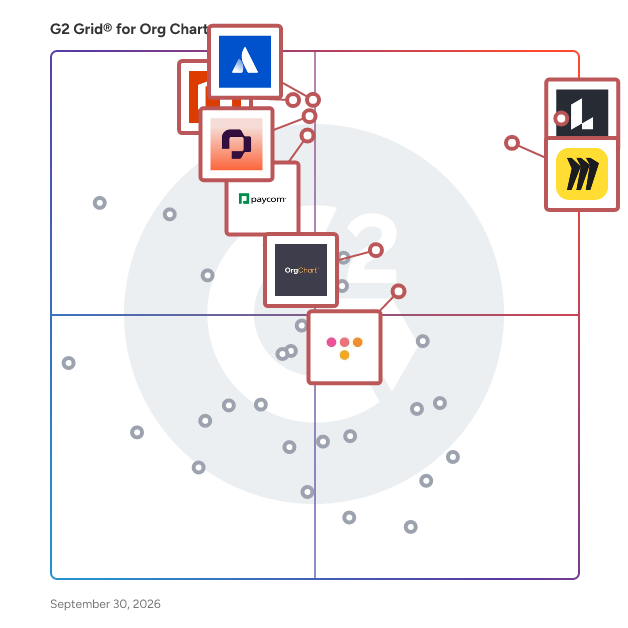
- **Leader:** [Lucid Visual Collaboration Suite](https://www.g2.com/products/lucid-software-inc-lucid-visual-collaboration-suite/reviews)
- **Highest Performer:** [OneDirectory](https://www.g2.com/products/onedirectory/reviews)
- **Easiest to Use:** [Squivr](https://www.g2.com/products/squivr/reviews)
- **Top Trending:** [100 Handshakes](https://www.g2.com/products/100-handshakes/reviews)
- **Best Free Software:** [Lucid Visual Collaboration Suite](https://www.g2.com/products/lucid-software-inc-lucid-visual-collaboration-suite/reviews)


## What Are the Top-Rated Org Chart Software Products in 2026?
### 1. [Lucid Visual Collaboration Suite](https://www.g2.com/products/lucid-software-inc-lucid-visual-collaboration-suite/reviews)
Lucid is a Work Acceleration Platform powered by visual collaboration that helps teams see and build the future. Serving more than 100 million users and 99% of the Fortune 500, its enterprise offering is the Lucid Visual Collaboration Suite, which combines Lucidchart for intelligent diagramming and Lucidspark for virtual whiteboarding. With an infinite, universal canvas, cross-functional teams can switch seamlessly between purpose-built toolsets to visualize complex systems, ideate, plan, and build better ideas faster. Key enterprise capabilities include powerful optional accelerators that specialize the platform for specific initiatives. The Agility Accelerator surfaces insights on team health and enables data-backed capacity planning; the Cloud Accelerator automatically generates up-to-date, customizable cloud infrastructure documentation; and the Process Accelerator delivers increased governance and standardization for maintaining organizational processes. Additionally, both core applications feature built-in AI capabilities and extensive integrations with industry leaders like Atlassian, Google, Microsoft, and Slack. The Lucid Suite facilitates seamless remote and hybrid collaboration across the entire enterprise—from IT and engineering to marketing and operations. Organizations use team hubs as a virtual home base for creating and sharing documentation, keeping work visible to the right people. Backed by enhanced enterprise security and premium support options, the Lucid Suite accelerates strategic initiatives such as technology innovation, faster decision-making, and operational excellence, ultimately driving large-scale organizational change.


**Average Rating:** 4.5/5.0
**Total Reviews:** 8,607
**How Do G2 Users Rate Lucid Visual Collaboration Suite?**

- **Has the product been a good partner in doing business?:** 9.0/10 (Category avg: 9.2/10)
- **Integration:** 8.1/10 (Category avg: 8.4/10)
- **Details:** 8.7/10 (Category avg: 8.7/10)
- **Restructure:** 8.4/10 (Category avg: 8.4/10)

**Who Is the Company Behind Lucid Visual Collaboration Suite?**

- **Seller:** [Lucid Software Inc.](https://www.g2.com/sellers/lucid-software-inc)
- **Company Website:** https://lucid.co/
- **Year Founded:** 2010
- **HQ Location:** South Jordan, UT
- **Twitter:** @LucidSoftware (14,511 Twitter followers)
- **LinkedIn® Page:** https://www.linkedin.com/company/1214453/ (1,503 employees on LinkedIn®)

**Who Uses This Product?**
- **Who Uses This:** Software Engineer, Student
- **Top Industries:** Information Technology and Services, Computer Software
- **Company Size:** 41% Small-Business, 35% Mid-Market


#### What Are Lucid Visual Collaboration Suite's Pros and Cons?

**Pros:**

- Ease of Use (1759 reviews)
- Diagramming (956 reviews)
- Easy Creation (952 reviews)
- Features (876 reviews)
- Team Collaboration (840 reviews)

**Cons:**

- Learning Curve (397 reviews)
- Missing Features (328 reviews)
- Diagramming Issues (291 reviews)
- Limited Features (288 reviews)
- Not Intuitive (242 reviews)


### What Do G2 Reviewers Say About Lucid Visual Collaboration Suite?
*AI-generated summary from verified user reviews*

**Pros:**

- Users praise the **ease of use** of Lucid Visual Collaboration Suite, highlighting its intuitive design and quick functionality.
- Users value the **intuitive diagramming tools** of Lucid Visual Collaboration Suite, praising its ease of use and extensive templates.
- Users love the **easy creation** features of Lucid Visual Collaboration Suite, simplifying teamwork and enhancing productivity effortlessly.
- Users appreciate the **ease of collaboration and effective documentation** provided by Lucid Visual Collaboration Suite for complex projects.
- Users value the **real-time collaboration features** of Lucid Visual Collaboration Suite, enhancing teamwork for complex projects effortlessly.

**Cons:**

- Users find the **learning curve challenging** , especially for beginners, as the interface and terminology can be overwhelming.
- Users find the **limited features for free users** of Lucid Visual Collaboration Suite frustrating, restricting their experience significantly.
- Users find Lucid Visual Collaboration Suite&#39;s **diagramming issues** frustrating, particularly the lack of precision in object placement.
- Users find the **limited features** for free users restrictive, hindering their ability to fully utilize the suite.
- Users find the platform&#39;s usability challenging, highlighting its **non-intuitive interface** compared to other collaboration tools like Figjam.

#### What Are Recent G2 Reviews of Lucid Visual Collaboration Suite?

**"[Lucid Makes Complex Customer Service Workflows Easy to Document and Standardize](https://www.g2.com/survey_responses/lucid-visual-collaboration-suite-review-12993204)"**

**Rating:** 5.0/5.0 stars
*— Tawnee S.*

[Read full review](https://www.g2.com/survey_responses/lucid-visual-collaboration-suite-review-12993204)

---

**"[Great Tool for Visual Collaboration and Planning](https://www.g2.com/survey_responses/lucid-visual-collaboration-suite-review-12999974)"**

**Rating:** 4.5/5.0 stars
*— Bhanu N.*

[Read full review](https://www.g2.com/survey_responses/lucid-visual-collaboration-suite-review-12999974)

---


#### What Are G2 Users Discussing About Lucid Visual Collaboration Suite?

- [What is Lucidchart used for?](https://www.g2.com/discussions/what-is-lucidchart-used-for) - 4 comments, 5 upvotes
- [How do you use a Lucidchart diagram?](https://www.g2.com/discussions/how-do-you-use-a-lucidchart-diagram)
- [Is Lucidchart any good?](https://www.g2.com/discussions/is-lucidchart-any-good) - 5 comments, 11 upvotes
- [What can you do with Lucidchart?](https://www.g2.com/discussions/what-can-you-do-with-lucidchart) - 2 comments

### 2. [Miro](https://www.g2.com/products/miro/reviews)
Miro is the AI Innovation Workspace that brings teams and AI together to plan, co-create, and build the next big thing faster. Serving more than 100 million users across 250,000 customers, Miro empowers cross-functional teams to flow from early discovery through final delivery on a shared, AI-first canvas. With the canvas as the prompt, Miro&#39;s collaborative AI workflows keep teams in the flow of work, scale shifts in ways of working, and drive organization-wide transformation. Key AI capabilities include Flows, which are visual AI workflows that automate multi-step processes while empowering teams with full visibility and control at every step; Sidekicks, which are conversational AI co-creators with expertise on specific tasks, jobs, or processes that move work forward; and Your AI and Knowledge, a collaborative integration layer that connects and enhances existing enterprise AI capabilities without leaving the platform. The Model Context Protocol (MCP) extends the ecosystem by accelerating agentic code, leveraging context from Miro to generate code in agents powered by Miro’s own MCP server. Miro for Product Acceleration is a comprehensive solution of integrated AI-first products designed to help product teams make smarter decisions about what to build and move faster. All of these capabilities are built on one platform with a shared data model, advanced security and compliance controls, and responsible AI certification at the forefront. By embedding AI where teamwork happens, Miro keeps teams in the flow of work, accelerates processes, and ultimately transforms organizations.


**Average Rating:** 4.6/5.0
**Total Reviews:** 13,064
**How Do G2 Users Rate Miro?**

- **Has the product been a good partner in doing business?:** 9.0/10 (Category avg: 9.2/10)
- **Integration:** 7.4/10 (Category avg: 8.4/10)
- **Details:** 8.8/10 (Category avg: 8.7/10)
- **Restructure:** 9.2/10 (Category avg: 8.4/10)

**Who Is the Company Behind Miro?**

- **Seller:** [Miro](https://www.g2.com/sellers/miro)
- **Company Website:** https://miro.com
- **Year Founded:** 2011
- **HQ Location:** San Francisco, California
- **Twitter:** @MiroHQ (38,406 Twitter followers)
- **LinkedIn® Page:** https://www.linkedin.com/company/mirohq/ (2,840 employees on LinkedIn®)

**Who Uses This Product?**
- **Who Uses This:** Product Manager, Project Manager
- **Top Industries:** Computer Software, Information Technology and Services
- **Company Size:** 39% Small-Business, 29% Mid-Market


#### What Are Miro's Pros and Cons?

**Pros:**

- Ease of Use (4144 reviews)
- Team Collaboration (3191 reviews)
- Features (2465 reviews)
- Real-time Collaboration (2259 reviews)
- Real-Time Collaboration (2208 reviews)

**Cons:**

- Missing Features (1419 reviews)
- Board Management (1015 reviews)
- Limited Features (988 reviews)
- Learning Curve (949 reviews)
- Slow Loading (821 reviews)


### What Do G2 Reviewers Say About Miro?
*AI-generated summary from verified user reviews*

**Pros:**

- Users value the **intuitive design** of Miro, finding it straightforward and effortless for collaborative work.
- Users love the **effortless team collaboration** Miro facilitates, thanks to its flexibility and comprehensive visual tools.
- Users appreciate Miro&#39;s **intuitive features** , enhancing productivity through easy navigation and effective task organization.
- Users value the **real-time collaboration** in Miro, enabling seamless teamwork and idea sharing with ease.
- Users value the **effortless real-time collaboration** in Miro, enhancing team alignment and idea visualization seamlessly.

**Cons:**

- Users find the **lack of a comprehensive overview** problematic, affecting project visibility and management in Miro.
- Users feel that **embedding Miro boards looks unappealing** in Confluence, detracting from overall presentation quality.
- Users find Miro&#39;s **limited features** in the free plan restrictive, especially for larger teams needing advanced options.
- Users face a **steep learning curve** with Miro, making initial navigation and feature utilization challenging.
- Users experience **slow loading issues** with Miro, particularly with document navigation and high-content boards.

#### What Are Recent G2 Reviews of Miro?

**"[A perfect tool for visual collaboration and teamwork](https://www.g2.com/survey_responses/miro-review-12722667)"**

**Rating:** 4.5/5.0 stars
*— Júlia B.*

[Read full review](https://www.g2.com/survey_responses/miro-review-12722667)

---

**"[Infinite Canvas and Templates Make Daily Collaboration Effortless](https://www.g2.com/survey_responses/miro-review-13033124)"**

**Rating:** 5.0/5.0 stars
*— Maxim A.*

[Read full review](https://www.g2.com/survey_responses/miro-review-13033124)

---


#### What Are G2 Users Discussing About Miro?

- [How are teams using Miro to enhance collaboration and brainstorming in a virtual environment?](https://www.g2.com/discussions/miro-how-are-teams-using-miro-to-enhance-collaboration-and-brainstorming-in-a-virtual-environment) - 4 comments, 5 upvotes
- [How are teams using Miro to enhance collaboration and brainstorming in a virtual environment?](https://www.g2.com/discussions/how-are-teams-using-miro-to-enhance-collaboration-and-brainstorming-in-a-virtual-environment) - 1 comment, 2 upvotes
- [What is Miro used for?](https://www.g2.com/discussions/what-is-miro-used-for) - 4 comments, 1 upvote
- [What is InVision Freehand used for?](https://www.g2.com/discussions/what-is-invision-freehand-used-for) - 1 comment, 2 upvotes
- [Is mural or Miro better?](https://www.g2.com/discussions/is-mural-or-miro-better) - 2 comments, 1 upvote

### 3. [Atlassian Atlas](https://www.g2.com/products/atlassian-atlas/reviews)
Atlassian Atlas was a teamwork directory designed to enhance team communication and alignment by connecting the dots across teams, their applications, and work, regardless of where it occurred. It provided a shared language for teams to clarify their objectives and responsibilities, ensuring full visibility into project ownership and team involvement. Stakeholders could easily access detailed information, track work progress, and stay updated on status changes, deadlines, and contributors. Key Features and Functionality: - Unified Project Tracking: Atlas offered a centralized platform for monitoring project statuses, deadlines, and team contributions, facilitating seamless collaboration. - Cross-Application Integration: It integrated with various tools and applications, allowing teams to manage work across different platforms without context-switching. - Concise Status Updates: Teams could provide brief, Twitter-like 280-character updates, ensuring efficient and clear communication. - Stakeholder Visibility: Atlas ensured that all stakeholders had access to up-to-date information, promoting transparency and informed decision-making. Primary Value and User Solutions: Atlas addressed the challenge of maintaining alignment and transparency in cross-functional teams by providing a centralized hub for project information and updates. It eliminated information silos, reduced the need for constant meetings, and enabled teams to stay informed asynchronously. By offering a clear overview of who is working on what and why, Atlas empowered organizations to improve collaboration, streamline communication, and enhance overall productivity. As of April 2024, Atlas has been retired as a standalone product, with its core features integrated into Atlassian&#39;s Platform Experiences, making them accessible to all Atlassian users.


**Average Rating:** 4.4/5.0
**Total Reviews:** 52
**How Do G2 Users Rate Atlassian Atlas?**

- **Has the product been a good partner in doing business?:** 9.3/10 (Category avg: 9.2/10)
- **Integration:** 8.6/10 (Category avg: 8.4/10)
- **Details:** 8.7/10 (Category avg: 8.7/10)
- **Restructure:** 8.2/10 (Category avg: 8.4/10)

**Who Is the Company Behind Atlassian Atlas?**

- **Seller:** [Atlassian](https://www.g2.com/sellers/atlassian)
- **Year Founded:** 2002
- **HQ Location:** Sydney and San Francisco
- **Twitter:** @Atlassian (106,496 Twitter followers)
- **LinkedIn® Page:** https://www.linkedin.com/company/atlassian (21,081 employees on LinkedIn®)
- **Ownership:** NASDAQ:TEAM

**Who Uses This Product?**
- **Top Industries:** Information Technology and Services, Computer Software
- **Company Size:** 58% Mid-Market, 29% Small-Business


#### What Are Atlassian Atlas's Pros and Cons?

**Pros:**

- Ease of Use (6 reviews)
- Productivity Improvement (6 reviews)
- Team Collaboration (6 reviews)
- Integrations (4 reviews)
- Collaboration Ease (3 reviews)

**Cons:**

- Limited Customization (3 reviews)
- Limited Options (3 reviews)
- Learning Curve (2 reviews)
- Complexity (1 reviews)
- Insufficient Information (1 reviews)


### What Do G2 Reviewers Say About Atlassian Atlas?
*AI-generated summary from verified user reviews*

**Pros:**

- Users appreciate the **remarkable ease of use** of Atlassian Atlas, facilitating effortless project tracking and team alignment.
- Users appreciate the **remarkable ease of use** in Atlassian Atlas for tracking projects and aligning teams effortlessly.
- Users value the **effective team collaboration** enabled by Atlassian Atlas, streamlining project management and communication.
- Users love the **seamless integration** of Atlassian Atlas with other tools, enhancing project alignment and visibility effortlessly.
- Users appreciate the **effortless collaboration** of Atlassian Atlas, ensuring teams stay aligned while minimizing extra work.

**Cons:**

- Users note the **limited customization** and reporting options in Atlassian Atlas, wishing for more advanced features.
- Users find **limited customization** in Atlassian Atlas, wishing for more advanced dashboards and reporting capabilities.
- Users find the **learning curve steep** for Atlassian Atlas, which can complicate initial setup and customization.
- Users find the **complexity** of Atlassian Atlas overwhelming, resulting in more time needed for setup and workflows.
- Users find the **insufficient information** can lead to confusion about the &quot;source of truth&quot; for project updates.

#### What Are Recent G2 Reviews of Atlassian Atlas?

**"[Easy Task Assignment and Progress Tracking for Teams](https://www.g2.com/survey_responses/atlassian-atlas-review-12688203)"**

**Rating:** 4.5/5.0 stars
*— iqra u.*

[Read full review](https://www.g2.com/survey_responses/atlassian-atlas-review-12688203)

---

**"[Centralized Project Visibility with a Clean, Easy-to-Navigate Interface](https://www.g2.com/survey_responses/atlassian-atlas-review-12925893)"**

**Rating:** 5.0/5.0 stars
*— ROY B.*

[Read full review](https://www.g2.com/survey_responses/atlassian-atlas-review-12925893)

---


### 4. [Visio](https://www.g2.com/products/visio/reviews)
Visio is an innovative solution that helps you visualize data-connected business process flows with dozens of ready-to-use templates and thousands of customizable shapes. Work visually from anywhere, at any time. Microsoft Visio helps professionals create detailed flowcharts, organizational charts, and network diagrams. With an intuitive interface and extensive templates, it simplifies visual data representation. Integrated with Microsoft 365, Visio supports real-time collaboration, making it ideal for business process modeling and IT infrastructure mapping.


**Average Rating:** 4.2/5.0
**Total Reviews:** 676
**How Do G2 Users Rate Visio?**

- **Has the product been a good partner in doing business?:** 8.5/10 (Category avg: 9.2/10)
- **Integration:** 8.4/10 (Category avg: 8.4/10)
- **Details:** 8.7/10 (Category avg: 8.7/10)
- **Restructure:** 8.6/10 (Category avg: 8.4/10)

**Who Is the Company Behind Visio?**

- **Seller:** [Microsoft](https://www.g2.com/sellers/microsoft)
- **Year Founded:** 1975
- **HQ Location:** Redmond, Washington
- **Twitter:** @microsoft (13,091,739 Twitter followers)
- **LinkedIn® Page:** https://www.linkedin.com/company/microsoft/ (231,632 employees on LinkedIn®)
- **Ownership:** MSFT

**Who Uses This Product?**
- **Who Uses This:** Consultant, Graduate Engineering Trainee
- **Top Industries:** Information Technology and Services, Hospital &amp; Health Care
- **Company Size:** 42% Enterprise, 33% Mid-Market


#### What Are Visio's Pros and Cons?

**Pros:**

- Ease of Use (11 reviews)
- Templates (6 reviews)
- Shapes Variety (5 reviews)
- Simple (5 reviews)
- User Interface (5 reviews)

**Cons:**

- Expensive (5 reviews)
- Learning Curve (4 reviews)
- Limited Features (3 reviews)
- Limited Color Options (2 reviews)
- Limited Icons (2 reviews)


### What Do G2 Reviewers Say About Visio?
*AI-generated summary from verified user reviews*

**Pros:**

- Users value the **ease of use** in Visio, facilitating simple integration with Microsoft products for seamless workflow.
- Users value the **wide variety of templates and customization options** in Visio, enhancing their creative capabilities.
- Users love the **variety of shapes** in Visio, enabling easy creation of diverse diagrams and charts.
- Users praise Visio for its **simple and user-friendly interface** , making diagram creation quick and efficient.
- Users find Visio&#39;s **user-friendly interface** enhances productivity, making it effortless to create professional diagrams.

**Cons:**

- Users are frustrated by the **high cost** of Visio, which affects accessibility and overall satisfaction with the product.
- Users find the **steep learning curve** of Visio challenging for beginners, though familiarity improves usability over time.
- Users criticize the **limited features** of Visio, particularly in symbol selection and user interface functionality.
- Users find the **limited color options** in Visio to be monotonous, lacking vibrancy and essential symbols in the free version.
- Users express frustration over **limited icons** in Visio, hampering creative flexibility and diminishing user experience.

#### What Are Recent G2 Reviews of Visio?

**"[Simple Yet Effective for Process Mapping](https://www.g2.com/survey_responses/visio-review-12868162)"**

**Rating:** 5.0/5.0 stars
*— Beatriz M.*

[Read full review](https://www.g2.com/survey_responses/visio-review-12868162)

---

**"[A Crucial Tool for Regulatory Affairs](https://www.g2.com/survey_responses/visio-review-12734647)"**

**Rating:** 5.0/5.0 stars
*— Mike W.*

[Read full review](https://www.g2.com/survey_responses/visio-review-12734647)

---


#### What Are G2 Users Discussing About Visio?

- [What is Visio used for?](https://www.g2.com/discussions/what-is-visio-used-for)
- [Is Visio better than PowerPoint?](https://www.g2.com/discussions/is-visio-better-than-powerpoint) - 2 comments
- [Is Visio free with Office 365?](https://www.g2.com/discussions/is-visio-free-with-office-365) - 2 comments
- [What&#39;s the difference between Visio Standard and Visio Professional?](https://www.g2.com/discussions/what-s-the-difference-between-visio-standard-and-visio-professional) - 1 comment
- [Is there a free version of Microsoft Visio?](https://www.g2.com/discussions/is-there-a-free-version-of-microsoft-visio) - 1 comment

### 5. [Personio](https://www.g2.com/products/personio/reviews)
Personio is the intelligent HR platform built for the way European businesses actually work. Most HR software was designed in the US and adapted for Europe as an afterthought. Personio was built here from the start, for companies navigating multiple languages, varying labor laws, and a patchwork of local compliance requirements that change faster than most platforms can keep up with. Manage the full employee lifecycle in one place: hiring, onboarding, time tracking, absence management, payroll, performance, and workforce reporting. No more switching between systems or maintaining spreadsheets on the side. Everything your HR team needs lives in one place, connected and up to date. Smart automations handle the repetitive admin that consumes your HR team&#39;s day. Approval workflows, absence tracking, contract generation, and onboarding checklists run in the background so your team can focus on the work that actually moves the business forward. Proactive insights turn workforce data into clear, shareable intelligence, helping HR leaders spot trends, anticipate change, and walk into leadership meetings with something worth saying. The platform adapts to how your organisation works, not the other way around. Customise workflows, approval chains, and reporting to fit your structure, whether you are running one office or coordinating teams across five countries. Personio connects with over 200 tools European businesses rely on, including DATEV, Slack, and Google Workspace. It runs natively in German, English, Spanish, French, Dutch, and Italian, among other languages and is built for GDPR compliance across every market you operate in. More than 14,000 companies across Germany, Austria, Switzerland, the UK, and Spain trust Personio to run their HR. It is the intelligent platform that grows with European businesses, because it was made for them.


**Average Rating:** 4.4/5.0
**Total Reviews:** 846
**How Do G2 Users Rate Personio?**

- **Has the product been a good partner in doing business?:** 8.5/10 (Category avg: 9.2/10)

**Who Is the Company Behind Personio?**

- **Seller:** [Personio](https://www.g2.com/sellers/personio)
- **Company Website:** https://www.personio.com
- **Year Founded:** 2015
- **HQ Location:** München, Bayern
- **LinkedIn® Page:** https://www.linkedin.com/company/personio/ (1,745 employees on LinkedIn®)

**Who Uses This Product?**
- **Who Uses This:** CEO, HR Manager
- **Top Industries:** Computer Software, Information Technology and Services
- **Company Size:** 59% Mid-Market, 28% Small-Business


#### What Are Personio's Pros and Cons?

**Pros:**

- Ease of Use (217 reviews)
- Intuitive (115 reviews)
- Features (100 reviews)
- User Interface (100 reviews)
- Comprehensive Features (98 reviews)

**Cons:**

- Missing Features (62 reviews)
- Limited Customization (56 reviews)
- Limited Features (54 reviews)
- Lacking Features (42 reviews)
- Access Limitations (40 reviews)


### What Do G2 Reviewers Say About Personio?
*AI-generated summary from verified user reviews*

**Pros:**

- Users appreciate the **ease of use** of Personio, simplifying administration and improving HR workflows significantly.
- Users commend the **intuitive design** of Personio, enabling quick mastery and efficient handling of HR tasks.
- Users commend the **intuitive interface and centralization** of Personio, streamlining HR processes and enhancing usability.
- Users value the **intuitive user interface** of Personio, making administrative tasks straightforward and efficient.
- Users appreciate the **comprehensive features** of Personio, enjoying streamlined workflows and centralized HR processes.

**Cons:**

- Users are frustrated by **missing features** , particularly around reports and the tool&#39;s overall adaptability to their needs.
- Users note that **limited customization options** in Personio restrict flexibility for unique organizational needs and preferences.
- Users find **limited features** in Personio, making it difficult to customize and navigate effectively.
- Users express frustration over the **lack of essential performance and feedback features** , hindering unified employee management.
- Users face **access limitations** with Personio, struggling with report customization and the overall user experience.

#### What Are Recent G2 Reviews of Personio?

**"[Personio noticeably relieves our HR processes and continuously evolves](https://www.g2.com/survey_responses/personio-review-12852402)"**

**Rating:** 5.0/5.0 stars
*— Silke A.*

[Read full review](https://www.g2.com/survey_responses/personio-review-12852402)

---

**"[Effortless HR Self-Service](https://www.g2.com/survey_responses/personio-review-13002993)"**

**Rating:** 5.0/5.0 stars
*— Robert K.*

[Read full review](https://www.g2.com/survey_responses/personio-review-13002993)

---


#### What Are G2 Users Discussing About Personio?

- [What is Personio used for?](https://www.g2.com/discussions/what-is-personio-used-for)

### 6. [OrgChart](https://www.g2.com/products/orgchart/reviews)
OrgChart is a leading org chart automation and workforce planning solution, built for HR professionals and the people leaders they support. OrgChart seamlessly integrates employee data from multiple sources, including over 50 HR systems, allowing for an always-accurate, and visually sophisticated org chart. Once connected, easily keep charts up to date without any manual effort – at any time – by scheduling automated syncs or updating charts with one simple click. OrgChart simplifies the complexity of HR work, providing unparalleled visibility into an organization’s personnel, and surfacing valuable insights for strategic decisions about future organizational structures. OrgChart is trusted by thousands of organizations worldwide across multiple industries – from non-profits, government agencies, and educational institutions – to Fortune 500 companies.


**Average Rating:** 4.5/5.0
**Total Reviews:** 286
**How Do G2 Users Rate OrgChart?**

- **Has the product been a good partner in doing business?:** 9.3/10 (Category avg: 9.2/10)
- **Integration:** 9.0/10 (Category avg: 8.4/10)
- **Details:** 8.7/10 (Category avg: 8.7/10)
- **Restructure:** 8.5/10 (Category avg: 8.4/10)

**Who Is the Company Behind OrgChart?**

- **Seller:** [OrgChart](https://www.g2.com/sellers/orgchart)
- **Company Website:** https://www.theorgchart.com/
- **Year Founded:** 2005
- **HQ Location:** Novato, California
- **Twitter:** @theorgchart (1,917 Twitter followers)
- **LinkedIn® Page:** https://www.linkedin.com/company/806102/ (67 employees on LinkedIn®)

**Who Uses This Product?**
- **Who Uses This:** HRIS Analyst
- **Top Industries:** Information Technology and Services, Financial Services
- **Company Size:** 71% Mid-Market, 26% Enterprise


#### What Are OrgChart's Pros and Cons?

**Pros:**

- Ease of Use (42 reviews)
- Org Chart (39 reviews)
- Org Charts (34 reviews)
- Helpful (33 reviews)
- Implementation Ease (25 reviews)

**Cons:**

- Learning Curve (20 reviews)
- Complexity (11 reviews)
- Not Intuitive (11 reviews)
- Steep Learning Curve (10 reviews)
- Not User-Friendly (8 reviews)


### What Do G2 Reviewers Say About OrgChart?
*AI-generated summary from verified user reviews*

**Pros:**

- Users find OrgChart to have a **user-friendly experience** , ensuring quick transitions and efficient organization setups.
- Users value the **seamlessness and efficiency** of OrgChart, streamlining complex chart management and data integration.
- Users value the **smooth transition and ease of use** of OrgChart, appreciating its readiness for any organization.
- Users find the **ease of use** of OrgChart invaluable, enhancing organization and efficiency during transitions.
- Users commend the **ease of implementation** with OrgChart, particularly appreciating the helpful support from specialists like Francois.

**Cons:**

- Users experience a **steep learning curve** with OrgChart, complicating understanding and effective use of the software.
- Users find the **complexity of open position management** in OrgChart to be clunky and time-consuming, causing frustration.
- Users find the software **not intuitive** , indicating the need for a more user-friendly interface and improved features.
- Users face a **steep learning curve** due to complex features and inconsistent training, hindering effective tool usage.
- Users find OrgChart to be **not user-friendly** , citing a confusing interface and complex language that hinders usability.

#### What Are Recent G2 Reviews of OrgChart?

**"[Custom Department Charts That Make Staffing Decisions Easier](https://www.g2.com/survey_responses/orgchart-review-12609419)"**

**Rating:** 5.0/5.0 stars
*— Heather K.*

[Read full review](https://www.g2.com/survey_responses/orgchart-review-12609419)

---

**"[Seamless System and Great Implementation Experience](https://www.g2.com/survey_responses/orgchart-review-12584352)"**

**Rating:** 5.0/5.0 stars
*— Teressa M.*

[Read full review](https://www.g2.com/survey_responses/orgchart-review-12584352)

---


#### What Are G2 Users Discussing About OrgChart?

- [What improvements would you suggest for OrgChart to better meet your organizational charting needs?](https://www.g2.com/discussions/what-improvements-would-you-suggest-for-orgchart-to-better-meet-your-organizational-charting-needs)
- [What is the best free program to create an organizational chart?](https://www.g2.com/discussions/what-is-the-best-free-program-to-create-an-organizational-chart)
- [What is the best Microsoft program for organizational charts?](https://www.g2.com/discussions/what-is-the-best-microsoft-program-for-organizational-charts)
- [What is organizational chart software?](https://www.g2.com/discussions/what-is-organizational-chart-software)
- [What is the best software for org charts?](https://www.g2.com/discussions/what-is-the-best-software-for-org-charts)

### 7. [Sift](https://www.g2.com/products/sift-sift/reviews)
Sift is the fastest way to discover and connect to colleagues. Sift&#39;s powerfully simple people search, dynamic org charts, and rich employee profiles enable collaboration and problem solving across your entire organization. Sift integrates with existing HR data systems, collects additional information from team members and LinkedIn, and works as a stand-alone solution or embeds seamlessly into your intranet. Leverage the power of your workforce by making anyone and anything searchable.


**Average Rating:** 4.8/5.0
**Total Reviews:** 477
**How Do G2 Users Rate Sift?**

- **Has the product been a good partner in doing business?:** 9.2/10 (Category avg: 9.2/10)
- **Integration:** 8.7/10 (Category avg: 8.4/10)
- **Details:** 8.9/10 (Category avg: 8.7/10)
- **Restructure:** 8.6/10 (Category avg: 8.4/10)

**Who Is the Company Behind Sift?**

- **Seller:** [Sift](https://www.g2.com/sellers/sift)
- **Company Website:** https://www.justsift.com
- **Year Founded:** 2015
- **HQ Location:** Detroit, US
- **Twitter:** @sift (1,036 Twitter followers)
- **LinkedIn® Page:** https://www.linkedin.com/company/10281428/ (23 employees on LinkedIn®)

**Who Uses This Product?**
- **Who Uses This:** Associate Banker, Banker
- **Top Industries:** Financial Services, Banking
- **Company Size:** 72% Enterprise, 22% Mid-Market


#### What Are Sift's Pros and Cons?

**Pros:**

- Ease of Use (115 reviews)
- Navigation Ease (52 reviews)
- Helpful (34 reviews)
- Org Chart (33 reviews)
- Team Collaboration (33 reviews)

**Cons:**

- Search Functionality (12 reviews)
- Missing Features (11 reviews)
- Limited Customization (8 reviews)
- Navigation Difficulty (8 reviews)
- Poor Design (8 reviews)


### What Do G2 Reviewers Say About Sift?
*AI-generated summary from verified user reviews*

**Pros:**

- Users find Sift&#39;s interface **very user-friendly** , making it easy to locate contacts and build profiles efficiently.
- Users value the **navigation ease** of Sift, making it simple to connect and learn about teammates.
- Users appreciate the **user-friendly support** and enhanced search capabilities, making it easier to connect with teammates.
- Users value the **easy search functionality and insightful org chart feature** , enhancing team collaboration and understanding.
- Users value the **team collaboration** in Sift, enhancing connections and making it easy to learn about peers.

**Cons:**

- Users find the **search functionality cumbersome** , often leading to issues with specific searches and recent activity tracking.
- Users note the **missing features** in Sift, such as inadequate org charts and lack of direct messaging.
- Users feel that **limited customization options** in Sift restrict their ability to personalize and enhance their experience.
- Users experience **navigation difficulty** initially, with some clunky UX/UI and slow-loading pages impacting usability.
- Users find the **poor design** of org charts problematic, complicating navigation and printing processes.

#### What Are Recent G2 Reviews of Sift?

**"[User-Friendly Interface, Invaluable Insights](https://www.g2.com/survey_responses/sift-review-12628729)"**

**Rating:** 4.5/5.0 stars
*— Vipasha G.*

[Read full review](https://www.g2.com/survey_responses/sift-review-12628729)

---

**"[Creative Concept with Great UX for Finding Colleagues](https://www.g2.com/survey_responses/sift-review-12967461)"**

**Rating:** 4.0/5.0 stars
*— Verified User in Marketing and Advertising*

[Read full review](https://www.g2.com/survey_responses/sift-review-12967461)

---


#### What Are G2 Users Discussing About Sift?

- [What is sift banking?](https://www.g2.com/discussions/what-is-sift-banking)
- [What is sift technology?](https://www.g2.com/discussions/what-is-sift-technology)
- [What does Sift software do?](https://www.g2.com/discussions/what-does-sift-software-do) - 3 comments

### 8. [Workleap](https://www.g2.com/products/workleap/reviews)
Workleap is the agentic platform that makes managers the most impactful role in your organization. It proactively handles the work that slows down leaders and drives high-performing teams. From preparing 1:1s, drafting performance reviews, spotting engagement trends, recognizing employees, or keeping track of action items, Workleap is the agent that always takes the right action to keep managers on top of their game. With Workleap, smaller HR teams punch above their weight. We bring essential people programs like engagement, performance management, and compensation into one system, which makes listening, connecting the dots, and making smart decisions routine. Over 70,000 leaders worldwide choose Workleap. Don’t leave great management to chance. Engagement Workleap has always-on engagement &amp; feedback features built for HR and managers. We combine surveys, feedback, and recognition data to deliver clear insights on who&#39;s thriving and who’s about to disengage. Performance management Workleap puts a stop to ineffective end-of-the-year reviews. We offer flexible review cycles, customizable workflows, peer feedback summaries, and review drafting that create recurrent moments for growth between leaders and teams. Compensation Workleap is the intuitive compensation engine that empowers HR, Finance, and people managers to make smarter, faster pay decisions through one purpose-built, streamlined workflow.


**Average Rating:** 4.3/5.0
**Total Reviews:** 1,058
**How Do G2 Users Rate Workleap?**

- **Has the product been a good partner in doing business?:** 8.9/10 (Category avg: 9.2/10)
- **Integration:** 8.6/10 (Category avg: 8.4/10)
- **Details:** 8.7/10 (Category avg: 8.7/10)
- **Restructure:** 8.6/10 (Category avg: 8.4/10)

**Who Is the Company Behind Workleap?**

- **Seller:** [Workleap](https://www.g2.com/sellers/workleap)
- **Company Website:** https://workleap.com/
- **Year Founded:** 2006
- **HQ Location:** Montréal, Québec, Canada
- **Twitter:** @WorkleapHQ (1,132 Twitter followers)
- **LinkedIn® Page:** https://www.linkedin.com/company/workleaphq/ (382 employees on LinkedIn®)

**Who Uses This Product?**
- **Who Uses This:** Operations Manager, Software Engineer
- **Top Industries:** Computer Software, Information Technology and Services
- **Company Size:** 60% Mid-Market, 24% Small-Business


#### What Are Workleap's Pros and Cons?

**Pros:**

- Ease of Use (31 reviews)
- Communication (16 reviews)
- Employee Engagement (14 reviews)
- Helpful (14 reviews)
- Intuitive (12 reviews)

**Cons:**

- Limited Features (7 reviews)
- Missing Features (7 reviews)
- Reporting Issues (6 reviews)
- Integration Issues (4 reviews)
- Learning Curve (4 reviews)


### What Do G2 Reviewers Say About Workleap?
*AI-generated summary from verified user reviews*

**Pros:**

- Users find Workleap to be **extremely easy to use** , enhancing engagement and support tracking for effective training.
- Users appreciate the **effective communication** facilitated by Workleap, promoting engagement and positive workplace culture.
- Users appreciate the **positive employee engagement** of Workleap, enhancing feedback and growth in a supportive culture.
- Users value the **people-first experience** of Workleap, enhancing engagement and fostering a supportive work culture.
- Users find Pingboard&#39;s **intuitive design** enhances team management, making organizational structure and connections easily accessible.

**Cons:**

- Users find the **limited features** of Workleap hinder efficient performance tracking and querying capabilities.
- Users feel that missing **features for integration and customization** hinder Workleap&#39;s effectiveness as a central organizational tool.
- Users experience **slow customer support** and lack standardized metrics, hindering efficiency and timely issue resolution.
- Users express concerns about **integration issues** , wishing for better connectivity with HR systems and calendars.
- Users find the **learning curve challenging** , especially newcomers struggling with complex features and navigation.

#### What Are Recent G2 Reviews of Workleap?

**"[Workleap: Intuitive All-in-One Platform for Engagement, Performance, and Feedback](https://www.g2.com/survey_responses/workleap-review-12735487)"**

**Rating:** 5.0/5.0 stars
*— Shruti T.*

[Read full review](https://www.g2.com/survey_responses/workleap-review-12735487)

---

**"[Know waht your employees like and dislike with  Pulse Surveys and Good Vibes Recognition](https://www.g2.com/survey_responses/workleap-review-12701573)"**

**Rating:** 4.5/5.0 stars
*— Sandi T.*

[Read full review](https://www.g2.com/survey_responses/workleap-review-12701573)

---


#### What Are G2 Users Discussing About Workleap?

- [What is Officevibe used for?](https://www.g2.com/discussions/what-is-officevibe-used-for) - 1 comment
- [What is Pingboard used for?](https://www.g2.com/discussions/what-is-pingboard-used-for) - 1 comment

### 9. [ChartHop](https://www.g2.com/products/charthop/reviews)
ChartHop is an AI-powered people operations platform designed to streamline and enhance the management of human resources within an organization. This comprehensive solution integrates various functions such as headcount planning, human resource information systems (HRIS), compensation management, performance tracking, employee engagement, and goal setting. By consolidating these critical components into a single intelligent system, ChartHop enables organizations to operate more efficiently and effectively, providing a unified source of truth for HR and Finance teams. The target audience for ChartHop includes HR professionals, finance teams, and organizational leaders who seek to improve their people management processes. By utilizing this platform, these stakeholders can access real-time data and insights that inform decision-making and strategic planning. ChartHop is particularly beneficial for organizations that require a cohesive approach to managing their workforce, as it connects various aspects of people operations to the underlying business data that drives organizational performance. Key features of ChartHop include its AI-driven analytics capabilities, which allow users to gain insights into workforce dynamics and trends. The platform&#39;s ability to reason across the full organizational context means that users can uncover patterns and make informed decisions based on comprehensive data analysis. Additionally, ChartHop facilitates collaboration among teams by providing a centralized platform where HR and Finance can work together seamlessly, eliminating the need for disparate systems and reducing the potential for errors. Another significant benefit of ChartHop is its focus on optimizing organizational operations. By understanding how various elements of the workforce interact and impact overall performance, organizations can make strategic adjustments to improve efficiency and employee satisfaction. The platform&#39;s integration of performance management and engagement tools further supports this goal, enabling leaders to align individual and team objectives with broader organizational goals. Overall, ChartHop stands out in the people operations category by offering a holistic approach to workforce management that leverages AI and data integration. Its ability to provide real-time insights, foster collaboration, and optimize organizational performance makes it a valuable tool for any organization looking to enhance its people operations strategy.


**Average Rating:** 4.3/5.0
**Total Reviews:** 165
**How Do G2 Users Rate ChartHop?**

- **Has the product been a good partner in doing business?:** 8.7/10 (Category avg: 9.2/10)
- **Integration:** 8.0/10 (Category avg: 8.4/10)
- **Details:** 8.7/10 (Category avg: 8.7/10)
- **Restructure:** 8.7/10 (Category avg: 8.4/10)

**Who Is the Company Behind ChartHop?**

- **Seller:** [ChartHop](https://www.g2.com/sellers/charthop)
- **Company Website:** https://www.charthop.com
- **Year Founded:** 2018
- **HQ Location:** New York
- **Twitter:** @ChartHop (959 Twitter followers)
- **LinkedIn® Page:** https://www.linkedin.com/company/12996946/ (54 employees on LinkedIn®)

**Who Uses This Product?**
- **Who Uses This:** Content QA Associate, People Operations Manager
- **Top Industries:** Information Technology and Services, Computer Software
- **Company Size:** 85% Mid-Market, 8% Enterprise


#### What Are ChartHop's Pros and Cons?

**Pros:**

- Ease of Use (35 reviews)
- Features (32 reviews)
- Org Chart (30 reviews)
- Comprehensive Features (21 reviews)
- User Interface (21 reviews)

**Cons:**

- Limited Customization (11 reviews)
- Missing Features (11 reviews)
- Complexity (9 reviews)
- Integration Issues (8 reviews)
- Learning Curve (7 reviews)


### What Do G2 Reviewers Say About ChartHop?
*AI-generated summary from verified user reviews*

**Pros:**

- Users value the **ease of use** of ChartHop, making data access and organization intuitive and efficient.
- Users appreciate the **intuitive interface and comprehensive features** of ChartHop, enhancing organization tracking and data integration.
- Users love the **easy access and customization** of ChartHop&#39;s Org Chart, enhancing their ability to visualize data effectively.
- Users value ChartHop&#39;s **comprehensive features** , enhancing teamwork, insights, and organizational efficiency through user-friendly tools and visuals.
- Users love the **intuitive user interface** of ChartHop for easy access to comprehensive organizational data.

**Cons:**

- Users find **limited customization** frustrating, especially with complex filters and confusing admin permissions hindering functionality.
- Users find **missing features** in ChartHop, such as limited connectivity and awkward handling of job-related data.
- Users find the **complexity** of ChartHop&#39;s data sheet features makes filtering and searching cumbersome and inefficient.
- Users experience significant **integration issues** with ChartHop, facing limitations in customization and compatibility with HRIS systems.
- Users experience a **steep learning curve** with ChartHop, particularly in customizing reports and filters effectively.

#### What Are Recent G2 Reviews of ChartHop?

**"[Essential for Navigating Team Structures](https://www.g2.com/survey_responses/charthop-review-12643058)"**

**Rating:** 5.0/5.0 stars
*— Joseph M.*

[Read full review](https://www.g2.com/survey_responses/charthop-review-12643058)

---

**"[Intuitive and Effective for Data Management, Needs More Dashboard Customization](https://www.g2.com/survey_responses/charthop-review-13032864)"**

**Rating:** 4.5/5.0 stars
*— Verified User in Financial Services*

[Read full review](https://www.g2.com/survey_responses/charthop-review-13032864)

---


#### What Are G2 Users Discussing About ChartHop?

- [What do you like most about ChartHop for workforce analytics, and what improvements would you suggest?](https://www.g2.com/discussions/what-do-you-like-most-about-charthop-for-workforce-analytics-and-what-improvements-would-you-suggest)
- [How do you use Charthop?](https://www.g2.com/discussions/how-do-you-use-charthop) - 2 upvotes
- [How much does ChartHop cost?](https://www.g2.com/discussions/how-much-does-charthop-cost) - 2 upvotes
- [How does ChartHop work?](https://www.g2.com/discussions/how-does-charthop-work)
- [What does ChartHop do?](https://www.g2.com/discussions/what-does-charthop-do)

### 10. [SmartDraw](https://www.g2.com/products/smartdraw/reviews)
SmartDraw makes professional drawings and diagrams accessible to everyone. Non-technical users can quickly create floor plans, while professionals get the precision and scale they require. With industry-leading floor planning tools, strong data integrations, and an intuitive interface for traditional diagramming, SmartDraw delivers enterprise-ready power without unnecessary complexity. 1. Easy to Get Expert Results SmartDraw makes it easy to create accurate scaled diagrams without requiring specialized CAD training. Create floor plans for both residential and commercial spaces, make accident reconstructions and crime scenes, build fire pre-plans and design landscapes easily. Your team doesn&#39;t need to be experts to get expert results. 2. Start with Existing Imagery While SmartDraw makes creating floor plans easy, you can skip that step and import an existing floor plan as a PDF or start with a Google Maps image to serve as the foundation for a new drawing. 3. Industry Standard Content Get thousands of industry-standard symbols to build anything from commercial floor plans, warehouse layouts to accident reconstructions and fire pre-plans. 4. Create Custom Symbol Libraries You can truly customize any floor plan using your own product catalog. Import symbols, apply scale, and add shape data. Plus, SmartDraw can count items automatically and generate visual manifests to support estimates and proposals. 5. Data-Enabled Shapes and Drawings With SmartDraw, you can turn ordinary diagrams into data-driven plans by attaching structured information to every symbol. Teams can generate manifests and summaries on demand for estimating, purchasing, or documentation. 6. A Solution for All Your Diagramming Needs Support your entire organization with flowcharts, organizational charts, mind maps, project charts, technical engineering diagrams, IT diagrams, and more. 7. Simple Administration SmartDraw works hand in glove with your existing IT infrastructure without disruption to maximize what you&#39;ve already invested in. You can provision users with SSO, save files to your own preferred storage solution, and enjoy enterprise-level security. 8. Enterprise Support As an enterprise customer, you will have your own dedicated support rep for onboarding, training, and more. SmartDraw customers range from universities, police departments, fire departments and government agencies to over 85% of the Fortune 500.


**Average Rating:** 4.5/5.0
**Total Reviews:** 384
**How Do G2 Users Rate SmartDraw?**

- **Has the product been a good partner in doing business?:** 9.5/10 (Category avg: 9.2/10)
- **Integration:** 8.0/10 (Category avg: 8.4/10)
- **Details:** 9.1/10 (Category avg: 8.7/10)
- **Restructure:** 9.0/10 (Category avg: 8.4/10)

**Who Is the Company Behind SmartDraw?**

- **Seller:** [SmartDraw](https://www.g2.com/sellers/smartdraw)
- **Company Website:** https://www.smartdraw.com/?id=333172
- **Year Founded:** 1994
- **HQ Location:** The Woodlands, Texas
- **Twitter:** @SmartDraw (3,069 Twitter followers)
- **LinkedIn® Page:** https://www.linkedin.com/company/38151/ (42 employees on LinkedIn®)

**Who Uses This Product?**
- **Who Uses This:** Project Manager, Owner
- **Top Industries:** Construction, Information Technology and Services
- **Company Size:** 43% Small-Business, 36% Mid-Market


#### What Are SmartDraw's Pros and Cons?

**Pros:**

- Ease of Use (54 reviews)
- Simple (25 reviews)
- Templates (19 reviews)
- Helpful (18 reviews)
- Easy Creation (17 reviews)

**Cons:**

- Learning Curve (10 reviews)
- Limited Shapes (7 reviews)
- Limited Features (6 reviews)
- Missing Features (6 reviews)
- Slow Loading (6 reviews)


### What Do G2 Reviewers Say About SmartDraw?
*AI-generated summary from verified user reviews*

**Pros:**

- Users enjoy the **ease of use** of SmartDraw, which simplifies design processes and enhances productivity significantly.
- Users value the **ease of use** of SmartDraw, appreciating its intuitive tools that enhance productivity and efficiency.
- Users love the **variety of templates** that simplify the design process and enhance creativity in projects.
- Users appreciate the **ease of use** and speed of SmartDraw, making it ideal for medium-sized businesses.
- Users love the **easy creation** process with SmartDraw, allowing for quick diagram completion and seamless sharing.

**Cons:**

- Users find the **learning curve for advanced features** to be challenging, necessitating time for mastery.
- Users note the **limited shapes** available in SmartDraw, wishing for more variety and 3D capabilities.
- Users find the **limited features** of SmartDraw restrict their creativity and functionality, especially on mobile devices.
- Users find several **missing features** in SmartDraw, such as better mobile access, more templates, and improved customization.
- Users report **slow loading** issues, especially on mobile devices, impacting efficiency and user experience significantly.

#### What Are Recent G2 Reviews of SmartDraw?

**"[Fast Onboarding and Templates That Make Complex Workflow Mapping Easy](https://www.g2.com/survey_responses/smartdraw-review-12904913)"**

**Rating:** 4.5/5.0 stars
*— Milinda  S.*

[Read full review](https://www.g2.com/survey_responses/smartdraw-review-12904913)

---

**"[Clean, Easy-to-Use Interface That Streamlines Team Collaboration](https://www.g2.com/survey_responses/smartdraw-review-12917764)"**

**Rating:** 4.5/5.0 stars
*— Gaylord G.*

[Read full review](https://www.g2.com/survey_responses/smartdraw-review-12917764)

---


#### What Are G2 Users Discussing About SmartDraw?

- [How do I download SmartDraw for free?](https://www.g2.com/discussions/how-do-i-download-smartdraw-for-free) - 1 comment
- [How much is SmartDraw for Mac?](https://www.g2.com/discussions/how-much-is-smartdraw-for-mac) - 1 comment
- [Is SmartDraw legit?](https://www.g2.com/discussions/is-smartdraw-legit) - 1 comment
- [What is SmartDraw used for?](https://www.g2.com/discussions/what-is-smartdraw-used-for) - 1 comment

### 11. [Deel HR](https://www.g2.com/products/deel-hr/reviews)
Deel HR is a global HRIS/HCM solution that helps companies manage people, compliance and HR processes across countries It runs core HR operations, onboarding, employee files, approvals, policies, time off, and documents, and layers on modular tools for talent, performance, compensation and planning. Built-in global data and AI help teams automate busywork, draft content, and turn people data into better decisions. Key capabilities and value: - HRIS that centralizes employee data and automates routine tasks to reduce manual work - Engage: reviews, goals, learning and surveys that live in the same system as HR data - Compensation and planning: salary insights, benchmarking and costed headcount planning tied to real payroll data - Global-first design: support for every worker type and local rules across 150+ countries- - AI and automation: automate tasks with workflows that give HR teams 97hours back per month. AI gets you answers about global compliance, salary data. You can even hire AI Agents to help complete actions like plan headcount, aid with offboarding, or check for time of conflicts. Deel HR is aimed at people leaders who want a single, connected system that grows with the business. The product reduces risk, improves HR efficiency, and provides clearer, country-aware reports for leaders planning hiring, pay and performance


**Average Rating:** 4.8/5.0
**Total Reviews:** 1,302
**How Do G2 Users Rate Deel HR?**

- **Has the product been a good partner in doing business?:** 9.5/10 (Category avg: 9.2/10)
- **Integration:** 9.7/10 (Category avg: 8.4/10)
- **Restructure:** 9.3/10 (Category avg: 8.4/10)

**Who Is the Company Behind Deel HR?**

- **Seller:** [Deel](https://www.g2.com/sellers/deel)
- **Company Website:** https://www.deel.com/
- **Year Founded:** 2019
- **HQ Location:** San Francisco, California
- **Twitter:** @deel (30,540 Twitter followers)
- **LinkedIn® Page:** https://www.linkedin.com/company/deel/ (9,619 employees on LinkedIn®)

**Who Uses This Product?**
- **Who Uses This:** Contractor, Software Engineer
- **Top Industries:** Computer Software, Information Technology and Services
- **Company Size:** 47% Small-Business, 43% Mid-Market


#### What Are Deel HR's Pros and Cons?

**Pros:**

- Ease of Use (862 reviews)
- Simple (427 reviews)
- Helpful (364 reviews)
- Intuitive (356 reviews)
- Convenience (355 reviews)

**Cons:**

- High Fees (129 reviews)
- Expensive (115 reviews)
- Payment Issues (104 reviews)
- Slow Loading (103 reviews)
- Slow Performance (101 reviews)


### What Do G2 Reviewers Say About Deel HR?
*AI-generated summary from verified user reviews*

**Pros:**

- Users appreciate the **ease of use** of Deel HR, enjoying intuitive navigation and helpful time-tracking features.
- Users appreciate the **ease of use** of Deel HR, with intuitive navigation and helpful time-tracking features.
- Users find Deel HR **exceptionally user-friendly** , with intuitive navigation and helpful time-tracking features streamlining their experience.
- Users find Deel HR to be very **intuitive and easy to use** , enhancing their overall experience and efficiency.
- Users appreciate the **convenience** of Deel HR for easy project tracking, payroll clarity, and timely salary payments.

**Cons:**

- Users find the **high fees** for transfers and withdrawals on Deel HR to be costly and limiting.
- Users find the **transfer fees expensive** , especially for methods that are typically free on other platforms.
- Users face **payment issues** with slow international transfers and high fees, leading to frustrations and complications.
- Users experience **slow loading times** that create frustration during tasks like document uploads and transfers.
- Users experience **slow performance** , facing delays in loading and frustrating transfer times with Deel HR.

#### What Are Recent G2 Reviews of Deel HR?

**"[Transparent, Reliable Payroll With Clear Fee Breakdowns](https://www.g2.com/survey_responses/deel-hr-review-12722827)"**

**Rating:** 4.0/5.0 stars
*— Santiago N.*

[Read full review](https://www.g2.com/survey_responses/deel-hr-review-12722827)

---

**"[User-Friendly Platform with Fast, Trackable Payments](https://www.g2.com/survey_responses/deel-hr-review-12683686)"**

**Rating:** 5.0/5.0 stars
*— Carmen M.*

[Read full review](https://www.g2.com/survey_responses/deel-hr-review-12683686)

---


### 12. [OneDirectory](https://www.g2.com/products/onedirectory/reviews)
OneDirectory is the Intelligent Employee Directory Platform that turns your employee data into a digital map of your company. Get fast people search, live org charts, rich profiles, and skills search. OneDirectory is best for mid-size and large organizations with complex structures and many locations. It’s designed for teams that need clear visibility across departments, roles, and regions, especially in distributed, hybrid, and fast-growing environments where people and structures change frequently. When employee information is scattered across tools, out of date, or hard to navigate, employees lose time, collaboration slows down, and new hires struggle to find their way. OneDirectory solves this by giving every employee one secure place to understand who’s who and how the organization fits together. OneDirectory brings employee profiles and org structure into a single, easy-to-explore experience. It combines a searchable employee directory with interactive org charts, making it simple to find people by name, role, department, location, and reporting line. Rich employee profiles provide the context teams need to work effectively, helping employees identify the right contact, understand ownership, and connect across offices and time zones. Instead of relying on static org charts, incomplete profile data, or internal guesswork, teams can explore the organization visually and access accurate information when they need it. The primary value of OneDirectory is workforce visibility that directly improves communication and collaboration. By reducing the everyday friction of “who do I ask?” and “where does this team sit?”, OneDirectory helps work move faster, strengthens alignment across teams, and makes employees feel more connected to the broader organization. Leaders benefit from clearer organizational transparency, employees benefit from faster discovery and better context, and the business benefits from a smoother employee experience, from onboarding to day-to-day collaboration.


**Average Rating:** 4.9/5.0
**Total Reviews:** 19
**How Do G2 Users Rate OneDirectory?**

- **Has the product been a good partner in doing business?:** 10.0/10 (Category avg: 9.2/10)
- **Integration:** 9.0/10 (Category avg: 8.4/10)
- **Details:** 7.7/10 (Category avg: 8.7/10)
- **Restructure:** 6.7/10 (Category avg: 8.4/10)

**Who Is the Company Behind OneDirectory?**

- **Seller:** [Vinewave](https://www.g2.com/sellers/vinewave)
- **Company Website:** https://www.onedirectory.com
- **Year Founded:** 2010
- **HQ Location:** Johannesburg, ZA
- **Twitter:** @onedirectory (236 Twitter followers)
- **LinkedIn® Page:** https://www.linkedin.com/company/vinewave/ (4 employees on LinkedIn®)

**Who Uses This Product?**
- **Company Size:** 74% Mid-Market, 21% Small-Business


#### What Are OneDirectory's Pros and Cons?

**Pros:**

- Ease of Use (14 reviews)
- Easy Setup (6 reviews)
- Ease of Understanding (4 reviews)
- Helpful (4 reviews)
- Speed (4 reviews)

**Cons:**

- Limited Customization (3 reviews)
- Insufficient Information (2 reviews)
- Limited Options (1 reviews)
- Poor Visibility (1 reviews)


### What Do G2 Reviewers Say About OneDirectory?
*AI-generated summary from verified user reviews*

**Pros:**

- Users appreciate the **ease of use** of OneDirectory, enjoying its intuitive interface and seamless integration with Microsoft.
- Users praise the **easy setup** of OneDirectory, allowing quick deployment and straightforward ongoing maintenance.
- Users appreciate the **ease of understanding** with OneDirectory, thanks to its intuitive UI and seamless integration.
- Users appreciate the **ease of use** of OneDirectory, with intuitive design and seamless integration with Microsoft 365.
- Users find the **speed of implementation** and efficient search of OneDirectory greatly enhances their everyday collaboration.

**Cons:**

- Users desire more **customization options** for org charts and views to enhance their experience with OneDirectory.
- Users find the **insufficient information** inputted affects OneDirectory&#39;s effectiveness, highlighting the need for improved data management.
- Users feel the need for **limited options** , wishing for more advanced customization and flexible display settings.
- Users face challenges with **poor visibility** in the org chart, making it hard to see everyone effectively.

#### What Are Recent G2 Reviews of OneDirectory?

**"[Fast, Up-to-Date Employee Directory That Makes Collaboration Effortless](https://www.g2.com/survey_responses/onedirectory-review-12331222)"**

**Rating:** 5.0/5.0 stars
*— Verified User in Online Media*

[Read full review](https://www.g2.com/survey_responses/onedirectory-review-12331222)

---

**"[Effortless Employee Directory with Intuitive UI](https://www.g2.com/survey_responses/onedirectory-review-12331606)"**

**Rating:** 5.0/5.0 stars
*— Craig T.*

[Read full review](https://www.g2.com/survey_responses/onedirectory-review-12331606)

---


#### What Are G2 Users Discussing About OneDirectory?

- [What is OneDirectory used for?](https://www.g2.com/discussions/what-is-onedirectory-used-for) - 1 comment, 2 upvotes

### 13. [Freshteam by Freshworks](https://www.g2.com/products/freshteam-by-freshworks/reviews)
Freshteam is the smart HR software for growing businesses. With Freshteam, you can attract, hire and onboard new hires, offboard exiting employees, manage employee information, and time off - all in one place. Freshteam helps attract and source top talent through various channels - a quickly customizable career site, integration with multiple free and premium job boards, and social media channels. Once the candidates are in, the recruiters can collaborate with the hiring managers to screen and interview them, share feedback, leave notes for each other, and finally, hire and roll out offers to the best candidates. Freshteam also enables the HR team to onboard new hires even before day one - whether it’s getting forms filled, documents signed, or handing out handbooks, Freshteam can do it in a few clicks. In addition, it also allows you to create an onboarding task list and assign it to respective people. You can gather all the necessary information and create employee profiles (which flesh out into a directory), manage access permissions to employee information and documents, etc. The HR software also takes complete care of employee time off, employee and manager self-service for employees to raise requests, manager approval workflows, time off reports for teams and the whole organization that give a quick view into upcoming leaves, absenteeism trends, and more. The Android and iOS apps enable you to carry out important actions on the go. Freshteam is part of the Freshworks product family, whose products include Freshdesk Customer Support Software, Freshservice IT Service Management Software, Freshsales CRM Software, etc. – with more than 150000 businesses worldwide, including Cisco, Honda, Chargebee, The Atlantic, JCDecaaux, and PharmEasy.


**Average Rating:** 4.4/5.0
**Total Reviews:** 273
**How Do G2 Users Rate Freshteam by Freshworks?**

- **Has the product been a good partner in doing business?:** 8.7/10 (Category avg: 9.2/10)
- **Integration:** 6.7/10 (Category avg: 8.4/10)
- **Details:** 8.9/10 (Category avg: 8.7/10)
- **Restructure:** 8.8/10 (Category avg: 8.4/10)

**Who Is the Company Behind Freshteam by Freshworks?**

- **Seller:** [Freshworks](https://www.g2.com/sellers/freshworks)
- **Year Founded:** 2010
- **HQ Location:** San Mateo, CA
- **Twitter:** @FreshworksInc (19,020 Twitter followers)
- **LinkedIn® Page:** https://www.linkedin.com/company/freshworks-inc/ (7,505 employees on LinkedIn®)
- **Ownership:** NASDAQ: FRSH

**Who Uses This Product?**
- **Who Uses This:** CEO, Software Engineer
- **Top Industries:** Information Technology and Services, Computer Software
- **Company Size:** 49% Mid-Market, 47% Small-Business


#### What Are Freshteam by Freshworks's Pros and Cons?

**Pros:**

- Ease of Use (9 reviews)
- Efficiency (6 reviews)
- User Interface (6 reviews)
- Easy Access (4 reviews)
- Navigation Ease (4 reviews)

**Cons:**

- Candidate Management (3 reviews)
- Integration Issues (3 reviews)
- Missing Features (3 reviews)
- Notification Issues (3 reviews)
- Poor Customer Support (3 reviews)


### What Do G2 Reviewers Say About Freshteam by Freshworks?
*AI-generated summary from verified user reviews*

**Pros:**

- Users appreciate the **user-friendly interface** of Freshteam, making recruitment management intuitive and straightforward.
- Users love the **efficient interface** of Freshteam, making candidate tracking and management streamlined and intuitive.
- Users appreciate the **user-friendly interface** of Freshteam, noting its intuitiveness and ease of navigation.
- Users value the **easy access** of Freshteam, facilitating smooth collaboration and efficient management of recruitment processes.
- Users praise the **intuitive navigation** of Freshteam, making it easy to manage the hiring process efficiently.

**Cons:**

- Users find it frustrating when candidates are **unassigned upon job closure** , complicating candidate tracking and search efforts.
- Users face **integration issues** with Freshteam, particularly with tools like calendars and HR platforms causing usability challenges.
- Users find **missing features** in Freshteam, such as limited reporting and mobile app functionalities, hindering their experience.
- Users face **notification issues** that disrupt the hiring process, including errors and duplicate emails sent to candidates.
- Users experience **poor customer support** with slow response times and limited understanding of their specific needs.

#### What Are Recent G2 Reviews of Freshteam by Freshworks?

**"[Service Delivery Recruitment Freshteam](https://www.g2.com/survey_responses/freshteam-by-freshworks-review-11447952)"**

**Rating:** 4.5/5.0 stars
*— Verified User in Information Technology and Services*

[Read full review](https://www.g2.com/survey_responses/freshteam-by-freshworks-review-11447952)

---

**"[Software that eases the hiring process - FT](https://www.g2.com/survey_responses/freshteam-by-freshworks-review-8339801)"**

**Rating:** 5.0/5.0 stars
*— Mohammed S.*

[Read full review](https://www.g2.com/survey_responses/freshteam-by-freshworks-review-8339801)

---


### 14. [Backstory](https://www.g2.com/products/people-ai-backstory/reviews)
Backstory (formerly People.ai) is the Revenue Answers Platform for GTM leaders. Revenue leaders ask the same questions every day: Is this deal real? Where&#39;s my risk? What do I focus on next? Backstory gives you straight answers - grounded in 100% of actual revenue activity, not CRM guesses. With more than a decade of training AI models on billions of sales interactions, Backstory connects every signal to the right accounts and opportunities and delivers answers where you already work - whether that&#39;s your CRM, Claude, Copilot, or other AI tools you already use. With Backstory, you can: - Know which deals are real and which are at risk, without waiting for rep updates - Get forecast answers you can defend, backed by actual activity data - Ask revenue questions directly in the AI tools your team already uses - See exactly what&#39;s happening across your pipeline and what to do next Sales leaders from Red Hat, Palo Alto Networks, Iron Mountain, TransUnion, Five9, and Randstad rely on Backstory to drive trillions in pipeline and revenue. Recognized by Gartner and Forrester, the Inc. 5000, Y Combinator Top Companies, and Forbes AI 50. Based in San Francisco and backed by ICONIQ Capital, Andreessen Horowitz, and Lightspeed Venture Partners.


**Average Rating:** 4.5/5.0
**Total Reviews:** 607
**How Do G2 Users Rate Backstory?**

- **Has the product been a good partner in doing business?:** 9.4/10 (Category avg: 9.2/10)
- **Integration:** 8.3/10 (Category avg: 8.4/10)
- **Details:** 9.0/10 (Category avg: 8.7/10)
- **Restructure:** 8.7/10 (Category avg: 8.4/10)

**Who Is the Company Behind Backstory?**

- **Seller:** [Backstory](https://www.g2.com/sellers/backstory-028935a9-8328-404d-9b5c-6a5ddb3bfe2d)
- **Company Website:** https://www.backstory.ai/
- **Year Founded:** 2016
- **HQ Location:** N/A
- **LinkedIn® Page:** https://www.linkedin.com/company/backstory-ai/ (85 employees on LinkedIn®)

**Who Uses This Product?**
- **Who Uses This:** Account Executive, Account Manager
- **Top Industries:** Computer Software, Information Technology and Services
- **Company Size:** 56% Enterprise, 39% Mid-Market


#### What Are Backstory's Pros and Cons?

**Pros:**

- Helpful (3 reviews)
- CRM Integration (2 reviews)
- Customer Support (2 reviews)
- Customization (2 reviews)
- Ease of Use (2 reviews)


### What Do G2 Reviewers Say About Backstory?
*AI-generated summary from verified user reviews*

**Pros:**

- Users praise the **valuable insights** from People.ai, enhancing sales management and decision-making across organizations.
- Users value the **seamless CRM integration** of People.ai, enhancing sales management and data-driven decision-making effectively.
- Users highly value the **responsive customer support** from People.ai, enhancing integration and collaboration throughout their organizations.
- Users admire the **customization options** of People.ai, enabling seamless integration and tailored solutions for their specific needs.
- Users praise the **ease of use** of Backstory, highlighting its intuitive design and seamless system integration.


#### What Are Recent G2 Reviews of Backstory?

**"[People.ai Transformed Our Sales Motion with Actionable Insights.](https://www.g2.com/survey_responses/backstory-review-12242339)"**

**Rating:** 5.0/5.0 stars
*— Jonathan B.*

[Read full review](https://www.g2.com/survey_responses/backstory-review-12242339)

---

**"[Stellar Partnership and Streamlined Sales Processes](https://www.g2.com/survey_responses/backstory-review-12242865)"**

**Rating:** 5.0/5.0 stars
*— Jamie C.*

[Read full review](https://www.g2.com/survey_responses/backstory-review-12242865)

---


#### What Are G2 Users Discussing About Backstory?

- [What is People.ai used for?](https://www.g2.com/discussions/what-is-people-ai-used-for)
- [What is PeopleGlass used for?](https://www.g2.com/discussions/what-is-peopleglass-used-for)

### 15. [Happeo](https://www.g2.com/products/happeo/reviews)
Happeo is a modern intranet solution that helps organizations centralize company information into one official place — so employees always know where to find what they need to get their work done. When knowledge is scattered across drives, email, and chat, people spend more time searching and asking around than actually getting work done. The same questions get asked repeatedly, new hires take too long to get up to speed, and no one can point to a single source of truth. At a certain point, the informal workarounds stop working — and the cost of scattered information becomes a real drag on execution. Happeo is built for desk-based teams that need a structured, searchable home for company knowledge — without a lengthy implementation or a dedicated intranet owner. It is particularly well-suited for organizations moving away from a patchwork of drives, email threads, and chat tools. New hires get a clear and consistent source of truth from day one, and teams stay aligned without relying on inboxes or chat to carry critical communication. Key features include pages that give teams a structured home for policies, processes, and resources; search that surfaces answers across company knowledge and connected tools; and channels that keep important company updates organized and visible so nothing gets buried in an overflowing inbox. AI-powered insights into missing, outdated, and incorrect content help teams keep their knowledge base accurate over time — not just at launch. The result is a trusted place for company knowledge that employees actually use — so less time is spent searching, and more time spent getting work done.


**Average Rating:** 4.5/5.0
**Total Reviews:** 150
**How Do G2 Users Rate Happeo?**

- **Has the product been a good partner in doing business?:** 9.4/10 (Category avg: 9.2/10)
- **Integration:** 8.9/10 (Category avg: 8.4/10)
- **Details:** 8.4/10 (Category avg: 8.7/10)
- **Restructure:** 8.1/10 (Category avg: 8.4/10)

**Who Is the Company Behind Happeo?**

- **Seller:** [Happeo](https://www.g2.com/sellers/happeo)
- **Year Founded:** 2017
- **HQ Location:** Helsinki, Helsinki
- **Twitter:** @happeoHQ (1,844 Twitter followers)
- **LinkedIn® Page:** https://www.linkedin.com/company/10472126/ (69 employees on LinkedIn®)

**Who Uses This Product?**
- **Top Industries:** Information Technology and Services, Computer Software
- **Company Size:** 69% Mid-Market, 17% Enterprise


#### What Are Happeo's Pros and Cons?

**Pros:**

- Ease of Use (5 reviews)
- Easy Integrations (5 reviews)
- Helpful (4 reviews)
- Integrations (4 reviews)
- Intuitive (4 reviews)

**Cons:**

- Lack of Information (3 reviews)
- Limited Options (3 reviews)
- Missing Features (3 reviews)
- Search Functionality (3 reviews)
- Search Limitations (3 reviews)


### What Do G2 Reviewers Say About Happeo?
*AI-generated summary from verified user reviews*

**Pros:**

- Users find Happeo&#39;s platform **easy to use** , appreciating its intuitive design and seamless integration with Google services.
- Users love the **easy integrations** with Google and Microsoft, streamlining access to profiles and resources.
- Users commend **easy integration and support** with Happeo, enhancing communication and centralizing information effortlessly.
- Users value the **easy integrations** with Google and Microsoft, streamlining access and enhancing user experience.
- Users find Happeo to be **intuitive and user-friendly** , significantly enhancing knowledge sharing and communication across the organization.

**Cons:**

- Users find a **lack of information** in Happeo&#39;s support section and desire more functionalities for better engagement.
- Users desire **more functionalities** in Happeo, including polls, better editing, and advanced analytics for improved engagement.
- Users desire **missing features** like polls and kudos for engagement, along with advanced analytics and improved editing options.
- Users find the **search functionality** lacking, particularly in terms of support information and usability.
- Users find the **search limitations** in Happeo frustrating, desiring more advanced options and support information.

#### What Are Recent G2 Reviews of Happeo?

**"[Easy to Navigate and Keeps Our HR and Company Details in One Place](https://www.g2.com/survey_responses/happeo-review-12774235)"**

**Rating:** 5.0/5.0 stars
*— Daniel O.*

[Read full review](https://www.g2.com/survey_responses/happeo-review-12774235)

---

**"[Happeo- A good to have service for your Organisation](https://www.g2.com/survey_responses/happeo-review-11498394)"**

**Rating:** 4.5/5.0 stars
*— Aman K.*

[Read full review](https://www.g2.com/survey_responses/happeo-review-11498394)

---


#### What Are G2 Users Discussing About Happeo?

- [What is Happeo used for?](https://www.g2.com/discussions/what-is-happeo-used-for)

### 16. [Squivr](https://www.g2.com/products/squivr/reviews)
Squivr: The Revenue Execution Platform for Salesforce Transform Salesforce from a system of record into a system of revenue execution. Squivr empowers revenue teams to plan, map, execute, strategize, and grow customer relationships directly within Salesforce. By combining Account Planning, Relationship Intelligence, Revenue Analytics, and Team Collaboration into a single native platform, Squivr helps organizations align teams, uncover opportunities, and drive predictable growth. Whether you&#39;re managing strategic accounts, expanding existing customers, or executing complex sales cycles, Squivr gives every stakeholder a shared view of the customer and a clear path to success. Relationship Intelligence Suite ArcSight + ArcGroups Revenue is driven by relationships. Squivr&#39;s Relationship Intelligence Suite helps teams understand who matters, how they are connected, and where opportunities and risks exist across every account. With ArcSight and ArcGroups, teams can: Visualize stakeholder networks and organizational relationships Identify champions, influencers, decision-makers, and blockers Track account team engagement and relationship strength Manage strategic partners, vendors, implementation teams, and customer contacts Build stronger, multi-threaded relationships across the customer lifecycle Improve account coverage and reduce single-threaded risk Relationship Intelligence provides the context revenue teams need to engage more effectively and win more often. Account Planning Suite Playbooks, Action Plans, SWOT, Competitive Analysis, and Whitespace Analysis The best revenue teams don&#39;t leave growth to chance. They execute against a plan. Squivr&#39;s Account Planning Suite enables organizations to operationalize their revenue strategy directly inside Salesforce. With Squivr, teams can: Build and standardize account planning processes Operationalize sales methodologies and customer success frameworks Execute strategic initiatives with Playbooks and Action Plans Conduct SWOT and Competitive Analysis Identify whitespace opportunities across products, business units, and geographies Understand account penetration and share-of-wallet Tier, segment, and prioritize accounts based on growth potential Align sales, customer success, account management, and leadership around a shared strategy Turn static account plans into living, actionable revenue strategies. Revenue Visibility and Growth Intelligence Squivr helps organizations move beyond activity tracking and into strategic revenue management. Gain visibility into: Total account spend Product adoption and expansion opportunities Revenue by account, business unit, and product family Strategic account health and growth potential Relationship coverage and engagement Forecasting and growth initiatives By bringing account intelligence and execution together, Squivr helps teams make better decisions and drive measurable business outcomes. Why Squivr? Squivr connects every step of the revenue journey: Plan with Account Planning and Playbooks Map relationships with ArcSight and ArcGroups Execute with Action Plans and Milestones Strategize with SWOT and Competitive Analysis Collaborate through Squivr Workspaces Visualize account intelligence and relationship networks Optimize revenue performance with analytics and insights All natively inside Salesforce. One Platform. One Strategy. One Source of Truth. Squivr empowers Sales, Customer Success, Account Management, Business Development, and Leadership teams to operate from a shared strategy, execute with confidence, and accelerate revenue growth. Plan smarter. Build stronger relationships. Execute with purpose. Grow predictably. That&#39;s the power of Squivr.


**Average Rating:** 5.0/5.0
**Total Reviews:** 57
**How Do G2 Users Rate Squivr?**

- **Has the product been a good partner in doing business?:** 10.0/10 (Category avg: 9.2/10)
- **Integration:** 9.9/10 (Category avg: 8.4/10)
- **Details:** 9.8/10 (Category avg: 8.7/10)
- **Restructure:** 9.7/10 (Category avg: 8.4/10)

**Who Is the Company Behind Squivr?**

- **Seller:** [Squivr](https://www.g2.com/sellers/squivr)
- **Year Founded:** 2018
- **HQ Location:** Denver, CO
- **Twitter:** @Squivr1 (155 Twitter followers)
- **LinkedIn® Page:** https://www.linkedin.com/company/squivr/ (2 employees on LinkedIn®)

**Who Uses This Product?**
- **Top Industries:** Computer Software, Information Technology and Services
- **Company Size:** 42% Small-Business, 37% Mid-Market


#### What Are Squivr's Pros and Cons?

**Pros:**

- Ease of Use (6 reviews)
- Efficiency (6 reviews)
- Intuitive (4 reviews)
- Customer Support (3 reviews)
- Features (3 reviews)

**Cons:**

- Learning Curve (2 reviews)
- Salesforce Integration (2 reviews)
- Difficult Setup (1 reviews)
- Inaccurate Forecasting (1 reviews)
- Limited Customization (1 reviews)


### What Do G2 Reviewers Say About Squivr?
*AI-generated summary from verified user reviews*

**Pros:**

- Users find Squivr&#39;s **ease of use** invaluable for simplifying complex organizational structures and enhancing team collaboration.
- Users value the **efficiency** of Squivr, as it streamlines tracking and research, saving significant time for sales teams.
- Users love Squivr&#39;s **intuitive interface** , enabling effortless navigation and enhancing collaboration across teams and projects.
- Users commend the **responsive customer support** of Squivr, highlighting quick and accurate assistance throughout their experience.
- Users value Squivr&#39;s **powerful visualizations** and intuitive UI, enhancing tracking and clarity in complex customer relationships.

**Cons:**

- Users note a **slight learning curve** during initial setup, especially when aligning with Salesforce structures and components.
- Users experience a **slight learning curve** when configuring templates and aligning with Salesforce, requiring dedicated admin effort.
- Users find the **difficult setup** challenging, needing dedicated effort to configure Squivr for optimal use.
- Users find the **inaccurate forecasting** of Squivr undermines trust and complicates adoption within the team.
- Users feel the **limited customization** of Squivr hampers its effectiveness for diverse team needs and preferences.

#### What Are Recent G2 Reviews of Squivr?

**"[Keeps our deals on track, keeps our revenue flow accelerating](https://www.g2.com/survey_responses/squivr-review-7850851)"**

**Rating:** 5.0/5.0 stars
*— Jeff F.*

[Read full review](https://www.g2.com/survey_responses/squivr-review-7850851)

---

**"[User-Friendly, Object-Agnostic Org Charts for Salesforce Hierarchies](https://www.g2.com/survey_responses/squivr-review-12712910)"**

**Rating:** 5.0/5.0 stars
*— Verified User in Online Media*

[Read full review](https://www.g2.com/survey_responses/squivr-review-12712910)

---


#### What Are G2 Users Discussing About Squivr?

- [What is Squivr used for?](https://www.g2.com/discussions/what-is-squivr-used-for)

### 17. [Creately](https://www.g2.com/products/creately/reviews)
Creately is an AI-powered diagramming and visual collaboration platform used by teams and professionals worldwide. From genograms and flowcharts to org charts, UML, and network diagrams, Creately makes complex visuals simple with its intuitive editor. It is also the first tool to introduce template-based AI diagram generation for advanced diagram types, saving hours of manual work. With real-time collaboration, smart templates, and integrations, Creately helps teams turn ideas into clear, actionable plans.


**Average Rating:** 4.4/5.0
**Total Reviews:** 1,378
**How Do G2 Users Rate Creately?**

- **Has the product been a good partner in doing business?:** 9.2/10 (Category avg: 9.2/10)
- **Integration:** 9.1/10 (Category avg: 8.4/10)
- **Details:** 8.6/10 (Category avg: 8.7/10)
- **Restructure:** 8.7/10 (Category avg: 8.4/10)

**Who Is the Company Behind Creately?**

- **Seller:** [Creately](https://www.g2.com/sellers/creately)
- **Company Website:** https://creately.com/
- **Year Founded:** 2008
- **HQ Location:** Melbourne, Australia
- **Twitter:** @creately (5,018 Twitter followers)
- **LinkedIn® Page:** https://www.linkedin.com/company/718127/ (39 employees on LinkedIn®)

**Who Uses This Product?**
- **Who Uses This:** Student, Software Engineer
- **Top Industries:** Computer Software, Information Technology and Services
- **Company Size:** 77% Small-Business, 14% Mid-Market


#### What Are Creately's Pros and Cons?

**Pros:**

- Ease of Use (32 reviews)
- Templates (20 reviews)
- Diagramming (18 reviews)
- Real-time Collaboration (18 reviews)
- Real-Time Collaboration (17 reviews)

**Cons:**

- Diagramming Issues (11 reviews)
- Slow Loading (11 reviews)
- Limited Features (9 reviews)
- Performance Issues (9 reviews)
- Expensive (7 reviews)


### What Do G2 Reviewers Say About Creately?
*AI-generated summary from verified user reviews*

**Pros:**

- Users find Creately&#39;s **ease of use** impressive, enabling efficient management and quick diagram creation without complexity.
- Users love the **user-friendly templates** of Creately, making diagram creation seamless and accessible for everyone.
- Users appreciate the **versatile diagramming options** in Creately, enhancing brainstorming and visual collaboration effortlessly.
- Users value the **real-time collaboration** features of Creately, enhancing teamwork, brainstorming, and productivity across devices.
- Users value the **real-time collaboration** features of Creately, enhancing teamwork and productivity during brainstorming and diagramming sessions.

**Cons:**

- Users often find **diagramming issues** in Creately, particularly with sluggish performance and cluttered interface on complex diagrams.
- Users find **slow loading** with larger diagrams in Creately, which disrupts collaboration and creates inefficiencies.
- Users feel that Creately&#39;s **limited features** in the free tier hinder accessibility for small teams and students.
- Users report **performance issues** with Creately, including slow loading and syncing delays when handling large diagrams.
- Users find the **pricing structure expensive** with limited free features and no trial for premium options.

#### What Are Recent G2 Reviews of Creately?

**"[Great tool for quick and intuitive database modeling](https://www.g2.com/survey_responses/creately-review-12565759)"**

**Rating:** 5.0/5.0 stars
*— Ialmo G.*

[Read full review](https://www.g2.com/survey_responses/creately-review-12565759)

---

**"[Helpful for Structuring Operational Workflows](https://www.g2.com/survey_responses/creately-review-12488618)"**

**Rating:** 4.5/5.0 stars
*— Apurv R.*

[Read full review](https://www.g2.com/survey_responses/creately-review-12488618)

---


#### What Are G2 Users Discussing About Creately?

- [What is Creately used for?](https://www.g2.com/discussions/what-is-creately-used-for)
- [How do you make a visual diagram?](https://www.g2.com/discussions/how-do-you-make-a-visual-diagram) - 1 comment
- [How do you make a beautiful diagram?](https://www.g2.com/discussions/creately-how-do-you-make-a-beautiful-diagram)
- [How do you use creately?](https://www.g2.com/discussions/how-do-you-use-creately)
- [What is creately?](https://www.g2.com/discussions/what-is-creately) - 1 comment, 1 upvote

### 18. [Knoetic](https://www.g2.com/products/knoetic/reviews)
Knoetic is a people analytics platform for hyper-growth startups. Knoetic aggregates fragmented data across the HR tech stack, creates unified profiles for every employee, and layers beautiful analytics on top. With Knoetic, you can answer your most pressing questions: - &quot;Why are valued people leaving the company? - &quot;Are we paying our workforce equitably?&quot; - &quot;What will our headcount be in 3 months?&quot; - &quot;How effective is our hiring process?&quot; - &quot;Are we doing enough to tackle diversity and inclusion?&quot;


**Average Rating:** 4.5/5.0
**Total Reviews:** 50
**How Do G2 Users Rate Knoetic?**

- **Has the product been a good partner in doing business?:** 9.7/10 (Category avg: 9.2/10)
- **Integration:** 8.3/10 (Category avg: 8.4/10)
- **Details:** 8.3/10 (Category avg: 8.7/10)
- **Restructure:** 8.3/10 (Category avg: 8.4/10)

**Who Is the Company Behind Knoetic?**

- **Seller:** [Knoetic](https://www.g2.com/sellers/knoetic)
- **Year Founded:** 2020
- **HQ Location:** New York, US
- **Twitter:** @Knoetic (1,143 Twitter followers)
- **LinkedIn® Page:** https://www.linkedin.com/company/knoeticinc/ (255 employees on LinkedIn®)

**Who Uses This Product?**
- **Who Uses This:** Chief People Officer
- **Top Industries:** Information Technology and Services, Computer Software
- **Company Size:** 96% Mid-Market, 2% Enterprise


#### What Are Recent G2 Reviews of Knoetic?

**"[Great tool for bringing your People Analytics together in one place](https://www.g2.com/survey_responses/knoetic-review-8785430)"**

**Rating:** 4.5/5.0 stars
*— Laura P.*

[Read full review](https://www.g2.com/survey_responses/knoetic-review-8785430)

---

**"[Knoetic for the win!](https://www.g2.com/survey_responses/knoetic-review-8426595)"**

**Rating:** 4.0/5.0 stars
*— Verified User in Computer Software*

[Read full review](https://www.g2.com/survey_responses/knoetic-review-8426595)

---


#### What Are G2 Users Discussing About Knoetic?

- [What is Knoetic used for?](https://www.g2.com/discussions/what-is-knoetic-used-for)

### 19. [100 Handshakes](https://www.g2.com/products/100-handshakes/reviews)
100 Handshakes is a specialized software solution designed to assist enterprise sales teams in navigating the complexities of securing strategic deals. By providing a comprehensive mapping of the human terrain within organizations, it enables users to identify key stakeholders, understand their roles, and strategize effectively to overcome obstacles in the sales process. This tool is particularly beneficial for those involved in high-stakes negotiations or working within intricate corporate structures. Targeted primarily at go-to-market (GTM) teams, founders, executives, and strategic business development leaders, 100 Handshakes is built for professionals who need to break into complex accounts and close deals more efficiently. The platform offers insights that help users develop relationships with champions, source valuable coaches, and identify influencers who can sway decisions in their favor. This capability is essential for anyone looking to enhance their sales strategy and improve their chances of success in competitive environments. Key features of 100 Handshakes include the ability to map out organizational hierarchies and relationships, which allows users to pinpoint economic buyers, technical evaluators, and other critical decision-makers. The software also aids in recognizing potential blockers and provides strategies to neutralize them, ensuring that sales teams can navigate around challenges effectively. By fostering coalition-building among stakeholders, 100 Handshakes empowers users to create a network of support that can significantly increase the likelihood of closing deals. The benefits of utilizing 100 Handshakes extend beyond simply improving sales outcomes. Users can expect to receive fewer rejections and more referrals, as the platform encourages conversations that lead to valuable connections. This not only streamlines the sales process but also enhances the overall engagement with potential clients. By equipping sales professionals with the tools to engage with precision, 100 Handshakes stands out as a vital resource for those aiming to achieve strategic success in enterprise sales.


**Average Rating:** 4.7/5.0
**Total Reviews:** 84
**How Do G2 Users Rate 100 Handshakes?**

- **Has the product been a good partner in doing business?:** 10.0/10 (Category avg: 9.2/10)
- **Integration:** 8.3/10 (Category avg: 8.4/10)
- **Details:** 9.1/10 (Category avg: 8.7/10)
- **Restructure:** 9.2/10 (Category avg: 8.4/10)

**Who Is the Company Behind 100 Handshakes?**

- **Seller:** [Hundred Handshakes](https://www.g2.com/sellers/hundred-handshakes)
- **Year Founded:** 2020
- **HQ Location:** Charlotte, NC
- **LinkedIn® Page:** https://www.linkedin.com/company/hundredhandshakes/ (10 employees on LinkedIn®)

**Who Uses This Product?**
- **Who Uses This:** Enterprise Account Executive
- **Top Industries:** Computer Software, Information Technology and Services
- **Company Size:** 51% Mid-Market, 29% Enterprise


#### What Are 100 Handshakes's Pros and Cons?

**Pros:**

- Team Collaboration (5 reviews)
- Ease of Use (4 reviews)
- Collaboration Ease (3 reviews)
- Helpful (2 reviews)
- Planning (2 reviews)

**Cons:**

- Poor Visibility (1 reviews)


### What Do G2 Reviewers Say About 100 Handshakes?
*AI-generated summary from verified user reviews*

**Pros:**

- Users love the **ease of collaboration** and intuitive org charts in 100 Handshakes, enhancing account planning efficiency.
- Users appreciate the **ease of use** of 100 Handshakes, enhancing visual collaboration and account planning effortlessly.
- Users appreciate the **collaboration ease** of 100 Handshakes, facilitating teamwork and effective planning effortlessly.
- Users find 100 Handshakes to be **super easy and helpful** , especially for visual learners in sales environments.
- Users value the **ease of planning** with 100 Handshakes, particularly for building and modifying org charts effortlessly.

**Cons:**

- Users notice **poor visibility** of contact data in 100 Handshakes, which complicates building out organization details effectively.

#### What Are Recent G2 Reviews of 100 Handshakes?

**"[My handshakes review its the best organization and b2b software](https://www.g2.com/survey_responses/100-handshakes-review-12702873)"**

**Rating:** 5.0/5.0 stars
*— Nichole L.*

[Read full review](https://www.g2.com/survey_responses/100-handshakes-review-12702873)

---

**"[Org Charts, Smart Tagging, and Easy LinkedIn Integration](https://www.g2.com/survey_responses/100-handshakes-review-12702028)"**

**Rating:** 5.0/5.0 stars
*— Vanshul C.*

[Read full review](https://www.g2.com/survey_responses/100-handshakes-review-12702028)

---


#### What Are G2 Users Discussing About 100 Handshakes?

- [What is Hundred Handshakes used for?](https://www.g2.com/discussions/what-is-hundred-handshakes-used-for)

### 20. [Orgvue](https://www.g2.com/products/orgvue/reviews)
Orgvue is an organizational design and planning platform that empowers businesses to transform their workforce by gaining insights into the work people do and the skills they possess. This innovative solution facilitates the integration of disparate datasets in a schemaless manner, allowing organizations to visualize and model both current and future states. By doing so, Orgvue enables users to make faster and more informed decisions regarding their workforce and organizational structure. The platform is particularly beneficial for large enterprises and consulting firms that require a comprehensive understanding of their workforce dynamics. With its ability to connect strategy to structure, Orgvue provides clarity of vision, which is essential for organizations aiming to adapt and thrive in an ever-evolving work environment. By leveraging Orgvue, businesses can identify skill gaps, optimize resource allocation, and align their workforce with strategic objectives, ultimately enhancing overall performance. Key features of Orgvue include advanced data visualization tools, robust modeling capabilities, and the ability to merge various data sources seamlessly. These features allow users to create detailed organizational models that reflect both current operations and future aspirations. The platform&#39;s intuitive interface makes it accessible for users across different levels of technical expertise, ensuring that insights can be easily shared and understood throughout the organization. One of the distinguishing aspects of Orgvue is its focus on adaptability. In a world where change is constant, organizations must be able to pivot quickly in response to new challenges and opportunities. Orgvue supports this need by providing real-time analytics and scenario planning tools that help leaders anticipate shifts in the workforce landscape. This proactive approach enables organizations to remain competitive and responsive, fostering a culture of agility and continuous improvement. Overall, Orgvue stands out as a comprehensive solution for organizational design and planning. By offering a clear connection between strategy and structure, it empowers businesses to build a more adaptable and high-performing workforce. With its global reach and application across various industries, Orgvue is a valuable tool for organizations looking to navigate the complexities of modern work environments effectively.


**Average Rating:** 4.4/5.0
**Total Reviews:** 16
**How Do G2 Users Rate Orgvue?**

- **Has the product been a good partner in doing business?:** 9.3/10 (Category avg: 9.2/10)
- **Integration:** 7.5/10 (Category avg: 8.4/10)
- **Details:** 8.1/10 (Category avg: 8.7/10)
- **Restructure:** 9.3/10 (Category avg: 8.4/10)

**Who Is the Company Behind Orgvue?**

- **Seller:** [Orgvue](https://www.g2.com/sellers/orgvue)
- **Company Website:** https://www.orgvue.com/
- **HQ Location:** London, GB
- **LinkedIn® Page:** https://www.linkedin.com/company/5179983 (261 employees on LinkedIn®)

**Who Uses This Product?**
- **Company Size:** 88% Enterprise, 13% Mid-Market


#### What Are Orgvue's Pros and Cons?

**Pros:**

- Ease of Use (8 reviews)
- Efficiency (4 reviews)
- Customizability (3 reviews)
- Features (3 reviews)
- Organization (3 reviews)

**Cons:**

- Not Intuitive (4 reviews)
- Learning Curve (3 reviews)
- Learning Difficulty (3 reviews)
- Not User-Friendly (3 reviews)
- Difficult Learning (2 reviews)


### What Do G2 Reviewers Say About Orgvue?
*AI-generated summary from verified user reviews*

**Pros:**

- Users find Orgvue to be **extremely user-friendly** , enabling quick insights and effective organizational redesign with ease.
- Users value the **efficiency** of Orgvue, transforming data into insights quickly and enhancing productivity significantly.
- Users value the **high customizability** of Orgvue, enabling tailored solutions and enhanced visual data representation.
- Users value the **powerful visual insights** Orgvue offers, enhancing stakeholder engagement and streamlining organizational design.
- Users appreciate the **user-friendly design and exceptional customer support** of Orgvue, enhancing organizational effectiveness and insights.

**Cons:**

- Users find Orgvue **not intuitive** , facing challenges with configuration and a clunky interface during presentations.
- Users face a **steep learning curve** with Orgvue, making configuration and mastery challenging for some.
- Users find Orgvue has a **learning difficulty** that may hinder broader adoption and requires time to master.
- Users find Orgvue to be **not user-friendly** , citing difficulties in configuration and a clunky interface.
- Users find **difficult learning** curves in Orgvue, as it is often not intuitive and requires additional support.

#### What Are Recent G2 Reviews of Orgvue?

**"[A huge time (and money) saver](https://www.g2.com/survey_responses/orgvue-review-9685790)"**

**Rating:** 4.5/5.0 stars
*— Azeem F.*

[Read full review](https://www.g2.com/survey_responses/orgvue-review-9685790)

---

**"[I am an admin user](https://www.g2.com/survey_responses/orgvue-review-9717807)"**

**Rating:** 4.5/5.0 stars
*— Verified User in Manufacturing*

[Read full review](https://www.g2.com/survey_responses/orgvue-review-9717807)

---


### 21. [Organimi](https://www.g2.com/products/organimi/reviews)
Organimi is the modern day, cloud-based organizational chart software that helps over 125,000 businesses around the globe. The platform gives businesses of all sizes access to charting software to assist with organizational design, sales and account planning, consulting, operations and more. Org charts, photoboards, directories, Organimi&#39;s got it all. Whether you&#39;re looking for a traditional hierarchical org chart suitable for your growing organization or a matrix chart for your project teams, we&#39;ve got you covered. The Organimi platform provides users the ability to: 1) Import their data from a CSV or Excel file to create a chart, directory or photoboard, or build manually/choose from demo templates 2) Fully customize their charts with custom fields, brand colours and design, or add colour badges and icons to each role card 3) Export to a PDF or PNG 4) Share their chart in three ways (public link, private invitation, or iFrame embed 5) Robust printing options (with over 50 different page sizes) 6) Integrations with all your favourite tools


**Average Rating:** 4.5/5.0
**Total Reviews:** 150
**How Do G2 Users Rate Organimi?**

- **Has the product been a good partner in doing business?:** 9.1/10 (Category avg: 9.2/10)
- **Integration:** 8.1/10 (Category avg: 8.4/10)
- **Details:** 8.6/10 (Category avg: 8.7/10)
- **Restructure:** 8.5/10 (Category avg: 8.4/10)

**Who Is the Company Behind Organimi?**

- **Seller:** [Organimi](https://www.g2.com/sellers/organimi)
- **Year Founded:** 2013
- **HQ Location:** Toronto, ON
- **Twitter:** @Organimi (1,086 Twitter followers)
- **LinkedIn® Page:** https://www.linkedin.com/company/2799788/ (17 employees on LinkedIn®)

**Who Uses This Product?**
- **Who Uses This:** Executive Assistant
- **Top Industries:** Financial Services, Information Technology and Services
- **Company Size:** 64% Mid-Market, 23% Small-Business


#### What Are Organimi's Pros and Cons?

**Pros:**

- Ease of Use (5 reviews)
- Charting (3 reviews)
- Design Quality (3 reviews)
- Customer Support (1 reviews)
- Easy Creation (1 reviews)

**Cons:**

- Access Limitations (1 reviews)
- Expensive (1 reviews)
- Formatting Issues (1 reviews)
- Inaccuracy (1 reviews)
- Learning Curve (1 reviews)


### What Do G2 Reviewers Say About Organimi?
*AI-generated summary from verified user reviews*

**Pros:**

- Users love the **ease of use** of Organimi, appreciating its user-friendly design and quick update options for org charts.
- Users love the **dynamic and user-friendly charts** of Organimi, easily updating and creating professional-looking org charts.
- Users love the **dynamic and beautiful design** of Organimi, noting its ease of use and professional formatting.
- Users praise the **incredible customer service** of Organimi, enhancing their experience with the platform.
- Users appreciate the **easy creation** capabilities of Organimi, noting smooth integration with other systems.

**Cons:**

- Users find the **access limitations** frustrating, particularly when trying to assign multiple managers to employees.
- Users find Organimi **expensive** since a paid plan is needed to print charts without a watermark.
- Users experience **formatting issues** with notes, which appear as unseparated text, complicating readability.
- Users occasionally experience **hierarchy inaccuracies** that require quick manual corrections, but overall satisfaction remains high.
- Users express frustration over the **lack of training resources** from Organimi, with no tutorials unless paid for.

#### What Are Recent G2 Reviews of Organimi?

**"[Quick, Customizable Org Charts with Clear Company Visibility](https://www.g2.com/survey_responses/organimi-review-12709064)"**

**Rating:** 4.0/5.0 stars
*— Abi N.*

[Read full review](https://www.g2.com/survey_responses/organimi-review-12709064)

---

**"[Great Roll-Up Feature, Flexible Layout Options, and Solid Value](https://www.g2.com/survey_responses/organimi-review-12696107)"**

**Rating:** 4.0/5.0 stars
*— Verified User in Construction*

[Read full review](https://www.g2.com/survey_responses/organimi-review-12696107)

---


#### What Are G2 Users Discussing About Organimi?

- [What is Organimi used for?](https://www.g2.com/discussions/what-is-organimi-used-for)
- [How do you make an easy organizational chart?](https://www.g2.com/discussions/how-do-you-make-an-easy-organizational-chart)
- [What is the best organizational chart software?](https://www.g2.com/discussions/what-is-the-best-organizational-chart-software)
- [How do you use Organimi?](https://www.g2.com/discussions/how-do-you-use-organimi)
- [What is Organimi?](https://www.g2.com/discussions/what-is-organimi)

### 22. [Functionly](https://www.g2.com/products/functionly/reviews)
Functionly is a workforce design platform that unifies people data across HR, finance, and business systems to visualize your current org and plan what’s next. Map roles, accountabilities, and matrix structures, compare future-state scenarios, and collaborate in real time to align strategy to execution — enabling companies to adapt quickly, all in one self-serve platform. • DYNAMIC ORG CHART: Create your org chart instantly via CSV or integrations. • INTEGRATIONS: Keep your org data updated and unified across business systems. • AI &amp; TEMPLATES: Accelerate your org design with AI assistance and templates. • GROUPS &amp; GOALS: Set your operating model with top-down goal setting. • ACCOUNTABILITIES: Track executive ownership for critical corporate priorities. • ROLES &amp; DOTTED-LINES: Clarify matrix team dynamics with dotted-line reporting. • INTERACTIVE DESIGN: Design your org with drag-and-drop, colors, layouts, and more. • SCENARIOS: Plan and compare your current and future-state organization. • FORECASTS: Model headcount costs with ease to view budget impacts. • CHANGE PLANNING: Track org changes with control and delegate action with ease. • ORGANIZATIONAL INSIGHTS: Get instant insights on spend, gaps, and overlaps. • REAL-TIME COLLABORATION: Get your team engaged and aligned with collaboration tools. • SHARING &amp; EXPORTS: Share links, embed, or export, and control what’s shown. • SECURITY &amp; CONTROLS: Limit access to sensitive data; all data is SOC2 Type II-backed. • PARTNER WORKSPACES: Manage multiple workspaces to support different clients. Whether you&#39;re scaling, restructuring, or downsizing, Functionly helps leadership teams align and adapt their org structure at every stage — transforming a slow, consultant-led process into a fast, flexible, and collaborative capability built for the AI era. Visit www.functionly.com for more info.


**Average Rating:** 4.9/5.0
**Total Reviews:** 23
**How Do G2 Users Rate Functionly?**

- **Has the product been a good partner in doing business?:** 10.0/10 (Category avg: 9.2/10)
- **Integration:** 6.9/10 (Category avg: 8.4/10)
- **Details:** 8.8/10 (Category avg: 8.7/10)
- **Restructure:** 9.2/10 (Category avg: 8.4/10)

**Who Is the Company Behind Functionly?**

- **Seller:** [Functionly](https://www.g2.com/sellers/functionly)
- **Year Founded:** 2018
- **HQ Location:** San Francisco, California
- **Twitter:** @functionly (917 Twitter followers)
- **LinkedIn® Page:** https://www.linkedin.com/company/functionly/ (25 employees on LinkedIn®)

**Who Uses This Product?**
- **Top Industries:** Information Technology and Services
- **Company Size:** 63% Small-Business, 38% Mid-Market


#### What Are Functionly's Pros and Cons?

**Pros:**

- Customer Support (2 reviews)
- Helpful (2 reviews)
- Intuitive (2 reviews)
- Design Quality (1 reviews)
- Ease of Use (1 reviews)

**Cons:**

- Not Intuitive (1 reviews)


### What Do G2 Reviewers Say About Functionly?
*AI-generated summary from verified user reviews*

**Pros:**

- Users praise the **responsive and knowledgeable customer support** of Functionly, highlighting their commitment to client success.
- Users appreciate the **intuitive design and responsive support** of Functionly, enhancing seamless collaboration and adaptability.
- Users appreciate the **intuitive design** of Functionly, ensuring smooth adoption and seamless navigation for their teams.
- Users praise the **intuitive design quality** of Functionly, facilitating seamless adoption and effective collaboration across teams.
- Users value the **ease of use** of Functionly for enhancing organizational clarity and strategic planning.

**Cons:**

- Users find some features **not intuitive** , making it challenging for newcomers to fully leverage the application&#39;s capabilities.

#### What Are Recent G2 Reviews of Functionly?

**"[Exceptional Support and a True Strategic Partner](https://www.g2.com/survey_responses/functionly-review-10955252)"**

**Rating:** 4.5/5.0 stars
*— Verified User in Retail*

[Read full review](https://www.g2.com/survey_responses/functionly-review-10955252)

---

**"[Our Go-To Tool for Adaptive Organization Design](https://www.g2.com/survey_responses/functionly-review-11338875)"**

**Rating:** 4.5/5.0 stars
*— Jacobi J.*

[Read full review](https://www.g2.com/survey_responses/functionly-review-11338875)

---


#### What Are G2 Users Discussing About Functionly?

- [What is Functionly used for?](https://www.g2.com/discussions/what-is-functionly-used-for)

### 23. [BuddiesHR](https://www.g2.com/products/buddieshr/reviews)
The #1 suite of Apps for Slack Measure engagement, recognize great work, run reviews, and automate the HR busywork. Modular. Native. Try it free in 60 seconds, no sales call required. Meet our buddies ‾‾‾‾‾‾‾‾‾‾‾‾‾‾‾‾‾‾‾‾‾‾ ☕️ Alfy - Connect your team together, build strong company culture and team bonding. 🎂 Billy - Celebrate birthdays and work anniversaries together. 👏 Clappy - Recognize your colleagues, make everyone feel valued and appreciated at work. 🗂️ Linky - Build and keep your Org-Chart updated on auto-pilot. 🐙 Pulsy - Polls, eNPS and Surveys. 📋 Stany - Async Daily Standups. 🌴 Palmy Vacation - Streamline vacation requests and approvals Benefits ‾‾‾‾‾‾‾‾‾‾‾ • All in Slack: This is where the culture happens. We know you don&#39;t want to have, again, another app to signup to. • All-in-one: Get everything you need at one place. As an HR we know how important it is to centralize these solutions. • Modular: Get only what you need. Most softwares have a lot of things you don’t want. With buddies, choose only relevant apps for your usage. • Affordable packages: Because it’s centralized and modular, we’re able to provide a great pricing point for every app. Ready to try? ‾‾‾‾‾‾‾‾‾‾‾‾‾‾‾‾‾ Join the thousands of companies, like Forbes, Docplanner, and Bayer, who already trust BuddiesHR apps today!


**Average Rating:** 4.8/5.0
**Total Reviews:** 88
**How Do G2 Users Rate BuddiesHR?**

- **Has the product been a good partner in doing business?:** 9.9/10 (Category avg: 9.2/10)
- **Integration:** 9.5/10 (Category avg: 8.4/10)
- **Details:** 9.7/10 (Category avg: 8.7/10)
- **Restructure:** 9.8/10 (Category avg: 8.4/10)

**Who Is the Company Behind BuddiesHR?**

- **Seller:** [BuddiesHR](https://www.g2.com/sellers/buddieshr)
- **HQ Location:** NYC, US
- **LinkedIn® Page:** https://www.linkedin.com/company/buddieshr/ (10 employees on LinkedIn®)

**Who Uses This Product?**
- **Top Industries:** Computer Software, Information Technology and Services
- **Company Size:** 49% Small-Business, 45% Mid-Market


#### What Are BuddiesHR's Pros and Cons?

**Pros:**

- Helpful (4 reviews)
- Ease of Use (3 reviews)
- Appreciation (2 reviews)
- Appreciation Culture (2 reviews)
- Ease of Setup (2 reviews)


### What Do G2 Reviewers Say About BuddiesHR?
*AI-generated summary from verified user reviews*

**Pros:**

- Users appreciate the **helpful features** of BuddiesHR, enjoying its variety and responsiveness to feedback.
- Users find BuddiesHR incredibly **easy to use** , streamlining team connections and enhancing remote-first culture effortlessly.
- Users appreciate the **personal feel** of BuddiesHR messages, enhancing team connections and overall team morale.
- Users love the **appreciation culture** fostered by BuddiesHR, feeling seen and valued through warm, thoughtful messages.
- Users value the **ease of setup** with BuddiesHR, finding it intuitive and straightforward for quick integration.


#### What Are Recent G2 Reviews of BuddiesHR?

**"[Love Billy!!](https://www.g2.com/survey_responses/buddieshr-review-12300709)"**

**Rating:** 5.0/5.0 stars
*— Chrysiida K.*

[Read full review](https://www.g2.com/survey_responses/buddieshr-review-12300709)

---

**"[Alfy App is a great bot for our team - seamlessly](https://www.g2.com/survey_responses/buddieshr-review-11338374)"**

**Rating:** 5.0/5.0 stars
*— Hannah P.*

[Read full review](https://www.g2.com/survey_responses/buddieshr-review-11338374)

---


### 24. [OrgWiki](https://www.g2.com/products/orgwiki/reviews)
Get a clear view into your people


**Average Rating:** 4.3/5.0
**Total Reviews:** 12
**How Do G2 Users Rate OrgWiki?**

- **Has the product been a good partner in doing business?:** 9.2/10 (Category avg: 9.2/10)
- **Integration:** 8.3/10 (Category avg: 8.4/10)
- **Details:** 8.3/10 (Category avg: 8.7/10)
- **Restructure:** 8.9/10 (Category avg: 8.4/10)

**Who Is the Company Behind OrgWiki?**

- **Seller:** [Veeva](https://www.g2.com/sellers/veeva)
- **Year Founded:** 2007
- **HQ Location:** Pleasanton, CA
- **Twitter:** @veevasystems (6,133 Twitter followers)
- **LinkedIn® Page:** https://www.linkedin.com/company/402048/ (9,958 employees on LinkedIn®)
- **Ownership:** NYSE: VEEV

**Who Uses This Product?**
- **Top Industries:** Information Technology and Services
- **Company Size:** 77% Enterprise, 15% Mid-Market


#### What Are Recent G2 Reviews of OrgWiki?

**"[Org Wiki is helpful and resourceful](https://www.g2.com/survey_responses/orgwiki-review-6734869)"**

**Rating:** 5.0/5.0 stars
*— Madeleine D.*

[Read full review](https://www.g2.com/survey_responses/orgwiki-review-6734869)

---

**"[robust and personal](https://www.g2.com/survey_responses/orgwiki-review-8258056)"**

**Rating:** 4.5/5.0 stars
*— Jessica P.*

[Read full review](https://www.g2.com/survey_responses/orgwiki-review-8258056)

---


#### What Are G2 Users Discussing About OrgWiki?

- [What is OrgWiki used for?](https://www.g2.com/discussions/what-is-orgwiki-used-for)

### 25. [Org Chart by Time is Ltd.](https://www.g2.com/products/org-chart-by-time-is-ltd/reviews)
Create and manage organizational charts seamlessly with Org Chart Builder. With versatile import options, including CSV and Google Workspace, you can effortlessly build your org charts from scratch or upload existing data. Your work is always saved, ensuring you pick up right where you left off. Key features include: Export as PDF: Easily convert your org charts into compact, shareable PDFs. Google Workspace Synchronization: Achieve two-way synchronization with your company&#39;s Google Workspace directory, ensuring all changes are reflected instantly on both platforms. Easy Sharing: Share your org charts with colleagues, granting view or edit permissions, or create a public link accessible to anyone. Drag and Drop Functionality: Reorganize teams and departments with a simple drag and drop feature. CSV Import: Leverage our straightforward CSV import function to build your org charts instantly. Use our ready CSV template to align your HR data with Org Chart fields. Powered by Time is Ltd., Org Chart Builder aims to boost productivity by reducing time wastage on inefficient communication. Enhance your performance, promote a happier work environment, and make inefficient meetings and emails a thing of the past. After all, time is limited; use it wisely.


**Average Rating:** 4.8/5.0
**Total Reviews:** 10
**How Do G2 Users Rate Org Chart by Time is Ltd.?**

- **Has the product been a good partner in doing business?:** 9.2/10 (Category avg: 9.2/10)
- **Integration:** 8.3/10 (Category avg: 8.4/10)
- **Details:** 9.0/10 (Category avg: 8.7/10)
- **Restructure:** 8.5/10 (Category avg: 8.4/10)

**Who Is the Company Behind Org Chart by Time is Ltd.?**

- **Seller:** [Time is Ltd.](https://www.g2.com/sellers/time-is-ltd)
- **Year Founded:** 2017
- **HQ Location:** New York 
- **Twitter:** @timeisltd (288 Twitter followers)
- **LinkedIn® Page:** https://www.linkedin.com/company/timeisltd/mycompany/ (9 employees on LinkedIn®)

**Who Uses This Product?**
- **Company Size:** 70% Small-Business, 30% Mid-Market


#### What Are Org Chart by Time is Ltd.'s Pros and Cons?

**Pros:**

- Collaboration Ease (1 reviews)
- Ease of Use (1 reviews)
- Productivity Improvement (1 reviews)
- Team Collaboration (1 reviews)


### What Do G2 Reviewers Say About Org Chart by Time is Ltd.?
*AI-generated summary from verified user reviews*

**Pros:**

- Users highlight the **ease of collaboration** with Org Chart, enhancing communication and onboarding within the company.
- Users value the **ease of use** of Org Chart, enhancing communication and helping new employees quickly learn the structure.
- Users appreciate the **productivity improvement** from Org Chart, enhancing communication and helping new employees adapt easily.
- Users appreciate the **clear visualization of team structures** , enhancing communication and collaboration across departments.


#### What Are Recent G2 Reviews of Org Chart by Time is Ltd.?

**"[Best Way to Optimize Your Organization&#39;s Structure](https://www.g2.com/survey_responses/org-chart-by-time-is-ltd-review-9034835)"**

**Rating:** 4.5/5.0 stars
*— Regina P.*

[Read full review](https://www.g2.com/survey_responses/org-chart-by-time-is-ltd-review-9034835)

---

**"[Great interoperability with our Google Workspace making things quick, easy and efficient!](https://www.g2.com/survey_responses/org-chart-by-time-is-ltd-review-9568343)"**

**Rating:** 4.0/5.0 stars
*— Anec H.*

[Read full review](https://www.g2.com/survey_responses/org-chart-by-time-is-ltd-review-9568343)

---


## What Is Org Chart Software?

[HR Software](https://www.g2.com/categories/hr)

## What Software Categories Are Similar to Org Chart Software?

- [Core HR Software](https://www.g2.com/categories/core-hr)
- [Diagramming Software](https://www.g2.com/categories/diagramming)
- [HR Analytics Software](https://www.g2.com/categories/hr-analytics)


---

## How Do You Choose the Right Org Chart Software?

### What You Should Know About Org Chart Software

### What is Org Chart Software?

Organizational charts are diagrams of the structure of an organization or business that delineate employee roles, departments, and hierarchy among the organization’s members. Org chart software allows users to generate and update organizational charts digitally as opposed to creating them by hand. Standalone org chart software is readily available, but most are built into larger diagramming tools or HR platforms.

Key Benefits of Org Chart Software

- Visual clarity for organization structure 
- Easy to use
- Specific to organizational charts as opposed to a generalized diagramming tool

### Why Use Org Chart Software?

Organizational charts can bring unprecedented clarity to a business’s structure, and org chart software simplifies the process of creating and maintaining them.

**Visibility —** Conveying complex structural information isn’t easy, especially when it needs to be digestible for an entire business. Organizational charts are the most succinct method to explain how a business is structured.

**Ease of use —** Org chart tools are straightforward and easy to understand. Generating an org chart can be as simple as uploading a roster list or drawing one in an application.

### Who Uses Org Chart Software?

Org charts themselves are helpful for any business of all sizes and industries. Employees at any level or in any department can benefit from the visual clarity org charts offer. While org charts themselves are useful across organizations, typically org chart software itself is in the hands of human resources (HR) departments. Since HR teams handle workforce roster lists across a business, org chart generation features are sometimes built into broader HR tools.

### Kinds of Org Chart software

Organizational charts seem simple, but there are multiple types available to suit different types of businesses, departments, and use cases. Org chart solutions will often provide pre-built templates for all the types of organizational structures outlined below.

**Hierarchical —** Hierarchical org charts are organized by tiers of authority; those at the bottom of the chart answer to those immediately above them, culminating with a single leader who oversees the organization. This is the most common type of organizational chart.

**Matrix —** Matrix org charts are used when individuals within an organization have multiple managers and/or have cross-functional roles. Organizations that don’t silo or separate their workforce by departments benefit most from matrix org charts because they are less concerned with hierarchy and focus more on the skills necessary for specific projects.

**Flat —** Flat org charts, sometimes called horizontal org charts, are similar to hierarchical org charts, but are best suited for organizations with little middle management and small companies. While flat org charts are organized by relative role and authority, there is more room for overlap between roles and skill sets. As businesses grow, they will often transition to hierarchical org charts to draw clear lines between roles and departments.

### Org Chart Software Features

The basic features of org chart software are ubiquitous across all products, whether they be standalone or built into broader offerings. Some org chart solutions do provide more complex functionality should buyers want features like automation or generalized employee directories.

**Templates —** Pre-made and/or customizable org chart templates. Having different templates available can be helpful if you anticipate making multiple types of organization charts.

**Roster upload —** Allows users to upload a roster of employees to automatically generate an organizational chart.

**Publishing tools —** Allows users to publish or store org charts in different content management systems or other software solutions.

#### Additional Org Chart Features

**Automation —** Allows users to connect with external roster lists, allowing for automatic updates to already published org charts.

**Workforce planning —** Users can create tentative roster lists privately or create succession charts for workforce planning. This feature is popular in dedicated org chart solutions intended for HR professionals.

**Staff directory —** Provides a separate employee directory where staff can be viewed in a simple list form. Some staff directories are interactive, and clicking on employee portraits presents more information.

### Potential Issues With Org Chart Software

**Requires constant updates —** The most noticeable problem with org charts is that they can quickly become out-of-date. Unless the software solution provides automatic updates, as a company changes, an org chart can quickly become inaccurate. For large businesses with multiple large departments that are always shifting, organizational charts that aren’t updated frequently can be completely useless. Businesses that want to use org chart software will either need to find an offering that provides automatic updates or will need to ensure information is manually updated as workforce changes are made.

**Variation in clarity —** Org charts aren’t always effectively implemented. As mentioned previously, there are multiple types of organizational charts, and each excels at presenting different kinds of organizational information. If created haphazardly or without context, a poorly-made org chart will only cause more confusion for those with questions.

Similarly, businesses may need to leverage multiple org charts of different types to adequately cover all the relationships that exist in their organization. Just one organizational chart may not be enough to provide enough clarity. If a business wants to implement org charts, the undertaking may take more time than they anticipate if they want to do it well. Businesses should be prepared to spend a sufficient amount of time and manpower creating and maintaining org charts if they choose to have them at all.

### Software and Services Related to Org Chart Software

**Diagramming software—** Many [diagramming software](https://www.g2.com/categories/diagramming) solutions offer org chart templates within their offering or users can make org charts from scratch within the application. The key difference between the two types of products is that org chart software is only capable of building organizational charts while diagramming tools can create any kind of diagram.