Best Workflow Management Software - Page 3

How Many Workflow Management Software Products Does G2 Track?

Total Products under this Category: 389

Category Stats (Aug 2026)

  • Average Rating: 4.54/5 The average rating of products in this category, based on all submitted ratings
  • Top Trending Product: R2 Docuo (+0.84%) - Among all products in this category, R2 Docuo recorded the largest rating increase compared to last month

Last updated: August 04, 2026

How Does G2 Rank Workflow Management Software Products?

Why You Can Trust G2's Software Rankings:

  • 30 Analysts and Data Experts
  • 145,000+ Authentic Reviews
  • 389+ Products
  • Unbiased Rankings

G2's software rankings are built on verified user reviews, rigorous moderation, and a consistent research methodology maintained by a team of analysts and data experts. Each product is measured using the same transparent criteria, with no paid placement or vendor influence. While reviews reflect real user experiences, which can be subjective, they offer valuable insight into how software performs in the hands of professionals. Together, these inputs power the G2 Score, a standardized way to compare tools within every category.

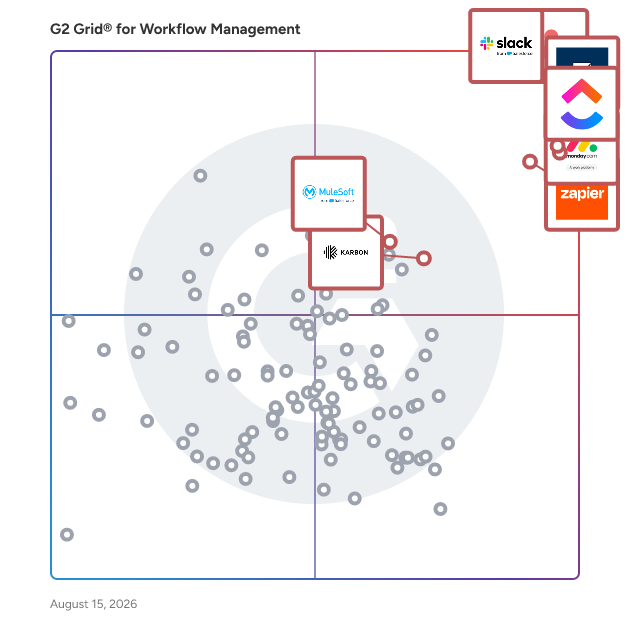
G2 Grid® for Workflow Management Software

G2 Grid® for Workflow Management Software plotting products by satisfaction and market presence

Highlighted products: Slack, Asana, Smartsheet, ClickUp, monday AI Work Platform, Zapier, Karbon, and MuleSoft Automation.

Underlying data: [Grid® JSON](https://www.g2.com/categories/workflow-management/grids.json?focus%5B%5D=slack&focus%5B%5D=asana&focus%5B%5D=smartsheet&focus%5B%5D=clickup&focus%5B%5D=monday-com&focus%5B%5D=zapier&focus%5B%5D=karbon-2025-03-03&focus%5B%5D=mulesoft-automation)

Sponsored

Moxo

Moxo is the AI orchestration platform built for business operations teams. From manual coordination to intelligent orchestration, Moxo transforms the way organizations run complex processes. The old way relies on scattered emails and manual follow-ups; the Moxo way keeps every step clear, connected, and accountable. We put human actions and decisions at the center of workflows, while AI and automation clear the manual work behind the scenes. By connecting people, systems, and AI, Moxo drives the right actions, from the right people, at the right time —whether it’s client onboarding, multi-party approvals, or ongoing account management. Business teams can eliminate bottlenecks, reduce drop-offs, and keep critical milestones moving forward. Trusted by leading global enterprises across financial services, consulting, legal, and healthcare, Moxo is the smarter way to orchestrate mission-critical workflows with confidence.

Visit website

Creatio

Creatio is an AI CRM and workflow platform where people and AI agents work together -with no limits on users, agents, or scale. Creatio helps midsize and large organizations run customer workflows in the AI era. This innovative platform enables organizations to create and manage workflows effortlessly, allowing users to focus on their core business activities while automating routine tasks. With millions of workflows operating daily, Creatio supports a diverse clientele across 100 countries, emphasizing a commitment to genuine care for its clients and partners. The platform is particularly beneficial for businesses seeking to enhance their operational efficiency without requiring extensive technical expertise. Its target audience includes small to large enterprises across various industries, particularly those looking to leverage technology to improve customer engagement and internal processes. Creatio's offerings cater to a wide range of use cases, from marketing automation and sales management to customer service optimization, making it a versatile solution for businesses aiming to adapt to the evolving market landscape. Key features of Creatio include the Creatio Studio, a no-code platform that allows users to build custom applications and AI agents using intuitive visual designers and natural language processing. This empowers users to create tailored solutions that meet their specific business needs without relying on traditional coding methods. Additionally, the CRM suite integrates embedded AI agents across Creatio Marketing, Sales, and Service, enhancing user experience and providing actionable insights to drive decision-making. Creatio also offers a specialized Financial Services CRM platform and industry-specific workflows across 19 verticals, ensuring that businesses can find solutions that resonate with their unique operational requirements. The availability of a marketplace with various add-ons further extends the platform's capabilities, allowing organizations to customize their experience and enhance functionality as needed. Recognized as a Leader and Strong Performer in prestigious Gartner and Forrester reports, Creatio stands out in its category by combining user-friendly design with powerful automation and AI-driven insights, making it an attractive option for businesses aiming to elevate their customer relationship management efforts. With its headquarters in Boston, MA, and a global presence of 850 employees across ten offices in 25 countries, Creatio has established long-lasting relationships with thousands of customers and over 500 partners worldwide. This extensive network underscores the platform's reliability and commitment to delivering value to its users, positioning Creatio as a trusted partner in the realm of AI agents, CRM, and workflow automation.

Average Rating: 4.6/5.0

Total Reviews: 315

How Do G2 Users Rate Creatio?

  • Has the product been a good partner in doing business?: 9.2/10 (Category avg: 9.1/10)
  • Activities: 9.2/10 (Category avg: 8.9/10)
  • Flows: 8.9/10 (Category avg: 8.9/10)
  • Integration: 8.7/10 (Category avg: 8.4/10)

Who Is the Company Behind Creatio?

  • Seller: Creatio
  • Company Website:
  • Year Founded: 2014
  • HQ Location: Boston, Massachusetts
  • Twitter: @Creatio_Global
    3,977 Twitter followers
  • LinkedIn® Page: www.linkedin.com
    1,150 employees on LinkedIn®

Who Uses This Product?

  • Who Uses This: CEO
  • Top Industries: Information Technology and Services, Computer Software
  • Company Size: 43% Small, 42% Medium

What Do G2 Reviewers Say About Creatio?

AI-generated summary from verified user reviews

Pros
  • Users appreciate the ease of use of Creatio, enabling quick implementation and seamless customization for their business needs.
  • Users value the efficiency of Creatio, enabling quick implementation and seamless customization for their business needs.
  • Users value the customizability of Creatio, enabling tailored processes and effective support for business needs.
  • Users appreciate the facility to customize Creatio, allowing for tailored solutions that enhance business processes and efficiency.
  • Users value the extensive customization options of Creatio, enhancing their ability to tailor solutions to specific needs.
Cons
  • Users find the learning curve steep, often needing training and support to effectively use Creatio.
  • Users are disappointed by the missing features in Creatio, particularly in advanced analytics and contact upload options.
  • Users find limited features in Creatio, particularly in analytics and marketplace app selection, hindering comprehensive functionality.
  • Users find limited customization options in Creatio, hindering the ability to tailor designs to specific needs.
  • Users find limited options in Creatio hinder flexibility, particularly for service businesses needing custom solutions and efficient contact uploads.

What Are Recent G2 Reviews of Creatio?

What Are G2 Users Discussing About Creatio?

Process Street

Process Street is a Compliance Operations Platform that helps teams run their most critical processes the right way, every time. Powered by AI agents, it ensures that policies are enforced, tasks are completed in the correct order, and everything is fully documented for audit readiness. Process Street is built for operational and compliance teams who need more control than task management tools offer, but without the complexity of legacy BPM or GRC systems. It enables anyone on the team to create, update, and run structured workflows without writing code. Instead of just documenting procedures, Process Street turns them into live, trackable processes that drive real execution. At the center of Process Street is Cora, an embedded AI compliance agent that monitors workflows in real time. Cora identifies skipped steps, flags potential risks, and ensures that each process stays aligned with internal policies and external regulations. Organizations use Cora to maintain compliance with frameworks such as ISO 9001, SOC 2, HIPAA, and others, without relying on manual oversight or last-minute audit preparation. The platform consists of three tightly integrated layers. First, document management allows teams to centralize policies, SOPs, and handbooks with full version control, approval workflows, and role-based permissions. Second, the process management engine turns those documents into workflows that assign tasks, route approvals, and collect data. Finally, Cora works across both layers to monitor execution, detect non-compliance, and generate audit-ready records in real time. Key capabilities include: • AI-powered compliance monitoring to enforce standards and surface process risks • No code workflow automation with tasks, forms, logic rules, and approvals • Controlled document management with audit trails, permissions, and version history • Automatic audit readiness with complete tracking of task activity and execution history • Integration with over 8000 tools, including Salesforce, Slack, Workday, and Google Workspace Process Street is used across industries like healthcare, financial services, real estate, and manufacturing. It is especially valuable to teams in operations, compliance, quality, and HR who need to ensure consistency, reduce risk, and prove that every step was followed. By combining structure, automation, and intelligence, Process Street helps teams replace manual processes with scalable systems that deliver control, visibility, and confidence across the business.

Average Rating: 4.6/5.0

Total Reviews: 451

How Do G2 Users Rate Process Street?

  • Has the product been a good partner in doing business?: 9.2/10 (Category avg: 9.1/10)
  • Activities: 8.6/10 (Category avg: 8.9/10)
  • Flows: 8.9/10 (Category avg: 8.9/10)
  • Integration: 8.6/10 (Category avg: 8.4/10)

Who Is the Company Behind Process Street?

  • Seller: Process Street
  • Company Website:
  • Year Founded: 2014
  • HQ Location: San Francisco, US
  • Twitter: @processstreet
    2,777 Twitter followers
  • LinkedIn® Page: www.linkedin.com
    53 employees on LinkedIn®

Who Uses This Product?

  • Who Uses This: CEO, Owner
  • Top Industries: Real Estate, Information Technology and Services
  • Company Size: 70% Small, 24% Medium

What Do G2 Reviewers Say About Process Street?

AI-generated summary from verified user reviews

Pros
  • Users find Process Street to be extremely easy to use, enhancing efficiency and streamlining workflow management effortlessly.
  • Users value the efficiency of Process Street, enabling streamlined workflows and organized task management for projects.
  • Users value the process efficiency of Process Street, facilitating streamlined workflows and improved team collaboration.
  • Users love how Process Street enhances task management, keeping teams organized and ensuring no tasks are overlooked.
  • Users praise the automation features of Process Street, seamlessly integrating human tasks for optimal workflow management.
Cons
  • Users note a steep learning curve that can be challenging, but support staff aids in navigating the platform.
  • Users face a steep learning difficulty with Process Street, especially when tackling complex conditional logic implementation.
  • Users find the limited customization options challenging, often leading to a steep learning curve and usability issues.
  • Users find the complexity of automations and managing processes can lead to confusion and inefficiency.
  • Users desire improved missing features like better document search, drag-and-drop tasks, and enhanced conditional logic capability.

What Are Recent G2 Reviews of Process Street?

What Are G2 Users Discussing About Process Street?

Softdocs

Softdocs is the only education focused provider of process automation and document management to enable schools to modernize campus operations and drive institutional success. We have helped hundreds of clients seamlessly integrate our platform with their SIS and other core systems across campus providing secure and compliant forms, workflows, electronic signatures, and content storage to build a connected campus and easily do more with less.

Average Rating: 4.7/5.0

Total Reviews: 24

How Do G2 Users Rate Softdocs?

  • Has the product been a good partner in doing business?: 9.8/10 (Category avg: 9.1/10)
  • Activities: 9.2/10 (Category avg: 8.9/10)
  • Flows: 9.1/10 (Category avg: 8.9/10)
  • Integration: 8.6/10 (Category avg: 8.4/10)

Who Is the Company Behind Softdocs?

  • Seller: Softdocs
  • Year Founded: 1998
  • HQ Location: Columbia, SC
  • Twitter: @Softdocs
    336 Twitter followers
  • LinkedIn® Page: www.linkedin.com
    144 employees on LinkedIn®

Who Uses This Product?

  • Top Industries: Higher Education, Education Management
  • Company Size: 71% Medium, 21% Large

What Are Recent G2 Reviews of Softdocs?

Wrangle

Wrangle is a modern ticketing and workflow system built into Slack Wrangle makes it easy for customers or colleagues to get help, ensures nothing falls through the cracks, and shows off how hard your team is working. All in Slack, where your team works. Wrangle powers conversational ticketing for both internal and external help desks Internal ticketing: Wrangle is used by thousands of IT, HR, and other ops teams to provide faster and more transparent service to their colleagues in Slack. External ticketing: Wrangle works in Slack Connect to help CX, support, and sales teams personally engage, grow, and support their customers. Powered by AI Wrangle was one of the first apps selected by Slack to be included in the AI-powered productivity category and was featured in the announcement of Slack AI. Wrangle leverages AI to make ticketing more conversational, lower resolution times, and improve customer satisfaction. Slack has also chosen Wrangle as an Essential App and has featured Wrangle as a Top App multiple times.

Average Rating: 4.9/5.0

Total Reviews: 10

How Do G2 Users Rate Wrangle?

  • Has the product been a good partner in doing business?: 10.0/10 (Category avg: 9.1/10)
  • Activities: 9.4/10 (Category avg: 8.9/10)
  • Flows: 9.0/10 (Category avg: 8.9/10)
  • Integration: 8.9/10 (Category avg: 8.4/10)

Who Is the Company Behind Wrangle?

  • Seller: Wrangle
  • Year Founded: 2020
  • HQ Location: Durham, US
  • LinkedIn® Page: www.linkedin.com
    9 employees on LinkedIn®

Who Uses This Product?

  • Company Size: 70% Medium, 20% Small

What Do G2 Reviewers Say About Wrangle?

AI-generated summary from verified user reviews

Pros
  • Users value the effective communication facilitated by Wrangle, enhancing team collaboration and operational efficiency.
  • Users highlight the enhanced efficiency of Wrangle, streamlining communication and improving collaboration across teams effectively.
  • Users commend the excellent customer support from Wrangle, appreciating their proactive assistance and understanding of workflows.
  • Users highlight the enhanced communication in daily workflows, streamlining interactions between support and project management.
  • Users find the ease of learning with Wrangle enhances communication and boosts internal efficiency in their teams.

What Are Recent G2 Reviews of Wrangle?

Parabola

Parabola is the AI agent platform for ops and finance teams. You describe your messy, recurring processes (the work that lives in macros, Python scripts, and tribal knowledge today) like reconciliations, carrier billing audits, accruals, inventory checks, and PO matching. Parabola builds the agents that run them on schedule, handle the unstructured inputs (PDFs, screenshots, multi-tab spreadsheets) a human analyst would handle, and show their work at every step. Unlike black-box agents, every decision is inspectable, governable, and audit-ready, so the agent becomes the SOP your team can review, hand off, and update without re-prompting from scratch. Every Parabola engagement includes access to a team of automation engineers, who take learnings from thousands of prior engagements to help design, scope, and deploy agents ready for production scale, not as a demo. Ops and finance teams at On Running, WHOOP, Flexport, Fabletics, Kendo Brands, KIND Bar, Spindrift, and Uber Freight use Parabola to operationalize AI for the high-stakes recurring work generic chatbots and autonomous agents can't safely run.

Average Rating: 4.9/5.0

Total Reviews: 53

How Do G2 Users Rate Parabola?

  • Has the product been a good partner in doing business?: 9.8/10 (Category avg: 9.1/10)
  • Activities: 8.5/10 (Category avg: 8.9/10)
  • Flows: 9.5/10 (Category avg: 8.9/10)
  • Integration: 8.5/10 (Category avg: 8.4/10)

Who Is the Company Behind Parabola?

  • Seller: Parabola
  • Year Founded: 2017
  • HQ Location: San Francisco, CA
  • Twitter: @parabolahq
  • LinkedIn® Page: www.linkedin.com
    85 employees on LinkedIn®

Who Uses This Product?

  • Top Industries: Consumer Goods, Computer Software
  • Company Size: 47% Medium, 45% Small

What Do G2 Reviewers Say About Parabola?

AI-generated summary from verified user reviews

Pros
  • Users love Parabola for its effortless automation, significantly saving time on repetitive tasks with easy setup.
  • Users find Parabola's ease of use exceptional, enabling quick automation setup without coding expertise.
  • Users highlight Parabola's intuitive interface, making automation accessible for both technical and non-technical users.
  • Users experience tremendous time savings with Parabola, easily automating tasks and enhancing workflow efficiency.
  • Users value the tremendous time savings Parabola provides by automating repetitive tasks and simplifying workflow management.
Cons
  • Users find the limited flexibility in data manipulation steps makes building flows cumbersome and time-consuming.
  • Users face a learning curve that can be challenging initially, but improvements may ease the transition.
  • Users find time consumption challenging with Parabola due to multiple steps needed for data manipulation, impacting efficiency.
  • Users experience data inaccuracy with Parabola, often needing to verify results and manage report settings carefully.
  • Users are frustrated by the limited export options, especially regarding large data sets exceeding Gmail's 25MB limit.

What Are Recent G2 Reviews of Parabola?

What Are G2 Users Discussing About Parabola?

DocuWare

DocuWare is a type of digital document management and automated workflow solution designed to help organizations streamline their document processes and enhance operational efficiency. This versatile platform caters to businesses of all sizes and spans various industries, including but not limited to manufacturing, finance, education, and government. By offering a comprehensive suite of tools for managing documents and automating workflows, DocuWare enables users to reduce manual tasks, improve collaboration, and ensure compliance with regulatory requirements. The target audience for DocuWare includes organizations seeking to optimize their document management practices and automate repetitive processes. This solution is particularly beneficial for businesses that handle large volumes of paperwork or require secure access to sensitive information. With its capabilities, DocuWare serves a diverse clientele, from small businesses to large enterprises, making it a flexible choice for any organization looking to enhance its document handling capabilities. DocuWare's key features include robust document storage, intelligent document processing, advanced search functionalities, and customizable workflow automation. Users can easily store and retrieve documents in a secure digital environment, ensuring that critical information is always accessible. The platform's advanced search capabilities allow users to locate documents quickly, saving time and improving productivity. Additionally, the customizable workflow automation tools enable organizations to design processes tailored to their specific needs, facilitating smoother operations and reducing the likelihood of errors. One of the standout aspects of DocuWare is its adaptability to various deployment options. Organizations can choose between cloud-based or on-premises solutions, allowing them to select the deployment method that best fits their infrastructure and security requirements. With support for 24 languages, DocuWare is accessible to a global audience, making it a suitable choice for multinational organizations. The platform currently serves over 20,000 customers and 930,000 users across more than 100 countries, backed by a network of over 800 partners, which highlights its widespread acceptance and reliability in the market. Overall, DocuWare provides a comprehensive solution for organizations looking to modernize their document management and workflow processes. By leveraging its advanced features and flexible deployment options, businesses can enhance efficiency, improve collaboration, and ensure that they remain compliant with industry regulations.

Average Rating: 4.4/5.0

Total Reviews: 238

How Do G2 Users Rate DocuWare?

  • Has the product been a good partner in doing business?: 9.0/10 (Category avg: 9.1/10)
  • Activities: 8.2/10 (Category avg: 8.9/10)
  • Flows: 8.4/10 (Category avg: 8.9/10)
  • Integration: 8.3/10 (Category avg: 8.4/10)

Who Is the Company Behind DocuWare?

  • Seller: DocuWare
  • Company Website:
  • Year Founded: 1988
  • HQ Location: Beacon, NY
  • Twitter: @DocuWare
    2,283 Twitter followers
  • LinkedIn® Page: www.linkedin.com
    647 employees on LinkedIn®

Who Uses This Product?

  • Who Uses This: Software Analyst
  • Top Industries: Information Technology and Services, Pharmaceuticals
  • Company Size: 47% Medium, 30% Large

What Do G2 Reviewers Say About DocuWare?

AI-generated summary from verified user reviews

Pros
  • Users appreciate the ease of use of DocuWare, which streamlines document management and improves accessibility.
  • Users value the seamless integration capabilities of DocuWare, enhancing productivity and streamlining workflows effectively.
  • Users value the streamlined document management in DocuWare, enhancing efficiency and organization through intuitive workflows and integrations.
  • Users appreciate the robust automation of DocuWare, significantly enhancing efficiency and streamlining workflows across various businesses.
  • Users value the easy integrations of DocuWare, enhancing workflow efficiency and connectivity with various applications.
Cons
  • Users note missing features in DocuWare, such as inadequate OCR and API documentation, affecting overall efficiency.
  • Users may face a difficult learning curve with DocuWare, especially those new to document management systems.
  • Users find DocuWare has limited features, requiring extensive scripting and lacking necessary built-in actions for workflows.
  • Users find the complexity of DocuWare's setup and features overwhelming, making initial use time-consuming and challenging.
  • Users find the training required challenging, especially due to limited tutorials and complex components to learn.

What Are Recent G2 Reviews of DocuWare?

What Are G2 Users Discussing About DocuWare?

SmartSuite

SmartSuite is an AI-powered Work Operating System (Work OS) — one platform for GRC & Resilience, IT Service Delivery, Project & Portfolio Management, and Business Operations. Trusted by over 2,000 businesses worldwide, SmartSuite unites data, teams, and systems in a single governed environment, eliminating tool sprawl, reducing manual handoffs, and giving every stakeholder real-time visibility into the work that matters most. Where traditional GRC and ITSM platforms require lengthy build cycles, custom development, and months of professional services before a single team goes live, SmartSuite is built to launch in weeks, not quarters. Purpose-built Solution Suites — spanning Enterprise Risk Management, Compliance, Internal Audit, Cyber & IT Risk, ITSM, IT Asset Management, Portfolio & Financial Management, and more — are ready to deploy from day one, configured without code, and designed to expand as adoption grows across the organization. Underpinned by 8 interconnected platform frameworks — Data Architecture, Workflow Orchestration, Automation, Artificial Intelligence, Secure Collaboration, Enterprise Reporting, Integrations, and Security & Governance — SmartSuite delivers the structural rigor enterprise organizations demand without the total cost of ownership that traditional point solutions carry. SOC 2, ISO 27001, GDPR, and HIPAA compliant out of the box.

Average Rating: 4.9/5.0

Total Reviews: 44

How Do G2 Users Rate SmartSuite?

  • Has the product been a good partner in doing business?: 9.9/10 (Category avg: 9.1/10)

Who Is the Company Behind SmartSuite?

  • Seller: SmartSuite
  • Company Website:
  • Year Founded: 2019
  • HQ Location: Newport Beach, US
  • Twitter: @hellosmartsuite
    494 Twitter followers
  • LinkedIn® Page: www.linkedin.com
    57 employees on LinkedIn®

Who Uses This Product?

  • Top Industries: Marketing and Advertising, Information Technology and Services
  • Company Size: 82% Small, 14% Medium

What Do G2 Reviewers Say About SmartSuite?

AI-generated summary from verified user reviews

Pros
  • Users appreciate the ease of use of SmartSuite, enabling quick tool creation and seamless organization of records.
  • Users appreciate the flexibility of SmartSuite, enjoying diverse views and seamless integration with other applications.
  • Users praise the exceptional customer support of SmartSuite, highlighting the responsive and helpful assistance provided.
  • Users love the intuitive design of SmartSuite, providing a user-friendly experience tailored to individual workflows.
  • Users praise SmartSuite for its beautiful user interface, enhancing adoption while offering robust functionality and flexibility.
Cons
  • Users find SmartSuite expensive, noting high costs for upgrades and the lack of a mid-tier plan.
  • Users note the missing features in SmartSuite, highlighting limitations in formula functions and automation tools.
  • Users find the learning curve steep, requiring database knowledge and time to navigate and configure SmartSuite effectively.
  • Users find the mobile app lacking and desire improvements in the "My Tasks" view and Grid View layout.
  • Users find the limited library of formula functions frustrating, lacking essential tools for data manipulation and text handling.

What Are Recent G2 Reviews of SmartSuite?

Rocketlane

Rocketlane is the world’s first Agentic Professional Services Automation (PSA) platform, built to transform how professional services teams deliver value in the AI-first era. While traditional PSAs focus on recording work, Rocketlane accelerates it through a connected system that unifies the entire front and back office. The platform brings together project delivery, resource management, time tracking, billing, and financial operations alongside collaboration capabilities such as Spaces, real-time chat, a modern client portal, Sheets for structured data, and a powerful Custom Apps framework that lets teams model any workflow inside Rocketlane. Everything lives in a single ecosystem, eliminating tool sprawl and fragmented data that slows down services teams. At the core of this is Nitro, Rocketlane's agentic execution layer: a network of intelligent AI agents that execute real delivery tasks, automate setup, manage workflows, detect risks, enforce governance, and continuously learn from patterns across the organization. This shift unlocks faster go-lives, better utilization, proactive issue detection, consistent delivery quality, and a level of operational resilience that was previously impossible. Over 650 companies, including Retool, Coursera, Postman, Intercom, Glean, AuditBoard, Vercel, Sprinklr, Worldpay, Grafana, OpenGov, and Outreach trust Rocketlane to run their mission-critical delivery processes. Customers across SaaS, services, and consulting use Rocketlane to shorten onboarding timelines, reduce escalations, improve forecasting accuracy, and accelerate moving from booked to consumed revenue. Founded in 2020, headquartered in the US, and operating globally with teams across India and the UK, Rocketlane is backed by leading investors, including Nexus Venture Partners and 8VC. The company’s rapid growth reflects strong market confidence in its category-defining vision for Agentic PSA.

Average Rating: 4.7/5.0

Total Reviews: 835

How Do G2 Users Rate Rocketlane?

  • Has the product been a good partner in doing business?: 9.5/10 (Category avg: 9.1/10)
  • Activities: 9.2/10 (Category avg: 8.9/10)
  • Flows: 9.1/10 (Category avg: 8.9/10)
  • Integration: 9.2/10 (Category avg: 8.4/10)

Who Is the Company Behind Rocketlane?

  • Seller: Rocketlane Corp
  • Company Website:
  • Year Founded: 2020
  • HQ Location: Walnut, US
  • Twitter: @RocketlaneHQ
    1,470 Twitter followers
  • LinkedIn® Page: www.linkedin.com
    290 employees on LinkedIn®

Who Uses This Product?

  • Who Uses This: Customer Success Manager, Software Engineer
  • Top Industries: Computer Software, Information Technology and Services
  • Company Size: 56% Medium, 27% Small

What Do G2 Reviewers Say About Rocketlane?

AI-generated summary from verified user reviews

Pros
  • Users appreciate the scope of features in Rocketlane, streamlining onboarding and project management in one tool.
  • Users find Rocketlane incredibly easy to use, with simple report generation and flexible, customizable features.
  • Users value the streamlined team collaboration in Rocketlane, enhancing organization and communication across projects and stakeholders.
  • Users find project tracking easy and efficient with Rocketlane, enhancing organization and collaboration for better outcomes.
  • Users appreciate the task management capabilities of Rocketlane, enabling streamlined project setup and efficient team collaboration.
Cons
  • Users frequently note the missing features in Rocketlane, particularly the lack of customer health scoring and effective resourcing tools.
  • Users report slow performance during high workloads, complicating project understanding and overall implementation processes.
  • Users report filtering issues that complicate navigation and experience, along with significant bugs and poor search capabilities.
  • Users find the learning curve challenging, especially when navigating initial setup and implementation complexities without sufficient resources.
  • Users find limited customization options in Rocketlane, especially in reporting capabilities and customer portal metrics.

What Are Recent G2 Reviews of Rocketlane?

What Are G2 Users Discussing About Rocketlane?

Kissflow

Kissflow is an easy-to-use, low-code platform for custom application development tailored to business operations. Kissflow enables process owners and IT developers to automate and build middle-office processes and applications. Kissflow help solve two main challenges in the enterprise: The first is the custom application backlog. Enterprise IT teams say “not now” to most custom application requests from business teams. While important to a department, they aren’t vital enough to engage limited IT bandwidth. Kissflow gives internal developers a hyper-fast platform to build various applications quickly. The second is starting a citizen development program. Process owners are scattered throughout the organization and need a standard, approved, and governed way to build automated applications that are a step up from spreadsheets. With its simple no-code design, patented rules engine, and comprehensive governance module, Kissflow is the ONLY platform that fulfills all the requirements for true citizen development. Teams can build a wide variety of solutions on Kissflow, from custom multifunctional applications to automated human-centric processes, workflows, case management, and project management. Hundreds of global and Fortune 500 brands rely on Kissflow to transform middle-office operations.

Average Rating: 4.3/5.0

Total Reviews: 560

How Do G2 Users Rate Kissflow?

  • Has the product been a good partner in doing business?: 8.6/10 (Category avg: 9.1/10)
  • Activities: 8.5/10 (Category avg: 8.9/10)
  • Flows: 8.9/10 (Category avg: 8.9/10)
  • Integration: 8.0/10 (Category avg: 8.4/10)

Who Is the Company Behind Kissflow?

  • Seller: KissFlow
  • Year Founded: 2012
  • HQ Location: Delaware, USA
  • Twitter: @kissflow
    6,920 Twitter followers
  • LinkedIn® Page: www.linkedin.com
    504 employees on LinkedIn®

Who Uses This Product?

  • Who Uses This: IT Manager, Business Analyst
  • Top Industries: Information Technology and Services, Education Management
  • Company Size: 55% Medium, 24% Small

What Do G2 Reviewers Say About Kissflow?

AI-generated summary from verified user reviews

Pros
  • Users love the user-friendly interface of Kissflow, appreciating its visual appeal and ease of navigation.
  • Users enjoy the ease of use and flexibility of Kissflow's workflow management for streamlined document processes.
  • Users value the automation capabilities of Kissflow, enhancing agility and productivity while simplifying process management.
  • Users admire the flexibility of Kissflow, making workflow design and document management effortless and customizable.
  • Users love Kissflow for its customization options, enabling tailored workflows and seamless integrations with third-party services.
Cons
  • Users face challenges with limited features in Kissflow, especially regarding data export and mobile app functionality.
  • Users desire a scripting engine and enhanced features to meet their specific customization and reporting needs.
  • Users find Kissflow offers limited customization, restricting flexibility and hindering specific use-case implementations.
  • Users find integration issues challenging, as third-party connections can be cumbersome and inflexible.
  • Users criticize the limited access control in Kissflow, noting inconsistent permissions and a lack of privacy features.

What Are Recent G2 Reviews of Kissflow?

What Are G2 Users Discussing About Kissflow?

Activepieces

Activepieces is an open-source, no-code automation platform designed to streamline workflows by connecting various applications and services. It empowers users to automate repetitive tasks without requiring programming skills, enhancing productivity and efficiency across diverse industries. Key Features and Functionality: - No-Code Automation: Enables users to create complex workflows through an intuitive drag-and-drop interface, eliminating the need for coding expertise. - Extensive Integrations: Supports a wide range of applications and services, allowing seamless data transfer and synchronization between different platforms. - Customizable Triggers and Actions: Offers flexibility in defining triggers and actions to tailor workflows to specific business needs. - Scalability: Designed to handle workflows of varying complexities, accommodating the growth and evolving requirements of businesses. - Open-Source Community: Benefits from a collaborative community that contributes to continuous improvement and innovation. Primary Value and Solutions Provided: Activepieces addresses the challenge of manual, time-consuming tasks by automating processes, thereby reducing errors and freeing up valuable time for strategic activities. It democratizes automation by making it accessible to non-technical users, fostering innovation and efficiency within organizations. By integrating disparate systems, Activepieces enhances data consistency and operational coherence, leading to improved decision-making and business outcomes.

Average Rating: 4.8/5.0

Total Reviews: 142

How Do G2 Users Rate Activepieces?

  • Has the product been a good partner in doing business?: 9.4/10 (Category avg: 9.1/10)
  • Activities: 8.9/10 (Category avg: 8.9/10)
  • Flows: 9.4/10 (Category avg: 8.9/10)
  • Integration: 9.4/10 (Category avg: 8.4/10)

Who Is the Company Behind Activepieces?

  • Seller: Activepieces
  • Year Founded: 2022
  • HQ Location: San Francisco, California
  • LinkedIn® Page: www.linkedin.com
    26 employees on LinkedIn®

Who Uses This Product?

  • Who Uses This: Founder
  • Top Industries: Marketing and Advertising, Computer Software
  • Company Size: 96% Small, 4% Medium

What Do G2 Reviewers Say About Activepieces?

AI-generated summary from verified user reviews

Pros
  • Users love the intuitive interface of Activepieces, which simplifies automation and enhances overall efficiency effortlessly.
  • Users love the powerful automation capabilities of Activepieces, making complex workflows easy and efficient to manage.
  • Users appreciate the powerful automation features of Activepieces, ensuring efficient and smooth operations across various tasks.
  • Users love the extensive software integrations offered by Activepieces, enhancing automation and collaboration across various platforms.
  • Users applaud Activepieces for its intuitive interface, making it easy and enjoyable to use for E-commerce tasks.
Cons
  • Users feel the limited integrations with Activepieces restrict their workflow and connection to other project management tools.
  • Users face a noticeable learning curve with Activepieces due to vague documentation and limited onboarding resources.
  • Users note the missing features in Activepieces, particularly in video tutorials and key integrations like Gmail.
  • Users feel there are currently limited app connections, but expect more integrations in the near future.
  • Users find integration issues challenging, especially with setting up APIs and multi-step workflows, complicating the user experience.

What Are Recent G2 Reviews of Activepieces?

SuprSend

SuprSend is a notification infrastructure built for modern product teams who need reliable, scalable, and developer-friendly notifications without building everything from scratch. WHY TEAMS CHOOSE SUPRSEND: Stop Rebuilding Notifications Most teams waste 3-6 months building notification systems that break at scale. SuprSend gives you enterprise-grade infrastructure out of the box so you can ship notifications in days, not months. One API, Every Channel Send to email, SMS, WhatsApp, Slack, MS Teams, mobile push, web push, and in-app—all with a single API call. No more juggling multiple vendor SDKs or maintaining separate integrations. Built for Developers, Loved by Product Teams Developers get clean APIs and SDKs (Node, Python, Java, Go, PHP). Product teams get a no-code workflow builder to create, test, and launch notifications without engineering bottlenecks. Workflows That Actually Work Build smart notification workflows with batching, digests, delays, conditional logic, timezone support, and cross-channel routing. Send the right message, on the right channel, at the right time. WHAT YOU GET: - Unified Notification API - One API for all channels - Template Management - Version-controlled templates with live preview - Workflow Builder - Drag-and-drop workflows with conditions and delays - In-App Inbox & Feed - Drop-in React components for web and mobile - User Preferences - Out-of-the-box preference management - Multi-Tenancy - Per-tenant customization for B2B2C products - Vendor Management - Automatic failover between email/SMS providers - Smart Routing - Intelligent channel selection based on user behavior - Real-time Analytics - Logs, delivery rates, and failure alerts - Data Warehouse Integration - Run campaigns on top of your data BUILT FOR: - SaaS products needing transactional emails (password resets, invoices, alerts) - B2B2C platforms requiring per-tenant notification customization - Growth teams running engagement campaigns across multiple channels - Engineering teams who don't want to build notification infrastructure TRUSTED BY: Startups to scaling companies across SaaS, E-commerce, FinTech, HealthTech, and EdTech rely on SuprSend to handle millions of notifications daily. Try SuprSend for free: https://www.suprsend.com/

Average Rating: 4.8/5.0

Total Reviews: 127

How Do G2 Users Rate SuprSend?

  • Has the product been a good partner in doing business?: 9.7/10 (Category avg: 9.1/10)
  • Activities: 9.6/10 (Category avg: 8.9/10)
  • Flows: 9.8/10 (Category avg: 8.9/10)
  • Integration: 9.7/10 (Category avg: 8.4/10)

Who Is the Company Behind SuprSend?

  • Seller: SuprSend
  • Company Website:
  • Year Founded: 2022
  • HQ Location: San Francisco, CA
  • Twitter: @SuprSend
    102 Twitter followers
  • LinkedIn® Page: www.linkedin.com
    22 employees on LinkedIn®

Who Uses This Product?

  • Top Industries: Computer Software, Information Technology and Services
  • Company Size: 73% Small, 22% Medium

What Do G2 Reviewers Say About SuprSend?

AI-generated summary from verified user reviews

Pros
  • Users value the visual workflow builder for its simplicity and ease of managing notifications without coding.
  • Users value the ease of use of SuprSend, allowing seamless setup and management of notification workflows without coding.
  • Users value the visual workflow builder that simplifies managing notification flows efficiently and intuitively.
  • Users value the simplicity and speed of integrations with SuprSend, enhancing their workflow management efficiently.
  • Users value the easy setup of SuprSend, enabling personalized notifications without needing engineering support.
Cons
  • Users feel the analytics features lack depth, noting the missing features limit the product’s overall potential.
  • Users desire more features on SuprSend as marketing notifications currently lack power compared to other platforms.
  • Users find the limited templates frustrating, wishing for more options and edit capabilities to streamline their workflow.
  • Users find the difficult setup of SuprSend time-consuming and confusing, but it becomes easier after initial configuration.
  • Users find the learning curve challenging, especially regarding interface navigation and initial setup, but adjust over time.

What Are Recent G2 Reviews of SuprSend?

getint.io

Getint is the go-to integration and migration platform trusted by enterprises worldwide to keep their workflows connected and their teams aligned. We specialize in secure, two-way integrations and data migrations between the most essential tools in ITSM, DevOps, CRM, and project management - Jira, Azure DevOps, ServiceNow, Salesforce, GitLab, GitHub, Zendesk, Asana, Monday.com, Wrike, HubSpot, ClickUp, Trello, Airtable, and more. With over 6,000 companies actively using Getint - including more than 16 Fortune 500 organizations - our platform powers 660,000+ users globally. Industry leaders like Lufthansa, Skoda, Deloitte, and Fujitsu rely on Getint to streamline operations, unify systems, and maintain business agility. Why Getint? Seamless two-way integrations with full customization - synchronize issues, tasks, incidents, tickets, and more, tailored to your workflows. Robust data migrations - securely move critical data between systems during tool transitions, mergers, or consolidations. Flexible deployment options - available as SaaS or fully on-premise, operating securely behind firewalls and aligned with enterprise compliance standards. Enterprise-grade security - our platform adheres to industry-leading security standards and certifications, ensuring your data stays protected. Award-winning growth - recognized as a Rising Star on the Atlassian Marketplace, Getint is the fastest-growing integration tool in the Atlassian ecosystem. Solution partnerships - as a Gold Atlassian Partner and official partner of GitLab and Monday.com, we deliver seamless, trusted integrations across major enterprise platforms. Dedicated support - our team works closely with your organization, providing expert guidance from onboarding through ongoing optimization. Discover how Getint can help your systems work better together. Visit www.getint.io.

Average Rating: 4.7/5.0

Total Reviews: 15

How Do G2 Users Rate getint.io?

  • Has the product been a good partner in doing business?: 9.8/10 (Category avg: 9.1/10)
  • Activities: 9.8/10 (Category avg: 8.9/10)
  • Flows: 9.8/10 (Category avg: 8.9/10)
  • Integration: 9.7/10 (Category avg: 8.4/10)

Who Is the Company Behind getint.io?

Who Uses This Product?

  • Company Size: 53% Medium, 33% Small

What Do G2 Reviewers Say About getint.io?

AI-generated summary from verified user reviews

Pros
  • Users find the ease of use of Getint.io remarkable, appreciating its intuitive setup and seamless integration.
  • Users commend the easy setup of Getint.io, making Jira and Azure DevOps integration seamless and efficient.
  • Users commend Getint's exceptional customer support, highlighting responsive 24/7 assistance that enhances the integration experience.
  • Users value the easy integrations offered by Getint.io, enabling quick setups without complex configurations.
  • Users find the intuitive interface of Getint.io facilitates seamless integration and simplifies the syncing process.
Cons
  • Users face a steep learning curve when starting with getint.io, requiring time and support to adapt effectively.
  • Users express frustration with the limited features of getint.io, affecting ease of use and requiring manual configuration.
  • Users find missing features frustrating, as many are still under development and require manual project configuration.

What Are Recent G2 Reviews of getint.io?

Runrun.it

Runrun.it is a Cloud Work Management Solution. If your company needs to track where people’s time goes and centralize the use of AI in a single platform, Runrun.it can help in a simple and unique way. Imagine Runrun.it as a playlist of tasks, projects, AI Agents, and workflows. Users simply click Play, and Runrun.it automatically tracks time, allocates costs to clients, projects, and task types, and creates, reviews, and analyzes content with AI. You gain greater control and visibility into the profitability of your projects and clients through a powerful set of data. Try it free.

Average Rating: 4.8/5.0

Total Reviews: 1,231

How Do G2 Users Rate Runrun.it?

  • Has the product been a good partner in doing business?: 9.2/10 (Category avg: 9.1/10)
  • Activities: 9.2/10 (Category avg: 8.9/10)
  • Flows: 9.0/10 (Category avg: 8.9/10)
  • Integration: 8.3/10 (Category avg: 8.4/10)

Who Is the Company Behind Runrun.it?

  • Seller: Runrun.it
  • Year Founded: 2012
  • HQ Location: Sao Paulo, Brazil
  • Twitter: @runrun_it
    1,387 Twitter followers
  • LinkedIn® Page: www.linkedin.com
    36 employees on LinkedIn®

Who Uses This Product?

  • Who Uses This: CEO, Designer
  • Top Industries: Marketing and Advertising, Information Technology and Services
  • Company Size: 58% Small, 36% Medium

What Do G2 Reviewers Say About Runrun.it?

AI-generated summary from verified user reviews

Pros
  • Users value the effective organization in Runrun.it for tracking projects, tasks, and deadlines effortlessly.
  • Users value the efficiency of Runrun.it, finding it intuitive for organizing tasks and tracking projects seamlessly.
  • Users appreciate the easy task management and intuitive interface of Runrun.it, boosting their productivity daily.
  • Users value the task tracking capabilities of Runrun.it, enabling clear organization and prioritization of projects.
  • Users value the time tracking feature for efficiently managing tasks and prioritizing urgent projects.
Cons
  • Users report frequent issues with the app functionality, including non-responsive buttons and constant login requirements.
  • Users often face app issues like unresponsive buttons and frequent login requirements, hindering quick task access.
  • Users often face bug issues like slowness, visual glitches, and occasional offline moments that hinder usability.
  • Users find the visualization confusing, particularly with adjusting hours and navigating the Kanban and process boards.
  • Users find the learning curve confusing, as adjusting hours and using Kanban can be laborious and unclear.

What Are Recent G2 Reviews of Runrun.it?

What Are G2 Users Discussing About Runrun.it?

Exalate

Exalate is a bidirectional synchronization solution that enables teams to sync data in real time between work management and ITSM tools – across departments, companies, and organizational boundaries. It connects systems like Jira, ServiceNow, Salesforce, Azure DevOps, Zendesk, Freshservice, Freshdesk, Asana, and more. Template-based sync tools work for predefined mappings but break when requirements get specific. iPaaS solutions handle orchestration across systems but add complexity and operational overhead at scale. Custom-built integrations offer control but drain resources on maintenance. Exalate sits in between: a Groovy-based scripting engine that handles any sync logic you can define, combined with a console that gives you visibility into what's running across all your connections. Teams that need operational control and flexibility for advanced cross-team or cross-company scenarios – without unpredictable costs – are the primary audience. Key capabilities: Side-by-side configuration: View and edit both sides of any connection in one screen – scripts, sync queues, and errors for each system displayed together. No need to switch between instances or coordinate with the other party to understand what's happening. Real-time bidirectional sync: Sync issues, tickets, incidents, comments, statuses, custom fields, and attachments. Scripts remain separated by direction (incoming/outgoing) for precise control. Test Run: Validate sync scripts and configuration changes before they affect production data. Preview outcomes, then publish when confident. Aida (AI assistant): Get help understanding existing scripts, designing changes, and troubleshooting sync errors – while humans stay in control. Outcome-based pricing: Pay for active work items in sync, not user seats or transaction volumes. Exalate is used by IT teams, integration administrators, DevOps engineers, and operations managers running cross-tool and cross-company integrations – from straightforward team-level syncs to complex multi-party environments with governance requirements. Trusted by 2,500+ organizations worldwide and 200+ partners. ISO 27001 certified. Over a decade in production.

Average Rating: 4.7/5.0

Total Reviews: 69

How Do G2 Users Rate Exalate?

  • Has the product been a good partner in doing business?: 9.4/10 (Category avg: 9.1/10)
  • Activities: 7.8/10 (Category avg: 8.9/10)
  • Flows: 7.8/10 (Category avg: 8.9/10)
  • Integration: 7.9/10 (Category avg: 8.4/10)

Who Is the Company Behind Exalate?

  • Seller: Exalate
  • Year Founded: 2011
  • HQ Location: Antwerpen, Vlaanderen
  • Twitter: @exalatetool
    26 Twitter followers
  • LinkedIn® Page: www.linkedin.com
    79 employees on LinkedIn®

Who Uses This Product?

  • Top Industries: Computer Software, Information Technology and Services
  • Company Size: 48% Medium, 31% Small

What Do G2 Reviewers Say About Exalate?

AI-generated summary from verified user reviews

Pros
  • Users value Exalate for its seamless data syncing, enhancing collaboration across platforms like Jira and GitHub.
  • Users appreciate the seamless integration between Jira and GitHub with Exalate, enhancing project visibility and efficiency.
  • Users value the automation capabilities of Exalate, enabling seamless integration and efficient incident management across platforms.
  • Users value the easy integrations of Exalate, enabling seamless connections between various systems like Jira and ServiceNow.
  • Users value the flexibility of Exalate, enabling tailored integrations that adapt to their specific processes seamlessly.
Cons
  • Users struggle with the steep learning curve of Exalate, requiring technical knowledge for effective use and configuration.
  • Users face a difficult learning curve with Exalate due to the need for technical knowledge in scripting and sync logic.
  • Users find the coding difficulty in Exalate challenging, especially with complex functionalities and scripting requirements.
  • Users find the complex setup challenging initially, requiring time to master advanced configurations for effective use.
  • Users struggle with advanced scripting challenges in Exalate, facing issues with syncing and text rendering between platforms.

What Are Recent G2 Reviews of Exalate?

What Are G2 Users Discussing About Exalate?

IBM Business Automation Workflow (BAW)

IBM Business Automation Workflow combines business process management and case management capabilities in one workflow solution. It integrates the capabilities of business process and case management into a single workflow offering. It unites information, process, and users to provide a 360-degree view of work. In addition to process management, workflow uses advanced analytics, business rules, and collaboration to drive more successful, optimized business outcomes. You can choose a deployment option most convenient for your business based on your needs. IBM Business Automation Workflow on Cloud and IBM Business Automation Workflow have the same capabilities. However, the former is a ready-to-use, cloud-based environment that is hosted in IBM Cloud data centers and managed by IBM. Key Features and functionality: -Enable business users to manage workflows -Implement changes quickly for greater agility -Achieve visibility across end-to-end workflows -Increase efficiency and consistency by reusing process components across multiple workflows. -Deliver better speed and scalability -Access the cloud service from the public cloud or mobile devices through the cloud portal or use a separately available Virtual Private Network (VPN) to connect. -Meet governance and compliance requirements Value of the product and what it can do for your users: -IBM Business Automation Workflow helps bridge business strategy and execution to deliver better outcomes -It helps model, design, implement and monitor more competitive front- or back-office workflows -Automate operations at scale to increase straight through processing and case closure rates -Consolidate disparate information to create unified data records linked by case or customer -Improve your ability to meet and manage information lifecycle governance requirements, such as protecting customer data and complying with data retention regulations

Average Rating: 4.4/5.0

Total Reviews: 75

How Do G2 Users Rate IBM Business Automation Workflow (BAW)?

  • Has the product been a good partner in doing business?: 8.1/10 (Category avg: 9.1/10)
  • Activities: 7.1/10 (Category avg: 8.9/10)
  • Flows: 8.3/10 (Category avg: 8.9/10)
  • Integration: 6.7/10 (Category avg: 8.4/10)

Who Is the Company Behind IBM Business Automation Workflow (BAW)?

  • Seller: IBM
  • Year Founded: 1911
  • HQ Location: Armonk, New York, United States
  • Twitter: @IBMSecurity
    74,660 Twitter followers
  • LinkedIn® Page: www.linkedin.com
    328,202 employees on LinkedIn®
  • Ownership: SWX:IBM

Who Uses This Product?

  • Who Uses This: Consultant, Software Developer
  • Top Industries: Information Technology and Services, Banking
  • Company Size: 49% Large, 34% Medium

What Do G2 Reviewers Say About IBM Business Automation Workflow (BAW)?

AI-generated summary from verified user reviews

Pros
  • Users value the ease of use of IBM BAW, finding it intuitive and efficient for business processes.
Cons
  • Users find the outdated layout of IBM BAW uninspiring, impacting their overall experience and engagement.

What Are Recent G2 Reviews of IBM Business Automation Workflow (BAW)?

What Are G2 Users Discussing About IBM Business Automation Workflow (BAW)?

Bijou Barry
BB
Researched and written by Bijou Barry
Updated April 9, 2026