Best Work Management Software - Page 3

How Many Work Management Software Products Does G2 Track?

Total Products under this Category: 241

Category Stats (Oct 2026)

  • Average Rating: 4.5/5 The average rating of products in this category, based on all submitted ratings
  • Top Trending Product: Semsto (+11.11%) - Among all products in this category, Semsto recorded the largest rating increase compared to last month

Last updated: October 26, 2026

How Does G2 Rank Work Management Software Products?

Why You Can Trust G2's Software Rankings:

  • 30 Analysts and Data Experts
  • 148,100+ Authentic Reviews
  • 241+ Products
  • Unbiased Rankings

G2's software rankings are built on verified user reviews, rigorous moderation, and a consistent research methodology maintained by a team of analysts and data experts. Each product is measured using the same transparent criteria, with no paid placement or vendor influence. While reviews reflect real user experiences, which can be subjective, they offer valuable insight into how software performs in the hands of professionals. Together, these inputs power the G2 Score, a standardized way to compare tools within every category.

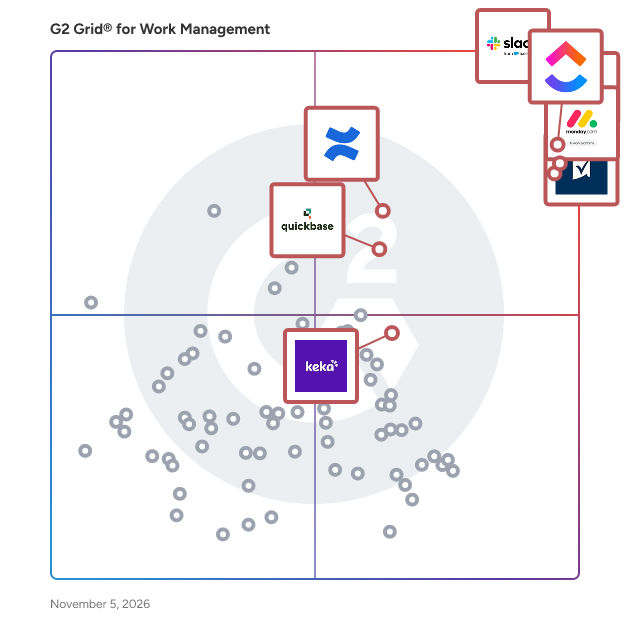
G2 Grid® for Work Management Software

G2 Grid® for Work Management Software plotting products by satisfaction and market presence

Highlighted products: Slack, ClickUp, Asana, monday AI Work Platform, Smartsheet, Confluence, Quickbase, and Keka.

Underlying data: [Grid® JSON](https://www.g2.com/categories/work-management/grids.json?focus%5B%5D=slack&focus%5B%5D=clickup&focus%5B%5D=asana&focus%5B%5D=monday-com&focus%5B%5D=smartsheet&focus%5B%5D=confluence&focus%5B%5D=quickbase&focus%5B%5D=keka)

Productive

Productive is the all-in-one professional services automation platform built for agencies, consultancies, and service businesses. Manage projects, resources, and finances in one place — with real-time visibility and advanced AI and agentic features. AI Experience a modern way of working with Productive’s AI features: an integrated AI Assistant that you can ask anything, Skills that make your processes shareable and standardize AI output, and fully autonomous, custom Agents that run work for you. With Connectors, AI fetches data and acts on external tools, so you can pull everything into one place. Notetaker Turn meetings into actionable tasks and to-dos, directly in the platform where you handle your work. The Notetaker connects to your Google or Outlook Calendar, joins meetings, and provides AI-generated summaries directly to your email. Sales Pipeline Easily manage your sales funnel, create and send polished proposals to clients, and win more deals. You won't ever forget to follow up on that potential business opportunity. When the deal is won, convert it into a project, and continue working in the same tool. Project Management Assign work, collaborate, and organize agency projects. Project Management features are integrated with Time Tracking and Task Management so you will run projects faster and more elegantly. Delegate busywork to autonomous agents, and focus on the work that matters most. Resource Planning Organize and plan a work schedule for your entire agency with smart resourcing suggestions. Find bottlenecks that cost money and consume time. Avoid collisions, burnouts, and overbooking with resource planning features. Powerful Business Insights Build customizable reports, or ask AI to do it for you. Check your Actual Utilization by People, Revenue & Profitability by Client, Invoiced Revenue by Months, Overtime by People, Profitability by Months, etc. Billing and Invoicing Automatically track invoiced amounts and be confident you’ve billed everything you need. Simply generate invoices using tracked time on billable services.

Average Rating: 4.6/5.0

Total Reviews: 85

How Do G2 Users Rate Productive?

  • Has the product been a good partner in doing business?: 9.5/10 (Category avg: 9.1/10)
  • Planning: 8.2/10 (Category avg: 9.0/10)
  • Procedures: 7.9/10 (Category avg: 8.5/10)
  • Insights: 8.6/10 (Category avg: 8.6/10)

Who Is the Company Behind Productive?

  • Seller: Productive
  • Company Website:
  • Year Founded: 2014
  • HQ Location: Claymont, US
  • LinkedIn® Page: www.linkedin.com
    187 employees on LinkedIn®

Who Uses This Product?

  • Top Industries: Marketing and Advertising, Computer Software
  • Company Size: 73% Small, 22% Medium

What Do G2 Reviewers Say About Productive?

AI-generated summary from verified user reviews

Pros
  • Users find Productive's ease of use transformative, streamlining their workflow and enhancing productivity effortlessly.
  • Users praise the customizability of Productive, allowing tailored views and reports to fit diverse workflows seamlessly.
  • Users value the seamless team collaboration enabled by Productive, enhancing project management and overall efficiency across the company.
  • Users praise the intuitive and user-friendly interface of Productive, making project management seamless and efficient.
  • Users value the responsive and personal support from Productive, enhancing their overall experience and satisfaction.
Cons
  • Users find the lack of integrations limiting, as essential tools and modules are not well-connected, complicating workflows.
  • Users find the missing mobile reporting features limiting, wishing for more detailed access and flexibility.
  • Users face organization difficulties due to overwhelming layouts and limited customization options in Productive's reporting tools.
  • Users find the reporting options lacking flexibility, limiting detailed data access, especially on the mobile app.
  • Users find complex usability in configuring reports, making navigation challenging and limiting customization options.

What Are Recent G2 Reviews of Productive?

What Are G2 Users Discussing About Productive?

Optimizely Content Marketing Platform

Optimizely Content Marketing Platform (CMP) is an AI-powered workspace purpose-built for marketers. A leader in digital experience platforms, Optimizely CMP empowers organizations to leverage agentic AI to streamline content planning, creation, optimization, and delivery. The results? Effective collaboration, faster time to market and higher quality content and campaigns.

Average Rating: 4.3/5.0

Total Reviews: 83

How Do G2 Users Rate Optimizely Content Marketing Platform?

  • Has the product been a good partner in doing business?: 9.1/10 (Category avg: 9.1/10)
  • Planning: 8.1/10 (Category avg: 9.0/10)
  • Procedures: 8.3/10 (Category avg: 8.5/10)
  • Insights: 7.7/10 (Category avg: 8.6/10)

Who Is the Company Behind Optimizely Content Marketing Platform?

  • Seller: Optimizely
  • Year Founded: 1994
  • HQ Location: New York
  • Twitter: @Optimizely
    28,791 Twitter followers
  • LinkedIn® Page: www.linkedin.com
    1,689 employees on LinkedIn®

Who Uses This Product?

  • Top Industries: Information Technology and Services, Marketing and Advertising
  • Company Size: 48% Large, 30% Medium

What Do G2 Reviewers Say About Optimizely Content Marketing Platform?

AI-generated summary from verified user reviews

Pros
  • Users find the platform extremely intuitive, making it easy to implement in diverse teams and teach others.
  • Users value the intuitive team collaboration features of Optimizely, enhancing productivity across diverse backgrounds and locations.
  • Users value the workflow efficiency in Optimizely, enhancing collaboration and streamlining content management across teams.
  • Users love the efficient task management capabilities of Optimizely, streamlining campaigns from planning to analysis in one platform.
  • Users find the time-saving workflow management features of Optimizely invaluable for efficient campaign execution and collaboration.
Cons
  • Users note a steep learning curve with Optimizely, often feeling overwhelmed during setup and training processes.
  • Users find the not intuitive design of Optimizely challenging, particularly for those unfamiliar with digital tools.
  • Users find the learning difficulty of Optimizely challenging, especially for those unfamiliar with digital tools and onboarding.
  • Users find adjustment issues challenging, especially non-digital users, complicating onboarding and overall functionality.
  • Users face limited customization options in Optimizely CMP, making it challenging to tailor the platform to specific needs.

What Are Recent G2 Reviews of Optimizely Content Marketing Platform?

What Are G2 Users Discussing About Optimizely Content Marketing Platform?

Vaiz

Vaiz is a project and knowledge management platform for AI-powered teams, bringing tasks, documents, plans, and automation into one connected workspace. Built for product, marketing, operations teams, and agencies, it keeps priorities, progress, and project context visible while reducing tool switching. Teams can organize work with Kanban boards, Gantt charts, and custom fields, collaborate on documents in real time, and automate routine updates. The built-in Vaiz Agent helps draft tasks and documents, plan projects, and summarize progress, while MCP connectivity lets teams work with Vaiz through AI tools such as ChatGPT, Claude, and Cursor. Integrations with Slack, GitHub, and Zapier connect everyday workflows, helping teams move from planning to delivery with less manual coordination.

Average Rating: 4.5/5.0

Total Reviews: 11

How Do G2 Users Rate Vaiz?

  • Has the product been a good partner in doing business?: 9.3/10 (Category avg: 9.1/10)
  • Planning: 10.0/10 (Category avg: 9.0/10)
  • Insights: 10.0/10 (Category avg: 8.6/10)

Who Is the Company Behind Vaiz?

  • Seller: VAIZ
  • Year Founded: 2022
  • HQ Location: Seychelles
  • Twitter: @VaizApp
  • LinkedIn® Page: www.linkedin.com
    19 employees on LinkedIn®

Who Uses This Product?

  • Company Size: 100% Small

What Are Recent G2 Reviews of Vaiz?

AI can help you find the answers. G2 helps you trust them.

Connect G2 to Claude or ChatGPT for answers grounded in G2's trusted reviews, comparisons, and pricing from real user insights.

How it works

OneSuite

OneSuite is an all-in-one client work management platform built for agencies, professional service teams, consultants, and independent professionals. It brings CRM, projects, clients, teams, time tracking, documents, invoicing, communication, and client collaboration into one connected workspace. Instead of managing client work across disconnected tools, OneSuite helps businesses manage the complete client journey, from the first opportunity and proposal to project delivery, tracked time, invoicing, and ongoing client relationships. Manage Leads and Clients With a Connected CRM OneSuite’s built-in CRM helps service businesses organize leads, manage opportunities, and move potential clients through customizable pipelines. Keep client details, conversations, projects, documents, invoices, and related activity connected, giving your team a clearer picture of every relationship. Plan and Deliver Client Projects Manage projects using flexible boards and lists, create and assign tasks, set priorities and deadlines, organize project files, and keep work moving from start to finish. Because projects are connected with clients, teams can easily understand what they’re working on, who it’s for, and what needs attention next. Track Time and Understand Team Capacity Built-in time tracking connects working hours directly with projects, tasks, and team members. Track billable and non-billable time, review timesheets, and understand where your team’s time is going. Team View brings important workforce information together so you can see assignments, capacity, utilization, permissions, rates, and contributions in one place. This helps agencies make better decisions about workloads, resources, and profitability without relying on separate tools. Create Proposals, Contracts, and Documents Create and manage proposals, contracts, agreements, and other client documents directly in OneSuite. Reusable templates and built-in e-signatures make it easier to standardize your sales and onboarding process while reducing paperwork and tool switching. Invoice Clients and Manage Recurring Billing Turn client work into revenue with one-time and recurring invoices. Manage retainers and ongoing services, keep track of invoice activity, and give clients convenient ways to pay online through supported payment providers. Because clients, projects, tracked time, documents, and billing live in the same system, teams get a more connected view of their work and finances. Give Clients a Branded Portal OneSuite includes a white-label client portal that creates a professional, branded experience for your clients. Customize the portal with your business branding and domain while giving clients a central place to access their projects, documents, invoices, and other shared information. This keeps clients informed without forcing your team to manage endless email threads or send information across multiple platforms. Keep Client Communication Connected Manage client communication closer to the work with OneSuite’s built-in email capabilities. Teams can connect email, keep conversations organized, and reduce the need to constantly switch between their inbox and client management tools. Custom SMTP support also gives businesses greater flexibility over how emails are sent from their workspace. Connect Your Accounting Workflow OneSuite integrates with QuickBooks and Xero, helping businesses connect their client management and invoicing workflows with the accounting tools they already use. Instead of manually moving information between disconnected systems, teams can build a more connected workflow from client work to financial management. Run Client Work From One Place OneSuite is designed to reduce the growing software stack that service businesses often need to manage their operations. CRM, client management, projects, tasks, team management, time tracking, timesheets, documents, e-signatures, invoicing, recurring billing, email, files, client portals, payment options, and integrations work together in one platform. For agencies and service professionals, that means less time switching between tools, better visibility across client work, and a more consistent experience for both teams and clients. With OneSuite, you can manage the client journey from lead to payment—and the work in between—from one connected platform.

Average Rating: 4.9/5.0

Total Reviews: 18

How Do G2 Users Rate OneSuite?

  • Has the product been a good partner in doing business?: 9.3/10 (Category avg: 9.1/10)
  • Planning: 10.0/10 (Category avg: 9.0/10)
  • Procedures: 8.3/10 (Category avg: 8.5/10)
  • Insights: 10.0/10 (Category avg: 8.6/10)

Who Is the Company Behind OneSuite?

  • Seller: OneSuite
  • Year Founded: 2024
  • HQ Location: Wilmington, Delaware, United States
  • Twitter: @getOneSuite
    25 Twitter followers
  • LinkedIn® Page: www.linkedin.com
    7 employees on LinkedIn®

Who Uses This Product?

  • Company Size: 94% Small, 6% Medium

What Do G2 Reviewers Say About OneSuite?

AI-generated summary from verified user reviews

Pros
  • Users love the Task Management features of OneSuite, allowing them to effectively keep track of multiple projects seamlessly.
  • Users love the Calendar and Dashboard features of OneSuite, simplifying project management and enhancing productivity.
  • Users highlight the time-saving features of OneSuite, enhancing task management and streamlining their workflow efficiently.
  • Users find the intuitive interface of OneSuite enhances project tracking and task management, making it easy to use.
Cons
  • Users suggest that cost issues could be improved for a better overall value with OneSuite.
  • Users feel that while there is nothing to dislike, the product is expensive and suggest reducing costs.

What Are Recent G2 Reviews of OneSuite?

ProofHub

Founded in the year 2012, ProofHub is a cloud-based project management and team collaboration platform that is used by teams across the globe. ProofHub is a top-rated work management application that has been designed to help teams in everyday work and is used by over 85,000 teams globally, including Netflix, Google, NASA, Nike, and Trip Advisor. ProofHub is a surprisingly simple yet powerful project management software that provides a consolidated view of tasks and progress. This project management software allows teams to communicate on work from anywhere using any device. With a rich set of features put in one location, this online SaaS tool is designed to help businesses swiftly plan, coordinate, organise, and deliver projects of all sizes. ProofHub is a cost-effective solution utilized by teams and enterprises of all sizes in various sectors. ProofHub can help businesses structure their work process while saving time and resources, with features ranging from task management to time tracking, bespoke workflows to online proofing, and much more. ProofHub offers a plethora of collaboration features such as chat, discussions, announcements, third-party integrations, file transfer, and more. ProofHub has a clean, simple layout with a low learning curve that makes users feel right at home. Apart from English, ProofHub is available in German, Spanish, Portuguese, French, Russian, Italian, Dutch, Chinese (Taiwan), Turkish, and Polish. ProofHub is a cost-effective solution that can be utilized by teams and enterprises in various sectors. ProofHub provides all the features you need to get your work done efficiently, from creating a project to assigning tasks, keeping track of progress, interacting with your team, and ultimately completing your projects on time.

Average Rating: 4.6/5.0

Total Reviews: 111

How Do G2 Users Rate ProofHub?

  • Has the product been a good partner in doing business?: 8.5/10 (Category avg: 9.1/10)
  • Planning: 9.3/10 (Category avg: 9.0/10)
  • Procedures: 9.0/10 (Category avg: 8.5/10)
  • Insights: 9.2/10 (Category avg: 8.6/10)

Who Is the Company Behind ProofHub?

  • Seller: ProofHub
  • Year Founded: 2012
  • HQ Location: Covina, CA
  • LinkedIn® Page: www.linkedin.com
    45 employees on LinkedIn®

Who Uses This Product?

  • Who Uses This: Marketing Manager
  • Top Industries: Computer Software, Marketing and Advertising
  • Company Size: 52% Small, 40% Medium

What Do G2 Reviewers Say About ProofHub?

AI-generated summary from verified user reviews

Pros
  • Users value the organization provided by ProofHub, as it centralizes information and clarifies task ownership effectively.
  • Users value the real-time visibility in ProofHub, enhancing project management and reducing the need for constant communication.
  • Users appreciate the real-time visibility in ProofHub, enhancing collaboration and streamlining marketing execution effectively.
  • Users love the effective team collaboration features of ProofHub, enhancing productivity and streamlining communication across projects.
  • Users find ProofHub's ease of use exceptional, streamlining project management and enhancing collaborative work experiences.
Cons
  • Users find ProofHub's interface lacks intuitiveness, making it more difficult to use compared to the desktop version.
  • Users find ProofHub's interface not intuitive, making it harder to use compared to the desktop version.
  • Users find the absence of a budgeting option and complex time management features challenging in ProofHub.
  • Users face challenges due to the inability to add participants to projects they did not create, limiting collaboration.
  • Users face collaboration issues due to restrictions on adding participants to projects they didn't create.

What Are Recent G2 Reviews of ProofHub?

What Are G2 Users Discussing About ProofHub?

edoro

edoro (formerly QuickReviewer) is a content orchestration and online proofing solution that helps creative, editorial, marketing, and regulatory teams review assets, automate routing workflows, and manage production timelines across the entire project lifecycle. The platform unifies project organization, visual ideation, AI-driven preflight checks, and cross-departmental feedback into a single operational command center. *Multi-Format Visual Proofing: Enables frame-accurate markup, interactive playback, and side-by-side version comparisons across 150+ file types—including high-resolution video, multi-page PDFs, live web URLs, HTML5 banners, audio tracks, and static graphics—backed by private internal commenting layers. *Agentic Workflow Automation: Constructs multi-stage parallel review paths guided by automated triggers, customizable stage-closure logic, and worst-outcome overrides that automatically halt pipelines and return rejected assets for rework. *Structured Metadata & Asset Governance:** Standardizes file ingestion using customizable metadata schemas (Job Jackets) with mandatory field validations, such as ISBN, DOI, or client billing codes, ensuring long-term database integrity. *Visual Timelines & Task Management: Features interactive Gantt charts, Kanban task boards, and dynamic cross-project dependency mapping to help project managers identify bottlenecks and track execution paths in real time. Designed for industries with complex review requirements—such as publishing, life sciences, consumer packaged goods, financial services, and creative agencies—edoro eliminates manual file transfers and administrative review lag. The platform maintains immutable, legal-grade audit logs and integrates natively with enterprise ecosystems.

Average Rating: 4.9/5.0

Total Reviews: 35

How Do G2 Users Rate edoro?

  • Has the product been a good partner in doing business?: 9.9/10 (Category avg: 9.1/10)

Who Is the Company Behind edoro?

  • Seller: Clavis Technologies
  • Year Founded: 2011
  • HQ Location: Noida, IN
  • Twitter: @Clavistechno
    102 Twitter followers
  • LinkedIn® Page: www.linkedin.com
    133 employees on LinkedIn®

Who Uses This Product?

  • Top Industries: Information Technology and Services, Computer Software
  • Company Size: 62% Small, 27% Medium

What Do G2 Reviewers Say About edoro?

AI-generated summary from verified user reviews

Pros
  • Users value the effective communication tools of QuickReviewer, enhancing collaboration and simplifying the review process.
  • Users find Quick Reviewer remarkably user-friendly, enhancing the efficiency of their proofing process and collaboration.
  • Users value the effective team collaboration offered by QuickReviewer, enhancing feedback and streamlining design processes.
  • Users appreciate the efficiency of QuickReviewer's color-coded comments and version control for easy tracking of changes.
  • Users find QuickReviewer's user-friendly and shareable design greatly enhances the PDF review process, simplifying collaboration.
Cons
  • Users find the limited storage space for documents in edoro challenging, particularly as freelancers requiring more capacity.
  • Users face integration issues with JIRA and Trello, impacting seamless project management despite an upcoming solution.

What Are Recent G2 Reviews of edoro?

What Are G2 Users Discussing About edoro?

SmartSuite

SmartSuite is the connected GRC platform for the enterprise. Governance, risk, compliance, audit, IT service and business operations run on one AI-native platform, with frameworks, controls, policies and evidence in one place. Teams automate workflows without code, connect the systems they already use, and let AI agents handle the routine work. Founded by the team that built Archer, SmartSuite is used by more than 2,000 organizations in more than 100 countries and is available in 16 languages. Teams in eight countries across every US time zone, headquartered in Irvine, California.

Average Rating: 4.4/5.0

Total Reviews: 190

How Do G2 Users Rate SmartSuite?

  • Has the product been a good partner in doing business?: 9.3/10 (Category avg: 9.1/10)
  • Planning: 9.1/10 (Category avg: 9.0/10)
  • Procedures: 9.2/10 (Category avg: 8.5/10)
  • Insights: 9.1/10 (Category avg: 8.6/10)

Who Is the Company Behind SmartSuite?

  • Seller: SmartSuite
  • Company Website:
  • Year Founded: 2019
  • HQ Location: Newport Beach, US
  • Twitter: @hellosmartsuite
    494 Twitter followers
  • LinkedIn® Page: www.linkedin.com
    51 employees on LinkedIn®

Who Uses This Product?

  • Top Industries: Information Technology and Services, Higher Education
  • Company Size: 49% Small, 34% Medium

What Do G2 Reviewers Say About SmartSuite?

AI-generated summary from verified user reviews

Pros
  • Users love the beautiful and user-friendly interface of SmartSuite, making complex tasks enjoyable and intuitive.
  • Users value the customizability of SmartSuite, enabling tailored solutions that enhance productivity and meet individual workflow needs.
  • Users value the seamless integrations of SmartSuite, which significantly enhances workflow efficiency and team collaboration.
  • Users appreciate the automation features of SmartSuite, which significantly enhance productivity and streamline workflows.
  • Users value SmartSuite for its intuitive interface and seamless daily integrations, enhancing team productivity and efficiency.
Cons
  • Users find many missing features in SmartSuite, such as limited functions and automation capabilities that hinder efficiency.
  • Users find SmartSuite expensive, prompting some to seek alternatives or upgrade plans due to lack of options.
  • Users feel the learning curve is steep, especially without prior database knowledge, making initial setup challenging.
  • Users desire an improved My Tasks view and a better mobile app experience for ease of use.
  • Users find the library of formula functions too limited, lacking essential features for better functionality and usability.

What Are Recent G2 Reviews of SmartSuite?

Progress Podio

Progress Podio is a flexible, custom collaboration database that enables you to accelerate and simplify your work. An all-in-one solution to accelerate productivity, digitize essential processes, streamline data collection, and automate document workflows in one secure tool. Progress Podio can automate, operationalize, and secure important business and document processes that reduces manual work and increases efficiency. Transform how work is done with versatile forms, powerful data collection, and automated client and document workflows— customized all by you with a few simple clicks. From key industries such as, creative agencies, legal services, accounting firms, real-estate, construction / manufacturing, to key departmental areas—sales, HR, marketing, legal, finance. Podio’s ability to connect diverse teams and disparate processes helps thousands of companies optimize their entire operations in one place. With Progress Podio, give your team a single tool to automate timely processes that unify in one tool. From simplifying client data collection to automating client interactions and agreements, Progress Podio simplifies your business’s most core activities.

Average Rating: 4.2/5.0

Total Reviews: 508

How Do G2 Users Rate Progress Podio?

  • Has the product been a good partner in doing business?: 8.4/10 (Category avg: 9.1/10)
  • Planning: 8.6/10 (Category avg: 9.0/10)
  • Procedures: 8.6/10 (Category avg: 8.5/10)
  • Insights: 8.2/10 (Category avg: 8.6/10)

Who Is the Company Behind Progress Podio?

  • Seller: Progress Software
  • Company Website:
  • Year Founded: 1981
  • HQ Location: Burlington, MA.
  • Twitter: @ProgressSW
    48,773 Twitter followers
  • LinkedIn® Page: www.linkedin.com
    4,242 employees on LinkedIn®

Who Uses This Product?

  • Who Uses This: Owner, Project Manager
  • Top Industries: Real Estate, Information Technology and Services
  • Company Size: 61% Small, 28% Medium

What Do G2 Reviewers Say About Progress Podio?

AI-generated summary from verified user reviews

Pros
  • Users find Progress Podio's ease of use invaluable, simplifying tasks and enhancing collaboration across various business processes.
  • Users appreciate the automation capabilities of Progress Podio, streamlining workflows and enhancing productivity across various tasks.
  • Users love the customization options that adapt Progress Podio to their specific business processes seamlessly.
  • Users love the integrated workflows and no-code capabilities of Progress Podio, enhancing efficiency in task management.
  • Users appreciate the powerful integrations of Progress Podio, enhancing collaboration and streamlining various business processes.
Cons
  • Users find the learning curve steep for Progress Podio, making setup challenging and performance occasionally sluggish.
  • Users find the billing issues and lack of responsive customer service frustrating in Progress Podio.
  • Users find the complexity of Progress Podio challenging, requiring significant effort to create an effective setup.
  • Users find poor customer support frustrating, often needing to hire external assistance for setup and issues.
  • Users find the slow performance of Progress Podio frustrating, as it hampers efficiency and productivity.

What Are Recent G2 Reviews of Progress Podio?

What Are G2 Users Discussing About Progress Podio?

Zenzap

Create your own AI agents in one click to automate custom workflows across your tools, with no technical skills needed, so you spend less time on busywork and more time on the work that matters. Connect your tools, then talk to them like you talk to your team. Describe any task or process in your own words to build a custom workflow. Start on your own, then invite your team to work with the same AI agents in a group chat. The familiar, secure interface is as easy as texting, so everyone can get started instantly. Your AI agents learn from your conversations and connected tools, adapting to how you work. Organize these chats around your workflows, with dedicated conversations for topics, projects, or locations. Any message can become a task or checklist, so you can assign work to an AI agent or colleague, track progress, and see what's outstanding. Messages, files, voice and video calls all live in the same place, with recordings and searchable transcriptions so you can find what you need and catch up on conversations you missed. Company data belongs to the business rather than the individual, so chat history, files, and contacts stay off employees' personal devices and under the company's control. Admins can add or remove access in a single click, so business data does not leave when an employee does. Zenzap is GDPR, SOC 2, and ISO 27001 compliant, plus HIPAA compliant with a signed BAA for healthcare teams. Key features and value propositions include: - AI Agents: Create AI agents in one click, customized for the way you actually work. Connect your tools and collaborate with the same AI agents as your team, with no technical expertise needed. - Automated Workflows: Create custom workflows for any task or process across your tools, in your own words. Your AI agents put them into action, giving you and your team hours back. - Full Admin Control & Compliance: Add or remove access in one click. Control who can create chats, use AI agents, and see information, and what AI agents can do. - Structured Communication: Dedicated chats organized around your workflows bring your team, AI agents, and ongoing work together, so information stays easy to find. - Business-Owned Data: Chat history, files, and contacts belong to the company and stay off personal devices, with everything stored securely in the cloud. - Efficiency Tools: Voice and video calls with recordings and searchable transcriptions, plus to-dos and checklists that turn any message into tracked, assigned work.

Average Rating: 4.5/5.0

Total Reviews: 88

How Do G2 Users Rate Zenzap?

  • Has the product been a good partner in doing business?: 8.9/10 (Category avg: 9.1/10)
  • Planning: 7.8/10 (Category avg: 9.0/10)
  • Procedures: 8.2/10 (Category avg: 8.5/10)
  • Insights: 7.4/10 (Category avg: 8.6/10)

Who Is the Company Behind Zenzap?

  • Seller: Zenzap
  • Company Website:
  • Year Founded: 2022
  • HQ Location: Tel Aviv
  • LinkedIn® Page: www.linkedin.com
    61 employees on LinkedIn®

Who Uses This Product?

  • Who Uses This: Director, Owner
  • Top Industries: Health, Wellness and Fitness, Computer Software
  • Company Size: 90% Small, 10% Medium

What Do G2 Reviewers Say About Zenzap?

AI-generated summary from verified user reviews

Pros
  • Users love the ease of use of ZenZap, enhancing communication and organization for every employee.
  • Users appreciate the task management and progress tracking features of ZenZap, enhancing team collaboration and efficiency.
  • Users love the effective communication tools in Zenzap, facilitating seamless collaboration across projects and teams.
  • Users appreciate the organizational capabilities of Zenzap, allowing for efficient management and task tracking.
  • Users enjoy the clean and simple interface of Zenzap, allowing them to focus on their conversations effortlessly.
Cons
  • Users express a desire for missing features, like search functionality and task reminders, to enhance usability.
  • Users are concerned about organizational issues, particularly with support response and feature development delays impacting usability.
  • Users face frustrating connectivity issues with Zenzap, resulting in communication breakdowns and reliance on alternatives like WhatsApp.
  • Users find the notification system overwhelming due to excessive alerts, making collaboration distracting and inefficient.
  • Users find Zenzap's interface not intuitive, as navigation can be cumbersome and lacks essential features like search.

What Are Recent G2 Reviews of Zenzap?

Swit

Swit is every team's work hub that consolidates collaboration essentials in one place - task, chat, goals, approvals, and integrations with Google Workspace and Microsoft 365. It's purpose-built to drive Employee Connection Where It Counts. Bring your entire company together on a unified platform that supports communication, work management, task tracking, goal setting, and so much more! Swit is flexible and scalable to meet the needs of any organization of any size. Drag and drop emails into Channels or convert them into task cards. Drag and drop task cards into Channels or DMs. Attach Approvals or OKRs directly to task cards. See why Swit is loved by organizations of all sizes from Small Businesses to Enterprise customers.

Average Rating: 4.7/5.0

Total Reviews: 349

How Do G2 Users Rate Swit?

  • Has the product been a good partner in doing business?: 8.9/10 (Category avg: 9.1/10)
  • Planning: 8.3/10 (Category avg: 9.0/10)
  • Procedures: 8.3/10 (Category avg: 8.5/10)

Who Is the Company Behind Swit?

  • Seller: Swit
  • Year Founded: 2018
  • HQ Location: San Francisco, California
  • Twitter: @GetSwit
    207 Twitter followers
  • LinkedIn® Page: www.linkedin.com
    180 employees on LinkedIn®

Who Uses This Product?

  • Who Uses This: CEO, Deputy General Manager
  • Top Industries: Airlines/Aviation, Computer Software
  • Company Size: 50% Small, 42% Medium

What Are Recent G2 Reviews of Swit?

What Are G2 Users Discussing About Swit?

Ravetree

Ravetree is the all-in-one project management platform designed specifically to empower client service businesses with the tools they need to manage projects, teams, and finances with confidence and clarity. Unlike generic project management tools, Ravetree delivers advanced capabilities for handling project budgets, tracking fees and costs, and providing real-time insights that drive profitability and client satisfaction. At the heart of Ravetree’s value is its robust project budgeting framework. You can forecast project budgets based on anticipated resource needs and time to completion, then track actual spend against estimates with powerful visualizations and reports. This means you always know where you stand financially, from initial proposal to final invoice. With Ravetree, you get deep insights into project fees and costs, allowing you to identify trends, monitor profitability, and make data-driven decisions that keep your business on track. Ravetree’s time tracking and billing features are among the most flexible and comprehensive available. You can create client rate cards with customizable start and end dates, ensuring billing accuracy and consistency across projects and engagements. The platform supports multiple people assigned to the same task, each with their own bill rates, work roles, and time estimates—making it ideal for complex client service scenarios where different team members contribute at different levels and costs. With Ravetree, you can break free from the limitations of generic project management tools. Its intuitive interface, robust reporting, and seamless integrations with CRM, resource planning, and client portals make it the perfect solution for agencies, consultancies, and professional service firms that demand more than just task management—they need a platform that brings together projects, people, and profits in one powerful system. Choose Ravetree and experience project management that truly supports your business goals.

Average Rating: 4.2/5.0

Total Reviews: 27

How Do G2 Users Rate Ravetree?

  • Has the product been a good partner in doing business?: 9.8/10 (Category avg: 9.1/10)
  • Planning: 10.0/10 (Category avg: 9.0/10)
  • Procedures: 8.3/10 (Category avg: 8.5/10)
  • Insights: 10.0/10 (Category avg: 8.6/10)

Who Is the Company Behind Ravetree?

  • Seller: Ravetree
  • Year Founded: 2013
  • HQ Location: Raleigh, NC
  • Twitter: @ravetree
    435 Twitter followers
  • LinkedIn® Page: www.linkedin.com
    4 employees on LinkedIn®

Who Uses This Product?

  • Top Industries: Marketing and Advertising
  • Company Size: 96% Small, 4% Medium

What Do G2 Reviewers Say About Ravetree?

AI-generated summary from verified user reviews

Pros
  • Users praise the exceptional customer support from Ravetree, highlighting their helpfulness and prompt feature delivery during onboarding.
  • Users value the robust analytics insights in Ravetree, enhancing project tracking and team performance evaluations.
  • Users appreciate the robust project budgeting features in Ravetree, enhancing project management efficiency and flexibility.
  • Users love the comprehensive project budgeting features in Ravetree, enhancing project management and team collaboration efficiently.
  • Users value the seamless team collaboration offered by Ravetree, enhancing project management across their workflows.
Cons
  • The steep learning curve of Ravetree can overwhelm team members resistant to change, though they improve with time.
  • Users express a desire for a full general ledger accounting system to enhance functionality in Ravetree.
  • Users feel the overwhelming experience due to the steep learning curve, challenging those averse to change.

What Are Recent G2 Reviews of Ravetree?

What Are G2 Users Discussing About Ravetree?

Plane

Plane is the work infrastructure for humans and agents. Cycles, modules, initiatives, teamspaces: the table stakes are here, and you already know how they work. Three things your current tool doesn't do. Projects, wiki, and service requests on one graph. A request becomes an issue becomes a doc, one ID carrying the history across all three. Not three products with a sync between them and a broken trail. Agents as governed actors. Every tool in this category now claims AI. Plane gives agents their own identity, permissions, and audit trail on the same graph you work on, reachable through a REST API and an official MCP server. Every action is attributable. Bring your own models and keep AI inside your perimeter. Deployment is yours. Cloud, self-hosted, or fully air-gapped: same product, same model, same behavior. Self-host and your data stays in your own infrastructure. It is why teams in defense, aerospace, and finance run Plane for work that cannot go down and cannot leak. 50,000+ teams in 63 countries. More than 10,000 companies have switched from Jira, Asana, Linear, and ClickUp. Certified to ISO 27001:2022 and SOC 2 Type 2, and GDPR. Start free on Plane Business: plane.so

Average Rating: 4.4/5.0

Total Reviews: 19

How Do G2 Users Rate Plane?

  • Has the product been a good partner in doing business?: 9.2/10 (Category avg: 9.1/10)
  • Planning: 8.8/10 (Category avg: 9.0/10)
  • Procedures: 8.0/10 (Category avg: 8.5/10)
  • Insights: 8.7/10 (Category avg: 8.6/10)

Who Is the Company Behind Plane?

  • Seller: Plane Software, Inc.
  • Company Website:
  • Year Founded: 2023
  • HQ Location: California and Hyderabad, IN
  • Twitter: @planepowers
    3,942 Twitter followers
  • LinkedIn® Page: www.linkedin.com
    100 employees on LinkedIn®

Who Uses This Product?

  • Company Size: 86% Small, 14% Medium

What Do G2 Reviewers Say About Plane?

AI-generated summary from verified user reviews

Pros
  • Users value the ease of use and comprehensive features of Plane for efficient project management in teams.
  • Users value the ease of use of Plane, noting its quick setup and intuitive interface for daily tasks.
  • Users praise Plane's clean and intuitive UI, making it easy to manage tasks and project spaces effectively.
  • Users appreciate the efficient and warm customer support from Plane, enhancing their overall experience with the software.
  • Users value the effective progress tracking in Plane, simplifying task management and enhancing productivity across teams.
Cons
  • Users find the lack of missing features like code linking and customization limits their experience with Plane.
  • Users are disappointed by the limited customization options in Plane, hindering tailored reporting and field configurations.
  • Users find the complexity of Plane frustrating, especially those who are not tech-savvy and struggle with navigation.
  • Users find the Plane's analytics rudimentary and expensive since custom issue types need a higher license tier.
  • Users note significant filtering issues that can lead to misleading counts and affect overall utility in business contexts.

What Are Recent G2 Reviews of Plane?

VobeSoft

VobeSoft is the modular platform for your work. Configure databases, automations, and views to streamline and optimize your operations—all within one flexible system. Every software system has databases. These databases are often static, giving organizations that work with these standard solutions functionalities that they are not using and functions they can't change to their unique needs. Usually, with a lot of hassle, workarounds are applied to reach the end goal. But in the end, this hassle with workarounds only leads to frustration and not optimally using the advantages a software system should give you and your organization. The only static of today is that organizations are constantly changing. And this change isn't bad. It represents an improvement of the organization. To accommodate for this change, a system that changes and adapts to the way an organization works is necessary to ensure growth. This is VobeSoft: a software system with a dynamic database that is configurable to fit seamlessly into any organization. You, and not the software determines how work will be done, what data matters and how it should be stored. The context of the custom is leading in the way the system is set up and used.

Average Rating: 4.6/5.0

Total Reviews: 43

How Do G2 Users Rate VobeSoft?

  • Has the product been a good partner in doing business?: 9.8/10 (Category avg: 9.1/10)
  • Planning: 10.0/10 (Category avg: 9.0/10)
  • Procedures: 10.0/10 (Category avg: 8.5/10)
  • Insights: 10.0/10 (Category avg: 8.6/10)

Who Is the Company Behind VobeSoft?

  • Seller: VobeSoft
  • Year Founded: 2011
  • HQ Location: s-Hertogenbosch, North Brabant
  • LinkedIn® Page: www.linkedin.com
    13 employees on LinkedIn®

Who Uses This Product?

  • Top Industries: Insurance, Financial Services
  • Company Size: 61% Small, 36% Medium

What Do G2 Reviewers Say About VobeSoft?

AI-generated summary from verified user reviews

Pros
  • Users find the ease of use of VobeSoft invaluable, allowing for flexible customizations without needing consultants.
  • Users value the easy customization of VobeSoft, enabling tailored solutions without needing external consultants.
  • Users value the flexibility of VobeSoft, enabling easy customization and efficient organization tailored to their needs.
  • Users value the high customizability of VobeSoft, making it easy to adapt to specific business needs.
  • Users value the flexibility and customization of VobeSoft, enhancing their business administration capabilities effectively.
Cons
  • Users find the learning curve steep, requiring time to master VobeSoft's features and data modeling capabilities.

What Are Recent G2 Reviews of VobeSoft?

What Are G2 Users Discussing About VobeSoft?

Projectworks

Grow your firm, and your impact.
 Projectworks is AI-powered, operator-built professional services automation software for consulting firms that want to grow and make a difference. Bringing deals, proposals, time tracking, resourcing, invoicing, and forecasting together in one platform, it gives you the visibility to see what’s working, fix what’s not, and scale your firm with confidence. Projectworks was built by consultants who know what it’s like to lose hours to spreadsheets and billing chaos. Designed specifically for engineering, architecture, software development, and management consulting, it’s professional services automation (PSA) software that gets experts out of the admin grind and back to the work that matters. Our cloud-based PSA tool brings together everything your business needs to plan, track, forecast, and grow. By automating time tracking, expense tracking, resource planning, project financials, and real-time reporting, Projectworks frees your people to focus on solving the world’s hardest problems - not wrestling with manual processes. On average, Projectworks users grow 20% in their first year. Connect Projectworks with your existing stack - including Xero, QuickBooks Online, MYOB, Jira, Azure DevOps, HubSpot, and Salesforce - to eliminate double handling, align your data, and operate with confidence. We’ll help you set up for success with expert data migration, comprehensive training, and responsive ongoing support. Key features CRM and Proposals Manage your pipeline and turn qualified opportunities into custom proposals, faster. Win more work and grow your firm. Time tracking software Easy, accurate timesheets that actually get filled out. Simplify project time tracking and keep billing up to date with integrated time management software for consultants. Expense tracking Track project spend against budget with simple, mobile-friendly expense submission. Sync approved expenses directly to Xero as bills to pay. Resource management software Plan and allocate resources effectively. See availability, utilization, and capacity in real time with powerful resource planning tools that make project delivery predictable. Revenue forecasting & project profitability Combine financial and resourcing data to model revenue, monitor utilization and profitability, and make confident growth decisions. Invoicing automation Create pre-populated invoices that sync seamlessly with Xero, reducing admin and helping you get paid faster. Reporting & insights Access real-time dashboards, project profitability reports, and PSA analytics that bring clarity to every decision. Track the consulting metrics that matter most - across projects, clients, and teams. Integrations Connect your favorite tools and run your firm on a unified project management and financial reporting platform. Get a 10% discount on annual subscriptions.

Average Rating: 4.4/5.0

Total Reviews: 244

How Do G2 Users Rate Projectworks?

  • Has the product been a good partner in doing business?: 9.2/10 (Category avg: 9.1/10)
  • Planning: 8.3/10 (Category avg: 9.0/10)
  • Procedures: 7.2/10 (Category avg: 8.5/10)
  • Insights: 8.4/10 (Category avg: 8.6/10)

Who Is the Company Behind Projectworks?

  • Seller: Projectworks
  • Company Website:
  • Year Founded: 2019
  • HQ Location: San Mateo, California
  • Twitter: @projectworksltd
    28 Twitter followers
  • LinkedIn® Page: www.linkedin.com
    79 employees on LinkedIn®

Who Uses This Product?

  • Who Uses This: Project Manager, Director
  • Top Industries: Consulting, Civil Engineering
  • Company Size: 66% Small, 32% Medium

What Do G2 Reviewers Say About Projectworks?

AI-generated summary from verified user reviews

Pros
  • Users find Projectworks to be intuitive and user-friendly, making daily tasks and onboarding significantly easier.
  • Users commend Projectworks for its effective centralization and streamlining of project management across multiple regions.
  • Users appreciate the user-friendly interface of Projectworks, which streamlines operations and enhances overall effectiveness.
  • Users appreciate the user-friendly interface of Projectworks, which enhances coordination and simplifies the management of complex projects.
  • Users appreciate the comprehensive features of Projectworks for streamlined management and integration across multiple regions.
Cons
  • Users note the limited features of Projectworks, especially in integrations and project scheduling, hindering overall effectiveness.
  • Users highlight the missing invoicing features in Projectworks, hindering customization and efficiency in their processes.
  • Users find limited customization in reporting and workflows, causing minor frustrations during fast-paced tasks.
  • Users find the learning curve challenging, as initial complexity and unclear features require time to master.
  • Users note that reporting issues exist, including limited customization and occasional slowness, impacting their workflow.

What Are Recent G2 Reviews of Projectworks?

What Are G2 Users Discussing About Projectworks?

Kantata Professional Services Automation (formerly Mavenlink+ Kimble)

Kantata helps professional services organizations of 50 to 5,000+ employees ensure consistent excellence and profitability across every project. With a platform that connects everything from scoping to resourcing to forecasting, you can always deliver amazing. The real challenge for most PS organizations is that their projects are so unpredictable. They never really know how an engagement is going to play out until it’s too late to do anything about it. And that undermines profits, strains resources, and leaves clients wondering what they’re really paying for. Kantata PSA puts an end to unpredictable projects by enabling you to: • Instantly assemble the ideal team – so you can deploy resources based on the best match for scope, scheduling, skillsets, and more • Easily amplify institutional knowledge – by turning past experience into real-time intelligence so all your expertise is available to all your people • Confidently forecast every outcome – with an accurate, comprehensive view of everything from revenue and margins to capacity and sentiment Not every services firm operates the same way — and your PSA shouldn’t either. Kantata is the only PSA offering both a Salesforce-native and an open infrastructure option, so you can choose the ecosystem that fits your business. With over 1,200 prebuilt connectors — including Salesforce, NetSuite, HubSpot, Workday, Sage Intacct, Microsoft Dynamics 365, Google Workspace, and Jira — Kantata extends the value of your existing tech stack while keeping all your operational data connected in one AI-powered platform. That’s why professional services organizations across software, IT services, management consulting, and marketing agencies rely on Kantata to operate with greater precision, predictability, and profitability. Leading organizations like Deloitte, Sage, and Hitachi trust Kantata, and our customers consistently achieve a 33% increase in on-time project delivery.

Average Rating: 4.2/5.0

Total Reviews: 1,515

How Do G2 Users Rate Kantata Professional Services Automation (formerly Mavenlink+ Kimble)?

  • Has the product been a good partner in doing business?: 8.6/10 (Category avg: 9.1/10)
  • Planning: 8.0/10 (Category avg: 9.0/10)
  • Procedures: 7.4/10 (Category avg: 8.5/10)
  • Insights: 7.8/10 (Category avg: 8.6/10)

Who Is the Company Behind Kantata Professional Services Automation (formerly Mavenlink+ Kimble)?

Who Uses This Product?

  • Who Uses This: Project Manager, Consultant
  • Top Industries: Information Technology and Services, Marketing and Advertising
  • Company Size: 57% Medium, 30% Small

What Do G2 Reviewers Say About Kantata Professional Services Automation (formerly Mavenlink+ Kimble)?

AI-generated summary from verified user reviews

Pros
  • Users value the integration of project management, resource planning, and finances, streamlining workflows and improving visibility.
  • Users value the effective project tracking of Kantata, enhancing workflow with real-time data and tailored features.
  • Users value the user-friendly interface of Kantata, simplifying project management and enhancing forecasting accuracy effortlessly.
  • Users commend Kantata for its robust reporting efficiency, allowing access to comprehensive data and real-time insights.
  • Users appreciate the custom report generation features of Kantata, which significantly enhance project management and data analysis.
Cons
  • Users find the dashboard creation process challenging and the overall interface unintuitive and overly manual.
  • Users experience a significant learning curve with Kantata PSA, necessitating extensive training and adjustment for optimal use.
  • Users note the not intuitive interface that complicates task management and slows down training for new users.
  • Users find the task management process overly manual, making it cumbersome to mark tasks complete and manage entries.
  • Users find the lack of customization frustrating, especially for unique reporting and intuitive project management tasks.

What Are Recent G2 Reviews of Kantata Professional Services Automation (formerly Mavenlink+ Kimble)?

What Are G2 Users Discussing About Kantata Professional Services Automation (formerly Mavenlink+ Kimble)?

Subhransu Sahu
SS
Researched and written by Subhransu Sahu
Updated April 9, 2026