# Best Visitor Management Software - Page 14

*By [Neeraja Prakash](https://research.g2.com/insights/author/neeraja-prakash)*


Visitor management software electronically monitors and records information about visitors and employees of a business, school, or public building. These tools help visitors check in and out after their visit.


As a part of the check-in process, an employee typically scans the visitor’s ID and issues a physical badge to approved visitors. Visitor information then gets stored in a database and can be accessed for various use cases, including audits, in the case of an emergency, or to check on anomalies. Hosts can often opt to receive notifications about visitors, such as when they arrive, when they leave, if they’ve completed screening, whether they’re on restricted visitor lists, and more.


The [best visitor management tools](https://learn.g2.com/best-visitor-management-software) help make facilities more secure and aid in maintaining compliance with internal and external requirements. They also make the visitor sign-in process more efficient, accurate, and consistent by documenting information about an on-site visitor’s time stamps and access type.


These platforms can be installed on a self-service kiosk, computer, mobile phone, or tablet. Administrators of the visitor management software are typically health and security professionals, HR professionals, front desk receptionists, and building security personnel.


Depending on the visitor management software, there are options for more specific functionalities that can be tailored to the business. For instance, visitor pre-registration to help with pre-screening, document signing, and training can be useful and help reduce bottlenecks for check-in. Certain visitor management solutions include the functionality to screen visitors against watch lists, which further increases building security and protects employees.


Certain visitor management tools can provide the ability to incorporate NDAs, document signing, training materials, videos, and safety checks into the sign-in process. This would be specifically helpful at manufacturing and industrial facilities, schools, legal offices, and other highly regulated industries. There can also be the ability to integrate multi-lingual support so any visitor speaking their native language can be assisted when checking into a building.


Visitor management software typically integrates with [identity and access management (IAM) software](https://www.g2.com/categories/identity-and-access-management-iam) to enhance security and ensure centralized physical access control and compliance for a company. If a company would like a scheduling system to go with their visitor check-in process, using [online appointment scheduling software](https://www.g2.com/categories/online-appointment-scheduling) can help track arrivals based on appointment time. At times, it can be beneficial to have [push notification software](https://www.g2.com/categories/push-notification) integrated into the visitor management system to notify guests directly of important information. Post COVID-19, there has also been a rise in integrations with [vaccine tracking software](https://www.g2.com/categories/vaccine-tracking) to ensure safety in buildings.


To qualify for inclusion in the Visitor Management category, a product must:

 
- Deploy on either a personal computer (PC), tablet, mobile phone, or self-service kiosk
- Scan face or ID, store photos, and issue visitor badges
- Automate on-site verification and visitor check-in
- Provide real-time visibility into which visitors are on site
- Create databases with reports for company visitor information
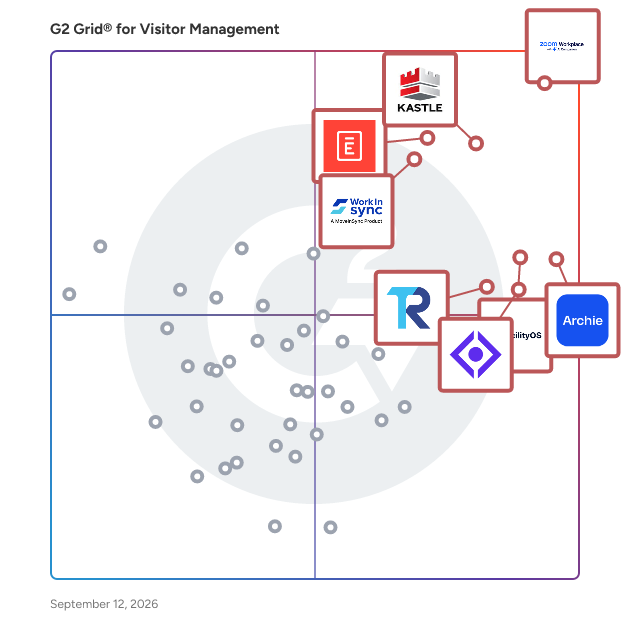


## Top Visitor Management Software at a Glance
| # | Product | Rating | Best For | What Users Say |
|---|---------|--------|----------|----------------|
| 1 | [Zoom Workplace](https://www.g2.com/products/zoom-workplace/reviews) | 4.5/5.0 (53,494 reviews) | Hybrid meeting coordination with desk reservation | "[Zoom Workplace: Seamless All-in-One Hub That Streamlines My Workflow](https://www.g2.com/survey_responses/zoom-workplace-review-13045001)" |
| 2 | [Envoy Visitors](https://www.g2.com/products/envoy-visitors/reviews) | 4.7/5.0 (426 reviews) | Automated visitor check-in with NDA capture | "[Streamlined, Secure QR Registration with Smooth Visitor Notifications](https://www.g2.com/survey_responses/envoy-visitors-review-12749650)" |
| 3 | [Kastle](https://www.g2.com/products/kastle/reviews) | 4.6/5.0 (168 reviews) | Badge-based visitor access with remote controllables | "[My Kastle Experience - Beyond Excellent!](https://www.g2.com/survey_responses/kastle-review-12294248)" |
| 4 | [Archie](https://www.g2.com/products/archie-archie/reviews) | 4.9/5.0 (241 reviews) | Pre-registration with hybrid workspace booking integration | "[A complete facility management platform](https://www.g2.com/survey_responses/archie-review-12443865)" |
| 5 | [FacilityOS](https://www.g2.com/products/facilityos/reviews) | 4.7/5.0 (260 reviews) | Pre-registration workflows with automated host notifications | "[iLobby meets ALL our needs!](https://www.g2.com/survey_responses/facilityos-review-9364054)" |
| 6 | [The Receptionist](https://www.g2.com/products/the-receptionist/reviews) | 4.8/5.0 (425 reviews) | Unmanned lobby check-in with instant SMS alerts | "[Efficient Gatekeeping with Minimal Hassle](https://www.g2.com/survey_responses/the-receptionist-review-4892407)" |
| 7 | [Visitly](https://www.g2.com/products/visitly/reviews) | 4.4/5.0 (82 reviews) | Receptionist-free visitor check-in with instant notifications | "[Visitly Makes Visitor Check-In Simple, Intuitive, and Efficient](https://www.g2.com/survey_responses/visitly-review-12485094)" |
| 8 | [Eptura Visitor](https://www.g2.com/products/eptura-visitor/reviews) | 4.6/5.0 (170 reviews) | Self-service visitor check-in with host notifications | "[Efficient and customizable service with a dedicated team.](https://www.g2.com/survey_responses/eptura-visitor-review-12999304)" |
| 9 | [Qminder](https://www.g2.com/products/qminder/reviews) | 4.6/5.0 (247 reviews) | — | "[Very easy to use](https://www.g2.com/survey_responses/qminder-review-8481690)" |
| 10 | [Verkada Guest](https://www.g2.com/products/verkada-guest/reviews) | 4.3/5.0 (12 reviews) | Unattended visitor check-in with camera integration | "[Verkada  Best Review](https://www.g2.com/survey_responses/verkada-guest-review-10198195)" |


## How Many Visitor Management Software Products Does G2 Track?
**Total Products under this Category:** 216

### Category Stats (Jul 2026)
- **Average Rating**: 4.5/5 The average rating of products in this category, based on all submitted ratings
- **Top Trending Product**: Swiftlane (+0.64%) - Among all products in this category, Swiftlane recorded the largest rating increase compared to last month
*Last updated: July 03, 2026*


## How Does G2 Rank Visitor Management Software Products?

**Why You Can Trust G2's Software Rankings:**

- 30 Analysts and Data Experts
- 63,600+ Authentic Reviews
- 216+ Products
- Unbiased Rankings

G2's software rankings are built on verified user reviews, rigorous moderation, and a consistent research methodology maintained by a team of analysts and data experts. Each product is measured using the same transparent criteria, with no paid placement or vendor influence. While reviews reflect real user experiences, which can be subjective, they offer valuable insight into how software performs in the hands of professionals. Together, these inputs power the G2 Score, a standardized way to compare tools within every category.


## Which Visitor Management Software Is Best for Your Use Case?

- **Leader:** [Zoom Workplace](https://www.g2.com/products/zoom-workplace/reviews)
- **Highest Performer:** [Skedda](https://www.g2.com/products/skedda/reviews)
- **Easiest to Use:** [Zoom Workplace](https://www.g2.com/products/zoom-workplace/reviews)
- **Top Trending:** [Visitly](https://www.g2.com/products/visitly/reviews)
- **Best Free Software:** [Envoy Visitors](https://www.g2.com/products/envoy-visitors/reviews)


---

**Sponsored**

### Guardian

Alert Enterprise Guardian is a leading Physical Identity and Access Management (PIAM), Visitor Management, and Identity &amp; Access Management (IAM) platform that unifies physical security, identity governance, and physical access control systems (PACS) into a single, automated solution. Guardian provides a single pane of glass to manage access for employees, contractors, and visitors, helping organizations reduce manual effort, automate workflows, improve compliance, and gain real-time visibility across facilities. 🔐 Physical Identity &amp; Access Management (PIAM) Guardian transforms systems like LenelS2, C•CURE, Honeywell and Genetec into an identity-driven platform with lifecycle automation and governance. By integrating with HR systems (Workday, SAP, Oracle) and IT identity platforms, Guardian enables: Automated provisioning and deprovisioning Real-time access visibility User access reviews (UAR) and compliance reporting (NERC, SOC 2, HIPAA) This replaces fragmented processes with centralized, policy-based access control. 🏢 Enterprise Visitor Management Guardian delivers enterprise-grade visitor management beyond tools like Envoy, connecting visitor workflows directly to PACS and identity systems. Pre-registration, check-in, and badge printing Integration with turnstiles and access systems Real-time visibility into site activity This ensures secure, consistent visitor experiences across locations. 🧠 IAM with Cyber-Physical Convergence Guardian extends IAM solutions like Saviynt, SailPoint and Okta by bridging digital identity and physical access. Identity lifecycle automation (joiner, mover, leaver) Role-based access control (RBAC) Access certifications and audit reporting Organizations gain full control over who has access to what, across IT and physical environments. 🚀 Why Organizations Choose Guardian Guardian combines: End-to-end access automation HR–IT–PACS integration Enterprise visitor management Faster provisioning and reduced manual effort Improved compliance and audit readiness Mobile credentials and AI-driven insights Customers highlight ease of use, scalability, strong integrations, and responsive support. 🏭 Built for Enterprise &amp; Regulated Environments Ideal for: Healthcare, energy, and utilities (NERC) Global enterprises with multiple PACS Financial services, manufacturing, and education Technology, Data Centers, Telecommunication Pharmaceuticals, Life Sciences, Biotech 📈 Key Outcomes Automated access processes Faster onboarding and provisioning Reduced risk (e.g., eliminating orphaned access) Enterprise-wide visibility Improved user experience 🌐 Flexible Deployment &amp; Global Support Deploy Guardian your way—SaaS (US/EU), AWS, Azure, GCP, ServiceNow, or on-premise. Backed by a global services team and 24/7, 365 support with SLA, Guardian ensures success from implementation through operations.


[Visit website](https://www.g2.com/external_clickthroughs/record?secure%5Bad_program%5D=ppc&amp;secure%5Bad_slot%5D=category_product_list&amp;secure%5Bcategory_id%5D=358&amp;secure%5Bchosen_at%5D=2026-07-03T15%3A29%3A50Z&amp;secure%5Bdisplayable_resource_id%5D=358&amp;secure%5Bdisplayable_resource_type%5D=Category&amp;secure%5Bmedium%5D=sponsored&amp;secure%5Bplacement_reason%5D=page_category&amp;secure%5Bplacement_resource_ids%5D%5B%5D=358&amp;secure%5Bprioritized%5D=false&amp;secure%5Bproduct_id%5D=21372&amp;secure%5Bresource_id%5D=358&amp;secure%5Bresource_type%5D=Category&amp;secure%5Bsource_type%5D=category_page&amp;secure%5Bsource_url%5D=https%3A%2F%2Fwww.g2.com%2Fcategories%2Fvisitor-management%3Fpage%3D14&amp;secure%5Btoken%5D=08c9171ae4b219adbab59fde290cd798bbbb6fc811732ef55eb4be8490ab03fa&amp;secure%5Burl%5D=https%3A%2F%2Falertenterprise.com%2Fcontact%2F&amp;secure%5Burl_type%5D=book_demo)

---


## What Is Visitor Management Software?

[Office Management Software](https://www.g2.com/categories/office-management-software)

## What Software Categories Are Similar to Visitor Management Software?

- [Meeting Room Booking Systems](https://www.g2.com/categories/meeting-room-booking-systems)
- [Space Management Software](https://www.g2.com/categories/space-management)
- [Desk Booking Software](https://www.g2.com/categories/desk-booking)


---

## How Do You Choose the Right Visitor Management Software?

### What You Should Know About Visitor Management Software

### What is Visitor Management Software?

Visitor management software tracks and manages visitors entering and leaving a business’ office. These tools are designed to make the visitor sign-in process more seamless, which in turn can improve the overall visitor experience. Some solutions offer self-sign-in for visitors. Others are administered by staff, which gives them the ability to manage assets such as access cards and keys. Visitor management software typically has the ability to notify the necessary employee that the visitor has arrived. This software can also document and gather specific information about those visitors’ whereabouts within the building. Overall, these solutions are designed to increase building security and protect its facilities and employees.

**Key Benefits of Visitor Management Software**

- Enhances a business’s overall security
- Speeds up the check-in process with features such as the ability to scan identification cards

### Why Use Visitor Management Software?

Visitor management software offers a number of benefits to its users, including but not limited to the following:

**Improved office security —** A visitor management software solution can enhance a building’s existing security system. These solutions require all visitors to sign in, which notifies the necessary party when someone enters and exits the office.

**Streamlined visitor check-in process —** There is no longer any need for building staff to manually check identification cards or place a call to the office informing them that a visitor has arrived. These solutions allow for driver’s licenses or other forms of identification to be scanned in right to the platform. They can also ping the necessary employee that their visitor has arrived.

**Dependable information —** Visitor management software stores information about incoming and outgoing visitors. If there is ever an emergency within the building, authorities can review the software to see exactly who has visited the office.

### Who Uses Visitor Management Software?

Visitor management software can be used by any business that regularly expects visitors. The following businesses are just a few that can benefit from visitor management software.

**Corporate offices —** Large office buildings typically house multiple offices. These offices will regularly have visitors, whether they are clients coming in for a meeting or candidates for job interviews. These solutions can help visitors find the correct office to make their appointment on time.

**College campuses —** Some campuses may have areas restricted to staff and faculty only. Visitor management software will ensure that only authorized faculty and staff will be allowed into those areas on the university campus.

**Elementary and high schools —** K–12 schools typically require their visitors to wear ID badges when entering the school. Visitor management software can help to manage these ID badges.

### Kinds of Visitor Management Software

As all visitor management software has the same purpose, the different types of solutions don’t vary much. Users may encounter two different options in the way this software is administered.

**Self-service visitor management —** This type of visitor management software lets visitors sign in themselves. Visitors can enter their information on the device, and once it is submitted, the software will send a notification to the employee expecting that visitor.

**Staff-administered visitor management —** These solutions are administered by members of building staff. Building staff can check in visitors and quickly scan in any necessary forms of identification. Staff can then call the employee expecting the visitor to inform them they have arrived.

### Visitor Management Software Features

The following features are commonly found in visitor management software:

**Visitor management and reporting —** This is arguably the most valuable feature of this type of software. This feature retains information about visitors to your office, such as the precise time they enter the office, along with the exact duration of the visit. This data can be used to track down the precise location of specific visitors and create reports on visitor flow.

**Self check-in —** This allows visitors to check themselves in, as opposed to needing to check in with building staff. The visitor management solution is typically set up on a tablet kiosk and requires them to enter in information such as their name, email, and purpose of visit.

**Notifications —** Once a visitor is signed in using the software, it can ping the employee expecting the visitor that they have arrived.

**Preregistration —** Businesses can use this software to preregister their guests. Using these tools, businesses can email their visitors to gather the necessary information needed prior to their visit.

### Trends Related to Visitor Management Software

The following trends are on the rise in the visitor management software industry.

**Increased self-service —** Thanks to technology like QR codes, visitor management software is continuing to evolve to include more self-service options. With these advances, receptionists and other building staff no longer need to conduct multiple steps to check in a single visitor. Staff can even manage multiple buildings through video displays and network links, thanks to self-service visitor management software.

**Wider range of identification options —** Providing a visitor with credentials is crucial for a workplace that experiences a constant flow of visitors. Visitor management software is evolving and beginning to provide more types of credentials to visitors. This can include mobile credentials, QR codes, or the typical visitor’s badge. This speeds up the check-in process, as visitors will have been pre-vetted prior to their visit.

### Potential Issues with Visitor Management Software

As with any kind of technology, visitor management software can come with its issues. The following are a few potential issues a business might face when using visitor management software.

**Cost —** While tracking visitors with pen and paper is time consuming and can potentially lead to human error, it is incredibly cheap. Visitor management software can be very expensive, especially for enterprise-sized businesses. Some solutions will require integrating hardware, such as cameras, driver’s license readers, business card scanners, and potentially more.

**Sensitive information can be complicated to protect —** Visitor data is often pretty sensitive. Required pieces of information can range from email to driver’s license numbers. If the solution you select is cloud-based, it will need to be encrypted in order to protect your visitors’ identities. That encrypted data will also need to be backed up. And of course, your business is liable for protecting visitors’ information.

### Software and Services Related to Visitor Management Software

Most software solutions need to integrate with other categories of software to ensure it is performing to the best of its abilities. The following solutions can typically work in tandem with visitor management software.

[**Backup software**](https://www.g2.com/categories/backup) **—** These tools offer protection for a business’ data, by copying that data from servers, databases, computers and any other device. In case of user error, corrupt disaster, or any other kind of issue, this ensures that businesses can still access their valuable data. Backup software can work in tandem with visitor management software to make sure visitors’ information is always protected.

[**Data security software**](https://www.g2.com/categories/data-security) **—** Another way businesses can protect their visitors’ data is to make sure it is secure. Data security software protects and encrypts data, directories, and systems from threats, hacks, and overall system failure. These solutions can integrate with visitor management software to ensure that sensitive data is always safe.


