Top Free Video Conferencing Software - Page 2

How Many Video Conferencing Software Products Does G2 Track?

Total Products under this Category: 278

Category Stats (Sep 2026)

  • Average Rating: 4.39/5 The average rating of products in this category, based on all submitted ratings
  • Top Trending Product: VidyoConnect (+3.05%) - Among all products in this category, VidyoConnect recorded the largest rating increase compared to last month

Last updated: September 01, 2026

How Does G2 Rank Video Conferencing Software Products?

Why You Can Trust G2's Software Rankings:

  • 30 Analysts and Data Experts
  • 198,200+ Authentic Reviews
  • 278+ Products
  • Unbiased Rankings

G2's software rankings are built on verified user reviews, rigorous moderation, and a consistent research methodology maintained by a team of analysts and data experts. Each product is measured using the same transparent criteria, with no paid placement or vendor influence. While reviews reflect real user experiences, which can be subjective, they offer valuable insight into how software performs in the hands of professionals. Together, these inputs power the G2 Score, a standardized way to compare tools within every category.

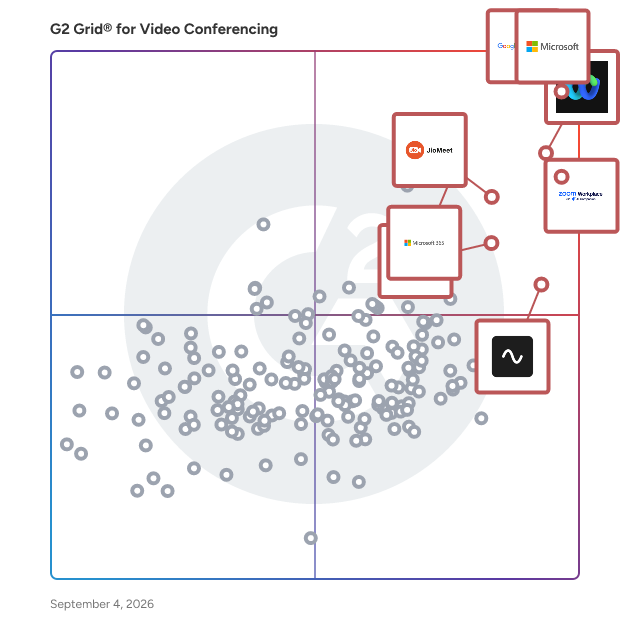
G2 Grid® for Video Conferencing Software

G2 Grid® for Video Conferencing Software plotting products by satisfaction and market presence

Highlighted products: Google Workspace, Microsoft Teams, Webex Suite, Zoom Workplace, JioMeet, Microsoft 365, Riverside, and GoTo Meeting.

Underlying data: [Grid® JSON](https://www.g2.com/categories/video-conferencing/grids.json?focus%5B%5D=google-workspace&focus%5B%5D=microsoft-teams&focus%5B%5D=cisco-webex-suite&focus%5B%5D=zoom-workplace&focus%5B%5D=jiomeet&focus%5B%5D=microsoft365&focus%5B%5D=riverside&focus%5B%5D=goto-meeting)

Pexip

Pexip enables any room to join any meeting through universal interoperability. We work with top providers and device manufacturers, like Microsoft, Google, Zoom, and Poly, to deliver a seamless and secure collaboration experience built on trusted, certified technology. Popular interoperability use cases that Pexip solves: - Google Meet Hardware to Teams Meetings - Zoom Rooms To Teams Meetings - Teams Rooms to Zoom and Webex meetings - Cisco and Poly SIP Devices to Teams, Zoom, Webex, and Google Meet What sets Pexip apart? Pexip's video conferencing solutions are designed to address some of the most complex communication challenges by prioritizing security, interoperability, and scalability. Pexip Secure Meetings ensures that sensitive video conversations and data are protected, offering advanced access control and compliance with relevant regulations. Pexip Connect breaks down platform barriers, enabling users to collaborate efficiently across different solutions and systems.

Average Rating: 4.4/5.0

Total Reviews: 99

How Do G2 Users Rate Pexip?

  • Has the product been a good partner in doing business?: 9.1/10 (Category avg: 8.9/10)
  • Presentations: 8.5/10 (Category avg: 8.9/10)
  • Participant Permissions: 8.4/10 (Category avg: 8.8/10)
  • Whiteboarding: 8.3/10 (Category avg: 8.6/10)

Who Is the Company Behind Pexip?

  • Seller: Pexip
  • Company Website:
  • Year Founded: 2012
  • HQ Location: Oslo, Norway
  • Twitter: @pexip
    4,124 Twitter followers
  • LinkedIn® Page: www.linkedin.com
    327 employees on LinkedIn®

Who Uses This Product?

  • Top Industries: Information Technology and Services, Computer Software
  • Company Size: 42% Medium, 35% Small

What Do G2 Reviewers Say About Pexip?

AI-generated summary from verified user reviews

Pros
  • Users commend Pexip for its reliability, ensuring consistent performance and high-quality video conferencing across various platforms.
  • Users commend Pexip for its ease of use, enabling seamless meeting participation across multiple platforms and devices.
  • Users value Pexip's strong security and reliability, ensuring high-quality video meetings across multiple platforms with ease.
  • Users commend Pexip for its easy setup, facilitating a smooth and straightforward initial experience for all users.
  • Users appreciate the smoother cross-platform integration of Pexip, enabling efficient collaborations across various video systems.
Cons
  • Users find Pexip's user interface complex, especially for newcomers, impacting ease of use and configuration.
  • Users find the learning curve steep with Pexip, especially for non-technical administrators, complicating setup and use.
  • Users find Pexip's limited customization options restrictive, particularly regarding branding and meeting layouts.
  • Users find that customer support responsiveness needs improvement, particularly during peak times affecting ticket resolution speed.
  • Users face editing limitations in Pexip, particularly with customization options and configuration complexity affecting usability.

What Are Recent G2 Reviews of Pexip?

What Are G2 Users Discussing About Pexip?

Zoho Webinar

Zoho Webinar is a secure online platform designed to facilitate large-scale virtual conferences, webinars, and online workshops. It enables businesses to conduct impactful events such as training sessions, marketing webinars, online courses, and workshops, ensuring seamless communication and engagement with a global audience. Key Features and Functionality: - Interactive Engagement: Enhance attendee participation through immersive Q&A sessions, audience polls, and interactive features like the "Raise Hand" option and emoji reactions. - Personalized Branding: Customize webinar registration links, promote events across various social platforms, and livestream sessions on platforms like YouTube to extend reach and visibility. - Advanced Analytics: Monitor attendee lists, generate detailed reports on participant information, analyze audience engagement levels, and export analytical data for further insights. - Lead Generation: Integrate seamlessly with Zoho CRM to push attendee information as leads, nurture them using Zoho Marketing Automation, and focus on the most promising prospects to boost sales. - Scalability: Host webinars accommodating up to 5,000 attendees without compromising performance, making it suitable for corporate events, global conferences, and large-scale training sessions. Primary Value and Solutions: Zoho Webinar addresses the need for a comprehensive, user-friendly, and scalable solution for conducting virtual events. It simplifies the process of hosting webinars by offering an intuitive interface, eliminating the need for downloads, and providing flexible pricing structures with no hidden fees. By integrating with other Zoho applications and third-party tools, it enhances lead generation and marketing efforts, ensuring businesses can effectively engage with their audience, expand their reach, and achieve better returns on investment for their virtual events.

Average Rating: 4.5/5.0

Total Reviews: 82

How Do G2 Users Rate Zoho Webinar?

  • Has the product been a good partner in doing business?: 9.0/10 (Category avg: 8.9/10)
  • Presentations: 8.9/10 (Category avg: 8.9/10)
  • Participant Permissions: 9.1/10 (Category avg: 8.8/10)
  • Whiteboarding: 8.5/10 (Category avg: 8.6/10)

Who Is the Company Behind Zoho Webinar?

  • Seller: Zoho
  • Year Founded: 1996
  • HQ Location: Austin, TX
  • Twitter: @Zoho
    137,880 Twitter followers
  • LinkedIn® Page: www.linkedin.com
    30,913 employees on LinkedIn®
  • Phone: +1 (888) 900-9646

Who Uses This Product?

  • Top Industries: Information Technology and Services, Education Management
  • Company Size: 82% Small, 15% Medium

What Do G2 Reviewers Say About Zoho Webinar?

AI-generated summary from verified user reviews

Pros
  • Users value the ease of use of Zoho Webinar, appreciating its quick implementation and responsive customer support.
  • Users appreciate the dependable streaming quality and features of Zoho Webinar, enhancing engagement and learning experiences.
  • Users appreciate the interactive features of Zoho Webinar, enhancing engagement and supporting effective teaching and training programs.
  • Users value the seamless integration of Zoho Webinar into workflows, enhancing functionality and user experience.
  • Users love the affordability of Zoho Webinar, finding it to be a cost-effective alternative to other solutions.
Cons
  • Users wish for more customization options in Zoho Webinar, specifically for registration and email templates' branding.
  • Users find the absence of key features like payment integration and advanced reporting limits the webinar experience.
  • Users find Zoho Webinar to be expensive for small startups, impacting accessibility despite its valuable features.
  • Users find the user interface complicated, wishing for a more intuitive design and easier functionality.
  • Users find delay issues frustrating, complicating the rescheduling process and impacting lead management efficiency.

What Are Recent G2 Reviews of Zoho Webinar?

SoWork

Work with your human and your AI teammates together in an all-in-one virtual office. 👨🏻👩🏻‍🦳🤖❤️ SoWork transforms your remote team’s daily grind into something joyful. 🏠 Your always-on virtual HQ. 📺 Spatial video calls make meetings smoother and hallway chats spontaneous. 💬 Fully-featured Slack-replacement chat, built right in. ✨ AI tools: Agents, meeting AI, recordings, transcript exports, and more. 📊 Deep Team Analytics: See your team's work habits. 🛠️ Fully customizable workplaces. 📱 Feature-packed mobile app for iOS and Android. 🖥️ Super low CPU footprint with 'Lite Mode'. 🐶 Pets and games! No more bouncing between Slack, Zoom, Claude, Asana, Calendars, and all the rest of your apps. Just one place for your team and your AI bots. Work together like in a real office, but better.

Average Rating: 4.9/5.0

Total Reviews: 83

How Do G2 Users Rate SoWork?

  • Has the product been a good partner in doing business?: 9.9/10 (Category avg: 8.9/10)
  • Presentations: 9.3/10 (Category avg: 8.9/10)
  • Participant Permissions: 9.3/10 (Category avg: 8.8/10)
  • Whiteboarding: 9.1/10 (Category avg: 8.6/10)

Who Is the Company Behind SoWork?

  • Seller: SoWork
  • Company Website:
  • Year Founded: 2020
  • HQ Location: Boston, MA
  • Twitter: @SoWorkHQ
    1,110 Twitter followers
  • LinkedIn® Page: www.linkedin.com
    24 employees on LinkedIn®

Who Uses This Product?

  • Top Industries: Marketing and Advertising, Computer Software
  • Company Size: 87% Small, 9% Medium

What Do G2 Reviewers Say About SoWork?

AI-generated summary from verified user reviews

Pros
  • Users highlight the enhanced communication in SoWork, fostering lively interactions and personal connections among team members.
  • Users appreciate the seamless integrations of SoWork, enhancing collaboration and making remote interactions engaging and intuitive.
  • Users appreciate the immediacy of communication in SoWork, enhancing remote collaboration and team engagement effectively.
  • Users value the enhanced team collaboration in SoWork, enjoying lively interactions and a more personal remote work experience.
  • Users value the immediacy of communication in SoWork, enhancing collaboration and connection with colleagues.
Cons
  • Users report encountering bugs occasionally, along with a desire for improved gallery order functionality during meetings.
  • Users report encountering glitches occasionally, but they remain hopeful for improvements in future updates.
  • Users experience video quality issues with SoWork, particularly regarding resolution and processing demands on their PCs.
  • Users report quirks and glitches with SoWork, though the customer support team is responsive and helpful.
  • Users note that difficult learning in SoWork can hinder the experience, especially regarding video call reliability.

What Are Recent G2 Reviews of SoWork?

Ringover

Ringover is the easy-to-use multichannel cloud communication solution (calls, SMS, video calls, emails...), designed to enhance your customers' experience, and maximize your sales. Give your clients and prospects a personalized experience and boost the productivity of your sales and customer service teams thanks to an intuitive and easy-to-manage interface. Our advanced supervision and coaching features allow you to closely monitor operations and train your team members fast. Ringover integrates with over 80 business tools (CRM, helpdesk...), streamlining tasks for increased efficiency.

Average Rating: 4.6/5.0

Total Reviews: 468

How Do G2 Users Rate Ringover?

  • Has the product been a good partner in doing business?: 8.8/10 (Category avg: 8.9/10)
  • Presentations: 9.6/10 (Category avg: 8.9/10)
  • Participant Permissions: 9.5/10 (Category avg: 8.8/10)
  • Whiteboarding: 9.5/10 (Category avg: 8.6/10)

Who Is the Company Behind Ringover?

  • Seller: Ringover
  • Year Founded: 2018
  • HQ Location: Montrouge
  • Twitter: @ringoverapp
    832 Twitter followers
  • LinkedIn® Page: www.linkedin.com
    288 employees on LinkedIn®

Who Uses This Product?

  • Who Uses This: CEO, Director
  • Top Industries: Staffing and Recruiting, Computer Software
  • Company Size: 76% Small, 21% Medium

What Do G2 Reviewers Say About Ringover?

AI-generated summary from verified user reviews

Pros
  • Users commend the ease of use of Ringover, appreciating its intuitive design and smooth onboarding experience.
  • Users appreciate the responsive and supportive customer service of Ringover, enhancing their overall experience with the app.
  • Users highlight the reliability of Ringover, praising its efficient performance and excellent customer support.
  • Users value the efficient and reliable customer support of Ringover, enhancing their overall experience and productivity.
  • Users appreciate the intuitive interface of Ringover, making setup and daily communication seamless and efficient.
Cons
  • Users find Ringover to be expensive, especially for small companies needing just one number, yet negotiation is possible.
  • Users feel that Ringover can be too expensive for small businesses, highlighting high cost concerns compared to other suppliers.
  • Users experience occasional glitches with call updates and inaccurate transcription errors on the mobile app.
  • Users wish for improved missing features like CRM integration, SMS sync, and consultative transfers for better usability.
  • Users report mobile app issues with SMS synchronization and limited options for obtaining UK mobile numbers.

What Are Recent G2 Reviews of Ringover?

What Are G2 Users Discussing About Ringover?

net2phone

net2phone is an AI-powered business communication solutions provider offering Unified Communications (UCaaS), contact center (CCaaS), AI agent, and performance coaching software for businesses focused on customer experience. Backed by 30+ years of expertise and trusted by 500,000+ users, net2phone helps businesses eliminate communication friction so every conversation drives retention and growth. Communication breaks down when channels are scattered, tools don't talk to each other, and information gets buried across platforms. net2phone solves this with a connected business VoIP and unified communications platform built for teams that can't afford dropped context or slow resolution times. Unite: Unified Communications unifies voice, messaging, video, and chat in a single place. Features include call and video recording with transcription, sentiment analysis on voice calls, automated action-item tracking, and AI-generated follow-up emails — reducing the tool-switching that slows teams down. uContact: Omnichannel Contact Center gives high-volume sales and support teams the automation, AI-driven routing, and real-time dashboards needed to deliver consistent omnichannel customer experiences at scale. Coach AI: Performance Intelligence analyzes 100% of voice, video, and text interactions, giving managers full visibility into team performance with sentiment analysis, call summaries, and targeted coaching recommendations by user or department. AI Agent: Intelligent Task Automation handles inquiries and completes workflows — answering questions, resolving support cases, scheduling, and managing returns — across phone and chat, with support for 30+ languages and seamless handoff to human agents. Every net2phone solution connects to the tools businesses already use, with a built-in drag-and-drop workflow builder that lets teams automate processes across the entire suite without writing code. Rather than just deploying software, net2phone provides expert guidance at every step — from workflow design to system integration to ongoing optimization, that guidance is backed by enterprise-grade security across every solution. All of this ensures unified communications and contact center technology actually deliver measurable retention and growth.

Average Rating: 4.4/5.0

Total Reviews: 186

How Do G2 Users Rate net2phone?

  • Has the product been a good partner in doing business?: 8.8/10 (Category avg: 8.9/10)
  • Presentations: 9.6/10 (Category avg: 8.9/10)
  • Participant Permissions: 8.3/10 (Category avg: 8.8/10)
  • Whiteboarding: 8.3/10 (Category avg: 8.6/10)

Who Is the Company Behind net2phone?

  • Seller: net2phone
  • Company Website:
  • Year Founded: 1996
  • HQ Location: Newark, NJ
  • Twitter: @net2phone
    1,900 Twitter followers
  • LinkedIn® Page: www.linkedin.com
    308 employees on LinkedIn®

Who Uses This Product?

  • Who Uses This: Office Manager, Owner
  • Top Industries: Construction, Information Technology and Services
  • Company Size: 80% Small, 18% Medium

What Do G2 Reviewers Say About net2phone?

AI-generated summary from verified user reviews

Pros
  • Users appreciate the exceptional customer service from Net2Phone, highlighting their prompt and knowledgeable support team.
  • Users find net2phone to offer exceptional ease of use, simplifying call tracking and management seamlessly.
  • Users commend the affordability of net2phone, highlighting significant cost savings compared to competitors.
  • Users praise the responsive customer support of Net2Phone, consistently receiving eager help with their issues.
  • Users highlight the responsive and helpful customer service of net2phone, enhancing their overall experience significantly.
Cons
  • Users experience connection issues that hinder functionality, with limited support for integrating with custom setups.
  • Users report significant issues with customer support, highlighting ignored complaints and poor communication regarding billing and equipment.
  • Users find the net2phone interface to be not intuitive, complicating basic functions and features usage.
  • Users report long wait times for support, leading to frustration and unresolved issues during critical setup moments.
  • Users report significant issues with poor customer support, including unaddressed complaints and inadequate assistance during setup.

What Are Recent G2 Reviews of net2phone?

What Are G2 Users Discussing About net2phone?

Boardable

Boardable is a type of board management software solution designed to help nonprofit organizations enhance their operational efficiency and foster collaboration among board members. By streamlining various processes, Boardable empowers boards to focus on their mission and drive positive change within their communities. This software is tailored specifically for the unique needs of nonprofits, ensuring that they can manage their governance responsibilities effectively while maximizing engagement and productivity. The primary target audience for Boardable includes nonprofit organizations of all sizes, ranging from small community groups to larger foundations. These organizations often encounter challenges related to communication, meeting coordination, and document management. Boardable addresses these issues by providing a centralized platform where board members can easily schedule meetings, share agendas, and collaborate on important documents. This is particularly beneficial for organizations that rely on volunteers or have members located in different geographical areas, as it facilitates seamless communication and collaboration regardless of location. Key features of Boardable include comprehensive meeting management capabilities, which allow users to schedule and conduct meetings efficiently. Users can build and share agendas, draft minutes, and even conduct digital voting, all within the same platform. This not only saves time but also ensures that all relevant information is easily accessible and organized. Additionally, Boardable integrates with existing email, file-sharing, and calendar platforms, centralizing all meeting content and communications in one place. This integration reduces the need for multiple tools and helps streamline operations, making it easier for boards to stay organized and focused. Another standout feature of Boardable is its built-in virtual conferencing tool, Boardable Video. This functionality enables users to record meetings, ensuring that governance best practices are adhered to and that important discussions are documented for future reference. The software is designed for accessibility, offering both desktop and mobile applications that provide secure access to meeting details, documents, discussions, and tasks from any device. This flexibility is crucial for busy board members who may need to access information on the go, allowing them to stay engaged and informed no matter where they are. Boardable serves as a vital resource for nonprofit organizations looking to enhance their board management processes. By removing friction and renewing focus, it allows boards to concentrate on their core mission and make a greater impact in their communities. The combination of centralized content, integrated tools, and robust meeting management features positions Boardable as a valuable asset for any nonprofit striving to do more for others.

Average Rating: 4.5/5.0

Total Reviews: 274

How Do G2 Users Rate Boardable?

  • Has the product been a good partner in doing business?: 9.3/10 (Category avg: 8.9/10)

Who Is the Company Behind Boardable?

  • Seller: Boardable
  • Company Website:
  • Year Founded: 2016
  • HQ Location: Carmel, US
  • Twitter: @BoardableApp
    956 Twitter followers
  • LinkedIn® Page: www.linkedin.com
    42 employees on LinkedIn®

Who Uses This Product?

  • Who Uses This: Executive Director, Administrator
  • Top Industries: Non-Profit Organization Management, Education Management
  • Company Size: 62% Small, 37% Medium

What Do G2 Reviewers Say About Boardable?

AI-generated summary from verified user reviews

Pros
  • Users find Boardable’s ease of use remarkable, simplifying board meetings and ensuring everyone can participate effortlessly.
  • Users value the organization and collaboration features of Boardable, streamlining meetings and enhancing document management.
  • Users value how Boardable simplifies board governance, enhancing organization and efficiency in meeting preparations and task management.
  • Users appreciate how Boardable's simplified meetings management streamlines governance and enhances overall efficiency for teams.
  • Users value the ease of agenda management in Boardable, enhancing organization and meeting preparation effortlessly.
Cons
  • Users find it cumbersome to locate comments and experience slow loading times, complicating their document management and workflow.
  • Users often express frustration over the lack of customization in Boardable, affecting flexibility and user experience.
  • Users find Boardable's limited features hinder effective collaboration and communication, making tasks more cumbersome than necessary.
  • Users find Boardable's limited functionality frustrating, affecting customization, reporting, and overall task management efficiency.
  • Users point out the lack of a polished mobile app, noting functionality issues that hinder on-the-go usage.

What Are Recent G2 Reviews of Boardable?

Whereby Meetings

Whereby is a video conferencing platform providing easy to use, beautiful video calls. Whereby Meetings Create a fully branded virtual meeting experience with memorable room URLs, accessed directly in your browser, no downloads or logins for guests. - No app downloads or installs - No logins for guests - Up to 200 participants - Custom branding - Loads of features including co-location groups, breakout groups, recording, screen sharing, virtual whiteboard and more.

Average Rating: 4.6/5.0

Total Reviews: 1,115

How Do G2 Users Rate Whereby Meetings?

  • Has the product been a good partner in doing business?: 9.4/10 (Category avg: 8.9/10)
  • Presentations: 8.9/10 (Category avg: 8.9/10)
  • Participant Permissions: 8.7/10 (Category avg: 8.8/10)
  • Whiteboarding: 7.8/10 (Category avg: 8.6/10)

Who Is the Company Behind Whereby Meetings?

  • Seller: Whereby
  • Year Founded: 2013
  • HQ Location: Florø, Vestland, Norway
  • Twitter: @whereby
    12,020 Twitter followers
  • LinkedIn® Page: www.linkedin.com
    48 employees on LinkedIn®

Who Uses This Product?

  • Who Uses This: CEO, Owner
  • Top Industries: Information Technology and Services, Computer Software
  • Company Size: 79% Small, 17% Medium

What Do G2 Reviewers Say About Whereby Meetings?

AI-generated summary from verified user reviews

Pros
  • Users value the ease of use of Whereby Meetings, allowing seamless access and interaction for all participants.
  • Users praise the great quality of video conferencing and effortless accessibility of Whereby Meetings for seamless communication.
  • Users commend the excellent video quality of Whereby Meetings, enhancing collaboration and user experience during sessions.
  • Users appreciate the simple and easy interface of Whereby Meetings, enabling effortless communication and quick access for calls.
  • Users love the frictionless setup of Whereby Meetings, allowing quick access for spontaneous calls and easy integration.
Cons
  • Users find the limited features on the free plan frustrating, especially regarding member connectivity and advanced options.
  • Users experience connectivity issues with Whereby, impacting call quality and reliability, especially on low network connections.
  • Users are frustrated by the limited access, as it restricts client calls and resource availability.
  • Users find participant limitations in Whereby Meetings restrictive, impacting usability, especially on free or lower-tier plans.
  • Users often face connection issues with Whereby, limiting its effectiveness for seamless communication during meetings.

What Are Recent G2 Reviews of Whereby Meetings?

What Are G2 Users Discussing About Whereby Meetings?

StartMeeting

StartMeeting® offers unlimited audio and video conferencing services for the enterprise space. Because we are a carrier and a conferencing network we are able to disrupt the market with truly transformative pricing. We offer an industry-leading $12.95/month/host pricing package for the small to medium-sized business space, and we also have a truly revolutionary $6,000/month package for large enterprise clients. The $6,000/month package allows enterprises of any size to have an unlimited number of hosts all for a flat monthly rate. With both the per host and unlimited hosts pricing, you’ll get an easy-to-use collaboration tool that will provide you and your teams unlimited HD quality audio & video conferencing and screen sharing. Every account also includes: • HD Audio & Video conferencing for up to 1,000 participants • Screen sharing and drawing • Meeting recording and playback • 10 gigs of storage • Custom hold music and greetings • Custom meeting wall • In-country dial-in numbers for 65 countries… and counting With StartMeeting® you are gaining access to one of the largest companies in conferencing. Since 2001 our network has carried more than two billion conference calls around the world, making us the world’s 2nd largest conferencing network. This size and scale are what lets us offer the pricing that we do and also what has helped us build such a streamlined, enterprise-grade application. For more information, visit www.startmeeting.com or call (844) 800-4000.

Average Rating: 4.5/5.0

Total Reviews: 63

How Do G2 Users Rate StartMeeting?

  • Has the product been a good partner in doing business?: 9.3/10 (Category avg: 8.9/10)
  • Presentations: 10.0/10 (Category avg: 8.9/10)
  • Participant Permissions: 8.8/10 (Category avg: 8.8/10)
  • Whiteboarding: 8.9/10 (Category avg: 8.6/10)

Who Is the Company Behind StartMeeting?

  • Seller: CarrierX
  • Year Founded: 2001
  • HQ Location: Long Beach, California
  • Twitter: @FreeConfCall
    9,828 Twitter followers
  • LinkedIn® Page: www.linkedin.com
    43 employees on LinkedIn®

Who Uses This Product?

  • Top Industries: Information Technology and Services, Computer & Network Security
  • Company Size: 43% Small, 23% Medium

What Do G2 Reviewers Say About StartMeeting?

AI-generated summary from verified user reviews

Pros
  • Users appreciate the ease of use of StartMeeting, enabling quick setup and hassle-free meeting management.
  • Users praise the impressive audio quality of StartMeeting, ensuring clear communication during all types of meetings.
  • Users find StartMeeting's easy setup ensures quick scheduling and hassle-free joining, enhancing overall meeting efficiency.
  • Users find StartMeeting to be highly reliable, ensuring smooth video conferences without lag or connectivity issues.
  • Users value the impressive video quality of StartMeeting, ensuring fast and reliable online meetings and webinars.
Cons
  • Users find the outdated and simplistic user interface of StartMeeting lacking in creativity and advanced features.
  • Users note the limited features of StartMeeting, wishing for more advanced capabilities and better customization options.
  • Users note the limited customization in StartMeeting, wishing for more advanced features and collaboration tools.
  • Users note the missing advanced features in StartMeeting, leading to a less versatile experience than competitors.
  • Users note limited integrations with StartMeeting, lacking advanced features and tools for complex workflows compared to competitors.

What Are Recent G2 Reviews of StartMeeting?

What Are G2 Users Discussing About StartMeeting?

Dialpad Connect

Dialpad Connect is an AI-native business communications solution that brings calling, messaging, and meetings together in one app, with real-time AI insights built in to enhance every interaction. With Dialpad Connect, you can: - Call, message, and meet in a single app - Seamlessly switch between devices - Focus on the conversation with real-time call transcriptions, AI summaries, and action items

Average Rating: 4.4/5.0

Total Reviews: 4,050

How Do G2 Users Rate Dialpad Connect?

  • Has the product been a good partner in doing business?: 8.9/10 (Category avg: 8.9/10)
  • Presentations: 8.8/10 (Category avg: 8.9/10)
  • Participant Permissions: 8.9/10 (Category avg: 8.8/10)
  • Whiteboarding: 8.9/10 (Category avg: 8.6/10)

Who Is the Company Behind Dialpad Connect?

  • Seller: Dialpad
  • Company Website:
  • Year Founded: 2011
  • HQ Location: San Ramon, California
  • Twitter: @DialpadHQ
    60 Twitter followers
  • LinkedIn® Page: www.linkedin.com
    1,503 employees on LinkedIn®

Who Uses This Product?

  • Who Uses This: Owner, CEO
  • Top Industries: Information Technology and Services, Marketing and Advertising
  • Company Size: 56% Small, 32% Medium

What Do G2 Reviewers Say About Dialpad Connect?

AI-generated summary from verified user reviews

Pros
  • Users value the ease of use of Dialpad Connect, enjoying its intuitive interface and seamless integrations.
  • Users value the call management features of Dialpad Connect, noting ease of use and excellent call quality.
  • Users value the helpfulness of AI transcription, enhancing efficiency and ease of use in their workflows.
  • Users value the call recording feature of Dialpad Connect for its utility and ease of review.
  • Users love the AI-powered features of Dialpad Connect, enhancing productivity with real-time transcription and sentiment analysis.
Cons
  • Users report call quality issues with Dialpad Connect, especially during important conversations and varying network conditions.
  • Users experience connection issues with Dialpad Connect, often facing call quality problems that disrupt communication.
  • Users find the missing functionality frustrating, especially the lack of options beyond DND and syncing issues with Podio.
  • Users experience recording issues with Dialpad Connect, expressing frustrations about voice recording and voicemail customization.
  • Users report call quality issues including dropped calls and difficulties in connecting, leading to frustration and lost communications.

What Are Recent G2 Reviews of Dialpad Connect?

What Are G2 Users Discussing About Dialpad Connect?

Aonmeetings

AONMeetings is a comprehensive browser-based video conferencing solution that helps businesses conduct HD video meetings, webinars, and live streams without requiring software installations. The platform operates entirely through web browsers, primarily Google Chrome and MS Edge, enabling users to connect instantly for professional communications. Here's the revised second paragraph: Designed to serve healthcare, education, legal, and corporate environments, AONMeetings also fits small to medium-sized businesses across various industries, prioritizing security with HIPAA compliance, end-to-end encryption, and granular access controls. The platform addresses the communication needs of organizations ranging from small businesses to large enterprises through its scalable participant limits and feature sets. Core Features and Capabilities: Unlimited HD video meetings and webinars with registration capabilities AI-powered meeting summaries and smart search functionality Screen sharing with annotations, whiteboard collaboration, and live polling Audio and video recording with closed captioning and virtual backgrounds Custom branding, multi-camera broadcasts, and RTMP streaming for advanced users AONMeetings operates on a tiered pricing model starting at $3.99 per month for up to 25 participants in the Standard plan, progressing through Pro (100 participants) and Business Pro (250 participants) tiers. The platform includes enterprise add-ons for large-scale webinars supporting 500 to 5,000 participants with both monthly subscription and one-time event pricing options. The solution distinguishes itself through its browser-based accessibility, eliminating the need for downloads or installations while maintaining professional-grade security standards. Integration capabilities include calendar systems like Calendly, MS Outlook, Google Calendar and Slack, while advanced analytics and insights help organizations optimize their communication strategies . This positions AONMeetings as a cost-effective alternative to traditional video conferencing platforms, particularly suited for organizations requiring reliable, secure, and feature-rich communication tools without the complexity of software management.

Average Rating: 4.9/5.0

Total Reviews: 40

How Do G2 Users Rate Aonmeetings?

  • Has the product been a good partner in doing business?: 9.7/10 (Category avg: 8.9/10)
  • Presentations: 9.1/10 (Category avg: 8.9/10)
  • Participant Permissions: 8.5/10 (Category avg: 8.8/10)
  • Whiteboarding: 9.7/10 (Category avg: 8.6/10)

Who Is the Company Behind Aonmeetings?

  • Seller: Aonmeetings
  • Company Website:
  • Year Founded: 2020
  • HQ Location: Des Moines, US
  • LinkedIn® Page: www.linkedin.com
    4 employees on LinkedIn®

Who Uses This Product?

  • Top Industries: Information Technology and Services, Marketing and Advertising
  • Company Size: 115% Small, 4% Large

What Do G2 Reviewers Say About Aonmeetings?

AI-generated summary from verified user reviews

Pros
  • Users find Aonmeetings' ease of use remarkable, allowing quick setup without the need for heavy software installations.
  • Users commend the reliable quality of Aonmeetings, ensuring smooth sessions even with varying bandwidth conditions.
  • Users commend the smooth video quality of Aonmeetings, enhancing their overall conferencing experience with reliable connections.
  • Users find Aonmeetings' easy setup incredibly beneficial, enabling hassle-free meetings without any downloads required.
  • Users highlight the superior video quality and seamless experience of Aonmeetings, enhancing live demos and collaboration.
Cons
  • Users find limited features in Aonmeetings, with basic polling and a need for better storage management options.
  • Users find the limited customization options frustrating, especially in meeting templates and data export functionality.
  • Users find the missing features in Aonmeetings limiting, particularly with storage and customization options.
  • Users find the user interface lacking, highlighting issues with complexity and payment integration, detracting from the overall experience.
  • Users find the limited options for virtual backgrounds and controls to be a drawback for Aonmeetings.

What Are Recent G2 Reviews of Aonmeetings?

FreeConference.com

FreeConference.com is the original free conference calling service. A pioneer in offering free and reliable teleconferencing solutions, today FreeConference serves over a billion minutes a year of all-digital conference calls to businesses and individuals requiring top-tier performance at little or no cost. Leading the industry with innovative value, FreeConference.com offers a more complete set of free audio and web conferencing features than any other provider, setting the standard in free conference calling. FreeConference.com is committed to providing reliable and affordable tools for gathering groups of every size, no matter their location, quickly, conveniently, and without restrictions. FreeConference.com is a service of iotum, a global leader in teleconferencing solutions. For more information, visit www.freeconference.com.

Average Rating: 4.5/5.0

Total Reviews: 317

How Do G2 Users Rate FreeConference.com?

  • Has the product been a good partner in doing business?: 9.2/10 (Category avg: 8.9/10)
  • Presentations: 8.8/10 (Category avg: 8.9/10)
  • Participant Permissions: 9.0/10 (Category avg: 8.8/10)
  • Whiteboarding: 8.4/10 (Category avg: 8.6/10)

Who Is the Company Behind FreeConference.com?

  • Seller: iotum
  • Year Founded: 2005
  • HQ Location: Toronto
  • Twitter: @iotuminc
    1,285 Twitter followers
  • LinkedIn® Page: www.linkedin.com
    26 employees on LinkedIn®

Who Uses This Product?

  • Who Uses This: Software Engineer, Owner
  • Top Industries: Information Technology and Services, Computer Software
  • Company Size: 61% Small, 25% Medium

What Do G2 Reviewers Say About FreeConference.com?

AI-generated summary from verified user reviews

Pros
  • Users praise the intuitive ease of use of FreeConference.com, making meetings simple and accessible for everyone.
  • Users love the easy setup of FreeConference.com, enabling quick, hassle-free meeting organization for everyone.
  • Users love the free service of FreeConference.com, enabling easy and intuitive meetings across any device without subscriptions.
  • Users value the reliability of FreeConference.com, enjoying consistent audio quality and seamless functionality across devices.
  • Users rave about the reliable audio quality of FreeConference.com, enhancing their meeting experience significantly.
Cons
  • Users note the limited features of FreeConference.com, particularly in the free plan, impacting usability for larger teams.
  • Users find the user interface outdated and navigation challenging, impacting the overall usability of FreeConference.com.
  • Users note the participant limitations on FreeConference.com hinder larger meetings and access to advanced features, affecting reliability.
  • Users find the poor quality of FreeConference.com affects call reliability and limits its effectiveness for larger teams.
  • Users experience connectivity issues with FreeConference.com, leading to glitches and poor audio/video quality on some devices.

What Are Recent G2 Reviews of FreeConference.com?

What Are G2 Users Discussing About FreeConference.com?

Remo Conference

Remo is a virtual event platform that enables interactive events and conferences that rival live, in-person gatherings. With the help of different tables, floors & buildings, Remo provides an immersive experience that empowers people to move around freely and spark spontaneous “hallway conversations”. It helps you create events that foster authentic, meaningful relationships that last beyond your event. Remo supports multiple use cases with more use cases being discovered all the time! If you’re in the business of connecting and networking, Remo can be used to conduct networking events, virtual conferences, career fairs, expos and much more. With Remo, you can: 1. Create Stunning Virtual Events Easily Set up events that guests rave about in less than 5 minutes. 2. Supercharge attendee interaction and engagement Connect Speakers and Guests in a satisfying way that enables everyone to feel heard, energized and inspired. 3. Customize And Brand Your Event Space You create the environment and experience that you want for your guests 4. Showcase Sponsors to Amplify Your Event Gain credibility and revenue when you create interactive opportunities for Sponsors to connect to your guests. Experience the magic of Remo!

Average Rating: 4.5/5.0

Total Reviews: 300

How Do G2 Users Rate Remo Conference?

  • Has the product been a good partner in doing business?: 9.0/10 (Category avg: 8.9/10)
  • Presentations: 7.8/10 (Category avg: 8.9/10)
  • Participant Permissions: 7.7/10 (Category avg: 8.8/10)
  • Whiteboarding: 7.3/10 (Category avg: 8.6/10)

Who Is the Company Behind Remo Conference?

  • Seller: Events.com
  • Year Founded: 2018
  • HQ Location: Claymont, Delaware
  • Twitter: @use_remo
    1,251 Twitter followers
  • LinkedIn® Page: www.linkedin.com
    182 employees on LinkedIn®

Who Uses This Product?

  • Who Uses This: CEO, Owner
  • Top Industries: Non-Profit Organization Management, Events Services
  • Company Size: 65% Small, 26% Medium

What Do G2 Reviewers Say About Remo Conference?

AI-generated summary from verified user reviews

Pros
  • Users appreciate the effective team collaboration features of Remo, enhancing engagement and networking at virtual events.
  • Users love the interactive design of Remo Conference, enhancing engagement and creativity in virtual events.
  • Users highlight the excellent customer support of Remo Conference, praising its responsiveness and attentiveness to needs.
  • Users praise Remo Conference for its exceptional customer support and seamless virtual event experience, making connections feel genuine.
  • Users appreciate the interactive event management of Remo Conference, enhancing engagement and organization for virtual fairs.
Cons
  • Users note the high cost of Remo Conference, especially for extensive features and customizations.
  • Users note the limited interaction options in Remo Conference, impacting engagement during group activities.
  • Users experience a steep learning curve when setting up Remo Conference, leading to initial confusion and intimidation.
  • Users find the user interface confusing and experience limitations with recording and whiteboard features on Remo Conference.
  • Users highlight the need for improved visual quality in Remo Conference to enhance the overall experience.

What Are Recent G2 Reviews of Remo Conference?

What Are G2 Users Discussing About Remo Conference?

Tencent RTC

Leveraging Tencent’s more than 20 years of experience in network and audio/video technologies, Tencent RTC mainly offers audio/video calls, conferencing, in game voice chat, Beauty AR, low-latency interactive live streaming solutions. At Tencent RTC, we specialize in providing global enterprises with cutting-edge real-time communication solutions. Tencent RTC focuses on delivering high-quality, cost-effective, and low-latency solutions, ensuring seamless and efficient communication for all-size businesses worldwide.

Average Rating: 4.4/5.0

Total Reviews: 29

How Do G2 Users Rate Tencent RTC?

  • Has the product been a good partner in doing business?: 8.3/10 (Category avg: 8.9/10)
  • Presentations: 8.0/10 (Category avg: 8.9/10)
  • Participant Permissions: 7.7/10 (Category avg: 8.8/10)
  • Whiteboarding: 7.8/10 (Category avg: 8.6/10)

Who Is the Company Behind Tencent RTC?

  • Seller: Tencent
  • Year Founded: 1998
  • HQ Location: Shenzhen, Guangdong
  • Twitter: @TencentGlobal
    56,308 Twitter followers
  • LinkedIn® Page: www.linkedin.com
    89,584 employees on LinkedIn®
  • Ownership: OTC: TCEHY

Who Uses This Product?

  • Top Industries: Computer Software, Information Technology and Services
  • Company Size: 49% Small, 30% Medium

What Do G2 Reviewers Say About Tencent RTC?

AI-generated summary from verified user reviews

Pros
  • Users appreciate the ease of use of Tencent RTC, praising its intuitive design and efficient setup for teaching.
  • Users commend Tencent RTC for its high-quality audio and video, achieving impressive stability even in challenging conditions.
  • Users find the easy setup of Tencent RTC crucial for quickly launching effective teaching and communication solutions.
  • Users commend the reliability and stability of Tencent RTC, ensuring high-quality audio and video even in challenging conditions.
  • Users praise Tencent RTC for its high-quality audio, consistently delivering clear communication even in challenging conditions.
Cons
  • Users find the poor documentation of Tencent RTC challenging, particularly for newcomers trying to customize advanced features.
  • Users report occasional technical issues with Tencent RTC, experiencing glitches during presentations and minor bugs during setup.
  • Users experience occasional glitches during presentations, impacting performance and creating frustration with Tencent RTC's reliability.
  • Users find the learning curve steep for Tencent RTC, especially around advanced features and unclear documentation.
  • Users find the difficult setup of Tencent RTC challenging, particularly with documentation and initial configuration steps.

What Are Recent G2 Reviews of Tencent RTC?

Livestorm

Livestorm is where marketing teams run webinars: Powerful, secure, and built for events that drive pipeline. With Livestorm, unblock traditional online events silos by owning every steps of the journey, without relying on any external help. Get access to email templates and sequences, customizable registration pages, email delivery tracking, website widgets, built-in social sharing, instant transcript and content repurposing and much more. Forget boring webinars with little interaction. With Livestorm, you can choose from a host of features to engage participants: launch polls, answer questions, send emojis, share files, and much more. Finally, take data-driven decisions thanks to Livestorm's integrated dashboard to track registrations, attendance, and participant engagement. Integrate Livestorm with Salesforce, HubSpot, or any CRM to leverage the data from any event. Livestorm is built with ease of use in mind. We serve companies of all sizes, from startups to Fortune 500s. Respected brands like Shopify, Revolut, Zapier, and ElevenLabs trust Livestorm to organize webinars that drive engagement and real results. Livestorm is built for scaling and large companies and particularly loved by marketers in the Finance, Healthcare, and Software industries. Livestorm is available in 24 languages, connecting users all over the world.

Average Rating: 4.4/5.0

Total Reviews: 1,658

How Do G2 Users Rate Livestorm?

  • Has the product been a good partner in doing business?: 8.8/10 (Category avg: 8.9/10)
  • Presentations: 8.9/10 (Category avg: 8.9/10)
  • Participant Permissions: 8.8/10 (Category avg: 8.8/10)
  • Whiteboarding: 8.6/10 (Category avg: 8.6/10)

Who Is the Company Behind Livestorm?

  • Seller: Livestorm
  • Year Founded: 2016
  • HQ Location: Paris
  • Twitter: @livestormapp
    4,539 Twitter followers
  • LinkedIn® Page: www.linkedin.com
    104 employees on LinkedIn®

Who Uses This Product?

  • Who Uses This: Marketing Manager, Customer Success Manager
  • Top Industries: Computer Software, Information Technology and Services
  • Company Size: 48% Medium, 45% Small

What Do G2 Reviewers Say About Livestorm?

AI-generated summary from verified user reviews

Pros
  • Users appreciate the ease of use of Livestorm, simplifying event hosting and enhancing participant engagement effortlessly.
  • Users appreciate the intuitive design of Livestorm, making webinar hosting and engagement seamless and efficient.
  • Users appreciate the easy setup of Livestorm, making webinar organization straightforward and user-friendly for all attendees.
  • Users appreciate the user-friendly setup of Livestorm, making it their preferred choice for webinars and events.
  • Users praise Livestorm for its reliability, ensuring smooth, interactive online meetings and seamless participant engagement.
Cons
  • Users desire more customization options for emails and forms in Livestorm to meet specific needs effectively.
  • Users find the pricing limitations concerning, especially as attendance increases for their webinars.
  • Users find the limited features of Livestorm inadequate, lacking customization and advanced conditional logic for forms.
  • Users find the branding options too limited, impacting the ability to align Livestorm with their company's unique identity.
  • Users express frustration over missing features in Livestorm, including layout controls, design customization, and advanced form logic.

What Are Recent G2 Reviews of Livestorm?

What Are G2 Users Discussing About Livestorm?

Sneek

Sneek is a remote communication tool designed to enhance team connectivity by replicating the experience of a physical office environment. It enables team members to see each other's live photos at regular intervals and initiate instant video chats with a single click, fostering a sense of presence and immediacy among remote teams. Key Features and Functionality: - Wall of Faces: Displays live photos of team members, updating at user-defined intervals, to maintain a visual connection throughout the day. - Instant Video Chats: Allows users to start one-on-one or group video calls instantly by clicking on a team member's photo, eliminating the need for scheduling or waiting. - Availability Settings: Offers three modes—Available, Busy, and Away—to communicate current status to the team effectively. - Slack Integration: Seamlessly integrates with Slack, enabling users to initiate video chats directly from Slack channels using simple commands. - Screen Sharing: Facilitates real-time collaboration by allowing users to share their screens during video calls. - Admin Controls: Provides administrative features such as interval control and snap pixelation management to customize the user experience. Primary Value and User Solutions: Sneek addresses the challenges of remote work by recreating the spontaneous interactions and visual presence inherent in traditional office settings. By offering continuous visual updates and instant communication tools, it reduces feelings of isolation, enhances team cohesion, and streamlines collaboration. This leads to improved productivity and a more connected remote workforce.

Average Rating: 4.5/5.0

Total Reviews: 102

How Do G2 Users Rate Sneek?

  • Has the product been a good partner in doing business?: 8.7/10 (Category avg: 8.9/10)
  • Presentations: 9.4/10 (Category avg: 8.9/10)
  • Participant Permissions: 8.9/10 (Category avg: 8.8/10)
  • Whiteboarding: 9.2/10 (Category avg: 8.6/10)

Who Is the Company Behind Sneek?

  • Seller: Sneek
  • Year Founded: 2016
  • HQ Location: Calgary, Alberta
  • Twitter: @SneekHQ
    985 Twitter followers
  • LinkedIn® Page: www.linkedin.com
    6 employees on LinkedIn®

Who Uses This Product?

  • Top Industries: Information Technology and Services, Computer Software
  • Company Size: 51% Medium, 43% Small

What Do G2 Reviewers Say About Sneek?

AI-generated summary from verified user reviews

Pros
  • Users find Sneek's ease of use exceptional, enabling quick access to team communication and collaboration without barriers.
  • Users find Sneek's easy setup facilitates seamless communication and enhances teamwork throughout the day.
  • Users cherish the real-time team presence of Sneek, fostering connection and collaboration in remote work settings.
  • Users praise the excellent customer support from Sneek, appreciating quick resolutions through direct live chat assistance.
  • Users love the easy communication in Sneek, fostering a connected and collaborative environment with no barriers.
Cons
  • Users express frustration with slow customer support, often taking a week to resolve even minor issues.
  • Users express frustration over integration issues with Sneek, citing difficulties linking to external tools and slow support response.
  • Users find the missing features in Sneek's smartphone version limits connectivity and lacks essential collaboration tools.
  • Users express frustration over the limited integrations of Sneek, hindering their ability to use essential features effectively.
  • Users are frustrated by the lack of screen sharing options, requiring reliance on external integration for collaboration.

What Are Recent G2 Reviews of Sneek?

What Are G2 Users Discussing About Sneek?

Neeraja Prakash
NP
Researched and written by Neeraja Prakash
Updated April 9, 2026