# Best Time &amp; Attendance Software for Small Business - Page 2

*By [Jeffrey Lin](https://research.g2.com/insights/author/jeffrey-lin)*


Products classified in the overall Time &amp; Attendance category are similar in many regards and help companies of all sizes solve their business problems. However, small business features, pricing, setup, and installation differ from businesses of other sizes, which is why we match buyers to the right Small Business Time &amp; Attendance to fit their needs. Compare product ratings based on reviews from enterprise users or connect with one of G2&#39;s buying advisors to find the right solutions within the Small Business Time &amp; Attendance category.

In addition to qualifying for inclusion in the Time &amp; Attendance Software category, to qualify for inclusion in the Small Business Time &amp; Attendance Software category, a product must have at least 10 reviews left by a reviewer from a small business.


## Top Time &amp; Attendance Software at a Glance
| # | Product | Rating | Best For | What Users Say |
|---|---------|--------|----------|----------------|
| 1 | [RUN Powered by ADP](https://www.g2.com/products/run-powered-by-adp/reviews) | 4.7/5.0 (5,942 reviews) | Payroll and time tracking for small businesses with live support | "[ADP: Straightforward Payroll Setup with Powerful All-in-One HR Features](https://www.g2.com/survey_responses/run-powered-by-adp-review-13135733)" |
| 2 | [Gusto](https://www.g2.com/products/gusto/reviews) | 4.6/5.0 (11,773 reviews) | Payroll and HR for small businesses with strong mobile access | "[Happy Customer](https://www.g2.com/survey_responses/gusto-review-12006488)" |
| 3 | [Rippling](https://www.g2.com/products/rippling/reviews) | 4.8/5.0 (11,578 reviews) | Unified HR, payroll, IT, and time tracking for growing teams | "[All-in-One HR Platform That Streamlines Payroll, Time Tracking, and Access Management](https://www.g2.com/survey_responses/rippling-review-13091087)" |
| 4 | [UKG Ready](https://www.g2.com/products/ukg-ready/reviews) | 4.4/5.0 (2,369 reviews) | Time, attendance, and payroll for mid-sized organizations | "[Intuitive, Fast, and Insightful—UKG Ready Delivers Real Workflow Efficiency](https://www.g2.com/survey_responses/ukg-ready-review-12643555)" |
| 5 | [Paycom](https://www.g2.com/products/paycom/reviews) | 4.5/5.0 (4,629 reviews) | Integrated HR, payroll, and time tracking in one platform | "[Paycom Review 06.26.2026](https://www.g2.com/survey_responses/paycom-review-13036323)" |
| 6 | [Connecteam](https://www.g2.com/products/connecteam/reviews) | 4.6/5.0 (3,491 reviews) | Mobile-first time tracking and scheduling for frontline teams | "[Connecteam Review](https://www.g2.com/survey_responses/connecteam-review-10735494)" |
| 7 | [Remote](https://www.g2.com/products/remote/reviews) | 4.5/5.0 (3,766 reviews) | Global payroll and compliance for internationally distributed teams | "[Professional Service and Responsive Support](https://www.g2.com/survey_responses/remote-review-11161176)" |
| 8 | [Paylocity](https://www.g2.com/products/paylocity/reviews) | 4.4/5.0 (5,998 reviews) | Payroll, time tracking, and HR with a strong employee app | "[Seamless All-in-One HR Platform That Saves Hours](https://www.g2.com/survey_responses/paylocity-review-12915096)" |
| 9 | [HROne](https://www.g2.com/products/uneecops-hrone/reviews) | 4.8/5.0 (2,063 reviews) | HR, payroll, and attendance automation for Indian enterprises | "[On-time support &amp; easy access, email pay-slip automation can be improved](https://www.g2.com/survey_responses/hrone-review-10898412)" |
| 10 | [Keka](https://www.g2.com/products/keka/reviews) | 4.4/5.0 (2,035 reviews) | HR, payroll, and attendance for growing Indian enterprises | "[Streamlined HR Tasks with Some Room for Improvement](https://www.g2.com/survey_responses/keka-review-13070476)" |


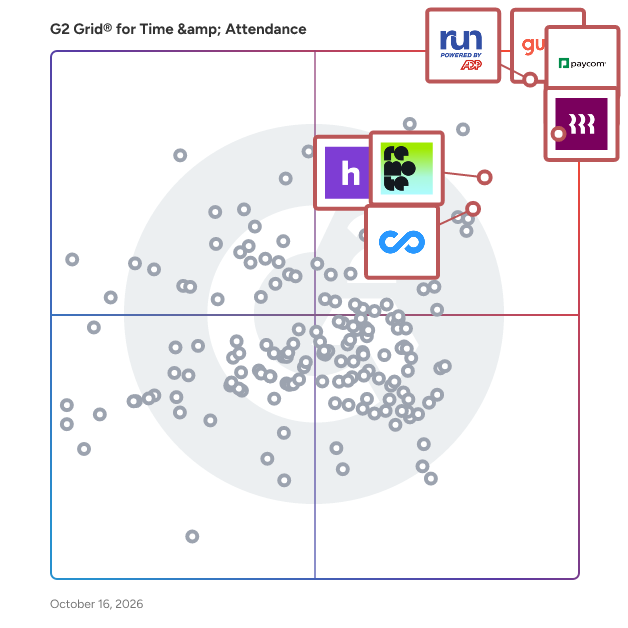
## G2 Grid® for Time &amp; Attendance Software
![G2 Grid® for Time & Attendance Software plotting products by satisfaction and market presence](https://www.g2.com/categories/time-attendance/grids.png?focus%5B%5D=5449&focus%5B%5D=3637&focus%5B%5D=53090&focus%5B%5D=20433&focus%5B%5D=19474&focus%5B%5D=79064&focus%5B%5D=4132&focus%5B%5D=5349)
Highlighted products: RUN Powered by ADP, Gusto, Rippling, Connecteam, Homebase, Remote, UKG Ready, and Hubstaff.
Underlying data: [Grid® JSON](https://www.g2.com/categories/time-attendance/grids.json?focus%5B%5D=run-powered-by-adp&amp;focus%5B%5D=gusto&amp;focus%5B%5D=rippling&amp;focus%5B%5D=connecteam&amp;focus%5B%5D=homebase&amp;focus%5B%5D=remote&amp;focus%5B%5D=ukg-ready&amp;focus%5B%5D=hubstaff&amp;segment=small-business)


## How Many Time &amp; Attendance Software Products Does G2 Track?
**Total Products under this Category:** 599

### Category Stats (Jul 2026)
- **Average Rating**: 4.41/5 The average rating of products in this category, based on all submitted ratings
- **Top Trending Product**: eTimesheets (+5.56%) - Among all products in this category, eTimesheets recorded the largest rating increase compared to last month
*Last updated: July 21, 2026*


## How Does G2 Rank Time &amp; Attendance Software Products?

**Why You Can Trust G2's Software Rankings:**

- 30 Analysts and Data Experts
- 102,300+ Authentic Reviews
- 599+ Products
- Unbiased Rankings

G2's software rankings are built on verified user reviews, rigorous moderation, and a consistent research methodology maintained by a team of analysts and data experts. Each product is measured using the same transparent criteria, with no paid placement or vendor influence. While reviews reflect real user experiences, which can be subjective, they offer valuable insight into how software performs in the hands of professionals. Together, these inputs power the G2 Score, a standardized way to compare tools within every category.


---

**Sponsored**

### Buddy Punch

Buddy Punch is a cloud-based platform that transforms how businesses track employee time and manage schedules, bringing clarity and control to workforce operations across industries. This software helps organizations accurately track employee work hours, manage time-off requests, monitor attendance, and prepare data for payroll. Buddy Punch is built to accommodate remote, mobile, and in-office teams with tools that support accountability, transparency, and flexibility. Designed for small to mid-sized businesses across industries like construction, healthcare, retail, professional services, and more, Buddy Punch provides customizable features to support both hourly and salaried workers. Employees can clock in and out using web browsers or mobile apps on iOS and Android devices, while employers can oversee operations in real time with GPS tracking, geofencing, and customizable permissions. Buddy Punch features: \*Real-Time Tracking &amp; Visibility: Monitor who is on the clock, their current location, and their punch activity with GPS and geofencing tools. \*Payroll-Ready Reporting: Export timesheets directly to payroll systems or download them in Excel format, with integrations for QuickBooks, ADP, Paychex, and SurePayroll. \*Flexible Punch Options: Employees can punch in via Face ID, QR codes, PIN, or mobile device, which ensures security and convenience. \*Advanced Time Management Tools: Includes automatic break rules, punch rounding, PTO accrual tracking, and job code reporting. \*Secure Access &amp; SSO: Offers role-based permissions and single sign-on (SSO) for a streamlined and secure login experience. Buddy Punch enables managers and business owners to reduce manual entry, enforce time tracking policies, and empower their teams with tools that are easy to use and built for accountability. Whether employees are on-site, remote, or mobile, Buddy Punch helps organizations ensure accurate time tracking and efficient payroll processing by making workforce management straightforward and reliable.


[Visit website](https://www.g2.com/external_clickthroughs/record?secure%5Bad_program%5D=paid_promo&amp;secure%5Bad_slot%5D=category_product_list&amp;secure%5Bcategory_id%5D=1381&amp;secure%5Bchosen_at%5D=2026-07-22T16%3A11%3A59Z&amp;secure%5Bmedium%5D=sponsored&amp;secure%5Bprioritized%5D=false&amp;secure%5Bproduct_id%5D=4446&amp;secure%5Bresource_id%5D=1381&amp;secure%5Bresource_type%5D=Category&amp;secure%5Bsource_type%5D=llm_category_page&amp;secure%5Bsource_url%5D=https%3A%2F%2Fwww.g2.com%2Fcategories%2Ftime-attendance%2Fsmall-business%3Fpage%3D2&amp;secure%5Btoken%5D=d3d9a9d49598da348fb589b41906d1d36961068856a7868e9b86c34b9b3af36a&amp;secure%5Burl%5D=https%3A%2F%2Fbuddypunch.com%2F%3Futm_campaign%3Dtime%26utm_content%3Dproducts-buddy-punch-reviews%26utm_medium%3Dcpc%26utm_source%3Dg2&amp;secure%5Burl_type%5D=paid_promos)

---

## What Are the Top-Rated Time &amp; Attendance Software Products in 2026?
### 1. [Personio](https://www.g2.com/products/personio/reviews)
Personio is the intelligent HR platform built for the way European businesses actually work. Most HR software was designed in the US and adapted for Europe as an afterthought. Personio was built here from the start, for companies navigating multiple languages, varying labor laws, and a patchwork of local compliance requirements that change faster than most platforms can keep up with. Manage the full employee lifecycle in one place: hiring, onboarding, time tracking, absence management, payroll, performance, and workforce reporting. No more switching between systems or maintaining spreadsheets on the side. Everything your HR team needs lives in one place, connected and up to date. Smart automations handle the repetitive admin that consumes your HR team&#39;s day. Approval workflows, absence tracking, contract generation, and onboarding checklists run in the background so your team can focus on the work that actually moves the business forward. Proactive insights turn workforce data into clear, shareable intelligence, helping HR leaders spot trends, anticipate change, and walk into leadership meetings with something worth saying. The platform adapts to how your organisation works, not the other way around. Customise workflows, approval chains, and reporting to fit your structure, whether you are running one office or coordinating teams across five countries. Personio connects with over 200 tools European businesses rely on, including DATEV, Slack, and Google Workspace. It runs natively in German, English, Spanish, French, Dutch, and Italian, among other languages and is built for GDPR compliance across every market you operate in. More than 14,000 companies across Germany, Austria, Switzerland, the UK, and Spain trust Personio to run their HR. It is the intelligent platform that grows with European businesses, because it was made for them.


**Average Rating:** 4.4/5.0
**Total Reviews:** 856
**How Do G2 Users Rate Personio?**

- **Has the product been a good partner in doing business?:** 8.5/10 (Category avg: 8.8/10)
- **Dashboards &amp; Reporting:** 8.2/10 (Category avg: 8.6/10)
- **Process Automation:** 8.5/10 (Category avg: 8.7/10)
- **Data Collection:** 8.4/10 (Category avg: 8.7/10)

**Who Is the Company Behind Personio?**

- **Seller:** [Personio](https://www.g2.com/sellers/personio)
- **Company Website:** https://www.personio.com
- **Year Founded:** 2015
- **HQ Location:** München, Bayern
- **LinkedIn® Page:** https://www.linkedin.com/company/personio/ (1,745 employees on LinkedIn®)

**Who Uses This Product?**
- **Who Uses This:** CEO, HR Manager
- **Top Industries:** Computer Software, Information Technology and Services
- **Company Size:** 60% Mid-Market, 28% Small-Business


#### What Are Personio's Pros and Cons?

**Pros:**

- Ease of Use (351 reviews)
- Intuitive (192 reviews)
- Features (184 reviews)
- HR Management (179 reviews)
- Comprehensive Features (177 reviews)

**Cons:**

- Missing Features (110 reviews)
- Limited Customization (100 reviews)
- Limited Features (94 reviews)
- Lacking Features (66 reviews)
- Limited Options (62 reviews)


### What Do G2 Reviewers Say About Personio?
*AI-generated summary from verified user reviews*

**Pros:**

- Users value the **ease of use** of Personio, enjoying its clarity and helpful resources for quick onboarding.
- Users appreciate the **intuitive interface** of Personio, enhancing their experience with easy navigation and accessibility.
- Users appreciate the **intuitive interface and centralized features** of Personio, making it ideal for small teams.
- Users appreciate the **high employee acceptance** of Personio, benefiting from its centralized HR management and versatile features.
- Users appreciate the **comprehensive features** of Personio, enjoying seamless integration and user-friendly process automation.

**Cons:**

- Users desire **missing features** in Personio, particularly in automated notifications and mobile functionality.
- Users experience **limited customization** options in Personio, which can hinder meeting unique needs effectively.
- Users find the **limited features** in Personio hinder workflow customization and can complicate the user experience.
- Users often face **lacking features** in Personio, with insufficient reporting and limited mobile functionality impacting usability.
- Users express frustration over **limited options** in customization and reporting tools, feeling restricted in their HR data management.

#### What Are Recent G2 Reviews of Personio?

**"[Personio noticeably relieves our HR processes and continuously evolves](https://www.g2.com/survey_responses/personio-review-12852402)"**

**Rating:** 5.0/5.0 stars
*— Silke A.*

[Read full review](https://www.g2.com/survey_responses/personio-review-12852402)

---

**"[Effortless HR Self-Service](https://www.g2.com/survey_responses/personio-review-13002993)"**

**Rating:** 5.0/5.0 stars
*— Robert K.*

[Read full review](https://www.g2.com/survey_responses/personio-review-13002993)

---


#### What Are G2 Users Discussing About Personio?

- [What is Personio used for?](https://www.g2.com/discussions/what-is-personio-used-for)

### 2. [TimeClock Plus by TCP](https://www.g2.com/products/timeclock-plus-by-tcp/reviews)
TimeClock Plus by TCP makes it easy to track employee hours, manage schedules, and handle time off, without messy spreadsheets and clunky systems. Your team can clock in however they prefer, while managers get real-time visibility to stay on top of hours, overtime, leave and absences. TimeClock Plus works with your ERP, HCM, and payroll tools to save time and reduce errors, while helping you stay compliant without the extra effort. Whether your people are in one location or many, TimeClock Plus helps you run smoother, smarter, and more efficiently so that you can focus on your people and not paperwork. From time tracking to delivering the perfect paycheck, get time right, every time.


**Average Rating:** 4.3/5.0
**Total Reviews:** 588
**How Do G2 Users Rate TimeClock Plus by TCP?**

- **Has the product been a good partner in doing business?:** 8.7/10 (Category avg: 8.8/10)
- **Dashboards &amp; Reporting:** 8.3/10 (Category avg: 8.6/10)
- **Process Automation:** 7.8/10 (Category avg: 8.7/10)
- **Data Collection:** 8.5/10 (Category avg: 8.7/10)

**Who Is the Company Behind TimeClock Plus by TCP?**

- **Seller:** [TCP Software](https://www.g2.com/sellers/tcp-software)
- **Company Website:** https://www.tcpsoftware.com/
- **Year Founded:** 1988
- **HQ Location:** Plano, US
- **Twitter:** @tcpsoftware (450 Twitter followers)
- **LinkedIn® Page:** https://www.linkedin.com/company/2644323/ (1,341 employees on LinkedIn®)

**Who Uses This Product?**
- **Who Uses This:** Office Manager, IT Manager
- **Top Industries:** Education Management, Primary/Secondary Education
- **Company Size:** 54% Mid-Market, 35% Small-Business


#### What Are TimeClock Plus by TCP's Pros and Cons?

**Pros:**

- Ease of Use (25 reviews)
- Customer Support (15 reviews)
- Time Tracking (13 reviews)
- Intuitive (9 reviews)
- Attendance Tracking (8 reviews)

**Cons:**

- Missing Features (7 reviews)
- Clocking Issues (5 reviews)
- Limited Customization (5 reviews)
- Limited Features (5 reviews)
- Not User-Friendly (4 reviews)


### What Do G2 Reviewers Say About TimeClock Plus by TCP?
*AI-generated summary from verified user reviews*

**Pros:**

- Users appreciate the **ease of use** of TimeClock Plus, making time tracking intuitive and efficient.
- Users commend the **excellent customer support** from TimeClock Plus, praising their responsiveness and willingness to assist.
- Users value the **ease of time tracking** with TimeClock Plus, appreciating its straightforward design and real-time updates.
- Users love the **intuitive design** of TimeClock Plus, making time tracking simple and efficient for everyone.
- Users appreciate the **easy tracking of time and attendance** in TimeClock Plus, enhancing overall efficiency and organization.

**Cons:**

- Users express disappointment over **missing features** and unfulfilled promises, complicating their overall experience with TimeClock Plus.
- Users experience **clocking issues** with TimeClock Plus, including navigation confusion and system glitches affecting clock-ins.
- Users find the **limited customization** options frustrating, making adjustments to PTO and approvals cumbersome.
- Users find the system&#39;s **limited features** can be overwhelming, with many promised improvements still unmet.
- Users find the system **not user-friendly** , with clunky navigation and unintuitive menus complicating their experience.

#### What Are Recent G2 Reviews of TimeClock Plus by TCP?

**"[TimeClock plus: Easy to Use, Fast, and Backed by Responsive 24/7 Chat Support](https://www.g2.com/survey_responses/timeclock-plus-by-tcp-review-13088349)"**

**Rating:** 5.0/5.0 stars
*— Jill B.*

[Read full review](https://www.g2.com/survey_responses/timeclock-plus-by-tcp-review-13088349)

---

**"[TimeClock Plus: Reliable, Easy-to-Use Workforce Management](https://www.g2.com/survey_responses/timeclock-plus-by-tcp-review-13105211)"**

**Rating:** 5.0/5.0 stars
*— barbara t.*

[Read full review](https://www.g2.com/survey_responses/timeclock-plus-by-tcp-review-13105211)

---


#### What Are G2 Users Discussing About TimeClock Plus by TCP?

- [What is TCP TimeClock Plus used for?](https://www.g2.com/discussions/what-is-tcp-timeclock-plus-used-for) - 1 upvote
- [What is the best free time clock app?](https://www.g2.com/discussions/what-is-the-best-free-time-clock-app) - 2 comments
- [What is the best time clock app for small business?](https://www.g2.com/discussions/what-is-the-best-time-clock-app-for-small-business) - 2 comments
- [What are the advantages of using a time clock in a factory?](https://www.g2.com/discussions/what-are-the-advantages-of-using-a-time-clock-in-a-factory) - 3 comments
- [What is the best employee time clock software?](https://www.g2.com/discussions/what-is-the-best-employee-time-clock-software) - 1 comment

### 3. [PeopleForce](https://www.g2.com/products/peopleforce/reviews)
PeopleForce is an all-in-one HR platform designed to automate and streamline human resources management for small to midsize businesses (SMBs) and organizations. This comprehensive solution empowers HR leaders, managers, recruiters, and People partners to focus on their most valuable asset—people—by significantly reducing the time spent on routine HR tasks. With over 1,000 companies already leveraging its capabilities, PeopleForce has demonstrated the potential to save up to 80% of the time traditionally allocated to HR activities. The platform encompasses several key modules tailored to various HR functions, ensuring that organizations can address their unique needs effectively. The CoreHR product centralizes all HR tasks and employee information within a single, intuitive interface, promoting transparency and efficiency across the organization. Users can manage leave and paid time off tracking, automate employee onboarding, preboarding, offboarding, and other essential processes, while eSignature capabilities streamline documentation. Additionally, robust internal communication tools enhance collaboration among team members, ensuring alignment and informed decision-making. For organizations looking to enhance their talent acquisition efforts, the Recruit product offers a comprehensive Applicant Tracking System (ATS). This feature automates candidate sourcing, screening, and interview scheduling, allowing HR teams to secure top talent swiftly and effectively. By streamlining the recruitment process, PeopleForce helps organizations reduce time-to-hire and improve the overall quality of their candidate selection, ultimately contributing to a stronger workforce. The Perform product focuses on driving excellence within teams by monitoring performance through Objectives and Key Results (OKRs), Key Performance Indicators (KPIs), one-on-one sessions, and 360-degree reviews. This fosters a culture of continuous improvement and achievement, empowering employees to reach their full potential. Additionally, the Pulse product utilizes employee Net Promoter Score (eNPS) and online surveys to gauge engagement and satisfaction, enabling organizations to proactively enhance their workplace environments based on real-time feedback. PeopleForce also includes a Time product for tracking employees&#39; working hours and configuring attendance policies, ensuring effective workload management and productivity tracking. The Desk product empowers employees to voice concerns and requests through a streamlined case management and whistleblowing system, facilitating prompt, personalized resolutions. Integration with tools such as Google Workspace, Microsoft Outlook, Slack, and many more creates a cohesive HR ecosystem that aligns seamlessly with existing workflows, further enhancing the platform&#39;s effectiveness and overall employee experience.


**Average Rating:** 4.8/5.0
**Total Reviews:** 245
**How Do G2 Users Rate PeopleForce?**

- **Has the product been a good partner in doing business?:** 9.5/10 (Category avg: 8.8/10)
- **Dashboards &amp; Reporting:** 8.9/10 (Category avg: 8.6/10)
- **Process Automation:** 9.1/10 (Category avg: 8.7/10)
- **Data Collection:** 8.9/10 (Category avg: 8.7/10)

**Who Is the Company Behind PeopleForce?**

- **Seller:** [PeopleForce](https://www.g2.com/sellers/peopleforce)
- **Company Website:** https://peopleforce.io/
- **Year Founded:** 2018
- **HQ Location:** Kyiv, UA
- **Twitter:** @peopleforcehrm (313 Twitter followers)
- **LinkedIn® Page:** https://www.linkedin.com/company/peopleforceapp/ (145 employees on LinkedIn®)

**Who Uses This Product?**
- **Who Uses This:** HR Manager, Human Resources Manager
- **Top Industries:** Information Technology and Services, Computer Software
- **Company Size:** 58% Mid-Market, 40% Small-Business


#### What Are PeopleForce's Pros and Cons?

**Pros:**

- Ease of Use (51 reviews)
- Customer Support (40 reviews)
- Helpful (40 reviews)
- Intuitive (35 reviews)
- Simple (29 reviews)

**Cons:**

- Missing Features (19 reviews)
- Limited Customization (13 reviews)
- Incomplete Features (7 reviews)
- Limited Features (7 reviews)
- Insufficient Information (6 reviews)


### What Do G2 Reviewers Say About PeopleForce?
*AI-generated summary from verified user reviews*

**Pros:**

- Users praise the **ease of use** of PeopleForce, highlighting its intuitive design and seamless HR process management.
- Users praise the **responsive customer support** of PeopleForce, highlighting quick assistance and effective onboarding experiences.
- Users value the **automation of repetitive tasks** in PeopleForce, significantly enhancing HR efficiency and saving time.
- Users find the system **intuitive and easy to use** , enhancing comfort and efficiency in daily HR tasks.
- Users value the **intuitive design** of PeopleForce, making HR management accessible and efficient for all employees.

**Cons:**

- Users find several **missing essential features** in PeopleForce, which limits customization and functionality for their needs.
- Users feel limited by the **lack of customization options** in PeopleForce, hindering tailor-made solutions for their needs.
- Users find that essential features are **incomplete in PeopleForce** , impacting customization and mobile functionality.
- Users find the **limited features** of PeopleForce restrict functionality, lacking essential tools for effective management.
- Users indicate **insufficient information** with outdated instructions and limited analytics, impacting effective utilization of PeopleForce.

#### What Are Recent G2 Reviews of PeopleForce?

**"[All in one place: calendar, contacts, and convenient onboarding](https://www.g2.com/survey_responses/peopleforce-review-12924044)"**

**Rating:** 5.0/5.0 stars
*— Maryna B.*

[Read full review](https://www.g2.com/survey_responses/peopleforce-review-12924044)

---

**"[PeopleForce Makes Core HR Processes Easy and Organized](https://www.g2.com/survey_responses/peopleforce-review-12952085)"**

**Rating:** 5.0/5.0 stars
*— Zhanar B.*

[Read full review](https://www.g2.com/survey_responses/peopleforce-review-12952085)

---


### 4. [isolved](https://www.g2.com/products/isolved/reviews)
isolved is a provider of human capital management (HCM) solutions that help organizations recruit, retain and elevate their workforce. More than 195,000 employers and 8 million employees rely on isolved&#39;s software and services to streamline human resource (HR) operations and deliver employee experiences that matter. isolved People Cloud™ is a unified yet modular HCM platform with built-in artificial intelligence (AI) and analytics that connects HR, payroll, benefits, and workforce and talent management into a single solution that drives better business outcomes. Through the Sidekick Advantage™, isolved also provides expert guidance, embedded services and an engaged community that empowers People Heroes™ to grow their companies and careers. Learn more at www.isolvedhcm.com.


**Average Rating:** 4.3/5.0
**Total Reviews:** 1,283
**How Do G2 Users Rate isolved?**

- **Has the product been a good partner in doing business?:** 8.5/10 (Category avg: 8.8/10)
- **Dashboards &amp; Reporting:** 8.0/10 (Category avg: 8.6/10)
- **Process Automation:** 8.1/10 (Category avg: 8.7/10)
- **Data Collection:** 8.1/10 (Category avg: 8.7/10)

**Who Is the Company Behind isolved?**

- **Seller:** [isolved HCM](https://www.g2.com/sellers/isolved-hcm)
- **Company Website:** https://www.isolvedhcm.com/
- **Year Founded:** 1986
- **HQ Location:** Charlotte, NC
- **Twitter:** @iSolvedHCM (2,254 Twitter followers)
- **LinkedIn® Page:** https://www.linkedin.com/company/10862921/ (1,867 employees on LinkedIn®)

**Who Uses This Product?**
- **Who Uses This:** HR Manager, Office Manager
- **Top Industries:** Hospital &amp; Health Care, Non-Profit Organization Management
- **Company Size:** 54% Mid-Market, 41% Small-Business


#### What Are isolved's Pros and Cons?

**Pros:**

- Helpful (156 reviews)
- Customer Support (145 reviews)
- Ease of Use (139 reviews)
- Response Time (72 reviews)
- Payroll Management (70 reviews)

**Cons:**

- Poor Customer Support (70 reviews)
- Not User-Friendly (62 reviews)
- Not Intuitive (58 reviews)
- Limited Features (56 reviews)
- Missing Features (49 reviews)


### What Do G2 Reviewers Say About isolved?
*AI-generated summary from verified user reviews*

**Pros:**

- Users find Isolved&#39;s **helpful support team** and features immensely beneficial for ease of use and solutions.
- Users appreciate the **wonderful customer support** from isolved, highlighting their responsiveness and ease of resolving issues.
- Users commend the **ease of use** of isolved, highlighting its user-friendly design and responsive support team.
- Users commend the **timely response time** of isolved&#39;s customer service, enhancing their overall experience with the platform.
- Users appreciate the **robust payroll management features** of iSolved, making processes seamless and efficient.

**Cons:**

- Users report **poor customer support** from isolved, citing slow responses and inefficiencies in handling inquiries and issues.
- Users find Isolved **not user-friendly** , citing issues with screen changes and a need for improved design for ease of use.
- Users report that Isolved can be **not intuitive** , with frequent changes complicating navigation and access to features.
- Users feel there is a need for more **features and functionality** in Isolved&#39;s payroll portal for improved usability.
- Users express frustration over the **missing features** in isolved, leading to complications and inefficiencies during updates.

#### What Are Recent G2 Reviews of isolved?

**"[Flexible Payroll Processing with Top-Notch UI and Support Materials](https://www.g2.com/survey_responses/isolved-review-13001705)"**

**Rating:** 4.0/5.0 stars
*— Derrick R.*

[Read full review](https://www.g2.com/survey_responses/isolved-review-13001705)

---

**"[Easy Timecards and Onboarding with Responsive Support](https://www.g2.com/survey_responses/isolved-review-12939213)"**

**Rating:** 5.0/5.0 stars
*— Leigh F.*

[Read full review](https://www.g2.com/survey_responses/isolved-review-12939213)

---


#### What Are G2 Users Discussing About isolved?

- [What is isolved used for?](https://www.g2.com/discussions/isolved-what-is-isolved-used-for) - 1 comment
- [What is isolved used for?](https://www.g2.com/discussions/what-is-isolved-used-for) - 1 comment

### 5. [Time Doctor](https://www.g2.com/products/time-doctor/reviews)
Managing a distributed workforce without reliable data means making decisions on gut feel. Time Doctor gives leaders the workforce visibility they need to manage performance, capacity, and productivity across remote, hybrid, and in-office teams without defaulting to micromanagement. More than 245,000 people across BPOs, healthcare, financial services, and remote-first companies use Time Doctor to move from reactive management to informed leadership. What Time Doctor Does - Tracks time, projects, and tasks so leaders know where effort is going and what&#39;s driving results - Surfaces productivity patterns, app and website usage, and workload signals to catch bottlenecks and disengagement early - Uses built-in AI to benchmark performance, flag trends, and surface issues before they escalate - Supports payroll, billing, and client reporting with accurate, audit-ready time data Deploys privacy-first controls: screenshot blurring, role-based access, employee-facing reports so oversight stays respectful, not invasive. What Sets Time Doctor Apart Most workforce tools force a trade-off between visibility and trust. Time Doctor is built so you don&#39;t have to choose. Managers get the data they need. Employees see the same data about their own work. That transparency is what makes adoption stick and what makes the data reliable. Who It&#39;s For Operations leaders, HR and people ops, team managers, executives, and IT leaders managing distributed or remote-first workforces.


**Average Rating:** 4.4/5.0
**Total Reviews:** 480
**How Do G2 Users Rate Time Doctor?**

- **Has the product been a good partner in doing business?:** 9.0/10 (Category avg: 8.8/10)
- **Dashboards &amp; Reporting:** 9.6/10 (Category avg: 8.6/10)
- **Process Automation:** 8.3/10 (Category avg: 8.7/10)
- **Data Collection:** 7.8/10 (Category avg: 8.7/10)

**Who Is the Company Behind Time Doctor?**

- **Seller:** [Time Doctor](https://www.g2.com/sellers/time-doctor-bb915eeb-aa62-46ed-acdb-b6d50c989b74)
- **Company Website:** https://www.timedoctor.com
- **Year Founded:** 2010
- **HQ Location:** Las Vegas, NV
- **Twitter:** @ManageYourTime (6,390 Twitter followers)
- **LinkedIn® Page:** https://www.linkedin.com/company/2184443/ (522 employees on LinkedIn®)

**Who Uses This Product?**
- **Who Uses This:** Owner, CEO
- **Top Industries:** Marketing and Advertising, Information Technology and Services
- **Company Size:** 62% Small-Business, 31% Mid-Market


#### What Are Time Doctor's Pros and Cons?

**Pros:**

- Time Tracking (108 reviews)
- Time-saving (53 reviews)
- Ease of Use (51 reviews)
- Efficiency (45 reviews)
- Features (43 reviews)

**Cons:**

- Technical Issues (19 reviews)
- Missing Features (17 reviews)
- Software Bugs (17 reviews)
- Tracking Issues (15 reviews)
- Limited Features (13 reviews)


### What Do G2 Reviewers Say About Time Doctor?
*AI-generated summary from verified user reviews*

**Pros:**

- Users find the **time tracking feature** of Time Doctor incredibly useful for monitoring hours and activity effectively.
- Users find **Time Doctor saves time** by maximizing team productivity and providing essential tracking reports effortlessly.
- Users appreciate the **ease of use** of Time Doctor, highlighting its user-friendly features and intuitive design.
- Users appreciate the **efficiency** of Time Doctor, gaining insights to enhance productivity and eliminate time wasters.
- Users value the **powerful tracking features** of Time Doctor, facilitating productivity and team management for remote work.

**Cons:**

- Users face **technical issues** with Time Doctor, including billing confusion, glitches, and unexpected app shutdowns.
- Users find the **missing features** of Time Doctor limiting, needing improvements for better accuracy and automation.
- Users often face **software bugs** in Time Doctor, causing inconsistencies and frustrations with functionality and billing.
- Users experience **tracking issues** , including inconsistencies in idle time recording and occasional timer malfunctions.
- Users find the **limited features** in Time Doctor&#39;s basic plan restrict insights and customization options for their needs.

#### What Are Recent G2 Reviews of Time Doctor?

**"[Real-Time Visibility and Automated Time Tracking That Boost Remote Productivity](https://www.g2.com/survey_responses/time-doctor-review-12787875)"**

**Rating:** 4.0/5.0 stars
*— Ben G.*

[Read full review](https://www.g2.com/survey_responses/time-doctor-review-12787875)

---

**"[Clean, Feature Rich Time Tracking with Great Support](https://www.g2.com/survey_responses/time-doctor-review-12752069)"**

**Rating:** 4.5/5.0 stars
*— Bhava  L.*

[Read full review](https://www.g2.com/survey_responses/time-doctor-review-12752069)

---


#### What Are G2 Users Discussing About Time Doctor?

- [Does Time Doctor record audio?](https://www.g2.com/discussions/does-time-doctor-record-audio)
- [How do you use the time Doctor app?](https://www.g2.com/discussions/how-do-you-use-the-time-doctor-app) - 1 comment
- [How do you set time in a doctor?](https://www.g2.com/discussions/how-do-you-set-time-in-a-doctor)
- [Does time doctor take screenshots?](https://www.g2.com/discussions/does-time-doctor-take-screenshots) - 3 comments

### 6. [Paycom](https://www.g2.com/products/paycom/reviews)
Paycom is the most automated HCM platform and the only HR and payroll software built on a truly single, unique database that automates the entire employee life cycle. Designed as a unified system, Paycom eliminates inefficiencies and errors caused by integrating multiple platforms by using command driven AI and full solution automation. Built on a single data source, Paycom enables uninterrupted data flow across HR and payroll, streamlining performance, communication and compliance. Frequently recognized by third party reviewers as one of the best payroll and HR software solutions, Paycom is used by organizations of all sizes across the U.S. and internationally to simplify workforce management and free HR teams to focus on strategic initiatives.


**Average Rating:** 4.5/5.0
**Total Reviews:** 4,629
**How Do G2 Users Rate Paycom?**

- **Has the product been a good partner in doing business?:** 8.3/10 (Category avg: 8.8/10)
- **Dashboards &amp; Reporting:** 8.7/10 (Category avg: 8.6/10)
- **Process Automation:** 8.8/10 (Category avg: 8.7/10)
- **Data Collection:** 8.8/10 (Category avg: 8.7/10)

**Who Is the Company Behind Paycom?**

- **Seller:** [Paycom](https://www.g2.com/sellers/paycom)
- **Company Website:** https://www.paycom.com/
- **Year Founded:** 1998
- **HQ Location:** Oklahoma City, OK
- **Twitter:** @Paycom (33,252 Twitter followers)
- **LinkedIn® Page:** https://www.linkedin.com/company/37759/ (5,844 employees on LinkedIn®)

**Who Uses This Product?**
- **Who Uses This:** HR Manager, Human Resources Manager
- **Top Industries:** Hospital &amp; Health Care, Non-Profit Organization Management
- **Company Size:** 18% Mid-Market, 4% Small-Business


#### What Are Paycom's Pros and Cons?

**Pros:**

- Ease of Use (395 reviews)
- Helpful (276 reviews)
- Customer Support (252 reviews)
- Payroll Management (242 reviews)
- Simple (210 reviews)

**Cons:**

- Poor Customer Support (107 reviews)
- Learning Curve (103 reviews)
- Not Intuitive (103 reviews)
- Limited Features (99 reviews)
- Not User-Friendly (92 reviews)


### What Do G2 Reviewers Say About Paycom?
*AI-generated summary from verified user reviews*

**Pros:**

- Users appreciate the **ease of use** of Paycom, finding it simple to set up and navigate for tracking hours.
- Users appreciate the **user-friendly technology** of Paycom, making payroll processing and time tracking seamless and efficient.
- Users commend the **knowledgeable and responsive customer support** of Paycom, enhancing their overall experience and satisfaction.
- Users love the **streamlined payroll management** of Paycom, simplifying processes and enhancing efficiency for everyone involved.
- Users find Paycom&#39;s **user-friendly technology** simplifies payroll and time tracking, increasing accuracy and reducing errors.

**Cons:**

- Users express disappointment with Paycom&#39;s **poor customer support** , indicating unresponsiveness and a lack of effective solutions.
- Users experience a **steep learning curve** with Paycom, finding it unintuitive and frustratingly complex to navigate.
- Users find the **UI unintuitive** , making navigation and task completion unnecessarily complicated and time-consuming.
- Users find Paycom&#39;s **limited features** inadequate for modern needs, causing significant frustration and operational inefficiencies.
- Users find Paycom **not user-friendly** , struggling with its unintuitive interface and complicated processes that hinder productivity.

#### What Are Recent G2 Reviews of Paycom?

**"[Paycom Review 06.26.2026](https://www.g2.com/survey_responses/paycom-review-13036323)"**

**Rating:** 4.0/5.0 stars
*— Mia J.*

[Read full review](https://www.g2.com/survey_responses/paycom-review-13036323)

---

**"[Efficient Payroll and HR with Beti AI, Great Integrations, and Top-Notch Support](https://www.g2.com/survey_responses/paycom-review-13043985)"**

**Rating:** 4.0/5.0 stars
*— Andrew H.*

[Read full review](https://www.g2.com/survey_responses/paycom-review-13043985)

---


### 7. [Time Champ](https://www.g2.com/products/time-champ/reviews)
Time Champ is an enterprise-grade Workforce Intelligence Platform built for teams that value operational clarity. Modern organizations run on people, processes, and performance, yet most leaders still struggle to connect the dots across them. Time Champ helps companies see how work truly happens across teams, tools, and workflows, and turns that visibility into actionable insights. Time Champ unifies employee monitoring, time tracking, productivity insights, project management, utilization trends and workforce analytics into one decision-grade platform. Through real-time dashboards, advanced analytics, and customizable reports, leaders gain clarity into how time, effort, and resources translate into outcomes. With Time Champ, operations, HR, delivery, and executive teams can: • Improve resource allocation and capacity planning • Detect early risk signals that impact delivery timelines • Reduce bandwidth waste and burnout patterns • Optimize project costs and workforce utilization • Replace spreadsheets and assumptions with decision-grade insights The platform consolidates attendance records, time tracking logs, employee monitoring data, task activity, application usage, project workflows, and field operations into role-based dashboards designed for clarity and insights. Built for hybrid, remote, field, and in-office teams, Time Champ is modular, scalable, and enterprise-ready, supporting operational growth without adding complexity. In one sentence, Time Champ gives leaders real-time clarity into Employee activity, productivity, time usage, operational efficiency, and performance insights, empowering confident, data-backed decisions.


**Average Rating:** 4.8/5.0
**Total Reviews:** 116
**How Do G2 Users Rate Time Champ?**

- **Has the product been a good partner in doing business?:** 9.6/10 (Category avg: 8.8/10)
- **Dashboards &amp; Reporting:** 9.2/10 (Category avg: 8.6/10)
- **Process Automation:** 9.3/10 (Category avg: 8.7/10)
- **Data Collection:** 9.3/10 (Category avg: 8.7/10)

**Who Is the Company Behind Time Champ?**

- **Seller:** [Snovasys Software Solutiions](https://www.g2.com/sellers/snovasys-software-solutiions)
- **Year Founded:** 2008
- **HQ Location:** Middlesex, GB
- **Twitter:** @snovasys (182 Twitter followers)
- **LinkedIn® Page:** https://www.linkedin.com/company/snovasys/ (292 employees on LinkedIn®)

**Who Uses This Product?**
- **Who Uses This:** Digital Marketing Executive
- **Top Industries:** Computer Software, Information Technology and Services
- **Company Size:** 55% Small-Business, 41% Mid-Market


#### What Are Time Champ's Pros and Cons?

**Pros:**

- Efficiency (25 reviews)
- Productivity Improvement (25 reviews)
- Time-saving (25 reviews)
- Time Tracking (25 reviews)
- Ease of Use (22 reviews)

**Cons:**

- Learning Curve (7 reviews)
- App Malfunction (2 reviews)
- Limited Features (2 reviews)
- Overwhelming Experience (2 reviews)
- Poor Interface Design (2 reviews)


### What Do G2 Reviewers Say About Time Champ?
*AI-generated summary from verified user reviews*

**Pros:**

- Users appreciate the **efficiency** of Time Champ, making tracking and managing tasks seamless and integrated.
- Users value the **productivity improvement** from Time Champ, enhancing focus and providing insightful performance data effortlessly.
- Users value the **time-saving features** of Time Champ, streamlining productivity tracking and reducing workload stress effortlessly.
- Users value the **ease of time tracking** with Time Champ, highlighting its clarity and efficiency for team performance insights.
- Users praise the **ease of use** of Time Champ, highlighting its simple interface and seamless insights for productivity tracking.

**Cons:**

- Users find the **learning curve challenging** , making it difficult for new users to fully utilize Time Champ&#39;s features.
- Users face **app malfunctions** with Time Champ, including issues post-iOS update and unwanted screen recording restarts.
- Users feel the **limited features** can be overwhelming, especially when advanced reports are not necessary for small businesses.
- Users find the **overwhelming experience** with excessive reports initially challenging, though benefits emerge with familiarity.
- Users find the **poor interface design** of Time Champ complicated, especially for new users unfamiliar with the software.

#### What Are Recent G2 Reviews of Time Champ?

**"[Delivers Real-Time Visibility and Effortless Time Tracking for Remote Teams](https://www.g2.com/survey_responses/time-champ-review-13084545)"**

**Rating:** 4.0/5.0 stars
*— Achyuth T.*

[Read full review](https://www.g2.com/survey_responses/time-champ-review-13084545)

---

**"[Comprehensive Platform for Remote Team Transparency and Productivity Analysis](https://www.g2.com/survey_responses/time-champ-review-13071056)"**

**Rating:** 4.5/5.0 stars
*— Balaji P.*

[Read full review](https://www.g2.com/survey_responses/time-champ-review-13071056)

---


#### What Are G2 Users Discussing About Time Champ?

- [What is Time Champ used for?](https://www.g2.com/discussions/what-is-time-champ-used-for) - 2 comments

### 8. [Quinyx](https://www.g2.com/products/quinyx/reviews)
Quinyx is the workforce management platform built for the world’s frontline industries, where efficiency, agility, and employee engagement make all the difference. More than just scheduling, Quinyx connects labor planning to real business outcomes. It helps organizations optimize staffing levels, control costs, and ensure compliance, all while empowering frontline teams with AI-powered, mobile-first tools designed for the way people actually work. Fast to deploy and simple to adopt, Quinyx delivers measurable ROI within months, transforming workforce management from a back-office function into a strategic driver of performance. With built-in global compliance and advanced AI capabilities, the platform enables businesses to forecast demand accurately, adapt to operational complexity, and scale seamlessly across regions and markets. Quinyx doesn’t just manage workforces — it elevates them. By aligning people, processes, and performance in one intuitive platform, Quinyx gives organizations the clarity and agility to make smarter labor decisions, engage their teams, and build a more productive, sustainable future of work.


**Average Rating:** 4.3/5.0
**Total Reviews:** 501
**How Do G2 Users Rate Quinyx?**

- **Has the product been a good partner in doing business?:** 8.5/10 (Category avg: 8.8/10)
- **Dashboards &amp; Reporting:** 8.2/10 (Category avg: 8.6/10)
- **Process Automation:** 8.1/10 (Category avg: 8.7/10)
- **Data Collection:** 8.1/10 (Category avg: 8.7/10)

**Who Is the Company Behind Quinyx?**

- **Seller:** [Quinyx](https://www.g2.com/sellers/quinyx)
- **Company Website:** https://www.quinyx.com
- **Year Founded:** 2005
- **HQ Location:** Stockholm
- **LinkedIn® Page:** https://www.linkedin.com/company/1281172/ (296 employees on LinkedIn®)

**Who Uses This Product?**
- **Who Uses This:** Store Manager, Supervisor
- **Top Industries:** Retail, Hospital &amp; Health Care
- **Company Size:** 37% Enterprise, 37% Mid-Market


#### What Are Quinyx's Pros and Cons?

**Pros:**

- Ease of Use (40 reviews)
- Intuitive (25 reviews)
- Simple (19 reviews)
- Navigation Ease (17 reviews)
- Scheduling (16 reviews)

**Cons:**

- Scheduling Issues (11 reviews)
- Missing Features (8 reviews)
- Not User-Friendly (8 reviews)
- Limited Features (7 reviews)
- Not Intuitive (7 reviews)


### What Do G2 Reviewers Say About Quinyx?
*AI-generated summary from verified user reviews*

**Pros:**

- Users find Quinyx to be an **easy-to-use system** , enhancing scheduling with a clean interface and helpful AI assistance.
- Users appreciate the **intuitive interface** of Quinyx, making it easy to manage and use effectively.
- Users love Quinyx for its **effective staff timing management** , making team control seamless and intuitive.
- Users value the **navigation ease** of Quinyx, enabling quick scheduling and management of teams in one place.
- Users find that Quinyx makes **scheduling and shift management easy** , effectively overseeing all schedules in one place.

**Cons:**

- Users report **scheduling issues** in Quinyx due to glitches and confusing hour tracking for employees.
- Users find some **missing features** in Quinyx, such as intuitive reporting and effective lead management, needing improvement.
- Users find Quinyx to be **not user-friendly** , especially with navigation and complex feature accessibility issues.
- Users note that Quinyx has **limited features** in reporting and management, which could enhance usability and efficiency.
- Users find Quinyx&#39;s interface **not intuitive** , citing difficulties in navigation and accessibility of features.

#### What Are Recent G2 Reviews of Quinyx?

**"[Effortless Scheduling, Precision Tracking](https://www.g2.com/survey_responses/quinyx-review-12442907)"**

**Rating:** 5.0/5.0 stars
*— Daniela F.*

[Read full review](https://www.g2.com/survey_responses/quinyx-review-12442907)

---

**"[Effortlessly Manages Large Workforce](https://www.g2.com/survey_responses/quinyx-review-7184284)"**

**Rating:** 5.0/5.0 stars
*— Muhammad I.*

[Read full review](https://www.g2.com/survey_responses/quinyx-review-7184284)

---


#### What Are G2 Users Discussing About Quinyx?

- [What is Quinyx used for?](https://www.g2.com/discussions/quinyx-what-is-quinyx-used-for) - 1 comment
- [What is Quinyx used for?](https://www.g2.com/discussions/what-is-quinyx-used-for) - 1 comment

### 9. [greytHR](https://www.g2.com/products/greythr/reviews)
greytHR is a comprehensive Human Resource Management System (HRMS) designed to streamline complex, recurring, and essential HR and payroll functions in a compliant and secure manner. This platform provides a full suite of over 50 tools that cover the entire employee lifecycle, from hiring to retirement, making it an invaluable resource for organizations looking to enhance their People Operations. The versatility of greytHR makes it suitable for a wide range of organizations, from small and medium-sized enterprises to large corporations. It is adaptable for various industries, including manufacturing, information technology, healthcare, banking, hospitality, education, and retail. This flexibility allows businesses with employee counts ranging from 5 to 50,000 to utilize the platform effectively. With over 30,000 organizations and 3 million users across more than 25 countries, greytHR has established itself as a trusted HRMS solution in regions such as India, the Middle East, and Southeast Asia. Key features of greytHR include modules for hiring, onboarding, core HR management, performance management, workforce management, and payroll processing. The platform also offers tools for absence management, time and attendance tracking, offboarding, and detailed HR reports and analytics. Employee self-service capabilities empower users to manage their own information, while a mobile app ensures accessibility on the go. Additionally, greytHR supports a marketplace for integrations, allowing organizations to connect with other software solutions seamlessly. By providing a centralized platform for all HR-related tasks, greytHR enhances operational efficiency and compliance. The platform’s robust features cater to the diverse needs of HR departments, enabling them to focus on strategic initiatives rather than administrative burdens. This holistic approach not only improves employee engagement and retention but also supports organizations in maintaining 100% compliance with HR regulations. As a result, greytHR stands out in the HRMS category, offering a unique blend of functionality, adaptability, and user-friendly design that meets the evolving needs of modern businesses.


**Average Rating:** 4.4/5.0
**Total Reviews:** 1,198
**How Do G2 Users Rate greytHR?**

- **Has the product been a good partner in doing business?:** 8.7/10 (Category avg: 8.8/10)
- **Dashboards &amp; Reporting:** 8.7/10 (Category avg: 8.6/10)
- **Process Automation:** 8.5/10 (Category avg: 8.7/10)
- **Data Collection:** 8.6/10 (Category avg: 8.7/10)

**Who Is the Company Behind greytHR?**

- **Seller:** [Greytip Software Pvt. Ltd.](https://www.g2.com/sellers/greytip-software-pvt-ltd)
- **Company Website:** https://www.greythr.com/
- **Year Founded:** 1994
- **HQ Location:** Bangalore
- **Twitter:** @greythr2 (1,092 Twitter followers)
- **LinkedIn® Page:** https://www.linkedin.com/company/600275/ (1,023 employees on LinkedIn®)

**Who Uses This Product?**
- **Who Uses This:** HR Manager, HR
- **Top Industries:** Information Technology and Services, Computer Software
- **Company Size:** 65% Mid-Market, 24% Small-Business


#### What Are greytHR's Pros and Cons?

**Pros:**

- Ease of Use (396 reviews)
- Payroll (240 reviews)
- Customer Support (157 reviews)
- Simple (155 reviews)
- User Interface (155 reviews)

**Cons:**

- Limited Customization (87 reviews)
- Slow Loading (87 reviews)
- Poor Customer Support (83 reviews)
- Limited Features (65 reviews)
- Login Problems (58 reviews)


### What Do G2 Reviewers Say About greytHR?
*AI-generated summary from verified user reviews*

**Pros:**

- Users appreciate the **ease of use** with greytHR, finding it user-friendly and simple to implement.
- Users appreciate the **user-friendly payroll management** of greytHR, facilitating easy handling of employee information and tasks.
- Users appreciate the **quick and effective customer support** from greytHR, enhancing their overall satisfaction with the service.
- Users appreciate the **user-friendly interface** of greytHR, making navigation and attendance tracking seamless for everyone.
- Users appreciate the **user-friendly interface** of greytHR, making HR operations streamlined and efficient.

**Cons:**

- Users find the **limited customization** options in greytHR frustrating, particularly for generating tailored reports.
- Users experience **slow loading times** with greytHR, impacting their efficiency and overall satisfaction with the application.
- Users express frustration with **poor customer support** , citing delays and unresolved queries that hinder timely assistance.
- Users find that some features are **limited or underdeveloped** , suggesting improvements for a more comprehensive experience.
- Users experience **login problems** due to network requirements and delays, which hinder quick access to the system.

#### What Are Recent G2 Reviews of greytHR?

**"[A Complete HRMS That Simplifies HR Operations](https://www.g2.com/survey_responses/greythr-review-13135401)"**

**Rating:** 5.0/5.0 stars
*— Abhijith M.*

[Read full review](https://www.g2.com/survey_responses/greythr-review-13135401)

---

**"[Secure, Mobile-Friendly greytHR with Real-Time Updates and Great Support](https://www.g2.com/survey_responses/greythr-review-13101868)"**

**Rating:** 5.0/5.0 stars
*— Abhiraj E.*

[Read full review](https://www.g2.com/survey_responses/greythr-review-13101868)

---


#### What Are G2 Users Discussing About greytHR?

- [What is greytHR used for?](https://www.g2.com/discussions/greythr-what-is-greythr-used-for) - 4 comments, 4 upvotes
- [What is greytHR used for?](https://www.g2.com/discussions/what-is-greythr-used-for) - 3 comments
- [What does a payroll software do?](https://www.g2.com/discussions/greythr-what-does-a-payroll-software-do) - 2 comments, 1 upvote
- [What is great HR?](https://www.g2.com/discussions/what-is-great-hr) - 2 comments
- [What is the most popular payroll software?](https://www.g2.com/discussions/what-is-the-most-popular-payroll-software) - 4 comments

### 10. [Workforce.com](https://www.g2.com/products/workforce-com/reviews)
Workforce.com is a workforce, HR, and payroll platform purpose-built for teams that run on hourly and shift-based labor. Instead of juggling multiple systems for scheduling, time tracking, HR, and payroll, Workforce.com brings everything together in one unified platform so businesses can run frontline operations with clarity, accuracy, and speed. With Workforce.com, managers can create optimal / efficient schedules, forecast staffing needs, monitor attendance in real time, and approve clean, compliant timesheets in just a few clicks. The system automatically applies complex pay rules—like overtime, shift differentials, multi-role pay, and compliance requirements—so payroll is accurate before it even begins. Employees benefit from a simple mobile experience that lets them clock in, swap shifts, request PTO, access their information, and stay connected to their workplace. The platform scales easily for single-location operators as well as multi-site businesses, offering consolidated wage visibility, multi-team management, and integrations with major payroll, POS, and HR systems. Workforce.com is trusted across industries like hospitality, retail, healthcare, staffing, manufacturing, and entertainment. By automating manual tasks and giving leaders real-time insight into wage costs and staffing needs, Workforce.com helps businesses operate more efficiently, stay compliant, and create better experiences for both managers and employees


**Average Rating:** 4.5/5.0
**Total Reviews:** 120
**How Do G2 Users Rate Workforce.com?**

- **Has the product been a good partner in doing business?:** 8.8/10 (Category avg: 8.8/10)
- **Dashboards &amp; Reporting:** 8.7/10 (Category avg: 8.6/10)
- **Process Automation:** 8.6/10 (Category avg: 8.7/10)
- **Data Collection:** 8.4/10 (Category avg: 8.7/10)

**Who Is the Company Behind Workforce.com?**

- **Seller:** [Workforce.com](https://www.g2.com/sellers/workforce-com)
- **Year Founded:** 1922
- **HQ Location:** Chicago, Illinois
- **Twitter:** @workforcedotcom (19,237 Twitter followers)
- **LinkedIn® Page:** https://www.linkedin.com/company/workforcemanagement/ (98 employees on LinkedIn®)

**Who Uses This Product?**
- **Who Uses This:** Operations Manager, Director
- **Top Industries:** Hospitality, Hospital &amp; Health Care
- **Company Size:** 46% Mid-Market, 43% Small-Business


#### What Are Workforce.com's Pros and Cons?

**Pros:**

- Ease of Use (25 reviews)
- Helpful (22 reviews)
- Customer Support (20 reviews)
- Setup Ease (16 reviews)
- Time-saving (16 reviews)

**Cons:**

- Not User-Friendly (5 reviews)
- Complexity (4 reviews)
- Difficult Navigation (4 reviews)
- Difficult Setup (4 reviews)
- Learning Curve (4 reviews)


### What Do G2 Reviewers Say About Workforce.com?
*AI-generated summary from verified user reviews*

**Pros:**

- Users praise the **ease of use** of Workforce.com, highlighting its intuitive design and responsive customer support.
- Users praise the **excellent customer support** and seamless implementation of Workforce.com, enhancing their overall experience significantly.
- Users praise the **outstanding customer support** of Workforce.com, highlighting efficiency, accessibility, and helpfulness during implementation.
- Users appreciate the **easy setup process** of Workforce.com, allowing quick access and efficient management for all employees.
- Users value the **time-saving capabilities** of Workforce.com, making management processes seamless and efficient.

**Cons:**

- Users find the **system not user-friendly** , with complicated navigation and awkward setup despite prior experience with similar systems.
- Users find the **initial setup and navigation complicated** , though customer service provides helpful support throughout the process.
- Users find the **difficult navigation** of Workforce.com frustrating, despite helpful customer service assistance for setup challenges.
- Users find the **difficult setup** of Workforce.com challenging, complicating the initial experience despite a user-friendly interface.
- Users experience a **challenging learning curve** with Workforce.com, finding setup and navigation less intuitive than desired.

#### What Are Recent G2 Reviews of Workforce.com?

**"[Effortless Setup and Customization, Perfect for Our Ice Cream Shop!](https://www.g2.com/survey_responses/workforce-com-review-12918098)"**

**Rating:** 5.0/5.0 stars
*— Cina K.*

[Read full review](https://www.g2.com/survey_responses/workforce-com-review-12918098)

---

**"[Great Support and a Flexible, Responsive Dashboard](https://www.g2.com/survey_responses/workforce-com-review-13112759)"**

**Rating:** 5.0/5.0 stars
*— Verified User in Hospitality*

[Read full review](https://www.g2.com/survey_responses/workforce-com-review-13112759)

---


#### What Are G2 Users Discussing About Workforce.com?

- [What is Workforce.com used for?](https://www.g2.com/discussions/what-is-workforce-com-used-for)

### 11. [HiBob HRIS](https://www.g2.com/products/hibob-hris/reviews)
HiBob is the company behind Bob, the people platform built for the AI era. Designed for modern, multi-national organizations with 100 to 5,000+ employees, Bob brings HR, payroll, workforce, and operational data together in one intuitive HR platform. As a modern HCM and flexible alternative to legacy HRIS platforms, Bob helps companies turn disconnected data into actionable insights, connect workforce strategy with business execution, and make better people decisions at scale. Bob supports the full employee lifecycle, including core HR, onboarding, performance, compensation, workforce planning, talent management, time and attendance, time off, engagement and surveys, people analytics, payroll, hiring, and learning. With AI, automated workflows, real-time insights, and configurable experiences built throughout, Bob helps organizations operate more effectively, develop and retain talent, and build high-performing teams. Built on the belief that the future of work will be defined by the partnership between people and AI, Bob helps leaders move faster, managers lead with confidence, and HR teams spend less time on manual processes and more time creating business value. More than 5,000 organizations and 1,000,000 users worldwide, including Loveable, Knix, Fiverr, Chili Piper, and Eleven Labs, trust Bob to help them build resilient, future-ready businesses. Bob integrates with over 100 platforms and offers an open API. HiBob teams span across the US, UK, Europe, Israel, and Australia to support customers worldwide.


**Average Rating:** 4.5/5.0
**Total Reviews:** 2,480
**How Do G2 Users Rate HiBob HRIS?**

- **Has the product been a good partner in doing business?:** 8.9/10 (Category avg: 8.8/10)
- **Dashboards &amp; Reporting:** 8.2/10 (Category avg: 8.6/10)
- **Process Automation:** 8.3/10 (Category avg: 8.7/10)
- **Data Collection:** 8.2/10 (Category avg: 8.7/10)

**Who Is the Company Behind HiBob HRIS?**

- **Seller:** [HiBob](https://www.g2.com/sellers/hibob)
- **Company Website:** https://www.hibob.com
- **Year Founded:** 2015
- **HQ Location:** New York
- **Twitter:** @HiBob_HR (4,192 Twitter followers)
- **LinkedIn® Page:** https://www.linkedin.com/company/7586104/ (2,088 employees on LinkedIn®)

**Who Uses This Product?**
- **Who Uses This:** HR Manager, Head of People
- **Top Industries:** Computer Software, Information Technology and Services
- **Company Size:** 76% Mid-Market, 16% Small-Business


#### What Are HiBob HRIS's Pros and Cons?

**Pros:**

- Ease of Use (1186 reviews)
- User Interface (661 reviews)
- Intuitive (646 reviews)
- Helpful (548 reviews)
- Simple (530 reviews)

**Cons:**

- Limited Features (379 reviews)
- Missing Features (350 reviews)
- Limited Customization (332 reviews)
- Integration Issues (241 reviews)
- Feature Absence (172 reviews)


### What Do G2 Reviewers Say About HiBob HRIS?
*AI-generated summary from verified user reviews*

**Pros:**

- Users appreciate the **intuitive interface** of HiBob HRIS, which simplifies navigation and enhances the overall user experience.
- Users find HiBob HRIS **easy and intuitive** , making HR management straightforward and user-friendly.
- Users highlight the **intuitive design** of HiBob HRIS, making navigation and usage seamless for everyone.
- Users appreciate the **helpful support** from HiBob HRIS, enhancing their experience with quick responses and detailed guidance.
- Users love the **customizability and ease of use** in HiBob HRIS, appreciating its user-friendly design and helpful resources.

**Cons:**

- Users find HiBob HRIS has **limited features** like reporting and add-ons that restrict their usability and effectiveness.
- Users find **missing features** in HiBob HRIS, such as limited automation and lack of essential functions in the app.
- Users note the **limited customization** options in HiBob, making it challenging to fully adapt to their needs.
- Users face **integration issues** with HiBob HRIS, particularly with performance reviews and third-party software compatibility.
- Users find HiBob HRIS lacking in **flexibility and essential features** , impacting their overall user experience.

#### What Are Recent G2 Reviews of HiBob HRIS?

**"[Highly Customizable, Saves Time with Automation](https://www.g2.com/survey_responses/hibob-hris-review-13055546)"**

**Rating:** 5.0/5.0 stars
*— Ola K.*

[Read full review](https://www.g2.com/survey_responses/hibob-hris-review-13055546)

---

**"[Hibob Empowers Employees with Easy Leave, Team Updates, and Smart Integrations](https://www.g2.com/survey_responses/hibob-hris-review-12701093)"**

**Rating:** 4.5/5.0 stars
*— Noxy P.*

[Read full review](https://www.g2.com/survey_responses/hibob-hris-review-12701093)

---


#### What Are G2 Users Discussing About HiBob HRIS?

- [What is Hibob HRIS used for?](https://www.g2.com/discussions/what-is-hibob-hris-used-for)

### 12. [Sprout Solutions](https://www.g2.com/products/sprout-solutions-philippines-inc-sprout-solutions/reviews)
Sprout Solutions is the Philippines&#39; leading HR software and payroll platform: a People-First AI system built for Philippine businesses that need accurate payroll, automated timekeeping, and full labor law compliance in one place. Founded in 2015, Sprout Solutions has grown into the largest homegrown B2B SaaS company in the Philippines, now serving 2,000+ business teams and 350,000+ platform users. It has processed over $2 billion in payroll, built entirely on deep local expertise in Philippine HR, labor regulations, and workforce management. What Sprout Solutions does: The platform covers the full employee lifecycle, from recruitment and onboarding to daily timekeeping, payroll processing, government-mandated compliance (BIR, SSS, PhilHealth, Pag-IBIG, DOLE), performance management, and employee financial wellness. Instead of managing multiple HR vendors, Sprout Solutions consolidates Core HR, Payroll, Talent Management, and Employee Retention into a single connected system, reducing errors, eliminating data silos, and giving HR teams real-time visibility over their entire workforce. Who it&#39;s built for: Sprout Solutions serves Philippine businesses of all sizes, from growing SMEs running their first formal payroll to large enterprises with complex multi-location, multi-shift workforce operations. It is especially trusted in industries with demanding compliance requirements: BPO, manufacturing, retail, professional services, and hospitality. AI-powered HR, built for the Philippines


**Average Rating:** 4.7/5.0
**Total Reviews:** 440
**How Do G2 Users Rate Sprout Solutions?**

- **Has the product been a good partner in doing business?:** 9.2/10 (Category avg: 8.8/10)
- **Dashboards &amp; Reporting:** 9.1/10 (Category avg: 8.6/10)
- **Process Automation:** 9.1/10 (Category avg: 8.7/10)
- **Data Collection:** 9.2/10 (Category avg: 8.7/10)

**Who Is the Company Behind Sprout Solutions?**

- **Seller:** [Sprout Solutions Philippines, Inc.](https://www.g2.com/sellers/sprout-solutions-philippines-inc)
- **Year Founded:** 2015
- **HQ Location:** Mandaluyong, National Capital Region
- **Twitter:** @SproutHRTech (1,030 Twitter followers)
- **LinkedIn® Page:** https://www.linkedin.com/company/6457088/ (453 employees on LinkedIn®)

**Who Uses This Product?**
- **Who Uses This:** Customer Service Representative, Content Moderator
- **Top Industries:** Outsourcing/Offshoring, Consumer Services
- **Company Size:** 62% Mid-Market, 20% Enterprise


#### What Are Sprout Solutions's Pros and Cons?

**Pros:**

- Ease of Use (82 reviews)
- Payroll Management (54 reviews)
- Payroll (37 reviews)
- Easy Payroll (31 reviews)
- Easy Access (27 reviews)

**Cons:**

- Technical Issues (32 reviews)
- Reporting Issues (22 reviews)
- Timekeeping Issues (16 reviews)
- Login Issues (10 reviews)
- Slow Loading (10 reviews)


### What Do G2 Reviewers Say About Sprout Solutions?
*AI-generated summary from verified user reviews*

**Pros:**

- Users find Sprout Solutions **user-friendly** , simplifying payroll, attendance tracking, and overall employee interactions with its appealing interface.
- Users value the **ease of payroll management** with Sprout Solutions, enhancing efficiency and monitoring capabilities for employees.
- Users value the **convenience and automation** in payroll management, simplifying adjustments and monitoring employee attendance efficiently.
- Users find **Easy Payroll** by Sprout Solutions simplifies payroll management and enhances employee monitoring effectively.
- Users value the **easy access** to employee files and attendance, significantly simplifying HR processes and payroll management.

**Cons:**

- Users face **technical issues** with Sprout Solutions, including inaccurate geotagging and server downtime affecting usability.
- Users face challenges with **reporting issues** , noting manual data entry and inconsistencies between mobile and web interfaces.
- Users experience **timekeeping issues** with Sprout Solutions, such as lag and failure to capture clock-ins correctly.
- Users often face **login issues** with Sprout Solutions, including unresponsiveness and frequent automatic logouts.
- Users experience **slow loading times** when accessing payslips, causing frustration and complications with attendance management.

#### What Are Recent G2 Reviews of Sprout Solutions?

**"[My amazing experience with Sprout Solutions.](https://www.g2.com/survey_responses/sprout-solutions-review-11529352)"**

**Rating:** 5.0/5.0 stars
*— Exequiel C.*

[Read full review](https://www.g2.com/survey_responses/sprout-solutions-review-11529352)

---

**"[Sprout Solutions: All-in-One HR Platform That Simplifies My Work](https://www.g2.com/survey_responses/sprout-solutions-review-11435786)"**

**Rating:** 5.0/5.0 stars
*— Jeanille R.*

[Read full review](https://www.g2.com/survey_responses/sprout-solutions-review-11435786)

---


#### What Are G2 Users Discussing About Sprout Solutions?

- [What is payroll system?](https://www.g2.com/discussions/sprout-solutions-hr-what-is-payroll-system-4226e616-afb6-41a2-9d01-eb19dafb0230)
- [What is payroll system?](https://www.g2.com/discussions/sprout-solutions-hr-what-is-payroll-system-17f38271-5a23-46d5-b42e-3f760735b4b7)
- [What is payroll system?](https://www.g2.com/discussions/sprout-solutions-hr-what-is-payroll-system)
- [What is payroll system?](https://www.g2.com/discussions/what-is-payroll-system)
- [How do you time in sprout?](https://www.g2.com/discussions/sprout-solutions-hr-how-do-you-time-in-sprout) - 1 comment

### 13. [Workfeed](https://www.g2.com/products/workfeed/reviews)
Employers and managers use Workfeed to create schedules that strike the perfect balance between the needs of their workforce and the demands of their business. By doing so, they pave the way towards optimized labor costs, a best-in-class work environment, and outstanding business results. Bottom line, Workfeed&#39;s customers save up to 80% time and thousands of $, while increasing employee satisfaction, flexibility, and retention.


**Average Rating:** 4.8/5.0
**Total Reviews:** 34
**How Do G2 Users Rate Workfeed?**

- **Has the product been a good partner in doing business?:** 9.8/10 (Category avg: 8.8/10)
- **Dashboards &amp; Reporting:** 7.8/10 (Category avg: 8.6/10)
- **Process Automation:** 8.6/10 (Category avg: 8.7/10)
- **Data Collection:** 8.9/10 (Category avg: 8.7/10)

**Who Is the Company Behind Workfeed?**

- **Seller:** [Workfeed](https://www.g2.com/sellers/workfeed)
- **Year Founded:** 2017
- **HQ Location:** Aarhus, Denmark
- **LinkedIn® Page:** https://www.linkedin.com/company/workfeed-app/ (13 employees on LinkedIn®)

**Who Uses This Product?**
- **Top Industries:** Restaurants
- **Company Size:** 76% Small-Business, 24% Mid-Market


#### What Are Workfeed's Pros and Cons?

**Pros:**

- Ease of Use (2 reviews)
- Easy Access (2 reviews)
- Easy Management (2 reviews)
- Flexibility (2 reviews)
- Scheduling Ease (2 reviews)


### What Do G2 Reviewers Say About Workfeed?
*AI-generated summary from verified user reviews*

**Pros:**

- Users find Workfeed to be **incredibly user-friendly** , greatly enhancing scheduling and team management for their organizations.
- Users commend Workfeed for its **easy access and user-friendly design** , making scheduling a breeze for all team members.
- Users appreciate the **easy management** of Workfeed, which enhances scheduling and team coordination for better business growth.
- Users value the **flexibility** of Workfeed, enabling efficient scheduling and empowering young employees in their roles.
- Users value the **ease of scheduling** with Workfeed, enhancing team management and flexibility for all employees.


#### What Are Recent G2 Reviews of Workfeed?

**"[Legacy-system power without the legacy-system hassle — scheduled workforce across 23 days](https://www.g2.com/survey_responses/workfeed-review-13119806)"**

**Rating:** 5.0/5.0 stars
*— Marc K.*

[Read full review](https://www.g2.com/survey_responses/workfeed-review-13119806)

---

**"[Straightforward Scheduling and Shift Planning in One Place](https://www.g2.com/survey_responses/workfeed-review-12948531)"**

**Rating:** 5.0/5.0 stars
*— Valdemar R.*

[Read full review](https://www.g2.com/survey_responses/workfeed-review-12948531)

---


### 14. [Eddy](https://www.g2.com/products/eddy/reviews)
Eddy is the ideal all-in-one HR and payroll platform for small businesses that have outgrown spreadsheets. It offers the key features you need without the complexity and overhead of larger systems, giving you the opportunity to simplify your life by combining multiple tools into one that makes sense for your business. Save time and money with Eddy. Hire, onboard, manage, and pay employees—all in a single, simple system.


**Average Rating:** 4.7/5.0
**Total Reviews:** 96
**How Do G2 Users Rate Eddy?**

- **Has the product been a good partner in doing business?:** 9.4/10 (Category avg: 8.8/10)
- **Dashboards &amp; Reporting:** 9.0/10 (Category avg: 8.6/10)
- **Process Automation:** 8.8/10 (Category avg: 8.7/10)
- **Data Collection:** 8.9/10 (Category avg: 8.7/10)

**Who Is the Company Behind Eddy?**

- **Seller:** [Eddy HR](https://www.g2.com/sellers/eddy-hr)
- **Company Website:** https://eddy.com/
- **Year Founded:** 2017
- **HQ Location:** Provo, US
- **Twitter:** @EddyHRsoftware (172 Twitter followers)
- **LinkedIn® Page:** https://www.linkedin.com/company/18100899/ (68 employees on LinkedIn®)

**Who Uses This Product?**
- **Top Industries:** Construction, Information Technology and Services
- **Company Size:** 60% Small-Business, 33% Mid-Market


#### What Are Eddy's Pros and Cons?

**Pros:**

- Ease of Use (35 reviews)
- Helpful (20 reviews)
- Customer Support (16 reviews)
- Features (14 reviews)
- Payroll (12 reviews)

**Cons:**

- Missing Features (10 reviews)
- Limited Customization (8 reviews)
- Limited Features (8 reviews)
- Payroll Issues (7 reviews)
- Employee Management (6 reviews)


### What Do G2 Reviewers Say About Eddy?
*AI-generated summary from verified user reviews*

**Pros:**

- Users value the **ease of use** of Eddy for tracking employees, licenses, and training documents effortlessly.
- Users value Eddy for its **exceptional responsiveness and helpful support** , significantly enhancing their HR management experience.
- Users appreciate the **responsive and professional customer support** from Eddy, ensuring quick assistance for all needs.
- Users appreciate the **user-friendly features** of Eddy, streamlining HR management and enhancing team visibility and efficiency.
- Users love how Eddy makes **payroll simple and easy** , providing responsive support and a user-friendly experience.

**Cons:**

- Users note the **missing features** in Eddy, including lack of customization and direct deposit options for IRA accounts.
- Users find **limited customization** in Eddy, making it challenging to create tailored reports and manage documents effectively.
- Users find Eddy&#39;s features **limited** , lacking clear paid time visuals and missing desired compliance and training tools.
- Users face **payroll issues** with Eddy, particularly regarding holiday pay calculations and automatic hour tracking.
- Users note the **lack of PTO controls** and limited reporting flexibility in Eddy&#39;s employee management system.

#### What Are Recent G2 Reviews of Eddy?

**"[Effortless HR for Tech Teams, But Needs Better Integrations](https://www.g2.com/survey_responses/eddy-review-12557255)"**

**Rating:** 4.0/5.0 stars
*— Pratillo Y.*

[Read full review](https://www.g2.com/survey_responses/eddy-review-12557255)

---

**"[Extremely pleased with platform](https://www.g2.com/survey_responses/eddy-review-9037487)"**

**Rating:** 5.0/5.0 stars
*— Tami R.*

[Read full review](https://www.g2.com/survey_responses/eddy-review-9037487)

---


#### What Are G2 Users Discussing About Eddy?

- [What is Eddy used for?](https://www.g2.com/discussions/what-is-eddy-used-for) - 2 comments

### 15. [Bullhorn](https://www.g2.com/products/bullhorn/reviews)
Bullhorn is an AI-powered recruitment platform for staffing and recruitment firms of all sizes. It is not enterprise-only software. Solo recruiters use it. So do global enterprises with thousands of users. Small agencies typically go live within days with no IT team required. Bullhorn manages the entire recruitment lifecycle in one system: sales CRM, applicant tracking, candidate engagement, placements, onboarding, time and expense, and invoicing. Bullhorn Amplify, the embedded AI suite, handles sourcing, screening, outreach, and candidate summaries inside the recruiter&#39;s daily workflow. Automation keeps data clean and pipelines moving without manual entry. Built-in analytics show which activities drive placements and revenue. Staffing firms on Bullhorn report 24% more placements per recruiter and 28% more jobs filled. Employment Enterprises cut job board spend by 38%. 10,000+ customers across 60+ countries. 26 years focused exclusively on staffing and recruitment. 1,400+ employees with 350+ dedicated support staff providing 24/7 coverage.


**Average Rating:** 4.2/5.0
**Total Reviews:** 1,176
**How Do G2 Users Rate Bullhorn?**

- **Has the product been a good partner in doing business?:** 8.5/10 (Category avg: 8.8/10)
- **Dashboards &amp; Reporting:** 7.5/10 (Category avg: 8.6/10)
- **Process Automation:** 7.9/10 (Category avg: 8.7/10)
- **Data Collection:** 8.1/10 (Category avg: 8.7/10)

**Who Is the Company Behind Bullhorn?**

- **Seller:** [Bullhorn](https://www.g2.com/sellers/bullhorn)
- **Year Founded:** 1999
- **HQ Location:** Boston, MA
- **Twitter:** @Bullhorn (10,992 Twitter followers)
- **LinkedIn® Page:** https://www.linkedin.com/company/18144/ (1,516 employees on LinkedIn®)
- **Phone:** 617.478.9100

**Who Uses This Product?**
- **Who Uses This:** Account Executive, Recruiter
- **Top Industries:** Staffing and Recruiting, Information Technology and Services
- **Company Size:** 50% Mid-Market, 32% Small-Business


#### What Are Bullhorn's Pros and Cons?

**Pros:**

- Ease of Use (419 reviews)
- User Interface (177 reviews)
- Integrations (160 reviews)
- Efficiency (153 reviews)
- Helpful (146 reviews)

**Cons:**

- Slow Loading (126 reviews)
- Slow Performance (97 reviews)
- Performance Lag (77 reviews)
- Learning Curve (72 reviews)
- Limited Customization (67 reviews)


### What Do G2 Reviewers Say About Bullhorn?
*AI-generated summary from verified user reviews*

**Pros:**

- Users appreciate the **ease of use** of Bullhorn, finding it simple to learn and navigate for efficient management.
- Users value the **user-friendly interface** of Bullhorn, making navigation and learning quick and efficient.
- Users appreciate the **seamless integrations** with various tools, enhancing the efficiency of their recruitment processes.
- Users appreciate the **efficiency** of Bullhorn, enjoying its user-friendly interface and seamless integration for streamlined processes.
- Users appreciate the **streamlined process** of entering placements, contacts, and notes, enhancing overall efficiency.

**Cons:**

- Users find Bullhorn&#39;s **slow loading times** frustrating, particularly when handling large datasets and running searches.
- Users find Bullhorn&#39;s **slow performance** frustrating, experiencing delays in loading and navigating through the system.
- Users experience **performance lag** with Bullhorn, which can disrupt workflow, particularly during complex searches and large datasets.
- Users face a significant **learning curve** with Bullhorn due to complex features and inadequate support resources.
- Users find the **limited customization** in Bullhorn restrictive, preferring a more unified software experience for efficiency.

#### What Are Recent G2 Reviews of Bullhorn?

**"[Efficient Talent Pool Management with Bullhorn](https://www.g2.com/survey_responses/bullhorn-review-12794591)"**

**Rating:** 4.0/5.0 stars
*— Nida N.*

[Read full review](https://www.g2.com/survey_responses/bullhorn-review-12794591)

---

**"[Robust CRM with Excellent Analytics, Needs Better Integration](https://www.g2.com/survey_responses/bullhorn-review-13090086)"**

**Rating:** 4.0/5.0 stars
*— Angelina G.*

[Read full review](https://www.g2.com/survey_responses/bullhorn-review-13090086)

---


#### What Are G2 Users Discussing About Bullhorn?

- [What is Bullhorn ATS &amp; CRM used for?](https://www.g2.com/discussions/what-is-bullhorn-ats-crm-used-for) - 1 comment
- [What is Bullhorn Time and Expense used for?](https://www.g2.com/discussions/what-is-bullhorn-time-and-expense-used-for)
- [How much does bullhorn cost?](https://www.g2.com/discussions/how-much-does-bullhorn-cost)
- [What is bullhorn used for?](https://www.g2.com/discussions/what-is-bullhorn-used-for)
- [Is bullhorn a CRM or ATS?](https://www.g2.com/discussions/is-bullhorn-a-crm-or-ats)

### 16. [EPAY HCM](https://www.g2.com/products/epay-hcm/reviews)
EPAY Systems seamless human capital management solution will ease the HR burden right off your shoulders, while reducing your admin costs and—this is important—helping you get more from your workforce. Our unified suite of HCM technology and professional services streamline your HR processes. They include: -Recruiting and applicant tracking -Onboarding -Human resource management -Benefits administration -Time and attendance -Payroll and tax management -ACA compliance -COBRA benefits administration Together, our human capital management solutions will help you simplify workflows, cut your labor expenses, improve labor compliance, and manage your people more effectively. Our powerful time and labor management application elevates our entire unified human capital management solution. Beyond capturing time and attendance, we provide you with real-time visibility into labor hours and dollars, which allows you to manage your workforce in ways you didn’t think possible. At EPAY, we take the time to understand your business needs, so we can provide you with the best possible service. And we back it up with free, round-the-clock customer support. Our HCM system is easy to use, so your staff may not need help very often. But we’ll be close by when they do.


**Average Rating:** 4.7/5.0
**Total Reviews:** 154
**How Do G2 Users Rate EPAY HCM?**

- **Has the product been a good partner in doing business?:** 9.0/10 (Category avg: 8.8/10)
- **Dashboards &amp; Reporting:** 9.4/10 (Category avg: 8.6/10)
- **Process Automation:** 9.0/10 (Category avg: 8.7/10)
- **Data Collection:** 9.2/10 (Category avg: 8.7/10)

**Who Is the Company Behind EPAY HCM?**

- **Seller:** [Vensure Employer Solutions](https://www.g2.com/sellers/vensure-employer-solutions)
- **Year Founded:** 2004
- **HQ Location:** Chandler, US
- **Twitter:** @VensureHR (600 Twitter followers)
- **LinkedIn® Page:** https://www.linkedin.com/company/vensure-employer-services/ (3,336 employees on LinkedIn®)

**Who Uses This Product?**
- **Who Uses This:** Account Manager
- **Top Industries:** Facilities Services, Hospital &amp; Health Care
- **Company Size:** 43% Enterprise, 31% Mid-Market


#### What Are EPAY HCM's Pros and Cons?

**Pros:**

- Ease of Use (2 reviews)
- Simple (2 reviews)
- Ease of Understanding (1 reviews)
- Navigation Ease (1 reviews)
- Time Tracking (1 reviews)

**Cons:**

- Limited Admin Control (1 reviews)
- Software Glitches (1 reviews)


### What Do G2 Reviewers Say About EPAY HCM?
*AI-generated summary from verified user reviews*

**Pros:**

- Users appreciate the **ease of use** of EPAY HCM, finding it simple to navigate and learn quickly.
- Users appreciate the **ease of use** of EPAY HCM, finding it intuitive and straightforward for all employees.
- Users find EPAY HCM&#39;s **ease of understanding** beneficial, enabling quick navigation and seamless time tracking for all employees.
- Users appreciate the **navigation ease** of EPAY HCM, allowing quick access to essential features and information.
- Users appreciate the **easy time tracking** features of EPAY HCM, making clocking in and accessing information seamless.

**Cons:**

- Users often face **limited admin controls** , which restricts their ability to access full details when needed.
- Users experience occasional **software glitches** that can cause freezing, though some issues have been addressed.

#### What Are Recent G2 Reviews of EPAY HCM?

**"[Love Them, or Lose Them](https://www.g2.com/survey_responses/epay-hcm-review-7030425)"**

**Rating:** 5.0/5.0 stars
*— Wilma C.*

[Read full review](https://www.g2.com/survey_responses/epay-hcm-review-7030425)

---

**"[Get On-Top of Your Hours Worked](https://www.g2.com/survey_responses/epay-hcm-review-7325435)"**

**Rating:** 5.0/5.0 stars
*— Verified User in Security and Investigations*

[Read full review](https://www.g2.com/survey_responses/epay-hcm-review-7325435)

---


#### What Are G2 Users Discussing About EPAY HCM?

- [What is EPAY HCM used for?](https://www.g2.com/discussions/what-is-epay-hcm-used-for)

### 17. [Timeero](https://www.g2.com/products/timeero/reviews)
Timeero is more than just a GPS time &amp; mileage tracking software. It is a powerful solution for field businesses and teams of all sizes who want to streamline their processes and save time and money. Timeero lets you easily track your team’s mileage, hours, and location from any device. You can quickly approve employees’ timesheets and mileage costs, view their real-time GPS locations, and replay their routes retrospectively. Plus, you can easily manage schedules, PTO, and breaks, generate customizable reports, run your payroll with just a few clicks, and do much more. Timeero helps you improve your productivity, efficiency, and profitability while ensuring compliance with relevant legislation. MILEAGE TRACKING SOFTWARE If you need to track your employees’ mileage, you don’t need to use two separate apps for time and mileage tracking. Timeero does it all in one app! Just set up your custom rates and rules for reimbursement. Tiimeero will automate the mileage tracking and reporting process so that you can reimburse your employees accurately for each business mile. With additional functionalities like Commuter Mileage, Shortest Distance, and Suggested Route, Timeero will help you save time and money on mileage tracking and reporting. GPS LOCATION TRACKING Do you still rely on paper and trust to keep track of your team’s time and location? If so, you are missing out on a better way. With our GPS tracking app, you can see where each team member is in real time. GPS tracking also records the path accurately, along with the time stamps of where each person has been, so you can replay it retrospectively. For even more possibilities, combine it with geofencing. So, no more guessing or wondering about your team’s whereabouts. SEGMENTED TRACKING SOFTWARE Wondering how your field employees spend their working hours? Segmented Tracking gives you a visual timeline with all the essential details in one dashboard. You can see each business trip, including the mileage and distance, and the time and location of each stop your employee makes. You can also see how long they stay on-site for each job. The best part is that it works automatically: your employees only need to clock in and out once for their shift, and Segmented Tracking will do the rest. Segmented Tracking helps you monitor and optimize your field operations with ease. TIME TRACKING SOFTWARE Are you still using paper or spreadsheets to track the hours worked by your team? If so, you are wasting both money and time. Timeero is a tracking software that helps you save time by eliminating the hassle of chasing timecards. Time cards are created automatically as soon as your employee clocks in, and it&#39;s available for your approval as soon as they clock out. Plus, with accurate time tracking, you can prevent time theft and ensure fair pay. Timeero also helps you log breaks, calculate overtime, and comply with labor laws such as DOL, DCAA, and FLSA. CALIFORNIA BREAKS TRACKING SOFTWARE Complying with California meal and labor laws can be a headache for employers and those in charge of manually tracking employees’ compliance. Timeero’s California Breaks Tracking software lets you track your employees’ breaks and meals hassle-free. The Daily Sign-off form requires your employees to attest to their breaks, giving proof for any lawsuits or litigation cases and safeguarding you from hefty penalties and fines. When an employee is non-compliant, you will get alerts so that you can take action right away. EMPLOYEE SCHEDULING SOFTWARE We are serious about getting rid of paper and time-consuming processes. Let’s say paper forms, spreadsheets, and inefficient processes are our archenemies, and we can help you eliminate them for good. Timeero’s Employee Scheduling software lets you easily create and manage your team’s schedules and prevent potential scheduling conflicts. You can assign jobs and tasks to your employees and see their progress in real time. When there is a new schedule or a change, your employees will be notified immediately so they can view all necessary job information in one place. STELLAR CUSTOMER SUPPORT - Always There For You Timeero has some of the finest customer support people you’ll meet. And yes, you’ve read that right - people! A real person is always ready to answer your questions and queries via phone, email, or a scheduled consultation: no bots, scripts, or waiting. Just put us to the test and see for yourself.


**Average Rating:** 4.8/5.0
**Total Reviews:** 50
**How Do G2 Users Rate Timeero?**

- **Has the product been a good partner in doing business?:** 9.7/10 (Category avg: 8.8/10)
- **Dashboards &amp; Reporting:** 9.4/10 (Category avg: 8.6/10)
- **Process Automation:** 9.0/10 (Category avg: 8.7/10)
- **Data Collection:** 9.2/10 (Category avg: 8.7/10)

**Who Is the Company Behind Timeero?**

- **Seller:** [Timeero](https://www.g2.com/sellers/timeero)
- **Year Founded:** 2019
- **HQ Location:** Chandler, Arizona
- **Twitter:** @TimeeroApp (23 Twitter followers)
- **LinkedIn® Page:** https://www.linkedin.com/company/timeeroapp/ (25 employees on LinkedIn®)

**Who Uses This Product?**
- **Top Industries:** Construction, Automotive
- **Company Size:** 84% Small-Business, 14% Mid-Market


#### What Are Timeero's Pros and Cons?

**Pros:**

- Customer Support (4 reviews)
- Helpful (4 reviews)
- Features (2 reviews)
- Intuitive (2 reviews)
- Comprehensive Features (1 reviews)

**Cons:**

- Expensive (1 reviews)
- Limited Features (1 reviews)
- Location Issues (1 reviews)
- Login Issues (1 reviews)
- Login Problems (1 reviews)


### What Do G2 Reviewers Say About Timeero?
*AI-generated summary from verified user reviews*

**Pros:**

- Users commend Timeero&#39;s **excellent customer support** , noting fast responses and a helpful, friendly team.
- Users find Timeero&#39;s **ease of use** and outstanding customer service to be invaluable for their tracking needs.
- Users commend the **excellent customer service** and comprehensive features, enhancing their overall experience with Timeero.
- Users find Timeero to be **incredibly intuitive** , allowing for quick onboarding and ease of use right from the start.
- Users appreciate the **comprehensive features** of Timeero, enhancing their experience and streamlining their workflow effectively.

**Cons:**

- Users find the requirement of the **expensive Pro version** for address access frustrating and limiting.
- Users express frustration over the **limited features** in Timeero&#39;s basic version, requiring Pro for essential location access.
- Users are frustrated by the lack of access to address locations without the **Pro version** of Timeero.
- Users experience **login issues** with Timeero, facing unexpected logouts that disrupt their workflow and convenience.
- Users experience **login problems** with Timeero, as the app frequently logs them out unexpectedly and disrupts usage.

#### What Are Recent G2 Reviews of Timeero?

**"[Timeero: Intuitive, Ultra-Accurate Tracking with Excellent Customer Service](https://www.g2.com/survey_responses/timeero-review-12232461)"**

**Rating:** 5.0/5.0 stars
*— Karrie D.*

[Read full review](https://www.g2.com/survey_responses/timeero-review-12232461)

---

**"[Helpful, Accurate, and Easy to Use with Quick Setup](https://www.g2.com/survey_responses/timeero-review-13090865)"**

**Rating:** 5.0/5.0 stars
*— Everett C.*

[Read full review](https://www.g2.com/survey_responses/timeero-review-13090865)

---


#### What Are G2 Users Discussing About Timeero?

- [What is Timeero used for?](https://www.g2.com/discussions/what-is-timeero-used-for)

### 18. [Clockify](https://www.g2.com/products/clockify/reviews)
Clockify is a time tracking and workforce management software solution that helps users monitor work hours, track billable and non-billable time, and analyze productivity across projects and teams. Clockify is used by freelancers, small businesses, and enterprise organizations that need visibility into time usage for operational, financial, and reporting purposes. It supports use cases such as timesheet management, project tracking, budgeting, invoicing, payroll preparation, and performance analysis. Users can track time using a timer, manual entry, or weekly timesheets, and categorize them by project, client, or task.This helps teams to better understand how time is allocated, identify inefficiencies, and maintain consistent records across workflows. The platform includes reporting tools that allow users to generate summary, detailed, and visual reports based on tracked time data. These reports can be filtered, shared, and exported for use in billing, client reporting, or internal analysis. Clockify also supports cost and revenue tracking by allowing users to define hourly rates, calculate billable amounts, and compare estimated versus actual time spent on tasks and projects. These capabilities help organizations maintain financial oversight and improve project planning accuracy. Clockify also provides features for managing teams, including user roles, permissions, and approval workflows. Managers can review and approve timesheets, monitor team activity, and control access to data. The software is available on web, desktop, and mobile platforms supporting time tracking across different devices and work environments. Integrations with project management and communication tools support more connected time tracking with broader business processes. Clockify can be used across industries to support productivity tracking, resource planning, and operational reporting. Its structured approach to time tracking helps teams improve accountability and maintain visibility into work processes. Track time using timers, manual entries, and timesheets across projects and tasks. Provides reporting and analytics for project tracking, budgeting, and productivity insights. Supports billing and cost tracking with configurable rates and exportable reports. Enables team management with roles, permissions, and approval workflows. Offers cross-platform access with web, desktop, and mobile applications and integrations with other business tools.


**Average Rating:** 4.5/5.0
**Total Reviews:** 200
**How Do G2 Users Rate Clockify?**

- **Has the product been a good partner in doing business?:** 9.1/10 (Category avg: 8.8/10)
- **Dashboards &amp; Reporting:** 8.7/10 (Category avg: 8.6/10)
- **Process Automation:** 8.9/10 (Category avg: 8.7/10)
- **Data Collection:** 8.5/10 (Category avg: 8.7/10)

**Who Is the Company Behind Clockify?**

- **Seller:** [CAKE.com](https://www.g2.com/sellers/cake-com)
- **Year Founded:** 2017
- **HQ Location:** Palo Alto, California
- **Twitter:** @cake_dot_com (837 Twitter followers)
- **LinkedIn® Page:** https://www.linkedin.com/company/cake-dot-com/mycompany (441 employees on LinkedIn®)

**Who Uses This Product?**
- **Who Uses This:** Software Engineer, Project Manager
- **Top Industries:** Computer Software, Marketing and Advertising
- **Company Size:** 66% Small-Business, 28% Mid-Market


#### What Are Clockify's Pros and Cons?

**Pros:**

- Time Tracking (18 reviews)
- Ease of Use (15 reviews)
- Time-saving (15 reviews)
- Efficiency (8 reviews)
- Simple (7 reviews)

**Cons:**

- Limited Features (7 reviews)
- Limited Customization (6 reviews)
- Poor Interface Design (4 reviews)
- App Performance (3 reviews)
- Cluttered Interface (3 reviews)


### What Do G2 Reviewers Say About Clockify?
*AI-generated summary from verified user reviews*

**Pros:**

- Users value the **easy and intuitive time tracking** of Clockify, appreciating its accessibility across devices and project management capabilities.
- Users value the **ease of use** of Clockify, finding it intuitive for tracking and managing time efficiently.
- Users appreciate the **time-saving features** of Clockify, simplifying time tracking and project management efficiently.
- Users highlight the **efficiency** of Clockify, appreciating its simple time-tracking and effective reporting features.
- Users highlight the **simple and user-friendly design** of Clockify, making time tracking accessible for everyone.

**Cons:**

- Users experience **limited features** with Clockify, particularly in reporting and advanced customization for larger teams.
- Users find the **limited customization options** in Clockify restrict their ability to tailor reports and dashboards effectively.
- Users find the **poor interface design** can be cluttered and confusing, especially when managing multiple projects.
- Users experience **app performance issues** like freezing and syncing delays which can hinder their overall experience.
- Users find the **cluttered interface** challenging, especially when managing multiple projects, impacting usability and efficiency.

#### What Are Recent G2 Reviews of Clockify?

**"[Intuitive and Efficient Time Management Tool](https://www.g2.com/survey_responses/clockify-review-7025578)"**

**Rating:** 5.0/5.0 stars
*— Mariano B.*

[Read full review](https://www.g2.com/survey_responses/clockify-review-7025578)

---

**"[Effortless Time Tracking With Room for Growth](https://www.g2.com/survey_responses/clockify-review-12714736)"**

**Rating:** 4.0/5.0 stars
*— Kurt G.*

[Read full review](https://www.g2.com/survey_responses/clockify-review-12714736)

---


#### What Are G2 Users Discussing About Clockify?

- [What is Clockify used for?](https://www.g2.com/discussions/what-is-clockify-used-for) - 1 comment
- [Does Clockify take screenshots?](https://www.g2.com/discussions/does-clockify-take-screenshots) - 2 comments
- [Is Clockify really free?](https://www.g2.com/discussions/is-clockify-really-free) - 1 comment
- [What are the main features of tracking?](https://www.g2.com/discussions/what-are-the-main-features-of-tracking) - 1 comment
- [What is Clockify?](https://www.g2.com/discussions/what-is-clockify) - 2 comments

### 19. [RosterElf](https://www.g2.com/products/rosterelf/reviews)
RosterElf is a cloud-based workforce management solution that helps businesses automate employee rostering, time tracking, leave management, onboarding, team communication, and payroll integration. RosterElf sits within the employee scheduling software and workforce management platform categories. It is designed for small to mid-sized businesses—particularly in retail, hospitality, healthcare, and other shift-based industries. With a mobile-first interface, RosterElf provides managers and frontline staff with powerful rostering tools, real-time attendance monitoring, and labour law compliance checks to ensure efficient and reliable workforce operations. Key Features &amp; Capabilities: - Employee rostering software Create, adjust, and publish rosters in minutes with drag-and-drop functionality. Conflict detection ensures compliance with workplace rules and awards, supporting businesses in Australia and beyond. - Time &amp; attendance tracking Employees clock in/out via mobile or tablet using GPS and photo capture, giving businesses accurate, verifiable attendance records. Managers gain instant workforce visibility across multiple sites. - Leave management &amp; staff availability Employees request leave or update availability through the app. Managers can approve requests and fill open shifts quickly, avoiding double-booking or overtime breaches. - Payroll integration &amp; labour law compliance tool Timesheets flow directly into payroll systems such as Xero and MYOB. The platform automatically interprets modern awards, overtime, allowances, and penalty rates to reduce payroll errors and meet Fair Work compliance. - Team communication &amp; mobile access Staff view rosters, update their availability, and claim shifts via the RosterElf mobile app. Secure in-app messaging centralises communication and reduces the need for separate tools. Onboarding &amp; HR management - Paperless onboarding with digital signatures and secure document storage keeps employee records organised in a centralised HR hub. Managers can oversee staff information, certifications, and compliance documentation easily. Benefits for Businesses: - Ease of use &amp; fast adoption An intuitive interface means businesses can implement RosterElf quickly without lengthy training. - Operational efficiency Automating scheduling, award interpretation, and payroll processes saves valuable admin time, enabling managers to focus on business performance. - Improved workforce visibility &amp; engagement Employees enjoy transparent access to rosters and shift updates, boosting communication and staff satisfaction. Company Background: Founded in Australia in 2011, RosterElf is a privately held company dedicated to simplifying workforce management for businesses with shift-based teams. Serving thousands of active users, RosterElf continues to grow globally while maintaining strong expertise in Australian rostering standards, payroll integration, and labour law compliance.


**Average Rating:** 4.3/5.0
**Total Reviews:** 108
**How Do G2 Users Rate RosterElf?**

- **Has the product been a good partner in doing business?:** 9.0/10 (Category avg: 8.8/10)
- **Dashboards &amp; Reporting:** 7.8/10 (Category avg: 8.6/10)
- **Process Automation:** 8.0/10 (Category avg: 8.7/10)
- **Data Collection:** 7.9/10 (Category avg: 8.7/10)

**Who Is the Company Behind RosterElf?**

- **Seller:** [RosterElf](https://www.g2.com/sellers/rosterelf)
- **Company Website:** https://www.rosterelf.com
- **Year Founded:** 2011
- **HQ Location:** Perth, AU
- **Twitter:** @RosterElf (47 Twitter followers)
- **LinkedIn® Page:** https://www.linkedin.com/company/rosterelf (12 employees on LinkedIn®)

**Who Uses This Product?**
- **Top Industries:** Hospitality, Retail
- **Company Size:** 84% Small-Business, 10% Mid-Market


#### What Are RosterElf's Pros and Cons?

**Pros:**

- Ease of Use (69 reviews)
- Scheduling (53 reviews)
- Shift Management (48 reviews)
- Simple (36 reviews)
- Intuitive (27 reviews)

**Cons:**

- Scheduling Issues (15 reviews)
- Login Problems (14 reviews)
- Clocking Issues (13 reviews)
- Poor Notifications (13 reviews)
- Notification Issues (12 reviews)


### What Do G2 Reviewers Say About RosterElf?
*AI-generated summary from verified user reviews*

**Pros:**

- Users love the **ease of use** of RosterElf, simplifying rostering and payroll management effectively and efficiently.
- Users appreciate the **ease of scheduling** with RosterElf, enabling effortless shift management and timely notifications.
- Users appreciate the **effortless shift management** of RosterElf, making scheduling seamless and enhancing team coordination.
- Users love the **simple and intuitive design** of RosterElf, making navigation and management effortless.
- Users find RosterElf to be **intuitive** , facilitating easy setup and efficient management of their rosters and availability.

**Cons:**

- Users find **scheduling issues** with RosterElf, citing excessive notifications and inflexible shift end times as problematic.
- Users are frustrated with frequent **login problems** , requiring repeated sign-ins and affecting overall usability of RosterElf.
- Users struggle with **clocking issues** in RosterElf, facing persistent reminders and challenges in accessing clock-in/out functionality.
- Users are frustrated with **poor notifications** , overwhelmed by unnecessary emails and missing important shift updates.
- Users are frustrated by **notification issues** that overwhelm and hinder their ability to manage shifts effectively.

#### What Are Recent G2 Reviews of RosterElf?

**"[Rosterelf made my team management better](https://www.g2.com/survey_responses/rosterelf-review-11785175)"**

**Rating:** 5.0/5.0 stars
*— Leanus L.*

[Read full review](https://www.g2.com/survey_responses/rosterelf-review-11785175)

---

**"[Simple, Efficient Shift Planning with RosterElf](https://www.g2.com/survey_responses/rosterelf-review-11780283)"**

**Rating:** 4.5/5.0 stars
*— Celine T.*

[Read full review](https://www.g2.com/survey_responses/rosterelf-review-11780283)

---


#### What Are G2 Users Discussing About RosterElf?

- [What is RosterElf used for?](https://www.g2.com/discussions/what-is-rosterelf-used-for)

### 20. [Timely](https://www.g2.com/products/timely-time-tracking/reviews)
The world’s first automatic time tracking app, developed by Vikings in Norway. Timely helps 5,000 companies across 160 countries stay connected with their workforce and report accurately on their business – covering payroll, project management, team management and capacity planning. By automating timesheet admin, Timely frees teams for the important work that matters. Offering strict user-level privacy by design, it&#39;s a tracking tool that employees actually trust.


**Average Rating:** 4.8/5.0
**Total Reviews:** 481
**How Do G2 Users Rate Timely?**

- **Has the product been a good partner in doing business?:** 9.6/10 (Category avg: 8.8/10)
- **Dashboards &amp; Reporting:** 8.7/10 (Category avg: 8.6/10)
- **Process Automation:** 8.3/10 (Category avg: 8.7/10)
- **Data Collection:** 8.9/10 (Category avg: 8.7/10)

**Who Is the Company Behind Timely?**

- **Seller:** [Timely](https://www.g2.com/sellers/timely-b4336c85-3f45-46a9-be29-c829e03fcd55)
- **Company Website:** https://timely.com
- **Year Founded:** 2013
- **HQ Location:** Oslo, Norway
- **Twitter:** @timelyapp (1,550 Twitter followers)
- **LinkedIn® Page:** https://www.linkedin.com/company/memory-ai/ (40 employees on LinkedIn®)

**Who Uses This Product?**
- **Who Uses This:** CEO, Partner
- **Top Industries:** Marketing and Advertising, Computer Software
- **Company Size:** 75% Small-Business, 19% Mid-Market


#### What Are Timely's Pros and Cons?

**Pros:**

- Time Tracking (44 reviews)
- Time-saving (33 reviews)
- Ease of Use (29 reviews)
- Tracking (19 reviews)
- Automatic Tracking (16 reviews)

**Cons:**

- Time Tracking Issues (16 reviews)
- Time Management Issues (9 reviews)
- Limited Features (7 reviews)
- Missing Features (6 reviews)
- Task Management (4 reviews)


### What Do G2 Reviewers Say About Timely?
*AI-generated summary from verified user reviews*

**Pros:**

- Users appreciate the **efficient automated time tracking** of Timely, enhancing productivity and simplifying daily task management.
- Users appreciate the **time-saving features** of Timely, making time tracking effortless and efficient across devices.
- Users love the **intuitive and user-friendly interface** of Timely, making project tracking and hour logging effortless.
- Users value the **efficient tracking** of Timely, simplifying timesheet management and project hour assignments.
- Users love the **automatic tracking** feature of Timely, simplifying time management and boosting productivity effortlessly.

**Cons:**

- Users report **time tracking issues** with Timely, including random memory stops and inadequate project categorization features.
- Users report **time management issues** with Timely, finding inaccuracies in AI-generated timesheets that complicate their workflow.
- Users express frustration with Timely&#39;s **limited features** , feeling it lacks necessary functionality for accurate time tracking.
- Users express frustration over **missing features** like easy PDF generation and calendar integration in Timely.
- Users find the **task management system too passive and rigid** , leading to inaccuracies in effort tracking and workflow disruption.

#### What Are Recent G2 Reviews of Timely?

**"[Timely is the best data tracking app for any organization.](https://www.g2.com/survey_responses/timely-review-8084200)"**

**Rating:** 5.0/5.0 stars
*— Aashir S.*

[Read full review](https://www.g2.com/survey_responses/timely-review-8084200)

---

**"[Timely: Flexible Tracking and Easy Integration](https://www.g2.com/survey_responses/timely-review-11959773)"**

**Rating:** 5.0/5.0 stars
*— Gianfranco R.*

[Read full review](https://www.g2.com/survey_responses/timely-review-11959773)

---


#### What Are G2 Users Discussing About Timely?

- [What is the best free scheduling software?](https://www.g2.com/discussions/timely-what-is-the-best-free-scheduling-software)
- [How much does timely app cost?](https://www.g2.com/discussions/how-much-does-timely-app-cost)
- [Is timely free?](https://www.g2.com/discussions/is-timely-free) - 1 comment
- [What is timely software?](https://www.g2.com/discussions/what-is-timely-software) - 1 comment

### 21. [TimeCamp](https://www.g2.com/products/timecamp/reviews)
Know what every project earns. You bill by the hour and only find out how fruitful the project is after it&#39;s done? We change that – TimeCamp logs your team hands-free, in the background, and with AI suggestions, so the profit you see is based on what actually happened, not what someone remembered on Friday. - Hours log themselves in the background, no timers, no timesheet chasing - Real-time margin on every client and project - Time, attendance, reporting, and capacity planning in one login Automatic capture, not clock-watching. For teams who are done guessing. TimeCamp is the time tracking software teams use to record work hours, create accurate timesheets, and bill with confidence. Designed for remote, hybrid, and in-office environments, it delivers granular, up-to-date insights into team performance, employees’ daily activity, project progress, and billable vs. non-billable time. Track hours by project and client, streamline employee time tracking, and simplify timesheet submission so managers get reliable data without the back-and-forth. With billable hours tracking and clear time reports, you can improve productivity, stay on budget, and keep work on schedule while ensuring accurate invoicing and better forecasting. If you need dependable timesheet software that makes project time tracking effortless and provides real-time team insights, TimeCamp brings everything together in one place. Start your free trial or book a demo to see how TimeCamp can help your team track hours, bill accurately, and make smarter decisions faster. TimeCamp is a perfect fit for mid-market services firms, agencies, software houses, and consultancies in the 51–1,000-employee range that bill by the hour and need to see real project margins. Larger enterprise teams (1,000+) are also a strong fit, especially where a high volume of time and project data, as well as a self-hosted deployment, are important for scaling. Still weighing your options? We&#39;ve put together honest, side-by-side breakdowns of how TimeCamp stacks up against the tools you&#39;re probably evaluating: TimeCamp vs Clockify (https://www.timecamp.com/blog/timecamp-vs-clockify/), TimeCamp vs Toggl (https://www.timecamp.com/blog/timecamp-vs-toggl/), TimeCamp vs Harvest (https://www.timecamp.com/blog/timecamp-vs-harvest/), TimeCamp vs Hubstaff (https://www.timecamp.com/blog/timecamp-vs-hubstaff/), TimeCamp vs Everhour (https://www.timecamp.com/blog/timecamp-vs-everhour/), TimeCamp vs Time Doctor (https://www.timecamp.com/blog/timecamp-vs-time-doctor/), and TimeCamp vs Jibble (https://www.timecamp.com/blog/timecamp-vs-jibble/). Feature-by-feature comparisons so you can pick what actually fits your team. 1. Native Integrations (Account-Level API Sync) These integrations import project/task structure, synchronize data bidirectionally, or export time to the connected tool. Each is configured in the TimeCamp Integrations panel by an Administrator. Jira (Cloud + Self-hosted) Asana Trello Monday.com ClickUp Notion Smartsheet Wrike Basecamp (2 + 3) Teamwork Podio Redmine ActiveCollab MeisterTask Breeze Targetprocess Dropbox Paper Todoist Azure DevOps GitHub GitLab Slack Microsoft Teams Salesforce Insightly Zendesk Freshdesk QuickBooks (Online only) Xero Google Calendar Outlook Calendar iCal / Calendar (ICS feed) Microsoft Entra (Azure AD) LDAP BambooHR Sage HRIS Zapier Toggl (migration tool) Global Holidays Custom Attendance Day Types 2. Browser Extension Timer Buttons (Chrome / Edge) These integrations add a one-click &quot;Start timer&quot; button directly into the interface of third-party web applications via the TimeCamp Chrome Extension or Microsoft Edge Extension. They do NOT sync project structure – they only provide a timer button that logs time to the currently selected project in TimeCamp. Requirement: TimeCamp Chrome Extension or Microsoft Edge Extension installed and logged in. Project Management Asana Trello ClickUp Monday.com Notion Wrike Todoist Podio Teamwork Projects OpenProject YouTrack Redbooth Fibery DokuWiki Unfuddle CodebaseHQ Zube Kantree Sprintly CRM &amp; Sales HubSpot Pipedrive Insightly MiniCRM Bitrix24 Helpdesk &amp; Support Zendesk Freshdesk osTicket Zammad Google Workspace Google Docs Google Keep Google Mail (Gmail) Productivity &amp; Other TickTick Habitica Odoo Remember The Milk Toodledo PagerDuty Sifterapp Spidergap Focuster Husky Marketing Planner Engineering &amp; CAD Onshape 3. Tools with Both Native Integration + Browser Extension These tools appear in both categories – they have a native account-level integration AND a dedicated Chrome extension timer button for quick access: Asana Trello ClickUp Monday.com Notion Wrike Todoist Insightly Zendesk Podio Teamwork Summary: 40 native integrations, 42 browser extension timer integrations, 11 tools available in both categories.


**Average Rating:** 4.7/5.0
**Total Reviews:** 366
**How Do G2 Users Rate TimeCamp?**

- **Has the product been a good partner in doing business?:** 9.1/10 (Category avg: 8.8/10)
- **Dashboards &amp; Reporting:** 7.4/10 (Category avg: 8.6/10)
- **Process Automation:** 6.8/10 (Category avg: 8.7/10)
- **Data Collection:** 6.7/10 (Category avg: 8.7/10)

**Who Is the Company Behind TimeCamp?**

- **Seller:** [TimeCamp](https://www.g2.com/sellers/timecamp)
- **Year Founded:** 2010
- **HQ Location:** Covina, CA
- **Twitter:** @timecamp (4,985 Twitter followers)
- **LinkedIn® Page:** https://www.linkedin.com/company/851167/ (39 employees on LinkedIn®)

**Who Uses This Product?**
- **Who Uses This:** Owner, Founder
- **Top Industries:** Information Technology and Services, Marketing and Advertising
- **Company Size:** 79% Small-Business, 15% Mid-Market


#### What Are TimeCamp's Pros and Cons?

**Pros:**

- Ease of Use (13 reviews)
- Time Tracking (10 reviews)
- Task Management (6 reviews)
- Simple (5 reviews)
- Time-saving (5 reviews)

**Cons:**

- Time Tracking Issues (4 reviews)
- Deletion Difficulty (3 reviews)
- Slow Loading (3 reviews)
- Task Management (3 reviews)
- Task Management Issues (3 reviews)


### What Do G2 Reviewers Say About TimeCamp?
*AI-generated summary from verified user reviews*

**Pros:**

- Users appreciate the **ease of use** of TimeCamp, highlighting its simple interface and effective team overview.
- Users love the **automatic time tracking** feature of TimeCamp, simplifying their workflow and enhancing productivity.
- Users appreciate the **easy setup and user-friendly interface** of TimeCamp for efficient task management and tracking.
- Users appreciate the **simplicity and ease of use** of TimeCamp, making team management straightforward and accessible.
- Users find the **time-saving features** of TimeCamp invaluable for tracking tasks and generating invoices efficiently.

**Cons:**

- Users struggle with **time tracking issues** , like difficulty pausing timers and inaccuracies in recorded activity.
- Users find the **deletion difficulty** frustrating, as recovering or modifying deleted tasks is quite cumbersome.
- Users often face **slow loading times** , impacting their productivity and making the app frustrating to use effectively.
- Users find **task selection cumbersome** , as quick methods to move selected tasks are not available, complicating their workflow.
- Users find **task management cumbersome** due to slow selection methods and lack of undo functionality, causing frustration.

#### What Are Recent G2 Reviews of TimeCamp?

**"[Invaluable Precision with Minor Quirks](https://www.g2.com/survey_responses/timecamp-review-13104190)"**

**Rating:** 4.5/5.0 stars
*— Terry G.*

[Read full review](https://www.g2.com/survey_responses/timecamp-review-13104190)

---

**"[Good Use case for daily purpose but UI/UX should be improved](https://www.g2.com/survey_responses/timecamp-review-13103055)"**

**Rating:** 5.0/5.0 stars
*— Adnaan A.*

[Read full review](https://www.g2.com/survey_responses/timecamp-review-13103055)

---


#### What Are G2 Users Discussing About TimeCamp?

- [What is TimeCamp used for?](https://www.g2.com/discussions/what-is-timecamp-used-for)
- [Is TimeCamp free?](https://www.g2.com/discussions/is-timecamp-free)
- [Does TimeCamp take screenshots?](https://www.g2.com/discussions/does-timecamp-take-screenshots)
- [What is the best free time tracking software?](https://www.g2.com/discussions/what-is-the-best-free-time-tracking-software) - 1 comment
- [What Does TimeCamp do?](https://www.g2.com/discussions/what-does-timecamp-do)

### 22. [Agendrix](https://www.g2.com/products/agendrix/reviews)
Agendrix is a staff scheduling and workforce management software designed to help businesses of all sizes improve their scheduling processes, streamline employee communication, and simplify time and attendance tracking. Some of the key features of Agendrix include: - Staff scheduling: Create, manage, and publish work schedules with ease, and quickly make changes as needed. - Time and attendance: Easily track employee work hours and attendance by turning any device into a punch clock that feeds your timesheets automatically. - Employee requests management: Review and approve employee requests submitted directly in the app, including leaves, replacements, and shift swaps. - Communication: Communicate with your team through the platform, and share schedules and messages in real time. - Reporting and analytics: Generate detailed reports and analytics on employee attendance and scheduling data. Thanks to its flexible pricing model, many optional add-ons, and cancel anytime policy, Agendrix&#39;s software is made to be affordable and accessible to businesses of all sizes. The platform is cloud-based, meaning that it can be accessed from anywhere with an internet connection, and there are no installation or setup fees. With Agendrix’s newest HR module, businesses can onboard new employees more efficiently, centralize employee records and documents, and gather employee feedback through surveys. This helps businesses to streamline their HR processes and ensure that they are complying with regulations and best practices. Additionally, the ability to highlight good work every day through the High fives feature can help businesses to foster a positive work culture and improve employee morale. Overall, Agendrix is a comprehensive and user-friendly workforce management software that streamlines scheduling, internal communication, and workforce management processes. Employees love Agendrix, too, because it helps their managers build schedules that truly meet their needs—which goes a long way toward becoming a business people love to work for.


**Average Rating:** 4.7/5.0
**Total Reviews:** 207
**How Do G2 Users Rate Agendrix?**

- **Has the product been a good partner in doing business?:** 9.5/10 (Category avg: 8.8/10)
- **Dashboards &amp; Reporting:** 8.8/10 (Category avg: 8.6/10)
- **Process Automation:** 8.9/10 (Category avg: 8.7/10)
- **Data Collection:** 8.8/10 (Category avg: 8.7/10)

**Who Is the Company Behind Agendrix?**

- **Seller:** [Agendrix](https://www.g2.com/sellers/agendrix)
- **Year Founded:** 2015
- **HQ Location:** Sherbrooke, CA
- **Twitter:** @Agendrix (82 Twitter followers)
- **LinkedIn® Page:** https://www.linkedin.com/company/agendrix/ (61 employees on LinkedIn®)

**Who Uses This Product?**
- **Top Industries:** Pharmaceuticals, Retail
- **Company Size:** 67% Small-Business, 33% Mid-Market


#### What Are Recent G2 Reviews of Agendrix?

**"[Good price for scheduling](https://www.g2.com/survey_responses/agendrix-review-9405154)"**

**Rating:** 4.0/5.0 stars
*— Melanie W.*

[Read full review](https://www.g2.com/survey_responses/agendrix-review-9405154)

---

**"[Agendrix had improved our scheduling and employee communication efficiency immensely](https://www.g2.com/survey_responses/agendrix-review-7866171)"**

**Rating:** 4.5/5.0 stars
*— Greg S.*

[Read full review](https://www.g2.com/survey_responses/agendrix-review-7866171)

---


#### What Are G2 Users Discussing About Agendrix?

- [What is Agendrix used for?](https://www.g2.com/discussions/what-is-agendrix-used-for) - 1 comment

### 23. [Insightful](https://www.g2.com/products/insightful/reviews)
Insightful is a Work Intelligence platform that helps organizations understand how work actually happens across people, processes, and AI, so they can improve performance, optimize workflows, and reduce operational waste. When work is spread across people, locations, and tools, small gaps add up fast. Time goes missing. Work slows down. Problems surface late. Insightful brings this together in one platform, built to help organizations optimize People, Process, and Technology through three core capabilities: 1. Workforce Analytics: Measure workforce productivity, utilization, and performance with real-time visibility into how work gets done. 2. Workflow Optimization: Identify bottlenecks, eliminate inefficiencies, and optimize workflows across teams and processes. 3. Work Intelligence: Measure AI adoption, usage, and business impact to maximize the ROI of your AI investments. With a customizable dashboard, users can create a custom layout with configurable widgets to surface the KPIs and insights most relevant to their role. You can see where time is going, how AI is being absorbed across your organization, how teams are performing, and where work is breaking down, without relying on manual tracking or guesswork. With Insightful, you can: - Understand how work happens across teams, processes, and AI - Spot drops in utilization and output early - Track AI adoption, usage, and business impact - See your most important KPIs and insights at a glance with a customizable homepage - See where work slows, stalls, or creates rework across workflows - Compare performance across teams, roles, or locations - Use real activity data to review work and resolve disputes - Automate time tracking and reporting This is not just another monitoring tool. It’s a precision Work Intelligence for actionable bottom line impact. Insightful helps you run better operations. You get clear data you can use in weekly reviews, planning, and day-to-day decisions. It combines automatic time tracking, activity data, and reporting in one place — so you can improve performance without adding overhead. Teams choose Insightful because it delivers strong visibility and control without the cost or complexity of heavier tools.


**Average Rating:** 4.6/5.0
**Total Reviews:** 368
**How Do G2 Users Rate Insightful?**

- **Has the product been a good partner in doing business?:** 9.3/10 (Category avg: 8.8/10)
- **Dashboards &amp; Reporting:** 9.0/10 (Category avg: 8.6/10)
- **Process Automation:** 8.5/10 (Category avg: 8.7/10)
- **Data Collection:** 8.6/10 (Category avg: 8.7/10)

**Who Is the Company Behind Insightful?**

- **Seller:** [Insightful (formerly Workpuls)](https://www.g2.com/sellers/insightful-formerly-workpuls)
- **Company Website:** https://www.insightful.io/
- **Year Founded:** 2015
- **HQ Location:** New York, US
- **Twitter:** @insightfulio (457 Twitter followers)
- **LinkedIn® Page:** https://www.linkedin.com/company/9375542/ (136 employees on LinkedIn®)

**Who Uses This Product?**
- **Who Uses This:** Director, CEO
- **Top Industries:** Information Technology and Services, Computer Software
- **Company Size:** 52% Small-Business, 35% Mid-Market


#### What Are Insightful's Pros and Cons?

**Pros:**

- Ease of Use (52 reviews)
- User Interface (27 reviews)
- Time-saving (24 reviews)
- Productivity (23 reviews)
- Efficiency (22 reviews)

**Cons:**

- Missing Features (14 reviews)
- Technical Issues (13 reviews)
- Learning Curve (9 reviews)
- Limited Customization (9 reviews)
- Limited Features (9 reviews)


### What Do G2 Reviewers Say About Insightful?
*AI-generated summary from verified user reviews*

**Pros:**

- Users value Insightful&#39;s **ease of use** , finding the user-friendly interface helps streamline their workflow effectively.
- Users appreciate the **simple and user-friendly interface** of Insightful, enhancing the convenience of time tracking.
- Users value the **time-saving features** of Insightful, enhancing efficiency and streamlining employee monitoring processes effortlessly.
- Users value the **real-time visibility** into productivity offered by Insightful, enhancing accountability and optimizing workflows effectively.
- Users commend Insightful for its **exceptional efficiency** , thanks to its user-friendly design and automation features.

**Cons:**

- Users struggle with **missing features** , particularly bulk shift deletion and better reporting options, impacting overall efficiency.
- Users experience **technical issues** like login difficulty, lag in reports, and complex setups that hinder usability.
- Users face a **steep learning curve** with Insightful, requiring significant time to understand all features and options.
- Users desire more **customization options** in Insightful, particularly for tailored reporting and specific tracking needs.
- Users feel that Insightful has **limited features** , lacking options for tracking diverse productivity tasks and payroll functionalities.

#### What Are Recent G2 Reviews of Insightful?

**"[From ActivTrak to Insightful](https://www.g2.com/survey_responses/insightful-review-7152366)"**

**Rating:** 5.0/5.0 stars
*— Javier G.*

[Read full review](https://www.g2.com/survey_responses/insightful-review-7152366)

---

**"[Easy Setup, Smooth UI, and Fast, Helpful Support](https://www.g2.com/survey_responses/insightful-review-13087748)"**

**Rating:** 4.5/5.0 stars
*— Stefan S.*

[Read full review](https://www.g2.com/survey_responses/insightful-review-13087748)

---


#### What Are G2 Users Discussing About Insightful?

- [What is Teramind agent?](https://www.g2.com/discussions/what-is-teramind-agent)
- [How do you trick employee monitoring software?](https://www.g2.com/discussions/how-do-you-trick-employee-monitoring-software) - 1 comment
- [What is screen monitoring software?](https://www.g2.com/discussions/insightful-formerly-workpuls-what-is-screen-monitoring-software) - 1 comment
- [What is Workpuls?](https://www.g2.com/discussions/what-is-workpuls)

### 24. [Trackabi](https://www.g2.com/products/trackabi/reviews)
Trackabi is excellent software for time tracking, employee monitoring, screenshot capturing and URL tracking, employee leave scheduling, GPR route tracking, time report preparation, project planning and estimating, invoicing, and payment management. Trackabi focuses on small and medium-sized enterprises. Trackabi makes time tracking efficient and engaging thanks to its gamification approach. Users can earn achievements and karma points when they reach specific goals defined by a manager. Product Strengths: — Trackabi Desktop Timer for Windows, Linux, and macOS can automatically record time worked and prepare daily user activity statistics. It can detect idle time, capture screenshots, track browser URLs, and record applications used, differentiating between work and leisure apps. — The Trackabi mobile application can track time and record GPS routes. It also includes a leave schedule section, and a convenient Insights section to control other users&#39; activity, view their screenshots and other data. — Gamification of time tracking: achievements and karma points for higher motivation and increased engagement. — Highly Customizable Timesheets: Timesheets can be edited like spreadsheets in Excel and offer many customization options (data to display, mandatory fields, additional custom fields, etc.). — Employee Leave Management Integrated with Timesheets: Personal day-off calendar for every employee and a common leave schedule with the request/approval process. Employee leaves can be included in timesheets to make it easier for managers to ensure the data is complete. — Customizable Time Reports: Time reports can be generated from a timesheet based on user settings and shared through external links or exported to Excel or PDF. — Invoicing and Payments: Invoices can be created from reports or independently and sent to clients by email. The system allows entering client payments and tracking totals and overdue invoices. — Project Plans and Estimates: Project plans with a breakdown by milestones, tasks, and subtasks allow bottom-up time and budget estimating. Estimated amounts can be matched against live data from employee timesheets. — User Access Roles: The system supports advanced user access roles based on editable privileges. Plus, every user may access many company accounts — join a company as an employee and create his company account using the same username. — Client Access: Clients can be invited to access saved time reports, invoices, and timesheets related to their projects. It helps a client keep an eye on the time spent by his contractor and control expenses. — Git Commits Import: Importing commits from Git and converting them into time entries is an excellent feature for software developers. The Git commits with comments can be converted into timesheet entries. — Informative Dashboards: A bird&#39;s-eye view dashboard shows time worked summaries, employee absence days, and alerts about missing time reports (less time than expected). — Company Data Insights: A detailed overview of every employee&#39;s daily activity showing time worked, time added to a timesheet, applications used, screenshots, idle time, GPS routes, etc. — Wellbeing Tracking: Capture exactly how your team feels, identify the specific factors driving those emotions, and record private feedback to address concerns at their source. It’s not just data—it&#39;s a roadmap to a healthier team.


**Average Rating:** 4.6/5.0
**Total Reviews:** 252
**How Do G2 Users Rate Trackabi?**

- **Has the product been a good partner in doing business?:** 8.9/10 (Category avg: 8.8/10)
- **Dashboards &amp; Reporting:** 9.2/10 (Category avg: 8.6/10)
- **Process Automation:** 9.1/10 (Category avg: 8.7/10)
- **Data Collection:** 9.2/10 (Category avg: 8.7/10)

**Who Is the Company Behind Trackabi?**

- **Seller:** [Trackabi LLC](https://www.g2.com/sellers/trackabi-llc)
- **Year Founded:** 2018
- **HQ Location:** Miami, US
- **Twitter:** @trackabi (126 Twitter followers)
- **LinkedIn® Page:** https://www.linkedin.com/company/trackabi/ (15 employees on LinkedIn®)

**Who Uses This Product?**
- **Who Uses This:** CEO, Founder
- **Top Industries:** Marketing and Advertising, Information Technology and Services
- **Company Size:** 67% Small-Business, 22% Mid-Market


#### What Are Trackabi's Pros and Cons?

**Pros:**

- Time Tracking (95 reviews)
- Ease of Use (82 reviews)
- Time-saving (57 reviews)
- Intuitive (53 reviews)
- Features (49 reviews)

**Cons:**

- Slow Loading (22 reviews)
- Limited Features (18 reviews)
- Missing Features (18 reviews)
- Software Bugs (18 reviews)
- Inaccurate Tracking (16 reviews)


### What Do G2 Reviewers Say About Trackabi?
*AI-generated summary from verified user reviews*

**Pros:**

- Users value the **ease of navigation** in Trackabi, making time tracking straightforward and efficient.
- Users love the **ease of navigation** in Trackabi, making it simple to transition from other time tracking tools.
- Users value the **time-saving features** of Trackabi, enabling effortless tracking and seamless reporting for maximum productivity.
- Users value the **intuitive interface** of Trackabi, which simplifies time tracking and enhances overall productivity.
- Users love the **user-friendly features** of Trackabi, enhancing productivity with effortless time tracking and clear reporting.

**Cons:**

- Users report **slow loading times** , particularly during data-heavy tasks, affecting overall user experience with Trackabi.
- Users note the **limited features** of Trackabi, particularly in the mobile app and reporting capabilities.
- Users face challenges with **missing features** like limited report customization and inadequate mobile app functionality.
- Users report **minor software bugs** that degrade the experience, alongside poor communication and attention to detail.
- Users experience **inaccurate tracking** when losing Wi-Fi connection, affecting the reliability of time management.

#### What Are Recent G2 Reviews of Trackabi?

**"[Accurate Time Tracking That Fits Seamlessly Into My Workflow](https://www.g2.com/survey_responses/trackabi-review-12122631)"**

**Rating:** 5.0/5.0 stars
*— Arghadeep D.*

[Read full review](https://www.g2.com/survey_responses/trackabi-review-12122631)

---

**"[Where Every Second Counts Toward the Finish Line](https://www.g2.com/survey_responses/trackabi-review-9859729)"**

**Rating:** 5.0/5.0 stars
*— Jatin  B.*

[Read full review](https://www.g2.com/survey_responses/trackabi-review-9859729)

---


#### What Are G2 Users Discussing About Trackabi?

- [What does Trackabi do?](https://www.g2.com/discussions/what-does-trackabi-do) - 2 comments
- [What is the advantage of tracking software?](https://www.g2.com/discussions/trackabi-what-is-the-advantage-of-tracking-software)
- [How do you use Trackabi?](https://www.g2.com/discussions/how-do-you-use-trackabi)
- [What are the main features of employee tracking software?](https://www.g2.com/discussions/trackabi-what-are-the-main-features-of-employee-tracking-software) - 1 comment

### 25. [Truein Time &amp; Attendance](https://www.g2.com/products/truein-time-attendance/reviews)
Truein is an AI-powered time &amp; attendance solution built for hourly and multi-site workforce. It ensures secure clock-ins with face recognition and geofencing, while AI TimeGuard detects anomalies, reduces time risks, and improves payroll accuracy. With Truein, you get: • Secure clock-ins with face recognition and geofencing • AI-powered anomaly detection to flag unusual patterns • Reduced time risks and improved data accuracy • Centralized visibility across sites Trusted by 500+ customers across 10,000+ locations.


**Average Rating:** 4.8/5.0
**Total Reviews:** 93
**How Do G2 Users Rate Truein Time &amp; Attendance?**

- **Has the product been a good partner in doing business?:** 9.5/10 (Category avg: 8.8/10)
- **Dashboards &amp; Reporting:** 9.4/10 (Category avg: 8.6/10)
- **Process Automation:** 9.4/10 (Category avg: 8.7/10)
- **Data Collection:** 9.6/10 (Category avg: 8.7/10)

**Who Is the Company Behind Truein Time &amp; Attendance?**

- **Seller:** [Truein](https://www.g2.com/sellers/truein)
- **Year Founded:** 2018
- **HQ Location:** Pune, Maharashtra
- **Twitter:** @truein_official (56 Twitter followers)
- **LinkedIn® Page:** https://www.linkedin.com/company/13604142 (49 employees on LinkedIn®)

**Who Uses This Product?**
- **Top Industries:** Computer Software, Construction
- **Company Size:** 38% Mid-Market, 16% Small-Business


#### What Are Truein Time &amp; Attendance's Pros and Cons?

**Pros:**

- Ease of Use (18 reviews)
- Attendance Management (8 reviews)
- Ease of Navigation (8 reviews)
- Simple (8 reviews)
- Attendance Tracking (7 reviews)

**Cons:**

- Limited Customization (3 reviews)
- Mobile App (3 reviews)
- Punching Issues (3 reviews)
- Insufficient Information (2 reviews)
- Slow Loading (2 reviews)


### What Do G2 Reviewers Say About Truein Time &amp; Attendance?
*AI-generated summary from verified user reviews*

**Pros:**

- Users appreciate the **ease of use** of Truein Time &amp; Attendance, valuing its straightforward setup and accessible interface.
- Users value the **easy-to-use attendance management** of Truein, appreciating its offline functionality and accurate reporting.
- Users appreciate the **ease of navigation** in Truein Time &amp; Attendance, making the system simple to use.
- Users appreciate the **user-friendly mobile app** of Truein Time &amp; Attendance, enhancing convenience and efficiency.
- Users value the **easy attendance tracking** for staff and appreciate the real-time updates and user-friendly tools.

**Cons:**

- Users find the **limited customization** of Truein Time &amp; Attendance restricts adaptability and report personalization.
- Users experience **slow performance and syncing issues** with the Truein mobile app, leading to frustration during peak hours.
- Users report **punching issues** due to slow system performance and occasional login or network problems during peak hours.
- Users express concern over **insufficient information** in invoices, making it hard to track license details and customization.
- Users report **slow loading** issues, causing inconveniences during face recognition and mobile app performance at peak times.

#### What Are Recent G2 Reviews of Truein Time &amp; Attendance?

**"[Real-Time Attendance Tracking That Syncs Seamlessly](https://www.g2.com/survey_responses/truein-time-attendance-review-11690671)"**

**Rating:** 5.0/5.0 stars
*— Siddesh K.*

[Read full review](https://www.g2.com/survey_responses/truein-time-attendance-review-11690671)

---

**"[I have been using Truein for the past 6 months](https://www.g2.com/survey_responses/truein-time-attendance-review-12562679)"**

**Rating:** 5.0/5.0 stars

[Read full review](https://www.g2.com/survey_responses/truein-time-attendance-review-12562679)

---


## What Is Time &amp; Attendance Software?

[HR Software](https://www.g2.com/categories/hr)

## What Software Categories Are Similar to Time &amp; Attendance Software?

- [Performance Management Software](https://www.g2.com/categories/performance-management)
- [Payroll Software](https://www.g2.com/categories/payroll)
- [Workforce Management Software](https://www.g2.com/categories/workforce-management)
- [Core HR Software](https://www.g2.com/categories/core-hr)
- [Time Tracking Software](https://www.g2.com/categories/time-tracking-software)
- [Onboarding Software](https://www.g2.com/categories/onboarding-software)
- [Employee Scheduling Software](https://www.g2.com/categories/employee-scheduling-software)


---

## How Do You Choose the Right Time &amp; Attendance Software?

### What You Should Know About Time &amp; Attendance Software

### **Time &amp; Attendance Software buying insights at a glance**

[Time &amp; Attendance Software](https://www.g2.com/categories/time-attendance) helps businesses track employee hours, manage attendance, monitor schedules, and support accurate payroll processing from a central system. As workforce operations become more distributed and schedule complexity increases, time and attendance software has become a critical operational tool rather than a simple clock-in utility. It gives HR, operations, and people managers a clearer view of labor activity while helping employees log time, review hours, and access payroll-related information more easily. For many buyers evaluating the best time and attendance software, the category now plays a direct role in payroll accuracy, workforce visibility, and administrative efficiency.&amp;nbsp;

When I dig into the G2 review data for this category, I see that buyers are mainly looking for platforms that simplify time tracking without creating new admin burdens. In practice, the strongest time and attendance systems help companies centralize attendance workflows, reduce manual corrections, and make it easier for both managers and employees to handle everyday workforce tasks. Based on G2 reviews, the category performs strongly overall, with an average star rating of 4.61/5, Ease of Use of 6.54/7, average Quality of Support of 6.43/7, and average Likelihood to Recommend of 9.22/10.&amp;nbsp;&amp;nbsp;&amp;nbsp;

The biggest buying pattern I see is that teams evaluating the best time and attendance systems are trying to balance usability, payroll accuracy, and setup speed. The best time and attendance software tends to stand out when it makes daily time entry, approvals, and employee self-service feel simple from day one, while still supporting the broader operational needs that companies expect from modern time and attendance management software.&amp;nbsp;&amp;nbsp;&amp;nbsp;&amp;nbsp;

Businesses use time and attendance software to accurately track hours, streamline approvals, and reduce manual payroll errors. It also helps centralize employee self-service and routine workforce administration, so HR and operations teams can spend less time on repetitive tasks and more time on higher-value work.&amp;nbsp;&amp;nbsp;&amp;nbsp;&amp;nbsp;

Pricing typically depends on business size, implementation scope, and the level of payroll or HR functionality included.&amp;nbsp; For buyers evaluating time and attendance systems, total cost is often shaped by employee count, number of locations, payroll integration needs, and the level of workflow automation the team expects from its time and attendance management software.&amp;nbsp;

**Top 5 FAQs from software buyers**

- Which time and attendance tools are easiest for employees and managers to adopt?
- How do time and attendance platforms handle payroll, approvals, and overtime tracking?
- Which time and attendance software integrates best with [payroll softwares,](https://www.g2.com/categories/payroll) HR tools, and scheduling systems?
- What is the best time and attendance software for small or mid-sized businesses?
- Which time and attendance systems work best for shift-based, multi-location, or distributed teams?

G2’s top-rated Time &amp; Attendance software, based on the uploaded review export of 14,456 verified reviews, includes [Rippling](https://www.g2.com/products/rippling/reviews), [UKG Ready](https://www.g2.com/products/ukg-ready/reviews), [HR One](https://www.g2.com/products/uneecops-hrone/reviews), [RUN Powered by ADP](https://www.g2.com/products/run-powered-by-adp/reviews), Remote, and [Connecteam](https://www.g2.com/products/connecteam/reviews)

### **What are the top-reviewed Time &amp; Attendance Software on G2?**

[Rippling](https://www.g2.com/products/rippling/reviews)

- Number of Reviews: 3871
- Satisfaction: 100
- Market Presence: 91
- G2 score: 96

[Connecteam](https://www.g2.com/products/connecteam/reviews)

- Number of Reviews: 775
- Satisfaction: 84
- Market Presence: 99
- G2 score: 92

[RUN Powered by ADP](https://www.g2.com/products/run-powered-by-adp/reviews)

- Number of Reviews: 775
- Satisfaction: 84
- Market Presence: 99
- G2 score: 92&amp;nbsp;

[UKG Ready](https://www.g2.com/products/ukg-ready/reviews)

- Number of Reviews: 1618
- Satisfaction: 93
- Market Presence: 83
- G2 score: 88

[Remote](https://www.g2.com/products/remote/reviews)

- Number of Reviews: 1074
- Satisfaction: 96
- Market Presence: 70
- G2 score: 83

[HR One](https://www.g2.com/products/uneecops-hrone/reviews)

- Number of Reviews: 1532
- Satisfaction: 96
- Market Presence: 70
- G2 score: 83

Satisfaction score reflects how positively users rate a product based on review-driven measures such as ease of use, support, implementation experience, and likelihood to recommend, as defined in G2’s scoring methodology. ([Source 2](https://www.g2.com/reports))

Market Presence score reflects a product’s overall market footprint using signals such as review volume and external company scale indicators, as described in G2’s methodology. ([Source 2](https://www.g2.com/reports))

G2 Score is the standardized overall score used to compare products within the same category, derived from the combined Satisfaction and Market Presence scoring components. ([Source 2](https://www.g2.com/reports))

Learn how G2 scores products. ([Source 1](https://documentation.g2.com/docs/research-scoring-methodologies?_gl=1*5vlk6s*_gcl_au*MTAwMzU5MzUxLjE3NjM0MTg0NzYuNjY0NTIxMTY0LjE3NjQ2MTc0NzcuMTc2NDYxNzQ3Nw..*_ga*NzY1MDU0NjE3LjE3NjM0NzQ3ODM.*_ga_MFZ5NDXZ5F*czE3NjYwODk1MTMkbzY3JGcxJHQxNzY2MDkyMjQyJGo1NyRsMCRoMA..))

### **What I Often See in Time &amp; Attendance**

#### Feedback Pros: What Users Consistently Appreciate

- **Fast initial setup with intuitive navigation for daily tasks**

_&quot;Rippling has been a game changer for our team. What I love most about it is how user-friendly it is the interface is clean, intuitive, and easy to navigate, even for non-tech-savvy users. On top of that, having HR, payroll, and IT all in one place is a huge time-saver. No more juggling multiple tools or platforms&amp;nbsp; everything you need is right there in a single dashboard.The onboarding process is smooth, payroll runs like clockwork, and the automation features significantly reduce manual work. It&#39;s clear that Rippling was built with the end user in mind.Overall, I highly recommend Rippling to any business looking to streamline their HR operations. It&#39;s one of those tools that once you start using it, you wonder how you ever managed without it.&quot;_

- Sagar Chormale, [Rippling Review](https://www.g2.com/products/rippling/reviews/rippling-review-12427517)

- **Employee self-service access to hours, pay stubs, records**

_&quot;What stands out about HROne is how it simplifies routine HR work without making it feel overly rigid. Attendance, leave, payroll and employee data are well connected, so updates in one area reflect smoothly across the system. I find the employee self-service features especially useful because they reduce the back-and-forth with HR for simple requests. The interface feels structured and practical for daily operations.&quot;_

- Priyanka Tomar, [HROne Review](https://www.g2.com/products/uneecops-hrone/reviews/hrone-review-12356840)

- **Streamlined hour tracking that simplifies payroll and approvals**

_&quot;The platform showed it was a great hub to manage not only payments but also time tracking in a really efficient way. At work, we usually had time that did not require being on the computer, but rather doing physical tasks. With Rippling, it was really easy to keep it all tracked and even to add manual time.&quot;_

- Rodrigo Moreno, [Rippling Review](https://www.g2.com/products/rippling/reviews/rippling-review-10960858)

#### Cons: Where Many Platforms Fall Short

- **Mobile app gaps create friction for quick clock-ins**

_&quot;The mobile app for expense requests seems to be a little messed up sometimes. I often have trouble getting a request in when I&#39;m trying to take a picture. And, also, when I started managing, it took us a while to figure out how to get reports sent to me instead of their prior manager.&quot;_

-Samuel Henry, [Rippling Review](https://www.g2.com/products/rippling/reviews/rippling-review-12277498)

- **Reporting and customization feel limited for complex workflows**

_&quot;While Connecteam is strong overall, there are areas that could be improved. Integrations with third-party systems are relatively limited compared to more mature HR or payroll ecosystems, which can create extra manual work for organizations with complex tool stacks. Advanced HR functionality, such as deep performance management, analytics, and benefits administration—is basic and may not meet the needs of larger enterprises. Some users also experience occasional mobile app performance issues, and reporting customization can feel restrictive when more granular or cross-module insights are required.&quot;_

- Harish T, [Connecteam Review](https://www.g2.com/products/connecteam/reviews/connecteam-review-12218180)

### **My Expert Takeaway on Time &amp; Attendance**

G2 review data suggests that time and attendance software performs especially well in the areas that most directly affect long-term adoption: usability, day-to-day efficiency, and confidence in payroll-related workflows. The category averages 4.61 out of 5 stars, alongside a 9.22 out of 10 likelihood-to-recommend score, indicating that most teams see clear operational value once the software is embedded in their regular workforce processes.

Where I see the biggest difference between average and high-performing teams is in how they operationalize the software beyond simple time capture. Teams that get the most value do not treat time and attendance systems as passive recordkeeping tools. They use them to create a steady operating rhythm: track attendance accurately, reduce exceptions before payroll runs, give employees more self-service access, and shorten the turnaround time for manager approvals. In other words, the best time and attendance software becomes a coordination layer between employees, managers, HR, and payroll rather than just a place to log hours.

I also notice stronger adoption patterns in industries that depend on shift coverage, compliance, or high-volume workforce coordination. In the uploaded review data, some of the strongest average ratings appear in Insurance (4.78), Medical Practice (4.74), Health, Wellness and Fitness (4.69), and Hospital &amp; Health Care (4.68) among segments with meaningful review volume. These environments typically require accurate hour tracking, repeatable approval workflows, and clear visibility across teams. That is where time and attendance management software tends to perform best, especially when it supports structured workflows without becoming administratively heavy.

Another consistent trend in the data is that usability and support are major adoption drivers, but product flexibility still matters as teams become more sophisticated. Quantitatively, category averages remain high for Ease of Use (6.54/7), Ease of Setup (6.41/7), Ease of Admin (6.34/7), and Quality of Support (6.43/7). That combination tells me most teams are satisfied once they are live, but written feedback suggests that reporting limitations, mobile app friction, and slower support response times can affect momentum during rollout or expansion.

If I were advising a team evaluating the best time and attendance systems, I would focus early on three things: how easily employees can use the product without training fatigue, how reliably the platform supports payroll-adjacent workflows, and how much administrative overhead it introduces as the business grows. The best time and attendance software usually wins when it can simplify routine workforce tasks, keep time data clean, and support manager oversight without creating unnecessary complexity. That is what separates ordinary time and attendance software from platforms that become core operational infrastructure.&amp;nbsp;

### **Time &amp; Attendance Software FAQs**

#### What is the best platform for tracking remote employee hours?

Remote and distributed teams usually need simple clock-ins, employee self-service, and reliable visibility into hours worked. Top options on G2 include:

- [Rippling:](https://www.g2.com/products/rippling/reviews) Strong choice for businesses that want time tracking tied closely to broader workforce operations.
- [Connecteam](https://www.g2.com/products/connecteam/reviews): Useful for teams that need mobile-friendly workflows for employees working across locations.
- [UKG Ready:](https://www.g2.com/products/ukg-ready/reviews) Good fit for organizations that want structured time tracking with manager oversight.

#### **What is the most affordable time and attendance tool for SMBs?**

SMBs usually prioritize fast setup, lower admin overhead, and practical payroll support without unnecessary complexity. Common choices for G2 users include:

- [Gusto](https://www.g2.com/products/gusto/reviews): Often a strong fit for smaller businesses looking for approachable payroll-connected time tracking.
- [Connecteam:](https://www.g2.com/products/connecteam/reviews) Helpful for SMBs that want straightforward scheduling and attendance workflows.
- [RUN Powered by ADP:](https://www.g2.com/products/run-powered-by-adp/reviews) Useful for growing small businesses that need payroll support alongside attendance tracking.
- [Jibble:](https://www.g2.com/products/jibble/reviews) Useful for SMBs looking for a lightweight and accessible time tracking solution.

#### **What is the top-rated time and attendance software for enterprises?**

Enterprise teams usually need stronger controls, manager approvals, workforce visibility, and more structured administration. Common choices for G2 users include:

- [UKG Ready:](https://www.g2.com/products/ukg-ready/reviews) Strong option for larger teams that need more structured workforce administration.
- [Rippling:](https://www.g2.com/products/rippling/reviews) Useful for organizations that want time tracking connected to broader employee operations.
- [RUN Powered by ADP:](https://www.g2.com/products/run-powered-by-adp/reviews) Often considered by teams that want dependable payroll-adjacent workflows at scale.&amp;nbsp;&amp;nbsp;&amp;nbsp;&amp;nbsp;&amp;nbsp;&amp;nbsp;

#### What platform integrates time tracking with payroll systems?&amp;nbsp; 

Buyers in this category often look for software that reduces manual corrections and helps move cleaner hours into payroll workflows. Top options on G2 include:

- [Gusto](https://www.g2.com/products/gusto/reviews): Known as a strong option for businesses that want payroll-connected time tracking.
- [RUN Powered by ADP:](https://www.g2.com/products/run-powered-by-adp/reviews) Useful for teams that prioritize payroll readiness and fewer manual adjustments.
- [Rippling:](https://www.g2.com/products/rippling/reviews) Helpful for organizations that want time, attendance, and workforce workflows in one system.

#### **What platform provides detailed analytics on employee attendance patterns?**

Teams looking at attendance analytics usually want better visibility into hours, exceptions, approvals, and workforce trends over time. Common choices for G2 users include:

- [UKG Ready:](https://www.g2.com/products/ukg-ready/reviews)Good fit for teams that need more structured visibility into workforce activity.
- [Rippling:](https://www.g2.com/products/rippling/reviews) Useful for organizations that want attendance data tied into broader operational reporting.
- [Connecteam:](https://www.g2.com/products/connecteam/reviews) Helpful for managers monitoring daily activity across distributed employees.
- [Hubstaff](https://www.g2.com/products/hubstaff/reviews): Best for teams that want stronger visibility into time usage and workforce activity patterns.

#### **Which solution supports multi-location workforce management?**

Multi-location teams typically need consistent clock-ins, manager oversight, and easier coordination across sites. Top options on G2 include:

- [Connecteam](https://www.g2.com/products/connecteam/reviews): Strong option for businesses managing employees across multiple locations or field settings.
- [UKG Ready:](https://www.g2.com/products/ukg-ready/reviews) Useful for organizations that need structured approvals and workforce visibility across teams.
- [Rippling:](https://www.g2.com/products/rippling/reviews) Helpful for businesses coordinating time tracking across different offices or employee groups.

#### **Which time and attendance software offers the best employee scheduling features?**

Scheduling-focused buyers usually want attendance tracking to work smoothly alongside daily shift coordination and manager approvals. Common choices for G2 users include:

- [Connecteam:](https://www.g2.com/products/connecteam/reviews) Often a strong fit for teams that need scheduling and attendance in the same workflow.
- [UKG Ready:](https://www.g2.com/products/ukg-ready/reviews) Useful for businesses with more structured scheduling and manager review needs.
- [Rippling:](https://www.g2.com/products/rippling/reviews) Helpful for companies that want scheduling tied into broader workforce administration.
- [Deel](https://www.g2.com/products/deel-hr/reviews): Best for teams that prioritize scheduling and shift coordination alongside attendance tracking.

#### **Which tool supports compliance with labor regulations?**

Compliance-minded teams usually need accurate records, cleaner approval workflows, and dependable workforce oversight. Top options on G2 include:

- [UKG Ready](https://www.g2.com/products/ukg-ready/reviews): Strong option for organizations that need more control and structure in workforce processes.
- [RUN Powered by ADP](https://www.g2.com/products/run-powered-by-adp/reviews): Useful for businesses that want attendance data aligned closely with payroll operations.
- [Rippling:](https://www.g2.com/products/rippling/reviews) Helpful for teams that want cleaner records and more centralized employee operations.

#### **Which vendor offers mobile-friendly time tracking apps?**

Mobile-first teams usually care most about quick clock-ins, easy employee access, and less friction in day-to-day use. Common choices for G2 users include:

- [Connecteam:](https://www.g2.com/products/connecteam/reviews)Often highlighted as a practical option for mobile and distributed workforces.
- [Rippling:](https://www.g2.com/products/rippling/reviews) Useful for teams that want modern, accessible attendance workflows.
- [Gusto:](https://www.g2.com/products/gusto/reviews) Helpful for smaller businesses that want a simpler employee experience.

#### **Which vendor provides biometric time clock integration?**

**&amp;nbsp;** Buyers researching biometric support usually want tighter attendance controls and more accurate clock-in records. Top options to evaluate on G2 include:

- [UKG Ready:](https://www.g2.com/products/ukg-ready/reviews) Best candidate for organizations with more advanced workforce administration requirements.
- [Paylocity:](https://www.g2.com/products/paylocity/reviews) Useful for teams comparing broader workforce systems with stronger attendance controls.
- [Isolved:](https://www.g2.com/products/isolved/reviews) Strong option to consider for businesses evaluating more structured time and labor workflows.&amp;nbsp;

#### Sources

1. [G2 Research Hub](https://research.g2.com/insights/demo-automation)
2. [G2 Research Scoring Methodologies](https://documentation.g2.com/docs/research-scoring-methodologies)
3. [G2 Market Presence Score Overview](https://www.g2.com/reports)

**Researched By:** [Jeffrey Lin](https://research.g2.com/insights/author/jeffrey-lin)

**Last updated on:** March 17, 2026.&amp;nbsp;&amp;nbsp;&amp;nbsp;&amp;nbsp;


---
## What Are the Most Common Questions About Time &amp; Attendance Software?
*AI-generated · Last updated: June  3, 2026*
### What platform integrates time tracking with payroll systems
According to verified users, buyers in the time &amp; attendance category often look for a platform that keeps employee hours closely connected to payroll. Recent reviews most often describe this through automatic or direct movement of time data into payroll, fewer manual calculations, and easier review of missed punches, overtime, and approvals before payroll runs. Across the latest feedback, users repeatedly mention attendance capture, timecards, PTO, and payroll working together in one workflow. Reviewers also note that strong support and simple setup matter, while reporting flexibility, occasional sync issues, and mobile reliability can still affect the experience for some teams evaluating this category.


### Which vendor offers mobile-friendly time tracking apps
Based on G2 reviews, several products in recent time &amp; attendance reviews are commonly described as mobile-friendly for tracking hours and attendance.

- [Gusto](https://www.g2.com/products/gusto) — easy app clock-in and pay visibility.
- [RUN Powered by ADP](https://www.g2.com/products/run-powered-by-adp) — mobile time clock and payroll tasks.
- [Rippling](https://www.g2.com/products/rippling) — schedules, timecards, and time-off access.
- [UKG Ready](https://www.g2.com/products/ukg-ready) — phone-based clock-ins and time views.


### What is the best platform for tracking remote employee hours
Based on G2 reviews, recent feedback shows a few products are repeatedly used for tracking remote employee hours and related attendance workflows.

- [RUN Powered by ADP](https://www.g2.com/products/run-powered-by-adp) — remote clock-ins with payroll connection.
- [Rippling](https://www.g2.com/products/rippling) — centralized time, leave, and schedules.
- [Connecteam](https://www.g2.com/products/connecteam) — mobile-first scheduling and attendance tracking.
- [Hubstaff](https://www.g2.com/products/hubstaff) — remote monitoring and hour tracking.


### What features define modern time and attendance software
According to verified users, modern time and attendance software is defined by how well it captures hours, simplifies approvals, and reduces manual payroll work. In recent reviews, buyers repeatedly mention mobile clock-in and clock-out, PTO and leave tracking, timecard correction workflows, scheduling visibility, reminders, employee self-service, and direct movement of hours into payroll. Reviewers also call out geofencing, location verification, overtime visibility, and centralized employee records as important differentiators. At the same time, users pay close attention to reporting depth, app reliability, and how smoothly time, attendance, and payroll functions work together during busy payroll cycles and shift-heavy operations.


### How do teams use Time &amp; Attendance for payroll
G2 reviewers mention that teams use time &amp; attendance software for payroll by capturing work hours daily, reviewing missed punches, approving timecards, and moving verified hours into payroll with fewer manual steps. In the most recent reviews, users commonly describe workflows around clocking in and out, PTO handling, overtime review, geofenced or mobile attendance, and final approval before payroll processing. This helps managers organize labor records, reduce back-and-forth with employees, and keep pay calculations more consistent. Reviews also show that teams value reminders, self-service updates, and centralized records because these features make payroll runs faster, while weak syncing or clunky reporting can still create extra review work.


