Best Enterprise Test Management Tools

How Many Test Management Tools Products Does G2 Track?

Total Products under this Category: 138

Category Stats (Sep 2026)

  • Average Rating: 4.46/5 (↓0.01 vs Aug 2026) The average rating of products in this category, based on all submitted ratings
  • Top Trending Product: Testpad (+0.75%) - Among all products in this category, Testpad recorded the largest rating increase compared to last month

Last updated: September 15, 2026

How Does G2 Rank Test Management Tools Products?

Why You Can Trust G2's Software Rankings:

  • 30 Analysts and Data Experts
  • 8,700+ Authentic Reviews
  • 138+ Products
  • Unbiased Rankings

G2's software rankings are built on verified user reviews, rigorous moderation, and a consistent research methodology maintained by a team of analysts and data experts. Each product is measured using the same transparent criteria, with no paid placement or vendor influence. While reviews reflect real user experiences, which can be subjective, they offer valuable insight into how software performs in the hands of professionals. Together, these inputs power the G2 Score, a standardized way to compare tools within every category.

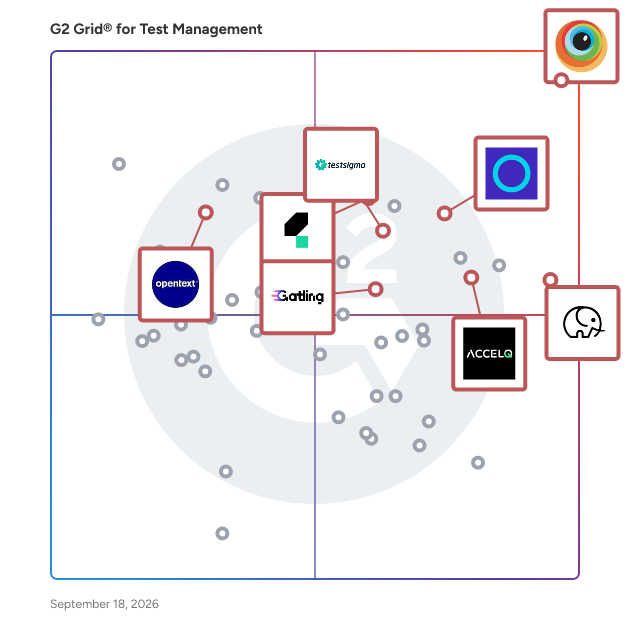
G2 Grid® for Test Management Tools

G2 Grid® for Test Management Tools plotting products by satisfaction and market presence

Highlighted products: BrowserStack, Panaya Smart Testing and Change Intelligence, Katalon, Tuskr, Testsigma, ACCELQ, Gatling, and OpenText Application Quality Management.

Underlying data: [Grid® JSON](https://www.g2.com/categories/test-management/grids.json?focus%5B%5D=browserstack&focus%5B%5D=panaya-smart-testing-and-change-intelligence&focus%5B%5D=katalon&focus%5B%5D=tuskr&focus%5B%5D=testsigma&focus%5B%5D=accelq&focus%5B%5D=gatling&focus%5B%5D=opentext-application-quality-management&segment=enterprise)

BrowserStack

BrowserStack is the world’s leading cloud-based testing platform, trusted by 50,000+ Dev and QA teams to deliver fast, reliable, and high-quality software. From manual to automated, visual to accessibility testing, BrowserStack brings every layer of the QA process onto a single, integrated platform, so you can ship confidently at scale. Our Products: Manual Testing Live: Cross-browser testing App Live: Real device testing Testing Toolkit: Essential manual testing tools Test Automation Automate: Browser automation cloud App Automate: Mobile app automation cloud Percy: Visual testing & review App Percy: Visual testing & review Management & Optimization Test Management: Plan, track, and manage tests Test Management for Jira: Manage tests inside Jira Test Reporting & Analytics: Monitor & optimize all tests Automation without coding Low Code Automation: AI-driven automated tests Website Scanner: All-in-one website checker

Average Rating: 4.4/5.0

Total Reviews: 3,324

How Do G2 Users Rate BrowserStack?

  • Scaling: 8.2/10 (Category avg: 8.7/10)
  • Integration: 8.7/10 (Category avg: 8.6/10)
  • Ease of Use: 8.9/10 (Category avg: 8.9/10)
  • Reporting: 8.5/10 (Category avg: 8.8/10)

Who Is the Company Behind BrowserStack?

  • Seller: BrowserStack
  • Company Website:
  • Year Founded: 2011
  • HQ Location: Dublin, Dublin
  • Twitter: @browserstack
    11,547 Twitter followers
  • LinkedIn® Page: www.linkedin.com
    1,731 employees on LinkedIn®

Who Uses This Product?

  • Who Uses This: Software Engineer, QA Engineer
  • Top Industries: Computer Software, Information Technology and Services
  • Company Size: 40% Small, 38% Medium

What Do G2 Reviewers Say About BrowserStack?

AI-generated summary from verified user reviews

Pros
  • Users find BrowserStack's interface easy to use, facilitating seamless access to real device testing across multiple platforms.
  • Users value the real device testing feature of BrowserStack, enhancing compatibility across diverse platforms without physical hardware.
  • Users value the wide coverage of real devices on BrowserStack, ensuring comprehensive product testing across different environments.
  • Users appreciate the extensive device and browser combinations in BrowserStack, significantly enhancing testing efficiency and compatibility.
  • Users find BrowserStack's easy testing capabilities invaluable for efficient cross-platform and UI-specific testing.
Cons
  • Users often experience slow performance with BrowserStack, impacting testing efficiency and reliability of results.
  • Users experience slow loading times with BrowserStack, leading to frustrating delays during tests and setup.
  • Users feel that the pricing of BrowserStack is expensive and suggest more affordable package options.
  • Users report testing difficulties due to inconsistencies and lag, making reliable results hard to achieve.
  • Users often face slow speed during peak hours, impacting performance and complicating debugging efforts.

What Are Recent G2 Reviews of BrowserStack?

What Are G2 Users Discussing About BrowserStack?

Panaya Smart Testing and Change Intelligence

Panaya is the leading agentic platform for enterprise cross-application testing and change impact analysis. Since 2006, Panaya has helped IT, QA and testing teams confidently deliver clean and safe changes to critical business processes and systems, while reducing risk, cost and disruption to business. We take pride in being business enablers for our customers by analyzing the impact of change, prioritizing risk, generating and fixing code, and effectively managing ongoing testing. With Panaya, IT, testing teams and business users can collaborate seamlessly, focusing their efforts where it matters most, so change becomes manageable, predictable and far less stressful. Transform your business with an agentic platform that helps you focus on what truly matters.

Average Rating: 4.5/5.0

Total Reviews: 534

How Do G2 Users Rate Panaya Smart Testing and Change Intelligence?

  • Scaling: 8.6/10 (Category avg: 8.7/10)
  • Integration: 8.3/10 (Category avg: 8.6/10)
  • Ease of Use: 8.8/10 (Category avg: 8.9/10)
  • Reporting: 8.8/10 (Category avg: 8.8/10)

Who Is the Company Behind Panaya Smart Testing and Change Intelligence?

  • Seller: Panaya LTD
  • Company Website:
  • Year Founded: 2006
  • HQ Location: Hod Hasharon, Center
  • Twitter: @panaya
    4,478 Twitter followers
  • LinkedIn® Page: www.linkedin.com
    204 employees on LinkedIn®

Who Uses This Product?

  • Who Uses This: Consultant, Project Manager
  • Top Industries: Information Technology and Services, Electrical/Electronic Manufacturing
  • Company Size: 57% Large, 27% Medium

What Do G2 Reviewers Say About Panaya Smart Testing and Change Intelligence?

AI-generated summary from verified user reviews

Pros
  • Users praise the ease of use of Panaya Smart Testing, enhancing efficiency in managing testing and documentation tasks.
  • Users value the efficient testing capabilities of Panaya Smart Testing, enhancing project speed and reducing manual efforts.
  • Users value the time-saving features of Panaya Smart Testing, enhancing productivity during data validation and testing processes.
  • Users value the efficiency of automation in Panaya Smart Testing, significantly reducing effort and project timelines.
  • Users appreciate the responsive support and intuitive platform of Panaya Smart Testing and Change Intelligence for effective collaboration.
Cons
  • Users face significant testing difficulties due to non-deletable data and the inability to easily manage test results.
  • Users find the learning curve steep, requiring time and effort to become proficient with the tool's navigation.
  • Users report slow performance with Panaya Smart Testing, experiencing lag and issues with the recorder functionality.
  • Users note the missing features in Panaya, highlighting a need for improved recording and evidence management.
  • Users face challenges with recording issues, including complicated interfaces and bugs that slow down testing processes.

What Are Recent G2 Reviews of Panaya Smart Testing and Change Intelligence?

What Are G2 Users Discussing About Panaya Smart Testing and Change Intelligence?

Katalon

Katalon True Platform is an AI-driven software quality solution designed to unify the software testing lifecycle, enabling Quality Assurance (QA) teams to deliver high-quality software more efficiently. By integrating multiple essential capabilities into a single platform, it addresses the challenges of fragmented testing environments that often hinder productivity and inflate costs. The True Platform encompasses six core functionalities: Manual Testing, Test Automation, Test Management, Test Execution Environment, Reporting & Analytics, and Production Insights, all coordinated by the Katalon AI Assistant. The fragmentation of software quality tools has historically created inefficiencies, with separate tools for each aspect of testing leading to delays and increased costs. Katalon True Platform seeks to eliminate these barriers by automating the entire testing lifecycle, not just the execution phase. This holistic approach allows QA teams to accelerate their delivery timelines, identify defects earlier in the process, and scale their quality efforts without the need for additional personnel. By streamlining the testing process, teams can focus on enhancing software quality and meeting project deadlines more effectively. A standout feature of the True Platform is the Katalon AI Assistant, which enhances productivity at every stage of the testing lifecycle. This embedded AI assistant employs six specialized agents that facilitate various tasks, from analyzing requirements and generating test cases to autonomously executing tests and reporting defects. For instance, the Requirement Analyzer identifies ambiguities in specifications, while the Bug Reporter automates the generation of detailed defect reports, integrating seamlessly with tools like Jira or Azure DevOps. This conversational AI experience keeps users in control while significantly reducing the time spent on routine tasks. Katalon Studio, a well-established test automation tool, remains an integral part of the True Platform. It provides a robust environment for teams seeking in-depth coded test automation, including custom frameworks and complex scripting. The key enhancement is that Katalon Studio now operates in conjunction with the broader platform, ensuring that all outputs are connected to the same test management and reporting infrastructure. This integration allows for a cohesive workflow across the QA team, enhancing collaboration and visibility. Designed to cater to the diverse needs of the entire QA organization, Katalon True Platform accommodates manual testers through intuitive, zero-code workflows, while providing automation engineers with the familiar scripting environment of Katalon Studio. QA managers benefit from real-time dashboards and predictable execution, and QA leaders gain consolidated visibility and cost efficiency by replacing multiple vendor solutions with a single, unified system. This comprehensive approach ensures that all team members can contribute effectively to the software quality process, ultimately leading to improved outcomes and faster delivery times.

Average Rating: 4.4/5.0

Total Reviews: 217

How Do G2 Users Rate Katalon?

  • Ease of Use: 8.9/10 (Category avg: 8.9/10)

Who Is the Company Behind Katalon?

  • Seller: Katalon LLC
  • Company Website:
  • Year Founded: 2016
  • HQ Location: Atlanta, US
  • Twitter: @KatalonPlatform
    1,613 Twitter followers
  • LinkedIn® Page: www.linkedin.com
    301 employees on LinkedIn®

Who Uses This Product?

  • Who Uses This: Test Engineer, QA Engineer
  • Top Industries: Computer Software, Information Technology and Services
  • Company Size: 40% Small, 30% Medium

What Do G2 Reviewers Say About Katalon?

AI-generated summary from verified user reviews

Pros
  • Users find Katalon easy to use, simplifying automation with intuitive features and minimal need for help.
  • Users find Katalon to provide user-friendly automation capabilities, allowing easy implementation and collaboration on test cases.
  • Users enjoy the ease of automation with Katalon, appreciating its simplicity and comprehensive features for effective testing.
  • Users find Katalon easy to implement, appreciating its user-friendly interface and extensive support for various testing needs.
  • Users value the time-saving capabilities of Katalon, allowing quick creation and maintenance of automated tests.
Cons
  • Users experience slow performance with Katalon, especially with large test suites causing extended execution times.
  • Users note the high cost of accessing advanced features, which can limit the overall usability of Katalon.
  • Users experience system delays with Katalon, particularly during code crashes and lengthy test executions.
  • Users experience bug issues with Katalon, including glitches, crashes, and unreliable self-healing capabilities affecting their workflow.
  • Users find a steep learning curve with Katalon, facing challenges in training and understanding variable management.

What Are Recent G2 Reviews of Katalon?

What Are G2 Users Discussing About Katalon?

Tuskr

Tuskr is a cloud-based test management platform built for modern QA teams. It centralizes test case management, test planning, test execution, issue tracking, reporting, and collaboration so teams can manage testing without relying on disconnected spreadsheets or separate systems. Teams can create and organize test cases with a rich-text editor, tables, images, custom fields, and spreadsheet imports. Tuskr supports manual and automated testing in the same platform, helping teams view execution results and testing progress in one place. Test Plans make recurring testing easier by grouping related Test Runs and allowing teams to reuse structured setups. Tuskr AI supports natural-language test management. It can help create and update test cases, modify test cases in bulk, build focused test runs, analyze testing trends, and generate charts for faster insight. Built-in reporting includes dashboards, burndown charts, project and test-run metrics, and PDF status reports for clients and stakeholders. Teams can create, assign, prioritize, and track issues in Tuskr, and link failed test cases to them with one click. For external tracking, integrations connect Tuskr with issue trackers, project management tools, communication platforms, automation frameworks, and CI/CD workflows. A platform-independent REST API, webhooks, Zapier, and Make provide additional integration options. Administration and security capabilities include audit trails, two-factor authentication, single sign-on, role-based access controls, version history, and customizable fields and workflows. Tuskr offers a free plan for teams of up to five users and a free 15-day trial for paid plans, with no credit card required.

Average Rating: 4.6/5.0

Total Reviews: 656

How Do G2 Users Rate Tuskr?

  • Scaling: 8.8/10 (Category avg: 8.7/10)
  • Integration: 8.7/10 (Category avg: 8.6/10)
  • Ease of Use: 9.3/10 (Category avg: 8.9/10)
  • Reporting: 8.7/10 (Category avg: 8.8/10)

Who Is the Company Behind Tuskr?

Who Uses This Product?

  • Who Uses This: Software Engineer, QA Engineer
  • Top Industries: Computer Software, Information Technology and Services
  • Company Size: 44% Small, 36% Medium

What Do G2 Reviewers Say About Tuskr?

AI-generated summary from verified user reviews

Pros
  • Users enjoy the streamlined ease of use of Tuskr, facilitating quick onboarding and efficient testing processes.
  • Users value the organization capabilities of Tuskr, enhancing clarity and efficiency in managing test cases and QA activities.
  • Users appreciate the simplicity and organization of Tuskr, enhancing test case management and saving time effectively.
  • Users value the clean and intuitive interface of Tuskr, making QA tasks streamlined and efficient.
  • Users appreciate the intuitive interface of Tuskr, making QA tasks and content creation smooth and efficient.
Cons
  • Users find the limited customization options insufficient for specific developer needs, hindering their overall experience.
  • Users find Tuskr's poor reporting and limited customization options restrict their ability to manage complex QA workflows effectively.
  • Users note integration issues with Tuskr, wishing for improved connections and customization for a smoother experience.
  • Users experience slow performance in Tuskr, particularly during heavy testing, which disrupts workflow and causes frustration.
  • Users note a learning curve with Tuskr, impacting efficiency when adapting to its features and structure.

What Are Recent G2 Reviews of Tuskr?

What Are G2 Users Discussing About Tuskr?

Testsigma

Testsigma is an agentic test automation platform that runs the full testing lifecycle: generating, executing, healing, and diagnosing tests, then filing the bugs, in one platform, on web, mobile, API, desktop, and Salesforce. At the end of that loop, it scores your release: a confidence number, backed by evidence, that tells you whether you're actually safe to ship, not just whether the build is green. Used by Nestlé, KFC, DHL, Samsung, Cisco, and more, Testsigma empowers quality engineering teams to speed up their testing effortlessly, thus ensuring high-quality software delivery with confidence.

Average Rating: 4.4/5.0

Total Reviews: 138

How Do G2 Users Rate Testsigma?

  • Scaling: 8.9/10 (Category avg: 8.7/10)
  • Integration: 8.8/10 (Category avg: 8.6/10)
  • Ease of Use: 9.0/10 (Category avg: 8.9/10)
  • Reporting: 8.9/10 (Category avg: 8.8/10)

Who Is the Company Behind Testsigma?

  • Seller: Testsigma
  • Year Founded: 2019
  • HQ Location: Bangalore, Karnataka
  • Twitter: @testsigmainc
    1,796 Twitter followers
  • LinkedIn® Page: www.linkedin.com
    237 employees on LinkedIn®

Who Uses This Product?

  • Who Uses This: QA Engineer, Software Engineer
  • Top Industries: Computer Software, Information Technology and Services
  • Company Size: 43% Medium, 43% Small

What Do G2 Reviewers Say About Testsigma?

AI-generated summary from verified user reviews

Pros
  • Users appreciate the ease of use of Testsigma, making automation and collaboration simple and effective for teams.
  • Users appreciate the ease of creating automation tests without coding experience, enhancing their testing efficiency.
  • Users appreciate the excellent customer support provided by Testsigma, enhancing their overall user experience.
  • Users praise the exceptional automation support of Testsigma, enhancing their transition from manual to automated testing.
  • Users benefit from time-saving features in Testsigma, enabling quick script development and an easy learning curve.
Cons
  • Users occasionally face slow performance with larger test suites, leading to longer wait times for results and execution.
  • Users face testing difficulties with TestSigma due to challenges in API testing and slow test completion times.
  • Users face testing issues with TestSigma, including errors with mobiledriver and lack of download options for tests.
  • Users find complexity issues with TestSigma, especially in automating challenging scenarios and achieving desired customization.
  • Users find the insufficient training leads to a steep learning curve for new TestSigma users, impacting initial setup.

What Are Recent G2 Reviews of Testsigma?

What Are G2 Users Discussing About Testsigma?

ACCELQ

ACCELQ offers AI-powered No-Code test automation and management built on a cloud-native platform. ACCELQ provides a unified platform for web, mobile, API, database, and packaged apps. Automation-first, codeless capabilities make it easy to use for testing teams without deep programming expertise. ACCELQ allows businesses to achieve 7.5x productivity and over 72% savings with its industry-first autonomics-based automation platform. ACCELQ was named a leader in The Forrester Wave™: Continuous Automation Testing Platforms, Q4 2022.

Average Rating: 4.8/5.0

Total Reviews: 114

How Do G2 Users Rate ACCELQ?

  • Scaling: 9.6/10 (Category avg: 8.7/10)
  • Integration: 9.7/10 (Category avg: 8.6/10)
  • Ease of Use: 9.5/10 (Category avg: 8.9/10)
  • Reporting: 9.3/10 (Category avg: 8.8/10)

Who Is the Company Behind ACCELQ?

  • Seller: ACCELQ
  • Company Website:
  • Year Founded: 2014
  • HQ Location: Dallas, US
  • Twitter: @accelq
    1,677 Twitter followers
  • LinkedIn® Page: www.linkedin.com
    233 employees on LinkedIn®

Who Uses This Product?

  • Top Industries: Information Technology and Services, Computer Software
  • Company Size: 41% Medium, 34% Large

What Do G2 Reviewers Say About ACCELQ?

AI-generated summary from verified user reviews

Pros
  • Users value the ease of use of ACCELQ, enabling rapid implementation and efficient automation without deep technical knowledge.
  • Users praise the ease of automation with ACCELQ, enabling rapid development of comprehensive testing suites.
  • Users value the codeless automation of ACCELQ, enabling easy collaboration and effective testing for all team members.
  • Users appreciate the time-saving features of ACCELQ, enabling efficient backend testing and quicker bug detection.
  • Users appreciate the automation ease of ACCELQ, streamlining testing processes and enhancing efficiency from day one.
Cons
  • Users find the learning curve steep for desktop automation compared to web and mobile testing, impacting user experience.
  • Users find integration issues with ACCELQ, noting limited options and complexities in learning the platform effectively.
  • Users mention poor reporting, noting the dashboard becomes congested when handling many test cases and scenarios.
  • Users face a difficult learning curve in ACCELQ, particularly when trying to grasp advanced features and setup.
  • Users find the insufficient information on features and documentation to be a barrier for effective use.

What Are Recent G2 Reviews of ACCELQ?

What Are G2 Users Discussing About ACCELQ?

Gatling

Gatling is a load-testing solution that helps organizations identify bottlenecks and guarantee website stability under traffic load through test automation. Gatling Enterprise includes advanced features for reporting (live reporting, TCP connections metrics, bandwidth usage, injectors' monitoring) and automation (public APIs, new Continuous Integration plugins, clustering mode). With 30,000,000 downloads for more than 300 000 companies worldwide, Gatling’s solution is used in diverse industries such as software, e-commerce, streaming media, banking, insurance, gaming, and finance.

Average Rating: 4.4/5.0

Total Reviews: 114

How Do G2 Users Rate Gatling?

  • Ease of Use: 8.2/10 (Category avg: 8.9/10)

Who Is the Company Behind Gatling?

  • Seller: Gatling
  • Company Website:
  • HQ Location: Paris, France
  • Twitter: @GatlingTool
    2,941 Twitter followers
  • LinkedIn® Page: www.linkedin.com
    47 employees on LinkedIn®

Who Uses This Product?

  • Who Uses This: Software Engineer
  • Top Industries: Computer Software, Information Technology and Services
  • Company Size: 39% Medium, 34% Small

What Do G2 Reviewers Say About Gatling?

AI-generated summary from verified user reviews

Pros
  • Users appreciate the automation capabilities of Gatling, facilitating seamless integration with CI/CD workflows for efficiency.
  • Users appreciate the ease of use in Gatling, enhancing load testing automation within their CI/CD workflows.
  • Users appreciate the excellent customer support of Gatling, enhancing their experience and facilitating smoother testing processes.
  • Users highlight the excellent customer support from Gatling, enhancing their overall testing experience and satisfaction.
  • Users appreciate the easy setup of Gatling, enabling seamless integration with CI/CD tools for efficient performance testing.
Cons
  • Users find the complex configuration of Gatling challenging, particularly non-developers lacking programming experience.
  • Users find insufficient documentation and confusing information which may hinder effective use of Gatling.
  • Users note that the poor documentation can lead to confusion and hinder effective use of Gatling's features.
  • Users struggle with Gatling’s poor UI, finding it difficult to navigate, especially those without programming skills.

What Are Recent G2 Reviews of Gatling?

What Are G2 Users Discussing About Gatling?

OpenText Application Quality Management

Micro Focus is now part of OpenText! OpenText™ Application Lifecycle Management (ALM)/Quality Center empowers you to achieve high efficiency in testing and manage quality with a requirements-driven, risk-based approach, align people with processes, mitigate application complexities, automate manual tasks, and establish end-to-end traceability. Gaining a complete view across all releases and projects grants you insights that help informed decisions. Multiple deployment options, open integrations with common tools, and strong data control make ALM/Quality Center ideal for ensuring compliance and adapting to changes. OpenText™ ALM/Quality Center serves as the single pane of glass to govern software quality and implement rigorous, auditable lifecycle processes. Designed for complex multi-application environments, organizations can achieve high efficiency in their testing and measure quality with a requirements-driven and risk-based testing approach. Advanced reporting provides a complete view across all releases to gain new insights and make informed decisions. With numerous deployment options, open integrations with common tools and strong data controls, ALM/Quality Center is a perfect choice for enterprises that need to enforce standards, ensure compliance and adapt to changing tools.

Average Rating: 4.0/5.0

Total Reviews: 125

How Do G2 Users Rate OpenText Application Quality Management?

  • Scaling: 8.8/10 (Category avg: 8.7/10)
  • Integration: 8.2/10 (Category avg: 8.6/10)
  • Ease of Use: 7.9/10 (Category avg: 8.9/10)
  • Reporting: 8.8/10 (Category avg: 8.8/10)

Who Is the Company Behind OpenText Application Quality Management?

  • Seller: OpenText
  • Year Founded: 1991
  • HQ Location: Waterloo, ON
  • Twitter: @OpenText
    21,565 Twitter followers
  • LinkedIn® Page: www.linkedin.com
    22,835 employees on LinkedIn®
  • Ownership: NASDAQ:OTEX

Who Uses This Product?

  • Top Industries: Information Technology and Services, Computer Software
  • Company Size: 71% Large, 21% Medium

What Do G2 Reviewers Say About OpenText Application Quality Management?

AI-generated summary from verified user reviews

Pros
  • Users value the excellent customer support offered by OpenText Application Quality Management, enhancing their overall experience.
  • Users find the ease of use invaluable, as it simplifies tracking and managing all project aspects.
  • Users appreciate the ease of tracking and managing all testing processes with OpenText Application Quality Management.
  • Users find the implementation ease of OpenText Application Quality Management straightforward, enhancing their overall experience and workflow.
  • Users value the easy implementation of OpenText Application Quality Management, making setup a seamless process.
Cons
  • Users find the difficult setup with OpenText Application Quality Management can be quite challenging, impacting their workflow.
  • Users find the pricing to be a drawback for small companies, despite ALM being the best tool for test management.
  • Users find the expensive subscriptions to be a significant drawback for small companies using OpenText Application Quality Management.
  • Users find integration issues with third-party tools to be a challenge that complicates usage of OpenText Application Quality Management.
  • Users note a lack of clarity in the interface and scheduling features of OpenText Application Quality Management.

What Are Recent G2 Reviews of OpenText Application Quality Management?

What Are G2 Users Discussing About OpenText Application Quality Management?

Testlio

Testlio’s AI-driven, fully managed crowdsourced testing platform integrates expert, on-demand testers directly into your release process. Ship faster and more confidently everywhere it matters. In any location. On any device. With any payment method. In any language. Powered by LeoAI Engine™, our proprietary intelligence layer, Testlio’s platform combines human expertise with machine intelligence to orchestrate testing, accelerate tester matching (LeoMatch™), streamline test execution, and deliver predictive insights across engagements. The result is faster releases, smarter testing, and consistently exceptional user experiences at a global scale. We’re a fully remote, distributed-by-design company with team members working from over 40 countries. Our freelance testing community is just as global, with vetted experts across 150+ countries, speaking 100+ languages. Each tester is carefully matched to your product, domain, and tech stack through LeoMatch™, ensuring you get the right fit every time. We support more than 20 testing capabilities, including payments, localization, accessibility, and AI. With access to 600k+ devices and 800+ payment methods, we test in-region, in-language, and in context. That’s why leading companies like Amazon, Microsoft, Netflix, NBA, Paramount, PayPal, and Uber rely on Testlio to deliver seamless experiences at scale, collectively serving billions of users. To learn more, visit testlio.com.

Average Rating: 4.7/5.0

Total Reviews: 76

How Do G2 Users Rate Testlio?

  • Scaling: 8.6/10 (Category avg: 8.7/10)
  • Integration: 8.3/10 (Category avg: 8.6/10)
  • Ease of Use: 8.9/10 (Category avg: 8.9/10)
  • Reporting: 9.3/10 (Category avg: 8.8/10)

Who Is the Company Behind Testlio?

  • Seller: Testlio Inc.
  • Company Website:
  • Year Founded: 2012
  • HQ Location: San Francisco, CA
  • Twitter: @testlio
    2,545 Twitter followers
  • LinkedIn® Page: www.linkedin.com
    930 employees on LinkedIn®

Who Uses This Product?

  • Who Uses This: Product Manager
  • Top Industries: Computer Software, Financial Services
  • Company Size: 39% Medium, 39% Small

What Do G2 Reviewers Say About Testlio?

AI-generated summary from verified user reviews

Pros
  • Users commend the automation expertise of Testlio, highlighting its seamless adaptation to evolving testing requirements.
  • Users admire the reliable support from Testlio, which adapts impressively to their evolving testing needs and standards.
  • Users admire the seamless automation of Testlio, expressing satisfaction with its reliability and adaptability to changing needs.
  • Users commend the exceptional reliability of automation support, consistently adapting to evolving testing needs seamlessly.
  • Users are impressed by Testlio's reliable automation capabilities, seamlessly adapting to evolving testing needs and maintaining high standards.

What Are Recent G2 Reviews of Testlio?

What Are G2 Users Discussing About Testlio?

Tricentis qTest

Tricentis qTest is an AI-driven test management platform designed to help enterprise organizations centralize, standardize, and scale their software testing operations. It is a type of test management solution that helps QA teams, project managers, and development leads plan, track, and report on testing activities across Agile, waterfall, and hybrid delivery methodologies. qTest provides a centralized repository for test cases, test plans, and test execution results, enabling teams to maintain visibility and control over testing across large, distributed projects. It integrates with the leading ALM, CI/CD, and defect management tools used across enterprise software delivery pipelines, including Jira, Azure DevOps, Jenkins, Bamboo, Cucumber, Selenium, and Rally. Key capabilities include: - AI-powered agentic test creation (qTest Copilot) that autonomously drafts and reuses test cases from natural-language requirements - Test case management supporting structured, exploratory, and automated test types, deployable in the cloud or on-premises - DevOps-native workflow integration for event-driven, automated testing processes - Exploratory testing with built-in recording, annotation, and session management - Behavior-driven development support through qTest Scenario, a Jira app that helps Agile teams scale BDD practices - Customizable dashboards and analytics for quality metrics, test coverage, and sprint velocity - Automated test orchestration and execution host management - Scaling to support thousands of test cases, multiple projects, and large distributed teams qTest is well suited for enterprise QA organizations transitioning from legacy test management tools, teams implementing AI-assisted quality practices, and organizations that need a single source of truth for testing across complex programs. Its reporting and analytics capabilities give program managers and quality leads the visibility needed to make informed decisions about release readiness and quality risk throughout the development lifecycle. qTest also integrates with Tricentis Tosca, enabling teams to sync manual test cases for automated execution, and with Tricentis Vera for organizations that need compliance validation alongside Agile software testing.

Average Rating: 4.3/5.0

Total Reviews: 103

How Do G2 Users Rate Tricentis qTest?

  • Scaling: 8.2/10 (Category avg: 8.7/10)
  • Integration: 7.9/10 (Category avg: 8.6/10)
  • Ease of Use: 8.4/10 (Category avg: 8.9/10)
  • Reporting: 8.3/10 (Category avg: 8.8/10)

Who Is the Company Behind Tricentis qTest?

  • Seller: Tricentis
  • Year Founded: 2007
  • HQ Location: Austin, Texas
  • Twitter: @Tricentis
    12,931 Twitter followers
  • LinkedIn® Page: www.linkedin.com
    1,679 employees on LinkedIn®

Who Uses This Product?

  • Who Uses This: Software Engineer
  • Top Industries: Information Technology and Services, Computer Software
  • Company Size: 45% Medium, 28% Small

What Do G2 Reviewers Say About Tricentis qTest?

AI-generated summary from verified user reviews

Pros
  • Users value the seamless integration of Tricentis qTest with tools like Jira, enhancing efficiency and visibility.
  • Users appreciate the seamless integration with Jira, enhancing collaboration and tracking in their testing processes.
  • Users find qTest's ease of use exceptional, with a user-friendly UI for efficient test management and integration.
  • Users value the easy integrations of qTest with tools like Jira, enhancing efficiency and visibility in test management.
  • Users value the centralized test management of qTest, enhancing collaboration and integration with tools like Jira.
Cons
  • Users find the slow performance of Tricentis qTest frustrating, particularly with large projects and complex integrations.
  • Users find the poor UI of Tricentis qTest makes navigation difficult, especially with larger projects and advanced integrations.
  • Users face poor reporting in Tricentis qTest, finding customization and insights options limited and complicated.
  • Users often face integration issues with Tricentis qTest, requiring extra effort for smooth functionality and setup.
  • Users find the setup difficulty of Tricentis qTest challenging, especially with complex integrations and slow interface performance.

What Are Recent G2 Reviews of Tricentis qTest?

What Are G2 Users Discussing About Tricentis qTest?

Avo Assure

Avo Assure is a sophisticated, AI-powered test automation platform designed to facilitate no-code, end-to-end software testing across a wide array of technologies. With support for over 200 technologies, Avo Assure is tailored for enterprise scalability, making it suitable for both technical and non-technical users. The platform's intuitive interface and smart automation features streamline the entire testing lifecycle, allowing organizations to enhance their software quality assurance processes efficiently. The primary audience for Avo Assure includes quality assurance (QA) teams, developers, and business users operating within agile environments. This platform empowers organizations to integrate testing seamlessly into their development cycles, ensuring that testing does not disrupt workflows. By enabling users to engage in testing without requiring extensive coding knowledge, Avo Assure democratizes the testing process, making it accessible to a broader range of users within an organization. Avo Assure boasts several key features that enhance its functionality and usability. The no-code automation capability allows users to conduct script-free testing through a user-friendly interface and a smart recorder, simplifying the test creation process. Its AI-driven testing features, such as GenAI, which auto-generates test cases, and Visual AI, which dynamically detects UI elements, significantly improve testing efficiency. Additionally, the SmartWait feature ensures test stability by waiting for elements to be ready before proceeding, thus minimizing errors during execution. The platform also supports cross-platform testing, enabling users to test applications across web, mobile, desktop, and mainframe environments with parallel execution and cross-browser compatibility. Avo Assure integrates seamlessly into agile workflows and CI/CD pipelines, facilitating in-sprint automation for continuous testing. Other notable features include a Design Studio for visual test planning, custom keywords for tailored test logic, and self-healing tests that adapt to UI changes, reducing maintenance efforts. The shared repository allows for centralized management of reusable test artifacts, while GIT integration supports version control and team collaboration. Overall, Avo Assure stands out in the test automation landscape due to its scalable architecture, efficiency in reducing test cycle times, and accessibility for non-technical users. Its reliable performance enhances test accuracy and minimizes flakiness, making it a valuable tool for organizations aiming to improve their software testing processes and deliver high-quality applications.

Average Rating: 4.6/5.0

Total Reviews: 144

How Do G2 Users Rate Avo Assure?

  • Scaling: 8.6/10 (Category avg: 8.7/10)
  • Integration: 8.3/10 (Category avg: 8.6/10)
  • Ease of Use: 9.0/10 (Category avg: 8.9/10)
  • Reporting: 9.4/10 (Category avg: 8.8/10)

Who Is the Company Behind Avo Assure?

  • Seller: Avo Automation
  • Year Founded: 2015
  • HQ Location: Cincinnati, Ohio
  • Twitter: @AvoAutomation
    57 Twitter followers
  • LinkedIn® Page: www.linkedin.com
    142 employees on LinkedIn®

Who Uses This Product?

  • Who Uses This: Automation Tester
  • Top Industries: Insurance, Information Technology and Services
  • Company Size: 36% Large, 32% Medium

What Do G2 Reviewers Say About Avo Assure?

AI-generated summary from verified user reviews

Pros
  • Users find Avo Assure to be easy to use, appreciating its flexibility and no-code capabilities for all roles.
  • Users love the efficiency of automation with Avo Assure, simplifying processes and enhancing overall productivity.
  • Users value the time-saving capabilities of Avo Assure, enabling efficient automation without coding and improving productivity.
  • Users value the simplified automation and comprehensive testing capabilities of Avo Assure, enhancing workflow validation efficiently.
  • Users appreciate the time-saving automation capabilities of Avo Assure, enabling faster testing and early issue detection.
Cons
  • Users experience slow performance with Avo Assure, particularly when handling large or complex test suites.
  • Users find insufficient information in Avo Assure, leading to delays and trials in resolving issues during critical projects.
  • Users find a steep learning curve with Avo Assure, struggling to grasp input and output requirements for automated testing.
  • Users face testing difficulties, including a steep learning curve and limitations in advanced testing capabilities.
  • Users note a difficult learning curve with Avo Assure, particularly for those unfamiliar with automation tools.

What Are Recent G2 Reviews of Avo Assure?

What Are G2 Users Discussing About Avo Assure?

PractiTest

PractiTest is an AI-powered Test Management and QA Intelligence Platform that goes beyond execution to actual business answers. While tests run, defects get logged, and dashboards fill up, the hardest questions still go unanswered: Are we ready to release? Are we covered where it matters? What's the real risk? PractiTest closes that gap. By turning QA data into clear indicators, insights, and suggested actions, release stakeholders get real-time clarity on risk, coverage, and release readiness. Built on a flexible data structure, agnostic integrations, SmartFox AI, and QA Intelligence, you always know where you stand and can release with confidence.

Average Rating: 4.3/5.0

Total Reviews: 233

How Do G2 Users Rate PractiTest?

  • Scaling: 8.3/10 (Category avg: 8.7/10)
  • Integration: 8.5/10 (Category avg: 8.6/10)
  • Ease of Use: 8.3/10 (Category avg: 8.9/10)
  • Reporting: 8.5/10 (Category avg: 8.8/10)

Who Is the Company Behind PractiTest?

  • Seller: PractiTest
  • Year Founded: 2008
  • HQ Location: Rehovot
  • Twitter: @PractiTest
    1,136 Twitter followers
  • LinkedIn® Page: www.linkedin.com
    41 employees on LinkedIn®

Who Uses This Product?

  • Who Uses This: QA Engineer, Quality Assurance Analyst
  • Top Industries: Information Technology and Services, Computer Software
  • Company Size: 43% Medium, 30% Small

What Do G2 Reviewers Say About PractiTest?

AI-generated summary from verified user reviews

Pros
  • Users value the ease of use in PractiTest, making test management straightforward and efficient for teams.
  • Users value the effective organization and centralization of test cases in PractiTest, enhancing QA process management.
  • Users appreciate the effective centralization and organization of QA processes in PractiTest, enhancing test management efficiency.
  • Users find the Jira integration invaluable for linking test cases and streamlining their testing process efficiently.
  • Users commend the responsive customer support of PractiTest, citing helpful documentation and excellent user experience.
Cons
  • Users face a difficult learning curve with PractiTest, making it challenging for beginners to utilize advanced features effectively.
  • Users experience filtering issues that slow down operations and complicate assigning specific test cases effectively.
  • Users often struggle with a steep learning curve that can overwhelm inexperienced users before mastering PractiTest’s advanced features.
  • Users often face a steep learning curve with PractiTest, making initial navigation and configuration challenging for newcomers.
  • Users find PractiTest not intuitive, experiencing difficulties with report cloning and complex filtering systems.

What Are Recent G2 Reviews of PractiTest?

What Are G2 Users Discussing About PractiTest?

Qase

Qase is a test management platform for QA and development teams responsible for quality. It brings CI results, automated test runs, and manual test cases into one system of record, so you can tell whether a release is ready from the data, not from a Slack thread or a judgment call. As a product grows, test results spread out. They sit across CI pipelines, spreadsheets, and issue trackers, with no single view tying them together. Requirements lose their link to test outcomes, so when something breaks in production it's hard to reconstruct what was tested. That's a tooling problem, not a team problem, and it's what Qase is built to fix. What you get: - A unified results view: Automated and manual results from CI/CD, test frameworks, and manual runs in one place, with requirements linked to test cases so coverage gaps are visible. - Release readiness reporting: Pass rates, coverage gaps, and open blockers in a shared dashboard, so the go/no-go call comes from one view instead of informal consensus. - Automation that keeps pace: Qase connects to Playwright, Cypress, and Selenium, and uses AI to convert manual test cases into automated scripts. You review what it drafts before anything runs. - Core test management: Test cases, test plans, test runs, defect management, a rich REST API, and webhooks to trigger builds in your CI. - MCP Server: The AI tools in your development stack can connect to Qase and work with your test data, cases, runs, coverage, and defects, as part of how your team already builds. - 35+ bidirectional integrations with the tools you already use, including Jira and Slack. Create an issue without leaving the app; get notified in Slack when a run starts. Qase also offers an MCP server, so AI assistants and coding agents can read and write your test data directly. Qase fits teams with a dedicated QA function and teams where developers write and own tests alongside their code. Both are valid ways in. Organizations use it to make quality visible and ship with more confidence.

Average Rating: 4.7/5.0

Total Reviews: 309

How Do G2 Users Rate Qase?

  • Scaling: 8.6/10 (Category avg: 8.7/10)
  • Integration: 8.3/10 (Category avg: 8.6/10)
  • Ease of Use: 9.3/10 (Category avg: 8.9/10)
  • Reporting: 8.7/10 (Category avg: 8.8/10)

Who Is the Company Behind Qase?

  • Seller: Qase Inc
  • Company Website:
  • Year Founded: 2018
  • HQ Location: San Francisco, California
  • Twitter: @qase_io
    364 Twitter followers
  • LinkedIn® Page: www.linkedin.com
    68 employees on LinkedIn®

Who Uses This Product?

  • Who Uses This: QA Engineer, QA Lead
  • Top Industries: Computer Software, Information Technology and Services
  • Company Size: 57% Small, 33% Medium

What Do G2 Reviewers Say About Qase?

AI-generated summary from verified user reviews

Pros
  • Users find Qase to have a clean and intuitive interface that simplifies test management and collaboration.
  • Users rave about the excellent customer support of Qase, praising its responsiveness and effective resolutions.
  • Users appreciate the exceptional customer support of Qase, praising its quick responses and effective problem resolution.
  • Users love the easy integration with other applications, enhancing their test management and workflow efficiency.
  • Users appreciate the conditional test cases in Qase, making it easy to manage similar scenarios efficiently.
Cons
  • Users find the limited customization of Qase restrictive, particularly for test reports and organizational features.
  • Users face testing difficulties, such as a cumbersome CSV import process and repetitive confirmation for deletions.
  • Users highlight integration issues with GitLab, affecting customization and report generation capabilities.
  • Users note the missing features in Qase, highlighting the need for more advanced testing options and app integrations.
  • Users note the limited features of Qase, wishing for more advanced testing options and functionalities.

What Are Recent G2 Reviews of Qase?

What Are G2 Users Discussing About Qase?

Centercode

Centercode is a user testing automation platform that transforms how you collect and analyze pre-release customer feedback. Our delta testing system uses intelligent technology to produce rapid results with minimal time investment. Imagine: continuous, up-to-the-minute customer insights ahead of every release. Centercode offers - Feedback automation, including sentiment-driven feedback forms, smart scoring, and workflows to eliminate the endless hours you spend copying and pasting feedback between tools. - Smart prioritization, which organizes your feedback based on its impact on product success and routes high-priority feedback to relevant teams automatically. - Tester automation, from finding testers to keeping them active in your projects. With fine-grained profiling, automated engagement, and community-building tools, your testers will love your tests as much as they love your product. - Project automation that automatically plans for you, manages tester engagement through machine learning, and distills results in easily digestible scores—ensuring your project’s success. - Turnkey dashboards and reports present robust analytics and scores. Centercode gets everyone speaking the same language and makes it simple to identify areas for improvement, communicate across teams, and demonstrate ROI. - Flexible APIs that enable anyone to create powerful integrations — no developer required. - The highest levels of security, reliability, privacy, and compliance so you can protect your customers and your organization. Centercode is GDPR and CCPA-compliant. 1 in 4 Fortune 100 companies relies on Centercode's powerful, data-centralized platform to bring customers to the product development table. Whether you're a solo act or a full-scale team, Centercode empowers you to create flexible projects, maintain high user participation rates, and produce continuous product insights to support high-speed development.

Average Rating: 4.3/5.0

Total Reviews: 108

How Do G2 Users Rate Centercode?

  • Scaling: 9.1/10 (Category avg: 8.7/10)
  • Integration: 8.6/10 (Category avg: 8.6/10)
  • Ease of Use: 7.3/10 (Category avg: 8.9/10)
  • Reporting: 8.0/10 (Category avg: 8.8/10)

Who Is the Company Behind Centercode?

  • Seller: Centercode
  • Year Founded: 2001
  • HQ Location: Laguna Hills, CA
  • Twitter: @Centercode
    1,830 Twitter followers
  • LinkedIn® Page: www.linkedin.com
    55 employees on LinkedIn®

Who Uses This Product?

  • Top Industries: Consumer Electronics, Computer Software
  • Company Size: 44% Large, 33% Medium

What Are Recent G2 Reviews of Centercode?

What Are G2 Users Discussing About Centercode?

Pcloudy

Pcloudy - The Real Device Cloud with Intelligence Most enterprise QA teams are stuck choosing between speed and security. Public clouds get flagged by InfoSec. Building an in-house lab takes months and costs a fortune. And testing on too few devices means bugs reach production before your team catches them. Pcloudy fixes that. Test mobile apps, web apps and APIs on 5000+ real devices and browsers - with 60+ real-device performance metrics built in. Enterprise security. Zero compromise. Public cloud, private cloud, on-premise, or hybrid - air-gap compatible, data residency compliant, and deployed inside your environment in weeks. Not months. And with AI Agents handling everything from test authoring to failure analysis, your team stops firefighting and starts shipping with confidence. Trusted by 500+ enterprises across industries globally.

Average Rating: 4.4/5.0

Total Reviews: 86

G2 Deal: Save 10% on your subscription

Testing your mobile and web apps doesn't only ensure quality but also saves your money as well. Sign up for pCloudy public cloud via G2 and receive a 10% discount on your annual subscription.

Price: ~~$39/month~~ → $35/month

View this exclusive G2 deal

How Do G2 Users Rate Pcloudy?

  • Ease of Use: 8.9/10 (Category avg: 8.9/10)

Who Is the Company Behind Pcloudy?

  • Seller: Opkey
  • Year Founded: 2015
  • HQ Location: Pittsburgh, PA
  • Twitter: @opkey_ssts
    310 Twitter followers
  • LinkedIn® Page: www.linkedin.com
    458 employees on LinkedIn®

Who Uses This Product?

  • Top Industries: Information Technology and Services, Computer Software
  • Company Size: 40% Medium, 36% Small

What Do G2 Reviewers Say About Pcloudy?

AI-generated summary from verified user reviews

Pros
  • Users rave about pCloudy's user-friendly interface, which simplifies testing processes across multiple devices and browsers.
  • Users value the prompt customer support from Pcloudy, appreciating the active assistance and reliable responses.
  • Users value the vast range of devices available on pCloudy for testing across various OS versions.
  • Users praise pCloudy's user-friendly interface, which simplifies cross-browser and mobile testing significantly for seamless app functionality.
  • Users commend the seamless integrations of pCloudy, enhancing workflow and simplifying testing across multiple platforms.
Cons
  • Users report slow speed on Pcloudy, with sluggish performance and unstable connections, especially on iOS devices.
  • Users experience slow performance with Pcloudy, facing difficulties accessing devices and sluggishness even with good internet.
  • Users experience a noticeable performance lag, making interactions feel sluggish even with fast internet connections.
  • Users experience speed issues with Pcloudy, as devices can be sluggish and unresponsive during testing.
  • Users report significant performance issues with Pcloudy, citing sluggishness and unreliable keyboard functionality as major concerns.

What Are Recent G2 Reviews of Pcloudy?

What Are G2 Users Discussing About Pcloudy?

Adam Crivello
AC
Researched and written by Adam Crivello
Updated