Best Survey Software for Small Business

How Many Survey Software Products Does G2 Track?

Total Products under this Category: 559

Category Stats (Aug 2026)

  • Average Rating: 4.41/5 The average rating of products in this category, based on all submitted ratings
  • Top Trending Product: Sphinx Declic (+2.35%) - Among all products in this category, Sphinx Declic recorded the largest rating increase compared to last month

Last updated: August 04, 2026

How Does G2 Rank Survey Software Products?

Why You Can Trust G2's Software Rankings:

  • 30 Analysts and Data Experts
  • 154,600+ Authentic Reviews
  • 559+ Products
  • Unbiased Rankings

G2's software rankings are built on verified user reviews, rigorous moderation, and a consistent research methodology maintained by a team of analysts and data experts. Each product is measured using the same transparent criteria, with no paid placement or vendor influence. While reviews reflect real user experiences, which can be subjective, they offer valuable insight into how software performs in the hands of professionals. Together, these inputs power the G2 Score, a standardized way to compare tools within every category.

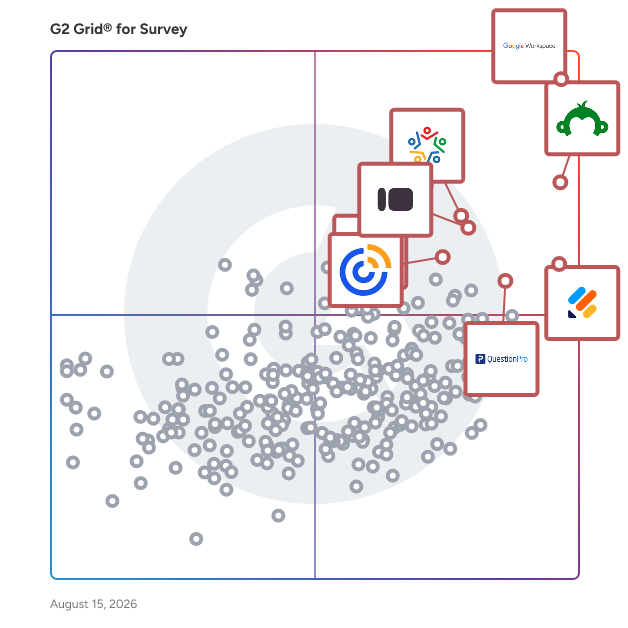
G2 Grid® for Survey Software

G2 Grid® for Survey Software plotting products by satisfaction and market presence

Highlighted products: Google Workspace, SurveyMonkey, Jotform, Typeform, QuestionPro, Constant Contact, Zoho Survey, and Microsoft 365.

Underlying data: [Grid® JSON](https://www.g2.com/categories/survey/grids.json?focus%5B%5D=google-workspace&focus%5B%5D=surveymonkey&focus%5B%5D=jotform&focus%5B%5D=typeform&focus%5B%5D=questionpro&focus%5B%5D=constant-contact&focus%5B%5D=zoho-survey&focus%5B%5D=microsoft365&segment=small-business)

Sponsored

Workvivo

Workvivo HQ gives Comms, HR, and IT teams an AI-powered employee experience no traditional intranet can match. With HQ Agent helping every employee find trusted answers and take action in seconds, and Seer turning employee feedback and sentiment into actionable intelligence, Workvivo is the missing link in your AI transformation strategy, driving adoption by making AI useful, accessible, and engaging for every employee. HQ Agent brings conversational and agentic AI into the daily flow of work. Employees can ask questions in natural language, receive concise answers grounded in trusted company sources, search across connected workplace content, and complete everyday tasks without navigating multiple systems. AI-powered summaries, enterprise search, federated knowledge, third-party data connections, and governance controls help organizations make workplace AI useful, secure, and accessible to every employee. AI is also embedded across internal communications and employee engagement. AI Compose helps teams create, personalize, translate, and optimize content, while Catch Me Up gives employees fast, relevant summaries of important updates. AI Podcasts and automated Employee Journeys help organizations deliver more engaging communications and guide employees through key moments such as onboarding, role changes, and promotions. Seer uses AI to transform employee listening into action. It brings together surveys, sentiment analysis, AI-powered comment analysis, engagement data, benchmarking, and workforce insights so leaders can understand what employees need, identify emerging issues, and respond faster. This connects employee voice directly to better communication, engagement, and business decisions. Built for frontline, hybrid, remote, and desk-based workforces, Workvivo acts as the AI-powered digital front door to work. Employees can access company news, conversations, recognition, documents, knowledge, workplace services, and essential tools through one intuitive experience across mobile, desktop, and digital signage—helping organizations drive AI adoption across the entire workforce, not just desk-based teams. Workvivo integrates with the technology organizations already use, including Microsoft 365, Google Workspace, Zoom, Workday, ServiceNow, Salesforce, SAP, Slack, Jira, Okta, and leading HRIS platforms. Trusted by global organizations including Amazon, Ryanair, Bupa, White Castle, and Motherson, Workvivo by Zoom is recognized by customers and industry analysts as a leader in employee engagement, intranet, and internal communications.

Visit website

Google Workspace

Google Workspace is a comprehensive productivity and collaboration solution designed to help users streamline their work processes by integrating essential tools such as email, chat, file storage, and video conferencing into a unified platform. This suite of applications is tailored for businesses, educational institutions, and individuals looking to enhance their communication and collaboration efforts, all while leveraging the power of Google’s artificial intelligence. Targeted at a diverse audience, Google Workspace caters to teams of all sizes, from small startups to large enterprises. It is particularly beneficial for remote teams and organizations that prioritize collaboration across different locations. The platform supports various use cases, including project management, team communication, document sharing, and virtual meetings, making it an ideal choice for professionals who need to work together efficiently, regardless of their physical location. One of the key features of Google Workspace is its seamless integration of applications such as Gmail, Google Meet, Google Drive, and Google Docs. This interconnectedness allows users to switch effortlessly between tasks, whether they are sending emails, participating in video calls, or collaborating on documents in real-time. The AI capabilities embedded within the platform enhance user experience by providing smart suggestions, automating repetitive tasks, and improving search functionalities, ultimately saving time and increasing productivity. Additionally, Google Workspace prioritizes security and data protection, offering robust features such as two-factor authentication, advanced phishing protection, and customizable access controls. These measures ensure that sensitive information remains secure while allowing teams to collaborate freely. The platform also supports third-party integrations, enabling users to connect their favorite applications and tools, further enhancing their workflow. In summary, Google Workspace stands out in the productivity software category by providing a holistic approach to collaboration. Its user-friendly interface, combined with powerful AI-driven features and strong security protocols, makes it a valuable tool for anyone looking to improve their work processes and foster effective teamwork. Whether for managing projects, communicating with colleagues, or sharing files, Google Workspace is designed to meet the diverse needs of its users, making it an essential resource in today’s digital workplace.

Average Rating: 4.6/5.0

Total Reviews: 45,662

How Do G2 Users Rate Google Workspace?

  • Has the product been a good partner in doing business?: 9.0/10 (Category avg: 8.9/10)
  • Permissions: 9.0/10 (Category avg: 8.6/10)
  • Customizable Questions: 9.0/10 (Category avg: 8.9/10)
  • Data Exporting: 9.0/10 (Category avg: 8.7/10)

Who Is the Company Behind Google Workspace?

  • Seller: Google
  • Year Founded: 1998
  • HQ Location: Mountain View, CA
  • Twitter: @google
    31,899,995 Twitter followers
  • LinkedIn® Page: www.linkedin.com
    341,888 employees on LinkedIn®
  • Ownership: NASDAQ:GOOG

Who Uses This Product?

  • Who Uses This: Student, Teacher
  • Top Industries: Information Technology and Services, Education Management
  • Company Size: 46% Small, 35% Medium

What Do G2 Reviewers Say About Google Workspace?

AI-generated summary from verified user reviews

Pros
  • Users love the ease of use of Google Workspace, which enhances productivity with its integrated tools and smooth interface.
  • Users enjoy the seamless team collaboration in Google Workspace, enhancing productivity and communication across remote teams.
  • Users value the seamless integration of Google Workspace tools, enhancing efficiency and ease of access.
  • Users love the ease of use and integrations in Google Workspace, enhancing productivity and collaboration for remote teams.
  • Users love the intuitive design of Google Workspace, enhancing productivity and simplifying workflow management seamlessly.
Cons
  • Users are frustrated by missing features, such as limited offline access and restrictions on AI tools and recording.
  • Users find the limited features of Google Workspace unsuitable for small teams, lacking essential tools for their needs.
  • Users find Google Workspace lacking features compared to other platforms, particularly in CRM and advanced spreadsheet capabilities.
  • Users find a lack of features in Google Workspace, noting limitations in customization and advanced meeting options.
  • Users find the limited customization options in Google Workspace unsatisfactory compared to other tools, affecting usability.

What Are Recent G2 Reviews of Google Workspace?

What Are G2 Users Discussing About Google Workspace?

SurveyMonkey

SurveyMonkey is the world’s most popular platform for surveys and forms, built for business and loved by users. We combine powerful capabilities with intuitive design, effectively serving every use case, from customer experience to employee engagement, market research to payment and registration forms. With built-in research expertise and AI-assisted technology, it’s like having a team of expert researchers right at your fingertips. Trusted by millions—from startups to Fortune 500 companies—SurveyMonkey helps teams gather insights and information that inspire better decisions, create experiences people love, and drive business growth. Discover how at http://surveymonkey.com.

Average Rating: 4.4/5.0

Total Reviews: 23,554

How Do G2 Users Rate SurveyMonkey?

  • Has the product been a good partner in doing business?: 8.8/10 (Category avg: 8.9/10)
  • Permissions: 8.4/10 (Category avg: 8.6/10)
  • Customizable Questions: 8.9/10 (Category avg: 8.9/10)
  • Data Exporting: 8.5/10 (Category avg: 8.7/10)

Who Is the Company Behind SurveyMonkey?

  • Seller: SurveyMonkey
  • Company Website:
  • Year Founded: 1999
  • HQ Location: San Mateo, CA
  • Twitter: @SurveyMonkey
    42,887 Twitter followers
  • LinkedIn® Page: www.linkedin.com
    1,390 employees on LinkedIn®

Who Uses This Product?

  • Who Uses This: Teacher, Owner
  • Top Industries: Education Management, Hospital & Health Care
  • Company Size: 37% Small, 34% Medium

What Do G2 Reviewers Say About SurveyMonkey?

AI-generated summary from verified user reviews

Pros
  • Users value the ease of use of SurveyMonkey, finding it simple and quick to create surveys effortlessly.
  • Users love the ease of creation with SurveyMonkey, allowing quick and intuitive survey building without technical skills.
  • Users find SurveyMonkey's intuitive design makes creating surveys straightforward and user-friendly, enhancing their experience.
  • Users value the simplicity of SurveyMonkey, appreciating its ease of creating and analyzing surveys without technical skills.
  • Users find SurveyMonkey easy to use, appreciating its free basic features and effective feedback collection.
Cons
  • Users find SurveyMonkey to be expensive, especially when seeking customization and more robust features beyond the basics.
  • Users find the limitations in the free plan restrictive, hindering value and necessitating an upgrade for advanced features.
  • Users find survey issues with outdated workflows and limited customization options that hinder the overall experience.
  • Users find the limited features in SurveyMonkey's free and lower-tier plans restrict their ability to gain insights.
  • Users feel the limited customization options in SurveyMonkey restrict their ability to create effective surveys.

What Are Recent G2 Reviews of SurveyMonkey?

What Are G2 Users Discussing About SurveyMonkey?

Jotform

Trusted by more than 35 million users worldwide, Jotform is an AI-powered online form builder designed to help individuals and organizations create, customize, and publish forms in minutes, from any device. With an intuitive drag-and-drop interface, Jotform makes it simple for anyone to build professional, mobile-responsive forms without writing a single line of code. As a fully no-code platform, Jotform empowers users to automate workflows, streamline data collection, and digitize processes. Jotform offers one of the largest template libraries in the industry, featuring 10,000+ ready-made form templates tailored to every use case. Popular categories include payment forms, lead generation forms, event registration forms, application forms, surveys, order forms, onboarding forms, consent forms, and feedback forms. Each template is fully customizable, allowing users to adjust layouts, add conditional logic, collect e-signatures, upload files, apply branding, and incorporate advanced field types. This level of flexibility ensures every form is optimized for user experience and aligned with organizational goals. To streamline workflows, Jotform integrates seamlessly with over 200 popular third-party apps, including Google Sheets, Slack, Zoom, HubSpot, Salesforce, PayPal, Stripe, and numerous other business tools. These integrations automate data collection, payment processing, CRM updates, and team notifications. By connecting forms directly to the tools your team already uses, Jotform helps eliminate data silos and supports end-to-end process automation—all within a no-code environment. Security and compliance are at the core of Jotform’s platform. Features such as HIPAA compliance options, 256-bit SSL encryption, CAPTCHA, form access controls, and audit logs help organizations protect sensitive data and meet industry standards. Whether you're collecting healthcare information, financial data, or internal employee records, Jotform provides the reliability and safeguards needed to operate with confidence. With powerful features like automated emails, approval workflows, analytics dashboards, and embeddable widgets, Jotform delivers an all-in-one solution for organizations looking to simplify data collection and improve productivity. From small businesses to enterprises, educational institutions, healthcare providers, and nonprofits, millions of teams rely on Jotform to capture information efficiently and turn submissions into actionable results.

Average Rating: 4.7/5.0

Total Reviews: 5,137

How Do G2 Users Rate Jotform?

  • Has the product been a good partner in doing business?: 9.1/10 (Category avg: 8.9/10)
  • Permissions: 8.5/10 (Category avg: 8.6/10)
  • Customizable Questions: 9.3/10 (Category avg: 8.9/10)
  • Data Exporting: 8.8/10 (Category avg: 8.7/10)

Who Is the Company Behind Jotform?

  • Seller: Jotform
  • Company Website:
  • Year Founded: 2006
  • HQ Location: San Francisco, California
  • Twitter: @Jotform
    39,289 Twitter followers
  • LinkedIn® Page: www.linkedin.com
    901 employees on LinkedIn®

Who Uses This Product?

  • Who Uses This: Owner, CEO
  • Top Industries: Non-Profit Organization Management, Education Management
  • Company Size: 71% Small, 21% Medium

What Do G2 Reviewers Say About Jotform?

AI-generated summary from verified user reviews

Pros
  • Users appreciate the ease of use of Jotform, highlighting its intuitive navigation and quick access to forms.
  • Users appreciate the ease of creating forms with Jotform, enhancing event management and streamlining operations effortlessly.
  • Users find Jotform's ease of creation remarkable, making setup and customization effortless for varied responses.
  • Users highlight Jotform's user-friendly design, making it easy to navigate and manage forms efficiently.
  • Users love the easy-to-use interface of Jotform, enabling efficient form creation without any coding skills.
Cons
  • Users find Jotform's pricing to be too expensive, feeling misled by its initial free advertisement.
  • Users find the missing features in Jotform frustrating, particularly with font colors and payment integration difficulties.
  • Users struggle with form issues, finding navigation difficult and certain functionalities challenging to use effectively.
  • Users find limited customization options in Jotform, struggling with graphic solutions and font color adjustments.
  • Users find form design navigation challenging, leading to confusion and difficulties with customization options in Jotform.

What Are Recent G2 Reviews of Jotform?

What Are G2 Users Discussing About Jotform?

Typeform

Typeform is a refreshingly different form builder. We help over 150,000 businesses collect the data they need with forms, surveys, and quizzes people enjoy. Designed to look striking and feel effortless to fill out, Typeform drives 500 million responses every year and integrates with essential tools like Slack, Zapier, and HubSpot.

Average Rating: 4.5/5.0

Total Reviews: 993

How Do G2 Users Rate Typeform?

  • Has the product been a good partner in doing business?: 8.8/10 (Category avg: 8.9/10)
  • Permissions: 8.7/10 (Category avg: 8.6/10)
  • Customizable Questions: 9.2/10 (Category avg: 8.9/10)
  • Data Exporting: 8.8/10 (Category avg: 8.7/10)

Who Is the Company Behind Typeform?

  • Seller: Typeform
  • Company Website:
  • Year Founded: 2012
  • HQ Location: Barcelona
  • Twitter: @typeform
    28,375 Twitter followers
  • LinkedIn® Page: www.linkedin.com
    882 employees on LinkedIn®

Who Uses This Product?

  • Who Uses This: CEO, Founder
  • Top Industries: Marketing and Advertising, Information Technology and Services
  • Company Size: 65% Small, 28% Medium

What Do G2 Reviewers Say About Typeform?

AI-generated summary from verified user reviews

Pros
  • Users love the ease of use of Typeform, allowing for straightforward form creation while engaging respondents effectively.
  • Users love the intuitive design of Typeform, creating a seamless experience that feels conversational and engaging.
  • Users appreciate the intuitive and user-friendly design of Typeform, making data collection seamless and efficient.
  • Users value the seamless integrations of Typeform with tools like Slack and Google Sheets, enhancing their workflow.
  • Users love the ease of creation in Typeform, enjoying its intuitive design and powerful AI features for form building.
Cons
  • Users find the high cost of Typeform prohibitive, especially when scaling for advanced features and insights.
  • Users feel the limited customization in Typeform restricts flexibility and affects data collection and user engagement.
  • Users find the limited features across plans restrict their options and add costs as they scale.
  • Users find the missing features in Typeform frustrating, especially regarding advanced insights and compliance options.
  • Users face significant integration issues with Typeform, particularly with CRM and analytics platforms, complicating their workflow.

What Are Recent G2 Reviews of Typeform?

What Are G2 Users Discussing About Typeform?

QuestionPro

QuestionPro es una plataforma integral de gestión de experiencias e insights confiada por más de 5.3 millones de usuarios en más de 100 países, desde investigadores individuales hasta corporaciones Fortune 100. Nuestro software potente y fácil de usar proporciona un conjunto integrado de herramientas para crear, distribuir y analizar encuestas en línea, sondeos, pruebas y cuestionarios para realizar análisis tanto cuantitativos como cualitativos. Aprovecha herramientas impulsadas por IA como QxBot para construir encuestas de manera conversacional o elige entre más de 50 tipos de preguntas avanzadas y más de 350 plantillas de encuestas. Nuestra plataforma cuenta con una lógica robusta de apuntar y hacer clic, incluyendo ramificación, canalización y aleatorización, para crear flujos de investigación sofisticados. Llega a los encuestados en cualquier lugar a través de distribución multicanal por correo electrónico, SMS, código QR, redes sociales y nuestra aplicación móvil offline. Analiza los resultados en paneles de control en tiempo real y utiliza un conjunto de herramientas analíticas que incluyen tablas cruzadas, análisis de sentimiento impulsado por IA y análisis TURF. QuestionPro ofrece soluciones personalizadas para satisfacer cada necesidad de investigación: Essentials: Perfecto para estudiantes, individuos y equipos pequeños, la cuenta Essentials ofrece una plataforma poderosa gratuita de por vida para proyectos de investigación rápida y recolección de datos. Es la cuenta de encuestas gratuita más rica en funciones de la industria. Advanced & Teams: Diseñado para PYMEs, consultores y profesionales, las licencias Advanced y Teams desbloquean características más poderosas, capacidades de marca y herramientas de colaboración para transformar datos en bruto en insights accionables que mejoran los resultados empresariales. Research Suite: Para empresas e investigadores de mercado profesionales, el Research Suite es un conjunto de herramientas líder en la industria diseñado para resolver los desafíos de investigación más complejos. Este conjunto incluye análisis especializados como Conjoint y MaxDiff, un panel de audiencia global integrado, un repositorio de insights impulsado por IA, y la opción de acceder a servicios de investigación de mercado de extremo a extremo de nuestro equipo de expertos. Diseñado para la empresa, aseguramos seguridad y privacidad de datos de primer nivel con cumplimiento de estándares globales, incluyendo GDPR, ISO 27001:2022, HIPAA, CCPA y SOC 2. Integra sin problemas con sistemas empresariales clave como Salesforce, HubSpot y Tableau, o conéctate a cientos de aplicaciones a través de Zapier. Con nuestro soporte al cliente global 24/7, tienes un socio dedicado para asegurar que tus proyectos tengan éxito. Únete a millones de usuarios y descubre por qué organizaciones como BMW, Fujitsu y la Sociedad Americana del Cáncer confían en QuestionPro para sus necesidades de insights. Comienza hoy con nuestra cuenta Essentials. Es gratis para siempre y no se requiere tarjeta de crédito.

Average Rating: 4.5/5.0

Total Reviews: 1,140

How Do G2 Users Rate QuestionPro?

  • ¿Ha sido the product un buen socio para hacer negocios?: 9.1/10 (Category avg: 8.9/10)
  • Permisos: 8.6/10 (Category avg: 8.6/10)
  • Preguntas personalizables: 9.1/10 (Category avg: 8.9/10)
  • Exportación de datos: 8.9/10 (Category avg: 8.7/10)

Who Is the Company Behind QuestionPro?

  • Vendedor: QuestionPro
  • Año de fundación: 2005
  • Ubicación de la sede: Austin , Texas
  • Twitter: @questionpro
    13,094 seguidores en Twitter
  • Página de LinkedIn®: www.linkedin.com
    533 empleados en LinkedIn®

Who Uses This Product?

  • Who Uses This: Director Ejecutivo, Estudiante
  • Top Industries: Gestión de organizaciones sin fines de lucro, Educación superior
  • Company Size: 60% Small, 23% Medium

What Do G2 Reviewers Say About QuestionPro?

AI-generated summary from verified user reviews

Pros
  • Los usuarios valoran la facilidad de uso de QuestionPro, apreciando sus plantillas personalizables y la creación de encuestas sencilla.
  • Los usuarios valoran el excelente servicio al cliente de QuestionPro, haciendo que la plataforma sea fácil de usar y de apoyo para todas las necesidades.
  • Los usuarios elogian la interfaz intuitiva de QuestionPro, destacando su facilidad de uso y rápida configuración para cuestionarios.
  • Los usuarios destacan el soporte al cliente excepcional de QuestionPro, señalando su capacidad de respuesta y ayuda durante toda la experiencia.
  • Los usuarios aprecian la facilidad de creación en QuestionPro, encontrando sencillo diseñar encuestas de manera rápida y eficiente.
Cons
  • Los usuarios encuentran limitaciones en las encuestas y problemas de rendimiento en QuestionPro, lo que afecta la efectividad de su recopilación de comentarios.
  • Los usuarios encuentran la curva de aprendizaje empinada con QuestionPro, requiriendo tiempo adicional para navegar por su extensa funcionalidad.
  • Los usuarios señalan que la estructura de precios costosa de QuestionPro limita el acceso a características y servicios vitales.
  • Los usuarios encuentran frustrantes las opciones limitadas de personalización, ya que buscan más flexibilidad en los paneles de control y las exportaciones.
  • Los usuarios encuentran que QuestionPro no es intuitivo, lo que causa frustración al buscar configuraciones y personalizar encuestas de manera efectiva.

What Are Recent G2 Reviews of QuestionPro?

What Are G2 Users Discussing About QuestionPro?

Zoho Survey

Zoho Survey is online survey and questionnaire creation software.   We give you all the essentials to create surveys, distribute them and analyze their responses.  ● Over 200 expertly made templates across a wide range of topics, ● Themes, fully customizable to suit your brand, ● Skip logic, ● Response collection from nearly every medium and screen size—even offline, ● Survey panels, for when you need responses from specific demographics, ● Collaborative editing and report sharing, ● Integration with Zoho CRM, SalesIQ, Campaigns, Sheet, MailChimp, and Google Sheets, ● SSL certification, ● Survey builder in 7 languages, ● Password, muti-response and spam protection.   Informed decisions are just around the corner. Learn more at https://www.zoho.com/survey/.

Average Rating: 4.4/5.0

Total Reviews: 995

How Do G2 Users Rate Zoho Survey?

  • Has the product been a good partner in doing business?: 8.7/10 (Category avg: 8.9/10)
  • Permissions: 8.8/10 (Category avg: 8.6/10)
  • Customizable Questions: 9.1/10 (Category avg: 8.9/10)
  • Data Exporting: 8.8/10 (Category avg: 8.7/10)

Who Is the Company Behind Zoho Survey?

  • Seller: Zoho
  • Year Founded: 1996
  • HQ Location: Austin, TX
  • Twitter: @Zoho
    137,880 Twitter followers
  • LinkedIn® Page: www.linkedin.com
    30,766 employees on LinkedIn®
  • Phone: +1 (888) 900-9646

Who Uses This Product?

  • Who Uses This: Founder, Engineer
  • Top Industries: Information Technology and Services, Education Management
  • Company Size: 50% Small, 33% Medium

What Do G2 Reviewers Say About Zoho Survey?

AI-generated summary from verified user reviews

Pros
  • Users favor the ease of use of Zoho Survey, benefiting from its intuitive design and customizable templates.
  • Users appreciate the ease of creation in Zoho Survey, finding it intuitive and straightforward for building surveys quickly.
  • Users appreciate the intuitive interface of Zoho Survey, finding it user-friendly and efficient for survey creation.
  • Users praise the ease of use in Zoho Survey, enabling quick survey creation and efficient feedback collection.
  • Users appreciate the helpful integrations and clear reporting of Zoho Survey, enhancing their survey experience significantly.
Cons
  • Users note limited customization options for advanced features and templates, impacting design flexibility and branding control.
  • Users note limited design options and occasional lags, impacting the overall experience of Zoho Survey.
  • Users find the limited features of Zoho Survey restrictive, particularly in the free plan and advanced options.
  • Users find limited data analysis in Zoho Survey, feeling restricted by basic reporting tools and advanced feature paywalls.
  • Users find the outdated design of Zoho Survey unappealing, lacking a modern aesthetic compared to competitors.

What Are Recent G2 Reviews of Zoho Survey?

What Are G2 Users Discussing About Zoho Survey?

Constant Contact

We deliver for small businesses with powerful tools to simplify and amplify digital marketing. Whether it's driving sales, growing a customer base or engaging an audience, we help you build strong connections and generate powerful results. - Grow your audience Build your list fast with landing pages, social media lead ads, and more. - Deepen customer relationships Connect with people where they are—via text, email, or social—all from one platform, to drive more engagement and results for your business. - Simplify your social media Create and manage social posts and ads to generate awareness, drive leads and promote growth. - Sync with the apps you're already using Connect with digital tools you're already using to grow your business and sell more online, faster. Learn more at www.constantcontact.com

Average Rating: 4.1/5.0

Total Reviews: 7,241

How Do G2 Users Rate Constant Contact?

  • Has the product been a good partner in doing business?: 8.6/10 (Category avg: 8.9/10)
  • Permissions: 8.8/10 (Category avg: 8.6/10)
  • Customizable Questions: 8.4/10 (Category avg: 8.9/10)
  • Data Exporting: 8.6/10 (Category avg: 8.7/10)

Who Is the Company Behind Constant Contact?

  • Seller: Constant Contact
  • Company Website:
  • Year Founded: 1995
  • HQ Location: Waltham, US
  • Twitter: @ConstantContact
    67,137 Twitter followers
  • LinkedIn® Page: www.linkedin.com
    1,156 employees on LinkedIn®

Who Uses This Product?

  • Who Uses This: Marketing Manager, Owner
  • Top Industries: Non-Profit Organization Management, Marketing and Advertising
  • Company Size: 70% Small, 23% Medium

What Do G2 Reviewers Say About Constant Contact?

AI-generated summary from verified user reviews

Pros
  • Users find Constant Contact's ease of use exceptional, facilitating effortless campaign creation and management for small businesses.
  • Users appreciate the easy creation of campaigns with Constant Contact, enhancing engagement and efficiency for small businesses.
  • Users value the user-friendly email builder of Constant Contact, making campaign creation and management effortless.
  • Users appreciate how simple it is to create consistent newsletters and engaging social media posts for their audience.
  • Users find Constant Contact incredibly helpful for managing email campaigns efficiently and training new team members easily.
Cons
  • Users find missing features in Constant Contact, such as inadequate search and limited design options, disappointing.
  • Users find the limited customization options restrictive, impacting their ability to create personalized campaigns effectively.
  • Users find the limited features of Constant Contact may not justify its pricing for their specific needs.
  • Users express frustration over limited templates, wishing for more design options and customization in Constant Contact.
  • Users find the layout issues in Constant Contact frustrating, leading to confusion in navigation and tool access.

What Are Recent G2 Reviews of Constant Contact?

What Are G2 Users Discussing About Constant Contact?

Microsoft 365

Launch and grow your business with Microsoft 365. Do more, faster, with intelligent tools to create, send, share, and store professional, branded documents with your customers and team - securely in the cloud. Microsoft 365 is a cloud-based suite of software tools designed to help you do more—with best-in-class communication, design, and data management apps, intelligent cloud services, and advanced security. Access your data from anywhere, collaborate with team members in real time, meet with people virtually, and use thousands of predesigned templates to better communicate with customers and manage your business - all with built-in security technology that safeguards your data and devices from anywhere. Get the latest Office apps, such as Microsoft Teams, Word, Excel, PowerPoint, Outlook, OneDrive, and more.

Average Rating: 4.6/5.0

Total Reviews: 5,545

How Do G2 Users Rate Microsoft 365?

  • Has the product been a good partner in doing business?: 8.8/10 (Category avg: 8.9/10)
  • Permissions: 9.0/10 (Category avg: 8.6/10)
  • Customizable Questions: 9.0/10 (Category avg: 8.9/10)
  • Data Exporting: 9.0/10 (Category avg: 8.7/10)

Who Is the Company Behind Microsoft 365?

  • Seller: Microsoft
  • Year Founded: 1975
  • HQ Location: Redmond, Washington
  • Twitter: @microsoft
    13,091,739 Twitter followers
  • LinkedIn® Page: www.linkedin.com
    231,632 employees on LinkedIn®
  • Ownership: MSFT

Who Uses This Product?

  • Who Uses This: Owner, Software Engineer
  • Top Industries: Information Technology and Services, Education Management
  • Company Size: 37% Medium, 35% Small

What Do G2 Reviewers Say About Microsoft 365?

AI-generated summary from verified user reviews

Pros
  • Users appreciate the ease of use in Microsoft 365, enjoying seamless access to powerful tools on any device.
  • Users appreciate the seamless team collaboration in Microsoft 365, enhancing productivity and communication across all applications.
  • Users appreciate the seamless integration with Microsoft apps, enhancing accessibility and collaboration across their projects.
  • Users appreciate the seamless integrations of Microsoft 365, enhancing collaboration and accessibility across Microsoft apps.
  • Users appreciate the seamless integration of Microsoft 365, enhancing accessibility and collaboration across apps.
Cons
  • Users feel the subscription cost is expensive compared to free alternatives, limiting accessibility for some.
  • Users often face missing features and frustrating updates in Microsoft 365 that disrupt their workflow and experience.
  • Users find the learning curve challenging, especially for non-technical individuals navigating complex features and tools.
  • Users are frustrated by limited features in Microsoft 365, often requiring costly plans for full functionality.
  • Users feel that Microsoft 365 is lacking features for smaller teams, as some essential tools are only in higher-priced plans.

What Are Recent G2 Reviews of Microsoft 365?

What Are G2 Users Discussing About Microsoft 365?

Tally

Say Goodbye to Boring Forms Tally is the simplest way to create online forms for free. No coding required — just type your questions like you would in a doc, and you’re ready to go. The best part? You get unlimited forms and submissions for free. 💨 As simple as it gets: Tally is the intuitive form builder you’ve been searching for. Just type and build any type of form in seconds.
 🆓 Unlimited submissions for free: Say goodbye to paywalls. With Tally, you can create unlimited forms and collect unlimited submissions at no cost, as long as you follow our fair usage guidelines.
 💬 Exceptional customer support: At Tally, our users come first. As an independent company, we build in public with a roadmap shaped by your feedback and provide fast, responsive support.

Average Rating: 4.9/5.0

Total Reviews: 140

How Do G2 Users Rate Tally?

  • Has the product been a good partner in doing business?: 9.5/10 (Category avg: 8.9/10)
  • Permissions: 8.9/10 (Category avg: 8.6/10)
  • Customizable Questions: 9.3/10 (Category avg: 8.9/10)
  • Data Exporting: 9.2/10 (Category avg: 8.7/10)

Who Is the Company Behind Tally?

  • Seller: Tally Forms
  • Year Founded: 2020
  • HQ Location: Ghent, BE
  • Twitter: @TallyForms
    14,165 Twitter followers
  • LinkedIn® Page: www.linkedin.com
    605 employees on LinkedIn®

Who Uses This Product?

  • Who Uses This: Founder
  • Top Industries: Computer Software, Consulting
  • Company Size: 84% Small, 9% Medium

What Do G2 Reviewers Say About Tally?

AI-generated summary from verified user reviews

Pros
  • Users appreciate the ease of use of Tally, enjoying seamless setup and intuitive functionality throughout their experience.
  • Users find Tally's easy setup invaluable, allowing seamless integration and quick form publishing without confusion.
  • Users value the seamless integrations of Tally, enhancing their workflow with tools like Notion and Google Sheets.
  • Users appreciate Tally for its ease of use and powerful functionality, making form creation effortless and effective.
  • Users highlight the responsive customer support of Tally, which effectively assists with clear explanations and guidance.
Cons
  • Users find a learning curve with Tally's form builder, needing occasional memory refreshers during infrequent use.
  • Users find the absence of features like statistics graphs and version history limits Tally's effectiveness.
  • Users find the limited customization options in Tally restrictive, wishing for more design flexibility and features.
  • Users find the form issues in Tally, like clunky field transitions and lost integrations, somewhat frustrating.
  • Users experience layout issues, with challenges in responsiveness and content placement on mobile devices affecting usability.

What Are Recent G2 Reviews of Tally?

SurveyMars

SurveyMars is a completely free survey and poll maker platform. With unlimited surveys, questions, and responses, you can gather insights quickly and effortlessly. Get started for free and there is no credit card required.

Average Rating: 4.7/5.0

Total Reviews: 137

How Do G2 Users Rate SurveyMars?

  • Has the product been a good partner in doing business?: 9.0/10 (Category avg: 8.9/10)
  • Permissions: 9.0/10 (Category avg: 8.6/10)
  • Customizable Questions: 9.3/10 (Category avg: 8.9/10)
  • Data Exporting: 8.8/10 (Category avg: 8.7/10)

Who Is the Company Behind SurveyMars?

Who Uses This Product?

  • Top Industries: Information Technology and Services, Computer Software
  • Company Size: 65% Small, 22% Medium

What Do G2 Reviewers Say About SurveyMars?

AI-generated summary from verified user reviews

Pros
  • Users find it incredibly easy to create surveys with varied question types and helpful AI hints on SurveyMars.
  • Users value the fast and easy experience of SurveyMars, appreciating its secure and attractive UX/UI design.
  • Users love the simple and fast survey creation in SurveyMars, allowing quick feedback collection without needing technical skills.
  • Users find SurveyMars incredibly user-friendly, allowing even non-technical teams to efficiently create and send surveys.
  • Users praise the easy setup of SurveyMars, enabling immediate survey creation without complicated onboarding processes.
Cons
  • Users desire more advanced customization options in SurveyMars for enhanced survey design flexibility.
  • Users find the limited data analysis capabilities of SurveyMars restrictive for comprehensive audience segmentation and reporting.
  • Users report export limitations and mobile formatting issues that hinder efficient survey experiences and data handling.
  • Users point out the missing advanced security and customization features, limiting suitability for sensitive enterprise surveys.
  • Users find the poor visualization in SurveyMars limits data analysis and sharing of insights effectively.

What Are Recent G2 Reviews of SurveyMars?

G2 Marketing Solutions

G2 es el mercado de software más grande y confiable del mundo. Más de 90 millones de personas al año, incluidos empleados de todas las empresas Fortune 500, utilizan G2 para tomar decisiones de software más inteligentes basadas en reseñas auténticas de pares. Miles de empresas de software y servicios de todos los tamaños se asocian con G2 para construir su reputación, gestionar su gasto en software y hacer crecer su negocio.

Average Rating: 4.6/5.0

Total Reviews: 5,375

How Do G2 Users Rate G2 Marketing Solutions?

  • ¿Ha sido the product un buen socio para hacer negocios?: 9.1/10 (Category avg: 8.9/10)
  • Permisos: 8.8/10 (Category avg: 8.6/10)
  • Preguntas personalizables: 9.3/10 (Category avg: 8.9/10)
  • Exportación de datos: 9.1/10 (Category avg: 8.7/10)

Who Is the Company Behind G2 Marketing Solutions?

  • Vendedor: G2
  • Sitio web de la empresa:
  • Año de fundación: 2012
  • Ubicación de la sede: Chicago, USA
  • Twitter: @G2dotcom
    32,942 seguidores en Twitter
  • Página de LinkedIn®: www.linkedin.com
    1,504 empleados en LinkedIn®

Who Uses This Product?

  • Who Uses This: Ingeniero de software, Gerente de Marketing
  • Top Industries: Software de Computadora, Tecnología de la información y servicios
  • Company Size: 43% Small, 37% Medium

What Do G2 Reviewers Say About G2 Marketing Solutions?

AI-generated summary from verified user reviews

Pros
  • Los usuarios aprecian la facilidad de uso de G2 Marketing Solutions, permitiendo una expresión sin esfuerzo de experiencias e ideas.
  • Los usuarios valoran la autenticidad y transparencia de G2 Marketing Solutions, confiando en reseñas reales para guiar sus decisiones.
  • Los usuarios aprecian la interfaz fácil de usar de G2 Marketing Solutions y las reseñas creíbles, lo que mejora las decisiones informadas sobre tecnología.
  • Los usuarios valoran las opiniones genuinas y justas en G2 Marketing Solutions, lo que les permite tomar decisiones informadas basadas en experiencias reales.
  • Los usuarios valoran las reseñas auténticas en G2 Marketing Solutions, considerándolo una fuente confiable para obtener información sobre tecnología.
Cons
  • Los usuarios encuentran el proceso de aprobación impredecible, lo que lleva a confusión y revisiones desactualizadas que dificultan decisiones informadas.
  • Los usuarios expresan preocupación por reseñas sesgadas que pueden no reflejar la calidad actual de G2 Marketing Solutions.
  • Los usuarios experimentan una falta de claridad respecto al estado de aprobación de revisiones y envío de videos, lo que afecta su satisfacción general.
  • Los usuarios encuentran que la naturaleza que consume mucho tiempo de las solicitudes de retroalimentación extensas de G2 Ask es onerosa e ineficiente.
  • Los usuarios experimentan confusión debido a la interfaz no intuitiva y a las inconsistencias en los procesos de revisión y acceso al soporte.

What Are Recent G2 Reviews of G2 Marketing Solutions?

What Are G2 Users Discussing About G2 Marketing Solutions?

Okendo

Okendo is the customer marketing platform built for Shopify brands to strengthen relationships and maximize lifetime value. Okendo makes it easy to collect feedback, reward engagement, and personalize interactions, helping brands turn shoppers into Superfans. Okendo’s products work together to build trust, increase retention, and capture valuable insights. With unified profiles, AI-powered tools and insights, customizable programs, and deep integrations across the eCommerce stack, Okendo provides brands with the tools to build stronger communities and drive long-term growth. With Okendo, brands can: - Convert better by showcasing content like customer ratings, reviews, photos, and videos that build trust and improve shopper confidence. - Retain more with loyalty and referral programs that reward engagement, encourage repeat purchases, and strengthen brand advocacy. - Adapt faster with quizzes, surveys, and AI automation that capture customer insights and personalize campaigns in real time. Why Brands Choose Okendo - Trusted by 18,000+ fast-growing Shopify brands including SKIMS, Rhode, and Oh Polly. - Proven impact with an average 4X lift in conversion rates and 15X ROI. - 65+ integrations with tools like Shopify, Klaviyo, Attentive, Postscript, and Meta. - Dedicated customer support with responsive, hands-on guidance for SMBs through enterprise. - Reliable, scalable performance built to support growth at every stage.

Average Rating: 4.7/5.0

Total Reviews: 428

How Do G2 Users Rate Okendo?

  • Has the product been a good partner in doing business?: 9.3/10 (Category avg: 8.9/10)
  • Permissions: 8.2/10 (Category avg: 8.6/10)
  • Customizable Questions: 8.7/10 (Category avg: 8.9/10)
  • Data Exporting: 7.8/10 (Category avg: 8.7/10)

Who Is the Company Behind Okendo?

  • Seller: Okendo
  • Company Website:
  • Year Founded: 2016
  • HQ Location: Sydney, Australia
  • Twitter: @GetOkendo
    1,257 Twitter followers
  • LinkedIn® Page: www.linkedin.com
    154 employees on LinkedIn®

Who Uses This Product?

  • Who Uses This: Marketing Manager, CEO
  • Top Industries: Retail, Consumer Goods
  • Company Size: 67% Small, 20% Medium

What Do G2 Reviewers Say About Okendo?

AI-generated summary from verified user reviews

Pros
  • Users appreciate the ease of use with Okendo, enjoying its intuitive setup and seamless Shopify integration.
  • Users praise Okendo for its exceptional customer support, noting quick responses and helpful resources throughout their experience.
  • Users value Okendo's seamless Shopify integration and exceptional customer support, enhancing their e-commerce experience and success.
  • Users praise Okendo for its seamless integration with Shopify, enhancing flexibility and user experience with powerful features.
  • Users find the easy setup of Okendo straightforward and efficient, enhancing their overall experience and usability.
Cons
  • Users find customization options limited, wishing for more flexibility in design and review placement within Okendo.
  • Users are frustrated by missing features in Okendo, such as automated promotions and seamless multi-store management.
  • Users feel the pricing is expensive, wishing for a more affordable option despite acknowledging its competitiveness.
  • Users feel the lack of customization in Okendo limits branding and user experience enhancements.
  • Users find Okendo's usage difficult, struggling with interface navigation and the lack of automation for certain features.

What Are Recent G2 Reviews of Okendo?

What Are G2 Users Discussing About Okendo?

Paperform

Paperform is a modern online form builder designed for small and growing businesses that want their forms to run the business, not just collect data. Start on a generous free plan and use a familiar doc‑style editor to build anything from simple contact forms to full landing‑page‑style experiences—no code, no designer and no clunky drag‑and‑drop required. Where some tools optimize for “quick and basic” and others focus on sheer feature breadth, Paperform is optimized for SMB workflows. Marketing, eCommerce, agency, education, healthcare and professional services teams use Paperform to power everyday forms: lead capture for campaigns and social ads, client onboarding and briefs, event registrations, bookings, internal requests, surveys and feedback. In one place, you can: - Build any form layout Single page, multi‑page or one‑question‑at‑a‑time—with rich text, images and video so forms look like part of your brand, not a bolted‑on widget. -Take payments and subscriptions Via Stripe, PayPal, Square and more, with live price calculations, discounts and currencies handled directly in the form. -Handle bookings and eSignatures With built‑in scheduling fields and Papersign, turn submissions into contracts and signed documents in a few clicks. - Automate workflows Using conditional logic, on‑form calculations and Stepper, routing approvals, updating CRMs, pinging Slack and creating tasks automatically. Ask Native AI to build In-app AI accelerates everything without taking control away from you: generate full forms from a prompt, ask AI to write complex calculation rules and use AI Insights to summarize survey responses into clear, shareable reports. Forms plug into the tools you already use—like HubSpot, Google Sheets, Notion, Slack and thousands more—via native integrations, Stepper, webhooks and Zapier/Make. Under the hood, Paperform is built for business: trusted by over 500K teams worldwide, SOC 2 Type II & GDPR compliant, with SSO, roles and permissions, data residency controls and a dedicated Trust Center backed by fast, human support. Featuring 30,000+ designer form templates, the result is an “all‑rounder” form builder that lets SMBs design, automate and scale their most important workflows from one simple platform.

Average Rating: 4.8/5.0

Total Reviews: 86

How Do G2 Users Rate Paperform?

  • Has the product been a good partner in doing business?: 9.8/10 (Category avg: 8.9/10)
  • Permissions: 8.7/10 (Category avg: 8.6/10)
  • Customizable Questions: 9.4/10 (Category avg: 8.9/10)
  • Data Exporting: 9.2/10 (Category avg: 8.7/10)

Who Is the Company Behind Paperform?

  • Seller: Paperform
  • Year Founded: 2016
  • HQ Location: Sydney, AU
  • Twitter: @PaperformCo
    1,420 Twitter followers
  • LinkedIn® Page: www.linkedin.com
    17 employees on LinkedIn®

Who Uses This Product?

  • Who Uses This: Founder
  • Top Industries: Marketing and Advertising, Education Management
  • Company Size: 83% Small, 7% Medium

What Do G2 Reviewers Say About Paperform?

AI-generated summary from verified user reviews

Pros
  • Users love the ease of use of Paperform, appreciating its intuitive design and robust functionality for various applications.
  • Users commend Paperform's responsive customer support, praising quick resolution from both agents and even the CEO.
  • Users praise the exceptional support of Paperform, highlighting its responsiveness and genuine helpfulness during their experience.
  • Users love the intuitive interface of Paperform, appreciating its balance of simplicity and robust functionality.
  • Users appreciate the absurd flexibility of Paperform, enabling them to adapt forms seamlessly to their needs.
Cons
  • Users express concerns about limited customization options, finding them restrictive for their specific needs and budget.
  • Users feel that Paperform is expensive, particularly for small businesses needing advanced customization features.
  • Users note the missing niche features in Paperform, which can limit customization and functionality for some needs.
  • Users find the limitations on calendar integrations restrictive, affecting their workflow and integration capabilities.
  • Users wish for the ability to customize webhook output to avoid dependency on in-between applications.

What Are Recent G2 Reviews of Paperform?

What Are G2 Users Discussing About Paperform?

Pollfish

Pollfish is a global DIY market research platform and online survey software that enables businesses to collect fast, reliable insights from targeted consumer audiences worldwide. Unlike traditional survey tools that only provide survey creation functionality, Pollfish combines survey design with built-in access to a global respondent panel, including a proprietary, first-party panel network powered by Prodege, one of the world’s largest consumer insights companies. This allows teams to both build their survey and reach verified consumers within a single platform. Companies use Pollfish for brand tracking, concept testing, product research, advertising and message testing, market validation, and consumer preference studies. The platform is built specifically for fast-turn, B2C research that requires precise targeting and scalable global reach. Pollfish provides access to millions of verified respondents across more than 160 countries through its proprietary panel and first-party partner network operated by Prodege. Users can target by demographics, geographic location, behavioral attributes, purchase intent, product usage, and custom screening questions. This enables precise audience definition before launch, rather than relying solely on existing customer lists or external recruitment. Designed for speed and usability, Pollfish allows users to create surveys from scratch or templates, apply skip logic and advanced question types, and use AI-powered survey builder assistance. Real-time pricing updates reflect targeting selections instantly, and surveys can be launched in minutes. There is no subscription required to register; users only pay when purchasing survey responses. For more complex research needs, Pollfish also offers managed services including survey design, programming, fielding, and reporting. Once launched, survey responses begin immediately. Users can monitor results in real time, export data in formats such as CSV and SPSS, generate AI-powered reports, apply filters and cross-tabulations, and share interactive dashboards. Pollfish also provides 24/7 human customer support, ensuring users can receive real-time assistance throughout survey setup, targeting, launch, and analysis. Pollfish prioritizes data quality through multi-layer fraud detection, device fingerprinting, duplicate prevention, behavioral quality checks, and attention filters. The platform adheres to GDPR-compliant data protection standards to ensure respondent integrity and reliable research outcomes.

Average Rating: 4.6/5.0

Total Reviews: 57

How Do G2 Users Rate Pollfish?

  • Has the product been a good partner in doing business?: 9.2/10 (Category avg: 8.9/10)
  • Permissions: 8.7/10 (Category avg: 8.6/10)
  • Customizable Questions: 9.4/10 (Category avg: 8.9/10)
  • Data Exporting: 8.9/10 (Category avg: 8.7/10)

Who Is the Company Behind Pollfish?

  • Seller: Prodege
  • Year Founded: 2005
  • HQ Location: El Segundo, California
  • Twitter: @ProdegeLLC
    878 Twitter followers
  • LinkedIn® Page: www.linkedin.com
    623 employees on LinkedIn®

Who Uses This Product?

  • Who Uses This: Founder
  • Top Industries: Computer Software, Marketing and Advertising
  • Company Size: 56% Small, 40% Medium

What Do G2 Reviewers Say About Pollfish?

AI-generated summary from verified user reviews

Pros
  • Users appreciate the user-friendliness and quality of data from Pollfish, enhancing survey creation and research outcomes.
  • Users appreciate the fantastic fast customer service offered by Pollfish, enhancing their overall experience significantly.
  • Users value the ease of use of Pollfish, enjoying a user-friendly dashboard and quick results delivery.
  • Users find Pollfish's interface highly intuitive, facilitating quick survey creation and effective data handling.
  • Users love the quick setup of Pollfish surveys, appreciating the intuitive interface and speedy response times.
Cons
  • Users express concerns about survey issues, particularly regarding response authenticity and a need for a more modern UI.
  • Users find Pollfish not user-friendly due to UI issues and lack of access to demographic data directly on the platform.
  • Users find the costs of Pollfish quite high, particularly for accessing filtered or separate A/B test results.
  • Users find the limited customization of Pollfish restricts the user experience and survey creation flexibility.
  • Users report dashboard issues with Pollfish, including occasional crashes that disrupt the survey experience.

What Are Recent G2 Reviews of Pollfish?

What Are G2 Users Discussing About Pollfish?

Mentimeter

Mentimeter is the audience engagement platform. Easy-to-use, interactive, and innovative; presenting has never been less stressful and more effortless! Create unique and dynamic presentations that will impress and engage your audience. With Mentimeter you can better connect with your students, colleagues, and clients. No matter if it is a lecture, workshop or meeting, Mentimeter has been designed to suit every type of presentation. Zoom and Teams integrations make it even easier to stand out in the remote and hybrid world. 1.Build a presentation The easy-to-use online editor makes presentation building a quick and easy process. Create a full slide deck filled with questions, polls, quizzes, content slides, word clouds, and more. 2. Connect with your audience Your audience uses their smartphones to connect to the presentation where they can submit responses. The real-time visual will help spark chat, discuss, and debate no matter if the meeting takes place online or in-person. 3. Learn from the experience Once the presentation is over, download the results and use what you have learned to improve for future meetings, classes or conferences.

Average Rating: 4.7/5.0

Total Reviews: 789

How Do G2 Users Rate Mentimeter?

  • Has the product been a good partner in doing business?: 9.2/10 (Category avg: 8.9/10)
  • Permissions: 8.1/10 (Category avg: 8.6/10)
  • Customizable Questions: 8.9/10 (Category avg: 8.9/10)
  • Data Exporting: 8.3/10 (Category avg: 8.7/10)

Who Is the Company Behind Mentimeter?

  • Seller: Mentimeter
  • Year Founded: 2014
  • HQ Location: Stockholm
  • Twitter: @Mentimeter
    10,398 Twitter followers
  • LinkedIn® Page: www.linkedin.com
    434 employees on LinkedIn®

Who Uses This Product?

  • Who Uses This: Teacher, Lecturer
  • Top Industries: Higher Education, Education Management
  • Company Size: 35% Small, 34% Medium

What Do G2 Reviewers Say About Mentimeter?

AI-generated summary from verified user reviews

Pros
  • Users value the ease of use of Mentimeter, creating engaging presentations and interactive learning experiences effortlessly.
  • Users appreciate the engaging and interactive features of Mentimeter, enhancing participation and simplifying audience interaction.
  • Users appreciate the interactive engagement of Mentimeter, enhancing participation and making presentations more enjoyable and effective.
  • Users enjoy the fun and interactive experience of Mentimeter, enhancing engagement and participation during presentations.
  • Users love the easy interactions in Mentimeter presentations, enhancing engagement and participation effortlessly for everyone involved.
Cons
  • Users find the limited customization options of Mentimeter restrictive, especially for creating unique and engaging sessions.
  • Users find Mentimeter lacks essential features, with limitations in functionality and presentation imports affecting usability.
  • Users find the PowerPoint integration glitchy, leading to challenges with animations and image quality in presentations.
  • Users experience PowerPoint integration issues that can lead to glitches and loss of animations in presentations.
  • Users find the limited features of Mentimeter restrict their ability to create customized and advanced sessions effectively.

What Are Recent G2 Reviews of Mentimeter?

What Are G2 Users Discussing About Mentimeter?