Best Procore App Marketplace Partners

How Many Procore App Marketplace Partners Products Does G2 Track?

Total Products under this Category: 51

Category Stats (Sep 2026)

  • Average Rating: 4.46/5 (↑0.01 vs Aug 2026) The average rating of products in this category, based on all submitted ratings
  • Top Trending Product: DroneDeploy (+0.48%) - Among all products in this category, DroneDeploy recorded the largest rating increase compared to last month

Last updated: September 26, 2026

How Does G2 Rank Procore App Marketplace Partners Products?

Why You Can Trust G2's Software Rankings:

  • 30 Analysts and Data Experts
  • 2,600+ Authentic Reviews
  • 51+ Products
  • Unbiased Rankings

G2's software rankings are built on verified user reviews, rigorous moderation, and a consistent research methodology maintained by a team of analysts and data experts. Each product is measured using the same transparent criteria, with no paid placement or vendor influence. While reviews reflect real user experiences, which can be subjective, they offer valuable insight into how software performs in the hands of professionals. Together, these inputs power the G2 Score, a standardized way to compare tools within every category.

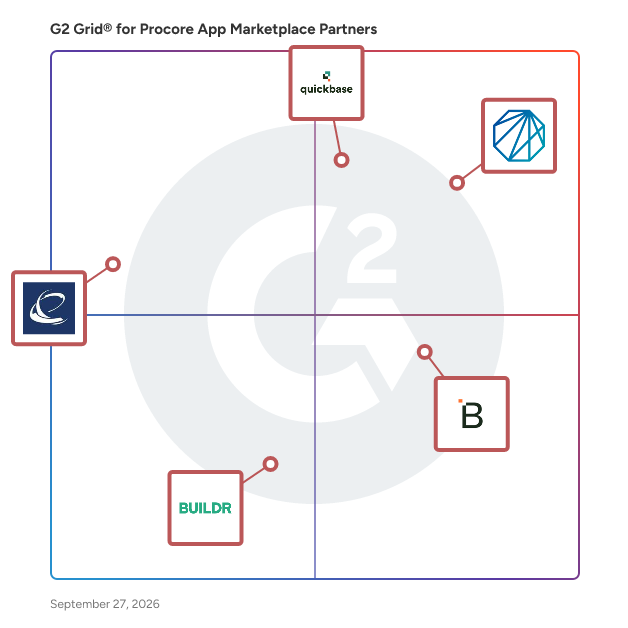
G2 Grid® for Procore App Marketplace Partners

G2 Grid® for Procore App Marketplace Partners plotting products by satisfaction and market presence

Highlighted products: Newforma, Quickbase, Breadcrumb, EarthCam, and Buildr.

Underlying data: [Grid® JSON](https://www.g2.com/categories/procore-app-marketplace-partners/grids.json?focus%5B%5D=newforma&focus%5B%5D=quickbase&focus%5B%5D=breadcrumb-2025-12-01&focus%5B%5D=earthcam&focus%5B%5D=buildr)

Newforma

Newforma is project information management (PIM) software for the architecture, engineering, construction, and owner (AECO) industry. It connects the emails, instant messages, files, drawings, models, issues and contract documents spread across a project team's systems and makes them accessible in one searchable project record. Teams use Newforma to run construction administration workflows, control documents, coordinate BIM issues, while showing creating a complete audit log of who knew what and when. The platform comes in cloud and on-premises versions, so firms choose where their project data lives. Newforma Konekt is the cloud option, differentiated by its hosted access, a single mobile companion app, and BIM coordination in 2D and 3D. Newforma Project Center is the server-based option for firms that keep project information inside their own network for control, security, or compliance reasons. Both work with the tools teams most frequently use, including Microsoft Outlook, Microsoft Teams, Microsoft SharePoint, Autodesk Revit, Autodesk Data Management (formally named Docs), local file server drives and Procore. Newforma’s goal is not replacing these solutions but instead provide a single interface users can access their project information regardless of where it is stored. ideal customer types are mid-market and enterprise architects, engineers, general contractors, and owners, frequently delivering document-heavy projects. Common use cases include construction administration, document control, project correspondence, design coordination, and protecting the firm during claims and disputes. Main capabilities: - Search across everything. One search covers project email, files, plans, folders, sheets, and logs, including records stored in connected systems like SharePoint and Autodesk Docs. - Project communication management. Email is filed from Outlook to the project record, so correspondence belongs to the whole team instead of sitting in one person's inbox. Additionally, Newforma connects Microsoft Teams Channels to the project record, retrieving available history and continuously archiving new posts, replies, reactions, and attachments - Construction administration. RFIs, submittals, transmittals, and contract changes move through structured review cycles with due dates, revision history, and a full audit trail. - Document control and file sharing. Version control, drawing and sheet management, package issuance, and large file transfers to outside parties. - BIM coordination and action items. Issues are tracked by location in 2D sheets and 3D models, assigned to the right person, and resolved in Revit or another authoring tool. Newforma has worked in AECO information management for more than 20 years. Firms including Foster + Partners, HOK, WSP, Arcadis, and Thornton Tomasetti use Newforma, and the platform holds records for over 20 million projects and roughly 1 billion project emails. Customers report shorter RFI and submittal response times and faster document retrieval during audits and claims. Pricing is quoted by firm based on product, package, and user count. Support includes implementation services, a customer help center, and training through Newforma Academies.

Average Rating: 4.2/5.0

Total Reviews: 180

Who Is the Company Behind Newforma?

  • Seller: Newforma
  • Company Website:
  • Year Founded: 2003
  • HQ Location: Manchester, NH
  • LinkedIn® Page: www.linkedin.com
    37 employees on LinkedIn®

Who Uses This Product?

  • Who Uses This: IT Manager
  • Top Industries: Architecture & Planning, Construction
  • Company Size: 65% Medium, 19% Large

What Do G2 Reviewers Say About Newforma?

AI-generated summary from verified user reviews

Pros
  • Users value the ease of use of Newforma Project Center, enjoying seamless management of all project processes in one platform.
  • Users appreciate the excellent organization capabilities of Newforma Project Center for efficiently managing project files and emails.
  • Users value the centralized document management of Newforma Project Center, streamlining access and improving project efficiency.
  • Users benefit from effective tracking of project data, making information retrieval and management seamless and efficient.
  • Users value the efficient data management of Newforma Project Center, enabling easy access, search, and organization of project information.
Cons
  • Users experience slow performance at times, which can hinder efficiency given the system's data processing demands.
  • Users experience slow processing during startup and email filing, affecting the overall efficiency of Newforma Project Center.
  • Users experience performance issues with Newforma Project Center, citing slow speeds and cumbersome processes that hinder efficiency.
  • Users express frustration over missing features in Newforma Project Center, affecting usability and workflow efficiency.
  • Users find the outdated interface of Newforma Project Center cumbersome and in need of significant improvements.

What Are Recent G2 Reviews of Newforma?

What Are G2 Users Discussing About Newforma?

Quickbase

Quickbase is an AI-driven platform designed to help businesses streamline their operations by adapting to their unique workflows and processes. Unlike traditional off-the-shelf software, which often requires users to conform to predefined structures, Quickbase empowers organizations to create customized solutions that align with their specific needs. This flexibility is crucial for companies seeking to eliminate inefficiencies and reduce the burden of 'Gray Work' - what we call the time-consuming tasks and manual processes that arise from using rigid software systems. The target audience for Quickbase includes businesses of all sizes across various industries that are looking to enhance their operational efficiency. Whether it's a 50 person small business or a large enterprise, organizations can benefit from a platform that allows them to connect disparate data sources, automate repetitive tasks, and scale their competitive advantages. Quickbase is particularly valuable for teams that rely on collaboration and data-driven decision-making, as it fosters an environment where information flows seamlessly and processes are optimized. Key features of Quickbase include its intuitive interface, which allows users to build custom applications without extensive coding knowledge. This user-friendly design enables teams to quickly adapt the platform to their specific workflows, ensuring that they can address unique challenges without the need for extensive IT support. Additionally, Quickbase offers powerful automation capabilities, allowing users to set up triggers and workflows that reduce manual effort and streamline operations. The platform also supports integration with various data sources, enabling businesses to consolidate their information and gain valuable insights. One of the standout benefits of Quickbase is its ability to scale with your business. As organizations grow and evolve, their processes often become more complex. Quickbase's adaptable nature ensures that users can modify their applications and workflows as needed, without the constraints typically associated with traditional software. This flexibility not only saves time but also fosters innovation, as teams can experiment with new processes and tools that enhance their productivity. By prioritizing user-centric design and adaptability, Quickbase stands out in the crowded landscape of business software solutions. It provides organizations with the tools they need to optimize their operations, reduce inefficiencies, and ultimately drive growth. With Quickbase, businesses can focus on what truly matters—leveraging their unique processes to gain a competitive edge in their respective markets.

Average Rating: 4.5/5.0

Total Reviews: 1,550

Who Is the Company Behind Quickbase?

  • Seller: Quickbase
  • Company Website:
  • Year Founded: 2012
  • HQ Location: Boston, MA
  • Twitter: @quickbase
    5,146 Twitter followers
  • LinkedIn® Page: www.linkedin.com
    806 employees on LinkedIn®

Who Uses This Product?

  • Who Uses This: Project Manager, Project Coordinator
  • Top Industries: Information Technology and Services, Construction
  • Company Size: 42% Medium, 31% Small

What Do G2 Reviewers Say About Quickbase?

AI-generated summary from verified user reviews

Pros
  • Users love the ease of use of Quickbase, finding it user-friendly and adaptable for various business needs.
  • Users value the customization options in Quickbase, enhancing adaptability and efficiency in managing their databases.
  • Users love the customizability of Quickbase, enabling tailored applications to fit specific business needs effectively.
  • Users appreciate the flexibility of Quickbase, enabling high customization and adaptation to diverse business needs.
  • Users love the customization options in Quickbase, tailoring databases to fit unique business needs effectively.
Cons
  • Users struggle with the learning curve due to enforced changes and lack of tailored training options.
  • Users feel the missing features in Quickbase limit its effectiveness for tasks like document management and reporting.
  • Users find Quickbase's limited features hinder effective integration, mobile usability, and overall flexibility in development.
  • Users find Quickbase to be not intuitive, with a confusing interface that affects overall usability and experience.
  • Users note limited customization options that can hinder flexibility, especially for those seeking advanced functionality and control.

What Are Recent G2 Reviews of Quickbase?

What Are G2 Users Discussing About Quickbase?

Breadcrumb

Breadcrumb is a modern worksite safety and compliance tool built for the construction industry in the United States and operating globally across the United Kingdom, Ireland, Australia, and New Zealand. Available on mobile and desktop, Breadcrumb houses vital jobsite safety documentation such as orientations, training and certifications, JHAs, and manpower counts, as well as a complete worker directory linked to every site with the ability to send messages directly to each worker on site. This centralized hub is accessible to everyone who needs it and integrates with Procore in real-time. By streamlining a typically disjointed experience and creating a direct path of communication to the worker, Breadcrumb helps jobsite teams manage projects more efficiently, without losing site of safety. Breadcrumb is connecting the field by providing general contractors the with the database, providing the foremen with the tools to manage their crews, and making it easy for workers to complete their orientations and profiles. We offer core tools like project and company orientations, project sign in and attendance, the collection of training, licenses and certifications, as well as evacuations and subcontractor communications and alerts. We also offer solutions for work permits, JHAs, PTPs and the like. The result is a complete worker directory with the contact information of every worker on every site, as well as a full compliance library and audit trail where everything is time-stamped and saved to the cloud. Furthermore, Breadcrumb offers a deep integration with project management platforms Procore and Autodesk Forma. **Procore integration:** The most downloaded safety app on the Procore marketplace. The integration includes bidirectional directories that sync projects, companies, users and permissions. The integration also means that all man hours recorded in Breadcrumb are pushed across to the Procore Daily Log, and all safety documents such as orientations, certifications and permits are replicated in Procore Documents. **Autodesk Forma integration:** Breadcrumb's integration with Autodesk Forma Build means site-specific safety plans, JHAs, orientations, PTPs and permits flow straight into Autodesk Forma, and real-time manpower counts push directly into Forma Build forms. No manual entry or duplicate work.

Average Rating: 4.7/5.0

Total Reviews: 53

Who Is the Company Behind Breadcrumb?

  • Seller: Breadcrumb
  • Company Website:
  • Year Founded: 2020
  • HQ Location: Cremorne, AU
  • LinkedIn® Page: www.linkedin.com
    80 employees on LinkedIn®

Who Uses This Product?

  • Top Industries: Construction
  • Company Size: 57% Small, 43% Medium

What Do G2 Reviewers Say About Breadcrumb?

AI-generated summary from verified user reviews

Pros
  • Users value enhanced communication through Breadcrumb, benefiting from efficient orientations and effective mass notifications.
  • Users find Breadcrumb's ease of use invaluable for efficient orientations and seamless communication across projects.
  • Users commend Breadcrumb for its effective time management, streamlining subcontractor orientation and enhancing communication efficiency.
  • Users find Breadcrumb's training capabilities effective, streamlining orientations and enhancing communication for subcontractors.
Cons
  • Users face challenges with poor connectivity in remote areas, hindering the loading of the Breadcrumb browser version.

What Are Recent G2 Reviews of Breadcrumb?

EarthCam

EarthCam exists to encourage exploration, foster discovery and connect people through innovative live camera technology.

Average Rating: 4.4/5.0

Total Reviews: 10

Who Is the Company Behind EarthCam?

  • Seller: EarthCam
  • Year Founded: 1996
  • HQ Location: Upper Saddle River, NJ
  • Twitter: @EarthCam
    33,614 Twitter followers
  • LinkedIn® Page: www.linkedin.com
    219 employees on LinkedIn®

Who Uses This Product?

  • Company Size: 80% Small, 20% Large

What Are Recent G2 Reviews of EarthCam?

Buildr

Buildr is the AI preconstruction workspace for general contractors. It enables leading builders to run estimating, pursuit tracking, business development, bid leveling, bidding, workforce planning, financial forecasting, and more—within a single connected workflow. Built for the modern GC, Buildr is construction’s first collaborative, AI-powered environment where teams move faster, make smarter decisions, and dramatically increase precon output. Leverage Buildr to expand your precon capacity, win smarter, and reduce risk with unprecedented efficiency.

Average Rating: 4.8/5.0

Total Reviews: 74

Who Is the Company Behind Buildr?

  • Seller: Buildr
  • Year Founded: 2018
  • HQ Location: Irvine, California
  • Twitter: @buildr
    158 Twitter followers
  • LinkedIn® Page: www.linkedin.com
    36 employees on LinkedIn®

Who Uses This Product?

  • Who Uses This: Project Manager, Project Engineer
  • Top Industries: Construction
  • Company Size: 47% Small, 41% Medium

What Do G2 Reviewers Say About Buildr?

AI-generated summary from verified user reviews

Pros
  • Users value the ease of use of Buildr, appreciating its intuitive dashboard and streamlined project organization.
  • Users value the centralized platform of Buildr, enhancing collaboration and streamlining processes across all divisions.
  • Users value the easy project management of BUILDR, enjoying organized contacts, task reminders, and streamlined processes for team alignment.
  • Users find setup easy with Buildr, appreciating the straightforward process and helpful tutorial for quick onboarding.
  • Users value the comprehensive tracking features of Buildr, effectively managing jobs and fostering team alignment.
Cons
  • Users find missing features in Buildr, limiting their ability to track projects and access flexible reporting options.
  • Users note the need for improvement in tracking and reporting features, making organization and usability challenging.
  • Users find the complexity of Buildr overwhelming, making organization and data input challenging without proper usage.
  • Users find difficult navigation issues that hinder finding information quickly and disrupt workflow efficiency.
  • Users find the lack of customization in Buildr limits functionality and organization, especially for complex projects.

What Are Recent G2 Reviews of Buildr?

What Are G2 Users Discussing About Buildr?

TrueLook

TrueLook is a provider of construction cameras and software used for jobsite monitoring, documentation, and security. The company offers a variety of cameras as well as three different subscription packages, making it so you only pay for what you need. Through the web and mobile platform, users can access live video, create custom time-lapse footage, and receive motion-triggered security recordings with alerts. The system supports multiple users, allowing project stakeholders to view and share updates as needed. In addition to self-monitoring, TrueLook offers a Jobsite Monitoring service where a remote team reviews alerts in real time to help prevent theft and keep jobsites secure after hours. TrueLook is commonly used for progress tracking, stakeholder communication, dispute resolution, insurance compliance, and creating marketing visuals.

Average Rating: 5.0/5.0

Total Reviews: 10

Who Is the Company Behind TrueLook?

  • Seller: TrueLook
  • Year Founded: 1995
  • HQ Location: Winston-Salem, US
  • Twitter: @TrueLook
    611 Twitter followers
  • LinkedIn® Page: www.linkedin.com
    69 employees on LinkedIn®

Who Uses This Product?

  • Top Industries: Construction
  • Company Size: 60% Medium, 20% Large

What Do G2 Reviewers Say About TrueLook?

AI-generated summary from verified user reviews

Pros
  • Users value the responsive customer support of TrueLook, ensuring assistance is always available for their needs.
  • Users appreciate the ease of use of TrueLook, highlighting its quick setup and user-friendly interface for monitoring.
  • Users value the simple and efficient setup of TrueLook, making monitoring projects across sites hassle-free.
  • Users value the easy setup and remote monitoring features of TrueLook, enhancing project oversight and security.
  • Users commend the efficient monitoring system of TrueLook, enabling seamless oversight across multiple job sites with ease.
Cons
  • Users report occasional camera setup issues and delayed access to security footage, impacting convenience.
  • Users face difficult setup challenges with the solar camera, leading to delays in accessing security footage.
  • Users note the expensive upfront investment for TrueLook, though they appreciate the product quality and support.
  • Users note a significant installation package limitation that can complicate the setup process for TrueLook cameras.
  • Users desire missing features in TrueLook, particularly options for individual add-ons or a middle package tier.

What Are Recent G2 Reviews of TrueLook?

What Are G2 Users Discussing About TrueLook?

DroneDeploy

DroneDeploy powers field teams with robotics and AI. As the only platform that combines robotic automation, AI agents and truly unified reality capture, DroneDeploy allows critical industries to operate with speed and confidence. From construction and energy to agriculture, the world’s largest companies use DroneDeploy to simplify field operations, improve safety and make smarter decisions, faster. By combining aerial drones, 360 and fixed cameras, ground robots and proprietary AI, we’re bringing the power of automation and visual intelligence to all stakeholders, from the field to the boardroom.

Average Rating: 4.6/5.0

Total Reviews: 118

Who Is the Company Behind DroneDeploy?

  • Seller: DroneDeploy
  • Year Founded: 2013
  • HQ Location: San Francisco, US
  • Twitter: @DroneDeploy
    34,433 Twitter followers
  • LinkedIn® Page: www.linkedin.com
    386 employees on LinkedIn®

Who Uses This Product?

  • Who Uses This: Project Engineer, VDC Manager
  • Top Industries: Construction, Architecture & Planning
  • Company Size: 41% Medium, 41% Small

What Do G2 Reviewers Say About DroneDeploy?

AI-generated summary from verified user reviews

Pros
  • Users appreciate the ease of use of DroneDeploy, enjoying intuitive features for planning and collaboration.
  • Users praise the user-friendly interface and exceptional customer service of DroneDeploy, enhancing their overall experience.
  • Users value the responsive and knowledgeable customer support from DroneDeploy, enhancing their overall experience and productivity.
  • Users value the intuitive flight planning and rapid map processing of DroneDeploy, significantly enhancing their workflow efficiency.
  • Users love the easy sharing capabilities of DroneDeploy, enabling seamless collaboration and effective project management.
Cons
  • Users find the service expensive, leading to difficulties in retention and understanding pricing plans.
  • Users report missing features like bulk GCP processing and account restrictions, making tasks tedious and less efficient.
  • Users report upload issues with DroneDeploy, finding it sometimes slow and complicating their project workflows.
  • Users face limited access to important logs and support, hindering their ability to effectively utilize DroneDeploy.

What Are Recent G2 Reviews of DroneDeploy?

What Are G2 Users Discussing About DroneDeploy?

cmBuilder.io

cmBuilder democratizes 4D construction site logistics with fast & easy cloud-based workflows, powerful sequencing simulation capabilities, and unparalleled real-time collaboration.

Average Rating: 4.9/5.0

Total Reviews: 27

Who Is the Company Behind cmBuilder.io?

  • Seller: CadMakers
  • Company Website:
  • Year Founded: 2014
  • HQ Location: Burnaby
  • LinkedIn® Page: www.linkedin.com
    68 employees on LinkedIn®

Who Uses This Product?

  • Top Industries: Construction
  • Company Size: 56% Medium, 26% Large

What Do G2 Reviewers Say About cmBuilder.io?

AI-generated summary from verified user reviews

Pros
  • Users find cmBuilder.io to be incredibly intuitive, making it easy for anyone to navigate and utilize effectively.
  • Users value the efficient project planning of CM Builder, enhancing collaboration and site management with 3D capabilities.
  • Users commend the responsive and supportive customer service of cmBuilder.io, enhancing their overall experience significantly.
  • Users find cmBuilder.io to be incredibly intuitive, making it easy for anyone to learn and use effectively.
  • Users praise the intuitive interface and extensive resource library of cmBuilder.io, enhancing project visualization and collaboration.
Cons
  • Users find the service expensive, especially for the highest subscription tier with essential features locked behind a paywall.
  • Users note a lack of realism in cmBuilder.io due to limitations in advanced rendering capabilities and customization options.
  • Users note that limited accessibility to advanced features can hinder cmBuilder.io's usability for some businesses.
  • Users find limited customization options restrict visual realism and function, affecting their overall modeling experience.
  • Users experience slow performance occasionally, especially with large models, which can lead to frustration during use.

What Are Recent G2 Reviews of cmBuilder.io?

Spectrum

Trimble Spectrum is a complete, cloud-based Enterprise Resource Planning (ERP) platform designed specifically for the construction industry. Tailored to meet the complex requirements of general contractors, specialty trades, heavy civil firms, and service contractors, Trimble Spectrum serves as a central hub that unifies back-office financials, project oversight, field operations, and resource planning into a single, reliable source of truth. By eliminating data silos and reliance on manual spreadsheets, the software empowers construction businesses to protect margins and enhance operational efficiency across the entire project lifecycle. Designed for Construction Unlike generic accounting systems or horizontal ERPs, Trimble Spectrum is built from the ground up to address the unique demands of the construction domain. From job costing and retainage tracking to certified payroll and multi-union management, every workflow within Trimble Spectrum is engineered to match the daily realities of construction accounting, project management, and field operations. Easy to Use Trimble Spectrum offers an intuitive, user-friendly interface designed for rapid adoption across teams with varying levels of technical background. Role-based customizable dashboards, streamlined navigation menus, and single-click access to daily tasks ensure that office administrators, project managers, and field staff can find the information they need without friction. In-app guidance, quick how-to resources, and automated data entry significantly reduce learning curves and processing burdens. Connected Workflows Between Office and Field Trimble Spectrum bridges the traditional divide between field workers and back-office staff. Through mobile field applications and cloud connectivity, field crews can log labor hours, track equipment usage, manage work orders, capture daily site logs, and process progress updates directly from the job site. This real-time synchronization eliminates double data entry, reduces paper-based administration by up to 80%, and ensures that financial managers always work with live project data. Powerful Analytics and Reporting Decision-makers gain full operational visibility through Trimble Spectrum’s robust analytics engine. Built-in, customizable financial reports, visual dashboards, and flexible drill-down inquiries allow contractors to monitor project health from a high-level corporate snapshot down to specific cost codes and vendor invoices. Live tracking of cash flow, work-in-progress (WIP), and job profit margins allows teams to spot potential overruns early and make proactive, data-driven decisions. A Comprehensive Construction Management Feature Suite Complete Construction Accounting: Features powerful General Ledger, Accounts Payable, Accounts Receivable, Cash Management (with positive pay and credit card reconciliation), Fixed Asset depreciation, and specialized Time & Material (T&M) billing. Automatic Invoicing & Payment Solutions: Streamline payable workflows with automated invoice processing. Intelligent document scanning extracts billing details from digital invoices and auto-populates entry forms in Spectrum, speeding up processing while automating lien waivers and pay application management. Trimble Pay, meanwhile, streamlines the flow of compliance and payment information between general contractors and subcontractors, making it fast and easy to collect accurate payments, lien waivers, billing Information, and compliance documents. Human Resources & Multi-Union Payroll: Automates the complete HR lifecycle—from digital onboarding and training to employee self-service portals and performance tracking. Spectrum handles complex construction payroll, multi-state tax filings, certified payroll reporting, and intricate multi-union wage structures with ease. Document Management: Centralizes, secures, and organizes project documents, submittals, RFIs, and contracts in a controlled digital environment, ensuring field and office personnel always reference current plans and specifications. Project Management: Delivers robust tools for tracking budgets, change orders, and job costs. Native integration with Trimble ProjectSight allows project managers and accounting teams to collaborate seamlessly without manual data transfers. Service Management & Dispatching: Integrates service contract management with field work orders, technician scheduling, dynamic dispatching, and mobile field work order and billing applications for contractors operating service and maintenance divisions. Subcontractor Management: Simplifies contract generation, compliance verification, vendor tracking, retainage handling, and payment applications to minimize exposure to legal and financial risk. Inventory & Materials Management: Tracks inventory levels, tool allocations, and material consumption across job sites, warehouses, and yards—reducing waste, optimizing asset usage, and improving cash flow.

Average Rating: 4.2/5.0

Total Reviews: 133

Who Is the Company Behind Spectrum?

  • Seller: Trimble
  • Year Founded: 1978
  • HQ Location: Sunnyvale, CA
  • Twitter: @TrimbleCorpNews
    12,061 Twitter followers
  • LinkedIn® Page: www.linkedin.com
    18,122 employees on LinkedIn®
  • Ownership: NASDAQ

Who Uses This Product?

  • Who Uses This: Controller
  • Top Industries: Construction, Accounting
  • Company Size: 76% Medium, 19% Small

What Do G2 Reviewers Say About Spectrum?

AI-generated summary from verified user reviews

Pros
  • Users appreciate the ease of use in Spectrum, finding it intuitive and efficient for their needs.
  • Users appreciate the ease of use and integration capabilities of Spectrum, making tasks straightforward and efficient.
  • Users commend the responsiveness of the customer support team, enhancing their experience with Spectrum's software.
  • Users value the organized data management in Spectrum, facilitating efficient access across all company areas.
  • Users find Spectrum's ease of learning enhances their experience through intuitive UI and helpful quick tricks.
Cons
  • Users express frustration with poor customer support, citing lack of documentation and unresolved bugs affecting their experience.
  • Users express frustration over poor support management, facing long waits and inadequate documentation for troubleshooting issues.
  • Users report bug issues in Spectrum, feeling neglected as support is slow to address these persistent problems.
  • Users find the complex usability of Spectrum requires significant time and training to master effectively.
  • Users find Spectrum difficult to learn, requiring significant time and training for those unfamiliar with its logic.

What Are Recent G2 Reviews of Spectrum?

Construction BI

Construction BI offers an array of services ranging from technology strategy and roadmap development to custom reporting and analytics.

Average Rating: 4.4/5.0

Total Reviews: 4

Who Is the Company Behind Construction BI?

Who Uses This Product?

  • Company Size: 75% Small, 25% Medium

What Are Recent G2 Reviews of Construction BI?

OpenSpace

OpenSpace is a Visual Intelligence Platform designed for the construction industry, leveraging advanced computer vision and AI technologies to provide comprehensive, real-time visual documentation of jobsites. By capturing 360° imagery, OpenSpace enables builders to monitor progress, enhance coordination between field and office teams, and make informed decisions swiftly. This platform transforms traditional construction workflows by integrating reality data into daily operations, thereby reducing risks and increasing efficiency. Key Features and Functionality: - OpenSpace Capture: Utilizes 360° cameras to document construction sites comprehensively, creating a detailed visual record that is automatically mapped to floor plans. - OpenSpace Field: An AI-powered system that allows teams to capture, track, and manage site data using smartphones, with images automatically aligned to floor plans and BIM models. - OpenSpace Progress Tracking: Provides automated tracking of construction progress, offering insights into work completed and identifying potential schedule risks. - OpenSpace Air: Integrates drone imagery into the platform, enabling the creation of high-resolution orthomosaics, point clouds, and 3D meshes for comprehensive site analysis. - OpenSpace BIM+: Offers 3D tools that facilitate coordination between field teams and Virtual Design and Construction (VDC) teams, allowing for seamless comparison of as-built conditions to design intent. Primary Value and Solutions Provided: OpenSpace addresses the construction industry's need for accurate, up-to-date site documentation and efficient project management. By providing a visual record of the jobsite, it enhances transparency, reduces miscommunication, and minimizes costly rework. The platform's AI-driven analytics offer actionable insights, enabling teams to identify issues promptly and make data-driven decisions. Additionally, OpenSpace's integration capabilities with tools like Procore and Autodesk Construction Cloud streamline workflows, fostering better collaboration among stakeholders. Overall, OpenSpace empowers construction professionals to deliver projects on time and within budget by transforming reality data into strategic assets.

Average Rating: 4.5/5.0

Total Reviews: 14

Who Is the Company Behind OpenSpace?

  • Seller: OpenSpace
  • Year Founded: 2017
  • HQ Location: SAN FRANCISCO, CA
  • Twitter: @openspaceai
    1,023 Twitter followers
  • LinkedIn® Page: www.linkedin.com
    424 employees on LinkedIn®

Who Uses This Product?

  • Top Industries: Construction
  • Company Size: 64% Medium, 29% Small

What Do G2 Reviewers Say About OpenSpace?

AI-generated summary from verified user reviews

Pros
  • Users find the ease of use in OpenSpace remarkable, enabling quick and accurate 360° photo captures.
  • Users praise the fast and accurate 360° photo capture of OpenSpace, enhancing job site documentation efficiency.
  • Users value the real-time updates from OpenSpace, enhancing visibility and coordination across all project phases.
  • Users value the real-time updates from OpenSpace, enhancing visibility and coordination throughout all project phases.
  • Users value the real-time web viewing of OpenSpace, enhancing project tracking and coordination from anywhere.
Cons
  • Users experience alignment issues between 360 photos and floor plans, leading to potential confusion in navigation.
  • Users find the complexity of OpenSpace challenging, often requiring additional training for effective use.
  • Users find the complex setup of OpenSpace requires additional training, leading to initial difficulties for field teams.
  • Users face initial confusion due to the complex setup and training required to effectively use OpenSpace.
  • Users find the difficult setup of OpenSpace challenging, requiring additional training for effective usage.

What Are Recent G2 Reviews of OpenSpace?

What Are G2 Users Discussing About OpenSpace?

Clearstory

Clearstory is the only purpose-built technology for managing Change Orders between construction stakeholders in real time, delivering unmatched transparency and speed. With all projects, trades, and Change Orders in one place, our cloud-based Change Order Request Log provides the visibility needed to reduce risk and foster trust. Designed for contractors of all types, Clearstory is easy to adopt, streamlines communication, and modernizes the T&M Tag and Change Order approach to simplify processes and save time and money.

Average Rating: 4.8/5.0

Total Reviews: 91

Who Is the Company Behind Clearstory?

  • Seller: Clearstory
  • Year Founded: 2018
  • HQ Location: San Francisco , US
  • LinkedIn® Page: www.linkedin.com
    101 employees on LinkedIn®

Who Uses This Product?

  • Who Uses This: Project Manager, Project Engineer
  • Top Industries: Construction
  • Company Size: 45% Medium, 31% Small

What Do G2 Reviewers Say About Clearstory?

AI-generated summary from verified user reviews

Pros
  • Users commend the ease of use of Clearstory, making subcontractor cost management intuitive and efficient.
  • Users appreciate the easy tracking of change orders with Clearstory, benefiting from its transparency and simplicity.
  • Users value the tracking efficiency of Clearstory, appreciating the ease of managing change orders and project transparency.
  • Users enjoy the efficiency improvement of Clearstory, streamlining pricing and change order management effectively.
  • Users value Clearstory for its excellent organization that centralizes all project-related documents and communications.
Cons
  • Users find Clearstory has missing features that hinder usability and limit efficiency in project management.
  • Users find difficult navigation in Clearstory, particularly with T&M slips and change events, complicating their experience.
  • Users find the difficult customization of Clearstory frustrating, hindering report updates and simple adjustments.
  • The difficult learning curve of Clearstory makes it challenging for contractors to fully utilize its features.
  • Users find the difficult setup of Clearstory's features, particularly the T&M module, to be a substantial inconvenience.

What Are Recent G2 Reviews of Clearstory?

Nyfty.ai

Automate construction workflows with conversational robots

Average Rating: 4.0/5.0

Total Reviews: 2

Who Is the Company Behind Nyfty.ai?

  • Seller: Nyfty.ai
  • Year Founded: 2018
  • HQ Location: Dover, US
  • Twitter: @1matt_edwards
    190 Twitter followers
  • LinkedIn® Page: www.linkedin.com
    3 employees on LinkedIn®

Who Uses This Product?

  • Company Size: 100% Small

What Are Recent G2 Reviews of Nyfty.ai?

Ei Dynamics

Ei Dynamics® is a Business Process Management (BPM) Platform enabling companies to rapidly develop and deploy robust workflow and custom data integration applications without the need for complex programming or development resources.

Average Rating: 5.0/5.0

Total Reviews: 1

Who Is the Company Behind Ei Dynamics?

  • Seller: Ei Dynamics
  • HQ Location: Irvine, US
  • Twitter: @EiDynamics
    7 Twitter followers
  • LinkedIn® Page: www.linkedin.com
    5 employees on LinkedIn®

Who Uses This Product?

  • Company Size: 100% Medium

What Are Recent G2 Reviews of Ei Dynamics?

GoFormz

GoFormz is a platform used for creating digital forms and collecting data, used by teams of every industry and size. Using GoFormz's AI-powered online form builder, teams can digitize existing documents and build new forms from scratch – no code required. GoFormz is the only digital form solution that empowers users to create a digital version of an existing form, enabling any user (regardless of their technical proficiency) to effortlessly generate digital and online forms that meet their unique business needs. Use the GoFormz AI Form Builder to digitize your forms in seconds. Simply upload a form, and with just a click, AI will instantly analyze your form and automatically map and place key data fields, including text boxes, tables, checkboxes, signatures, and more. Your form fields can even be customized with dynamic fields, conditional logic, calculations, requirements, and more! Your digital forms can be filled out on mobile devices, like phones and tablets, and online from a computer. The GoFormz mobile apps are fully functional offline, allowing users to continue their work uninterrupted, no matter how remote their location. You can share forms with individuals outside of your organization, allowing them to fill them out and complete forms, even without a GoFormz login. GoFormz can also automate routine tasks and workflows, like sending completed forms to designated contacts, updating connected databases and dashboards, and uploading forms to integrated systems. By automating these tasks, businesses can rapidly implement streamlined processes for document approvals, authorizations, payroll activities, quality assurance, and numerous other activities quickly and efficiently. Your digital forms can also be directly integrated with your other business applications, like Salesforce, Google Suite, Microsoft 365, Procore, Box, and much more. Completed digital forms and collected data can be instantly uploaded to corresponding tools and records within connected systems, and data can even be pushed back to your digital forms, resulting in enhanced communication, improved operational efficiencies, and increased visibility. GoFormz’s award-winning Customer Support and Professional Services teams are readily available to help when you need it. Ready to jumpstart your digital transformation? Try GoFormz with a 14-day trial or request a demo today!

Average Rating: 4.7/5.0

Total Reviews: 225

Who Is the Company Behind GoFormz?

  • Seller: GoFormz
  • Company Website:
  • Year Founded: 2012
  • HQ Location: San Diego, CA
  • Twitter: @goformz
    397 Twitter followers
  • LinkedIn® Page: www.linkedin.com
    65 employees on LinkedIn®

Who Uses This Product?

  • Top Industries: Construction, Oil & Energy
  • Company Size: 49% Small, 45% Medium

What Do G2 Reviewers Say About GoFormz?

AI-generated summary from verified user reviews

Pros
  • Users value the ease of use of GoFormz, enhancing efficiency and simplifying form creation and data collection.
  • Users value the easy form customization in GoFormz, streamlining data collection and enhancing digital transformation.
  • Users appreciate the ease of creation with GoFormz, effortlessly transforming PDF forms into digital formats within minutes.
  • Users highlight the easy setup of GoFormz, ensuring a seamless transition and intuitive user experience.
  • Users appreciate the easy creation of forms with GoFormz, enhancing efficiency and digital transformation in their processes.
Cons
  • Users find difficult customization in GoFormz time-consuming, with rigid designs and limited dynamic template options.
  • Users find limited customization options in GoFormz, making form management less flexible than desired.
  • Users experience connectivity issues with GoFormz, especially when lacking cell service, impacting usability temporarily.
  • Users experience customization issues with GoFormz, finding form designs rigid and assistance necessary for better solutions.
  • Users find GoFormz expensive, with rapid price increases and high maintenance costs for smaller teams.

What Are Recent G2 Reviews of GoFormz?

What Are G2 Users Discussing About GoFormz?

Neeraja Prakash
NP
Researched and written by Neeraja Prakash
Updated June 16, 2025