Best Other Office Software for Small Business

How Many Other Office Software Products Does G2 Track?

Total Products under this Category: 500

Category Stats (Aug 2026)

  • Average Rating: 4.4/5 The average rating of products in this category, based on all submitted ratings
  • Top Trending Product: GAT Labs (+0.17%) - Among all products in this category, GAT Labs recorded the largest rating increase compared to last month

Last updated: August 15, 2026

How Does G2 Rank Other Office Software Products?

Why You Can Trust G2's Software Rankings:

  • 30 Analysts and Data Experts
  • 1,100+ Authentic Reviews
  • 500+ Products
  • Unbiased Rankings

G2's software rankings are built on verified user reviews, rigorous moderation, and a consistent research methodology maintained by a team of analysts and data experts. Each product is measured using the same transparent criteria, with no paid placement or vendor influence. While reviews reflect real user experiences, which can be subjective, they offer valuable insight into how software performs in the hands of professionals. Together, these inputs power the G2 Score, a standardized way to compare tools within every category.

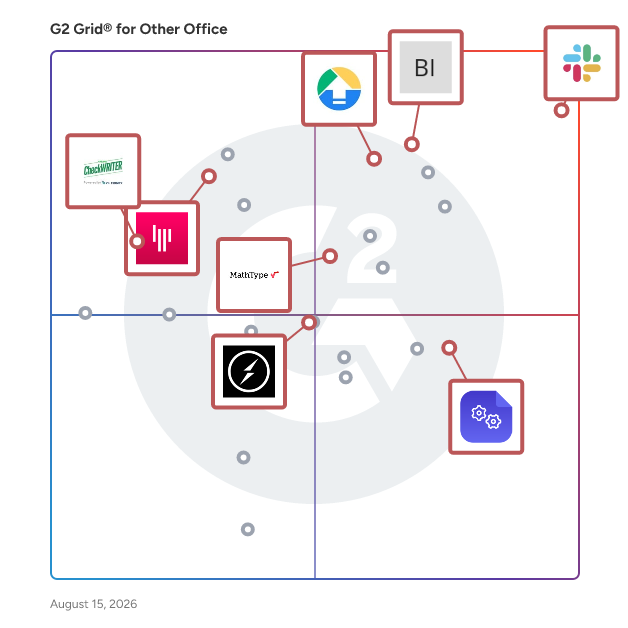
G2 Grid® for Other Office Software

G2 Grid® for Other Office Software plotting products by satisfaction and market presence

Highlighted products: Slack Connector for Jira, Google Drive & Docs for Confluence, Drive Uploader, Gitter, MathType, DocsAutomator, Online Check Writer- powered by Zil Money, and Socket.Io.

Underlying data: [Grid® JSON](https://www.g2.com/categories/other-office/grids.json?focus%5B%5D=slack-connector-for-jira&focus%5B%5D=google-drive-docs-for-confluence&focus%5B%5D=drive-uploader&focus%5B%5D=gitter&focus%5B%5D=mathtype&focus%5B%5D=docsautomator&focus%5B%5D=online-check-writer-powered-by-zil-money&focus%5B%5D=socket-io&segment=small-business)

Sponsored

Zoho Desk

Zoho Desk is a web-based help desk software solution designed to assist organizations in providing exceptional customer support experiences. This platform serves as a centralized hub for managing customer interactions across multiple channels, allowing businesses to streamline their support processes and enhance overall customer satisfaction. By focusing on the needs of both customers and support agents, Zoho Desk aims to create a more efficient and effective help desk environment. Targeted primarily at businesses of all sizes, Zoho Desk caters to customer support teams looking to improve their service delivery and operational efficiency. The software is particularly beneficial for organizations that require a robust system to manage inquiries from various communication channels, including email, chat, social media, and phone. With its comprehensive feature set, Zoho Desk is well-suited for industries such as retail, technology, healthcare, and finance, where customer engagement and support are critical to success. One of the standout features of Zoho Desk is its omnichannel support capability, which allows businesses to engage with customers seamlessly across different platforms. This ensures that customers receive consistent and timely responses, regardless of how they choose to reach out. Additionally, the platform enhances agent productivity through automation tools that handle repetitive tasks, enabling support teams to focus on more complex customer issues. The integration of AI capabilities further empowers agents by providing them with insights and suggestions based on historical data and customer interactions. Zoho Desk also offers extensive customization options, allowing organizations to tailor the help desk experience to their specific needs. Users can create custom workflows, set up automated responses, and design personalized dashboards to monitor performance metrics. This level of customization ensures that businesses can adapt the software to fit their unique operational requirements, ultimately leading to improved service delivery and customer satisfaction. Furthermore, Zoho Desk provides real-time performance insights, enabling support managers to track key metrics and make data-driven decisions. The ability to analyze customer interactions and agent performance helps organizations identify areas for improvement and optimize their support strategies. With its cost-effective pricing model, Zoho Desk stands out as a practical solution for businesses seeking to enhance their customer support capabilities without incurring excessive expenses.

Visit website

Slack Connector for Jira

Slack Connector for Jira is a comprehensive integration tool designed to bridge the gap between Slack and Jira Cloud, enhancing team collaboration and streamlining project management workflows. By facilitating seamless communication between these platforms, it ensures that teams remain synchronized and informed without the need to switch between applications. Key Features and Functionality: - Issue Notifications to Selected Channels: Configure multiple Slack channels to receive real-time notifications about changes in specific Jira issues or projects. Each channel can have customized filters, events, and threading options to control the information shared. - Perform Jira Actions from Slack: Utilize the @jira_connector bot to execute Jira actions directly within Slack, such as assigning tasks, adding comments, and logging work. The bot also expands Jira issue keys mentioned in Slack channels for quick reference. - Access Slack Discussions from Jira Issues: An additional tab panel within Jira issues allows users to view and join related Slack conversations, ensuring all discussions are centralized and easily accessible. - Advanced Notification Filtering: Implement sophisticated filters to manage the flow of notifications, preventing Slack channels from becoming cluttered and ensuring that only pertinent updates are shared. - Automatic Thread Grouping: Maintain organized Slack channels by grouping notifications into threads based on issue, project, space, or content, which is particularly beneficial for high-volume channels. Primary Value and User Solutions: Slack Connector for Jira addresses the challenge of fragmented communication between development and project management teams by integrating Slack and Jira Cloud. This integration ensures that all team members have immediate access to relevant updates, can perform Jira actions without leaving Slack, and can track discussions related to specific issues directly from Jira. By reducing the need to switch between platforms, it enhances productivity, minimizes miscommunication, and keeps projects progressing smoothly.

Average Rating: 4.7/5.0

Total Reviews: 269

How Do G2 Users Rate Slack Connector for Jira?

  • Quality of Support: 9.1/10 (Category avg: 8.7/10)
  • Ease of Use: 9.3/10 (Category avg: 9.0/10)

Who Is the Company Behind Slack Connector for Jira?

  • Seller: Wisoft
  • Year Founded: 2007
  • HQ Location: Poznan, Greater Poland
  • LinkedIn® Page: www.linkedin.com
    3 employees on LinkedIn®

Who Uses This Product?

  • Who Uses This: Project Manager
  • Top Industries: Computer Software, Information Technology and Services
  • Company Size: 57% Medium, 28% Small

What Are Recent G2 Reviews of Slack Connector for Jira?

Google Drive & Docs for Confluence

Google Drive & Docs for Confluence is a powerful integration tool designed to bridge the gap between Atlassian's Confluence and Google's suite of productivity applications. By seamlessly embedding Google Drive files—such as Docs, Sheets, and Slides—directly into Confluence pages, this add-on enhances collaboration and streamlines workflows. Users can insert human-readable links, embed individual files, or display entire folders from Google Drive within their Confluence environment. This integration eliminates the need to switch between platforms, allowing teams to access and manage their documents efficiently. The add-on utilizes Google Drive's OAuth2 protocol, ensuring secure access to files and maintaining data integrity. By consolidating resources and reducing context switching, Google Drive & Docs for Confluence empowers teams to collaborate more effectively and maintain a cohesive workspace. Key Features and Functionality: - Live Links: Insert human-readable links to Google Drive files into Confluence pages, providing direct access without leaving the Confluence environment. - Embedded Files: Embed individual Google Drive files, such as Docs, Sheets, and Slides, directly into Confluence pages, allowing users to view and interact with content seamlessly. - Embedded Folders: Display entire Google Drive folders within Confluence, enabling organized access to multiple files and fostering a structured collaboration space. Primary Value and User Solutions: Google Drive & Docs for Confluence addresses the common challenge of managing and accessing documents across multiple platforms. By integrating Google Drive directly into Confluence, it reduces the need for constant switching between applications, thereby enhancing productivity and minimizing workflow disruptions. The add-on ensures that all team members have access to the most up-to-date documents within their collaborative workspace, promoting consistency and efficiency. Additionally, by leveraging Google Drive's OAuth2 protocol, it maintains high security standards, ensuring that sensitive information remains protected. This integration ultimately provides a cohesive solution for teams seeking to unify their documentation and collaboration processes.

Average Rating: 4.5/5.0

Total Reviews: 46

How Do G2 Users Rate Google Drive & Docs for Confluence?

  • Quality of Support: 8.4/10 (Category avg: 8.7/10)
  • Ease of Use: 8.8/10 (Category avg: 9.0/10)

Who Is the Company Behind Google Drive & Docs for Confluence?

Who Uses This Product?

  • Top Industries: Information Technology and Services, Computer Software
  • Company Size: 43% Small, 41% Medium

What Are Recent G2 Reviews of Google Drive & Docs for Confluence?

Drive Uploader

DriveUploader is a user-friendly application that enables individuals and businesses to receive large files directly into their Google Drive™ accounts without requiring the sender to have a Google account or install any software. By simply sharing a unique upload link, recipients can collect files from clients, colleagues, or partners seamlessly. This service is particularly beneficial for those who need to manage substantial data transfers efficiently and securely. Key Features and Functionality: - Simple File Uploads: Senders can easily drag and drop files into a web browser, which are then saved directly to the recipient's Google Drive™. - No File Size Limits: DriveUploader supports the transfer of very large files, up to hundreds of gigabytes each, as long as they fit within the storage capacity of the recipient's Google Drive™. - No Login Required for Senders: Individuals sending files do not need to create accounts or log in, streamlining the upload process. - Secure Transfers: Utilizing HTTPS, DriveUploader ensures that all file transfers are secure, with data stored directly in the recipient's Google Drive™ account. - QR Code Generation: Users can generate unique QR codes for their uploaders, allowing senders to access the upload page instantly without the need for links or typing. - Folder Uploads: The service supports the transfer of single files, multiple files, and entire folders, including all subfolders. - Custom Branding: Paid plans offer the ability to customize the uploader page with a logo, providing a branded experience for clients and web visitors. - Website Integration: DriveUploader can be easily embedded into existing websites, blogs, or Facebook pages, enhancing user engagement. - Password Protection: Users can set unique passwords for uploader links, adding an extra layer of privacy and ensuring that only authorized individuals can access the files. - Email Notifications: The service can send updates about new file uploads to multiple email addresses, with personalized subjects and messages, facilitating team collaborations. - Form Builder: DriveUploader offers a form builder that allows users to design custom forms within each uploader, collecting specific data needed alongside the files. - API Integration: For developers, DriveUploader provides an API and webhooks to integrate file uploads into online services that process images, videos, or other large files with custom logic. Primary Value and User Solutions: DriveUploader addresses the common challenges associated with receiving large files, such as email attachment size limits and the need for sender accounts. By offering a straightforward, secure, and efficient method for file transfers directly into Google Drive™, it simplifies workflows for professionals, educators, and businesses. The service's flexibility, including features like QR code access, custom branding, and website integration, ensures that users can tailor the experience to their specific needs, enhancing productivity and collaboration.

Average Rating: 4.5/5.0

Total Reviews: 17

How Do G2 Users Rate Drive Uploader?

  • Quality of Support: 9.0/10 (Category avg: 8.7/10)
  • Ease of Use: 9.6/10 (Category avg: 9.0/10)

Who Is the Company Behind Drive Uploader?

  • Seller: Google
  • Year Founded: 1998
  • HQ Location: Mountain View, CA
  • Twitter: @google
    31,899,995 Twitter followers
  • LinkedIn® Page: www.linkedin.com
    341,888 employees on LinkedIn®
  • Ownership: NASDAQ:GOOG

Who Uses This Product?

  • Top Industries: Computer Software
  • Company Size: 61% Small, 28% Medium

What Are Recent G2 Reviews of Drive Uploader?

MathType

MathType is the world's leading equation editor that allows you to write math notation as easily as you write text. From simple equations to complex mathematical expressions, MathType offers an intuitive interface with a toolbar offering over 500 symbols, including support for matrix, multiline equations, and elementary mathematical symbols. In addition to its powerful mathematical capabilities, MathType simplifies the writing of chemical notation with ChemType. This includes a customized toolbar equipped with the periodic table and other chemistry-related symbols, making it easy to create inorganic chemistry notation. MathType is compatible with Microsoft 365, WPS, and Google Workspace. As one of the most powerful mathematical editors on the market, MathType seamlessly integrates with various LMS and text editors, including Moodle, Canvas, Schoology, TinyMCE, and CKEditor. Trusted by educators and EdTech companies globally, MathType offers: · Symbol coverage: With over 500 symbols, MathType supports matrices, multiline equations, and a comprehensive range of specialized symbols, ensuring you have everything needed for any mathematical or scientific notation. · Easy to use: Write equations with an interface that provides a user-friendly experience from day one. MathML native and LaTeX friendly. · AI-Powered Handwriting Recognition: Converts handwritten expressions into clean, digital equations ready to be used in your documents. · ChemType: Unlock a personalized toolbar equipped with specialized chemistry buttons tailored for editing inorganic chemistry notation. · Accessibility: MathType is compliant with accessibility requirements and ensures software accessibility for people with disabilities. · High-quality output: It generates perfect, high-quality images for all your equations that can be exported in various formats such as SVG, PDF, and PNG. · Customizable: You can customize formatting options to define the style settings required for your documents and configure how equation elements are displayed. · Smooth integration: Easily integrate MathType with the platform and technology that best suits you: LMS, HTML, XML, and CMS editors.

Average Rating: 4.1/5.0

Total Reviews: 23

How Do G2 Users Rate MathType?

  • Quality of Support: 8.9/10 (Category avg: 8.7/10)
  • Ease of Use: 8.6/10 (Category avg: 9.0/10)

Who Is the Company Behind MathType?

  • Seller: WIRIS
  • Year Founded: 1999
  • HQ Location: Barcelona, Catalonia
  • LinkedIn® Page: www.linkedin.com
    116 employees on LinkedIn®

Who Uses This Product?

  • Top Industries: Education Management
  • Company Size: 48% Small, 35% Medium

What Are Recent G2 Reviews of MathType?

What Are G2 Users Discussing About MathType?

Gitter

Gitter is an open-source chat and networking platform designed to help developers manage, grow, and connect communities through messaging, content sharing, and discovery. Built on the Matrix protocol, Gitter offers secure, decentralized communication, enabling users to engage in real-time discussions across various platforms, including web, desktop, and mobile applications. By integrating seamlessly with GitHub, GitLab, and Twitter, Gitter provides a collaborative environment tailored for developers and open-source projects. Key Features and Functionality: - Seamless Integration: Users can sign in using their GitHub, GitLab, or Twitter accounts, facilitating quick access and streamlined collaboration. - End-to-End Encryption: Ensures secure communication, protecting sensitive information shared within communities. - Markdown and LaTeX Support: Allows for rich text formatting, enabling users to share code snippets, documentation, and mathematical equations effectively. - Matrix Protocol Compatibility: As a Matrix-native platform, Gitter ensures interoperability with various Matrix clients, offering flexibility in how users access and manage their conversations. - Persistent Chat History: Maintains a comprehensive record of discussions, allowing users to search and reference past conversations easily. Primary Value and User Solutions: Gitter addresses the need for a dedicated communication platform tailored for developers and open-source communities. By providing a secure, integrated, and user-friendly environment, it facilitates effective collaboration, knowledge sharing, and community building. Its compatibility with the Matrix protocol ensures that users have the flexibility to choose their preferred client while maintaining access to their communities. Overall, Gitter enhances productivity and fosters a sense of connection among developers worldwide.

Average Rating: 4.0/5.0

Total Reviews: 49

How Do G2 Users Rate Gitter?

  • Quality of Support: 8.3/10 (Category avg: 8.7/10)
  • Ease of Use: 8.6/10 (Category avg: 9.0/10)

Who Is the Company Behind Gitter?

  • Seller: GitHub
  • Year Founded: 2008
  • HQ Location: San Francisco, CA
  • Twitter: @github
    2,673,925 Twitter followers
  • LinkedIn® Page: www.linkedin.com
    6,653 employees on LinkedIn®

Who Uses This Product?

  • Top Industries: Computer Software, Information Technology and Services
  • Company Size: 63% Small, 18% Medium

What Do G2 Reviewers Say About Gitter?

AI-generated summary from verified user reviews

Pros
  • Users find Gitter's ease of use remarkable, with no learning curve and accessible on multiple devices.
  • Users value the seamless accessibility of Gitter, making it easy to stay connected on any device.
  • Users appreciate Gitter's real-time chat and integration with GitHub/GitLab, enhancing community collaboration and problem-solving.
  • Users appreciate the real-time collaboration on Gitter, enhancing team communication and community engagement effortlessly.
  • Users value the real-time communication in Gitter, enhancing teamwork and discussions within developer communities.
Cons
  • Users feel the learning curve is steep for Gitter, finding its UI more complicated than other developer apps.
  • Users find Gitter's interface not intuitive, making it challenging for newcomers to engage effectively in conversations.
  • Users find the difficult navigation challenging, as it complicates following conversations and understanding message status.
  • Users are frustrated by Gitter's limited features, restricting usability for non-developers and lacking essential moderation tools.
  • Users find the search functionality lacking, making it hard to locate past messages in extensive chat histories.

What Are Recent G2 Reviews of Gitter?

What Are G2 Users Discussing About Gitter?

DocsAutomator

DocsAutomator is a document automation platform that turns structured data into Google Docs, PDFs, and e-signed contracts. Build a template once in Google Docs or upload any PDF as a template, connect your data source, and DocsAutomator handles the rest. It connects natively with Airtable, Notion, Google Sheets, SmartSuite, ClickUp, n8n, Zapier, Make, Glide, Noloco, and a REST API, so the data already in your stack flows straight into your documents. Trusted by 3,000+ companies, DocsAutomator is built to make document automation as straightforward as editing a Google Doc. Key features: **Fast document generation** Generate documents in seconds, independent of length and complexity. **Unlimited pages** Need to produce a 200-page report dynamically? Documents can be any length. **Line items and nested line items** Dynamic line items and sections, nested up to 3 levels deep, adapt documents to any use case from invoices to multi-section reports. **Dynamic images** Add pre-processed, automatically converted images to your documents on the fly. **Conditional content** Show or hide values, paragraphs, and entire sections based on the underlying data, no template forking required. **Conditional styling** Style text and elements based on data values to tailor documents to each situation. **Built-in e-signatures** Send legally binding e-signature requests directly from generated documents. Flat $0.50 per signed document, no per-signer charges. **Unlimited test mode** Preview and iterate on templates without burning paid document credits while you build. **Editable Google Doc output** Every generated document is saved as a Google Doc, so a human can still edit or polish before sending. **Flexible delivery** Save to Google Drive, send as email attachments from your own Gmail address, deliver to a webhook, or merge with existing PDFs.

Average Rating: 4.9/5.0

Total Reviews: 16

How Do G2 Users Rate DocsAutomator?

  • Quality of Support: 10.0/10 (Category avg: 8.7/10)
  • Ease of Use: 9.5/10 (Category avg: 9.0/10)

Who Is the Company Behind DocsAutomator?

Who Uses This Product?

  • Company Size: 88% Small, 13% Medium

What Are Recent G2 Reviews of DocsAutomator?

Online Check Writer- powered by Zil Money

OnlineCheckWriter.com – Powered by Zil Money allows you to customize and print checks instantly on blank stock papers using a regular printer at your office or home. Also, the payment processing platform lets you move money seamlessly and instantly through various payment methods like ACH, wire, eChecks, check mailing, payment links, and more, with a low transaction fee. Take advantage of Overnight Check Mailing with Tracking for Secure payments: simply create your checks, click send, and OnlineCheckWriter.com – Powered by Zil Money will print and mail your checks via FedEx overnight. You can open a US checking account online without being physically present in the USA using OnlineCheckWriter.com – Powered by Zil Money's payment service. Users can also create checking accounts with no hidden fees. • Ability to write and print checks from any computer. • Connect with your bank (99% of United States Banks) • Create Check and auto match with bank transaction when clear and mark fraud check • Full outsourcing of checks those prefer. You create online, OnlineCheckWriter.com – Powered by Zil Money print and mail for 1.25$ to your customers • End to end encryption in the Amazon cloud means military-grade security. • Importing/exporting to/from other accounting software • Fraud prevention with Positive pay. • Design professional checks the way you want with your Logos or yours • Make and track deposit slips • Creating checks with or without payee, amount, date, • Print Bulk check, Bulk blank checks, import and print, Group it and print, Set Recurring • Employee/Staff Access Level and Beyond. OnlineCheckWriter.com- Powered by Zil Money is a financial technology company, not a bank. OnlineCheckWriter.com offers banking services through partnership with FDIC member banks Texas National Bank. Customers are not directly insured by the FDIC - but through the pass-through coverage of our partner banks and is conditional on proper titling, record-keeping, and custodial arrangements. Contact Name: OnlineCheckwriter.com- Powered by Zil Money 111 North Market St San Jose CA 95113 Email : Support@onlinecheckwriter.com Phone : 408 372 7707 Fax : 877 722 3376

Average Rating: 4.2/5.0

Total Reviews: 34

How Do G2 Users Rate Online Check Writer- powered by Zil Money?

  • Quality of Support: 9.1/10 (Category avg: 8.7/10)
  • Ease of Use: 9.0/10 (Category avg: 9.0/10)

Who Is the Company Behind Online Check Writer- powered by Zil Money?

  • Seller: Online Check Writer
  • Year Founded: 2018
  • HQ Location: San Jose, CA
  • Twitter: @webcheckwriter
    38,823 Twitter followers
  • LinkedIn® Page: www.linkedin.com
    139 employees on LinkedIn®

Who Uses This Product?

  • Top Industries: Accounting
  • Company Size: 78% Small, 14% Medium

What Do G2 Reviewers Say About Online Check Writer- powered by Zil Money?

AI-generated summary from verified user reviews

Pros
  • Users praise the ease of use for payments with Online Check Writer, appreciating its efficiency and personalization options.
  • Users value the instant check writing feature of Online Check Writer, eliminating unnecessary delays in payments.
  • Users value the customization options for checks, which allow for personal expression and ease of use in payments.
  • Users find the software intuitive and user-friendly, allowing for quick and straightforward transactions without confusion.
  • Users find navigation easy, describing the process as fast and free of confusion, enhancing their experience.
Cons
  • Users face significant approval process issues, leading to frustration and an inability to utilize the platform effectively.

What Are Recent G2 Reviews of Online Check Writer- powered by Zil Money?

What Are G2 Users Discussing About Online Check Writer- powered by Zil Money?

Socket.Io

Socket.IO enables real-time bidirectional event-based communication.

Average Rating: 4.6/5.0

Total Reviews: 54

How Do G2 Users Rate Socket.Io?

  • Quality of Support: 8.3/10 (Category avg: 8.7/10)
  • Ease of Use: 8.8/10 (Category avg: 9.0/10)

Who Is the Company Behind Socket.Io?

  • Seller: Socket.io
  • HQ Location: San Francisco, CA
  • Twitter: @SocketIO
    8,075 Twitter followers
  • LinkedIn® Page: www.linkedin.com
    1 employees on LinkedIn®

Who Uses This Product?

  • Who Uses This: Software Engineer
  • Top Industries: Computer Software, Information Technology and Services
  • Company Size: 67% Small, 21% Medium

What Do G2 Reviewers Say About Socket.Io?

AI-generated summary from verified user reviews

Pros
  • Users praise the ease of use of Socket.IO, highlighting its seamless integration and efficient bi-directional communication.
  • Users appreciate the implementation ease of Socket.IO, finding it simple to integrate with various programming technologies.
  • Users love the easy integrations of Socket.IO, streamlining the setup process for effective server-client communication.
  • Users find Socket.io to have simple integration, making bidirectional communication and development straightforward and efficient.
  • Users value the real-time communication capabilities of Socket.IO, enabling instant data transfer and enhancing user experiences.
Cons
  • Users often face connectivity issues with Socket.IO, making debugging and stable communication a challenge.
  • Users find the complexity increases significantly when managing larger sets of groups with Socket.IO.
  • Users note that Socket.Io can be expensive after the free trial, limiting its accessibility for long-term use.
  • Users find the learning curve steep due to difficult access to documents and videos for better understanding.
  • Users desire more cross-platform support in Socket.Io to enhance compatibility and functionality across devices.

What Are Recent G2 Reviews of Socket.Io?

What Are G2 Users Discussing About Socket.Io?

Sonetel

Sonetel offers solutions for business communications.

Average Rating: 4.4/5.0

Total Reviews: 20

How Do G2 Users Rate Sonetel?

  • Quality of Support: 8.5/10 (Category avg: 8.7/10)
  • Ease of Use: 8.3/10 (Category avg: 9.0/10)

Who Is the Company Behind Sonetel?

  • Seller: Sonetel
  • HQ Location: Stockholm
  • Twitter: @sonetel
    1,067 Twitter followers
  • LinkedIn® Page: www.linkedin.com
    58 employees on LinkedIn®

Who Uses This Product?

  • Company Size: 86% Small, 10% Medium

What Do G2 Reviewers Say About Sonetel?

AI-generated summary from verified user reviews

Pros
  • Users appreciate the affordable pricing of Sonetel, providing cost-effective solutions and excellent support for virtual phone services.
  • Users commend the excellent customer support of Sonetel, noting prompt assistance and personal care from the team.
  • Users value the quick response from Sonetel's support team, with personal follow-ups enhancing their experience greatly.
  • Users find Sonetel to be an essential business tool with excellent chat integration and easy team invitations.
  • Users love Sonetel's monthly subscription and free credits, making it an excellent virtual phone number service.
Cons
  • Users experience call notification issues that disrupt their communication with Sonetel's service.
  • Users are disappointed with the inferior customer service, finding the team unprepared to resolve issues effectively.
  • Users experience number issues with SMS verification that may hinder functionality, though carrier factors may be involved.

What Are Recent G2 Reviews of Sonetel?