Top Free Other Office Software

How Many Other Office Software Products Does G2 Track?

Total Products under this Category: 500

Category Stats (Aug 2026)

  • Average Rating: 4.4/5 The average rating of products in this category, based on all submitted ratings
  • Top Trending Product: GAT Labs (+0.17%) - Among all products in this category, GAT Labs recorded the largest rating increase compared to last month

Last updated: August 15, 2026

How Does G2 Rank Other Office Software Products?

Why You Can Trust G2's Software Rankings:

  • 30 Analysts and Data Experts
  • 1,100+ Authentic Reviews
  • 500+ Products
  • Unbiased Rankings

G2's software rankings are built on verified user reviews, rigorous moderation, and a consistent research methodology maintained by a team of analysts and data experts. Each product is measured using the same transparent criteria, with no paid placement or vendor influence. While reviews reflect real user experiences, which can be subjective, they offer valuable insight into how software performs in the hands of professionals. Together, these inputs power the G2 Score, a standardized way to compare tools within every category.

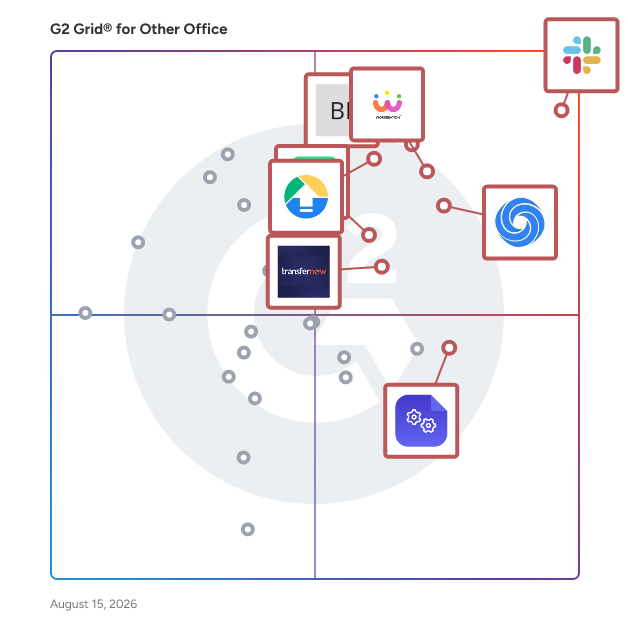
G2 Grid® for Other Office Software

G2 Grid® for Other Office Software plotting products by satisfaction and market presence

Highlighted products: Slack Connector for Jira, Google Drive & Docs for Confluence, Workreation®, NoteGPT, Drive Uploader, Diffchecker, TransferNow, and DocsAutomator.

Underlying data: [Grid® JSON](https://www.g2.com/categories/other-office/grids.json?focus%5B%5D=slack-connector-for-jira&focus%5B%5D=google-drive-docs-for-confluence&focus%5B%5D=workreation&focus%5B%5D=notegpt&focus%5B%5D=drive-uploader&focus%5B%5D=diffchecker&focus%5B%5D=transfernow&focus%5B%5D=docsautomator)

Sponsored

Hive

Hive is an all-in-one project management software platform that helps teams plan, collaborate, automate workflows, and deliver projects faster. Designed for organizations of every size, Hive combines powerful project planning, task management, team collaboration, and workflow automation tools in one customizable workspace. Whether you're managing marketing campaigns, product launches, creative projects, client work, or cross-functional initiatives, Hive adapts to your team's unique processes. Unlike rigid project management tools, Hive offers flexible workflows, customizable dashboards, and multiple project views so every team can work the way they work best. Hive empowers marketing, operations, product, IT, creative, and remote teams with the tools they need to stay organized and aligned. With customizable workflows and powerful collaboration features, teams can centralize work, reduce manual tasks, and improve visibility across every project. Key capabilities include: - Multiple project views, including Kanban boards, Gantt charts, calendars, tables, and lists - Task management with custom fields, dependencies, milestones, and priorities - Workflow automation to eliminate repetitive work - Real-time team collaboration with messaging, comments, and file sharing - Time tracking, reporting, and analytics - Integrations with hundreds of popular business applications Every organization works differently, which is why Hive is built to be one of the most customizable project management platforms available. Teams can create workflows tailored to their business processes using custom fields, project templates, automations, approvals, and integrations. Instead of forcing teams to change how they work, Hive adapts to existing workflows — helping organizations improve efficiency without disrupting productivity. Hive gives teams the flexibility to manage projects from the perspective that works best for them. Switch seamlessly between: - Kanban boards for agile workflows - Gantt charts for timeline planning - Calendar views for scheduling - Table and List views for detailed task management These flexible project views help teams track deadlines, manage resources, identify bottlenecks, and keep projects moving forward. Hive brings projects, communication, and documentation together in one centralized workspace. Team members can collaborate in real time, assign tasks, share files, provide feedback, and monitor project progress without switching between multiple tools. By combining project planning, collaboration, automation, and reporting in a single platform, Hive helps teams reduce busywork and focus on delivering results. Hive is more than just task management software—it's a scalable work management platform built to evolve alongside your business. As your needs change, Hive continues to expand through new features, integrations, and customer-driven enhancements. With flexible customization, powerful automation, and dedicated customer support, Hive enables organizations to streamline workflows, improve cross-functional collaboration, and execute projects with greater speed and confidence.

Visit website

Diffchecker

Diffchecker is a file and document comparison tool for text, code, PDFs, Word documents, Excel spreadsheets, PowerPoints, images, and folders. Diffchecker's free online tool is built for collaboration. It runs in any browser with no sign-up and lets users save diffs online, share them by link, and leave line-by-line comments. An AI summary tool can also explain complex or semantic differences in plain English (web only). Diffchecker Desktop is built for confidential work and is the stronger choice for compliance-sensitive workflows. It runs fully offline on Windows, Mac, and Linux, so files never leave the device, and it has no AI or LLM integrations. That makes it a private, secure choice for redlining legal contracts and other confidential documents. Professional legal redlining is the centerpiece for legal teams. Diffchecker produces polished, customizable Word and PDF redlines of contracts and agreements, comparing PDF to Word, PDF to PDF, or Word to Word, with tracked changes down to the word and character and OCR for scanned documents. The Diffchecker Legal plan adds iManage integration, which lets users redline documents directly from iManage and save results back to it. Enterprise adds SAML single sign-on, SCIM provisioning, and dedicated support. Text-diff features include: real-time text editor, syntax highlighting, ignore whitespace or custom text, PDF export, and automatic character or word-level granularity. Document-diff features include: changelog, formatting change detection (e.g. font size/style/color), move detection, redline, image detection, custom ignore rules, PDF or Word exports with a revisions report, and OCR. Image-diff features include: image auto-alignment, automatic change detection with a changelog, OCR, metadata diffs, and a variety of comparison views, making it a suitable choice for proofreading product labels. Plans start free, with Pro + Desktop $15, Legal $20, and Enterprise $40 per user per month, plus a free 14-day trial.

Average Rating: 4.6/5.0

Total Reviews: 21

How Do G2 Users Rate Diffchecker?

  • Quality of Support: 8.7/10 (Category avg: 8.7/10)
  • Ease of Use: 9.7/10 (Category avg: 9.0/10)

Who Is the Company Behind Diffchecker?

Who Uses This Product?

  • Top Industries: Information Technology and Services, Computer Software
  • Company Size: 43% Medium, 38% Small

What Are Recent G2 Reviews of Diffchecker?

DocsAutomator

DocsAutomator is a document automation platform that turns structured data into Google Docs, PDFs, and e-signed contracts. Build a template once in Google Docs or upload any PDF as a template, connect your data source, and DocsAutomator handles the rest. It connects natively with Airtable, Notion, Google Sheets, SmartSuite, ClickUp, n8n, Zapier, Make, Glide, Noloco, and a REST API, so the data already in your stack flows straight into your documents. Trusted by 3,000+ companies, DocsAutomator is built to make document automation as straightforward as editing a Google Doc. Key features: **Fast document generation** Generate documents in seconds, independent of length and complexity. **Unlimited pages** Need to produce a 200-page report dynamically? Documents can be any length. **Line items and nested line items** Dynamic line items and sections, nested up to 3 levels deep, adapt documents to any use case from invoices to multi-section reports. **Dynamic images** Add pre-processed, automatically converted images to your documents on the fly. **Conditional content** Show or hide values, paragraphs, and entire sections based on the underlying data, no template forking required. **Conditional styling** Style text and elements based on data values to tailor documents to each situation. **Built-in e-signatures** Send legally binding e-signature requests directly from generated documents. Flat $0.50 per signed document, no per-signer charges. **Unlimited test mode** Preview and iterate on templates without burning paid document credits while you build. **Editable Google Doc output** Every generated document is saved as a Google Doc, so a human can still edit or polish before sending. **Flexible delivery** Save to Google Drive, send as email attachments from your own Gmail address, deliver to a webhook, or merge with existing PDFs.

Average Rating: 4.9/5.0

Total Reviews: 16

How Do G2 Users Rate DocsAutomator?

  • Quality of Support: 10.0/10 (Category avg: 8.7/10)
  • Ease of Use: 9.5/10 (Category avg: 9.0/10)

Who Is the Company Behind DocsAutomator?

Who Uses This Product?

  • Company Size: 88% Small, 13% Medium

What Are Recent G2 Reviews of DocsAutomator?

MathType

MathType is the world's leading equation editor that allows you to write math notation as easily as you write text. From simple equations to complex mathematical expressions, MathType offers an intuitive interface with a toolbar offering over 500 symbols, including support for matrix, multiline equations, and elementary mathematical symbols. In addition to its powerful mathematical capabilities, MathType simplifies the writing of chemical notation with ChemType. This includes a customized toolbar equipped with the periodic table and other chemistry-related symbols, making it easy to create inorganic chemistry notation. MathType is compatible with Microsoft 365, WPS, and Google Workspace. As one of the most powerful mathematical editors on the market, MathType seamlessly integrates with various LMS and text editors, including Moodle, Canvas, Schoology, TinyMCE, and CKEditor. Trusted by educators and EdTech companies globally, MathType offers: · Symbol coverage: With over 500 symbols, MathType supports matrices, multiline equations, and a comprehensive range of specialized symbols, ensuring you have everything needed for any mathematical or scientific notation. · Easy to use: Write equations with an interface that provides a user-friendly experience from day one. MathML native and LaTeX friendly. · AI-Powered Handwriting Recognition: Converts handwritten expressions into clean, digital equations ready to be used in your documents. · ChemType: Unlock a personalized toolbar equipped with specialized chemistry buttons tailored for editing inorganic chemistry notation. · Accessibility: MathType is compliant with accessibility requirements and ensures software accessibility for people with disabilities. · High-quality output: It generates perfect, high-quality images for all your equations that can be exported in various formats such as SVG, PDF, and PNG. · Customizable: You can customize formatting options to define the style settings required for your documents and configure how equation elements are displayed. · Smooth integration: Easily integrate MathType with the platform and technology that best suits you: LMS, HTML, XML, and CMS editors.

Average Rating: 4.1/5.0

Total Reviews: 23

How Do G2 Users Rate MathType?

  • Quality of Support: 8.9/10 (Category avg: 8.7/10)
  • Ease of Use: 8.6/10 (Category avg: 9.0/10)

Who Is the Company Behind MathType?

  • Seller: WIRIS
  • Year Founded: 1999
  • HQ Location: Barcelona, Catalonia
  • LinkedIn® Page: www.linkedin.com
    116 employees on LinkedIn®

Who Uses This Product?

  • Top Industries: Education Management
  • Company Size: 48% Small, 35% Medium

What Are Recent G2 Reviews of MathType?

What Are G2 Users Discussing About MathType?

GAT Labs

GAT Labs build tools that help complement the power of Google Workspace and Chrome for Enterprise and Education domains with auditing, management, security, automation and insights. Today, GAT is the only ‘full stack’ solution covering all layers of Google Workspace and Chrome. Every single tool from the GAT Suite gives IT Admins unique capabilities, visibility and security across their cloud environment: - GAT+, which provides advanced data analytics and immediate responses to breach threats. - GAT Unlock allows for controlled document access and ownership changes, requiring dual organisational authorization. - GAT Flow streamlines the process of user onboarding, offboarding, and bulk modifications through secure automated workflows. - GAT Shield offers continuous, live, in-browser 3-factor authentication for Chrome users. For the educational sector, we offer additional tools such as - Teacher Assist lets teachers monitor and manage remote classrooms, fully controlling student browsing. - Teacher Taskmaster automates the supervision of homework assignments without teacher or parent intervention. It uses advanced technology to track time spent, cut and paste actions, typing activity, and AI-generated responses, and verifies if the student typing is the one assigned the work GAT Labs is proud to be SOC 2 Type 2 and ADA CASA Tier-3 certified, demonstrating our unwavering commitment to the highest standards of security and privacy. 15-day free trial available

Average Rating: 4.9/5.0

Total Reviews: 41

How Do G2 Users Rate GAT Labs?

  • Quality of Support: 9.4/10 (Category avg: 8.7/10)
  • Ease of Use: 8.2/10 (Category avg: 9.0/10)

Who Is the Company Behind GAT Labs?

Who Uses This Product?

  • Top Industries: Education Management, Primary/Secondary Education
  • Company Size: 56% Medium, 24% Large

What Do G2 Reviewers Say About GAT Labs?

AI-generated summary from verified user reviews

Pros
  • Users commend GAT Labs for its exceptional customer support, ensuring consistent assistance and valuable training throughout their usage.
  • Users praise GAT Labs for its intuitive and powerful reporting features, enabling deep insights into Google Workspace data.
  • Users highlight the clarity and depth of reports from GAT Labs, enhancing organizational insights and strategic decisions.
  • Users value the seamless automation of GAT Labs, enhancing efficiency in managing accounts and data workflows.
  • Users value the seamless integration with Google Workspace, enhancing account management and workflow efficiency significantly.
Cons
  • Users find GAT Labs’ performance slow and inefficient, leading to frustrating delays in processing tasks and support reliance.
  • Users find the complex configuration of GAT Labs challenging, making navigation and usage more difficult.
  • Users find GAT Labs to be complex and difficult to navigate, making the experience less user-friendly.
  • Users find the complex setup of GAT Labs challenging, making navigation and usage more difficult.
  • Users find difficult navigation in GAT Labs, stemming from the complexity of Google Workspace impacting usability.

What Are Recent G2 Reviews of GAT Labs?

Online Check Writer- powered by Zil Money

OnlineCheckWriter.com – Powered by Zil Money allows you to customize and print checks instantly on blank stock papers using a regular printer at your office or home. Also, the payment processing platform lets you move money seamlessly and instantly through various payment methods like ACH, wire, eChecks, check mailing, payment links, and more, with a low transaction fee. Take advantage of Overnight Check Mailing with Tracking for Secure payments: simply create your checks, click send, and OnlineCheckWriter.com – Powered by Zil Money will print and mail your checks via FedEx overnight. You can open a US checking account online without being physically present in the USA using OnlineCheckWriter.com – Powered by Zil Money's payment service. Users can also create checking accounts with no hidden fees. • Ability to write and print checks from any computer. • Connect with your bank (99% of United States Banks) • Create Check and auto match with bank transaction when clear and mark fraud check • Full outsourcing of checks those prefer. You create online, OnlineCheckWriter.com – Powered by Zil Money print and mail for 1.25$ to your customers • End to end encryption in the Amazon cloud means military-grade security. • Importing/exporting to/from other accounting software • Fraud prevention with Positive pay. • Design professional checks the way you want with your Logos or yours • Make and track deposit slips • Creating checks with or without payee, amount, date, • Print Bulk check, Bulk blank checks, import and print, Group it and print, Set Recurring • Employee/Staff Access Level and Beyond. OnlineCheckWriter.com- Powered by Zil Money is a financial technology company, not a bank. OnlineCheckWriter.com offers banking services through partnership with FDIC member banks Texas National Bank. Customers are not directly insured by the FDIC - but through the pass-through coverage of our partner banks and is conditional on proper titling, record-keeping, and custodial arrangements. Contact Name: OnlineCheckwriter.com- Powered by Zil Money 111 North Market St San Jose CA 95113 Email : Support@onlinecheckwriter.com Phone : 408 372 7707 Fax : 877 722 3376

Average Rating: 4.2/5.0

Total Reviews: 34

How Do G2 Users Rate Online Check Writer- powered by Zil Money?

  • Quality of Support: 9.1/10 (Category avg: 8.7/10)
  • Ease of Use: 9.0/10 (Category avg: 9.0/10)

Who Is the Company Behind Online Check Writer- powered by Zil Money?

  • Seller: Online Check Writer
  • Year Founded: 2018
  • HQ Location: San Jose, CA
  • Twitter: @webcheckwriter
    38,823 Twitter followers
  • LinkedIn® Page: www.linkedin.com
    139 employees on LinkedIn®

Who Uses This Product?

  • Top Industries: Accounting
  • Company Size: 78% Small, 14% Medium

What Do G2 Reviewers Say About Online Check Writer- powered by Zil Money?

AI-generated summary from verified user reviews

Pros
  • Users praise the ease of use for payments with Online Check Writer, appreciating its efficiency and personalization options.
  • Users value the instant check writing feature of Online Check Writer, eliminating unnecessary delays in payments.
  • Users value the customization options for checks, which allow for personal expression and ease of use in payments.
  • Users find the software intuitive and user-friendly, allowing for quick and straightforward transactions without confusion.
  • Users find navigation easy, describing the process as fast and free of confusion, enhancing their experience.
Cons
  • Users face significant approval process issues, leading to frustration and an inability to utilize the platform effectively.

What Are Recent G2 Reviews of Online Check Writer- powered by Zil Money?

What Are G2 Users Discussing About Online Check Writer- powered by Zil Money?

Markup

Markup is a productivity tool with unique AI-powered features to create a smart reading experience for users. It automatically extracts key reading points out of large files or text and learns the user’s preference and behavior to provide informed suggestions. Markup lets you highlight, annotate, and read with efficiency. ***Widely Recognized by Media & Our Users*** + Featured in All Digital School – Editor’s Choice for Reading + Featured in “Annotation and Screencasting to Extend the Reach of Your Classroom” by Yale Center of Language Study + Featured in “The 9 Best PDF Apps for the Apple iPad” by TabletPC Review + User Testimonial: “PDF Markup helps me to take work with me when I am not in the office. It really does make life better!” - Val Sigler KEY FEATURES AUTO SUMMARY (NEW)* •Immediately find your focus on reading by extracting information that matters •Automatically process heavyweight content in a summary view •Add to your own annotations to keep your ideas all in one place •Copy to your clipboards and share to other platforms for extensive reading WEB HIGHLIGHTER – Also available for Chrome extension • Highlight text and excerpts on web pages through built-in or Safari browser. • Sync your highlights through devices and web • Explore highlights from the markup community or share your own. • Link web highlights to your PDFs DOCUMENT VIEWER & ANNOTATOR • Support all mainstream formats, including PDF and ePub books • Add highlights, freehand writings, sticky notes, text boxes, arrows, shapes, etc. • Customize PDF stamps by adding texts or images • Sign documents & fill forms • BOTA list- display a summary of bookmark, outline, thumbnail and annotation • Text-to-Speech- read out text content with natural sounding voices* • Multimedia note-taking - insert links, images, audio clips and capture screens* • Advanced PDF Editing – merge and split pages, watermarks, flattened PDFs and more* MARKUP EXPLORE WITH AI INTEGRATION • Analyze highlighted stories with Markup's brilliant algorithm • Automatically sort web pages you’ve highlighted into different categories • Recommend relevant stories you might be interested in INSTANT TEAM COLLABORATION • Share files, pictures, articles, videos, and URLs with your team via Shared Folder • Directly share highlighted Web Markups and annotations to your team • Onboard your team members via Teams Clipboards • Invite and manage your members in Team Panel which also tracks team’s activity FILE TRANSFER & BACKUP • Get files from Dropbox, Google Drive, iCloud Drive, Photo gallery and local files • Copy files via WiFi, iTunes USB, and Open-in feature KDAN CLOUD SERVICES – SIGN UP FOR FREE • Resume unfinished uploading • Viewing PDFs online by sending file links • Send download links from the web with password protection

Average Rating: 4.7/5.0

Total Reviews: 10

How Do G2 Users Rate Markup?

  • Quality of Support: 8.9/10 (Category avg: 8.7/10)
  • Ease of Use: 9.3/10 (Category avg: 9.0/10)

Who Is the Company Behind Markup?

  • Seller: KDAN
  • Year Founded: 2009
  • HQ Location: Irvine, California
  • LinkedIn® Page: www.linkedin.com
    233 employees on LinkedIn®

Who Uses This Product?

  • Company Size: 90% Small, 10% Medium

What Are Recent G2 Reviews of Markup?

ManageEngine Free Windows Admin Tools

Free Windows Admin Tools, helps the IT Administrator in day to day desktop management routines.This windows tool helps in operations like Remote desktop connection, Remote task manager, Software inventory, Remote shutdown, Remote restart , Wake on LAN tool, System inventory tool, Perform Group Policy update, Hard disk space monitor, Remote command prompt, Remote device manager, Local Users/Groups List, Network Share Browser, Join/Unjoin Computer, Currently Logged On User,Laptop Battery Power Monitor from a single console. Download Now from this link https://www.manageengine.com/products/free-windows-tools/download.html

Average Rating: 4.0/5.0

Total Reviews: 7

How Do G2 Users Rate ManageEngine Free Windows Admin Tools?

  • Quality of Support: 7.8/10 (Category avg: 8.7/10)
  • Ease of Use: 7.7/10 (Category avg: 9.0/10)

Who Is the Company Behind ManageEngine Free Windows Admin Tools?

  • Seller: Zoho
  • Year Founded: 1996
  • HQ Location: Austin, TX
  • Twitter: @Zoho
    137,880 Twitter followers
  • LinkedIn® Page: www.linkedin.com
    30,766 employees on LinkedIn®
  • Phone: +1 (888) 900-9646

Who Uses This Product?

  • Company Size: 100% Medium

What Are Recent G2 Reviews of ManageEngine Free Windows Admin Tools?

ExtendSync

With direct integration between NetSuite and Microsoft Outlook or Google Workspace, ExtendSync provides a solution for NetSuite CRM data updates, storage savings, email attachments, and calendar syncing all from one email-based app. Stay in your inbox and set up ExtendSync to automatically attach emails and files, sync calendar events, and create, edit, and delete contact records from email to NetSuite. Give your teams instant organizational visibility into important communications, documents, and connections with a solution that can be configured within 30 minutes or less. With ExtendSync, your teams are empowered to save time and increase productivity. ExtendSync, part of NetSuite’s Built for NetSuite program, automates the process of adding emails, calendar events, and file attachments to the CRM. Users no longer have to spend their valuable time adding these manually. Add Autopilot and automatically add entire email chains to NetSuite based on a thread or a particular email address. Key features: Create and edit NetSuite records directly from your inbox One-click addition of emails, attachments, and events to NetSuite records Reduce storage costs by leveraging SharePoint, OneDrive, or Google Drive in NetSuite by associating files and folders with NetSuite records Using Autopilot, attach an email thread to NetSuite once and ensure that the entire conversation is visible in NetSuite without any user action required. Or attach automatically based on a particular sender or recipient email address. Eliminate duplicate emails: ExtendSync alerts you if an email has already been attached by you or a colleague CloudExtend empowers users to make faster, more insightful decisions by creating innovative, user-friendly applications that integrate workplace productivity tools with platforms they use every day to automatically add emails, events, and files to NetSuite from Gmail and Outlook, or use Excel and Power BI to improve reporting and analysis capabilities for popular data sources. Our integration apps eliminate hundreds of manual work hours, significantly reduce data import times, and facilitate a 360-degree view of customer activity.

Average Rating: 4.3/5.0

Total Reviews: 14

How Do G2 Users Rate ExtendSync?

  • Quality of Support: 9.0/10 (Category avg: 8.7/10)
  • Ease of Use: 8.9/10 (Category avg: 9.0/10)

Who Is the Company Behind ExtendSync?

  • Seller: CloudExtend by Celigo
  • Year Founded: 2007
  • HQ Location: Redwood City, US
  • Twitter: @cloudextendIO
    253 Twitter followers
  • LinkedIn® Page: www.linkedin.com
    17 employees on LinkedIn®

Who Uses This Product?

  • Company Size: 64% Small, 36% Medium

What Do G2 Reviewers Say About ExtendSync?

AI-generated summary from verified user reviews

Pros
  • Users appreciate the ability to attach emails to customer records, enhancing organization and accessibility in document management.
Cons
  • Users experience technical difficulties when attempting to attach items to Netsuite, leading to frustration and inefficiency.

What Are Recent G2 Reviews of ExtendSync?

What Are G2 Users Discussing About ExtendSync?

Doc.Office

Doc.Office is a powerful tool adapted to the most demanding. The solution works at the production level and offers unmatched scalability in today's market. The software allows from your applications (Word, Excel, PowerPoint, Outlook, the office or the Windows file system) to convert the files to PDF or leave them in their original format, integrate and transform the attached files for Outlook, classifying and indexing them according to their wishes. Integration with all systems: Doc.Office has a series of connectors that allow you to connect to all your applications in a few clicks, be it SharePoint, AIRS, Alfresco, Nuxeo, DropBox, GoogleDoc, Google Drive, Bonita, and many others such as, For example, all business applications. The solution also allows a standard export of fields in XML or CSV and transform your documents into PDF / A. Doc.Office grants the possibility to communicate with other ODBC compliant databases. Thanks to its flexibility, Doc.Office is imposed as the application, for all systems, which allows users to insert and sort all documents quickly and simply.

Average Rating: 4.3/5.0

Total Reviews: 4

How Do G2 Users Rate Doc.Office?

  • Quality of Support: 9.2/10 (Category avg: 8.7/10)
  • Ease of Use: 9.2/10 (Category avg: 9.0/10)

Who Is the Company Behind Doc.Office?

  • Seller: Doc.Series
  • Year Founded: 2014
  • HQ Location: Bevaix, CH
  • Twitter: @Doc_Series
    24 Twitter followers
  • LinkedIn® Page: www.linkedin.com
    10 employees on LinkedIn®

Who Uses This Product?

  • Company Size: 50% Medium, 25% Large

What Are Recent G2 Reviews of Doc.Office?

What Are G2 Users Discussing About Doc.Office?

Draftable

Draftable is an Enterprise-Grade Document Comparison Software that lets users easily spot changes between documents. Draftable is designed for easy use, prioritises data security, and is enterprise-ready. Having been used to compare over 10 million documents, it has been perfected and honed for heavy-duty use.

Average Rating: 4.4/5.0

Total Reviews: 4

How Do G2 Users Rate Draftable?

  • Quality of Support: 8.3/10 (Category avg: 8.7/10)
  • Ease of Use: 7.5/10 (Category avg: 9.0/10)

Who Is the Company Behind Draftable?

  • Seller: Draftable
  • Year Founded: 2012
  • HQ Location: Melbourne, AU
  • Twitter: @WeAreDraftable
    237 Twitter followers
  • LinkedIn® Page: www.linkedin.com
    24 employees on LinkedIn®

Who Uses This Product?

  • Company Size: 75% Small, 25% Medium

What Are Recent G2 Reviews of Draftable?

Spoke Phone

Spoke Phone is the leading platform for high-value, complex, and regulated conversations. Spoke Phone guides employees to say the right things and collect the right information from customers, so every employee now has the skills to drive better conversations. The result is that customers get better experiences and the business gets better outcomes. To achieve this unique outcome, Spoke Phone combines traditional business phone systems, high--cost contact centers, and business process automation, and made it all easy to use on a mobile phone or desktop.

Average Rating: 3.8/5.0

Total Reviews: 4

How Do G2 Users Rate Spoke Phone?

  • Quality of Support: 10.0/10 (Category avg: 8.7/10)
  • Ease of Use: 10.0/10 (Category avg: 9.0/10)

Who Is the Company Behind Spoke Phone?

Who Uses This Product?

  • Company Size: 75% Small

What Are Recent G2 Reviews of Spoke Phone?

What Are G2 Users Discussing About Spoke Phone?

Office

Based on AutoCAD®, 2020 Cap is the perfect professional space planning and specification solution for designing faster with fewer errors thanks to the automation of time-consuming tasks and the most up-to-date catalogs in the industry.

Average Rating: 4.2/5.0

Total Reviews: 3

How Do G2 Users Rate Office?

  • Quality of Support: 8.3/10 (Category avg: 8.7/10)
  • Ease of Use: 8.3/10 (Category avg: 9.0/10)

Who Is the Company Behind Office?

  • Seller: Cyncly
  • HQ Location: N/A
  • Twitter: @CynclyCo
    151 Twitter followers
  • LinkedIn® Page: www.linkedin.com
    3,593 employees on LinkedIn®

Who Uses This Product?

  • Company Size: 100% Small

What Are Recent G2 Reviews of Office?

PDF Generator For WP Pro

WP Pro PDF Generator helps visitors and buyers create and download PDF files from WordPress sites. you can easily convert your post, product pages, and blogs to PDF format using the PDF plugin to make them available offline. use these customizable PDF designs to effectively distribute your brand across different channels.

Average Rating: 5.0/5.0

Total Reviews: 3

How Do G2 Users Rate PDF Generator For WP Pro?

  • Quality of Support: 10.0/10 (Category avg: 8.7/10)
  • Ease of Use: 10.0/10 (Category avg: 9.0/10)

Who Is the Company Behind PDF Generator For WP Pro?

  • Seller: WP Swings
  • Year Founded: 2021
  • HQ Location: Portland, US
  • Twitter: @wpswings
    379 Twitter followers
  • LinkedIn® Page: www.linkedin.com
    11 employees on LinkedIn®

Who Uses This Product?

  • Company Size: 100% Small

What Are Recent G2 Reviews of PDF Generator For WP Pro?

SharePoint List Synchronizer for Excel

Export your existing SharePoint lists and read, modify, share it within Excel. SharePoint List Synchronizer enables two-way synchronization between Excel (2007, 2010, 2013, 2016, 2019) and SharePoint lists (SharePoint Online and SharePoint 2007, 2010, 2013, 2016).

Average Rating: 4.5/5.0

Total Reviews: 3

How Do G2 Users Rate SharePoint List Synchronizer for Excel?

  • Quality of Support: 10.0/10 (Category avg: 8.7/10)
  • Ease of Use: 8.9/10 (Category avg: 9.0/10)

Who Is the Company Behind SharePoint List Synchronizer for Excel?

  • Seller: SoftFluent Software
  • Year Founded: 2005
  • HQ Location: Antony, FR
  • Twitter: @SoftFluent
    1,860 Twitter followers
  • LinkedIn® Page: www.linkedin.com
    74 employees on LinkedIn®

Who Uses This Product?

  • Company Size: 33% Large, 33% Medium

What Are Recent G2 Reviews of SharePoint List Synchronizer for Excel?

What Are G2 Users Discussing About SharePoint List Synchronizer for Excel?

CardWorks

Create, design and print your own business cards with CardWorks Business Card Software. Easily create your own business cards with a wide range of business card templates. All standard sizes of business cards supported. Export your business card files and have them professionally printed or print them yourself.

Average Rating: 3.5/5.0

Total Reviews: 2

How Do G2 Users Rate CardWorks?

  • Quality of Support: 4.2/10 (Category avg: 8.7/10)
  • Ease of Use: 7.5/10 (Category avg: 9.0/10)

Who Is the Company Behind CardWorks?

  • Seller: NCH Software
  • Year Founded: 1993
  • HQ Location: Greenwood Village, CO
  • Twitter: @nchsoftware
    9,910 Twitter followers
  • LinkedIn® Page: www.linkedin.com
    78 employees on LinkedIn®

Who Uses This Product?

  • Company Size: 50% Large, 50% Small

What Are Recent G2 Reviews of CardWorks?

What Are G2 Users Discussing About CardWorks?