# Best Enterprise Org Chart Software

  *By [Grace Savides](https://research.g2.com/insights/author/grace-savides)*

   Products classified in the overall Org Chart category are similar in many regards and help companies of all sizes solve their business problems. However, enterprise business features, pricing, setup, and installation differ from businesses of other sizes, which is why we match buyers to the right Enterprise Business Org Chart to fit their needs. Compare product ratings based on reviews from enterprise users or connect with one of G2&#39;s buying advisors to find the right solutions within the Enterprise Business Org Chart category.

In addition to qualifying for inclusion in the Org Chart Software category, to qualify for inclusion in the Enterprise Business Org Chart Software category, a product must have at least 10 reviews left by a reviewer from an enterprise business.


## Category Overview

**Total Products under this Category:** 92


## Trust & Credibility Stats

**Why You Can Trust G2's Software Rankings:**

- 30 Analysts and Data Experts
- 31,900+ Authentic Reviews
- 92+ Products
- Unbiased Rankings

G2's software rankings are built on verified user reviews, rigorous moderation, and a consistent research methodology maintained by a team of analysts and data experts. Each product is measured using the same transparent criteria, with no paid placement or vendor influence. While reviews reflect real user experiences, which can be subjective, they offer valuable insight into how software performs in the hands of professionals. Together, these inputs power the G2 Score, a standardized way to compare tools within every category.


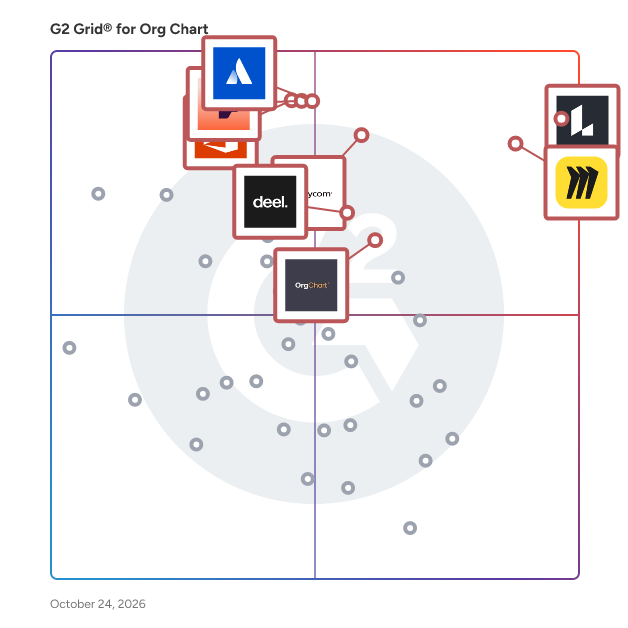
## Best Org Chart Software At A Glance

- **Best for Small Businesses:** [Lucid Visual Collaboration Suite](https://www.g2.com/products/lucid-software-inc-lucid-visual-collaboration-suite/reviews)
- **Best for Mid-Market:** [Lucid Visual Collaboration Suite](https://www.g2.com/products/lucid-software-inc-lucid-visual-collaboration-suite/reviews)
- **Best for Enterprise:** [Lucid Visual Collaboration Suite](https://www.g2.com/products/lucid-software-inc-lucid-visual-collaboration-suite/reviews)
- **Highest User Satisfaction:** [Lucid Visual Collaboration Suite](https://www.g2.com/products/lucid-software-inc-lucid-visual-collaboration-suite/reviews)
- **Best Free Software:** [Lucid Visual Collaboration Suite](https://www.g2.com/products/lucid-software-inc-lucid-visual-collaboration-suite/reviews)


---

**Sponsored**

### Functionly

Functionly is a workforce design platform that unifies people data across HR, finance, and business systems to visualize your current org and plan what’s next. Map roles, accountabilities, and matrix structures, compare future-state scenarios, and collaborate in real time to align strategy to execution — enabling companies to adapt quickly, all in one self-serve platform. • DYNAMIC ORG CHART: Create your org chart instantly via CSV or integrations. • INTEGRATIONS: Keep your org data updated and unified across business systems. • AI &amp; TEMPLATES: Accelerate your org design with AI assistance and templates. • GROUPS &amp; GOALS: Set your operating model with top-down goal setting. • ACCOUNTABILITIES: Track executive ownership for critical corporate priorities. • ROLES &amp; DOTTED-LINES: Clarify matrix team dynamics with dotted-line reporting. • INTERACTIVE DESIGN: Design your org with drag-and-drop, colors, layouts, and more. • SCENARIOS: Plan and compare your current and future-state organization. • FORECASTS: Model headcount costs with ease to view budget impacts. • CHANGE PLANNING: Track org changes with control and delegate action with ease. • ORGANIZATIONAL INSIGHTS: Get instant insights on spend, gaps, and overlaps. • REAL-TIME COLLABORATION: Get your team engaged and aligned with collaboration tools. • SHARING &amp; EXPORTS: Share links, embed, or export, and control what’s shown. • SECURITY &amp; CONTROLS: Limit access to sensitive data; all data is SOC2 Type II-backed. • PARTNER WORKSPACES: Manage multiple workspaces to support different clients. Whether you&#39;re scaling, restructuring, or downsizing, Functionly helps leadership teams align and adapt their org structure at every stage — transforming a slow, consultant-led process into a fast, flexible, and collaborative capability built for the AI era. Visit www.functionly.com for more info.


[Visit website](https://www.g2.com/external_clickthroughs/record?secure%5Bad_program%5D=ppc&amp;secure%5Bad_slot%5D=category_product_list&amp;secure%5Bcategory_id%5D=1533&amp;secure%5Bdisplayable_resource_id%5D=1533&amp;secure%5Bdisplayable_resource_type%5D=Category&amp;secure%5Bmedium%5D=sponsored&amp;secure%5Bplacement_reason%5D=page_category&amp;secure%5Bplacement_resource_ids%5D%5B%5D=1533&amp;secure%5Bprioritized%5D=false&amp;secure%5Bproduct_id%5D=115665&amp;secure%5Bresource_id%5D=1533&amp;secure%5Bresource_type%5D=Category&amp;secure%5Bsource_type%5D=category_page&amp;secure%5Bsource_url%5D=https%3A%2F%2Fwww.g2.com%2Fcategories%2Forg-chart%3Fpage%3D4&amp;secure%5Btoken%5D=da6a55ae7009fa14c56bd1600bd9623b97d9f16d52ca2a042673d4caa20cee1b&amp;secure%5Burl%5D=https%3A%2F%2Fwww.functionly.com&amp;secure%5Burl_type%5D=company_website)

---

## Top-Rated Products (Ranked by G2 Score)
### 1. [Lucid Visual Collaboration Suite](https://www.g2.com/products/lucid-software-inc-lucid-visual-collaboration-suite/reviews)
  Lucid is a Work Acceleration Platform powered by visual collaboration. Its enterprise offering is the Lucid Visual Collaboration Suite, which combines Lucidchart for intelligent diagramming and Lucidspark for virtual whiteboarding. Here’s how it works: • Lucidchart enables teams to visualize complex ideas, systems, and processes. Lucidspark empowers teams to ideate, plan, and build better ideas, faster. With Lucid’s universal canvas feature, teams can switch seamlessly between purpose-built toolsets in both applications. • Lucidchart and Lucidspark both provide an infinite canvas with AI capabilities and features for collaborating, getting aligned, and driving large-scale change. Both applications integrate with apps from leading providers such as Atlassian, Google, Microsoft, Slack, and more. Enterprises can also add accelerators to the Lucid Suite with specialized capabilities for organizational agility, cloud transformation, and process improvement: • The Agility Accelerator helps teams share proven yet flexible ways of working, surface insights about team confidence and health, and make data-backed decisions with capacity and scenario planning. • The Cloud Accelerator helps teams understand the current state and plan future changes to their cloud infrastructures by generating up-to-date, customizable cloud documentation. • The Process Accelerator provides organizations with increased governance and standardization in how processes are documented, stored, and maintained.&amp;nbsp; • Add-ons are also available for enhanced enterprise security and premium support. The Lucid Suite facilitates remote and hybrid collaboration across any enterprise—from IT, engineering, and product teams to marketing, sales, and operations. Organizations use the Lucid Suite to accelerate strategic initiatives such as technology innovation, faster decision-making, operational excellence, increased productivity, and cost efficiency. With team hubs, Lucid provides a virtual home base for ideating, planning, creating and sharing documentation, and making work more visible for the right people. Founded in 2010, Lucid Software is a pioneer and leader in work acceleration and visual collaboration dedicated to helping teams see and build the future. Lucid supports more than 100 million users in over 180 countries. Customers range from small businesses to 99% of the Fortune 500, spanning industries such as technology, healthcare, finance, manufacturing, government, and education.


  **Average Rating:** 4.5/5.0
  **Total Reviews:** 8,496

**User Satisfaction Scores:**

- **Has the product been a good partner in doing business?:** 9.0/10 (Category avg: 9.2/10)
- **Integration:** 8.1/10 (Category avg: 8.4/10)
- **Details:** 8.7/10 (Category avg: 8.7/10)
- **Restructure:** 8.4/10 (Category avg: 8.4/10)


**Seller Details:**

- **Seller:** [Lucid Software Inc.](https://www.g2.com/sellers/lucid-software-inc)
- **Company Website:** https://lucidchart.com
- **Year Founded:** 2010
- **HQ Location:** South Jordan, UT
- **Twitter:** @LucidSoftware (14,557 Twitter followers)
- **LinkedIn® Page:** https://www.linkedin.com/company/1214453/ (1,327 employees on LinkedIn®)

**Reviewer Demographics:**
  - **Who Uses This:** Software Engineer, Student
  - **Top Industries:** Information Technology and Services, Computer Software
  - **Company Size:** 40% Small-Business, 34% Mid-Market


#### Pros & Cons

**Pros:**

- Ease of Use (2012 reviews)
- Easy Creation (1080 reviews)
- Diagramming (1041 reviews)
- Features (967 reviews)
- Team Collaboration (958 reviews)

**Cons:**

- Learning Curve (480 reviews)
- Missing Features (377 reviews)
- Diagramming Issues (347 reviews)
- Limited Features (319 reviews)
- Not Intuitive (291 reviews)

### 2. [Sift](https://www.g2.com/products/sift-sift/reviews)
  Sift is the fastest way to discover and connect to colleagues. Sift&#39;s powerfully simple people search, dynamic org charts, and rich employee profiles enable collaboration and problem solving across your entire organization. Sift integrates with existing HR data systems, collects additional information from team members and LinkedIn, and works as a stand-alone solution or embeds seamlessly into your intranet. Leverage the power of your workforce by making anyone and anything searchable.


  **Average Rating:** 4.8/5.0
  **Total Reviews:** 474

**User Satisfaction Scores:**

- **Has the product been a good partner in doing business?:** 9.2/10 (Category avg: 9.2/10)
- **Integration:** 8.7/10 (Category avg: 8.4/10)
- **Details:** 8.9/10 (Category avg: 8.7/10)
- **Restructure:** 8.6/10 (Category avg: 8.4/10)


**Seller Details:**

- **Seller:** [Sift](https://www.g2.com/sellers/sift)
- **Company Website:** https://www.justsift.com
- **Year Founded:** 2015
- **HQ Location:** Detroit, US
- **Twitter:** @sift (1,037 Twitter followers)
- **LinkedIn® Page:** https://www.linkedin.com/company/10281428/ (23 employees on LinkedIn®)

**Reviewer Demographics:**
  - **Who Uses This:** Associate Banker, Banker
  - **Top Industries:** Financial Services, Banking
  - **Company Size:** 72% Enterprise, 22% Mid-Market


#### Pros & Cons

**Pros:**

- Ease of Use (116 reviews)
- Navigation Ease (54 reviews)
- Helpful (36 reviews)
- Org Chart (35 reviews)
- Team Collaboration (34 reviews)

**Cons:**

- Search Functionality (12 reviews)
- Missing Features (11 reviews)
- Limited Customization (8 reviews)
- Navigation Difficulty (8 reviews)
- Poor Design (8 reviews)

### 3. [Miro](https://www.g2.com/products/miro/reviews)
  Miro is the AI Innovation Workspace that brings teams and AI together to plan, co-create, and build the next big thing faster. Serving more than 100 million users across 250,000 customers, Miro empowers cross-functional teams to flow from early discovery through final delivery on a shared, AI-first canvas. With the canvas as the prompt, Miro&#39;s collaborative AI workflows keep teams in the flow of work, scale shifts in ways of working, and drive organization-wide transformation. Key AI capabilities include Flows, which are visual AI workflows that automate multi-step processes while empowering teams with full visibility and control at every step; Sidekicks, which are conversational AI co-creators with expertise on specific tasks, jobs, or processes that move work forward; and Your AI and Knowledge, a collaborative integration layer that connects and enhances existing enterprise AI capabilities without leaving the platform. The Model Context Protocol (MCP) extends the ecosystem by accelerating agentic code, leveraging context from Miro to generate code in agents powered by Miro’s own MCP server. Miro for Product Acceleration is a comprehensive solution of integrated AI-first products designed to help product teams make smarter decisions about what to build and move faster. All of these capabilities are built on one platform with a shared data model, advanced security and compliance controls, and responsible AI certification at the forefront. By embedding AI where teamwork happens, Miro keeps teams in the flow of work, accelerates processes, and ultimately transforms organizations.


  **Average Rating:** 4.6/5.0
  **Total Reviews:** 12,685

**User Satisfaction Scores:**

- **Has the product been a good partner in doing business?:** 9.0/10 (Category avg: 9.2/10)
- **Integration:** 7.4/10 (Category avg: 8.4/10)
- **Details:** 8.8/10 (Category avg: 8.7/10)
- **Restructure:** 9.1/10 (Category avg: 8.4/10)


**Seller Details:**

- **Seller:** [Miro](https://www.g2.com/sellers/miro)
- **Company Website:** https://miro.com
- **Year Founded:** 2011
- **HQ Location:** San Francisco, California
- **Twitter:** @MiroHQ (38,422 Twitter followers)
- **LinkedIn® Page:** https://www.linkedin.com/company/mirohq/ (2,511 employees on LinkedIn®)

**Reviewer Demographics:**
  - **Who Uses This:** Product Manager, Project Manager
  - **Top Industries:** Computer Software, Information Technology and Services
  - **Company Size:** 39% Small-Business, 29% Mid-Market


#### Pros & Cons

**Pros:**

- Ease of Use (4144 reviews)
- Team Collaboration (3192 reviews)
- Features (2465 reviews)
- Real-time Collaboration (2260 reviews)
- Real-Time Collaboration (2209 reviews)

**Cons:**

- Missing Features (1419 reviews)
- Board Management (1015 reviews)
- Limited Features (988 reviews)
- Learning Curve (949 reviews)
- Slow Loading (821 reviews)

### 4. [OrgChart](https://www.g2.com/products/orgchart/reviews)
  OrgChart is a leading org chart automation and workforce planning solution, built for HR professionals and the people leaders they support. OrgChart seamlessly integrates employee data from multiple sources, including over 50 HR systems, allowing for an always-accurate, and visually sophisticated org chart. Once connected, easily keep charts up to date without any manual effort – at any time – by scheduling automated syncs or updating charts with one simple click. OrgChart simplifies the complexity of HR work, providing unparalleled visibility into an organization’s personnel, and surfacing valuable insights for strategic decisions about future organizational structures. OrgChart is trusted by thousands of organizations worldwide across multiple industries – from non-profits, government agencies, and educational institutions – to Fortune 500 companies.


  **Average Rating:** 4.5/5.0
  **Total Reviews:** 278

**User Satisfaction Scores:**

- **Has the product been a good partner in doing business?:** 9.3/10 (Category avg: 9.2/10)
- **Integration:** 9.0/10 (Category avg: 8.4/10)
- **Details:** 8.7/10 (Category avg: 8.7/10)
- **Restructure:** 8.5/10 (Category avg: 8.4/10)


**Seller Details:**

- **Seller:** [OrgChart](https://www.g2.com/sellers/orgchart)
- **Company Website:** https://www.theorgchart.com/
- **Year Founded:** 2005
- **HQ Location:** Novato, California
- **Twitter:** @theorgchart (1,921 Twitter followers)
- **LinkedIn® Page:** https://www.linkedin.com/company/806102/ (66 employees on LinkedIn®)

**Reviewer Demographics:**
  - **Who Uses This:** HRIS Analyst
  - **Top Industries:** Information Technology and Services, Financial Services
  - **Company Size:** 71% Mid-Market, 26% Enterprise


#### Pros & Cons

**Pros:**

- Ease of Use (42 reviews)
- Org Chart (39 reviews)
- Org Charts (34 reviews)
- Helpful (33 reviews)
- Implementation Ease (25 reviews)

**Cons:**

- Learning Curve (20 reviews)
- Complexity (11 reviews)
- Not Intuitive (11 reviews)
- Steep Learning Curve (10 reviews)
- Not User-Friendly (8 reviews)

### 5. [Visio](https://www.g2.com/products/visio/reviews)
  Visio is an innovative solution that helps you visualize data-connected business process flows with dozens of ready-to-use templates and thousands of customizable shapes. Work visually from anywhere, at any time. Microsoft Visio helps professionals create detailed flowcharts, organizational charts, and network diagrams. With an intuitive interface and extensive templates, it simplifies visual data representation. Integrated with Microsoft 365, Visio supports real-time collaboration, making it ideal for business process modeling and IT infrastructure mapping.


  **Average Rating:** 4.2/5.0
  **Total Reviews:** 660

**User Satisfaction Scores:**

- **Has the product been a good partner in doing business?:** 8.5/10 (Category avg: 9.2/10)
- **Integration:** 8.4/10 (Category avg: 8.4/10)
- **Details:** 8.7/10 (Category avg: 8.7/10)
- **Restructure:** 8.6/10 (Category avg: 8.4/10)


**Seller Details:**

- **Seller:** [Microsoft](https://www.g2.com/sellers/microsoft)
- **Year Founded:** 1975
- **HQ Location:** Redmond, Washington
- **Twitter:** @microsoft (13,105,844 Twitter followers)
- **LinkedIn® Page:** https://www.linkedin.com/company/microsoft/ (227,697 employees on LinkedIn®)
- **Ownership:** MSFT

**Reviewer Demographics:**
  - **Who Uses This:** Consultant, Graduate Engineering Trainee
  - **Top Industries:** Information Technology and Services, Hospital &amp; Health Care
  - **Company Size:** 43% Enterprise, 32% Mid-Market


#### Pros & Cons

**Pros:**

- Ease of Use (11 reviews)
- Templates (6 reviews)
- Shapes Variety (5 reviews)
- Simple (5 reviews)
- User Interface (5 reviews)

**Cons:**

- Expensive (5 reviews)
- Learning Curve (4 reviews)
- Limited Features (3 reviews)
- Limited Color Options (2 reviews)
- Limited Icons (2 reviews)

### 6. [Orgvue](https://www.g2.com/products/orgvue/reviews)
  Orgvue is an organizational design and planning platform that empowers your business to transform its workforce by understanding the work people do and the skills they have. We do this by merging disparate datasets in a schemaless way, then visualizing and modeling current and future states of the organization to enable faster, more informed decisions. Our platform connects strategy to structure, providing clarity of vision, so you can build a more adaptable, better performing organization that thrives in a constantly changing world of work. Orgvue is used by the world’s largest and best-known enterprises and consulting firms from offices in the United Kingdom, the United States, Canada, Europe, and Australia.


  **Average Rating:** 4.4/5.0
  **Total Reviews:** 16

**User Satisfaction Scores:**

- **Has the product been a good partner in doing business?:** 9.3/10 (Category avg: 9.2/10)
- **Integration:** 7.5/10 (Category avg: 8.4/10)
- **Details:** 8.1/10 (Category avg: 8.7/10)
- **Restructure:** 9.3/10 (Category avg: 8.4/10)


**Seller Details:**

- **Seller:** [Orgvue](https://www.g2.com/sellers/orgvue)
- **Company Website:** https://www.orgvue.com/
- **HQ Location:** London, GB
- **LinkedIn® Page:** https://www.linkedin.com/company/5179983 (254 employees on LinkedIn®)

**Reviewer Demographics:**
  - **Company Size:** 88% Enterprise, 13% Mid-Market


#### Pros & Cons

**Pros:**

- Ease of Use (8 reviews)
- Efficiency (4 reviews)
- Customizability (3 reviews)
- Features (3 reviews)
- Organization (3 reviews)

**Cons:**

- Not Intuitive (4 reviews)
- Learning Curve (3 reviews)
- Learning Difficulty (3 reviews)
- Not User-Friendly (3 reviews)
- Difficult Learning (2 reviews)

### 7. [Backstory](https://www.g2.com/products/people-ai-backstory/reviews)
  Backstory (formerly People.ai) is the Revenue Answers Platform for GTM leaders. Revenue leaders ask the same questions every day: Is this deal real? Where&#39;s my risk? What do I focus on next? Backstory gives you straight answers - grounded in 100% of actual revenue activity, not CRM guesses. With more than a decade of training AI models on billions of sales interactions, Backstory connects every signal to the right accounts and opportunities and delivers answers where you already work - whether that&#39;s your CRM, Claude, Copilot, or other AI tools you already use. With Backstory, you can: - Know which deals are real and which are at risk, without waiting for rep updates - Get forecast answers you can defend, backed by actual activity data - Ask revenue questions directly in the AI tools your team already uses - See exactly what&#39;s happening across your pipeline and what to do next Sales leaders from Red Hat, Palo Alto Networks, Iron Mountain, TransUnion, Five9, and Randstad rely on Backstory to drive trillions in pipeline and revenue. Recognized by Gartner and Forrester, the Inc. 5000, Y Combinator Top Companies, and Forbes AI 50. Based in San Francisco and backed by ICONIQ Capital, Andreessen Horowitz, and Lightspeed Venture Partners.


  **Average Rating:** 4.5/5.0
  **Total Reviews:** 607

**User Satisfaction Scores:**

- **Has the product been a good partner in doing business?:** 9.4/10 (Category avg: 9.2/10)
- **Integration:** 8.3/10 (Category avg: 8.4/10)
- **Details:** 9.0/10 (Category avg: 8.7/10)
- **Restructure:** 8.7/10 (Category avg: 8.4/10)


**Seller Details:**

- **Seller:** [Backstory](https://www.g2.com/sellers/backstory-028935a9-8328-404d-9b5c-6a5ddb3bfe2d)
- **Company Website:** https://www.backstory.ai/
- **Year Founded:** 2016
- **HQ Location:** N/A
- **LinkedIn® Page:** https://www.linkedin.com/company/backstory-ai/ (62 employees on LinkedIn®)

**Reviewer Demographics:**
  - **Who Uses This:** Account Executive, Account Manager
  - **Top Industries:** Computer Software, Information Technology and Services
  - **Company Size:** 56% Enterprise, 39% Mid-Market


#### Pros & Cons

**Pros:**

- Helpful (3 reviews)
- CRM Integration (2 reviews)
- Customer Support (2 reviews)
- Customization (2 reviews)
- Ease of Use (2 reviews)


### 8. [SmartDraw](https://www.g2.com/products/smartdraw/reviews)
  SmartDraw makes professional drawings and diagrams accessible to everyone. Non-technical users can quickly create floor plans, while professionals get the precision and scale they require. With industry-leading floor planning tools, strong data integrations, and an intuitive interface for traditional diagramming, SmartDraw delivers enterprise-ready power without unnecessary complexity. 1. Easy to Get Expert Results SmartDraw makes it easy to create accurate scaled diagrams without requiring specialized CAD training. Create floor plans for both residential and commercial spaces, make accident reconstructions and crime scenes, build fire pre-plans and design landscapes easily. Your team doesn&#39;t need to be experts to get expert results. 2. Start with Existing Imagery While SmartDraw makes creating floor plans easy, you can skip that step and import an existing floor plan as a PDF or start with a Google Maps image to serve as the foundation for a new drawing. 3. Industry Standard Content Get thousands of industry-standard symbols to build anything from commercial floor plans, warehouse layouts to accident reconstructions and fire pre-plans. 4. Create Custom Symbol Libraries You can truly customize any floor plan using your own product catalog. Import symbols, apply scale, and add shape data. Plus, SmartDraw can count items automatically and generate visual manifests to support estimates and proposals. 5. Data-Enabled Shapes and Drawings With SmartDraw, you can turn ordinary diagrams into data-driven plans by attaching structured information to every symbol. Teams can generate manifests and summaries on demand for estimating, purchasing, or documentation. 6. A Solution for All Your Diagramming Needs Support your entire organization with flowcharts, organizational charts, mind maps, project charts, technical engineering diagrams, IT diagrams, and more. 7. Simple Administration SmartDraw works hand in glove with your existing IT infrastructure without disruption to maximize what you&#39;ve already invested in. You can provision users with SSO, save files to your own preferred storage solution, and enjoy enterprise-level security. 8. Enterprise Support As an enterprise customer, you will have your own dedicated support rep for onboarding, training, and more. SmartDraw customers range from universities, police departments, fire departments and government agencies to over 85% of the Fortune 500.


  **Average Rating:** 4.5/5.0
  **Total Reviews:** 368

**User Satisfaction Scores:**

- **Has the product been a good partner in doing business?:** 9.5/10 (Category avg: 9.2/10)
- **Integration:** 8.1/10 (Category avg: 8.4/10)
- **Details:** 9.1/10 (Category avg: 8.7/10)
- **Restructure:** 9.0/10 (Category avg: 8.4/10)


**Seller Details:**

- **Seller:** [SmartDraw](https://www.g2.com/sellers/smartdraw)
- **Company Website:** https://www.smartdraw.com/?id=333172
- **Year Founded:** 1994
- **HQ Location:** The Woodlands, Texas
- **Twitter:** @SmartDraw (3,060 Twitter followers)
- **LinkedIn® Page:** https://www.linkedin.com/company/38151/ (43 employees on LinkedIn®)

**Reviewer Demographics:**
  - **Who Uses This:** Owner, President
  - **Top Industries:** Construction, Information Technology and Services
  - **Company Size:** 43% Small-Business, 35% Mid-Market


#### Pros & Cons

**Pros:**

- Ease of Use (54 reviews)
- Simple (25 reviews)
- Templates (19 reviews)
- Helpful (18 reviews)
- Easy Creation (17 reviews)

**Cons:**

- Learning Curve (10 reviews)
- Limited Shapes (7 reviews)
- Limited Features (6 reviews)
- Missing Features (6 reviews)
- Slow Loading (6 reviews)

### 9. [Ingentis org.manager](https://www.g2.com/products/ingentis-softwareentwicklung-gmbh-ingentis-org-manager/reviews)
  Ingentis org.manager is a leading software solution for people and organizational analytics. It is already used by over 2,000 renowned corporations worldwide and ensures transparency and clarity by automatically and demand-oriented visualizing HR and organizational data from virtually any data source. Companies can use Ingentis org.manager to analyze their current organization, design target states, and optimize structures. Our software helps businesses uncover previously untapped potential and prepares them to tackle the rapidly changing business world with ever-growing demands on governance and performance. To learn more, check out www.ingentis.com or follow us on LinkedIn.


  **Average Rating:** 4.7/5.0
  **Total Reviews:** 14

**User Satisfaction Scores:**

- **Has the product been a good partner in doing business?:** 8.9/10 (Category avg: 9.2/10)
- **Integration:** 8.5/10 (Category avg: 8.4/10)
- **Details:** 8.3/10 (Category avg: 8.7/10)
- **Restructure:** 7.7/10 (Category avg: 8.4/10)


**Seller Details:**

- **Seller:** [Ingentis Softwareentwicklung GmbH](https://www.g2.com/sellers/ingentis-softwareentwicklung-gmbh)
- **Year Founded:** 1997
- **HQ Location:** Nuremberg, Germany
- **Twitter:** @ingentisgmbh (1,162 Twitter followers)
- **LinkedIn® Page:** https://www.linkedin.com/company/ingentis-group/ (1 employees on LinkedIn®)

**Reviewer Demographics:**
  - **Company Size:** 87% Enterprise, 13% Mid-Market


### 10. [100 Handshakes](https://www.g2.com/products/100-handshakes/reviews)
  100 Handshakes is a specialized software solution designed to assist enterprise sales teams in navigating the complexities of securing strategic deals. By providing a comprehensive mapping of the human terrain within organizations, it enables users to identify key stakeholders, understand their roles, and strategize effectively to overcome obstacles in the sales process. This tool is particularly beneficial for those involved in high-stakes negotiations or working within intricate corporate structures. Targeted primarily at go-to-market (GTM) teams, founders, executives, and strategic business development leaders, 100 Handshakes is built for professionals who need to break into complex accounts and close deals more efficiently. The platform offers insights that help users develop relationships with champions, source valuable coaches, and identify influencers who can sway decisions in their favor. This capability is essential for anyone looking to enhance their sales strategy and improve their chances of success in competitive environments. Key features of 100 Handshakes include the ability to map out organizational hierarchies and relationships, which allows users to pinpoint economic buyers, technical evaluators, and other critical decision-makers. The software also aids in recognizing potential blockers and provides strategies to neutralize them, ensuring that sales teams can navigate around challenges effectively. By fostering coalition-building among stakeholders, 100 Handshakes empowers users to create a network of support that can significantly increase the likelihood of closing deals. The benefits of utilizing 100 Handshakes extend beyond simply improving sales outcomes. Users can expect to receive fewer rejections and more referrals, as the platform encourages conversations that lead to valuable connections. This not only streamlines the sales process but also enhances the overall engagement with potential clients. By equipping sales professionals with the tools to engage with precision, 100 Handshakes stands out as a vital resource for those aiming to achieve strategic success in enterprise sales.


  **Average Rating:** 4.7/5.0
  **Total Reviews:** 84

**User Satisfaction Scores:**

- **Has the product been a good partner in doing business?:** 10.0/10 (Category avg: 9.2/10)
- **Integration:** 8.3/10 (Category avg: 8.4/10)
- **Details:** 9.1/10 (Category avg: 8.7/10)
- **Restructure:** 9.2/10 (Category avg: 8.4/10)


**Seller Details:**

- **Seller:** [Hundred Handshakes](https://www.g2.com/sellers/hundred-handshakes)
- **Year Founded:** 2020
- **HQ Location:** Charlotte, NC
- **LinkedIn® Page:** https://www.linkedin.com/company/hundredhandshakes/ (10 employees on LinkedIn®)

**Reviewer Demographics:**
  - **Who Uses This:** Enterprise Account Executive
  - **Top Industries:** Computer Software, Information Technology and Services
  - **Company Size:** 51% Mid-Market, 29% Enterprise


#### Pros & Cons

**Pros:**

- Team Collaboration (5 reviews)
- Ease of Use (4 reviews)
- Collaboration Ease (3 reviews)
- Helpful (2 reviews)
- Planning (2 reviews)

**Cons:**

- Poor Visibility (1 reviews)

### 11. [Workleap](https://www.g2.com/products/workleap/reviews)
  Workleap is the people management platform that builds engaged and high-performing teams, one step at a time. With Workleap, smaller HR teams punch above their weight. We bring engagement, performance management, and compensation into one intelligent, AI-powered system, that makes listening, connecting the dots, and making smart decisions routine. Our offer is simple: see what’s really happening inside your company, act fast to drive real growth and scale what works using invaluable insights gathered across our platform and your tools. Enough with the spreadsheets, scattered tools and guesswork. HR should focus on leadership, not admin. We’ve been shaping the future of work since 2006, and we’re just getting started. See, act, and scale, with Workleap. Workleap Officevibe Workleap Officevibe is the always-on engagement &amp; feedback engine built for HR and managers. Powered by AI, Officevibe combines surveys, feedback, and recognition data to deliver clear insights on who&#39;s thriving and who’s about to disengage. Workleap Performance Workleap Performance puts a stop to ineffective end of the year reviews. Powered by AI, Performance offers flexible review cycles, customizable workflows, and peer feedback summaries that create recurrent moments for growth between leaders and teams. Workleap Compensation Workleap Compensation is the intuitive compensation engine that empowers HR, Finance, and people managers to make smarter, faster pay decisions through one purpose-built, streamlined workflow.


  **Average Rating:** 4.3/5.0
  **Total Reviews:** 1,042

**User Satisfaction Scores:**

- **Has the product been a good partner in doing business?:** 8.9/10 (Category avg: 9.2/10)
- **Integration:** 8.6/10 (Category avg: 8.4/10)
- **Details:** 8.7/10 (Category avg: 8.7/10)
- **Restructure:** 8.6/10 (Category avg: 8.4/10)


**Seller Details:**

- **Seller:** [Workleap](https://www.g2.com/sellers/workleap)
- **Company Website:** https://workleap.com/
- **Year Founded:** 2006
- **HQ Location:** Montréal, Québec, Canada
- **Twitter:** @WorkleapHQ (1,132 Twitter followers)
- **LinkedIn® Page:** https://www.linkedin.com/company/workleaphq/ (411 employees on LinkedIn®)

**Reviewer Demographics:**
  - **Who Uses This:** Operations Manager, Software Engineer
  - **Top Industries:** Computer Software, Information Technology and Services
  - **Company Size:** 59% Mid-Market, 24% Small-Business


#### Pros & Cons

**Pros:**

- Ease of Use (31 reviews)
- Communication (16 reviews)
- Employee Engagement (14 reviews)
- Helpful (14 reviews)
- Intuitive (12 reviews)

**Cons:**

- Limited Features (7 reviews)
- Missing Features (7 reviews)
- Reporting Issues (6 reviews)
- Integration Issues (4 reviews)
- Learning Curve (4 reviews)

### 12. [Squivr](https://www.g2.com/products/squivr/reviews)
  Squivr: Revenue Excellence Through Smarter Account Planning &amp; Relationship Management, All Inside Salesforce Unleash the power of Account Planning and Relationship Management without ever leaving Salesforce. Squivr enables your entire revenue team to collaborate, strategize, and execute directly within your CRM to optimize success and accelerate growth. 🔹 Relationship Management (RM) Suite: ArcGroups + ArcSight Drive revenue team performance and strengthen key relationships with Squivr ArcSight. Gain visibility into contacts and engagement scores Track account team members and relationships with key customer contacts Manage strategic, vendor, and implementation partners across accounts and contacts 🔹 Account Planning (AP) Suite: Playbooks, Action Plans, and Whitespace Analysis Turn your “Plan of Success” into Salesforce. Squivr transforms your CRM from a system of record into a system of action, enabling your team to: Map and operationalize your sales methodology for new and renewal revenue Identify cross-sell and up-sell opportunities with advanced whitespace analysis Understand revenue per account and product family Tier and prioritize accounts throughout the customer lifecycle With Squivr, your teams can visualize total account spend, uncover share-of-wallet insights, and confidently forecast and drive growth, all from within Salesforce. Drive alignment. Enhance predictability. Accelerate success. That’s the power of Squivr.


  **Average Rating:** 5.0/5.0
  **Total Reviews:** 55

**User Satisfaction Scores:**

- **Has the product been a good partner in doing business?:** 10.0/10 (Category avg: 9.2/10)
- **Integration:** 9.9/10 (Category avg: 8.4/10)
- **Details:** 9.8/10 (Category avg: 8.7/10)
- **Restructure:** 9.7/10 (Category avg: 8.4/10)


**Seller Details:**

- **Seller:** [Squivr](https://www.g2.com/sellers/squivr)
- **Year Founded:** 2018
- **HQ Location:** Denver, CO
- **Twitter:** @Squivr1 (157 Twitter followers)
- **LinkedIn® Page:** https://www.linkedin.com/company/squivr/ (2 employees on LinkedIn®)

**Reviewer Demographics:**
  - **Top Industries:** Computer Software, Information Technology and Services
  - **Company Size:** 40% Small-Business, 39% Mid-Market


#### Pros & Cons

**Pros:**

- Ease of Use (9 reviews)
- Efficiency (8 reviews)
- Features (7 reviews)
- Salesforce Integration (6 reviews)
- Intuitive (5 reviews)

**Cons:**

- Learning Curve (3 reviews)
- Salesforce Integration (2 reviews)
- Difficult Setup (1 reviews)
- Inaccurate Forecasting (1 reviews)
- Limited Customization (1 reviews)

### 13. [Happeo](https://www.g2.com/products/happeo/reviews)
  Happeo is a modern intranet solution that helps organizations centralize company information into one official place — so employees always know where to find what they need to get their work done. When knowledge is scattered across drives, email, and chat, people spend more time searching and asking around than actually getting work done. The same questions get asked repeatedly, new hires take too long to get up to speed, and no one can point to a single source of truth. At a certain point, the informal workarounds stop working — and the cost of scattered information becomes a real drag on execution. Happeo is built for desk-based teams that need a structured, searchable home for company knowledge — without a lengthy implementation or a dedicated intranet owner. It is particularly well-suited for organizations moving away from a patchwork of drives, email threads, and chat tools. New hires get a clear and consistent source of truth from day one, and teams stay aligned without relying on inboxes or chat to carry critical communication. Key features include pages that give teams a structured home for policies, processes, and resources; search that surfaces answers across company knowledge and connected tools; and channels that keep important company updates organized and visible so nothing gets buried in an overflowing inbox. AI-powered insights into missing, outdated, and incorrect content help teams keep their knowledge base accurate over time — not just at launch. The result is a trusted place for company knowledge that employees actually use — so less time is spent searching, and more time spent getting work done.


  **Average Rating:** 4.5/5.0
  **Total Reviews:** 149

**User Satisfaction Scores:**

- **Has the product been a good partner in doing business?:** 9.4/10 (Category avg: 9.2/10)
- **Integration:** 8.9/10 (Category avg: 8.4/10)
- **Details:** 8.4/10 (Category avg: 8.7/10)
- **Restructure:** 8.1/10 (Category avg: 8.4/10)


**Seller Details:**

- **Seller:** [Happeo](https://www.g2.com/sellers/happeo)
- **Company Website:** https://www.happeo.com
- **Year Founded:** 2017
- **HQ Location:** Helsinki, Helsinki
- **Twitter:** @happeoHQ (1,848 Twitter followers)
- **LinkedIn® Page:** https://www.linkedin.com/company/10472126/ (74 employees on LinkedIn®)

**Reviewer Demographics:**
  - **Top Industries:** Information Technology and Services, Computer Software
  - **Company Size:** 69% Mid-Market, 17% Enterprise


#### Pros & Cons

**Pros:**

- Ease of Use (5 reviews)
- Easy Integrations (5 reviews)
- Helpful (4 reviews)
- Integrations (4 reviews)
- Intuitive (4 reviews)

**Cons:**

- Lack of Information (3 reviews)
- Limited Options (3 reviews)
- Missing Features (3 reviews)
- Search Functionality (3 reviews)
- Search Limitations (3 reviews)

### 14. [DemandFarm](https://www.g2.com/products/demandfarm/reviews)
  DemandFarm&#39;s Key Account Management software suite is purpose-built to help you unlock the full revenue potential of your strategic accounts. DemandFarm gives sales leaders and account managers everything they need to build strategic relationships, uncover expansion revenue blind spots, and close large complex deals faster. A peek into the world’s favorite strategic account management software suite: - Sales account planning software to simplify &amp; standardize account plans - Relationship mapping software to visualize complex account hierarchies - Opportunity management software to boost adoption of any sales methodology and accelerate deal velocity Since 2016, DemandFarm has helped 250+ global organizations like DHL, Zebra Technologies, TaskUs, HCLTech and Belden spot growth opportunities in their key accounts, visualize key relationships, boost upsell and cross-sell revenue, win large deals, and centralize key account intelligence.


  **Average Rating:** 4.4/5.0
  **Total Reviews:** 45

**User Satisfaction Scores:**

- **Has the product been a good partner in doing business?:** 9.4/10 (Category avg: 9.2/10)
- **Integration:** 8.0/10 (Category avg: 8.4/10)
- **Details:** 7.8/10 (Category avg: 8.7/10)
- **Restructure:** 7.8/10 (Category avg: 8.4/10)


**Seller Details:**

- **Seller:** [Demand Farm](https://www.g2.com/sellers/demand-farm)
- **Year Founded:** 2016
- **HQ Location:** NY, New York
- **Twitter:** @demandfarm (3,315 Twitter followers)
- **LinkedIn® Page:** https://www.linkedin.com/company/demandfarm (52 employees on LinkedIn®)

**Reviewer Demographics:**
  - **Top Industries:** Computer Software, Information Technology and Services
  - **Company Size:** 58% Mid-Market, 33% Enterprise


### 15. [Organimi](https://www.g2.com/products/organimi/reviews)
  Organimi is the modern day, cloud-based organizational chart software that helps over 125,000 businesses around the globe. The platform gives businesses of all sizes access to charting software to assist with organizational design, sales and account planning, consulting, operations and more. Org charts, photoboards, directories, Organimi&#39;s got it all. Whether you&#39;re looking for a traditional hierarchical org chart suitable for your growing organization or a matrix chart for your project teams, we&#39;ve got you covered. The Organimi platform provides users the ability to: 1) Import their data from a CSV or Excel file to create a chart, directory or photoboard, or build manually/choose from demo templates 2) Fully customize their charts with custom fields, brand colours and design, or add colour badges and icons to each role card 3) Export to a PDF or PNG 4) Share their chart in three ways (public link, private invitation, or iFrame embed 5) Robust printing options (with over 50 different page sizes) 6) Integrations with all your favourite tools


  **Average Rating:** 4.5/5.0
  **Total Reviews:** 150

**User Satisfaction Scores:**

- **Has the product been a good partner in doing business?:** 9.1/10 (Category avg: 9.2/10)
- **Integration:** 8.1/10 (Category avg: 8.4/10)
- **Details:** 8.6/10 (Category avg: 8.7/10)
- **Restructure:** 8.5/10 (Category avg: 8.4/10)


**Seller Details:**

- **Seller:** [Organimi](https://www.g2.com/sellers/organimi)
- **Year Founded:** 2013
- **HQ Location:** Toronto, ON
- **Twitter:** @Organimi (1,085 Twitter followers)
- **LinkedIn® Page:** https://www.linkedin.com/company/2799788/ (16 employees on LinkedIn®)

**Reviewer Demographics:**
  - **Who Uses This:** Executive Assistant
  - **Top Industries:** Financial Services, Information Technology and Services
  - **Company Size:** 64% Mid-Market, 23% Small-Business


#### Pros & Cons

**Pros:**

- Ease of Use (7 reviews)
- Charting (3 reviews)
- Design Quality (3 reviews)
- Experience (3 reviews)
- Helpful (2 reviews)

**Cons:**

- Access Limitations (1 reviews)
- Expensive (1 reviews)
- Formatting Issues (1 reviews)
- Inaccuracy (1 reviews)
- Learning Curve (1 reviews)

### 16. [ChartHop](https://www.g2.com/products/charthop/reviews)
  ChartHop is an AI-powered people operations platform that unifies headcount planning, HRIS, compensation, performance, engagement, and goals—connected to the business data that actually runs the organization. Because everything lives in one intelligent system, HR and Finance teams work from a single source of truth, leaders get real-time answers without waiting on analysts, and AI can reason across the full organizational context to surface insights and take action. ChartHop doesn’t just help you manage your people, it helps you understand and optimize how your organization operates.


  **Average Rating:** 4.3/5.0
  **Total Reviews:** 164

**User Satisfaction Scores:**

- **Has the product been a good partner in doing business?:** 8.7/10 (Category avg: 9.2/10)
- **Integration:** 8.0/10 (Category avg: 8.4/10)
- **Details:** 8.7/10 (Category avg: 8.7/10)
- **Restructure:** 8.7/10 (Category avg: 8.4/10)


**Seller Details:**

- **Seller:** [ChartHop](https://www.g2.com/sellers/charthop)
- **Company Website:** https://www.charthop.com
- **Year Founded:** 2018
- **HQ Location:** New York
- **Twitter:** @ChartHop (960 Twitter followers)
- **LinkedIn® Page:** https://www.linkedin.com/company/12996946/ (53 employees on LinkedIn®)

**Reviewer Demographics:**
  - **Who Uses This:** People Operations Manager, Content QA Associate
  - **Top Industries:** Information Technology and Services, Computer Software
  - **Company Size:** 85% Mid-Market, 8% Enterprise


#### Pros & Cons

**Pros:**

- Ease of Use (37 reviews)
- Features (34 reviews)
- Org Chart (31 reviews)
- Comprehensive Features (21 reviews)
- User Interface (21 reviews)

**Cons:**

- Limited Customization (11 reviews)
- Missing Features (11 reviews)
- Complexity (9 reviews)
- Integration Issues (8 reviews)
- Technical Issues (8 reviews)

### 17. [Creately](https://www.g2.com/products/creately/reviews)
  Creately is an AI-powered diagramming and visual collaboration platform used by teams and professionals worldwide. From genograms and flowcharts to org charts, UML, and network diagrams, Creately makes complex visuals simple with its intuitive editor. It is also the first tool to introduce template-based AI diagram generation for advanced diagram types, saving hours of manual work. With real-time collaboration, smart templates, and integrations, Creately helps teams turn ideas into clear, actionable plans.


  **Average Rating:** 4.4/5.0
  **Total Reviews:** 1,353

**User Satisfaction Scores:**

- **Has the product been a good partner in doing business?:** 9.2/10 (Category avg: 9.2/10)
- **Integration:** 9.1/10 (Category avg: 8.4/10)
- **Details:** 8.6/10 (Category avg: 8.7/10)
- **Restructure:** 8.7/10 (Category avg: 8.4/10)


**Seller Details:**

- **Seller:** [Creately](https://www.g2.com/sellers/creately)
- **Company Website:** https://creately.com/
- **Year Founded:** 2008
- **HQ Location:** Melbourne, Australia
- **Twitter:** @creately (5,022 Twitter followers)
- **LinkedIn® Page:** https://www.linkedin.com/company/718127/ (39 employees on LinkedIn®)

**Reviewer Demographics:**
  - **Who Uses This:** Student, Software Engineer
  - **Top Industries:** Computer Software, Information Technology and Services
  - **Company Size:** 78% Small-Business, 14% Mid-Market


#### Pros & Cons

**Pros:**

- Ease of Use (32 reviews)
- Templates (20 reviews)
- Diagramming (18 reviews)
- Real-time Collaboration (18 reviews)
- Real-Time Collaboration (17 reviews)

**Cons:**

- Diagramming Issues (11 reviews)
- Slow Loading (11 reviews)
- Limited Features (9 reviews)
- Performance Issues (9 reviews)
- Expensive (7 reviews)


## Parent Category

[HR Software](https://www.g2.com/categories/hr)


## Related Categories

- [Core HR Software](https://www.g2.com/categories/core-hr)
- [Diagramming Software](https://www.g2.com/categories/diagramming)
- [HR Analytics Software](https://www.g2.com/categories/hr-analytics)


---

## Buyer Guide

### What You Should Know About Org Chart Software

### What is Org Chart Software?

Organizational charts are diagrams of the structure of an organization or business that delineate employee roles, departments, and hierarchy among the organization’s members. Org chart software allows users to generate and update organizational charts digitally as opposed to creating them by hand. Standalone org chart software is readily available, but most are built into larger diagramming tools or HR platforms.

Key Benefits of Org Chart Software

- Visual clarity for organization structure 
- Easy to use
- Specific to organizational charts as opposed to a generalized diagramming tool

### Why Use Org Chart Software?

Organizational charts can bring unprecedented clarity to a business’s structure, and org chart software simplifies the process of creating and maintaining them.

**Visibility —** Conveying complex structural information isn’t easy, especially when it needs to be digestible for an entire business. Organizational charts are the most succinct method to explain how a business is structured.

**Ease of use —** Org chart tools are straightforward and easy to understand. Generating an org chart can be as simple as uploading a roster list or drawing one in an application.

### Who Uses Org Chart Software?

Org charts themselves are helpful for any business of all sizes and industries. Employees at any level or in any department can benefit from the visual clarity org charts offer. While org charts themselves are useful across organizations, typically org chart software itself is in the hands of human resources (HR) departments. Since HR teams handle workforce roster lists across a business, org chart generation features are sometimes built into broader HR tools.

### Kinds of Org Chart software

Organizational charts seem simple, but there are multiple types available to suit different types of businesses, departments, and use cases. Org chart solutions will often provide pre-built templates for all the types of organizational structures outlined below.

**Hierarchical —** Hierarchical org charts are organized by tiers of authority; those at the bottom of the chart answer to those immediately above them, culminating with a single leader who oversees the organization. This is the most common type of organizational chart.

**Matrix —** Matrix org charts are used when individuals within an organization have multiple managers and/or have cross-functional roles. Organizations that don’t silo or separate their workforce by departments benefit most from matrix org charts because they are less concerned with hierarchy and focus more on the skills necessary for specific projects.

**Flat —** Flat org charts, sometimes called horizontal org charts, are similar to hierarchical org charts, but are best suited for organizations with little middle management and small companies. While flat org charts are organized by relative role and authority, there is more room for overlap between roles and skill sets. As businesses grow, they will often transition to hierarchical org charts to draw clear lines between roles and departments.

### Org Chart Software Features

The basic features of org chart software are ubiquitous across all products, whether they be standalone or built into broader offerings. Some org chart solutions do provide more complex functionality should buyers want features like automation or generalized employee directories.

**Templates —** Pre-made and/or customizable org chart templates. Having different templates available can be helpful if you anticipate making multiple types of organization charts.

**Roster upload —** Allows users to upload a roster of employees to automatically generate an organizational chart.

**Publishing tools —** Allows users to publish or store org charts in different content management systems or other software solutions.

#### Additional Org Chart Features

**Automation —** Allows users to connect with external roster lists, allowing for automatic updates to already published org charts.

**Workforce planning —** Users can create tentative roster lists privately or create succession charts for workforce planning. This feature is popular in dedicated org chart solutions intended for HR professionals.

**Staff directory —** Provides a separate employee directory where staff can be viewed in a simple list form. Some staff directories are interactive, and clicking on employee portraits presents more information.

### Potential Issues With Org Chart Software

**Requires constant updates —** The most noticeable problem with org charts is that they can quickly become out-of-date. Unless the software solution provides automatic updates, as a company changes, an org chart can quickly become inaccurate. For large businesses with multiple large departments that are always shifting, organizational charts that aren’t updated frequently can be completely useless. Businesses that want to use org chart software will either need to find an offering that provides automatic updates or will need to ensure information is manually updated as workforce changes are made.

**Variation in clarity —** Org charts aren’t always effectively implemented. As mentioned previously, there are multiple types of organizational charts, and each excels at presenting different kinds of organizational information. If created haphazardly or without context, a poorly-made org chart will only cause more confusion for those with questions.

Similarly, businesses may need to leverage multiple org charts of different types to adequately cover all the relationships that exist in their organization. Just one organizational chart may not be enough to provide enough clarity. If a business wants to implement org charts, the undertaking may take more time than they anticipate if they want to do it well. Businesses should be prepared to spend a sufficient amount of time and manpower creating and maintaining org charts if they choose to have them at all.

### Software and Services Related to Org Chart Software

**Diagramming software—** Many [diagramming software](https://www.g2.com/categories/diagramming) solutions offer org chart templates within their offering or users can make org charts from scratch within the application. The key difference between the two types of products is that org chart software is only capable of building organizational charts while diagramming tools can create any kind of diagram.


