Best Note-Taking Software for Small Business - Page 2

How Many Note-Taking Software Products Does G2 Track?

Total Products under this Category: 193

Category Stats (Oct 2026)

  • Average Rating: 4.39/5 The average rating of products in this category, based on all submitted ratings
  • Top Trending Product: Supernotes (+1.06%) - Among all products in this category, Supernotes recorded the largest rating increase compared to last month

Last updated: October 01, 2026

How Does G2 Rank Note-Taking Software Products?

Why You Can Trust G2's Software Rankings:

  • 30 Analysts and Data Experts
  • 102,600+ Authentic Reviews
  • 193+ Products
  • Unbiased Rankings

G2's software rankings are built on verified user reviews, rigorous moderation, and a consistent research methodology maintained by a team of analysts and data experts. Each product is measured using the same transparent criteria, with no paid placement or vendor influence. While reviews reflect real user experiences, which can be subjective, they offer valuable insight into how software performs in the hands of professionals. Together, these inputs power the G2 Score, a standardized way to compare tools within every category.

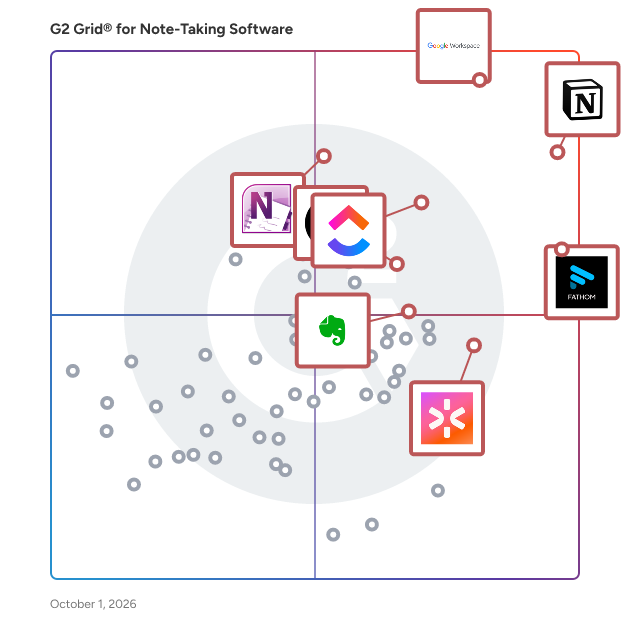
G2 Grid® for Note-Taking Software

G2 Grid® for Note-Taking Software plotting products by satisfaction and market presence

Highlighted products: Notion, Fathom, Google Workspace, ClickUp, CoRecruit (formerly Quil), Rev, Microsoft OneNote, and Evernote Teams.

Underlying data: [Grid® JSON](https://www.g2.com/categories/note-taking-software/grids.json?focus%5B%5D=notion&focus%5B%5D=fathom-video&focus%5B%5D=google-workspace&focus%5B%5D=clickup&focus%5B%5D=corecruit-formerly-quil&focus%5B%5D=rev&focus%5B%5D=microsoft-onenote&focus%5B%5D=evernote-teams&segment=small-business)

Grain

Grain is an AI-powered meeting recording tool built to help customer-focused teams understand, organize, and advocate for the needs of their customers. It connects seamlessly to platforms like Zoom, Google Meet, and Microsoft Teams to automate note-taking, record-keeping, and insight capture from every customer conversation. Grain ensures that no important detail, request, or moment of insight is ever lost, helping teams stay aligned and data-driven across every interaction. Conversation Intelligence Grain was designed with mid-market sales teams in mind. Transform everyday customer conversations into actionable revenue drivers by automatically identifying coaching opportunities, capturing key insights, and syncing them directly to your CRM to keep deals moving forward. With built-in automation and smart integration, Grain is free to start, simple to deploy, and cost-effective to scale across your entire organization. Superpower Your AEs Empower your account executives with AI-generated insights that drive results. Automatically update CRM properties, detect winning deal patterns using the “Deals” feature, and close more opportunities with meaningful, contextual data. Generate personalized follow-up emails in one click using meeting context, and instantly sync summaries and conversation details across your entire CRM ecosystem. Change Customer Success Send AI-driven customer feedback directly to sales, product, or leadership with a single click. Use Grain features like “Trackers” and “Ask,” along with MCP to highlight, share, and organize customer sentiment, requests, and milestones, ensuring teams stay aligned on what customers truly care about. Build Better Products Transform real customer conversations into context-informed deliverables including product briefs, roadmaps, and sprint plans. Keep teams connected with automatic Slack updates summarizing insights, next steps, and decisions. Grain helps you build better products and stronger customer relationships, faster.

Average Rating: 4.7/5.0

Total Reviews: 308

How Do G2 Users Rate Grain?

  • Has the product been a good partner in doing business?: 9.6/10 (Category avg: 9.1/10)
  • Quality of Support: 9.1/10 (Category avg: 8.5/10)
  • Ease of Use: 9.4/10 (Category avg: 8.9/10)

Who Is the Company Behind Grain?

  • Seller: Grain Intelligence
  • Year Founded: 2018
  • HQ Location: San Francisco, US
  • Twitter: @grainhq
    1,984 Twitter followers
  • LinkedIn® Page: www.linkedin.com
    97 employees on LinkedIn®

Who Uses This Product?

  • Who Uses This: Student, CEO
  • Top Industries: Computer Software, Marketing and Advertising
  • Company Size: 77% Small, 20% Medium

What Do G2 Reviewers Say About Grain?

AI-generated summary from verified user reviews

Pros
  • Users appreciate the high accuracy of Grain's transcriptions, which significantly enhance meeting documentation and follow-up tasks.
  • Users value the seamless CRM integration of Grain, significantly enhancing productivity and saving time in meetings.
  • Users love the customizable templates of Grain, enhancing adaptability and improving organization in client interactions.
  • Users praise Grain for its excellent note-taking abilities, making meetings more efficient and driving accountability effectively.
  • Users value the s seamless integration with HubSpot, greatly enhancing workflow efficiency and saving time on sales calls.
Cons
  • Users report integration issues with Grain, affecting connectivity with other tools like Productboard and CRM systems.
  • Users find the AI inaccuracy in Grain frustrating, limiting their ability to efficiently integrate outputs into projects.
  • Users feel the AI tooling could be better in Grain, limiting integration with other tools and functionality.
  • Users experience call issues that hinder distinguishing between meetings and calls, complicating the user experience.
  • Users find Grain to be expensive, especially for smaller teams needing additional access for viewing and highlights.

What Are Recent G2 Reviews of Grain?

What Are G2 Users Discussing About Grain?

Slite

Slite is the self-maintaining knowledge base that keeps company information current and trusted. Powered by an AI agent, Slite watches what changes across your tools, catches when docs have drifted from reality, and proposes the fix for your team to approve, so the answer you find is always the right one. From onboarding guides to all-hands notes, Slite keeps every type of company knowledge centralised in one place: organised, verified, and tracked. And because it stays in sync, the people and AI agents relying on it can act with confidence. Replace all-in-one workspaces with a tool built for company knowledge, and join thousands of growing teams who trust Slite as their single source of truth.

Average Rating: 4.6/5.0

Total Reviews: 272

How Do G2 Users Rate Slite?

  • Has the product been a good partner in doing business?: 8.9/10 (Category avg: 9.1/10)
  • Quality of Support: 9.2/10 (Category avg: 8.5/10)
  • Ease of Use: 9.3/10 (Category avg: 8.9/10)

Who Is the Company Behind Slite?

  • Seller: Slite
  • Year Founded: 2016
  • HQ Location: Paris
  • Twitter: @sliteHQ
    3,527 Twitter followers
  • LinkedIn® Page: www.linkedin.com
    42 employees on LinkedIn®

Who Uses This Product?

  • Who Uses This: CEO, Product Manager
  • Top Industries: Computer Software, Information Technology and Services
  • Company Size: 63% Small, 28% Medium

What Do G2 Reviewers Say About Slite?

AI-generated summary from verified user reviews

Pros
  • Users find Slite's ease of use exceptional, enabling seamless collaboration and efficient organization of documents.
  • Users praise Slite for its intuitive interface, making it easy to navigate and quickly adopt for various tasks.
  • Users love the real-time collaboration features of Slite, enhancing teamwork and streamlining information sharing effectively.
  • Users find Slite's helpful tools and intuitive interface make documentation and navigation simple and efficient.
  • Users appreciate the clean and intuitive interface of Slite, enhancing productivity and simplifying document organization.
Cons
  • Users find the limited customization options in Slite somewhat restricting for more complex workflows and document layouts.
  • Users find formatting issues with Slite, noting a lack of customization for document layouts and basic options.
  • Users find integration options lacking in Slite, limiting seamless connectivity with other tools and workflows.
  • Users find Slite's limited reporting capabilities insufficient for complex workflows, affecting their overall experience and customization options.
  • Users find tool limitations in Slite, particularly in search efficiency and lack of multiple windows support.

What Are Recent G2 Reviews of Slite?

What Are G2 Users Discussing About Slite?

Basecamp

Basecamp is the #1 collaboration tool for hundreds of thousands of teams worldwide. Teams use Basecamp to work on projects, communicate, and get work organized every day. Whether with teammates across the room, or clients across the world, Basecamp is the best tool to get things done. Basecamp makes it easy for teams to see what everyone is working on, collaborate on documents, schedule projects, and more without meetings or emails. Not convinced? Read our thousands of reviews and sign up for free.

Average Rating: 4.1/5.0

Total Reviews: 5,358

G2 Deal: Get 10% off Basecamp Pro Unlimited

Basecamp Pro Unlimited gets you unlimited users, 10x more storage, priority support, personal onboarding and more for one flat fee. Discount available for a limited time only.

Price: ~~$299~~ → $269

View this exclusive G2 deal

How Do G2 Users Rate Basecamp?

  • Has the product been a good partner in doing business?: 8.7/10 (Category avg: 9.1/10)
  • Quality of Support: 8.4/10 (Category avg: 8.5/10)
  • Ease of Use: 8.5/10 (Category avg: 8.9/10)

Who Is the Company Behind Basecamp?

  • Seller: 37signals
  • Year Founded: 1999
  • HQ Location: Chicago, IL
  • Twitter: @basecamp
    7,061 Twitter followers
  • LinkedIn® Page: www.linkedin.com
    176 employees on LinkedIn®

Who Uses This Product?

  • Who Uses This: Project Manager, Marketing Manager
  • Top Industries: Marketing and Advertising, Information Technology and Services
  • Company Size: 50% Small, 34% Medium

What Do G2 Reviewers Say About Basecamp?

AI-generated summary from verified user reviews

Pros
  • Users love the ease of use of Basecamp, facilitating smooth collaboration and project management for remote teams.
  • Users value the easy project coordination and streamlined team communication offered by Basecamp within a centralized platform.
  • Users love Basecamp's collaboration tools, promoting teamwork and streamlined project management for success.
  • Users enjoy the organization features of Basecamp, which streamline project coordination and enhance team accountability.
  • Users love how Basecamp offers intuitive task management, making it easy to organize and track multiple projects smoothly.
Cons
  • Users find Basecamp to have limited features compared to other software, wanting more options for scheduling and reporting.
  • Users find Basecamp lacking in advanced features, including reporting and scheduling tools for complex project management.
  • Users find Basecamp's limited functionality challenging for managing complex workflows and tracking project progress effectively.
  • Users find Basecamp's project management confusing, struggling with visibility and oversimplification, especially in complex scenarios.
  • Users feel that the lack of features in Basecamp limits its effectiveness compared to other software options.

What Are Recent G2 Reviews of Basecamp?

What Are G2 Users Discussing About Basecamp?

AI can help you find the answers. G2 helps you trust them.

Connect G2 to Claude or ChatGPT for answers grounded in G2's trusted reviews, comparisons, and pricing from real user insights.

How it works

Bordio

Bordio is work management software for teams across all industries. Here you can add teams and invite your teammates, create projects, manage tasks and events and organize your teamwork. Whether you're working with people inside your team or bringing in outside partners and clients, Bordio has got you covered. It's designed to handle everything from your daily tasks to those big projects, keeping everything running smoothly so you can focus on what really matters. Bordio doesn't just stop at organizing your tasks; it goes the extra mile by helping you manage your team's workload effectively. With features that let you track the time spent on tasks and meetings, setting up recurring tasks, and keeping an eye on daily progress, it's easier than ever to keep everyone on track. Plus, with the ability to chat right in the task window, you'll never lose track of those important conversations and decisions. Keep the communication clear and make sure everyone's on the same page. Say goodbye to juggling multiple apps for notes, file storage, and calendars. With Bordio, you can upload files directly to tasks, keep all your project-related notes tidy, and even sync up with your Google Calendar. And with the mobile app, you can keep tabs on everything, no matter where you are. Bordio makes managing your team's work not just doable but downright easy.

Average Rating: 5.0/5.0

Total Reviews: 59

How Do G2 Users Rate Bordio?

  • Has the product been a good partner in doing business?: 10.0/10 (Category avg: 9.1/10)
  • Quality of Support: 10.0/10 (Category avg: 8.5/10)
  • Ease of Use: 10.0/10 (Category avg: 8.9/10)

Who Is the Company Behind Bordio?

  • Seller: Bordio
  • Year Founded: 2021
  • HQ Location: Riga, LV
  • LinkedIn® Page: www.linkedin.com
    6 employees on LinkedIn®

Who Uses This Product?

  • Top Industries: Automotive, Building Materials
  • Company Size: 98% Small, 2% Medium

What Do G2 Reviewers Say About Bordio?

AI-generated summary from verified user reviews

Pros
  • Users appreciate the ease of use of Bordio, allowing quick organization of teams and schedules in one board.
  • Users appreciate the flexibility of Bordio, allowing quick adjustments to teams and schedules on one board.
  • Users love the management ease of Bordio, simplifying team organization and quick adjustments for schedules.
  • Users appreciate the multi-user access of Bordio, allowing efficient management of teams and schedules on one board.
  • Users appreciate the efficient project management of Bordio, allowing quick adjustments and organized team visibility.
Cons
  • Users struggle with limited app functionality during low signal strength, needing alternative methods for offline updates.
  • Users find the mobile functionality limited in low signal areas, making offline usage challenging and cumbersome.
  • Users face connectivity issues with Bordio, especially in low signal areas, affecting mobile and offline functionality.
  • Users experience issues with glitches in mobile and offline functionality, disrupting their ability to stay organized.
  • Users find the limited mobile and offline functionality of Bordio frustrating, often needing alternatives for recording updates.

What Are Recent G2 Reviews of Bordio?

Hive

Hive is an all-in-one project management software platform that helps teams plan, collaborate, automate workflows, and deliver projects faster. Designed for organizations of every size, Hive combines powerful project planning, task management, team collaboration, and workflow automation tools in one customizable workspace. Whether you're managing marketing campaigns, product launches, creative projects, client work, or cross-functional initiatives, Hive adapts to your team's unique processes. Unlike rigid project management tools, Hive offers flexible workflows, customizable dashboards, and multiple project views so every team can work the way they work best. Hive empowers marketing, operations, product, IT, creative, and remote teams with the tools they need to stay organized and aligned. With customizable workflows and powerful collaboration features, teams can centralize work, reduce manual tasks, and improve visibility across every project. Key capabilities include: - Multiple project views, including Kanban boards, Gantt charts, calendars, tables, and lists - Task management with custom fields, dependencies, milestones, and priorities - Workflow automation to eliminate repetitive work - Real-time team collaboration with messaging, comments, and file sharing - Time tracking, reporting, and analytics - Integrations with hundreds of popular business applications Every organization works differently, which is why Hive is built to be one of the most customizable project management platforms available. Teams can create workflows tailored to their business processes using custom fields, project templates, automations, approvals, and integrations. Instead of forcing teams to change how they work, Hive adapts to existing workflows — helping organizations improve efficiency without disrupting productivity. Hive gives teams the flexibility to manage projects from the perspective that works best for them. Switch seamlessly between: - Kanban boards for agile workflows - Gantt charts for timeline planning - Calendar views for scheduling - Table and List views for detailed task management These flexible project views help teams track deadlines, manage resources, identify bottlenecks, and keep projects moving forward. Hive brings projects, communication, and documentation together in one centralized workspace. Team members can collaborate in real time, assign tasks, share files, provide feedback, and monitor project progress without switching between multiple tools. By combining project planning, collaboration, automation, and reporting in a single platform, Hive helps teams reduce busywork and focus on delivering results. Hive is more than just task management software—it's a scalable work management platform built to evolve alongside your business. As your needs change, Hive continues to expand through new features, integrations, and customer-driven enhancements. With flexible customization, powerful automation, and dedicated customer support, Hive enables organizations to streamline workflows, improve cross-functional collaboration, and execute projects with greater speed and confidence.

Average Rating: 4.6/5.0

Total Reviews: 652

G2 Deal: Get 20% off Hive

Get 20% off Hive Starter or Hive Teams plans. Customize your project management experience with the best tools & functionality for every budget.

Price: ~~$5 per user/month~~ → $4 per user/month

View this exclusive G2 deal

How Do G2 Users Rate Hive?

  • Has the product been a good partner in doing business?: 9.4/10 (Category avg: 9.1/10)
  • Quality of Support: 9.3/10 (Category avg: 8.5/10)
  • Ease of Use: 9.1/10 (Category avg: 8.9/10)

Who Is the Company Behind Hive?

  • Seller: Hive
  • Company Website:
  • Year Founded: 2016
  • HQ Location: New York, New York
  • Twitter: @hive
    3,353 Twitter followers
  • LinkedIn® Page: www.linkedin.com
    63 employees on LinkedIn®

Who Uses This Product?

  • Who Uses This: Project Manager, Graphic Designer
  • Top Industries: Marketing and Advertising, Information Technology and Services
  • Company Size: 63% Small, 29% Medium

What Do G2 Reviewers Say About Hive?

AI-generated summary from verified user reviews

Pros
  • Users appreciate the versatile project tracking capabilities of Hive, enhancing organization and timely documentation across projects.
  • Users appreciate the ease of use of Hive, enabling quick project setup and valuable features right away.
  • Users value the strong team collaboration features of Hive, enhancing interaction and streamlining workflows effectively.
  • Users appreciate the collaborative and efficient features of Hive, enhancing project management and workflow execution.
  • Users appreciate the effective organization of projects and timelines, enhancing overall workflow and documentation.
Cons
  • Users find the missing features in Hive frustrating, such as limited calendar views and inadequate text formatting options.
  • Users note a challenging learning curve initially, but supportive resources help ease navigation through Hive.
  • Users find Hive's limited features a drawback, wishing for more customization and bulk actions to enhance usability.
  • Users find Hive's interface not intuitive, feeling overwhelmed with project organization and mobile app usability issues.
  • Users experience a learning curve with Hive due to its complexity and differences from other project management tools.

What Are Recent G2 Reviews of Hive?

Notability

Notability is a versatile note taking app designed and built in San Francisco. Notability enhances productivity and streamlines workflows on iPad. It has a rich feature set, including the best-in-class handwriting engine, PDF annotation, document import, and audio recording. Whether you work in the field or in the board room, Notability gives you all the tools you need to mark up and review documents, take notes, share everything, and safely back up your documents to your cloud storage of choice. Notability is the most powerful, most intuitive note taking app on the market. Join millions of users who are getting the most out of their iPads with Notability. Try it today for free.

Average Rating: 4.6/5.0

Total Reviews: 43

How Do G2 Users Rate Notability?

  • Has the product been a good partner in doing business?: 10.0/10 (Category avg: 9.1/10)
  • Quality of Support: 8.9/10 (Category avg: 8.5/10)
  • Ease of Use: 9.3/10 (Category avg: 8.9/10)

Who Is the Company Behind Notability?

  • Seller: Gingerlabs
  • Year Founded: 2008
  • HQ Location: San Francisco, California
  • Twitter: @NotabilityApp
    30,267 Twitter followers
  • LinkedIn® Page: www.linkedin.com
    103 employees on LinkedIn®

Who Uses This Product?

  • Top Industries: Higher Education, Education Management
  • Company Size: 47% Small, 31% Medium

What Do G2 Reviewers Say About Notability?

AI-generated summary from verified user reviews

Pros
  • Users find Notability's easy setup highly beneficial for daily schoollife, ensuring organized and accessible notes.
  • Users love the dynamic note-taking experience with versatile tools and seamless integration across devices in Notability.
  • Users love the organization features of Notability, enhancing note accessibility and integration in daily school life.
  • Users love the ease of use in Notability, seamlessly integrating it into their everyday school life.
  • Users love the easy integrations of Notability, enhancing their school life with quick and organized note accessibility.
Cons
  • Users report slow loading times for notes, impacting their overall experience with Notability.

What Are Recent G2 Reviews of Notability?

What Are G2 Users Discussing About Notability?

Fellow

Fellow is the only AI meeting assistant built from the ground up with privacy and security at its core. With both bot and botless recording options, Fellow gives teams full control over how meetings are captured — whether through a visible meeting bot or seamless, native recording with no bot required. Every recording, transcript, and summary is protected by enterprise-grade privacy and access controls, ensuring only the right people see the right information. Fellow delivers the most accurate AI meeting notes, transcripts, and summaries — and with Ask Fellow, you can instantly search across all your past meetings to surface key decisions, action items, and context without digging through notes. Leaders at Shopify, Aledade, Vidyard, and HubSpot trust Fellow to save their teams time and money by revolutionizing the way they meet.

Average Rating: 4.7/5.0

Total Reviews: 2,428

How Do G2 Users Rate Fellow?

  • Has the product been a good partner in doing business?: 9.4/10 (Category avg: 9.1/10)
  • Quality of Support: 9.3/10 (Category avg: 8.5/10)
  • Ease of Use: 9.0/10 (Category avg: 8.9/10)

Who Is the Company Behind Fellow?

Who Uses This Product?

  • Who Uses This: Team Lead, Product Manager
  • Top Industries: Computer Software, Information Technology and Services
  • Company Size: 38% Medium, 33% Small

What Do G2 Reviewers Say About Fellow?

AI-generated summary from verified user reviews

Pros
  • Users value the ease of use of Fellow, benefiting from its seamless organization and integration features for meetings.
  • Users appreciate the organized meeting notes feature of Fellow, enhancing collaboration and consistency during discussions.
  • Users appreciate the easy note-taking and organizational features of Fellow, enhancing their workflow and team collaboration.
  • Users find the action item tracking in Fellow invaluable for organizing tasks and enhancing meeting effectiveness.
  • Users value the organization features of Fellow, effectively managing meeting notes and action items in one place.
Cons
  • Users experience joining issues with Fellow and wish for compatibility with more meeting platforms.
  • Users find that action item management is cumbersome, leading to overlooked tasks and inefficiencies in tracking responsibilities.
  • Users face issues with calendar integration, limiting functionality and causing missed meetings across different platforms.
  • Users find the template issues frustrating, citing lack of intuitiveness and difficulty in customization for meetings.
  • Users face integration issues with Fellow, limiting its functionality across various meeting platforms and tools.

What Are Recent G2 Reviews of Fellow?

What Are G2 Users Discussing About Fellow?

Lark

Built by ByteDance, Lark is an enterprise AI workspace designed for seamless human-agent collaboration. It unifies teams, communication, knowledge, and business workflows in one connected environment with an open architecture for AI models and agents. By bringing work into one place rather than scattering it across separate apps, Lark gives AI complete, real-time context and the native ability to act across the entire business. Today, organizations in more than 190 markets use Lark to turn AI into measurable business value.

Average Rating: 4.6/5.0

Total Reviews: 183

How Do G2 Users Rate Lark?

  • Has the product been a good partner in doing business?: 9.5/10 (Category avg: 9.1/10)
  • Quality of Support: 9.0/10 (Category avg: 8.5/10)
  • Ease of Use: 9.1/10 (Category avg: 8.9/10)

Who Is the Company Behind Lark?

  • Seller: Lark Technologies
  • Year Founded: 2003
  • HQ Location: Singapore, Singapore
  • Twitter: @lark
    471 Twitter followers
  • LinkedIn® Page: www.linkedin.com
    220 employees on LinkedIn®

Who Uses This Product?

  • Top Industries: Information Technology and Services, Computer Software
  • Company Size: 48% Small, 33% Medium

What Do G2 Reviewers Say About Lark?

AI-generated summary from verified user reviews

Pros
  • Users appreciate the ease of use of Lark, enjoying seamless collaboration and efficient navigation across its features.
  • Users love Lark for its user-friendly features, including real-time collaboration, integrated tools, and easy navigation.
  • Users value the seamless team collaboration offered by Lark, integrating communication, tasks, and documents in one platform.
  • Users admire Lark's innovative communication tools, enhancing collaboration with real-time features and seamless integration.
  • Users love Lark for its user-friendly collaboration, seamlessly integrating meetings, chat, and document sharing in one app.
Cons
  • Users face a notable learning curve with Lark, as navigating features can be confusing at first.
  • Users face integration issues that interrupt workflows and complicate the use of Lark with other platforms.
  • Users report slow loading issues with Lark, causing frustration and inefficiencies during their work experience.
  • Users express frustration over limited customization, affecting ease of use and overall experience with Lark.
  • Users report login issues with Lark, including confusion during setup and occasional bugs affecting accessibility.

What Are Recent G2 Reviews of Lark?

What Are G2 Users Discussing About Lark?

Spike

Spike is an AI-powered email and team communication platform that combines email, chat, meetings, and collaboration tools into a single, organized workspace. It is designed for professionals, small teams, and businesses that use email as their primary communication channel but want a faster, more streamlined way to manage daily interactions and tasks. By transforming traditional email into a chat-like format, Spike simplifies how users read and reply to messages. The platform removes repetitive headers, quoted text, and long chains, allowing conversations to appear as clean, continuous threads. Users can manage all email accounts, calendars, and contacts in one place while taking advantage of built-in AI to summarize conversations, draft replies, and organize the inbox automatically. Spike supports both individual and team use. Freelancers and professionals use it to manage clients and projects more efficiently, while teams rely on Spike to centralize communication, share files, and collaborate in real time without switching between multiple tools. Core Features: Conversational Email: Presents emails as natural chat-like conversations while remaining fully compatible with standard email protocols. AI Productivity Tools: Provides automatic summaries, suggested replies, translations, and content drafting to speed up workflow. Priority Inbox: Uses AI to sort incoming messages into relevant categories—Priority, Other, Notes, and Starred—helping users focus on what matters most. Integrated Meetings: Enables voice and video calls directly from email threads for faster coordination. Collaborative Notes and Docs: Allows users to create, edit, and share documents in real time within the inbox. Unified Inbox and Search: Consolidates multiple email accounts and calendars into a single interface with cross-account search. Shared Inbox: Helps teams manage customer and project communications collaboratively, ensuring faster response times. Compatibility: Works with Gmail, Outlook, iCloud, Office 365, Yahoo Mail, and all IMAP-supported accounts across desktop, mobile, and web platforms. Security and Privacy: Spike is ad-free and never sells or monetizes user data. All message data is encrypted using the AES-256 standard. Spike is suited for users seeking a unified communication platform that enhances productivity while maintaining the familiarity of email. It bridges the gap between traditional email clients and modern collaboration tools, offering a single, AI-enhanced workspace that helps individuals and teams stay focused and efficient.

Average Rating: 4.6/5.0

Total Reviews: 249

How Do G2 Users Rate Spike?

  • Has the product been a good partner in doing business?: 8.6/10 (Category avg: 9.1/10)
  • Quality of Support: 9.0/10 (Category avg: 8.5/10)
  • Ease of Use: 9.3/10 (Category avg: 8.9/10)

Who Is the Company Behind Spike?

  • Seller: Spike
  • Year Founded: 2014
  • HQ Location: Herzliya, IL
  • Twitter: @SpikeNowHQ
    3,036 Twitter followers
  • LinkedIn® Page: www.linkedin.com
    29 employees on LinkedIn®

Who Uses This Product?

  • Who Uses This: Owner, CEO
  • Top Industries: Information Technology and Services, Computer Software
  • Company Size: 72% Small, 15% Medium

What Do G2 Reviewers Say About Spike?

AI-generated summary from verified user reviews

Pros
  • Users find Spike's ease of use remarkable, simplifying communications and enhancing their productivity significantly.
  • Users love the easy email management of Spike, appreciating its simple interface and organized personal messages.
  • Users love Spike's modern chat-like communication, which simplifies email management and enhances productivity through its intuitive design.
  • Users appreciate the intuitive chat-style interface of Spike, enhancing email management and reducing inbox anxiety significantly.
  • Users love Spike's chat-style interface and unified inbox, significantly enhancing productivity and email management.
Cons
  • Users note a lack of essential features in Spike, particularly impacting usability for structured and professional environments.
  • Users highlight limited features in Spike, noting message history caps and lack of search for Japanese text as significant drawbacks.
  • Users note integration issues with Spike, citing limited third-party support and occasional syncing problems with external email providers.
  • Users find Spike expensive, particularly feeling pressured towards paid plans due to limitations on the free tier.
  • Users express frustration with the limited customization options in Spike, impacting notification management and overall experience.

What Are Recent G2 Reviews of Spike?

What Are G2 Users Discussing About Spike?

Zoho Notebook

Zoho Notebook is a cross-platform note-taking app built for the many ways people capture information. A note can be text, a checklist, meeting audio, a scanned document, a sketch, a PDF, a photo, a video, or a useful link. Notebook brings all of these together in one organized workspace. Available on iOS, iPadOS, Android, Mac, Windows, Linux, and the web, Notebook keeps notes synced across devices and supports offline access when you need to keep working without an internet connection. Capture Notes in Multiple Formats At the heart of Notebook are Note Cards, designed for different types of content. Create Text Cards for detailed notes, Checklist Cards for tasks, Photo Cards for images, Audio and Video Cards for recordings, Sketch Cards for handwritten ideas, and File Cards for documents and attachments. The editor supports headings, lists, checklists, tables, quotes, code blocks, links, images, dividers, and other formatting tools. Notes can also be merged, moved or copied between notebooks, tagged, favorited, shared, exported, and given reminders. Version History helps you return to an earlier version when needed. Transform Links into Rich Smart Cards Notebook’s Smart Cards turn supported web content into more useful notes. Save a recipe and Notebook can organize the image, ingredients, and preparation steps into a Recipe Card. Supported video links can become Video Cards with previews and distraction-free playback, while webpages can appear as Link Cards with useful page information instead of a bare URL. Digitize Documents with Built-In Scanning and OCR Notebook includes a mobile document scanner for documents, handwritten notes, receipts, business cards, books, and other physical material. Auto edge detection, auto capture, perspective correction, multi-page scanning, and image enhancement help clean up scans before saving them. Scans can be organized, tagged, shared, and searched alongside other notes. OCR makes text in supported images and scanned documents searchable, helping you find information even when you cannot remember the file name. Review and Annotate PDFs in Zoho Notebook Store PDFs alongside your notes and annotate them on supported plans and platforms without switching apps. Highlight text, draw, and add text boxes, shapes, links, images, checkboxes, signatures, watermarks, QR codes, and other annotations. Organize and Find Notes with Search and Tags Notebook helps large note libraries stay manageable with notebooks, collections, nested collections, tags, favorites, filters, and search. Add multiple tags to a note to organize information by project, topic, priority, or your own system. Notebook AI can suggest tags for supported content, while global search and filters help narrow down information across your workspace. Manage Projects Visually with Kanban-Style Noteboards Noteboards provide a Kanban-style way to arrange Note Cards into lists. Create and rename lists, move cards between stages, filter information, search a board, and create new notes where they belong. Use Noteboards for project planning, task management, research, content planning, or any workflow that benefits from a visual board. Brainstorm and Collaborate with Whiteboards Whiteboards provide a flexible canvas for text, images, shapes, drawings, flowcharts, equations, links, and other visual elements. Teams can share and collaborate on Whiteboards for brainstorming, planning, diagrams, workshops, and discussions. Work Smarter with Notebook AI Notebook AI brings AI assistance directly into your notes. Summarize lengthy content, rewrite or improve text, simplify information, change tone, translate notes, generate checklists and tables, create structured content, and ask questions based on information in Notebook. Notebook AI can also turn information into Mind Maps, helping you visualize relationships between ideas and break complex topics into a clearer structure. Convert Audio and Video into Searchable AI Transcripts Notebook can convert supported audio and video recordings into searchable transcripts. Notebook AI can then help summarize and work with the information inside them. Meetings, lectures, interviews, brainstorming sessions, and voice notes become information you can read, search, summarize, and revisit without replaying the entire recording. Stay on Track with Reminders and Recurring Tasks Attach reminders directly to Note Cards, with recurring reminders available on supported plans. Use them for deadlines, routines, follow-ups, bills, study schedules, and recurring tasks. On supported mobile platforms, widgets can also keep important notes and checklists accessible from your home screen. Turn Emails into Organized Note Cards with Email-In Forward emails into Notebook and save them as Note Cards. Keep reference emails, confirmations, travel details, and other useful messages alongside the projects or topics they relate to instead of leaving them buried in your inbox. Share Notes and Collaborate with Teams Share individual Note Cards, notebooks, and collections with access controls for viewing or editing. Share a single note without exposing the rest of a notebook, or collaborate through a shared workspace when a project needs ongoing input. Notebook for Business extends this with team workspaces for meeting notes, internal documentation, projects, research, and shared knowledge. Teams can work with shared notebooks, Noteboards, and Whiteboards, while administrators get additional controls for users and access. Automate Workflows with Integrations and MCP Notebook works with other Zoho applications and supports workflow automation through services such as Zoho Flow and Zapier. Notebook also supports Model Context Protocol (MCP), allowing compatible AI assistants and development tools such as ChatGPT, Claude, Cursor, and VS Code to securely work with Notebook after authorization. Supported actions can include finding, creating, updating, and organizing notes or setting reminders. Notebook AI works with information inside Notebook, while MCP lets compatible external AI tools interact with Notebook through authorized access. Migrate Notes from Popular Note-Taking Apps Notebook provides migration options and documented workflows for bringing content from supported services such as Evernote, Microsoft OneNote, Google Keep, and Apple Notes. This makes it easier to move an existing note library without starting again from scratch. Access and Sync Notes Across Devices Use Notebook on the web, iPhone, iPad, Android, Mac, Windows, and Linux. Capture something on your phone and continue working with it from your computer later. Offline access lets you continue working with supported content without a connection and sync your changes when you are back online. Keep Notes Private with an Ad-Free Experience Notebook is ad-free, keeping personal notes and workspaces free from advertising. Notes can also be protected using supported device security options such as Face ID or Touch ID. Sharing controls help determine who can access collaborative content, while business users get additional controls for managing team access. Build a Smarter Personal and Team Knowledge Workspace Zoho Notebook can stay simple for quick notes and checklists, but it can also grow with more involved work. A scan can become searchable. A recording can become a transcript and summary. Notes can become a Noteboard. Ideas can become Mind Maps. Teams can brainstorm on Whiteboards. PDFs can be reviewed without leaving the app. Emails can become Note Cards. Previous edits can be recovered through Version History. Notebook AI can help you understand your content, while MCP can securely connect it with compatible AI tools. Together, these features make Zoho Notebook useful for personal organization, study, research, creative work, meetings, project planning, documentation, and shared team knowledge.

Average Rating: 4.4/5.0

Total Reviews: 70

How Do G2 Users Rate Zoho Notebook?

  • Has the product been a good partner in doing business?: 6.7/10 (Category avg: 9.1/10)
  • Quality of Support: 8.8/10 (Category avg: 8.5/10)
  • Ease of Use: 9.2/10 (Category avg: 8.9/10)

Who Is the Company Behind Zoho Notebook?

  • Seller: Zoho
  • Year Founded: 1996
  • HQ Location: Austin, TX
  • Twitter: @Zoho
    137,880 Twitter followers
  • LinkedIn® Page: www.linkedin.com
    30,913 employees on LinkedIn®
  • Phone: +1 (888) 900-9646

Who Uses This Product?

  • Top Industries: Information Technology and Services, Telecommunications
  • Company Size: 64% Small, 30% Medium

What Do G2 Reviewers Say About Zoho Notebook?

AI-generated summary from verified user reviews

Pros
  • Users admire the intuitive design of Zoho Notebook, making note organization and access incredibly easy and efficient.
  • Users value the organization features of Zoho Notebook, allowing effortless categorization and quick access to notes offline.
  • Users love the intuitive interface of Zoho Notebook, finding it easy to organize and access their notes seamlessly.

What Are Recent G2 Reviews of Zoho Notebook?

What Are G2 Users Discussing About Zoho Notebook?
Mentalyc

Mentalyc is an AI clinical documentation and therapy notes platform built specifically for psychotherapists, psychologists, counselors, and mental health professionals. Mentalyc automatically listens to therapy sessions or processes therapist inputs to generate structured, insurance-ready progress notes such as SOAP, DAP, GIRP, intake notes, treatment plans, custom templates and summaries in minutes. AI note-taking tools help reduce the administrative burden of translating session conversations into documentation, allowing clinicians to focus more on patient care. Designed for real clinical workflows, Mentalyc combines AI therapy note generation, transcription, and clinical intelligence features to help therapists save hours every week, reduce burnout, and improve documentation consistency. Key capabilities include: • AI Therapy Notes Generation - Automatically converts session audio, video, or text into high-quality clinical notes tailored to therapist writing style • Multiple Clinical Templates - Supports SOAP notes, DAP notes, BIRP/GIRP formats, intake documentation, treatment plans, and custom templates • Clinical Intelligence & Progress Tracking - Enables longitudinal tracking of client progress and treatment themes across sessions • HIPAA-Compliant & Privacy-First Architecture - Built for secure behavioral health documentation workflows • Flexible Documentation Modes - Works with live telehealth sessions, uploaded recordings, dictation, or manual summaries • EHR-Friendly Workflows - Easy export, copy-paste, or integration support for common therapy EHR systems Mentalyc is ideal for solo therapists, group practices, and behavioral health organizations seeking a modern AI scribe solution that goes beyond transcription and supports better clinical decision-making. By reducing documentation time and cognitive load, Mentalyc helps therapists stay present during sessions while maintaining accurate, compliant, and structured records.

Average Rating: 4.9/5.0

Total Reviews: 24

How Do G2 Users Rate Mentalyc?

  • Quality of Support: 9.3/10 (Category avg: 8.5/10)
  • Ease of Use: 9.3/10 (Category avg: 8.9/10)

Who Is the Company Behind Mentalyc?

Who Uses This Product?

  • Top Industries: Mental Health Care
  • Company Size: 92% Small, 4% Medium

What Are Recent G2 Reviews of Mentalyc?

Jamie

Jamie is your AI meeting assistant that turns conversations into clear notes, highlights action items, and identifies speakers – all without joining as a bot. It works across all video platforms and offline, supports 90+ languages, and integrates with tools like Notion, Asana, Google Docs, and OneNote. Jamie keeps your data encrypted, GDPR-compliant, and secure in Europe, so you can focus on your meetings and never miss a key point.

Average Rating: 4.7/5.0

Total Reviews: 50

How Do G2 Users Rate Jamie?

  • Has the product been a good partner in doing business?: 9.8/10 (Category avg: 9.1/10)
  • Quality of Support: 9.3/10 (Category avg: 8.5/10)
  • Ease of Use: 9.7/10 (Category avg: 8.9/10)

Who Is the Company Behind Jamie?

  • Seller: Jamie
  • Year Founded: 2021
  • HQ Location: Cologne, DE
  • Twitter: @meetjamie_ai
    457 Twitter followers
  • LinkedIn® Page: www.linkedin.com
    36 employees on LinkedIn®

Who Uses This Product?

  • Top Industries: Marketing and Advertising, Computer Software
  • Company Size: 80% Small, 8% Medium

What Do G2 Reviewers Say About Jamie?

AI-generated summary from verified user reviews

Pros
  • Users love the ease of use of Jamie, appreciating its seamless integration and topic-based meeting notes.
  • Users appreciate Jamie's seamless note management, effortlessly organizing topic-based notes from meetings without requiring bots or plugins.
  • Users value Jamie for its high transcription accuracy, ensuring precise note-taking and reliable summaries compared to other tools.
  • Users love Jamie for its accurate transcriptions and user-friendly design, enhancing their note-taking experience effortlessly.
  • Users appreciate the seamless meeting management of Jamie, benefiting from precise notes and enhanced team collaboration.
Cons
  • Users note that the speaker identification feature is not entirely reliable, impacting the effectiveness of Jamie's performance.
  • Users face significant inaccurate transcription issues, often resulting in lost meetings and troublesome voice capture.
  • Users report that poor audio quality significantly affects their experience and transcription accuracy during meetings.
  • Users report significant recording issues, including lock-ups and inaccurate transcript details that hinder effective usage.
  • Users experience frequent audio issues, leading to frustrating bugs and a need for constant troubleshooting and support.

What Are Recent G2 Reviews of Jamie?

liftOS - The ultimate productivity Workspace

#1 Easiest Project Management Software - Made in Germany Built-in Projects, Wikis, Documents and Whiteboard help small to large teams work with many tools in one place. Trusted by over 2000+ Businesses, Agencies and Freelancers. Detailed Features: - Todos (manage projects) - Notes (write, share, and create knowledgebase) - Files (share and store files) - Whiteboard (brainstorm in real time) - Chat (communicate with team & clients) - Calendar (visualize your day & week) - Google Workspace (Natively integrate Google Sheets, Docs or Slides) - Miro & more websites or weblinks

Average Rating: 4.9/5.0

Total Reviews: 18

How Do G2 Users Rate liftOS - The ultimate productivity Workspace?

  • Has the product been a good partner in doing business?: 10.0/10 (Category avg: 9.1/10)
  • Quality of Support: 9.7/10 (Category avg: 8.5/10)
  • Ease of Use: 9.3/10 (Category avg: 8.9/10)

Who Is the Company Behind liftOS - The ultimate productivity Workspace?

  • Seller: liftOS
  • Year Founded: 2021
  • HQ Location: Berlin, DE
  • LinkedIn® Page: www.linkedin.com
    3 employees on LinkedIn®

Who Uses This Product?

  • Company Size: 100% Small

What Do G2 Reviewers Say About liftOS - The ultimate productivity Workspace?

AI-generated summary from verified user reviews

Pros
  • Users love the seamless integration of productivity tools in liftOS, enhancing organization and efficiency in their workflows.
  • Users appreciate the easy integrations of liftOS, seamlessly combining productivity tools into a single, efficient workspace.
  • Users love the seamless integrations with various apps, enhancing their productivity and simplifying workflow management.
  • Users find the out-of-the-box templates in liftOS invaluable, saving time and providing structure for their tasks.
  • Users appreciate the responsive customer support of liftOS, noting its helpfulness and genuine care for user needs.
Cons
  • Users find the learning curve steep initially, but adaptability leads to smoother usage over time.
  • Users note the missing features in liftOS, but see potential as updates are on the way.
  • Users express a desire for improved template creation options, seeking enhanced customization and flexibility in LiftOS.
  • Users find difficult navigation at first, but eventually adapt for a smoother experience with liftOS.
  • Users express frustration over integration issues that limit functionality and hinder seamless workflow within liftOS.

What Are Recent G2 Reviews of liftOS - The ultimate productivity Workspace?

Milanote

Milanote is an easy-to-use tool to organize your ideas and projects into visual boards.

Average Rating: 4.5/5.0

Total Reviews: 42

How Do G2 Users Rate Milanote?

  • Has the product been a good partner in doing business?: 8.3/10 (Category avg: 9.1/10)
  • Quality of Support: 8.9/10 (Category avg: 8.5/10)
  • Ease of Use: 9.3/10 (Category avg: 8.9/10)

Who Is the Company Behind Milanote?

  • Seller: Milanote
  • Year Founded: 2016
  • HQ Location: Melbourne, Australia
  • LinkedIn® Page: www.linkedin.com
    23 employees on LinkedIn®

Who Uses This Product?

  • Top Industries: Marketing and Advertising
  • Company Size: 71% Small, 26% Medium

What Do G2 Reviewers Say About Milanote?

AI-generated summary from verified user reviews

Pros
  • Users love the beautiful and intuitive interface of Milanote, which enhances their creative workflow effortlessly.
  • Users love the beautiful, visual interface of Milanote, making it perfect for organizing creative ideas and projects.
  • Users appreciate the beautiful, visual interface of Milanote, making organization of creative projects effortless and enjoyable.
  • Users admire the beautiful, visual interface of Milanote, which enhances creativity and organization in projects.
Cons
  • Users find integration issues with Milanote limiting, especially desiring more connections to third-party tools and automations.
  • Users experience limited features on the free plan, wishing for more integrations and automation options.
  • Users find Milanote's free plan limitations restrictive, especially when heavily utilizing the tool without third-party integrations.

What Are Recent G2 Reviews of Milanote?

What Are G2 Users Discussing About Milanote?

Craft Docs

Craft is collaborative workspace where your whole team can come together to take notes, create docs, manage work and ideate together. Craft's Daily Notes offers a paradigm shift in team collaboration. Power your team’s progress with structured daily updates, align on priorities, and remove blockers — all in one place. With a built-in AI assistant, you can quickly generate ideas, summarize longer content or get help with editing your documents.

Average Rating: 4.6/5.0

Total Reviews: 22

How Do G2 Users Rate Craft Docs?

  • Has the product been a good partner in doing business?: 10.0/10 (Category avg: 9.1/10)
  • Quality of Support: 9.3/10 (Category avg: 8.5/10)
  • Ease of Use: 9.3/10 (Category avg: 8.9/10)

Who Is the Company Behind Craft Docs?

  • Seller: Craft Docs
  • Year Founded: 2019
  • HQ Location: Budapest, Hungary
  • LinkedIn® Page: www.linkedin.com
    26 employees on LinkedIn®

Who Uses This Product?

  • Company Size: 82% Small, 14% Medium

What Do G2 Reviewers Say About Craft Docs?

AI-generated summary from verified user reviews

Pros
  • Users find Craft Docs to be beautifully simple, enhancing their daily note-taking experience with elegance and usability.
  • Users love Craft Docs for its beautiful simplicity, making note-taking an enjoyable and accessible experience for everyone.
  • Users love the efficiency of Craft Docs, making note-taking a fun and effortless experience for everyone.
  • Users admire the beautiful simplicity of Craft Docs, making note-taking easy and enjoyable for everyone.
  • Users love the beautiful simplicity of Craft Docs, making note-taking enjoyable and accessible for everyone.
Cons
  • Users note the lack of features in Craft Docs compared to competitors, but appreciate ongoing updates and improvements.
  • Users note the limited reporting capabilities of Craft Docs, but appreciate the team's commitment to ongoing improvements.
  • Users note the missing features in Craft Docs, yet appreciate the team's efforts to improve and update the software.

What Are Recent G2 Reviews of Craft Docs?

Neeraja Prakash
NP
Researched and written by Neeraja Prakash
Updated