Top Free Enterprise IT Management Software

How Many Enterprise IT Management Software Products Does G2 Track?

Total Products under this Category: 123

Category Stats (Aug 2026)

  • Average Rating: 4.4/5 The average rating of products in this category, based on all submitted ratings
  • Top Trending Product: AWS Systems Manager (+1.01%) - Among all products in this category, AWS Systems Manager recorded the largest rating increase compared to last month

Last updated: August 06, 2026

How Does G2 Rank Enterprise IT Management Software Products?

Why You Can Trust G2's Software Rankings:

  • 30 Analysts and Data Experts
  • 19,900+ Authentic Reviews
  • 123+ Products
  • Unbiased Rankings

G2's software rankings are built on verified user reviews, rigorous moderation, and a consistent research methodology maintained by a team of analysts and data experts. Each product is measured using the same transparent criteria, with no paid placement or vendor influence. While reviews reflect real user experiences, which can be subjective, they offer valuable insight into how software performs in the hands of professionals. Together, these inputs power the G2 Score, a standardized way to compare tools within every category.

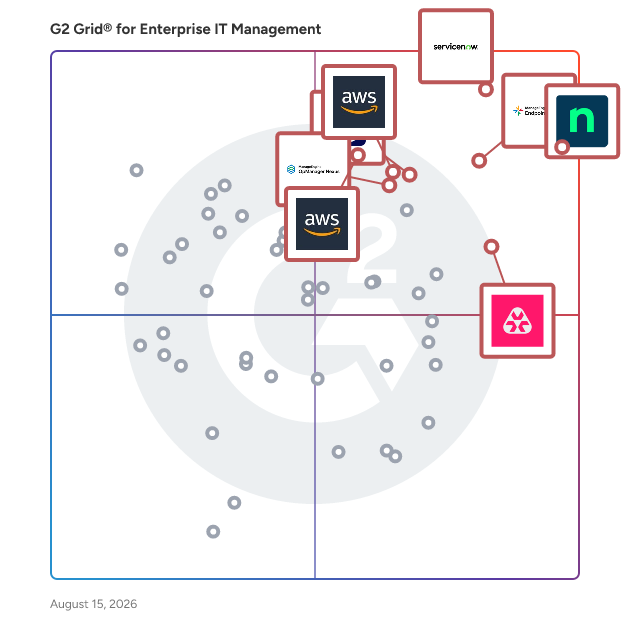
G2 Grid® for Enterprise IT Management Software

G2 Grid® for Enterprise IT Management Software plotting products by satisfaction and market presence

Highlighted products: NinjaOne, ServiceNow IT Operations Management, ManageEngine Endpoint Central, TeamViewer, Atera, AWS Systems Manager, AWS Management Console, and OpManager Nexus.

Underlying data: [Grid® JSON](https://www.g2.com/categories/enterprise-it-management/grids.json?focus%5B%5D=ninjaone&focus%5B%5D=servicenow-it-operations-management&focus%5B%5D=manageengine-endpoint-central&focus%5B%5D=teamviewer&focus%5B%5D=atera&focus%5B%5D=aws-systems-manager&focus%5B%5D=aws-management-console&focus%5B%5D=opmanager-nexus)

Sponsored

Asato

Asato is an IT asset optimization platform designed to assist Chief Information Officers (CIOs) and IT leaders in managing and enhancing their IT asset portfolios. This solution focuses on optimizing the entire IT asset estate through continuous discovery and AI-driven execution, aiming to eliminate waste, capture value, and maximize the return on investment (ROI) of IT expenditures across various domains, including Software as a Service (SaaS), hardware, and cloud infrastructure. The platform serves a diverse audience, particularly organizations looking to streamline their IT operations and improve asset management. Asato is particularly beneficial for enterprises that operate in complex environments with multiple IT systems and assets. By unifying data from disparate sources into a connected knowledge layer, Asato provides actionable insights that facilitate risk and compliance analysis, cost optimization, and proactive decision-making support for IT operations. This holistic approach enables organizations to align their technology strategies with overarching business objectives. One of the standout features of Asato is its ability to deliver unified visibility and management of IT assets across various platforms, including SaaS, hardware, and cloud services. This comprehensive visibility allows organizations to monitor and manage their assets effectively, ensuring that resources are utilized efficiently and that potential issues are identified before they escalate. Additionally, the platform leverages AI to provide powerful insights that drive cost optimization and enhance operational efficiency, making it easier for IT leaders to make informed decisions. Asato also emphasizes risk and compliance monitoring, which is crucial in today's digital landscape. By continuously assessing digital assets for compliance with regulatory requirements and organizational policies, the platform helps mitigate risks associated with IT asset management. Furthermore, real-time analytics and decision support capabilities empower IT leaders to adapt their strategies dynamically, ensuring that they remain responsive to changing business needs and technological advancements. Overall, Asato stands out in the IT asset optimization category by combining advanced AI technologies with a comprehensive approach to asset management. Its focus on delivering actionable insights, risk mitigation, and operational efficiency positions it as a valuable tool for organizations aiming to enhance their IT asset management practices and drive better business outcomes.

Visit website

NinjaOne

NinjaOne is the unified IT operations platform that helps IT teams and managed service providers manage, secure, and support every endpoint from a single cloud-native console. Nearly 40,000 customers across 140+ countries use NinjaOne to replace fragmented point tools with one platform built to scale. The platform brings together the core work of modern IT operations: endpoint management, autonomous patch management, vulnerability management, endpoint and SaaS backup, remote access, and IT service desk. Teams monitor and control Windows, macOS, Linux, mobile, and virtual devices in one place, automate routine work with policy-based automation and human-centered AI, and cut the cost and risk that come from running many disconnected tools. NinjaOne serves internal IT teams and MSPs alike, from lean IT departments to mid-market and large enterprise organizations managing distributed, multi-site environments. Common uses include consolidating IT tooling, automating patching for security and compliance, managing distributed and hybrid workforces, improving endpoint visibility, and strengthening backup and ransomware readiness. NinjaOne has maintained a 98 percent customer satisfaction score for more than five years, backed by free unlimited onboarding and 24/7 support in seven languages. Organizations that move to NinjaOne report replacing four or more separate tools with the single platform. NinjaOne is FedRAMP Moderate Authorized and SOC 2 Type II and Type III compliant, and supports audit-ready compliance evidence across frameworks including CMMC, ISO 27001, and HIPAA. The mission behind the platform is simple: unify IT to simplify work, giving IT teams better tools and employees a great technology experience at work.

Average Rating: 4.7/5.0

Total Reviews: 4,953

How Do G2 Users Rate NinjaOne?

  • Has the product been a good partner in doing business?: 9.4/10 (Category avg: 8.9/10)
  • Service Management: 8.9/10 (Category avg: 8.6/10)
  • ITIL Policy Compliance: 8.3/10 (Category avg: 8.4/10)
  • Disaster Recovery: 7.8/10 (Category avg: 7.6/10)

Who Is the Company Behind NinjaOne?

  • Seller: NinjaOne
  • Company Website:
  • Year Founded: 2013
  • HQ Location: Austin, Texas
  • Twitter: @NinjaOne
    3,607 Twitter followers
  • LinkedIn® Page: www.linkedin.com
    2,376 employees on LinkedIn®

Who Uses This Product?

  • Who Uses This: IT Manager, Owner
  • Top Industries: Information Technology and Services, Computer & Network Security
  • Company Size: 47% Medium, 45% Small

What Do G2 Reviewers Say About NinjaOne?

AI-generated summary from verified user reviews

Pros
  • Users appreciate the ease of use of NinjaOne, streamlining asset management and automating essential tasks effortlessly.
  • Users praise the powerful automation capabilities of NinjaOne, enhancing efficiency and simplifying device management.
  • Users appreciate the easy navigation and dashboard of NinjaOne, facilitating quick device management and monitoring.
  • Users praise NinjaOne for its automated updates and efficient alerts, significantly simplifying server management and saving time.
  • Users value the excellent customer support from NinjaOne, noting quick access to knowledgeable staff and practical solutions.
Cons
  • Users feel the missing features limit functionality, particularly lacking client and customer portal capabilities.
  • Users find the search function lacking, and the interface can confuse end users with unclear icons.
  • Users find NinjaOne has limited features, especially in mobile app functionality and device management options.
  • Users find that NinjaOne needs improvement in search functionality and a better ticketing dashboard for efficiency tracking.
  • Users report facing feature issues with function settings and a lack of adequate role-based controls in NinjaOne.

What Are Recent G2 Reviews of NinjaOne?

What Are G2 Users Discussing About NinjaOne?

ManageEngine Endpoint Central

ManageEngine Endpoint Central es una solución integral de gestión y seguridad de endpoints unificada (UEMS) que ofrece gestión del ciclo de vida de extremo a extremo y protección de endpoints. Desde el parcheo automatizado de múltiples sistemas operativos y la implementación de software hasta la inteligencia de activos y la gestión de dispositivos móviles, unifica los flujos de trabajo centrales de los que dependen los equipos de TI todos los días. En el lado de la seguridad, su antivirus de próxima generación (NGAV) utiliza detección de comportamiento, IA y análisis en tiempo real para detectar y detener amenazas avanzadas, mientras que la gestión de la superficie de ataque incorporada, la seguridad del navegador y la prevención de pérdida de datos mantienen los datos sensibles protegidos en los endpoints de oficina, remotos y de primera línea por igual. Endpoint Central también prioriza la productividad a través del monitoreo de la experiencia digital del empleado (DEX), proporcionando información en tiempo real sobre la salud del dispositivo, el rendimiento de las aplicaciones y la telemetría de endpoints para que los equipos de TI puedan resolver problemas antes de que afecten a los empleados. Reconocido como líder por Gartner®, IDC y Forrester, Endpoint Central es confiado por más de 31,000 empresas en todo el mundo y está disponible en ediciones tanto locales como SaaS. Esta solución simplifica el complejo panorama de la gestión de endpoints, permitiendo a los equipos de TI y seguridad gestionar más con menos, ofreciendo automatización inteligente y mitigación de amenazas impulsada por IA a través de una plataforma unificada. Beneficios empresariales y ROI Un estudio comisionado de Forrester Total Economic Impact™ encontró que las organizaciones que implementan Endpoint Central lograron varios beneficios empresariales significativos, incluyendo: - Un retorno de inversión del 442% en tres años, impulsado por la consolidación de herramientas, la automatización y la reducción de costos operativos. - $4.5 millones en beneficios económicos totales cuantificados (valor presente), un valor presente neto de $3.7 millones y un período de recuperación de menos de seis meses. - Reducción del 95% en el tiempo de parcheo manual, así como reducción de costos de licencias y seguros a través de una mejor postura de seguridad y cumplimiento. - Reducciones significativas en violaciones de cumplimiento y interrupciones relacionadas con la seguridad impulsadas por la capacidad de Endpoint Central para convertir la estabilidad de los endpoints y la reducción de riesgos en resultados empresariales medibles.

Average Rating: 4.5/5.0

Total Reviews: 1,119

How Do G2 Users Rate ManageEngine Endpoint Central?

  • ¿Ha sido the product un buen socio para hacer negocios?: 8.9/10 (Category avg: 8.9/10)
  • Gestión de servicios: 8.2/10 (Category avg: 8.6/10)
  • Cumplimiento de la política de ITIL: 8.2/10 (Category avg: 8.4/10)
  • Recuperación ante desastres: 7.2/10 (Category avg: 7.6/10)

Who Is the Company Behind ManageEngine Endpoint Central?

  • Vendedor: Zoho
  • Año de fundación: 1996
  • Ubicación de la sede: Austin, TX
  • Twitter: @Zoho
    137,880 seguidores en Twitter
  • Página de LinkedIn®: www.linkedin.com
    30,766 empleados en LinkedIn®
  • Teléfono: +1 (888) 900-9646

Who Uses This Product?

  • Who Uses This: Gerente de TI, Administrador de sistemas
  • Top Industries: Tecnología de la información y servicios, Servicios Financieros
  • Company Size: 64% Medium, 24% Large

What Do G2 Reviewers Say About ManageEngine Endpoint Central?

AI-generated summary from verified user reviews

Pros
  • Los usuarios elogian la facilidad de uso de Endpoint Central, destacando su interfaz amigable y la integración perfecta con los sistemas existentes.
  • Los usuarios valoran el sistema de gestión de parches fácil y eficiente de ManageEngine Endpoint Central, mejorando la seguridad y la usabilidad.
  • A los usuarios les encantan las extensas características de ManageEngine Endpoint Central para una gestión eficiente de endpoints y parches.
  • Los usuarios encuentran que las capacidades de implementación de software de ManageEngine Endpoint Central son eficientes y ahorran tiempo para la gestión de TI.
  • Los usuarios aprecian las ricas características de ManageEngine Endpoint Central, haciendo que la gestión de endpoints y seguridad sea fluida en una sola plataforma.
Cons
  • Los usuarios consideran que la falta de funcionalidad de informes es una desventaja, limitando la efectividad para los proveedores de servicios gestionados.
  • Los usuarios enfrentan desafíos con problemas de características en Endpoint Central, particularmente en lo que respecta a grupos dinámicos y comentarios de implementación poco claros.
  • Los usuarios enfrentan problemas de parcheo con ManageEngine Endpoint Central, ya que tiene dificultades para actualizar el software y el hardware de manera eficiente.
  • Los usuarios encuentran la complejidad de la interfaz abrumadora, con una guía poco clara sobre las funciones y la gestión móvil.
  • Los usuarios notan una curva de aprendizaje pronunciada y una personalización limitada, lo que dificulta el uso efectivo de ManageEngine Endpoint Central.

What Are Recent G2 Reviews of ManageEngine Endpoint Central?

What Are G2 Users Discussing About ManageEngine Endpoint Central?

Atera

Atera está definiendo la categoría de TI Autónoma, donde los agentes de IA resuelven incidentes técnicos de principio a fin, sin un técnico en el proceso. La plataforma de gestión de TI nativa de IA de Atera consolida RMM, mesa de ayuda, gestión de tickets, informes avanzados y automatización, empoderando a los equipos de TI y MSPs para gestionar y proteger la infraestructura, automatizar tareas y mejorar la calidad del servicio al reducir el tiempo de inactividad y mejorar los SLA. El agente autónomo de IA de Atera, Robin, detecta, diagnostica, remedia y verifica incidentes tomando acción directamente en dispositivos, servidores, redes y mainframes, resolviendo incidentes de Nivel 1 y complejos de Nivel 2 en su totalidad. 1) Resolución sin espera. Robin no solo sugiere o asiste, actúa y resuelve, por sí solo, al instante. 2) Cobertura continua, día y noche. Robin extiende el alcance de tu equipo las 24 horas, resolviendo problemas a las 2am con la misma fiabilidad que a las 2pm, por lo que tu equipo no es la única línea de defensa cuando se trata de combatir el tiempo de inactividad. 3) Un técnico de TI personal para cada empleado. Un agente de IA inteligente y consciente del contexto que entiende tu entorno, se adapta a cada usuario y responde al instante. Construido sobre una arquitectura patentada, Robin opera como un sistema de acción dentro de tu entorno empresarial existente, adhiriéndose a los más altos estándares de seguridad y cumplimiento de nivel empresarial. Está gobernado por límites configurables, un registro completo de auditoría y flujos de trabajo de aprobación, por lo que la autonomía nunca viene a costa del control. Más de 13,000 organizaciones en más de 120 países confían en Atera para mantener a su personal trabajando, sin interrupciones. Descubre cómo Atera puede ayudarte a lograr una eficiencia organizacional sin igual en www.atera.com.

Average Rating: 4.6/5.0

Total Reviews: 1,228

How Do G2 Users Rate Atera?

  • ¿Ha sido the product un buen socio para hacer negocios?: 9.2/10 (Category avg: 8.9/10)
  • Gestión de servicios: 8.3/10 (Category avg: 8.6/10)
  • Cumplimiento de la política de ITIL: 8.1/10 (Category avg: 8.4/10)
  • Recuperación ante desastres: 7.4/10 (Category avg: 7.6/10)

Who Is the Company Behind Atera?

  • Vendedor: Atera
  • Sitio web de la empresa:
  • Año de fundación: 2011
  • Ubicación de la sede: Tel Aviv
  • Twitter: @AteraCloud
    1,675 seguidores en Twitter
  • Página de LinkedIn®: www.linkedin.com
    416 empleados en LinkedIn®

Who Uses This Product?

  • Who Uses This: Propietario, Gerente de TI
  • Top Industries: Tecnología de la información y servicios, Seguridad de Redes y Computadoras
  • Company Size: 55% Small, 31% Medium

What Do G2 Reviewers Say About Atera?

AI-generated summary from verified user reviews

Pros
  • Los usuarios encuentran que Atera es increíblemente fácil de usar, simplificando la gestión de estaciones de trabajo y servidores en un solo lugar.
  • Los usuarios valoran las poderosas herramientas de automatización de Atera, que permiten una gestión eficiente de estaciones de trabajo y servidores a través de scripts y acceso remoto.
  • Los usuarios aprecian el panel de control todo en uno de Atera, que agiliza su flujo de trabajo y mejora drásticamente la productividad.
  • Los usuarios valoran la eficiencia de Atera, destacando que su automatización y facilidad de uso agilizan la gestión de sus dispositivos.
  • Los usuarios aprecian el monitoreo proactivo de Atera, mejorando la eficiencia con un panel todo en uno sin fisuras para un mejor flujo de trabajo.
Cons
  • Los usuarios notan características faltantes como listas de verificación y contexto de alerta insuficiente, complicando su experiencia general con Atera.
  • Los usuarios encuentran las funciones limitadas de Atera restrictivas, especialmente en la aplicación móvil y las opciones de facturación.
  • Los usuarios informan que se necesita mejora en los cambios de interfaz de Atera y la fiabilidad del acceso remoto, lo que afecta los flujos de trabajo.
  • Los usuarios señalan que los tiempos de carga de los informes y la personalización limitada pueden obstaculizar la eficiencia y la usabilidad dentro de Atera.
  • Los usuarios destacan problemas de características con Atera, incluyendo incrementos de facturación inconvenientes y cambios de interfaz disruptivos.

What Are Recent G2 Reviews of Atera?

What Are G2 Users Discussing About Atera?

TeamViewer

TeamViewer is a leading provider of remote connectivity software for individuals and businesses of all sizes. Our remote software enables companies across various industries to enhance their efficiency and achieve their business goals by digitally transforming their processes. We offer a selection of bespoke solutions: TeamViewer Tensor, our enterprise remote connectivity solution, enables businesses to connect, manage, and protect computers, mobile devices, and embedded platforms – on site and around the globe. TeamViewer Remote, our remote access and support solution, enables secure access to devices for remote support in small and medium-sized businesses. A free version of TeamViewer Remote is available for personal use. TeamViewer is actively working to shape the digital revolution by innovating in the fields of augmented reality (AR) and the Internet of Things (IoT). Our AR platform, Frontline, brings digital technology onto the shop floor with industrial AR solutions designed to optimize manual processes. Strategic partnerships and software integrations with other industry leaders such as SAP, Google, and Microsoft let us provide our customers with a seamless experience, regardless of their device or operating system. Since TeamViewer was founded in Göppingen, Germany, in 2005, our solutions have been installed on more than 2.5 billion devices worldwide. For more information, visit www.teamviewer.com.

Average Rating: 4.5/5.0

Total Reviews: 4,047

How Do G2 Users Rate TeamViewer?

  • Has the product been a good partner in doing business?: 8.6/10 (Category avg: 8.9/10)
  • Service Management: 9.7/10 (Category avg: 8.6/10)
  • ITIL Policy Compliance: 9.1/10 (Category avg: 8.4/10)
  • Disaster Recovery: 9.2/10 (Category avg: 7.6/10)

Who Is the Company Behind TeamViewer?

  • Seller: TeamViewer
  • Company Website:
  • Year Founded: 2005
  • HQ Location: Goppingen
  • Twitter: @TeamViewer
    48,070 Twitter followers
  • LinkedIn® Page: www.linkedin.com
    2,769 employees on LinkedIn®

Who Uses This Product?

  • Who Uses This: Software Engineer, IT Manager
  • Top Industries: Information Technology and Services, Computer Software
  • Company Size: 41% Small, 34% Medium

What Do G2 Reviewers Say About TeamViewer?

AI-generated summary from verified user reviews

Pros
  • Users enjoy the ease of use of TeamViewer, appreciating its flexible interface and accessible features for collaboration.
  • Users appreciate the ease of use and reliable connections TeamViewer offers, making remote access seamless and effective.
  • Users value the ease of use of TeamViewer for reliable remote access and seamless technical support.
  • Users appreciate the easy access of TeamViewer, enabling seamless control and support across all devices.
  • Users find TeamViewer's remote access capabilities invaluable for virtual meetings and seamless collaboration without platform limitations.
Cons
  • Users often face connection issues with TeamViewer, leading to frustrations in maintaining stable connections during use.
  • Users experience connectivity issues with TeamViewer, leading to difficulties during connections and affecting performance.
  • Users find TeamViewer's pricing to be quite steep, especially when considered against its competitors' offerings.
  • Users often experience slow performance during screenshare, particularly with weak internet connections affecting usability.
  • Users find remote access issues with TeamViewer frustrating, often struggling with connectivity and confusing control panels.

What Are Recent G2 Reviews of TeamViewer?

What Are G2 Users Discussing About TeamViewer?

OpManager Nexus

OpManager Nexus es una plataforma de observabilidad de pila completa que ayuda a los equipos de TI a monitorear y gestionar toda su infraestructura, incluyendo redes, servidores, aplicaciones, bases de datos y sitios web, desde una única consola. Diseñado para organizaciones medianas a grandes que gestionan entornos híbridos y locales, OpManager Nexus proporciona una visibilidad profunda en cada capa de la pila de TI. Los equipos de TI obtienen una vista consolidada de su infraestructura, eliminando la necesidad de múltiples herramientas de monitoreo desconectadas y reduciendo la sobrecarga operativa que conlleva gestionarlas. Este enfoque unificado permite una toma de decisiones más rápida y ayuda a las organizaciones a mantener la fiabilidad del servicio en entornos complejos y distribuidos donde el tiempo de inactividad puede tener un impacto directo en la continuidad del negocio. OpManager Nexus incluye capacidades de AIOps que van más allá del monitoreo tradicional. Las integraciones de IA agéntica e IA generativa automatizan los diagnósticos rutinarios y aceleran la resolución de problemas, mientras que la correlación inteligente de eventos identifica relaciones entre alertas en toda la pila. Juntas, estas capacidades ayudan a los equipos de TI a detectar problemas temprano, filtrar el ruido de alertas y resolver problemas antes de que impacten a los usuarios finales o a las operaciones comerciales más amplias. Para los equipos de TI que manejan grandes volúmenes de eventos en entornos extensos, este nivel de automatización reduce significativamente el tiempo dedicado a la resolución de problemas manual. En el frente de la implementación, OpManager Nexus admite tanto la instalación local como el acceso en la nube (impulsado por Site24x7) a través de los centros de datos privados de ManageEngine. Las organizaciones pueden elegir el modelo que se alinee con su estrategia de infraestructura, políticas de seguridad y requisitos de cumplimiento, sin comprometer la profundidad del monitoreo o la capacidad de la plataforma. Como parte del ecosistema de ManageEngine, OpManager Nexus se integra de manera nativa con herramientas de ITSM, analítica y seguridad, brindando a los equipos de TI el contexto operativo completo necesario para gestionar el rendimiento de la infraestructura y responder a incidentes de principio a fin.

Average Rating: 4.6/5.0

Total Reviews: 223

How Do G2 Users Rate OpManager Nexus?

  • ¿Ha sido the product un buen socio para hacer negocios?: 9.0/10 (Category avg: 8.9/10)
  • Gestión de servicios: 10.0/10 (Category avg: 8.6/10)
  • Cumplimiento de la política de ITIL: 10.0/10 (Category avg: 8.4/10)

Who Is the Company Behind OpManager Nexus?

  • Vendedor: Zoho
  • Sitio web de la empresa:
  • Año de fundación: 1996
  • Ubicación de la sede: Austin, TX
  • Twitter: @Zoho
    137,880 seguidores en Twitter
  • Página de LinkedIn®: www.linkedin.com
    30,766 empleados en LinkedIn®

Who Uses This Product?

  • Who Uses This: Gerente de TI, Administrador de Red
  • Top Industries: Tecnología de la información y servicios, Servicios Financieros
  • Company Size: 54% Medium, 32% Large

What Do G2 Reviewers Say About OpManager Nexus?

AI-generated summary from verified user reviews

Pros
  • Los usuarios valoran las capacidades de monitoreo de OpManager Nexus, elogiando su facilidad de uso y la efectividad de las alertas en tiempo real.
  • Los usuarios valoran el monitoreo en tiempo real de OpManager Nexus, mejorando la resolución de problemas y manteniendo la eficiencia del sistema.
  • Los usuarios aprecian la facilidad de uso de OpManager Nexus, que simplifica la supervisión y gestión de sistemas críticos.
  • Los usuarios valoran la interfaz de usuario intuitiva de OpManager Nexus, mejorando su experiencia de monitoreo con una navegación fácil y alertas.
  • Los usuarios valoran las capacidades de monitoreo integral de OpManager Nexus para una gestión mejorada de servidores y redes.
Cons
  • Los usuarios encuentran que la complejidad de la configuración de OpManager Nexus puede llevar a dificultades en la gestión y las notificaciones.
  • Los usuarios encuentran la configuración compleja de OpManager desafiante, especialmente durante la configuración inicial y la gestión de alertas.
  • Los usuarios encuentran el configuración compleja de OpManager Nexus desafiante, especialmente durante el proceso de incorporación inicial.
  • Los usuarios notan características faltantes en OpManager Nexus, con algunas opciones avanzadas bloqueadas detrás de ediciones superiores, limitando la funcionalidad.
  • Los usuarios encuentran la configuración difícil de OpManager desafiante, lo que a menudo lleva a alertas excesivas sin los ajustes adecuados.

What Are Recent G2 Reviews of OpManager Nexus?

What Are G2 Users Discussing About OpManager Nexus?

Freshservice

Freshservice de Freshworks es una plataforma de operaciones de servicio unificada y potenciada por IA, diseñada para empresas ágiles que necesitan moverse rápido sin sacrificar el control. Freshworks ha sido nombrado Líder en el Cuadrante Mágico™ de Gartner® 2026 para Plataformas de Gestión de Servicios de TI, un reconocimiento que creemos refleja nuestras inversiones estratégicas en la plataforma, mejoras de producto moldeadas por la retroalimentación de los clientes y una fuerte visibilidad entre los compradores de ITSM. Al reunir ITSM, ITOM, ITAM y la gestión de servicios empresariales en una sola plataforma con un modelo de datos y contexto compartido, Freshservice reduce la fragmentación y la proliferación de herramientas que ralentizan a los equipos, creando una fuente de verdad más consistente a través de servicios, activos e infraestructura. Los equipos de TI obtienen visibilidad en su entorno a través del descubrimiento automatizado, un CMDB robusto para el análisis de impacto y la resolución de causas raíz, y una gestión simplificada de incidentes, problemas, cambios y grandes incidentes. Más allá de TI, Freshservice extiende la entrega de servicios a RRHH, finanzas e instalaciones, brindando a los equipos de negocio una experiencia de servicio consistente y eficiente sin requerir herramientas separadas. Freshservice incluye Freddy AI, una capa de IA específica del dominio que ayuda a los agentes a resolver problemas más rápido, automatiza las solicitudes de servicio de los empleados y proporciona a los líderes información para tomar mejores decisiones. Integrado en los flujos de trabajo de servicio, Freddy AI actúa como un multiplicador de fuerza para los equipos al ayudar a reducir el trabajo repetitivo, acelerar la resolución y detectar patrones y riesgos más temprano. El resultado son operaciones de servicio más rápidas e informadas que ayudan a los equipos a ser más proactivos mientras mantienen la gobernanza y el control que el negocio requiere.

Average Rating: 4.6/5.0

Total Reviews: 1,305

How Do G2 Users Rate Freshservice?

  • ¿Ha sido the product un buen socio para hacer negocios?: 9.1/10 (Category avg: 8.9/10)
  • Gestión de servicios: 8.9/10 (Category avg: 8.6/10)
  • Cumplimiento de la política de ITIL: 8.7/10 (Category avg: 8.4/10)
  • Recuperación ante desastres: 7.5/10 (Category avg: 7.6/10)

Who Is the Company Behind Freshservice?

  • Vendedor: Freshworks
  • Sitio web de la empresa:
  • Año de fundación: 2010
  • Ubicación de la sede: San Mateo, CA
  • Twitter: @FreshworksInc
    19,020 seguidores en Twitter
  • Página de LinkedIn®: www.linkedin.com
    7,505 empleados en LinkedIn®

Who Uses This Product?

  • Who Uses This: Gerente de TI, Director de TI
  • Top Industries: Tecnología de la información y servicios, Software de Computadora
  • Company Size: 61% Medium, 21% Large

What Do G2 Reviewers Say About Freshservice?

AI-generated summary from verified user reviews

Pros
  • Los usuarios destacan la facilidad de uso de Freshservice, apreciando su diseño intuitivo y la gestión eficiente de tickets.
  • Los usuarios aprecian la interfaz intuitiva y las amplias características de Freshservice, simplificando tanto las tareas complejas como las actividades diarias.
  • Los usuarios valoran las funciones de automatización de Freshservice, mejorando significativamente la eficiencia y agilizando los procesos de gestión de tickets.
  • Los usuarios elogian la variedad de opciones de organización de tickets en Freshservice, mejorando la eficiencia y la experiencia del usuario.
  • Los usuarios valoran la gestión intuitiva de tickets en Freshservice, mejorando la usabilidad y agilizando los procesos de aprobación interna.
Cons
  • Los usuarios encuentran las características faltantes en Freshservice frustrantes, particularmente la falta de funcionalidades de informes y búsqueda intuitivas.
  • Los usuarios encuentran las funciones limitadas de Freshservice restrictivas, lo que afecta la efectividad de los informes y la gestión de proyectos.
  • Los usuarios encuentran la curva de aprendizaje empinada, con configuraciones complicadas y características de informes poco intuitivas que causan frustración.
  • Los usuarios encuentran opciones de personalización limitadas en Freshservice, lo que puede restringir la adaptación del sistema a necesidades comerciales específicas.
  • Los usuarios encuentran los problemas de emisión de boletos frustrantes, especialmente con informes confusos y dificultad para extraer datos para la gestión.

What Are Recent G2 Reviews of Freshservice?

What Are G2 Users Discussing About Freshservice?

Nerdio Manager

Nerdio Manager es una plataforma de gestión nativa de Azure diseñada para ayudar a los equipos de TI a desplegar, gestionar y optimizar escritorios y puntos finales en la nube de Microsoft a gran escala. Esta solución opera completamente dentro del inquilino de Azure de un cliente, adhiriéndose a las mejores prácticas de Microsoft, y mejora las capacidades nativas de Azure Virtual Desktop (AVD), Windows 365 Cloud PCs, Microsoft 365 y Microsoft Intune. Con automatización incorporada, optimización de costos, controles de seguridad y herramientas de migración, Nerdio Manager aborda las complejidades de gestionar entornos en la nube. A medida que las organizaciones adoptan cada vez más modelos de trabajo híbrido y remoto, la responsabilidad de los equipos de TI se ha expandido para garantizar un acceso seguro y de alto rendimiento a los recursos corporativos tanto en entornos en la nube como físicos. Aunque las tecnologías de Microsoft como AVD, Windows 365 e Intune proporcionan bloques de construcción esenciales para estrategias modernas de puntos finales, gestionar estas plataformas a través de herramientas nativas puede llevar a desafíos operativos. Nerdio Manager llena este vacío ofreciendo una capa de gestión unificada que simplifica la administración y centraliza el control a través de estos servicios, reduciendo así el esfuerzo manual y los desafíos de costos que a menudo se encuentran a gran escala. Las características clave de Nerdio Manager incluyen capacidades de automatización inteligente y escalado automático, que ayudan a disminuir los costos de infraestructura y operativos mientras aseguran que los usuarios tengan acceso oportuno a los recursos necesarios. La plataforma ofrece gestión centralizada de políticas y controles basados en roles, permitiendo a los equipos de TI aplicar estándares de seguridad y cumplimiento consistentes en entornos diversos. Además, el monitoreo y las perspectivas integradas proporcionan visibilidad casi en tiempo real del rendimiento, uso y capacidad de los puntos finales, empoderando a los equipos de TI para tomar decisiones informadas. Además, Nerdio Manager incluye herramientas de migración que facilitan la transición de plataformas de Infraestructura de Escritorio Virtual (VDI) heredadas y entornos locales a escritorios en la nube de Microsoft con mínima interrupción. Esta capacidad es particularmente beneficiosa para organizaciones que buscan modernizar su espacio de trabajo digital sin incurrir en tiempos de inactividad significativos o contratiempos operativos. En esencia, Nerdio Manager sirve como el plano de control operativo para escritorios en la nube de Microsoft y gestión de puntos finales. Permite a las organizaciones modernizar sus entornos de espacio de trabajo digital mientras gestionan efectivamente los costos, simplifican las operaciones diarias y retienen la propiedad y control total sobre su infraestructura. Al transformar herramientas poderosas pero fragmentadas en una plataforma cohesiva y manejable, Nerdio Manager maximiza el valor de las inversiones en Microsoft Cloud, convirtiéndolo en un activo vital para los equipos de TI que navegan por las complejidades de la gestión moderna de puntos finales.

Average Rating: 4.7/5.0

Total Reviews: 230

How Do G2 Users Rate Nerdio Manager?

  • ¿Ha sido the product un buen socio para hacer negocios?: 9.4/10 (Category avg: 8.9/10)
  • Gestión de servicios: 8.3/10 (Category avg: 8.6/10)
  • Cumplimiento de la política de ITIL: 7.0/10 (Category avg: 8.4/10)
  • Recuperación ante desastres: 7.8/10 (Category avg: 7.6/10)

Who Is the Company Behind Nerdio Manager?

  • Vendedor: Nerdio
  • Sitio web de la empresa:
  • Año de fundación: 2016
  • Ubicación de la sede: Chicago, IL
  • Twitter: @GetNerdio
    2,103 seguidores en Twitter
  • Página de LinkedIn®: www.linkedin.com
    454 empleados en LinkedIn®

Who Uses This Product?

  • Who Uses This: Presidente
  • Top Industries: Tecnología de la información y servicios, Seguridad de Redes y Computadoras
  • Company Size: 47% Small, 29% Medium

What Do G2 Reviewers Say About Nerdio Manager?

AI-generated summary from verified user reviews

Pros
  • Los usuarios aprecian la facilidad de uso de Nerdio Manager, encontrándolo intuitivo y directo para la creación de espacios de trabajo.
  • Los usuarios valoran la automatización en Nerdio Manager, mejorando la eficiencia en la nube y reduciendo costos mientras simplifican la gestión.
  • Los usuarios valoran la eficiencia de costos de Nerdio Manager, logrando ahorros significativos y una gestión de recursos optimizada sin esfuerzo.
  • Los usuarios valoran la automatización que ahorra tiempo de Nerdio Manager, simplificando la gestión y reduciendo la necesidad de scripts complejos.
  • Los usuarios valoran la eficiencia de automatización de Nerdio Manager, mejorando las operaciones en la nube mientras minimizan costos y riesgos.
Cons
  • Los usuarios experimentan una curva de aprendizaje pronunciada con Nerdio Manager, encontrando la interfaz inicialmente abrumadora y la documentación insuficiente.
  • Los usuarios notan las características faltantes en Nerdio Manager, específicamente la falta de soporte para inquilinos de GCC 365 y una visibilidad mejorada.
  • Los usuarios encuentran el configuración compleja desafiante y a menudo se sienten frustrados con la funcionalidad poco clara de Nerdio Manager.
  • Los usuarios encuentran el configuración difícil de Nerdio Manager desafiante debido a su instancia de Azure autoalojada y las instrucciones iniciales poco claras.
  • Los usuarios encuentran que el costo de Nerdio Manager es alto, afectando a implementaciones más pequeñas a pesar de los posibles ahorros en Azure.

What Are Recent G2 Reviews of Nerdio Manager?

What Are G2 Users Discussing About Nerdio Manager?

Tines

Tines es la plataforma de flujo de trabajo inteligente en la que confían las organizaciones más avanzadas del mundo. Empresas como Coinbase, Databricks, Mars, Reddit y SAP utilizan Tines para impulsar sus flujos de trabajo más importantes. Con Tines, han construido una base segura y flexible para operacionalizar agentes de IA y flujos de trabajo inteligentes, desbloqueando la productividad, avanzando más rápido y preparándose para el futuro en la forma en que se realiza el trabajo.

Average Rating: 4.7/5.0

Total Reviews: 402

How Do G2 Users Rate Tines?

  • ¿Ha sido the product un buen socio para hacer negocios?: 9.7/10 (Category avg: 8.9/10)
  • Gestión de servicios: 9.2/10 (Category avg: 8.6/10)
  • Recuperación ante desastres: 8.3/10 (Category avg: 7.6/10)

Who Is the Company Behind Tines?

  • Vendedor: Tines
  • Sitio web de la empresa:
  • Año de fundación: 2018
  • Ubicación de la sede: Dublin, IE
  • Página de LinkedIn®: www.linkedin.com
    568 empleados en LinkedIn®

Who Uses This Product?

  • Who Uses This: Ingeniero de Seguridad, Ingeniero de software
  • Top Industries: Seguridad de Redes y Computadoras, Tecnología de la información y servicios
  • Company Size: 39% Medium, 35% Large

What Do G2 Reviewers Say About Tines?

AI-generated summary from verified user reviews

Pros
  • Los usuarios aprecian la facilidad de uso de Tines, lo que permite una automatización eficiente sin requerir un conocimiento técnico extenso.
  • Los usuarios encuentran que Tines hace que la automatización sea sin esfuerzo, permitiendo un manejo fácil de tareas sin requerir habilidades de codificación.
  • Los usuarios elogian a Tines por su soporte al cliente excepcional, brindando asistencia rápida, amigable y efectiva siempre que se necesite.
  • Los usuarios valoran las fáciles integraciones de Tines, permitiendo una automatización rápida y efectiva sin habilidades de codificación.
  • Los usuarios elogian a Tines por sus integraciones fluidas y su sólido soporte, lo que permite una automatización eficiente del flujo de trabajo con facilidad.
Cons
  • Los usuarios encuentran que Tines carece de características esenciales, notablemente un IDE robusto y capacidades de revisión de código, lo que afecta la eficiencia del flujo de trabajo.
  • Los usuarios experimentan una curva de aprendizaje pronunciada con Tines, requiriendo un profundo entendimiento para una automatización y personalización efectivas.
  • Los usuarios encuentran que la falta de funciones avanzadas en Tines obstaculiza su capacidad para crear flujos de trabajo complejos de manera efectiva.
  • Los usuarios encuentran Tines caro, especialmente para equipos más pequeños, debido a su rígido modelo de precios y características limitadas de gestión de tickets.
  • Los usuarios encuentran la curva de aprendizaje y la complejidad desafiantes, lo que dificulta aprovechar al máximo las capacidades de Tines.

What Are Recent G2 Reviews of Tines?

What Are G2 Users Discussing About Tines?

ConnectWise RMM

ConnectWise RMM es una solución de monitoreo y gestión remota (RMM) nativa de la nube, diseñada para profesionales de TI que necesitan monitorear, gestionar y apoyar entornos de TI diversos. Proporciona visibilidad centralizada, alertas inteligentes y automatización avanzada para ayudar a los equipos a abordar proactivamente los desafíos de TI y prevenir tiempos de inactividad. Monitoreo y Visibilidad Integral ConnectWise RMM ofrece monitoreo 24/7 en puntos finales, redes, copias de seguridad, salud y disponibilidad en la nube, y postura de seguridad. Los paneles unificados reúnen esta información en un solo lugar, facilitando la identificación de problemas y la acción antes de que afecten a los usuarios finales. Con más de 1,200 alertas mantenidas por expertos, el sistema puede reducir el ruido típico de alertas RMM hasta en un 90% sin sacrificar visibilidad, ayudando a los técnicos a centrarse en problemas significativos en lugar de gastar tiempo revisando falsos positivos. Gestión Automatizada de Parches La solución incluye gestión automatizada de parches de sistemas operativos y de terceros para más de 7,000 aplicaciones. De manera única, las actualizaciones de seguridad del sistema operativo Windows son revisadas y aprobadas por expertos del NOC de ConnectWise antes de cada lanzamiento. Esto ayuda a los equipos a aplicar parches más rápido y con más confianza para reducir vulnerabilidades, agilizar el cumplimiento y mantener los sistemas optimizados. Automatización y Scripting Avanzados ConnectWise RMM proporciona capacidades de automatización como automatización integrada para seleccionar alertas inteligentes, generación de scripts asistida por IA y orquestación de flujos de trabajo multi-solución. Estas herramientas simplifican las tareas de mantenimiento rutinarias, imponen estándares consistentes y permiten una respuesta más rápida a eventos comunes de TI. Los equipos pueden completar el trabajo hasta un 75% más rápido, reduciendo el esfuerzo manual repetitivo y creando más tiempo para proyectos estratégicos. Escalabilidad y Gestión de Puntos Finales ConnectWise RMM está diseñado para apoyar una amplia gama de negocios, incluidos entornos grandes y complejos, con la capacidad de gestionar más de 100,000 dispositivos en un solo inquilino. Al unificar el monitoreo, la aplicación de parches, la automatización y el scripting en una sola solución, los profesionales de TI pueden ofrecer un servicio confiable, reducir el volumen de tickets y mejorar el rendimiento general de TI. La visibilidad multi-sitio, los complementos flexibles y la integración sin problemas con herramientas de seguridad, copia de seguridad y gestión empresarial facilitan la adaptación a medida que los entornos crecen sin añadir complejidad innecesaria.

Average Rating: 4.2/5.0

Total Reviews: 63

How Do G2 Users Rate ConnectWise RMM?

  • ¿Ha sido the product un buen socio para hacer negocios?: 8.2/10 (Category avg: 8.9/10)
  • Gestión de servicios: 8.7/10 (Category avg: 8.6/10)
  • Cumplimiento de la política de ITIL: 8.0/10 (Category avg: 8.4/10)
  • Recuperación ante desastres: 6.7/10 (Category avg: 7.6/10)

Who Is the Company Behind ConnectWise RMM?

  • Vendedor: ConnectWise
  • Sitio web de la empresa:
  • Año de fundación: 1982
  • Ubicación de la sede: Tampa, FL
  • Twitter: @ConnectWise
    14,926 seguidores en Twitter
  • Página de LinkedIn®: www.linkedin.com
    3,401 empleados en LinkedIn®

Who Uses This Product?

  • Top Industries: Tecnología de la información y servicios, Seguridad de Redes y Computadoras
  • Company Size: 68% Small, 26% Medium

What Do G2 Reviewers Say About ConnectWise RMM?

AI-generated summary from verified user reviews

Pros
  • Los usuarios aprecian la facilidad de uso de ConnectWise RMM, encontrándolo útil para tareas de monitoreo y automatización.
  • Los usuarios valoran el acceso remoto sin interrupciones de ConnectWise RMM, lo que permite un soporte eficiente desde cualquier ubicación con un retraso mínimo.
  • Los usuarios valoran la automatización en ConnectWise RMM, apreciando su conveniencia para gestionar tareas y mejorar la seguridad.
  • Los usuarios valoran la Solución Todo en Uno de ConnectWise RMM por su simplicidad y capacidades de gestión efectivas.
  • Los usuarios aprecian la interfaz fácil de usar de ConnectWise RMM, mejorando la visibilidad y la eficiencia en la gestión de organizaciones.
Cons
  • Los usuarios están frustrados con las funciones faltantes en ConnectWise RMM, lo que obstaculiza la eficiencia del flujo de trabajo y los informes.
  • Los usuarios experimentan un mal servicio al cliente, a menudo enfrentando retrasos y problemas de comunicación que dificultan la pronta resolución de problemas.
  • Los usuarios encuentran problemas de características en ConnectWise RMM, lo que lleva a complejidad y subutilización para las pequeñas empresas.
  • Los usuarios enfrentan problemas significativos de integración con ConnectWise RMM, lo que afecta la funcionalidad y causa problemas de conectividad.
  • Los usuarios encuentran que ConnectWise RMM es caro debido a los cargos por dispositivo y por técnico, buscando opciones más asequibles.

What Are Recent G2 Reviews of ConnectWise RMM?

What Are G2 Users Discussing About ConnectWise RMM?

Alloy Navigator

Alloy Navigator is an AI-powered IT service and asset management solution that enables organizations of all sizes to manage their IT operations. This solution offers fully integrated help desk, network inventory and knowledge base capabilities, plus ITIL standards such as change and configuration management. Navigator creates relationships automatically between meaningful data while providing a comprehensive view of IT infrastructure components. Alloy Navigator’s service desk manages tickets, assets, incidents, changes, work orders and more within a single interface. Workflow management engine inside Alloy Navigator enables users to design custom IT processes. These can be altered to the specific needs of the business and personnel and might even include AI-driven steps. The solution also offers an online web portal, self-service portal for end users, and mobile apps for technicians and end-users. The Self-Service Portal is equipped with an AI Assistant to resolve routine questions of end-users, freeing IT for bigger challenges. Alloy Navigator gives users the ability to one-click audit their entire network, conduct a physical inventory with a barcode scanner and ensure compliance in software licensing. End users and admins also have access to interactive dashboards, scheduled reporting and real-time views for timely analysis.

Average Rating: 4.8/5.0

Total Reviews: 118

How Do G2 Users Rate Alloy Navigator?

  • Has the product been a good partner in doing business?: 9.1/10 (Category avg: 8.9/10)

Who Is the Company Behind Alloy Navigator?

  • Seller: Alloy Software
  • Year Founded: 2002
  • HQ Location: Bloomfield, NJ
  • Twitter: @AlloySoftware
    466 Twitter followers
  • LinkedIn® Page: www.linkedin.com
    16 employees on LinkedIn®

Who Uses This Product?

  • Top Industries: Information Technology and Services, Marketing and Advertising
  • Company Size: 76% Small, 33% Medium

What Do G2 Reviewers Say About Alloy Navigator?

AI-generated summary from verified user reviews

Pros
  • Users value the consolidation of IT elements in Alloy Navigator, significantly simplifying workflow and enhancing team efficiency.
  • Users find Alloy Navigator's ease of use exceptional, enhancing efficiency via streamlined workflows and simple ticketing.
  • Users value the integrated ticketing and asset management of Alloy Navigator, significantly enhancing workflow efficiency.
  • Users value the consolidation of IT management tools in Alloy Navigator, enhancing workflow efficiency and productivity.
  • Users value the seamless automation in Alloy Navigator, which streamlines IT management and enhances efficiency throughout processes.
Cons
  • Users find the learning curve steep, requiring extra training for new hires and better onboarding resources.
  • Users find the complex setup process challenging, requiring extra training and experimentation to configure effectively.
  • Users find Alloy Navigator's limited customization restricts flexibility, impacting creative collaboration and reporting needs.
  • Users find the setup difficulty challenging due to unclear instructions and time-consuming custom workflows.
  • Users find the poor interface design hinders usability, noting a need for a more streamlined and modern experience.

What Are Recent G2 Reviews of Alloy Navigator?

What Are G2 Users Discussing About Alloy Navigator?

SolarWinds Observability

SolarWinds® Observability is a comprehensive full-stack observability solution designed to meet the diverse needs of modern organizations, regardless of their size. This solution provides deep visibility into hybrid ecosystems, enabling users to monitor and manage both on-premises and cloud environments effectively. By optimizing performance and ensuring availability across distributed hybrid IT infrastructures, SolarWinds Observability supports organizations in navigating the complexities of their IT environments. Targeted at IT professionals and organizations that require robust monitoring capabilities, SolarWinds Observability caters to a wide range of use cases. It is particularly beneficial for businesses operating in hybrid environments, where the integration of on-premises and cloud resources is essential. The solution allows users to gain a holistic view of their networks, applications, databases, and user experiences, thereby facilitating better decision-making and operational efficiency. This is especially crucial in today’s fast-paced digital landscape, where downtime can significantly impact service reliability and customer satisfaction. One of the standout features of SolarWinds Observability is its built-in intelligence powered by AIOps capabilities. This functionality accelerates issue remediation by enabling users to detect, troubleshoot, and resolve problems more efficiently. The advanced predictive analysis and anomaly-based alerts help organizations proactively address potential issues before they escalate, ultimately reducing downtime and enhancing service reliability. Additionally, the solution's log pattern analysis further streamlines the troubleshooting process, allowing IT teams to focus on strategic initiatives rather than being bogged down by operational challenges. SolarWinds Observability offers flexibility in deployment, providing users with the option to choose between self-hosted and SaaS models. The self-hosted option integrates seamlessly with other SolarWinds services, such as security and storage monitoring, while the SaaS option is tailored for deeper monitoring of custom and cloud-based applications. This adaptability ensures that organizations can select the deployment method that best aligns with their operational needs and infrastructure. Moreover, SolarWinds Observability stands out by consolidating multiple monitoring tools into a single, integrated solution. This not only simplifies the monitoring process but also helps organizations reduce costs associated with managing disparate systems. By offering comprehensive visibility across hybrid IT environments, SolarWinds Observability empowers organizations to optimize their operations and enhance overall performance.

Average Rating: 4.3/5.0

Total Reviews: 824

How Do G2 Users Rate SolarWinds Observability?

  • Has the product been a good partner in doing business?: 8.3/10 (Category avg: 8.9/10)
  • Service Management: 9.5/10 (Category avg: 8.6/10)
  • ITIL Policy Compliance: 6.7/10 (Category avg: 8.4/10)
  • Disaster Recovery: 7.1/10 (Category avg: 7.6/10)

Who Is the Company Behind SolarWinds Observability?

  • Seller: SolarWinds Worldwide LLC
  • Company Website:
  • Year Founded: 1999
  • HQ Location: Austin, TX
  • Twitter: @solarwinds
    19,570 Twitter followers
  • LinkedIn® Page: www.linkedin.com
    2,824 employees on LinkedIn®

Who Uses This Product?

  • Who Uses This: Network Engineer, Network Administrator
  • Top Industries: Information Technology and Services, Hospital & Health Care
  • Company Size: 43% Large, 35% Medium

What Do G2 Reviewers Say About SolarWinds Observability?

AI-generated summary from verified user reviews

Pros
  • Users highlight the ease of use of SolarWinds Observability, appreciating its intuitive interface and unified dashboards.
  • Users appreciate the comprehensive visibility with SolarWinds Observability, enhancing system management and performance monitoring effortlessly.
  • Users appreciate the visibility provided by SolarWinds Observability, making system management and performance monitoring effortless.
  • Users appreciate the real-time monitoring of SolarWinds Observability, which enhances system management and troubleshooting efficiency.
  • Users appreciate the easy-to-read dashboards of SolarWinds Observability, making monitoring and system management seamless and efficient.
Cons
  • Users face a significant learning curve in leveraging advanced features and navigating the setup and configuration process.
  • Users find the pricing to be steep, especially with costs increasing rapidly as more features are utilized.
  • Users find SolarWinds Observability not user-friendly due to a difficult new interface and outdated setup documentation.
  • Users face integration issues due to limited out-of-the-box support and challenges with setup and custom work.
  • Users report poor customer support from SolarWinds Observability, with insufficient assistance for integrations and troubleshooting issues.

What Are Recent G2 Reviews of SolarWinds Observability?

What Are G2 Users Discussing About SolarWinds Observability?

N-able N-central

Join the thousands of MSPs and IT professionals who use N-able™ N-central® to remotely monitor and manage devices and complex networks. Built with security in mind, N-central provides the visibility and efficiency you need to monitor more, provide great customer service, and scale your business. Key features include: • Monitor almost any device, including support for Windows, Linux, and macOS • Gain complete insight across your network and cloud services without the need for extra network monitoring software • Create automated patch management policies to ensure devices are up to date • Streamline your workflow with drag-and-drop scripting in automation manager—no need to write a line of code • Provide remote support across devices and platforms with the integrated Take Control feature • Integrate your existing PSA software or use N-able MSP Manager to manage tickets and billing • Manage security with integrated backup, EDR, AV, and disk encryption • Available as an on-premises or hosted cloud solution to fit your business N-central is designed to help you run your managed services business or internal IT department more efficiently, so you can focus on scaling operations.

Average Rating: 4.4/5.0

Total Reviews: 542

How Do G2 Users Rate N-able N-central?

  • Has the product been a good partner in doing business?: 8.6/10 (Category avg: 8.9/10)
  • Service Management: 8.0/10 (Category avg: 8.6/10)
  • ITIL Policy Compliance: 7.6/10 (Category avg: 8.4/10)
  • Disaster Recovery: 7.2/10 (Category avg: 7.6/10)

Who Is the Company Behind N-able N-central?

  • Seller: N-able
  • Company Website:
  • HQ Location: Morrisville, North Carolina
  • Twitter: @Nable
    15,859 Twitter followers
  • LinkedIn® Page: www.linkedin.com
    2,287 employees on LinkedIn®
  • Ownership: NYSE: NABL

Who Uses This Product?

  • Who Uses This: Owner, Director
  • Top Industries: Information Technology and Services, Computer & Network Security
  • Company Size: 60% Small, 33% Medium

What Do G2 Reviewers Say About N-able N-central?

AI-generated summary from verified user reviews

Pros
  • Users appreciate the ease of use of N-able N-central, which simplifies remote management and integration of tools.
  • Users value the automation capabilities of N-able N-central, appreciating the control and flexibility it provides.
  • Users value the customizable scripting options and excellent remote access for effective IT management in N-able N-central.
  • Users value the solid remote access features of N-able N-central, enhancing monitoring and management capabilities.
  • Users value the extensive monitoring capabilities of N-able N-central, enabling proactive support without client disruption.
Cons
  • Users find the missing features in N-able N-central, like better chat and credential management, frustrating for support tasks.
  • Users experience feature issues with N-able N-central, including bugs, inconsistent filters, and a lack of reporting.
  • Users express frustration with the inability to edit filters and the complexity of managing patches in N-able N-central.
  • Users experience a challenging learning curve with N-able N-central due to scattered documentation and complexity.
  • Users find the user interface confusing, often struggling with navigation and frequent issues with the take control feature.

What Are Recent G2 Reviews of N-able N-central?

What Are G2 Users Discussing About N-able N-central?

EV Reach

Provide remote IT support, automate your IT management, network and system admin tasks with the industry's most secure on-premises remote access software EV Reach enables you to seamlessly support all your users and their machines, no matter where, and without the need for a VPN. With EV Reach you have: . Secure access to your users machines no matter where they are . Enterprise-class Remote Control . Active Directory administration and Password management . Behind-the-scenes systems reporting and management . Software and patch distribution . IT workflow automation . Compliance and security management

Average Rating: 4.5/5.0

Total Reviews: 428

How Do G2 Users Rate EV Reach?

  • Has the product been a good partner in doing business?: 9.0/10 (Category avg: 8.9/10)
  • Service Management: 8.3/10 (Category avg: 8.6/10)
  • ITIL Policy Compliance: 7.7/10 (Category avg: 8.4/10)
  • Disaster Recovery: 6.6/10 (Category avg: 7.6/10)

Who Is the Company Behind EV Reach?

  • Seller: EasyVista
  • Year Founded: 1988
  • HQ Location: Noisy-le-Grand
  • Twitter: @EasyVista
    1,283 Twitter followers
  • LinkedIn® Page: www.linkedin.com
    375 employees on LinkedIn®
  • Ownership: EPA: ALEZV

Who Uses This Product?

  • Who Uses This: IT Manager, Systems Administrator
  • Top Industries: Information Technology and Services, Hospital & Health Care
  • Company Size: 59% Medium, 31% Large

What Do G2 Reviewers Say About EV Reach?

AI-generated summary from verified user reviews

Pros
  • Users praise the ease of use of EV Reach, enabling intuitive navigation and streamlined workflows for all team members.
  • Users love the flexibility of remote access with EV Reach, allowing efficient troubleshooting and device management.
  • Users value the remote support capabilities of EV Reach, enabling quick issue resolution and enhanced user satisfaction.
  • Users value seamless remote access with EV Reach, enhancing troubleshooting speed and overall user satisfaction significantly.
  • Users value the comprehensive feature set of EV Reach, enhancing productivity and simplifying remote support management.
Cons
  • Users face remote access issues with EV Reach, particularly around setup difficulties and connection reliability.
  • Users note the lack of missing features in EV Reach, such as patch management and pre-built packages.
  • Users face frequent connection issues, complicating setup and configuration processes for the EV Reach product.
  • Users experience slow performance with EV Reach, particularly during peak times, impacting productivity and efficiency.
  • Users feel the feature limitations of EV Reach hinder usability and flexibility, especially for new users and small teams.

What Are Recent G2 Reviews of EV Reach?

IBM Apptio

IBM Apptio is a comprehensive, suite of IT Financial Management (ITFM) solutions designed to help organizations modernize how they plan, understand, and optimize IT spend. Whether you’re building foundational ITFM capabilities or advancing a mature practice, IBM Apptio meets you where you are and scales with you as your needs evolve. Built for speed and ease of use, IBM Apptio enables teams to replace manual spreadsheets and quickly gain defensible visibility of financial and operational data, through streamlined, automated workflows. Organizations can achieve actionable insights in as little as 30 days – enabling clearer cost visibility, faster planning cycles, and more confident decision-making. With over 18 years of market leadership, over 1,800 deployments, and more than $650 billion in technology spend managed, IBM Apptio delivers proven expertise and assurance for organizations navigating rising costs, increased scrutiny, and business accountability. At its core, IBM Apptio helps organizations: • Modernize ITFM practices with AI and automation Bring modern efficiency to IT planning and cost management while increasing spend transparency across the organization. Reduce spreadsheet and manual process dependence while gaining a connected view into technology spend by leveraging AI to automate data ingestion, surface anomalies, accelerate analysis, and free teams to focus on strategic decisions. • Get fast, accurate insights into IT spend Quickly transform your key enterprise data into actionable insights by automatically allocating IT spend data. Get insights fast and build a foundation for IT financial management that grows with you. From applications, services, infrastructure, products, and business units – organizations can quickly understand cost drivers, usage patterns, and value delivered across on-premises, hybrid, and cloud environments. • Optimize costs and maximize business value Find cost savings opportunities, streamline investments, and get more from your IT spend, improving alignment through enhanced transparency, business unit accountability, and data-driven decision-making. Together, IBM Apptio empowers IT, Finance, and business leaders to manage complexity, govern emerging technology trends like AI and Hybrid IT, and turn IT spend into a strategic advantage. Overview of IBM Apptio Solutions: • IBM Apptio Costing – Achieve defensible cost transparency and unit economics to understand total cost of ownership (TCO) with allocations based on the TBM Council-backed Apptio TBM Unified Model (ATUM) framework. • IBM Apptio Planning – Streamline budgeting and forecasting with continuous, collaborative planning. • IBM Apptio Billing – Enable accurate showback and chargeback to drive accountability and informed consumption. • IBM Apptio Benchmarking – Compare performance against peers to validate strategy and identify improvement opportunities. • IBM Apptio TCO Solutions – Purpose-built TCO solutions for today’s top-of-mind investment categories such as Hybrid IT, Public Cloud, AI, and Mainframe, delivering out-of-the-box visibility into the cost drivers, usage, and business

Average Rating: 4.3/5.0

Total Reviews: 201

How Do G2 Users Rate IBM Apptio?

  • Has the product been a good partner in doing business?: 8.3/10 (Category avg: 8.9/10)
  • Service Management: 8.1/10 (Category avg: 8.6/10)
  • ITIL Policy Compliance: 7.6/10 (Category avg: 8.4/10)
  • Disaster Recovery: 7.5/10 (Category avg: 7.6/10)

Who Is the Company Behind IBM Apptio?

  • Seller: Apptio, an IBM Company
  • Company Website:
  • Year Founded: 1996
  • HQ Location: Bellevue, WA
  • Twitter: @Apptio
    9,662 Twitter followers
  • LinkedIn® Page: www.linkedin.com
    1,280 employees on LinkedIn®

Who Uses This Product?

  • Top Industries: Financial Services, Insurance
  • Company Size: 52% Large, 15% Medium

What Do G2 Reviewers Say About IBM Apptio?

AI-generated summary from verified user reviews

Pros
  • Users appreciate the ease of use of IBM Apptio, benefiting from its intuitive interface and straightforward setup process.
  • Users value the standardization for financial forecasting in IBM Apptio, enhancing comparability and accountability across functions.
  • Users value the robust reporting features of IBM Apptio, enhancing budget management and providing tailored insights.
  • Users value the cost efficiency of IBM Apptio, benefiting from transparent allocations and informed decision-making for optimization.
  • Users value the customization capabilities of IBM Apptio, enabling tailored reports for precise business management and budgeting.
Cons
  • Users experience slow performance with IBM Apptio, leading to inefficiencies and frustration during data processing and navigation.
  • Users find missing features in IBM Apptio, particularly related to exchange rates, forecasting, and AI capabilities.
  • Users face a steep learning curve with IBM Apptio due to inadequate support and complex initial setup.
  • Users find the complexity of reporting and configuration in IBM Apptio challenging, leading to a steep learning curve.
  • Users struggle with the complex setup of IBM Apptio, finding it time-consuming and challenging for new users.

What Are Recent G2 Reviews of IBM Apptio?

What Are G2 Users Discussing About IBM Apptio?

Red Hat Ansible Automation Platform

Red Hat® Ansible® Automation Platform is Red Hat's primary enterprise automation product offering., it includes all of the tooling needed for building, deploying, and managing end-to-end automation at scale. Ansible Automation Platform makes it possible for users across an organization to share, vet, and manage automation content by means of a simple, powerful, and agentless technical implementation. IT managers can provide guidelines on how automation is applied to individual teams. Meanwhile, automation creators retain the freedom to write tasks that use existing knowledge, without the operational overhead of conforming to complex tools and frameworks. It is a more secure and stable foundation for deploying end-to-end automation solutions, from hybrid cloud to the edge. Ansible Automation Platform uses an open source development model of the Ansible project to create an experience tailored to enterprise automation. This open development model connects the engineers behind Ansible Automation Platform to more than a dozen open source Ansible projects in the community. As members work together to identify and elevate the best ideas, Red Hat supports them by contributing to the code and creating products from upstream projects. View more at https://www.ansible.com/compare Ansible Automation Platform simplifies packaging and distribution while providing tested and trusted interoperability between all the components. Combined with an 18-month support life cycle, Ansible Automation Platform takes the complexity, uncertainty, and guesswork out of using upstream open source tools. With a Red Hat subscription, you get certified and validated automation content from our robust partner ecosystem; added security, reporting, and analytics; and life cycle technical support from Red Hat and Red Hat’s technology partners to scale automation across your organization. And you’ll get expert knowledge gained from our success with thousands of customers.

Average Rating: 4.6/5.0

Total Reviews: 369

How Do G2 Users Rate Red Hat Ansible Automation Platform?

  • Has the product been a good partner in doing business?: 8.8/10 (Category avg: 8.9/10)
  • Service Management: 8.6/10 (Category avg: 8.6/10)
  • ITIL Policy Compliance: 6.3/10 (Category avg: 8.4/10)
  • Disaster Recovery: 6.8/10 (Category avg: 7.6/10)

Who Is the Company Behind Red Hat Ansible Automation Platform?

  • Seller: Red Hat
  • Year Founded: 1993
  • HQ Location: Raleigh, NC
  • Twitter: @RedHat
    300,769 Twitter followers
  • LinkedIn® Page: www.linkedin.com
    19,413 employees on LinkedIn®

Who Uses This Product?

  • Who Uses This: DevOps Engineer, Software Engineer
  • Top Industries: Information Technology and Services, Financial Services
  • Company Size: 48% Large, 36% Medium

What Do G2 Reviewers Say About Red Hat Ansible Automation Platform?

AI-generated summary from verified user reviews

Pros
  • Users appreciate the automation efficiency of Red Hat Ansible Automation Platform, simplifying task execution without human intervention.
  • Users value the automation efficiency of Red Hat Ansible Automation Platform, streamlining tasks without human intervention.
  • Users value the easy integrations of Red Hat Ansible Automation Platform, streamlining their automation processes efficiently.
  • Users value the task automation capabilities of Red Hat Ansible, enabling efficient, hands-free operations for repeatable tasks.
  • Users appreciate the ease of use of Red Hat Ansible Automation Platform, enabling efficient multitasking and streamlined operations.
Cons
  • Users face a steep learning curve with Ansible, requiring a shift from traditional methods and challenging installations.
  • Users find the learning difficulty of the Red Hat Ansible Automation Platform due to its complexity and daunting environment.
  • Users find the complexity of the environment and licensing challenging, making management and scaling difficult.
  • Users find the complex setup of Red Hat Ansible Automation Platform challenging, particularly when managing dependencies in isolated environments.
  • Users find automation issues with Ansible Automation Platform, citing bugs and limited export functionality as concerns.

What Are Recent G2 Reviews of Red Hat Ansible Automation Platform?

What Are G2 Users Discussing About Red Hat Ansible Automation Platform?