Best Document Management Software - Page 5

How Many Document Management Software Products Does G2 Track?

Total Products under this Category: 710

Category Stats (Sep 2026)

  • Average Rating: 4.42/5 The average rating of products in this category, based on all submitted ratings
  • Top Trending Product: Docuplete (+1.75%) - Among all products in this category, Docuplete recorded the largest rating increase compared to last month

Last updated: September 01, 2026

How Does G2 Rank Document Management Software Products?

Why You Can Trust G2's Software Rankings:

  • 30 Analysts and Data Experts
  • 19,900+ Authentic Reviews
  • 710+ Products
  • Unbiased Rankings

G2's software rankings are built on verified user reviews, rigorous moderation, and a consistent research methodology maintained by a team of analysts and data experts. Each product is measured using the same transparent criteria, with no paid placement or vendor influence. While reviews reflect real user experiences, which can be subjective, they offer valuable insight into how software performs in the hands of professionals. Together, these inputs power the G2 Score, a standardized way to compare tools within every category.

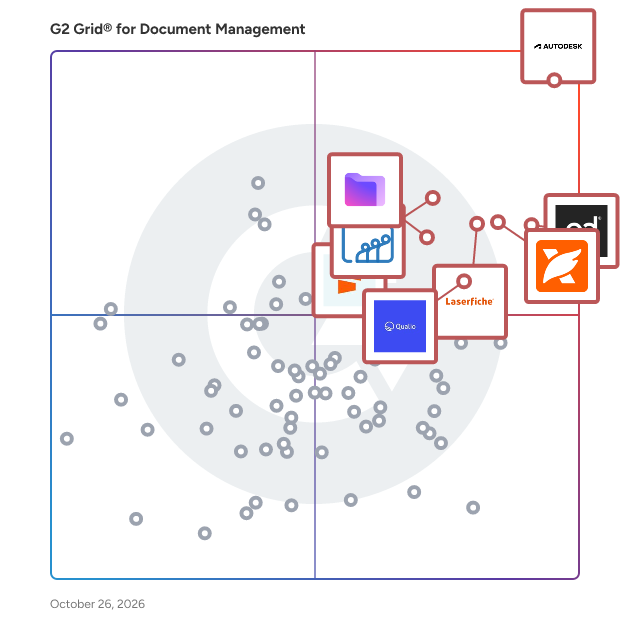
G2 Grid® for Document Management Software

G2 Grid® for Document Management Software plotting products by satisfaction and market presence

Highlighted products: PandaDoc, Foxit PDF Editor, Laserfiche, Zoho WorkDrive, Seismic Enablement Cloud, Proton Drive For Business, M-Files, and Signify.

Underlying data: [Grid® JSON](https://www.g2.com/categories/document-management/grids.json?focus%5B%5D=pandadoc&focus%5B%5D=foxit-pdf-editor&focus%5B%5D=laserfiche&focus%5B%5D=zoho-workdrive&focus%5B%5D=seismic-enablement-cloud&focus%5B%5D=proton-drive-for-business&focus%5B%5D=m-files&focus%5B%5D=signify-signify)

OpenText Documentum Content Management

OpenText™ Documentum™ content management is a distributed, cloud-native enterprise content platform that offers a compliant, secure single-source-of-truth for all users. Built on a modular foundation, Documentum software integrates into enterprise business applications to enable access from any UI. Documentum products scale to meet the high-volume content demands of highly-regulated organizations.

Average Rating: 3.7/5.0

Total Reviews: 57

How Do G2 Users Rate OpenText Documentum Content Management?

  • Has the product been a good partner in doing business?: 6.8/10 (Category avg: 8.8/10)
  • Ease of Admin: 6.6/10 (Category avg: 8.4/10)
  • Quality of Support: 7.2/10 (Category avg: 8.5/10)
  • Ease of Use: 6.8/10 (Category avg: 8.6/10)

Who Is the Company Behind OpenText Documentum Content Management?

  • Seller: OpenText
  • Year Founded: 1991
  • HQ Location: Waterloo, ON
  • Twitter: @OpenText
    21,565 Twitter followers
  • LinkedIn® Page: www.linkedin.com
    23,048 employees on LinkedIn®
  • Ownership: NASDAQ:OTEX

Who Uses This Product?

  • Top Industries: Information Technology and Services, Financial Services
  • Company Size: 60% Large, 23% Medium

What Do G2 Reviewers Say About OpenText Documentum Content Management?

AI-generated summary from verified user reviews

Pros
  • Users value the granular security and compliance features of OpenText Documentum, enhancing control over sensitive documents.
  • Users praise the user-friendly interface of OpenText Documentum, making their experience smooth and intuitive.
  • Users commend the robustness and scalability of Documentum, effectively managing massive volumes of documents with ease.
  • Users value the user-friendly experience of OpenText Documentum Content Management, making it easy to navigate and utilize.
  • Users value the easy collaboration features of Documentum, which enhance teamwork and streamline document review processes.
Cons
  • Users find the cost of Documentum to be prohibitively high, adding financial strain and complexity to its usage.
  • Users face a steep learning curve with Documentum, necessitating significant training for effective use.
  • Users find the complexity of OpenText Documentum challenging due to its steep learning curve and complicated operations.
  • Users find the complex workflows of OpenText Documentum challenging, making the system hard to navigate and operate.
  • Users find the price too expensive and the complexity adds to the overall frustration with the product.

What Are Recent G2 Reviews of OpenText Documentum Content Management?

What Are G2 Users Discussing About OpenText Documentum Content Management?

fileplan

fileplan is simple document management in the cloud that enables consistent, planned filing with document control and collaboration. The vendor (Radix Software) says fileplan helps teams apply simple, common sense principles to organize and control their documents since the software is quick to implement and simple to use. fileplan document management software is focused on delivering a practical user experience that helps organizations take control of their files quickly by providing a filing structured that can be consistently applied by all staff without changing the way they work with documents. With fileplan, the vendor's goal is to bridge the gap between the ease of use and convenience of cloud-based file synchronization and sharing and the advanced control offered by traditional document management systems. fileplan features: - planned filing for documents and email in one place - access documents wherever you are working - retain control over access and versions - simple to use

Average Rating: 4.4/5.0

Total Reviews: 48

How Do G2 Users Rate fileplan?

  • Has the product been a good partner in doing business?: 9.2/10 (Category avg: 8.8/10)
  • Ease of Admin: 8.8/10 (Category avg: 8.4/10)
  • Quality of Support: 8.8/10 (Category avg: 8.5/10)
  • Ease of Use: 9.0/10 (Category avg: 8.6/10)

Who Is the Company Behind fileplan?

  • Seller: Radix Software
  • Year Founded: 2005
  • HQ Location: Brisbane, Australia
  • Twitter: @RadixSoftware
    14 Twitter followers
  • LinkedIn® Page: www.linkedin.com
    2 employees on LinkedIn®

Who Uses This Product?

  • Top Industries: Education Management
  • Company Size: 46% Medium, 44% Small

What Do G2 Reviewers Say About fileplan?

AI-generated summary from verified user reviews

Pros
  • Users appreciate the ease of use of Fileplan, highlighting its straightforward setup and intuitive interface for effective document management.
  • Users value the easy organization and compliance features of Fileplan, enhancing their document management experience significantly.
  • Users value the reliable organization and security of FilePlan, enhancing document management and workflow efficiency.
  • Users value the security features of Fileplan, ensuring compliance and safe management of documents and records.
  • Users love the amazing storage capacity of Fileplan, making document management easy and efficient.
Cons
  • Users find searching inefficient, with slow results and cumbersome bulk file actions impacting usability and experience.
  • Users find that slow loading times, especially with large files, hinder the overall performance of FilePlan.
  • Users find the mobile experience less intuitive than desktop, highlighting slow search results and cumbersome bulk actions.
  • Users find offline capabilities limited, hindering mobile work and scenarios requiring disconnection from the cloud.
  • Users find search difficulties with FilePlan, as results can take longer than expected and navigation is cumbersome.

What Are Recent G2 Reviews of fileplan?

What Are G2 Users Discussing About fileplan?

Kleeto

Kleeto is a comprehensive document management solution designed to streamline the handling of critical business documents through automation and customization. By digitizing and centralizing document storage, Kleeto enhances operational efficiency, reduces manual tasks, and ensures secure access to important files. Its user-friendly interface and robust features cater to various industries, including finance, human resources, legal, and supply chain management. Key Features and Functionality: - Personalized Dashboards: Tailor workflows to meet specific organizational needs, providing curated interfaces for efficient document management. - Automated Rule Engines: Implement compliance-driven automation to maintain regulatory standards and reduce human error. - Centralized Storage: Consolidate all employee and business documents in a single, secure repository for easy access and management. - Advanced Search Capabilities: Utilize powerful search tools to quickly locate documents, enhancing productivity and reducing time spent on manual searches. - Access Control and Security: Manage document access with role-based permissions, ensuring sensitive information is only available to authorized personnel. - Activity Logs and Tracking: Monitor document history and user interactions to maintain transparency and accountability within the organization. Primary Value and Solutions Provided: Kleeto addresses the challenges associated with traditional document management by offering a digital platform that simplifies the storage, retrieval, and sharing of documents. It eliminates the need for physical storage, reducing overhead costs and minimizing risks related to document loss or damage. By automating routine tasks and ensuring compliance with regulatory requirements, Kleeto empowers businesses to focus on core activities, thereby enhancing overall productivity and operational efficiency.

Average Rating: 4.1/5.0

Total Reviews: 25

How Do G2 Users Rate Kleeto?

  • Has the product been a good partner in doing business?: 7.8/10 (Category avg: 8.8/10)
  • Ease of Admin: 8.3/10 (Category avg: 8.4/10)
  • Quality of Support: 8.8/10 (Category avg: 8.5/10)
  • Ease of Use: 8.7/10 (Category avg: 8.6/10)

Who Is the Company Behind Kleeto?

  • Seller: Mr.kleeto
  • Year Founded: 2009
  • HQ Location: Gurugram, Haryana
  • LinkedIn® Page: www.linkedin.com
    122 employees on LinkedIn®

Who Uses This Product?

  • Company Size: 46% Small, 38% Medium

What Do G2 Reviewers Say About Kleeto?

AI-generated summary from verified user reviews

Pros
  • Users love Kleeto for its ease of use, making document digitization and file sharing quick and efficient.
  • Users value the strong security features of Kleeto, ensuring safe management and sharing of sensitive documents.
  • Users value the secure, cloud-based document management of Kleeto for its ease of access and robust compliance features.
  • Users value the secure, cloud-based document management of Kleeto, enhancing ease of access and compliance.
  • Users appreciate the strong focus on security in Kleeto, ensuring safe and easy document management for businesses.
Cons
  • Users find that Kleeto occasionally has trouble understanding handwriting, leading to incorrect document scans.
  • Users find Kleeto to be expensive, especially when compared to more affordable open-source alternatives.
  • Users report integration difficulties with Kleeto, finding it challenging to connect with their existing software solutions.
  • Users note the limited customization options in Kleeto, which may not suit specific workflow needs.
  • Users find permission issues challenging, especially for controlling access to sensitive legal documents securely.

What Are Recent G2 Reviews of Kleeto?

What Are G2 Users Discussing About Kleeto?

Mango Practice Management

Founded by a practice CPA for over 35 years, Mango Practice Management is truly built by accountants for accountants. We provide project management, document management, time and billing, secure file-sharing, integrated payments, and client engagement solutions that bring real organization to your firm. Streamline workflows, eliminate non-billable work, collaborate with your clients, and get paid fast for all the work you do. Like we always say, Mango has everything you need, all in one place. Start your 10-day free trial at www.mangopractice.com to take back control of your practice today!

Average Rating: 3.8/5.0

Total Reviews: 35

How Do G2 Users Rate Mango Practice Management?

  • Has the product been a good partner in doing business?: 7.6/10 (Category avg: 8.8/10)
  • Ease of Admin: 7.9/10 (Category avg: 8.4/10)
  • Quality of Support: 7.2/10 (Category avg: 8.5/10)
  • Ease of Use: 8.3/10 (Category avg: 8.6/10)

Who Is the Company Behind Mango Practice Management?

  • Seller: ProfitSolv
  • Company Website:
  • Year Founded: 2020
  • HQ Location: Knoxville, US
  • Twitter: @ProfitSolv
    18 Twitter followers
  • LinkedIn® Page: www.linkedin.com
    179 employees on LinkedIn®

Who Uses This Product?

  • Top Industries: Accounting
  • Company Size: 86% Small, 14% Medium

What Do G2 Reviewers Say About Mango Practice Management?

AI-generated summary from verified user reviews

Pros
  • Users love the ease of use of Mango Practice Management, with its intuitive interface and multitude of features.
  • Users love Mango's efficient billing system, finding it user-friendly and seamless for managing invoicing and time entries.
  • Users appreciate the user-friendly invoicing integration with QBO, enhancing billing efficiency and client satisfaction.
  • Users appreciate the effective client management features of Mango, enhancing their practice with flexibility and user-friendly tools.
  • Users appreciate the amazing range of features in Mango Practice Management, enhancing efficiency for accounting firms.
Cons
  • Users find the limited options frustrating, particularly for billing and recurring payments, hindering their workflow.
  • Users highlight the missing features in Mango Practice Management, such as no recurring payments and joint billing options.
  • Users express frustration over billing issues, as features like multi-client billing and recurring payments are lacking.
  • Users experience slow processing with Mango, facing persistent issues and delays in bug fixes and reporting flexibility.
  • Users often face software bugs in Mango, leading to recurring issues and frustrating latency in performance.

What Are Recent G2 Reviews of Mango Practice Management?

What Are G2 Users Discussing About Mango Practice Management?

Geminid Systems File Explorer

Managing your files in Salesforce has never been easier.

Average Rating: 4.2/5.0

Total Reviews: 12

How Do G2 Users Rate Geminid Systems File Explorer?

  • Has the product been a good partner in doing business?: 10.0/10 (Category avg: 8.8/10)
  • Ease of Admin: 6.7/10 (Category avg: 8.4/10)
  • Quality of Support: 8.5/10 (Category avg: 8.5/10)
  • Ease of Use: 8.8/10 (Category avg: 8.6/10)

Who Is the Company Behind Geminid Systems File Explorer?

Who Uses This Product?

  • Company Size: 75% Small, 25% Medium

What Do G2 Reviewers Say About Geminid Systems File Explorer?

AI-generated summary from verified user reviews

Pros
  • Users find Geminid Systems File Explorer to be very easy to use, enhancing their efficiency and collaboration.
  • Users appreciate the detailed folder organization of Geminid Systems File Explorer, making file management effortless and efficient.
  • Users value the user-friendly interface of Gemini, enhancing file management and ensuring efficient document handling.
  • Users appreciate the reliable customer support of Geminid Systems File Explorer, ensuring assistance whenever needed.
  • Users appreciate the reliability of Gemini Systems File Explorer, ensuring smooth document management and dependable customer support.
Cons
  • Users face integration difficulty, as Geminid Systems File Explorer primarily focuses on Salesforce, limiting compatibility with other systems.
  • Users express frustration over the limited customization, as they cannot change the color scheme or layout.
  • Users have encountered poor customer support with delays and unsatisfactory responses when seeking assistance.

What Are Recent G2 Reviews of Geminid Systems File Explorer?

What Are G2 Users Discussing About Geminid Systems File Explorer?

DocStar ECM

DocStar Enterprise Content Management (ECM) DocStar ECM helps organizations securely capture, manage, find, and act on the documents and information that support everyday business processes. By bringing content management, workflow automation, and business system integrations together, DocStar helps reduce manual work, improve visibility, and keep information accessible throughout its lifecycle. Key Use Cases Accounts Payable Automation: Automate invoice capture, validation, routing, and approvals to reduce manual data entry and accelerate invoice processing. Document Management: Securely capture, organize, search, and manage business documents including invoices, purchase orders, contracts, employee records, and supporting documentation. Workflow Automation: Streamline document-driven processes with configurable workflows for routing, approvals, notifications, and exception handling. Compliance & Audit Readiness: Support information governance with document retention policies, access controls, version history, and audit trails. ERP & Business System Integrations: Connect DocStar with leading ERP and business applications, including Epicor Kinetic, Prophet 21, Microsoft Dynamics 365, Sage Intacct, and Workday, and more, helping documents and supporting information remain connected to the processes and transactions they support. Why DocStar? DocStar combines enterprise content management, document management, and workflow automation in one platform, helping organizations reduce disconnected processes, improve access to information, and automate work that extends beyond the ERP.

Average Rating: 3.8/5.0

Total Reviews: 120

How Do G2 Users Rate DocStar ECM?

  • Has the product been a good partner in doing business?: 7.4/10 (Category avg: 8.8/10)
  • Ease of Admin: 7.5/10 (Category avg: 8.4/10)
  • Quality of Support: 7.3/10 (Category avg: 8.5/10)
  • Ease of Use: 7.5/10 (Category avg: 8.6/10)

Who Is the Company Behind DocStar ECM?

  • Seller: Epicor
  • Year Founded: 1972
  • HQ Location: Austin, TX
  • Twitter: @Epicor
    9,286 Twitter followers
  • LinkedIn® Page: www.linkedin.com
    6,174 employees on LinkedIn®

Who Uses This Product?

  • Top Industries: Insurance, Hospital & Health Care
  • Company Size: 59% Medium, 30% Small

What Do G2 Reviewers Say About DocStar ECM?

AI-generated summary from verified user reviews

Pros
  • Users love the intelligent automation of DocStar ECM, which greatly minimizes manual tasks and enhances efficiency.
  • Users appreciate the ease of document processing and cloud storage with DocStar ECM, simplifying file management greatly.
  • Users value the helpful customer support of DocStar ECM, which enhances ease of setup and document management.
  • Users value the intelligent automation and data capture in DocStar ECM, reducing manual work significantly.
  • Users value the ease of document scanning and cloud storage in DocStar ECM, enhancing file management significantly.
Cons
  • Users struggle with the complex and dated interface of DocStar ECM, making navigation and task completion challenging.
  • Users find the outdated interface of DocStar ECM challenging and frustrating, impacting their overall experience.
  • Users find the complex interface of DocStar ECM challenging, often leading to frustration and inefficiency.
  • Users find the learning curve steep with DocStar ECM, struggling with its complex and outdated interface.
  • Users find the interface not intuitive, making it challenging to learn and navigate effectively.

What Are Recent G2 Reviews of DocStar ECM?

What Are G2 Users Discussing About DocStar ECM?

Leapfile

Secure file transfer. Transfers files of any size and any format to your clients simply and securely. Professional file exchange with a branded site.

Average Rating: 3.7/5.0

Total Reviews: 11

How Do G2 Users Rate Leapfile?

  • Quality of Support: 8.5/10 (Category avg: 8.5/10)
  • Ease of Use: 7.6/10 (Category avg: 8.6/10)

Who Is the Company Behind Leapfile?

  • Seller: Leapfile
  • Year Founded: 2003
  • HQ Location: Redwood City, California
  • Twitter: @leapfile
    298 Twitter followers
  • LinkedIn® Page: www.linkedin.com
    6 employees on LinkedIn®

Who Uses This Product?

  • Company Size: 69% Large, 15% Medium

What Are Recent G2 Reviews of Leapfile?

What Are G2 Users Discussing About Leapfile?

Leapdocs

Leapdocs is an affordable, secure, easy document management application for enterprises, small businesses, and start-ups.

Average Rating: 4.6/5.0

Total Reviews: 14

How Do G2 Users Rate Leapdocs?

  • Has the product been a good partner in doing business?: 10.0/10 (Category avg: 8.8/10)
  • Ease of Admin: 10.0/10 (Category avg: 8.4/10)
  • Quality of Support: 9.2/10 (Category avg: 8.5/10)
  • Ease of Use: 9.6/10 (Category avg: 8.6/10)

Who Is the Company Behind Leapdocs?

Who Uses This Product?

  • Top Industries: Information Technology and Services
  • Company Size: 36% Medium, 36% Small

What Do G2 Reviewers Say About Leapdocs?

AI-generated summary from verified user reviews

Pros
  • Users find Leapdocs easy to use, with a user-friendly interface that simplifies document management and organization.
  • Users highlight the cloud storage capabilities of Leapdocs, enhancing document organization, security, and accessibility.
  • Users value the comprehensive data management features of Leapdocs, enhancing document organization, security, and search capabilities.
  • Users value Leapdocs for its robust security features, ensuring safe and organized document management.
  • Users appreciate the user-friendly interface of Leapdocs, which facilitates quick tool adoption and minimizes the learning curve.
Cons
  • Users find Leapdocs to be expensive, with limited space and higher pricing compared to alternatives.
  • Users are frustrated by the limited free storage offered by Leapdocs, making it challenging for new users.
  • Users feel the folder navigation is inadequate, hindering usability, especially compared to other interactive UIs.
  • Users express frustration over limited free storage and lack of mobile support, complicating their experience with Leapdocs.
  • Users must evaluate Leapdocs' security measures as it may not meet all specific needs for sensitive information.

What Are Recent G2 Reviews of Leapdocs?

What Are G2 Users Discussing About Leapdocs?

Document Mountain

We author our solution with your entire process in mind. From the origination of a paper document to its final resting place, we'll save you from your mountain of paper.

Average Rating: 4.5/5.0

Total Reviews: 10

How Do G2 Users Rate Document Mountain?

  • Quality of Support: 8.6/10 (Category avg: 8.5/10)
  • Ease of Use: 8.8/10 (Category avg: 8.6/10)

Who Is the Company Behind Document Mountain?

Who Uses This Product?

  • Company Size: 36% Large, 36% Small

What Do G2 Reviewers Say About Document Mountain?

AI-generated summary from verified user reviews

Pros
  • Users value the secure and efficient cloud storage of Document Mountain for maintaining organized documents easily.
  • Users appreciate the user-friendly interface of Document Mountain, making document management and navigation effortless.
  • Users value the easy accessibility of Document Mountain, thanks to its organized storage and seamless cloud management.
  • Users highlight the efficient document management of Document Mountain, making data organization quick and easy.
  • Users value the user-friendly interface of Document Mountain, facilitating easy navigation and efficient document management.
Cons
  • Users find the lack of internet independence limiting as they need a stable connection for secure file access.
  • Users note the limited features of Document Mountain, missing key options like trial periods and certain file recovery types.

What Are Recent G2 Reviews of Document Mountain?

What Are G2 Users Discussing About Document Mountain?

UpBox.me

UpBox.me is a user-friendly file-sharing platform that enables individuals and businesses to receive files from others effortlessly. By creating a personalized upload box, users can share a unique link, allowing friends, clients, or colleagues to upload files directly to a centralized location. This streamlined process eliminates the complexities often associated with file transfers, offering a secure and efficient solution for collecting documents, images, or any other file types. Key Features and Functionality: - Customizable Upload Boxes: Users can design their upload boxes to align with personal or brand aesthetics, ensuring a cohesive experience for those uploading files. - Unique Shareable Links: Each upload box generates a distinct link, simplifying the process of requesting and receiving files from multiple sources. - Secure File Management: Uploaded files are accessible solely to the upload box owner via the UpBox.me dashboard, ensuring privacy and security. - User-Friendly Interface: The platform is designed for ease of use, requiring no technical expertise, making it accessible to a broad audience. - Flexible Subscription Plans: UpBox.me offers both free and pro plans, catering to varying storage needs and feature requirements. Primary Value and User Solutions: UpBox.me addresses the common challenge of collecting files from multiple individuals by providing a centralized, secure, and straightforward platform. It eliminates the need for complex email attachments or third-party services, streamlining workflows for professionals, educators, and anyone needing to gather files efficiently. The customizable nature of the upload boxes ensures that users can maintain brand consistency, while the secure storage guarantees that sensitive information remains protected.

Average Rating: 4.3/5.0

Total Reviews: 23

How Do G2 Users Rate UpBox.me?

  • Has the product been a good partner in doing business?: 7.8/10 (Category avg: 8.8/10)
  • Ease of Admin: 8.3/10 (Category avg: 8.4/10)
  • Quality of Support: 8.3/10 (Category avg: 8.5/10)
  • Ease of Use: 8.8/10 (Category avg: 8.6/10)

Who Is the Company Behind UpBox.me?

Who Uses This Product?

  • Company Size: 61% Small, 30% Medium

What Do G2 Reviewers Say About UpBox.me?

AI-generated summary from verified user reviews

Pros
  • Users appreciate the ease of use of UpBox.me, enjoying its simple interface and hassle-free file sharing.
  • Users love the easy sharing feature of UpBox.me, allowing quick collaboration and secure file storage for everyone.
  • Users love the hassle-free file sharing experience with UpBox.me's simple interface and responsive support.
  • Users love the easy upload feature of UpBox.me, praising its swift and hassle-free file handling experience.
  • Users appreciate the simplicity of UpBox.me, enjoying its user-friendly interface and hassle-free file sharing experience.
Cons
  • Users express concerns about the high cost of UpBox.me, feeling it should be free for everyone.
  • Users express concerns about the security vulnerabilities of UpBox.me, impacting their confidence in the platform.
  • Users express concerns about the cost issues of UpBox.me, finding it potentially burdensome compared to alternatives.
  • Users note the lack of features in UpBox.me, limiting its adaptability for different needs and use cases.
  • Users feel the limited customization options hinder their ability to tailor UpBox.me to their specific needs.

What Are Recent G2 Reviews of UpBox.me?

What Are G2 Users Discussing About UpBox.me?

Zenya DOC

Zenya DOC: Efficient document management for healthcare organizations Zenya DOC is a powerful document management system designed for healthcare organizations to ensure quick access, version control, and compliance with regulatory requirements. It helps hospitals, clinics, and care institutions organize, update, and distribute critical documents seamlessly, ensuring staff always work with the most accurate and up-to-date information. Why Zenya DOC? If you are evaluating document management solutions for healthcare, Zenya DOC stands out with its automation, compliance support, and user-friendly design. Here’s why: 1. Always the latest version of critical documents In healthcare, working with outdated protocols, policies, or guidelines can lead to errors and compliance risks. Zenya DOC ensures automated version control so that staff always have access to the latest approved documents. 2. Seamless compliance with healthcare regulations Many healthcare regulations, such as ISO 9001, JCI, and NIAZ, require strict document control. Zenya DOC provides audit trails, approval workflows, and access controls, helping hospitals and care organizations meet these requirements without manual effort. 3. Quick and easy document retrieval Unlike traditional filing systems, Zenya DOC makes finding documents fast and effortless. With smart search functions and structured categorization, staff can retrieve the right document in seconds, even in high-pressure environments. 4. Automated workflows for efficiency Manual document approval processes can slow down operations. Zenya DOC automates review and approval workflows, ensuring that medical guidelines, procedures, and policies are updated and distributed without unnecessary delays. 5. Intuitive and scalable for any healthcare organization Designed for hospitals, clinics, and healthcare networks, Zenya DOC is easy to use and scalable, allowing organizations to manage thousands of documents efficiently without complexity. For healthcare institutions seeking a reliable document management system, Zenya DOC offers security, compliance, and efficiency, ensuring that critical documents are always accessible, up to date, and well-organized.

Average Rating: 4.3/5.0

Total Reviews: 10

How Do G2 Users Rate Zenya DOC?

  • Has the product been a good partner in doing business?: 10.0/10 (Category avg: 8.8/10)
  • Ease of Admin: 10.0/10 (Category avg: 8.4/10)
  • Quality of Support: 8.8/10 (Category avg: 8.5/10)
  • Ease of Use: 7.9/10 (Category avg: 8.6/10)

Who Is the Company Behind Zenya DOC?

  • Seller: Zenya
  • Year Founded: 1998
  • HQ Location: Eindhoven, NL
  • LinkedIn® Page: www.linkedin.com
    146 employees on LinkedIn®

Who Uses This Product?

  • Company Size: 50% Small, 30% Medium

What Do G2 Reviewers Say About Zenya DOC?

AI-generated summary from verified user reviews

Pros
  • Users love the user-friendly interface of Zenya DOC, making document management a breeze for everyone.
  • Users praise Zenya DOC for its easy-to-use data management, enhancing document organization and sharing capabilities.
  • Users appreciate the remote access capabilities of Zenya DOC, allowing for seamless and timely information sharing anywhere.
  • Users value the ease of securing and sharing data with Zenya DOC's efficient cloud-based storage solution.
  • Users praise Zenya DOC for its excellent customer support, enhancing the overall experience and effectiveness of document management.
Cons
  • Users face challenges with document publishing and syncing issues, impacting their experience with Zenya DOC.
  • Users note the need for faster processing speeds in Zenya DOC to enhance their overall experience.
  • Users often face syncing issues with Zenya DOC, as documents frequently get stuck on older versions, causing delays.
  • Users experience time delays due to documents getting stuck on older versions and failing to sync in real-time.
  • Users experience unreliable performance due to poor connectivity, hindering the overall effectiveness of Zenya DOC.

What Are Recent G2 Reviews of Zenya DOC?

Textstor

Flexible indexing of documents giving fast & easy retrieval of documents. Saves paper as printing of reports no longer needed. Proprietary Smart (thin) Client gives total data security

Average Rating: 4.1/5.0

Total Reviews: 12

How Do G2 Users Rate Textstor?

  • Has the product been a good partner in doing business?: 5.0/10 (Category avg: 8.8/10)
  • Ease of Admin: 6.7/10 (Category avg: 8.4/10)
  • Quality of Support: 7.8/10 (Category avg: 8.5/10)
  • Ease of Use: 7.5/10 (Category avg: 8.6/10)

Who Is the Company Behind Textstor?

Who Uses This Product?

  • Company Size: 43% Large, 29% Medium

What Do G2 Reviewers Say About Textstor?

AI-generated summary from verified user reviews

Pros
  • Users appreciate the convenience of a centralized document repository in Textstor, making access and editing straightforward.
  • Users find the easy access to all stored documents in one repository remarkably convenient for editing and viewing.

What Are Recent G2 Reviews of Textstor?

What Are G2 Users Discussing About Textstor?

Quadient Impress

Quadient Impress is a user-friendly, cloud-based intelligent multi-channel document automation and delivery software solution. It automates your entire customer communication workflow and enables you to simplify the preparation and distribution of business communications. Quadient Impress gives you the flexibility to prepare, send and track all documents, whether ad hoc or batch, via any combination of channels (print or digital) depending on your customers' preferences, all at your own pace.

Average Rating: 4.6/5.0

Total Reviews: 16

How Do G2 Users Rate Quadient Impress?

  • Has the product been a good partner in doing business?: 9.0/10 (Category avg: 8.8/10)
  • Ease of Admin: 8.8/10 (Category avg: 8.4/10)
  • Quality of Support: 8.9/10 (Category avg: 8.5/10)
  • Ease of Use: 8.4/10 (Category avg: 8.6/10)

Who Is the Company Behind Quadient Impress?

  • Seller: Quadient
  • Year Founded: 1924
  • HQ Location: Bagneux, France
  • Twitter: @Quadient
    3,878 Twitter followers
  • LinkedIn® Page: www.linkedin.com
    3,966 employees on LinkedIn®
  • Ownership: EPA: QDT

Who Uses This Product?

  • Company Size: 38% Large, 31% Small

What Are Recent G2 Reviews of Quadient Impress?

Appfire Comala Document Management

What is Comala Document Management? Comala Document Management is a robust solution designed to enhance document control and governance within Confluence. It enables teams to create, review, and approve documents with ease, ensuring compliance with regulatory standards like ISO, FDA, and GDPR, as well as internal policies. Purpose The solution simplifies the management of policies, procedures, and other compliance-critical documents, helping organizations maintain alignment with both internal and external governance requirements. Key Features - Workflow Automation: Streamline document creation, review, and approval processes with customizable workflows. - Version Control: Track document revisions to ensure teams are always working with the latest version. - Audit Trails: Maintain transparency with detailed logs of changes and approvals for compliance audits. - Compliance Assurance: Built to meet rigorous regulatory and internal standards. - Integration with Confluence: Seamless integration for centralized document management in your digital workspace. Benefits to Users Comala Document Management enhances team productivity by reducing manual effort in managing documents, ensuring accuracy and consistency. It minimizes compliance risks by automating workflows and maintaining detailed audit trails, giving organizations confidence in their regulatory adherence. Whether handling policies, procedures, or contracts, this solution is essential for businesses seeking streamlined and secure document control practices. With Comala Document Management, organizations can focus on achieving their goals without worrying about compliance gaps or inefficiencies.

Average Rating: 4.1/5.0

Total Reviews: 8

How Do G2 Users Rate Appfire Comala Document Management?

  • Has the product been a good partner in doing business?: 8.8/10 (Category avg: 8.8/10)
  • Ease of Admin: 7.7/10 (Category avg: 8.4/10)
  • Quality of Support: 9.4/10 (Category avg: 8.5/10)
  • Ease of Use: 7.5/10 (Category avg: 8.6/10)

Who Is the Company Behind Appfire Comala Document Management?

  • Seller: Appfire
  • Company Website:
  • Year Founded: 2005
  • HQ Location: Boston, Massachusetts
  • Twitter: @Appfire
    1,632 Twitter followers
  • LinkedIn® Page: www.linkedin.com
    745 employees on LinkedIn®

Who Uses This Product?

  • Company Size: 38% Large, 25% Medium

What Do G2 Reviewers Say About Appfire Comala Document Management?

AI-generated summary from verified user reviews

Pros
  • Users value the seamless integration of Appfire Comala Document Management with Confluence, enhancing document approval efficiency.
  • Users value the customization options of Appfire Comala Document Management, enhancing workflow flexibility and content tracking.
  • Users value the ease of use of Appfire Comala Document Management, appreciating its simple setup and user-friendly interface.
  • Users value the flexibility in customizing workflows with Appfire Comala Document Management, enhancing their content management experience.
  • Users appreciate the easy initial setup of Appfire Comala Document Management, enabling quick deployment without technical issues.
Cons
  • Users find the cost issues problematic, as expenses increase considerably with larger user groups.
  • Users find implementation difficult, particularly for non-technical teams and limited use cases, impacting overall usability.
  • Users find the inefficient searching for the approval button frustrating, especially if unfamiliar with the interface.
  • Users are disappointed with the missing features after the migration from server to cloud, impacting usability.
  • Users find the required expertise for Comala Document Management a barrier, limiting usability for non-technical teams.

What Are Recent G2 Reviews of Appfire Comala Document Management?

CentricMinds

CentricMinds is a modern intranet and employee experience platform designed to enhance organizational communication, knowledge management, and productivity from a single, integrated solution. This platform empowers employees to create content with the assistance of artificial intelligence, facilitates instant access to information through AI-driven enterprise search, and promotes collaboration via a dedicated employee app that includes team chat features. With CentricMinds, employees can efficiently access essential documents, forms, workflows, and business information, regardless of their work location. Targeting organizations of various sizes, CentricMinds serves as a comprehensive digital workplace that replaces the need for multiple disconnected tools. It caters to a diverse audience, including office-based staff, remote workers, and frontline employees, ensuring that all team members remain connected and informed. The platform's modern intranet serves as a central hub for company news, announcements, and knowledge sharing, fostering a culture of transparency and engagement among employees. Key features of CentricMinds include a dedicated employee app that consolidates company news, team chat, and essential documents, allowing for seamless communication and collaboration. The task management functionality enables managers to assign and track work through the desktop intranet, while frontline employees can receive, update, and complete tasks directly from their mobile devices. This streamlined approach to task management enhances accountability and ensures that work is completed efficiently. The platform also leverages AI technology to assist with content creation and enterprise search, enabling employees to publish updates more quickly and find critical organizational knowledge with ease. Document management capabilities, including version control, metadata management, and permissions, ensure that sensitive information is securely handled. Moreover, CentricMinds integrates with popular business systems such as Microsoft 365, SharePoint, Google Drive, and Dropbox, allowing organizations to maintain their existing workflows while enhancing overall efficiency. In addition to these features, CentricMinds offers digital forms, approval workflows, and employee directories that automate business processes and improve collaboration across teams. By bringing together people, information, and business processes in one cohesive platform, organizations can cultivate a more connected, informed, and engaged workforce. This ultimately strengthens communication, enhances collaboration, and fosters a culture of accountability and continuous improvement within the organization.

Average Rating: 4.6/5.0

Total Reviews: 22

How Do G2 Users Rate CentricMinds?

  • Has the product been a good partner in doing business?: 9.5/10 (Category avg: 8.8/10)
  • Ease of Admin: 8.9/10 (Category avg: 8.4/10)
  • Quality of Support: 9.4/10 (Category avg: 8.5/10)
  • Ease of Use: 9.4/10 (Category avg: 8.6/10)

Who Is the Company Behind CentricMinds?

  • Seller: CentricMinds
  • Company Website:
  • Year Founded: 2002
  • HQ Location: Melbourne, VIC
  • Twitter: @CentricMinds
    334 Twitter followers
  • LinkedIn® Page: www.linkedin.com
    17 employees on LinkedIn®

Who Uses This Product?

  • Company Size: 64% Medium, 27% Large

What Are Recent G2 Reviews of CentricMinds?

What Are G2 Users Discussing About CentricMinds?

Neeraja Prakash
NP
Researched and written by Neeraja Prakash
Updated October 3, 2024