Best Construction CRM Software

Last updated: November 14, 2026

How Many Construction CRM Software Products Does G2 Track?

Total Products under this Category: 249

Category Stats (Nov 2026)

  • Average Rating: 4.35/5 (↓0.01 vs Oct 2026) The average rating of products in this category, based on all submitted ratings
  • Top Trending Product: Bolster (+0.13%) - Among all products in this category, Bolster recorded the largest rating increase compared to last month

Last updated: November 01, 2026

How Does G2 Rank Construction CRM Software Products?

Why You Can Trust G2's Software Rankings:

  • 30 Analysts and Data Experts
  • 50,600+ Authentic Reviews
  • 249+ Products
  • Unbiased Rankings

G2's software rankings are built on verified user reviews, rigorous moderation, and a consistent research methodology maintained by a team of analysts and data experts. Each product is measured using the same transparent criteria, with no paid placement or vendor influence. While reviews reflect real user experiences, which can be subjective, they offer valuable insight into how software performs in the hands of professionals. Together, these inputs power the G2 Score, a standardized way to compare tools within every category.

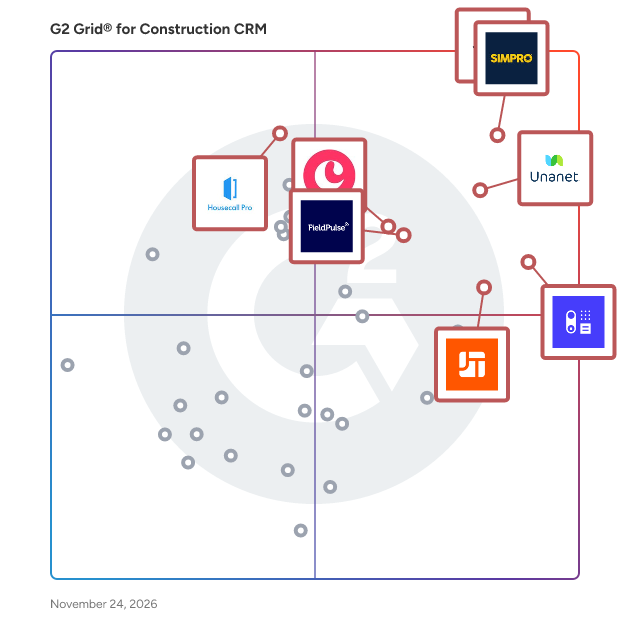
G2 Grid® for Construction CRM Software

G2 Grid® for Construction CRM Software plotting products by satisfaction and market presence

Highlighted products: Jobber, Simpro, Unanet CRM, Capsule CRM, JobTread, FieldPulse, Copper, and Housecall Pro.

Underlying data: [Grid® JSON](https://www.g2.com/categories/construction-crm/grids.json?focus%5B%5D=jobber&focus%5B%5D=simpro&focus%5B%5D=unanet-crm&focus%5B%5D=capsule-crm&focus%5B%5D=jobtread&focus%5B%5D=fieldpulse-fieldpulse&focus%5B%5D=copper&focus%5B%5D=housecall-pro)

Jobber

Start Your Free Trial of Jobber - No Credit Card Required Run a more efficient, predictable service business with one system built for growing, multi-crew teams. Keep Work Moving as You Get Busier Jobber connects quoting, scheduling, invoicing, and payments in one place so work moves forward without constant follow-ups or manual coordination. Build efficient days without spending hours managing the calendar, and adjust quickly when plans change. Plus, connect with tools like QuickBooks Online to keep your operations running smoothly. Keep Your Team Aligned in the Field and Office Give your crews clear schedules, job details, and updates they can access anywhere. While they stay focused on the work, your office has real-time visibility into every job without chasing calls, texts, or status updates. Drive Predictable, Profitable Performance Track jobs, revenue, and payments in one place so you always know how your business is performing. Automations keep quotes, invoices, and follow-ups moving, helping you maintain steady cash flow without adding more admin work. Client Testimonial “I spend maybe an hour per week on invoicing and paperwork now. Online payments and invoicing make me look professional.” - Stacey Flanagan, SEF The Lawn Surgeon Discover the Jobber Difference Join 200,000+ service professionals across 50+ industries including landscaping, HVAC, and residential cleaning who run their business with Jobber.

Average Rating: 4.6/5.0

Total Reviews: 543

How Do G2 Users Rate Jobber?

  • Has the product been a good partner in doing business?: 9.2/10 (Category avg: 9.3/10)
  • Ease of Admin: 9.1/10 (Category avg: 8.8/10)
  • Ease of Use: 9.0/10 (Category avg: 8.8/10)
  • Quality of Support: 9.1/10 (Category avg: 8.8/10)

Who Is the Company Behind Jobber?

  • Seller: Jobber
  • Company Website:
  • Year Founded: 2011
  • HQ Location: Edmonton, Canada
  • LinkedIn® Page: www.linkedin.com
    1,462 employees on LinkedIn®

Who Uses This Product?

  • Who Uses This: Owner, Office Manager
  • Top Industries: Construction, Consumer Services
  • Company Size: 86% Small, 6% Medium

What Do G2 Reviewers Say About Jobber?

AI-generated summary from verified user reviews

Pros
  • Users find the interface intuitive and easy to navigate, helping them learn the platform and move through daily tasks smoothly.
  • Users like having business tools together in one platform, which helps them organize and manage their workflows.
  • Users appreciate the time savings and streamlined operations, which reduce administrative work and make running their businesses easier.
  • Users find setup easy and appreciate helpful onboarding guidance that gets them started quickly.
  • Users value the easy, flexible scheduling tools that help them organize calendars, adjust jobs, and keep crews on track.
Cons
  • Users find costs high, with add-on features and plan options often requiring extra payments.
  • Users find the mobile app limited compared with desktop, lacking features and sometimes unreliable or difficult to use.
  • Users say limited customization restricts how well settings, emails, workflows, and client-facing features can fit their businesses.
  • Users find scheduling cumbersome and hard to navigate, with limited online booking and crew, availability, and job-order controls.
  • Users find quote options inflexible, with pricing and online presentation limitations and unreliable saving or sending.

What Are Recent G2 Reviews of Jobber?

What Are G2 Users Discussing About Jobber?

Simpro

Simpro is field service management software for trade and service contractors. It handles job management from the first call through quoting, scheduling, the work order, the invoice and the payment, so the office, the field and finance work from the same records. More than 250,000 users worldwide run their work in Simpro. Simpro Lightning, Simpro's AI-First Operating Platform, brings AI field service management into the field service software contractors already run. Cooper, the AI at its center, powers JustAsk and a digital workforce of role-based AI agents for training, job preparation, documentation and customer summaries. • JustAsk answers business questions in plain language. Ask for margins by technician or overdue invoices and get the answer without building a report. • FieldReady supports technician training, JobReady prepares each job before dispatch, JobScribe structures on-site documentation, and JobBrief writes customer summaries for technicians to review. • JustDo is the AI office assistant. Tell it what needs doing, or hand it an email, PDF, photo or spreadsheet, and it drafts the job, customer or quote in Simpro for your team to approve. It brings field service automation to the data entry that fills an office team's day. • Pulse is the AI receptionist, a digital worker on the Simpro Lightning digital workforce. It answers inbound calls 24/7, recognizes callers from their Simpro record, qualifies the job and places a provisional hold on the schedule for your team to confirm. Safety-critical calls such as gas leaks or flooding go straight to your on-call technician. • Two-Way Messaging and GPS Time Tracking handle customer communication and time capture. Delight, the AI customer marketing agent, is a digital worker for customer follow-up. It reads each customer's Simpro job history and assets and writes them personal messages about maintenance reminders, quotes that went quiet and seasonal campaigns. You can preview each message 24 hours before it goes out. Simtrac 360 adds GPS fleet tracking hardware that is built into Simpro. The AX300 tracker plugs into a vehicle's OBD port, and a hardwired AK300 is available for covert installs. Simpro sites act as geofences, so each site visit becomes labor hours on the matching job. Odometer readings and engine hours update the vehicle's asset record. The core platform covers the full job lifecycle: • Win and plan work: Customer and site history, estimates and quotes live in one field service CRM. When a quote is accepted, the office schedules and dispatches the right technician from the same system. • Complete work in the field: Technicians get mobile work orders, digital forms, job notes and asset records. Preventive maintenance contracts run on the same records, so work order management and maintenance management stay in one place. • Protect margin and cash flow: Job costing, inventory, invoicing, payment options and dashboards show what each job made, from quote to cash. Simpro is built for trade contractors running residential and commercial service calls, maintenance, installations and projects: • HVAC: Emergency no-heat and no-cool calls, seasonal maintenance contracts and full system replacements share one schedule. Estimates use live supplier pricing for equipment and refrigerant, and job costing tracks estimated against actual cost as the work happens. • Plumbing: Burst pipe call-outs, backflow and gas maintenance agreements and hot water system replacements all compete for the same plumbers. The office schedules them from a drag-and-drop dispatch board, and fittings costs stay tied to supplier price files. • Electrical: Reactive callouts, scheduled maintenance and multi-stage projects run on one platform. Estimates cover labor, materials and large cable runs, and job costing shows where each project stands before the final invoice. • Pool service: Recurring cleaning and maintenance visits can be bulk-scheduled by route, zone and preferred technician, and field staff clock in and out from the Simpro Mobile app. Fire protection and security contractors run on the same platform. It works for small teams and grows with the business.

Average Rating: 4.1/5.0

Total Reviews: 533

How Do G2 Users Rate Simpro?

  • Has the product been a good partner in doing business?: 7.9/10 (Category avg: 9.3/10)
  • Ease of Admin: 7.6/10 (Category avg: 8.8/10)
  • Ease of Use: 7.7/10 (Category avg: 8.8/10)
  • Quality of Support: 7.6/10 (Category avg: 8.8/10)

Who Is the Company Behind Simpro?

  • Seller: Simpro
  • Company Website:
  • Year Founded: 2002
  • HQ Location: Miami, FL
  • LinkedIn® Page: www.linkedin.com
    719 employees on LinkedIn®

Who Uses This Product?

  • Who Uses This: Director, Office Manager
  • Top Industries: Construction, Electrical/Electronic Manufacturing
  • Company Size: 78% Small, 22% Medium

What Do G2 Reviewers Say About Simpro?

AI-generated summary from verified user reviews

Pros
  • Users find Simpro to be incredibly easy to use, thanks to its user-friendly interface and customizable options.
  • Users value the streamlined data collection capabilities of Simpro, enhancing workflow and asset management efficiency.
  • Users value the user-friendly interface and wide range of features in Simpro, enhancing productivity and customization.
  • Users find the responsive customer support of Simpro quick and effective, enhancing overall satisfaction and usability.
  • Users value the efficiency of Simpro, streamlining everything from quotes to invoicing seamlessly in one system.
Cons
  • Users find the complexity of setup in Simpro overwhelming, making it challenging to utilize its features effectively.
  • Users find the complex setup of Simpro challenging, resulting in a steep learning curve and slower workflows.
  • Users find the difficult learning curve challenging due to complexity and extensive setup requirements in Simpro.
  • Users face difficult onboarding and complexity with Simpro, making the transition and training challenging for staff.
  • Users find the learning curve challenging due to the complexity and extensive setup required for effective use.

What Are Recent G2 Reviews of Simpro?

What Are G2 Users Discussing About Simpro?

Unanet CRM

Unanet is an AI-first CRM and growth platform specifically designed for project-driven businesses, including sectors such as government contracting, architecture, engineering, and construction (AEC). This comprehensive solution is trusted by over 4,200 firms to streamline the connection between relationships, opportunities, proposals, projects, and overall business performance. By offering industry-specific workflows, real-time visibility, and intelligent automation, Unanet empowers teams to focus on the most promising opportunities, enhance their win rates, and grow with greater assurance. The Unanet CRM serves as a vital growth system of record for organizations that rely on relationships, expertise, and reputation to secure work through complex pursuits. It integrates various functions such as relationship management, account and contact intelligence, opportunity and pipeline management, and proposal development into a cohesive system. This integration allows teams to operate more efficiently, making informed decisions based on comprehensive data rather than fragmented information. For AEC firms, Unanet CRM provides a robust framework that connects crucial data points, including client, contact, partner, project, employee, and past-performance information. This interconnectedness enables teams to gain insights into their relationships, identify relevant experience, and craft stronger proposals. For government contractors, the Unanet GovCon CRM enhances this capability by integrating market and award intelligence, pipeline management, and AI-driven pursuit prioritization, ensuring that teams can effectively identify and pursue the opportunities they are best positioned to win. Unanet CRM facilitates collaboration among business development, capture, marketing, proposal, and executive teams by providing a shared context that eliminates the need for disconnected spreadsheets and point solutions. Users can manage their pipeline, improve forecast accuracy, and streamline proposal processes while preserving institutional knowledge. The platform is accessible through web, mobile, and Outlook experiences, allowing users to work seamlessly within their existing workflows. The AI capabilities of Unanet extend beyond mere activity documentation. With features like ChampAI, the platform introduces embedded intelligence that assists teams in evaluating pursuit fit, surfacing relevant relationships, and identifying critical tasks that require attention. Depending on the selected market and package, Unanet CRM can also integrate with tools such as ProposalAI, GovIntel, OpportuneAI, Unanet ERP, DataLake, and Unanet Connect, offering a comprehensive view that spans from opportunity identification to project execution and financial performance. This interconnected approach ensures that users have the insights and tools necessary to drive their business forward effectively.

Average Rating: 4.0/5.0

Total Reviews: 265

How Do G2 Users Rate Unanet CRM?

  • Has the product been a good partner in doing business?: 8.1/10 (Category avg: 9.3/10)
  • Ease of Admin: 7.5/10 (Category avg: 8.8/10)
  • Ease of Use: 7.4/10 (Category avg: 8.8/10)
  • Quality of Support: 7.5/10 (Category avg: 8.8/10)

Who Is the Company Behind Unanet CRM?

  • Seller: Unanet
  • Company Website:
  • Year Founded: 1988
  • HQ Location: Dulles, VA
  • LinkedIn® Page: www.linkedin.com
    455 employees on LinkedIn®
  • Phone: (703)-689-9440

Who Uses This Product?

  • Who Uses This: Marketing Coordinator, Marketing Manager
  • Top Industries: Construction, Architecture & Planning
  • Company Size: 68% Medium, 19% Small

What Do G2 Reviewers Say About Unanet CRM?

AI-generated summary from verified user reviews

Pros
  • Users find Unanet CRM easy to use, especially appreciating the intuitive timesheets feature and accessible past history information.
  • Users value the unifying capabilities of Unanet CRM, enhancing collaboration and strategic alignment across teams.
  • Users find the tracking capabilities essential for monitoring proposals, clients, and sales performance effectively.
  • Users find Client Management in Unanet CRM invaluable for tracking proposals, clients, and performance metrics effectively.
  • Users value the comprehensive features of Unanet CRM, highlighting its quick integration and excellent customer support.
Cons
  • Users find Unanet CRM not user-friendly, struggling with navigation, report creation, and a steep learning curve.
  • Users find the poor reporting capabilities of Unanet CRM frustrating, affecting data analysis and decision-making processes.
  • Users find the complex usability of Unanet CRM challenging, particularly with report creation and navigating features.
  • Users report a significant learning curve with Unanet CRM, making initial usage challenging and time-consuming.
  • Users find the difficult navigation of Unanet CRM hampers their ability to quickly locate relevant information.

What Are Recent G2 Reviews of Unanet CRM?

What Are G2 Users Discussing About Unanet CRM?

AI can help you find the answers. G2 helps you trust them.

Connect G2 to Claude or ChatGPT for answers grounded in G2's trusted reviews, comparisons, and pricing from real user insights.

How it works

Capsule CRM

Capsule CRM is a customer relationship management (CRM) software solution that helps small and medium-sized businesses win more business, keep more clients, and deliver consistently great work. It gives sales, marketing, and service teams one organized place to see every contact, conversation, and deal - so nothing falls through the cracks, and no one's digging through scattered spreadsheets or half-updated tools just to find out where things stand. Trusted by more than 10,000 businesses worldwide, Capsule is built for teams that want the structure of a bigger CRM system without the complexity or setup headaches that usually come with one. It brings sales tracking, contact management, and project tracking together in one place, so your team can spend less time managing software and more time managing relationships. Capsule connects to the tools businesses already use - like email, accounting software, and marketing platforms - and now offers an AI integration, available via Model Context Protocol (MCP), that lets supported AI tools answer questions about your CRM data in plain language. No dashboards to build, no filters to configure - just ask. Here's what makes it work for growing teams: Contact and company management: every interaction, note, email, and document lives in one place, so you walk into every call or meeting already knowing where things stand. Visual sales pipelines: see exactly where every deal is and what needs your attention next, with the flexibility to build different pipelines for different sales processes. Built-in task and calendar management: follow-ups and meetings are linked directly to the right contact or deal, so nothing gets missed and no one has to keep it all in their head. Project and case tracking: keep delivery and after-sale work moving with simple boards, milestones, and stages, so sales and delivery teams are always working from the same page. Easy integrations: connect Capsule to the tools you already rely on, with even more possible through its API and growing AI/MCP capabilities. Reporting tools turn your pipeline and activity data into a clear, honest picture of how sales are really going, so decisions get made on real numbers instead of gut feel. And as your team grows, you can control who sees and edits what - so Capsule scales with you instead of becoming something you have to manage around. At its core, Capsule is built for businesses that want a CRM that feels quick to set up and easy to keep organized from day one, without giving up the depth needed to handle more complex sales or client work as the business grows.

Average Rating: 4.7/5.0

Total Reviews: 528

G2 Deal: 20% off the monthly price per user of any paid Capsule plan for 12 months

Capsule CRM is a growth-oriented CRM tool that empowers salespeople, marketers, and business owners to win more business, retain more clients, and deliver exceptional work. G2 customers can get 20% off the monthly price per user of any paid Capsule plan for the first 12 months.

Price: ~~$21-$75 per user per month.~~ → $16.80-$60 per user per month.

View this exclusive G2 deal

How Do G2 Users Rate Capsule CRM?

  • Has the product been a good partner in doing business?: 9.5/10 (Category avg: 9.3/10)
  • Ease of Admin: 9.4/10 (Category avg: 8.8/10)
  • Ease of Use: 9.4/10 (Category avg: 8.8/10)
  • Quality of Support: 9.4/10 (Category avg: 8.8/10)

Who Is the Company Behind Capsule CRM?

  • Seller: Capsule
  • Company Website:
  • Year Founded: 2007
  • HQ Location: Manchester, GB
  • LinkedIn® Page: www.linkedin.com
    55 employees on LinkedIn®

Who Uses This Product?

  • Who Uses This: Director, Owner
  • Top Industries: Consulting, Marketing and Advertising
  • Company Size: 93% Small, 7% Medium

What Do G2 Reviewers Say About Capsule CRM?

AI-generated summary from verified user reviews

Pros
  • Users find Capsule CRM extremely easy to use, appreciating its intuitive design and efficient task management features.
  • Users highlight the super responsive customer support of Capsule CRM, ensuring quick resolutions and a satisfying experience.
  • Users highlight the user-friendly interface of Capsule CRM, making it easy for beginners to navigate and manage tasks.
  • Users love the simplicity of Capsule CRM, making it perfect for beginners and efficient for small businesses.
  • Users value the task management features of Capsule CRM, which enhance organization and efficiency for daily activities.
Cons
  • Users note a lack of essential features in Capsule CRM, affecting ease of use and support options.
  • Users feel that there is limited customization available in Capsule CRM, impacting their flexibility and user experience.
  • Users express frustration over the integration issues with Capsule CRM, relying on costly third-party software for connectivity.
  • Users struggle with incomplete information regarding advanced features and tutorials, making it hard to utilize Capsule CRM fully.
  • Users face a steep learning curve with Capsule CRM, struggling to utilize all features and set up effectively.

What Are Recent G2 Reviews of Capsule CRM?

What Are G2 Users Discussing About Capsule CRM?

JobTread

JobTread provides end-to-end construction management software that helps jobs-based businesses manage all of their processes, from pre-construction to project completion. The platform serves as a central location to manage jobs, teams, documents, photos, finances, customers, vendors, sub-contractors, and more. Its budget-first approach creates financial transparency at every stage of a project. Through JobTread, you will have access to an extensive list of Sales and Estimating features ranging from a construction CRM and budgeting to contracts and eSignitures. The Project Management features cover purchase orders, daily logs, tasks and scheduling and more. Its Finance and Cashflow features offer Change Orders, invoices, billing, job costing, and payment processing. With the Business Intelligence features the user has custom fields, reporting, dashboards, and performance insights. JobTread has integrations with Quickbooks Online, Stripe Payments, Slack, and Zapier.

Average Rating: 4.9/5.0

Total Reviews: 120

How Do G2 Users Rate JobTread?

  • Has the product been a good partner in doing business?: 9.8/10 (Category avg: 9.3/10)
  • Ease of Admin: 9.4/10 (Category avg: 8.8/10)
  • Ease of Use: 9.3/10 (Category avg: 8.8/10)
  • Quality of Support: 9.9/10 (Category avg: 8.8/10)

Who Is the Company Behind JobTread?

  • Seller: JobTread
  • Company Website:
  • Year Founded: 2019
  • HQ Location: Dallas, US
  • LinkedIn® Page: www.linkedin.com
    70 employees on LinkedIn®

Who Uses This Product?

  • Who Uses This: Owner, President
  • Top Industries: Construction
  • Company Size: 97% Small, 3% Large

What Do G2 Reviewers Say About JobTread?

AI-generated summary from verified user reviews

Pros
  • Users appreciate the ease of use of JobTread, noting its intuitive design and excellent support for seamless integration.
  • Users value the exceptional customer support that ensures smooth implementation and successful utilization of JobTread.
  • Users value the efficiency improvement brought by JobTread, enjoying streamlined project management and exceptional customer support.
  • Users love the intuitive platform and exceptional customer support, making project management seamless and efficient.
  • Users highly value the exceptional customer support from JobTread, ensuring successful integration and ongoing assistance.
Cons
  • Users note the missing features of JobTread, such as limited invoice editing and lack of an integrated takeoff tool.
  • Users face access limitations as spreadsheets require external edits and the platform is not optimized for fixed-price contracts.
  • Users face editing difficulties with JobTread, particularly with spreadsheet updates requiring external adjustments before re-uploading.
  • Users note that JobTread requires improvement in handling invoicing issues to enhance user experience and functionality.
  • Users find it challenging to keep up with update issues as JobTread evolves, despite strong support resources.

What Are Recent G2 Reviews of JobTread?

What Are G2 Users Discussing About JobTread?

FieldPulse

FieldPulse is a leading AI-enabled field service management platform built for growing teams. Trusted by more than 10,000 service professionals, it brings scheduling and dispatch, work orders, estimates, invoicing, payments, and customer management into one system. From plumbing and HVAC to electrical, garage door, and appliance repair, service businesses run their entire operation on FieldPulse, with owners, office staff, and technicians working from the same information. In the office, dispatchers see each technician’s day in one view, so they can send the right person to the right job and adjust when plans change. The built-in CRM keeps each customer’s conversations, past jobs, and payment history in one place, and QuickBooks stays in sync in the background. When it’s time to look at the bigger picture, reporting puts revenue, job profitability, and technician performance in front of you at a glance. For quick answers, FieldPulse Maverick, the AI assistant, finds records, pulls the numbers, and drafts estimates, invoices, and jobs in seconds. In the field, technicians have their schedule, job details, and customer information in the mobile app, ready to go even without a connection. Once they’re on site, ClearPath walks them through each stage of the job, so every technician follows the same process and the office sees progress as it happens. Without leaving the job site, technicians can build estimates from the flat-rate pricebook, turn approved work into invoices, and collect payment with FieldPulse Payments. With FieldPulse, your whole team stays aligned from the first call to the final payment. As you add jobs, technicians, and locations, FieldPulse's seat-based pricing scales with your team and workflows adapt as your processes change. FieldPulse is one platform to run the office, equip the field, and grow with confidence, today and for whatever comes next.

Average Rating: 4.7/5.0

Total Reviews: 409

How Do G2 Users Rate FieldPulse?

  • Has the product been a good partner in doing business?: 9.2/10 (Category avg: 9.3/10)
  • Ease of Admin: 8.8/10 (Category avg: 8.8/10)
  • Ease of Use: 8.9/10 (Category avg: 8.8/10)
  • Quality of Support: 9.5/10 (Category avg: 8.8/10)

Who Is the Company Behind FieldPulse?

  • Seller: FieldPulse
  • Company Website:
  • Year Founded: 2015
  • HQ Location: Dallas, Texas
  • LinkedIn® Page: www.linkedin.com
    208 employees on LinkedIn®
  • Phone: 817-635-2218

Who Uses This Product?

  • Who Uses This: Owner, Office Manager
  • Top Industries: Construction, Consumer Services
  • Company Size: 94% Small, 4% Medium

What Do G2 Reviewers Say About FieldPulse?

AI-generated summary from verified user reviews

Pros
  • Users commend the responsive customer support of FieldPulse, appreciating quick answers and hands-on assistance.
  • Users value the ease of use of FieldPulse, finding it simple to navigate and implement in their business.
  • Users appreciate the ease of use and detailed project tracking in FieldPulse, enhancing workflow management effectively.
  • Users love the intuitive scheduling feature of FieldPulse, which simplifies job assignments and enhances technician tracking.
  • Users appreciate the excellent customer service from FieldPulse, receiving quick responses and effective support for all inquiries.
Cons
  • Users find the need for improvement in FieldPulse, citing issues with CRM functionality and system integration.
  • Users find the limited customization options in FieldPulse challenging, impacting their workflows and overall experience.
  • Users find the limited features of FieldPulse hinder their workflow and integration capabilities significantly.
  • Users note a steep learning curve with FieldPulse, requiring significant time and effort to fully harness its capabilities.
  • Users express frustration with update issues, particularly regarding missed features and ineffective support responses.

What Are Recent G2 Reviews of FieldPulse?

What Are G2 Users Discussing About FieldPulse?

Copper

Copper is the only client and project management tool that's a Recommended for Google Workspace app. Built for agencies, consultants and professional services, Copper helps you connect with leads, win deals, deliver projects and create repeat clients. All in one easy-to-use tool. Join 30,000+ professional services businesses in building more valuable, longer-lasting relationships. Collect leads with website contact forms or scan business cards from our mobile app. Leads flow effortlessly into your sales pipeline. Pipeline flags and reports help you keep things moving. Transition new clients over to your onboarding or project delivery pipelines with one click. Manage next steps and tasks directly on your pipeline without needing to click into projects. Copper’s integration with Google works seamlessly with your Gmail, Calendar and Drive, you never have to switch tabs to add leads, track email conversations, find files and manage tasks in your marketing and sales process. Talking to a new person? Add new contacts directly from Gmail through our Chrome Extension. Hover over any Copper contact for rich, contextualized communication and activity details. Surface your CRM reminders and tasks alongside your Gmail inbox. Speed up your email responses with email templates, automations and merge fields. Add new leads and update old ones based on your email interactions, Google Contacts and Copper suggestions. Manual data entry is a thing of the past. Your Google Calendar gets a makeover too. You can look up event details, customer interactions, and materials directly from Google Calendar without breaking your workflow. Stop hunting for files, they're right where you need them. Files and Google docs sync to your Copper contact records automatically. Quickly surface customer files across company and deal records, and easily attach suggested files in Gmail based on your email activity. Export any data from Copper directly to Google Sheets via the custom report builder, or connect to Looker Studio to visualize Copper data longside other data sources.

Average Rating: 4.5/5.0

Total Reviews: 1,126

G2 Deal: 15% Off Annual Plan for Life

15% Off Annual Plan for Life on all available Copper plans

Price: ~~Starting at $23/user/month~~ → Starting at $19/user/month

View this exclusive G2 deal

How Do G2 Users Rate Copper?

  • Has the product been a good partner in doing business?: 9.0/10 (Category avg: 9.3/10)
  • Ease of Admin: 8.9/10 (Category avg: 8.8/10)
  • Ease of Use: 9.1/10 (Category avg: 8.8/10)
  • Quality of Support: 8.6/10 (Category avg: 8.8/10)

Who Is the Company Behind Copper?

  • Seller: Copper
  • Company Website:
  • Year Founded: 2012
  • HQ Location: San Francisco, CA
  • LinkedIn® Page: www.linkedin.com
    313 employees on LinkedIn®

Who Uses This Product?

  • Who Uses This: CEO, Founder
  • Top Industries: Marketing and Advertising, Information Technology and Services
  • Company Size: 79% Small, 18% Medium

What Do G2 Reviewers Say About Copper?

AI-generated summary from verified user reviews

Pros
  • Users appreciate the ease of use with Copper, seamlessly integrating with Google Workspace for efficient management.
  • Users benefit from the seamless Gmail integration of Copper, enhancing contact management and productivity effortlessly.
  • Users value the seamless integration of Copper with Google Workspace, enhancing productivity and simplifying contact management.
  • Users value Copper's seamless integrations with Google Workspace, enhancing productivity and simplifying task management significantly.
  • Users appreciate the seamless integration of Copper with Google Workspace, enhancing productivity and simplifying contact management.
Cons
  • Users feel that Copper is expensive relative to its limited features and inadequate customer support.
  • Users find the limited features of Copper frustrating, especially compared to other enterprise CRMs.
  • Users find integration issues with Copper, especially lacking options like Google Voice for streamlined communication.
  • Users find the missing features in Copper, especially automation and better customer support, to be frustrating.
  • Users find the limited customization options frustrating, as they hinder usability and flexibility in the product.

What Are Recent G2 Reviews of Copper?

What Are G2 Users Discussing About Copper?

Housecall Pro

Housecall Pro is a comprehensive business solution designed specifically for home service professionals, providing a suite of innovative tools and features within an easy-to-use platform. Trusted by over 200k+ Pros, Housecall Pro aims to streamline operations for professionals in various home service industries, including plumbing, electrical work, landscaping, and cleaning services. This platform is accessible via both web and mobile applications, allowing users to manage their businesses efficiently from anywhere. The target audience for Housecall Pro includes small to medium-sized businesses in the home services sector that are looking to enhance their operational efficiency and increase revenue. The platform caters to a variety of use cases, such as automating marketing efforts to attract new customers, facilitating online booking, and managing job schedules. By integrating these functionalities, Housecall Pro empowers service professionals to focus more on their core work while effectively managing the business side of operations. Key features of Housecall Pro include automated marketing campaigns that help users reach potential clients, visually appealing proposal creation, and consumer financing options that enable businesses to secure larger jobs. The platform also supports online payment processing, allowing customers to pay via multiple methods, including credit cards, bank transfers, and mobile wallets. This flexibility not only enhances customer satisfaction but also accelerates cash flow for service providers. In addition to revenue growth and payment solutions, Housecall Pro offers robust job management capabilities. Users can automate routine tasks such as scheduling, dispatching, and invoicing, while also tracking leads and job progress through a comprehensive workflow management board. Real-time alerts enhance communication among team members and clients, ensuring everyone stays informed throughout the service process. Furthermore, the platform integrates seamlessly with third-party tools like QuickBooks, enabling users to sync data effortlessly and manage payroll and employee benefits. Housecall Pro also provides valuable insights through detailed analytics and reporting on key business metrics, allowing professionals to make informed decisions and scale their operations effectively. On average, users report a more than 35% increase in monthly revenue after their first year with Housecall Pro. Subscribers gain access to an online community where they can connect with other home service professionals, sharing insights and best practices. This collaborative environment fosters growth and learning, making Housecall Pro not just a tool, but a partner in business success.

Average Rating: 4.3/5.0

Total Reviews: 206

How Do G2 Users Rate Housecall Pro?

  • Has the product been a good partner in doing business?: 8.8/10 (Category avg: 9.3/10)
  • Ease of Admin: 8.9/10 (Category avg: 8.8/10)
  • Ease of Use: 8.8/10 (Category avg: 8.8/10)
  • Quality of Support: 8.6/10 (Category avg: 8.8/10)

Who Is the Company Behind Housecall Pro?

  • Seller: Housecall Pro
  • Company Website:
  • Year Founded: 2013
  • HQ Location: San Diego, CA
  • LinkedIn® Page: www.linkedin.com
    1,550 employees on LinkedIn®

Who Uses This Product?

  • Who Uses This: Owner, owner
  • Top Industries: Construction, Consumer Services
  • Company Size: 91% Small, 4% Medium

What Do G2 Reviewers Say About Housecall Pro?

AI-generated summary from verified user reviews

Pros
  • Users find Housecall Pro to be incredibly easy to use, appreciating its intuitive setup and convenience for managing business tasks.
  • Users value the responsive customer support of Housecall Pro, enhancing their business operations with quick assistance and updates.
  • Users find Housecall Pro's easy setup invaluable for quickly managing their business operations and onboarding staff.
  • Users value the seamless integration of Housecall Pro, enhancing scheduling, billing, and payroll processes effectively.
  • Users highlight the user-friendly design of Housecall Pro, enhancing onboarding and overall customer experience.
Cons
  • Users note the lack of specialized features in Housecall Pro, limiting its effectiveness across diverse industries.
  • Users feel Housecall Pro can be expensive for smaller businesses, contrasting its features with ongoing development issues.
  • Users note the need for improvement in Housecall Pro's existing features and user experience amidst aggressive upselling.
  • Users express concern over limited customization options, wishing for tailored features to better suit their specific needs.
  • Users express concerns over limited features, particularly regarding customization, scheduling, and reporting functionalities.

What Are Recent G2 Reviews of Housecall Pro?

What Are G2 Users Discussing About Housecall Pro?

Buildr

Buildr is the AI preconstruction workspace for general contractors. It enables leading builders to run estimating, pursuit tracking, business development, bid leveling, bidding, workforce planning, financial forecasting, and more—within a single connected workflow. Built for the modern GC, Buildr is construction’s first collaborative, AI-powered environment where teams move faster, make smarter decisions, and dramatically increase precon output. Leverage Buildr to expand your precon capacity, win smarter, and reduce risk with unprecedented efficiency.

Average Rating: 4.8/5.0

Total Reviews: 74

How Do G2 Users Rate Buildr?

  • Has the product been a good partner in doing business?: 9.9/10 (Category avg: 9.3/10)
  • Ease of Admin: 9.3/10 (Category avg: 8.8/10)
  • Ease of Use: 9.4/10 (Category avg: 8.8/10)
  • Quality of Support: 9.7/10 (Category avg: 8.8/10)

Who Is the Company Behind Buildr?

  • Seller: Buildr
  • Year Founded: 2018
  • HQ Location: Irvine, California
  • LinkedIn® Page: www.linkedin.com
    36 employees on LinkedIn®

Who Uses This Product?

  • Who Uses This: Project Manager, Project Engineer
  • Top Industries: Construction
  • Company Size: 47% Small, 41% Medium

What Do G2 Reviewers Say About Buildr?

AI-generated summary from verified user reviews

Pros
  • Users find Buildr's ease of use exceptional, highlighting its intuitive nature and straightforward learning process.
  • Users value the centralized platform of Buildr for its comprehensive project tracking and user-friendly interface.
  • Users value the comprehensive project management capabilities of Buildr, enhancing their efficiency and organization.
  • Users appreciate the easy setup of Buildr, aided by helpful videos and multiple support options.
  • Users value the effective job tracking feature in Buildr, enhancing the pre-construction process significantly.
Cons
  • Users find the missing features of Buildr frustrating, particularly in project tracking and reporting improvements.
  • Users note that significant improvement is needed in tracking re-bids, reporting features, and tool usability for Buildr.
  • Users find Buildr's interface overwhelming and confusing, especially when managing multiple projects and bids effectively.
  • Users find difficult navigation on Buildr, particularly for new users trying to locate opportunities efficiently.
  • Users find a significant lack of customization in Buildr, limiting usability and organization for project tracking and reporting.

What Are Recent G2 Reviews of Buildr?

What Are G2 Users Discussing About Buildr?

Deltek Vantagepoint

Deltek Vantagepoint is an AI-powered, project-based ERP that helps architecture, engineering, and consulting firms manage projects and financials in one application — so teams gain clarity, speed, and profitability across the entire project lifecycle. It connects pipeline, people, projects, and financials from pursuit through to project closeout, eliminating handoffs and data silos. With embedded AI, predictive insights, and intuitive workflows, Vantagepoint enables firms to win the right work, plan smarter, deliver profitable projects, and close the month faster. Best for: Professional services firms in architecture, engineering, and consulting that need a single ERP built for the way project-based businesses actually work — not a generic system with project features bolted on. Use cases:  Build a healthier pipeline by connecting client, pursuit, and resource intelligence in one CRM  Assign the right people to the right projects by balancing workloads and forecasting demand  Keep projects on track with predictive metrics, project-specific KPIs, and automated notifications  Speed up billing cycles and improve cash flow with automated invoice approvals and interactive billing  Simplify time entry and expense capture using AI-powered Timesheet Assist and intelligent character recognition Key Features:  Ask Dela — the AI orchestrator that answers questions, surfaces insights, and completes tasks  Smart Summaries for firms and projects — concise, AI-generated executive briefings  Interactive dashboards and KPIs with Deltek Clarity A&E industry benchmarks  Resource management with skills-based search, capacity planning, and Gantt-based project scheduling  Automated AP invoice processing, draft invoice markups, and Vantagepoint Payments for AR and AP automation Why project-based firms choose Vantagepoint:  One application replaces disconnected systems across the full project lifecycle. Vantagepoint connects pipeline, resource planning, project delivery, and financials — eliminating the data gaps and duplicate work caused by stitching separate tools together.  AI is embedded where teams already work — not added as a separate tool. Ask Dela, Smart Summaries, Dela Insights, Timesheet Assist, and intelligent character recognition operate inside daily workflows to reduce manual effort and surface insights at the point of decision.  Purpose-built for architecture, engineering, and consulting firms. Workflows, financial structures, and reporting are designed around project- based operations — including multi-company, multi-currency project financials — so firms do not need to force-fit a generic ERP. Used by: Architecture, engineering, and consulting firms — from growing practices to large multi-office enterprises — rely on Vantagepoint to run their project-based operations. 98% of the Top 500 Architecture and Engineering firms rely on Deltek, and more than 2,000 companies run their business on Vantagepoint.

Average Rating: 4.1/5.0

Total Reviews: 735

How Do G2 Users Rate Deltek Vantagepoint?

  • Has the product been a good partner in doing business?: 8.3/10 (Category avg: 9.3/10)
  • Ease of Admin: 7.5/10 (Category avg: 8.8/10)
  • Ease of Use: 7.5/10 (Category avg: 8.8/10)
  • Quality of Support: 7.7/10 (Category avg: 8.8/10)

Who Is the Company Behind Deltek Vantagepoint?

  • Seller: Deltek
  • Company Website:
  • Year Founded: 1983
  • HQ Location: Herndon, VA
  • LinkedIn® Page: www.linkedin.com
    4,856 employees on LinkedIn®

Who Uses This Product?

  • Who Uses This: Controller, Accountant
  • Top Industries: Architecture & Planning, Civil Engineering
  • Company Size: 62% Medium, 17% Small

What Do G2 Reviewers Say About Deltek Vantagepoint?

AI-generated summary from verified user reviews

Pros
  • Users find Deltek Vantagepoint to be intuitively easy to use, enhancing their project visibility and overall experience.
  • Users appreciate the ease of use and integration of Deltek Vantagepoint, enhancing collaboration and project management efficiency.
  • Users appreciate the user-friendly interface and project visibility of Deltek Vantagepoint, enhancing overall productivity and experience.
  • Users value the reporting efficiency of Deltek Vantagepoint, appreciating its integration and seamless information organization.
  • Users value the customizability of Deltek Vantagepoint, allowing tailored solutions for company-specific needs.
Cons
  • Users experience poor reporting with Deltek Vantagepoint, finding it unintuitive and slow, causing frustration and inefficiency.
  • Users are frustrated by missing features like outdated help documentation and a less than intuitive invoice editor.
  • Users face complex usability issues with Deltek Vantagepoint, including outdated help materials and unresponsive support.
  • Users find the learning curve steep, impacting their ability to use Deltek Vantagepoint effectively without adequate training.
  • Users find the complexity of Deltek Vantagepoint frustrating, especially regarding reporting and data cross-linking challenges.

What Are Recent G2 Reviews of Deltek Vantagepoint?

What Are G2 Users Discussing About Deltek Vantagepoint?

Bolster

Meet Bolster, a trailblazer in construction management software, revolutionizing the way residential construction is bought, sold and managed. Bolster enables contractors to save more time, win more jobs, enhance project oversight, and elevate the homeowner experience using one end-to-end platform. As we rapidly expand, Bolster is committed to delivering new products and features to meet the evolving needs of our customers and the industry. From our patented interactive estimating solution to robust capabilities in scheduling, project management, payments, and dedicated support, Bolster is the essential tool for success in residential construction. From first click to final payment, Bolster is building better solutions that make building as enjoyable as buying and selling online for both contractors and homeowners.

Average Rating: 4.6/5.0

Total Reviews: 48

How Do G2 Users Rate Bolster?

  • Has the product been a good partner in doing business?: 8.8/10 (Category avg: 9.3/10)
  • Ease of Admin: 8.7/10 (Category avg: 8.8/10)
  • Ease of Use: 8.4/10 (Category avg: 8.8/10)
  • Quality of Support: 9.4/10 (Category avg: 8.8/10)

Who Is the Company Behind Bolster?

  • Seller: Bolster
  • Year Founded: 2016
  • HQ Location: Calgary, CA
  • LinkedIn® Page: www.linkedin.com
    49 employees on LinkedIn®

Who Uses This Product?

  • Who Uses This: Owner
  • Top Industries: Construction
  • Company Size: 90% Small

What Do G2 Reviewers Say About Bolster?

AI-generated summary from verified user reviews

Pros
  • Users find Bolster easy to use, enhancing workflow and organization while significantly reducing manual tasks.
  • Users appreciate the efficiency improvements of Bolster, enhancing productivity and organization in their daily tasks.
  • Users value Bolster's powerful estimating tools, which streamline the quoting process and enhance team organization.
  • Users find Bolster's powerful estimation feature pivotal for streamlining quoting and enhancing team productivity.
  • Users appreciate the time-saving features of Bolster, enabling faster workflows and more time for important tasks.
Cons
  • Users find a steep learning curve with Bolster, especially older users who take longer to adapt.
  • Users find the setup difficulty of Bolster to be lengthy, though support is commendable in facilitating the process.
  • Users find the difficult setup process lengthens onboarding, though support is commendable in assisting with it.
  • Users find the complex setup process time-consuming, despite helpful support from the Bolster team.
  • Users find Bolster to have a learning difficulty that requires time to master for optimal use.

What Are Recent G2 Reviews of Bolster?

BuildOps

BuildOps is an all-in-one operations platform for commercial MEP contractors—HVAC, mechanical, refrigeration, electrical, and plumbing—bringing dispatch, estimating, invoicing, service, projects, and reporting into one system. A single source of truth unifies office and field data, metrics, and work history. Projects flow seamlessly into service: as-built equipment becomes asset records that power service agreements, scheduling, dispatch, billing, and documentation. Smarter scheduling comes from a live planning board with technician skills, certifications, location, and availability—plus intelligent recommendations and drag-and-drop dispatch to handle emergencies, multi-day work, and long-term planning. Field teams stay audit-ready with photos, videos, and PDFs attached directly to quotes, invoices, and assets, while automated workflows keep work orders, customer data, and billing in sync across project and service. The result: predictable maintenance, stronger recurring revenue, protected margins, and a end-to-end support from the building phase to ongoing service.

Average Rating: 4.1/5.0

Total Reviews: 179

How Do G2 Users Rate BuildOps?

  • Has the product been a good partner in doing business?: 8.4/10 (Category avg: 9.3/10)
  • Ease of Admin: 7.8/10 (Category avg: 8.8/10)
  • Ease of Use: 7.9/10 (Category avg: 8.8/10)
  • Quality of Support: 8.1/10 (Category avg: 8.8/10)

Who Is the Company Behind BuildOps?

  • Seller: BuildOps
  • Company Website:
  • Year Founded: 2018
  • HQ Location: Santa Monica, CA 90404, US
  • LinkedIn® Page: www.linkedin.com
    616 employees on LinkedIn®

Who Uses This Product?

  • Top Industries: Construction, Mechanical or Industrial Engineering
  • Company Size: 58% Medium, 39% Small

What Do G2 Reviewers Say About BuildOps?

AI-generated summary from verified user reviews

Pros
  • Users praise the ease of use of BuildOps, highlighting its intuitive design and seamless ERP integration.
  • Users commend the excellent customer support from BuildOps, highlighting responsiveness and helpfulness from the team.
  • Users value the robust reporting capabilities and constant improvements of BuildOps, enhancing project management efficiency and insights.
  • Users highlight the user-friendly and intuitive interface of BuildOps, enhancing operational efficiency and team management.
  • Users appreciate the centralization in BuildOps, which simplifies operations and enhances team efficiency in real-time management.
Cons
  • Users find the information too segmented in BuildOps, leading to inefficiencies and repetitive input challenges.
  • Users report a steep learning curve with BuildOps, finding implementation and tech adaptation challenging and frustrating.
  • Users find BuildOps has limited features, lacking crucial functionalities and effective integration with CRM+ for their needs.
  • Users express concerns about update issues, citing lack of communication and changes that disrupt functionality and usability.
  • Users express concerns about limited customization in BuildOps, affecting data integration and functionality for their needs.

What Are Recent G2 Reviews of BuildOps?

What Are G2 Users Discussing About BuildOps?

Leap

What is Leap? Leap is the complete roofing and home improvement contractor software built for roofers and multi-trade contractors, including siding, window and door, remodeling, with built-in support for both retail and insurance-driven jobs. Leap connects your entire business workflow, from first lead to final payment, in one place, so you can win more jobs, run a tighter operation, and deliver a homeowner experience that earns referrals. What is Leap CRM? Leap CRM is a roofing and home improvement CRM built for contractors who managing leads, scheduling, production, crews and subcontractors, and materials ordering in one system. It's built for home improvement contractors who are scaling beyond what spreadsheets and disconnected tools can handle. Key capabilities include: - Fully customizable workflows by division or trade - Real-time job costing and profit/loss tracking by project - Custom report builder across leads, revenue, margins, and team performance - Direct materials ordering from ABC Supply, SRS Distribution, and QXO with live pricing pulled into estimates - Built-in insurance claim tools for contractors who work restoration and adjuster-driven jobs - Two-way texting and automated homeowner communication, so nothing gets lost between crew and office - Homeowner portal and subcontractor portal included - Integrated payments via Leap Pay, no monthly fees, same-day payouts - GreenSky financing available at point of sale - 15+ integrations included at no extra cost: QuickBooks, CompanyCam, Eagleview, HOVER, GAF QuickMeasure, Angi Leads, Zapier, Google Calendar, and more Leap CRM starts at $79/month. What is SalesPro? SalesPro is Leap's in-home sales app for sales reps who build proposals, present pricing, and close deals at the kitchen table, fully offline. SalesPro features include: - Patented dynamic contract system that adjusts in real time as options change - Full offline capability, no Wi-Fi or cell signal required - Configurable required fields and If/Then logic guardrails to prevent errors - Built-in eSignature and payment capture - Multi-trade support: roofing, siding, windows, doors, baths, remodeling, and more - Financing through a 10-lender Universal Credit Application -35+ integrations included at no extra cost: Eagleview, DocuSign, HOVER, GAF QuickMeasure, JobNimbus, Salesforce, CompanyCam, FeneVision, and more Why Contractors Choose Leap Leap has been named to the Inc. 5000 list of fastest-growing companies five consecutive years (2021–2025). With a 4.3-star rating across 500+ reviews on G2 and Capterra, contractors across North America rely on Leap to run their businesses more efficiently and close more jobs.

Average Rating: 4.3/5.0

Total Reviews: 172

How Do G2 Users Rate Leap?

  • Has the product been a good partner in doing business?: 8.8/10 (Category avg: 9.3/10)
  • Ease of Admin: 8.3/10 (Category avg: 8.8/10)
  • Ease of Use: 8.6/10 (Category avg: 8.8/10)
  • Quality of Support: 8.5/10 (Category avg: 8.8/10)

Who Is the Company Behind Leap?

  • Seller: Leap
  • Company Website:
  • Year Founded: 2016
  • HQ Location: Columbia, Maryland
  • LinkedIn® Page: www.linkedin.com
    145 employees on LinkedIn®

Who Uses This Product?

  • Top Industries: Construction, Consumer Goods
  • Company Size: 59% Small, 40% Medium

What Do G2 Reviewers Say About Leap?

AI-generated summary from verified user reviews

Cons
  • Users find the product complex and clunky, struggling with data tracking and an outdated interface.
  • Users find the data management clunky, hindering effective tracking and highlighting the high cost compared to alternatives.
  • Users consider Leap to be very expensive compared to better alternatives, affecting its perceived value and usability.
  • Users find the inadequate tracking in Leap frustrating, hindering effective data management and overall usability.
  • Users report inefficient tracking with Leap, finding the service clunky and the interface outdated.

What Are Recent G2 Reviews of Leap?

Contractor+

Contractor+ is an operating system for build and service contractors that connects jobs, crews, customers, and business communication. It gives owners, office staff, and field teams a shared place to manage work from the first inquiry through the final payment. Keep customer details, property records, documents, tasks, and conversation history together in the CRM. Build professional estimates with Estimatic AI, local cost data, Good/Better/Best options, and optional add-ons. Move approved work into scheduling and job management, coordinate crews, track time and mileage, manage contracts, and monitor job costs and profitability. Two-way email and text, business phone tools, and team and client chats help keep conversations connected to the work. Send invoices, collect payments through Contractor+ Pay, and give customers a branded client portal. QuickBooks Online, Zapier, and developer API options connect Contractor+ with other business systems. Contractor+ is available on the web, iPhone, iPad, and Android. PRO TEAM is built for growing teams, starting at $98/month with two users included. MAX is $597/month with unlimited team members, included Voice and AI usage, Contractor+ Local, and priority support and onboarding. Monthly prices are in USD; feature access, usage, and fees depend on the plan. Annual billing is available.

Average Rating: 4.7/5.0

Total Reviews: 153

How Do G2 Users Rate Contractor+?

  • Has the product been a good partner in doing business?: 9.3/10 (Category avg: 9.3/10)
  • Ease of Admin: 8.8/10 (Category avg: 8.8/10)
  • Ease of Use: 9.0/10 (Category avg: 8.8/10)
  • Quality of Support: 9.1/10 (Category avg: 8.8/10)

Who Is the Company Behind Contractor+?

Who Uses This Product?

  • Who Uses This: Owner
  • Top Industries: Construction
  • Company Size: 91% Small

What Do G2 Reviewers Say About Contractor+?

AI-generated summary from verified user reviews

Pros
  • Users value the ease of use of Contractor+, finding it simple to set up and manage their business effectively.
  • Users appreciate the centralized features of Contractor+, making it ideal for managing all aspects of a service-based business.
  • Users commend the easy setup of Contractor+, finding it smooth and straightforward compared to competitors.
  • Users appreciate the practical and easy-to-use estimating feature of Contractor+, enhancing their workflow and saving time.
  • Users appreciate the setup ease of Contractor+, highlighting its smooth onboarding process and intuitive design.
Cons
  • Users express the need for improvement in data integration and performance, citing persistent glitches and slow loading times.
  • Users find Contractor+ pricey and lacking essential integrations like Zapier without incurring additional costs.
  • Users find the pricing of Contractor+ quite high, leading to frustration over costs and missing integrations.
  • Users find the learning curve steep for beginners, but it becomes manageable with time and exploration of features.
  • Users are disappointed by the feature limitations of Contractor+, particularly the lack of Zapier integration and change order processing.

What Are Recent G2 Reviews of Contractor+?

aec360

Microsoft’s leading Dynamics™ 365-based solution for the AEC industry, HSO’s aec360 is a cloud-based business platform designed to meet the unique needs of architecture, engineering, and construction firms. aec360 provides an integrated industry solution for marketing and business development, project management, accounting, and human resource management, and was built to leverage the best of the Microsoft cloud, helping AEC firms drive productivity, collaboration, and insights across their organization. For more information, please visit our website at www.aec360.com.

Average Rating: 4.3/5.0

Total Reviews: 36

How Do G2 Users Rate aec360?

  • Has the product been a good partner in doing business?: 8.0/10 (Category avg: 9.3/10)
  • Ease of Admin: 8.3/10 (Category avg: 8.8/10)
  • Ease of Use: 8.2/10 (Category avg: 8.8/10)
  • Quality of Support: 8.5/10 (Category avg: 8.8/10)

Who Is the Company Behind aec360?

  • Seller: HSO
  • Year Founded: 1987
  • HQ Location: Veenendaal, Netherlands
  • LinkedIn® Page: www.linkedin.com
    2,911 employees on LinkedIn®

Who Uses This Product?

  • Top Industries: Accounting
  • Company Size: 44% Medium, 36% Small

What Are Recent G2 Reviews of aec360?

What Are G2 Users Discussing About aec360?

Reviews of Construction CRM products
Neya Kumaresan
NK
Researched and written by Neya Kumaresan

Learn More About Construction CRM Software

Construction customer relationship management (CRM) software is a tailored solution made to nurture customer relationships and manage critical business operations unique to the construction sector. It transcends traditional customer management by accommodating the intricate workflows of construction projects, giving businesses the means to handle vast networks of contacts, bids, contracts, and project timelines with improved efficiency and accuracy. 

Construction CRM further simplifies internal workflows, helps coordinate interactions with stakeholders, and delivers detailed insights and reports for better decision-making. 

For construction firms, adopting a CRM system isn't just about managing data; it's about securing new projects, nurturing existing relationships, and, ultimately, building a sustainable and profitable business. This approach is especially important for construction companies because over half of their revenue stems from repeat customers.

Key features of construction CRM software

While there are some general CRM features, construction CRMs go beyond the basics to address the unique needs of the building and contracting industry, like bid and subcontractor management. Below are some of the most common features of construction CRMs.

  • Contact management centralizes client and stakeholder information to eliminate silos and empower teams with ready access to essential contact data.
  • Lead generation and tracking capture potential leads from various sources, track their progress through the sales pipeline and identify hot prospects. 
  • Project management and scheduling simplify project oversight from inception to completion. This feature keeps projects on track and within budget, allocates resources based on team member or subcontractor availability, and makes sure stakeholders are informed of important dates and deadlines.
  • Document storage safeguards important documents in a searchable, unified repository to reduce paper trails and make compliance and reference hassle-free.
  • Communication tracking monitors interactions across communication platforms, seeing to it that no message, email, or call falls through the cracks. This level of reliability enhances accountability and client satisfaction.
  • Task management organizes and prioritizes tasks so teams can tackle project demands with clarity and concentrate on efforts that align with strategic objectives.
  • Quotes, billing, and invoicing manage all financial transactions with ease and accuracy. You can create customized quotes and proposals with accurate pricing and project timelines based on specific needs. 
  • Reports and analytics generate reports and dashboards to visually present key metrics like project progress, sales pipeline, and team performance. The data can be used to identify trends and optimize operations for future undertakings.

Benefits of construction CRM software

Construction CRM solutions offer a wide range of benefits for businesses of all sizes, including improving their operations, winning more projects, and developing stronger relationships with clients. Here are some other key advantages: 

  • Improved customer relationship. Construction CRM software allows systematic management of customer information so that every interaction is informed and personalized. This leads to increased trust and satisfaction, resulting in repeat business and referrals, which are invaluable in the construction industry.
  • Opportunity and lead management. Identifying and tracking potential projects is fundamental for sustaining growth. With construction CRM, sales and marketing professionals can capture and track leads, assess opportunities, and nurture them through the sales pipeline. The structured approach prevents any opportunities from falling through the cracks. For contractors and subcontractors, construction CRM helps track bids and proposals with potential clients.
  • Enhanced productivity. Automating admin tasks and standardizing processes frees up personnel to focus on more critical, value-adding duties. Because it reduces the need for manual data entry, project leaders can supervise projects more effectively with integrated scheduling and task management. Mobile app versions of construction CRM keep field staff connected to the repository of information. 
  • Data-driven decision making. Construction CRM gathers data from various touchpoints and turns it into actionable insights. Business owners and executives can use this data for better forecasting, budgeting, strategic planning, and adjusting project plans based on real-time data.
  • Automated tasks. CRM automation reduces the likelihood of human error and increases consistency in client engagement by sending out automated communications to clients and scheduling follow-ups on leads. Pinpointing different automation opportunities also increases the ROI on CRM investment.

Construction CRM vs. Horizontal CRM

CRM systems come in two main categories: vertical (industry-specific) and horizontal (general purpose). For a specific domain like construction, a specialized CRM presents tailored components to simplify construction processes and get the most out of workflows. However, a horizontal CRM does the job if the requirement is for a flexible solution with general features like lead nurturing.

Construction CRM

Tailored for the construction sector, this CRM system is designed to address challenges such as bid management, field operations, subcontractor collaboration, job costing, and regulatory compliance – all in addition to client management. Construction CRMs prioritize cultivating long-term, project-based relationships over high-volume sales processes. The platform incorporates language and terms familiar to the industry, enhancing its intuitiveness for construction professionals. It also seamlessly integrates with other construction management software solutions and tools that facilitate change orders and job progress.

Horizontal CRM

Like a multi-tool, horizontal CRM caters to a broad range of industries and scales to any business size. Horizontal CRMs often come with a broad set of features that are applicable to most businesses, such as contact management, sales management, and marketing campaigns. They’re designed to be flexible, allowing for the addition of modules or integrations to fit specific needs, but that requires additional investment. 

Choosing between the two depends on the specific needs of your construction business. Construction CRMs are often a better fit for businesses that require specialized tools and features that align closely with the construction industry. However, they may lack some of the versatility and extensive third-party integration options that horizontal CRMs offer.

Who uses construction CRM software?

Construction CRM is a versatile tool that workers in various roles rely on for improved communication, customer management, project tracking, and more. The professionals who use it are typically:

  • Project managers use the CRM to supervise deadlines, keep client communication consistent throughout the project lifecycle, and allocate resources wisely. By proactively monitoring project progress, they can identify potential delays and address them promptly. 
  • Architects use construction CRM systems to document client interactions, handle leads for prospective projects, and increase collaboration with contractors and project managers. The platform makes it simple to share design revisions and track feedback. Further, the flexibility of accessing project information from any device enhances overall workflow efficiency. 
  • Engineers like construction CRM because it helps them keep track of project specifications and changes, stay current with permit applications and inspection schedules, collaborate with architects and contractors, and share technical documents.
  • Sales teams in construction companies use construction CRM to follow up on leads in a timely way, track relationships with potential clients, generate precise quotes, and supervise the sales pipeline. It also gives you sales data for enhanced forecasting and strategic decision-making.
  • General contractors use this CRM to oversee multiple construction projects, manage budgets, communicate with clients and subcontractors, control bid processes, and generate project reports.
  • Subcontractors find value in construction CRM because of its easy access to project information, efficient task and deadline tracking, and effortless communication with the main contractor and fellow subcontractors. 
  • Marketing specialists segment their audiences, personalize outreach, judge the effectiveness of their campaigns, and develop strategies that align with client insights gathered from the CRM’s data.
  • Field personnel probably don’t use CRM tools every day, but the software is there so they can input data and real-time progress, access project information on their mobile devices, track on-site time and materials usage, fulfill safety checklists, and report incidents promptly to the stakeholders. 
  • Finance and accounting professionals use the CRM platform for invoicing and tracking payments, maintaining a history of client transactions, and forecasting revenue based on the sales pipeline. They can also keep up with project expenses and invoices and generate insightful financial reports. 

Construction CRM software pricing

The pricing structure of construction CRM software depends upon the provider, important utilities, user count, and customization, among other determinants. The cost should also scale with business size or project scope. 

As per G2 data, the minimum annual price per license for construction CRM software stands at $159. This price remains consistent even without a free version. On the other end, the maximum annual price per license reaches $2388. On average, users can anticipate an annual cost of $989 per license.

General pricing models and factors that can influence the cost of CRM software in the construction industry are explained here.

  • Subscription model: Widely adopted, this model charges a recurring fee per user on a monthly or annual basis.
  • Tiered pricing: Providers often present different pricing levels, with more expensive tiers boasting escalating features, higher limits, or supplementary services. 
  • One-time license fee: Some software may necessitate an upfront cost for a perpetual license based on the software's complexity.
  • Customization and add-ons: Customization, added modules or features, training, and support services beyond the standard package comes with higher pricing. Integration with other tools, like accounting software, bidding platforms, or project management tools, can also influence costs.
  • Free versions: Certain CRM platforms provide a basic, free version with limited features as a viable starting point for small businesses or anyone who wants to try the software before committing.

Alternatives to construction CRM software

While construction CRMs have undeniable benefits, they might not be the perfect fit for everyone – or for you. Here are two potential alternatives with similar features.

General CRM software

A more budget-friendly option with a broader feature set, general CRM software works well for companies with assorted operations beyond construction, providing flexibility across industries. Some tools can incorporate marketing automation and social media integration. Unfortunately, general CRM falls short because it doesn’t cater to construction-specific needs, like bid management and field workforce tools; it often requires customization and additional costs to align with industry workflows.

Enterprise resource planning (ERP) systems 

ERP software manages complex business processes and integrates core business functions such as finance, accounting, inventory, and project management into one platform. It often includes CRM functionality, but despite offering several advantages, ERPs are expensive. The cost includes upfront licensing fees, ongoing subscriptions, potential implementation expenses, and the complexity of adapting generic ERP systems to specific construction requirements. Just the setup process itself can be lengthy and disruptive, demanding substantial time and resources.

Challenges with Construction CRM

Construction CRM software benefits construction companies in terms of managing customer relationships, projects, and business processes. However, as with any software, there can be challenges that need to be addressed.

  • Data accuracy: Ensuring accurate and complete data in the CRM system is non-negotiable. Inaccurate data due to inconsistent data entry, manual transfer, or lack of training brings miscommunication, project delays, compromised credibility, and conflict with customers.
  • Integration complexity: Pairing a construction CRM with your company's other systems can be complicated due to compatibility issues. Misaligned systems may result in productivity loss, data silos, and more manual work as users navigate between platforms in order to do their jobs.
  • Data security and privacy concerns: Construction CRM systems handle sensitive information like clients’ financial details. A data breach will lead to legal, financial, and reputational damage. Compliance violations may result in fines and erode customer trust.

Tackling these challenges means you have to select the right software, establish efficient processes, and provide best practices training for your team. Some other measures to guarantee success are implementing robust data governance, using API integration tools, choosing cloud-based CRMs with built-in security features and data encryption, and conducting regular security audits.

How to choose the best construction CRM software

When selecting construction CRM, you have to follow a structured approach to ensure that the final choice aligns with your company's specific needs and goals. Here's a rundown of all the things to do before purchasing software:

Identify business needs and priorities

Initiate the process by conducting a comprehensive assessment of your company's existing processes, pinpointing issues and clarifying the reasons for implementing a CRM system. Outline essential features, including project management, customer data management, lead tracking, and communication tools. Request input from team members who will actively engage with the CRM to determine their specific needs and preferences. 

Simultaneously, identify your primary objectives – enhancing customer satisfaction, boosting sales, and simplifying operations – to guide the strategic implementation of the CRM system. Through this collaborative effort, prioritize features by distinguishing between must-haves and nice-to-haves. 

Choose the necessary technology and features

Give precedence to the core functionalities essential to your business operations, such as seamless integration with estimating or project management software. Highlight user-friendly CRMs that your staff can easily adopt, minimizing resistance and training costs. Assess the level of customization offered to verify that the CRM can scale alongside company growth. Check for mobile accessibility for field staff.

Review different vendors

Judge vendor credibility by doing an in-depth examination of the vendor's track record, client testimonials, and case studies, particularly within the construction industry. Additionally, review the vendor's product development roadmap to guarantee alignment with emerging trends and technologies. Equally critical is evaluating support services provided, including training, help desks, and post-deployment assistance.

Evaluate the deployment and purchasing model

Consider the choice between cloud and on-premises deployment options to determine which is best for your company's needs and existing IT infrastructure. Check for the cost structure, including subscription fees, setup charges, and any additional expenses related to support or add-ons. You should also evaluate the licensing model to make sure it works well with the size and structure of your team.

Select the right construction CRM software

Create a comparison matrix to weigh different options based on your priorities and needs. Utilize demos and trials for real-life performance and establish feedback loops during this time to gauge practicality. Finally, make a selection according to the accumulated data, considering factors like functionality, cost, support, and potential return on investment. By methodically addressing these areas, you’ll choose a CRM that not only meets immediate needs but also aligns with long-term strategic goals.

How to implement construction CRM software

Implementing construction CRM software involves a series of strategic and technical steps to ensure that the system is successfully adopted across the organization and integrates seamlessly with other business processes. 

How is construction CRM software implemented?

Implementation strategies vary depending on the chosen software and vendor, but construction CRM is typically implemented through—planning, system configuration, integration, data migration, user training, testing, going live, and ongoing support and optimization. 

  • Data migration: Transferring existing data from spreadsheets, legacy systems, or other CRMs to the new platform.
  • Configuration: Setting up user profiles, roles, permissions, and customizable workflows to match the unique processes.
  • Training: Educating the team on the CRM's features and functionalities, ensuring everyone is on board with the new system.
  • Testing and rollout: Thoroughly testing the system and gradually rolling it out to different departments or teams to catch any potential issues.
  • Ongoing support: Utilizing vendor support or internal resources to address any post-implementation challenges.

Who is responsible for the implementation?

While the specific team structure might vary, construction CRM implementation typically involves a collaborative effort. Project managers oversee the entire process, ensuring it stays on track and within budget. CRM administrators configure the software, manage user accounts, and train employees. IT teams handle data migration, integration with existing systems, and ongoing technical support. Additionally, depending on the project, the team might also include IT professionals for technical aspects, CRM consultants for software expertise, end-users from various departments for feedback, and vendor support representatives for specific assistance.

When should you implement a construction CRM?

Implementing a construction CRM should be considered under the following circumstances:

  • When your company's current processes are inadequate for managing customer data and communications.
  • When experiencing growth beyond what existing systems can support effectively.
  • When outdated systems or manual processes hinder growth and lead to poor communication.
  • When launching new lines of business or services, it necessitates stronger client management.
  • When there's a clear business case for the value a CRM system can bring, such as improved sales tracking, enhanced project management, or better customer service.

Timing for the implementation should also take into account your business cycle, such as slower periods when the transition may be less disruptive, and should ensure that key staff are available to participate in the process.