# Best Collaborative Whiteboard Software for Small Business - Page 2

*By [Neeraja Prakash](https://research.g2.com/insights/author/neeraja-prakash)*


Products classified in the overall Collaborative Whiteboard category are similar in many regards and help companies of all sizes solve their business problems. However, small business features, pricing, setup, and installation differ from businesses of other sizes, which is why we match buyers to the right Small Business Collaborative Whiteboard to fit their needs. Compare product ratings based on reviews from enterprise users or connect with one of G2&#39;s buying advisors to find the right solutions within the Small Business Collaborative Whiteboard category.

In addition to qualifying for inclusion in the Collaborative Whiteboard Software category, to qualify for inclusion in the Small Business Collaborative Whiteboard Software category, a product must have at least 10 reviews left by a reviewer from a small business.


## Top Collaborative Whiteboard Software at a Glance
| # | Product | Rating | Best For | What Users Say |
|---|---------|--------|----------|----------------|
| 1 | [Miro](https://www.g2.com/products/miro/reviews) | 4.6/5.0 (13,123 reviews) | Cross-functional workshop facilitation with infinite canvas | "[A Creative, Fast Digital Storyboarding Platform with Convenient Drag-and-Drop](https://www.g2.com/survey_responses/miro-review-13095817)" |
| 2 | [Lucid Visual Collaboration Suite](https://www.g2.com/products/lucid-software-inc-lucid-visual-collaboration-suite/reviews) | 4.5/5.0 (8,674 reviews) | Cross-functional diagramming and real-time visual collaboration | "[As a Business Analyst, I believe that Lucidcharts is a game changer.](https://www.g2.com/survey_responses/lucid-visual-collaboration-suite-review-13060586)" |
| 3 | [Zoom Workplace](https://www.g2.com/products/zoom-workplace/reviews) | 4.5/5.0 (53,516 reviews) | Live whiteboarding inside unified meeting workflows | "[Reliable Meetings with Smart AI Summaries and Seamless Collaboration](https://www.g2.com/survey_responses/zoom-workplace-review-12831216)" |
| 4 | [Canva](https://www.g2.com/products/canva/reviews) | 4.7/5.0 (6,442 reviews) | Brand-consistent visual collaboration for non-designers | "[Canva keeps becoming much more than a design tool](https://www.g2.com/survey_responses/canva-review-13061098)" |
| 5 | [Webex Suite](https://www.g2.com/products/cisco-webex-suite/reviews) | 4.2/5.0 (17,658 reviews) | Persistent whiteboarding inside enterprise-grade unified collaboration | "[Dependable All-in-One Collaboration with Webex Suite](https://www.g2.com/survey_responses/webex-suite-review-13068771)" |
| 6 | [FigJam](https://www.g2.com/products/fig-jam/reviews) | 4.6/5.0 (457 reviews) | Figma-native cross-functional whiteboarding and ideation | "[Fast, intuitive, and team-friendly](https://www.g2.com/survey_responses/figjam-review-13039267)" |
| 7 | [ClickUp](https://www.g2.com/products/clickup/reviews) | 4.6/5.0 (12,516 reviews) | Whiteboard-to-task conversion inside unified workspaces | "[Standardized Project Structure with Clear Dashboards and Azure DevOps Integration](https://www.g2.com/survey_responses/clickup-review-13095194)" |
| 8 | [Visio](https://www.g2.com/products/visio/reviews) | 4.2/5.0 (676 reviews) | — | "[Simple Yet Effective for Process Mapping](https://www.g2.com/survey_responses/visio-review-12868162)" |
| 9 | [Mural](https://www.g2.com/products/mural/reviews) | 4.6/5.0 (1,401 reviews) | Facilitated brainstorming and remote workshop collaboration | "[Flexible Visual Canvas That Supercharges Remote Collaboration](https://www.g2.com/survey_responses/mural-review-12983512)" |
| 10 | [Padlet](https://www.g2.com/products/padlet/reviews) | 4.9/5.0 (336 reviews) | Async classroom collaboration with multimedia walls | "[Collaboration assignments using Padlet](https://www.g2.com/survey_responses/padlet-review-5055530)" |


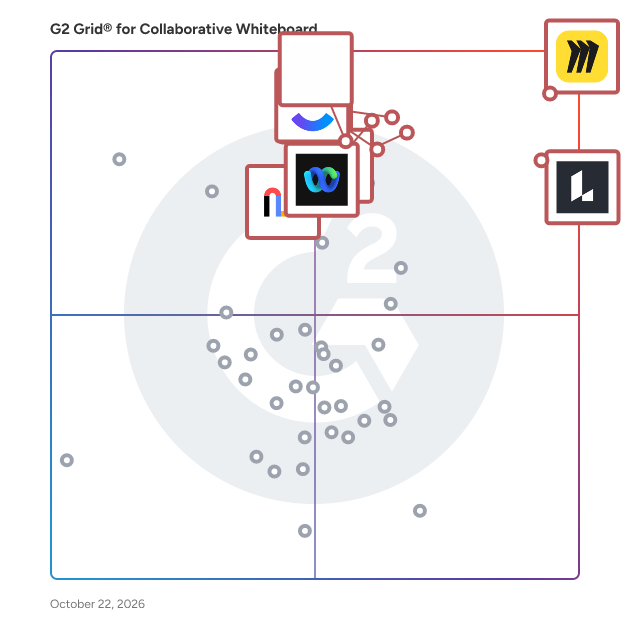
## G2 Grid® for Collaborative Whiteboard Software
![G2 Grid® for Collaborative Whiteboard Software plotting products by satisfaction and market presence](https://www.g2.com/categories/collaborative-whiteboard/grids.png?focus%5B%5D=42445&focus%5B%5D=2887&focus%5B%5D=4400&focus%5B%5D=7372&focus%5B%5D=25675&focus%5B%5D=18255&focus%5B%5D=1215793&focus%5B%5D=6782)
Highlighted products: Miro, Lucid Visual Collaboration Suite, Canva, Zoom Workplace, ClickUp, Webex Suite, FigJam, and Mural.
Underlying data: [Grid® JSON](https://www.g2.com/categories/collaborative-whiteboard/grids.json?focus%5B%5D=miro&amp;focus%5B%5D=lucid-software-inc-lucid-visual-collaboration-suite&amp;focus%5B%5D=canva&amp;focus%5B%5D=zoom-workplace&amp;focus%5B%5D=clickup&amp;focus%5B%5D=cisco-webex-suite&amp;focus%5B%5D=fig-jam&amp;focus%5B%5D=mural&amp;segment=small-business)


## How Many Collaborative Whiteboard Software Products Does G2 Track?
**Total Products under this Category:** 122

### Category Stats (Jul 2026)
- **Average Rating**: 4.44/5 The average rating of products in this category, based on all submitted ratings
- **Top Trending Product**: Visio (+0.07%) - Among all products in this category, Visio recorded the largest rating increase compared to last month
*Last updated: July 13, 2026*


## How Does G2 Rank Collaborative Whiteboard Software Products?

**Why You Can Trust G2's Software Rankings:**

- 30 Analysts and Data Experts
- 125,500+ Authentic Reviews
- 122+ Products
- Unbiased Rankings

G2's software rankings are built on verified user reviews, rigorous moderation, and a consistent research methodology maintained by a team of analysts and data experts. Each product is measured using the same transparent criteria, with no paid placement or vendor influence. While reviews reflect real user experiences, which can be subjective, they offer valuable insight into how software performs in the hands of professionals. Together, these inputs power the G2 Score, a standardized way to compare tools within every category.


## What Are the Top-Rated Collaborative Whiteboard Software Products in 2026?
### 1. [Cacoo](https://www.g2.com/products/cacoo/reviews)
Cacoo is a diagramming software solution designed to help users create a wide range of visual representations, including diagrams, flowcharts, and wireframes. This tool is particularly beneficial for teams and individual creators who seek to enhance their visual communication, whether they are working in a collaborative environment or independently. Cacoo&#39;s intuitive interface allows users to easily navigate its features, making it accessible to individuals with varying levels of design experience. Targeted at professionals across various industries, Cacoo serves a diverse audience, including project managers, designers, educators, and developers. The software is particularly useful for teams that require a clear and effective way to visualize processes, workflows, and concepts. With its cloud-based functionality, Cacoo enables real-time collaboration, allowing multiple users to work on diagrams simultaneously, regardless of their physical location. This feature is essential for remote teams or organizations with members spread across different geographical areas. Cacoo stands out in the diagramming category due to its extensive library of templates and shapes, which cater to a wide array of use cases. Users can choose from pre-designed templates or create custom diagrams from scratch. The ability to integrate with popular applications like Google Drive, Confluence, AWS, and Visio further enhances its usability, allowing users to streamline their workflow and access their work from multiple platforms. Key features of Cacoo include easy sharing options, such as embedding diagrams in websites, generating shareable links, and exporting diagrams in various formats. This flexibility ensures that users can present their work in a manner that suits their audience, whether for internal presentations or external communications. Additionally, Cacoo&#39;s user-friendly design allows for drag-and-drop functionality, making it simple to add and arrange elements within diagrams, which can significantly reduce the time spent on creating visual content. Overall, Cacoo provides a comprehensive solution for anyone looking to improve their visual communication through effective diagramming. Its combination of collaborative features, integration capabilities, and a rich library of resources makes it a valuable tool for both individual users and teams aiming to convey complex information clearly and efficiently.


**Average Rating:** 4.5/5.0
**Total Reviews:** 228
**How Do G2 Users Rate Cacoo?**

- **Quality of Support:** 8.5/10 (Category avg: 8.9/10)
- **Ease of Use:** 9.1/10 (Category avg: 9.2/10)

**Who Is the Company Behind Cacoo?**

- **Seller:** [Nulab Inc.](https://www.g2.com/sellers/nulab-inc-9c44ff5b-8b59-4627-9703-f685e195f1ff)
- **Year Founded:** 2004
- **HQ Location:** Fukuoka, Japan
- **Twitter:** @nulabinc (2,186 Twitter followers)
- **LinkedIn® Page:** https://www.linkedin.com/company/729787/ (122 employees on LinkedIn®)

**Who Uses This Product?**
- **Who Uses This:** Software Engineer, CEO
- **Top Industries:** Computer Software, Information Technology and Services
- **Company Size:** 60% Small-Business, 28% Mid-Market


#### What Are Cacoo's Pros and Cons?

**Pros:**

- Templates (9 reviews)
- Ease of Use (7 reviews)
- Intuitive (7 reviews)
- Team Collaboration (6 reviews)
- Real-time Collaboration (5 reviews)

**Cons:**

- Limited Features (7 reviews)
- Missing Features (4 reviews)
- Difficult Navigation (3 reviews)
- Limited Templates (3 reviews)
- Complexity (2 reviews)


### What Do G2 Reviewers Say About Cacoo?
*AI-generated summary from verified user reviews*

**Pros:**

- Users love the **wide range of templates** in Cacoo, enhancing collaboration and streamlining complex visualizations.
- Users praise the **ease of use** of Cacoo, facilitating efficient visual communication for complex projects.
- Users find Cacoo **intuitive and user-friendly** , enabling quick collaboration and effective brainstorming with its easy-to-use interface and templates.
- Users enjoy the **effective team collaboration** features of Cacoo, facilitating seamless communication and design workflows.
- Users love Cacoo&#39;s **real-time collaboration** features, which enhance teamwork and streamline project designs effectively.

**Cons:**

- Users find the **limited features** of Cacoo&#39;s free plan restrict their usability and integration with other tools.
- Users find the **missing features** in Cacoo limiting, especially regarding integrations and diagram variety for free users.
- Users find the **difficult navigation** in Cacoo time-consuming, especially when adding items and analyzing designs collaboratively.
- Users find the **limited templates** on the free account restrictive, affecting usability for simple diagrams.
- Users find the **complexity** of Cacoo challenging, especially noting performance issues with larger diagrams during collaboration.

#### What Are Recent G2 Reviews of Cacoo?

**"[User friendly app](https://www.g2.com/survey_responses/cacoo-review-9006179)"**

**Rating:** 5.0/5.0 stars
*— Vanessa A.*

[Read full review](https://www.g2.com/survey_responses/cacoo-review-9006179)

---

**"[Easy, Flexible Flow Diagrams with Seamless Sharing](https://www.g2.com/survey_responses/cacoo-review-12954885)"**

**Rating:** 5.0/5.0 stars
*— Leah W.*

[Read full review](https://www.g2.com/survey_responses/cacoo-review-12954885)

---


#### What Are G2 Users Discussing About Cacoo?

- [What is Cacoo used for?](https://www.g2.com/discussions/what-is-cacoo-used-for) - 1 comment
- [How do I make an online flow chart?](https://www.g2.com/discussions/how-do-i-make-an-online-flow-chart) - 1 comment
- [How can I make an online architecture diagram?](https://www.g2.com/discussions/how-can-i-make-an-online-architecture-diagram) - 1 comment
- [How do you make a beautiful diagram?](https://www.g2.com/discussions/how-do-you-make-a-beautiful-diagram) - 1 comment
- [How do you use Cacoo?](https://www.g2.com/discussions/how-do-you-use-cacoo) - 1 comment

### 2. [DEON](https://www.g2.com/products/deon/reviews)
DEON is the Sovereign AI Workspace for enterprises and public sector organizations that demand full data control. Built on an infinite, zoomable canvas, DEON combines agentic AI with visual collaboration — empowering teams to work smarter without sacrificing data sovereignty. DEON Holistic Intelligence (DHI) brings AI directly into your visual workspace. DAIA, the DEON AI Assistant, grounds every answer in your actual documents, live data, and embedded web apps — with direct visual references so you always know where insights come from. Graph Chat replaces linear chat threads with persistent, branching AI conversations your whole team can see and build on. Unlike black-box AI tools, DEON gives you full model sovereignty: choose internal LLMs, MS Copilot, OpenAI, or sovereign European providers. Deploy on-premises, in a German cloud, or via dedicated tenant. TISAX-certified and GDPR-compliant. DEON&#39;s unique Metabrowser embeds any live web application — Jira, SAP, SharePoint, live camera feeds — directly into your infinite canvas. Automate workflows via REST API and connect agent systems like n8n, Zapier, or MS Power Automate. Trusted by automotive manufacturers, public agencies, and innovation labs across Europe.


**Average Rating:** 4.6/5.0
**Total Reviews:** 31
**How Do G2 Users Rate DEON?**

- **Quality of Support:** 9.4/10 (Category avg: 8.9/10)
- **Ease of Use:** 8.7/10 (Category avg: 9.2/10)

**Who Is the Company Behind DEON?**

- **Seller:** [DEON](https://www.g2.com/sellers/deon)
- **Year Founded:** 2005
- **HQ Location:** Berlin, Berlin
- **LinkedIn® Page:** https://www.linkedin.com/company/deon-gmbh-&amp;-co-kg/ (23 employees on LinkedIn®)

**Who Uses This Product?**
- **Top Industries:** Automotive, Management Consulting
- **Company Size:** 66% Small-Business, 22% Mid-Market


#### What Are Recent G2 Reviews of DEON?

**"[Very simple to use, very good performanc and best collaboration](https://www.g2.com/survey_responses/deon-review-7644862)"**

**Rating:** 5.0/5.0 stars
*— Juergen S.*

[Read full review](https://www.g2.com/survey_responses/deon-review-7644862)

---

**"[A must have for everyone using Microsoft Office 365](https://www.g2.com/survey_responses/deon-review-7231976)"**

**Rating:** 5.0/5.0 stars
*— Tim  R.*

[Read full review](https://www.g2.com/survey_responses/deon-review-7231976)

---


#### What Are G2 Users Discussing About DEON?

- [What is DEON used for?](https://www.g2.com/discussions/what-is-deon-used-for)

### 3. [Bluescape](https://www.g2.com/products/bluescape/reviews)
Bluescape is the platform for creative collaboration. Streamline workflows with all your ideas, assets, iterations, and entire projects into one secure virtual workspace. With built-in voice and video calling, simply gather your team in Bluescape and make quicker decisions. Reduce meetings and finish projects faster in a secure platform trusted by Fortune 100 companies, government agencies, and the world’s largest movie studios.


**Average Rating:** 4.2/5.0
**Total Reviews:** 29
**How Do G2 Users Rate Bluescape?**

- **Quality of Support:** 8.7/10 (Category avg: 8.9/10)
- **Ease of Use:** 7.8/10 (Category avg: 9.2/10)

**Who Is the Company Behind Bluescape?**

- **Seller:** [Bluescape](https://www.g2.com/sellers/bluescape)
- **Year Founded:** 2012
- **HQ Location:** Redwood City, California
- **Twitter:** @bluescaper (2,350 Twitter followers)
- **LinkedIn® Page:** https://www.linkedin.com/company/3133361/ (67 employees on LinkedIn®)

**Who Uses This Product?**
- **Top Industries:** Furniture
- **Company Size:** 45% Small-Business, 29% Enterprise


#### What Are Recent G2 Reviews of Bluescape?

**"[Immersive visual collaboration software](https://www.g2.com/survey_responses/bluescape-review-7799481)"**

**Rating:** 4.5/5.0 stars
*— Shreya C.*

[Read full review](https://www.g2.com/survey_responses/bluescape-review-7799481)

---

**"[Software for commercial promotions.](https://www.g2.com/survey_responses/bluescape-review-6988980)"**

**Rating:** 4.5/5.0 stars
*— Sarah L.*

[Read full review](https://www.g2.com/survey_responses/bluescape-review-6988980)

---


#### What Are G2 Users Discussing About Bluescape?

- [What is Bluescape used for?](https://www.g2.com/discussions/what-is-bluescape-used-for)
- [Is Bluescape a public company?](https://www.g2.com/discussions/is-bluescape-a-public-company)
- [What is Bluescape stock symbol?](https://www.g2.com/discussions/what-is-bluescape-stock-symbol)
- [How do you use Bluescape?](https://www.g2.com/discussions/how-do-you-use-bluescape)
- [What is Bluescape software?](https://www.g2.com/discussions/what-is-bluescape-software)


## What Is Collaborative Whiteboard Software?

[Team Collaboration Software](https://www.g2.com/categories/team-collaboration)

## What Software Categories Are Similar to Collaborative Whiteboard Software?

- [Diagramming Software](https://www.g2.com/categories/diagramming)
- [Mind Mapping Software](https://www.g2.com/categories/mind-mapping-software)
- [Visual Collaboration Platforms](https://www.g2.com/categories/visual-collaboration-platforms)


---

## How Do You Choose the Right Collaborative Whiteboard Software?

### What You Should Know About Collaborative Whiteboard Software

### What is Collaborative Whiteboard Software?

Collaborative whiteboard software, sometimes called digital, online, or virtual whiteboard software, provides a digital canvas that can be edited simultaneously by multiple participants. Collaborative whiteboards are outfitted with multiple features to support a user&#39;s ability to represent their ideas visually, including brushes, colors, shapes, images, and templates. These collaboration tools are incredibly flexible, and businesses can easily utilize one for a myriad of purposes. Popular use cases of this type of software include, but aren&#39;t limited to, project management, workflow visualization, meeting management, and brainstorming sessions.

### What are the Common Features of Collaborative Whiteboard Software?

The following are some core features within collaborative whiteboard software that can help users collaborate simultaneously and remotely:

**Freehand drawing:** The staple feature of collaborative whiteboards is the ability for users to draw freehand. Most digital whiteboards allow users to modify their drawing tool by providing different brush widths, textures, and colors. Freehand drawing is the cornerstone feature within a collaborative whiteboard, and most businesses looking to leverage one have this feature in mind to facilitate real-time team collaboration.

**Premade assets:** The majority of collaborative whiteboard solutions provide preset assets for users to utilize on a canvas, including shapes, images, and emojis. Premade assets are helpful for allowing users to quickly represent an idea on a canvas without drawing it themselves.

**Real-time chat:** Some collaborative whiteboards are mainly intended for facilitating simultaneous remote collaboration as opposed to co-located collaboration. Remote solutions will often provide a real-time live chat that can be accessed by team members using the same canvas. This allows remote teams to communicate via text while using the whiteboard.

**Commenting:** Many teams leverage collaborative whiteboard software to facilitate asynchronous collaboration since whiteboards can be edited by multiple users at different points in time. One feature many online whiteboards provide to support this use case is the commenting capability for users. Virtual whiteboards with this feature give users the ability to leave annotations on parts of the canvas itself for their teammates to read later. Some whiteboards will offer a sticky note feature to achieve the same goal.

**Templates:** Some collaborative whiteboards come with premade templates for specific types of tables or diagrams, including mind maps, Kanban boards, and user story maps. Templates are useful for providing the framework for specific brainstorming exercises or project planning techniques.

**Screen sharing:** A few digital whiteboards will also include screen sharing capabilities within their offering. Users can leverage this feature to share information from an app or browser to their teammates without leaving the whiteboard. Screen sharing and collaborative whiteboarding can also be secondary features of video conferencing software and visual collaboration platforms, so buyers looking for both of these capabilities can also find potential solutions there.

### What are the Benefits of Collaborative Whiteboard Software?

Collaborative whiteboards are flexible in nature which allows businesses to leverage them in many different contexts. Digital whiteboards are well suited to support multiple types of collaboration, so businesses can utilize them across multiple scenarios and use cases.&amp;nbsp;

**Flexible real-time collaboration:** While many collaboration tools support real-time collaboration, virtual whiteboards uniquely fit a niche for flexible, open-ended collaboration. Since there isn&#39;t a strict use case for online whiteboards, teams can decide how they want to leverage one based on meeting type or activity.&amp;nbsp;

**Asynchronous collaboration:** One key feature of online whiteboards is the ability for users to make changes or updates at different points in time. The ability to effectively collaborate asynchronously is useful for teams with varying schedules or those spread across multiple time zones.&amp;nbsp;

**Visual collaboration:** Few collaboration tools provide the capacity for visual collaboration that digital whiteboards offer. While many solutions connect teams over text or voice channels, collaborative whiteboards allow teams to visually represent and record their ideas and thought processes.&amp;nbsp;

### Who Uses Collaborative Whiteboard Software?

Collaborative whiteboards do not have a set use case, and as a result, are highly flexible. Potentially any type of team could find a use for a digital whiteboard, whether it be for project management, meeting management, or to brainstorm. However, there are a few use cases where collaborative whiteboards are especially pertinent.

**Creative teams:** Within a business, the most obvious use case for a collaborative whiteboard is within creative teams. Creative departments including product design, user experience, and marketing teams are already handling visually creative tasks. Interactive whiteboards can be an effective tool for project planning, creating mock-ups and user story maps, and visually brainstorming.

**Remote teams:** Remote work is becoming more prevalent, and many in the workforce have the option to work remotely some or all of the time. While remote work comes with many benefits, the organic collaboration between co-located teams can be difficult to replicate in a virtual environment. Virtual whiteboards support team collaboration within remote teams by allowing them to collaborate visually. Many remote teams also employ collaborative whiteboards as a space to share ideas and provide updates in lieu of an office break room.&amp;nbsp;

**Classroom settings:** Collaborative whiteboards can take the place of a physical whiteboard in both physical and virtual classroom settings. Physical classrooms can benefit from a digital whiteboard that students and teachers can contribute to and that can be saved for later reference. Some in-person classrooms also leverage a physical digital whiteboard as a hardware analog for a traditional physical whiteboard. Remote classroom settings are also becoming increasingly common; interactive whiteboards can help keep students engaged and provide a shared space to share ideas and brainstorm for class activities.

### What are the Alternatives to Collaborative Whiteboard Software?

Alternatives to collaborative whiteboard software can replace this type of software, either partially or completely:

[Diagramming software](https://www.g2.com/categories/diagramming) **:** Diagramming tools are very similar to online whiteboards in the features they provide. However, the former is more concerned specifically with the creation of diagrams while whiteboards offer more freeform idea expression.&amp;nbsp;

[Mind mapping software](https://www.g2.com/categories/mind-mapping) **:** Mind mapping software is intended specifically for the creation of mind maps. Like diagramming software, mind mapping tools support a specific type of visual collaboration. Businesses should consider the breadth and depth of what they expect to create in a visual collaboration-type tool before deciding on a category of software to pursue.

[Visual collaboration platforms](https://www.g2.com/categories/visual-collaboration-platforms) **:** Visual collaboration platforms take the base features of collaborative whiteboards and expand upon them by adding built-in communication channels and deeper integrations with other software solutions. While visual collaboration platforms provide all the features of a digital whiteboard, not all businesses are looking for the extended functionality provided by a visual collaboration platform.&amp;nbsp;

[Video conferencing software](https://www.g2.com/categories/video-conferencing) **:** Like visual collaboration platforms, some video conferencing software solutions include a whiteboard feature within their offering. However, since these whiteboards are built into larger video conferencing platforms, users may not have the ability to access them unless they are in a video chat. Additionally, these built-in whiteboards may not provide as extensive functionality as standalone whiteboard solutions.

### Challenges with Collaborative Whiteboard Software

Software solutions can come with their own set of challenges.&amp;nbsp;

**Requires a solid implementation plan:** As mentioned previously, collaborative whiteboards are open-ended in how they can be used. While this allows them to be leveraged in many contexts and by different types of teams, businesses without a concrete implementation plan for one might find themselves wasting capital. Without a specific use case, employees may abandon the tool altogether if they don&#39;t find their own personal use for it. To avoid this, businesses should build use of a collaborative whiteboard into their processes and workflows to ensure adoption of the software solution.

### Which Companies Should Buy Collaborative Whiteboard Software?

Since collaborative whiteboards do not have a set intended use case, virtually any company or business could find a use for one within their processes. There are specific teams or types of businesses that may have a more obvious need for virtual whiteboards, but these solutions are open-ended enough in nature that businesses could easily find a use for one.

### How to Buy Collaborative Whiteboard Software

#### Requirements Gathering (RFI/RFP) for Collaborative Whiteboard Software

While the majority of collaborative whiteboard options provide the same basic features, there are still a few considerations businesses should evaluate when deciding which products they should pursue. In particular, businesses should consider the following questions specific to collaborative whiteboards:

- Are we looking for a standalone tool or are we open to virtual whiteboards built into other solutions like video conferencing software?
- Could our needs be met with a more focused solution like a diagramming or mind mapping tool?
- Are our requirements broad or deep enough that our needs would be better met with a larger visual collaboration platform?
- What key features are must-have features for us outside of freehand drawing (screen sharing, premade templates, etc.)?

Apart from these questions, businesses should also evaluate common software purchasing considerations like the number of seats required, pricing, and payment model.&amp;nbsp;

#### Compare Collaborative Whiteboard Software Products

**Create a long list**

Based on the requirements gathering, companies must put together a list of no more than 10 products that qualify. Using G2 is a great way to narrow down which products in a category fit a business&#39;s requirements. Users can filter down products in a category by the features they provide, pricing availability, and the business size of reviewers.&amp;nbsp;

**Create a short list**

After creating a long list, buyers should create a short list to narrow down the business&#39;s options. One way to start is by eliminating options that are out of budget or don&#39;t provide must-have features. This is also a good point to start reaching out to vendors with an RFI, and their responses can narrow down the options further if vendors don&#39;t provide satisfactory information or otherwise can&#39;t meet particular business needs.

**Conduct demos**

Once a business has a short list of products that meet their requirements, they can begin reaching out to software vendors for demos of their product. Demos provide key insight into the viability of a software solution within a business, so buyers must take notes on the demo and think critically about the software&#39;s strengths and weaknesses. In the case of a collaborative whiteboard, it is crucial to make note of the product&#39;s ease of use and any limitations the product might have (limited number of saved boards, admin controls, etc.).

#### Selection of Collaborative Whiteboard Software

**Choose a selection team**

​​​​A selection team should start with an executive sponsor to provide buy-in from company leadership and a project manager to handle the logistics of the software buying process. This team should also include subject matter experts within the organization as well as those who will be using the software as part of their work.&amp;nbsp;

For organizations looking to leverage collaborative whiteboards in a classroom context, it can be helpful to lean on user reviews from students for a product to inform that perspective. If possible, it can be helpful to let students demo a whiteboard product to ensure the selection team has as much information to work with as possible.

**Negotiation**

Before signing a contract, it&#39;s beneficial to check if any discounts are available. Buyers must explore payment options and implementation and onboarding services as well, during this time.

**Final decision**

After a business finds their whiteboard solution of choice, the next steps can vary depending on the vendor. Some vendors require their customers to sign a contract along with the purchase of their solution. However, many collaborative whiteboards are available as lightweight SaaS solutions, and many of these products won&#39;t require a customer to sign any lengthy paperwork. In fact, some solutions in the space are available for free as either a browser application or open-source software.


---
## What Are the Most Common Questions About Collaborative Whiteboard Software?

### How do collaborative whiteboards facilitate real-time collaboration among users?

Collaborative whiteboards enhance real-time collaboration by enabling simultaneous editing, visual brainstorming, and instant feedback among users. Features such as sticky notes, drawing tools, and templates facilitate dynamic interaction, allowing teams to visualize ideas collectively. User reviews highlight that platforms like Miro, Microsoft Whiteboard, and Lucidspark excel in providing intuitive interfaces that support seamless communication and engagement. Additionally, integrations with other tools streamline workflows, further enhancing collaborative efforts. Overall, these functionalities contribute to a more interactive and productive teamwork environment.


### What are the limitations of using collaborative whiteboards for project management?

Collaborative whiteboards can face limitations in project management, such as lack of advanced task tracking features, which can hinder project oversight. Users often report difficulties in integrating with other project management tools, leading to fragmented workflows. Additionally, while they excel in brainstorming and visual collaboration, they may not support detailed project timelines or resource allocation effectively. Some users also mention performance issues with larger teams, which can disrupt real-time collaboration.


### How scalable are collaborative whiteboard tools for growing teams?

Collaborative whiteboard tools are generally scalable for growing teams, with products like Miro, MURAL, and Microsoft Whiteboard offering features that support large user bases. Miro, for instance, is noted for its ability to handle unlimited boards and users, making it suitable for extensive collaboration. MURAL also emphasizes scalability, allowing teams to work together seamlessly across various locations. Microsoft Whiteboard integrates well with other Microsoft tools, enhancing its scalability for organizations already using Microsoft products. User reviews highlight these tools&#39; adaptability to team growth and diverse collaboration needs.


### What level of customer support is typically offered by collaborative whiteboard vendors?

Collaborative whiteboard vendors typically offer varying levels of customer support, with many providing 24/7 support options. For instance, Miro users frequently highlight responsive customer service, while MURAL is noted for its extensive resources and community support. Stormboard users appreciate the availability of live chat and email support. Overall, most vendors emphasize user-friendly help centers and tutorials, with many offering dedicated account managers for enterprise clients, ensuring comprehensive support tailored to different user needs.


### How do collaborative whiteboards enhance remote team collaboration?

Collaborative whiteboards enhance remote team collaboration by providing real-time visual interaction, which fosters creativity and engagement. Users report that features like sticky notes, drawing tools, and templates facilitate brainstorming sessions, making it easier to share ideas. High user satisfaction ratings highlight the effectiveness of tools like Miro, Microsoft Whiteboard, and Lucidspark in improving communication and project alignment. Additionally, integrations with other software platforms streamline workflows, allowing teams to collaborate seamlessly across different applications.


### What security features should I prioritize in a collaborative whiteboard solution?

When selecting a collaborative whiteboard solution, prioritize security features such as data encryption, user authentication, and access controls. High-rated products like Miro and Microsoft Whiteboard emphasize robust encryption protocols and multi-factor authentication to protect user data. Additionally, features like role-based access control are highlighted by users of Lucidspark, ensuring that only authorized personnel can edit or view sensitive information. Look for solutions that also offer compliance with industry standards such as GDPR and HIPAA, as noted by users of Stormboard.


### What are the key features to look for in a collaborative whiteboard tool?

Key features to look for in a collaborative whiteboard tool include real-time collaboration, which is highly rated by users for enhancing teamwork; a variety of templates and shapes to facilitate brainstorming; integration capabilities with other tools, ensuring seamless workflows; user-friendly interface for ease of use; and robust export options for sharing work. Additionally, features like sticky notes and drawing tools are frequently highlighted as essential for effective visual communication.


### How do pricing models vary across different collaborative whiteboard solutions?

Pricing models for collaborative whiteboard solutions vary significantly. For instance, Miro offers a freemium model with paid plans starting at $8 per user per month, while Microsoft Whiteboard is included with Microsoft 365 subscriptions, which start at $6 per user per month. Lucidspark provides a free tier with paid plans beginning at $7.95 per user per month. In contrast, Stormboard has a subscription model starting at $5 per user per month. These variations reflect different approaches to accessibility and feature sets.


### What integrations should I consider for my existing software stack?

When considering integrations for collaborative whiteboard software, prioritize tools that enhance productivity and collaboration. Key integrations to explore include Google Drive for document sharing, Slack for team communication, and Microsoft Teams for seamless collaboration. Additionally, tools like Trello for project management and Zoom for video conferencing are frequently mentioned by users as valuable integrations that enhance the overall functionality of collaborative whiteboards.


### How does user experience differ among popular collaborative whiteboard platforms?

User experience among popular collaborative whiteboard platforms varies significantly. Miro leads with a high user satisfaction rating of 4.7, praised for its extensive features and intuitive interface. Microsoft Whiteboard follows closely with a rating of 4.5, noted for its seamless integration with other Microsoft tools. Lucidspark has a rating of 4.4, appreciated for its ease of use and collaborative features. In contrast, Stormboard, with a rating of 4.2, is recognized for its brainstorming capabilities but has received mixed feedback on its user interface. Overall, Miro stands out for its comprehensive functionality and user-friendly design.


### What are the most common use cases for collaborative whiteboards in businesses?

Common use cases for collaborative whiteboards in businesses include brainstorming sessions, project planning, and remote team collaboration. Users frequently highlight their effectiveness in visualizing ideas and workflows, enhancing communication during meetings, and facilitating real-time feedback. Popular tools like Miro, Microsoft Whiteboard, and Lucidspark are often utilized for these purposes, with users noting features such as templates for agile workflows, integration with other software, and ease of use as key benefits that support these use cases.


### How can I evaluate the effectiveness of a collaborative whiteboard during a trial period?

To evaluate the effectiveness of a collaborative whiteboard during a trial period, focus on user engagement, ease of use, and feature utilization. Look for feedback on how intuitive the interface is, as products like Miro and Microsoft Whiteboard score highly on user satisfaction for usability. Assess collaboration features such as real-time editing and integration capabilities, which are crucial for team productivity. Additionally, track the frequency of use and user retention rates during the trial, as these metrics indicate overall effectiveness and user acceptance.


