Introducing G2.ai, the future of software buying.Try now

Best Enterprise Collaborative Whiteboard Software

Nana Serwah Nkrahene
NSN
Researched and written by Nana Serwah Nkrahene

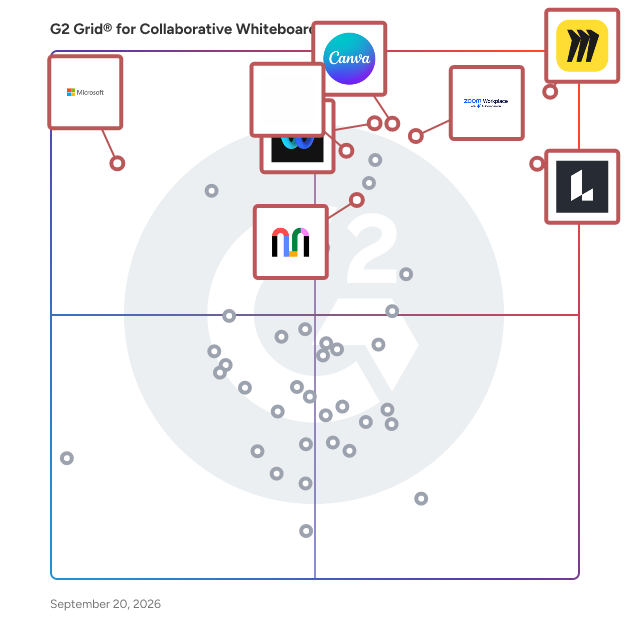
Products classified in the overall Collaborative Whiteboard category are similar in many regards and help companies of all sizes solve their business problems. However, enterprise business features, pricing, setup, and installation differ from businesses of other sizes, which is why we match buyers to the right Enterprise Business Collaborative Whiteboard to fit their needs. Compare product ratings based on reviews from enterprise users or connect with one of G2's buying advisors to find the right solutions within the Enterprise Business Collaborative Whiteboard category.

In addition to qualifying for inclusion in the Collaborative Whiteboard Software category, to qualify for inclusion in the Enterprise Business Collaborative Whiteboard Software category, a product must have at least 10 reviews left by a reviewer from an enterprise business.

Show More
Show Less

G2 takes pride in showing unbiased reviews on user satisfaction in our ratings and reports. We do not allow paid placements in any of our ratings, rankings, or reports. Learn about our scoring methodologies.

Coming Soon
Get Trending Collaborative Whiteboard Products in Your Inbox

A weekly snapshot of rising stars, new launches, and what everyone's buzzing about.

Sample Trending Products Newsletter
1 filter applied
Clear All

21 Listings in Enterprise Collaborative Whiteboard Software Available

(11,424)4.7 out of 5
Optimized for quick response
6th Easiest To Use in Collaborative Whiteboard software
View top Consulting Services for Miro
Save to My Lists
100% Off: Free forever
  • Overview
    Expand/Collapse Overview
  • Product Description
    How are these determined?Information
    This description is provided by the seller.

    Miro is the AI Innovation Workspace that brings teams and AI together to plan, co-create, and build the next big thing faster. Cross-functional teams flow from early discovery to final delivery on a s

    Users
    • Product Manager
    • Project Manager
    Industries
    • Information Technology and Services
    • Computer Software
    Market Segment
    • 40% Small-Business
    • 29% Mid-Market
  • Pros and Cons
    Expand/Collapse Pros and Cons
  • Miro Pros and Cons
    How are these determined?Information
    Pros and Cons are compiled from review feedback and grouped into themes to provide an easy-to-understand summary of user reviews.
    Pros
    Ease of Use
    3,282
    Team Collaboration
    2,676
    Features
    2,037
    Real-time Collaboration
    1,895
    Real-Time Collaboration
    1,817
    Cons
    Missing Features
    1,176
    Limited Features
    825
    Board Management
    796
    Learning Curve
    765
    Slow Loading
    669
  • User Satisfaction
    Expand/Collapse User Satisfaction
  • Miro features and usability ratings that predict user satisfaction
    8.7
    Quality of Support
    Average: 8.9
    9.0
    Ease of Use
    Average: 9.2
  • Seller Details
    Expand/Collapse Seller Details
  • Seller Details
    Seller
    Miro
    Company Website
    Year Founded
    2011
    HQ Location
    San Francisco, California
    Twitter
    @MiroHQ
    38,468 Twitter followers
    LinkedIn® Page
    www.linkedin.com
    2,376 employees on LinkedIn®
Product Description
How are these determined?Information
This description is provided by the seller.

Miro is the AI Innovation Workspace that brings teams and AI together to plan, co-create, and build the next big thing faster. Cross-functional teams flow from early discovery to final delivery on a s

Users
  • Product Manager
  • Project Manager
Industries
  • Information Technology and Services
  • Computer Software
Market Segment
  • 40% Small-Business
  • 29% Mid-Market
Miro Pros and Cons
How are these determined?Information
Pros and Cons are compiled from review feedback and grouped into themes to provide an easy-to-understand summary of user reviews.
Pros
Ease of Use
3,282
Team Collaboration
2,676
Features
2,037
Real-time Collaboration
1,895
Real-Time Collaboration
1,817
Cons
Missing Features
1,176
Limited Features
825
Board Management
796
Learning Curve
765
Slow Loading
669
Miro features and usability ratings that predict user satisfaction
8.7
Quality of Support
Average: 8.9
9.0
Ease of Use
Average: 9.2
Seller Details
Seller
Miro
Company Website
Year Founded
2011
HQ Location
San Francisco, California
Twitter
@MiroHQ
38,468 Twitter followers
LinkedIn® Page
www.linkedin.com
2,376 employees on LinkedIn®
(18,600)4.2 out of 5
3rd Easiest To Use in Collaborative Whiteboard software
Save to My Lists
Entry Level Price:$0.00
  • Overview
    Expand/Collapse Overview
  • Product Description
    How are these determined?Information
    This description is provided by the seller.

    Webex Suite is an all-in-one, AI-powered collaboration suite built to increase productivity and maximize teamwork in today’s hybrid work. With 8 powerful individual workflows – Meetings, Messaging, Ca

    Users
    • Software Engineer
    • Senior Software Engineer
    Industries
    • Information Technology and Services
    • Computer Software
    Market Segment
    • 51% Enterprise
    • 31% Mid-Market
  • Pros and Cons
    Expand/Collapse Pros and Cons
  • Webex Suite Pros and Cons
    How are these determined?Information
    Pros and Cons are compiled from review feedback and grouped into themes to provide an easy-to-understand summary of user reviews.
    Pros
    Ease of Use
    939
    Video Quality
    586
    Video Conferencing
    573
    Reliability
    542
    Screen Sharing
    488
    Cons
    Connectivity Issues
    222
    Limited Features
    201
    Audio Issues
    182
    Slow Loading
    182
    Expensive
    152
  • User Satisfaction
    Expand/Collapse User Satisfaction
  • Webex Suite features and usability ratings that predict user satisfaction
    8.5
    Quality of Support
    Average: 8.9
    8.7
    Ease of Use
    Average: 9.2
  • Seller Details
    Expand/Collapse Seller Details
  • Seller Details
    Seller
    Cisco
    Company Website
    Year Founded
    1984
    HQ Location
    San Jose, CA
    Twitter
    @Cisco
    721,851 Twitter followers
    LinkedIn® Page
    www.linkedin.com
    95,148 employees on LinkedIn®
Product Description
How are these determined?Information
This description is provided by the seller.

Webex Suite is an all-in-one, AI-powered collaboration suite built to increase productivity and maximize teamwork in today’s hybrid work. With 8 powerful individual workflows – Meetings, Messaging, Ca

Users
  • Software Engineer
  • Senior Software Engineer
Industries
  • Information Technology and Services
  • Computer Software
Market Segment
  • 51% Enterprise
  • 31% Mid-Market
Webex Suite Pros and Cons
How are these determined?Information
Pros and Cons are compiled from review feedback and grouped into themes to provide an easy-to-understand summary of user reviews.
Pros
Ease of Use
939
Video Quality
586
Video Conferencing
573
Reliability
542
Screen Sharing
488
Cons
Connectivity Issues
222
Limited Features
201
Audio Issues
182
Slow Loading
182
Expensive
152
Webex Suite features and usability ratings that predict user satisfaction
8.5
Quality of Support
Average: 8.9
8.7
Ease of Use
Average: 9.2
Seller Details
Seller
Cisco
Company Website
Year Founded
1984
HQ Location
San Jose, CA
Twitter
@Cisco
721,851 Twitter followers
LinkedIn® Page
www.linkedin.com
95,148 employees on LinkedIn®

This is how G2 Deals can help you:

  • Easily shop for curated – and trusted – software
  • Own your own software buying journey
  • Discover exclusive deals on software
(7,703)4.5 out of 5
Optimized for quick response
7th Easiest To Use in Collaborative Whiteboard software
Save to My Lists
Entry Level Price:Free
  • Overview
    Expand/Collapse Overview
  • Product Description
    How are these determined?Information
    This description is provided by the seller.

    Lucid is a Work Acceleration Platform powered by visual collaboration. Its enterprise offering is the Lucid Visual Collaboration Suite, which combines Lucidchart for intelligent diagramming and Lucids

    Users
    • Software Engineer
    • Product Manager
    Industries
    • Information Technology and Services
    • Computer Software
    Market Segment
    • 40% Small-Business
    • 34% Mid-Market
  • Pros and Cons
    Expand/Collapse Pros and Cons
  • Lucid Visual Collaboration Suite Pros and Cons
    How are these determined?Information
    Pros and Cons are compiled from review feedback and grouped into themes to provide an easy-to-understand summary of user reviews.
    Pros
    Ease of Use
    1,449
    Easy Creation
    775
    Team Collaboration
    772
    Real-time Collaboration
    684
    Diagramming
    681
    Cons
    Learning Curve
    419
    Missing Features
    315
    Diagramming Issues
    266
    Limited Features
    250
    Not Intuitive
    240
  • User Satisfaction
    Expand/Collapse User Satisfaction
  • Lucid Visual Collaboration Suite features and usability ratings that predict user satisfaction
    8.9
    Quality of Support
    Average: 8.9
    8.9
    Ease of Use
    Average: 9.2
  • Seller Details
    Expand/Collapse Seller Details
  • Seller Details
    Company Website
    Year Founded
    2010
    HQ Location
    South Jordan, UT
    Twitter
    @LucidSoftware
    14,636 Twitter followers
    LinkedIn® Page
    www.linkedin.com
    1,315 employees on LinkedIn®
Product Description
How are these determined?Information
This description is provided by the seller.

Lucid is a Work Acceleration Platform powered by visual collaboration. Its enterprise offering is the Lucid Visual Collaboration Suite, which combines Lucidchart for intelligent diagramming and Lucids

Users
  • Software Engineer
  • Product Manager
Industries
  • Information Technology and Services
  • Computer Software
Market Segment
  • 40% Small-Business
  • 34% Mid-Market
Lucid Visual Collaboration Suite Pros and Cons
How are these determined?Information
Pros and Cons are compiled from review feedback and grouped into themes to provide an easy-to-understand summary of user reviews.
Pros
Ease of Use
1,449
Easy Creation
775
Team Collaboration
772
Real-time Collaboration
684
Diagramming
681
Cons
Learning Curve
419
Missing Features
315
Diagramming Issues
266
Limited Features
250
Not Intuitive
240
Lucid Visual Collaboration Suite features and usability ratings that predict user satisfaction
8.9
Quality of Support
Average: 8.9
8.9
Ease of Use
Average: 9.2
Seller Details
Company Website
Year Founded
2010
HQ Location
South Jordan, UT
Twitter
@LucidSoftware
14,636 Twitter followers
LinkedIn® Page
www.linkedin.com
1,315 employees on LinkedIn®
(55,323)4.5 out of 5
Optimized for quick response
1st Easiest To Use in Collaborative Whiteboard software
View top Consulting Services for Zoom Workplace
Save to My Lists
Entry Level Price:Free
  • Overview
    Expand/Collapse Overview
  • Product Description
    How are these determined?Information
    This description is provided by the seller.

    Goodbye app overload. Hello effortless work. Work can be complicated. Your tools shouldn't be. Zoom Workplace connects all the ways you collaborate — from meetings to docs to chat and more — with bui

    Users
    • Owner
    • Software Engineer
    Industries
    • Information Technology and Services
    • Computer Software
    Market Segment
    • 51% Small-Business
    • 31% Mid-Market
    User Sentiment
    How are these determined?Information
    These insights, currently in beta, are compiled from user reviews and grouped to display a high-level overview of the software.
    • Zoom Workplace is a platform that facilitates video meetings, online collaboration, and communication through features such as screen sharing, virtual whiteboards, and instant messaging.
    • Users frequently mention the ease of use, high-quality audio and video, and the ability to host large meetings with breakout room functionality as standout features of Zoom Workplace.
    • Users mentioned issues with occasional lag, audio quality, and the complexity of admin settings, as well as the high cost and limitations of the free version.
  • Pros and Cons
    Expand/Collapse Pros and Cons
  • Zoom Workplace Pros and Cons
    How are these determined?Information
    Pros and Cons are compiled from review feedback and grouped into themes to provide an easy-to-understand summary of user reviews.
    Pros
    Ease of Use
    4,576
    Video Conferencing
    2,710
    Video Quality
    1,993
    Reliability
    1,916
    Screen Sharing
    1,606
    Cons
    Zoom Issues
    1,214
    Limited Features
    1,198
    Meeting Issues
    1,181
    Connection Issues
    815
    Video Issues
    803
  • User Satisfaction
    Expand/Collapse User Satisfaction
  • Zoom Workplace features and usability ratings that predict user satisfaction
    8.7
    Quality of Support
    Average: 8.9
    9.1
    Ease of Use
    Average: 9.2
  • Seller Details
    Expand/Collapse Seller Details
  • Seller Details
    Seller
    Zoom
    Company Website
    Year Founded
    2011
    HQ Location
    San Jose, CA
    Twitter
    @zoom
    1,047,270 Twitter followers
    LinkedIn® Page
    www.linkedin.com
    12,432 employees on LinkedIn®
Product Description
How are these determined?Information
This description is provided by the seller.

Goodbye app overload. Hello effortless work. Work can be complicated. Your tools shouldn't be. Zoom Workplace connects all the ways you collaborate — from meetings to docs to chat and more — with bui

Users
  • Owner
  • Software Engineer
Industries
  • Information Technology and Services
  • Computer Software
Market Segment
  • 51% Small-Business
  • 31% Mid-Market
User Sentiment
How are these determined?Information
These insights, currently in beta, are compiled from user reviews and grouped to display a high-level overview of the software.
  • Zoom Workplace is a platform that facilitates video meetings, online collaboration, and communication through features such as screen sharing, virtual whiteboards, and instant messaging.
  • Users frequently mention the ease of use, high-quality audio and video, and the ability to host large meetings with breakout room functionality as standout features of Zoom Workplace.
  • Users mentioned issues with occasional lag, audio quality, and the complexity of admin settings, as well as the high cost and limitations of the free version.
Zoom Workplace Pros and Cons
How are these determined?Information
Pros and Cons are compiled from review feedback and grouped into themes to provide an easy-to-understand summary of user reviews.
Pros
Ease of Use
4,576
Video Conferencing
2,710
Video Quality
1,993
Reliability
1,916
Screen Sharing
1,606
Cons
Zoom Issues
1,214
Limited Features
1,198
Meeting Issues
1,181
Connection Issues
815
Video Issues
803
Zoom Workplace features and usability ratings that predict user satisfaction
8.7
Quality of Support
Average: 8.9
9.1
Ease of Use
Average: 9.2
Seller Details
Seller
Zoom
Company Website
Year Founded
2011
HQ Location
San Jose, CA
Twitter
@zoom
1,047,270 Twitter followers
LinkedIn® Page
www.linkedin.com
12,432 employees on LinkedIn®
  • Overview
    Expand/Collapse Overview
  • Product Description
    How are these determined?Information
    This description is provided by the seller.

    Meet the freeform digital canvas where ideas, content, and people come together.

    Users
    No information available
    Industries
    • Information Technology and Services
    Market Segment
    • 36% Small-Business
    • 32% Mid-Market
  • Pros and Cons
    Expand/Collapse Pros and Cons
  • Microsoft Whiteboard Pros and Cons
    How are these determined?Information
    Pros and Cons are compiled from review feedback and grouped into themes to provide an easy-to-understand summary of user reviews.
    Pros
    Integrations
    2
    Easy Integrations
    1
    Flexibility
    1
    Sharing
    1
    Team Collaboration
    1
    Cons
    Limited Features
    2
    Diagramming Issues
    1
    Integration Issues
    1
    Limited Customization
    1
    Not Intuitive
    1
  • User Satisfaction
    Expand/Collapse User Satisfaction
  • Microsoft Whiteboard features and usability ratings that predict user satisfaction
    7.6
    Quality of Support
    Average: 8.9
    8.8
    Ease of Use
    Average: 9.2
  • Seller Details
    Expand/Collapse Seller Details
  • Seller Details
    Seller
    Microsoft
    Year Founded
    1975
    HQ Location
    Redmond, Washington
    Twitter
    @microsoft
    13,090,087 Twitter followers
    LinkedIn® Page
    www.linkedin.com
    220,934 employees on LinkedIn®
    Ownership
    MSFT
Product Description
How are these determined?Information
This description is provided by the seller.

Meet the freeform digital canvas where ideas, content, and people come together.

Users
No information available
Industries
  • Information Technology and Services
Market Segment
  • 36% Small-Business
  • 32% Mid-Market
Microsoft Whiteboard Pros and Cons
How are these determined?Information
Pros and Cons are compiled from review feedback and grouped into themes to provide an easy-to-understand summary of user reviews.
Pros
Integrations
2
Easy Integrations
1
Flexibility
1
Sharing
1
Team Collaboration
1
Cons
Limited Features
2
Diagramming Issues
1
Integration Issues
1
Limited Customization
1
Not Intuitive
1
Microsoft Whiteboard features and usability ratings that predict user satisfaction
7.6
Quality of Support
Average: 8.9
8.8
Ease of Use
Average: 9.2
Seller Details
Seller
Microsoft
Year Founded
1975
HQ Location
Redmond, Washington
Twitter
@microsoft
13,090,087 Twitter followers
LinkedIn® Page
www.linkedin.com
220,934 employees on LinkedIn®
Ownership
MSFT
(1,443)4.6 out of 5
9th Easiest To Use in Collaborative Whiteboard software
View top Consulting Services for Mural
Save to My Lists
Entry Level Price:Free
  • Overview
    Expand/Collapse Overview
  • Product Description
    How are these determined?Information
    This description is provided by the seller.

    Mural is a visual collaboration platform specifically designed to enhance the productivity and effectiveness of go-to-market (GTM) teams. As an interactive workspace, Mural enables teams to create per

    Users
    • UX Designer
    • Product Manager
    Industries
    • Information Technology and Services
    • Management Consulting
    Market Segment
    • 45% Enterprise
    • 35% Small-Business
    User Sentiment
    How are these determined?Information
    These insights, currently in beta, are compiled from user reviews and grouped to display a high-level overview of the software.
    • Mural is a collaboration tool designed to facilitate brainstorming, project planning, and process mapping in a single platform, particularly for remote teams.
    • Users frequently mention the intuitive and visually engaging interface, the variety of templates and sticky notes for organizing ideas, and the real-time editing features that make team collaboration highly productive and interactive.
    • Reviewers mentioned that Mural can occasionally feel cluttered when working on larger boards with multiple collaborators, navigation and organization can get tricky without clear structure, and performance sometimes slows down when too many elements are on a canvas.
  • Pros and Cons
    Expand/Collapse Pros and Cons
  • Mural Pros and Cons
    How are these determined?Information
    Pros and Cons are compiled from review feedback and grouped into themes to provide an easy-to-understand summary of user reviews.
    Pros
    Ease of Use
    142
    Team Collaboration
    110
    Features
    75
    Real-Time Collaboration
    74
    Templates
    65
    Cons
    Missing Features
    38
    Learning Curve
    33
    Not Intuitive
    27
    Limited Features
    26
    Slow Performance
    21
  • User Satisfaction
    Expand/Collapse User Satisfaction
  • Mural features and usability ratings that predict user satisfaction
    8.9
    Quality of Support
    Average: 8.9
    8.8
    Ease of Use
    Average: 9.2
  • Seller Details
    Expand/Collapse Seller Details
  • Seller Details
    Seller
    Mural
    Company Website
    Year Founded
    2011
    HQ Location
    San Francisco, California
    Twitter
    @MURAL
    13,731 Twitter followers
    LinkedIn® Page
    www.linkedin.com
    556 employees on LinkedIn®
Product Description
How are these determined?Information
This description is provided by the seller.

Mural is a visual collaboration platform specifically designed to enhance the productivity and effectiveness of go-to-market (GTM) teams. As an interactive workspace, Mural enables teams to create per

Users
  • UX Designer
  • Product Manager
Industries
  • Information Technology and Services
  • Management Consulting
Market Segment
  • 45% Enterprise
  • 35% Small-Business
User Sentiment
How are these determined?Information
These insights, currently in beta, are compiled from user reviews and grouped to display a high-level overview of the software.
  • Mural is a collaboration tool designed to facilitate brainstorming, project planning, and process mapping in a single platform, particularly for remote teams.
  • Users frequently mention the intuitive and visually engaging interface, the variety of templates and sticky notes for organizing ideas, and the real-time editing features that make team collaboration highly productive and interactive.
  • Reviewers mentioned that Mural can occasionally feel cluttered when working on larger boards with multiple collaborators, navigation and organization can get tricky without clear structure, and performance sometimes slows down when too many elements are on a canvas.
Mural Pros and Cons
How are these determined?Information
Pros and Cons are compiled from review feedback and grouped into themes to provide an easy-to-understand summary of user reviews.
Pros
Ease of Use
142
Team Collaboration
110
Features
75
Real-Time Collaboration
74
Templates
65
Cons
Missing Features
38
Learning Curve
33
Not Intuitive
27
Limited Features
26
Slow Performance
21
Mural features and usability ratings that predict user satisfaction
8.9
Quality of Support
Average: 8.9
8.8
Ease of Use
Average: 9.2
Seller Details
Seller
Mural
Company Website
Year Founded
2011
HQ Location
San Francisco, California
Twitter
@MURAL
13,731 Twitter followers
LinkedIn® Page
www.linkedin.com
556 employees on LinkedIn®
(455)4.6 out of 5
10th Easiest To Use in Collaborative Whiteboard software
Save to My Lists
Entry Level Price:Free
  • Overview
    Expand/Collapse Overview
  • Product Description
    How are these determined?Information
    This description is provided by the seller.

    FigJam is the space where teams turn possibilities into real plans. Use FigJam’s flexible, open canvas to shape stronger solutions to tough problems, get stakeholders on the same page, and keep spri

    Users
    • Product Designer
    • Product Manager
    Industries
    • Computer Software
    • Information Technology and Services
    Market Segment
    • 49% Small-Business
    • 35% Mid-Market
  • Pros and Cons
    Expand/Collapse Pros and Cons
  • FigJam Pros and Cons
    How are these determined?Information
    Pros and Cons are compiled from review feedback and grouped into themes to provide an easy-to-understand summary of user reviews.
    Pros
    Ease of Use
    9
    Features
    8
    Simple
    5
    Team Collaboration
    5
    Brainstorming
    4
    Cons
    Limited Features
    6
    Missing Features
    5
    Limited Templates
    4
    Templates
    4
    Performance Issues
    3
  • User Satisfaction
    Expand/Collapse User Satisfaction
  • FigJam features and usability ratings that predict user satisfaction
    8.7
    Quality of Support
    Average: 8.9
    9.0
    Ease of Use
    Average: 9.2
  • Seller Details
    Expand/Collapse Seller Details
  • Seller Details
    Seller
    Figma
    Year Founded
    2012
    HQ Location
    San Francisco, California
    Twitter
    @figma
    529,248 Twitter followers
    LinkedIn® Page
    www.linkedin.com
    2,749 employees on LinkedIn®
Product Description
How are these determined?Information
This description is provided by the seller.

FigJam is the space where teams turn possibilities into real plans. Use FigJam’s flexible, open canvas to shape stronger solutions to tough problems, get stakeholders on the same page, and keep spri

Users
  • Product Designer
  • Product Manager
Industries
  • Computer Software
  • Information Technology and Services
Market Segment
  • 49% Small-Business
  • 35% Mid-Market
FigJam Pros and Cons
How are these determined?Information
Pros and Cons are compiled from review feedback and grouped into themes to provide an easy-to-understand summary of user reviews.
Pros
Ease of Use
9
Features
8
Simple
5
Team Collaboration
5
Brainstorming
4
Cons
Limited Features
6
Missing Features
5
Limited Templates
4
Templates
4
Performance Issues
3
FigJam features and usability ratings that predict user satisfaction
8.7
Quality of Support
Average: 8.9
9.0
Ease of Use
Average: 9.2
Seller Details
Seller
Figma
Year Founded
2012
HQ Location
San Francisco, California
Twitter
@figma
529,248 Twitter followers
LinkedIn® Page
www.linkedin.com
2,749 employees on LinkedIn®
(6,538)4.7 out of 5
2nd Easiest To Use in Collaborative Whiteboard software
View top Consulting Services for Canva
Save to My Lists
Entry Level Price:Free
  • Overview
    Expand/Collapse Overview
  • Product Description
    How are these determined?Information
    This description is provided by the seller.

    Canva is an end-to-end AI-powered visual communication and collaboration platform empowering everyone in the world to design everything from presentations to infographics, videos, documents, websites,

    Users
    • Owner
    • Marketing Manager
    Industries
    • Marketing and Advertising
    • Information Technology and Services
    Market Segment
    • 66% Small-Business
    • 23% Mid-Market
    User Sentiment
    How are these determined?Information
    These insights, currently in beta, are compiled from user reviews and grouped to display a high-level overview of the software.
    • Canva is a design tool used for creating various types of visual content such as menus, social media posts, promotional designs, and more.
    • Reviewers like the easy-to-use interface, the time-saving ready-made templates, and the convenience of the mobile app for quick design needs.
    • Users mentioned limitations in export quality for some templates, a lack of advanced design features, and a desire for more free restaurant-style designs.
  • Pros and Cons
    Expand/Collapse Pros and Cons
  • Canva Pros and Cons
    How are these determined?Information
    Pros and Cons are compiled from review feedback and grouped into themes to provide an easy-to-understand summary of user reviews.
    Pros
    Ease of Use
    1,351
    Templates
    958
    Features
    860
    Template Availability
    808
    Useful
    784
    Cons
    Limited Features
    446
    Limited Options
    417
    Expensive
    364
    Limited Templates
    341
    Missing Features
    323
  • User Satisfaction
    Expand/Collapse User Satisfaction
  • Canva features and usability ratings that predict user satisfaction
    8.8
    Quality of Support
    Average: 8.9
    9.4
    Ease of Use
    Average: 9.2
  • Seller Details
    Expand/Collapse Seller Details
  • Seller Details
    Seller
    Canva
    Company Website
    Year Founded
    2012
    HQ Location
    Sydney
    Twitter
    @canva
    333,775 Twitter followers
    LinkedIn® Page
    www.linkedin.com
    10,807 employees on LinkedIn®
Product Description
How are these determined?Information
This description is provided by the seller.

Canva is an end-to-end AI-powered visual communication and collaboration platform empowering everyone in the world to design everything from presentations to infographics, videos, documents, websites,

Users
  • Owner
  • Marketing Manager
Industries
  • Marketing and Advertising
  • Information Technology and Services
Market Segment
  • 66% Small-Business
  • 23% Mid-Market
User Sentiment
How are these determined?Information
These insights, currently in beta, are compiled from user reviews and grouped to display a high-level overview of the software.
  • Canva is a design tool used for creating various types of visual content such as menus, social media posts, promotional designs, and more.
  • Reviewers like the easy-to-use interface, the time-saving ready-made templates, and the convenience of the mobile app for quick design needs.
  • Users mentioned limitations in export quality for some templates, a lack of advanced design features, and a desire for more free restaurant-style designs.
Canva Pros and Cons
How are these determined?Information
Pros and Cons are compiled from review feedback and grouped into themes to provide an easy-to-understand summary of user reviews.
Pros
Ease of Use
1,351
Templates
958
Features
860
Template Availability
808
Useful
784
Cons
Limited Features
446
Limited Options
417
Expensive
364
Limited Templates
341
Missing Features
323
Canva features and usability ratings that predict user satisfaction
8.8
Quality of Support
Average: 8.9
9.4
Ease of Use
Average: 9.2
Seller Details
Seller
Canva
Company Website
Year Founded
2012
HQ Location
Sydney
Twitter
@canva
333,775 Twitter followers
LinkedIn® Page
www.linkedin.com
10,807 employees on LinkedIn®
(306)4.3 out of 5
14th Easiest To Use in Collaborative Whiteboard software
Save to My Lists
Entry Level Price:Free
  • Overview
    Expand/Collapse Overview
  • Product Description
    How are these determined?Information
    This description is provided by the seller.

    Freehand by InVision is the only visual collaboration platform built for full organizations. With pre-built templates, organized spaces tor project management, and interactive widgets and reactions. F

    Users
    • Product Designer
    • UX Designer
    Industries
    • Computer Software
    • Design
    Market Segment
    • 40% Small-Business
    • 33% Mid-Market
  • User Satisfaction
    Expand/Collapse User Satisfaction
  • Freehand features and usability ratings that predict user satisfaction
    8.6
    Quality of Support
    Average: 8.9
    8.8
    Ease of Use
    Average: 9.2
  • Seller Details
    Expand/Collapse Seller Details
  • Seller Details
    Seller
    Miro
    Year Founded
    2011
    HQ Location
    San Francisco, California
    Twitter
    @MiroHQ
    38,468 Twitter followers
    LinkedIn® Page
    www.linkedin.com
    2,376 employees on LinkedIn®
Product Description
How are these determined?Information
This description is provided by the seller.

Freehand by InVision is the only visual collaboration platform built for full organizations. With pre-built templates, organized spaces tor project management, and interactive widgets and reactions. F

Users
  • Product Designer
  • UX Designer
Industries
  • Computer Software
  • Design
Market Segment
  • 40% Small-Business
  • 33% Mid-Market
Freehand features and usability ratings that predict user satisfaction
8.6
Quality of Support
Average: 8.9
8.8
Ease of Use
Average: 9.2
Seller Details
Seller
Miro
Year Founded
2011
HQ Location
San Francisco, California
Twitter
@MiroHQ
38,468 Twitter followers
LinkedIn® Page
www.linkedin.com
2,376 employees on LinkedIn®
(336)4.9 out of 5
4th Easiest To Use in Collaborative Whiteboard software
Save to My Lists
Entry Level Price:Free
  • Overview
    Expand/Collapse Overview
  • Product Description
    How are these determined?Information
    This description is provided by the seller.

    Dostoevsky said that beauty will save the world. Padlet offers beautiful boards and canvases for visual thinkers and learners. Use boards to collect, organize, and present anything. Use sandboxes

    Users
    • Teacher
    Industries
    • Education Management
    • Primary/Secondary Education
    Market Segment
    • 49% Small-Business
    • 43% Mid-Market
  • Pros and Cons
    Expand/Collapse Pros and Cons
  • Padlet Pros and Cons
    How are these determined?Information
    Pros and Cons are compiled from review feedback and grouped into themes to provide an easy-to-understand summary of user reviews.
    Pros
    Ease of Use
    34
    Features
    18
    Sharing
    18
    Helpful
    16
    Easy Sharing
    14
    Cons
    Access Limitations
    14
    Limited Features
    10
    Lack of Features
    8
    Missing Features
    8
    Restrictions
    7
  • User Satisfaction
    Expand/Collapse User Satisfaction
  • Padlet features and usability ratings that predict user satisfaction
    9.3
    Quality of Support
    Average: 8.9
    9.6
    Ease of Use
    Average: 9.2
  • Seller Details
    Expand/Collapse Seller Details
  • Seller Details
    Seller
    Padlet
    Year Founded
    2012
    HQ Location
    San Francisco, US
    Twitter
    @padlet
    73,889 Twitter followers
    LinkedIn® Page
    www.linkedin.com
    75 employees on LinkedIn®
Product Description
How are these determined?Information
This description is provided by the seller.

Dostoevsky said that beauty will save the world. Padlet offers beautiful boards and canvases for visual thinkers and learners. Use boards to collect, organize, and present anything. Use sandboxes

Users
  • Teacher
Industries
  • Education Management
  • Primary/Secondary Education
Market Segment
  • 49% Small-Business
  • 43% Mid-Market
Padlet Pros and Cons
How are these determined?Information
Pros and Cons are compiled from review feedback and grouped into themes to provide an easy-to-understand summary of user reviews.
Pros
Ease of Use
34
Features
18
Sharing
18
Helpful
16
Easy Sharing
14
Cons
Access Limitations
14
Limited Features
10
Lack of Features
8
Missing Features
8
Restrictions
7
Padlet features and usability ratings that predict user satisfaction
9.3
Quality of Support
Average: 8.9
9.6
Ease of Use
Average: 9.2
Seller Details
Seller
Padlet
Year Founded
2012
HQ Location
San Francisco, US
Twitter
@padlet
73,889 Twitter followers
LinkedIn® Page
www.linkedin.com
75 employees on LinkedIn®
Entry Level Price:Free
  • Overview
    Expand/Collapse Overview
  • Product Description
    How are these determined?Information
    This description is provided by the seller.

    Klaxoon is a an online all-in one work collaboration platform that boosts engagement levels, at all times. With a unique range of 9 visual collaboration tools and services, Klaxoon empowers people to

    Users
    No information available
    Industries
    • Information Technology and Services
    • Banking
    Market Segment
    • 58% Enterprise
    • 24% Mid-Market
  • User Satisfaction
    Expand/Collapse User Satisfaction
  • Klaxoon features and usability ratings that predict user satisfaction
    9.6
    Quality of Support
    Average: 8.9
    8.6
    Ease of Use
    Average: 9.2
  • Seller Details
    Expand/Collapse Seller Details
  • Seller Details
    Year Founded
    2006
    HQ Location
    San Diego, CA
    Twitter
    @wrike
    13,656 Twitter followers
    LinkedIn® Page
    www.linkedin.com
    1,291 employees on LinkedIn®
    Ownership
    Symphony Technology Group (STG)
Product Description
How are these determined?Information
This description is provided by the seller.

Klaxoon is a an online all-in one work collaboration platform that boosts engagement levels, at all times. With a unique range of 9 visual collaboration tools and services, Klaxoon empowers people to

Users
No information available
Industries
  • Information Technology and Services
  • Banking
Market Segment
  • 58% Enterprise
  • 24% Mid-Market
Klaxoon features and usability ratings that predict user satisfaction
9.6
Quality of Support
Average: 8.9
8.6
Ease of Use
Average: 9.2
Seller Details
Year Founded
2006
HQ Location
San Diego, CA
Twitter
@wrike
13,656 Twitter followers
LinkedIn® Page
www.linkedin.com
1,291 employees on LinkedIn®
Ownership
Symphony Technology Group (STG)
(101)4.6 out of 5
8th Easiest To Use in Collaborative Whiteboard software
Save to My Lists
Entry Level Price:Free
  • Overview
    Expand/Collapse Overview
  • Product Description
    How are these determined?Information
    This description is provided by the seller.

    Conceptboard is the GDPR-compliant, ISO-certified collaboration platform for secure teamwork across enterprises, public administrations, and critical infrastructure sectors. Developed and fully hosted

    Users
    No information available
    Industries
    • Computer Software
    • Management Consulting
    Market Segment
    • 56% Small-Business
    • 25% Enterprise
  • Pros and Cons
    Expand/Collapse Pros and Cons
  • Conceptboard Pros and Cons
    How are these determined?Information
    Pros and Cons are compiled from review feedback and grouped into themes to provide an easy-to-understand summary of user reviews.
    Pros
    Ease of Use
    3
    User-Friendly
    3
    Intuitive
    2
    Real-time Collaboration
    2
    Real-Time Collaboration
    2
    Cons
    Slow Loading
    2
    Connectivity Issues
    1
    Intuitiveness
    1
    Lack of Intuitiveness
    1
    Lagging Performance
    1
  • User Satisfaction
    Expand/Collapse User Satisfaction
  • Conceptboard features and usability ratings that predict user satisfaction
    9.3
    Quality of Support
    Average: 8.9
    9.4
    Ease of Use
    Average: 9.2
  • Seller Details
    Expand/Collapse Seller Details
  • Seller Details
    Company Website
    Year Founded
    2010
    HQ Location
    Halle (Saale), Sachsen-Anhalt
    Twitter
    @ConceptboardApp
    4,941 Twitter followers
    LinkedIn® Page
    www.linkedin.com
    89 employees on LinkedIn®
Product Description
How are these determined?Information
This description is provided by the seller.

Conceptboard is the GDPR-compliant, ISO-certified collaboration platform for secure teamwork across enterprises, public administrations, and critical infrastructure sectors. Developed and fully hosted

Users
No information available
Industries
  • Computer Software
  • Management Consulting
Market Segment
  • 56% Small-Business
  • 25% Enterprise
Conceptboard Pros and Cons
How are these determined?Information
Pros and Cons are compiled from review feedback and grouped into themes to provide an easy-to-understand summary of user reviews.
Pros
Ease of Use
3
User-Friendly
3
Intuitive
2
Real-time Collaboration
2
Real-Time Collaboration
2
Cons
Slow Loading
2
Connectivity Issues
1
Intuitiveness
1
Lack of Intuitiveness
1
Lagging Performance
1
Conceptboard features and usability ratings that predict user satisfaction
9.3
Quality of Support
Average: 8.9
9.4
Ease of Use
Average: 9.2
Seller Details
Company Website
Year Founded
2010
HQ Location
Halle (Saale), Sachsen-Anhalt
Twitter
@ConceptboardApp
4,941 Twitter followers
LinkedIn® Page
www.linkedin.com
89 employees on LinkedIn®
(10,849)4.7 out of 5
Optimized for quick response
5th Easiest To Use in Collaborative Whiteboard software
View top Consulting Services for ClickUp
Save to My Lists
Entry Level Price:Free
  • Overview
    Expand/Collapse Overview
  • Product Description
    How are these determined?Information
    This description is provided by the seller.

    ClickUp is the world’s first Converged AI Workspace, bringing together all work apps, data, and workflows. ClickUp eliminates all forms of work sprawl to provide 100% context and a single place for hu

    Users
    • CEO
    • Project Manager
    Industries
    • Marketing and Advertising
    • Computer Software
    Market Segment
    • 77% Small-Business
    • 18% Mid-Market
    User Sentiment
    How are these determined?Information
    These insights, currently in beta, are compiled from user reviews and grouped to display a high-level overview of the software.
    • ClickUp is a project management tool that offers task planning features such as Gantt charts, tables, and to-do lists, and allows for task customization and automation.
    • Reviewers appreciate ClickUp's clean dashboard, real-time project monitoring, and the ability to create and inherit statuses for different use cases, enhancing team coordination and communication.
    • Reviewers mentioned that the platform can feel overwhelming due to its many features, the mobile app can be less responsive, and the pricing structure is complicated to understand.
  • Pros and Cons
    Expand/Collapse Pros and Cons
  • ClickUp Pros and Cons
    How are these determined?Information
    Pros and Cons are compiled from review feedback and grouped into themes to provide an easy-to-understand summary of user reviews.
    Pros
    Ease of Use
    3,918
    Task Management
    3,008
    Features
    2,881
    Project Management
    2,600
    Organization
    2,370
    Cons
    Missing Features
    1,909
    Learning Curve
    1,603
    Limited Features
    1,189
    Slow Loading
    1,077
    Not Intuitive
    1,049
  • User Satisfaction
    Expand/Collapse User Satisfaction
  • ClickUp features and usability ratings that predict user satisfaction
    8.9
    Quality of Support
    Average: 8.9
    8.5
    Ease of Use
    Average: 9.2
  • Seller Details
    Expand/Collapse Seller Details
  • Seller Details
    Seller
    ClickUp
    Company Website
    Year Founded
    2017
    HQ Location
    San Diego, California
    Twitter
    @clickup
    68,053 Twitter followers
    LinkedIn® Page
    www.linkedin.com
    1,420 employees on LinkedIn®
Product Description
How are these determined?Information
This description is provided by the seller.

ClickUp is the world’s first Converged AI Workspace, bringing together all work apps, data, and workflows. ClickUp eliminates all forms of work sprawl to provide 100% context and a single place for hu

Users
  • CEO
  • Project Manager
Industries
  • Marketing and Advertising
  • Computer Software
Market Segment
  • 77% Small-Business
  • 18% Mid-Market
User Sentiment
How are these determined?Information
These insights, currently in beta, are compiled from user reviews and grouped to display a high-level overview of the software.
  • ClickUp is a project management tool that offers task planning features such as Gantt charts, tables, and to-do lists, and allows for task customization and automation.
  • Reviewers appreciate ClickUp's clean dashboard, real-time project monitoring, and the ability to create and inherit statuses for different use cases, enhancing team coordination and communication.
  • Reviewers mentioned that the platform can feel overwhelming due to its many features, the mobile app can be less responsive, and the pricing structure is complicated to understand.
ClickUp Pros and Cons
How are these determined?Information
Pros and Cons are compiled from review feedback and grouped into themes to provide an easy-to-understand summary of user reviews.
Pros
Ease of Use
3,918
Task Management
3,008
Features
2,881
Project Management
2,600
Organization
2,370
Cons
Missing Features
1,909
Learning Curve
1,603
Limited Features
1,189
Slow Loading
1,077
Not Intuitive
1,049
ClickUp features and usability ratings that predict user satisfaction
8.9
Quality of Support
Average: 8.9
8.5
Ease of Use
Average: 9.2
Seller Details
Seller
ClickUp
Company Website
Year Founded
2017
HQ Location
San Diego, California
Twitter
@clickup
68,053 Twitter followers
LinkedIn® Page
www.linkedin.com
1,420 employees on LinkedIn®
  • Overview
    Expand/Collapse Overview
  • Users
    No information available
    Industries
    • Information Technology and Services
    • Education Management
    Market Segment
    • 48% Small-Business
    • 28% Enterprise
  • User Satisfaction
    Expand/Collapse User Satisfaction
  • Jamboard features and usability ratings that predict user satisfaction
    8.8
    Quality of Support
    Average: 8.9
    8.9
    Ease of Use
    Average: 9.2
  • Seller Details
    Expand/Collapse Seller Details
  • Seller Details
    Seller
    Google
    Year Founded
    1998
    HQ Location
    Mountain View, CA
    Twitter
    @google
    31,508,752 Twitter followers
    LinkedIn® Page
    www.linkedin.com
    325,307 employees on LinkedIn®
    Ownership
    NASDAQ:GOOG
Users
No information available
Industries
  • Information Technology and Services
  • Education Management
Market Segment
  • 48% Small-Business
  • 28% Enterprise
Jamboard features and usability ratings that predict user satisfaction
8.8
Quality of Support
Average: 8.9
8.9
Ease of Use
Average: 9.2
Seller Details
Seller
Google
Year Founded
1998
HQ Location
Mountain View, CA
Twitter
@google
31,508,752 Twitter followers
LinkedIn® Page
www.linkedin.com
325,307 employees on LinkedIn®
Ownership
NASDAQ:GOOG
(143)4.6 out of 5
Optimized for quick response
15th Easiest To Use in Collaborative Whiteboard software
Save to My Lists
  • Overview
    Expand/Collapse Overview
  • Product Description
    How are these determined?Information
    This description is provided by the seller.

    iObeya virtualizes meeting rooms dedicated to Visual Management practices, while respecting Lean and Agile principles. By enabling remote collaboration and removing the confines of paper, teams across

    Users
    No information available
    Industries
    • Pharmaceuticals
    • Aviation & Aerospace
    Market Segment
    • 51% Enterprise
    • 30% Mid-Market
  • Pros and Cons
    Expand/Collapse Pros and Cons
  • iObeya Pros and Cons
    How are these determined?Information
    Pros and Cons are compiled from review feedback and grouped into themes to provide an easy-to-understand summary of user reviews.
    Pros
    Ease of Use
    11
    Team Collaboration
    8
    User Interface
    7
    Customization
    6
    Features
    6
    Cons
    Missing Features
    5
    Not Intuitive
    4
    Poor Usability
    4
    Board Management
    3
    Intuitiveness
    3
  • User Satisfaction
    Expand/Collapse User Satisfaction
  • iObeya features and usability ratings that predict user satisfaction
    8.8
    Quality of Support
    Average: 8.9
    9.0
    Ease of Use
    Average: 9.2
  • Seller Details
    Expand/Collapse Seller Details
  • Seller Details
    Seller
    iObeya
    Company Website
    Year Founded
    2011
    HQ Location
    Massy, Ile-de-France
    Twitter
    @iObeya
    1,455 Twitter followers
    LinkedIn® Page
    www.linkedin.com
    158 employees on LinkedIn®
Product Description
How are these determined?Information
This description is provided by the seller.

iObeya virtualizes meeting rooms dedicated to Visual Management practices, while respecting Lean and Agile principles. By enabling remote collaboration and removing the confines of paper, teams across

Users
No information available
Industries
  • Pharmaceuticals
  • Aviation & Aerospace
Market Segment
  • 51% Enterprise
  • 30% Mid-Market
iObeya Pros and Cons
How are these determined?Information
Pros and Cons are compiled from review feedback and grouped into themes to provide an easy-to-understand summary of user reviews.
Pros
Ease of Use
11
Team Collaboration
8
User Interface
7
Customization
6
Features
6
Cons
Missing Features
5
Not Intuitive
4
Poor Usability
4
Board Management
3
Intuitiveness
3
iObeya features and usability ratings that predict user satisfaction
8.8
Quality of Support
Average: 8.9
9.0
Ease of Use
Average: 9.2
Seller Details
Seller
iObeya
Company Website
Year Founded
2011
HQ Location
Massy, Ile-de-France
Twitter
@iObeya
1,455 Twitter followers
LinkedIn® Page
www.linkedin.com
158 employees on LinkedIn®

Frequently asked questions about Collaborative Whiteboard Software

Generated using AI