# Best Autonomous Endpoint Management (AEM) Software

*By [Brandon Summers-Miller](https://research.g2.com/insights/author/brandon-summers-miller)*


Autonomous endpoint management (AEM) software enables IT and InfoSec teams to perform core endpoint management functions, including monitoring, security enforcement, patching, and self-healing, with minimal to no human intervention, using AI integration to identify and adapt to new issues as they arise across device ecosystems.

### Core Capabilities of AEM Software

To qualify for inclusion in the Autonomous Endpoint Management (AEM) category, a product must:

- Autonomously manage endpoints with the integration of AI
- Automatically apply and enforce security policies across endpoints to ensure compliance without human oversight
- Predictively detect and block new and emerging threats before they infiltrate devices or networks
- Self-heal issues at endpoints such as fixing misconfigurations or corrupted files
- Provide health and performance analytics of endpoints across the network in a centralized dashboard for IT and InfoSec oversight

### Common Use Cases for AEM Software

IT and InfoSec teams use AEM software to maintain secure, up-to-date endpoint ecosystems without the time burden of manual management. Common use cases include:

- Automatically patching software vulnerabilities across endpoints as new threats emerge
- Enforcing security policies and configurations autonomously without requiring IT intervention for each change
- Self-healing misconfigured or corrupted endpoint files to maintain device health across distributed networks

### How AEM Software Differs from Other Tools

AEM software performs the same core functions as traditional [endpoint management software](https://www.g2.com/categories/endpoint-management) but does so autonomously, eliminating the need for manual IT oversight on routine tasks. While traditional endpoint management tools require human operators to monitor and respond to issues, AEM platforms use AI to detect, adapt to, and resolve endpoint problems proactively and independently, freeing IT and InfoSec teams to focus on more strategic work.

### Insights from G2 on AEM Software

Based on category trends on G2, autonomous patching and predictive threat detection stand out as standout capabilities. These platforms deliver reductions in manual endpoint management workload and faster response to emerging vulnerabilities as primary outcomes of adoption.


---
## What Are the Most Common Questions About Autonomous Endpoint Management (AEM) Software?
*AI-generated · Last updated: May 26, 2026*
### What Autonomous Endpoint Management platforms maintaining security during autonomous patch cycles based on reviews?
Based on G2 reviews, buyers evaluating Autonomous Endpoint Management (AEM) Software consistently prioritize platforms that automate patching while preserving visibility into vulnerabilities, device status, and remediation progress. According to verified users, Action1 is often praised for vulnerability remediation, centralized patching, and keeping software up to date across distributed environments. G2 reviewers mention NinjaOne for reliable patch management, scripting, and centralized endpoint control, while Automox is frequently associated with scheduled patching, compliance support, and device posture visibility. Reviews also show that teams value alerts, reporting, and policy controls that help them confirm updates were applied and identify exceptions without relying on manual follow-up.

**Here are some of the top-rated products on G2:**

- [Action1](https://www.g2.com/products/action1/reviews/action1-review-12643430) – used for vulnerability remediation, software updates, and secure patching across remote devices
- [NinjaOne](https://www.g2.com/products/ninjaone/reviews/ninjaone-review-12708540) – suited for centralized patching, endpoint management, and proactive incident response
- [Automox](https://www.g2.com/products/automox/reviews/automox-review-12855266) – helpful for automating updates, remediation, and maintaining device compliance


### What most trusted Autonomous Endpoint Management platforms by IT operations managers based on user reviews?
Based on G2 reviews, trust in Autonomous Endpoint Management (AEM) Software is most often tied to ease of use, dependable automation, responsive support, and strong day-to-day visibility into endpoints. According to verified users, NinjaOne stands out repeatedly for intuitive workflows, reliable remote support, and a single-pane approach to patching, monitoring, and management. G2 reviewers mention Action1 as a dependable option for patching and vulnerability management, especially where teams want quick setup and straightforward operations. Tanium is also trusted by reviewers who need real-time visibility and large-scale control, though they often note a steeper learning curve. Across reviews, trust is reinforced when platforms reduce manual effort without sacrificing control.

**Here are some of the top-rated products on G2:**

- [NinjaOne](https://www.g2.com/products/ninjaone/reviews/ninjaone-review-11193057) – favored for unified endpoint management, remote support, and strong visibility across environments
- [Action1](https://www.g2.com/products/action1/reviews/action1-review-12777452) – valued for easy patching, endpoint monitoring, and reduced manual workload
- [Tanium](https://www.g2.com/products/tanium/reviews/tanium-review-12609702) – used for real-time endpoint visibility, remediation, and broad operational control


### What Autonomous Endpoint Management solutions with transparent licensing models that avoid per-device overruns?
Based on G2 reviews, licensing transparency in Autonomous Endpoint Management (AEM) Software is most clearly discussed for Action1, Atera, and Splashtop Autonomous Endpoint Management. According to verified users, Action1 is frequently highlighted for its free tier for smaller endpoint counts, which reviewers say lowers risk when testing or managing lean environments. G2 reviewers mention Atera for per-technician or flat-fee pricing that helps some teams scale endpoints without device-based cost pressure. Splashtop Autonomous Endpoint Management is also described as cost-effective and competitively priced by users who value combining remote access, inventory, and patch management in one account. Reviews suggest buyers should still validate fit, but these products are the clearest on pricing value in the recent feedback.

**Here are some of the top-rated products on G2:**

- [Action1](https://www.g2.com/products/action1/reviews/action1-review-12686309) – a fit for smaller teams seeking patch management without immediate endpoint-based cost pressure
- [Atera](https://www.g2.com/products/atera/reviews/atera-review-12303857) – often chosen for flat-fee or per-technician scaling across growing endpoint estates
- [Splashtop Autonomous Endpoint Management](https://www.g2.com/products/splashtop-autonomous-endpoint-management/reviews/splashtop-autonomous-endpoint-management-review-12507952) – used by teams wanting cost-effective remote management and patch visibility in one platform


### Which AEM platforms provide real-time compliance tracking and visibility for security audits?
Based on G2 reviews, Action1 provides the strongest recent evidence for real-time compliance tracking and security visibility in this category. According to verified users, it gives clear views of vulnerabilities, missing updates, installed software, and endpoint status from a centralized console. G2 reviewers mention using it to monitor compliance posture, support audits, and quickly identify devices that need remediation without manually checking each machine. Other reviewed products also mention visibility and reporting, but Action1 appears most consistently associated with audit readiness, vulnerability awareness, and patch status tracking in the recent dataset. Buyers focused on compliance workflows should still review reporting depth and platform fit, but Action1 is the clearest single winner from these reviews.


### What is the best Autonomous Endpoint Management tools for remote device management without requiring on-site IT?
Based on G2 reviews, the best Autonomous Endpoint Management (AEM) Software for remote device management combines reliable remote access, centralized patching, and enough visibility to resolve issues without traveling onsite. According to verified users, NinjaOne is frequently praised for remote access, background support sessions, scripting, and centralized endpoint control across distributed environments. G2 reviewers also highlight Splashtop Autonomous Endpoint Management for unattended access, remote support, and patch scheduling, while Action1 is often used for remote patching, software deployment, and vulnerability remediation. Across recent reviews, buyers value platforms that let IT teams troubleshoot, deploy updates, and monitor device health from one console so support stays fast even when users and machines are spread across locations.

**Here are some of the top-rated products on G2:**

- [NinjaOne](https://www.g2.com/products/ninjaone/reviews/ninjaone-review-12703641) – strong for remote support sessions, troubleshooting, and centralized endpoint tasks
- [Splashtop Autonomous Endpoint Management](https://www.g2.com/products/splashtop-autonomous-endpoint-management/reviews/splashtop-autonomous-endpoint-management-review-12477163) – well suited for unattended remote access, updates, and remote endpoint oversight
- [Action1](https://www.g2.com/products/action1/reviews/action1-review-12634171) – useful for remote updates, scripting, access, and inventory management without on-site work


### What Autonomous Endpoint Management platforms that eliminate manual patch management for enterprise device networks?
Based on G2 reviews, enterprises trying to reduce manual patching work look for platforms that centralize updates, automate scheduling, and surface exceptions clearly. According to verified users, NinjaOne is widely used to automate patching, scripting, and endpoint maintenance from a single console, helping teams avoid repetitive manual tasks. G2 reviewers mention Action1 for automated patch deployment, vulnerability remediation, and keeping distributed systems current with less hands-on effort. Tanium is also cited by users managing large estates where real-time visibility and patch actions need to happen at scale. Reviews consistently show that the biggest benefit comes from combining automation with reporting and device visibility so IT teams can manage exceptions instead of patching endpoint by endpoint.


### Which AEM tools scale without proportional increases to IT team size or complexity?
Based on G2 reviews, NinjaOne is the strongest recent match for scaling endpoint operations without growing IT effort at the same rate. According to verified users, it combines monitoring, patching, remote access, backup visibility, and automation in a centralized platform that reduces tool sprawl and repetitive work. G2 reviewers mention that automation, alerting, and scripting help lean teams support large or growing environments more efficiently, while centralized views make it easier to manage many devices without adding operational overhead. Other products in the dataset also support scale, but NinjaOne is the clearest single winner because recent reviews most consistently connect it with saved support time, simplified daily workflows, and handling more endpoints from one console.


### Which AEM solutions avoid complicated implementation timelines that significantly delay device deployments?
Based on G2 reviews, Action1 stands out as the clearest recent option for teams that want straightforward onboarding and fast rollout. According to verified users, setup is often described as quick and simple, with reviewers mentioning easy agent deployment, fast time to value, and minimal effort to start managing updates, vulnerabilities, and software across endpoints. G2 reviewers also note smooth onboarding for smaller and mid-sized environments, especially when replacing more complex tools. While other products in the category also receive positive implementation feedback, Action1 appears most consistently associated with easy learning, rapid deployment, and fewer barriers during initial rollout. That makes it the strongest single winner for buyers trying to avoid lengthy implementation timelines.


### What highest rated AEM solutions for enterprises scaling without proportionally adding IT operations staff?
Based on G2 reviews, buyers looking for highly regarded Autonomous Endpoint Management (AEM) Software for efficient scaling most often mention NinjaOne, Tanium, and Atera. According to verified users, NinjaOne helps consolidate monitoring, patching, scripting, and remote support so lean teams can handle more devices from one interface. G2 reviewers mention Tanium for large-scale visibility and fast action across broad endpoint estates, especially where real-time data matters. Atera is also associated with automation, AI-assisted workflows, and combining RMM with helpdesk capabilities to reduce manual workload. Reviews suggest these platforms are valued when they centralize operations, automate routine maintenance, and improve support consistency as environments grow.

**Here are some of the top-rated products on G2:**

- [NinjaOne](https://www.g2.com/products/ninjaone/reviews/ninjaone-review-12683594) – helps lean IT teams manage broad endpoint footprints with centralized patching and remote access
- [Tanium](https://www.g2.com/products/tanium/reviews/tanium-review-12612683) – suited for enterprise-scale visibility, compliance tracking, and fast remediation across many endpoints
- [Atera](https://www.g2.com/products/atera/reviews/atera-review-12867149) – useful for teams seeking AI-assisted automation and fewer manual support interruptions


### What are the best AEM solutions for IT teams managing devices across multiple distributed locations?
Based on G2 reviews, the best Autonomous Endpoint Management (AEM) Software for distributed environments helps IT teams patch, monitor, and support devices remotely from a central console. According to verified users, NinjaOne is commonly used to manage endpoints across customer sites and remote work settings with strong remote access, scripting, and patching workflows. G2 reviewers mention Action1 for keeping devices updated across locations while improving visibility into vulnerabilities and software status. Splashtop Autonomous Endpoint Management is also frequently cited for remote access, patch scheduling, and managing endpoints without frequent site visits. Across reviews, buyers with multiple locations tend to value platforms that reduce travel, centralize inventory and alerts, and keep updates consistent regardless of where devices are located.

**Here are some of the top-rated products on G2:**

- [NinjaOne](https://www.g2.com/products/ninjaone/reviews/ninjaone-review-12694247) – supports centralized software deployment, rapid provisioning, and remote assistance across environments
- [Action1](https://www.g2.com/products/action1/reviews/action1-review-12844489) – helps update computers across different locations and identify security issues from one desk
- [Splashtop Autonomous Endpoint Management](https://www.g2.com/products/splashtop-autonomous-endpoint-management/reviews/splashtop-autonomous-endpoint-management-review-12470933) – useful for scheduling updates and managing endpoints across multiple locations without manual visits


## How Many Autonomous Endpoint Management (AEM) Software Products Does G2 Track?
**Total Products under this Category:** 13

### Category Stats (Jun 2026)
- **Average Rating**: 4.56/5 The average rating of products in this category, based on all submitted ratings
- **Top Trending Product**: Tanium (+0.14%) - Among all products in this category, Tanium recorded the largest rating increase compared to last month
*Last updated: June 24, 2026*


## How Does G2 Rank Autonomous Endpoint Management (AEM) Software Products?

**Why You Can Trust G2's Software Rankings:**

- 30 Analysts and Data Experts
- 7,800+ Authentic Reviews
- 13+ Products
- Unbiased Rankings

G2's software rankings are built on verified user reviews, rigorous moderation, and a consistent research methodology maintained by a team of analysts and data experts. Each product is measured using the same transparent criteria, with no paid placement or vendor influence. While reviews reflect real user experiences, which can be subjective, they offer valuable insight into how software performs in the hands of professionals. Together, these inputs power the G2 Score, a standardized way to compare tools within every category.


## Which Autonomous Endpoint Management (AEM) Software Is Best for Your Use Case?

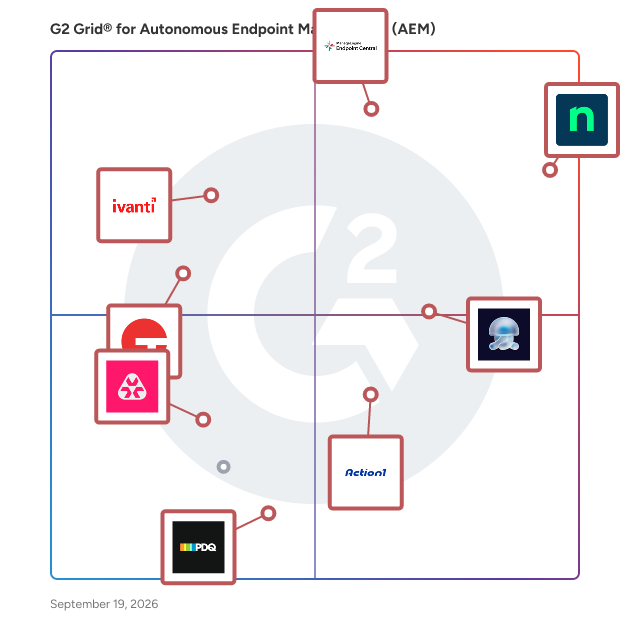
- **Leader:** [NinjaOne](https://www.g2.com/products/ninjaone/reviews)
- **Highest Performer:** [Action1](https://www.g2.com/products/action1/reviews)
- **Easiest to Use:** [Action1](https://www.g2.com/products/action1/reviews)
- **Top Trending:** [NinjaOne](https://www.g2.com/products/ninjaone/reviews)
- **Best Free Software:** [NinjaOne](https://www.g2.com/products/ninjaone/reviews)


---

**Sponsored**

### Prisma Browser for Business

Prisma Browser for Business is a secure web browser tailored for small businesses, integrating advanced security features directly into the browsing experience. Built on the Chromium platform, it offers a familiar interface while providing enterprise-grade protection against online threats such as phishing, ransomware, and data breaches. This solution enables teams to work seamlessly across various applications and AI tools, ensuring data security without the need for a dedicated IT team. Key Features and Functionality: - Proactive Threat Protection: Utilizes AI-powered threat scanning to detect and block phishing attempts, malware, and other cyber threats in real-time. - Data Loss Prevention: Implements controls to prevent accidental sharing of sensitive information, such as disabling copy/paste and file uploads to unauthorized platforms. - AI Interaction Management: Monitors and regulates AI tool usage to prevent unintended actions and data leaks, ensuring that business information remains secure. - User-Friendly Deployment: Offers a straightforward setup process with pre-configured security settings, allowing businesses to protect their teams without technical expertise. Primary Value and Problem Solved: Prisma Browser for Business addresses the critical need for robust cybersecurity in small businesses, which are increasingly targeted by sophisticated cyberattacks. By embedding security directly into the browser, it safeguards the primary workspace where employees spend the majority of their time. This solution not only protects against external threats but also mitigates risks associated with accidental data exposure through AI tools and other online platforms. By providing an easy-to-use, comprehensive security solution, Prisma Browser for Business empowers small businesses to focus on growth and productivity without compromising on security.


[Visit website](https://www.g2.com/external_clickthroughs/record?secure%5Bad_program%5D=ppc&amp;secure%5Bad_slot%5D=category_product_list&amp;secure%5Bcategory_id%5D=1011281&amp;secure%5Bdisplayable_resource_id%5D=1011281&amp;secure%5Bdisplayable_resource_type%5D=Category&amp;secure%5Bmedium%5D=sponsored&amp;secure%5Bplacement_reason%5D=page_category&amp;secure%5Bplacement_resource_ids%5D%5B%5D=1011281&amp;secure%5Bprioritized%5D=false&amp;secure%5Bproduct_id%5D=1806417&amp;secure%5Bresource_id%5D=1011281&amp;secure%5Bresource_type%5D=Category&amp;secure%5Bsource_type%5D=category_page&amp;secure%5Bsource_url%5D=https%3A%2F%2Fwww.g2.com%2Fcategories%2Fautonomous-endpoint-management-aem&amp;secure%5Btoken%5D=4df82b2403551301f7ce979c2954ea8ac7fa8253c79455f7c7bda2eb62fd0de2&amp;secure%5Burl%5D=https%3A%2F%2Fwww.paloaltonetworks.com%2Fprisma-browser-for-business%3Futm_source%3Ddv360-panw_inhouse-amer-sase-smco-sfow%26utm_medium%3Ddisplay%26utm_campaign%3Dg2-sase-prisma_browser_smb-amer-us-awareness-en-native-cat_com%26utm_content%3D701Ki000000p2UKIAY&amp;secure%5Burl_type%5D=custom_url)

---

## What Are the Top-Rated Autonomous Endpoint Management (AEM) Software Products in 2026?
### 1. [NinjaOne](https://www.g2.com/products/ninjaone/reviews)
NinjaOne is the unified IT operations platform that helps IT teams and managed service providers manage, secure, and support every endpoint from a single cloud-native console. Nearly 40,000 customers across 140+ countries use NinjaOne to replace fragmented point tools with one platform built to scale. The platform brings together the core work of modern IT operations: endpoint management, autonomous patch management, vulnerability management, endpoint and SaaS backup, remote access, and IT service desk. Teams monitor and control Windows, macOS, Linux, mobile, and virtual devices in one place, automate routine work with policy-based automation and human-centered AI, and cut the cost and risk that come from running many disconnected tools. NinjaOne serves internal IT teams and MSPs alike, from lean IT departments to mid-market and large enterprise organizations managing distributed, multi-site environments. Common uses include consolidating IT tooling, automating patching for security and compliance, managing distributed and hybrid workforces, improving endpoint visibility, and strengthening backup and ransomware readiness. NinjaOne has maintained a 98 percent customer satisfaction score for more than five years, backed by free unlimited onboarding and 24/7 support in seven languages. Organizations that move to NinjaOne report replacing four or more separate tools with the single platform. NinjaOne is FedRAMP Moderate Authorized and SOC 2 Type II and Type III compliant, and supports audit-ready compliance evidence across frameworks including CMMC, ISO 27001, and HIPAA. The mission behind the platform is simple: unify IT to simplify work, giving IT teams better tools and employees a great technology experience at work.


**Average Rating:** 4.7/5.0
**Total Reviews:** 4,346

**Who Is the Company Behind NinjaOne?**

- **Seller:** [NinjaOne](https://www.g2.com/sellers/ninjaone)
- **Company Website:** https://www.ninjaone.com/
- **Year Founded:** 2013
- **HQ Location:** Austin, Texas
- **Twitter:** @NinjaOne (3,607 Twitter followers)
- **LinkedIn® Page:** https://www.linkedin.com/company/6436301/ (2,121 employees on LinkedIn®)

**Who Uses This Product?**
- **Who Uses This:** IT Manager, Owner
- **Top Industries:** Information Technology and Services, Computer &amp; Network Security
- **Company Size:** 48% Mid-Market, 44% Small-Business


#### What Are NinjaOne's Pros and Cons?

**Pros:**

- Ease of Use (1373 reviews)
- Remote Access (867 reviews)
- Features (852 reviews)
- Automation (820 reviews)
- Customer Support (733 reviews)

**Cons:**

- Missing Features (715 reviews)
- Limited Features (396 reviews)
- Improvement Needed (372 reviews)
- Needs Improvement (362 reviews)
- Feature Issues (306 reviews)


### What Do G2 Reviewers Say About NinjaOne?
*AI-generated summary from verified user reviews*

**Pros:**

- Users appreciate the **ease of use** with NinjaOne, enjoying seamless management of company assets and automated features.
- Users value the **ease of remote access** with NinjaOne, allowing seamless management of devices and scripts.
- Users appreciate the **automated updates and alerts** in NinjaOne, significantly easing the management of multiple servers.
- Users appreciate the **automation capabilities** of NinjaOne, streamlining tasks and enhancing efficiency in IT management.
- Users appreciate the **excellent customer support** from NinjaOne, providing quick access to knowledgeable staff and practical solutions.

**Cons:**

- Users note the **missing features** in NinjaOne, particularly in the mobile app and policy application complexity.
- Users find NinjaOne has **limited features** , making device management and support less efficient than desired.
- Users feel an **improvement is needed** in the search function and feature delivery timelines of NinjaOne.
- Users feel NinjaOne&#39;s **search function lacks efficiency** and desire improved features and a better ticketing dashboard.
- Users face **feature issues** with function settings and lack of out-of-the-box roles, impacting usability and integration.

#### What Are Recent G2 Reviews of NinjaOne?

**"[NinjaOne Streamlines Endpoint Management and Remote Troubleshooting](https://www.g2.com/survey_responses/ninjaone-review-12791930)"**

**Rating:** 4.0/5.0 stars
*— Richard T.*

[Read full review](https://www.g2.com/survey_responses/ninjaone-review-12791930)

---

**"[Super Easy and Effective - Loved my Experience!](https://www.g2.com/survey_responses/ninjaone-review-9229992)"**

**Rating:** 5.0/5.0 stars
*— Kyle P.*

[Read full review](https://www.g2.com/survey_responses/ninjaone-review-9229992)

---


#### What Are G2 Users Discussing About NinjaOne?

- [What is NinjaOne (formerly NinjaRMM) used for?](https://www.g2.com/discussions/what-is-ninjaone-formerly-ninjarmm-used-for) - 2 comments
- [Does Office 365 Backup your data?](https://www.g2.com/discussions/does-office-365-backup-your-data) - 3 comments
- [What does Dropsuite Backup?](https://www.g2.com/discussions/what-does-dropsuite-backup) - 1 comment

### 2. [Action1](https://www.g2.com/products/action1/reviews)
Action1 is an autonomous endpoint management platform trusted by many Fortune 500 companies. Cloud-native, infinitely scalable, highly secure, and configurable in 5 minutes—it just works and is always free for the first 200 endpoints, with no functional limits. By pioneering autonomous OS and third-party patching with peer-to-peer patch distribution and real-time vulnerability assessment without needing a VPN, it eliminates routine labor, preempts ransomware and security risks, and protects the digital employee experience. In 2025, Action1 was recognized by Inc. 5000 as the fastest-growing private software company in America. The company is founder-led by Alex Vovk and Mike Walters, American entrepreneurs who previously founded Netwrix, a multi-billion-dollar cybersecurity company.


**Average Rating:** 4.9/5.0
**Total Reviews:** 1,073

**Who Is the Company Behind Action1?**

- **Seller:** [Action1](https://www.g2.com/sellers/action1)
- **Company Website:** https://www.action1.com/?refid=G2_company_website
- **Year Founded:** 2018
- **HQ Location:** Houston, Texas
- **Twitter:** @Action1corp (609 Twitter followers)
- **LinkedIn® Page:** https://www.linkedin.com/company/action1/ (124 employees on LinkedIn®)

**Who Uses This Product?**
- **Who Uses This:** IT Manager, System Administrator
- **Top Industries:** Information Technology and Services, Manufacturing
- **Company Size:** 55% Mid-Market, 37% Small-Business


#### What Are Action1's Pros and Cons?

**Pros:**

- Ease of Use (375 reviews)
- Patch Management (330 reviews)
- Easy Setup (225 reviews)
- Software Deployment (212 reviews)
- Automation (205 reviews)

**Cons:**

- Missing Features (171 reviews)
- Remote Access Issues (111 reviews)
- Feature Limitations (73 reviews)
- Needs Improvement (72 reviews)
- Improvement Needed (71 reviews)


### What Do G2 Reviewers Say About Action1?
*AI-generated summary from verified user reviews*

**Pros:**

- Users value the **ease of use** of Action1, finding setup quick and management simple for their systems.
- Users value the **effective patch management** of Action1, significantly easing their endpoint management challenges and increasing reliability.
- Users find Action1&#39;s **easy setup** and configuration process to be seamless and hassle-free for managing updates.
- Users value the **effortless software deployment** capabilities of Action1, ensuring seamless updates across all devices.
- Users love the **automation capabilities** of Action1, allowing seamless server updates and efficient endpoint management.

**Cons:**

- Users note the **absence of a Linux agent** , limiting functionality for those using Linux servers or clients.
- Users find the **remote access issues** in Action1 frustrating, citing slow connections and a need for feature improvements.
- Users note some **feature limitations** in Action1, including organization and reporting issues, impacting overall effectiveness.
- Users find the **reporting and user-friendliness** of Action1 lacking, affecting overall efficiency and usability.
- Users find that **improvement is needed** in report usability and automation logging for better experience.

#### What Are Recent G2 Reviews of Action1?

**"[Action1 Delivers Incredible Value: Free Endpoints, Affordable Scaling, and Phenomenal Reporting](https://www.g2.com/survey_responses/action1-review-13040126)"**

**Rating:** 5.0/5.0 stars
*— Ryan H.*

[Read full review](https://www.g2.com/survey_responses/action1-review-13040126)

---

**"[Effortless Software Management with Robust Remote Installation](https://www.g2.com/survey_responses/action1-review-12191305)"**

**Rating:** 5.0/5.0 stars
*— Christopher W.*

[Read full review](https://www.g2.com/survey_responses/action1-review-12191305)

---


#### What Are G2 Users Discussing About Action1?

- [What do you like most about Action1 for remote endpoint management, and what could be improved?](https://www.g2.com/discussions/what-do-you-like-most-about-action1-for-remote-endpoint-management-and-what-could-be-improved) - 1 comment
- [What is Action1 RMM used for?](https://www.g2.com/discussions/what-is-action1-rmm-used-for) - 1 comment

### 3. [Tanium](https://www.g2.com/products/tanium/reviews)
Trusted by 40% of the Fortune 100, 8 of the top 10 U.S. Banks, and all 6 branches of the U.S. Armed Forces. Tanium is the platform the world&#39;s most security-conscious organizations trust. The Tanium Autonomous IT Platform unifies endpoint management and security on a single, unified platform. Driven by real-time intelligence and generative, agentic, and predictive AI, Tanium ensures every insight and automation is based on accurate, trustworthy data so IT operations and security teams can act faster, stay resilient, and drive better business outcomes with confidence. Built on Tanium’s patented Linear Chain Architecture, teams can deploy trusted automation progressively, then execute actions safely at speed and scale - without scans or manual workflows. Continuous visibility across IT, mobile, OT, and cloud environments helps organizations accelerate decision agility, save costs through integrated automation, and strengthen resilience with closed-loop security.


**Average Rating:** 4.4/5.0
**Total Reviews:** 65

**Who Is the Company Behind Tanium?**

- **Seller:** [Tanium](https://www.g2.com/sellers/tanium)
- **Company Website:** https://www.tanium.com/
- **Year Founded:** 2007
- **HQ Location:** Emeryville, CA
- **Twitter:** @Tanium (7,243 Twitter followers)
- **LinkedIn® Page:** https://www.linkedin.com/company/2109024/ (2,333 employees on LinkedIn®)

**Who Uses This Product?**
- **Top Industries:** Information Technology and Services, Hospital &amp; Health Care
- **Company Size:** 48% Enterprise, 32% Mid-Market


#### What Are Tanium's Pros and Cons?

**Pros:**

- Ease of Use (7 reviews)
- Features (7 reviews)
- Reliability (4 reviews)
- Security (4 reviews)
- Visibility (4 reviews)

**Cons:**

- Learning Curve (4 reviews)
- Complexity (3 reviews)
- Limited Features (3 reviews)
- Insufficient Information (2 reviews)
- Needs Improvement (2 reviews)


### What Do G2 Reviewers Say About Tanium?
*AI-generated summary from verified user reviews*

**Pros:**

- Users appreciate the **ease of use** in Tanium, highlighting its user-friendly interface and efficiency in management tasks.
- Users value the **real-time visibility** and **ease of endpoint management** that Tanium provides for effective security and operations.
- Users commend Tanium for its **reliability and real-time visibility** , ensuring effective endpoint management and security.
- Users value Tanium&#39;s **strong security capabilities** , providing effective management and protection of endpoint resources.
- Users value the **real-time visibility** offered by Tanium, enhancing their ability to manage endpoints effectively.

**Cons:**

- Users find the **learning curve of Tanium steep** , requiring extra effort to navigate and utilize its features effectively.
- Users find Tanium&#39;s **complexity** challenging, especially for newcomers to cybersecurity and those preferring cloud solutions.
- Users note the **limited features** of Tanium, particularly in troubleshooting and support for Linux and updates.
- Users find the **insufficient information** on the Tanium platform makes navigation and onboarding more challenging and time-consuming.
- Users often find the **learning curve steep** and lack of clear onboarding resources overwhelming for Tanium.

#### What Are Recent G2 Reviews of Tanium?

**"[Real-Time Visibility and Fast Global Remediation with Tanium](https://www.g2.com/survey_responses/tanium-review-12961686)"**

**Rating:** 4.5/5.0 stars
*— Aswindev P.*

[Read full review](https://www.g2.com/survey_responses/tanium-review-12961686)

---

**"[Rapid Endpoint Visibility That Transformed Our Incident Troubleshooting](https://www.g2.com/survey_responses/tanium-review-12742786)"**

**Rating:** 4.0/5.0 stars
*— Nijat I.*

[Read full review](https://www.g2.com/survey_responses/tanium-review-12742786)

---


### 4. [Splashtop Autonomous Endpoint Management](https://www.g2.com/products/splashtop-autonomous-endpoint-management/reviews)
Splashtop Autonomous Endpoint Management (AEM) is an automation-led endpoint management solution that helps IT teams streamline software updates, improve security posture, and reduce manual workloads. With real-time OS and third-party software patching, cross-platform support, dashboards, inventory reporting and quick remediation tools, AEM can be used by IT teams to stay secure, compliant, and efficient. Splashtop AEM enables IT to: • Automate patching for OS, third-party, and custom apps • Complement Intune and other MDMs with real-time patching, scripting and remediation • Detect and prioritize vulnerabilities using AI-powered based threat CVE insights • Track and manage hardware and software inventory across all endpoints • Monitor endpoints and resolve issues proactively


**Average Rating:** 4.5/5.0
**Total Reviews:** 66

**Who Is the Company Behind Splashtop Autonomous Endpoint Management?**

- **Seller:** [Splashtop Inc.](https://www.g2.com/sellers/splashtop-inc)
- **Company Website:** https://www.splashtop.com
- **Year Founded:** 2006
- **HQ Location:** Cupertino, CA
- **Twitter:** @splashtop (5,216 Twitter followers)
- **LinkedIn® Page:** https://www.linkedin.com/company/1944335/ (346 employees on LinkedIn®)

**Who Uses This Product?**
- **Who Uses This:** IT Manager
- **Top Industries:** Information Technology and Services, Manufacturing
- **Company Size:** 54% Mid-Market, 34% Small-Business


#### What Are Splashtop Autonomous Endpoint Management's Pros and Cons?

**Pros:**

- Ease of Use (20 reviews)
- Reliability (18 reviews)
- Remote Access (17 reviews)
- Security (14 reviews)
- Features (11 reviews)

**Cons:**

- Missing Features (12 reviews)
- Limited Features (6 reviews)
- Limitations (5 reviews)
- Needs Improvement (5 reviews)
- Remote Access Issues (4 reviews)


### What Do G2 Reviewers Say About Splashtop Autonomous Endpoint Management?
*AI-generated summary from verified user reviews*

**Pros:**

- Users appreciate the **ease of use** of Splashtop, finding implementation and integration simple and intuitive.
- Users value the **reliability** of Splashtop, ensuring timely updates and seamless access across all machines.
- Users appreciate the **ease of remote access** with Splashtop, facilitating effective troubleshooting and task assistance daily.
- Users appreciate the **strong security features** of Splashtop, enabling effective management of updates and threats effortlessly.
- Users value the **intuitive and powerful features** of Splashtop, enhancing security and efficiency in IT management.

**Cons:**

- Users feel Splashtop AEM lacks **advanced reporting** and deeper compliance features necessary for comprehensive endpoint management.
- Users find the **limited software updates** and basic reporting features to be a constraint on functionality.
- Users face **limitations in function access** , requiring owner accounts for significant changes and limited reporting granularity.
- Users find **memory and CPU usage excessive** on some systems, and reporting lacks deeper compliance-focused insights.
- Users report frequent **remote access issues** , particularly with IP conflicts and streamer app offline behavior.

#### What Are Recent G2 Reviews of Splashtop Autonomous Endpoint Management?

**"[AI-Powered Endpoint Management on Autopilot with Real-Time Visibility](https://www.g2.com/survey_responses/splashtop-autonomous-endpoint-management-review-12994102)"**

**Rating:** 4.0/5.0 stars
*— Verified User in Computer Software*

[Read full review](https://www.g2.com/survey_responses/splashtop-autonomous-endpoint-management-review-12994102)

---

**"[Centralized Management with Seamless Updates](https://www.g2.com/survey_responses/splashtop-autonomous-endpoint-management-review-12500494)"**

**Rating:** 4.5/5.0 stars
*— Calvin M.*

[Read full review](https://www.g2.com/survey_responses/splashtop-autonomous-endpoint-management-review-12500494)

---


### 5. [Atera](https://www.g2.com/products/atera/reviews)
The first and only Agentic AI platform for IT management, offers a digital workforce of AI agents that proactively and autonomously support your entire IT operation. Atera’s all-in-one IT management platform consolidates RMM, helpdesk, ticketing, advanced reporting and automation- thus empowering IT teams and MSPs to efficiently manage and protect infrastructure, automate tasks, and boost service quality by reducing downtime and improving SLAs. Introducing Robin by Atera: It isn’t another IT solution, it’s a transformation in how organization scale IT. This evolution paves the way for Autonomous IT, shifting the modus operandi from reactive or routine automation to proactive and preemptive action. (1) Cut 40% of your IT workload: Eliminate 100% of tasks that drain your team’s time. Robin doesn’t just assist, it acts and resolves. (2) Always-on. No downtime: Deliver 24/7/365 IT support, no vacations, no sick leave. (3) A personal IT tech for every employee: Intelligent, context-aware AI agent that understands your environment, adapts to each user, responds instantly, and resolves autonomously. Plus, early-adopters have said it’s also quite polite. Atera is pioneering the shift from automation to AI-powered autonomy in IT. With our AI agents, IT teams can offload repetitive tasks, resolve issues faster, ensure better service, and focus on strategy rather than fix/break or firefighting. We maintain the highest security and compliance standards and follow responsible AI frameworks, ensuring our AI can be a trusted extension of your IT team. Trusted by over 13K customers in 120+ countries, Atera offers a scalable solution enabling organizations to drive sustainable growth and maximize organizational efficiency. Discover how Atera can help you achieve unparalleled IT efficiency. Try Atera free for 30 days at: www.atera.com


**Average Rating:** 4.6/5.0
**Total Reviews:** 1,177

**Who Is the Company Behind Atera?**

- **Seller:** [Atera](https://www.g2.com/sellers/atera)
- **Company Website:** https://www.atera.com
- **Year Founded:** 2011
- **HQ Location:** Tel Aviv
- **Twitter:** @AteraCloud (1,675 Twitter followers)
- **LinkedIn® Page:** https://www.linkedin.com/company/98739/ (404 employees on LinkedIn®)

**Who Uses This Product?**
- **Who Uses This:** Owner, IT Manager
- **Top Industries:** Information Technology and Services, Computer &amp; Network Security
- **Company Size:** 57% Small-Business, 31% Mid-Market


#### What Are Atera's Pros and Cons?

**Pros:**

- Ease of Use (595 reviews)
- Efficiency (285 reviews)
- Automation (273 reviews)
- Remote Access (267 reviews)
- Features (260 reviews)

**Cons:**

- Missing Features (269 reviews)
- Limited Features (199 reviews)
- Improvement Needed (137 reviews)
- Needs Improvement (117 reviews)
- Expensive (89 reviews)


### What Do G2 Reviewers Say About Atera?
*AI-generated summary from verified user reviews*

**Pros:**

- Users appreciate the **ease of use** of Atera, finding it simple and efficient for managing all tasks in one place.
- Users praise Atera&#39;s **efficiency** in streamlining client management and automating tasks, enhancing their overall workflow.
- Users value Atera&#39;s **powerful automation tools** , enhancing efficiency in managing workstations and automating tasks seamlessly.
- Users value the **seamless remote access** of Atera, enhancing efficiency with a unified dashboard and direct client connectivity.
- Users value Atera’s **all-in-one dashboard** for saving time with seamless remote access and automated features.

**Cons:**

- Users find Atera lacking in **advanced features and device compatibility** , hoping for improvements in the mobile app and dashboard.
- Users feel the **limited features** of Atera hinder functionality and increase costs for essential tools and settings.
- Users note the need for **improvement in interface changes** and Remote access reliability, affecting workflow and usability.
- Users find the **automation workflow accuracy** challenging, alongside difficulties with resource demands and threshold profile limitations.
- Users find Atera&#39;s pricing **expensive** , making it difficult for freelancers and small organizations to manage effectively.

#### What Are Recent G2 Reviews of Atera?

**"[Atera: All-in-One IT Management with Strong Integrations, Automation, and ROI](https://www.g2.com/survey_responses/atera-review-12982693)"**

**Rating:** 4.5/5.0 stars
*— Emil C.*

[Read full review](https://www.g2.com/survey_responses/atera-review-12982693)

---

**"[Comprehensive IT Management Made Easy with Powerful Add-Ons](https://www.g2.com/survey_responses/atera-review-12159122)"**

**Rating:** 5.0/5.0 stars
*— Marc Verjans T.*

[Read full review](https://www.g2.com/survey_responses/atera-review-12159122)

---


#### What Are G2 Users Discussing About Atera?

- [What is Atera used for?](https://www.g2.com/discussions/what-is-atera-used-for) - 1 comment
- [What is the best RMM tool?](https://www.g2.com/discussions/what-is-the-best-rmm-tool) - 1 comment
- [Is atera safe?](https://www.g2.com/discussions/is-atera-safe) - 2 comments
- [What is atera RMM?](https://www.g2.com/discussions/what-is-atera-rmm) - 1 comment
- [What is atera software?](https://www.g2.com/discussions/what-is-atera-software) - 1 comment

### 6. [PDQ Connect](https://www.g2.com/products/pdq-connect/reviews)
PDQ Connect is an agent-based endpoint management solution for Windows and macOS, designed for IT administrators and sysadmins. Manage, secure, and automate endpoints across remote, hybrid, and on-site environments without requiring a VPN. Core capabilities include patch management, software deployment, remote desktop access, and vulnerability management. Patch management supports both Windows updates and third-party applications. Vulnerabilities are continuously detected and prioritized using real-world exploit activity in addition to CVSS, enabling remediation based on active risk. Real-time, event-driven automation allows IT teams to execute workflows based on device state and predefined conditions — deployments trigger the moment a condition is met, without waiting for a scheduled window. Offline device deployment queuing ensures no device is skipped regardless of connectivity at the time a deployment runs. The curated package library includes 500+ applications and scripts, sourced directly from publishers, virus-scanned, and typically updated within hours of a new release. Custom multistep packages are supported for proprietary or specialized software. Device groups and inventory provide dynamic and static targeting based on device state, installed software, and custom scan data. Native deployment logging captures failure detail without requiring custom scripts. Remote desktop access supports sessions whether or not an end user is logged in. Multi-tenant support allows IT teams managing multiple environments to operate from a single console. PDQ Connect is SOC 2 certified and includes security features including MFA, role-based access controls, encryption, and audit logging to support compliance requirements. Pricing is publicly available and supports self-service purchasing without requiring a sales call. A 14-day free trial is available with no credit card required. Founded in 2001, PDQ was built by sysadmins, for sysadmins. Backed by a support team with a 95% customer satisfaction score over the past year. Trusted by 30,000+ IT professionals worldwide.


**Average Rating:** 4.6/5.0
**Total Reviews:** 408

**Who Is the Company Behind PDQ Connect?**

- **Seller:** [PDQ.com](https://www.g2.com/sellers/pdq-com)
- **Company Website:** https://www.PDQ.com
- **Year Founded:** 2001
- **HQ Location:** Salt Lake City, Utah, United States
- **Twitter:** @admarsenal (987 Twitter followers)
- **LinkedIn® Page:** https://www.linkedin.com/company/17961724/ (366 employees on LinkedIn®)

**Who Uses This Product?**
- **Who Uses This:** IT Manager, Systems Administrator
- **Top Industries:** Information Technology and Services, Primary/Secondary Education
- **Company Size:** 55% Mid-Market, 14% Enterprise


#### What Are PDQ Connect's Pros and Cons?

**Pros:**

- Ease of Use (233 reviews)
- Software Deployment (180 reviews)
- Easy Deployment (132 reviews)
- Easy Setup (129 reviews)
- Remote Access (118 reviews)

**Cons:**

- Missing Features (111 reviews)
- Improvement Needed (70 reviews)
- Limited Features (56 reviews)
- Remote Access Issues (35 reviews)
- Deployment Issues (33 reviews)


### What Do G2 Reviewers Say About PDQ Connect?
*AI-generated summary from verified user reviews*

**Pros:**

- Users appreciate the **ease of use** of PDQ Connect, with its intuitive UI and quick deployment capabilities.
- Users appreciate the **ease of software deployments** with PDQ Connect, simplifying updates and improving efficiency across the infrastructure.
- Users enjoy the **easy deployment** of PDQ Connect, appreciating effortless management of software across remote users.
- Users praise the **easy setup** of PDQ Connect, ensuring a smooth transition for remote management tasks.
- Users value the **remote access capabilities** of PDQ Connect, especially for providing offline support efficiently.

**Cons:**

- Users find the **missing features** of PDQ Connect hinder flexibility and efficiency in command execution and admin tasks.
- Users feel that **improvements are needed** for features like patch management, notifications, and mobile responsiveness.
- Users note the **limited features** of PDQ Connect, expressing the need for expanded capabilities and support.
- Users report **remote access issues** in PDQ Connect, lacking features for easy cloud-based user support.
- Users face **deployment issues** with PDQ Connect, particularly when managing pre-installed software and custom executables.

#### What Are Recent G2 Reviews of PDQ Connect?

**"[Simple, Real-Time Endpoint Management with Powerful Remote Updates](https://www.g2.com/survey_responses/pdq-connect-review-12432856)"**

**Rating:** 5.0/5.0 stars
*— Heather L.*

[Read full review](https://www.g2.com/survey_responses/pdq-connect-review-12432856)

---

**"[Quick Setup, Intuitive Interface, and Fast Deployments with PDQ Connect](https://www.g2.com/survey_responses/pdq-connect-review-12890173)"**

**Rating:** 4.5/5.0 stars
*— Jeff M.*

[Read full review](https://www.g2.com/survey_responses/pdq-connect-review-12890173)

---


### 7. [Automox](https://www.g2.com/products/automox/reviews)
Automox is the Autonomous Endpoint Management platform built for autonomous from day one. Policy-driven, human-controlled automation gives IT and security teams the speed, clarity, and control to reduce risk and move faster with confidence. Automox unifies automation, visibility, protection, adaptability, and speed in a single, cloud-native platform – enabling teams to automate up to 96% more patches, shorten remediation time, and operate securely at scale across Windows, macOS, and Linux devices.


**Average Rating:** 4.5/5.0
**Total Reviews:** 295

**Who Is the Company Behind Automox?**

- **Seller:** [Automox](https://www.g2.com/sellers/automox)
- **Company Website:** https://www.automox.com
- **Year Founded:** 2015
- **HQ Location:** Austin, TX
- **Twitter:** @Automox (886 Twitter followers)
- **LinkedIn® Page:** https://www.linkedin.com/company/7941257/ (203 employees on LinkedIn®)

**Who Uses This Product?**
- **Who Uses This:** Systems Administrator, IT Manager
- **Top Industries:** Information Technology and Services, Financial Services
- **Company Size:** 69% Mid-Market, 21% Enterprise


#### What Are Automox's Pros and Cons?

**Pros:**

- Patch Management (95 reviews)
- Automation (71 reviews)
- Ease of Use (64 reviews)
- Easy Deployment (37 reviews)
- Time-saving (33 reviews)

**Cons:**

- Access Issues (17 reviews)
- Needs Improvement (15 reviews)
- Poor Reporting (15 reviews)
- Slow Performance (14 reviews)
- Update Issues (14 reviews)


### What Do G2 Reviewers Say About Automox?
*AI-generated summary from verified user reviews*

**Pros:**

- Users value the **automated patch management** of Automox, streamlining updates for multiple operating systems effortlessly.
- Users appreciate the **effortless automation** of patch management with Automox, simplifying security and reducing vulnerabilities effectively.
- Users appreciate the **ease of use** of Automox, finding the interface intuitive and user-friendly for quick navigation.
- Users value the **easy deployment** of Automox, simplifying patching across multiple devices for enhanced efficiency.
- Users value the **time-saving automation** of Automox, allowing IT teams to focus on strategic initiatives instead of manual patching.

**Cons:**

- Users face **access issues** with Automox, requiring troubleshooting and causing frustration during use and support.
- Users find **setup challenges and limited reporting options** in Automox, impacting their overall experience and efficiency.
- Users note that **poor reporting** affects visibility of system compliance and suggests a need for improved options.
- Users often experience **slow performance** , with delays in device reconnection and unreliable remote access to client machines.
- Users experience **update issues** due to lack of communication between agents and UI, impacting device management efficiency.

#### What Are Recent G2 Reviews of Automox?

**"[Simplifying Cybersecurity and Endpoint Management](https://www.g2.com/survey_responses/automox-review-11263953)"**

**Rating:** 5.0/5.0 stars
*— Johnny C.*

[Read full review](https://www.g2.com/survey_responses/automox-review-11263953)

---

**"[Information-Rich Dashboard That Makes Patching and Reporting Effortless](https://www.g2.com/survey_responses/automox-review-12860569)"**

**Rating:** 5.0/5.0 stars
*— robert b.*

[Read full review](https://www.g2.com/survey_responses/automox-review-12860569)

---


#### What Are G2 Users Discussing About Automox?

- [What is 3rd party patching?](https://www.g2.com/discussions/what-is-3rd-party-patching)
- [What is patch management software?](https://www.g2.com/discussions/what-is-patch-management-software)
- [Where is Automox based?](https://www.g2.com/discussions/where-is-automox-based)
- [What does Automox do?](https://www.g2.com/discussions/what-does-automox-do)

### 8. [IBM MaaS360](https://www.g2.com/products/ibm-maas360/reviews)
IBM MaaS360 is an easy to use, unified endpoint management (UEM) solution that transforms the way that organizations support users, apps, content, and data across essentially every type of device. Its open, cloud-based platform integrates with preferred security and productivity tools. You can protect your workforce with evolved Threat Management, Mobile Security, Device management features and your analytics will be powered by watsonx AI capabilities, helping you to set up a good security posture. IBM MaaS360 is available for purchase on ibm.com and AWS Marketplace.


**Average Rating:** 4.2/5.0
**Total Reviews:** 190

**Who Is the Company Behind IBM MaaS360?**

- **Seller:** [IBM](https://www.g2.com/sellers/ibm)
- **Company Website:** https://www.ibm.com
- **Year Founded:** 1911
- **HQ Location:** Armonk, New York, United States
- **Twitter:** @IBMSecurity (74,660 Twitter followers)
- **LinkedIn® Page:** https://www.linkedin.com/company/1009/ (328,202 employees on LinkedIn®)

**Who Uses This Product?**
- **Who Uses This:** IT Manager, Software Engineer
- **Top Industries:** Information Technology and Services, Computer Software
- **Company Size:** 44% Mid-Market, 34% Enterprise


#### What Are IBM MaaS360's Pros and Cons?

**Pros:**

- Features (48 reviews)
- Security (46 reviews)
- Device Management (38 reviews)
- Ease of Use (37 reviews)
- Protection (24 reviews)

**Cons:**

- Learning Curve (24 reviews)
- Poor Interface Design (17 reviews)
- Poor UI (17 reviews)
- Slow Performance (17 reviews)
- Outdated Interface (13 reviews)


### What Do G2 Reviewers Say About IBM MaaS360?
*AI-generated summary from verified user reviews*

**Pros:**

- Users appreciate the **robust security features** of IBM MaaS360, enhancing protection and management of enterprise tools.
- Users value the **robust security** features of IBM MaaS360, effectively protecting tools and managing cyber threats.
- Users value the **unified device management** of IBM MaaS360, enhancing security and ease of integration for all devices.
- Users appreciate the **ease of use** of IBM MaaS360, highlighting its intuitive dashboard and seamless device onboarding experience.
- Users value the **enhanced security** provided by IBM MaaS360, effectively protecting tools and data from cyber threats.

**Cons:**

- Users find the **learning curve steep** , as advanced configurations and outdated interface hinder ease of use.
- Users find the **interface design poor** , describing it as outdated and sometimes overwhelming for new users.
- Users find the **interface outdated** and clunky, leading to a frustrating experience with IBM MaaS360.
- Users notice **slow performance** in IBM MaaS360, particularly with outdated interface and sync delays affecting efficiency.
- Users find the **interface outdated and clunky** , which can hinder the overall user experience with IBM MaaS360.

#### What Are Recent G2 Reviews of IBM MaaS360?

**"[Efficient and Secure Management for Remote Teams](https://www.g2.com/survey_responses/ibm-maas360-review-12996280)"**

**Rating:** 5.0/5.0 stars
*— Juen Hui C.*

[Read full review](https://www.g2.com/survey_responses/ibm-maas360-review-12996280)

---

**"[Seamless Security and Device Management with IBM MaaS360](https://www.g2.com/survey_responses/ibm-maas360-review-12998220)"**

**Rating:** 4.0/5.0 stars
*— Soumyadip H.*

[Read full review](https://www.g2.com/survey_responses/ibm-maas360-review-12998220)

---


#### What Are G2 Users Discussing About IBM MaaS360?

- [What is IBM Security MaaS360 with Watson used for?](https://www.g2.com/discussions/what-is-ibm-security-maas360-with-watson-used-for)
- [Can MaaS360 read text messages?](https://www.g2.com/discussions/can-maas360-read-text-messages)
- [Can IBM MaaS360 track your location?](https://www.g2.com/discussions/can-ibm-maas360-track-your-location)
- [What does IBM MaaS360 do?](https://www.g2.com/discussions/what-does-ibm-maas360-do)
- [What is IBM MaaS360 with Watson?](https://www.g2.com/discussions/what-is-ibm-maas360-with-watson) - 2 comments

### 9. [Adaptiva](https://www.g2.com/products/adaptiva/reviews)
Adaptiva OneSite is a sophisticated AI-driven endpoint management solution designed to optimize the patching and management of endpoints on a large scale. This platform employs an adaptive and autonomous approach, enabling IT and security teams to automate essential processes without requiring manual intervention. By minimizing the need for human effort, OneSite accelerates the patching process and bolsters continuous security across various network environments. The primary audience for Adaptiva OneSite consists of IT departments and security teams within large enterprises that oversee extensive networks of endpoints. These organizations often grapple with the dual challenge of maintaining security and compliance while ensuring operational efficiency. OneSite Patch effectively addresses these challenges by offering hands-free automation that delivers patches, software updates, and vulnerability remediations in real time. This capability is vital for organizations aiming to reduce disruptions to network performance while upholding a strong security posture. OneSite Patch distinguishes itself within the endpoint management category through its seamless integration with prominent security solutions, including CrowdStrike Exposure Management, SentinelOne Singularity Platform, and Microsoft Defender for Endpoint. Such integration ensures that vulnerabilities are prioritized and remediated automatically, enabling organizations to respond quickly to emerging threats. Moreover, OneSite Patch serves as the foundational technology for Tenable Patch Management, further solidifying its credibility and effectiveness in the competitive landscape of endpoint management solutions. Key features of Adaptiva OneSite encompass autonomous patch management, software distribution via OneSite Anywhere, and automated endpoint health checks and remediation through OneSite Health. These features collectively empower organizations to enhance operational efficiency, mitigate security risks, and maximize patching speed across millions of endpoints. By utilizing Adaptiva OneSite, enterprises can gain greater control over their endpoint management processes, ensuring that their networks remain secure and compliant in an increasingly complex threat environment. This comprehensive approach not only streamlines operations but also fortifies the overall security framework, making it an essential tool for modern IT and security teams.


**Average Rating:** 4.8/5.0
**Total Reviews:** 30

**Who Is the Company Behind Adaptiva?**

- **Seller:** [Adaptiva](https://www.g2.com/sellers/adaptiva)
- **Company Website:** https://adaptiva.com/
- **Year Founded:** 2011
- **HQ Location:** Kirkland, Washington, United States
- **Twitter:** @adaptiva (1,822 Twitter followers)
- **LinkedIn® Page:** https://linkedin.com/company/adaptiva (95 employees on LinkedIn®)

**Who Uses This Product?**
- **Company Size:** 87% Enterprise, 10% Mid-Market


#### What Are Adaptiva's Pros and Cons?

**Pros:**

- Customer Support (7 reviews)
- Reliability (6 reviews)
- Ease of Use (4 reviews)
- Security (4 reviews)
- Patch Management (3 reviews)

**Cons:**

- Insufficient Information (2 reviews)
- Missing Features (2 reviews)
- Needs Improvement (2 reviews)
- Access Issues (1 reviews)
- File Transfer Issues (1 reviews)


### What Do G2 Reviewers Say About Adaptiva?
*AI-generated summary from verified user reviews*

**Pros:**

- Users praise the **fast and accurate customer support** of Adaptiva, ensuring efficient resolution of issues whenever needed.
- Users highlight **exceptional reliability** with Adaptiva, enjoying fast support and efficient content distribution across varied environments.
- Users find Adaptiva to be **exceptionally easy to use** , greatly simplifying IT operations and enhancing efficiency.
- Users value the **strong security measures** of Adaptiva, significantly reducing vulnerabilities and enhancing overall IT efficiency.
- Users praise **automated patch management** for reducing manual effort and keeping systems secure with real-time risk priorities.

**Cons:**

- Users find the **insufficient information** in Adaptiva regarding operational issues frustrating and in need of improvement.
- Users find the **lack of available operational resources** in Adaptiva&#39;s support portal to be a significant drawback.
- Users suggest that **reporting features need improvement** , as options and delivery optimization are lacking.
- Users face **access issues** due to limited availability of operational resources on the Adaptiva Support Portal.
- Users report **file transfer issues** including lack of expedited downloads and delivery optimization problems.

#### What Are Recent G2 Reviews of Adaptiva?

**"[Amazing product with stellar customer support.](https://www.g2.com/survey_responses/adaptiva-review-11326407)"**

**Rating:** 5.0/5.0 stars
*— Johan N.*

[Read full review](https://www.g2.com/survey_responses/adaptiva-review-11326407)

---

**"[Superb support](https://www.g2.com/survey_responses/adaptiva-review-11535837)"**

**Rating:** 5.0/5.0 stars
*— George Y.*

[Read full review](https://www.g2.com/survey_responses/adaptiva-review-11535837)

---


#### What Are G2 Users Discussing About Adaptiva?

- [What does Onesite do?](https://www.g2.com/discussions/what-does-onesite-do)
- [Is RealPage an ERP system?](https://www.g2.com/discussions/is-realpage-an-erp-system)
- [What is Property Management Software?](https://www.g2.com/discussions/what-is-property-management-software)

### 10. [HCL BigFix](https://www.g2.com/products/hcl-technologies-hcl-bigfix/reviews)
HCL BigFix is an enterprise-grade Unified Endpoint Management (UEM) and automation platform. Built to deliver Secure Resilient Operations, HCL BigFix enables IT and security teams to manage, secure, and remediate endpoints and infrastructure across on-premises, hybrid, and multi-cloud environments at enterprise scale. Enterprises choose HCL BigFix for: - A single-agent, unified platform for endpoint and infrastructure management - Centralized visibility and control across 155M+ endpoints and 90+ operating system variants - Automated patching, continuous compliance, and real-time vulnerability remediation with \&gt;98% first-pass patch success - AI-driven automation and agentic workflows powered by AEX to enable proactive self-healing and improved Digital Employee Experience (DEX)


**Average Rating:** 4.5/5.0
**Total Reviews:** 85

**Who Is the Company Behind HCL BigFix?**

- **Seller:** [HCL Technologies](https://www.g2.com/sellers/hcl-technologies)
- **Year Founded:** 1999
- **HQ Location:** Noida, Uttar Pradesh
- **Twitter:** @hcltech (425,043 Twitter followers)
- **LinkedIn® Page:** https://www.linkedin.com/company/1756/ (246,058 employees on LinkedIn®)
- **Ownership:** NSE - National Stock Exchange of India

**Who Uses This Product?**
- **Top Industries:** Information Technology and Services, Computer &amp; Network Security
- **Company Size:** 38% Mid-Market, 36% Enterprise


#### What Are HCL BigFix's Pros and Cons?

**Pros:**

- Automation (1 reviews)
- Centralized Management (1 reviews)
- Ease of Use (1 reviews)
- Endpoint Management (1 reviews)
- Patching Efficiency (1 reviews)

**Cons:**

- Complexity (1 reviews)
- Learning Curve (1 reviews)
- Poor Interface Design (1 reviews)
- Poor Reporting (1 reviews)
- Poor UI (1 reviews)


### What Do G2 Reviewers Say About HCL BigFix?
*AI-generated summary from verified user reviews*

**Pros:**

- Users appreciate the **automation capabilities** of HCL BigFix, enhancing security and reducing operational effort effectively.
- Users appreciate the **real-time visibility and centralized management** of HCL BigFix, streamlining endpoint operations efficiently.
- Users appreciate the **ease of use** of HCL BigFix for centralized management and efficient endpoint maintenance.
- Users appreciate the **real-time visibility and centralized management** of HCL BigFix, enhancing security and operational efficiency.
- Users appreciate the **patching efficiency** of HCL BigFix, enhancing security and reducing operational effort through automation.

**Cons:**

- Users find the **UI complex and unintuitive** , resulting in a steep learning curve and time-consuming tasks.
- Users find the **complex UI** of HCL BigFix increases the learning curve for newcomers and complicates customizations.
- Users find the **UI complex and less intuitive** , resulting in a steep learning curve for new users.
- Users find the **poor reporting** feature of HCL BigFix frustrating due to complex configurations needed for insights.
- Users find the **poor UI** of HCL BigFix complex and unintuitive, increasing the learning curve for new users.

#### What Are Recent G2 Reviews of HCL BigFix?

**"[Real-Time Visibility and Centralized Endpoint Management That Scales](https://www.g2.com/survey_responses/hcl-bigfix-review-12330404)"**

**Rating:** 5.0/5.0 stars
*— Sourabh M.*

[Read full review](https://www.g2.com/survey_responses/hcl-bigfix-review-12330404)

---

**"[Best for Server patching](https://www.g2.com/survey_responses/hcl-bigfix-review-12705779)"**

**Rating:** 5.0/5.0 stars
*— Deepak S.*

[Read full review](https://www.g2.com/survey_responses/hcl-bigfix-review-12705779)

---


#### What Are G2 Users Discussing About HCL BigFix?

- [What is the basic function provided by BigFix inventory?](https://www.g2.com/discussions/what-is-the-basic-function-provided-by-bigfix-inventory)
- [What feature sets does the BigFix Lifecycle module provide?](https://www.g2.com/discussions/what-feature-sets-does-the-bigfix-lifecycle-module-provide)
- [What is BigFix HCL?](https://www.g2.com/discussions/what-is-bigfix-hcl) - 3 comments
- [What does BigFix software do?](https://www.g2.com/discussions/what-does-bigfix-software-do)

### 11. [Teamviewer DEX](https://www.g2.com/products/teamviewer-dex/reviews)
The TeamViewer DEX platform is a real-time autonomous Digital Employee Experience (DEX) solution that fixes digital workforce problems fast and forever, improving compliance, reducing costs, and delivering a superior digital experience for users.​ Key Capabilities: Autonomous Digital Workplace Management​ Endpoint Troubleshooting Endpoint Automation Employee sentiment surveys and notifications Experience Analytics Patch management Virtual Assistant for ServiceNow ServiceNow embedded troubleshooting and remediation Application Experience Management (AXM) Hardware and software asset management Virtual Desktop Experience (VDX) Software Reclaim Content Distribution for Microsoft Configuration Manager Hardware Lifecycle Management Digital Experience Observability Real-time actions for Microsoft Intune Low code/no code automation​ AI insights and recommendations Business Impact dashboard M365 application monitoring Unified Communications app monitoring Network monitoring


**Average Rating:** 4.4/5.0
**Total Reviews:** 55

**Who Is the Company Behind Teamviewer DEX?**

- **Seller:** [TeamViewer](https://www.g2.com/sellers/teamviewer)
- **Company Website:** https://www.teamviewer.com
- **Year Founded:** 2005
- **HQ Location:** Goppingen
- **Twitter:** @TeamViewer (48,070 Twitter followers)
- **LinkedIn® Page:** https://www.linkedin.com/company/3479536/ (2,769 employees on LinkedIn®)

**Who Uses This Product?**
- **Top Industries:** Information Technology and Services, Oil &amp; Energy
- **Company Size:** 75% Enterprise, 16% Mid-Market


#### What Are Teamviewer DEX's Pros and Cons?

**Pros:**

- Features (7 reviews)
- Automation (6 reviews)
- Time-saving (6 reviews)
- Ease of Use (4 reviews)
- Easy Implementation (3 reviews)

**Cons:**

- Learning Curve (4 reviews)
- Poor Customer Support (4 reviews)
- Setup Complexity (3 reviews)
- Expensive (2 reviews)
- Poor Interface Design (2 reviews)


### What Do G2 Reviewers Say About Teamviewer DEX?
*AI-generated summary from verified user reviews*

**Pros:**

- Users value the **powerful features and accessibility** of Teamviewer DEX, enhancing their technology experience significantly.
- Users appreciate the **automation features** of Teamviewer DEX, which streamline endpoint management and enhance operational efficiency.
- Users appreciate the **time-saving automation** of Teamviewer DEX, making IT operations significantly more efficient and streamlined.
- Users appreciate the **ease of use** of TeamViewer DEX, enhancing productivity and streamlining remote management tasks.
- Users appreciate the **easy implementation** of Teamviewer DEX, enabling seamless integration and efficient management of enterprise endpoints.

**Cons:**

- Users find the **learning curve steep** for TeamViewer DEX, especially with complex initial setups and advanced features.
- Users report **poor customer support** , noting slow response times and challenges in implementation processes.
- Users find the **initial setup and configuration complex** , particularly for those unfamiliar with the platform&#39;s requirements.
- Users find the **license costs to be quite high** , particularly impacting small teams and startups.
- Users find the **poor interface design** and learning curve challenging, hindering a smoother overall experience with Teamviewer DEX.

#### What Are Recent G2 Reviews of Teamviewer DEX?

**"[Transforms IT Efficiency with Powerful Automation and Real-Time Insights](https://www.g2.com/survey_responses/teamviewer-dex-review-11914059)"**

**Rating:** 4.0/5.0 stars
*— Verified User in Information Technology and Services*

[Read full review](https://www.g2.com/survey_responses/teamviewer-dex-review-11914059)

---

**"[Reliable Remote Management with Powerful Features—Initial Setup Can Be Complex](https://www.g2.com/survey_responses/teamviewer-dex-review-11908396)"**

**Rating:** 4.5/5.0 stars
*— Tushar K.*

[Read full review](https://www.g2.com/survey_responses/teamviewer-dex-review-11908396)

---


#### What Are G2 Users Discussing About Teamviewer DEX?

- [What is 1E used for?](https://www.g2.com/discussions/what-is-1e-used-for)

### 12. [Patchifi](https://www.g2.com/products/patchifi/reviews)
Patchifi – Autonomous Endpoint Management for Modern IT Teams Patchifi is a cloud-native endpoint management platform built for IT teams and Managed Service Providers (MSPs) who need more than just basic automation. Instead of manually tracking patches and updates across hundreds of endpoints, Patchifi handles it all — intelligently and autonomously. What makes Patchifi different? Unlike traditional patch management tools, Patchifi uses AI-powered decisioning to prioritize and apply patches based on real-time risk context and system health — not just release schedules. It thinks, learns, and acts so your team doesn&#39;t have to. Key Capabilities: Automated Patch Management – Keep Windows and Linux (including Ubuntu) endpoints continuously up to date without manual intervention. Third-Party Software Updates – Manage updates across a wide range of applications from a single platform. Remote Software Deployment – Silently install, update, or remove software across multiple endpoints with zero user disruption. Script Execution – Run scripts remotely across your environment at scale. Real-Time Dashboards – Get instant visibility into patch status, system health, and compliance across your entire estate. Audit-Ready Reporting – Simplify regulatory assessments with detailed, exportable compliance reports. Who is it for? Patchifi is built for IT teams, MSPs, and security-focused organizations of all sizes — from small businesses to large enterprises, nonprofits, and government entities. Why teams love it: Patchifi eliminates the tedious, repetitive work of endpoint maintenance. With continuous compliance, autonomous workflows, and a clean centralized dashboard, IT teams can shift their focus from firefighting patches to higher-value work. Headquartered in the United Kingdom, Patchifi is trusted by organizations across India, the UAE, and Europe — and growing fast since its public launch in late 2025.


**Who Is the Company Behind Patchifi?**

- **Seller:** [Patchifi](https://www.g2.com/sellers/patchifi)
- **Year Founded:** 2025
- **HQ Location:** London, GB
- **LinkedIn® Page:** https://www.linkedin.com/company/patchifi/ (6 employees on LinkedIn®)


### 13. [Remedio](https://www.g2.com/products/remedio/reviews)
The leading platform for continuous exposure management, Remedio goes beyond device posture to deliver intelligent, scalable risk elimination across endpoints, applications, and AI systems. Through context-aware monitoring and policy-driven controls, [Remedio](https://www.remedio.io) provides unified visibility and enforcement across Windows, macOS, Linux, servers, cloud environments, and modern application ecosystems. Remedio protects against misconfigurations, unpatched vulnerabilities, risky or unauthorized applications, and emerging AI-driven threats. By correlating configuration, vulnerability, and usage data, it prioritizes real risk and draws a direct path from discovery to remediation – combining automated patching, application control, and continuous policy enforcement. With built-in safeguards and rollback capabilities, Remedio enables aggressive attack surface reduction without disrupting the business, ensuring that every action is safe, auditable, and aligned to operational realities.


**Average Rating:** 4.3/5.0
**Total Reviews:** 5

**Who Is the Company Behind Remedio?**

- **Seller:** [Remedio (formerly GYTPOL)](https://www.g2.com/sellers/remedio-formerly-gytpol)
- **Company Website:** https://www.remedio.io/
- **Twitter:** @remediosecurity (461 Twitter followers)
- **LinkedIn® Page:** https://www.linkedin.com/company/remediosecurity/

**Who Uses This Product?**
- **Company Size:** 40% Enterprise, 40% Mid-Market


#### What Are Remedio's Pros and Cons?

**Pros:**

- Ease of Use (2 reviews)
- Customer Support (1 reviews)
- Easy Setup (1 reviews)
- Features (1 reviews)
- Intuitive (1 reviews)

**Cons:**

- Missing Information (1 reviews)
- Patching Issues (1 reviews)
- Poor Customer Support (1 reviews)
- Setup Complexity (1 reviews)


### What Do G2 Reviewers Say About Remedio?
*AI-generated summary from verified user reviews*

**Pros:**

- Users value Remedio for its **intuitive design** , which simplifies workflows and minimizes the learning curve.
- Users value the **outstanding customer support** of Remedio, which enhances their experience and maximizes platform benefits.
- Users praise Remedio for its **easy setup** , making adoption smooth and efficient with excellent technical support.
- Users value the **security configuration management** of Remedio, appreciating the ability to monitor and reverse changes effectively.
- Users find Remedio&#39;s **intuitive design** enhances workflow, simplifying operations and reducing the learning curve for teams.

**Cons:**

- Users find the **documentation lacking accessibility** , making it difficult to fully utilize Remedio’s features.
- Users struggle with **automatic patch installation** , making the update process cumbersome and inconvenient.
- Users find the **poor customer support** hinders a smooth transition to the cloud and complicates onboarding processes.
- Users feel the **setup complexity** of Remedio makes the transition clunky, lacking sufficient support for a smoother experience.

#### What Are Recent G2 Reviews of Remedio?

**"[Seamless Transition to SAAS with Effortless Server Migration](https://www.g2.com/survey_responses/remedio-review-11998665)"**

**Rating:** 4.0/5.0 stars
*— Verified User in Transportation/Trucking/Railroad*

[Read full review](https://www.g2.com/survey_responses/remedio-review-11998665)

---

**"[Solid Security Partner with Room for Improvement](https://www.g2.com/survey_responses/remedio-review-11999552)"**

**Rating:** 4.0/5.0 stars
*— Dell S.*

[Read full review](https://www.g2.com/survey_responses/remedio-review-11999552)

---


## What Is Autonomous Endpoint Management (AEM) Software?

[Endpoint Protection Software](https://www.g2.com/categories/endpoint-protection)

## What Software Categories Are Similar to Autonomous Endpoint Management (AEM) Software?

- [Endpoint Management Software](https://www.g2.com/categories/endpoint-management)
- [Patch Management Software](https://www.g2.com/categories/patch-management)
- [Unified Endpoint Management (UEM) Software](https://www.g2.com/categories/unified-endpoint-management-uem)


