AI-Generated Results
Finding matches…
Stay on top of legal case information, documents, communications, tasks, and deadlines. Our Neodeluxe legal products and services are designed to optimize legal case management and data solutions, making your operaions more efficient, secure, and client-centric.
Not seeing what you're looking for?
Dive deeper into "Notella" on G2 AI

Hotello is a SAAS, Cloud or on premise hospitality management software that manage establishment's day to day operations and customer service.
Highlight PDF documents or import annotations from other PDF apps. Manage annotations in the BOTA list and connect with related notes. Link key facts pulled from multiple PDF documents and digest what you've read. View sources and related notes at a glance. Collect information intuitively across the web. Simply drag texts, images, or videos from web pages, and drop to paste with a mobile friendly web clipper. Sort through excessive information and build knowledge upon what you've comprehended. Manage and trace references in an instant. Add images, videos, or audios to record memorable notes and express amazing ideas in an interactive way.
Shop securely, transfer money anywhere in the United States of America, access your funds instantly

Lightweight web based AB testing. A streamlined alternative to complex testing tools.


Notezilla is a sticky notes app for Windows designed to keep you well-equipped and well organized. It lets you take quick notes on sticky notes (that look like 3M Post-It Notes), right on your Windows desktop and gives you the best sticky notes experience.

IntellaSphere helps businesses / #SMBs market more effectively using a socially collaborative approach.

Microsoft Teams is a comprehensive collaboration platform developed by Microsoft, designed to streamline communication and teamwork within organizations. It integrates chat, video conferencing, file storage, and application integration into a single interface, facilitating seamless collaboration across various devices and operating systems. As part of the Microsoft 365 suite, Teams enhances productivity by providing a centralized hub for team interactions and project management.
Key Features and Functionality:
- Chat and Messaging: Facilitates real-time text communication with individuals or groups, supporting rich text, emojis, stickers, and GIFs.
- Video Conferencing: Offers high-quality video meetings with features like screen sharing, custom backgrounds, and live captions, accommodating both small team huddles and large webinars.
- File Sharing and Collaboration: Enables secure file storage and sharing through integration with OneDrive and SharePoint, allowing multiple users to co-author documents simultaneously.
- Integration with Applications: Supports integration with a wide range of Microsoft and third-party applications, enhancing workflow efficiency by bringing various tools into one platform.
- Security and Compliance: Provides enterprise-grade security measures, including data encryption for meetings, chats, calls, and files, ensuring compliance with industry standards.
Primary Value and Solutions Provided:
Microsoft Teams addresses the challenges of modern workplace collaboration by unifying communication channels, reducing the need for multiple disparate tools. It enhances team productivity by centralizing resources, facilitating real-time collaboration, and ensuring secure information sharing. By integrating with the broader Microsoft 365 ecosystem, Teams offers a cohesive environment that supports remote work, hybrid teams, and in-person collaboration, adapting to the diverse needs of today's workforce.
Fathom records, transcribes, highlights, and summarizes your meetings so you can focus on the conversation.

NotelyAi is an advanced AI-powered note-taking application designed to enhance productivity and streamline the process of capturing, organizing, and retrieving information. By leveraging cutting-edge artificial intelligence, NotelyAi offers users an intuitive platform that adapts to their unique needs, ensuring efficient and effective note management.
Key Features and Functionality:
- AI-Driven Organization: Automatically categorizes and tags notes based on content, making retrieval seamless and intuitive.
- Voice-to-Text Conversion: Transcribes spoken words into accurate text notes, facilitating hands-free note-taking.
- Cross-Platform Synchronization: Ensures notes are accessible and up-to-date across all devices, providing flexibility and convenience.
- Smart Search Capabilities: Employs advanced search algorithms to quickly locate specific information within notes.
- Collaborative Tools: Allows multiple users to share and edit notes in real-time, enhancing teamwork and communication.
- Integration with Other Applications: Connects with popular productivity tools, streamlining workflows and reducing the need to switch between apps.
Primary Value and User Solutions:
NotelyAi addresses the common challenges of information overload and disorganized note management by providing a centralized, intelligent platform for capturing and organizing thoughts, ideas, and tasks. Its AI-driven features save users time by automating the organization process and improving the accuracy of information retrieval. The application's cross-platform synchronization and collaborative tools make it ideal for both individual users and teams seeking to enhance productivity and maintain seamless communication. By integrating with existing productivity applications, NotelyAi simplifies workflows, allowing users to focus on their core tasks without the distraction of managing multiple tools.

Remember everything. Capture Everything. Access anywhere. Find things fast.

Slack brings all your communication together in one place. It’s real-time messaging, archiving and search for modern teams.

Fellow is a meeting productivity app designed to help you stay organized and make the most of your time in meetings. Fellow connects your meeting notes to your calendar, makes them easy to find, creates accountability with assigned action items, and ensures you’re setting a meaningful agenda for each meeting with collaborative agendas and meeting templates. Fellow also provides features that help improve the meeting experience with automated reminders, suggestions to cancel the meeting when there’s no clear agenda, meeting feedback, and a long list of integrations to ensure your meeting information communicates with your other tools.
The developer-friendly platform that takes the pain out of capturing & sharing technical notes

Microsoft OneNote is a note-taking application designed to help users capture, organize, and share information across various devices. It allows for the creation of digital notebooks where users can input text, drawings, screen clippings, and audio commentaries. OneNote's free-form canvas enables users to place content anywhere on the page, facilitating a flexible and intuitive note-taking experience. Integrated with Microsoft 365, OneNote supports real-time collaboration, allowing multiple users to edit and share notes simultaneously. Its cross-platform availability ensures seamless access to notes on Windows, macOS, iOS, Android, and through web browsers.
Key Features and Functionality:
- Flexible Note-Taking: Users can type, handwrite, or draw notes, insert images, and embed multimedia content, accommodating various input preferences.
- Organizational Tools: Notebooks are structured into sections and pages, with powerful search capabilities to quickly locate information.
- Collaboration: Multiple users can work on the same notebook simultaneously, with changes synced in real-time, enhancing teamwork and productivity.
- Integration with Microsoft 365: Seamless integration with other Microsoft applications like Word, Excel, and PowerPoint allows for easy sharing and embedding of content.
- Cross-Platform Accessibility: OneNote is available on various platforms, including Windows, macOS, iOS, Android, and web browsers, ensuring access to notes from any device.
Primary Value and User Solutions:
OneNote addresses the need for a centralized, flexible, and collaborative note-taking solution. It simplifies information management by allowing users to capture diverse content types in a single location, organize them effectively, and access them across multiple devices. The application's collaborative features enhance teamwork by enabling shared access and real-time editing, making it ideal for both personal productivity and professional projects. By integrating with the Microsoft 365 suite, OneNote streamlines workflows and ensures that users have the tools they need to capture ideas, plan projects, and share information efficiently.

Google Workspace enables teams of all sizes to connect, create and collaborate. It includes productivity and collaboration tools for all the ways that we work: Gmail for custom business email, Drive for cloud storage, Docs for word processing, Meet for video and voice conferencing, Chat for team messaging, Slides for presentation building, shared Calendars, and many more.
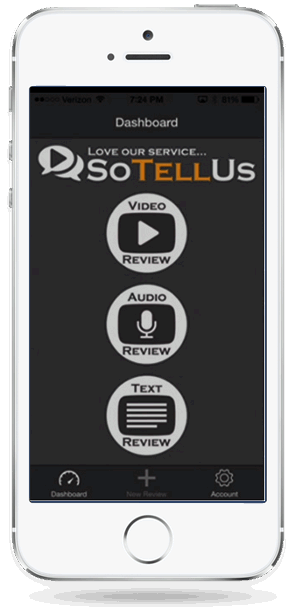
Review system that allows you to get video, audio, and written reviews instantly.

Notion is a unified workspace for teams. Notion is a connected workspace where your team can create docs, take notes, manage tasks, and organize your work – all in one place. And now, with Notion AI, you can augment your capabilities in new and unexpected ways. Leverage the power of AI right inside Notion, across all your notes and docs, without the need to jump between your work and a separate AI-powered tool.