Best E-Signature Software with Bulk Digital Signatures Capabilities

How Many E-Signature Software Products Does G2 Track?

Total Products under this Category: 431

Category Stats (Aug 2026)

  • Average Rating: 4.59/5 (↑0.01 vs Jul 2026) The average rating of products in this category, based on all submitted ratings
  • Top Trending Product: Kinective SignPlus (+8.33%) - Among all products in this category, Kinective SignPlus recorded the largest rating increase compared to last month

Last updated: August 04, 2026

How Does G2 Rank E-Signature Software Products?

Why You Can Trust G2's Software Rankings:

  • 30 Analysts and Data Experts
  • 56,200+ Authentic Reviews
  • 431+ Products
  • Unbiased Rankings

G2's software rankings are built on verified user reviews, rigorous moderation, and a consistent research methodology maintained by a team of analysts and data experts. Each product is measured using the same transparent criteria, with no paid placement or vendor influence. While reviews reflect real user experiences, which can be subjective, they offer valuable insight into how software performs in the hands of professionals. Together, these inputs power the G2 Score, a standardized way to compare tools within every category.

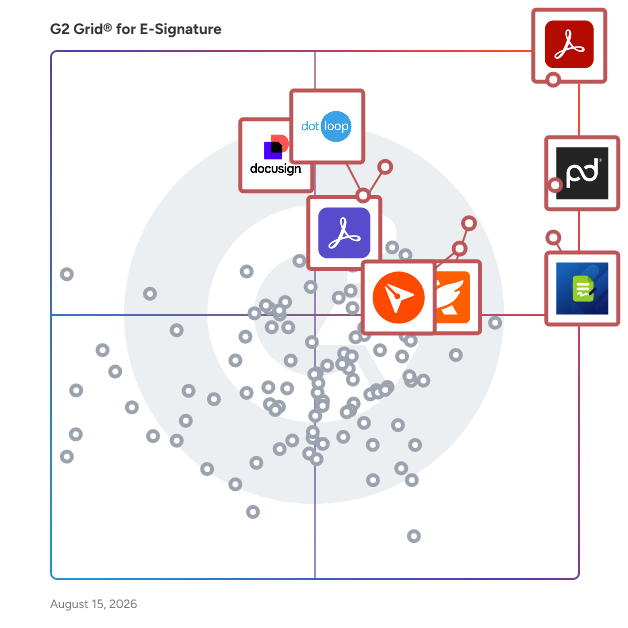
G2 Grid® for E-Signature Software

G2 Grid® for E-Signature Software plotting products by satisfaction and market presence

Highlighted products: Adobe Acrobat, PandaDoc, Jotform Sign, Foxit PDF Editor, Docusign, Adobe Acrobat Sign, BoldSign, and dotloop.

Underlying data: [Grid® JSON](https://www.g2.com/categories/e-signature/grids.json?focus%5B%5D=adobe-acrobat&focus%5B%5D=pandadoc&focus%5B%5D=jotform-sign&focus%5B%5D=foxit-pdf-editor&focus%5B%5D=docusign&focus%5B%5D=adobe-acrobat-sign&focus%5B%5D=boldsign&focus%5B%5D=dotloop)

Sponsored

BoldSign

BoldSign® by Syncfusion® is an easy-to-use and secure electronic signature solution. With BoldSign you can quickly sign documents or send them out for signature, complete contracts, fill out forms, approve invoices, confirm service appointments, onboard new employees, and more. Its easy set-up, user-friendly interface, and intuitive auto-reminder settings smooth the way for the quick turnarounds you're looking for. BoldSign is a top alternative to DocuSign, offering flexible month-to-month plans and budget-friendly pricing options tailored to your needs. Key features: - Use a solution that meets U.S. ESIGN and EU eIDAS eSignature standards, is SOC 2® Type 2 certified, and fully compliant with HIPAA and GDPR. - No hidden document limits, feature restrictions, or surprise overage fees. - Intuitive, easy-to-use web interface. - Comprehensive, highly responsive API available, to easily embed the entire eSignature process within your apps. - Create reusable templates to streamline recurring document workflows. - Request signatures via both email and SMS. - Add your company’s branding to eSignature requests. - Effortlessly send documents to multiple recipients using bulk sending and bulk links. - Instantly generate signing links for easy sharing and faster completion. - Ensure signer authenticity with identity verification options. - Embed sending and signing directly into your applications. - Get real-time document status updates through webhooks. - Enjoy dedicated customer care, even for free-plan users in email, chat, and the ticketing system. - Securely store and retrieve documents with automatic cloud backups. Syncfusion, the company behind BoldSign, has been helping developers worldwide to build powerful line-of-business software for over 20 years. Syncfusion serves a wide spectrum of customers, empowering individual developers and Fortune 500 companies alike to build high-impact line-of-business software.

Visit website

PandaDoc

PandaDoc is an all-in-one document management platform trusted by 50,000+ sales, legal, and operations teams to create, send, e-sign, and manage documents faster and with less manual work. Teams using PandaDoc close deals 30% faster and cut document turnaround time by up to 50%. Customers like Autodesk, Rakuten, and Sysco use PandaDoc to streamline their entire document process, from proposal to signed contract, and everything in between. PandaDoc helps your team: - Build and send professional proposals, contracts, and agreements using customizable templates and a drag-and-drop editor - Collect legally binding e-signatures from any device, anywhere, with no printing, scanning, or delays - Collaborate in real time with internal stakeholders and external signers simultaneously - Automate repetitive document tasks so reps and ops teams spend less time on admin and more time closing - Track document performance with analytics that show how recipients engage with every page PandaDoc integrates natively with the tools your team already uses, including Salesforce, HubSpot, Pipedrive, Stripe, and 30+ other CRM and payment platforms — keeping document processes inside your existing stack without adding friction or extra logins. Whether you're in sales, legal, HR, or finance, PandaDoc is especially popular with growing businesses that need enterprise-grade document processes without the added complexity or price tag. From first draft to final approval, PandaDoc centralizes the full document lifecycle with the compliance, security, and audit trail your team needs to operate with confidence. PandaDoc also supports notarization, payment collection, and document analytics in a single platform, reducing the need to manage multiple tools across your document process.

Average Rating: 4.7/5.0

Total Reviews: 3,448

How Do G2 Users Rate PandaDoc?

  • Has the product been a good partner in doing business?: 9.2/10 (Category avg: 9.2/10)
  • Performance and Reliability: 9.2/10 (Category avg: 9.0/10)
  • Enterprise Scalability: 9.0/10 (Category avg: 8.9/10)
  • Signature Document Creation: 9.3/10 (Category avg: 9.1/10)

Who Is the Company Behind PandaDoc?

  • Seller: PandaDoc
  • Company Website:
  • Year Founded: 2011
  • HQ Location: San Francisco, CA
  • Twitter: @pandadoc
    18,428 Twitter followers
  • LinkedIn® Page: www.linkedin.com
    883 employees on LinkedIn®

Who Uses This Product?

  • Who Uses This: CEO, Owner
  • Top Industries: Computer Software, Marketing and Advertising
  • Company Size: 68% Small, 26% Medium

What Do G2 Reviewers Say About PandaDoc?

AI-generated summary from verified user reviews

Pros
  • Users love the ease of use of PandaDoc, finding it simple to navigate and set up for online signing.
  • Users value PandaDoc's intuitive document management tools, enhancing workflow efficiency and streamlining approvals seamlessly.
  • Users love the intuitive editing tools of PandaDoc, enhancing their workflow and document customization.
  • Users find PandaDoc to be highly intuitive, making document management and e-signatures easy and efficient.
  • Users appreciate the simplicity and efficiency of PandaDoc for obtaining e-signatures, enhancing their workflow significantly.
Cons
  • Users are frustrated by the missing features in PandaDoc, such as document expiration controls and dynamic dates.
  • Users find PandaDoc expensive, especially for small teams needing affordable solutions for online form submissions.
  • Users find signature issues in PandaDoc, struggling with personal signature use and other document formatting challenges.
  • Users find difficult editing frustrating due to issues with document navigation and limited edit capabilities during collaboration.
  • Users find the editing difficulty in PandaDoc frustrating, especially with table formatting and live document changes.

What Are Recent G2 Reviews of PandaDoc?

What Are G2 Users Discussing About PandaDoc?

Docusign

Docusign helps organizations connect and automate how they prepare, sign, act on and manage agreements. As part of the Docusign's Intelligent Agreement Mangement (IAM), Docusign offers eSignature, the world's #1 way to sign electronically on practically any device, from almost anywhere, at any time. Today, over a million customers and more than a billion users in over 180 countries use the Docusign Intelligent Agreement Management (IAM) to accelerate the process of doing business and simplify people's lives. Docusign helps your business: * Send, sign and track agreements quickly and easily * Boost customer satisfaction by providing a superior signing experience * Standardize the agreement process * Save time by reducing manual work * Increase accuracy of agreements * Integrate with your existing business systems But don’t just take our word for it. Check out these customer stories now to see why Docusign is the leading eSignature provider: https://www.docusign.com/customer-stories Why companies everywhere choose Docusign: * Trusted by over a million customers and more than a billion users * 80% of agreements completed in 24 hours (44% in < 15 minutes) *Saves an average of $36 per document compared to traditional paper processes * 24/7 customer support * 350+ integrations and APIs *Docusign eSignature has the most 5-star reviews of any electronic signature product on Apple App Store, Google Play Store and Salesforce AppExchange * Docusign eSignatures are secure, lawful and court-admissible

Average Rating: 4.5/5.0

Total Reviews: 2,523

How Do G2 Users Rate Docusign?

  • Has the product been a good partner in doing business?: 8.3/10 (Category avg: 9.2/10)
  • Performance and Reliability: 8.9/10 (Category avg: 9.0/10)
  • Enterprise Scalability: 9.0/10 (Category avg: 8.9/10)
  • Signature Document Creation: 8.9/10 (Category avg: 9.1/10)

Who Is the Company Behind Docusign?

  • Seller: Docusign
  • Company Website:
  • Year Founded: 2003
  • HQ Location: San Francisco, CA
  • Twitter: @Docusign
    143,953 Twitter followers
  • LinkedIn® Page: www.linkedin.com
    8,433 employees on LinkedIn®

Who Uses This Product?

  • Who Uses This: Account Executive, Owner
  • Top Industries: Computer Software, Real Estate
  • Company Size: 40% Small, 38% Medium

What Do G2 Reviewers Say About Docusign?

AI-generated summary from verified user reviews

Pros
  • Users highlight the user-friendly interface of DocuSign, making document signing quick and convenient for everyone.
  • Users appreciate the user-friendly electronic signing of DocuSign, finding it efficient and reliable for transactions.
  • Users appreciate the user-friendly and customizable signature options of DocuSign, enhancing efficiency in their processes.
  • Users appreciate the seamless and reliable signing process of Docusign, which significantly enhances efficiency and ease of use.
  • Users appreciate the time-saving efficiency of Docusign, making document signing quick and hassle-free.
Cons
  • Users criticize DocuSign for being expensive, especially regarding extra features and insufficient support for small businesses.
  • Users find pricing issues with Docusign frustrating due to rigid terms and unresponsive customer service.
  • Users experience poor customer support with Docusign, especially after signing the contract and needing assistance.
  • Users find limited customization options frustrating, as essential features and support are difficult to manage effectively.
  • Users dislike the missing features in Docusign, such as limited envelope options and occasional document loss.

What Are Recent G2 Reviews of Docusign?

What Are G2 Users Discussing About Docusign?

Adobe Acrobat Sign

At Adobe, we believe that documents are more than just a collection of information and proof. They are foundational to connecting people and ideas, pushing business forward. Adobe Acrobat Sign helps your business move faster. Acrobat Sign is the only intuitive e-signature solution that combines simple and secure e-signatures with the power of Adobe Acrobat. With Acrobat Sign, you can create, sign, send for signature, manage, and track documents – all from one Adobe platform. You can create delightful signing experiences for your customers and teams by enabling them to sign documents on any device or browser – anytime, anywhere. No additional software download or accounts are needed. As Microsoft’s preferred e-signature solution, Acrobat Sign seamlessly integrates with your favorite Microsoft apps. Save time by signing and requesting signatures – all right from Microsoft 365, Teams, Outlook, and more. Plus, you can access smart integrations for Salesforce, Workday, and many more apps you use every day. Minimize legal and compliance risks by choosing Acrobat Sign, designed to be globally compliant and legally-binding in nearly every country in the world.

Average Rating: 4.4/5.0

Total Reviews: 1,017

How Do G2 Users Rate Adobe Acrobat Sign?

  • Has the product been a good partner in doing business?: 8.1/10 (Category avg: 9.2/10)
  • Performance and Reliability: 8.7/10 (Category avg: 9.0/10)
  • Enterprise Scalability: 8.8/10 (Category avg: 8.9/10)
  • Signature Document Creation: 8.6/10 (Category avg: 9.1/10)

Who Is the Company Behind Adobe Acrobat Sign?

  • Seller: Adobe
  • Year Founded: 1982
  • HQ Location: San Jose, CA
  • Twitter: @Adobe
    956,842 Twitter followers
  • LinkedIn® Page: www.linkedin.com
    42,087 employees on LinkedIn®
  • Ownership: NASDAQ:ADBE

Who Uses This Product?

  • Who Uses This: Owner, President
  • Top Industries: Information Technology and Services, Computer Software
  • Company Size: 40% Small, 38% Medium

What Do G2 Reviewers Say About Adobe Acrobat Sign?

AI-generated summary from verified user reviews

Pros
  • Users value the ease of use of Adobe Acrobat Sign, appreciating its convenience and seamless integration with other Adobe software.
  • Users value the seamless integration of Adobe Acrobat Sign with other Adobe products, enhancing document management efficiency.
  • Users praise the easy setup of Adobe Acrobat Sign, allowing for quick document signing without technical issues.
  • Users admire the effortless document tracking of Adobe Acrobat Sign, streamlining the signing process and enhancing organization.
  • Users value the ease of tracking signatures in Adobe Acrobat Sign, making the signing process efficient and organized.
Cons
  • Users find the pricing of Adobe Acrobat Sign to be too high, especially for smaller teams and organizations.
  • Users struggle with a steep learning curve, particularly for advanced features and complex workflows in Adobe Acrobat Sign.
  • Users often face signature access issues, making it difficult to complete their signing process efficiently.
  • Users find the app not intuitive, particularly on mobile, making navigation and feature accessibility challenging.
  • Users find Adobe Acrobat Sign not user-friendly, often causing confusion and requiring repeated document resending.

What Are Recent G2 Reviews of Adobe Acrobat Sign?

What Are G2 Users Discussing About Adobe Acrobat Sign?

GetAccept

GetAccept is the #1 AI Digital Sales Room, built to help revenue teams run every deal like their best sales rep. It replaces scattered emails and static attachments with an AI-native workspace, bringing content, proposals, e-signing, and buyer communication together so sellers, buyers, and every stakeholder stay aligned on the latest documents, timelines, and next steps across the full sales cycle. GetAccept's AI analyses your meetings, calls, emails, CRM data, internal content, and publicly available data, and is trained to take action, building and updating personalized Digital Sales Rooms in minutes and keeping every rep on track with your sales process and methodology. Real-time tracking shows exactly how buyers engage with each deal, and native CRM integrations keep everything synced in the tools reps already use. GetAccept solves the problem of deals stalling between meetings in scattered email threads, static attachments, and manual admin. By giving sellers and buyers a single, trackable space to collaborate from first touch to signature, it helps revenue teams of every size to work smarter, close faster, and win more. Why revenue teams choose GetAccept  ↳ AI-powered enablement: auto-generate and surface the right content for each deal, stage, and stakeholder, grounded in your meetings, CRM, and internal knowledge.  ↳ AI-built sales rooms: spin up a personalized, interactive Digital Sales Room in minutes that keeps conversations, materials, and actions aligned.  ↳ Deal intelligence: turn buyer engagement signals into clear visibility and AI-guided next steps.  ↳ Proposals and e-signing built in: create, send, track, and close documents without leaving the room.  ↳ Connected to your stack: #1-rated native integrations with Salesforce, HubSpot, and Slack, plus 100+ more, keep activity synced everywhere automatically. Trusted by 5,000+ revenue teams, including Dealfront, ScaleWise, Samsung, and Chargebee. "This is a way for you to control the narrative, to make sure your reps are sticking to the process and helping your customers experience value instead of just product pitching." Remi Aaagaard Mørken, SVP of Sales, SalesScreen (100% increase in win rate) "Since I started using GetAccept, my sales process and communication with my prospects are way more project- and solution-oriented. They know where to find the content they need, and I can focus on providing solutions." Carolina Bräuninger, Senior Strategic Account Executive, Dealfront (67% decrease in sales cycle time) "If you haven't got something like GetAccept from a contracts perspective, but equally from a Deal Room perspective, then you're behind." Gavin Summer, Co-Founder, ScaleWise (51% increase in proposal-to-close rate) (edited)

Average Rating: 4.6/5.0

Total Reviews: 1,252

How Do G2 Users Rate GetAccept?

  • Has the product been a good partner in doing business?: 9.3/10 (Category avg: 9.2/10)
  • Performance and Reliability: 8.8/10 (Category avg: 9.0/10)
  • Enterprise Scalability: 8.7/10 (Category avg: 8.9/10)
  • Signature Document Creation: 8.7/10 (Category avg: 9.1/10)

Who Is the Company Behind GetAccept?

  • Seller: GetAccept Inc.
  • Company Website:
  • Year Founded: 2015
  • HQ Location: Palo Alto, CA
  • Twitter: @getaccept
    1,433 Twitter followers
  • LinkedIn® Page: www.linkedin.com
    154 employees on LinkedIn®

Who Uses This Product?

  • Who Uses This: Sales Manager, Account Manager
  • Top Industries: Computer Software, Information Technology and Services
  • Company Size: 50% Small, 43% Medium

What Do G2 Reviewers Say About GetAccept?

AI-generated summary from verified user reviews

Pros
  • Users value the ease of use of GetAccept, highlighting its supportive environment and user-friendly setup.
  • Users value the great customer support from GetAccept, consistently highlighting its responsiveness and helpfulness.
  • Users find GetAccept to be intuitive and easy to edit, making document management seamless for everyone.
  • Users value the great customer service from GetAccept, which enhances their overall experience and satisfaction.
  • Users appreciate the time-saving features of GetAccept, benefiting from centralized accessibility and efficient automation.
Cons
  • Users feel the lack of dark mode is an eyestrain issue and struggle with visual representation of multiple signees.
  • Users find limited customization with GetAccept, leading to frustrations and complex processes due to inflexible templates.
  • Users experience poor integration issues with GetAccept, often facing troubleshooting and error messages that hinder usability.
  • Users find template issues in GetAccept frustrating, as they complicate contract management and increase internal friction.
  • Users find the difficult editing experience in GetAccept limits their ability to make necessary adjustments efficiently.
What Are Recent G2 Reviews of GetAccept?

pdfFiller

pdfFiller is a cloud-based platform with a comprehensive digital toolkit that makes handling PDFs easy. Edit, sign, store, manage, and collaborate on documents all in one place — no downloads, switching apps, or paying for multiple subscriptions needed. All your documents are safely stored in the cloud, so you can access them anytime, anywhere, without worrying about losing your data.

Average Rating: 4.6/5.0

Total Reviews: 876

How Do G2 Users Rate pdfFiller?

  • Has the product been a good partner in doing business?: 9.5/10 (Category avg: 9.2/10)
  • Performance and Reliability: 9.3/10 (Category avg: 9.0/10)
  • Enterprise Scalability: 9.4/10 (Category avg: 8.9/10)
  • Signature Document Creation: 9.3/10 (Category avg: 9.1/10)

Who Is the Company Behind pdfFiller?

  • Seller: airSlate
  • Company Website:
  • Year Founded: 2006
  • HQ Location: Brookline, Massachusetts
  • Twitter: @airSlate
    1,234 Twitter followers
  • LinkedIn® Page: www.linkedin.com
    798 employees on LinkedIn®

Who Uses This Product?

  • Who Uses This: Owner, President
  • Top Industries: Real Estate, Insurance
  • Company Size: 82% Small, 13% Medium

What Do G2 Reviewers Say About pdfFiller?

AI-generated summary from verified user reviews

Pros
  • Users find pdfFiller to be user-friendly and convenient, greatly simplifying document management and saving time.
  • Users find easy editing with pdfFiller especially beneficial, allowing seamless modifications and swift document handling.
  • Users find the Form Filling feature essential for efficiently managing and completing various important documents.
  • Users value the editing capabilities of pdfFiller, which enhance productivity and streamline document management efficiently.
  • Users appreciate the efficient e-signing features of pdfFiller, enhancing document processing and timely approvals.
Cons
  • Users are disappointed by missing advanced editing features and the lack of convenient notary options in pdfFiller.
  • Users find the product expensive for its offerings, noting bugs and limited features in the free trial.
  • Users find pdfFiller's interface not user-friendly, as the multitude of tools can confuse first-time users.
  • Users find feature limitations frustrating, especially when essential tools are only available in paid plans or slow loading times occur.
  • Users experience slow performance with large documents and confusion regarding e-signing navigation, impacting their workflow.

What Are Recent G2 Reviews of pdfFiller?

What Are G2 Users Discussing About pdfFiller?

Zoho Sign

Zoho Sign is a digital signing service that lets you execute contracts quickly without the hassles of transporting paper documents while ensuring security and legality. It works completely on cloud and integrates readily with your everyday apps for a completely seamless signing experience. Zoho Sign is perfect for anyone who needs to sign business documents but widely used for HR, legal, finance, and sales functions. - Sign documents on the go - Send documents to multiple signers across the world - Integrate with everyday applications: Zoho Docs, Box, Google Drive, Dropbox, Gmail, and OneDrive - Sign and send, secure and legally binding documents Documents that can be signed: - NDAs - Invoices - Sales contracts - Business proposals - Purchase orders - Lease agreements - Partnership agreements - Employment offers and more. KEY FEATURES: General - Create, send and sign documents within minutes - Supported document types include pdf, jpeg, doc, png and more - Create customizable templates once and save them for future use - Set an order for signing the document using the "Send in Order" feature - Upload documents directly from daily applications: Zoho Docs, Box, Google Drive, Dropbox, Gmail, and OneDrive - Import files from other applications using the Cloud Picker - Send timely reminders to sign documents that are in progress - Add re-sizable signature, text, initial, name, company, checkbox and date fields to the document - Initiate signing of documents directly from your inbox - Preview and make changes to the document using the document viewer - Assign someone else to sign the document - Receive real-time push notifications whenever any action is performed on a document Support URL: https://www.zoho.com/contactus.html

Average Rating: 4.4/5.0

Total Reviews: 62

How Do G2 Users Rate Zoho Sign?

  • Has the product been a good partner in doing business?: 9.5/10 (Category avg: 9.2/10)
  • Performance and Reliability: 9.1/10 (Category avg: 9.0/10)
  • Enterprise Scalability: 8.2/10 (Category avg: 8.9/10)
  • Signature Document Creation: 8.3/10 (Category avg: 9.1/10)

Who Is the Company Behind Zoho Sign?

  • Seller: Zoho
  • Year Founded: 1996
  • HQ Location: Austin, TX
  • Twitter: @Zoho
    137,880 Twitter followers
  • LinkedIn® Page: www.linkedin.com
    30,766 employees on LinkedIn®
  • Phone: +1 (888) 900-9646

Who Uses This Product?

  • Top Industries: Information Technology and Services, Computer Software
  • Company Size: 59% Small, 30% Medium

What Do G2 Reviewers Say About Zoho Sign?

AI-generated summary from verified user reviews

Pros
  • Users enjoy the ease of use of Zoho Sign, finding it simple and reliable for their signing needs.
  • Users value the affordability of Zoho Sign, finding it easy to use and manage with professional support.
  • Users value the simplicity of Zoho Sign, finding it easy to manage and stress-free for their needs.
  • Users appreciate the customizability of Zoho Sign, allowing for tailored forms with various design options.
  • Users love the impressive customization options in Zoho Sign, especially for editing forms and defining styles.
Cons
  • Users find the difficult editing process of Zoho Sign frustrating, wishing for more intuitive options for templates.
  • Users find the editing process unintuitive, wishing for more options to streamline template modifications.
  • Users often face email issues with Zoho Sign, affecting the reliability of communication and document handling.
  • Users find the limited features of Zoho Sign restrictive and desire more customizable options in the user interface.

What Are Recent G2 Reviews of Zoho Sign?

What Are G2 Users Discussing About Zoho Sign?

SignNow

signNow is an electronic signature that enables business to be conducted anywhere, anytime and on any device. signNow offers the best ROI for SBM and mid-market thanks to its intuitive UI, transparent pricing, flexible configuration and the ease of API integrations. All paid plans of airSlate SignNow include unlimited number of users.

Average Rating: 4.6/5.0

Total Reviews: 1,731

How Do G2 Users Rate SignNow?

  • Has the product been a good partner in doing business?: 9.1/10 (Category avg: 9.2/10)
  • Performance and Reliability: 9.1/10 (Category avg: 9.0/10)
  • Enterprise Scalability: 9.0/10 (Category avg: 8.9/10)
  • Signature Document Creation: 8.9/10 (Category avg: 9.1/10)

Who Is the Company Behind SignNow?

  • Seller: airSlate
  • Company Website:
  • Year Founded: 2006
  • HQ Location: Brookline, Massachusetts
  • Twitter: @airSlate
    1,234 Twitter followers
  • LinkedIn® Page: www.linkedin.com
    798 employees on LinkedIn®

Who Uses This Product?

  • Who Uses This: Owner, CEO
  • Top Industries: Real Estate, Insurance
  • Company Size: 72% Small, 22% Medium

What Do G2 Reviewers Say About SignNow?

AI-generated summary from verified user reviews

Pros
  • Users highlight the ease of use of SignNow, making document management and signing a seamless experience.
  • Users appreciate the intuitive design of SignNow, finding it easy to manage and sign documents effortlessly.
  • Users value the ease of use of SignNow, allowing quick signatures and reducing the need for paper documents.
  • Users find SignNow's user-friendly signature solutions invaluable for contactless document signing, with excellent support available.
  • Users value the time-saving features of SignNow, enabling quick and efficient processing of waivers and templates.
Cons
  • Users find the lack of synchronization between devices frustrating, complicating document management and template reuse.
  • Users find SignNow to be expensive, believing it could be more affordable despite its useful features.
  • Users find that there is a steep learning curve for advanced features, making onboarding challenging for new team members.
  • Users find the signature issues frustrating, especially with confusing UI and auto-detection of fields that can't be disabled.
  • Users find difficult navigation in SignNow, especially with advanced settings and UI changes affecting usability.

What Are Recent G2 Reviews of SignNow?

What Are G2 Users Discussing About SignNow?

Scrive

Founded in 2010 in Sweden, Scrive offers an omnichannel solution, automating agreement-based business processes with electronic signature and identity verification. Ease of use and robust security measures are key reasons why organisations of all sizes, including enterprises in highly regulated industries, rely on Scrive solutions to drive internal efficiency, compliance and customer satisfaction. As a Qualified Trust Service Provider (QTSP) for Qualified Electronic Signatures (QES), Scrive ensures the highest level of trust and legal validity for digital transactions in accordance with EU eIDAS regulations. eSign, Scrive’s agreement signing platform, is available out of the box with pricing plans and feature packages to suit any business, or as an API integration. Key benefits include: - Sign on any device - Authenticate and onboard users with eIDs - Track and monitor the status of your agreements - Solutions built for EU compliance - Detailed audit log/legal evidence - Secure, tamper-proof documents

Average Rating: 4.5/5.0

Total Reviews: 196

How Do G2 Users Rate Scrive?

  • Has the product been a good partner in doing business?: 9.4/10 (Category avg: 9.2/10)
  • Performance and Reliability: 9.4/10 (Category avg: 9.0/10)
  • Enterprise Scalability: 9.0/10 (Category avg: 8.9/10)
  • Signature Document Creation: 8.8/10 (Category avg: 9.1/10)

Who Is the Company Behind Scrive?

  • Seller: Scrive
  • Company Website:
  • Year Founded: 2010
  • HQ Location: Stockholm
  • Twitter: @scrive
    476 Twitter followers
  • LinkedIn® Page: www.linkedin.com
    265 employees on LinkedIn®

Who Uses This Product?

  • Top Industries: Information Technology and Services, Financial Services
  • Company Size: 38% Medium, 33% Small

What Do G2 Reviewers Say About Scrive?

AI-generated summary from verified user reviews

Pros
  • Users appreciate the ease of use of Scrive, finding it intuitive and efficient for creating professional documents.
  • Users value the easy setup of Scrive, allowing for a hassle-free start to contract management.
  • Users appreciate the fast and helpful customer support of Scrive, enhancing their overall experience and efficiency.
  • Users love Scrive's intuitive interface, making form creation seamless and accessible for all employees.
  • Users value the high level of security in Scrive, ensuring safe document transactions in their workflow.
Cons
  • Users report poor customer support, citing issues with ticket management and unhelpful assistance from the support team.
  • Users face signature issues with Scrive, experiencing inflexibility, tedious setups, and difficulties with plugins and document handling.
  • Users experience connectivity issues with integrations and SMS delivery, impacting usability in some regions.
  • Users find Scrive expensive, especially for startups, and suggest shorter license periods for better affordability.
  • Users report insufficient tutorials that hinder effective use of Scrive, leading to confusion and frustrating experiences.

What Are Recent G2 Reviews of Scrive?

What Are G2 Users Discussing About Scrive?

Qwilr

Make your competitors’ proposals look primitive with Qwilr. Send proposals, generate quotes, collect sign-off, and get paid – all in one place. Trusted by 5,000+ organizations including OpenTable, Thomson Reuters, Drata, Yale University and more, Qwilr helps sales teams close deals faster by turning static proposals and quotes into interactive, trackable web pages. With Qwilr, you can… Create impressive, interactive proposals: Engage buyers with dynamic proposals featuring videos, interactive pricing, calendar links and more Get deals closed faster: Get deals signed with legally-compliant e-signatures and collect payments instantly with our integrated payments solution, QwilrPay Track buyer engagement: See what your buyers view and click on, and use this to tailor your follow-ups. Get real-time alerts via Slack or email when buyers take action Keep every page consistently branded: Standardize your proposals, automatically applying your fonts and colors to every page Scale your process with automation: Connect Qwilr to Salesforce, HubSpot, Pipedrive or Zoho and automate proposal creation. Improve team efficiency: Create reusable templates and content blocks, so that reps never start from scratch Thousands of sales teams use Qwilr to modernize their proposal process, impress buyers, and close deals faster. Try Qwilr free for 14 days: https://qwilr.com/

Average Rating: 4.6/5.0

Total Reviews: 900

How Do G2 Users Rate Qwilr?

  • Has the product been a good partner in doing business?: 9.3/10 (Category avg: 9.2/10)
  • Performance and Reliability: 9.1/10 (Category avg: 9.0/10)
  • Enterprise Scalability: 8.6/10 (Category avg: 8.9/10)
  • Signature Document Creation: 8.9/10 (Category avg: 9.1/10)

Who Is the Company Behind Qwilr?

  • Seller: Qwilr
  • Company Website:
  • Year Founded: 2014
  • HQ Location: Redfern, New South Wales
  • Twitter: @Qwilr
    2,506 Twitter followers
  • LinkedIn® Page: www.linkedin.com
    104 employees on LinkedIn®

Who Uses This Product?

  • Who Uses This: Account Executive, CEO
  • Top Industries: Marketing and Advertising, Computer Software
  • Company Size: 80% Small, 16% Medium

What Do G2 Reviewers Say About Qwilr?

AI-generated summary from verified user reviews

Pros
  • Users appreciate the ease of use of Qwilr, finding the interface simple and customization quick and effective.
  • Users love Qwilr's customizable templates, enhancing their proposals with a professional touch and intuitive interface.
  • Users find the easy setup of Qwilr intuitive, allowing effortless creation of proposals without needing support.
  • Users praise Qwilr for its simplicity and efficiency, enhancing workflow and collaboration across teams effortlessly.
  • Users value the excellent customer support from Qwilr, enhancing their experience with responsive assistance and guidance.
Cons
  • Users feel that Qwilr has limited customization options, making it difficult to achieve desired edits and layouts.
  • Users are frustrated with integration issues, particularly with QuickBooks and payment options, impacting overall satisfaction.
  • Users note missing features, such as CMS-like design tools and better integrations, affecting their overall experience.
  • Users struggle with difficult editing, often feeling limited in formatting control and facing cumbersome customization challenges.
  • Users find the limited features of Qwilr restrict usability, especially with content arrangement and integrated scheduling tools.

What Are Recent G2 Reviews of Qwilr?

What Are G2 Users Discussing About Qwilr?

Lightico

Lightico is an AI-powered platform for end-to-end customer journey orchestration, built to help regulated enterprises in financial services, energy, and telecoms run compliant digital journeys across every channel. Manual paperwork, fragmented systems, and compliance checks slow down decisions and frustrate customers at the moments that matter most. Lightico closes that gap: customers complete documents, verify identity, sign, and pay from a single link sent by text or email, without downloading an app or paying a per-envelope fee. Teams reduce manual processing and reallocate staff time to higher-value work as a result. Key capabilities: 1. AI-Powered Intelligent Document Processing (IDP): classifies, reads and validates documents automatically, cutting manual review at every step. 2. Journey Orchestration & No-Code Design: business teams design and launch compliant customer journeys without long IT cycles. 3. eSignature & Digital Consent: customers sign contracts and approve terms and conditions instantly, with clickwrap consent captured and audit-ready. 4. ID Verification (IDV): verifies identity in real time to fight fraud without adding friction. 5. Document Collection & eForms: collects and organizes customer data and documents in one flow. 6. Case Management: streamlines documents, tasks, updates, and approvals into one connected case, in any channel. Compliance, operations, and CX teams use Lightico to run high-stakes, regulated interactions across contact centers, retail, and digital channels, layering on top of existing software and core systems. Lightico's customers, including HSBC, VodafoneThree, GM Financial, and EE, have seen results such as same-day loan processing, a 30% compliance lift, a 13-point NPS increase, and a £120 million revenue uplift with transactions completed 7 minutes faster. Lightico delivers a documented 5:1 ROI, typically recovered within 3 to 6 months. Lightico works through an API, native MCP (Model Context Protocol) connectivity for AI agents, or standalone, and integrates with systems like Salesforce. It runs on SOC 2, ISO 27001, PCI-DSS, HIPAA, eIDAS, and ESIGN Act controls. Visit lightico.com to request a demo and see how Lightico cuts compliance risk and speeds up customer journeys.

Average Rating: 4.8/5.0

Total Reviews: 322

How Do G2 Users Rate Lightico?

  • Has the product been a good partner in doing business?: 9.5/10 (Category avg: 9.2/10)
  • Performance and Reliability: 9.4/10 (Category avg: 9.0/10)
  • Enterprise Scalability: 9.6/10 (Category avg: 8.9/10)
  • Signature Document Creation: 9.5/10 (Category avg: 9.1/10)

Who Is the Company Behind Lightico?

  • Seller: Lightico
  • Year Founded: 2014
  • HQ Location: New York, NY
  • Twitter: @lightico
    2,735 Twitter followers
  • LinkedIn® Page: www.linkedin.com
    129 employees on LinkedIn®

Who Uses This Product?

  • Who Uses This: sales advisor, sales
  • Top Industries: Telecommunications, Financial Services
  • Company Size: 61% Large, 26% Medium

What Are Recent G2 Reviews of Lightico?

What Are G2 Users Discussing About Lightico?

Sertifi

Sertifi provides a complete contracting, payment, and authorization platform for the hospitality and travel industry. Brands like Marriott, Topgolf, and AEG Worldwide trust Sertifi to efficiently and securely finalize event and travel bookings with their guests. Sertifi’s easy-to-use platform helps tens of thousands of businesses in more than 135 countries, with more than $5 billion in payment requests being sent through the system annually. With decades of experience in hospitality and travel, Sertifi is building a network that gives guests and travelers across the globe a great experience from the start. Sertifi for e-Signatures Send and sign fully branded agreements – anytime, anywhere, from any device. Give your guests a convenient, digital experience and see completed contracts flow in 90% faster. Sertifi for Payments Avoid delays and get paid 2.5x faster by sending payment and signature requests together. Behind the scenes, Sertifi captures and processes your payments as one PCI-compliant solution. SertifiPay Get paid even faster with our proprietary payment processor, available worldwide and powered by Stripe. In less than 10 minutes, you can sign up to accept payments directly in Sertifi – one account, one complete workflow. Sertifi for Digital Authorizations Digitize payment authorizations to keep your guest’s information secure with PCI compliance and receive completed forms 5x faster. Eliminate chargebacks with advanced fraud tools that instantly verify cards and detect fraud early. Enjoy seamless B2B payment delivery between travel companies - such as travel management companies and virtual card providers - and travel suppliers, particularly hotels. It's a convenient, secure alternative to faxes. Contact us directly at corp.sertifi.com.

Average Rating: 4.8/5.0

Total Reviews: 133

How Do G2 Users Rate Sertifi?

  • Has the product been a good partner in doing business?: 9.6/10 (Category avg: 9.2/10)
  • Performance and Reliability: 9.5/10 (Category avg: 9.0/10)
  • Enterprise Scalability: 9.7/10 (Category avg: 8.9/10)
  • Signature Document Creation: 9.4/10 (Category avg: 9.1/10)

Who Is the Company Behind Sertifi?

  • Seller: Flywire
  • HQ Location: Boston, MA
  • Twitter: @Flywire
    4,578 Twitter followers
  • LinkedIn® Page: www.linkedin.com
    1,309 employees on LinkedIn®
  • Ownership: NASDAQ: FLYW

Who Uses This Product?

  • Who Uses This: President, Carrier Development Specialist
  • Top Industries: Computer Software, Hospitality
  • Company Size: 36% Medium, 26% Large

What Are Recent G2 Reviews of Sertifi?

Box Sign

Boost efficiency with reliable e-signing. With millions of documents sent all around the world, SignRequest is the secure, legally binding and affordable e-signature solution.

Average Rating: 4.6/5.0

Total Reviews: 1,523

How Do G2 Users Rate Box Sign?

  • Has the product been a good partner in doing business?: 9.3/10 (Category avg: 9.2/10)
  • Performance and Reliability: 9.2/10 (Category avg: 9.0/10)
  • Enterprise Scalability: 8.8/10 (Category avg: 8.9/10)
  • Signature Document Creation: 8.8/10 (Category avg: 9.1/10)

Who Is the Company Behind Box Sign?

  • Seller: Box
  • Year Founded: 1998
  • HQ Location: Redwood City, CA
  • Twitter: @Box
    78,537 Twitter followers
  • LinkedIn® Page: www.linkedin.com
    4,311 employees on LinkedIn®
  • Ownership: NYSE:BOX

Who Uses This Product?

  • Who Uses This: Owner, CEO
  • Top Industries: Marketing and Advertising, Real Estate
  • Company Size: 81% Small, 14% Medium

What Do G2 Reviewers Say About Box Sign?

AI-generated summary from verified user reviews

Pros
  • Users value the convenience of Box Sign for efficiently managing and securing documents in one centralized location.
  • Users value the ease of use of Box Sign, seamlessly managing document workflows in a secure environment.
  • Users value the security and reliability of Box Sign, efficiently managing and tracking documents in a safe environment.
  • Users value the time-saving features of Box Sign for efficiently managing and tracking document signatures in one place.
  • Users value the tracking features of Box Sign, enhancing document management and ensuring secure, streamlined workflows.
Cons
  • Users note layout issues on mobile, suggesting improvements for a more responsive and seamless signing experience.
  • Users find mobile issues with Box Sign, noting non-responsive UI and suggesting improvements for a better experience.

What Are Recent G2 Reviews of Box Sign?

What Are G2 Users Discussing About Box Sign?

Gatekeeper

Gatekeeper is the only unified Vendor and Contract Lifecycle Management solution. Built for lean Finance, Procurement and Legal teams with enterprise-sized compliance responsibilities, Gatekeeper brings every vendor, contract, obligation, renewal, performance review and line of spend together in one connected platform. Unlike standalone CLM, supplier risk and procurement tools, every stage of the vendor lifecycle stays connected, giving organisations complete visibility, stronger governance and better commercial decisions. Due diligence shapes the contract. The contract stays connected to obligations, performance and spend. A continuous view of what every vendor delivers and costs surfaces savings your team can act on Gatekeeper AI turns your data into answers, while Gatekeeper Agents turn those answers into action. More than 50 specialist agents automate due diligence, contract review, evidence collection, compliance monitoring, obligation tracking and supplier performance. Customers reduce vendor onboarding by up to 90%, accelerate contracting by up to 75%, reclaim more than 30 weeks of manual administration and reduce vendor spend by up to 14%. With implementation in less than 60 days, more than 1,700 integrations and SOC 1 Type 2, SOC 2 Type 1, ISO 9001 and ISO 27001 certifications, Gatekeeper helps organisations strengthen governance, accelerate contracting and unlock more value from every supplier relationship. Protection ✦ Performance. Together.

Average Rating: 4.5/5.0

Total Reviews: 82

How Do G2 Users Rate Gatekeeper?

  • Has the product been a good partner in doing business?: 9.3/10 (Category avg: 9.2/10)
  • Performance and Reliability: 9.3/10 (Category avg: 9.0/10)
  • Enterprise Scalability: 9.2/10 (Category avg: 8.9/10)
  • Signature Document Creation: 8.9/10 (Category avg: 9.1/10)

Who Is the Company Behind Gatekeeper?

  • Seller: Gatekeeper
  • Company Website:
  • Year Founded: 2010
  • HQ Location: London, United Kingdom
  • Twitter: @gatekeeperhq
    100 Twitter followers
  • LinkedIn® Page: www.linkedin.com
    115 employees on LinkedIn®

Who Uses This Product?

  • Top Industries: Information Technology and Services, Financial Services
  • Company Size: 49% Medium, 29% Large

What Do G2 Reviewers Say About Gatekeeper?

AI-generated summary from verified user reviews

Pros
  • Users commend the user-friendly design of Gatekeeper, praising its ease of use and efficient functionality.
  • Users praise the responsive customer support from Gatekeeper, highlighting their timely assistance and helpful team members.
  • Users find contract management easy and efficient with Gatekeeper, benefiting from templates and superb customer support.
  • Users find the implementation process straightforward, supported by a proactive and responsive team, ensuring a seamless experience.
  • Users value the customization options of Gatekeeper, which enhance functionality and streamline contract management processes.
Cons
  • Users desire customization options and better ERP integration in Gatekeeper, limiting its overall utility for some.
  • Users find limited customization options frustrating, as they require significant effort and may not meet individual needs.
  • Users find the additional modules expensive, leading to concerns about the overall pricing structure and budgeting.
  • Users find the high fees for additional modules to be a significant drawback of Gatekeeper.
  • Users report poor customer support, facing challenges even after submitting Tech support requests for issue resolution.

What Are Recent G2 Reviews of Gatekeeper?

What Are G2 Users Discussing About Gatekeeper?

Legalesign

Legalesign is UK-based eSignature software to send, sign and manage contracts online. Companies use Legalesign to gain significant productivity and financial benefits, increase their customers' satisfaction by removing the need for a printer and enabling them to sign from anywhere and, last but not least, relieve the burden of tiresome paperwork upon long suffering staff everywhere. Legalesign customers include legal firms, insurance companies, property firms, recruiters, accountants and many others. Legalesign is built from the ground up to deliver maximum value for our customers. The tariff price of business software is often far exceeded by its costs of use – the cost of adoption, training, the time in day-to-day usage, and the cost of change. Legalesign is designed throughout to minimise these costs so our customers see the most value through to the bottom line: from eliminating un-needed clicks in day-to-day actions so you don’t waste time getting contracts sent out, up to the entire architecture of the system that allows you to scale horizontally and vertically seamlessly and easily. We invest heavily in behind-the-scenes systems to ensure uptime and reliability, providing service where it matters.

Average Rating: 4.8/5.0

Total Reviews: 295

How Do G2 Users Rate Legalesign?

  • Has the product been a good partner in doing business?: 9.6/10 (Category avg: 9.2/10)
  • Performance and Reliability: 9.4/10 (Category avg: 9.0/10)
  • Enterprise Scalability: 9.2/10 (Category avg: 8.9/10)
  • Signature Document Creation: 9.0/10 (Category avg: 9.1/10)

Who Is the Company Behind Legalesign?

  • Seller: Legalesign
  • Year Founded: 2012
  • HQ Location: Cambridge, England
  • Twitter: @Legalesign
    512 Twitter followers
  • LinkedIn® Page: www.linkedin.com
    13 employees on LinkedIn®

Who Uses This Product?

  • Who Uses This: Director, Managing Director
  • Top Industries: Staffing and Recruiting, Accounting
  • Company Size: 66% Small, 29% Medium

What Do G2 Reviewers Say About Legalesign?

AI-generated summary from verified user reviews

Pros
  • Users rave about the exceptional customer support from Legalesign, noting prompt and helpful responses during their onboarding process.
  • Users appreciate the ease of use of Legalesign, valuing its functionality and responsive customer support.
  • Users find Legalesign super intuitive, enabling seamless document signing without the need for any training.
  • Users commend the reliability and speed of Legalesign, seamlessly transforming their document signing process with confidence.
  • Users find Legalesign to be an affordable option with exceptional support, enhancing functionality and satisfaction.
Cons
  • Users find the interface usability issues of Legalesign, such as quirky designs and persistent onboarding cards, frustrating.
  • Users find some features confusing, particularly with checkboxes and the process of bulk sending.
  • Users note signature issues that complicate workflow, although recent updates have improved user experience significantly.
  • Users find difficult editing frustrating, as mistakes require deleting documents and starting the process over.
  • Users express concern over limited customization with Legalesign, particularly regarding integration with JobAdder for efficiency.

What Are Recent G2 Reviews of Legalesign?

What Are G2 Users Discussing About Legalesign?

Signaturit

Building trust in every digital transaction. Signaturit Group, a Namirial Company, European leader in Trusted Digital Transactions. We drive the digital transformation of businesses and administrations with a cloud-native platform that covers the entire digital transaction lifecycle: digital identity, onboarding, electronic signature, fraud prevention, document management and archiving, certified communication, digital identity wallet, and e-invoicing. As a Qualified Trust Service Provider (QTSP) under eIDAS, we guarantee legal certainty, regulatory compliance and maximum trust in every digital transaction. Namirial Company +250,000 customers | +90 countries | +1,400 employees

Average Rating: 4.5/5.0

Total Reviews: 36

How Do G2 Users Rate Signaturit?

  • Has the product been a good partner in doing business?: 9.4/10 (Category avg: 9.2/10)
  • Performance and Reliability: 9.3/10 (Category avg: 9.0/10)
  • Enterprise Scalability: 8.9/10 (Category avg: 8.9/10)
  • Signature Document Creation: 8.5/10 (Category avg: 9.1/10)

Who Is the Company Behind Signaturit?

Who Uses This Product?

  • Company Size: 47% Small, 44% Medium

What Do G2 Reviewers Say About Signaturit?

AI-generated summary from verified user reviews

Pros
  • Users find Signaturit's affordable pricing significantly more appealing than that of its competitors.
  • Users appreciate the intuitive interface of Signaturit, making the signing process fast and reliable.
  • Users love the intuitive interface of Signaturit, enhancing the speed and reliability of the signing process.
  • Users find the pricing of Signaturit significantly more appealing compared to other options in the market.
  • Users value the reliable signing process of Signaturit, appreciating its intuitive interface and legal security.
Cons
  • Users find the pricing structure expensive, particularly for small volumes and limited customization options.
  • Users find the limited customization options for emails restrict their ability to tailor communications effectively.
  • Users feel the limited customization options and high pricing for small volumes make Signaturit less appealing.

What Are Recent G2 Reviews of Signaturit?

What Are G2 Users Discussing About Signaturit?