Best Construction Accounting Software

How Many Construction Accounting Software Products Does G2 Track?

Total Products under this Category: 157

Category Stats (Oct 2026)

  • Average Rating: 4.31/5 (↑0.01 vs Sep 2026) The average rating of products in this category, based on all submitted ratings
  • Top Trending Product: Access Coins (+3.95%) - Among all products in this category, Access Coins recorded the largest rating increase compared to last month

Last updated: October 24, 2026

How Does G2 Rank Construction Accounting Software Products?

Why You Can Trust G2's Software Rankings:

  • 30 Analysts and Data Experts
  • 19,200+ Authentic Reviews
  • 157+ Products
  • Unbiased Rankings

G2's software rankings are built on verified user reviews, rigorous moderation, and a consistent research methodology maintained by a team of analysts and data experts. Each product is measured using the same transparent criteria, with no paid placement or vendor influence. While reviews reflect real user experiences, which can be subjective, they offer valuable insight into how software performs in the hands of professionals. Together, these inputs power the G2 Score, a standardized way to compare tools within every category.

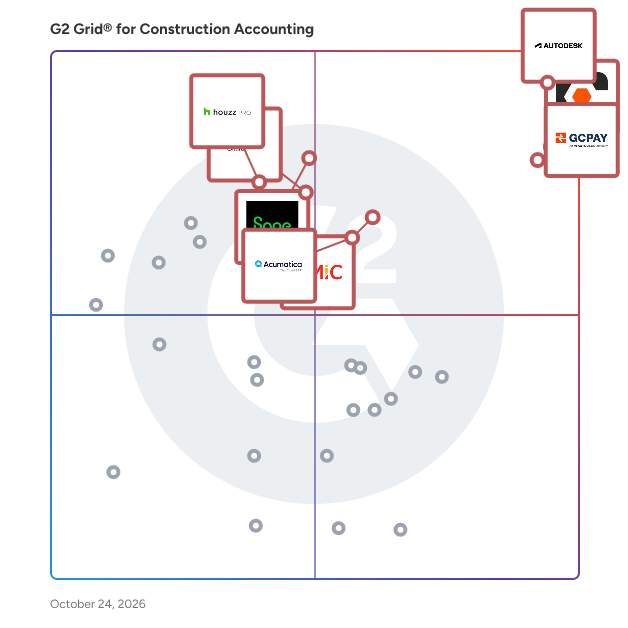
G2 Grid® for Construction Accounting Software

G2 Grid® for Construction Accounting Software plotting products by satisfaction and market presence

Highlighted products: Autodesk Forma (formerly Autodesk Construction Cloud), Procore, GCPay, CMiC Platform, Sage Intacct, Oracle Textura Payment Management, Acumatica, and Houzz Pro.

Underlying data: [Grid® JSON](https://www.g2.com/categories/construction-accounting-software/grids.json?focus%5B%5D=autodesk-forma-formerly-autodesk-construction-cloud&focus%5B%5D=procore&focus%5B%5D=gcpay&focus%5B%5D=cmic-platform&focus%5B%5D=sage-intacct&focus%5B%5D=oracle-textura-payment-management&focus%5B%5D=acumatica&focus%5B%5D=houzz-pro)

Autodesk Forma (formerly Autodesk Construction Cloud)

Autodesk Forma (formerly Autodesk Construction Cloud) connects workflows, teams and data at every stage of construction to reduce risk, maximize efficiency, and increase profits. Autodesk Build is part of Autodesk Forma (formerly Autodesk Construction Cloud)'s newest set of products that further connect data, workflows, and teams throughout the entire building lifecycle. Build delivers a broad, deep, and connected set of field execution and project management tools for builders in a single software platform that is easy to deploy, adopt and use. Autodesk Build delivers the unification of best-in-class technology from PlanGrid and BIM 360, along with new functionality, to connect construction data and workflows across the headquarters, office, and jobsite. It offers tools for project management, quality, safety, cost, document management and project closeout workflows in a single application that is purpose-built for what you do and where you are working. -Supports integrated & digitized processes for the build phase of a project in a platform that is easy to deploy, adopt and use, while ensuring information sharing and workflows are tightly controlled and highly-configurable. -Standardized and centralized data collection from design through operations enables data-driven decision making, and predictive analytics provide visibility into high-risk issues that can impact project cost, schedule, quality, and safety. -Cloud-based document management provides a single source of truth for all project documentation for the owner, GCs and subs. Autodesk Takeoff empowers estimators to create fast, accurate takeoffs in a cloud-based solution that combines 2D and 3D workflows. Autodesk Takeoff is part of Autodesk Forma (formerly Autodesk Construction Cloud)'s newest set of products that further connect data, workflows, and teams throughout the entire building lifecycle. Autodesk Takeoff allows estimators to perform more accurate 2D takeoffs and generate automated quantities from 3D models in a single online solution. Preconstruction teams are empowered to win more work with integrated takeoffs and quantities that help produce quality estimates for faster, more accurate bidding. -Manage sheets and models in one data environment with Autodesk Docs -Easily capture project scope with linear, count and area takeoff -Generate multiple quantities and use custom formulas -Get instant access to quantities from models for automated 3D takeoffs -Access aggregated quantities from drawings and models Autodesk BIM Collaborate is part of Autodesk Forma (formerly Autodesk Construction Cloud)'s newest set of products that further connect data, workflows, and teams throughout the entire building lifecycle. BIM Collaborate empowers project teams to align and execute on design intent and constructability by managing the entire design collaboration and coordination workflow. Autodesk BIM Collaborate empowers design and construction teams to align and execute on design intent and constructability in a single online solution. By allowing teams to manage the entire design collaboration and coordination process in a single common data environment, BIM Collaborate reduces rework and improves overall design quality. -No limits on projects or file storage -Subscribe once and use on any project you are working on -Flexible subscription offerings for users, projects and businesses -Easily add subscribers and models as your business grows -Keep the same central administration and user login when adding new products

Average Rating: 4.4/5.0

Total Reviews: 5,467

How Do G2 Users Rate Autodesk Forma (formerly Autodesk Construction Cloud)?

  • Ease of Use: 8.1/10 (Category avg: 8.3/10)
  • Ease of Admin: 7.9/10 (Category avg: 8.7/10)
  • Has the product been a good partner in doing business?: 8.3/10 (Category avg: 8.8/10)
  • Quality of Support: 8.0/10 (Category avg: 8.5/10)

Who Is the Company Behind Autodesk Forma (formerly Autodesk Construction Cloud)?

  • Seller: Autodesk
  • Company Website:
  • Year Founded: 1982
  • HQ Location: San Francisco
  • Twitter: @autodesk
    273,215 Twitter followers
  • LinkedIn® Page: www.linkedin.com
    15,757 employees on LinkedIn®

Who Uses This Product?

  • Who Uses This: BIM Manager, Project Manager
  • Top Industries: Construction, Architecture & Planning
  • Company Size: 45% Medium, 31% Large

What Do G2 Reviewers Say About Autodesk Forma (formerly Autodesk Construction Cloud)?

AI-generated summary from verified user reviews

Pros
  • Users appreciate the simple user interface of Autodesk Forma, making it easy to navigate and utilize effectively.
  • Users value the real-time collaboration features of Autodesk Forma, enhancing project insight and coordination efficiency.
  • Users value the real-time collaboration features of Autodesk Forma, enhancing insights and teamwork throughout the design process.
  • Users value the seamless collaboration in Autodesk Forma, enhancing trust and efficiency across project phases.
  • Users value the accessible large CAD file capabilities of Autodesk Forma, ensuring seamless project management from anywhere.
Cons
  • Users express frustration over missing features and complex access hurdles that limit functionality for architects in Autodesk Forma.
  • Users face limitations in tracking and functionality, making project management challenging and costing concerns prevalent.
  • Users face access limitations with Autodesk Forma, struggling with login prompts and multi-level assemblies access.
  • Users highlight the need for better configuration and accessibility in Autodesk Forma for improved usability.
  • Users find the steep learning curve of Autodesk Forma challenging, especially for smaller teams and simpler projects.

What Are Recent G2 Reviews of Autodesk Forma (formerly Autodesk Construction Cloud)?

What Are G2 Users Discussing About Autodesk Forma (formerly Autodesk Construction Cloud)?

Procore

Procore construction software manages your construction projects, resources and financials from planning to closeout. The platform connects every project contributor to solutions built specifically for the industry for the owner, the general contractor and the specialty contractor. The ability to communicate across teams makes it easier to work together by establishing a single source of truth. This is how Procore gives your team easy access to everything they need to know to get the job done.

Average Rating: 4.6/5.0

Total Reviews: 4,539

How Do G2 Users Rate Procore?

  • Ease of Use: 8.6/10 (Category avg: 8.3/10)
  • Ease of Admin: 8.5/10 (Category avg: 8.7/10)
  • Has the product been a good partner in doing business?: 8.9/10 (Category avg: 8.8/10)
  • Quality of Support: 9.0/10 (Category avg: 8.5/10)

Who Is the Company Behind Procore?

  • Seller: Procore Technologies
  • Company Website:
  • Year Founded: 2003
  • HQ Location: Carpinteria, CA
  • Twitter: @procoretech
    16,491 Twitter followers
  • LinkedIn® Page: www.linkedin.com
    4,950 employees on LinkedIn®

Who Uses This Product?

  • Who Uses This: Project Manager, Project Engineer
  • Top Industries: Construction, Architecture & Planning
  • Company Size: 49% Medium, 39% Small

What Do G2 Reviewers Say About Procore?

AI-generated summary from verified user reviews

Pros
  • Users highlight Procore's intuitive interface, making training and onboarding for new users effortless.
  • Users value the logical organization of Procore, enhancing task management and collaboration on job sites.
  • Users value the centralization of information in Procore, streamlining processes and enhancing efficiency in construction projects.
  • Users value the efficient document management in Procore, streamlining processes and reducing the need for physical storage.
  • Users appreciate the intuitive interface of Procore, which simplifies navigation and enhances project management efficiency.
Cons
  • Users note the missing features in Procore, particularly concerning material procurement and meeting management improvements.
  • Users find the learning curve steep, particularly with importing budgets from Excel, impacting overall user-friendliness.
  • Users find limitations in integration and reporting features that hinder Procore's overall effectiveness for their needs.
  • Users find Procore's difficult learning curve challenging, often feeling overwhelmed by its complex features and notifications.
  • Users find that significant improvement is needed in Procore's setup, integration, and overall module functionality.

What Are Recent G2 Reviews of Procore?

What Are G2 Users Discussing About Procore?

GCPay

GCPay, An Autodesk Company, is a cloud-based construction payment platform built specifically for general contractors. Teams use it to simplify how they manage payments and compliance with subcontractors. It automates pay apps, lien waivers, and compliance document collection in one place, with direct ERP integrations that cut down on manual work and back-and-forth. Customers use GCPay to reduce payment risk, speed up approvals, and get subcontractors paid faster—saving time for accounting and project teams while improving subcontractor relationships.

Average Rating: 4.6/5.0

Total Reviews: 426

How Do G2 Users Rate GCPay?

  • Ease of Use: 9.1/10 (Category avg: 8.3/10)
  • Ease of Admin: 9.4/10 (Category avg: 8.7/10)
  • Has the product been a good partner in doing business?: 9.5/10 (Category avg: 8.8/10)
  • Quality of Support: 9.4/10 (Category avg: 8.5/10)

Who Is the Company Behind GCPay?

  • Seller: Autodesk
  • Company Website:
  • Year Founded: 1982
  • HQ Location: San Francisco
  • Twitter: @autodesk
    273,215 Twitter followers
  • LinkedIn® Page: www.linkedin.com
    15,757 employees on LinkedIn®

Who Uses This Product?

  • Who Uses This: Project Manager, Project Coordinator
  • Top Industries: Construction, Accounting
  • Company Size: 58% Medium, 38% Small

What Do G2 Reviewers Say About GCPay?

AI-generated summary from verified user reviews

Pros
  • Users value the exceptional customer support of GCPay, praising prompt responses and effective problem resolution.
  • Users admire the ease of use of GCPay, highlighting its user-friendly interface and streamlined invoicing process.
  • Users value the easy tracking of change orders and compliance items in GCPay, enhancing their project management experience.
  • Users value the seamless integrations of GCPay with accounting systems, enhancing efficiency and reducing frustration.
  • Users praise GCPay for its quick and knowledgeable customer service, enhancing the subcontractor billing process significantly.
Cons
  • Users express frustration with billing issues, including additional fees and difficulty in accessing important reports.
  • Users find it frustrating that file management is inefficient, requiring extra steps to locate documents and email addresses.
  • Users find the learning curve for adding users to jobs a bit complicated and not very intuitive.
  • Users find the reporting capabilities limited, wishing for improved inquiry options and customizable report features.
  • Users struggle with navigation issues in GCPay, often losing their place and facing confusion in waivers submission.

What Are Recent G2 Reviews of GCPay?

What Are G2 Users Discussing About GCPay?

AI can help you find the answers. G2 helps you trust them.

Connect G2 to Claude or ChatGPT for answers grounded in G2's trusted reviews, comparisons, and pricing from real user insights.

How it works

CMiC Platform

CMiC is the leading provider of an AI-powered, fully integrated construction ERP platform purpose-built for general contractors, specialty contractors, and civil/heavy-highway firms. Built on a Single Database Platform™, CMiC delivers a unified suite of Financials, Project Management, and Project Controls applications designed to manage the full complexity of construction operations. Core financial applications include Accounting, HR and Payroll, Opportunity Management (CRM), Resource Planning, and Inventory and Equipment Management. On the project management side, CMiC covers Bidding and Procurement, Drawing Management, and Project Management. Trusted by 1 in 5 General Contractors on Engineering News Record's Top 400, CMiC is an award-winning platform that enterprise construction firms rely on globally to drive financial control, operational efficiency, and project predictability. With a 25% market share among North America's top 400 contractors and a growing international footprint, some of the largest construction firms in the US have chosen CMiC as their long-term strategic ERP partner. CMiC's turnkey model means implementation, support, development, and customer success are all managed in-house, giving firms a single, accountable partner from initial deployment through long-term growth. With no middleware dependencies and over 50 integration partners, CMiC connects seamlessly with the tools and systems construction firms already rely on. CMiC's industry leadership has been consistently recognized by leading organizations. Deloitte has named CMiC a Best Managed Company for over seven years, a distinction it now holds at Platinum status. CMiC has also earned Construction Executive's Top Tech Award, BuildWorld's Preconstruction Tech Top 50, and Featured Customer's Market Leader Award. For more information, please visit www.cmicglobal.com.

Average Rating: 4.1/5.0

Total Reviews: 122

How Do G2 Users Rate CMiC Platform?

  • Ease of Use: 8.0/10 (Category avg: 8.3/10)
  • Ease of Admin: 7.9/10 (Category avg: 8.7/10)
  • Has the product been a good partner in doing business?: 8.6/10 (Category avg: 8.8/10)
  • Quality of Support: 8.0/10 (Category avg: 8.5/10)

Who Is the Company Behind CMiC Platform?

  • Seller: CMiC
  • Company Website:
  • Year Founded: 1974
  • HQ Location: Toronto, Canada
  • Twitter: @cmicsoftware
    1,297 Twitter followers
  • LinkedIn® Page: www.linkedin.com
    703 employees on LinkedIn®

Who Uses This Product?

  • Who Uses This: Controller, Project Coordinator
  • Top Industries: Construction, Building Materials
  • Company Size: 65% Medium, 27% Small

What Are Recent G2 Reviews of CMiC Platform?

What Are G2 Users Discussing About CMiC Platform?

Sage Intacct

Sage Intacct is the flexible and scalable financial platform that delivers deep accounting capabilities to thousands of businesses across the world. Sage Intacct delivers an array of core accounting applications such as a general ledger, accounts payable, accounts receivable, cash management, and order management to any accounting department or finance team. It also supports functionality for built-in dashboards, real time reporting, time and expense management, project accounting, revenue management, and global consolidations for multiple entities. The software can be used in a wide variety of industries as a horizontal accounting system, but also delivers specialized features for the following industries: Nonprofit, Software and SaaS, Professional Services, Financial Services, Healthcare, Hospitality, Wholesale Distribution, Construction and Real Estate.

Average Rating: 4.3/5.0

Total Reviews: 4,176

How Do G2 Users Rate Sage Intacct?

  • Ease of Use: 8.4/10 (Category avg: 8.3/10)
  • Ease of Admin: 8.3/10 (Category avg: 8.7/10)
  • Has the product been a good partner in doing business?: 8.4/10 (Category avg: 8.8/10)
  • Quality of Support: 8.1/10 (Category avg: 8.5/10)

Who Is the Company Behind Sage Intacct?

  • Seller: Sage Software
  • Company Website:
  • Year Founded: 1981
  • HQ Location: Newcastle
  • LinkedIn® Page: www.linkedin.com
    15,833 employees on LinkedIn®
  • Ownership: SGE.L

Who Uses This Product?

  • Who Uses This: Controller, Senior Accountant
  • Top Industries: Accounting, Non-Profit Organization Management
  • Company Size: 57% Medium, 26% Small

What Do G2 Reviewers Say About Sage Intacct?

AI-generated summary from verified user reviews

Pros
  • Users find Sage Intacct's interface to be very user friendly, enhanced by numerous helpful tools for assistance.
  • Users find Sage Intacct intuitive and user-friendly, making navigation and finding tools a pleasant experience.
  • Users value Sage Intacct for its comprehensive reporting and dashboards, offering deep insights and enhanced financial transparency.
  • Users find Sage Intacct to be user-friendly, with a logical layout and numerous helpful tools for navigation.
  • Users value the customizable and user-friendly interface of Sage Intacct, enhancing efficiency and simplifying daily tasks.
Cons
  • Users find the missing features limiting, feeling the platform lacks essential tools for effective use.
  • Users find the learning curve steep, struggling with setup, ticket help, and complex module interactions.
  • Users find the limited functionality of Sage Intacct challenging, particularly with module integration and search features.
  • Users find access limitations frustrating, especially with overwhelming information and delayed approvals impacting timely actions.
  • Users face a learning difficulty with Sage Intacct's extensive features, requiring time and guidance to navigate effectively.

What Are Recent G2 Reviews of Sage Intacct?

What Are G2 Users Discussing About Sage Intacct?

Oracle Textura Payment Management

Oracle Textura Payment Management increases efficiency and control in construction payment management through a collaborative subcontractor invoicing and payment software system. The cloud solution streamlines and automates processes to accelerate payment, mitigate risk, and improve cash flow. Contractors can rely on the exchange of e-signed lien waivers and electronic payments. Key Business Benefits: - Increased efficiency: Eliminate paper and gridlock by standardizing processes and providing a single source of truth to the supply chain. - Control and risk mitigation: Enforce requirements and automate payment holds for compliance issues. - Insights and visibility: Analyze and easily report on payments and compliance data to improve project performance. Features include: - Streamlined Workflows and Automation - Online Collaboration in a Shared Environment - Lien Waivers and Compliance Documents - ERP/Accounting System Integration - Electronic Payment - Insights and Visibility - Dedicated Client Services

Average Rating: 4.1/5.0

Total Reviews: 45

How Do G2 Users Rate Oracle Textura Payment Management?

  • Ease of Use: 8.1/10 (Category avg: 8.3/10)
  • Ease of Admin: 7.7/10 (Category avg: 8.7/10)
  • Has the product been a good partner in doing business?: 8.0/10 (Category avg: 8.8/10)
  • Quality of Support: 8.3/10 (Category avg: 8.5/10)

Who Is the Company Behind Oracle Textura Payment Management?

  • Seller: Oracle
  • Year Founded: 1977
  • HQ Location: Austin, TX
  • Twitter: @Oracle
    827,997 Twitter followers
  • LinkedIn® Page: www.linkedin.com
    207,576 employees on LinkedIn®
  • Ownership: NYSE:ORCL

Who Uses This Product?

  • Top Industries: Construction, Accounting
  • Company Size: 43% Medium, 41% Small

What Are Recent G2 Reviews of Oracle Textura Payment Management?

What Are G2 Users Discussing About Oracle Textura Payment Management?

Acumatica

Acumatica Cloud ERP is an AI-enabled, cloud-based enterprise resource planning solution built for small and mid-sized businesses that want to grow on their own terms. It brings together a full suite of business management applications—covering finance, inventory, operations, project accounting, and customer management—so every team works from a single, connected platform. Growing businesses shouldn't have to wrestle with disconnected tools or rigid software that can't keep up. Acumatica is designed around real-world needs: the challenges of scaling operations, keeping data accurate across departments, and making confident decisions quickly. Key features and capabilities include: - AI-enabled workflows: Automation powered by artificial intelligence reduces manual tasks across finance, sales, inventory, and customer service, helping teams work more efficiently and consistently. - Open API architecture: Built-in open APIs allow rapid integrations with the software your business already relies on, breaking down data silos and connecting your entire operation. - Consumption-based licensing: Pricing is based on the computing resources you use, not the number of users. Your whole team can access the platform without adding to your licensing costs as you grow. - Remote and mobile access: Acumatica is a true cloud solution, giving employees, field teams, and leadership real-time visibility into operations from any device, anywhere. - Scalable, future-ready platform: The platform adapts as your business evolves, supporting new modules, additional complexity, and emerging technologies without requiring a system overhaul. Acumatica is a practical fit for mid-sized organizations that have moved beyond entry-level accounting tools and need a more adaptable, cost-effective alternative to large enterprise ERP solutions. Common use cases include multi-entity financial management, supply chain coordination, automated compliance reporting, and cross-department synchronization across sales, fulfillment, and customer service. The platform also addresses business resilience directly. Real-time data insights support faster, more informed decisions, while built-in security controls and financial audit capabilities help organizations meet compliance requirements, including SOX, tax, and data security standards. Acumatica is more than software; it is a platform built around the people who run and grow businesses every day. By connecting operations, enabling collaboration, and aligning costs with actual usage, it gives small and mid-sized businesses the tools they need to operate efficiently, adapt confidently, and build for what comes next.

Average Rating: 4.4/5.0

Total Reviews: 1,948

How Do G2 Users Rate Acumatica?

  • Ease of Use: 8.4/10 (Category avg: 8.3/10)
  • Ease of Admin: 7.9/10 (Category avg: 8.7/10)
  • Has the product been a good partner in doing business?: 8.5/10 (Category avg: 8.8/10)
  • Quality of Support: 8.0/10 (Category avg: 8.5/10)

Who Is the Company Behind Acumatica?

  • Seller: Acumatica
  • Company Website:
  • Year Founded: 2008
  • HQ Location: Bellevue, WA
  • Twitter: @Acumatica
    28,250 Twitter followers
  • LinkedIn® Page: www.linkedin.com
    810 employees on LinkedIn®

Who Uses This Product?

  • Who Uses This: Controller, CFO
  • Top Industries: Construction, Manufacturing
  • Company Size: 49% Medium, 29% Small

What Do G2 Reviewers Say About Acumatica?

AI-generated summary from verified user reviews

Pros
  • Users value the ease of use of Acumatica, quickly grasping its features and navigating project financials effortlessly.
  • Users value the customization options of Acumatica, enabling tailored solutions for diverse business needs and improved efficiency.
  • Users appreciate the customizability of Acumatica, effortlessly tailoring it to meet their specific business needs.
  • Users appreciate the user-friendly interface and extensive reporting features of Acumatica, making data access effortless.
  • Users value the extensive customization options in Acumatica, enabling tailored solutions for diverse business requirements.
Cons
  • Users find Acumatica's software lacking in critical features and user-friendliness, complicating tasks and implementations.
  • Users experience a steep learning curve with Acumatica, finding initial setup and training quite overwhelming.
  • Users experience a difficult setup with Acumatica, facing challenges in implementing various essential modules.
  • Users find the complex setup of Acumatica overwhelming and time-consuming, complicating the overall implementation process.
  • Users find the setup difficulties of Acumatica overwhelming, facing challenges with implementation and various modules.

What Are Recent G2 Reviews of Acumatica?

Houzz Pro

Houzz Pro, the leading platform for construction and design, empowers industry professionals and homeowners with the tools they need to make every project a success. Used by more than 3 million construction and design industry professionals and over 70 million homeowners and home design enthusiasts around the world, our AI-powered project management and design software helps pros win projects, collaborate with clients and teams, and run their businesses efficiently and profitably. It’s an all-in-one solution that spans the full customer lifecycle, CRM and Email Marketing tools, Estimates & Proposals, 3D Floor Plans, Schedule, Selections, financial tools, Invoicing & Payments, QuickBooks integration, and a client portal.

Average Rating: 4.2/5.0

Total Reviews: 76

How Do G2 Users Rate Houzz Pro?

  • Ease of Use: 7.9/10 (Category avg: 8.3/10)
  • Ease of Admin: 7.8/10 (Category avg: 8.7/10)
  • Has the product been a good partner in doing business?: 8.1/10 (Category avg: 8.8/10)
  • Quality of Support: 7.7/10 (Category avg: 8.5/10)

Who Is the Company Behind Houzz Pro?

  • Seller: Houzz
  • Company Website:
  • Year Founded: 2009
  • HQ Location: Palo Alto, CA
  • Twitter: @houzz
    293,583 Twitter followers
  • LinkedIn® Page: www.linkedin.com
    1,380 employees on LinkedIn®

Who Uses This Product?

  • Who Uses This: Owner
  • Top Industries: Construction, Design
  • Company Size: 93% Small, 1% Medium

What Do G2 Reviewers Say About Houzz Pro?

AI-generated summary from verified user reviews

Pros
  • Users value the ease of use in Houzz Pro, appreciating its user-friendly design and comprehensive management tools.
  • Users value the integrated features of Houzz Pro for streamlining construction management and enhancing client communication.
  • Users value the integrated all-in-one business tools of Houzz Pro, enhancing efficiency in construction management projects.
  • Users value the comprehensive project management features of Houzz Pro, simplifying construction management and enhancing efficiency.
  • Users appreciate the integrated functionality of Houzz Pro, streamlining their business processes and improving efficiency.
Cons
  • Users find Houzz Pro to be expensive, with high subscription costs and additional client fees impacting their experience.
  • Users find the limited client list filtering and lack of features frustrating, impacting overall efficiency and usability.
  • Users report significant integration issues with QuickBooks and mobile functionality, hindering their workflow and efficiency.
  • Users report pricing issues with Houzz Pro, citing high subscription costs and additional client fees as concerns.
  • Users experience billing issues with slow processing, high fees, and complications with refunds, leading to frustration.

What Are Recent G2 Reviews of Houzz Pro?

What Are G2 Users Discussing About Houzz Pro?

JobTread

JobTread provides end-to-end construction management software that helps jobs-based businesses manage all of their processes, from pre-construction to project completion. The platform serves as a central location to manage jobs, teams, documents, photos, finances, customers, vendors, sub-contractors, and more. Its budget-first approach creates financial transparency at every stage of a project. Through JobTread, you will have access to an extensive list of Sales and Estimating features ranging from a construction CRM and budgeting to contracts and eSignitures. The Project Management features cover purchase orders, daily logs, tasks and scheduling and more. Its Finance and Cashflow features offer Change Orders, invoices, billing, job costing, and payment processing. With the Business Intelligence features the user has custom fields, reporting, dashboards, and performance insights. JobTread has integrations with Quickbooks Online, Stripe Payments, Slack, and Zapier.

Average Rating: 4.9/5.0

Total Reviews: 111

How Do G2 Users Rate JobTread?

  • Ease of Use: 9.4/10 (Category avg: 8.3/10)
  • Ease of Admin: 9.5/10 (Category avg: 8.7/10)
  • Has the product been a good partner in doing business?: 9.8/10 (Category avg: 8.8/10)
  • Quality of Support: 9.9/10 (Category avg: 8.5/10)

Who Is the Company Behind JobTread?

  • Seller: JobTread
  • Company Website:
  • Year Founded: 2019
  • HQ Location: Dallas, US
  • Twitter: @jobtread
    225 Twitter followers
  • LinkedIn® Page: www.linkedin.com
    70 employees on LinkedIn®

Who Uses This Product?

  • Who Uses This: Owner, President
  • Top Industries: Construction
  • Company Size: 96% Small, 3% Large

What Do G2 Reviewers Say About JobTread?

AI-generated summary from verified user reviews

Pros
  • Users praise the exceptional customer support of JobTread, highlighting their responsiveness and commitment to assisting clients.
  • Users appreciate the ease of use of JobTread, highlighting its intuitive interface and exceptional customer support.
  • Users commend JobTread for its efficiency improvements, enabling quick project management and seamless workflows daily.
  • Users praise JobTread for being very affordable, enabling them to streamline processes and improve efficiency significantly.
  • Users praise JobTread for its increased efficiency, enabling smoother, faster workflows and streamlined project management.
Cons
  • Users note a lack of essential features in JobTread, with limitations for fixed-price contracts and missing functions like takeoff.
  • Users face access limitations with JobTread, such as inability to edit spreadsheets directly on the platform.
  • Users face editing difficulties with JobTread, needing external tools to modify spreadsheets before uploading them.
  • Users experience update issues with JobTread, finding it challenging to keep up with frequent changes and new features.
  • Users face access restrictions with JobTread, limiting its effectiveness for contractors using fixed-price contracts.

What Are Recent G2 Reviews of JobTread?

What Are G2 Users Discussing About JobTread?

briq

Briq built Otto, the AI orchestration platform for construction. Most construction software records work after a person has already done it. Otto does the work itself, verifies it, and tells you what should happen next. Otto is delivered as three products that run on one shared intelligence layer. Lead Genius is AI business development. Otto sources, scores, and ranks every lead, runs bids and pursuits from first signal to submitted proposal, and keeps every record current without manual entry. Project Genius is AI project management. Budgets track live against every cost, change orders get caught, priced, and routed automatically, and what happens in the field lands in the numbers without anyone rekeying it. Accounting Genius is AI accounting and finance. AP, billing, pay apps, and job cost reconcile as work happens instead of at month-end, replacing most of the ERP and leaving only the two ledger seats accounting actually keeps. Because all three products run on the same Otto brain, nothing gets rekeyed between systems. Otto reads the systems you use today, takes over the work inside them, and retires them on your schedule. Briq was founded in 2018 and is headquartered in Santa Barbara, California. Otto is used by general contractors, specialty and MEP contractors, civil contractors, construction managers, and design-build firms across the United States.

Average Rating: 4.9/5.0

Total Reviews: 46

How Do G2 Users Rate briq?

  • Ease of Use: 9.6/10 (Category avg: 8.3/10)
  • Ease of Admin: 9.6/10 (Category avg: 8.7/10)
  • Has the product been a good partner in doing business?: 9.2/10 (Category avg: 8.8/10)
  • Quality of Support: 9.7/10 (Category avg: 8.5/10)

Who Is the Company Behind briq?

  • Seller: briq
  • Year Founded: 2018
  • HQ Location: Santa Barbara, California, United States
  • LinkedIn® Page: www.linkedin.com
    134 employees on LinkedIn®

Who Uses This Product?

  • Top Industries: Construction
  • Company Size: 52% Medium, 44% Small

What Are Recent G2 Reviews of briq?

Deltek ComputerEase

Deltek ComputerEase is construction accounting software that helps contractors protect job margins and get paid faster. Built for the construction industry, it combines real-time job costing, WIP reporting, construction billing, and payroll compliance in one connected system — so owners and finance teams see where money is made or lost and can act before a job slips. Best for: Small to mid-size contractors — including general, specialty, and trade businesses — running multiple concurrent jobs with thin margins, outgrowing generic accounting tools that can't handle construction-specific cost structures, billing, or payroll. Use cases:  Track real-time job profitability by job, phase, and cost code  Generate AIA and unit billing to speed up invoicing and improve cash flow  Manage union payroll, prevailing wage, and multistate tax compliance  Monitor committed costs from POs and subcontracts before invoices hit  Submit field costs, daily logs, and receipts from the job site via mobile Key Features:  Real-time job costing and Work in Progress (WIP) reporting  AIA billing, unit billing, and retainage management  Construction payroll with local, state, and federal tax compliance  Committed cost tracking across POs and subcontracts  Field app with Intelligent Character Recognition (ICR) and Dela AI orchestrator  Accounts payable and receivable with routing and approval workflows  Cloud hosting with 24/7 monitoring and FIPS 140-2 certified encryption Why construction firms choose ComputerEase:  Real-time margin visibility — not month-end surprises. WIP reporting and committed cost tracking surface overruns while work is happening, so you can act before a job slips.  Billing built for how contractors actually bill. AIA billing, unit billing, and retainage are native to the system — not workarounds bolted onto generic accounting.  Audit-ready payroll without the stress. Union payroll, prevailing wage, and multistate tax rules are handled by construction payroll experts, with free weekly office hours three days a week.  Built by construction pros for construction pros. The ComputerEase team brings 43+ years of industry focus and over 1,000 years of combined in- house construction accounting experience — reflected in a 96% customer renewal rate. Used by: General contractors, specialty contractors, and trade businesses across commercial and residential construction. Owners, finance leaders, and operations teams rely on ComputerEase to manage job costing, billing, and payroll. More than 4,000 contractors trust ComputerEase, backed by 43+ years serving the construction industry.

Average Rating: 4.2/5.0

Total Reviews: 259

How Do G2 Users Rate Deltek ComputerEase?

  • Ease of Use: 7.9/10 (Category avg: 8.3/10)
  • Ease of Admin: 8.2/10 (Category avg: 8.7/10)
  • Has the product been a good partner in doing business?: 8.5/10 (Category avg: 8.8/10)
  • Quality of Support: 8.3/10 (Category avg: 8.5/10)

Who Is the Company Behind Deltek ComputerEase?

  • Seller: Deltek
  • Company Website:
  • Year Founded: 1983
  • HQ Location: Herndon, VA
  • Twitter: @Deltek
    6,574 Twitter followers
  • LinkedIn® Page: www.linkedin.com
    4,856 employees on LinkedIn®

Who Uses This Product?

  • Who Uses This: Controller, Office Manager
  • Top Industries: Construction, Accounting
  • Company Size: 53% Small, 47% Medium

What Do G2 Reviewers Say About Deltek ComputerEase?

AI-generated summary from verified user reviews

Pros
  • Users appreciate the ease of use of Deltek ComputerEase, enjoying its user-friendly platform and customizable features.
  • Users value the excellent customer support of Deltek ComputerEase, finding the team knowledgeable and responsive.
  • Users find the ease of learning with Deltek ComputerEase impressive, allowing for self-navigation and minimal instruction needed.
  • Users find the customer support very helpful, enhancing their experience with Deltek ComputerEase for over a decade.
  • Users value the flexible reporting capabilities of Deltek ComputerEase, making it easy to generate customized reports.
Cons
  • Users note the missing features in Deltek ComputerEase, particularly for HR, onboarding, and inventory management.
  • Users find the learning curve steep, wishing for improved user-friendliness and better training support from Deltek ComputerEase.
  • Users find Deltek ComputerEase not user-friendly, struggling with navigation, support, and glitchy app functionality.
  • Users experience slow performance with Deltek ComputerEase, facing clunkiness and lag during input and navigation.
  • Users find the limited reporting capabilities of Deltek ComputerEase challenging for detailed construction project analysis.

What Are Recent G2 Reviews of Deltek ComputerEase?

What Are G2 Users Discussing About Deltek ComputerEase?

Sage Construction Management (formerly Corecon)

Sage Construction Management (Formerly Corecon)’s cloud based software suite helps engineering and construction firms manage their projects more efficiently. The software helps people with different roles and responsibilities work together regardless if they are at the office or jobsite. The software suite includes modules for estimating, vendor bid management, contract administration, procurement, time tracking, correspondence, documentation, quality control, safety and scheduling. Being cloud based, contracting firms will have the ability to access their project information anytime anywhere and make quick and informed decisions. With its built-in wizards that automate complex tasks or comprehensive executive dashboards to analyze project budgets, Sage Construction Management (Formerly Corecon) provides cutting-edge technology to maximize the profitability of one’s projects and make all departments work more efficiently

Average Rating: 3.9/5.0

Total Reviews: 42

How Do G2 Users Rate Sage Construction Management (formerly Corecon)?

  • Ease of Use: 7.1/10 (Category avg: 8.3/10)
  • Ease of Admin: 8.0/10 (Category avg: 8.7/10)
  • Has the product been a good partner in doing business?: 8.5/10 (Category avg: 8.8/10)
  • Quality of Support: 7.8/10 (Category avg: 8.5/10)

Who Is the Company Behind Sage Construction Management (formerly Corecon)?

  • Seller: Sage Software
  • Year Founded: 1981
  • HQ Location: Newcastle
  • LinkedIn® Page: www.linkedin.com
    15,833 employees on LinkedIn®
  • Ownership: SGE.L
  • Phone: +1 (866) 996-7243

Who Uses This Product?

  • Who Uses This: Project Manager
  • Top Industries: Construction
  • Company Size: 79% Small, 19% Medium

What Do G2 Reviewers Say About Sage Construction Management (formerly Corecon)?

AI-generated summary from verified user reviews

Pros
  • Users find Sage Construction Management easy to use, enhancing efficiency in managing POs and tracking man hours.
  • Users find potential in Sage Construction Management but are frustrated by its syncing issues and usability challenges.
  • Users note the potential for improvement in Sage Construction Management, highlighting features that could enhance usability if fixed.
  • Users find Sage Construction Management's productivity tools helpful for creating POs and tracking man hours effectively.
  • Users find the setup process easy, enabling a quick start with Sage Construction Management's features.
Cons
  • Users feel the software has access limitations, hindering actions beyond purchase orders and restricting functionality.
  • Users experience compatibility issues with job syncing, leading to frustration and inefficiencies in Sage Construction Management.
  • Users find the complexity of Sage Construction Management limits flexibility in actions beyond purchase orders.
  • Users find the lack of customization limiting when trying to go beyond basic purchase orders.
  • Users find the closed-ended nature of Sage Construction Management limits flexibility for tasks beyond purchase orders.

What Are Recent G2 Reviews of Sage Construction Management (formerly Corecon)?

Adaptive

Adaptive is the agentic financial operations platform for construction. It works with your existing ERP and project management system. Profit is lost between the jobsite and the ledger. Your ERP knows what's been paperworked. Your field knows what's actually happening. Nothing lives in between. Adaptive's Construction Finance Agents close that gap. They reach superintendents and PMs by outbound call, text, and email, turning a 40 second voice note into live job costs, cost to complete, and WIP with the story behind every number still attached. The same agents then run the financial work that context drives: AP coding, three way match, approvals, billing, and compliance. Agents never post to the general ledger on their own. A person approves every action. Key capabilities: - Field context capture. Outbound voice, SMS, and email agents collect project updates on your cadence. Mobile voice notes, photos, documents, and PM inbox correspondence land in one searchable company context store. No forms, no daily log ritual. - Margin fade detection. Field updates are flagged to a configurable risk register and routed to whoever can confirm, dispute, or absorb them, while a crew can still be moved. Unbilled and unformalized change orders are caught and drafted. - Live job costing and WIP. Cost to complete is built from field observation, not a monthly estimate entered under pressure. Drill down from a margin change to the cost code, change order, or voice note behind it. - AP and back office automation. The AP agent ingests the invoice, codes it to the job and cost code, matches the PO or commitment against field confirmation of delivery, and routes it for approval. Expense and receipt capture, billing, lien waiver and COI tracking included. - Runs on what you've got. Native two way sync with 10+ ERPs including Sage Intacct, Sage 100, Acumatica, Foundation, Viewpoint Vista, Viewpoint Spectrum, Deltek ComputerEase, IES, QuickBooks Online, and QuickBooks Desktop, plus Procore, ProjectSight, and HCSS. No migration, no parallel ledger, no retraining your accounting team on a new GL. Live in weeks. More than 750 construction companies use Adaptive, from $5M to $5B in revenue: general contractors, specialty trades, heavy highway, homebuilders, restoration and franchise operators, real estate developers, and the CPA firms that serve them. NPS 80. Adaptive has raised $56M, most recently a Series B led by Tidemark. Named Best Business Solution Software at the 2026 NAHB International Builders' Show.

Average Rating: 4.8/5.0

Total Reviews: 22

How Do G2 Users Rate Adaptive?

  • Ease of Use: 9.4/10 (Category avg: 8.3/10)
  • Ease of Admin: 10.0/10 (Category avg: 8.7/10)
  • Has the product been a good partner in doing business?: 10.0/10 (Category avg: 8.8/10)
  • Quality of Support: 9.4/10 (Category avg: 8.5/10)

Who Is the Company Behind Adaptive?

  • Seller: Adaptive
  • Company Website:
  • Year Founded: 2022
  • HQ Location: New York, US
  • LinkedIn® Page: www.linkedin.com
    115 employees on LinkedIn®

Who Uses This Product?

  • Who Uses This: Owner
  • Top Industries: Construction
  • Company Size: 86% Small, 5% Medium

What Do G2 Reviewers Say About Adaptive?

AI-generated summary from verified user reviews

Pros
  • Users value the ease of use of Adaptive, making workflow automation and project management significantly simpler and quicker.
  • Users benefit from significant efficiency improvements in billing, leading to faster cash flow and streamlined workflows.
  • Users highlight the time-saving invoicing features of Adaptive, transforming their billing process and enhancing efficiency.
  • Users love the automation capabilities of Adaptive, which streamline workflows and save significant time on labor tracking.
  • Users value the process streamlining with Adaptive, significantly improving efficiency in managing invoices and approvals.
Cons
  • Users find the learning curve steep, but mastering Adaptive leads to substantial benefits in effectiveness.

What Are Recent G2 Reviews of Adaptive?

Premier Construction Software

Premier Construction Software is a global, AI-powered construction ERP that helps growing general contractors control job costs, cash flow, and risk across every project in one easy-to-use cloud platform. Replace disconnected accounting, project management, and field tools with a single source of truth for WIP, change orders, and forecasting, so your team can shorten billing cycles and keep margins on track. How we're different: • Built for general contractors, owners, and land developers managing multi-project, multi-entity portfolios. • Advanced construction accounting with detailed job costing, real-time WIP reporting, and cash-flow forecasting to spot issues before they hit the P&L. • Project and field management with RFIs, subcontracts, drawings, and change orders tied directly to the budget and schedule. • Automated billing, approvals, and payroll to reduce manual entry and speed up collections. • Unlimited entities, consolidated reporting, and role-based dashboards.

Average Rating: 4.8/5.0

Total Reviews: 66

How Do G2 Users Rate Premier Construction Software?

  • Ease of Use: 9.2/10 (Category avg: 8.3/10)
  • Ease of Admin: 9.2/10 (Category avg: 8.7/10)
  • Has the product been a good partner in doing business?: 9.5/10 (Category avg: 8.8/10)
  • Quality of Support: 9.4/10 (Category avg: 8.5/10)

Who Is the Company Behind Premier Construction Software?

Who Uses This Product?

  • Who Uses This: Controller
  • Top Industries: Construction, Accounting
  • Company Size: 70% Small, 30% Medium

What Do G2 Reviewers Say About Premier Construction Software?

AI-generated summary from verified user reviews

Pros
  • Users value the responsive support and comprehensive project management capabilities of Premier Construction Software for efficiency.
  • Users value the responsive customer support of Premier Construction Software, enhancing their overall experience and efficiency.
  • Users value the efficiency improvement from Premier Construction Software, enhancing training and streamlining communication and workflows.
  • Users appreciate the seamless integrations of Premier Construction Software, enhancing team communication and project management efficiency.
  • Users value the efficient reporting capabilities of Premier Construction Software, simplifying job costing and WIP management.
Cons
  • Users find the learning curve challenging, but acknowledge it's a common hurdle with new systems.
  • Users find the implementation difficulties challenging, yet expect such hurdles with any new system.
  • Users find the limited functionality in payroll processing a drawback, requiring reliance on third-party services.
  • Users note the lack of a payroll processing system in Premier Construction Software, requiring third-party services for payroll.

What Are Recent G2 Reviews of Premier Construction Software?

Knowify

**NEW** - Knowify now connects directly to AI platforms like Claude and ChatGPT. No generic AI advice. No reports to build. No analyst to hire. Just the insights you need to grow with confidence. ✅ “What jobs need my attention this week?” ✅ “What’s my WIP this month?” ✅ “Who’s making me the most money on commercial work?” Every job. Every number. Everything that drives profitability. Any question you’ve every had about your business. Now all you have to do is ask. ------------------------------------------------- Knowify is job management software built for trade contractors. Founded in New York City, with team members across the U.S. and Canada, Knowify supports growing subcontractors with teams ranging from 2 to 200. The platform is trusted by contractors across trades like electrical, plumbing, HVAC, drywall, and remodeling. Knowify brings estimating, job costing, scheduling, time tracking, and invoicing together in one platform. It supports construction-specific workflows including AIA billing, change orders, certified payroll, and prevailing wage tracking. Mobile tools keep field teams connected to the office, and everything stays in sync with QuickBooks Online, QuickBooks Payroll, QuickBooks time, QuickBooks Payments, and Intuit Enterprise Suite through a best-in-class two-way integration. Knowify helps contractors stay organized, on schedule, and profitable. With real-time visibility into costs and progress, contractors can manage every job more efficiently and make confident financial decisions. Knowify replaces spreadsheets and disconnected tools with one system built to support growing construction businesses. Most importantly - our fully U.S.-based support team is full of real people ready to talk and help you solve the challenges in your business. We're proud partners of the trades - and proud of our commitment to top quality software and service.

Average Rating: 4.5/5.0

Total Reviews: 102

How Do G2 Users Rate Knowify?

  • Ease of Use: 8.8/10 (Category avg: 8.3/10)
  • Ease of Admin: 8.7/10 (Category avg: 8.7/10)
  • Has the product been a good partner in doing business?: 9.1/10 (Category avg: 8.8/10)
  • Quality of Support: 9.4/10 (Category avg: 8.5/10)

Who Is the Company Behind Knowify?

  • Seller: Knowify
  • Company Website:
  • Year Founded: 2012
  • HQ Location: New York, NY
  • Twitter: @knowify
    970 Twitter followers
  • LinkedIn® Page: www.linkedin.com
    53 employees on LinkedIn®

Who Uses This Product?

  • Who Uses This: Owner
  • Top Industries: Construction
  • Company Size: 85% Small, 12% Medium

What Do G2 Reviewers Say About Knowify?

AI-generated summary from verified user reviews

Pros
  • Users enjoy the user-friendly interface of Knowify, making navigation intuitive and enhancing overall experience.
  • Users appreciate the exceptional customer support of Knowify, highlighting responsive service and personalized training sessions.
  • Users value the effective data management in Knowify, streamlining processes and enhancing project organization effortlessly.
  • Users value the enhanced efficiency of Knowify, benefiting from streamlined processes and excellent customer support.
  • Users love the user-friendly interface and exceptional customer service of Knowify, enhancing their overall experience significantly.
Cons
  • Users feel there is a desperate need for improved reporting and better commission calculations to enhance functionality.
  • Users find the missing features in Knowify limiting, impacting management of large projects and client interactions.
  • Users experience access limitations with Knowify, leading to increased workload and functionality issues for employees.
  • Users report invoicing issues with mismatched tax rates and cumbersome proposal revision processes, impacting efficiency.
  • Users find limited customization in Knowify, struggling with features like reporting and invoicing templates.

What Are Recent G2 Reviews of Knowify?

What Are G2 Users Discussing About Knowify?

Neya Kumaresan
NK
Researched and written by Neya Kumaresan
Updated March 7, 2025

Learn More About Construction Accounting Software

What is Construction Accounting Software?

Construction companies of all sizes constantly communicate and work with contractors, subcontractors, and field crew teams, which inevitably complicates payroll and accounting responsibilities. Hence, accounting is one of the most important areas in construction. The unique business model of construction companies—each project is essentially its own business, with its own revenue, expenses, payroll, and moving parts—requires accounting software that is designed specifically for the construction industry. What distinguishes construction accounting software from generalized accounting software is an integrated job costing feature. Job costing that integrates with the general ledger enables the accurate tracking, utilizing, and replenishing of construction resources.

Construction accounting software reports on the profitability of each job and can even point out significant contributing factors to the profitability of a job. With construction accounting software, project managers and contractors can track financial data of projects and attribute data to specific projects. Ultimately, construction accounting software improves project performance, encourages visibility and transparency into utilized resources, and synchronizes project information across all players.

Key Benefits of Construction Accounting Software

  • Optimizes accounting tasks as well as relevant financial-based operational tasks throughout the entire construction project lifecycle
  • Connects information and systems via a centralized source of truth, bringing together field teams with administrative and accounting teams
  • Provides insight into the financial health of individual construction projects or the entirety of a construction company’s project portfolio

Why Use Construction Accounting Software?

Construction accounting software enables construction companies and contractors to operate efficiently. Effective construction accounting software allows construction businesses and firms to keep track of the financial aspects of construction projects. For example, if a project has already reached half of their budgets but hasn’t completed half of the jobsite, then accountants and project managers can better address inefficiencies and gaps with construction accounting software. Construction accounting software streamlines financial reporting and tracking capabilities, fully integrates financials with construction project documentation, and provides historical financial details that will help identify, analyze, and resolve irregularities. Additionally, construction accounting software smoothens the flow of sharing project financial information, to better keep stakeholders up to date on the progress and the health of projects.

Provides a comprehensive picture of the finances and operations — Updates project cost information in real time, enabling communication with the field, ensuring job costs do not deviate too drastically from initial estimates, and generating cost reports that can be used for future project planning. Construction accounting software records and keeps track of any and all actions on a construction project that makes, costs, or contributes to money.

Enables greater productivity and better information sharing — Construction accounting software does not need to integrate with construction project management software to facilitate information flow. On its own, construction accounting software enables a clear data trail for both auditing and project management purposes. Construction accounting software offers easy-to-use approval processes, which contributes to fewer mistakes, more efficiency, and accurate cost reporting.

Increases potential client confidence — With construction accounting software, users can tighten up how they track and record both financial and operational components of a construction project. This validates a company’s ability to complete a project in a timely and cost-efficient manner. Additionally, construction accounting software simultaneously eases the manual effort to keep a company’s finances in order as well as helps in impressing clients with outstanding bookkeeping instances.

Who Uses Construction Accounting Software?

The finance or administration team at construction firms, independent contractors, land and building developers, and commercial real estate owners or operators can utilize and benefit from construction accounting software. Cloud-based construction accounting software is accessible anywhere, whether it’s at the office, on the jobsite, or on the move with clients. Construction accounting software facilitates seamless connectivity between employees, crew members, and relevant stakeholders, improving communication and flow of operations.

Kinds of Construction Accounting Software

The kinds of projects that construction firms and contractors work on as well as any specialty trades that are contracted on projects determine which construction accounting solutions can match those needs. The size of construction companies also play a role in the kind of construction accounting software that is sought out by businesses. While more and more construction accounting systems (in addition to other types of construction software) are migrating to the cloud—to better fit the on-the-go and on-the-site realities of a construction professional—some solutions are still offered as on-premise solutions. One more thing of note: services companies do exist to streamline the training and consulting, and implementation and integration processes of deploying construction accounting software. The construction industry is a legacy one and while cloud-based, automated solutions have emerged to help modernize construction companies, it’s not easy for such companies to pivot. Service providers have emerged to bridge that gap, providing professionals with human resources that ease the burden of deploying and integrating brand new systems.

Construction Accounting Software Features

Contractors, construction project managers, and construction accountants leverage construction accounting software to track the financial data of each project they manage. Construction accounting software provides construction companies an industry-specific financial management solution that efficiently handles job costing in addition to general ledger and payroll functionalities. The following features are core accounting modules that can be found in any construction accounting solution:

Construction payroll — Payroll is a necessary component of effectively managing contractors and construction workers. Construction accounting software ensures that a company’s payroll complies with regulations as set by federal and state agencies, equal employee opportunity (EEO) minority compliance, multi-state and multi-locality, automated fringes, and unions.

Construction billing and procurement — Billing is another important element that construction businesses must accurately record and track. Construction billing functionality from a construction accounting solution has to be able to generate and track invoices for time and materials, provide full visibility into bookkeeping, track both estimated and actual job costs, and generate standardized American Institute of Architects (AIA) billing forms. Some construction accounting solutions also integrate equipment management functionality, which enables the tracking of any physical assets or equipments borrowed to comply with IRS regulations.

General ledger — Effective construction accounting software provides an easy way to generate and manage general ledgers as well as any relevant financial reports that can help make informed business decisions.

Project accounting — Project accounting enables project managers and construction accountants to track revenue and costs that are allocated to a construction project. Job reports can be generated to help businesses understand whether a project is on or off track. Those job reports can include anything from over or under billing, estimated versus actual costs and production tracking, and cash flow analysis.

Integration or compatibility with other construction systems — While construction accounting software can exist and work on its own, it depends on the size of a construction company or the kinds of projects the company contracts. Software that is built to integrate with other construction solutions helps streamline all workflows and reduce any gaps in communication or handoffs.

Forecasting — Construction accounting software that records and stores data and financial results effectively creates a historical record of job costs and trends. That historical record can be leveraged to better forecast and predict similar projects in the future. This helps construction companies maintain and ensure profitability of future projects.

Potential Issues with Construction Accounting Software

Size of company — The needs and requirements of a smaller construction company are not the same as the ones for a larger construction company. Some construction accounting solutions are more suited for a smaller business that take on less high tech projects; the same goes for solutions that are more suited for larger businesses that take on projects like warehousing and distribution centers for tech giants. Buyers must be able to suss out which accounting software will make the jobs of their accounting team (or person) easier.

Vendor support— Vendor support is crucial to ensuring that the deployed construction accounting solutions make good on the company’s investment. Regardless of the immediate, short-term benefits that a construction accounting system may bring to a construction company, if sustained vendor support (for both long-term support and initial training and integration support) isn’t provided, then construction companies will be left with an expensive, sophisticated system that can be just as arduous and ineffective as their previous legacy systems.

Communication and collaboration — If the database that a construction accounting solution provides or contributes to isn’t centralized, then the number and types of reports generated serves no purpose. If the construction accounting software doesn’t easily integrate with other existing construction systems, then the software cannot be as effective as advertised. Buyers need to ask questions about integrations and user access levels when researching appropriate construction accounting software to get the most out of their investment.