Best Collaborative Whiteboard Software

How Many Collaborative Whiteboard Software Products Does G2 Track?

Total Products under this Category: 120

Category Stats (Aug 2026)

  • Average Rating: 4.44/5 The average rating of products in this category, based on all submitted ratings
  • Top Trending Product: Collaboard (+0.27%) - Among all products in this category, Collaboard recorded the largest rating increase compared to last month

Last updated: August 06, 2026

How Does G2 Rank Collaborative Whiteboard Software Products?

Why You Can Trust G2's Software Rankings:

  • 30 Analysts and Data Experts
  • 126,600+ Authentic Reviews
  • 120+ Products
  • Unbiased Rankings

G2's software rankings are built on verified user reviews, rigorous moderation, and a consistent research methodology maintained by a team of analysts and data experts. Each product is measured using the same transparent criteria, with no paid placement or vendor influence. While reviews reflect real user experiences, which can be subjective, they offer valuable insight into how software performs in the hands of professionals. Together, these inputs power the G2 Score, a standardized way to compare tools within every category.

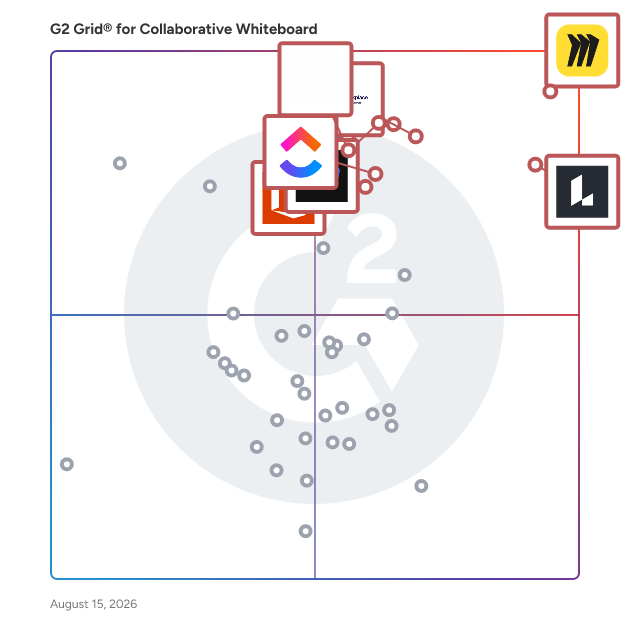
G2 Grid® for Collaborative Whiteboard Software

G2 Grid® for Collaborative Whiteboard Software plotting products by satisfaction and market presence

Highlighted products: Miro, Lucid Visual Collaboration Suite, Canva, Zoom Workplace, Webex Suite, FigJam, ClickUp, and Visio.

Underlying data: [Grid® JSON](https://www.g2.com/categories/collaborative-whiteboard/grids.json?focus%5B%5D=miro&focus%5B%5D=lucid-software-inc-lucid-visual-collaboration-suite&focus%5B%5D=canva&focus%5B%5D=zoom-workplace&focus%5B%5D=cisco-webex-suite&focus%5B%5D=fig-jam&focus%5B%5D=clickup&focus%5B%5D=visio)

Sponsored

Aladtec by TCP

Aladtec is a specialized employee scheduling software solution designed specifically for public safety organizations, such as fire departments, police departments, and emergency medical services. This innovative platform streamlines the complex process of scheduling personnel around the clock, allowing agencies to focus on their critical mission of serving the community rather than getting bogged down in administrative tasks. By automating scheduling, Aladtec helps organizations manage their workforce more effectively, ensuring that they have the right number of staff available at all times. The target audience for Aladtec includes public safety administrators, human resources personnel, and operational managers who are responsible for maintaining compliance with labor laws and union agreements while also managing budgets and overtime costs. The software is particularly beneficial for organizations that operate on unique rotation patterns and require adherence to specific staffing policies. By providing a centralized platform for scheduling, Aladtec enhances communication and collaboration among team members, ultimately leading to improved employee satisfaction and retention. Key features of Aladtec include real-time data access, which allows administrators to monitor staffing levels, budget allocations, and overtime usage effectively. This insight is crucial for making informed decisions that can help mitigate unnecessary costs. Additionally, the software offers self-service tools for employees, granting them the flexibility to manage their schedules according to their preferences. This includes the ability to trade shifts, bid for open shifts, and view their schedules at any time, fostering a sense of ownership and accountability among staff. Aladtec stands out in the public safety scheduling software category by providing tailored solutions that align with the specific needs of emergency service organizations. Its focus on compliance tracking and adherence to labor rules helps mitigate risks associated with scheduling errors. Furthermore, the platform’s user-friendly interface ensures that both administrators and employees can navigate the system with ease, enhancing overall productivity. By automating routine scheduling tasks, Aladtec empowers public safety personnel to devote more time to their core responsibilities, ultimately benefiting the communities they serve.

Visit website

Miro

Miro is the collaborative workspace where agents and teams converge to think, decide, and build together. As AI accelerates work, the challenge for organizations isn't doing more; it's turning individual output into scaled impact. Serving more than 100 million users across 250,000 customers, Miro’s shared, secure canvas surfaces the context that empowers teams to solve harder problems, make better decisions, and move work forward faster. Founded in 2011, Miro currently employs 1,600 people in 13 hubs around the world. To learn more, visit miro.com Key AI capabilities include Flows, which are visual AI workflows that automate multi-step processes while empowering teams with full visibility and control at every step; Sidekicks, which are conversational AI co-creators with expertise on specific tasks, jobs, or processes that move work forward; and Your AI and Knowledge, a collaborative integration layer that connects and enhances existing enterprise AI capabilities without leaving the platform. The Model Context Protocol (MCP) extends the ecosystem by accelerating agentic code, leveraging context from Miro to generate code in agents powered by Miro’s own MCP server. Miro for Product Acceleration is a comprehensive solution of integrated AI-first products designed to help product teams make smarter decisions about what to build and move faster. All of these capabilities are built on one platform with a shared data model, advanced security and compliance controls, and responsible AI certification at the forefront. By embedding AI where teamwork happens, Miro keeps teams in the flow of work, accelerates processes, and ultimately transforms organizations.

Average Rating: 4.6/5.0

Total Reviews: 13,356

How Do G2 Users Rate Miro?

  • Quality of Support: 8.7/10 (Category avg: 9.0/10)
  • Ease of Use: 9.0/10 (Category avg: 9.2/10)

Who Is the Company Behind Miro?

  • Seller: Miro
  • Company Website:
  • Year Founded: 2011
  • HQ Location: San Francisco, California
  • Twitter: @MiroHQ
    38,406 Twitter followers
  • LinkedIn® Page: www.linkedin.com
    2,840 employees on LinkedIn®

Who Uses This Product?

  • Who Uses This: Product Manager, Project Manager
  • Top Industries: Computer Software, Information Technology and Services
  • Company Size: 39% Small, 29% Medium

What Do G2 Reviewers Say About Miro?

AI-generated summary from verified user reviews

Pros
  • Users appreciate the intuitive design of Miro, finding it easy to use and convenient for collaboration.
  • Users appreciate the efficient team collaboration in Miro, benefiting from easy access and seamless sharing of ideas.
  • Users value Miro's intuitive features and flexibility, enhancing productivity and creativity with easy-to-navigate tools.
  • Users love Miro for its effortless real-time collaboration, enhancing teamwork and idea visualization seamlessly.
  • Users appreciate Miro's versatile templates that simplify project planning and enhance collaborative workflows seamlessly.
Cons
  • Users express a desire for a bird’s-eye view feature in Miro, seeking better project overview and management.
  • Users find that embedding Miro boards looks poor in Confluence, hindering the overall presentation quality.
  • Users find Miro's limited features frustrating, as essential functions often require a paid plan for access.
  • Users find the learning curve challenging, particularly for onboarding less tech-savvy individuals to Miro.
  • Users experience slow loading times with Miro, which hinders efficiency when handling large documents and boards.

What Are Recent G2 Reviews of Miro?

What Are G2 Users Discussing About Miro?

Lucid Visual Collaboration Suite

Lucid is a Work Acceleration Platform powered by visual collaboration that helps teams see and build the future. Serving more than 100 million users and 99% of the Fortune 500, its enterprise offering is the Lucid Visual Collaboration Suite, which combines Lucidchart for intelligent diagramming and Lucidspark for virtual whiteboarding. With an infinite, universal canvas, cross-functional teams can switch seamlessly between purpose-built toolsets to visualize complex systems, ideate, plan, and build better ideas faster. Key enterprise capabilities include powerful optional accelerators that specialize the platform for specific initiatives. The Agility Accelerator surfaces insights on team health and enables data-backed capacity planning; the Cloud Accelerator automatically generates up-to-date, customizable cloud infrastructure documentation; and the Process Accelerator delivers increased governance and standardization for maintaining organizational processes. Additionally, both core applications feature built-in AI capabilities and extensive integrations with industry leaders like Atlassian, Google, Microsoft, and Slack. The Lucid Suite facilitates seamless remote and hybrid collaboration across the entire enterprise—from IT and engineering to marketing and operations. Organizations use team hubs as a virtual home base for creating and sharing documentation, keeping work visible to the right people. Backed by enhanced enterprise security and premium support options, the Lucid Suite accelerates strategic initiatives such as technology innovation, faster decision-making, and operational excellence, ultimately driving large-scale organizational change.

Average Rating: 4.5/5.0

Total Reviews: 8,725

How Do G2 Users Rate Lucid Visual Collaboration Suite?

  • Quality of Support: 8.9/10 (Category avg: 9.0/10)
  • Ease of Use: 8.9/10 (Category avg: 9.2/10)

Who Is the Company Behind Lucid Visual Collaboration Suite?

  • Seller: Lucid Software Inc.
  • Company Website:
  • Year Founded: 2010
  • HQ Location: South Jordan, UT
  • Twitter: @LucidSoftware
    14,511 Twitter followers
  • LinkedIn® Page: www.linkedin.com
    1,380 employees on LinkedIn®

Who Uses This Product?

  • Who Uses This: Software Engineer, Student
  • Top Industries: Information Technology and Services, Computer Software
  • Company Size: 40% Small, 35% Medium

What Do G2 Reviewers Say About Lucid Visual Collaboration Suite?

AI-generated summary from verified user reviews

Pros
  • Users find the intuitive and easy-to-navigate design of Lucid Visual Collaboration Suite enhances their diagramming and flowcharting experience.
  • Users highlight the easy creation features of Lucid Visual Collaboration Suite, streamlining project planning and collaboration effortlessly.
  • Users value the intelligent diagramming capabilities of Lucid Visual Collaboration Suite, enhancing creativity and collaboration across teams.
  • Users appreciate the user-friendly interface and versatile features of Lucid Visual Collaboration Suite for efficient diagram design.
  • Users value the effective team collaboration features of Lucid Visual Collaboration Suite that enhance productivity and streamline tasks.
Cons
  • Users find the learning curve for Lucid Visual Collaboration Suite somewhat overwhelming, requiring time to master its features.
  • Users find missing features like limited document creation and advanced functionalities restrict their collaboration experience.
  • Users often face diagramming issues like limited shapes and performance lags with large diagrams, affecting usability.
  • Users find the limited features in the Lucid Visual Collaboration Suite hinder their experience, especially for free users.
  • Users find Lucid Visual Collaboration Suite's usability to be not intuitive, especially when compared to competitors like Figjam.

What Are Recent G2 Reviews of Lucid Visual Collaboration Suite?

What Are G2 Users Discussing About Lucid Visual Collaboration Suite?

Zoom Workplace

Goodbye app overload. Hello effortless work. Work can be complicated. Your tools shouldn't be. Zoom Workplace connects all the ways you collaborate — from meetings to docs to chat and more — with built-in AI and seamless integrations that help teams focus and work flawlessly. Zoom Communications: Unified, Effortless Connection for Modern Work Bring every way your teams communicate—meetings, chat, calls, email, and scheduling—into one seamless experience. With Zoom, collaboration happens faster and more naturally across channels, without switching apps or losing context. From spontaneous chats to scheduled meetings and calls, everything stays connected, searchable, and secure—powered by one intuitive platform built for how modern teams work. Zoom Productivity: Workflows Connected, Work Effortless Transform how work gets done with AI-first collaboration that keeps people, content, and actions in one place. From brainstorming on whiteboards to co-creating in docs, sharing clips, and automating follow-ups, Zoom connects every step of your workflow. With Zoom Hub and integrated video management, knowledge stays organized, accessible, and actionable—so teams can move from idea to outcome without friction. Zoom Spaces: Smarter, Connected Workplaces for Every Team Bring your physical and hybrid environments to life with intelligent, connected spaces. Zoom Spaces unifies meeting rooms, desk reservations, digital signage, and visitor management into one seamless experience—making it simple to collaborate, navigate, and manage the workplace. Whether employees are remote, hybrid, or on-site, Zoom creates a consistent, secure, and flexible environment that keeps teams connected wherever work happens. Zoom Employee Engagement: Connect, Inspire, and Empower Every Employee Foster belonging and alignment with Workvivo by Zoom—a modern employee experience platform that unites communication, culture, and community in one place. From company-wide updates to recognition, feedback, and social engagement, Workvivo gives every employee a voice and a sense of connection. Built right into Zoom Workplace, it helps organizations strengthen culture, boost engagement, and keep teams informed and inspired—no matter where they work.

Average Rating: 4.5/5.0

Total Reviews: 53,565

How Do G2 Users Rate Zoom Workplace?

  • Quality of Support: 8.7/10 (Category avg: 9.0/10)
  • Ease of Use: 9.1/10 (Category avg: 9.2/10)

Who Is the Company Behind Zoom Workplace?

  • Seller: Zoom
  • Company Website:
  • Year Founded: 2011
  • HQ Location: San Jose, CA
  • Twitter: @zoom
    1,042,714 Twitter followers
  • LinkedIn® Page: www.linkedin.com
    13,494 employees on LinkedIn®

Who Uses This Product?

  • Who Uses This: Owner, Software Engineer
  • Top Industries: Information Technology and Services, Computer Software
  • Company Size: 51% Small, 31% Medium

What Do G2 Reviewers Say About Zoom Workplace?

AI-generated summary from verified user reviews

Pros
  • Users value the ease of use with Zoom Workplace, enjoying convenient access to multiple features in one place.
  • Users love the easy team meetings on Zoom, with features like breakout rooms and seamless screen sharing enhancing collaboration.
  • Users commend the reliability of Zoom Workplace, ensuring seamless connections even during challenging internet conditions.
  • Users appreciate the ease of use and reliability of Zoom Workplace for seamless meetings and effective collaboration.
  • Users value the easy-to-use video conferencing features of Zoom Workplace, enhancing collaboration and productivity across teams.
Cons
  • Users note the limited features of Zoom Workplace, expressing a desire for improved tools and streamlined functionality.
  • Users often experience Zoom issues like fatigue and connectivity problems, making long meetings challenging and impersonal.
  • Users often experience meeting issues like fatigue, cluttered interface, and connectivity problems, impacting overall satisfaction.
  • Users note the missing features of Zoom Workplace, highlighting the need for improved chat access and recording sharing.
  • Users experience connection issues with Zoom Workplace, affecting usability and overall satisfaction compared to alternatives like Google Meet.

What Are Recent G2 Reviews of Zoom Workplace?

What Are G2 Users Discussing About Zoom Workplace?

Canva

Canva is a visual communication platform that gives everyone a creative voice, no matter your design experience, team size, or budget. Whether you're a student making your first presentation, a marketer producing social graphics in minutes, or a global team creating on-brand content without touching a designer's inbox, Canva is where ideas become something you can actually show. Start with one of over a million professionally designed templates, or build from scratch with an AI-powered drag-and-drop editor. A library of stock images, videos, soundtracks, and fonts means you are easily equipped to create visual content at scale. Looking to work in Canva across your team? Real-time collaboration lets multiple people design simultaneously. Brand kits keep assets, colors, and fonts consistent across a one-person business or a Fortune 500 company. Canva AI helps you generate, resize, write, and edit visuals in a fraction of the time. Canva is used by more than 265 million people across 190 countries and trusted by 95% of Fortune 500 companies. Canva is available on the web, iOS and Android.

Average Rating: 4.7/5.0

Total Reviews: 6,480

How Do G2 Users Rate Canva?

  • Quality of Support: 8.8/10 (Category avg: 9.0/10)
  • Ease of Use: 9.4/10 (Category avg: 9.2/10)

Who Is the Company Behind Canva?

  • Seller: Canva
  • Company Website:
  • Year Founded: 2012
  • HQ Location: Sydney
  • Twitter: @canva
    339,250 Twitter followers
  • LinkedIn® Page: www.linkedin.com
    16,408 employees on LinkedIn®

Who Uses This Product?

  • Who Uses This: Owner, Marketing Manager
  • Top Industries: Marketing and Advertising, Information Technology and Services
  • Company Size: 66% Small, 23% Medium

What Do G2 Reviewers Say About Canva?

AI-generated summary from verified user reviews

Pros
  • Users love the ease of use of Canva, making design simple and quick with intuitive features and templates.
  • Users love the extensive templates offered by Canva, making design quick, easy, and accessible for everyone.
  • Users appreciate the extensive design options in Canva, making it easy to create polished designs quickly and intuitively.
  • Users love Canva for its easy creation process, enabling quick and intuitive design with a wide range of templates.
  • Users value the extensive template availability in Canva, which simplifies the design process for everyone.
Cons
  • Users find Canva has limited features, especially on the free plan, making it costly for beginners to access more tools.
  • Users find limited options in Canva frustrating, especially for vector editing and bulk creation of designs.
  • Users express their frustration with missing features in Canva, such as vector editing and offline functionality, impacting design efficiency.
  • Users feel that the premium plan is too expensive, particularly for beginners needing essential features.
  • Users find limited customization options in Canva, wishing for more flexibility and manual editing tools for designs.

What Are Recent G2 Reviews of Canva?

What Are G2 Users Discussing About Canva?

Webex Suite

Webex Suite is an all-in-one, AI-powered collaboration suite built to increase productivity and maximize teamwork in today’s hybrid work. With 8 powerful individual workflows – Meetings, Messaging, Calling, Webinar, Events, Polling, Whiteboarding and Video Messaging in one, Webex Suite delivers exceptional value, world-class user experiences, and incredible audio and video, anywhere on any device. With a variety of collaboration and AI innovations, such as Webex AI Assistant, Real-time Translation, Background Noise Removal, and more, Webex Suite delivers rich and innovative experiences for employees and customers, enabling them to seamlessly connect, collaborate, engage and get work done. Webex Suite is powered by the industry-leading Webex Platform that is secure, compliant, and easily managed with built-in pervasive intelligence, bringing AI innovations across the entire Webex portfolio. The entire Webex Suite can be managed via the single-pane-of-glass management tool, Webex Control Hub. Webex Suite is backed by Cisco’s industry-leading security and networking infrastructure that ensures the best quality video and audio communications. Webex Suite Workflows: Meetings: Drive more productive meetings with AI-powered experiences and high-quality audio and video. Messaging: Collaborate async with rich messaging, secure file sharing, and digital whiteboarding to keep work flowing between meetings. Calling: Stay connected with modern business phone system and flexible calling options. Webinar: Host high quality webinars and drive engagement with immersive content and interactive audience experiences. Events: Power virtual, in-person, and hybrid events with immersive multi-track agendas, ticketing, attendee networking, analytics, and more. Polling: Enable active participation in every meeting with quizzes, polling, and interactive Q&A. Whiteboarding: Unleash creativity with a digital whiteboarding solution for everyone, on any device. Video Messaging: Record, share ideas, engage, and facilitate real-time feedback with intuitive video messaging.

Average Rating: 4.2/5.0

Total Reviews: 17,667

How Do G2 Users Rate Webex Suite?

  • Quality of Support: 8.5/10 (Category avg: 9.0/10)
  • Ease of Use: 8.7/10 (Category avg: 9.2/10)

Who Is the Company Behind Webex Suite?

  • Seller: Cisco
  • Company Website:
  • Year Founded: 1984
  • HQ Location: San Jose, CA
  • Twitter: @Cisco
    720,366 Twitter followers
  • LinkedIn® Page: www.linkedin.com
    95,545 employees on LinkedIn®

Who Uses This Product?

  • Who Uses This: Software Engineer, Senior Software Engineer
  • Top Industries: Information Technology and Services, Computer Software
  • Company Size: 50% Large, 31% Medium

What Do G2 Reviewers Say About Webex Suite?

AI-generated summary from verified user reviews

Pros
  • Users appreciate the ease of use of Webex Suite, enjoying smooth communication and simple setup for seamless collaboration.
  • Users value the seamless integration of Webex Suite, enhancing organization and responsiveness across multiple tools.
  • Users value the high reliability of Webex Suite, benefiting from excellent audio and video quality consistently.
  • Users appreciate the all-in-one nature of Webex Suite, seamlessly integrating video conferencing, messaging, and essential tools.
  • Users commend the excellent video quality of Webex Suite, ensuring seamless and clear communication during meetings.
Cons
  • Users experience slow loading times and lag, affecting productivity and usability, especially on slower networks.
  • Users often experience performance issues with Webex Suite, including lag, freezes, and a complex setup process.
  • Users find Webex Suite to be not user-friendly, often struggling with its interface and overall complexity, especially when learning.
  • Users find the lack of intuitiveness in Webex Suite can lead to a challenging and complicated user experience.
  • Users find the poor user experience of Webex Suite challenging, with a complex setup and a cluttered interface.

What Are Recent G2 Reviews of Webex Suite?

What Are G2 Users Discussing About Webex Suite?

ClickUp

ClickUp is the world’s first Converged AI Workspace, bringing together all work apps, data, and workflows. ClickUp eliminates all forms of work sprawl to provide 100% context and a single place for humans and agents to work, together. Trusted by more than 20 million users worldwide, ClickUp is on a mission to maximize human productivity.

Average Rating: 4.6/5.0

Total Reviews: 13,065

How Do G2 Users Rate ClickUp?

  • Quality of Support: 8.8/10 (Category avg: 9.0/10)
  • Ease of Use: 8.5/10 (Category avg: 9.2/10)

Who Is the Company Behind ClickUp?

  • Seller: ClickUp
  • Company Website:
  • Year Founded: 2017
  • HQ Location: San Diego, California
  • Twitter: @clickup
    69,539 Twitter followers
  • LinkedIn® Page: www.linkedin.com
    1,526 employees on LinkedIn®

Who Uses This Product?

  • Who Uses This: CEO, Project Manager
  • Top Industries: Marketing and Advertising, Computer Software
  • Company Size: 77% Small, 19% Medium

What Do G2 Reviewers Say About ClickUp?

AI-generated summary from verified user reviews

Pros
  • Users praise ClickUp for its ease of use, enhancing collaboration and project management efficiency effortlessly.
  • Users value the robust task management capabilities of ClickUp, enhancing organization, productivity, and overall workflow efficiency.
  • Users value ClickUp's robust features and flexibility, significantly enhancing productivity and project visibility across teams.
  • Users appreciate the flexibility and comprehensive integration of ClickUp, enhancing teamwork and project execution efficiency.
  • Users appreciate the effective collaboration of ClickUp, enabling seamless teamwork and task management on a single platform.
Cons
  • Users find missing features frustrating in ClickUp, especially when crucial tools are restricted by paywalls and limits.
  • Users find the learning curve for beginners to be challenging, requiring time to adapt and master the system.
  • Users find ClickUp has limited features, lacking integrations and complex functionalities, impacting usability and flexibility.
  • Users find ClickUp's interface not intuitive, complicating the discovery of features and overall user experience.
  • Users report experiencing slow loading times in ClickUp, impacting overall efficiency and user experience.

What Are Recent G2 Reviews of ClickUp?

What Are G2 Users Discussing About ClickUp?

FigJam

FigJam is the space where teams turn possibilities into real plans. Use FigJam’s flexible, open canvas to shape stronger solutions to tough problems, get stakeholders on the same page, and keep sprints moving forward. FigJam lives side by side with Figma, so work and ideas can flow from one tool to the next. Get started with templates featuring everything from workshops and diagramming to mind-mapping and planning—try FigJam for free today and discover a better way of visually collaborating with your team.

Average Rating: 4.5/5.0

Total Reviews: 459

How Do G2 Users Rate FigJam?

  • Quality of Support: 8.7/10 (Category avg: 9.0/10)
  • Ease of Use: 9.0/10 (Category avg: 9.2/10)

Who Is the Company Behind FigJam?

  • Seller: Figma
  • Year Founded: 2012
  • HQ Location: San Francisco, California
  • Twitter: @figma
    560,699 Twitter followers
  • LinkedIn® Page: www.linkedin.com
    3,110 employees on LinkedIn®

Who Uses This Product?

  • Who Uses This: Product Designer, Product Manager
  • Top Industries: Computer Software, Information Technology and Services
  • Company Size: 50% Small, 35% Medium

What Do G2 Reviewers Say About FigJam?

AI-generated summary from verified user reviews

Pros
  • Users find FigJam incredibly easy to use, enabling smooth collaboration and fast integration for teams and designers.
  • Users value the intuitive interface and seamless integration of FigJam, enhancing collaboration and brainstorming efficiency.
  • Users appreciate the ease of use of FigJam, making it accessible and efficient for all, including non-designers.
  • Users value the seamless team collaboration in FigJam, enhancing brainstorming and UX research efficiency across projects.
  • Users value FigJam for its fast and intuitive brainstorming experience, enhancing team collaboration and integration with Figma.
Cons
  • Users find FigJam has limited features for complex diagrams, affecting usability and performance on large boards.
  • Users note a lack of diverse and polished templates in FigJam compared to competitors, affecting usability for new contributors.
  • Users experience performance issues with FigJam on large boards, causing slowness when collaborating and managing complex diagrams.
  • Users experience slow performance on large boards with many assets, affecting their overall experience and efficiency.
  • Users experience lagging performance when using FigJam for large boards, impacting their workflow and efficiency.

What Are Recent G2 Reviews of FigJam?

Visio

Visio is an innovative solution that helps you visualize data-connected business process flows with dozens of ready-to-use templates and thousands of customizable shapes. Work visually from anywhere, at any time. Microsoft Visio helps professionals create detailed flowcharts, organizational charts, and network diagrams. With an intuitive interface and extensive templates, it simplifies visual data representation. Integrated with Microsoft 365, Visio supports real-time collaboration, making it ideal for business process modeling and IT infrastructure mapping.

Average Rating: 4.2/5.0

Total Reviews: 677

How Do G2 Users Rate Visio?

  • Quality of Support: 8.1/10 (Category avg: 9.0/10)
  • Ease of Use: 8.2/10 (Category avg: 9.2/10)

Who Is the Company Behind Visio?

  • Seller: Microsoft
  • Year Founded: 1975
  • HQ Location: Redmond, Washington
  • Twitter: @microsoft
    13,091,739 Twitter followers
  • LinkedIn® Page: www.linkedin.com
    231,632 employees on LinkedIn®
  • Ownership: MSFT

Who Uses This Product?

  • Who Uses This: Consultant, Graduate Engineering Trainee
  • Top Industries: Information Technology and Services, Hospital & Health Care
  • Company Size: 42% Large, 33% Medium

What Do G2 Reviewers Say About Visio?

AI-generated summary from verified user reviews

Pros
  • Users appreciate the ease of use in Visio, highlighting its user-friendly design and fast drawing capabilities.
  • Users appreciate the variety of shapes in Visio, enabling easy and flexible diagram creation for diverse needs.
  • Users find Visio's easy creation of diagrams efficient, thanks to its user-friendly interface and rich templates.
  • Users appreciate the seamless integration of Visio with Microsoft products, enhancing their workflow and collaboration effectively.
  • Users appreciate the intuitive design of Visio, making it easy and fast to create visuals and diagrams.
Cons
  • Users find the cost of the perpetual license for Visio quite high, raising concerns about its overall value.
  • Users find the learning curve steep for advanced features, but ultimately adapt for a positive experience.
  • Users find the limited templates in Visio restrictive, hindering their ability to create varied diagrams effectively.
  • Users experience slow performance when working with large diagrams, particularly when using Visio via the browser.
  • Users experience compatibility issues with Microsoft Visio, complicating sharing and access for non-Visio users.

What Are Recent G2 Reviews of Visio?

What Are G2 Users Discussing About Visio?

Mural

Mural is a visual collaboration platform specifically designed to enhance the productivity and effectiveness of go-to-market (GTM) teams. As an interactive workspace, Mural enables teams to create persistent visbility that builds alignment, while leveraging human-centered AI that accelerates teams to reach their outcomes faster. Whether it's building better products more in line with customer demand, creating more seamless marketing campaigns that drive pipeline, or collaborative selling motions that close deals faster, teams are using Mural to drive revenue growth more intelligently. The primary target audiences for Mural all have their hand in go-to-market motions, including product management & engineering teams, sales, marketing, and customer success teams. These teams often face challenges aligning their efforts and communicating effectively, hindering their ability to respond to market demands quickly enough to gain a competitive advantage. Within Mural, teams can leverage tools and expert-designed methods that increase their speed: to visualize their ideas, share insights, and collaborate in real time, regardless of their physical location. Key features of Mural include customizable templates by role or function, diagramming tools, intelligent workflows and methods, and AI infused throughout to help teams move faster from ideation to execution. The platform supports integrations with other popular software, including Salesforce, Microsoft, and Jira, enabling seamless workflows and reducing swivel-chair between systems. With Mural, teams can build a strategic visual layer that helps them calibrate decisions and actions and creates visibility so people stay informed without accessing multiple systems. Additionally, Mural's AI capabilities help teams identify patterns and insights from their collaborative sessions, further enriching the decision-making process. By providing a robust visual collaboration environment, Mural stands out in its category as a solution that not only enhances productivity but also fosters a deeper connection among team members. This unique approach to collaboration enables organizations to adapt quickly to changing market dynamics and customer needs, ultimately driving better outcomes and sustained growth.

Average Rating: 4.6/5.0

Total Reviews: 1,410

How Do G2 Users Rate Mural?

  • Quality of Support: 9.0/10 (Category avg: 9.0/10)
  • Ease of Use: 8.8/10 (Category avg: 9.2/10)

Who Is the Company Behind Mural?

  • Seller: Mural
  • Company Website:
  • Year Founded: 2011
  • HQ Location: San Francisco, California
  • Twitter: @MURAL
    13,596 Twitter followers
  • LinkedIn® Page: www.linkedin.com
    558 employees on LinkedIn®

Who Uses This Product?

  • Who Uses This: UX Designer, Product Manager
  • Top Industries: Information Technology and Services, Management Consulting
  • Company Size: 44% Large, 35% Small

What Do G2 Reviewers Say About Mural?

AI-generated summary from verified user reviews

Pros
  • Users appreciate the ease of use of Mural, finding it intuitive and efficient for collaborative work.
  • Users value the easy team collaboration in Mural, enhancing meetings and brainstorming with intuitive tools and great support.
  • Users appreciate the time-saving templates in Mural, which enhance collaboration and streamline the brainstorming process.
  • Users love the collaboration capabilities of Mural, enhancing teamwork with intuitive tools for brainstorming and meetings.
  • Users love the real-time collaboration features of Mural, enhancing teamwork with dynamic interactions and seamless integration.
Cons
  • Users experience slow performance with Mural, particularly when handling large files or during simultaneous collaborations.
  • Users experience slow loading when processing large files or during simultaneous collaboration, affecting overall fluidity.
  • Users experience performance issues with Mural, especially when handling large files or during simultaneous edits.
  • Users find Mural's limited features frustrating, especially compared to alternatives like Miro and Lucid.
  • Users find Mural's diagramming features lacking, limiting its overall utility and organizational capabilities.

What Are Recent G2 Reviews of Mural?

What Are G2 Users Discussing About Mural?

Padlet

Dostoevsky said that beauty will save the world. Padlet offers beautiful boards and canvases for visual thinkers and learners. Use boards to collect, organize, and present anything. Use sandboxes for whiteboarding, lessons, and activities. Over 40 million people every month actively use Padlet around the world. Here are some of the ways they use it: -Collaborate on files with clients -Store instructional videos -Share marketing assets -Manage real-estate listings on a map -Create interactive lessons -Design collaborative worksheets -Make slideshows -Build meeting agendas -Solicit feedback -Brainstorm ideas -And more Dostoevsky would have loved Padlet.

Average Rating: 4.9/5.0

Total Reviews: 339

How Do G2 Users Rate Padlet?

  • Quality of Support: 9.4/10 (Category avg: 9.0/10)
  • Ease of Use: 9.6/10 (Category avg: 9.2/10)

Who Is the Company Behind Padlet?

  • Seller: Padlet
  • Year Founded: 2012
  • HQ Location: San Francisco, US
  • Twitter: @padlet
    73,244 Twitter followers
  • LinkedIn® Page: www.linkedin.com
    80 employees on LinkedIn®

Who Uses This Product?

  • Who Uses This: Teacher
  • Top Industries: Education Management, Primary/Secondary Education
  • Company Size: 49% Small, 43% Medium

What Do G2 Reviewers Say About Padlet?

AI-generated summary from verified user reviews

Pros
  • Users find Padlet to be incredibly user-friendly, appreciating its intuitive design that simplifies organizing and collaboration.
  • Users love Padlet for its easy sharing, flexible designs, and time-saving templates, making collaboration effortless.
  • Users enjoy the engaging interaction Padlet fosters, making it easy for students to express thoughts and collaborate.
  • Users love the interactivity of Padlet, enabling collaborative discussions and dynamic content sharing among participants.
  • Users value the real-time collaboration in Padlet, enhancing interaction and engagement in educational environments.
Cons
  • Users are frustrated by access limitations in Padlet's free version, hindering their ability to create multiple projects.
  • Users are frustrated by the limited features of the free Padlet version, which restricts account functionality for teachers.
  • Users feel the lack of features in the free version limits their ability to effectively manage multiple classes.
  • Users find the limited features of Padlet frustrating, particularly with only 3 Padlets available on a free account.
  • Users find Padlet expensive, with limited free options that restrict the use of its features effectively.

What Are Recent G2 Reviews of Padlet?

What Are G2 Users Discussing About Padlet?

Conceptboard

Conceptboard is the GDPR-compliant online whiteboard that combines visual collaboration with secure task and project management. Built for distributed teams, Conceptboard supports real-time and asynchronous work across locations, time zones, and departments—without compromising on security or usability. Whether you’re brainstorming ideas, mapping strategies, planning projects, or facilitating workshops, Conceptboard offers a visual workspace that turns complexity into clarity. Teams can assign tasks, manage responsibilities, and track progress—all directly on the board. This makes Conceptboard more than just a digital whiteboard: it’s a central hub for visual thinking, team alignment, and execution. Hosted entirely in Germany and certified to ISO 27001, 27017, and 27018, Conceptboard ensures maximum data protection and sovereignty. That’s why it's trusted by enterprises and public sector organizations alike—from the German Federal Chancellery and Ministry of Health to Siemens, Sennheiser, and the U.S. Air Force. With powerful integrations (e.g. MS Teams, Confluence, Webex), customizable templates, moderation tools, and infinite canvas capabilities, Conceptboard adapts to the way your team works—without requiring installation. Use Conceptboard for: Online workshops and remote collaboration Visual task and project management Secure teamwork across public administration and enterprises Agile planning, retros, and roadmapping Interactive meetings and hybrid sessions Join 14M+ users worldwide who collaborate visually, securely, and productively—on a platform designed for digital sovereignty. Conceptboard: The sovereign collaboration platform for secure teamwork at scale.

Average Rating: 4.6/5.0

Total Reviews: 102

How Do G2 Users Rate Conceptboard?

  • Quality of Support: 9.3/10 (Category avg: 9.0/10)
  • Ease of Use: 9.4/10 (Category avg: 9.2/10)

Who Is the Company Behind Conceptboard?

  • Seller: Conceptboard
  • Company Website:
  • Year Founded: 2010
  • HQ Location: Halle (Saale), Sachsen-Anhalt
  • Twitter: @ConceptboardApp
    4,908 Twitter followers
  • LinkedIn® Page: www.linkedin.com
    86 employees on LinkedIn®

Who Uses This Product?

  • Top Industries: Computer Software, Management Consulting
  • Company Size: 56% Small, 24% Large

What Do G2 Reviewers Say About Conceptboard?

AI-generated summary from verified user reviews

Pros
  • Users find Conceptboard highly easy to use, enhancing visual collaboration and project management for teams effortlessly.
  • Users love the variety of templates available in Conceptboard, enhancing creativity and making collaboration engaging.
  • Users appreciate the user-friendly interface of Conceptboard, making collaboration and project management intuitive and seamless.
  • Users love the customization options in Conceptboard, making it easy to adapt projects and collaborate effectively.
  • Users rave about the easy creation process in Conceptboard, making collaboration and project management intuitive and fun.
Cons
  • Users report connectivity issues during client sessions, causing brief interruptions but are generally satisfied with the product.
  • Users find Conceptboard's interface unintuitive and slow, leading to a frustrating and outdated user experience.
  • Users find Conceptboard's lack of intuitiveness frustrating, as it complicates tasks and diminishes the overall experience.
  • Users often find the lagging performance of Conceptboard frustrating, leading to a subpar user experience overall.
  • Users face login issues that disrupt sessions, yet find the overall experience with Conceptboard enjoyable and secure.

What Are Recent G2 Reviews of Conceptboard?

What Are G2 Users Discussing About Conceptboard?

Klaxoon

Klaxoon by Wrike is the ultimate visual collaboration platform designed to boost collective intelligence and seamlessly align hybrid and remote teams. In today’s fast-paced business environment, keeping dispersed teams engaged and productive can be a challenge. Klaxoon by Wrike solves this by transforming everyday meetings into high-performance, action-oriented work sessions. By bridging the gap between creative ideation and project delivery, it ensures that your team's best ideas are instantly captured, organized, and executed.

Average Rating: 4.6/5.0

Total Reviews: 311

How Do G2 Users Rate Klaxoon?

  • Quality of Support: 9.3/10 (Category avg: 9.0/10)
  • Ease of Use: 8.6/10 (Category avg: 9.2/10)

Who Is the Company Behind Klaxoon?

  • Seller: Wrike, Inc.
  • Company Website:
  • Year Founded: 2006
  • HQ Location: San Diego, CA
  • Twitter: @wrike
    13,574 Twitter followers
  • LinkedIn® Page: www.linkedin.com
    1,257 employees on LinkedIn®

Who Uses This Product?

  • Who Uses This: Project Manager
  • Top Industries: Banking, Information Technology and Services
  • Company Size: 51% Large, 25% Medium

What Do G2 Reviewers Say About Klaxoon?

AI-generated summary from verified user reviews

Pros
  • Users find Klaxoon to be incredibly easy to use, facilitating dynamic and engaging collaboration effortlessly.
  • Users love the real-time collaboration in Klaxoon, enhancing group interaction and transforming ideas into organized visuals.
  • Users appreciate the seamless team collaboration in Klaxoon, enabling flexible, engaging, and responsive interactions for all participants.
  • Users value the interactive and engaging features of Klaxoon, enhancing collaboration and inclusivity during meetings.
  • Users value the collaborative sharing features of Klaxoon, enhancing teamwork and improving project presentations.
Cons
  • Users find Klaxoon's learning curve steep, requiring more guidance and simpler onboarding to enhance productivity.
  • Users find it challenging to navigate boards in Klaxoon, making idea segmentation difficult and cumbersome.
  • Users find difficult navigation within Klaxoon hampers effective organization and segmentation of project work streams.
  • Users find Klaxoon's insufficient tutorials overwhelming, suggesting better onboarding to ease the initial learning curve.
  • Users find the limited templates in Klaxoon can hinder new users from quickly becoming productive in the platform.

What Are Recent G2 Reviews of Klaxoon?

Jamboard

Google Jamboard was an interactive whiteboard developed to enhance real-time collaboration and creativity within teams. It combined a 55-inch touchscreen display with the power of Google Workspace, allowing users to brainstorm, create, and share ideas seamlessly. The device supported multi-user input, enabling team members to draw, write, and add images simultaneously. Integrated with Google Drive, it ensured that all work was saved automatically and accessible from any device. However, as of December 31, 2024, Google has discontinued the Jamboard application and device. Users are encouraged to transition to alternative whiteboarding tools that integrate with Google Workspace. Key Features and Functionality: - Interactive Touchscreen Display: A 55-inch 4K display that responded to touch and stylus input, facilitating dynamic team interactions. - Real-Time Collaboration: Multiple users could work on the same board simultaneously, whether in the same room or remotely. - Google Workspace Integration: Seamless connection with Google Drive, Docs, Sheets, and Slides for easy access and sharing of content. - Automatic Saving: All changes were saved in real-time to Google Drive, ensuring no loss of data. - Remote Accessibility: Users could access and edit boards from various devices, including tablets and smartphones. Primary Value and User Solutions: Jamboard aimed to revolutionize team collaboration by providing a digital platform that mimicked the traditional whiteboard experience while offering advanced features. It addressed common challenges in team settings, such as the need for real-time collaboration across different locations, by enabling users to brainstorm and develop ideas together, regardless of their physical location. The integration with Google Workspace ensured that all materials were organized and easily accessible, streamlining workflows and enhancing productivity. With the discontinuation of Jamboard, users are advised to explore other whiteboarding solutions that integrate with Google Workspace to continue benefiting from similar collaborative features.

Average Rating: 4.3/5.0

Total Reviews: 68

How Do G2 Users Rate Jamboard?

  • Quality of Support: 8.7/10 (Category avg: 9.0/10)
  • Ease of Use: 8.9/10 (Category avg: 9.2/10)

Who Is the Company Behind Jamboard?

  • Seller: Google
  • Year Founded: 1998
  • HQ Location: Mountain View, CA
  • Twitter: @google
    31,899,995 Twitter followers
  • LinkedIn® Page: www.linkedin.com
    341,888 employees on LinkedIn®
  • Ownership: NASDAQ:GOOG

Who Uses This Product?

  • Top Industries: Information Technology and Services, Education Management
  • Company Size: 47% Small, 27% Large

What Are Recent G2 Reviews of Jamboard?

What Are G2 Users Discussing About Jamboard?

Aha!

Aha! is the world's #1 product management software. We help more than 1 million product builders to bring their strategy to life. Our integrated tools empower teams to go from discovery to delivery with AI. The suite includes Aha! Roadmaps, Aha! Discovery, Aha! Ideas, Aha! Whiteboards, Aha! Builder, Aha! Develop, Aha! Teamwork, and Aha! Knowledge. Product teams rely on our expertise, Elle (the AI assistant), and training programs via Aha! Academy to do their best work. We are proud to be a very different type of high-growth SaaS company. The business is self-funded, profitable, and 100% remote. We are recognized as one of the best fully remote companies to work for, champion the Bootstrap Movement, and have given over $1.5M to people in need through Aha! Cares. Learn more at www.aha.io.

Average Rating: 4.4/5.0

Total Reviews: 357

How Do G2 Users Rate Aha!?

  • Quality of Support: 9.2/10 (Category avg: 9.0/10)
  • Ease of Use: 7.8/10 (Category avg: 9.2/10)

Who Is the Company Behind Aha!?

  • Seller: Aha! Labs
  • Company Website:
  • Year Founded: 2013
  • HQ Location: Menlo Park, CA
  • Twitter: @aha_io
    22,142 Twitter followers
  • LinkedIn® Page: www.linkedin.com
    143 employees on LinkedIn®

Who Uses This Product?

  • Who Uses This: Product Manager, Senior Product Manager
  • Top Industries: Computer Software, Information Technology and Services
  • Company Size: 47% Medium, 31% Large

What Do G2 Reviewers Say About Aha!?

AI-generated summary from verified user reviews

Pros
  • Users value the exceptional customer support of Aha! during implementation and trial phases, greatly enhancing their experience.
  • Users appreciate the ease of use of Aha!, enjoying its intuitive design and seamless integration for project management.
  • Users appreciate the clear presentation of features and intuitive management, enhancing their product development process seamlessly.
  • Users value the excellent integrations with Azure DevOps, enhancing their workflow and overall productivity with Aha!
  • Users value the customization options in Aha!, allowing seamless integration and adaptation to specific workflows and needs.
Cons
  • Users face a steep learning curve with Aha!, as finding settings can be time-consuming and unintuitive.
  • Users find Aha! offers limited features that are often overshadowed by more specialized tools like Asana and Miro.
  • Users find Aha! lacking in key features, which hampers collaboration and necessitates reliance on other tools.
  • Users face difficult navigation issues with Aha!, struggling to locate settings and understand different workspaces.
  • Users find the learning difficulty to navigate Aha! challenging, requiring time to become familiar with its features.

What Are Recent G2 Reviews of Aha!?

What Are G2 Users Discussing About Aha!?

ezTalks

ezTalks is specialized in providing reliable web conferencing and video conferencing solutions. It offers cloud and on-premise software with powerful features such as HD video/ audio Chat, IM, screen sharing, record and whiteboard, etc. It also offers high-quality video conferencing devices which are integrated with software and deliver the simple and ultimate meeting experience. ezTalks aims to make your meetings easier and more collaborative.

Average Rating: 4.4/5.0

Total Reviews: 189

How Do G2 Users Rate ezTalks?

  • Quality of Support: 8.7/10 (Category avg: 9.0/10)
  • Ease of Use: 9.2/10 (Category avg: 9.2/10)

Who Is the Company Behind ezTalks?

Who Uses This Product?

  • Top Industries: Information Technology and Services, Computer Software
  • Company Size: 54% Small, 33% Medium

What Do G2 Reviewers Say About ezTalks?

AI-generated summary from verified user reviews

Pros
  • Users appreciate the ease of use of ezTalks, finding it efficient and simple to navigate for everyone.
  • Users value ezTalks for its user-friendly features, including whiteboarding and high-quality video for effective collaboration.
  • Users value the seamless communication features of ezTalks, enhancing collaboration and productivity across teams.
  • Users commend the intuitive interface of ezTalks, making virtual meetings easy for everyone to navigate.
  • Users praise the user-friendly interface of ezTalks, simplifying exploration and enhancing overall usability and efficiency.
Cons
  • Users often experience connectivity issues with ezTalks, including dropped calls and trouble joining meetings.
  • Users experience slow loading times in ezTalks, leading to delays and connectivity issues during meetings.
  • Users experience audio issues on ezTalks, including voice drops and freezes during calls, impacting communication quality.
  • Users experience internet dependency with ezTalks, as it consumes significant data and performs poorly on low-speed networks.
  • Users feel ezTalks has limited features, lacking essential tools like video calling and effective data management.

What Are Recent G2 Reviews of ezTalks?

What Are G2 Users Discussing About ezTalks?

Neeraja Prakash
NP
Researched and written by Neeraja Prakash
Updated October 3, 2024

Learn More About Collaborative Whiteboard Software

What is Collaborative Whiteboard Software?

Collaborative whiteboard software, sometimes called digital, online, or virtual whiteboard software, provides a digital canvas that can be edited simultaneously by multiple participants. Collaborative whiteboards are outfitted with multiple features to support a user's ability to represent their ideas visually, including brushes, colors, shapes, images, and templates. These collaboration tools are incredibly flexible, and businesses can easily utilize one for a myriad of purposes. Popular use cases of this type of software include, but aren't limited to, project management, workflow visualization, meeting management, and brainstorming sessions.

What are the Common Features of Collaborative Whiteboard Software?

The following are some core features within collaborative whiteboard software that can help users collaborate simultaneously and remotely:

Freehand drawing: The staple feature of collaborative whiteboards is the ability for users to draw freehand. Most digital whiteboards allow users to modify their drawing tool by providing different brush widths, textures, and colors. Freehand drawing is the cornerstone feature within a collaborative whiteboard, and most businesses looking to leverage one have this feature in mind to facilitate real-time team collaboration.

Premade assets: The majority of collaborative whiteboard solutions provide preset assets for users to utilize on a canvas, including shapes, images, and emojis. Premade assets are helpful for allowing users to quickly represent an idea on a canvas without drawing it themselves.

Real-time chat: Some collaborative whiteboards are mainly intended for facilitating simultaneous remote collaboration as opposed to co-located collaboration. Remote solutions will often provide a real-time live chat that can be accessed by team members using the same canvas. This allows remote teams to communicate via text while using the whiteboard.

Commenting: Many teams leverage collaborative whiteboard software to facilitate asynchronous collaboration since whiteboards can be edited by multiple users at different points in time. One feature many online whiteboards provide to support this use case is the commenting capability for users. Virtual whiteboards with this feature give users the ability to leave annotations on parts of the canvas itself for their teammates to read later. Some whiteboards will offer a sticky note feature to achieve the same goal.

Templates: Some collaborative whiteboards come with premade templates for specific types of tables or diagrams, including mind maps, Kanban boards, and user story maps. Templates are useful for providing the framework for specific brainstorming exercises or project planning techniques.

Screen sharing: A few digital whiteboards will also include screen sharing capabilities within their offering. Users can leverage this feature to share information from an app or browser to their teammates without leaving the whiteboard. Screen sharing and collaborative whiteboarding can also be secondary features of video conferencing software and visual collaboration platforms, so buyers looking for both of these capabilities can also find potential solutions there.

What are the Benefits of Collaborative Whiteboard Software?

Collaborative whiteboards are flexible in nature which allows businesses to leverage them in many different contexts. Digital whiteboards are well suited to support multiple types of collaboration, so businesses can utilize them across multiple scenarios and use cases. 

Flexible real-time collaboration: While many collaboration tools support real-time collaboration, virtual whiteboards uniquely fit a niche for flexible, open-ended collaboration. Since there isn't a strict use case for online whiteboards, teams can decide how they want to leverage one based on meeting type or activity. 

Asynchronous collaboration: One key feature of online whiteboards is the ability for users to make changes or updates at different points in time. The ability to effectively collaborate asynchronously is useful for teams with varying schedules or those spread across multiple time zones. 

Visual collaboration: Few collaboration tools provide the capacity for visual collaboration that digital whiteboards offer. While many solutions connect teams over text or voice channels, collaborative whiteboards allow teams to visually represent and record their ideas and thought processes. 

Who Uses Collaborative Whiteboard Software?

Collaborative whiteboards do not have a set use case, and as a result, are highly flexible. Potentially any type of team could find a use for a digital whiteboard, whether it be for project management, meeting management, or to brainstorm. However, there are a few use cases where collaborative whiteboards are especially pertinent.

Creative teams: Within a business, the most obvious use case for a collaborative whiteboard is within creative teams. Creative departments including product design, user experience, and marketing teams are already handling visually creative tasks. Interactive whiteboards can be an effective tool for project planning, creating mock-ups and user story maps, and visually brainstorming.

Remote teams: Remote work is becoming more prevalent, and many in the workforce have the option to work remotely some or all of the time. While remote work comes with many benefits, the organic collaboration between co-located teams can be difficult to replicate in a virtual environment. Virtual whiteboards support team collaboration within remote teams by allowing them to collaborate visually. Many remote teams also employ collaborative whiteboards as a space to share ideas and provide updates in lieu of an office break room. 

Classroom settings: Collaborative whiteboards can take the place of a physical whiteboard in both physical and virtual classroom settings. Physical classrooms can benefit from a digital whiteboard that students and teachers can contribute to and that can be saved for later reference. Some in-person classrooms also leverage a physical digital whiteboard as a hardware analog for a traditional physical whiteboard. Remote classroom settings are also becoming increasingly common; interactive whiteboards can help keep students engaged and provide a shared space to share ideas and brainstorm for class activities.

What are the Alternatives to Collaborative Whiteboard Software?

Alternatives to collaborative whiteboard software can replace this type of software, either partially or completely:

Diagramming software: Diagramming tools are very similar to online whiteboards in the features they provide. However, the former is more concerned specifically with the creation of diagrams while whiteboards offer more freeform idea expression. 

Mind mapping software: Mind mapping software is intended specifically for the creation of mind maps. Like diagramming software, mind mapping tools support a specific type of visual collaboration. Businesses should consider the breadth and depth of what they expect to create in a visual collaboration-type tool before deciding on a category of software to pursue.

Visual collaboration platforms: Visual collaboration platforms take the base features of collaborative whiteboards and expand upon them by adding built-in communication channels and deeper integrations with other software solutions. While visual collaboration platforms provide all the features of a digital whiteboard, not all businesses are looking for the extended functionality provided by a visual collaboration platform. 

Video conferencing software: Like visual collaboration platforms, some video conferencing software solutions include a whiteboard feature within their offering. However, since these whiteboards are built into larger video conferencing platforms, users may not have the ability to access them unless they are in a video chat. Additionally, these built-in whiteboards may not provide as extensive functionality as standalone whiteboard solutions.

Challenges with Collaborative Whiteboard Software

Software solutions can come with their own set of challenges. 

Requires a solid implementation plan: As mentioned previously, collaborative whiteboards are open-ended in how they can be used. While this allows them to be leveraged in many contexts and by different types of teams, businesses without a concrete implementation plan for one might find themselves wasting capital. Without a specific use case, employees may abandon the tool altogether if they don't find their own personal use for it. To avoid this, businesses should build use of a collaborative whiteboard into their processes and workflows to ensure adoption of the software solution.

Which Companies Should Buy Collaborative Whiteboard Software?

Since collaborative whiteboards do not have a set intended use case, virtually any company or business could find a use for one within their processes. There are specific teams or types of businesses that may have a more obvious need for virtual whiteboards, but these solutions are open-ended enough in nature that businesses could easily find a use for one.

How to Buy Collaborative Whiteboard Software

Requirements Gathering (RFI/RFP) for Collaborative Whiteboard Software

While the majority of collaborative whiteboard options provide the same basic features, there are still a few considerations businesses should evaluate when deciding which products they should pursue. In particular, businesses should consider the following questions specific to collaborative whiteboards:

  • Are we looking for a standalone tool or are we open to virtual whiteboards built into other solutions like video conferencing software?
  • Could our needs be met with a more focused solution like a diagramming or mind mapping tool?
  • Are our requirements broad or deep enough that our needs would be better met with a larger visual collaboration platform?
  • What key features are must-have features for us outside of freehand drawing (screen sharing, premade templates, etc.)?

Apart from these questions, businesses should also evaluate common software purchasing considerations like the number of seats required, pricing, and payment model. 

Compare Collaborative Whiteboard Software Products

Create a long list

Based on the requirements gathering, companies must put together a list of no more than 10 products that qualify. Using G2 is a great way to narrow down which products in a category fit a business's requirements. Users can filter down products in a category by the features they provide, pricing availability, and the business size of reviewers. 

Create a short list

After creating a long list, buyers should create a short list to narrow down the business's options. One way to start is by eliminating options that are out of budget or don't provide must-have features. This is also a good point to start reaching out to vendors with an RFI, and their responses can narrow down the options further if vendors don't provide satisfactory information or otherwise can't meet particular business needs.

Conduct demos

Once a business has a short list of products that meet their requirements, they can begin reaching out to software vendors for demos of their product. Demos provide key insight into the viability of a software solution within a business, so buyers must take notes on the demo and think critically about the software's strengths and weaknesses. In the case of a collaborative whiteboard, it is crucial to make note of the product's ease of use and any limitations the product might have (limited number of saved boards, admin controls, etc.).

Selection of Collaborative Whiteboard Software

Choose a selection team

​​​​A selection team should start with an executive sponsor to provide buy-in from company leadership and a project manager to handle the logistics of the software buying process. This team should also include subject matter experts within the organization as well as those who will be using the software as part of their work. 

For organizations looking to leverage collaborative whiteboards in a classroom context, it can be helpful to lean on user reviews from students for a product to inform that perspective. If possible, it can be helpful to let students demo a whiteboard product to ensure the selection team has as much information to work with as possible.

Negotiation

Before signing a contract, it's beneficial to check if any discounts are available. Buyers must explore payment options and implementation and onboarding services as well, during this time.

Final decision

After a business finds their whiteboard solution of choice, the next steps can vary depending on the vendor. Some vendors require their customers to sign a contract along with the purchase of their solution. However, many collaborative whiteboards are available as lightweight SaaS solutions, and many of these products won't require a customer to sign any lengthy paperwork. In fact, some solutions in the space are available for free as either a browser application or open-source software.