Best Landing Page Builders

How Many Landing Page Builders Products Does G2 Track?

Total Products under this Category: 292

Category Stats (Aug 2026)

  • Average Rating: 4.49/5 (↑0.01 vs Jul 2026) The average rating of products in this category, based on all submitted ratings
  • Top Trending Product: LandingAI Agentic Document Extraction (+1.46%) - Among all products in this category, LandingAI Agentic Document Extraction recorded the largest rating increase compared to last month

Last updated: August 03, 2026

How Does G2 Rank Landing Page Builders Products?

Why You Can Trust G2's Software Rankings:

  • 30 Analysts and Data Experts
  • 72,000+ Authentic Reviews
  • 292+ Products
  • Unbiased Rankings

G2's software rankings are built on verified user reviews, rigorous moderation, and a consistent research methodology maintained by a team of analysts and data experts. Each product is measured using the same transparent criteria, with no paid placement or vendor influence. While reviews reflect real user experiences, which can be subjective, they offer valuable insight into how software performs in the hands of professionals. Together, these inputs power the G2 Score, a standardized way to compare tools within every category.

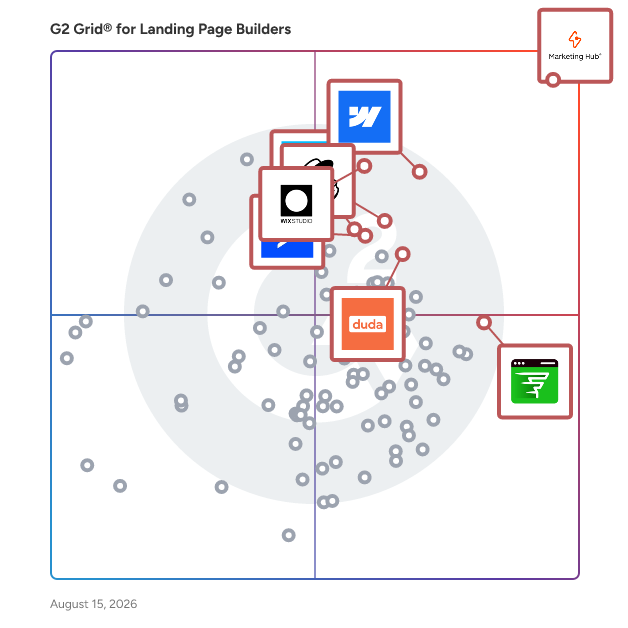
G2 Grid® for Landing Page Builders

G2 Grid® for Landing Page Builders plotting products by satisfaction and market presence

Highlighted products: HubSpot Marketing Hub, Webflow, Wix Studio, Intuit Mailchimp All-in-One Marketing Platform, FlexiFunnels, Duda, ActiveCampaign, and GetResponse.

Underlying data: [Grid® JSON](https://www.g2.com/categories/landing-page-builders/grids.json?focus%5B%5D=hubspot-marketing-hub&focus%5B%5D=webflow&focus%5B%5D=wix-studio&focus%5B%5D=intuit-mailchimp-all-in-one-marketing-platform&focus%5B%5D=flexifunnels&focus%5B%5D=duda&focus%5B%5D=activecampaign&focus%5B%5D=getresponse)

Sponsored

HelpCenter.io

HelpCenter.io is the complete platform for creating and managing exceptional public-facing help centers and internal knowledge bases. Built for businesses that care about getting help right, it turns company knowledge into accurate, easy-to-find, genuinely helpful self-service—without requiring developers or complicated content tools. Teams can create beautifully branded, multilingual help content with an intuitive no-code editor, organize articles clearly, collaborate across the company, and keep important answers fresh with ownership and review workflows. Customers get fast, relevant search that helps them find answers in their own words, AI answers grounded in the content the business controls, and contextual help directly inside a website or product through the HelpCenter.io Smart Widget. When self-service cannot resolve a question, businesses can preserve a clear path to human support. Built-in analytics reveal what customers search for, which content they use, and where questions still go unanswered—giving teams a practical way to improve the experience over time. Businesses and agencies can also create and manage multiple help centers from one account without unnecessary development work or per-seat pricing. HelpCenter.io treats a help center as more than a place to store articles. It is an essential part of the customer experience: one that should respect customers’ time, strengthen trust, reduce repetitive support requests, and deliver the right answer exactly when it is needed.

Visit website

HubSpot Marketing Hub

Marketing Hub consolidates marketing tools and customer data into a unified platform, eliminating scattered point solutions and simplifying software management for modern marketing teams. Core Value Proposition: HubSpot's Marketing Hub solves three critical pain points stemming from disconnected software: fragmented customer data, inefficient execution, and wasted time on tool management. Built as part of the HubSpot CRM platform, Marketing Hub keeps customer data central to all marketing activities– enabling sales alignment and clear ROI tracking across the full platform. Key Capabilities: Unified Data Architecture: Marketing Hub stores all marketing tools and customer data on one platform. This eliminates data silos and provides complete customer context for personalized marketing at scale. Time Efficiency: Marketers save time previously spent switching between applications, reconciling data across systems, and troubleshooting integration issues that plague multi-tool marketing stacks. Smart CRM Integration: Because Marketing Hub operates as part of the HubSpot CRM platform rather than as a standalone tool, customer information, interaction history, and engagement data remain accessible within the marketing workflow without manual data transfer. Sales-Marketing Alignment: With the complete HubSpot CRM platform, marketing and sales teams work in alignment. Unified reporting ties marketing activities to revenue, proving ROI. Marketing Hub vs. Alternatives: Unlike individual marketing tools requiring manual integration and data transfer, Marketing Hub provides a native connection between email marketing, landing pages, social media management, and data analytics. This eliminates integration complexity and data sync challenges that fragment marketing operations. Marketing Hub delivers powerful capabilities without requiring extensive training, dedicated administrators, or technical implementation teams that complex enterprise platforms demand. Teams can adopt and use the system quickly, focusing on execution rather than software management. Who Should Use Marketing Hub: Marketing Hub serves marketing teams experiencing productivity loss from tool fragmentation, marketers requiring complete customer context for effective personalization, and organizations needing to demonstrate clear marketing ROI. The platform scales from small marketing teams to enterprise organizations without proportional increases in system complexity. Outcome: Marketing Hub enables marketers to save valuable time, provide personalized experiences that attract and convert the right customers at scale, and keep data at the center of everything they do– all while scaling their company, not complexity.

Average Rating: 4.4/5.0

Total Reviews: 14,252

How Do G2 Users Rate HubSpot Marketing Hub?

  • Has the product been a good partner in doing business?: 8.7/10 (Category avg: 9.0/10)
  • Third-Party Integrations: 8.7/10 (Category avg: 8.5/10)
  • Web Analytics: 8.2/10 (Category avg: 8.4/10)
  • E-Commerce Integration: 7.4/10 (Category avg: 8.1/10)

Who Is the Company Behind HubSpot Marketing Hub?

  • Seller: HubSpot
  • Company Website:
  • Year Founded: 2006
  • HQ Location: Cambridge, Massachusetts, United States
  • Twitter: @HubSpot
    784,270 Twitter followers
  • LinkedIn® Page: www.linkedin.com
    12,158 employees on LinkedIn®

Who Uses This Product?

  • Who Uses This: Marketing Manager, Marketing Coordinator
  • Top Industries: Computer Software, Marketing and Advertising
  • Company Size: 52% Small, 41% Medium

What Do G2 Reviewers Say About HubSpot Marketing Hub?

AI-generated summary from verified user reviews

Pros
  • Users commend the ease of use of HubSpot Marketing Hub, which simplifies managing all marketing activities in one platform.
  • Users value the automation tools in HubSpot Marketing Hub, significantly boosting productivity and simplifying email marketing processes.
  • Users love the beginner-friendly yet powerful features of HubSpot Marketing Hub, simplifying marketing and automation processes.
  • Users love the powerful automation features of HubSpot Marketing Hub, enabling efficient lead nurturing and campaign management.
  • Users appreciate the seamless integrations of HubSpot Marketing Hub, enhancing collaboration between marketing and sales efforts.
Cons
  • Users find the learning curve steep for HubSpot Marketing Hub, requiring time and training to master its features.
  • Users find HubSpot Marketing Hub's limited features frustrating, lacking essential tools and ease of use compared to competitors.
  • Users find HubSpot Marketing Hub to be expensive as costs rise significantly with increasing features and contacts.
  • Users find the missing features in HubSpot Marketing Hub limit flexibility and increase costs as their needs grow.
  • Users find HubSpot Marketing Hub's high pricing challenging, especially for smaller teams needing advanced features.

What Are Recent G2 Reviews of HubSpot Marketing Hub?

What Are G2 Users Discussing About HubSpot Marketing Hub?

Webflow

Webflow is the agentic web marketing platform for high-performing teams. Marketers, designers, and developers collaborate in Webflow to build distinctive web experiences that grow their brand, rank in AI search, and drive real revenue, all without the complexity of a Frankenstack or the cost of constant replatforming. Built-in AI accelerates creation, optimization, and automation, while audit trails and permissions ensure teams stay in control. Over 300,000 companies and 2,000+ Certified Partners trust Webflow to power enterprise-grade web experiences worldwide.

Average Rating: 4.4/5.0

Total Reviews: 981

How Do G2 Users Rate Webflow?

  • Has the product been a good partner in doing business?: 8.9/10 (Category avg: 9.0/10)
  • Third-Party Integrations: 6.8/10 (Category avg: 8.5/10)
  • Web Analytics: 7.1/10 (Category avg: 8.4/10)
  • E-Commerce Integration: 6.2/10 (Category avg: 8.1/10)

Who Is the Company Behind Webflow?

  • Seller: Webflow
  • Year Founded: 2012
  • HQ Location: San Francisco, California
  • Twitter: @webflowapp
    1 Twitter followers
  • LinkedIn® Page: www.linkedin.com
    1,628 employees on LinkedIn®

Who Uses This Product?

  • Who Uses This: Founder, Web Developer
  • Top Industries: Design, Marketing and Advertising
  • Company Size: 69% Small, 22% Medium

What Do G2 Reviewers Say About Webflow?

AI-generated summary from verified user reviews

Pros
  • Users enjoy the ease of use of Webflow, appreciating its intuitive interface and quick website building capabilities.
  • Users value the intuitive visual control of Webflow, empowering them to create responsive sites effortlessly.
  • Users value the design flexibility of Webflow, enabling fast, responsive site creation with powerful customization options.
  • Users love the intuitive visual controls of Webflow, simplifying website building without needing to code.
  • Users love Webflow's flexibility, enabling quick site creation with options for advanced coding for customization.
Cons
  • Users find the learning curve challenging due to an overwhelming interface and complex CMS configurations.
  • Users find limited features in Webflow, especially regarding CMS capabilities and e-commerce functionality.
  • Users find the pricing too high, especially when limited features are offered compared to coding a website from scratch.
  • Users have noted missing features in Webflow, such as multi-language management and flexible code management.
  • Users find the steep learning curve daunting, especially when transitioning from other platforms and dealing with complex setups.

What Are Recent G2 Reviews of Webflow?

What Are G2 Users Discussing About Webflow?

Wix Studio

Wix Studio is the website building platform for professional designers, developers, and marketers. With high-end design capabilities, streamlined workflows, and robust business tools, it empowers freelancers and agencies to build, manage, and scale exceptional websites with maximum efficiency. Wix Studio addresses the requirements of professional web creators by offering an all-in-one solution that combines advanced design technology with workflow, business and client management tools. Users can efficiently collaborate, design high-performing websites and grow their client base—whether they are part of an agency, small studio, or working independently. Key features include: - Advanced design capabilities: Access a fully responsive drag-and-drop editor with extensive design precision and flexibility. With custom breakpoints, layout grids and no-code animations and effects you can create visually distinctive, custom websites. - Hyper-efficient workflow: Wix Studio is built to streamline workflows, minimize repetition, and maximize creative output. From the start, you can instantly convert design files into fully functional websites with the Figma to Studio plugin, or quickly map site structures using the AI-powered Visual Sitemap and Wireframe Generator. A library of pre-designed components and over 375 responsive templates makes building faster, while site styles and themes ensure brand consistency across projects. And with built-in AI tools to automate repetitive tasks and optimize design, you can stay focused on creativity, not busywork. - Deep functionality: Wix Studio offers a robust no-code CMS, enabling dynamic content creation, custom collections and precise styling. Creators can also add custom CSS, backend logic, and work in a VS Code-based IDE or integrate with GitHub for seamless development and deployment. - Client management: Centralize communication, approvals and feedback within the platform, simplifying client management. The Client Kit enables seamless handovers by allowing you to add custom tutorials, guides and resources directly to client dashboards for easy onboarding and ongoing support. With tools like Content Mode, clients can independently update site content without affecting design. - Management workflows: Manage your team and clients from one unified dashboard. With built-in solutions for Stores, Events, Bookings, and more, creators can easily handle diverse client operations—no plugins or external tools needed. Wix Studio brings everything together, combining collaborative tools, ready-made sections, and wireframes to streamline both building and management. Plus, built-in automations take care of marketing, customer engagement, and internal notifications, so you can focus on what matters most. - Growth opportunity: Wix Studio helps agencies and freelancers turn creative expertise into scalable growth. Through the Partner Program, you’ll unlock tiered benefits that evolve with your agency while opening new income streams. Sell custom templates in the global Marketplace, earn revenue share from premium sites and marketing solutions, and monetize your apps and widgets by reaching over 258 million users in the Wix App Market. Wix Studio is a versatile solution for professional web creators seeking to efficiently produce exceptional websites and manage their workflow and business growth in a unified platform.

Average Rating: 4.6/5.0

Total Reviews: 81

How Do G2 Users Rate Wix Studio?

  • Has the product been a good partner in doing business?: 9.4/10 (Category avg: 9.0/10)
  • Third-Party Integrations: 9.1/10 (Category avg: 8.5/10)
  • Web Analytics: 9.8/10 (Category avg: 8.4/10)
  • E-Commerce Integration: 8.9/10 (Category avg: 8.1/10)

Who Is the Company Behind Wix Studio?

  • Seller: Wix
  • Company Website:
  • Year Founded: 2006
  • HQ Location: Tel Aviv
  • Twitter: @Wix
    391,474 Twitter followers
  • LinkedIn® Page: www.linkedin.com
    7,506 employees on LinkedIn®

Who Uses This Product?

  • Top Industries: Design, Marketing and Advertising
  • Company Size: 77% Small, 10% Medium

What Do G2 Reviewers Say About Wix Studio?

AI-generated summary from verified user reviews

Pros
  • Users find Wix Studio incredibly user-friendly, appreciating its simplicity and ease of implementation for managing websites effectively.
  • Users value the intuitive design tools of Wix Studio, making it effortless to create beautiful, responsive websites.
  • Users enjoy the user-friendly platform of Wix Studio, enabling easy updates and seamless integration for effective website management.
  • Users value the simplicity and ease of use of Wix Studio, enabling swift web page creation and management.
  • Users commend the exceptional customer support provided by Wix Studio, highlighting quick responses and skilled assistance.
Cons
  • Users note the limited features of Wix Studio, requiring workarounds for complex projects and integrations.
  • Users find missing features in Wix Studio, leading to frustrations with limited options and confusing elements.
  • Users find Wix Studio's limited customization options frustrating, especially with templates and dynamic elements.
  • Users face a steep learning curve with Wix Studio, finding it less intuitive and overwhelming initially.
  • Users note limited options in Wix Studio, requiring workarounds and additional effort for complex projects and custom designs.

What Are Recent G2 Reviews of Wix Studio?

Duda

Duda is the leading website development platform empowering digital marketing agencies and SaaS companies to build and manage their customers' digital presence. Duda’s award-winning low-code no-code platform enables agencies and SaaS companies to reach higher productivity and unprecedented growth with an extensive range of capabilities spanning ecommerce, client management, SEO, automation, and white labeling.

Average Rating: 4.7/5.0

Total Reviews: 811

How Do G2 Users Rate Duda?

  • Has the product been a good partner in doing business?: 9.3/10 (Category avg: 9.0/10)
  • Third-Party Integrations: 7.7/10 (Category avg: 8.5/10)
  • Web Analytics: 8.3/10 (Category avg: 8.4/10)
  • E-Commerce Integration: 7.7/10 (Category avg: 8.1/10)

Who Is the Company Behind Duda?

  • Seller: Duda
  • Company Website:
  • Year Founded: 2009
  • HQ Location: Palo Alto, CA
  • Twitter: @DudaPlatform
    13,995 Twitter followers
  • LinkedIn® Page: www.linkedin.com
    432 employees on LinkedIn®

Who Uses This Product?

  • Who Uses This: Owner, CEO
  • Top Industries: Marketing and Advertising, Design
  • Company Size: 84% Small, 11% Medium

What Do G2 Reviewers Say About Duda?

AI-generated summary from verified user reviews

Pros
  • Users find Duda's platform to be extremely user-friendly, with an intuitive editor and great customer support.
  • Users praise Duda for its outstanding customer support, enhancing agency operations and overall user experience significantly.
  • Users praise Duda for its easy creation process, simplifying website management and enhancing workflow for agencies.
  • Users appreciate Duda's strong support for agencies, ease of use, and constant feature improvements, enhancing overall efficiency.
  • Users praise Duda for its intuitive design, making website development significantly easier and more efficient.
Cons
  • Users find limited customization frustrating, affecting design flexibility and advanced feature implementation on Duda.
  • Users find Duda's limited features restrictive, lacking advanced options and requiring workarounds for modern design needs.
  • Users find a lack of advanced features in Duda, limiting design freedom and customisation options.
  • Users feel a lack of customization options in Duda, limiting design flexibility and functionality for individual use.
  • Users find that Duda has a steep learning curve, making it challenging to adapt from other website builders.

What Are Recent G2 Reviews of Duda?

What Are G2 Users Discussing About Duda?

Intuit Mailchimp All-in-One Marketing Platform

Mailchimp is a marketing automation platform trusted by 11 million+ users worldwide to personalize every email and SMS for every customer using AI-powered insights and content creation tools. With a 99% delivery rate and over 300 integrations, Mailchimp helps businesses connect with their customers, foster repeat business, and build lasting brand loyalty while seamlessly fitting into their existing workflows. Our platform puts data-backed recommendations at the heart of your marketing so you can find and engage customers with multichannel campaigns. In 2021, Mailchimp was acquired by Intuit Inc. (Nasdaq: INTU), the global financial technology platform that makes Intuit TurboTax, Credit Karma, QuickBooks, and Mailchimp. Since then, we’ve released 100+ new features to help our customers continue to grow. Find out why more than 11+ million businesses trust Intuit Mailchimp to help them turn insights into action and their emails into revenue. Visit Mailchimp.com to get started today.

Average Rating: 4.4/5.0

Total Reviews: 5,201

How Do G2 Users Rate Intuit Mailchimp All-in-One Marketing Platform?

  • Has the product been a good partner in doing business?: 8.8/10 (Category avg: 9.0/10)
  • Third-Party Integrations: 8.9/10 (Category avg: 8.5/10)
  • Web Analytics: 8.6/10 (Category avg: 8.4/10)
  • E-Commerce Integration: 8.4/10 (Category avg: 8.1/10)

Who Is the Company Behind Intuit Mailchimp All-in-One Marketing Platform?

  • Seller: Intuit Mailchimp
  • Company Website:
  • Year Founded: 2001
  • HQ Location: Atlanta, GA
  • Twitter: @MailChimp
    238,536 Twitter followers
  • LinkedIn® Page: www.linkedin.com
    1,468 employees on LinkedIn®

Who Uses This Product?

  • Who Uses This: Owner, Marketing Manager
  • Top Industries: Marketing and Advertising, Information Technology and Services
  • Company Size: 72% Small, 20% Medium

What Do G2 Reviewers Say About Intuit Mailchimp All-in-One Marketing Platform?

AI-generated summary from verified user reviews

Pros
  • Users find the ease of use of Intuit Mailchimp ideal for seamless campaign creation and management.
  • Users appreciate the intuitive and user-friendly email marketing features of Intuit Mailchimp, enhancing their campaign management experience.
  • Users value the easy-to-use email management features of Mailchimp, simplifying the marketing process for businesses.
  • Users appreciate the intuitive platform and comprehensive tools that simplify campaigns and enhance marketing efforts.
  • Users love the easy creation features of Mailchimp, allowing for simple campaign building and performance tracking.
Cons
  • Users note that pricing can escalate quickly as subscriber lists grow, making it expensive for larger operations.
  • Users find the limited features in Mailchimp's free version restrictive, hindering their ability to fully evaluate the platform.
  • Users feel that missing features like improved contact import and automated social media link handling hinder productivity.
  • Users find the learning curve challenging, suggesting improvements like interactive training for better understanding.
  • Users find limited customization options in Intuit Mailchimp, limiting their ability to tailor campaigns effectively.

What Are Recent G2 Reviews of Intuit Mailchimp All-in-One Marketing Platform?

What Are G2 Users Discussing About Intuit Mailchimp All-in-One Marketing Platform?

FlexiFunnels

FlexiFunnels: Conversion Optimized *AI Funnel Builder* FlexiFunnels is an AI-powered business growth platform. From creating world-class landing pages in seconds to handling your marketing and lead generation, FlexiFunnels brings everything under one roof. --- ## Main Features of FlexiFunnels 1.) **AI Website & Funnel Builder** – Type just one line, and Flexi AI instantly creates professional landing pages with proven direct-response sales copy. You can then customize them with our easy drag-and-drop editor. 2.) **AI Marketing Agents** – Get your entire marketing and copywriting tasks done, from ad copy to webinar pages, sales pages, emails, hooks, video ad scripts, and more. 3.) **FlexiViral – Viral Referral Lead Generation System** – Launch viral campaigns where your customers bring in more leads for you. 4.) Drag & Drop Landing Page Builder 5.) Super Fast Hosting & Accelerated Page Delivery 6.) Integrated Payment Gateway Integrations 7.) Converting Checkout Pages 8.) Bump Offers 9.) Advanced Funnel Logics 10.) Host & Sell Courses Inside FlexiFunnels 11.) Piracy Protected Courses (Paid Courses) 12.) Autoresponder & Webinar Integrations 13.) Automated Split Testing 14.) Source Tracking of Buyers & Leads 15.) Proof Notifications for Leads & Sales 16.) Facebook Conversion API 17.) Cart Abandon Automated Email Sequence 18.) Cart Abandon Data Transfer 19.) Webhook for Leads & Sales Data Transfer 20.) Advanced Membership Features – Certificates, Quiz, Drip Feed, Notes, Discussions, etc. 21.) AI Based High Converting Sales Copy 22.) 700+ Done For You Funnels & Pages 23.) Fully Mobile Responsive Pages 24.) Digital Assets – Automated delivery of products like eBooks, PDFs, etc. 25.) Domain Mapping (Subdomain or Main Domain) 26.) Advanced Analytics of Page Conversions 27.) Detailed Reporting Dashboard – Project, Product, Funnel & Lead Report …and much more. --- ## Huge Benefits of FlexiFunnels: ✅ Launch Fast with AI – Start your online business in hours, not weeks. ✅ All-in-One Dashboard – Funnels, websites, courses, payments, email integrations, AI tools, and analytics in one place. ✅ Save Time & Money – No need for 10+ tools or expensive coders. FlexiFunnels covers it all. ✅ Affordable Pricing – Get full access for just $447/year. ✅ Outstanding Support – 3-Minute Live Chat Support, 6 One-on-One Onboarding Calls, weekly Q

A, and detailed tutorials, knowledgebase. ✅ Community & Training – Join 100,000+ members in our active community. Plus, access in-depth courses on ads, funnels, copywriting, freelancing, course creation, and more. ✅ Client Income Opportunity – Use FlexiFunnels to sell your products or offer funnel/website building services to clients. ✅ Risk-Free Guarantee – 30-Day money-back, no questions asked. ⚡ In short: FlexiFunnels is your **AI Funnel Builder + Complete Online Business System**, designed to save you time, increase conversions, and grow your income.

Average Rating: 4.7/5.0

Total Reviews: 238

How Do G2 Users Rate FlexiFunnels?

  • Has the product been a good partner in doing business?: 9.4/10 (Category avg: 9.0/10)
  • Third-Party Integrations: 9.2/10 (Category avg: 8.5/10)
  • Web Analytics: 9.2/10 (Category avg: 8.4/10)
  • E-Commerce Integration: 7.9/10 (Category avg: 8.1/10)

Who Is the Company Behind FlexiFunnels?

Who Uses This Product?

  • Who Uses This: Founder, Freelancer
  • Top Industries: Marketing and Advertising, Professional Training & Coaching
  • Company Size: 79% Small, 0% Large

What Do G2 Reviewers Say About FlexiFunnels?

AI-generated summary from verified user reviews

Pros
  • Users love the ease of use of FlexiFunnels, enabling simple drag-and-drop creation of websites and landing pages.
  • Users commend the excellent customer support of FlexiFunnels, noting quick responses and helpful assistance at all times.
  • Users love FlexiFunnels for its easy creation of high-converting sales pages, simplifying their online business needs.
  • Users love the easy setup of FlexiFunnels, appreciating the clear guidance and user-friendly features for a smooth experience.
  • Users praise the ease of creating landing pages with FlexiFunnels, making it accessible for non-technical individuals.
Cons
  • Users find the learning curve steep initially but appreciate support once they become familiar with FlexiFunnels.
  • Users are frustrated by the missing features in FlexiFunnels, especially the lack of certificate functionality for webinars.
  • Users express frustration over poor customer support from FlexiFunnels, experiencing delays and unhelpful responses after payment.
  • Users wish for more advanced customization options and additional templates for niche-specific funnels with improved performance.
  • Users desire more integrations for FlexiFunnels, particularly with CRM and Meta platforms, to enhance functionality.

What Are Recent G2 Reviews of FlexiFunnels?

Zoho LandingPage

Zoho Landing Page - This all-encompassing landing page platform is a valuable addition to any marketing stack with conversion-optimized templates, in-built, fully customizable form and popup builder, seamless integrations with your favorite CRM and marketing tools, extensive analytical reports that offer clear insight and an absolutely zero-code, intuitive builder that makes landing page building a delight.

Average Rating: 4.5/5.0

Total Reviews: 132

How Do G2 Users Rate Zoho LandingPage?

  • Has the product been a good partner in doing business?: 8.5/10 (Category avg: 9.0/10)
  • Third-Party Integrations: 8.2/10 (Category avg: 8.5/10)
  • Web Analytics: 8.2/10 (Category avg: 8.4/10)
  • E-Commerce Integration: 7.6/10 (Category avg: 8.1/10)

Who Is the Company Behind Zoho LandingPage?

  • Seller: Zoho
  • Year Founded: 1996
  • HQ Location: Austin, TX
  • Twitter: @Zoho
    137,880 Twitter followers
  • LinkedIn® Page: www.linkedin.com
    30,766 employees on LinkedIn®
  • Phone: +1 (888) 900-9646

Who Uses This Product?

  • Who Uses This: Founder
  • Top Industries: Financial Services, Marketing and Advertising
  • Company Size: 79% Small, 11% Medium

What Do G2 Reviewers Say About Zoho LandingPage?

AI-generated summary from verified user reviews

Pros
  • Users enjoy the ease of use of Zoho LandingPage, enabling efficient navigation and effective tool utilization without technical skills.
  • Users appreciate the ease of use and flexibility of Zoho LandingPage, enabling efficient creation of effective landing pages.
  • Users value the ease of creation with Zoho LandingPage, enabling efficient navigation and quick setup for stunning designs.
  • Users appreciate the easy setup of Zoho LandingPage, enabling quick creation of attractive and functional pages effortlessly.
  • Users praise the intuitive design of Zoho LandingPage, making setup and customization easy and efficient.
Cons
  • Users are concerned about the high costs associated with Zoho LandingPage, seeking better pricing options and more templates.
  • Users find the limited customization options in Zoho Landing Pages restrict their design flexibility and efficiency.
  • Users find limited integrations challenging, wishing for better customization and more robust analytics options.
  • Users desire a wider selection of limited templates to enhance their experience with Zoho LandingPage.
  • Users report landing page issues, featuring bugs and poor mobile functionality that hinder effective usage.

What Are Recent G2 Reviews of Zoho LandingPage?

ActiveCampaign

ActiveCampaign is the autonomous marketing platform built to transform how marketers, agencies, and business owners work. Use Active Intelligence to power goal-aware automations and orchestrate personalized experiences across email, SMS, and WhatsApp. Effortlessly integrate with 1000+ apps, uncover deep performance insights, and optimize your workflows so you win every day. - Autonomous marketing Built on the foundation of marketing automation, fuel your marketing strategy and customer journeys with AI-driven execution, optimization, and insight at every step. - AI agents Run entire marketing campaigns through simple prompts, backed by Active Intelligence. - Cross-channel marketing Reach prospects and customers wherever they are, with email, SMS, WhatsApp, and more. - On-brand, personalized content Creative tools that deliver professional, conversion-ready designs for email and landing pages. - CRM Track, manage, and automate your sales process. - 1000+ apps & integrations Connect ActiveCampaign to your favorite tools.

Average Rating: 4.4/5.0

Total Reviews: 14,242

How Do G2 Users Rate ActiveCampaign?

  • Has the product been a good partner in doing business?: 8.8/10 (Category avg: 9.0/10)
  • Third-Party Integrations: 8.5/10 (Category avg: 8.5/10)
  • Web Analytics: 7.5/10 (Category avg: 8.4/10)
  • E-Commerce Integration: 7.5/10 (Category avg: 8.1/10)

Who Is the Company Behind ActiveCampaign?

  • Seller: ActiveCampaign
  • Company Website:
  • Year Founded: 2003
  • HQ Location: Chicago, IL
  • Twitter: @ActiveCampaign
    13,203 Twitter followers
  • LinkedIn® Page: www.linkedin.com
    848 employees on LinkedIn®

Who Uses This Product?

  • Who Uses This: Owner, CEO
  • Top Industries: Marketing and Advertising, Health, Wellness and Fitness
  • Company Size: 92% Small, 7% Medium

What Do G2 Reviewers Say About ActiveCampaign?

AI-generated summary from verified user reviews

Pros
  • Users find ActiveCampaign's interface easy to use, enhancing communication and engagement with its versatile features.
  • Users value the powerful automation features of ActiveCampaign, enhancing engagement and streamlining marketing efforts effectively.
  • Users appreciate the automation features of ActiveCampaign, which streamline marketing activities and enhance customer engagement.
  • Users love the powerful automation capabilities of ActiveCampaign, enhancing customer engagement effortlessly and efficiently.
  • Users appreciate the user-friendly automation and integration features of ActiveCampaign, enhancing customer engagement and targeting.
Cons
  • Users face a learning curve with ActiveCampaign, needing extra support to master its powerful features efficiently.
  • Users find ActiveCampaign expensive, especially for startups, making it challenging for some customers to justify the cost.
  • Users find the missing features in ActiveCampaign limit their automation testing and client information collection capabilities.
  • Users find the limited features of ActiveCampaign frustrating, desiring more customization and easier access to key metrics.
  • Users find the ActiveCampaign platform not intuitive, making learning and setup time-consuming and challenging to navigate.

What Are Recent G2 Reviews of ActiveCampaign?

What Are G2 Users Discussing About ActiveCampaign?

GetResponse

GetResponse is a lifecycle automation platform for businesses that want to drive more consistent, repeatable revenue across the entire customer journey. We help you move customers from first touch to first purchase, repeat purchase, and reactivation - using email, SMS, push notifications, and lifecycle automation across every stage of the customer journey With built-in deliverability, behavioral triggers, and deep integrations, you can launch faster, reduce manual work, and turn your lifecycle into a predictable revenue system. No disconnected tools. No campaign chaos. Just one system designed to move customers forward.

Average Rating: 4.3/5.0

Total Reviews: 1,117

How Do G2 Users Rate GetResponse?

  • Has the product been a good partner in doing business?: 8.6/10 (Category avg: 9.0/10)
  • Third-Party Integrations: 8.8/10 (Category avg: 8.5/10)
  • Web Analytics: 8.5/10 (Category avg: 8.4/10)
  • E-Commerce Integration: 8.5/10 (Category avg: 8.1/10)

Who Is the Company Behind GetResponse?

  • Seller: GetResponse
  • Company Website:
  • Year Founded: 1998
  • HQ Location: Poland
  • Twitter: @getresponse
    54,233 Twitter followers
  • LinkedIn® Page: www.linkedin.com
    433 employees on LinkedIn®

Who Uses This Product?

  • Who Uses This: Owner, CEO
  • Top Industries: Marketing and Advertising, Health, Wellness and Fitness
  • Company Size: 78% Small, 17% Medium

What Do G2 Reviewers Say About GetResponse?

AI-generated summary from verified user reviews

Pros
  • Users love the user-friendly interface of GetResponse, making complex tasks simple with intuitive design and support.
  • Users commend the fast and friendly customer support of GetResponse, enhancing their overall experience and satisfaction.
  • Users value the user-friendly interface and comprehensive tools of GetResponse, enhancing their email marketing experience.
  • Users appreciate the user-friendly interface of GetResponse, enabling fast and accurate email creation with powerful analytics.
  • Users highlight the user-friendly interface of GetResponse, making email building fast and efficient with drag-and-drop features.
Cons
  • Users experience a steep learning curve with GetResponse, particularly in mastering automations and integrations.
  • Users find the pricing of GetResponse expensive compared to other email marketing options and seek more cost-effective solutions.
  • Users mention the need for a missing design feature to enhance quick creation of marketing materials within GetResponse.
  • Users note limited features in GetResponse, wishing for more integrated design tools and robust testing options.
  • Users find the pricing issues of GetResponse high compared to competitors, especially for additional automation features.

What Are Recent G2 Reviews of GetResponse?

What Are G2 Users Discussing About GetResponse?

Framer

Teams use Framer as an AI website builder and no-code web design platform for launching responsive marketing websites, landing pages, blogs, portfolios, and resource hubs. Designers, marketers, agencies, startups, and enterprise teams use Framer to design on a visual canvas, manage content with a built-in CMS, publish to custom domains, and improve SEO from one workspace. Framer includes AI agents that help teams design, update, and improve websites. Teams can ask agents to update site copy, restructure pages, change layouts, apply brand colors and typography, create new sections, build new pages from prompts or references, migrate sites from tools like WordPress or Webflow, and make pages responsive across desktop, tablet, and mobile. Framer agents also help with CMS workflows, custom components, SEO, analytics, accessibility, and site QA. Teams can use agents to create CMS collections, update fields, import content, add metadata, write alt text, fix broken links, check heading structure, improve accessibility, and audit design consistency. Framer also supports external agents such as Claude, Cursor, and Codex so teams can connect AI-assisted workflows to their website projects. Framer fits teams that want a fast website builder with professional design control, AI-assisted site creation, CMS workflows, SEO tools, and scalable publishing.

Average Rating: 4.5/5.0

Total Reviews: 144

How Do G2 Users Rate Framer?

  • Has the product been a good partner in doing business?: 9.0/10 (Category avg: 9.0/10)
  • Third-Party Integrations: 7.1/10 (Category avg: 8.5/10)
  • Web Analytics: 7.6/10 (Category avg: 8.4/10)
  • E-Commerce Integration: 5.8/10 (Category avg: 8.1/10)

Who Is the Company Behind Framer?

  • Seller: Framer
  • Company Website:
  • HQ Location: Amsterdam, NL
  • Twitter: @framer
    199,152 Twitter followers
  • LinkedIn® Page: www.linkedin.com
    759 employees on LinkedIn®

Who Uses This Product?

  • Who Uses This: Founder, Product Designer
  • Top Industries: Design, Computer Software
  • Company Size: 69% Small, 22% Medium

What Do G2 Reviewers Say About Framer?

AI-generated summary from verified user reviews

Pros
  • Users find Framer's ease of use exceptional, making design and development straightforward for everyone.
  • Users commend the fast and thoughtful customer support from Framer, enhancing their design and development experience.
  • Users praise Framer for its speed and seamless design collaboration, significantly enhancing workflow and efficiency.
  • Users laud Framer for its exceptional speed, enabling quick publication of new pages and seamless collaboration.
  • Users love Framer's intuitive design and ease of use, making web development accessible and enjoyable for everyone.
Cons
  • Users highlight the missing CMS features in Framer, seeking more versatility and automation for better usability.
  • Users find the pricing of Framer to be expensive, especially for personal projects and multilingual functionalities.
  • Users find pricing issues with Framer, especially for personal projects and multilingual functionalities, to be a concern.
  • Users note the limited options in Framer, especially regarding flexibility with tables and CMS functionality.
  • Users experience slow loading times with Framer, affecting productivity and overall satisfaction with the platform.

What Are Recent G2 Reviews of Framer?

What Are G2 Users Discussing About Framer?

Bitly

Bitly is a leading marketing platform for link and QR Code management, enabling businesses of all sizes to see what’s working across online and offline channels. Powering more than 100 billion clicks and scans annually worldwide, Bitly makes it easy to create, share, and track short links and QR Codes, so brands can find what’s resonating and scale their reach. More than 3 million customers rely on Bitly to connect with their audiences, from global enterprises to growing businesses, including two-thirds of the Fortune 500.

Average Rating: 4.5/5.0

Total Reviews: 915

How Do G2 Users Rate Bitly?

  • Has the product been a good partner in doing business?: 9.0/10 (Category avg: 9.0/10)
  • Third-Party Integrations: 7.1/10 (Category avg: 8.5/10)
  • Web Analytics: 7.4/10 (Category avg: 8.4/10)
  • E-Commerce Integration: 6.7/10 (Category avg: 8.1/10)

Who Is the Company Behind Bitly?

  • Seller: Bitly, Inc.
  • Company Website:
  • Year Founded: 2008
  • HQ Location: New York
  • Twitter: @Bitly
    63,498 Twitter followers
  • LinkedIn® Page: www.linkedin.com
    338 employees on LinkedIn®

Who Uses This Product?

  • Who Uses This: Marketing Manager, Owner
  • Top Industries: Marketing and Advertising, Computer Software
  • Company Size: 60% Small, 29% Medium

What Do G2 Reviewers Say About Bitly?

AI-generated summary from verified user reviews

Pros
  • Users love the ease of use of Bitly, finding it simple and organized for all their link management needs.
  • Users appreciate the organized management of Bitly, enjoying custom URLs and useful analytics for their links.
  • Users appreciate the ease of use in creating and managing shortened links with Bitly, enhancing their workflow.
  • Users praise the detailed analytics of Bitly, enabling effective tracking of links and understanding audience engagement.
  • Users love Bitly for its efficient link management, offering powerful analytics and user-friendly customization for effective marketing.
Cons
  • Users find Bitly expensive and feel limited by data access and additional costs for adding team members.
  • Users find it challenging due to limited link organization options and restrictions on renaming campaigns in Bitly.
  • Users express frustration over limited analytics and access to historical data, finding the interface cumbersome and restrictive.
  • Users face link management issues with Bitly, impacting organization and causing frustration with redirects and costs.
  • Users find the subscription costs high for features like extended data access and adding team members.

What Are Recent G2 Reviews of Bitly?

What Are G2 Users Discussing About Bitly?

ContactPigeon

ContactPigeon empowers retailers to build interactions that resonate deeply with their customers. By unifying real-time customer data with advanced AI and automation engines, we enable businesses to scale their engagements across channels effectively while cultivating enduring customer loyalty through every step of the customer journey. The platform is built around two core components. The Omnichannel Customer Engagement solution enables retailers to manage and execute marketing campaigns across multiple built-in messaging channels, ensuring consistency and relevance in every customer interaction. Our powerful Customer Data Platform (CDP) collects, analyzes, and uses customer data to create automated, personalized experiences at scale. Together, these components provide a comprehensive solution for retailers looking to build meaningful, lasting relationships with their audience. The ContactPigeon suite offers a robust set of features, including: • Automated customer journey orchestration that ensures a cohesive and seamless experience across all touchpoints and channels • Built-in messaging channels and campaign manager that covers email, mobile (sms / WhatsApp / Viber), push notifications, pop-ups, forms, chatbot, and direct mails • BI tools for real-time analytics and customizable dashboards for deep insights into customer behavior and campaign performance • AI-driven product recommendations and RFM analysis to enhance the shopping experience and predict the at-risk customers • Advanced customer segmentation and clustering capabilities to segment your audience effectively, enabling targeted marketing that resonates with specific groups

Average Rating: 4.9/5.0

Total Reviews: 289

How Do G2 Users Rate ContactPigeon?

  • Has the product been a good partner in doing business?: 9.9/10 (Category avg: 9.0/10)
  • Third-Party Integrations: 10.0/10 (Category avg: 8.5/10)
  • Web Analytics: 9.7/10 (Category avg: 8.4/10)
  • E-Commerce Integration: 10.0/10 (Category avg: 8.1/10)

Who Is the Company Behind ContactPigeon?

  • Seller: ContactPigeon
  • Company Website:
  • Year Founded: 2014
  • HQ Location: Athens, Greece
  • Twitter: @ContactPigeon
    456 Twitter followers
  • LinkedIn® Page: www.linkedin.com
    32 employees on LinkedIn®

Who Uses This Product?

  • Who Uses This: Marketing Manager, Marketing Director
  • Top Industries: Apparel & Fashion, Retail
  • Company Size: 62% Small, 33% Medium

What Do G2 Reviewers Say About ContactPigeon?

AI-generated summary from verified user reviews

Pros
  • Users appreciate the automation efficiency of ContactPigeon, enhancing campaign coordination and boosting revenue generation significantly.
  • Users highlight the effective automation flows of ContactPigeon, streamlining their marketing processes remarkably.
  • Users appreciate the flexibility in managing customer engagement with ContactPigeon, streamlining diverse marketing activities effectively.
  • Users value the effective email marketing of ContactPigeon, enhancing organization and boosting revenue through tailored campaigns.
  • Users value the diverse features of ContactPigeon, enjoying seamless management of multiple marketing channels from one platform.
Cons
  • Users find the learning curve steep for advanced features, complicating tasks despite responsive support from the team.
  • Users experience slow performance at times, especially with larger campaign lists and reports, impacting usability.
  • Users find that the platform experiences slow loading times occasionally, which can impact efficiency and user experience.
  • Users find the high complexity of certain features in ContactPigeon challenging, despite overall functionality being satisfactory.
  • Users find the user experience lacking in some specific areas, which can hinder effective use of the platform.

What Are Recent G2 Reviews of ContactPigeon?

What Are G2 Users Discussing About ContactPigeon?

EngageBay

EngageBay is an all-in-one customer engagement platform designed for small and mid-sized businesses that want to manage marketing, sales, and support from a unified system. Positioned as a cost-conscious alternative to platforms like HubSpot and ActiveCampaign, it focuses on delivering essential CRM and automation capabilities without the overhead typically associated with enterprise software. The platform combines contact and deal management, marketing automation, email marketing, landing pages, forms, live chat, and help desk functionality within a single interface. By consolidating these functions, EngageBay provides teams with a centralized view of customer interactions across the lifecycle and reduces the need for multiple disconnected tools. EngageBay also incorporates AI-assisted features to streamline common tasks and improve productivity. These capabilities include AI-powered email and content generation, subject line suggestions, and workflow assistance that help teams create campaigns and communications more efficiently. The AI tools are designed to support everyday execution rather than replace core strategy, making them accessible to smaller teams that may not have dedicated automation specialists. On the marketing side, users can build email campaigns, design automation workflows, capture leads through forms and landing pages, and run A/B tests. The CRM module supports pipeline tracking, contact management, task automation, and appointment scheduling to help sales teams manage opportunities in a structured way. For post-purchase engagement, the service suite includes ticketing, knowledge base tools, and live chat to manage customer support conversations from one place. A key design principle of EngageBay is accessibility for growing businesses. The platform offers a free tier with core functionality and scales through bundled paid plans rather than numerous add-ons, helping teams adopt automation without significant upfront investment. EngageBay integrates with a range of third-party tools and provides reporting dashboards to monitor campaign performance, deal progress, and support activity. While it is not positioned as a deep enterprise platform, it is built to meet the day-to-day operational needs of SMB revenue teams looking for an integrated, AI-assisted, and budget-aware solution. The platform is built with a focus on simplicity and performance, integrating advanced marketing automation, sales CRM, and customer support software into one cohesive system. EngageBay leverages cutting-edge AI intelligence to enhance productivity and decision-making across various teams. This integration allows businesses to streamline their operations and improve customer interactions, making it an ideal choice for organizations that require a robust yet user-friendly solution. EngageBay's AI capabilities are particularly noteworthy, providing users with tools that help create content quickly, predict outcomes intelligently, and deliver personalized experiences at scale. The AI Email & Content Generator allows users to craft engaging emails and campaigns in seconds, while the AI Lead & Deal Scoring feature helps identify and prioritize leads most likely to convert. Additionally, AI Insights & Recommendations offer actionable suggestions to enhance engagement and productivity, making it easier for businesses to navigate their customer journeys effectively. The platform also boasts a suite of key features that add significant value to its users. EngageBay's marketing automation capabilities include email marketing workflows, landing page and form builders, and social media integration, which collectively enhance outreach efforts. The sales CRM component provides tools for contact and deal management, visual sales pipelines, and team collaboration, ensuring that sales processes are efficient and transparent. Furthermore, the customer support features, such as a helpdesk and ticketing system, live chat, and a unified customer view, facilitate seamless communication and service delivery. EngageBay is particularly well-suited for small to mid-sized businesses, startups, and growing teams that seek an affordable yet powerful alternative to fragmented tools. It is designed for organizations aiming to automate customer interactions, align marketing and sales efforts, and improve support efficiency through the use of AI. This comprehensive approach not only enhances operational efficiency but also positions businesses to compete effectively in their respective markets. What is this product? EngageBay is an all-in-one CRM software platform built for small and mid-sized businesses to manage marketing automation, sales pipelines, and customer support in a single system. It combines email marketing, marketing automation, landing pages, contact management, deal tracking, helpdesk, and live chat—eliminating the need for multiple disconnected tools. Designed as an affordable alternative to HubSpot and ActiveCampaign, EngageBay helps growing businesses attract leads, convert deals, and support customers without enterprise-level costs or complexity. It centralizes customer data, automates workflows, and improves visibility across the entire customer lifecycle.

Average Rating: 4.6/5.0

Total Reviews: 697

How Do G2 Users Rate EngageBay?

  • Has the product been a good partner in doing business?: 9.5/10 (Category avg: 9.0/10)
  • Third-Party Integrations: 9.2/10 (Category avg: 8.5/10)
  • Web Analytics: 8.2/10 (Category avg: 8.4/10)
  • E-Commerce Integration: 8.4/10 (Category avg: 8.1/10)

Who Is the Company Behind EngageBay?

  • Seller: EngageBay Inc
  • Company Website:
  • Year Founded: 2018
  • HQ Location: Wilmington, Delaware
  • Twitter: @engagebay
    16,866 Twitter followers
  • LinkedIn® Page: www.linkedin.com
    54 employees on LinkedIn®

Who Uses This Product?

  • Who Uses This: Marketing Manager, Business Development Manager
  • Top Industries: Information Technology and Services, Staffing and Recruiting
  • Company Size: 69% Small, 32% Medium

What Do G2 Reviewers Say About EngageBay?

AI-generated summary from verified user reviews

Pros
  • Users appreciate the ease of use of EngageBay, seamlessly managing CRM, email marketing, and automation in one dashboard.
  • Users value the time-saving automation of EngageBay, enhancing organization and streamlining daily operations effectively.
  • Users praise the exceptional customer support at EngageBay, noting quick responses and helpful assistance from the support staff.
  • Users value the seamless integration of CRM, email, and automation in EngageBay, enhancing workflow efficiency and reducing tool switching.
  • Users praise EngageBay for its streamlined automation, enhancing efficiency by integrating CRM, email, and support in one platform.
Cons
  • Users find the missing features hinder usability, especially for data analysis and email management functionality.
  • Users experience limited features, feeling restricted by the lack of advanced functionalities and usability in EngageBay.
  • Users find the reporting features limited, lacking the depth and detail needed for more specific needs.
  • Users find the limited customization options frustrating, particularly with landing pages and workflows, impacting their overall experience.
  • Users find the reporting flexibility lacking in EngageBay, hindering deeper analytics and advanced customer journey insights.

What Are Recent G2 Reviews of EngageBay?

What Are G2 Users Discussing About EngageBay?

Brevo Marketing Platform

Trusted by over 500,000 businesses worldwide, Brevo (formerly Sendinblue) is the affordable, all-in-one marketing and CRM stack that helps growing businesses scale faster. It's easy to use and suitable for companies of all sizes. Build lasting customer relationships with Brevo's flexible toolkit. Products range from marketing to sales, chat, and transactional emails. Choose what you need — and only pay for what you use. Here are just some of the things you can do with Brevo: - Run multi-channel marketing campaigns across email, WhatsApp, SMS, web push, and Facebook ads - Trigger transactional emails, SMS, and WhatsApp notifications over Brevo SMTP and APIs - Automate marketing activities to deliver the right message at the right time, and efficiently manage your audience - Reduce the number of marketing and sales apps — and get a full view of customer interactions with tools that talk to each other - Engage customers in real-time and reply to FAQs 24/7 with live chat and chatbot - Track leads, automate tasks, and schedule meetings with the Brevo Sales Platform - Connect your e-commerce store to track web sales and use the Retention analysis to improve your marketing strategy. - Talk to customers anytime, anywhere with Brevo’s cloud-based phone system Learn more and start for free at https://www.brevo.com/products/marketing-platform/ Get a custom quote: https://www.brevo.com/plus/contact/

Average Rating: 4.5/5.0

Total Reviews: 2,481

How Do G2 Users Rate Brevo Marketing Platform?

  • Has the product been a good partner in doing business?: 8.9/10 (Category avg: 9.0/10)
  • Third-Party Integrations: 8.9/10 (Category avg: 8.5/10)
  • Web Analytics: 8.7/10 (Category avg: 8.4/10)
  • E-Commerce Integration: 8.3/10 (Category avg: 8.1/10)

Who Is the Company Behind Brevo Marketing Platform?

  • Seller: Brevo
  • Company Website:
  • Year Founded: 2012
  • HQ Location: Paris
  • Twitter: @brevo_official
    16,032 Twitter followers
  • LinkedIn® Page: www.linkedin.com
    880 employees on LinkedIn®

Who Uses This Product?

  • Who Uses This: CEO, Founder
  • Top Industries: Marketing and Advertising, Information Technology and Services
  • Company Size: 84% Small, 13% Medium

What Do G2 Reviewers Say About Brevo Marketing Platform?

AI-generated summary from verified user reviews

Pros
  • Users find Brevo Marketing Platform's ease of use beneficial, praising its clean design and user-friendly interface.
  • Users value the easy scheduling and automation features of Brevo, enhancing their email marketing efficiency significantly.
  • Users appreciate the convenient and efficient email marketing features of Brevo, making automation and scheduling a breeze.
  • Users find the easy setup of Brevo Marketing Platform essential for managing effective email campaigns effortlessly.
  • Users appreciate the simplicity of Brevo, noting its ease in creating effective marketing campaigns without complexity.
Cons
  • Users find missing features in Brevo, particularly with limited template flexibility and insufficient automation options.
  • Users note the limited features in Brevo, particularly in template customization and workflow automation capabilities.
  • Users find the limited customization of Brevo's templates restricts their ability to execute complex marketing tasks effectively.
  • Users find the learning curve steep, as understanding advanced features and back-end processes can be complicated.
  • Users find Brevo Marketing Platform to be expensive, especially with escalating costs for SMS and complex pricing tiers.

What Are Recent G2 Reviews of Brevo Marketing Platform?

What Are G2 Users Discussing About Brevo Marketing Platform?

Moosend

Moosend is an affordable, intuitive email marketing and marketing automation platform, suitable both for beginners and seasoned marketers. Thanks to its 1-day implementation, 130+ email templates, automation recipes, and AI Writer, users can set up their campaigns right away. And they can rest assured emails will reach the inbox as Moosend scores a 98% deliverability rate. They can also use advanced features like Audience Discovery to get smart segments based on customer behavior, transactional emails to send important updates at the right time, and custom reports to track the numbers they need. Users can pick a pricing plan that works for them. Or, create a custom plan with add-ons of their choice. No matter their plan, they can reach the support team through email or chat and get advice on how to optimize their campaigns. Finally, Moosend is GDPR and ISO-27001 compliant and follows all the latest security standards to guarantee customer data remains safe. Try Moosend's core features for free: https://moosend.com/register/ Get a Custom Quote: https://moosend.com/contact-us/sales/

Average Rating: 4.6/5.0

Total Reviews: 721

How Do G2 Users Rate Moosend?

  • Has the product been a good partner in doing business?: 9.2/10 (Category avg: 9.0/10)
  • Third-Party Integrations: 9.1/10 (Category avg: 8.5/10)
  • Web Analytics: 8.8/10 (Category avg: 8.4/10)
  • E-Commerce Integration: 8.5/10 (Category avg: 8.1/10)

Who Is the Company Behind Moosend?

  • Seller: Constant Contact
  • Company Website:
  • Year Founded: 1995
  • HQ Location: Waltham, US
  • Twitter: @ConstantContact
    67,137 Twitter followers
  • LinkedIn® Page: www.linkedin.com
    1,156 employees on LinkedIn®

Who Uses This Product?

  • Who Uses This: CEO, Owner
  • Top Industries: Marketing and Advertising, Information Technology and Services
  • Company Size: 82% Small, 14% Medium

What Do G2 Reviewers Say About Moosend?

AI-generated summary from verified user reviews

Pros
  • Users love the ease of use of Moosend, making email marketing straightforward and accessible for beginners.
  • Users love the easy creation of campaigns in Moosend, enabling great results without design skills or complexity.
  • Users appreciate the solid and immediate customer support from Moosend, enhancing their experience and learning curve.
  • Users appreciate the user-friendly email templates of Moosend, enabling easy creation of professional campaigns with minimal effort.
  • Users love the user-friendly interface of Moosend, making their newsletter management seamless and enjoyable.
Cons
  • Users find limited templates in Moosend, wishing for more variety and modern aesthetics to enhance their designs.
  • Users note a lack of features in Moosend, particularly in customizability and image management options.
  • Users experience poor customer support, particularly with unhelpful email responses that can be condescending to new users.
  • Users find the learning curve steep for Moosend, requiring time to fully utilize its advanced features.
  • Users note the limited features in Moosend, especially regarding templates and advanced functionalities compared to competitors.

What Are Recent G2 Reviews of Moosend?

What Are G2 Users Discussing About Moosend?

Alanna Iwuh
A
Researched and written by Alanna Iwuh
Updated October 3, 2024

Learn More About Landing Page Builders

What are Landing Page Builders?

A landing page is a standalone web page designed to drive visitors to complete a specific call-to-action (CTA) or conversion such as making a purchase, signing up for a newsletter, or downloading content. These pages are commonly used for lead generation in marketing promotions, advertisements, and sales funnels. Designing and launching a website or new web page is a daunting task for non-technical users, and some businesses may not have the resources to build unique landing pages for every marketing campaign. Instead, businesses use landing page builders to create, manage, and analyze custom web pages for marketing or sales efforts.

Landing page builders offer a simple drag-and-drop editor or what you see is what you get (WYSIWYG editor), as well as landing page templates, enabling users to create and publish beautiful web pages without the assistance of a web developer or IT team. Landing page creators allow marketers to control every aspect of a page, including design, colors, logos, multimedia, forms, text, HTML, and custom domains. It is common for landing page tools to integrate with other types of software, including CRM software, marketing automation platforms, and email marketing tools, to transfer lead data captured from web forms to a business’ marketing database. 

What are the Common Features of Landing Page Builders?

Common features of landing page software include a drag-and-drop builder, a template library, advanced customization options, A/B testing, analytics, and marketing integrations.

Templates: Landing page builders come with dozens or even hundreds of customizable templates to choose from. This eases the design process considerably, especially for users who may not have much design experience. Templates are typically optimized for a specific use case, such as lead capture, e-commerce, email marketing, or pay-per-click (PPC) advertisements. Users will likely want to customize the template with their company’s brand colors or font styles to ensure a consistent brand experience.

Advanced customization: For users with more technical knowledge, landing page platforms offer advanced features for customization. This functionality enables users to edit a page’s existing code or add custom code, such as CSS or JavaScript. Advanced customization may also include search engine optimization (SEO) features such as hiding pages from search engines or updating meta descriptions.

Multimedia: A landing page wouldn’t be complete without images. Most software offers a built-in media library where users can upload their own images and add them to their pages. Other multimedia features may include integrations with stock photos websites and the ability to embed videos from video hosting software.

A/B testing: An important strategy for conversion rate optimization is A/B testing. Landing page creators typically offer built-in features for running A/B tests, which allows marketers to deploy two different versions of a page and determine which one performs best. After collecting the results of an A/B test, marketers better understand which features of a page lead to more conversions and tweak future pages accordingly. If a landing page tool doesn’t include A/B testing features, it may integrate with A/B testing software.

Digital analytics: Landing page builders provide analytics features that track page traffic, clicks, and conversions. Analytics tools give marketers real-time insight into how their campaigns are performing. Most landing page creators also integrate with popular digital analytics software so users are able to conduct further analysis.

Integrations: Integrations are essential for the success of a landing page. Some landing page builders integrate with web content management software to ensure that each page seamlessly replicates the design of a business’s main website. Maintaining a consistent design improves brand awareness and consumer trust; if a consumer clicks on an advertisement and lands on a page that doesn’t align with the company’s brand, they may feel confused or doubtful of the page’s authenticity.

Landing page tools also integrate with other marketing products such as email marketing software to transfer leads to email lists, digital advertising channels for running advertising campaigns on search engines and social media, as well as for analytics tools for measuring traffic, SEO, and conversions.

What are the Benefits of Landing Page Builders?

The use of landing page platforms can help reduce dependence on web developers, enhance lead generation strategies, increase conversion rates, and aid the growth strategy of any business.

Lead generation: One of the most common purposes of a landing page is to capture leads for a business. Landing pages for lead generation contain online forms that ask visitors to submit their name and contact information typically to access gated content, such as a webinar recording or whitepaper, or to sign up for an event or giveaway. The visitor’s data is then shared with the company’s CRM or marketing database, allowing sales and marketing teams to continue engaging the prospect, with the eventual goal of converting the prospect into a customer. To facilitate this process, most builders integrate with a company’s technology stack, including marketing automation platforms, email marketing software, and CRM software.

Improve conversion rates: Another popular use of landing page builders is for the creation of unique post-click web pages for advertising campaigns. When a consumer clicks on a digital advertisement on a search engine or social media site, they expect to be sent to a page with content that is relevant to the advertisement. For example, if a meal delivery brand is advertising a discount for first-time customers, users who click on the ad expect the link to bring them to a page with further information about the discount and a registration form to sign up for their first meal kit. If the advertisement brings them to the brand’s main website instead, the user may be distracted by navigation menus and fail to convert. By offering a streamlined, direct path to purchase landing pages help marketers improve conversion rates. Since promotions like this are usually temporary, landing page tools allow marketers to create a distinct page for each campaign.

Save time and resources: Landing page creators allow marketers to optimize and scale their lead generation campaigns without the assistance of web developers. These products enable marketers to create more web pages in a shorter amount of time, ultimately improving conversions and return on investment (ROI). Landing page software also frees up time and resources for development teams to focus on other projects that contribute to the company’s bottom line.

Who Uses Landing Page Builders?

Landing page builders can be used by anyone—beginners who would benefit most from drag-and-drop functionality, marketers already versed in how to create landing pages, and developers who code them from scratch. Small business owners benefit from platforms that offer preset, conversion-ready templates along with integrations with existing tools.

Marketing teams: Marketing pros use landing page software to create beautiful, high-converting web pages for digital advertising campaigns. Intuitive drag-and-drop features make it easy for non-technical users like marketers to create a plethora of different pages for each new ad campaign. Marketers may also wish to create distinct pages for different audiences—for example, ensuring the web page content aligns with the visitor’s geographic location or acquisition channel improves user experience and leads to higher conversions. Landing page creators help marketers create content that is highly personalized and relevant to each user, improving the chance that a prospect converts into a paying customer.

E-commerce managers: E-commerce businesses use landing page builders to create product pages. While e-commerce sites include built-in product pages, these pages still contain generic CTAs and navigation menus which may distract potential customers from a specific conversion goal. Landing page tools allow e-commerce businesses to create product-specific pages with engaging content and streamlined designs that are optimized for conversion. Additionally, updating an e-commerce site may require involvement from a web development team. Landing page software empowers e-commerce marketers to quickly create web pages for flash sales or holidays without involving developers.

What are the Alternatives to Landing Page Builders?

While landing page builders are the preferred choice for creating unique pages for marketing campaigns and sales funnels, some other types of software include many of the same features and can be used in its place.

Website builder software: Landing pages are an extension of an existing website. Website builder software allows non-technical users to create and publish websites. Like landing page platforms, these solutions offer a simple drag-and-drop interface with predesigned templates to easily create and maintain a website. A larger investment than landing page software, website builders offer more advanced capabilities including web hosting, e-commerce integrations, and blogging. 

Marketing automation software: Marketing automation software acts as a company’s central marketing database and enables marketers to plan, automate, and measure marketing campaigns across multiple channels. This type of software includes features for building landing pages and forms for capturing prospect information. Once a prospect’s information is stored in the company’s database, marketers nurture those leads through targeted, personalized advertisements and marketing content.

Software Related to Landing Page Builders

Landing page creators can be used together with various other products in an organization’s marketing tech stack, including CRM software, email marketing platforms, and pop-up builders.

Email marketing software: Like marketing automation software, email marketing software enables businesses to send marketing messages to their audiences via email. Although email marketing tools don’t offer as many channels as marketing automation software, some products allow users to create landing pages that are used to acquire new subscribers.

Pop-up builder software: Pop-ups are another type of website tool for lead generation and conversion rate optimization. These on-site messages are used to alert website visitors to a new promotion or request a visitor’s email address in exchange for a discount. Pop-up builder software allows marketers to design and deploy on-site messages without the assistance of a developer. Some landing page builders include similar tools for creating pop-ups, overlays, and sticky bars.

Challenges with Landing Page Builders

While landing page software is designed with ease of use in mind, this focus on simplicity can create several challenges for marketers.

Responsive design: Something buyers should consider is the ability for the product to create responsive landing pages that are optimized for both desktop and mobile solutions. A web page that looks gorgeous on a desktop computer but looks squashed or stretched out on a mobile is off-putting for mobile users and may result in reduced conversion rates. Make sure to test out a trial or demo version of the product to see if the landing page designs respond to all device types, including mobile devices, tablets, and desktop computers.

Lack of customization: Landing pages are utilized by beginners, marketers familiar with the terrain, and experienced developers. That range in users means that products vary in their customization opportunities. Some products allow easy drag-and-drop functionality and some products are very restrictive in the kinds of edits they allow on preset templates. However, for the latter, those preset templates have already been optimized for best conversions, so those products are best for businesses and individuals who are building landing pages for the first time.

Which Companies Should Buy Landing Page Builders?

Landing page creators are used across all industries and in companies of all sizes, from startups to large enterprises. Both business-to-business (B2B) and business-to-consumer (B2C) organizations can benefit from landing page software.

B2C companies: Businesses that sell to consumers primarily use landing pages to sell products. For example, imagine a marketer at an e-commerce brand decides to run a digital marketing campaign on social media to promote a limited-time sale on the brand’s best-selling product. The digital ad links to a page that the marketer has created featuring the product information, images, marketing copy, and a straightforward CTA. This type of post-click landing page allows marketers to tailor page content that aligns with specific digital marketing campaigns. B2C companies also use landing page software to capture leads—for example, a web page for a giveaway or event could be used to collect email addresses that can be added to the company’s email marketing list.

B2B companies: Businesses that sell products or services to other businesses primarily use landing page builders for lead generation. B2B organizations often market to different types of personas, and it’s not always possible for a business’ website to personalize content to so many audiences. With landing page creators, B2B marketers can more efficiently customize content to target specific audiences or keywords. These pages include lead capture forms that ask visitors to submit their contact information in exchange for some benefit, such as a free quote or access to gated content.

How to Buy Landing Page Builders

Requirements Gathering (RFI/RFP) for Landing Page Builders

Before researching potential products or sending out requests for information (RFI), buyers should create a list of features their business requires in a landing page builder. Common requirements can include integrations, A/B testing, custom domains, and responsive templates. 

Compare Landing Page Builders Products

Create a long list

A long list of landing page creators should include any products that meet the core requirements of the business. At this point, buyers should decide if they’re looking for a standalone tool or if they are interested in purchasing or replacing a marketing platform that includes landing page builders.

Create a short list

Once the long list has been finalized, buyers should consider additional criteria to narrow down the list of landing page builders. For example, if consumer privacy is a concern, buyers can eliminate products that are not compliant with privacy laws like the General Data Protection Regulation (GDPR) or California Consumer Privacy Act (CCPA). This is also a good time to decide how many web pages the business will need and approximately how much traffic they expect to receive since many subscription plans place restrictions on the number of pages and visitors.

Conduct demos

Once a short list of about three to five products has been finalized, buyers should begin reaching out to vendors to schedule demos of their landing page builders. Demos allow buyers to take a closer look at each platform’s features, integrations, and usability. This may also be the first opportunity to glimpse each vendor’s onboarding style and service levels.

Selection of Landing Page Builders

Choose a selection team

The organization should involve any relevant personas as early as possible in the selection process. With landing page creators, it will be necessary to consult both managers and individual contributors in the marketing department, as they will likely be the heaviest users of the platform. Sales teams should also be consulted if they will be using the product to create their own pages and sales funnels. The selection team should include a project manager role to coordinate efforts and ensure the process runs smoothly. 

Negotiation

Before signing a contract, it is imperative to open up a conversation about pricing and contract length. While a few vendors may not budge on pricing, many will offer flexible pricing plans based on the length of the contract or billing period.

Final decision

In the days and months after signing the contract, buyers should monitor the company’s progress with the landing page builder solution. Is the product working as intended? Have employees fully adopted the product and its features? Will the product scale with the company’s growth? If the answer to any of these questions is “no,” the buyer should consider raising the concerns with the vendor. If they are unable to resolve these issues, it may be time to look for alternatives.

What Do Landing Page Builders Cost?

Landing page creators are sold exclusively on a software as a service (SaaS) subscription basis. When offered as a feature of a broader marketing platform, landing page tools are typically included in the overall cost of the platform subscription. However, some vendors may place a cap on the number of landing pages that can be created while others might offer unlimited pages. Buyers should read pricing information carefully to ensure the tools included in a product subscription will scale with the business.

When sold as a standalone product, landing page builders range in cost from $25 per month to $200 per month, but some vendors may charge more for custom enterprise plans. Subscriptions can be billed monthly, but most vendors will offer discounts for annual billing.

Return on Investment (ROI)

ROI for a product can be calculated by dividing the net benefit of the product by the initial cost of the investment. Positive ROI is achieved when the benefit of the landing page software exceeds the cost. However, landing page creators provide benefits that cannot always be measured in financial terms or sales numbers. When considering the tool’s ROI, marketers should weigh the value of generating new leads and building brand awareness. Landing page builders also save businesses time and resources on development, since the pages are created by marketing teams rather than developers.