Best Document Generation Software

Last updated: November 14, 2026

How Many Document Generation Software Products Does G2 Track?

Total Products under this Category: 627

Category Stats (Nov 2026)

  • Average Rating: 4.56/5 (↑0.01 vs Oct 2026) The average rating of products in this category, based on all submitted ratings
  • Top Trending Product: DocSpring (+12.5%) - Among all products in this category, DocSpring recorded the largest rating increase compared to last month

Last updated: November 10, 2026

How Does G2 Rank Document Generation Software Products?

Why You Can Trust G2's Software Rankings:

  • 30 Analysts and Data Experts
  • 34,700+ Authentic Reviews
  • 627+ Products
  • Unbiased Rankings

G2's software rankings are built on verified user reviews, rigorous moderation, and a consistent research methodology maintained by a team of analysts and data experts. Each product is measured using the same transparent criteria, with no paid placement or vendor influence. While reviews reflect real user experiences, which can be subjective, they offer valuable insight into how software performs in the hands of professionals. Together, these inputs power the G2 Score, a standardized way to compare tools within every category.

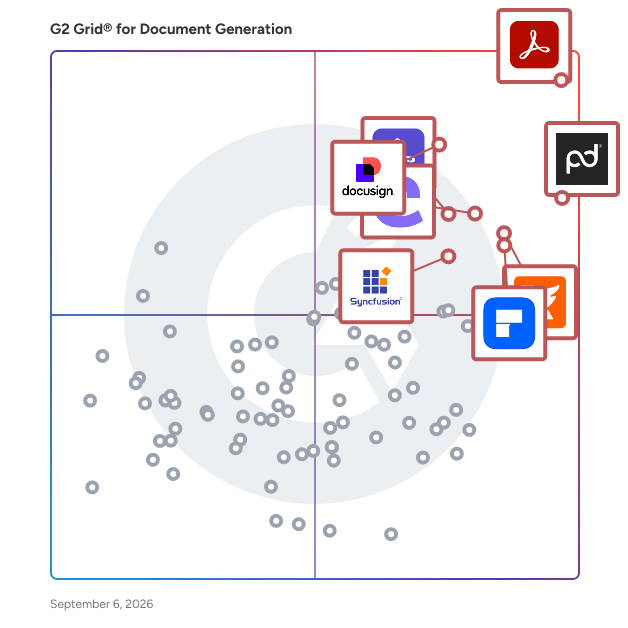
G2 Grid® for Document Generation Software

G2 Grid® for Document Generation Software plotting products by satisfaction and market presence

Highlighted products: Adobe Acrobat, PandaDoc, Docusign CLM, Foxit PDF Editor, Conga Composer, Wondershare PDFelement, Adobe Acrobat Sign, and Essential Studio.

Underlying data: [Grid® JSON](https://www.g2.com/categories/document-generation/grids.json?focus%5B%5D=adobe-acrobat&focus%5B%5D=pandadoc&focus%5B%5D=docusign-clm&focus%5B%5D=foxit-pdf-editor&focus%5B%5D=conga-composer&focus%5B%5D=wondershare-wondershare-pdfelement&focus%5B%5D=adobe-acrobat-sign&focus%5B%5D=essential-studio)

Adobe Acrobat

Acrobat: Trusted for documents. Now built for how work really happens. For more than 30 years, Acrobat has been the trusted name in document workflow — helping businesses create, sign, and share with confidence. As one of the leading enterprise document platforms that scales for global teams, Acrobat has evolved beyond the PDF. Now with Acrobat Studio, it has been reimagined for how modern teams work: smarter, more collaborative, and powered by AI. Acrobat Studio builds on everything professionals know from Acrobat Pro — powerful PDF editing, signing, and reviewing — and expands it into a connected workspace where teams can create, collaborate, and communicate in entirely new ways. While Acrobat Pro focuses on the PDF itself, Acrobat Studio connects the full document journey, from insight to action. With PDF Spaces, teams can bring related documents together, chat with AI Assistants that summarize content or surface key takeaways, and keep everyone aligned without endless versions or email threads. Express Premium tools make it easy to remix or reuse that same content into branded presentations, visuals, or reports — helping teams communicate ideas faster and more confidently. Security remains a constant. Acrobat follows Adobe's Secure Product Lifecycle to safeguard data at every stage, with encryption, access controls, and enterprise-grade compliance. For organizations evaluating document automation tools suitable for multi-region, multi-team deployments, Acrobat Studio delivers the scale, security, and integrations to support it. From small teams to large enterprises, it turns everyday PDFs into powerful, intelligent workspaces — helping people move ideas forward and communicate with greater clarity and impact.

Average Rating: 4.5/5.0

Total Reviews: 4,958

How Do G2 Users Rate Adobe Acrobat?

  • Has the product been a good partner in doing business?: 8.9/10 (Category avg: 9.3/10)
  • Documents: 9.1/10 (Category avg: 9.0/10)
  • Software: 8.7/10 (Category avg: 8.7/10)
  • Workflow: 8.6/10 (Category avg: 8.6/10)

Who Is the Company Behind Adobe Acrobat?

  • Seller: Adobe
  • Company Website:
  • Year Founded: 1982
  • HQ Location: San Jose, CA
  • LinkedIn® Page: www.linkedin.com
    42,975 employees on LinkedIn®
  • Ownership: NASDAQ:ADBE

Who Uses This Product?

  • Who Uses This: Graphic Designer, Software Engineer
  • Top Industries: Information Technology and Services, Computer Software
  • Company Size: 42% Small, 32% Medium

What Do G2 Reviewers Say About Adobe Acrobat?

AI-generated summary from verified user reviews

Pros
  • Users appreciate the ease of use of Adobe Acrobat, simplifying PDF management and enhancing productivity seamlessly.
  • Users appreciate the easy editing features of Adobe Acrobat, which streamline PDF handling and enhance productivity.
  • Users value the versatile PDF editing capabilities of Adobe Acrobat, making document management seamless and efficient.
  • Users value the robust editing capabilities of Adobe Acrobat, enhancing their efficiency in managing PDF documents.
  • Users value the centralized management of PDFs in Adobe Acrobat, appreciating its all-in-one platform for various tasks.
Cons
  • Users feel that Adobe Acrobat is expensive, particularly due to limited free features and a restrictive subscription model.
  • Users experience slow performance with Adobe Acrobat, noting lag and loading issues despite having high-end systems.
  • Users often face PDF issues with Acrobat, including difficulty compressing, slow performance, and challenging editing experiences.
  • Users find Adobe Acrobat not user friendly, especially when trying to navigate its complex features and tools.
  • Users find the learning curve steep, with advanced tools often overwhelming and hidden, causing initial difficulties in usage.

What Are Recent G2 Reviews of Adobe Acrobat?

What Are G2 Users Discussing About Adobe Acrobat?

PandaDoc

PandaDoc is an all-in-one document management platform trusted by 68,000+ sales, legal, and operations teams to create, send, e-sign, and manage documents faster and with less manual work. Teams using PandaDoc close deals 30% faster and cut document turnaround time by up to 50%. Customers like Autodesk, Rakuten, and Sysco use PandaDoc to streamline their entire document process, from proposal to signed contract, and everything in between. PandaDoc helps your team: - Build and send professional proposals, contracts, and agreements using customizable templates and a drag-and-drop editor - Collect legally binding e-signatures from any device, anywhere, with no printing, scanning, or delays - Collaborate in real time with internal stakeholders and external signers simultaneously - Automate repetitive document tasks so reps and ops teams spend less time on admin and more time closing - Track document performance with analytics that show how recipients engage with every page PandaDoc integrates natively with the tools your team already uses, including Salesforce, HubSpot, Pipedrive, Stripe, and 30+ other CRM and payment platforms — keeping document processes inside your existing stack without adding friction or extra logins. Whether you're in sales, legal, HR, or finance, PandaDoc is especially popular with growing businesses that need enterprise-grade document processes without the added complexity or price tag. From first draft to final approval, PandaDoc centralizes the full document lifecycle with the compliance, security, and audit trail your team needs to operate with confidence. PandaDoc also supports notarization, payment collection, and document analytics in a single platform, reducing the need to manage multiple tools across your document process.

Average Rating: 4.7/5.0

Total Reviews: 3,675

How Do G2 Users Rate PandaDoc?

  • Has the product been a good partner in doing business?: 9.2/10 (Category avg: 9.3/10)
  • Documents: 9.1/10 (Category avg: 9.0/10)
  • Software: 8.8/10 (Category avg: 8.7/10)
  • Workflow: 9.2/10 (Category avg: 8.6/10)

Who Is the Company Behind PandaDoc?

  • Seller: PandaDoc
  • Company Website:
  • Year Founded: 2011
  • HQ Location: San Francisco, CA
  • LinkedIn® Page: www.linkedin.com
    883 employees on LinkedIn®

Who Uses This Product?

  • Who Uses This: CEO, Owner
  • Top Industries: Computer Software, Marketing and Advertising
  • Company Size: 68% Small, 26% Medium

What Do G2 Reviewers Say About PandaDoc?

AI-generated summary from verified user reviews

Pros
  • Users value the ease of use of PandaDoc, appreciating its user-friendly tools and collaborative features.
  • Users appreciate the ease of document management in PandaDoc, highlighting its intuitive interface and helpful features.
  • Users appreciate the ease of use in PandaDoc, benefiting from features that enhance efficiency and team collaboration.
  • Users appreciate the ease of use and convenience of PandaDoc for proposals and e-signing.
  • Users love the intuitive interface of PandaDoc, making document management seamless and quick for everyone involved.
Cons
  • Users face challenges with signature issues related to client hesitance and lag during document processing.
  • Users find the missing features in PandaDoc's plans frustrating, especially with basic options being costly or unavailable.
  • Users find PandaDoc expensive, particularly regarding bulk send costs and strict renewal policies that hinder flexibility.
  • Users find difficult editing options in PandaDoc frustrating, with issues like signatures not saving properly during document completion.
  • Users express frustration over document visibility and organization issues that hinder usability and workflow efficiency.

What Are Recent G2 Reviews of PandaDoc?

What Are G2 Users Discussing About PandaDoc?

Docusign CLM

While eSignature has changed the way that many organizations execute a contract, the lifecycle before and after signature is often managed through manual processes, spreadsheets, and emails—slowing the pace of doing business, increasing risk, and frustrating customers and employees. Docusign CLM (Contract Lifecycle Management) allows organizations to streamline the agreement lifecycle by transforming analog manual processes into a digital automated workflow. The end result is an accelerated pace of doing business, increased compliance, and more efficient employees. Key Features: Central Repository, Advanced Search & Find, Version Control, Clause Library, Collaboration with internal and external parties, Redlining, Simple & Advanced Workflows, Tagging, Mobile Access, Multi Platform integrations (including tight integration with Salesforce).

Average Rating: 4.3/5.0

Total Reviews: 494

How Do G2 Users Rate Docusign CLM?

  • Has the product been a good partner in doing business?: 8.6/10 (Category avg: 9.3/10)
  • Documents: 9.0/10 (Category avg: 9.0/10)
  • Software: 8.6/10 (Category avg: 8.7/10)
  • Workflow: 8.8/10 (Category avg: 8.6/10)

Who Is the Company Behind Docusign CLM?

  • Seller: Docusign
  • Company Website:
  • Year Founded: 2003
  • HQ Location: San Francisco, CA
  • LinkedIn® Page: www.linkedin.com
    8,566 employees on LinkedIn®
  • Ownership: NASDAQ: DOCU

Who Uses This Product?

  • Who Uses This: Account Executive, General Counsel
  • Top Industries: Information Technology and Services, Computer Software
  • Company Size: 46% Medium, 29% Large

What Do G2 Reviewers Say About Docusign CLM?

AI-generated summary from verified user reviews

Pros
  • Users appreciate the ease of use of Docusign CLM, simplifying contract management and enhancing professionalism.
  • Users value the ease of digital signing with DocuSign CLM, streamlining contract processes effortlessly from their accounts.
  • Users value the ease of creating and sending digital signatures with DocuSign CLM for a professional touch.
  • Users appreciate the efficient document management of Docusign CLM, streamlining contract workflows and enhancing clarity.
  • Users find Docusign CLM to be easy and simple to execute, making the document management process effortless and accessible.
Cons
  • Users find the pricing too high, especially for larger contracts, making alternatives more appealing.
  • Users find the steep learning curve of DocuSign CLM challenging, making navigation and initial setup quite difficult.
  • Users find the lack of automated signature reminders frustrating, complicating follow-ups and the signing process.
  • Users experience complex setup challenges with DocuSign CLM, finding it difficult to navigate and manage workflows effectively.
  • Users find the learning curve steep with DocuSign CLM, making management and navigation quite challenging.

What Are Recent G2 Reviews of Docusign CLM?

What Are G2 Users Discussing About Docusign CLM?

AI can help you find the answers. G2 helps you trust them.

Connect G2 to Claude or ChatGPT for answers grounded in G2's trusted reviews, comparisons, and pricing from real user insights.

How it works

Foxit PDF Editor

Founded in 2001, Foxit is a leading provider of innovative PDF and eSignature products and services, helping knowledge workers increase productivity and do more with documents. Foxit combines easy-to-use desktop software, mobile apps, and cloud services in one powerful solution: The Foxit PDF Editor. This intelligent document solution allows users to create, edit, fill, and sign documents through their integrated PDF Editor and eSign offerings – from anywhere and on any device. Most editing tools focus only on creating and modifying documents, leaving storage, organization, and control to other systems. Foxit Document Management System (DMS) is included in Foxit PDF Editor, so every document is securely stored, organized, governed, and connected from the moment it's edited. Foxit Workspace extends that to work across many documents. It is an AI-powered workspace where teams can bring PDFs, Word, Excel, PowerPoint files, images, and web links into a single project, ask questions across the whole collection with answers cited back to the source, and generate editable reports, presentations, diagrams, and web pages. Projects keep their files and context between sessions, so users can pick up where they left off. As the first to market with AI-powered PDF editing solutions, Foxit enhances productivity with smart document editing and workflow automation. Winner of numerous awards, Foxit has over 700 million users and has sold to over 528,000 customers, ranging from SMBs to global enterprises worldwide. Foxit products are ISO 32000-1/PDF 1.7 standard compliant, therefore, compatible with your existing PDF documents and forms.

Average Rating: 4.6/5.0

Total Reviews: 3,535

G2 Deal: Foxit PDF Editor - Offer for G2 Users

Cost-effective, easy-to-use, and integrated PDF and eSign solution. Perfect for knowledge workers who work independently. Sign up now to get 20% off your first year when you purchase 10-30 licenses.

Price: ~~Starting at $1399.90/year~~ → 10-30 Licenses: starting at $1119.92/year

View this exclusive G2 deal

How Do G2 Users Rate Foxit PDF Editor?

  • Has the product been a good partner in doing business?: 9.0/10 (Category avg: 9.3/10)
  • Documents: 9.0/10 (Category avg: 9.0/10)
  • Software: 8.5/10 (Category avg: 8.7/10)
  • Workflow: 8.2/10 (Category avg: 8.6/10)

Who Is the Company Behind Foxit PDF Editor?

  • Seller: Foxit
  • Company Website:
  • Year Founded: 2001
  • HQ Location: Fremont, CA
  • LinkedIn® Page: www.linkedin.com
    590 employees on LinkedIn®

Who Uses This Product?

  • Who Uses This: Owner, President
  • Top Industries: Construction, Accounting
  • Company Size: 63% Small, 24% Medium

What Do G2 Reviewers Say About Foxit PDF Editor?

AI-generated summary from verified user reviews

Pros
  • Users praise the ease of use in Foxit PDF Editor, appreciating its intuitive interface and smooth functionality.
  • Users value the easy PDF editing capabilities of Foxit PDF Editor, enhancing productivity and user experience.
  • Users appreciate the easy editing capabilities of Foxit PDF Editor, making PDF management smooth and efficient.
  • Users appreciate the intuitive interface with advanced features of Foxit PDF Editor for effective document management.
  • Users value the advanced features of Foxit PDF Editor for efficient document management and collaboration enhancements.
Cons
  • Users find the interface crowded and confusing, making it difficult to navigate and slowing down productivity.
  • Users find the price of Foxit PDF Editor expensive, especially considering it should be a one-time purchase only.
  • Users find the learning curve challenging due to a complex interface and confusion with advanced features.
  • Users feel that Foxit PDF Editor lacks several essential features which could enhance usability and editing efficiency.
  • Users note the limited features of Foxit PDF Editor, suggesting improvements for better accessibility and usability.

What Are Recent G2 Reviews of Foxit PDF Editor?

What Are G2 Users Discussing About Foxit PDF Editor?

FAQs About Document Generation Software

Generated using AI

Which platform offers AI-powered document creation

Based on G2 reviews, several products in this category are used for AI-assisted document work, but buyers most often describe different strengths such as PDF summaries, proposal creation, contract generation, and document automation. Recent reviewers mention AI support for summarizing long files, extracting key details, drafting content faster, and automating repetitive document tasks. The best fit depends on whether your team needs PDF editing, proposal workflows, or contract generation inside a broader process.

  • Adobe Acrobat — AI summaries and PDF editing.
  • PandaDoc — proposals, templates, and signature workflows.
  • Conga Composer — Salesforce-driven document generation workflows.

Top tools for automating contract and invoice generation

Based on G2 reviews, buyers in this category most often look for tools that reduce manual document prep, reuse templates, and keep signing or approval steps moving. Recent feedback highlights recurring needs around contracts, invoices, quotes, and proposal generation, with strong interest in platforms that connect to CRM data or automate document delivery. The most frequently mentioned use cases center on faster turnaround, fewer copy-paste errors, and more consistent customer-facing documents.

Best software for large-scale document automation

Based on G2 reviews, the products most often associated with large-scale document automation are the ones buyers describe as handling templates, repeatable workflows, CRM-connected generation, and high-volume document output. Recent reviewers emphasize automation for proposals, quotes, contracts, reports, and bulk generation rather than one-off editing alone. The strongest options tend to support standardized templates, faster document turnaround, and easier handoffs between teams working in sales, operations, or compliance-heavy processes.

What is document generation software

Document generation software is used to create, update, format, and share business documents from templates or existing files without rebuilding them manually each time. In recent G2 reviews, users describe it as a way to automate contracts, proposals, invoices, forms, reports, and PDFs while keeping formatting consistent. Common capabilities include template reuse, data insertion, e-signatures, document conversion, editing, and tracking. The main value for buyers is reducing repetitive work, cutting copy-paste errors, and helping teams move documents from draft to signature or delivery faster across sales, operations, and compliance workflows.

What features define modern document generation software

According to verified users, modern document generation software is defined by a mix of template-based creation, PDF editing, e-signatures, document conversion, and workflow automation. Recent reviews also point to recurring demand for content libraries, reusable blocks, tracking, collaboration, CRM-connected data population, and OCR for turning scanned files into searchable or editable content. Buyers also value the ability to merge files, manage forms, standardize outputs, and keep documents accessible across devices. In this category, the most praised products help teams create documents faster while preserving formatting, improving accuracy, and reducing the need to jump between multiple tools.

Conga Composer

Flexible. Scalable. Embedded. Conga Composer transforms how businesses generate documents Disconnected systems and manual workflows make document generation slow, error-prone, and costly. Conga Composer streamlines this by embedding automated document creation into your existing tools. It supports multiple formats, merges data from any source, and scales effortlessly, empowering teams to deliver accurate, beautifully branded documents faster, with less effort and greater control. Conga Composer excels in document generation with key advantages: Launch Anywhere – Trigger document generation from buttons, flows, Apex, or external systems- no custom code needed. Multi-Format Support – Create Word, PDF, Excel, PowerPoint, and HTML email templates. Dynamic Content – Use conditional logic, charts, dashboards, rich text, and global currencies. High-Volume Ready – Supports large templates (25MB), merged outputs (250MB), and batch processing. Enterprise Scalability – Reusable templates and behaviors across departments and use cases. eSignature Integration – Seamless pairing with Conga Sign for end-to-end agreement workflows. Revenue Lifecycle Alignment – Only vendor that integrates doc gen into CLM, CPQ, and full revenue processes. Admin-Friendly Setup – Built for Salesforce admins and business users—no developer dependency. Proven Performance – Trusted by 8,000+ businesses; millions of documents generated monthly. Future-Ready – Monitoring AI trends to invest when enterprise-grade reliability is guaranteed. With these strengths, Conga Composer delivers a scalable, flexible, and automated solution for efficient document generation.

Average Rating: 4.4/5.0

Total Reviews: 852

How Do G2 Users Rate Conga Composer?

  • Has the product been a good partner in doing business?: 8.7/10 (Category avg: 9.3/10)
  • Documents: 8.7/10 (Category avg: 9.0/10)
  • Software: 8.9/10 (Category avg: 8.7/10)
  • Workflow: 8.6/10 (Category avg: 8.6/10)

Who Is the Company Behind Conga Composer?

  • Seller: Conga
  • Company Website:
  • Year Founded: 2006
  • HQ Location: 3200 Kirby Dr., Suite 500, Houston, TX 77098
  • LinkedIn® Page: www.linkedin.com
    2,159 employees on LinkedIn®
  • Phone: (303) 465-1616

Who Uses This Product?

  • Who Uses This: Salesforce Administrator, Business Analyst
  • Top Industries: Information Technology and Services, Computer Software
  • Company Size: 46% Medium, 28% Large

What Do G2 Reviewers Say About Conga Composer?

AI-generated summary from verified user reviews

Pros
  • Users praise the automation and conditional logic features of Conga Composer, enhancing efficiency and accuracy in proposals.
  • Users appreciate the flexibility and automation in Conga Composer, significantly enhancing document creation and accuracy.
  • Users appreciate the ease of use of Conga Composer, allowing quick and efficient document generation without hassle.
  • Users value the seamless integration with Salesforce that enhances efficiency and reduces errors in document creation.
  • Users value the seamless Salesforce integration of Conga Composer, streamlining document creation and enhancing productivity.
Cons
  • Users note a steep learning curve with Conga Composer, requiring time and effort for mastering its features.
  • Users face a steep learning curve with Conga Composer, especially during initial setup and advanced configuration.
  • Users find the time-consuming nature of document generation and layout design to be frustrating and inefficient.
  • Users find the complexity of the template creation process in Conga Composer can make initial setup challenging.
  • Users find the limited template flexibility challenging, as setup and adjustments demand considerable time and technical skills.

What Are Recent G2 Reviews of Conga Composer?

What Are G2 Users Discussing About Conga Composer?

Wondershare PDFelement

PDFelement is a comprehensive PDF editing solution designed to assist users in managing their PDF documents efficiently. This versatile software caters to a wide range of needs, including creating, editing, converting, annotating, and securing PDF files. With its user-friendly interface and advanced features, PDFelement is suitable for both professionals and individuals seeking to streamline their document workflows. The target audience for PDFelement includes businesses, students, and professionals who frequently work with PDF files. Its capabilities are particularly beneficial for those who require a reliable tool for document management, whether for creating reports, filling out forms, or collaborating on projects. The software is designed to enhance productivity by simplifying complex tasks associated with PDF handling, making it an essential tool for anyone who regularly interacts with digital documents. One of the standout features of PDFelement is its advanced Optical Character Recognition (OCR) technology, which allows users to convert scanned documents into editable and searchable text. This feature is particularly useful for professionals who need to digitize paper documents while preserving their original formatting. Additionally, PDFelement supports the conversion of PDFs to and from various formats, including Word, Excel, and PowerPoint, ensuring that users can work with their documents in the format that best suits their needs. PDFelement also offers robust security features, enabling users to protect sensitive information within their documents. Users can easily password-protect their PDFs, redact confidential data, and electronically sign documents, facilitating secure collaboration. The software’s form-filling capabilities further enhance its utility, allowing users to create and fill out forms effortlessly, which is especially beneficial for businesses that require streamlined data collection processes. Overall, PDFelement stands out in the PDF editing category due to its combination of powerful features, ease of use, and versatility. By optimizing PDF tasks and providing a comprehensive set of tools, PDFelement empowers users to manage their documents more effectively, ultimately enhancing their productivity and workflow efficiency.

Average Rating: 4.5/5.0

Total Reviews: 1,051

How Do G2 Users Rate Wondershare PDFelement?

  • Has the product been a good partner in doing business?: 8.9/10 (Category avg: 9.3/10)
  • Documents: 9.1/10 (Category avg: 9.0/10)
  • Software: 8.6/10 (Category avg: 8.7/10)
  • Workflow: 8.8/10 (Category avg: 8.6/10)

Who Is the Company Behind Wondershare PDFelement?

  • Seller: Wondershare
  • Company Website:
  • Year Founded: 2003
  • HQ Location: Shenzen, CN
  • LinkedIn® Page: www.linkedin.com
    639 employees on LinkedIn®
  • Ownership: SHE: 300624

Who Uses This Product?

  • Who Uses This: Owner, Project Manager
  • Top Industries: Information Technology and Services, Computer Software
  • Company Size: 65% Small, 24% Medium

What Do G2 Reviewers Say About Wondershare PDFelement?

AI-generated summary from verified user reviews

Pros
  • Users find Wondershare PDFelement to be incredibly easy to use, making PDF editing intuitive and efficient.
  • Users appreciate the all-in-one tool availability of Wondershare PDFelement, making PDF management efficient and user-friendly.
  • Users value the fast and efficient PDF editing capabilities of Wondershare PDFelement, streamlining their document management tasks.
  • Users find easy editing features in Wondershare PDFelement invaluable for fast, organized document management and smooth collaboration.
  • Users value the effective PDF management features of Wondershare PDFelement, appreciating its smooth usability and excellent support.
Cons
  • Users experience slow performance with large documents and notice lag when zooming, impacting overall efficiency.
  • Users experience various PDF issues such as sync problems and poor text detection, impacting their overall functionality.
  • Users find the pricing and costs for AI features and premium tools in Wondershare PDFelement to be frustratingly high.
  • Users express dissatisfaction with the limited features in PDFelement, particularly for collaborative and advanced tools.
  • Users experience missing features like hidden tools and inadequate support, leading to frustration and a steep learning curve.

What Are Recent G2 Reviews of Wondershare PDFelement?

What Are G2 Users Discussing About Wondershare PDFelement?

Adobe Acrobat Sign

At Adobe, we believe that documents are more than just a collection of information and proof. They are foundational to connecting people and ideas, pushing business forward. Adobe Acrobat Sign helps your business move faster. Acrobat Sign is the only intuitive e-signature solution that combines simple and secure e-signatures with the power of Adobe Acrobat. With Acrobat Sign, you can create, sign, send for signature, manage, and track documents – all from one Adobe platform. You can create delightful signing experiences for your customers and teams by enabling them to sign documents on any device or browser – anytime, anywhere. No additional software download or accounts are needed. As Microsoft’s preferred e-signature solution, Acrobat Sign seamlessly integrates with your favorite Microsoft apps. Save time by signing and requesting signatures – all right from Microsoft 365, Teams, Outlook, and more. Plus, you can access smart integrations for Salesforce, Workday, and many more apps you use every day. Minimize legal and compliance risks by choosing Acrobat Sign, designed to be globally compliant and legally-binding in nearly every country in the world.

Average Rating: 4.4/5.0

Total Reviews: 1,020

How Do G2 Users Rate Adobe Acrobat Sign?

  • Has the product been a good partner in doing business?: 8.1/10 (Category avg: 9.3/10)
  • Documents: 8.8/10 (Category avg: 9.0/10)
  • Software: 8.6/10 (Category avg: 8.7/10)
  • Workflow: 8.9/10 (Category avg: 8.6/10)

Who Is the Company Behind Adobe Acrobat Sign?

  • Seller: Adobe
  • Year Founded: 1982
  • HQ Location: San Jose, CA
  • LinkedIn® Page: www.linkedin.com
    42,975 employees on LinkedIn®
  • Ownership: NASDAQ:ADBE
  • Phone: +1 (888) 649-2990

Who Uses This Product?

  • Who Uses This: Owner, Account Executive
  • Top Industries: Information Technology and Services, Computer Software
  • Company Size: 40% Small, 39% Medium

What Do G2 Reviewers Say About Adobe Acrobat Sign?

AI-generated summary from verified user reviews

Pros
  • Users appreciate the ease of use of Adobe Acrobat Sign, enabling quick, seamless document signing and management on the go.
  • Users value the seamless integration and ease of use of Adobe Acrobat Sign for efficient document management and signing.
  • Users find the easy setup of Adobe Acrobat Sign enhances efficiency, simplifying digital document management and signing.
  • Users value the streamlined document management features of Adobe Acrobat Sign, enhancing efficiency in contract handling and approvals.
  • Users praise the ease of document signing with Adobe Acrobat Sign, streamlining the contract process seamlessly.
Cons
  • Users find Adobe Acrobat Sign to be expensive, especially for freelancers and small studios compared to alternatives.
  • Users experience a challenging learning curve due to locked forms, complex setup, and usability issues on mobile devices.
  • Users express frustration over the ineffective undo feature in Adobe Acrobat Sign, complicating the correction of mistakes.
  • Users find the interface not intuitive, making it difficult to navigate and use effectively, especially on mobile.
  • Users find Adobe Acrobat Sign not user-friendly, particularly struggling with mobile use and complex multi-page documents.

What Are Recent G2 Reviews of Adobe Acrobat Sign?

What Are G2 Users Discussing About Adobe Acrobat Sign?

Essential Studio

Syncfusion® Essential Studio® is a suite of 1,600+ software components and frameworks for developing web, mobile, and desktop applications. Its UI controls are designed to be flexible, optimized for high performance, and relied on by over 60% of the Fortune 500. With Syncfusion in your toolkit, you can speed up the creation of modern user interfaces and read and write common file formats. Having supplied components to over 63K+ enterprise customers and 2M+ developers around the world, Syncfusion has a proven track record of delivering cutting-edge products and above-and-beyond support.

Average Rating: 4.5/5.0

Total Reviews: 853

How Do G2 Users Rate Essential Studio?

  • Has the product been a good partner in doing business?: 8.9/10 (Category avg: 9.3/10)
  • Documents: 8.6/10 (Category avg: 9.0/10)
  • Software: 8.3/10 (Category avg: 8.7/10)
  • Workflow: 7.5/10 (Category avg: 8.6/10)

Who Is the Company Behind Essential Studio?

  • Seller: Syncfusion
  • Company Website:
  • Year Founded: 2001
  • HQ Location: Morrisville, North Carolina
  • LinkedIn® Page: www.linkedin.com
    2,739 employees on LinkedIn®

Who Uses This Product?

  • Who Uses This: Owner, Developer
  • Top Industries: Computer Software, Information Technology and Services
  • Company Size: 83% Small, 11% Medium

What Do G2 Reviewers Say About Essential Studio?

AI-generated summary from verified user reviews

Pros
  • Users commend the feature-rich components of Essential Studio, enhancing application development with quality and efficiency.
  • Users appreciate the extensive collection of feature-rich components that streamline application development and enhance user experience.
  • Users appreciate the ease of use of Essential Studio, facilitating fast and efficient application development.
  • Users praise the excellent customer support provided by Syncfusion, enhancing their overall experience with the product.
  • Users commend the thorough documentation of Syncfusion Essential Studio, which simplifies the integration process for developers.
Cons
  • Users find the documentation lacking, particularly for beginners, causing confusion and slowing down development efforts.
  • Users note documentation issues, mentioning the need for clearer, more concise examples for better understanding.
  • Users face update issues with frequent bugs in new versions, complicating dependency management and usability.
  • Users find the confusing documentation challenging, as it can hinder understanding and slow down integration for teams.
  • Users find complex customization challenging, requiring deeper knowledge to achieve desired UI styles and behaviors.

What Are Recent G2 Reviews of Essential Studio?

What Are G2 Users Discussing About Essential Studio?

Progress Telerik

Telerik and Kendo UI are comprehensive UI component libraries designed to assist .NET and JavaScript developers in creating modern, visually appealing, and robust applications. These libraries offer a vast collection of over 1,250 UI components tailored for various platforms, enabling developers to streamline their workflow and enhance productivity. By leveraging these tools, users can significantly reduce development time, reportedly by up to 50%, while ensuring their applications remain future-proof and adaptable to evolving technology trends. Targeted primarily at web developers and designers, Telerik and Kendo UI cater to a diverse audience, including enterprises, startups, and individual developers seeking to elevate their application development process. The libraries are particularly beneficial for teams that require rapid prototyping and deployment of user interfaces. With a rich set of features, these libraries support a wide array of use cases, from creating simple web applications to complex enterprise solutions, all while maintaining a high standard of quality and performance. One of the standout features of Telerik and Kendo UI is the extensive customization options available to users. Developers can choose from various themes and skins to ensure their applications align with branding guidelines and user preferences. Additionally, the libraries come equipped with tools for Embedded Reporting, Automated Testing, and Mocking, which further enhance the development experience. These features not only facilitate a smoother workflow but also contribute to the overall quality and reliability of the applications being developed. For teams collaborating with designers, Telerik and Kendo UI offer Design Kits for Figma, which provide highly customizable design files that accurately represent the web components. This integration allows for seamless communication between developers and designers, significantly speeding up UI development cycles. The Design Kits are aligned with the themes available in the libraries, such as Material, Bootstrap, and Default, ensuring consistency and coherence throughout the design and development process. Overall, Telerik and Kendo UI stand out in the crowded landscape of UI component libraries by offering a robust set of features, extensive customization capabilities, and valuable resources for collaboration. These tools empower developers to create high-quality applications efficiently, making them an essential asset for anyone involved in modern web development.

Average Rating: 4.5/5.0

Total Reviews: 211

How Do G2 Users Rate Progress Telerik?

  • Has the product been a good partner in doing business?: 9.1/10 (Category avg: 9.3/10)
  • Documents: 9.1/10 (Category avg: 9.0/10)
  • Software: 8.8/10 (Category avg: 8.7/10)
  • Workflow: 8.5/10 (Category avg: 8.6/10)

Who Is the Company Behind Progress Telerik?

  • Seller: Progress Software
  • Company Website:
  • Year Founded: 1981
  • HQ Location: Burlington, MA.
  • LinkedIn® Page: www.linkedin.com
    4,242 employees on LinkedIn®
  • Ownership: NASDAQ:PRGS

Who Uses This Product?

  • Who Uses This: Software Developer, Software Engineer
  • Top Industries: Computer Software, Information Technology and Services
  • Company Size: 52% Small, 27% Medium

What Do G2 Reviewers Say About Progress Telerik?

AI-generated summary from verified user reviews

Pros
  • Users enjoy the ease of use with Progress Telerik, benefiting from helpful documentation and excellent support.
  • Users value the responsive customer support and appreciate the ease of getting started with Progress Telerik.
  • Users value the diverse UI components from Progress Telerik, enhancing their applications' appearance and functionality seamlessly.
  • Users highlight the versatile functionality of Progress Telerik, enhancing UIX and modernizing their applications effortlessly.
  • Users appreciate the wide range of easy-to-use web controls in Progress Telerik, enhancing their productivity and UI experience.
Cons
  • Users find the learning curve steep, especially due to inconsistent component properties and insufficient documentation.
  • Users find the licensing cost high, especially burdensome for solo developers and smaller teams.
  • Users find the high cost of Progress Telerik challenging, especially for solo developers and small teams.
  • Users feel that there are missing features in Progress Telerik, leading to unfulfilled needs and delayed improvements.
  • Users find the documentation lacking in details and visual examples, hindering the integration of Telerik into projects.

What Are Recent G2 Reviews of Progress Telerik?

What Are G2 Users Discussing About Progress Telerik?

Nitro PDF

1. What is Nitro PDF? Nitro PDF is a full-featured PDF editor that enables you to create, edit, convert, sign, and secure PDF documents. It is designed for individuals, small businesses, and enterprises as a cost-effective alternative to Adobe Acrobat, combining powerful functionality with an intuitive interface that works across devices. 2. What are the main features of Nitro PDF? Nitro PDF is a comprehensive solution for creating, editing, and securing documents across Windows, Mac, iOS, and web browsers. It includes powerful AI productivity tools and is built with an intuitive interface mirroring the Microsoft Office and Apple toolbars. Key features of Nitro PDF include: • Core Editing: Tools to create, edit, convert, combine, and annotate PDFs, including advanced OCR and secure signing capabilities. • AI Smart Tools: Enhances productivity via smart data extraction, automated form creation, and intelligent document redaction. • Nitro Analytics: Real-time visibility into PDF usage, allowing organizations to measure productivity, prove ROI, and track sustainability. • Nitro Workspace: A centralized cloud hub for accessing PDF and eSign tools, AI assistants, and administration from any device. • Advanced Editing: Create PDFs from any file type and convert PDFs into editable Microsoft Word, Excel, and PowerPoint files while maintaining original layouts. • Powerful OCR (Optical Character Recognition): Turn scanned paper documents and images into fully searchable and editable PDFs with high-accuracy text recognition. Nitro PDF is available in multiple plans to suit different business needs. 3. What support options does Nitro offer? Whether you're a five-person team or a global enterprise, our dedicated support is available 24/7. • Human Support: Nitro offers dedicated customer support, including onboarding, training, and troubleshooting resources, to ensure a smooth experience for your team. • Knowledge Base and Guides: Access hundreds of detailed articles covering product features, integrations, workflows, and best practices. • Video Tutorials: Step-by-step walkthroughs and demonstrations to help you learn and master Nitro tools quickly. • Community Forum: Connect with other Nitro users, share feedback, ask questions, and discover tips and solutions. • Knowledge Assistant: A 24/7 in-app AI assistant providing instant, context-aware guidance on features, workflows, and troubleshooting. 4. Does Nitro PDF support integrations with other business tools? Yes. Nitro PDF integrates with software such as Microsoft Office suite, OneDrive, Dropbox, and other platforms. These integrations simplify document workflows and make it easy to create, edit, and share PDFs directly within your existing environment. 5. How does Nitro ensure document security and compliance? Nitro protects sensitive information with advanced encryption, password protection, granular access controls, and tamper-evident audit trails. Nitro's solutions are designed to meet enterprise and mid-market compliance requirements, including ISO 27001, SOC 2, HIPAA, GDPR, eIDAS, UETA, and the ESIGN Act.

Average Rating: 4.4/5.0

Total Reviews: 418

How Do G2 Users Rate Nitro PDF?

  • Has the product been a good partner in doing business?: 8.9/10 (Category avg: 9.3/10)

Who Is the Company Behind Nitro PDF?

  • Seller: Nitro, Inc
  • Company Website:
  • Year Founded: 2005
  • HQ Location: San Francisco, CA
  • LinkedIn® Page: www.linkedin.com
    382 employees on LinkedIn®

Who Uses This Product?

  • Who Uses This: IT Manager
  • Top Industries: Information Technology and Services, Computer Software
  • Company Size: 49% Small, 34% Medium

What Do G2 Reviewers Say About Nitro PDF?

AI-generated summary from verified user reviews

Pros
  • Users love the intuitive ease of use of Nitro PDF, streamlining document management without a steep learning curve.
  • Users love the easy editing features of Nitro PDF, appreciating its intuitive interface and speed for seamless workflow.
  • Users admire Nitro PDF for its user-friendly features, versatile editing, and excellent customer support for seamless functionality.
  • Users admire the easy conversion capabilities of Nitro PDF, enabling smooth transitions between formats and enhancing productivity.
  • Users enjoy the intuitive and fast PDF editing in Nitro PDF, making document management seamless and efficient.
Cons
  • Users note that Nitro PDF has PDF issues, including slow performance on older systems and limited sharing options.
  • Users find the pricing of Nitro PDF to be high, especially for individuals and small teams needing basic features.
  • Users experience slow performance with Nitro PDF, particularly during compression and with large files, affecting usability.
  • Users find that some advanced features are limited, especially when handling complex documents, affecting their overall experience.
  • Users report performance issues with Nitro PDF, especially on slower machines and while handling large or complex files.

What Are Recent G2 Reviews of Nitro PDF?

What Are G2 Users Discussing About Nitro PDF?

Qwilr

Make your competitors’ proposals look primitive with Qwilr. Send proposals, generate quotes, collect sign-off, and get paid – all in one place. Trusted by 5,000+ organizations including OpenTable, Thomson Reuters, Drata, Yale University and more, Qwilr helps sales teams close deals faster by turning static proposals and quotes into interactive, trackable web pages. With Qwilr, you can… Create impressive, interactive proposals: Engage buyers with dynamic proposals featuring videos, interactive pricing, calendar links and more Get deals closed faster: Get deals signed with legally-compliant e-signatures and collect payments instantly with our integrated payments solution, QwilrPay Track buyer engagement: See what your buyers view and click on, and use this to tailor your follow-ups. Get real-time alerts via Slack or email when buyers take action Keep every page consistently branded: Standardize your proposals, automatically applying your fonts and colors to every page Scale your process with automation: Connect Qwilr to Salesforce, HubSpot, Pipedrive or Zoho and automate proposal creation. Improve team efficiency: Create reusable templates and content blocks, so that reps never start from scratch Thousands of sales teams use Qwilr to modernize their proposal process, impress buyers, and close deals faster. Try Qwilr free for 14 days: https://qwilr.com/

Average Rating: 4.6/5.0

Total Reviews: 923

G2 Deal: Get 20% off Qwilr for 3 months.

Start increasing deal velocity, getting buyer insights from sales assets, and giving reps more time to sell with Qwilr. Sign-up now and use coupon code 'G2DEAL' to get 20% off for your first 3 months.

Price: ~~$39/user per month~~ → $31/user per month

View this exclusive G2 deal

How Do G2 Users Rate Qwilr?

  • Has the product been a good partner in doing business?: 9.3/10 (Category avg: 9.3/10)
  • Documents: 8.4/10 (Category avg: 9.0/10)
  • Software: 8.5/10 (Category avg: 8.7/10)
  • Workflow: 8.7/10 (Category avg: 8.6/10)

Who Is the Company Behind Qwilr?

  • Seller: Qwilr
  • Company Website:
  • Year Founded: 2014
  • HQ Location: Redfern, New South Wales
  • LinkedIn® Page: www.linkedin.com
    106 employees on LinkedIn®

Who Uses This Product?

  • Who Uses This: CEO, Account Executive
  • Top Industries: Marketing and Advertising, Computer Software
  • Company Size: 80% Small, 16% Medium

What Do G2 Reviewers Say About Qwilr?

AI-generated summary from verified user reviews

Pros
  • Users find Qwilr to be extremely user-friendly, enjoying seamless quote creation and easy template management integration.
  • Users value the ease of creating aesthetic proposals with Qwilr, appreciating the modern design and intuitive interface.
  • Users value the excellent customer support provided by Qwilr, making setup and assistance effortless and efficient.
  • Users love the easy-to-use templates in Qwilr, allowing for quick, beautiful proposals that enhance efficiency.
  • Users find the easy setup of Qwilr intuitive and beneficial, enhancing their experience in creating proposals.
Cons
  • Users find limited customization options frustrating, particularly for layout adjustments and coding flexibility within Qwilr.
  • Users find difficult editing in Qwilr frustrating, as formatting and positioning elements require excessive copying and pasting.
  • Users note a lack of missing features in Qwilr, particularly in syncing, payment options, and proposal templates.
  • Users face integration issues with Qwilr, especially regarding payment processing and syncing with Salesforce.
  • Users often struggle with limited features that hinder layout control and complicate content placement within Qwilr.

What Are Recent G2 Reviews of Qwilr?

What Are G2 Users Discussing About Qwilr?

GetAccept

GetAccept is the #1 AI Digital Sales Room, built to help revenue teams run every deal like their best sales rep. It replaces scattered emails and static attachments with an AI-native workspace, bringing content, proposals, e-signing, and buyer communication together so sellers, buyers, and every stakeholder stay aligned on the latest documents, timelines, and next steps across the full sales cycle. GetAccept's AI analyses your meetings, calls, emails, CRM data, internal content, and publicly available data, and is trained to take action, building and updating personalized Digital Sales Rooms in minutes and keeping every rep on track with your sales process and methodology. Real-time tracking shows exactly how buyers engage with each deal, and native CRM integrations keep everything synced in the tools reps already use. GetAccept solves the problem of deals stalling between meetings in scattered email threads, static attachments, and manual admin. By giving sellers and buyers a single, trackable space to collaborate from first touch to signature, it helps revenue teams of every size to work smarter, close faster, and win more. Why revenue teams choose GetAccept  ↳ AI-powered enablement: auto-generate and surface the right content for each deal, stage, and stakeholder, grounded in your meetings, CRM, and internal knowledge.  ↳ AI-built sales rooms: spin up a personalized, interactive Digital Sales Room in minutes that keeps conversations, materials, and actions aligned.  ↳ Deal intelligence: turn buyer engagement signals into clear visibility and AI-guided next steps.  ↳ Proposals and e-signing built in: create, send, track, and close documents without leaving the room.  ↳ Connected to your stack: #1-rated native integrations with Salesforce, HubSpot, and Slack, plus 100+ more, keep activity synced everywhere automatically. Trusted by 5,000+ revenue teams, including Dealfront, ScaleWise, Samsung, and Chargebee. "This is a way for you to control the narrative, to make sure your reps are sticking to the process and helping your customers experience value instead of just product pitching." Remi Aaagaard Mørken, SVP of Sales, SalesScreen (100% increase in win rate) "Since I started using GetAccept, my sales process and communication with my prospects are way more project- and solution-oriented. They know where to find the content they need, and I can focus on providing solutions." Carolina Bräuninger, Senior Strategic Account Executive, Dealfront (67% decrease in sales cycle time) "If you haven't got something like GetAccept from a contracts perspective, but equally from a Deal Room perspective, then you're behind." Gavin Summer, Co-Founder, ScaleWise (51% increase in proposal-to-close rate) (edited)

Average Rating: 4.6/5.0

Total Reviews: 1,301

How Do G2 Users Rate GetAccept?

  • Has the product been a good partner in doing business?: 9.3/10 (Category avg: 9.3/10)
  • Documents: 8.1/10 (Category avg: 9.0/10)
  • Software: 8.6/10 (Category avg: 8.7/10)
  • Workflow: 8.8/10 (Category avg: 8.6/10)

Who Is the Company Behind GetAccept?

  • Seller: GetAccept Inc.
  • Company Website:
  • Year Founded: 2015
  • HQ Location: Palo Alto, CA
  • LinkedIn® Page: www.linkedin.com
    154 employees on LinkedIn®

Who Uses This Product?

  • Who Uses This: Account Manager, Sales Manager
  • Top Industries: Computer Software, Information Technology and Services
  • Company Size: 50% Small, 43% Medium

What Do G2 Reviewers Say About GetAccept?

AI-generated summary from verified user reviews

Pros
  • Users value the ease of use in GetAccept, enhancing workflow efficiency through intuitive features and integrations.
  • Users commend GetAccept's excellent customer support, enhancing their experience through AI and seamless integrations with other tools.
  • Users appreciate the flexibility and AI support of GetAccept, enhancing efficiency across various processes and integrations.
  • Users appreciate the intuitive design of GetAccept, simplifying workflows and enhancing user experience in document management.
  • Users value the time-saving features of GetAccept, enhancing efficiency through AI support and seamless integrations.
Cons
  • Users seek more flexibility and features in GetAccept, particularly for templates and e-signature capabilities.
  • Users express frustration over limited customization options in GetAccept, wishing for more flexibility in templates.
  • Users report limited features in GetAccept templates, hindering flexibility and contract management capabilities.
  • Users find the difficult editing process to be clunky and limited, hindering flexibility in creating templates.
  • Users report poor integration issues with GetAccept, leading to confusion and time-consuming troubleshooting efforts.

What Are Recent G2 Reviews of GetAccept?

DealHub AI

DealHub AI is the Agentic Quote-to-Revenue (Q2R) platform designed for the AI era. We empower high-growth SaaS and forward-thinking enterprises to fully consolidate, automate, and accelerate their entire revenue lifecycle, from initial quote generation through final cash collection and revenue recognition. DealHub AI gives enterprises ultimate flexibility, enabling the rapid design, launch, and scale of any modern monetization model, such as Sales-Led Growth (SLG), Product-Led Growth (PLG), Self-Serve, Subscription, Usage-Based, and AI Consumption models. The unified platform replaces fragmented revenue tools, integrating critical capabilities into one orchestrated engine, including AI-Powered CPQ (Configure, Price, Quote), CLM (Contract Lifecycle Management), Subscription Management & Billing, Revenue Recognition, Digital DealRoom, and Composable API-first Headless Quoting. Enterprises choose DealHub AI to drive revenue at AI scale, leveraging real-time revenue visibility and predictability across all revenue streams via live ARR, usage, churn, and forecast dashboards. DealHub AI offers seamless, native integration with all leading CRMs, including Salesforce, Microsoft Dynamics, and HubSpot, ensuring customers achieve faster time-to-value. DealHub AI is trusted by global revenue leaders, including Intuit, HP, Gong, and Braze.

Average Rating: 4.7/5.0

Total Reviews: 852

How Do G2 Users Rate DealHub AI?

  • Has the product been a good partner in doing business?: 9.6/10 (Category avg: 9.3/10)
  • Documents: 9.0/10 (Category avg: 9.0/10)
  • Software: 9.3/10 (Category avg: 8.7/10)
  • Workflow: 9.3/10 (Category avg: 8.6/10)

Who Is the Company Behind DealHub AI?

  • Seller: DealHub.io
  • Company Website:
  • Year Founded: 2014
  • HQ Location: Austin, Texas
  • LinkedIn® Page: www.linkedin.com
    330 employees on LinkedIn®

Who Uses This Product?

  • Who Uses This: Sales Operations Manager, Account Executive
  • Top Industries: Computer Software, Information Technology and Services
  • Company Size: 65% Medium, 23% Small

What Do G2 Reviewers Say About DealHub AI?

AI-generated summary from verified user reviews

Pros
  • Users commend the exceptional customer support from DealHub AI, ensuring smooth setup and effective troubleshooting assistance.
  • Users appreciate the ease of use in DealHub AI, streamlining quote generation and contract management efficiently.
  • Users value the efficiency of DealHub AI, which streamlines quoting and saves valuable time for sales reps.
  • Users value the time-saving capabilities of DealHub AI, enabling efficient and streamlined quoting processes.
  • Users value the seamless integration of DealHub.io with various tools, enhancing efficiency and accuracy in the quoting process.
Cons
  • Users find the learning curve steep, making initial implementation challenging despite DealHub's powerful features.
  • Users note limited customization options in DealHub AI, wishing for more flexibility in tailoring the product.
  • Users find the steep learning curve challenging, requiring time and support to fully adapt to DealHub AI.
  • Users find missing features in DealHub AI, like limited automation and UI enhancements, affecting usability and efficiency.
  • Users find integration issues can slow down processes and complicate the management of proposals and configurations.

What Are Recent G2 Reviews of DealHub AI?

What Are G2 Users Discussing About DealHub AI?

Carbone

Streamline your document generation with Carbone. Create templates using popular editors like Word, Excel, LibreOffice, or Google Docs, and provide data in JSON format. Carbone seamlessly merges your data into templates to generate professional reports. Supported documents: PDF, DOCX, XLSX, ODT, ODS, PPTX, ODP, XML, HTML, IDML, JPEG, PNG, EPUB, TXT and CSV 🎨 𝗗𝗲𝘀𝗶𝗴𝗻𝗶𝗻𝗴 𝗮 𝘁𝗲𝗺𝗽𝗹𝗮𝘁𝗲 Anyone can create and edit templates; you don't have to ask a developer to make a change. The template separates design and logic: - Add Carbone tags, a low-code templating language, to inject data dynamically, such as text, images, barcodes, charts, lists, HTML content, signatures, and colours. - Compute complex calculations with built-in aggregators. - Format any data with "formatters": numbers, currencies, strings, and lists. - Hide or print sections or elements conditionally - Translate documents into multiple languages - Anything related to styling, layouts, and paginations must be created with the power of your text editor. ⚡️ 𝗜𝗻𝘁𝗲𝗴𝗿𝗮𝘁𝗶𝗼𝗻 𝗮𝗻𝗱 𝗮𝘂𝘁𝗼𝗺𝗮𝘁𝗶𝗼𝗻 - Easily set up automation with pre-configured integrations for Salesforce, HubSpot, Airtable, Monday, Bubble, Zapier, Make, and N8N. - Developers can quickly get started with SDKs available in Node, Golang, PHP, Java, Python, Rust, and JavaScript. - We guarantee 99.999% availability. - An on-premise and private cloud version is available for offline or privacy requirements. ✅ 𝗦𝘂𝗽𝗽𝗼𝗿𝘁𝗲𝗱 𝘁𝗲𝘅𝘁 𝗲𝗱𝗶𝘁𝗼𝗿𝘀 - Microsoft Word / Excel / Powerpoint - LibreOffice Text / Spreadsheet / Presentation - Google Doc / Sheet - Apple Pages - WYSIWYG editor - Code Editor 🛟 𝗟𝗶𝘃𝗲 𝗖𝗵𝗮𝘁 𝗦𝘂𝗽𝗽𝗼𝗿𝘁 The engineering team is available on the live chat to solve your issues in a few minutes, help you design templates, or answer any questions related to Carbone. The support is available from 9 am to 6 pm, Monday to Friday (Europe/Paris UTC+2). 📍 𝗘𝘅𝗮𝗺𝗽𝗹𝗲 𝗼𝗳 𝗱𝗼𝗰𝘂𝗺𝗲𝗻𝘁𝘀 Automate Invoices, Contracts, Reports, Receipts, Agreements, Financial Statements, Budget Reports, Performance Reviews, Recruitment Reports, SOPs, Project Plans, Inventory Records, Purchase Orders, Policies, User Manuals, and more with Carbone. Try Carbone today to enhance your document workflow!

Average Rating: 4.5/5.0

Total Reviews: 173

How Do G2 Users Rate Carbone?

  • Has the product been a good partner in doing business?: 9.2/10 (Category avg: 9.3/10)
  • Documents: 9.1/10 (Category avg: 9.0/10)
  • Software: 8.8/10 (Category avg: 8.7/10)
  • Workflow: 8.4/10 (Category avg: 8.6/10)

Who Is the Company Behind Carbone?

  • Seller: CarboneIO
  • Company Website:
  • Year Founded: 2021
  • HQ Location: La Roche-sur-Yon, France
  • LinkedIn® Page: www.linkedin.com
    3 employees on LinkedIn®

Who Uses This Product?

  • Who Uses This: Software Developer, Software Engineer
  • Top Industries: Information Technology and Services, Computer Software
  • Company Size: 71% Small, 23% Medium

What Do G2 Reviewers Say About Carbone?

AI-generated summary from verified user reviews

Pros
  • Users commend Carbone for its responsive and supportive customer support, facilitating a smooth document generation experience.
  • Users value the ease of use of Carbone, enabling quick and straightforward document generation with impressive flexibility.
  • Users appreciate the robust templating system of Carbone for its flexibility and ease in document generation.
  • Users enjoy the impressive flexibility and ease of integration with Carbone, simplifying document generation across various systems.
  • Users commend the reliability of Carbone, highlighting its consistent performance and exceptional document generation speed.
Cons
  • Users find the poor documentation of Carbone challenging, hindering mastery of its advanced features and functionalities.
  • Users report a steep learning curve with Carbone, especially for advanced features, making initial setup challenging.
  • Users report that difficult editing challenges arise due to complex template logic and formatting issues with variable fonts.
  • Users find Carbone somewhat expensive at scale, especially for active business users needing upgrades from the free tier.
  • Users face challenges with the lack of integrations, especially with API limitations and difficulties in handling large datasets.

What Are Recent G2 Reviews of Carbone?

DocHub

DocHub is a browser-based solution for editing, signing, filling out, and sharing documents, built to replace the scattered mix of scanners, printers, and disconnected apps that everyday paperwork often requires. With DocHub, any lease can be finalized, a school form completed, or a client agreement reviewed in a single sitting, from first edit to final signature, without installing any software on your computer, tablet, or phone. DocHub is designed to fit directly into the tools that people are already using. Through native integrations with well-known services like Google Drive and Gmail, DocHub lets documents move from inbox to completed form without leaving a familiar workspace. There is no need to download a file, open a separate program, and re-upload it elsewhere. DocHub meets people where their documents already are, which is why it has become a natural part of how millions of users handle everyday paperwork. DocHub is trusted by more than one hundred million users, spanning from individuals completing simple personal forms to mid-sized and larger organizations running well- structured & high-volume document processes. To serve both audiences, DocHub maintains compliance with GDPR, HIPAA, and SOC 2 Type II. DocHub naturally applies artificial intelligence in a focused and practical way rather than as a separate, general-purpose chat experience layered on top. DocHub's offers built-in intelligence support for the most specific tasks: locating a clause within a large text, clarifying dense language, reorganizing a file as such, moving a delayed document forward. Such level of AI support lets DocHub function less like an added, separate tool and more like a capable, truly “smart” assistant, already familiar with all your daily tasks. DocHub serves a broad base of individuals and independent professionals. Freelancers use DocHub to send polished, signable invoices along with contracts, application forms and tax documentation. Contractors and business owners across multiple sectors use DocHub to prepare and finalize agreements on site, in the office or even while commuting between both. Solo practitioners, consultants, and service providers rely on DocHub for client-facing paperwork that needs to look professional without having a dedicated back office. DocHub is also capable of supporting other routine paperwork that has nothing to do with running business. Students use DocHub to complete enrollment forms, permission slips, and financial aid documents without hunting for a printer. Job seekers use DocHub to fill out applications and survey forms and then sign offer letters quickly. People handling routine personal administration tasks, from medical intake forms to rental applications and leases, confirm that DocHub turns a multi-step exhausting chore into an easy, doable task which does not require much time or effort.

Average Rating: 4.6/5.0

Total Reviews: 305

How Do G2 Users Rate DocHub?

  • Has the product been a good partner in doing business?: 9.2/10 (Category avg: 9.3/10)
  • Documents: 9.1/10 (Category avg: 9.0/10)

Who Is the Company Behind DocHub?

  • Seller: airSlate
  • Company Website:
  • Year Founded: 2006
  • HQ Location: Brookline, Massachusetts
  • LinkedIn® Page: www.linkedin.com
    816 employees on LinkedIn®

Who Uses This Product?

  • Who Uses This: Owner, President
  • Top Industries: Real Estate, Construction
  • Company Size: 81% Small, 16% Medium

What Do G2 Reviewers Say About DocHub?

AI-generated summary from verified user reviews

Pros
  • Users find DocHub to be incredibly easy to use, making document management and signing a straightforward process.
  • Users value the signature functionality of DocHub, appreciating its ease of use for signing and managing PDFs.
  • Users appreciate the simplicity and straightforwardness of DocHub, making document editing and signing effortless.
  • Users value the signature features of DocHub, appreciating its ease of use and reliability for PDF management.
  • Users appreciate the intuitive design of DocHub, making PDF editing and signing refreshingly simple and efficient.
Cons
  • Users often find signature issues in DocHub, particularly with editing documents after sending them for signatures.
  • Users find that the missing features hinder advanced editing and document management, impacting their overall experience.
  • Users find DocHub not user-friendly, especially on mobile, making tasks like editing and sending documents cumbersome.
  • Users find difficult editing in DocHub, struggling with limitations on advanced features and document management.
  • Users find DocHub not user-friendly, particularly on mobile, often facing confusion and clunkiness in navigation.

What Are Recent G2 Reviews of DocHub?

What Are G2 Users Discussing About DocHub?

Reviews of Document Generation products
Neeraja Prakash
NP
Researched and written by Neeraja Prakash