# Best Work Instructions Software - Page 4

  *By [Gauri Pawsey](https://research.g2.com/insights/author/gauri-pawsey)*

   Work instructions software, also called visual work instructions or digital work instructions software, allows users to create and dispense step-by-step instructions for business procedures. While tools like [knowledge management software](https://www.g2.com/categories/knowledge-management) can offer a knowledge base for bullet point facts or information, work instructions solutions enable users to create itemized guides for distinct processes complete with tips, pictures, and even videos.

User guides are universally helpful, but industries that require hands-on, mechanical tasks find even more value in dedicated work instructions platforms. Industries such as manufacturing, oil and gas, and field service are just a few that benefit the most from visual work instructions; some work instructions providers even offer industry-specific add-ons or solutions that include features that accommodate the needs of their use cases.

Work instructions solutions come bundled with integrations that allow them to be comprehensive knowledge management tools. They can integrate with other knowledge management systems and [content management systems](https://www.g2.com/categories/content-management) so guides can pull relevant information, like documents or pictures, from other repositories if necessary.

To qualify for inclusion in the Work Instructions category, a product must:

- Create step-by-step user guides and instructions for business-related processes
- Support version control for user guides
- Store guides in cloud storage and/or local servers
- Collect employee feedback concerning guides and procedures
- Provide multimedia support
- Be available on desktop and mobile devices


## Category Overview

**Total Products under this Category:** 90


## Trust & Credibility Stats

**Why You Can Trust G2's Software Rankings:**

- 30 Analysts and Data Experts
- 6,500+ Authentic Reviews
- 90+ Products
- Unbiased Rankings

G2's software rankings are built on verified user reviews, rigorous moderation, and a consistent research methodology maintained by a team of analysts and data experts. Each product is measured using the same transparent criteria, with no paid placement or vendor influence. While reviews reflect real user experiences, which can be subjective, they offer valuable insight into how software performs in the hands of professionals. Together, these inputs power the G2 Score, a standardized way to compare tools within every category.


## Best Work Instructions Software At A Glance

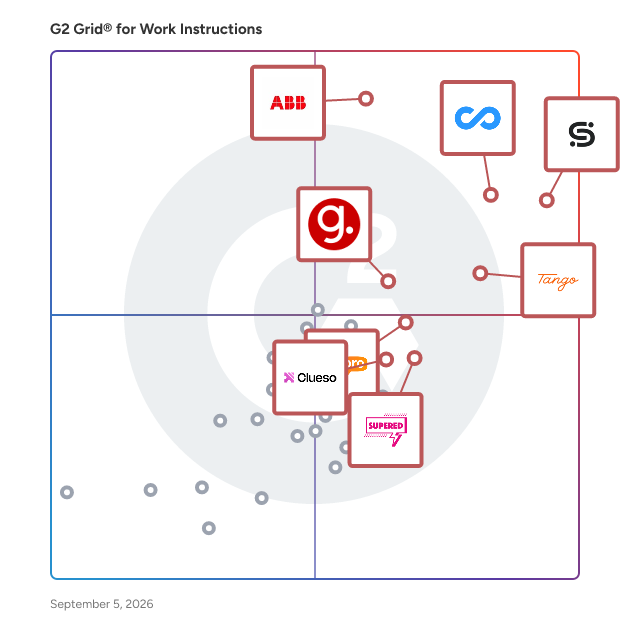
- **Leader:** [Connecteam](https://www.g2.com/products/connecteam/reviews)
- **Highest Performer:** [livepro Knowledge Management](https://www.g2.com/products/livepro-knowledge-management/reviews)
- **Easiest to Use:** [livepro Knowledge Management](https://www.g2.com/products/livepro-knowledge-management/reviews)
- **Top Trending:** [Connecteam](https://www.g2.com/products/connecteam/reviews)
- **Best Free Software:** [Connecteam](https://www.g2.com/products/connecteam/reviews)


---

**Sponsored**

### Whale

Turn scattered knowledge into scalable systems with Whale. Whale helps fast-growing teams capture processes, train employees, and answer questions — without the chaos of scattered docs or outdated wikis. What Whale Does: - AI process capture: Turn screen recordings, videos, or existing docs into structured SOPs in minutes - Alice (AI assistant): Employees get instant answers to &quot;how do we do X?&quot; in any language, any channel - Training built-in: Convert SOPs into onboarding flows and quizzes so people actually learn - Mobile-first access: QR codes and mobile app mean SOPs live where the work happens Why Teams Choose Whale: - Cut onboarding time by 50% by connecting training to live processes - Reduce documentation time by 70% with AI-powered capture - Keep knowledge current — not buried in Google Docs nobody reads Who Uses Whale: Operations leaders and HR teams at scaling companies (50-500 employees) who need to onboard faster and standardize without slowing down.


[Visit website](https://www.g2.com/external_clickthroughs/record?secure%5Bad_program%5D=ppc&amp;secure%5Bad_slot%5D=category_product_list&amp;secure%5Bcategory_id%5D=1915&amp;secure%5Bdisplayable_resource_id%5D=1313&amp;secure%5Bdisplayable_resource_type%5D=Category&amp;secure%5Bmedium%5D=sponsored&amp;secure%5Bplacement_reason%5D=neighbor_category&amp;secure%5Bplacement_resource_ids%5D%5B%5D=2039&amp;secure%5Bprioritized%5D=false&amp;secure%5Bproduct_id%5D=138874&amp;secure%5Bresource_id%5D=1915&amp;secure%5Bresource_type%5D=Category&amp;secure%5Bsource_type%5D=category_page&amp;secure%5Bsource_url%5D=https%3A%2F%2Fwww.g2.com%2Fcategories%2Fwork-instructions%3Fpage%3D3&amp;secure%5Btoken%5D=a33d82382467c4d4927a2e1dc9b3e9726a0537a6d9110d1e6b054cc7732de453&amp;secure%5Burl%5D=https%3A%2F%2Fusewhale.io%2F&amp;secure%5Burl_type%5D=free_trial)

---

## Top-Rated Products (Ranked by G2 Score)
### 1. [nxtStation](https://www.g2.com/products/nxtstation/reviews)
  Visualize I Simulate I Guide &amp; Operate by aR/AR/MR. “We revolutionize the future of work by seamlessly connecting employees with knowledge through cutting-edge AR/AR/MR technologies, transforming tasks with step-by-step instructions, streamlining FM processes, and providing comprehensive data analysis.”


**Seller Details:**

- **Seller:** [nxtdynamics](https://www.g2.com/sellers/nxtdynamics)
- **Year Founded:** 2022
- **HQ Location:** N/A
- **Twitter:** @jjk10713
- **LinkedIn® Page:** https://www.linkedin.com/company/nxtdynamics (2 employees on LinkedIn®)


### 2. [Operandio](https://www.g2.com/products/operandio/reviews)
  Operandio is a leading operations management, compliance and automation platform built for multi-unit businesses in QSR, hospitality, and franchising. It helps streamline daily workflows, ensure compliance, and provide real-time visibility into operations. Operandio simplifies complex processes to enhance efficiency and accountability with HACCP-compliant temperature monitoring, audits &amp; inspections, digital checklists, label printing, reporting, SOP management, employee training, Learning Management System (LMS) and more. It not only replaces outdated paper-based systems but also consolidates multiple software solutions into one modern, integrated platform, helping businesses reduce costs while improving operational performance.


**Seller Details:**

- **Seller:** [Operandio](https://www.g2.com/sellers/operandio)
- **Year Founded:** 2019
- **HQ Location:** Melbourne, AU
- **LinkedIn® Page:** https://www.linkedin.com/company/operandio/ (15 employees on LinkedIn®)


### 3. [Operations1](https://www.g2.com/products/operations1/reviews)
  Operations1 is the leading Connected Worker platform for the industry. With Operations1, you digitize your employee-led production processes end-to-end: from activity planning and the supply of knowledge to intuitive process guidance, documentation, live analysis and collaborative incident management. With Operations1, customers such as Bosch, Daimler Trucks, ThyssenKrupp, Trumpf or Stabilo benefit from increased employee satisfaction, improved quality and productivity, and a more resilient and flexible organization. Due to its enormous scalability, the platform is used worldwide in more than 15 countries in all processes in maintenance, production, assembly, quality, training, HSSE and audits. Since its founding date, the Frankfurt and Augsburg-based company&#39;s mission has been to empower every worker around the world to accomplish more and skill up. The clipboard becomes a tablet, complexity becomes simplicity, blindspot becomes transparency.


**Seller Details:**

- **Seller:** [Cioplenu](https://www.g2.com/sellers/cioplenu)
- **HQ Location:** N/A
- **LinkedIn® Page:** https://www.linkedin.com/company/No-Linkedin-Presence-Added-Intentionally-By-DataOps (1 employees on LinkedIn®)


### 4. [Picomto](https://www.g2.com/products/picomto/reviews)
  Picomto is a solution for digitizing work instructions, procedures, SOP in a visual, connected and smart way. The goal of Picomto is to give the operator a tool to improve his operational performance: to facilitate the execution of his tasks with visual work instructions and to simplify the data collection to improve processes.


**Seller Details:**

- **Seller:** [Picomto](https://www.g2.com/sellers/picomto)
- **Year Founded:** 2013
- **HQ Location:** La Madeleine, FR
- **LinkedIn® Page:** https://www.linkedin.com/company/picomto (17 employees on LinkedIn®)


### 5. [Plutomen Workflow](https://www.g2.com/products/plutomen-plutomen-workflow/reviews)
  Plutomen Workflow is a Digital Work Instructions software that helps frontline workers create, update, and distribute detailed work instructions, checklists, and SOPs. By using Plutomen Workflow, Industrial enterprises can digitize their frontline operations with step-by-step, personalized, and standardized work instructions on mobile, web, tablet, and smart glasses. The software streamlines your maintenance, troubleshooting, and inspection sequences.


**Seller Details:**

- **Seller:** [Plutomen](https://www.g2.com/sellers/plutomen)
- **Year Founded:** 2016
- **HQ Location:** Ahmedabad, IN
- **Twitter:** @Plutomen_Live (101 Twitter followers)
- **LinkedIn® Page:** https://www.linkedin.com/company/plutomen (33 employees on LinkedIn®)


### 6. [ProcessFlow](https://www.g2.com/products/processflow/reviews)
  Turn your processes into clear, visual guides in minutes.


**Seller Details:**

- **Seller:** [ProcessFlow](https://www.g2.com/sellers/processflow)
- **Year Founded:** 2024
- **HQ Location:** Paris, FR
- **LinkedIn® Page:** https://www.linkedin.com/company/processflow1/ (4 employees on LinkedIn®)


### 7. [Process Shepherd](https://www.g2.com/products/process-shepherd/reviews)
  Process Shepherd is a dynamic guided workflow that steps consultants through complex business processes including edge case scenarios. Workflows can be integrated with external systems to collect and save data to your CRM. Consistently meet compliance goals, and reduce time to competency.


**Seller Details:**

- **Seller:** [Process Shepherd](https://www.g2.com/sellers/process-shepherd)
- **HQ Location:** N/A
- **LinkedIn® Page:** https://www.linkedin.com/company/No-Linkedin-Presence-Added-Intentionally-By-DataOps (1 employees on LinkedIn®)


### 8. [Production Software Integrated](https://www.g2.com/products/production-software-integrated/reviews)
  Visual Work Instructions provide your users with step-by-step instructions for completing inspections. With PSI you can input information about the inspection, upload pictures, videos, pdfs, and other supporting documents to give your employees the knowledge they need to get the job done right. This allows you to keep all of your instructions organized and accessible, so that the entire team is always on the same page about how a process should be completed. You can update this information simply and instantly, helping to mitigate confusion about whether your team has a current version of the instructions.


**Seller Details:**

- **Seller:** [Production Software Integrated](https://www.g2.com/sellers/production-software-integrated)
- **Year Founded:** 2016
- **HQ Location:** Muskegon, US
- **Twitter:** @psiapp (24 Twitter followers)
- **LinkedIn® Page:** http://www.linkedin.com/company/production-software-integrated-llc (2 employees on LinkedIn®)


### 9. [RevQR](https://www.g2.com/products/revqr/reviews)
  RevQR is audit-ready document control software for manufacturing teams that need the current approved work instruction available at point of use. Quality and operations teams use RevQR to manage controlled documents, keep one current approved revision, schedule release by effective date, and maintain clear traceability around approval and revision history. QR access helps operators open the right instruction on the shop floor, while evidence views and audit-pack export help teams show what was current on a given date without adopting a heavy QMS.


**Seller Details:**

- **Seller:** [RevQR](https://www.g2.com/sellers/revqr)
- **HQ Location:** N/A
- **LinkedIn® Page:** https://www.linkedin.com/company/No-Linkedin-Presence-Added-Intentionally-By-DataOps (1 employees on LinkedIn®)


### 10. [SETAGO App](https://www.g2.com/products/setago-app/reviews)
  Setago.io&amp;nbsp;GmbH is a german company that specializes in developing software and hardware tools to enhance collaboration and productivity in SMEs. The SETAGO App&amp;nbsp;is a cloud-based tool for creating and managing digital work processes, such as documentation, step-by-step instructions, digital checklists, and more! Its modern and intuitive user interface and templates make it easy to create digital documents, including videos, pictures&amp;nbsp;and warning notices. Our SaaS product benefits include: - Real-time data access Traceability solutions allow businesses to access data in&amp;nbsp;realtime, ensuring that they are always up-to-date with their operations. - Scalability SaaS-based traceability solutions are highly&amp;nbsp;scalable, which means that businesses can easily expand or contract their usage as their needs change. Integrate hardware to improve your assembly line or pick by lights for more effiency in intralogistics. -Cost-effectiveness SaaS solutions are typically offered at a lower cost than traditional on-premise solutions, making them an&amp;nbsp;affordable&amp;nbsp;option for businesses of all sizes. Whether empowering employees, onboarding, providing customer support, or improving knowledge management - there is a feature designed to meet your needs.


**Seller Details:**

- **Seller:** [Setago.io](https://www.g2.com/sellers/setago-io)
- **Year Founded:** 2018
- **HQ Location:** Nürnberg, DE
- **LinkedIn® Page:** https://www.linkedin.com/company/setagoio-gmbh/ (7 employees on LinkedIn®)


### 11. [Squint](https://www.g2.com/products/squint/reviews)
  Squint is a manufacturing intelligence software platform that enables frontline workers, engineers, and plant leaders to capture, access, and standardize operational knowledge directly on the production floor. It is used to create digital work instructions, standard operating procedures (SOPs), equipment knowledge, and troubleshooting guidance in environments where process consistency, safety, and uptime are priorities. Squint supports organizations in manufacturing sectors such as automotive, consumer packaged goods, food and beverage, and industrial equipment production. The software is designed for teams that need to reduce onboarding time, maintain consistent quality across shifts or sites, and ensure that expertise is not lost due to workforce turnover or changes in staffing. Users document tasks by recording steps in real working conditions and convert them into visual, step-by-step procedures that can be accessed on mobile devices or smart glasses. Typical use cases include equipment changeovers, maintenance routines, line startup and shutdown processes, quality checks, incident response, and operator training. The platform is structured to fit into existing workflows rather than requiring specialized authoring tools or hardware, making updates and process refinements more efficient. Key Features and Capabilities: - Mobile- and smart-glasses-based creation of work instructions and SOPs - Computer vision-based step recognition linked to physical equipment or workspace context - AI-assisted procedure generation and editing for faster documentation - Role-based access for operators, trainers, and engineers - Analytics that show usage patterns and identify process improvement opportunities Primary Benefits: - Supports faster onboarding and upskilling of new employees - Reduces unplanned downtime associated with inconsistent procedures or knowledge gaps - Helps preserve institutional knowledge amid workforce turnover - Enables standardization and continuous improvement across lines, shifts, and facilities


**Seller Details:**

- **Seller:** [Squint](https://www.g2.com/sellers/squint)
- **Year Founded:** 2021
- **HQ Location:** San Francisco, US
- **LinkedIn® Page:** https://www.linkedin.com/company/squintai/ (73 employees on LinkedIn®)


### 12. [Standard Work Pro (swp)](https://www.g2.com/products/standard-work-pro-swp/reviews)
  Standard Work Pro is a powerful digital platform designed to help manufacturers create, deploy, and sustain standard work across the shop floor. Built by lean practitioners for real-world use, it enables teams to define the best-known method for every operation and make it instantly accessible to operators, trainers, and leaders across shifts and sites. Standard Work Pro turns messy spreadsheets, tribal knowledge, and paper instructions into structured, visual, and version-controlled workflows—bringing clarity, consistency, and continuous improvement to frontline work. Key Features: 👉🏻 Drag-and-drop standard work builder with images, takt time, and layout visuals 👉🏻 Role-based access for authors, reviewers, trainers, and supervisors 👉🏻 Visual work combo charts and sequence tracking 👉🏻 Standard work audits with timestamped logs and digital signoffs 👉🏻 Layout mapping with walking time and task alignment 👉🏻 Mobile and tablet-friendly access for frontline workers 💫 Best For: Manufacturing leaders in automotive, aerospace, electronics, and medical device sectors who want to reduce variation, boost productivity, and embed lean thinking on the floor.


**Seller Details:**

- **Seller:** [Orca Lean](https://www.g2.com/sellers/orca-lean)
- **Year Founded:** 2021
- **HQ Location:** Detroit, US
- **LinkedIn® Page:** https://www.linkedin.com/company/orcalean (2 employees on LinkedIn®)


### 13. [tome.host](https://www.g2.com/products/tome-host/reviews)
  tome.host is a SaaS for creating online user manuals and other technical documentation.


**Seller Details:**

- **Seller:** [Cactusoft](https://www.g2.com/sellers/cactusoft)
- **Year Founded:** 1998
- **HQ Location:** Wilmington, US
- **LinkedIn® Page:** https://www.linkedin.com/company/2637424 (5 employees on LinkedIn®)


### 14. [Vimachem Pharma MES Platform](https://www.g2.com/products/vimachem-pharma-mes-platform/reviews)
  Manufacturing analytics &amp; OEE solution is an intelligent Pharma OEE Cloud solution that allows you to collect, store and visualize data across your site / enterprise and apply AI algorithms to optimize production efficiency and product quality. The lack of real time manufacturing data leads to massive inefficiencies in production and packaging operations, from unexpected machine downtime and manufacturing losses to inability to continuously improve processes or justify capital expenditures.


  **Average Rating:** 4.3/5.0
  **Total Reviews:** 6

**User Satisfaction Scores:**

- **Ease of Use:** 8.9/10 (Category avg: 9.1/10)


**Seller Details:**

- **Seller:** [Vimachem](https://www.g2.com/sellers/vimachem)
- **Year Founded:** 2014
- **HQ Location:** Queens, US
- **LinkedIn® Page:** http://www.linkedin.com/company/vimachem (82 employees on LinkedIn®)

**Reviewer Demographics:**
  - **Top Industries:** Pharmaceuticals
  - **Company Size:** 83% Mid-Market, 17% Small-Business


#### Pros & Cons

**Pros:**

- Manufacturing Integration (3 reviews)
- Communication (2 reviews)
- Customer Support (2 reviews)
- Data Management (2 reviews)
- Integration Capabilities (2 reviews)

**Cons:**

- Complex Usability (2 reviews)
- Complexity (1 reviews)
- Difficult Learning (1 reviews)
- Difficult Navigation (1 reviews)
- Expensive (1 reviews)

### 15. [Zaptic](https://www.g2.com/products/zaptic/reviews)
  Zaptic improves shop floor performance for complex manufacturers by capturing actionable, hard-to-reach data. Overcome key challenges in today’s manufacturing environment - from skills shortages to productivity: - Bring transparency to the shop floor by digitizing daily work - Analyse and act decisively - Operate to standards and continuously improve Zaptic’s focus on empowered execution and exposing actionable data allows you to digitize work for safety, knowledge management, onboarding and compliance.


  **Average Rating:** 4.5/5.0
  **Total Reviews:** 4

**User Satisfaction Scores:**

- **Ease of Use:** 8.8/10 (Category avg: 9.1/10)


**Seller Details:**

- **Seller:** [Zaptic](https://www.g2.com/sellers/zaptic)
- **Year Founded:** 2015
- **HQ Location:** Manchester , GB
- **Twitter:** @zaptic (1,272 Twitter followers)
- **LinkedIn® Page:** http://www.linkedin.com/company/zaptic (32 employees on LinkedIn®)

**Reviewer Demographics:**
  - **Company Size:** 50% Mid-Market, 25% Enterprise


## Parent Category

[Knowledge Management Software](https://www.g2.com/categories/knowledge-management)


## Related Categories

- [Connected Worker Platforms](https://www.g2.com/categories/connected-worker-platform)
- [Manufacturing Intelligence Software](https://www.g2.com/categories/manufacturing-intelligence)
- [Standard Operating Procedures Software](https://www.g2.com/categories/standard-operating-procedures)


---

## Buyer Guide

### What You Should Know About Work Instructions Software

### What is Work Instructions Software?

Work instructions software, also known as visual work instructions or digital work instructions software, allows users to create and dispense step-by-step instructions for business procedures, empowering companies to streamline their workflows. While tools like knowledge management software offer a knowledge base for text articles and other types of informative media, work instructions solutions enable users to create itemized guides for distinct processes, complete with tips, pictures, and videos.

Instruction guides are universally helpful, but industries that require hands-on, mechanical tasks find more value in dedicated work instructions platforms. Industries such as manufacturing, oil and gas, and field service are just a few that benefit the most from visual work instructions. Some work instructions providers even offer industry-specific add-ons that include features that accommodate the needs of their use cases.

### What are the Common Features of Work Instructions Software?

The following are some core features within work instructions software that can help users create practical step-by-step guides for their business procedures:

**Creation of visual guides:** Users can create visual guides consisting of text, checklists, photos, and videos that explain how to carry out certain tasks. New guides can be created for each different procedure a business has, and these guides can all be stored in a central location so all employees can access them.

**Performance monitoring:** If employees are required to use the company’s work instructions platform to follow guides and check off tasks as they are completed, managers can use this real-time data to monitor performance and efficiency at an employee, team, and business level.

**Analytics and reporting:** Work instructions platforms can collect data based on employees’ activity on the platform to help users create reports on production, training, downtime, etc.

**Screen recording:** If a task is meant to be done on a computer, administrators can record their screen to demonstrate how a task is meant to be completed and add the screen recording to the specific guide for that task.

### What are the Benefits of Work Instructions Software?

Besides helping with standardizing business procedures, work instructions software has other benefits, including time savings and boosting employee morale.

**Standardizes processes:** Work instructions platforms digitize and collate paper-based documents or procedures that have been documented and placed in disparate sources throughout the business. This platform becomes the single source of truth for instructions, providing guides on how to complete most, if not all, tasks.

**Saves time in documenting procedures:** Because this software is tailored to meet the needs of managers and workers, it provides the necessary tools, such as templates and authoring and publishing tools, to quickly and accurately document and distribute work procedures.

**Reduces retraining:** Because guides are collated in a central library on work instructions platforms, employees can access them at any time to review procedures they learned in the past. Also, as procedures change within an organization, administrators can update them within the work instructions platform instead of individually informing and training employees.&amp;nbsp;

**Reduces employee errors:** Employees can also have these guides open while completing tasks in real-time, so they can ensure they follow each step correctly to avoid errors. This is especially useful for workers who are visual learners. Being able to see a checklist or videos showing how to carry out a task will resonate with these workers better than just being told what to do.

**Boosts morale:** Visual guides give employees the autonomy to learn at their own pace. It empowers them to review procedures they don’t feel confident with, taking longer on some sections while going quicker through others. Having this sense of control over their own training helps to boost morale.

### Who Uses Work Instructions Software?

There are a few different use cases for work instructions software, as mentioned below:

**Manufacturing and assembly workstations:** Electronic work instructions are beneficial for frontline workers working with their hands on repetitive manufacturing and assembly tasks. Oftentimes, these tasks are time sensitive as there are numerous people involved in the creation of a single product, and instruction guides help complete them quickly and accurately.&amp;nbsp;

**Service work instruction:** Service work often involves helping customers resolve various problems. It doesn’t always make sense to train service workers on every possible issue that may arise, so work instructions are a good way for them to train themselves as different problems need to be addressed.

**Training department:** This use case covers many industries, especially those with high employee turnover. Training time is often very costly, and training guides are a self-service method for employees to train themselves.

### What are the Alternatives to Work Instructions Software?

Alternatives to work instructions software can replace this type of software, either partially or completely:

[Knowledge base software](https://www.g2.com/categories/knowledge-base): Work instructions software is essentially a subset of knowledge base software. Knowledge bases hold information pertaining to a wide range of topics, while work instructions include more action-oriented information.

[Standard operating procedures (SOP) software](http://dures): SOP platforms hold similar information to work instructions platforms. However, SOPs are more high level than work instructions. SOPs summarize the specifications of a process, while work instructions narrow down to individual tasks and explain each of the steps outlined within an SOP.

### Challenges with Work Instructions Software

Work instructions solutions can come with their own set of challenges.&amp;nbsp;

**Rapidly changing processes:** Work instructions software comes in handy in industries and workplaces where processes are undergoing continuous improvement and being updated. It can help make sure employees are staying up to date with the latest guides. However, updating the platform with the latest processes can be tedious and time consuming.

**Supplying workers with a digital interface:** Since work instructions software is a digital product, a digital interface, such as a mobile device, tablet, or laptop, needs to be provided to the employees who will be using the software, which can be costly.

### How to Buy Work Instructions Software

#### Requirements Gathering (RFI/RFP) for Work Instructions Software

Before looking for a software solution for work instructions, buyers should ask themselves what goals they want to accomplish with the software. Are they simpler goals, such as just converting paper documents to a digital format? Or do they need a complete overhaul of their operations practices to make them more automated? Whatever it is, it’s important to note these down before seeking out software as different solutions offer different functionality and levels of robustness. Here are some things to consider:

- Who will be using the software? How easy to use does it need to be?
- Which other systems and tools will the software need to connect with?
- What type of content will be stored in the work instructions platform, and how much storage will be needed?

#### Compare Work Instructions Software Products

**Create a long list**

After listing down requirements, buyers can start to browse products at a high level to create a long list. These products won’t necessarily meet all the requirements, so buyers will need to prioritize their list of requirements. By visiting G2.com’s category for work instructions software, buyers may sift through the work instructions platforms and add products to their “My List” within [G2.com](https://www.g2.com/).

**Create a short list**

Once buyers have created a short list, they can further sort their options by checking the product’s ratings on the G2 Grid® and reading user reviews to understand how their peers experience the software. This way, buyers can find the best work instructions platform for their needs.

**Conduct demos**

After narrowing down the selection, buyers must contact the vendors to schedule demonstrations of the solution. Businesses can contact many vendors directly on G2.com to request demos by selecting the “Get a Quote” button. At each demo, buyers must be sure to ask the same questions and use case scenarios to best evaluate each product.

#### Selection of Work Instructions Software

**Choose a selection team**

Depending on how the platform will be utilized, different people will need to be involved in the selection process. However, in most cases, the people that need to be involved are:

- Those who will be creating the instruction guides
- Those who will be overseeing people using the instruction guides
- Someone on the quality assurance team whose metrics depend on how well the guides are followed

**Negotiation**

Work instructions platforms have set pricing depending on which features a buyer requires, and there typically isn’t any negotiation. Enterprise-level organizations that require larger storage space and other advanced features may be able to negotiate their plan and pricing.

**Final decision**

The team member who will be overseeing the platform the most should make the final decision.

### What Does Work Instructions Software Cost?

Pricing models for these solutions are straightforward. Most providers don’t require buyers to sign a contract to purchase monthly plans. While most providers offer free plans, these come with limited storage space and basic features. Buyers can opt for one of the paid plans, which offer more storage space, advanced automation, and more integrations. These tiers increase in pricing accordingly with the capabilities they offer.

**Return on Investment (ROI)**

ROI on work instructions software can be evaluated by looking at the performance of certain tasks, such as assembly, customer support tickets, and employee training, after implementing the software. Here are some specific factors to consider:

- Time saved on these tasks
- The increase in the amount of tasks completed
- The accuracy/quality of completed tasks
- Customer satisfaction (if the software is being used by customer service teams)
- Employee satisfaction (if employees are using software for day-to-day tasks)