Best Training Management Software for Small Business - Page 2

How Many Training Management Software Products Does G2 Track?

Total Products under this Category: 794

Category Stats (Nov 2026)

  • Average Rating: 4.54/5 (↑0.02 vs Oct 2026) The average rating of products in this category, based on all submitted ratings
  • Top Trending Product: Game Strategies (+5.56%) - Among all products in this category, Game Strategies recorded the largest rating increase compared to last month

Last updated: November 24, 2026

How Does G2 Rank Training Management Software Products?

Why You Can Trust G2's Software Rankings:

  • 30 Analysts and Data Experts
  • 75,500+ Authentic Reviews
  • 794+ Products
  • Unbiased Rankings

G2's software rankings are built on verified user reviews, rigorous moderation, and a consistent research methodology maintained by a team of analysts and data experts. Each product is measured using the same transparent criteria, with no paid placement or vendor influence. While reviews reflect real user experiences, which can be subjective, they offer valuable insight into how software performs in the hands of professionals. Together, these inputs power the G2 Score, a standardized way to compare tools within every category.

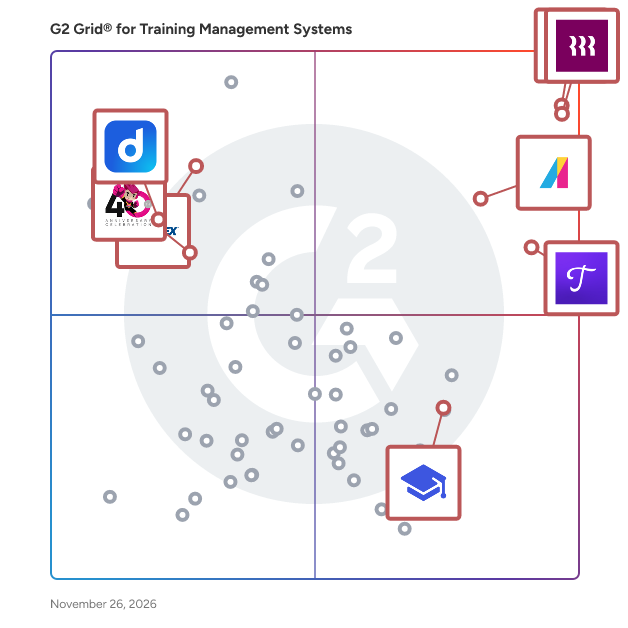
G2 Grid® for Training Management Software

G2 Grid® for Training Management Software plotting products by satisfaction and market presence

Highlighted products: Rippling, Trainual, Paycom, Absorb LMS, isolved, Cademy, Dayforce, and Paychex.

Underlying data: [Grid® JSON](https://www.g2.com/categories/training-management-systems/grids.json?focus%5B%5D=rippling&focus%5B%5D=trainual&focus%5B%5D=paycom&focus%5B%5D=absorb-software-absorb-lms&focus%5B%5D=isolved&focus%5B%5D=cademy&focus%5B%5D=dayforce&focus%5B%5D=paychex&segment=small-business)

Arlo Training Management Software

Arlo is training management software for instructor-led training providers who need more than an LMS. Arlo is the platform instructor-led training providers use to run, deliver and grow their entire training operation — across public courses, private clients, in-person, live online, and blended delivery. Running ILT is complex. Most providers are managing scheduling, registrations, payments, instructor coordination, certificates, and client communications across tools that don't talk to each other. The gaps between those tools are where admin time disappears, revenue gets hard to see, and the learner experience suffers. Arlo brings the whole operation together in one place — built specifically for the way instructor-led training businesses work. Thousands of training providers use Arlo to run a more connected operation, grow revenue across public and private training, and deliver an experience their learners will love. On average, Arlo customers save over 30 minutes per registration — and grow revenue by 30% in year two.

Average Rating: 4.5/5.0

Total Reviews: 105

How Do G2 Users Rate Arlo Training Management Software?

  • Has the product been a good partner in doing business?: 9.1/10 (Category avg: 9.3/10)
  • Content Delivery and Tracking: 8.5/10 (Category avg: 9.0/10)
  • Customer Training: 9.3/10 (Category avg: 8.7/10)
  • Content Storage and Management: 8.2/10 (Category avg: 8.9/10)

Who Is the Company Behind Arlo Training Management Software?

Who Uses This Product?

  • Top Industries: Education Management, Professional Training & Coaching
  • Company Size: 59% Small, 31% Medium

What Do G2 Reviewers Say About Arlo Training Management Software?

AI-generated summary from verified user reviews

Pros
  • Users praise the ease of use of Arlo Training Management Software, simplifying setup and integration with other systems.
  • Users find Arlo Training Management Software easy to use, with effective setup and diverse customization options enhancing their experience.
  • Users appreciate the comprehensive features of Arlo Training Management Software, enhancing event management and revenue generation.
  • Users value the fully featured training management capabilities of Arlo, enabling seamless integration for efficient business scaling.
  • Users value the fully featured training management software that aligns perfectly with training business needs and supports scaling.
Cons
  • Users find feature issues in Arlo, particularly with the email system and clunky interface, needing improvements.
  • Users find Arlo's features to be limited, with ongoing requests for improvements in email functionality and e-learning capabilities.
  • Users find the complexity of Arlo's software challenging to navigate, especially with its clunky UX and API.
  • Users find Arlo's pricing to be too high for smaller organizations, making it less accessible for many users.
  • Users find the missing features of Arlo software, like LMS integration, a major limitation for their needs.

What Are Recent G2 Reviews of Arlo Training Management Software?

TalentLMS

TalentLMS is an AI-powered, cloud-based learning management system (LMS) for growing businesses that want to launch training fast, prove ROI sooner, and turn learning into a driver of business growth. With built-in AI tools and an intuitive design, TalentLMS helps teams create and manage training without the time and complexity of traditional systems. Based on G2 data, companies using TalentLMS enjoy: * Ease of setup * Fast time to launch * Achieving ROI in less than a year One platform to train employees, partners, and customers TalentLMS supports employee onboarding and development, partner enablement, and customer training in one intuitive platform. As your business grows, training scales with you, without added complexity. The features you need to run training that delivers results TalentLMS combines intuitive design with AI-powered tools to help you create content faster and reduce admin time. Seamless integrations connect your existing tools, while built-in reporting helps you track progress, measure impact, and prove the value of training. How teams use TalentLMS * Create structured Learning Paths for employee, customer, and partner training. * Use AI tools such as the AI course creator to build and update courses and assessments faster. Use AI Coach for Learners to reinforce knowledge and Skills to personalize upskilling for specific roles. * Connect TalentLMS to your tech stack through enhanced integrations, including HubSpot, LTI 1.3, and more. * Access plug-and-play, ready-made courses from TalentLibrary to launch training instantly. * Scale training programs by automating routine tasks, managing multiple groups or departments with Branches, and using advanced reporting tools to understand progress and training outcomes. Organizations including Google, Amazon, Meta, and more use TalentLMS to improve training efficiency and support measurable results. More than 70,000 teams across 12,000+ organizations rely on the platform to see results sooner without the hassle of complicated systems or high costs.

Average Rating: 4.6/5.0

Total Reviews: 773

How Do G2 Users Rate TalentLMS?

  • Has the product been a good partner in doing business?: 9.1/10 (Category avg: 9.3/10)
  • Content Delivery and Tracking: 8.8/10 (Category avg: 9.0/10)
  • Customer Training: 8.5/10 (Category avg: 8.7/10)
  • Content Storage and Management: 8.4/10 (Category avg: 8.9/10)

Who Is the Company Behind TalentLMS?

Who Uses This Product?

  • Who Uses This: CEO, Director
  • Top Industries: E-Learning, Education Management
  • Company Size: 48% Small, 40% Medium

What Do G2 Reviewers Say About TalentLMS?

AI-generated summary from verified user reviews

Pros
  • Users appreciate the ease of use of TalentLMS, finding it user-friendly for learners, instructors, and admins.
  • Users appreciate the ease of course creation in TalentLMS, streamlining training delivery for busy schedules.
  • Users value the user-friendly interface of TalentLMS, enabling seamless navigation for learners, instructors, and admins alike.
  • Users commend the great customer service and support provided by TalentLMS, ensuring a smooth user experience.
  • Users appreciate the easy setup of TalentLMS, enhancing their onboarding experience with smooth transitions and dedicated support.
Cons
  • Users express frustration with limited features, feeling that basic issues need resolution before new updates are introduced.
  • Users are frustrated by the missing features in TalentLMS, feeling basic issues need resolution before new additions are made.
  • Users desire more customization options in TalentLMS, particularly for reporting and course creation functionalities.
  • Users find the reporting issues in TalentLMS challenging, needing better knowledge and customization options for effective use.
  • Users report feature issues with TalentLMS, citing glitches and limited integration, complicating their overall experience.

What Are Recent G2 Reviews of TalentLMS?

What Are G2 Users Discussing About TalentLMS?

Bridge

Bridge is the most connected LMS you’ll ever use. An all-in-one learning, skills, and performance platform, it’s built to help lean L&D and HR teams onboard employees, run compliance training, and go further: mapping skills with AI-powered tagging, building career paths, and running performance conversations. All from one platform that’s effortlessly in sync with the rest of the business. It’s a favorite among L&D teams, HR pros, and leaders who need to boost employee skills, stay compliant, and grow business performance. With Bridge, you can easily customize courses, target the exact skills your team needs, and create training that drives real career development. Bridge’s AI-powered skills engine draws on a database of 32,000 skills, all mapped to live labor market data, so you can build a detailed skills taxonomy, track coverage across your team, and spot any gaps instantly. These insights connect directly to Bridge’s training programs—making it simple to deliver learning that lines up perfectly with business needs and employee growth ambitions. Skills insights also connect directly to career pathing, so employees can see exactly which skills close the gap to their next role, and leadership can spot organization-wide gaps before they become a problem. Bridge also comes with powerful reporting tools that track learner progress, monitor completions, and highlight areas that need attention. And with automated training workflows, admins can schedule and deliver learning programs in stages—no constant micromanaging required. That “set-it-and-forget-it” convenience keeps learners on track while saving time. Even better? The MCP Connector is set to link your org’s AI tool of choice (ChatGPT, Claude, etc.) directly to Bridge. AI that reasons over training and skills data alongside insights from across your org connects the dots no standalone LMS report ever could. For learners, Bridge offers a clean, personalized learning experience with tailored course recommendations and reminders that help them stay engaged. Plus, the Bridge mobile app makes it easy for deskless and remote workers to complete training anytime, anywhere—even offline.

Average Rating: 4.2/5.0

Total Reviews: 385

How Do G2 Users Rate Bridge?

  • Has the product been a good partner in doing business?: 8.7/10 (Category avg: 9.3/10)
  • Content Delivery and Tracking: 7.9/10 (Category avg: 9.0/10)
  • Customer Training: 7.4/10 (Category avg: 8.7/10)
  • Content Storage and Management: 8.0/10 (Category avg: 8.9/10)

Who Is the Company Behind Bridge?

  • Seller: Bridge
  • Company Website:
  • Year Founded: 2008
  • HQ Location: Salt Lake City, US
  • LinkedIn® Page: www.linkedin.com
    151 employees on LinkedIn®

Who Uses This Product?

  • Who Uses This: Instructional Designer, Training Manager
  • Top Industries: Education Management, Higher Education
  • Company Size: 58% Medium, 32% Large

What Do G2 Reviewers Say About Bridge?

AI-generated summary from verified user reviews

Pros
  • Users appreciate the ease of use of Bridge, finding it user-friendly and efficient for training and administration tasks.
  • Users value the easy and appealing learner experience Bridge provides, enhancing training efficiency and organizational growth.
  • Users appreciate the user-friendly experience of Bridge, finding it easy and appealing for training across organizations.
  • Users value the easy course creation in Bridge, enabling efficient content development and engaging learning experiences.
  • Users praise the easy setup of Bridge, appreciating its intuitive navigation and seamless implementation process.
Cons
  • Users note the missing features in Bridge, expressing a desire for more advanced customization and enhanced content tools.
  • Users note the limited features of Bridge, feeling the need for external tools for advanced functionalities and reporting.
  • Users struggle with the learning curve of Bridge, finding setup and reporting processes challenging and not user-friendly.
  • Users note the limited customization options in Bridge, often needing external tools for advanced or specialized functionalities.
  • Users face feature issues with Bridge, requiring external tools for advanced customization and limiting content development options.

What Are Recent G2 Reviews of Bridge?

AI can help you find the answers. G2 helps you trust them.

Connect G2 to Claude or ChatGPT for answers grounded in G2's trusted reviews, comparisons, and pricing from real user insights.

How it works

Cavu HCM

CAVU HCM by IRIS is a comprehensive Human Capital Management solution offering services designed to streamline payroll and HR processes for US-based businesses. With an intuitive platform, CAVU HCM automates payroll, manages employee data, and simplifies compliance with regulatory requirements. Tailored for small to mid-sized companies, the solution integrates seamlessly with HR workflows, offering tools for workforce management, time and attendance tracking, and employee self-service. By choosing CAVU HCM by IRIS, businesses can reduce administrative burdens, ensure accurate payroll processing, and focus more on strategic growth.

Average Rating: 4.9/5.0

Total Reviews: 137

How Do G2 Users Rate Cavu HCM?

  • Has the product been a good partner in doing business?: 9.8/10 (Category avg: 9.3/10)
  • Content Delivery and Tracking: 10.0/10 (Category avg: 9.0/10)
  • Customer Training: 10.0/10 (Category avg: 8.7/10)
  • Content Storage and Management: 10.0/10 (Category avg: 8.9/10)

Who Is the Company Behind Cavu HCM?

  • Seller: IRIS Software Group
  • Company Website:
  • Year Founded: 1978
  • HQ Location: Slough, United Kingdom
  • LinkedIn® Page: www.linkedin.com
    3,115 employees on LinkedIn®

Who Uses This Product?

  • Who Uses This: Owner, President
  • Top Industries: Construction, Hospital & Health Care
  • Company Size: 82% Small, 18% Medium

What Do G2 Reviewers Say About Cavu HCM?

AI-generated summary from verified user reviews

Pros
  • Users commend the excellent customer support from CAVU HCM, appreciating prompt responses and dedicated assistance.
  • Users appreciate the user-friendly technology of Cavu HCM, highlighted by prompt support and personalized service.
  • Users find Cavu HCM to be user-friendly, appreciating its ease of use and convenience in payroll management.
  • Users value the user-friendly payroll management of Cavu HCM, noting excellent support and minimal intervention needed.
  • Users value the user-friendly payroll management of Cavu HCM, praising its flexibility and exceptional customer service.
Cons
  • Users experience payroll issues like double payments and technical errors that hinder the software's reliability.
  • Users experience slow loading times during operations, causing occasional lag in the Cavu HCM system.
  • Users occasionally face account management issues causing duplicate payments, though they are rare in long-term use.
  • Users experience occasional billing issues with double payments, but it's infrequent and manageable over the years.
  • Users find the reporting function confusing, especially for first-time users, impacting their overall experience with Cavu HCM.

What Are Recent G2 Reviews of Cavu HCM?

What Are G2 Users Discussing About Cavu HCM?

Docebo

Docebo is an AI-powered learning platform designed to support continuous learning across employees, partners, and customers. More than 3,900 organizations use Docebo to deliver onboarding, enablement, compliance, and customer education from a single platform. Learning experiences are personalized at scale, with AI improving content discovery, recommendations, and automation to reduce manual administration. With skills-based insights, flexible delivery, and built-in analytics, Docebo helps organizations keep learning aligned to evolving roles and business goals, so people never stop learning as work changes.

Average Rating: 4.3/5.0

Total Reviews: 731

How Do G2 Users Rate Docebo?

  • Has the product been a good partner in doing business?: 8.7/10 (Category avg: 9.3/10)
  • Content Delivery and Tracking: 8.5/10 (Category avg: 9.0/10)
  • Customer Training: 8.3/10 (Category avg: 8.7/10)
  • Content Storage and Management: 8.1/10 (Category avg: 8.9/10)

Who Is the Company Behind Docebo?

  • Seller: Docebo Inc.
  • Company Website:
  • Year Founded: 2005
  • HQ Location: Toronto
  • LinkedIn® Page: www.linkedin.com
    1,014 employees on LinkedIn®
  • Ownership: TSX: DCBO

Who Uses This Product?

  • Who Uses This: Instructional Designer, LMS Administrator
  • Top Industries: Information Technology and Services, Computer Software
  • Company Size: 45% Large, 44% Medium

What Do G2 Reviewers Say About Docebo?

AI-generated summary from verified user reviews

Pros
  • Users appreciate the ease of use of Docebo, enjoying seamless access, customization, and intuitive navigation for training.
  • Users commend Docebo for its customizable branding, stability, robust integrations, and enhanced support, improving their training experience.
  • Users value the flexible course creation features of Docebo, enhancing their ability to meet diverse learning needs.
  • Users commend Docebo's advanced customization capabilities, allowing tailored branding and professional dashboard appearances for training.
  • Users find Docebo’s intuitive navigation essential for seamless learning management and efficient training customization.
Cons
  • Users note a limited feature set in Docebo, particularly regarding batch actions and content authoring tools.
  • Users find the learning curve steep due to complex configurations and advanced settings in Docebo.
  • Users express frustration over limited customization, finding advanced settings complex and lacking intuitive reporting features.
  • Users express frustration over missing features in Docebo, including unresponsive support and subpar automation capabilities.
  • Users face a steep learning curve with Docebo, as complex configurations and setup can be overwhelming for newcomers.

What Are Recent G2 Reviews of Docebo?

What Are G2 Users Discussing About Docebo?

SkyPrep

Train smarter and faster with SkyPrep, the LMS without the mess, supercharged by AI. Simplify onboarding, product training, and compliance while keeping learners engaged. With an intuitive interface, powerful features, and exceptional support, SkyPrep makes training effortless and effective for employees, customers, and partners. Beyond its user-friendly design, SkyPrep offers a wide range of features, including AI-powered content creation tools, support for any file type, integrated assessment builders, and advanced reporting. Plus, its built-in course library provides instant access to ready-made training content, helping organizations accelerate learning and drive results. Discover more of our powerful, innovative features to elevate learning: Generative AI – Quickly turn existing documents, manuals, policies, or training materials into fully structured, interactive courses in minutes. SkyPrep Perform - Streamlines performance management with goal setting, structured reviews, continuous feedback, and employee progress tracking in one centralized platform. Content authoring – Seamlessly create, edit, and publish engaging training content in one place. Social learning and document management - Deliver personalized learning while fostering collaboration with built-in social learning and document management tools. Learner engagement - Build an interactive and engaging learning experience with intuitive design, gamification, and knowledge checks. Customization - White-label your platform by customizing URLs, color schemes, logos, login pages, email notifications, and themes to align seamlessly with your branding. Performance tracking - Define and manage core skills and competencies, assign point values and prerequisites, track progress with detailed reports, and set skill levels. Course library - Prebuilt, ready-to-assign training courses on key topics like compliance, safety, leadership, and business skills. Outstanding support - SkyPrep delivers a personalized customer success model designed to help every customer maximize value and overcome challenges with ease. Bring your training to life with SkyPrep for a more engaging, streamlined learning experience.

Average Rating: 4.6/5.0

Total Reviews: 94

How Do G2 Users Rate SkyPrep?

  • Has the product been a good partner in doing business?: 9.3/10 (Category avg: 9.3/10)
  • Content Delivery and Tracking: 9.0/10 (Category avg: 9.0/10)
  • Customer Training: 9.2/10 (Category avg: 8.7/10)
  • Content Storage and Management: 9.2/10 (Category avg: 8.9/10)

Who Is the Company Behind SkyPrep?

  • Seller: SkyPrep
  • Company Website:
  • Year Founded: 2012
  • HQ Location: Toronto, Canada
  • LinkedIn® Page: www.linkedin.com
    26 employees on LinkedIn®

Who Uses This Product?

  • Who Uses This: Project Manager
  • Top Industries: Hospital & Health Care, Construction
  • Company Size: 57% Medium, 23% Small

What Do G2 Reviewers Say About SkyPrep?

AI-generated summary from verified user reviews

Pros
  • Users appreciate the ease of use of SkyPrep, enabling quick content management and efficient learning experiences.
  • Users find the easy setup of SkyPrep invaluable, allowing for quick deployment and streamlined training program initiation.
  • Users appreciate the real-time information dissemination of SkyPrep, enhancing nationwide training and learner performance tracking.
  • Users find SkyPrep's intuitive design enhances efficiency, simplifying management and interaction for staff and trainers alike.
  • Users appreciate the fantastic customer support from SkyPrep, noting responsiveness and helpfulness in addressing their needs.
Cons
  • Users find the limited features of SkyPrep restrictive, particularly regarding group limits and automated email reminders.
  • Users find the course management process cumbersome due to large file uploads and a less intuitive interface.
  • Users find the difficult navigation of SkyPrep frustrating, often getting lost while trying to access information.
  • Users often face feature issues that create confusion during setup and lead to errors without proper guidance.
  • Users find the inadequate reporting features of SkyPrep frustrating, with slow access to essential information and poor organization.

What Are Recent G2 Reviews of SkyPrep?

What Are G2 Users Discussing About SkyPrep?

Eddy

Eddy is the ideal all-in-one HR and payroll platform for small businesses that have outgrown spreadsheets. It offers the key features you need without the complexity and overhead of larger systems, giving you the opportunity to simplify your life by combining multiple tools into one that makes sense for your business. Save time and money with Eddy. Hire, onboard, manage, and pay employees—all in a single, simple system.

Average Rating: 4.6/5.0

Total Reviews: 99

How Do G2 Users Rate Eddy?

  • Has the product been a good partner in doing business?: 9.4/10 (Category avg: 9.3/10)
  • Content Delivery and Tracking: 9.6/10 (Category avg: 9.0/10)
  • Customer Training: 8.9/10 (Category avg: 8.7/10)
  • Content Storage and Management: 9.6/10 (Category avg: 8.9/10)

Who Is the Company Behind Eddy?

  • Seller: Eddy HR
  • Company Website:
  • Year Founded: 2017
  • HQ Location: Provo, US
  • LinkedIn® Page: www.linkedin.com
    68 employees on LinkedIn®

Who Uses This Product?

  • Top Industries: Construction, Information Technology and Services
  • Company Size: 61% Small, 33% Medium

What Do G2 Reviewers Say About Eddy?

AI-generated summary from verified user reviews

Pros
  • Users appreciate the ease of use of Eddy, highlighting its fast, efficient, and user-friendly design.
  • Users appreciate the prompt and helpful customer service of Eddy, enhancing their recruiting and onboarding experience.
  • Users appreciate the prompt and helpful customer support from Eddy, enhancing their overall experience with recruiting.
  • Users appreciate the ease of use and comprehensive features of Eddy, streamlining hiring, reviews, training, and payroll.
  • Users appreciate the ease and simplicity of payroll management with Eddy, valuing its effectiveness and professional support.
Cons
  • Users find that Eddy lacks clear visibility of paid time, complicating tracking and management on mobile devices.
  • Users desire greater customization options in Eddy, wishing for features tailored to their specific needs.
  • Users feel the limited features of Eddy restrict their experience, particularly in report visibility and interface customization.
  • Users face payroll issues with Eddy, including high costs and limitations in holiday calculations affecting usability.
  • Users find the employee PTO request system problematic, leading to potential over-approvals and confusion in management.

What Are Recent G2 Reviews of Eddy?

What Are G2 Users Discussing About Eddy?

Adobe Learning Manager (formerly Adobe Captivate Prime)

Adobe Learning Manager is a cloud-based learning management system (LMS) for mid to large enterprises with a range of features to provide personalized learning at scale for partners, customers and employees alike. The SaaS learning platform is used extensively by large Fortune 500 firms and mid-sized enterprises across industries worldwide. Learning Manager provides business leaders and learning administrators with a range of features to conduct large scale customer onboarding, partner training and employee skilling programs. The primary features of Learning Manager are - Unified learning experience with headless learning environment - Gamification and social learning - Hybrid learning - Low-code and open API based integrations with enterprise applications - Automated learning plans and learning paths - LCMS functionalities and xAPI integrations - Customizable reports - Extended enterprise learning Learning Manager also comes with a marketplace of more than 86,000 courses curated across 30+ playlists from the world’s leading publishers such as EdX, Blinkist, Thomson Reuters and others. A range of easy integrations with enterprise apps such as Salesforce, FTP, MS Teams, Adobe Connect, Marketo Engage and Adobe Commerce, Learning Manager helps offer a variety of use-cases for organizations to expand training as a core-component of their customer and partner focused initiatives.

Average Rating: 4.0/5.0

Total Reviews: 300

How Do G2 Users Rate Adobe Learning Manager (formerly Adobe Captivate Prime)?

  • Has the product been a good partner in doing business?: 8.1/10 (Category avg: 9.3/10)
  • Content Delivery and Tracking: 8.4/10 (Category avg: 9.0/10)
  • Customer Training: 7.9/10 (Category avg: 8.7/10)
  • Content Storage and Management: 8.5/10 (Category avg: 8.9/10)

Who Is the Company Behind Adobe Learning Manager (formerly Adobe Captivate Prime)?

  • Seller: Adobe
  • Year Founded: 1982
  • HQ Location: San Jose, CA
  • LinkedIn® Page: www.linkedin.com
    42,975 employees on LinkedIn®
  • Ownership: NASDAQ:ADBE
  • Phone: +1 (888) 649-2990

Who Uses This Product?

  • Who Uses This: Instructional Designer
  • Top Industries: E-Learning, Information Technology and Services
  • Company Size: 34% Large, 33% Small

What Are Recent G2 Reviews of Adobe Learning Manager (formerly Adobe Captivate Prime)?

Coassemble

Coassemble is an API-first training platform. You build courses with AI, embed them inside your own product, intranet, or Slack, and track every completion through one API. Point the agent at your files (handbooks, decks, wikis, PDFs) to generate a course, or build one in the visual builder. Deliver it as an embeddable component, a SCORM export, or a signed link in Slack or email. Completions and progress stream back to your stack via the tracking API and webhooks. SOC 2 Type II. Data residency in the EU, US, and APAC. Standard DPA and MSA. No-train AI policy.

Average Rating: 4.6/5.0

Total Reviews: 166

How Do G2 Users Rate Coassemble?

  • Has the product been a good partner in doing business?: 9.5/10 (Category avg: 9.3/10)
  • Content Delivery and Tracking: 9.0/10 (Category avg: 9.0/10)
  • Customer Training: 9.0/10 (Category avg: 8.7/10)
  • Content Storage and Management: 8.9/10 (Category avg: 8.9/10)

Who Is the Company Behind Coassemble?

  • Seller: Coassemble
  • Year Founded: 2016
  • HQ Location: Sydney, Australia
  • LinkedIn® Page: www.linkedin.com
    19 employees on LinkedIn®

Who Uses This Product?

  • Top Industries: E-Learning, Non-Profit Organization Management
  • Company Size: 57% Small, 35% Medium

What Do G2 Reviewers Say About Coassemble?

AI-generated summary from verified user reviews

Pros
  • Users highlight the ease of use of Coassemble, making course creation enjoyable and intuitive for everyone.
  • Users rave about the excellent customer support of Coassemble, praising its helpfulness and promptness in responses.
  • Users love the intuitive course creation features of Coassemble, making the process seamless and enjoyable for beginners.
  • Users appreciate the high-quality content creation tools of Coassemble, making course design enjoyable and effective.
  • Users love the intuitive design and ease of use in Coassemble, finding it perfect for creating engaging courses.
Cons
  • Users report frequent bug issues with Coassemble, including functionality limits that hinder larger organizations and course management.
  • Users find Coassemble’s limited features and capabilities challenging for large companies, impacting training and reporting efficiency.
  • Users desire more customization options in Coassemble, feeling restricted by the current limited features and workarounds.
  • Users are frustrated by the missing features in Coassemble, impacting functionality and usability for larger organizations.
  • Users report experiencing slow performance with Coassemble, particularly with reporting and processing for large datasets.

What Are Recent G2 Reviews of Coassemble?

What Are G2 Users Discussing About Coassemble?

GoTo Training

A versatile software platform for learning and development in virtual, or a mix of in-person and virtual situations, GoTo Training is now comes as part of GoTo Connect, the all-in-one communications software built for SMBs. The Training solution allows trainers to create effective and engaging training sessions. Trainers can measure students’ knowledge before class via custom registration, distribution of course materials, and tests. Vital class engagement is achieved via polls, videos, and document collaboration. Trainer evaluation and exams ensure learning has taken place.

Average Rating: 4.3/5.0

Total Reviews: 40

How Do G2 Users Rate GoTo Training?

  • Has the product been a good partner in doing business?: 8.0/10 (Category avg: 9.3/10)
  • Content Delivery and Tracking: 8.6/10 (Category avg: 9.0/10)
  • Customer Training: 9.0/10 (Category avg: 8.7/10)
  • Content Storage and Management: 8.2/10 (Category avg: 8.9/10)

Who Is the Company Behind GoTo Training?

  • Seller: GoTo
  • Year Founded: 2003
  • HQ Location: Boston, MA
  • LinkedIn® Page: www.linkedin.com
    980 employees on LinkedIn®

Who Uses This Product?

  • Company Size: 50% Small, 33% Medium

What Are Recent G2 Reviews of GoTo Training?

What Are G2 Users Discussing About GoTo Training?

Zensai Platform

Zensai is the Human Success company. We believe every employee should have the skills, feedback, and support they need to perform at their best. Our platform delivers that through agentic AI coaching for learning, performance, and engagement, fully built inside Microsoft 365, where your people already work. 💡 Learning management that goes beyond the LMS: compliance, onboarding, AI-coached skills development, and course creation, all inside Teams, SharePoint, and Outlook. AI coaches every employee along a personalized development path, with the AI Tutor answering questions from your own content in the flow of work. 🎯 Performance management built into everyday routines: continuous check-ins, OKRs, 360 feedback, and manager coaching workflows that make performance a habit, not an annual event. AI coaches every manager through every conversation, every goal, and every piece of feedback. 🙂 Employee engagement that shows you how your people are really doing: real-time sentiment, recognition, pulse surveys, and a continuously updated signal on how every employee, every team, and the whole organization is learning, performing, and engaging. Don't just track people progress. Coach it.

Average Rating: 4.4/5.0

Total Reviews: 357

How Do G2 Users Rate Zensai Platform?

  • Has the product been a good partner in doing business?: 9.1/10 (Category avg: 9.3/10)
  • Content Delivery and Tracking: 8.3/10 (Category avg: 9.0/10)
  • Customer Training: 7.9/10 (Category avg: 8.7/10)
  • Content Storage and Management: 8.1/10 (Category avg: 8.9/10)

Who Is the Company Behind Zensai Platform?

  • Seller: Zensai
  • Company Website:
  • Year Founded: 2009
  • HQ Location: Aarhus, Central Denmark Region, Denmark
  • LinkedIn® Page: www.linkedin.com
    216 employees on LinkedIn®

Who Uses This Product?

  • Who Uses This: Training Coordinator
  • Top Industries: Information Technology and Services, Civil Engineering
  • Company Size: 51% Medium, 25% Small

What Do G2 Reviewers Say About Zensai Platform?

AI-generated summary from verified user reviews

Pros
  • Users find the ease of use with Zensai's UI simplifies training organization and module management effectively.
  • Users love the fantastic support from Zensai, appreciating quick responses and helpful assistance throughout their experience.
  • Users commend Zensai's fantastic customer support, noting fast response times and effective problem-solving assistance.
  • Users love the intuitive user interface of Zensai, which simplifies training organization and enhances usability.
  • Users value the seamless integrations of Zensai, especially with Microsoft 365 and SharePoint, enhancing operational efficiency.
Cons
  • Users express frustration over missing features in Zensai, limiting capabilities for content creation and course management.
  • Users desire more native functionality in Zensai, highlighting limited features for content creation and reporting.
  • Users find the limited customization options frustrating, especially concerning notifications and reporting capabilities.
  • Users express concerns about reporting issues in Zensai, impacting functionality and user confidence despite feedback responsiveness.
  • Users find the notification issues annoying due to excessive emails and complicated reporting, affecting overall usability.

What Are Recent G2 Reviews of Zensai Platform?

What Are G2 Users Discussing About Zensai Platform?

Glue Up

Glue Up is an all-in-one CRM platform designed to help associations, Chambers of Commerce and other member-based organizations build and grow their communities through events, memberships, and various digital tools, all from a single interface. This comprehensive solution integrates essential functionalities such as CRM, event management, membership management, email marketing, project management, training management, surveys, and financial tools, providing users with a cohesive experience that simplifies their operations. Targeted primarily at associations, Chambers of Commerce, event organizers, and other member-based organizations, Glue Up is perfect choice for those seeking to enhance their community engagement and operational efficiency. The platform is particularly beneficial for organizations that require robust tools to manage memberships, organize events, and communicate effectively with their members. By consolidating multiple functionalities into one platform, Glue Up allows organizations to focus on their core mission of serving their communities while reducing the complexity of managing disparate systems. Key features of Glue Up include its two mobile applications—one designed for organizations and the other for their communities—both available at no additional cost. These mobile apps enable users to manage their activities on the go, ensuring that they can stay connected and engaged with their members anytime, anywhere. Additionally, Glue Up's advanced engagement features, such as Speed Networking, Community Engagement Solutions, and Chapter Management, provide organizations with innovative ways to foster interaction and collaboration among their members. Since its introduction of AI capabilities in 2023, Glue Up has positioned itself as the first AI-powered association management software. This advancement allows organizations to leverage artificial intelligence to enhance member engagement and streamline operations further. The platform's unique offerings, including White Label and Webinar Engagement Solutions, cater to the specific needs of demanding member organizations, making it a versatile choice for those looking to elevate their community-building efforts. With over 3,000 organizations utilizing Glue Up across more than 70 countries, the platform has proven its effectiveness in helping member communities thrive. By integrating a wide array of tools and features into a single platform, Glue Up stands out as a comprehensive solution that addresses the diverse needs of organizations aiming to enhance their community engagement and operational success. #ams #communityfirst

Average Rating: 4.5/5.0

Total Reviews: 137

How Do G2 Users Rate Glue Up?

  • Has the product been a good partner in doing business?: 9.1/10 (Category avg: 9.3/10)
  • Content Delivery and Tracking: 7.3/10 (Category avg: 9.0/10)
  • Customer Training: 8.0/10 (Category avg: 8.7/10)
  • Content Storage and Management: 7.7/10 (Category avg: 8.9/10)

Who Is the Company Behind Glue Up?

  • Seller: Glue Up
  • Year Founded: 2013
  • HQ Location: Tysons, VA
  • LinkedIn® Page: www.linkedin.com
    48 employees on LinkedIn®

Who Uses This Product?

  • Who Uses This: Executive Director
  • Top Industries: Non-Profit Organization Management, Events Services
  • Company Size: 86% Small, 11% Medium

What Do G2 Reviewers Say About Glue Up?

AI-generated summary from verified user reviews

Pros
  • Users value the ease of use of Glue Up, appreciating its intuitive interface and supportive customer service.
  • Users find Glue Up's event management capabilities invaluable, enhancing efficiency and centralizing data effectively.
  • Users commend the excellent customer support of Glue Up, highlighting friendly, quick responses and comprehensive guidance.
  • Users appreciate the user-friendly interface of Glue Up that streamlines operations and enhances community engagement.
  • Users appreciate the helpful support provided by Glue Up, highlighting quick responses and informative guidance throughout their experience.
Cons
  • Users note the missing features in Glue Up, wishing for basic event management functions and fewer format limitations.
  • Users face significant setup difficulties with Glue Up, requiring extended time for account configuration and issue resolution.
  • Users find the learning curve steep, requiring significant time for setup and proper training to avoid overwhelm.
  • Users note a significant learning difficulty, recommending proper onboarding to avoid feeling overwhelmed with the system.
  • Users find the interface confusing, causing frustration in navigating the platform and accessing contact information easily.

What Are Recent G2 Reviews of Glue Up?

What Are G2 Users Discussing About Glue Up?

PlaybookBuilder

Build Business Processes with the Power of AI. Whether you’re looking to onboard new people, scale or sell, or simply drive the performance of your organization, PlaybookBuilder – now with ChatGPT can help.

Average Rating: 4.7/5.0

Total Reviews: 101

How Do G2 Users Rate PlaybookBuilder?

  • Has the product been a good partner in doing business?: 9.5/10 (Category avg: 9.3/10)
  • Content Delivery and Tracking: 8.9/10 (Category avg: 9.0/10)
  • Customer Training: 8.9/10 (Category avg: 8.7/10)
  • Content Storage and Management: 9.0/10 (Category avg: 8.9/10)

Who Is the Company Behind PlaybookBuilder?

Who Uses This Product?

  • Who Uses This: Director of Operations
  • Top Industries: Financial Services, Construction
  • Company Size: 79% Small, 19% Medium

What Do G2 Reviewers Say About PlaybookBuilder?

AI-generated summary from verified user reviews

Pros
  • Users find PlaybookBuilder to be incredibly easy to use, facilitating quick onboarding and team alignment effortlessly.
  • Users find Playbook Builder essential for creating engaging training materials, enhancing team alignment, and simplifying onboarding processes.
  • Users appreciate the comprehensive training capabilities of PlaybookBuilder, enhancing engagement and accessibility for diverse learning styles.
  • Users praise the excellent customer support of Playbook Builder, enhancing their experience and ease of use.
  • Users value the customizability of PlaybookBuilder, enhancing their training processes with tailored content and interactive quizzes.
Cons
  • Users find the difficult setup process time-consuming and seek more assistance during initial configuration.
  • Users find the learning curve steep with PlaybookBuilder, requiring time to effectively structure and utilize its features.
  • Users find the initial learning curve and software overload challenging, complicating the transition to PlaybookBuilder.
  • Users feel the missing features like MFA/2FA and better communication options hinder their overall experience.
  • Users find assigning playbooks cumbersome, feeling overwhelmed by adding another software to their workflow.

What Are Recent G2 Reviews of PlaybookBuilder?

myQuest LMS

Building new skills isn't just about memorizing information; it requires real-life practice and intelligent personal feedback. myQuest LMS was designed to achieve this. With our “Quest Builder,” you can easily create gamified training experiences structured around practical activities. Each activity is followed by personalized feedback from an expert, peers, or an AI assistant trained on your content. We use advanced technology to return to the skill-building basics, now at scale.

Average Rating: 4.6/5.0

Total Reviews: 36

How Do G2 Users Rate myQuest LMS?

  • Has the product been a good partner in doing business?: 9.7/10 (Category avg: 9.3/10)
  • Content Delivery and Tracking: 8.7/10 (Category avg: 9.0/10)
  • Customer Training: 9.3/10 (Category avg: 8.7/10)
  • Content Storage and Management: 8.5/10 (Category avg: 8.9/10)

Who Is the Company Behind myQuest LMS?

  • Seller: myQuest
  • Year Founded: 2012
  • HQ Location: Tel Aviv, Israel
  • LinkedIn® Page: www.linkedin.com
    36 employees on LinkedIn®

Who Uses This Product?

  • Top Industries: Professional Training & Coaching, Management Consulting
  • Company Size: 94% Small, 6% Medium

What Do G2 Reviewers Say About myQuest LMS?

AI-generated summary from verified user reviews

Pros
  • Users appreciate the easy content upload and engagement features of myQuest LMS, enhancing learning experiences effectively.
  • Users appreciate the exceptional customer support from myQuest LMS, enhancing their overall experience on the platform.
  • Users find the easy setup of myQuest LMS facilitates efficient content management and enhances learning experiences.
  • Users value the customization options in myQuest LMS, enjoying a tailored and engaging learning experience in their programs.
  • Users appreciate the ease of use of myQuest LMS, finding it simple to upload content and navigate.
Cons
  • Users experience app glitches when multiple team members access the program builder simultaneously, necessitating careful coordination.
  • Users note that complexity in simultaneous edits can cause glitches, requiring careful team coordination when using the platform.
  • Users find the difficult navigation in the administrative part of myQuest LMS challenging and non-intuitive.
  • Users face navigation difficulties in the administrative section, making it hard to understand some features.
  • Users find the poor interface design of myQuest LMS frustrating, as it lacks intuitiveness and clarity.

What Are Recent G2 Reviews of myQuest LMS?

What Are G2 Users Discussing About myQuest LMS?

Paycor

Paycor, a Paychex company, offers the most comprehensive, flexible, and innovative Human Capital Management (HCM) platform on the market. Paycor unifies employee data in a single system while seamlessly integrating with third-party applications. Paycor’s cloud-based solution delivers everything from applicant tracking and onboarding to payroll, benefits administration, talent management, and expense management—all within one intuitive interface. This integrated approach eliminates platform switching and re-keying information, ensuring data accuracy and saving valuable time. The combination of Paycor and Paychex provides more choice, more expertise, and more flexibility to customers. Organizations gain access to an expanded suite of solutions that combines Paycor's innovative technology with Paychex's deep compliance expertise and advisory services. This powerful partnership raises the bar for what businesses can expect from their HCM provider. With Paycor, leaders can modernize every aspect of people management and focus on what really matters: building winning teams. The platform automates tedious administrative tasks, mitigates compliance risk through built-in safeguards and real-time updates, and drives organizational efficiencies through streamlined workflows. Employees benefit from self-service capabilities and mobile access that allow them to manage their own information, request time off, access pay statements and control their financial health. Leaders gain strategic advantages through COR Leadership Insights, providing data-driven intelligence that transforms routine workforce information into actionable insights. These analytics help managers improve team performance, strengthen employee engagement, and make more informed business decisions. The platform's open architecture ensures that as business needs evolve, Paycor scales accordingly, supporting both rapid growth scenarios and long-term sustainability goals. Backed by responsive customer support and enhanced by Paychex's advisory expertise, Paycor functions as more than just a technology provider—it serves as a trusted partner in helping organizations optimize their most valuable asset: their people.

Average Rating: 4.0/5.0

Total Reviews: 1,737

How Do G2 Users Rate Paycor?

  • Has the product been a good partner in doing business?: 7.7/10 (Category avg: 9.3/10)
  • Content Delivery and Tracking: 7.8/10 (Category avg: 9.0/10)
  • Customer Training: 6.7/10 (Category avg: 8.7/10)
  • Content Storage and Management: 8.1/10 (Category avg: 8.9/10)

Who Is the Company Behind Paycor?

  • Seller: Paycor
  • Company Website:
  • Year Founded: 1990
  • HQ Location: Cincinnati, OH
  • LinkedIn® Page: www.linkedin.com
    2,750 employees on LinkedIn®
  • Ownership: NASDAQ: PYCR

Who Uses This Product?

  • Who Uses This: HR Manager, Human Resources Manager
  • Top Industries: Hospital & Health Care, Non-Profit Organization Management
  • Company Size: 73% Medium, 17% Small

What Do G2 Reviewers Say About Paycor?

AI-generated summary from verified user reviews

Pros
  • Users praise Paycor for its user-friendly interface, making employee management and reporting easy and accessible.
  • Users love the seamless integration of Paycor, enhancing their HR, payroll, and benefits experience significantly.
  • Users appreciate the easy access to manage work hours, payroll, and PTO, making their job much simpler.
  • Users appreciate the user-friendly interface of Paycor, making time-off tracking and payroll management seamless and efficient.
  • Users appreciate the user-friendly interface of Paycor, making it easy to track hours and access information.
Cons
  • Users express concern over poor customer support, highlighting challenges with onboarding and unfulfilled callbacks.
  • Users note the missing features in Paycor, which affect usability and sometimes remove necessary functionalities.
  • Users express frustration over not user-friendly features that complicate onboarding and require excessive troubleshooting.
  • Users find poor support services at Paycor frustrating, with long waits and unresolved issues impacting their experience negatively.
  • Users are frustrated by the lack of dedicated support, leading to frequent issues and poor customer service experiences.

What Are Recent G2 Reviews of Paycor?

What Are G2 Users Discussing About Paycor?

Grace Savides
GS
Researched and written by Grace Savides
Updated
Reviews & FAQs

Reviews Summary: The Best Training Management Systems Software for Small-Business Businesses

Thanks to 36297 Training Management Systems software reviews and associated data from users working for small-sized companies, at G2 we have some of the most definitive data on the best Training Management Systems software for the smaller space. We have identified 32 individual Training Management Systems products offering the features, pricing and support that Small-Business companies look for when comparing Training Management Systems software and solutions. These reviews are generated using the qualitative and quantitative feedback from G2 members working in small-sized companies and who have used these Training Management Systems software products.

When G2 reviewers submit their Training Management Systems software reviews, they often provide information on the type of company they work for and what market segment they belong to. We break these different market segments into three distinct groups:

  • Small Business Training Management Systems Software Reviews (< 50 employees)
  • smaller Training Management Systems Software Reviews (51-1,000 employees)
  • Enterprise Training Management Systems Software Reviews (1,001+ employees)

smaller businesses have their own unique requirements when it comes to Training Management Systems software compared to small or enterprise companies. That is why these individual small-sized company Training Management Systems software reviews are especially helpful when comparing product set up, ease of use and overall cost.

Below you will find FAQs and review snippets for Training Management Systems software products that work well in smaller environments. These reviews are written by real G2 users working for these Small-Business companies who have real-world experience with these Training Management Systems software products.

FAQs About Training Management Systems Software for Small-Business Businesses

Q. What are the best Training Management Systems software products for small-sized businesses, according to G2 reviewers?
  • Rippling - 4.7-stars, 219 reviews (26% from smaller reviewers)
  • Trainual - 4.7-stars, 481 reviews (61% from smaller reviewers)
  • Paycom - 4.9-stars, 38 reviews (8% from smaller reviewers)
  • Absorb LMS - 4.7-stars, 60 reviews (13% from smaller reviewers)
  • isolved - 4.6-stars, 26 reviews (25% from smaller reviewers)
Q. What are the least-liked Training Management Systems software products for professionals at small-sized companies, based on the overall G2 rating?
  • Tovuti LMS - 4.5-stars, 33 reviews (23% from smaller reviewers)
  • 5Mins.ai - 4.9-stars, 10 reviews (25% from smaller reviewers)
  • Continu - 4.5-stars, 25 reviews (10% from smaller reviewers)
  • Thought Industries - 4.3-stars, 36 reviews (34% from smaller reviewers)
  • Paycor - 3.4-stars, 11 reviews (8% from smaller reviewers)
Q. What are the highest-rated Training Management Systems software tool features according to employees at Small-Business companies?
  • Content Delivery and Tracking - 4.5-stars
  • Manager Portals - 4.4-stars
  • Content Storage and Management - 4.4-stars
Q. What are the features that are rated lowest by employees at Small-Business companies?
  • Customer Training - 4.3-stars
Q. How many Training Management Systems software reviews are from users working in smaller companies?

1806 out of all Training Management Systems software reviews on G2 are from users working in Small-Business companies (5%).

Here's What Reviewers Working at smaller Businesses Have to Say About Training Management Systems Software

What Small-Business Professionals Liked What Small-Business Professionals Disliked

Coassemble: “The platform is very intuitive for a novice or professional designer. Having worked on the platform for 6 years the design and ease of use is superior to other products on the market. Great experience for learners and rapid design features for developers.”

Read Review

Rippling: “The onboarding process is poorly designed and needlessly long so what could be a 3-5 min each employee setup takes 10-15 min each employee. Pricing is awful and (at-least from our rep experience) misleading with contractual gotchas like auto renewing certain parts for a 1 year term even if you stated you want to cancel the full service. Performance is subpar with consistent employee account issues such as not being able to transfer their own available balances and just saying contact support who does not give answers other than automated Ai response with help article links. Even urgent issues such as "multiple employees are not able to get their wages and error says something went wrong contact support" are not handled with a timeline, urgency, or visibility but the money deducted to make those payments comes out days in advanced or you get urgent payroll emails saying they wont process. The support side is not helpful unless you get escalated past the "AI" gate and employee who copies and pasts the help articles. Even then, it is bad. Integrations with google workspace was poor and disconnected promptly due to trust issue with Rippling. the UI is terribly designed with no clear intuitive navigation or usability. The "AI" is worthless and would be the same performance as using Apple's Siri if you have a lisp.”

Read Review

Paycom: “Very easy to use. has a chat for any questions that you may have and answers them”

Read Review

Beekast: “the whiteboard which is less obvious and less fun than some competitors”

Read Review

Coassemble: “I like the many options that Coassemble has for learner interaction, engagement, and assessment. The interface is so smooth for learners!”

Read Review

Coassemble: “My ONLY complaint is that when there are new updates or features released, it seems to affect the rest of the platform and can cause some of it to be down for a while.”

Read Review

Recommendations To Others Problems Solved & Benefits

Docebo: “Docebo can do so much. Make sure you understand all of it before rolling out your training. You want to make sure you set up in the best way possible”

Read Review

Paycom: “Rating job applicants to look for best candidates that meet eligibility. Shares scores with other team members to have all involved in deciding who to interview.”

Read Review

Trainual: “Document and delegate to your team to do it. it's a pain in the neck to accomplish this but the time saved is invaluable.”

Read Review

Paycom: “Paycom keeps my employee information in one place, easily accessible and user friendly.”

Read Review

GoTo Training: “If you are looking for an interactive tool to start making training with your business partners is one of the best tools easy to use.”

Read Review

Paycom: “Paycom helps you to keep up with your time and your PTO time so that's very beneficial.”

Read Review