  # Best Salesforce CRM Document Generation Software - Page 2

  *By [Julie Jung](https://research.g2.com/insights/author/julie-jung)*

   Document generation applications that allows Salesforce CRM users to generate, customize, edit, and produce data driven documents can both increase efficiency and offer consistency to brand and corporate image. These applications generate documents to address many of the common Salesforce CRM document generation use cases, for Word, Excel®, PowerPoint®, PDF or HTML emails. Document generation applications should easily maintain brand consistency and offer conditional formatting. Documents created through these products range in functionality and can include proposals, legal documentation, presentations, quotes and contracts, among others.

To qualify for inclusion in the Document Creation category, a product must:

- Enable the creation of text-based and graphically rich documents
- Available within the Salesforce App Exchange
- Allow documents to be saved and exported in multiple formats


## How Many Salesforce CRM Document Generation Software Products Does G2 Track?
**Total Products under this Category:** 32

### Category Stats (May 2026)
- **Average Rating**: 4.42/5
- **New Reviews This Quarter**: 13
- **Buyer Segments**: Small-Business 45% │ Mid-Market 40% │ Enterprise 15%
- **Top Trending Product**: Docusign CLM (+0.001)
*Last updated: May 19, 2026*

  
## How Does G2 Rank Salesforce CRM Document Generation Software Products?

**Why You Can Trust G2's Software Rankings:**

- 30 Analysts and Data Experts
- 6,300+ Authentic Reviews
- 32+ Products
- Unbiased Rankings

G2's software rankings are built on verified user reviews, rigorous moderation, and a consistent research methodology maintained by a team of analysts and data experts. Each product is measured using the same transparent criteria, with no paid placement or vendor influence. While reviews reflect real user experiences, which can be subjective, they offer valuable insight into how software performs in the hands of professionals. Together, these inputs power the G2 Score, a standardized way to compare tools within every category.

  
## Which Salesforce CRM Document Generation Software Is Best for Your Use Case?

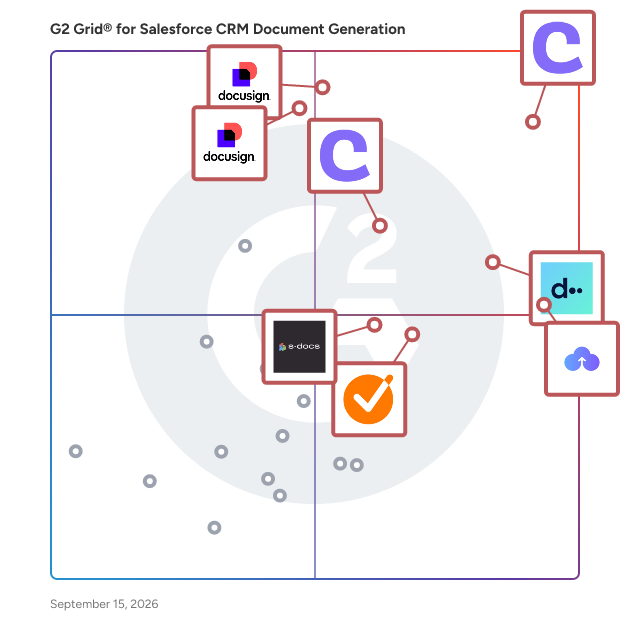
- **Leader:** [Conga Composer](https://www.g2.com/products/conga-composer/reviews)
- **Highest Performer:** [GetAccept](https://www.g2.com/products/getaccept/reviews)
- **Easiest to Use:** [DealHub](https://www.g2.com/products/dealhub/reviews)
- **Top Trending:** [S-Docs](https://www.g2.com/products/s-docs/reviews)
- **Best Free Software:** [Conga Composer](https://www.g2.com/products/conga-composer/reviews)

  
---

**Sponsored**

### Conga Composer

Flexible. Scalable. Embedded. Conga Composer transforms how businesses generate documents Disconnected systems and manual workflows make document generation slow, error-prone, and costly. Conga Composer streamlines this by embedding automated document creation into your existing tools. It supports multiple formats, merges data from any source, and scales effortlessly, empowering teams to deliver accurate, beautifully branded documents faster, with less effort and greater control. Conga Composer excels in document generation with key advantages: Launch Anywhere – Trigger document generation from buttons, flows, Apex, or external systems- no custom code needed. Multi-Format Support – Create Word, PDF, Excel, PowerPoint, and HTML email templates. Dynamic Content – Use conditional logic, charts, dashboards, rich text, and global currencies. High-Volume Ready – Supports large templates (25MB), merged outputs (250MB), and batch processing. Enterprise Scalability – Reusable templates and behaviors across departments and use cases. eSignature Integration – Seamless pairing with Conga Sign for end-to-end agreement workflows. Revenue Lifecycle Alignment – Only vendor that integrates doc gen into CLM, CPQ, and full revenue processes. Admin-Friendly Setup – Built for Salesforce admins and business users—no developer dependency. Proven Performance – Trusted by 8,000+ businesses; millions of documents generated monthly. Future-Ready – Monitoring AI trends to invest when enterprise-grade reliability is guaranteed. With these strengths, Conga Composer delivers a scalable, flexible, and automated solution for efficient document generation.


[Visit website](https://www.g2.com/external_clickthroughs/record?secure%5Bad_program%5D=ppc&amp;secure%5Bad_slot%5D=category_product_list&amp;secure%5Bcategory_id%5D=1119&amp;secure%5Bdisplayable_resource_id%5D=1119&amp;secure%5Bdisplayable_resource_type%5D=Category&amp;secure%5Bmedium%5D=sponsored&amp;secure%5Bplacement_reason%5D=page_category&amp;secure%5Bplacement_resource_ids%5D%5B%5D=1119&amp;secure%5Bprioritized%5D=false&amp;secure%5Bproduct_id%5D=274&amp;secure%5Bresource_id%5D=1119&amp;secure%5Bresource_type%5D=Category&amp;secure%5Bsource_type%5D=category_page&amp;secure%5Bsource_url%5D=https%3A%2F%2Fwww.g2.com%2Fcategories%2Fsalesforce-crm-document-generation%3Fpage%3D2&amp;secure%5Btoken%5D=c12c924728bcaa7af01bcd493984507c47143377c8abafdde322161a90c1ab41&amp;secure%5Burl%5D=https%3A%2F%2Fconga.com%2Fdemo%3Futm_campaign%3Dg2clickcampaign-composer-demo%26utm_source%3Dg2%26utm_medium%3Dreview-site%26utm_content%3D&amp;secure%5Burl_type%5D=book_demo)

---

  ## What Are the Top-Rated Salesforce CRM Document Generation Software Products in 2026?
### 1. [EasySend](https://www.g2.com/products/easysend/reviews)
  EasySend is a no‑code platform for building and automating digital journeys. Forget static forms—turn customer onboarding, applications, quotes, service requests and other processes into personalized, end‑to‑end workflows that work across every channel. You can launch powerful digital experiences without writing code, connect them to your CRM, ERP and other apps to manage customers at scale, and optimize them with built‑in e‑signatures, integrations and analytics. Trusted by enterprises worldwide, EasySend meets stringent security standards—including SOC&amp;nbsp;2, GDPR and HIPAA—and accelerates digital transformation from fast onboarding to enterprise‑grade solutions.


  **Average Rating:** 4.4/5.0
  **Total Reviews:** 16
**How Do G2 Users Rate EasySend?**

- **Has the product been a good partner in doing business?:** 9.3/10 (Category avg: 8.8/10)
- **Ease of Use:** 7.6/10 (Category avg: 8.7/10)
- **Ease of Admin:** 7.1/10 (Category avg: 8.2/10)
- **Quality of Support:** 8.7/10 (Category avg: 8.7/10)

**Who Is the Company Behind EasySend?**

- **Seller:** [EasySend](https://www.g2.com/sellers/easysend)
- **Year Founded:** 2016
- **HQ Location:** Tel Aviv, Israel
- **Twitter:** @easy_send (293 Twitter followers)
- **LinkedIn® Page:** https://www.linkedin.com/company/easysend/ (68 employees on LinkedIn®)

**Who Uses This Product?**
  - **Top Industries:** Insurance
  - **Company Size:** 48% Small-Business, 44% Mid-Market


#### What Are EasySend's Pros and Cons?

**Pros:**

- Efficiency (6 reviews)
- Intuitive (6 reviews)
- Time Saving (6 reviews)
- Customer Support (5 reviews)
- Ease of Use (4 reviews)

**Cons:**

- Slow Performance (4 reviews)
- Integration Issues (3 reviews)
- Not Intuitive (3 reviews)
- Slow Loading (3 reviews)
- Bug Issues (2 reviews)

### 2. [360 Smart Docs](https://www.g2.com/products/360-smart-docs/reviews)
  360 SmartDocs is a 100% native Salesforce document generation app built for teams that run high-volume, high-stakes document workflows. Installed directly from Salesforce AppExchange, it requires no external integrations, no middleware, and no manual data entry. With 360 SmartDocs, users can merge live record data from any standard or custom Salesforce object into professionally designed Word templates, then instantly output customer-ready PDFs or Word documents in a single click. The built-in Word Template Builder supports conditional logic, dynamic tables, multi-level relationship fields (up to five levels deep), and image merge — enabling complex document automation without writing a single line of code. For high-volume needs, bulk document generation lets teams process entire list views or report results at once, eliminating repetitive manual work at month-end, quarter-end, or during large campaign runs. Generated documents automatically sync to Google Drive or attach directly to the originating Salesforce record. Trusted by sales operations, finance, HR, legal, and real estate teams across global enterprises — including clients in financial services, manufacturing, healthcare, and professional services — 360 SmartDocs delivers measurable ROI: faster deal cycles, fewer document errors, and dramatically reduced administrative overhead. With a 4.94 rating on AppExchange and 50+ verified reviews, it is the CRM document generation solution teams rely on.


**Who Is the Company Behind 360 Smart Docs?**

- **Seller:** [360 Degree Cloud Technologies](https://www.g2.com/sellers/360-degree-cloud-technologies)
- **Year Founded:** 2012
- **HQ Location:** Los Angeles, California, United States
- **Twitter:** @360degreecloud (237 Twitter followers)
- **LinkedIn® Page:** https://www.linkedin.com/company/360-degree-cloud/ (796 employees on LinkedIn®)


### 3. [DocGen &amp; Signer](https://www.g2.com/products/docgen-signer/reviews)
  Cloudy DocGen &amp; Signer is a Salesforce-native solution for creating, customizing, and digitally signing documents. It streamlines workflows like contracts, proposals, onboarding forms, and agreements with reusable templates and secure e-signatures.


**Who Is the Company Behind DocGen &amp; Signer?**

- **Seller:** [Cloudy Wave](https://www.g2.com/sellers/cloudy-wave)
- **Year Founded:** 2016
- **HQ Location:** Los Angeles, US
- **LinkedIn® Page:** https://www.linkedin.com/company/cloudywave/ (38 employees on LinkedIn®)


### 4. [Document Generation &amp; eSignature](https://www.g2.com/products/document-generation-esignature/reviews)
  Managing documents is one of the most important yet time-consuming parts of any business process. Businesses use numerous disconnected tools to generate contracts and proposals, collect signatures and approvals electronically, and manage other aspects of their document lifecycle. Document Generation &amp; eSignature is a 100% Salesforce-native solution designed to simplify and automate the entire document lifecycle directly within CRM. Unlike other traditional document management and e-signature apps that store your data outside of Salesforce or require complex integration, Document Generation &amp; eSignature stores all your data securely inside of Salesforce. This allows organizations to maintain stronger security, improve operational efficiency, and eliminate unnecessary manual processes. 𝗙𝗲𝗮𝘁𝘂𝗿𝗲𝘀 𝗮𝗻𝗱 𝗕𝗲𝗻𝗲𝗳𝗶𝘁𝘀 #𝟭 𝗦𝗲𝗮𝗺𝗹𝗲𝘀𝘀 𝗦𝗮𝗹𝗲𝘀𝗳𝗼𝗿𝗰𝗲 𝗜𝗻𝘁𝗲𝗴𝗿𝗮𝘁𝗶𝗼𝗻 Because Document Generation &amp; eSignature is native to Salesforce, you can complete all aspects of your document workflow in one place rather than having to switch between different platforms or utilize external applications. The app enables you to automatically create documents in Salesforce using real time data. Companies no longer have to manually enter data from Salesforce records when creating contracts, agreements, proposals, or forms. By automating this process, you reduce manual effort and minimize the risk of human error. Some of the benefits include: &amp;nbsp;&amp;nbsp;• Automated document generation in Salesforce using live data &amp;nbsp;&amp;nbsp;• Elimination of repetitive manual data entry &amp;nbsp;&amp;nbsp;• Real-time synchronization of updates back into Salesforce &amp;nbsp;&amp;nbsp;• Support for standard and custom Salesforce objects &amp;nbsp;&amp;nbsp;• Centralized Salesforce document management #𝟮 𝗗𝗼𝗰𝘂𝗺𝗲𝗻𝘁 𝗠𝗲𝗿𝗴𝗶𝗻𝗴 𝗮𝗻𝗱 𝗦𝗽𝗹𝗶𝘁𝘁𝗶𝗻𝗴 Managing multiple PDF files manually can quickly become inefficient, especially when teams need to combine, organize, or separate documents during daily operations. Document Generation &amp; eSignature makes it much simpler to manage multiple PDFs by allowing users to merge and divide PDFs (both individually) from inside Salesforce. Users can merge all applicable documents into one PDF that is easy to share, approve, or store. At the same time, teams easily break down larger PDFs and pull out only the necessary sections when needed. This functionality removes the need for teams to download files to their desktops, edit them using external tools, and then upload them back into Salesforce. The traditional manual methods of managing documents not only waste your valuable time but also create unnecessary security risks. Organizations can: &amp;nbsp;&amp;nbsp;• Merge multiple PDF files within Salesforce &amp;nbsp;&amp;nbsp;• Split large documents into smaller sections &amp;nbsp;&amp;nbsp;• Organize files more efficiently &amp;nbsp;&amp;nbsp;• Improve document distribution workflows &amp;nbsp;&amp;nbsp;• Reduce dependency on third-party PDF tools #𝟯 𝗘𝗳𝗳𝗶𝗰𝗶𝗲𝗻𝘁 𝗦𝗶𝗴𝗻𝗶𝗻𝗴 𝗣𝗿𝗼𝗰𝗲𝘀𝘀 Electronic signatures should help simplify business processes, not complicate them Document Generation &amp; eSignature provides organizations with both simple and complex approval workflows with an easy-to-use, flexible signing experience. The platform allows sequential signing for multiple signers, which ensures that documents follow a structured approval path. The signing process is designed to seamlessly serve the interests of all parties involved, such as customers, employees, partners, legal teams, and executives. Key capabilities include: &amp;nbsp;&amp;nbsp;• Sequential signing workflows &amp;nbsp;&amp;nbsp;• Support for multiple signers &amp;nbsp;&amp;nbsp;• Customizable approval structures &amp;nbsp;&amp;nbsp;• Simplified signer experience &amp;nbsp;&amp;nbsp;• Faster document turnaround times #𝟰 𝗧𝗶𝗺𝗲-𝗦𝗮𝘃𝗶𝗻𝗴 𝗮𝗻𝗱 𝗨𝘀𝗲𝗿-𝗙𝗿𝗶𝗲𝗻𝗱𝗹𝘆 One of the biggest issues many companies face when it comes to using document automation software is how complex they are. Most document automation solutions require technical configuration; often they use JSON to map fields, and sometimes you need developers to help with the integration. Document Generation &amp; eSignature takes a different approach and focus on simplicity. Business users can easily create templates and workflow with little to no technical knowledge, thereby reducing the implementation time and enabling teams to become efficient. Benefits include: &amp;nbsp;&amp;nbsp;• Easy-to-use PDF field mapping &amp;nbsp;&amp;nbsp;• No complex JSON configurations &amp;nbsp;&amp;nbsp;• Faster setup and implementation &amp;nbsp;&amp;nbsp;• Reduced dependency on technical teams &amp;nbsp;&amp;nbsp;• Improved productivity for business users #𝟱 𝗦𝗲𝗰𝘂𝗿𝗶𝘁𝘆 𝗮𝗻𝗱 𝗖𝗼𝗺𝗽𝗹𝗶𝗮𝗻𝗰𝗲 If your organization handles sensitive customer or operational data, security and compliance become more criticial. Document Generation &amp; eSignature is designed with advanced security and compliance capabilities to help you maintain strong governance standards while protecting confidential information. 𝙔𝙤𝙪𝙧 𝘿𝙖𝙩𝙖 𝙎𝙩𝙖𝙮𝙨 𝙎𝙚𝙘𝙪𝙧𝙚 𝙒𝙞𝙩𝙝𝙞𝙣 𝙎𝙖𝙡𝙚𝙨𝙛𝙤𝙧𝙘𝙚 As a fully Salesforce-native application, Document Generation &amp; eSignature keeps all documents, signer information, workflow data, and audit records inside Salesforce. This approach provides several important advantages: &amp;nbsp;&amp;nbsp;• No external data storage or transfers &amp;nbsp;&amp;nbsp;• Improved compliance with data protection regulations &amp;nbsp;&amp;nbsp;• Reduced risk of unauthorized access &amp;nbsp;&amp;nbsp;• Stronger governance and security control &amp;nbsp;&amp;nbsp;• Better alignment with Salesforce security architecture Companies retain complete visibility and ownership of all their most sensitive business data. 𝙈𝙪𝙡𝙩𝙞-𝙁𝙖𝙘𝙩𝙤𝙧 𝘼𝙪𝙩𝙝𝙚𝙣𝙩𝙞𝙘𝙖𝙩𝙞𝙤𝙣 (𝙈𝙁𝘼) Document Generation &amp; eSignature enhances document security through multi-factor authentication capabilities. One-time password (OTP) verification ensures only authorized personnel may access and electronically sign documents. This additional layer of authentication helps businesses strengthen identity verification processes and reduce the risk of unauthorized activity. Additional security features include: &amp;nbsp;&amp;nbsp;• OTP-based authentication &amp;nbsp;&amp;nbsp;• Controlled document access &amp;nbsp;&amp;nbsp;• Enhanced signer verification &amp;nbsp;&amp;nbsp;• Protection against unauthorized access &amp;nbsp;&amp;nbsp;• Customizable authentication workflows 𝙎𝙞𝙜𝙣𝙚𝙧 𝙄𝙋 𝙏𝙧𝙖𝙘𝙠𝙞𝙣𝙜 𝙛𝙤𝙧 𝘾𝙤𝙢𝙥𝙡𝙞𝙖𝙣𝙘𝙚 Compliance tracking is another important aspect of secure document management. When a document is accessed, the user&#39;s IP address is captured and stored in Salesforce. This creates a verifiable audit trail that tracks each individual&#39;s access to signed documents. This functionality helps businesses: &amp;nbsp;&amp;nbsp;• Track signer activity &amp;nbsp;&amp;nbsp;• Improve accountability &amp;nbsp;&amp;nbsp;• Support compliance requirements &amp;nbsp;&amp;nbsp;• Maintain detailed audit records &amp;nbsp;&amp;nbsp;• Strengthen document verification processes For many regulated industries, these types of audit functions are vital to documenting and verifying the integrity of agreements and transactions. 𝙚𝙊𝙧𝙞𝙜𝙞𝙣𝙖𝙡 𝙄𝙣𝙩𝙚𝙜𝙧𝙖𝙩𝙞𝙤𝙣 𝙛𝙤𝙧 𝙎𝙚𝙘𝙪𝙧𝙚 𝘿𝙤𝙘𝙪𝙢𝙚𝙣𝙩 𝙑𝙖𝙪𝙡𝙩𝙞𝙣𝙜 Integrate with eOriginal to securely store legally binding documents in a tamper-sealed eVault. Leverage multi-factor authentication, IP tracking, digital signatures, and audit trails for compliance. #𝟲 𝗔𝗱𝘃𝗮𝗻𝗰𝗲𝗱 𝗥𝗲𝗽𝗼𝗿𝘁𝗶𝗻𝗴 𝗮𝗻𝗱 𝗧𝗿𝗮𝗰𝗸𝗶𝗻𝗴 Visibility is essential for efficient Salesforce document management. When an organization does not properly track its documents through each stage of approval, signature or status update, it can cause significant delays in how long it takes to complete those processes. Document Generation &amp; eSignature has several features including advance reporting and tracking tools that allow users to track all stages of their document lifecycle directly within Salesforce. 𝙎𝙞𝙜𝙣𝙞𝙣𝙜 𝘾𝙚𝙧𝙩𝙞𝙛𝙞𝙘𝙖𝙩𝙚 𝘾𝙧𝙚𝙖𝙩𝙞𝙤𝙣 After the signing process is complete, Document Generation &amp; eSignature creates a legally binding electronic signing certificate based upon the information provided during the signing process. The certificate includes important verification details such as: &amp;nbsp;&amp;nbsp;• Signer name &amp;nbsp;&amp;nbsp;• Email address &amp;nbsp;&amp;nbsp;• Timestamp &amp;nbsp;&amp;nbsp;• IP address &amp;nbsp;&amp;nbsp;• Signing activity details 𝙒𝙤𝙧𝙠𝙛𝙡𝙤𝙬 𝙏𝙧𝙖𝙘𝙠𝙞𝙣𝙜 𝙖𝙣𝙙 𝙍𝙚𝙢𝙞𝙣𝙙𝙚𝙧𝙨 The platform enables organizations to monitor document workflows in real time. You can instantly verify: &amp;nbsp;&amp;nbsp;• Envelope status &amp;nbsp;&amp;nbsp;• Document delivery &amp;nbsp;&amp;nbsp;• Signature progress &amp;nbsp;&amp;nbsp;• Completion status &amp;nbsp;&amp;nbsp;• Workflow activity 𝙊𝙏𝙋 𝘼𝙪𝙩𝙝𝙚𝙣𝙩𝙞𝙘𝙖𝙩𝙞𝙤𝙣 𝙈𝙤𝙣𝙞𝙩𝙤𝙧𝙞𝙣𝙜 Document Generation &amp; eSignature logs and tracks all OTP authentication attempts for enhanced security monitoring. This helps organizations: &amp;nbsp;&amp;nbsp;• Identify potential security risks &amp;nbsp;&amp;nbsp;• Monitor authentication activity &amp;nbsp;&amp;nbsp;• Verify signer authenticity &amp;nbsp;&amp;nbsp;• Improve access control visibility 𝘼𝙙𝙫𝙖𝙣𝙘𝙚𝙙 𝙍𝙚𝙥𝙤𝙧𝙩𝙞𝙣𝙜 𝙖𝙣𝙙 𝘿𝙖𝙨𝙝𝙗𝙤𝙖𝙧𝙙𝙨 The platform includes advanced reporting and dashboard capabilities that allow you to gain deeper visibility into document operations. You can track performance metrics, monitor workflow efficiency, and analyze document completion trends directly within Salesforce. Document Generation &amp; eSignature is a comprehensive Salesforce-native solution built to simplify document automation and digital signature vs electronic signature workflows. If you are looking to modernize document management while maximizing your Salesforce investment, Document Generation &amp; eSignature delivers the flexibility, security, and efficiency required to scale with confidence.


**Who Is the Company Behind Document Generation &amp; eSignature?**

- **Seller:** [Cloud Maven](https://www.g2.com/sellers/cloud-maven)
- **Year Founded:** 2015
- **HQ Location:** New York, US
- **LinkedIn® Page:** https://www.linkedin.com/company/cloud-maven-inc (24 employees on LinkedIn®)


### 5. [docuWeaver](https://www.g2.com/products/docuweaver/reviews)
  docuWeaver is a Salesforce document management, document generation, and e-signature solution that enables organizations to manage the complete document lifecycle directly within Salesforce. It allows users to generate documents using Salesforce and external data, store files in Salesforce or external storage systems, send documents for signature using preferred e-signature platforms, and access all documents within Salesforce. docuWeaver is categorized as Salesforce document management software and Salesforce document generation software. It is designed for teams that rely on Salesforce as their system of record and require secure, scalable, and automated document workflows across sales, operations, finance, legal, and service functions. 1. Document Generation The Document Generation module automates document creation using Salesforce and external data sources. Key capabilities: - Create datasets using Salesforce standard and custom objects and external data sources - Generate documents in Word and PDF formats - Support for Salesforce PDF generation -Template-based document creation along with template versioning - Fully automated document generation in Salesforce - Trigger document generation via Salesforce flows - Send automated emails after document generation - Configure reusable email templates 2. E-Signature The E-Signature module enables flexible and automated signing workflows within Salesforce. Key capabilities: - Integrate with multiple Salesforce e-signature platforms - Support for multiple recipients and signing sequences - Track signing status within Salesforce - Automate e-signature workflows as part of document generation 3. Document Management The Document Management module provides centralized control over files while removing Salesforce storage limitations. Key capabilities: - Store documents in Salesforce or any external storage server - Access externally stored files directly within Salesforce - Organize documents using folders and structured hierarchies - Store files based on data residency requirements - Upload any file type and file size - Maintain document versions and revision history - Perform bulk file uploads - Search documents by file name, folder, or content - Control access using Salesforce permissions End-to-End Automation docuWeaver allows organizations to automate the full document lifecycle within a single Salesforce platform: from document generation to e-signature and final storage. Once documents are signed, they can be automatically stored in the preferred storage location and remain accessible within Salesforce records.


  **Average Rating:** 4.5/5.0
  **Total Reviews:** 1

**Who Is the Company Behind docuWeaver?**

- **Seller:** [Enzigma](https://www.g2.com/sellers/enzigma)
- **Year Founded:** 2002
- **HQ Location:** Pune
- **Twitter:** @enzigma (295 Twitter followers)
- **LinkedIn® Page:** https://www.linkedin.com/company/enzigma/ (130 employees on LinkedIn®)


#### What Are docuWeaver's Pros and Cons?

**Pros:**

- Ease of Use (2 reviews)
- Setup Ease (2 reviews)
- Automation (1 reviews)
- Digital Signature (1 reviews)
- Document Management (1 reviews)


### 6. [Impowr‚ö°Excel Data Import for Users](https://www.g2.com/products/impowr-o-excel-data-import-for-users/reviews)
  Excel data loading made easy for users, partners and customers. Impowr provides components for importing spreadsheet data into any Salesforce object. Simple, secure, and powerful.


**Who Is the Company Behind Impowr‚ö°Excel Data Import for Users?**

- **Seller:** [ProvenWorks](https://www.g2.com/sellers/provenworks)
- **Year Founded:** 2008
- **HQ Location:** Reading, GB
- **Twitter:** @provenworks (333 Twitter followers)
- **LinkedIn® Page:** https://www.linkedin.com/company/provenworks/ (19 employees on LinkedIn®)


### 7. [Merge Connect](https://www.g2.com/products/merge-connect/reviews)
  Merge Connect makes document generation for Salesforce easier than ever before. With Merge Connect, you can build templates, generate documents, create automated document generation processes, and access generated documents directly from Salesforce records. BUILD DOCUMENT GENERATION TEMPLATES DIRECTLY IN SALESFORCE. Experience the easiest template builder in the ecosystem. The Merge Connect Template Builder brings an elegant, familiar, no-code experience into a single browser tab. GENERATE DOCUMENTS USING SALESFORCE DATA. Generate PDFs, Microsoft Word documents, and PowerPoint presentations from Salesforce record pages in seconds. AUTOMATE DOCUMENT GENERATION PROCESSES WITH SALESFORCE FLOW. With support for Record-Triggered, Screen, and Autolaunched Flows, The Automate Merge custom Flow action makes it easy to build automated processes that keep your entire org on the same page. VIEW GENERATED DOCUMENTS FROM SALESFORCE RECORD PAGES. The Merged Documents Lightning Component displays generated documents directly in their corresponding record, improving document management and visibility in your org. DOCUMENT GENERATION READY FOR AGENTFORCE. With Agentforce capabilities available at no additional cost, you can enhance your doc gen processes with dynamic, agent-authored content based on the data merged into documents. NO MINIMUM LICENSE REQUIREMENT. With Appiphony apps, there is no minimum to meet when purchasing licenses. Buy what your org needs, nothing more.


**Who Is the Company Behind Merge Connect?**

- **Seller:** [Appiphony](https://www.g2.com/sellers/appiphony)
- **Year Founded:** 2009
- **HQ Location:** Chicago, IL
- **Twitter:** @Appiphony (121 Twitter followers)
- **LinkedIn® Page:** https://www.linkedin.com/company/1675445/ (40 employees on LinkedIn®)


    ## What Is Salesforce CRM Document Generation Software?
  [Sales Acceleration Software](https://www.g2.com/categories/sales-acceleration)
  ## What Software Categories Are Similar to Salesforce CRM Document Generation Software?
    - [Contract Management Software](https://www.g2.com/categories/contract-management)
    - [Proposal Software](https://www.g2.com/categories/proposal)
    - [Salesforce AppExchange Apps](https://www.g2.com/categories/salesforce-appexchange-apps)
    - [E-Signature Software](https://www.g2.com/categories/e-signature)
    - [Document Generation Software](https://www.g2.com/categories/document-generation)

  
---

## How Do You Choose the Right Salesforce CRM Document Generation Software?

### What You Should Know About Salesforce CRM Document Generation Software

### **Salesforce CRM Document Generation Software FAQs**

#### Most Popular FAQs

##### Which Salesforce CRM Document Generation Software has the best reviews?

The best-reviewed tools in this category combine strong document automation with easier day-to-day use and a smoother Salesforce workflow.

- [Conga Composer](https://www.g2.com/products/conga-composer/reviews) - Best for teams that need highly customizable Salesforce-driven proposals, invoices, and sales documents.
- [S-Docs](https://www.g2.com/products/s-docs/reviews) - A strong choice for Salesforce-native document generation with solid automation and less overhead than broader suites.
- [GetAccept](https://www.g2.com/products/getaccept/reviews) - Well-suited for teams that want document generation tied closely to proposals, buyer engagement, and e-signature workflows.
- [XfilesPro](https://www.g2.com/products/xfilespro/reviews) - A good fit for smaller Salesforce teams that want document output and file automation with a simpler user experience.

##### How does Salesforce CRM work?

Salesforce CRM centralizes customer, prospect, pipeline, and account data in one system so sales, service, and revenue teams can track relationships and move work forward from a single record. In a document generation workflow, that means a team can pull data from opportunities, accounts, contacts, quotes, or custom objects and use it to generate proposals, contracts, invoices, onboarding documents, or internal paperwork without rebuilding those documents manually each time.

##### What’s the best way to handle document generation in Salesforce CRM without it being super expensive?

The best low-cost approach is to choose a tool that covers your core templates well, stays close to Salesforce, and does not force you into a broader platform before you actually need it.

- [S-Docs](https://www.g2.com/products/s-docs/reviews) - Best for teams that want Salesforce-native document generation without paying for a larger contract lifecycle stack.
- [DocuSign Gen](https://www.g2.com/products/docusign-gen/reviews)- A practical option for simpler generation and send workflows, especially when ease of use matters more than deep customization.
- [Formstack for Salesforce](https://www.g2.com/products/formstack-for-salesforce/reviews)- Useful for businesses that need straightforward document and form automation without a highly technical setup.
- [Docs Made Easy](https://www.g2.com/products/docs-made-easy/reviews) - A lightweight choice for teams focused on simple Salesforce document creation rather than enterprise process design.

##### Which companies in the Salesforce document generation space are known for the best customer support?

The strongest support reputations in this category come from vendors that help teams troubleshoot template logic, implementation details, and Salesforce-specific workflow issues quickly.

- [S-Docs](https://www.g2.com/products/s-docs/reviews)&amp;nbsp; - Often a strong fit for teams that want responsive help on Salesforce-native document generation and automation.
- [DocuSign Gen](https://www.g2.com/products/docusign-gen/reviews) -&amp;nbsp; Best for organizations that value a simpler product experience backed by familiar support channels.
- [XfilesPro](https://www.g2.com/products/xfilespro/reviews) - A good option for smaller teams that want a more manageable support and setup experience.
- [DocXpert](https://www.g2.com/products/docxpert/reviews) - A niche option for teams that care most about guided setup and hands-on support with templated document output.

##### What are the benefits of document generation applications in Salesforce CRM?

The biggest benefit of document generation in Salesforce CRM is that it turns customer and deal data into consistent, ready-to-send documents without making teams recreate the same work every time. In practice, that means faster proposal creation, fewer manual errors, better template consistency, easier approvals, cleaner handoffs between teams, and a more scalable process for documents like quotes, contracts, renewals, and onboarding materials.

#### Small Business FAQs

##### What is the most affordable Salesforce CRM Document Generation Software for SMBs?

[SMBs](https://www.g2.com/categories/salesforce-crm-document-generation/small-business) get the most value from tools that are simple to deploy and built around core document generation, without the overhead of a full enterprise platform.

- [XfilesPro](https://www.g2.com/products/xfilespro/reviews) - Best for SMBs that want strong usability and document automation without a heavy implementation burden.
- [DocuSign Gen](https://www.g2.com/products/docusign-gen/reviews) - A smart fit for small teams that want simple generation and sending workflows with low friction.
- [Formstack for Salesforce](https://www.g2.com/products/formstack-for-salesforce/reviews) - Useful for SMBs that need document creation plus forms and workflow support in a familiar package.
- [Documill Dynamo](https://www.g2.com/products/documill-dynamo/reviews) - A practical choice for teams that want Salesforce document automation without stepping immediately into full CLM complexity.

##### What is the best Salesforce CRM Document Generation Software for startups?

Startups tend to benefit most from tools that let small teams produce polished customer-facing documents fast, without adding extra administrative burden.

- [GetAccept](https://www.g2.com/products/getaccept/reviews) - Best for startups that want proposals, engagement tracking, chat, and close workflows in one sales motion.
- [XfilesPro](https://www.g2.com/products/xfilespro/reviews) - A good choice for startups that want straightforward Salesforce document automation with less operational drag.
- [DocuSign Gen](https://www.g2.com/products/docusign-gen/reviews) - Ideal for founders and small sales teams that prioritize simplicity and speed to value.
- [Mambo Merge](https://www.g2.com/products/mambo-merge/reviews) - A lightweight option for startups that need basic Salesforce document generation without a large platform commitment.

##### Which Salesforce CRM Document Generation Software is the most user-friendly for startups?

The most user-friendly startup tools tend to be the ones that let teams build, send, and reuse documents without wrestling with too much template logic or admin setup.

- [XfilesPro](https://www.g2.com/products/xfilespro/reviews) - Best for startups that want a smoother learning curve and fast day-to-day document use.
- [GetAccept](https://www.g2.com/products/getaccept/reviews) - Strong for sales-led startups that want document workflows tied to buyer interaction and simple execution.
- [DocuSign Gen](https://www.g2.com/products/docusign-gen/reviews) - A natural pick for small teams that want minimal complexity and fast adoption.
- [Formstack for Salesforce](https://www.g2.com/products/formstack-for-salesforce/reviews) - Helpful for teams that value easier workflows over deep customization.

##### Which Salesforce document generation software is best for small sales teams sending proposals?

For small sales teams, the best document generation tools are the ones that make proposals fast to create, easy to personalize, and simple to send.

- [GetAccept](https://www.g2.com/products/getaccept/reviews) - Best for proposal-driven sales teams that want engagement visibility and follow-up cues.
- [Conga Composer](https://www.g2.com/products/conga-composer/reviews) &amp;nbsp;- A strong fit when proposal formatting, pricing details, and template flexibility matter most.
- [DocuSign Gen](https://www.g2.com/products/docusign-gen/reviews) - Good for teams that want a simpler send-and-sign motion tied to generated documents.

##### What should an SMB look for in Salesforce CRM document generation software?

SMBs should look for software that automates their core documents well, fits their Salesforce setup, and does not create more admin work than it removes. The most important things to evaluate are template flexibility, ease of setup, support quality, how well the product handles approvals or signatures, and whether the product still feels manageable when your team adds more use cases later.

#### Enterprise FAQs

##### What is best-rated Salesforce CRM Document Generation Software for tech enterprises?

[Tech enterprises](https://www.g2.com/categories/salesforce-crm-document-generation/enterprise) typically favor tools that support sophisticated template management, a wide range of document workflows, and more advanced Salesforce requirements across teams.

- [Conga Composer](https://www.g2.com/products/conga-composer/reviews) - Best for enterprises that need highly configurable document generation across sophisticated Salesforce workflows.
- [Conga CLM](https://www.g2.com/products/conga-conga-clm/reviews?)- A strong choice for enterprises that want document generation tied to contract lifecycle management and governance.
- [S-Docs](https://www.g2.com/products/s-docs/reviews)&amp;nbsp; - Well-suited for enterprises that want strong Salesforce-native automation without as much platform sprawl.
- **DocuSign** [CLM](https://www.g2.com/products/docusign-clm/reviews) - A fit for organizations that want document generation aligned with broader contract and approval processes.

##### What is the most reliable Salesforce CRM Document Generation Software tool for enterprises?

For enterprise reliability, the strongest tools are the ones that can consistently generate accurate documents from Salesforce data while supporting complex approvals, renewals, and downstream workflows.

- **DocuSign** [CLM](https://www.g2.com/products/docusign-clm/reviews) - Useful when legal, sales, and operations all need document workflows to stay controlled and auditable.
- [Conga CLM](https://www.g2.com/products/conga-conga-clm/reviews?) - Ideal for enterprises that need reliability across document generation and contract lifecycle orchestration.
- [S-Docs](https://www.g2.com/products/s-docs/reviews) - A dependable choice for teams that prefer a more Salesforce-native operating model.
- [Conga Composer](https://www.g2.com/products/conga-composer/reviews) - Best when reliability means repeatable document output across many Salesforce use cases.

##### What is the best-reviewed Salesforce CRM Document Generation Software for enterprise app integration?

The strongest enterprise integration solutions work well within Salesforce while also connecting smoothly to the broader systems that support quoting, contracts, approvals, and e-signature workflows.

- [Conga Composer](https://www.g2.com/products/conga-composer/reviews) - Best for enterprises that want document generation tightly connected to Salesforce records and downstream document actions.
- [Conga CLM](https://www.g2.com/products/conga-conga-clm/reviews?) - A strong fit when integration needs extend into legal operations, contract workflows, and process governance.
- **DocuSign** [CLM](https://www.g2.com/products/docusign-clm/reviews)&amp;nbsp; - Well-suited for enterprises that need contract workflows to connect with signature, approval, and compliance systems.
- [DealHub.io](https://www.g2.com/products/dealhub-io/reviews) - A good option for revenue teams that want document generation linked more directly to quoting and deal desk workflows.

##### Which Salesforce document generation software is best for contract-heavy enterprises?

For contract-heavy enterprises, the best fit is usually a platform that can generate documents accurately while also supporting approval chains, version control, and lifecycle visibility.

- [Conga CLM](https://www.g2.com/products/conga-conga-clm/reviews?)&amp;nbsp; - Best for organizations that need document generation as part of a full contract lifecycle process.
- **DocuSign** [CLM](https://www.g2.com/products/docusign-clm/reviews) - A strong choice for enterprises that want contracting, approvals, and signatures in a coordinated workflow.
- [Conga Composer](https://www.g2.com/products/conga-composer/reviews)&amp;nbsp; - Useful when contract generation needs are complex but still closely tied to Salesforce record logic.

##### Which Salesforce CRM Document Generation Software is best for large teams with complex template requirements?

For large teams managing complex template logic, the most effective software is the kind that supports many document variations while reducing the need for manual edits.

- [Conga Composer](https://www.g2.com/products/conga-composer/reviews) - Best for organizations that need highly customized templates and dynamic Salesforce data pulls.
- [S-Docs](https://www.g2.com/products/s-docs/reviews) - A strong option for teams that want advanced document automation with a more Salesforce-native feel.
- [Conga CLM](https://www.g2.com/products/conga-conga-clm/reviews?) - A good fit when complex templates are part of broader enterprise contract operations.

Last updated on April 23, 2026


