Best Other Office Software - Page 3

How Many Other Office Software Products Does G2 Track?

Total Products under this Category: 500

Category Stats (Aug 2026)

  • Average Rating: 4.4/5 The average rating of products in this category, based on all submitted ratings
  • Top Trending Product: GAT Labs (+0.17%) - Among all products in this category, GAT Labs recorded the largest rating increase compared to last month

Last updated: August 15, 2026

How Does G2 Rank Other Office Software Products?

Why You Can Trust G2's Software Rankings:

  • 30 Analysts and Data Experts
  • 1,100+ Authentic Reviews
  • 500+ Products
  • Unbiased Rankings

G2's software rankings are built on verified user reviews, rigorous moderation, and a consistent research methodology maintained by a team of analysts and data experts. Each product is measured using the same transparent criteria, with no paid placement or vendor influence. While reviews reflect real user experiences, which can be subjective, they offer valuable insight into how software performs in the hands of professionals. Together, these inputs power the G2 Score, a standardized way to compare tools within every category.

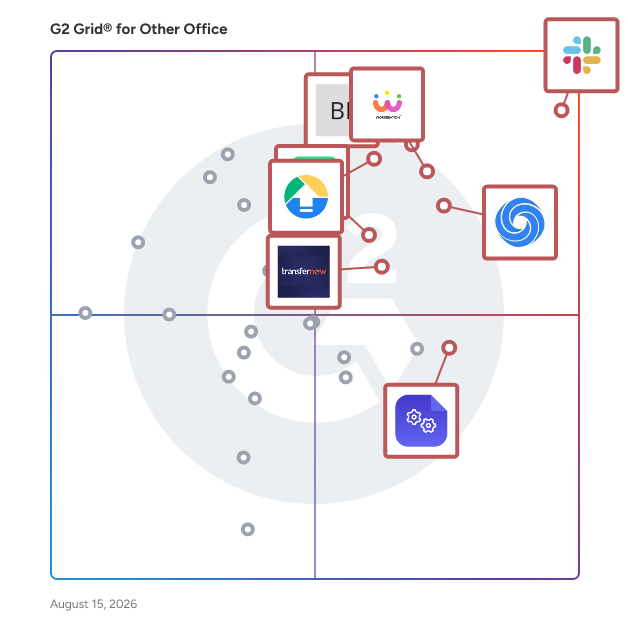
G2 Grid® for Other Office Software

G2 Grid® for Other Office Software plotting products by satisfaction and market presence

Highlighted products: Slack Connector for Jira, Google Drive & Docs for Confluence, Workreation®, NoteGPT, Drive Uploader, Diffchecker, TransferNow, and DocsAutomator.

Underlying data: [Grid® JSON](https://www.g2.com/categories/other-office/grids.json?focus%5B%5D=slack-connector-for-jira&focus%5B%5D=google-drive-docs-for-confluence&focus%5B%5D=workreation&focus%5B%5D=notegpt&focus%5B%5D=drive-uploader&focus%5B%5D=diffchecker&focus%5B%5D=transfernow&focus%5B%5D=docsautomator)

Snippyly

Snippyly is a privacy focused screen capture & collaboration tool. Instantly share your thoughts via a link. No more endless back & forth with your team or clients! Capture your screen, crop, draw, add comments and share instantly using a private link. Snippyly is faster than typing an email or meeting live. Snippyly screenshots are instantly ready to share and accessible on any device. No installations required. Snippyly is an external version of Google's most used internal productivity and collaboration tool, built by two ex Googlers. Simple, no non-sense, no ads, no spyware, and no blanket permissions. Snippyly enhances the way you communicate at work: ✅ Highlight important stuff ✅ Explain by showing vs typing endlessly ✅ Report bugs and give clear feedback ✅ Add helpful visuals to your how-to tutorials

Average Rating: 4.5/5.0

Total Reviews: 8

How Do G2 Users Rate Snippyly?

  • Quality of Support: 8.1/10 (Category avg: 8.7/10)
  • Ease of Use: 8.6/10 (Category avg: 9.0/10)

Who Is the Company Behind Snippyly?

  • Seller: Snippyly
  • Year Founded: 2020
  • HQ Location: San Francisco, CA
  • LinkedIn® Page: www.linkedin.com
    1 employees on LinkedIn®

Who Uses This Product?

  • Company Size: 33% Large, 33% Medium

What Are Recent G2 Reviews of Snippyly?

What Are G2 Users Discussing About Snippyly?

ManageEngine Free Windows Admin Tools

Free Windows Admin Tools, helps the IT Administrator in day to day desktop management routines.This windows tool helps in operations like Remote desktop connection, Remote task manager, Software inventory, Remote shutdown, Remote restart , Wake on LAN tool, System inventory tool, Perform Group Policy update, Hard disk space monitor, Remote command prompt, Remote device manager, Local Users/Groups List, Network Share Browser, Join/Unjoin Computer, Currently Logged On User,Laptop Battery Power Monitor from a single console. Download Now from this link https://www.manageengine.com/products/free-windows-tools/download.html

Average Rating: 4.0/5.0

Total Reviews: 7

How Do G2 Users Rate ManageEngine Free Windows Admin Tools?

  • Quality of Support: 7.8/10 (Category avg: 8.7/10)
  • Ease of Use: 7.7/10 (Category avg: 9.0/10)

Who Is the Company Behind ManageEngine Free Windows Admin Tools?

  • Seller: Zoho
  • Year Founded: 1996
  • HQ Location: Austin, TX
  • Twitter: @Zoho
    137,880 Twitter followers
  • LinkedIn® Page: www.linkedin.com
    30,766 employees on LinkedIn®
  • Phone: +1 (888) 900-9646

Who Uses This Product?

  • Company Size: 100% Medium

What Are Recent G2 Reviews of ManageEngine Free Windows Admin Tools?

neep

neep is a noise cancelling software to remove unwanted background noise like people talking, typing, or dogs barking so users can have more productive meetings and phone calls without disruptions.

Average Rating: 5.0/5.0

Total Reviews: 7

How Do G2 Users Rate neep?

  • Quality of Support: 10.0/10 (Category avg: 8.7/10)
  • Ease of Use: 9.5/10 (Category avg: 9.0/10)

Who Is the Company Behind neep?

  • Seller: Headset Advisor
  • Year Founded: 1994
  • HQ Location: Rancho Cordova, US
  • Twitter: @HeadsetAdvisor
    368 Twitter followers
  • LinkedIn® Page: www.linkedin.com
    25 employees on LinkedIn®

Who Uses This Product?

  • Company Size: 71% Small, 14% Medium

What Are Recent G2 Reviews of neep?

ClipClip

ClipClip is a free clipboard management software for Windows that will revolutionize the way you copy and paste. ClipClip makes it possible to copy multiple texts, images or files to your clipboard. You can then browse or search through these Latest Clips, or convert them to Saved Clips so you can assign a title and organize them into folders to use later on. By pressing CTRL+SHIFT+V you can view a list of all of your past clips, so you can paste without losing focus of what you were working on. Whether you’re an engineer, lawyer, manager, executive, accountant, salesperson, office clerk, customer support rep or just someone who uses Copy & Paste frequently, ClipClip can make you more productive!

Average Rating: 4.7/5.0

Total Reviews: 6

How Do G2 Users Rate ClipClip?

  • Quality of Support: 7.2/10 (Category avg: 8.7/10)
  • Ease of Use: 9.2/10 (Category avg: 9.0/10)

Who Is the Company Behind ClipClip?

  • Seller: Vitzo, Ltd.
  • Year Founded: 2007
  • HQ Location: N/A
  • Twitter: @VitzoES
    29 Twitter followers
  • LinkedIn® Page: www.linkedin.com
    12 employees on LinkedIn®

Who Uses This Product?

  • Company Size: 67% Small, 33% Medium

What Are Recent G2 Reviews of ClipClip?

What Are G2 Users Discussing About ClipClip?

Tabs Outliner

Tabs Outliner is a comprehensive Chrome extension that combines tab management, session management, and personal information organization into a single, efficient tool. It allows users to manage numerous open tabs by organizing them in a flexible, tree-like structure, enabling easy annotation, saving, and restoration of tabs and windows in their original context. This approach significantly reduces browser resource usage and enhances productivity by maintaining a clear overview of all open and saved tabs. Key Features and Functionality: - Hierarchical Organization: Arrange tabs and windows in a customizable tree structure, facilitating logical grouping and prioritization. - Session Management: Save and close entire sessions with a single click, preserving the context and structure for future restoration. - Annotations and Notes: Add comments, summaries, and to-do items directly to tabs or groups, enhancing organization and recall. - Drag-and-Drop Interface: Easily reorder tabs and windows within the tree to reflect changing priorities or workflows. - Crash Resistance and Restore: After a browser crash, selectively reopen only the necessary windows or tabs without losing others, maintaining the original context. - Export and Share: Export annotated tab lists to Google Docs, Word, Evernote, email, or messaging platforms for collaboration or record-keeping. - Procrastination Stopper: Close and save all open windows and tabs with one click, helping to regain focus and improve PC responsiveness. Primary Value and User Solutions: Tabs Outliner addresses the common challenge of managing numerous open tabs, which can lead to browser slowdowns and decreased productivity. By providing a structured, tree-like interface, it enables users to organize, annotate, and save tabs efficiently, reducing clutter and resource consumption. The extension's session management and crash recovery features ensure that users can maintain their workflow continuity without the risk of losing important information. Additionally, the ability to export and share tab structures facilitates collaboration and information sharing among teams. Overall, Tabs Outliner enhances browsing efficiency and organization, making it an invaluable tool for users who handle multiple tabs and projects simultaneously.

Average Rating: 4.0/5.0

Total Reviews: 6

How Do G2 Users Rate Tabs Outliner?

  • Quality of Support: 7.2/10 (Category avg: 8.7/10)
  • Ease of Use: 7.9/10 (Category avg: 9.0/10)

Who Is the Company Behind Tabs Outliner?

Who Uses This Product?

  • Company Size: 57% Medium, 43% Small

What Are Recent G2 Reviews of Tabs Outliner?

ClipBook

ClipBook is a macOS productivity tool designed for professionals who work extensively with text, data, and repetitive content throughout their daily workflows. It provides a structured clipboard history that allows users to store, search, organize, and reuse copied content efficiently, reducing context switching and eliminating the need to repeatedly recreate the same information. ClipBook is commonly used by software developers, QA engineers, marketers, product managers, and content creators who need fast access to code snippets, test data, templates, links, and frequently reused text. The app helps streamline professional workflows by keeping copied items available, searchable, and categorized. Key capabilities include configurable clipboard history retention, favorites management, keyboard-driven navigation, and full control over how long different types of clipboard items are stored. This allows teams and individual professionals to balance productivity with data control and disk usage. ClipBook is a macOS-native desktop application available via a one-time purchase, making it suitable for freelancers, small teams, and organizations that prefer simple licensing without subscriptions.

Average Rating: 5.0/5.0

Total Reviews: 5

How Do G2 Users Rate ClipBook?

  • Quality of Support: 10.0/10 (Category avg: 8.7/10)
  • Ease of Use: 10.0/10 (Category avg: 9.0/10)

Who Is the Company Behind ClipBook?

Who Uses This Product?

  • Company Size: 100% Small

What Are Recent G2 Reviews of ClipBook?

ExtendSync

With direct integration between NetSuite and Microsoft Outlook or Google Workspace, ExtendSync provides a solution for NetSuite CRM data updates, storage savings, email attachments, and calendar syncing all from one email-based app. Stay in your inbox and set up ExtendSync to automatically attach emails and files, sync calendar events, and create, edit, and delete contact records from email to NetSuite. Give your teams instant organizational visibility into important communications, documents, and connections with a solution that can be configured within 30 minutes or less. With ExtendSync, your teams are empowered to save time and increase productivity. ExtendSync, part of NetSuite’s Built for NetSuite program, automates the process of adding emails, calendar events, and file attachments to the CRM. Users no longer have to spend their valuable time adding these manually. Add Autopilot and automatically add entire email chains to NetSuite based on a thread or a particular email address. Key features: Create and edit NetSuite records directly from your inbox One-click addition of emails, attachments, and events to NetSuite records Reduce storage costs by leveraging SharePoint, OneDrive, or Google Drive in NetSuite by associating files and folders with NetSuite records Using Autopilot, attach an email thread to NetSuite once and ensure that the entire conversation is visible in NetSuite without any user action required. Or attach automatically based on a particular sender or recipient email address. Eliminate duplicate emails: ExtendSync alerts you if an email has already been attached by you or a colleague CloudExtend empowers users to make faster, more insightful decisions by creating innovative, user-friendly applications that integrate workplace productivity tools with platforms they use every day to automatically add emails, events, and files to NetSuite from Gmail and Outlook, or use Excel and Power BI to improve reporting and analysis capabilities for popular data sources. Our integration apps eliminate hundreds of manual work hours, significantly reduce data import times, and facilitate a 360-degree view of customer activity.

Average Rating: 4.3/5.0

Total Reviews: 14

How Do G2 Users Rate ExtendSync?

  • Quality of Support: 9.0/10 (Category avg: 8.7/10)
  • Ease of Use: 8.9/10 (Category avg: 9.0/10)

Who Is the Company Behind ExtendSync?

  • Seller: CloudExtend by Celigo
  • Year Founded: 2007
  • HQ Location: Redwood City, US
  • Twitter: @cloudextendIO
    253 Twitter followers
  • LinkedIn® Page: www.linkedin.com
    17 employees on LinkedIn®

Who Uses This Product?

  • Company Size: 64% Small, 36% Medium

What Do G2 Reviewers Say About ExtendSync?

AI-generated summary from verified user reviews

Pros
  • Users appreciate the ability to attach emails to customer records, enhancing organization and accessibility in document management.
Cons
  • Users experience technical difficulties when attempting to attach items to Netsuite, leading to frustration and inefficiency.

What Are Recent G2 Reviews of ExtendSync?

What Are G2 Users Discussing About ExtendSync?

Lindo

LINDO Software for Integer Programming, Linear Programming, Nonlinear Programming, Stochastic Programming, Global Optimization

Average Rating: 4.6/5.0

Total Reviews: 5

How Do G2 Users Rate Lindo?

  • Quality of Support: 8.7/10 (Category avg: 8.7/10)
  • Ease of Use: 8.3/10 (Category avg: 9.0/10)

Who Is the Company Behind Lindo?

  • Seller: LINDO Systems
  • Year Founded: 1981
  • HQ Location: CHICAGO, US
  • Twitter: @LindoSystems
    245 Twitter followers
  • LinkedIn® Page: www.linkedin.com
    10 employees on LinkedIn®

Who Uses This Product?

  • Company Size: 60% Small, 40% Medium

What Are Recent G2 Reviews of Lindo?

What Are G2 Users Discussing About Lindo?

Officeluv

OfficeLuv creates happier and more productive workplaces by centralizing office ordering through one platform. With dozens of vendors and thousands of products, OfficeLuv consolidates all your ordering to help office management teams order supplies and groceries, manage vendors, gather employee insights, and analyze office spend.

Average Rating: 4.7/5.0

Total Reviews: 5

How Do G2 Users Rate Officeluv?

  • Quality of Support: 10.0/10 (Category avg: 8.7/10)
  • Ease of Use: 9.4/10 (Category avg: 9.0/10)

Who Is the Company Behind Officeluv?

  • Seller: Officeluv
  • Year Founded: 2015
  • HQ Location: Chicago, US
  • Twitter: @OfficeLuv
    595 Twitter followers
  • LinkedIn® Page: www.linkedin.com
    29 employees on LinkedIn®

Who Uses This Product?

  • Company Size: 60% Medium, 20% Large

What Are Recent G2 Reviews of Officeluv?

What Are G2 Users Discussing About Officeluv?

Revoluspace

Build stronger connections and improve office management with a solution entirely integrated within Slack and Microsoft Teams

Average Rating: 5.0/5.0

Total Reviews: 5

How Do G2 Users Rate Revoluspace?

  • Quality of Support: 10.0/10 (Category avg: 8.7/10)
  • Ease of Use: 10.0/10 (Category avg: 9.0/10)

Who Is the Company Behind Revoluspace?

Who Uses This Product?

  • Company Size: 100% Medium

What Are Recent G2 Reviews of Revoluspace?

Doc.Office

Doc.Office is a powerful tool adapted to the most demanding. The solution works at the production level and offers unmatched scalability in today's market. The software allows from your applications (Word, Excel, PowerPoint, Outlook, the office or the Windows file system) to convert the files to PDF or leave them in their original format, integrate and transform the attached files for Outlook, classifying and indexing them according to their wishes. Integration with all systems: Doc.Office has a series of connectors that allow you to connect to all your applications in a few clicks, be it SharePoint, AIRS, Alfresco, Nuxeo, DropBox, GoogleDoc, Google Drive, Bonita, and many others such as, For example, all business applications. The solution also allows a standard export of fields in XML or CSV and transform your documents into PDF / A. Doc.Office grants the possibility to communicate with other ODBC compliant databases. Thanks to its flexibility, Doc.Office is imposed as the application, for all systems, which allows users to insert and sort all documents quickly and simply.

Average Rating: 4.3/5.0

Total Reviews: 4

How Do G2 Users Rate Doc.Office?

  • Quality of Support: 9.2/10 (Category avg: 8.7/10)
  • Ease of Use: 9.2/10 (Category avg: 9.0/10)

Who Is the Company Behind Doc.Office?

  • Seller: Doc.Series
  • Year Founded: 2014
  • HQ Location: Bevaix, CH
  • Twitter: @Doc_Series
    24 Twitter followers
  • LinkedIn® Page: www.linkedin.com
    10 employees on LinkedIn®

Who Uses This Product?

  • Company Size: 50% Medium, 25% Large

What Are Recent G2 Reviews of Doc.Office?

What Are G2 Users Discussing About Doc.Office?

Draftable

Draftable is an Enterprise-Grade Document Comparison Software that lets users easily spot changes between documents. Draftable is designed for easy use, prioritises data security, and is enterprise-ready. Having been used to compare over 10 million documents, it has been perfected and honed for heavy-duty use.

Average Rating: 4.4/5.0

Total Reviews: 4

How Do G2 Users Rate Draftable?

  • Quality of Support: 8.3/10 (Category avg: 8.7/10)
  • Ease of Use: 7.5/10 (Category avg: 9.0/10)

Who Is the Company Behind Draftable?

  • Seller: Draftable
  • Year Founded: 2012
  • HQ Location: Melbourne, AU
  • Twitter: @WeAreDraftable
    237 Twitter followers
  • LinkedIn® Page: www.linkedin.com
    24 employees on LinkedIn®

Who Uses This Product?

  • Company Size: 75% Small, 25% Medium

What Are Recent G2 Reviews of Draftable?

Inalambria

Inalambria offers enterprise messaging solutions.

Average Rating: 4.0/5.0

Total Reviews: 4

How Do G2 Users Rate Inalambria?

  • Quality of Support: 7.5/10 (Category avg: 8.7/10)
  • Ease of Use: 6.7/10 (Category avg: 9.0/10)

Who Is the Company Behind Inalambria?

Who Uses This Product?

  • Company Size: 50% Medium, 25% Small

What Do G2 Reviewers Say About Inalambria?

AI-generated summary from verified user reviews

Pros
  • Users value the convenience of Inalambria for effortlessly sending mass SMS alerts and scheduling messages.
  • Users value the ease of use in Inalambria, appreciating its simple message design and scheduling features.
  • Users appreciate the simplicity of design and scheduling, enhancing outreach with mass SMS alerts effectively.
Cons
  • Users find the missing language support in Inalambria limiting, especially for multicultural service needs.

What Are Recent G2 Reviews of Inalambria?

What Are G2 Users Discussing About Inalambria?

LibreOffice Math

Math is LibreOffice's formula editor, and can be invoked in your text documents, spreadsheets, presentations and drawings, enabling you to insert perfectly formatted mathematical and scientific formulas. Your formulas can include a wide range of elements, from fractions, terms with exponents and indices, integrals, and mathematical functions, to inequalities, systems of equations, and matrices.

Average Rating: 4.1/5.0

Total Reviews: 4

How Do G2 Users Rate LibreOffice Math?

  • Quality of Support: 7.8/10 (Category avg: 8.7/10)
  • Ease of Use: 9.4/10 (Category avg: 9.0/10)

Who Is the Company Behind LibreOffice Math?

  • Seller: LibreOffice
  • Year Founded: 2010
  • HQ Location: Berlin, DE
  • Twitter: @libreoffice
    79,608 Twitter followers
  • LinkedIn® Page: www.linkedin.com
    31 employees on LinkedIn®

Who Uses This Product?

  • Company Size: 75% Small, 25% Medium

What Are Recent G2 Reviews of LibreOffice Math?

Paraphraser

Paraphrase Tool is an AI-powered writing assistant designed to help users rephrase and enhance text across more than 100 languages. It offers 20 distinct paraphrasing modes, including summarization, text simplification, and sentence shortening, catering to a wide range of writing needs. The platform also features a "Compose" mode, enabling users to generate coherent paragraphs from provided keywords, streamlining the content creation process. Additionally, Paraphrase Tool includes a robust plagiarism checker that supports over 50 languages, ensuring the originality of your work. With its advanced AI capabilities, the tool maintains the original meaning of the text while improving clarity and fluency, making it an invaluable resource for students, professionals, and content creators alike. Key Features: - Multiple Paraphrasing Modes: Offers 20 different modes, such as summarization, simplification, and sentence shortening, to suit various writing requirements. - Multilingual Support: Supports paraphrasing and composing in over 100 languages, making it accessible to a global audience. - Compose Mode: Generates coherent paragraphs from user-provided keywords, aiding in faster content creation. - Plagiarism Checker: Ensures text originality by checking for plagiarism in more than 50 languages. - Grammar Checking: Includes a free grammar checker to enhance the quality and readability of the text. Primary Value and User Solutions: Paraphrase Tool addresses common challenges in writing by providing users with the means to rephrase text effectively, generate content quickly, and ensure originality. Its diverse paraphrasing modes and multilingual support make it suitable for a wide range of users, including students seeking to improve essays, professionals drafting reports, and content creators aiming for unique and engaging material. By leveraging advanced AI technology, Paraphrase Tool enhances writing efficiency, clarity, and originality, ultimately helping users communicate their ideas more effectively.

Average Rating: 4.4/5.0

Total Reviews: 4

How Do G2 Users Rate Paraphraser?

  • Quality of Support: 9.4/10 (Category avg: 8.7/10)
  • Ease of Use: 8.3/10 (Category avg: 9.0/10)

Who Is the Company Behind Paraphraser?

Who Uses This Product?

  • Company Size: 75% Medium, 50% Small

What Are Recent G2 Reviews of Paraphraser?

Neeraja Prakash
NP
Researched and written by Neeraja Prakash
Updated June 16, 2025