  # Best Online Form Builder Software - Page 6

  *By [Neeraja Prakash](https://research.g2.com/insights/author/neeraja-prakash)*

   Online form builder software allows users to create fillable forms, including surveys, quizzes, and questionnaires, using a drag-and-drop interface, collect responses, and store submission data within the application itself.

### Core Capabilities of Online Form Builder Software

To qualify for inclusion in the Online Form Builder category, a product must:

- Offer a drag-and-drop or simplified interface for building fillable forms
- Provide native form building features without relying on integrations
- Allow users to share forms or embed them on websites for data collection
- Provide analytics on form submission data
- Offer multiple templates for distinct types of fillable forms

### Common Use Cases for Online Form Builder Software

Online form builders are used by teams across functions to quickly gather structured information from internal or external audiences. Common use cases include:

- Collecting lead information from potential customers or clients
- Running internal surveys and feedback forms
- Embedding registration or intake forms on web pages

### How Online Form Builder Software Differs from Other Tools

Some online form builders operate as standalone solutions, while tools like [CRM software](https://www.g2.com/categories/crm), [lead capture software](https://www.g2.com/categories/lead-capture), and [survey software](https://www.g2.com/categories/survey) may include form building as a secondary feature. Dedicated online form builders distinguish themselves through native form creation, robust templating, and broad integration support for sharing and exporting data.

### Insights from G2 on Online Form Builder Software

Based on category trends on G2, ease of use and the variety of available templates stand out as primary strengths. The ability to embed forms directly on websites and quickly analyze submission data is frequently noted as a major productivity benefit.


## How Many Online Form Builder Software Products Does G2 Track?
**Total Products under this Category:** 408

### Category Stats (May 2026)
- **Average Rating**: 4.48/5 (↑0.01 vs Apr 2026)
- **New Reviews This Quarter**: 674
- **Buyer Segments**: Small-Business 67% │ Mid-Market 26% │ Enterprise 7%
- **Top Trending Product**: SurveyKing (+0.25)
*Last updated: May 18, 2026*

  
## How Does G2 Rank Online Form Builder Software Products?

**Why You Can Trust G2's Software Rankings:**

- 30 Analysts and Data Experts
- 103,800+ Authentic Reviews
- 408+ Products
- Unbiased Rankings

G2's software rankings are built on verified user reviews, rigorous moderation, and a consistent research methodology maintained by a team of analysts and data experts. Each product is measured using the same transparent criteria, with no paid placement or vendor influence. While reviews reflect real user experiences, which can be subjective, they offer valuable insight into how software performs in the hands of professionals. Together, these inputs power the G2 Score, a standardized way to compare tools within every category.

  
## Top Online Form Builder Software at a Glance
| # | Product | Rating | Best For | What Users Say |
|---|---------|--------|----------|----------------|
| 1 | [Jotform](https://www.g2.com/products/jotform/reviews) | 4.7/5.0 (4,913 reviews) | Multi-step forms with payment and e-signature | "[Helpful for Multiple Registration in One Form](https://www.g2.com/survey_responses/jotform-review-12892930)" |
| 2 | [SurveyMonkey](https://www.g2.com/products/surveymonkey/reviews) | 4.4/5.0 (23,199 reviews) | Survey feedback with built-in analytics and AI | "[Build with AI Makes Survey Creation Fast and Effortless](https://www.g2.com/survey_responses/surveymonkey-review-12696624)" |
| 3 | [Typeform](https://www.g2.com/products/typeform/reviews) | 4.5/5.0 (975 reviews) | Conversational forms with conditional logic and branding | "[Flexible, Easy-to-Use, Robust, and Fits the Budget](https://www.g2.com/survey_responses/typeform-review-12873950)" |
| 4 | [Microsoft Forms](https://www.g2.com/products/microsoft-forms/reviews) | 4.4/5.0 (458 reviews) | Microsoft 365-native surveys with Excel integration | "[Simple and Practical Tool for Managing forms, Follow ups, and Daily Information Collection](https://www.g2.com/survey_responses/microsoft-forms-review-12786461)" |
| 5 | [ClickUp](https://www.g2.com/products/clickup/reviews) | 4.6/5.0 (12,005 reviews) | Form-triggered task automation across connected workflows | "[Powerful with Seamless Integrations, Slight Learning Curve](https://www.g2.com/survey_responses/clickup-review-12883187)" |
| 6 | [ActiveCampaign](https://www.g2.com/products/activecampaign/reviews) | 4.4/5.0 (14,153 reviews) | Lead-capture forms wired into CRM automations | "[Clear UI and Best-in-Class Automations Make CRM Management Effortless](https://www.g2.com/survey_responses/activecampaign-review-12689317)" |
| 7 | [Laserfiche](https://www.g2.com/products/laserfiche/reviews) | 4.7/5.0 (1,205 reviews) | Government forms with automated retention workflows | "[Document Management and Automation](https://www.g2.com/survey_responses/laserfiche-review-3536890)" |
| 8 | [Adobe Acrobat Sign](https://www.g2.com/products/adobe-acrobat-sign/reviews) | 4.4/5.0 (1,015 reviews) | Multi-party contract signing with Adobe integration | "[Fraud-Proof Document Signing, Easy Setup](https://www.g2.com/survey_responses/adobe-acrobat-sign-review-12723943)" |
| 9 | [Tally](https://www.g2.com/products/tally-forms-tally/reviews) | 4.9/5.0 (128 reviews) | Notion-style form building with conditional logic | "[Fast, Minimalist Form Builder with Polished Results, Plus Unlimited Free Forms](https://www.g2.com/survey_responses/tally-review-12703783)" |
| 10 | [PandaDoc](https://www.g2.com/products/pandadoc/reviews) | 4.7/5.0 (3,312 reviews) | Contract workflows with e-signature and payment collection | "[Time-Saving Templates with Few Limitations](https://www.g2.com/survey_responses/pandadoc-review-12240403)" |

  
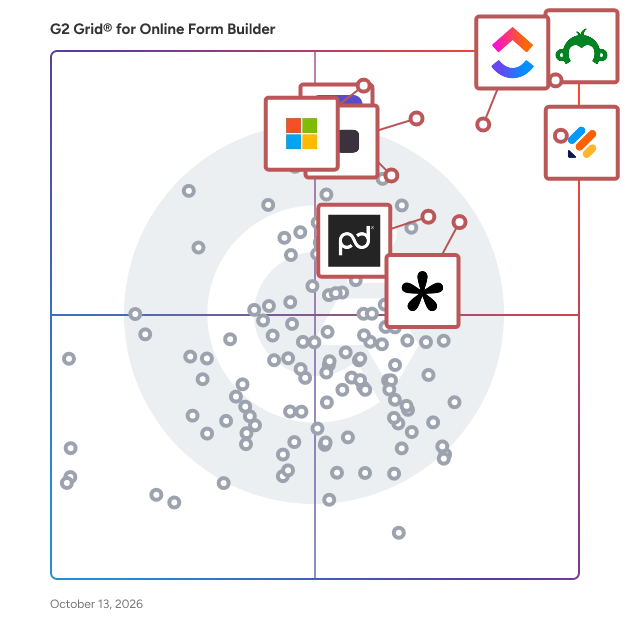
## Which Online Form Builder Software Is Best for Your Use Case?

- **Leader:** [Jotform](https://www.g2.com/products/jotform/reviews)
- **Highest Performer:** [Paperform](https://www.g2.com/products/paperform/reviews)
- **Easiest to Use:** [PandaDoc](https://www.g2.com/products/pandadoc/reviews)
- **Top Trending:** [Tally](https://www.g2.com/products/tally-forms-tally/reviews)
- **Best Free Software:** [SurveyMonkey](https://www.g2.com/products/surveymonkey/reviews)

  
## Which Type of Online Form Builder Software Tools Are You Looking For?
  - [Online Form Builder Software](https://www.g2.com/categories/online-form-builder) *(current)*
  - [Survey Software](https://www.g2.com/categories/survey)
  - [CRM Software](https://www.g2.com/categories/crm)
  - [Lead Capture Software](https://www.g2.com/categories/lead-capture)

  
---

**Sponsored**

### Alchemer Survey

Alchemer Survey is a professional survey platform that helps organizations collect feedback, analyze results, and turn insights into action across customer experience, employee engagement, and market research programs. Designed for teams that need more power and flexibility than basic survey tools — without the complexity of enterprise research platforms — Alchemer Survey scales from a single project to organization-wide feedback programs. What is Alchemer Survey used for? Alchemer Survey is used to run customer satisfaction (CSAT) surveys, Net Promoter Score (NPS) programs, market research studies, employee engagement surveys, product feedback loops, and academic or organizational research. It supports both one-off surveys and ongoing, multi-wave feedback programs across industries including technology, healthcare, education, financial services, and retail. Who is Alchemer Survey for? Alchemer Survey is built for researchers, CX professionals, HR teams, marketers, and product managers who need advanced survey logic and reporting without requiring dedicated IT or data science support. It serves organizations of all sizes — from small teams running targeted studies to enterprises managing global, multi-language feedback programs. Key capabilities: - Advanced survey building with branching logic, piping, randomization, and skip patterns — enabling highly tailored respondent experiences - Pre-built templates for common use cases alongside full custom-build options, so teams can launch fast or go deep - Omnichannel distribution via email, web, SMS, embedded links, QR codes, and social media — maximizing reach and response rates - Real-time reporting and analytics with live dashboards, response filtering, cross-tabulation, and exportable reports for easy stakeholder sharing - Multi-language support for global research programs, with role-based permissions to manage access and data governance at scale - Scalable architecture that grows with organizational needs — from a single survey to enterprise-wide feedback operations How does Alchemer Survey compare to other survey platforms? Alchemer Survey sits between simple tools like SurveyMonkey and Google Forms and enterprise platforms like Qualtrics. It offers research-grade features — advanced logic, robust reporting, and flexible distribution — at a price point and implementation complexity accessible to mid-market teams. Organizations that have outgrown basic tools but don&#39;t need (or want to pay for) a full enterprise suite consistently cite Alchemer Survey as a preferred alternative. Bottom line: Alchemer Survey gives organizations the tools to ask smarter questions, reach the right audiences, and act on what they learn — whether running a quick pulse survey or a comprehensive global research program.


[Visit website](https://www.g2.com/external_clickthroughs/record?secure%5Bad_program%5D=ppc&amp;secure%5Bad_slot%5D=category_product_list&amp;secure%5Bcategory_id%5D=1253&amp;secure%5Bdisplayable_resource_id%5D=1253&amp;secure%5Bdisplayable_resource_type%5D=Category&amp;secure%5Bmedium%5D=sponsored&amp;secure%5Bplacement_reason%5D=page_category&amp;secure%5Bplacement_resource_ids%5D%5B%5D=1253&amp;secure%5Bprioritized%5D=false&amp;secure%5Bproduct_id%5D=1627&amp;secure%5Bresource_id%5D=1253&amp;secure%5Bresource_type%5D=Category&amp;secure%5Bsource_type%5D=category_page&amp;secure%5Bsource_url%5D=https%3A%2F%2Fwww.g2.com%2Fcategories%2Fonline-form-builder%3Fpage%3D15&amp;secure%5Btoken%5D=b843a33a65b2ffec4a78a94cd9c392edbffc5824942138d74325c438ac870f5d&amp;secure%5Burl%5D=https%3A%2F%2Fwww.alchemer.com%2Fl%2Falchemer-survey-g2-ppc%2F&amp;secure%5Burl_type%5D=book_demo)

---

  
## Buyer Guide: Key Questions for Choosing Online Form Builder Software Software
  ### What does Online Form Builder software do?
  I define Online Form Builder software as a no-code system for creating, publishing, and managing digital forms that collect structured information. Across the G2 feedback I analyzed, users connect this category with surveys, questionnaires, intake forms, registration pages, order forms, payments, e-signatures, CRM sync, conditional logic, and response tracking. These tools help teams turn customer, employee, student, patient, or lead information into clean submissions that can be reviewed, routed, exported, or pushed into other systems. The category matters most when teams want to replace PDFs, email back-and-forth, handwritten details, and spreadsheet-based collection with forms that are easier to send, complete, and manage.


  ### Why do businesses use Online Form Builder software?
  The clearest pattern I saw in G2 reviews was faster data collection without technical help. Users want forms that can be built quickly, shared easily, and adjusted when the information they need changes.

- **Simple form creation:** G2 reviewers often praise drag-and-drop builders, templates, field options, and quick setup for surveys, requests, and questionnaires.
- **Cleaner data capture:** Teams use required fields, dropdowns, file uploads, and structured questions to reduce incomplete or messy submissions.
- **Workflow automation:** Users connect forms with notifications, approvals, email follow-ups, CRM records, and internal task flows.
- **Customer and client intake:** Forms help teams collect leads, applications, orders, feedback, consent, and service details before work begins.

Reviewers point to pricing tiers, response limits, branding restrictions, logic complexity, template edits, and reporting depth as areas to check closely.


  ### Who uses Online Form Builder software primarily?
  When I reviewed G2 reviewer profiles, I saw Online Form Builder software being used by teams that collect information from customers, employees, students, applicants, and internal requesters.

- **Marketing teams:** Create lead forms, surveys, event forms, feedback forms, and campaign intake pages.
- **Operations teams:** Manage internal requests, approvals, order forms, process intake, and recurring submissions.
- **HR and recruiting teams:** Collect applications, employee details, onboarding forms, and policy acknowledgments.
- **Education and training teams:** Build quizzes, polls, course feedback forms, registrations, and student information forms.
- **Small business and service teams:** Capture client details, appointment information, consent forms, payments, and project requests.


  ### What types of Online Form Builder software should I consider?
  G2 reviews show that Online Form Builder tools are usually separated by the level of design control, workflow depth, and data handling a team needs:

- **General form builders:** Suited to surveys, contact forms, request forms, registrations, and everyday data collection.
- **Conversational form tools:** Built around one-question-at-a-time forms, polished survey experiences, and higher-completion feedback flows.
- **Workflow form platforms:** Useful for approvals, routing, internal requests, task creation, and process automation.
- **Document and e-sign form tools:** Designed for PDFs, signatures, contracts, consent forms, and file-heavy workflows.
- **Payment and order form tools:** A strong match for bookings, donations, event fees, product orders, and paid submissions.


  ### What are the core features to look for in Online Form Builder software?
  When evaluating Online Form Builder software, these are the core features that users tend to look for:

- Form design and field control with templates, custom fields, conditional logic, branding, file uploads, and mobile-friendly layouts.
- Response management through submissions, filters, exports, dashboards, and searchable records.
- Automation and routing with notifications, approvals, confirmation emails, task creation, and conditional paths.
- Integrations and data sync across CRM, email, spreadsheets, payment tools, storage systems, and workflow platforms.
- Security and submission controls covering permissions, spam protection, consent, payment handling, e-signatures, and data access.


  ### What trends are shaping Online Form Builder software right now?
  My read of G2 themes and current market signals points to these shifts in Online Form Builder software:

- **AI-generated forms** are shortening setup by creating draft questions, fields, and layouts from prompts.
- **Conversational data collection** is gaining ground as teams use more guided, one-question-at-a-time form experiences.
- **Forms are moving closer to workflow automation** through approvals, routing, notifications, and follow-up tasks.
- **First-party data** is increasing the value of forms as companies collect their own customer, lead, and audience information.
- **Privacy and governance** are becoming buying checks as teams pay closer attention to collected data, access, consent, and storage.


  ### How should I choose an online form builder?
  I would suggest starting with the form your audience completes most often. Marketing teams should place more weight on design control, CRM sync, lead routing, and campaign reporting. Operations-heavy teams need stronger intake logic, approvals, notifications, and submission tracking. When payments, signatures, or sensitive data are involved, security controls, consent handling, file support, and admin permissions deserve closer review. I also advise checking pricing tiers, response limits, branding rules, template editing, and reporting depth because G2 reviewers often tie those details to how well the tool holds up after routine forms become business-critical.


---

  ## What Are the Top-Rated Online Form Builder Software Products in 2026?
### 1. [SuiteCRM](https://www.g2.com/products/suitecrm/reviews)
  **Average Rating:** 4.2/5.0
  **Total Reviews:** 95
  **Product Description:** SuiteCRM is the award winning Customer Relationship Management application brought to you by SuiteCRM who are the authors and maintainers. The application is enterprise ready and completely scalable to suit any business size or business requirement. The application is fully customisable and can be tailor made to fit your current or future business processes. Most importantly the application is open source and so it’s completely FREE to use, with no limitations on users.


### What Do G2 Reviewers Say About SuiteCRM?
*AI-generated summary from verified user reviews*

**Pros:**

- Users value SuiteCRM&#39;s **open-source customizability** , allowing personalized configurations that meet diverse business needs without vendor constraints.
- Users value SuiteCRM&#39;s **ease of use** , enjoying its seamless functionality and customizable interface for enhanced efficiency.
- Users value the **easy customization** of SuiteCRM, allowing tailored solutions without vendor constraints or high costs.
- Users find the **easy setup** of SuiteCRM to be a significant advantage for streamlining their workflow and customization.
- Users value the **affordability** of SuiteCRM, benefiting from its open-source model and zero licensing fees.

**Cons:**

- Users find the **user interface outdated** , lacking visual appeal and modern design, which affects overall usability.
- Users face **integration issues** with SuiteCRM, requiring technical know-how to optimize advanced features effectively.
- Users note a **steep learning curve** with SuiteCRM due to its outdated interface and complex setup requirements.
- Users find the interface **not intuitive** , especially for new users and when switching between modules.
- Users find SuiteCRM&#39;s interface **not user-friendly** , with clunky mobile app performance and slow, inefficient functionalities.
  #### What Are Recent G2 Reviews of SuiteCRM?

**"[Making Follow Ups, Activity Tracking, and Work Records Easier to Handle](https://www.g2.com/survey_responses/suitecrm-review-12892013)"**

**Rating:** 4.5/5.0 stars
*— Ishan S.*

[Read full review](https://www.g2.com/survey_responses/suitecrm-review-12892013)

---

**"[SuiteCRM Gives Us Control with Flexible Dashboards and Solid Integrations](https://www.g2.com/survey_responses/suitecrm-review-12846054)"**

**Rating:** 4.0/5.0 stars
*— Vipul K.*

[Read full review](https://www.g2.com/survey_responses/suitecrm-review-12846054)

---

  #### What Are G2 Users Discussing About SuiteCRM?

- [How much does SugarCRM cost?](https://www.g2.com/discussions/suitecrm-how-much-does-sugarcrm-cost)
- [What is SugarCRM software?](https://www.g2.com/discussions/what-is-sugarcrm-software)
- [How do I set up SuiteCRM?](https://www.g2.com/discussions/how-do-i-set-up-suitecrm)
### 2. [C2CRM](https://www.g2.com/products/c2crm/reviews)
  **Average Rating:** 4.6/5.0
  **Total Reviews:** 72
  **Product Description:** Clear C2 is a 30-year-old, privately-owned CRM software development company, based in Dallas, TX. Our CRM solution, C2CRM, is robust yet easy to use. Built for companies of all industries and sizes (10-user minimum). A customizable enterprise CRM that will drive sales, manage customer relationships, and automate marketing while streamlining internal processes. Affordable, flexible pricing, and feature-rich.


### What Do G2 Reviewers Say About C2CRM?
*AI-generated summary from verified user reviews*

**Pros:**

- Users value the **customizability** of C2CRM, effectively tailoring the system to fit their unique business processes.
- Users highlight the **ease of use** in C2CRM, making data management efficient and user-friendly for all.
- Users value the **easy customization** of C2CRM, allowing seamless adaptation to unique business processes and workflows.
- Users value the **responsive customer support** from C2CRM, ensuring effective assistance throughout their usage experience.
- Users value the **extensive customization options** in C2CRM, enhancing their workflows and optimizing business operations.

**Cons:**

- Users find the **learning curve steep** , making it challenging for beginners to navigate C2CRM effectively.
- Users find the **interface outdated** and seek more flexible customization and modern integrations for C2CRM.
- Users find C2CRM **not intuitive** , requiring manual work and experience, making it challenging for beginners to use.
- Users find C2CRM to be **not user-friendly** , particularly for beginners and due to mobile compatibility issues.
- Users find **poor customer support** from C2CRM as an area needing significant improvement for client satisfaction.
  #### What Are Recent G2 Reviews of C2CRM?

**"[Customizable CRM with Strong Integration but Needs UI Improvements](https://www.g2.com/survey_responses/c2crm-review-12568995)"**

**Rating:** 4.5/5.0 stars
*— Lalit  K.*

[Read full review](https://www.g2.com/survey_responses/c2crm-review-12568995)

---

**"[Streamlined Recruitment with Easy Tracking](https://www.g2.com/survey_responses/c2crm-review-12885531)"**

**Rating:** 5.0/5.0 stars
*— Khushbu B.*

[Read full review](https://www.g2.com/survey_responses/c2crm-review-12885531)

---

  #### What Are G2 Users Discussing About C2CRM?

- [What is C2CRM used for?](https://www.g2.com/discussions/what-is-c2crm-used-for) - 1 comment
### 3. [Form2Sheet](https://www.g2.com/products/form2sheet/reviews)
  **Average Rating:** 4.3/5.0
  **Total Reviews:** 11
  **Product Description:** A custom HTML form that stores the responses in Google Sheets. Like the functionality of Google Forms but miss customizability? Form2Sheet is the solution for you. Perfect for contact forms and surveys. No code or back-end needed on your static website.


  #### What Are Recent G2 Reviews of Form2Sheet?

**"[Super Simple to capture forms to spreadsheets](https://www.g2.com/survey_responses/form2sheet-review-8578187)"**

**Rating:** 4.0/5.0 stars
*— Verified User in Computer Software*

[Read full review](https://www.g2.com/survey_responses/form2sheet-review-8578187)

---

**"[Form2Sheet Review: A Customizable and User-Friendly Alternative to Google Forms](https://www.g2.com/survey_responses/form2sheet-review-8592260)"**

**Rating:** 4.0/5.0 stars
*— Pankaj S.*

[Read full review](https://www.g2.com/survey_responses/form2sheet-review-8592260)

---

  #### What Are G2 Users Discussing About Form2Sheet?

- [What is Form2Sheet used for?](https://www.g2.com/discussions/what-is-form2sheet-used-for)
### 4. [OnceHub](https://www.g2.com/products/oncehub/reviews)
  **Average Rating:** 4.4/5.0
  **Total Reviews:** 58
  **Product Description:** OnceHub is a single platform to engage, screen, and schedule across phone and web channels. The right booking experience creates a solid first impression and prioritizes your team&#39;s time. OnceHub screens visitors for fit, matches them to the right expert, and delivers a polished, branded experience before the conversation even begins. Professional booking pages eliminate back-and-forth. Smart routing ensures only high-value conversations reach your calendar. When the office is closed, OnceHub stays open. Phone agents answer calls and book meetings around the clock. Web chatbots answer questions and route visitors to the right outcome. Financial advisors, healthcare providers, universities, coaches, and recruitment teams start every day with booked calendars and conversations that are already qualified. Every booking triggers the details automatically — video links, email &amp; SMS notifications, and reminders created the moment a meeting is confirmed. One-on-one, multi-host, group, or concurrent meetings are all supported, with hosts pre-assigned or dynamically matched to the right person. Monitor team utilization, track booking performance, and identify where conversions are won or lost. Customizable dashboards give managers full visibility into every host, calendar, and meeting outcome across the organization. For enterprises in regulated industries, OnceHub maintains compliance with GDPR, FINRA, HIPAA, and FERPA. Tiered permissions, real-time utilization tracking, and full interaction visibility give operations teams the control they need without slowing anyone down. OnceHub works with the tools your team already runs on: Google and Microsoft calendars, Salesforce and HubSpot for CRM, Stripe and PayPal for payments, plus thousands more through automation platforms like Zapier, Make, and others. Start a free 14-day trial. No credit card required.


### What Do G2 Reviewers Say About OnceHub?
*AI-generated summary from verified user reviews*

**Pros:**

- Users value the **ease of use** of OnceHub, finding it intuitive and smooth for everyday scheduling tasks.
- Users value the **seamless integrations** with tools like Zoom and Google Calendar, enhancing their scheduling experience.
- Users admire the **easy integrations** of OnceHub, enhancing their experience with seamless connections to essential tools.
- Users commend the **easy setup** of OnceHub, seamlessly integrating into their workflows with minimal effort.
- Users appreciate the **extensive features and seamless integration** of OnceHub, enhancing their overall productivity and experience.

**Cons:**

- Users find the **learning curve steep** initially due to complex terminology and features being bundled in various sections.
- Users express disappointment over the **limited features** of OnceHub, particularly the lack of scheduling flexibility and approval options.
- User experiences **difficult learning** due to non-intuitive features and terminology, but adaptability improves speed over time.
- Users are frustrated by the **missing features** in OnceHub, particularly the lack of booking with approval and scheduling flexibility.
- Users experience challenges with **appointment management** due to non-compliance with day selection, limiting scheduling flexibility.
  #### What Are Recent G2 Reviews of OnceHub?

**"[Instant Professionalism and Simplicity, But Needs Better Mobile Support](https://www.g2.com/survey_responses/oncehub-review-11049819)"**

**Rating:** 4.5/5.0 stars
*— Vijay M.*

[Read full review](https://www.g2.com/survey_responses/oncehub-review-11049819)

---

**"[Effortless Setup and Seamless Integrations Make This a Standout](https://www.g2.com/survey_responses/oncehub-review-12077184)"**

**Rating:** 5.0/5.0 stars
*— Matthew A.*

[Read full review](https://www.g2.com/survey_responses/oncehub-review-12077184)

---

  #### What Are G2 Users Discussing About OnceHub?

- [What is a booking link?](https://www.g2.com/discussions/what-is-a-booking-link)
- [How much does ScheduleOnce cost?](https://www.g2.com/discussions/how-much-does-scheduleonce-cost)
- [What is ScheduleOnce?](https://www.g2.com/discussions/what-is-scheduleonce)
### 5. [Under.io](https://www.g2.com/products/under-io/reviews)
  **Average Rating:** 4.9/5.0
  **Total Reviews:** 13
  **Product Description:** Under.io is a software platform that helps financial services companies upgrade how they onboard their customers. Our product includes an online application builder, online form builder, electronic signature, mass document collection, and full underwriting capabilities. Our underwriting tools include KYC, KYB, Bank, and credit checks—finally, a form builder loved by sales, operations, and underwriting teams.


### What Do G2 Reviewers Say About Under.io?
*AI-generated summary from verified user reviews*

**Pros:**

- Users value the **easy editing** features of Under.io, streamlining tasks and enhancing the onboarding experience significantly.
- Users love the **time-saving features** of Under.io, streamlining processes and simplifying onboarding significantly.
- Users commend the **responsive customer support** of Under.io, ensuring quick assistance and customization for their needs.
- Users value the **customizability** of Under.io, allowing tailored forms and applications for their unique needs.
- Users appreciate the **customization options** of Under.io, enabling tailored forms and quick adjustments for agents.

**Cons:**

- Users find **client difficulties** due to limited insurance company partnerships, hindering streamlined processes in Under.io.
- Users note a notable **learning curve** with Under.io, particularly for those unfamiliar with KYC/KYB processes.
- Users are disappointed by the **missing insurance company integrations** that hinder Under.io&#39;s potential to streamline processes.
- Users are frustrated by the **lack of setup with multiple insurance companies** , limiting Under.io&#39;s potential to streamline processes.
  #### What Are Recent G2 Reviews of Under.io?

**"[A game changer for the payments space](https://www.g2.com/survey_responses/under-io-review-10378171)"**

**Rating:** 5.0/5.0 stars
*— Andy R.*

[Read full review](https://www.g2.com/survey_responses/under-io-review-10378171)

---

**"[Great product to cut down on admin time](https://www.g2.com/survey_responses/under-io-review-11270402)"**

**Rating:** 5.0/5.0 stars
*— William H.*

[Read full review](https://www.g2.com/survey_responses/under-io-review-11270402)

---

### 6. [Youform](https://www.g2.com/products/youform/reviews)
  **Average Rating:** 4.4/5.0
  **Total Reviews:** 7
  **Product Description:** Youform is a no-code form builder to create conversational style forms for collecting leads, surveys, and feedback.


### What Do G2 Reviewers Say About Youform?
*AI-generated summary from verified user reviews*

**Pros:**

- Users appreciate the **customizability** of Youform, finding it easy and accessible for even non-tech savvy individuals.
- Users find Youform&#39;s interface **easy to navigate** , making customization simple even for tech novices.
- Users find the **intuitive UI** of Youform easy to navigate and user-friendly for all skill levels.
- Users find the **navigation easy** , allowing even non-tech-savvy individuals to customize templates effortlessly.
- Users find the **easy navigation and customizable templates** of Youform ideal, even for those less tech-savvy.

**Cons:**

- Users are frustrated by the **limited features on the free/basic plan** , which restricts their overall experience with Youform.
  #### What Are Recent G2 Reviews of Youform?

**"[Easy to use and feature rich form builder!](https://www.g2.com/survey_responses/youform-review-10237162)"**

**Rating:** 5.0/5.0 stars
*— Ryan P.*

[Read full review](https://www.g2.com/survey_responses/youform-review-10237162)

---

**"[Easy to Use with Responsive Support](https://www.g2.com/survey_responses/youform-review-12544789)"**

**Rating:** 5.0/5.0 stars
*— Willem .*

[Read full review](https://www.g2.com/survey_responses/youform-review-12544789)

---

### 7. [1Channel](https://www.g2.com/products/1channel/reviews)
  **Average Rating:** 4.8/5.0
  **Total Reviews:** 64
  **Product Description:** 1Channel is a comprehensive platform designed to empower businesses with next-gen automation across sales, distribution, and customer engagement. Trusted by companies in 40+ countries, we deliver measurable outcomes through our suite of solutions: Sales Force Automation (SFA), Field CRM, Channel and Influencer Loyalty, and Retail Merchandising Execution. Clients trust 1Channel not just for software, but for solving real business problems with data-driven insights, innovative technology, and reliable support. From organizing field force operations to strengthening channel partnerships and ensuring flawless retail execution, we help brands achieve growth with efficiency and clarity. What makes 1Channel stand apart is its nimbleness, adaptability, and responsiveness. Our solutions are configurable to diverse business models, offering configurations without unnecessary complexity. With AI-powered tools, intuitive dashboards, and timely support, we enable organizations to transform processes, drive loyalty, and maximize ROI. More than a technology provider, 1Channel is a partner committed to delivering on promises including high-quality execution, on-time delivery, and an eager-to-help culture. Businesses rely on us for growth, reliability, and a fair return on every investment they make.


  #### What Are Recent G2 Reviews of 1Channel?

**"[Offline Mode and Live Dashboard Deliver Powerful Real-Time Field Intelligence](https://www.g2.com/survey_responses/1channel-review-12701261)"**

**Rating:** 5.0/5.0 stars
*— Marcio B.*

[Read full review](https://www.g2.com/survey_responses/1channel-review-12701261)

---

**"[Reliable tool for field force tracking and daily reporting](https://www.g2.com/survey_responses/1channel-review-12521008)"**

**Rating:** 4.0/5.0 stars
*— Vidur S.*

[Read full review](https://www.g2.com/survey_responses/1channel-review-12521008)

---

### 8. [ClaySys AppForms](https://www.g2.com/products/claysys-appforms/reviews)
  **Average Rating:** 4.8/5.0
  **Total Reviews:** 7
  **Product Description:** ClaySys AppForms allows you to build any form, workflow &amp; application without writing a single line of code. With ClaySys No-Code Application Development Platform, business users and subject matter experts with no formal programming skills can now quickly build both on-premise and cloud-based enterprise-class applications.


### What Do G2 Reviewers Say About ClaySys AppForms?
*AI-generated summary from verified user reviews*

**Pros:**

- Users appreciate the **ease of use** of ClaySys AppForms, enabling quick and efficient app development without coding.
- Users value the **no-code functionality** of ClaySys AppForms, enabling quick development of websites and applications with ease.
- Users find **easy creation** in ClaySys AppForms beneficial, as it simplifies form and application development for everyone.
- Users find the **easy setup** of ClaySys AppForms beneficial for non-developers, enhancing efficiency in application development.
- Users value the **automation efficiency** of ClaySys AppForms, significantly reducing development time and simplifying internal processes.

**Cons:**

- Users face a **steep learning curve** when trying to understand different logics in ClaySys AppForms.
  #### What Are Recent G2 Reviews of ClaySys AppForms?

**"[Streamlined Development with Low-Code Efficiency](https://www.g2.com/survey_responses/claysys-appforms-review-12386906)"**

**Rating:** 4.5/5.0 stars
*— Nivetha R.*

[Read full review](https://www.g2.com/survey_responses/claysys-appforms-review-12386906)

---

**"[Effortless Form Creation and Data Connectivity](https://www.g2.com/survey_responses/claysys-appforms-review-12386143)"**

**Rating:** 4.5/5.0 stars
*— Naizam H.*

[Read full review](https://www.g2.com/survey_responses/claysys-appforms-review-12386143)

---

### 9. [Forms.io by 500apps](https://www.g2.com/products/forms-io-by-500apps/reviews)
  **Average Rating:** 5.0/5.0
  **Total Reviews:** 6
  **Product Description:** Forms.io by 500apps helps to build forms and manage responses like never before with a new-age form builder and response manager. Built-in drag-and-drop editors help build engaging forms without sacrificing quality. Create forms in minutes by adding desired blocks and components without any coding experience. Manage all form responses at the same place to make informed decisions. Key benefits of using Forms.io 1. Build Online Forms in Seconds - Customizable form templates - Create forms without coding - Drag-and-drop Form Builder - Create registration forms, application forms, order forms, contact forms, sign-up forms, offline surveys, and more! 2. Publish and Share Your Form - Design your online form and get the source code. copy and paste a short embed code into your web page HTML - Share your online form through Gmail and social media 3. Collect Online Payments - Collect payments from customers supported by payment processing software, that makes sure the transaction data is safe and secured - Accept credit cards for one-time payments, recurring payments, and more - No additional transaction fees 4. Automate your forms and surveys - Save time and money by eliminating paper forms. - The ability to create, view, and edit forms. - Instantly collect and manage data. 5. WordPress Form Plugin - Forms.io is also available as a WordPress plugin, you can access your entire form database from the WordPress dashboard. 6. Bonus! Get access to 50 apps for $14.99 per user.


  #### What Are Recent G2 Reviews of Forms.io by 500apps?

**"[Provides 360° client satisfaction, is easy to configure, and achieves the job](https://www.g2.com/survey_responses/forms-io-by-500apps-review-7654633)"**

**Rating:** 5.0/5.0 stars
*— James R.*

[Read full review](https://www.g2.com/survey_responses/forms-io-by-500apps-review-7654633)

---

**"[Effortless and User-Friendly: My Forms.io Experience](https://www.g2.com/survey_responses/forms-io-by-500apps-review-7670388)"**

**Rating:** 5.0/5.0 stars
*— Paul B.*

[Read full review](https://www.g2.com/survey_responses/forms-io-by-500apps-review-7670388)

---

  #### What Are G2 Users Discussing About Forms.io by 500apps?

- [What is Forms.io by 500apps used for?](https://www.g2.com/discussions/what-is-forms-io-by-500apps-used-for)
### 10. [Kizen](https://www.g2.com/products/kizen/reviews)
  **Average Rating:** 4.4/5.0
  **Total Reviews:** 32
  **Product Description:** Kizen helps enterprise leaders empower their teams with unprecedented autonomy, efficiency, and agility. Integrate with your current tech stack or power all of your data, sales, marketing, HR, and operations initiatives using Kizen as the heart of your enterprise. SKYROCKET SALES PRODUCTIVITY &amp; PREDICTABILITY. Close more deals faster with suggested next best actions, predictive forecasts, and low performance alerts. AI-DRIVEN, AUTO-DEPLOYED 1-TO-1 JOURNEYS. Hyper-automated customer journeys that learn from every data point in your business. IDENTIFY &amp; HIRE STAR TALENT AT WARP SPEED. AI-assisted HR administration to hire quickly, automate &amp; adapt workflows, and retain your MVPs. AI-ACCELERATED IT SUPPORT, DATA OPS, &amp; APP CREATION. Unified, centralized data plus a no-code interface allow you to launch in hours what used to take weeks. MAXIMIZE EXPERIENCES &amp; EFFICIENCY USING AUTOMATION. Streamline workflows and manage, automate, &amp; support initiatives in real-time using a single, no-code application.


### What Do G2 Reviewers Say About Kizen?
*AI-generated summary from verified user reviews*

**Pros:**

- Users appreciate the **ease of use** of Kizen, enabling streamlined processes and efficient management of customer data.
- Users value Kizen&#39;s **effortless automation** that enhances workflow efficiency while simplifying marketing and sales processes.
- Users value the **automation efficiency** of Kizen, which simplifies workflows and enhances productivity across teams.
- Users appreciate the **robust automation features** of Kizen, effectively streamlining marketing and sales processes.
- Users commend **Kizen&#39;s automation capabilities** , which simplify workflows and enhance efficiency in managing customer data.

**Cons:**

- Users find some **advanced configurations limiting** and report difficulty in making deeper adjustments.
- Users experience **workflow issues** due to limited native integrations with essential third-party tools, affecting seamless operations.
- Users find **access restrictions** frustrating, as advanced configurations can be limiting and hard to adjust.
- Users find that **complex features** can be limiting, making deeper adjustments difficult and frustrating.
- Users feel that advanced configurations have **feature limitations** , making deeper adjustments challenging and frustrating.
  #### What Are Recent G2 Reviews of Kizen?

**"[All-in-One CRM That Keeps Sales, Contacts, and Follow-Ups Organized](https://www.g2.com/survey_responses/kizen-review-12727389)"**

**Rating:** 4.0/5.0 stars
*— Nicole A.*

[Read full review](https://www.g2.com/survey_responses/kizen-review-12727389)

---

**"[Intuitive, High-Performance Automation With Seamless Integrations](https://www.g2.com/survey_responses/kizen-review-12785032)"**

**Rating:** 4.5/5.0 stars
*— talha a.*

[Read full review](https://www.g2.com/survey_responses/kizen-review-12785032)

---

  #### What Are G2 Users Discussing About Kizen?

- [What is Kizen used for?](https://www.g2.com/discussions/what-is-kizen-used-for)
### 11. [Kwes Forms](https://www.g2.com/products/kwes-forms/reviews)
  **Average Rating:** 5.0/5.0
  **Total Reviews:** 6
  **Product Description:** Kwes Forms is the most complete developer-focused form builder in the market. Build any form you need without drag and drop, and unnecessary complications.


  #### What Are Recent G2 Reviews of Kwes Forms?

**"[Awesome for static/prerendered sites.](https://www.g2.com/survey_responses/kwes-forms-review-4276057)"**

**Rating:** 5.0/5.0 stars
*— Raghav M.*

[Read full review](https://www.g2.com/survey_responses/kwes-forms-review-4276057)

---

**"[the best customer service i have ever experinced and the fastest way to get what you want](https://www.g2.com/survey_responses/kwes-forms-review-4709808)"**

**Rating:** 5.0/5.0 stars
*— Verified User in Computer Software*

[Read full review](https://www.g2.com/survey_responses/kwes-forms-review-4709808)

---

  #### What Are G2 Users Discussing About Kwes Forms?

- [What is Kwes Forms used for?](https://www.g2.com/discussions/what-is-kwes-forms-used-for)
### 12. [User Registration &amp; Membership](https://www.g2.com/products/user-registration-membership/reviews)
  **Average Rating:** 4.9/5.0
  **Total Reviews:** 12
  **Product Description:** User Registration &amp; Membership (URM) is the most flexible custom user signup and membership plugin for WordPress site. It is equipped with a drag and drop builder that let you build custom dynamic registration form to replace the default WordPress solution. You can create a full-fledged membership sites with unlimited membership tiers, members, groups, user profiles, and content restriction.


### What Do G2 Reviewers Say About User Registration &amp; Membership?
*AI-generated summary from verified user reviews*

**Pros:**

- Users commend the **excellent and timely support** from the User Registration team, enhancing their overall experience.
- Users love the **easy-to-use registration process** and seamless membership management, enhancing their overall experience.
- Users appreciate the **outstanding wealth of features** in User Registration &amp; Membership, making management and customization effortless.
- Users value the **seamless integrations** of User Registration &amp; Membership, enhancing user experience and support throughout.
- Users value the **extensive customizability** in User Registration &amp; Membership, enhancing user experience and integration capabilities.

**Cons:**

- Users find the **integrations a little complex** , yet they still consider the experience satisfactory overall.
- Users find the **learning curve difficult** , especially with the complicated review process and initial setup challenges.
- Users find the **review process overly complicated** , leading to frustration during both reviews and initial setup.
- Users mention **payment issues** as a minor setback, yet they find the plugin valuable and well-supported.
- Users report receiving **poor customer support** , leading to frustration despite the product&#39;s overall functionality.
  #### What Are Recent G2 Reviews of User Registration &amp; Membership?

**"[Feature-Rich Registration, Outstanding Support](https://www.g2.com/survey_responses/user-registration-membership-review-12082089)"**

**Rating:** 5.0/5.0 stars
*— Manuel R.*

[Read full review](https://www.g2.com/survey_responses/user-registration-membership-review-12082089)

---

**"[Unmatched Free Features and Outstanding Support](https://www.g2.com/survey_responses/user-registration-membership-review-11952819)"**

**Rating:** 5.0/5.0 stars
*— Steve S.*

[Read full review](https://www.g2.com/survey_responses/user-registration-membership-review-11952819)

---

### 13. [DocuFirst](https://www.g2.com/products/docufirst/reviews)
  **Average Rating:** 4.5/5.0
  **Total Reviews:** 14
  **Product Description:** DocuFirst is the easy way to manage your business forms and documents in one simple secure online platform. DocuFirst is much more than just an e-sign solution! We allow businesses to collect and store data needed to fill forms, along with providing robust document management capabilities.


  #### What Are Recent G2 Reviews of DocuFirst?

**"[Easy to use. Simple to teach people how to use.](https://www.g2.com/survey_responses/docufirst-review-5151690)"**

**Rating:** 5.0/5.0 stars
*— Durety B.*

[Read full review](https://www.g2.com/survey_responses/docufirst-review-5151690)

---

**"[Easy, secure signatures](https://www.g2.com/survey_responses/docufirst-review-4420986)"**

**Rating:** 5.0/5.0 stars
*— Verified User in Motion Pictures and Film*

[Read full review](https://www.g2.com/survey_responses/docufirst-review-4420986)

---

  #### What Are G2 Users Discussing About DocuFirst?

- [What is DocuFirst used for?](https://www.g2.com/discussions/what-is-docufirst-used-for)
### 14. [Munshify Forms](https://www.g2.com/products/munshify-forms/reviews)
  **Average Rating:** 4.5/5.0
  **Total Reviews:** 5
  **Product Description:** Forms with Payment Integration


### What Do G2 Reviewers Say About Munshify Forms?
*AI-generated summary from verified user reviews*

**Pros:**

- Users appreciate the **ease of use** of Munshify Forms, highlighting its user-friendly interface and customization options.
- Users appreciate the **high customizability** of Munshify Forms, enjoying its user-friendly interface and extensive design options.
- Users value the **customization options** in Munshify Forms, allowing easy personalization with logos and colors.
- Users love the **ease of creation** with Munshify Forms, finding it simple and efficient for form building.
- Users value the **efficiency** of Munshify Forms, simplifying form creation with its intuitive drag-and-drop interface.

**Cons:**

- Users experience a **confusing learning curve** due to the numerous elements in Munshify Forms.
- Users find the **limited third-party plugin compatibility** of Munshify Forms restricts their customization options and usability.
- Users feel that there are **missing features** in Munshify Forms, which limits its overall functionality and usability.
  #### What Are Recent G2 Reviews of Munshify Forms?

**"[Munshify Forms: The Smart Way to Build and Manage Forms with Ease](https://www.g2.com/survey_responses/munshify-forms-review-10394699)"**

**Rating:** 4.5/5.0 stars
*— Ashwath S.*

[Read full review](https://www.g2.com/survey_responses/munshify-forms-review-10394699)

---

**"[creating forms in seconds](https://www.g2.com/survey_responses/munshify-forms-review-10357666)"**

**Rating:** 4.5/5.0 stars
*— Nikhil C A.*

[Read full review](https://www.g2.com/survey_responses/munshify-forms-review-10357666)

---

### 15. [PaperlessForms](https://www.g2.com/products/paperlessforms/reviews)
  **Average Rating:** 4.7/5.0
  **Total Reviews:** 5
  **Product Description:** Paperless Forms has been trusted by business owners to improve processes, professionalism, and profits since 2017. Use our online form builder on your laptop, tablet, or phone to easily drag and drop forms. Features include: - Full personalization and customization with colors and fonts - Integration with hundreds of software applications for seamless processes - E-signature fields - Multi-part questions - Calculations and tables Your data is fully encrypted and protected. Our software exceeds global standards for security, including SSAE-16, HIPAA, PCI-DSS, ISAE 3402, and AMS-IX. With 3 ISO certified servers located in the USA and Europe, there is no data loss or downtime. Paperless Forms is built by sophisticated technology, and powered by regular people. If you get stuck, support is available from our team via email and phone. No bots. No surprises. Paperless Forms gives you all the features of a powerful online form builder, with no hassle.


### What Do G2 Reviewers Say About PaperlessForms?
*AI-generated summary from verified user reviews*

**Pros:**

- Users appreciate the **ease of use** of PaperlessForms, with simple drag-and-drop functionality and convenient sharing options.
- Users find the **simplicity of use** in PaperlessForms enhances their ability to create and share forms effortlessly.

**Cons:**

- Users find the product **expensive** , priced at $15 monthly with limited features and only 3 trial forms available.
- Users find the **costly pricing and limited facilities** of PaperlessForms to be a significant drawback in usability.
- Users find the pricing of PaperlessForms **somewhat costly** , especially given the limited features and trial forms offered.
  #### What Are Recent G2 Reviews of PaperlessForms?

**"[Seamless and Efficient Online Forms Solution](https://www.g2.com/survey_responses/paperlessforms-review-8307510)"**

**Rating:** 5.0/5.0 stars
*— Verified User in Food &amp; Beverages*

[Read full review](https://www.g2.com/survey_responses/paperlessforms-review-8307510)

---

**"[Review on PaperlessForms](https://www.g2.com/survey_responses/paperlessforms-review-10481336)"**

**Rating:** 5.0/5.0 stars
*— Verified User in Higher Education*

[Read full review](https://www.g2.com/survey_responses/paperlessforms-review-10481336)

---

### 16. [Powr](https://www.g2.com/products/powr-powr/reviews)
  **Average Rating:** 4.7/5.0
  **Total Reviews:** 6
  **Product Description:** Unreel.me offers tools to build your very own video streaming site and app.


  #### What Are Recent G2 Reviews of Powr?

**"[Plugins made easy and for platform winning combinations for customer support](https://www.g2.com/survey_responses/powr-review-8676655)"**

**Rating:** 5.0/5.0 stars
*— Dheeraj R.*

[Read full review](https://www.g2.com/survey_responses/powr-review-8676655)

---

**"[Powr is a powerful form building integrtator](https://www.g2.com/survey_responses/powr-review-8709106)"**

**Rating:** 5.0/5.0 stars
*— Ananya M.*

[Read full review](https://www.g2.com/survey_responses/powr-review-8709106)

---

### 17. [vcita](https://www.g2.com/products/vcita/reviews)
  **Average Rating:** 4.5/5.0
  **Total Reviews:** 79
  **Product Description:** vcita: All-in-one business management solution designed to help busy business owners stay organized and deliver exceptional client experiences. vcita is a comprehensive business management software designed to empower small and medium-sized businesses with digital tools to automate administrative tasks and deliver exceptional client experiences. With vcita, business owners can streamline operations, save time, and drive growth through smart automation and seamless integration. Key Features of vcita’s All-in-One Solution: • CRM &amp; Client Management: Easily manage client information, communication history, and track interactions with customizable client cards and workflows. • Payment Collection &amp; Invoicing: Automate billing, estimates, invoicing, and payment collection to ensure getting paid on time 3x faster. • Online Scheduling &amp; Calendar Management: Let clients schedule appointments 24/7,keeping your and your staff’s calendar full with automated reminders and meeting confirmations. • SMS &amp; Email Marketing: Run targeted campaigns and automated follow-ups via SMS and email campaigns to nurture relationships and retain clients. • Lead Capture: Securely capture new leads directly from your website, ensuring seamless integration into your CRM and business flow.. • Client Portal: Let your clients book, pay, send messages and share documents through a secure and branded client portal - any time, from any device. • Documents &amp; Files Management: Store, share, and manage documents securely in one place for easy access. • Automated Reminders: Set reminders for clients and staff to ensure no appointment or payment is missed. • Marketing Automation: Engage clients with automated SMS and email campaigns, saving you time and effort on routine communications. Latest Updates: • BizAI -AI assistant: A fully integrated AI-powered business advisor that offers personalized insights and automates tasks like scheduling, client communication. It learns from user feedback and business data to provide tailored recommendations, allowing business owners to stay in control. • Facebook Messenger Integration: Capture leads directly from Facebook Messenger and integrate them into your CRM, making communication with prospects more seamless. • Multi-Service Scheduling: Schedule multiple services within a single client appointment, allowing for easier management of complex client needs. • Calls &amp; Texting App: New integration allows businesses to manage both calls and text messages from a single business phone number, streamlining communication and offering features like call recording, missed call logs, and custom greetings. • Payment Workflows: New streamlined payment workflows allow businesses to charge clients directly from the service catalog, providing a POS-like experience for quicker payments. Why Choose vcita? Join over 100,000 businesses globally using vcita to automate tasks, improve client relationships, and grow their business. Whether you’re looking to streamline billing, enhance marketing efforts, or offer a better client experience, vcita delivers a powerful, easy-to-use solution that covers it all.


### What Do G2 Reviewers Say About vcita?
*AI-generated summary from verified user reviews*

**Pros:**

- Users find vcita&#39;s interface exceptionally **easy to use** , with seamless integrations enhancing their experience and productivity.
- Users value the **automated confirmations and reminders** , making client management easy and efficient for their businesses.
- Users praise the **exceptional customer support** from vcita, highlighting quick responses and helpful solutions for their business needs.
- Users value the **seamless integration** with apps, enhancing customer interactions and simplifying business processes.
- Users appreciate the **seamless app integrations** of vcita, enhancing business operations and client interactions effectively.

**Cons:**

- Users experience **integration issues** with Google Calendar, leading to confusing availability and complicating scheduling efforts.
- Users are frustrated by **missing features** , such as limited refunds and document uploads, affecting usability and efficiency.
- Users find vcita **expensive** due to high upgrade costs for essential features and limitations on document uploads.
- Users face a **lack of integration** with other services, making workflow management and task tracking more challenging.
- Users often face **linking issues** with vcita, particularly with integrations and inaccurate availability, leading to frustration.
  #### What Are Recent G2 Reviews of vcita?

**"[Outstanding backend system transformed my business](https://www.g2.com/survey_responses/vcita-review-9522081)"**

**Rating:** 5.0/5.0 stars
*— Neil D.*

[Read full review](https://www.g2.com/survey_responses/vcita-review-9522081)

---

**"[A god-send for our non-profit community mental health service](https://www.g2.com/survey_responses/vcita-review-12206525)"**

**Rating:** 5.0/5.0 stars
*— Verified User in Hospital &amp; Health Care*

[Read full review](https://www.g2.com/survey_responses/vcita-review-12206525)

---

  #### What Are G2 Users Discussing About vcita?

- [What does Vcita do?](https://www.g2.com/discussions/what-does-vcita-do)
- [Does vcita have an app?](https://www.g2.com/discussions/does-vcita-have-an-app)
- [How does vcita work?](https://www.g2.com/discussions/how-does-vcita-work)
### 18. [Clientary](https://www.g2.com/products/clientary/reviews)
  **Average Rating:** 4.7/5.0
  **Total Reviews:** 45
  **Product Description:** Clientary is a full-suite app for your team to manage projects, hours, proposals, leads, invoices, payments, staff, and clients. Stop wrestling with one-off doc files, templates, and disconnected apps. Clientary helps you streamline client lifecycles from proposals and estimates, to time tracking, invoices and payments so you and your team have everything you need in one place. Clientary also includes a branded client portal to help you look professional to clients and prospects.


  #### What Are Recent G2 Reviews of Clientary?

**"[Easy to Use, Responsive Support, and Constant Improvements](https://www.g2.com/survey_responses/clientary-review-12615050)"**

**Rating:** 4.5/5.0 stars
*— Ethan H.*

[Read full review](https://www.g2.com/survey_responses/clientary-review-12615050)

---

**"[Perfectly Merged into our Brand&#39;s Aesthetics &amp; Needs](https://www.g2.com/survey_responses/clientary-review-9407822)"**

**Rating:** 4.5/5.0 stars
*— Jay S.*

[Read full review](https://www.g2.com/survey_responses/clientary-review-9407822)

---

### 19. [Everest Forms](https://www.g2.com/products/everest-forms/reviews)
  **Average Rating:** 4.8/5.0
  **Total Reviews:** 4
  **Product Description:** Everest Forms is a powerful, beginner-friendly WordPress form builder plugin that empowers website owners to create any kind of form—contact forms, surveys, quizzes, payment forms, and more—without writing a single line of code. Built on an intuitive drag-and-drop interface, Everest Forms combines a lightweight footprint with enterprise-grade features, making it the go-to solution for bloggers, small businesses, nonprofits, and enterprise teams alike. It offers 1000+ ready-made form templates that you can simply import and use on your site. You can also create forms from scratch combining the extensive library of 35+ form fields. All forms are 100% mobile responsive and include built-in privacy controls (Honeypot, reCAPTCHA, hCaptcha, Cloudflare Turnstile) to reduce spam and ensure data compliance. Beyond the basics, Everest Forms integrates seamlessly with leading CRM, email marketing, and payment platforms. Connect to MailChimp, ActiveCampaign, ConvertKit, Drip, Salesforce, HubSpot, and 50+ other tools via native addons or Zapier/webhooks, then automate lead capture, subscriber segmentation, and transactional emails—all from within your WordPress dashboard. Every submission is stored securely in an entries manager, with customizable email notifications and PDF generation for invoices, contracts, or intake forms. Advanced users can use conditional logic to show or hide fields dynamically, enable Save &amp; Continue functionality, collect digital signatures, calculate totals with built-in calculators, and restrict forms by date, user role, or entry count.


### What Do G2 Reviewers Say About Everest Forms?
*AI-generated summary from verified user reviews*

**Pros:**

- Users find Everest Forms to be **user-friendly** , making form building simple and efficient for various applications.
- Users rave about the **responsive customer support** of Everest Forms, promptly addressing issues and ensuring satisfaction.
- Users commend **automation** in Everest Forms for efficiently generating and deploying surveys to gather audience insights.
- Users appreciate the **flexibility and functionality** of Everest Forms, delivering high-quality forms at an excellent value.
- Users find **Everest Forms convenient** for quickly generating and deploying surveys for audience insight research.

**Cons:**

- Users find **formatting issues** somewhat challenging with Everest Forms, despite appreciating the attractive form output.
- Users find **form formatting challenging** at times, though Everest Forms creates visually appealing and user-friendly outputs.
- Users find **limited editing capabilities** in Everest Forms, complicating precise formatting despite the forms&#39; attractive designs.
- Users feel there are **limited options** for titles, sections, and texts in Everest Forms, impacting customization.
- Users experience **poor customer support** , along with cluttered settings that hinder effective use of Everest Forms.
  #### What Are Recent G2 Reviews of Everest Forms?

**"[I love this software.](https://www.g2.com/survey_responses/everest-forms-review-12375961)"**

**Rating:** 5.0/5.0 stars
*— Richard P.*

[Read full review](https://www.g2.com/survey_responses/everest-forms-review-12375961)

---

**"[Best Software for your Business](https://www.g2.com/survey_responses/everest-forms-review-11202522)"**

**Rating:** 5.0/5.0 stars
*— Verified User in Wholesale*

[Read full review](https://www.g2.com/survey_responses/everest-forms-review-11202522)

---

### 20. [Fielda](https://www.g2.com/products/fielda/reviews)
  **Average Rating:** 4.5/5.0
  **Total Reviews:** 15
  **Product Description:** Fielda is a Low-Code and Easy to use Mobile Data Collection and Workflow management platform built specifically for field activity. Whether your organization is doing Field Asset inspection, Device Installation projects, or simple data collection, Fielda can help you stay on schedule, share data, eliminate errors, and maintain inspection compliance. Our proprietary Geospatial Software (GIS) Maps can speed up mobile data collection and provide in-depth insights. A host of features including a no-code form builder with offline data collection, fully customizable forms, workflows, real-time insights, image capture, and easy integration with other applications make Fielda popular among our customers. Today, Fielda manages over 2.5 million assets and offers specific solutions for the Electric, Oil &amp; Gas, Engineering, and Telecom industries. Visit App Store or Google Play Store to download Fielda today!


  #### What Are Recent G2 Reviews of Fielda?

**"[Excellent data collection tool with great support](https://www.g2.com/survey_responses/fielda-review-8833237)"**

**Rating:** 4.5/5.0 stars
*— Ashish T.*

[Read full review](https://www.g2.com/survey_responses/fielda-review-8833237)

---

**"[Data Collection](https://www.g2.com/survey_responses/fielda-review-8853020)"**

**Rating:** 4.5/5.0 stars
*— Rahimullah R.*

[Read full review](https://www.g2.com/survey_responses/fielda-review-8853020)

---

  #### What Are G2 Users Discussing About Fielda?

- [What is Fielda used for?](https://www.g2.com/discussions/what-is-fielda-used-for)
### 21. [KoboToolbox](https://www.g2.com/products/kobotoolbox/reviews)
  **Average Rating:** 4.8/5.0
  **Total Reviews:** 4
  **Product Description:** KoboToolbox is a suite of tools for field data collection for use in challenging environments. Our software is free and open source. Most of our users are people working in humanitarian crises, as well as aid professionals, researchers, and nonprofits around the world.


### What Do G2 Reviewers Say About KoboToolbox?
*AI-generated summary from verified user reviews*

**Pros:**

- Users appreciate the **affordability** of KoboToolbox, enjoying its free access and effective data collection capabilities.

**Cons:**

- Users find **layout issues** frustrating, as forms are hard to customize and intuitive functionality is lacking.
- Users find it **not intuitive** to customize forms and manage dynamic questions effectively in KoboToolbox.
  #### What Are Recent G2 Reviews of KoboToolbox?

**"[A simple and reliable data collection tool.](https://www.g2.com/survey_responses/kobotoolbox-review-7459749)"**

**Rating:** 4.5/5.0 stars
*— Soumaila K.*

[Read full review](https://www.g2.com/survey_responses/kobotoolbox-review-7459749)

---

**"[Very good for data collection](https://www.g2.com/survey_responses/kobotoolbox-review-11757598)"**

**Rating:** 4.5/5.0 stars
*— charlotte s.*

[Read full review](https://www.g2.com/survey_responses/kobotoolbox-review-11757598)

---

  #### What Are G2 Users Discussing About KoboToolbox?

- [What is KoBoToolbox used for?](https://www.g2.com/discussions/what-is-kobotoolbox-used-for)
### 22. [pForm](https://www.g2.com/products/pform/reviews)
  **Average Rating:** 3.8/5.0
  **Total Reviews:** 4
  **Product Description:** pForm is a free HTML form builder.


  #### What Are Recent G2 Reviews of pForm?

**"[Easy to use](https://www.g2.com/survey_responses/pform-review-1899304)"**

**Rating:** 5.0/5.0 stars
*— Verified User in Gambling &amp; Casinos*

[Read full review](https://www.g2.com/survey_responses/pform-review-1899304)

---

**"[Easy to use form app](https://www.g2.com/survey_responses/pform-review-1878167)"**

**Rating:** 4.5/5.0 stars
*— Verified User in Computer Software*

[Read full review](https://www.g2.com/survey_responses/pform-review-1878167)

---

  #### What Are G2 Users Discussing About pForm?

- [What is pForm used for?](https://www.g2.com/discussions/what-is-pform-used-for)
### 23. [Tablesprint](https://www.g2.com/products/tablesprint/reviews)
  **Average Rating:** 4.8/5.0
  **Total Reviews:** 6
  **Product Description:** TableSprint is the most complete AI platform to build apps, agents, and all automations together in one place. Anyone who has an idea or requirement can build an app using simple prompts and vibe coding. It can be used by tech as well as non-tech citizen developers. One can create and deploy production-ready apps with databases, automations, security, and user controls in no time. Unlike other app builders, TableSprint integrates native database deployment, pre-tested UI components, built-in security, and AI agent functionality—making it a complete stack for scalable and secure app development. KEY FEATURES • AI Agents: Pre-built and customizable AI agents. • Native Database: Inbuilt database deployment with no manual setup. • Pre-tested UI Components: Ready-to-use elements to speed up development. • Integrations: In-built connections for APIs and Excel uploads. • Security &amp; Compliance: Certified data protection, audit trails, granular RBAC permissions, and data backup with restore options. • Enterprise Ready: Suitable for large organizations, startups, project managers, and consultants. WHY CHOOSE TABLESPRINT? • Fastest MVP &amp; Production-Ready App Development: Build production-ready apps in record time. • Scalable: Handles massive data with robust backup and recovery. • End-to-End Solution: From data handling to secure deployments with minimal coding. USE CASES - For Enterprises • Internal tools and dashboards • Customer relationship management systems • Inventory and asset management • HR and employee management portals • Compliance and reporting applications - For Startups • Rapid MVP development • Customer-facing applications • Product prototypes with production capability • Data management platforms • SaaS product foundations - For Project Managers • Project tracking and management tools • Resource allocation systems • Stakeholder communication platforms • Workflow automation solutions - For Consultants • Custom client applications • Industry-specific solutions • Quick proof-of-concept demonstrations • Scalable client deliverables - For Developers • Accelerated full-stack development • Backend infrastructure without DevOps overhead • Secure multi-tenant applications • API-driven applications


### What Do G2 Reviewers Say About Tablesprint?
*AI-generated summary from verified user reviews*

**Pros:**

- Users love the **intuitive design** of Tablesprint, which simplifies tool building and enhances productivity effortlessly.
- Users praise the **collaborative efforts** of Tablesprint, highlighting seamless task assignment and real-time client interaction.
- Users find Tablesprint to offer **ease of use** , enabling effortless tool and workflow creation without coding.
- Users appreciate the **seamless collaboration capabilities** of Tablesprint, enhancing teamwork and project management efficiency.
- Users appreciate the **easy integration** of Tablesprint with various tools, enhancing their productivity and collaboration.

**Cons:**

- Users find the **limited customization** of Tablesprint restricts their ability to personalize and enhance the software effectively.
- Users find **limited options for building different types of forms** , which may hinder customization but is not a significant concern.
- Users are disappointed by the **limited font options** , which restricts design creativity on Tablesprint.
- Users notice a **slow performance** in Tablesprint, experiencing noticeable lag during their usage.
- Users notice a slight **system delay** , which impacts their overall experience with Tablesprint.
  #### What Are Recent G2 Reviews of Tablesprint?

**"[Single Prompt Application Makes Work Effortless](https://www.g2.com/survey_responses/tablesprint-review-11998921)"**

**Rating:** 5.0/5.0 stars
*— Rahul M M.*

[Read full review](https://www.g2.com/survey_responses/tablesprint-review-11998921)

---

**"[Efficient No-Code Solution, Yet Lacks Flexibility](https://www.g2.com/survey_responses/tablesprint-review-11965844)"**

**Rating:** 4.0/5.0 stars
*— Verified User*

[Read full review](https://www.g2.com/survey_responses/tablesprint-review-11965844)

---

### 24. [TeamWave](https://www.g2.com/products/teamwave/reviews)
  **Average Rating:** 4.6/5.0
  **Total Reviews:** 24
  **Product Description:** Integrated Software to Run Your Entire Business - CRM, Projects, HR &amp; More.


  #### What Are Recent G2 Reviews of TeamWave?

**"[Convenient team management](https://www.g2.com/survey_responses/teamwave-review-7137011)"**

**Rating:** 5.0/5.0 stars
*— Verified User in Information Technology and Services*

[Read full review](https://www.g2.com/survey_responses/teamwave-review-7137011)

---

**"[Remote Team Friendly!](https://www.g2.com/survey_responses/teamwave-review-7136190)"**

**Rating:** 5.0/5.0 stars
*— Janice R.*

[Read full review](https://www.g2.com/survey_responses/teamwave-review-7136190)

---

  #### What Are G2 Users Discussing About TeamWave?

- [What is TeamWave used for?](https://www.g2.com/discussions/what-is-teamwave-used-for)
### 25. [VisualVault](https://www.g2.com/products/visualvault/reviews)
  **Average Rating:** 4.3/5.0
  **Total Reviews:** 29
  **Product Description:** VisualVault is a highly-configurable, cloud-based content services platform (CSP) that employs a host of low-code applications and a suite of valuable analytics features. The VisualVault platform is ideally-suited to accommodate the rapid building of valuable line-of-business workflow solutions as well as managing high-volume, high-value data and document-intensive processes. VisualVault functionality is well-suited to a broad range of vertical markets including Healthcare patient data management applications as well as Licensing, Permitting and Case Management for local and state government organizations.


### What Do G2 Reviewers Say About VisualVault?
*AI-generated summary from verified user reviews*

**Pros:**

- Users value the **highly customizable workflows** of VisualVault, enhancing document automation and compliance tracking significantly.
- Users praise the **ease of use** of VisualVault, highlighting its intuitive navigation and efficient document handling.
- Users value the **efficiency improvements** in VisualVault, particularly in launching and signing documents seamlessly.
- Users appreciate the **ease of use and reliability** of VisualVault, enhancing their document management experience significantly.
- Users value the **responsive customer support** from VisualVault, highlighting their professionalism and helpfulness during setup.

**Cons:**

- Users find the **difficult setup** of VisualVault frustrating, particularly in securing the right solutions expert.
- Users find the **inefficient searching** for employee files frustrating, highlighting the need for better organization and reminders.
- Users experience a **slight learning curve** , particularly non-technical users, making initial use more challenging.
- Users face a **slight learning difficulty** with VisualVault, especially non-technical users adapting to the system.
- Users experience **performance issues** with VisualVault, including lag during uploads and frequent freezing.
  #### What Are Recent G2 Reviews of VisualVault?

**"[Reliable Document Management with Superb Support](https://www.g2.com/survey_responses/visualvault-review-9661617)"**

**Rating:** 5.0/5.0 stars
*— Verified User in Hospital &amp; Health Care*

[Read full review](https://www.g2.com/survey_responses/visualvault-review-9661617)

---

**"[Secure and Efficient Platform for HR File Management](https://www.g2.com/survey_responses/visualvault-review-12697903)"**

**Rating:** 4.5/5.0 stars
*— Harkamalpreet G.*

[Read full review](https://www.g2.com/survey_responses/visualvault-review-12697903)

---

  #### What Are G2 Users Discussing About VisualVault?

- [What is VisualVault used for?](https://www.g2.com/discussions/what-is-visualvault-used-for) - 1 comment

    ## What Is Online Form Builder Software?
  [Content Management Systems](https://www.g2.com/categories/content-management)
  ## What Software Categories Are Similar to Online Form Builder Software?
    - [Survey Software](https://www.g2.com/categories/survey)
    - [CRM Software](https://www.g2.com/categories/crm)
    - [Lead Capture Software](https://www.g2.com/categories/lead-capture)

  
---

## How Do You Choose the Right Online Form Builder Software?

### What You Should Know About Online Form Builder Software

### Online form builder software buying insights at a glance&amp;nbsp;

[Online form builder software](https://www.g2.com/categories/online-form-builder) helps teams capture requests and collect structured information by turning questions into shareable, mobile-friendly forms that feed directly into the systems where work happens. These platforms typically support templates, drag-and-drop form creation, conditional logic, and routing so submissions can trigger workflows across [CRMs](https://www.g2.com/categories/crm), [service desks,](https://www.g2.com/categories/service-desk) [onboarding processes](https://www.g2.com/categories/onboarding-software), approvals, and analytics. In practice, online form builder software bridges intake and execution—helping organizations move from “what do we need to collect?” to “where should this go next?” with less manual follow-up.

As more customer and internal workflows shift to self-serve experiences, expectations have risen around both polish and speed: forms need to look clean on any device and deliver data that’s immediately usable. That’s why the best online form builder software and modern online form builder platforms aren’t limited to simple surveys; they function as lightweight workflow engines that reduce back-and-forth and keep teams moving.

Based on G2 review data, buyers consistently reward form builder software that’s easy to learn and quick to deploy: the average star rating is 4.62/5, and the average “likely to recommend” score is 9.23/10. Ease scores are especially strong (average 6.46/7 for ease of use; 6.42/7 for ease of setup), reinforcing that the category delivers the most value when it removes friction for both form creators and respondents. While most reviewers didn’t switch tools, 21% did, signaling teams outgrowing basic online form builder tools and moving toward deeper logic, controls, and integrations that better align with how they operate.

**Common use cases (and how businesses benefit)**

- **Lead capture and qualification:** Route form submissions into sales pipelines automatically for faster follow-up.
- **Customer intake, onboarding, and documentation:** Standardize required details upfront to reduce rework and delays.
- **Internal request workflows (IT, HR, facilities, procurement):** Centralize requests with approvals and SLAs to keep work moving.
- **Event registration, payments, and waivers:** Collect attendee data cleanly while minimizing manual errors and reconciliation time.
- **Feedback loops and surveys:** Capture structured responses that can be tied back to teams, accounts, and outcomes.

Most online form builder software vendors offer a free plan or free trial, then tier pricing based on submissions, features (logic, branding, permissions), and integrations. On G2 listings, entry-level pricing for prominent tools often starts at roughly $15-$30/user/month, with higher tiers unlocking advanced logic, admin controls, and reporting.

### Top 5 FAQs from software buyers:

- What platform supports payment collection through forms?
- What tool provides real-time analytics for form submissions?
- Which platform supports multi-language form creation?
- Which vendor offers advanced conditional logic for form fields?
- Which vendor provides the most customizable form templates?

G2’s top-rated **Online Form Builder** software, based on verified reviews, includes [Jotform](https://www.g2.com/products/jotform/reviews) **,** [ActiveCampaign](https://www.g2.com/sellers/activecampaign) **,** [Survey Monkey](https://www.g2.com/products/surveymonkey/reviews) **, and** [Microsoft Forms.](https://www.g2.com/products/microsoft-forms/reviews)

### What are the top-reviewed Online Form Builder on G2?

[Jotform](https://www.g2.com/products/jotform/reviews)

- Number of Reviews: 3445
- Satisfaction: 99&amp;nbsp;
- Market Score: 88
- G2 Score: 94

[ActiveCampaign](https://www.g2.com/sellers/activecampaign)

- Number of Reviews: 2830
- Satisfaction: 89
- Market Score: 84
- G2 Score: 87

[Survey Monkey](https://www.g2.com/products/surveymonkey/reviews)

- Number of Reviews: 5326
- Satisfaction: 75
- Market Score: 94
- G2 Score: 84

[Microsoft Forms](https://www.g2.com/products/microsoft-forms/reviews)

- Number of Reviews: 335
- Satisfaction: 67
- Market Score: 99
- G2 Score: 83

[Click Up](https://www.g2.com/products/clickup/reviews)

- Number of Reviews: 1093
- Satisfaction: 75
- Market Score: 89
- G2 Score: 82

**Satisfaction score** reflects how positively users rate and feel about a product based on review-driven signals (beyond just a star average). ([Source 2](https://www.g2.com/reports))&amp;nbsp;

**Market Presence score** reflects a product’s reach and strength in the market using signals like market share, seller size, and broader visibility/impact indicators. ([Source 2](https://www.g2.com/reports))

**G2 Score** is calculated as a proprietary composite that (in simplified terms) averages Satisfaction and Market Presence to rank products within a category. ([Source 2](https://www.g2.com/reports))

Learn how G2 scores products. ([Source 1](https://documentation.g2.com/docs/research-scoring-methodologies?_gl=1*5vlk6s*_gcl_au*MTAwMzU5MzUxLjE3NjM0MTg0NzYuNjY0NTIxMTY0LjE3NjQ2MTc0NzcuMTc2NDYxNzQ3Nw..*_ga*NzY1MDU0NjE3LjE3NjM0NzQ3ODM.*_ga_MFZ5NDXZ5F*czE3NjYwODk1MTMkbzY3JGcxJHQxNzY2MDkyMjQyJGo1NyRsMCRoMA..))

### What I Often See in Online Form Builder Tools

#### Feedback Pros: What Users Consistently Appreciate

- **Drag-and-drop templates accelerate building branded multi-step forms**

_&quot;What I like best about Jotform is how intuitive and flexible it is. The platform makes it incredibly easy to build forms, collect responses, and streamline workflows without needing any technical background. The drag-and-drop builder is clean and user-friendly, and I love how quickly I can customize designs, add conditional logic, and automate follow-up emails. Jotform also integrates seamlessly with the tools I use every day, which saves me time and keeps everything organized in one place. Whether I need to create a simple sign-off form or a more complex registration workflow, Jotform makes the entire process smooth and efficient.”_

_-_ [_Allison C._](https://www.g2.com/products/jotform/reviews/jotform-review-12077608)_, Jotform Review_

- **Native integrations push submissions into spreadsheets, CRMs, and workflows**

_&quot;What is most helpful about ActiveCampaign is how automation-friendly and integration-ready the platform is. It is built in a way that doesn&#39;t fight me; it actually supports my mindset. The automation builder is honestly one of the cleanest I have used. The webhooks are reliable, the API documentation is solid, and syncing between systems doesn&#39;t feel fragile. The reporting dashboards provide the right level of details.”_

_-_ [_Sathya G._](https://www.g2.com/products/activecampaign/reviews/activecampaign-review-12373182)_,_ _ActiveCampaign Review_

- **Conditional logic and routing reduce manual follow-up and errors**

_“What I don’t like about SurveyMonkey is that many advanced features—such as deeper analytics, logic controls, and export options—are locked behind higher-priced plans. Because of this, the free and lower-tier versions can feel quite limiting if you need more detailed insights. Also, while the interface is easy to use, the design and branding customization options are fairly limited, which can be a downside for teams that want surveys to look more tailored or visually distinctive.”_

_-_ [_Tiwari S_](https://www.g2.com/products/surveymonkey/reviews/surveymonkey-review-12293707)_._ **_,_** _Survey Monkey Review_

#### Cons: Where Many Platforms Fall Short

- **Advanced logic, reporting, and design controls gated by tiers**

_“Many essential features are only available on higher-tier plans, which can become pretty spendy fast. It would also be helpful if the customization options were more flexible without requiring coding knowledge. You can apply some branding to your surveys, but achieving complete design control is difficult unless you upgrade or work directly with CSS. Finally, mastering some of the advanced logic features takes a fair amount of trial and error.”_

_-_ [_Julie K_](https://www.g2.com/products/surveymonkey/reviews/surveymonkey-review-11764117)_._ **_,_** _Survey Monkey Review_

- **Complex forms become clunky; learning curve for new admins**

_“While excellent for basic to intermediate surveys, it lacks the deep analytical and branding features of a dedicated platform like Qualtrics. The customisation options for fonts and themes are limited, which can be a minor drawback for customer-facing surveys that require a fully branded experience. It&#39;s a tool for gathering data efficiently, not for complex customer experience (CX) program management.”_

_-_ [_Krisztián T.,_](https://www.g2.com/products/microsoft-forms/reviews/microsoft-forms-review-11996308)_Microsoft Forms Review_

- **Integration setup can be inconsistent, especially for real-time syncing**

_“The API is great and solid, but the rate limits at times feel tight for high-volume operations when syncing large datasets. This requires batching strategies sometimes.”_

_-_ [_Ramesh K._](https://www.g2.com/products/activecampaign/reviews/activecampaign-review-12313091)_, ActiveCampaign Review_

### My Expert Takeaway on Online Form Builder in 2026

Based on G2 reviews, Online form builder tools score strongly on the signals that typically drive adoption: a 4.62/5 average star rating, 9.23/10 likelihood to recommend, 6.46/7 ease of use, and 6.42/7 ease of setup. That profile suggests the category works well for fast rollouts and quick launches, especially when the workflow is straightforward: collect a submission, route it, and notify the right person.

The differences show up after teams move past the first few forms. For basic intake, templates and drag-and-drop builders are usually enough. As usage expands across departments, requirements become more operational. Teams start needing multi-step flows, conditional logic, dependable data syncing, shared assets, and consistent branding. At that point, the question shifts from “How fast can we build?” to “How well can we run this at scale?” In reviews, friction tends to concentrate in two areas: advanced features are often tied to higher tiers, and administration effort increases as more teams share the same environment.

Teams that get the best long-term outcomes treat form builders as workflow infrastructure. They define where submissions land and who owns downstream systems, standardize repeatable patterns like intake, approvals, and handoffs, and enforce guardrails through permissions, templates, and brand controls. They also validate early with the people building the most complex forms, since platforms that feel simple for basic use cases can strain under heavier logic, reporting needs, and sync expectations.

If you’re choosing an Online form builder for a scaling organization, validate four things up front: conditional logic depth, admin controls and permissions, integration reliability, and pricing that stays predictable as volume and governance needs increase. Teams that confirm these early tend to land on a platform that supports both rapid launches and standardized intake across the business.

### Online Form Builder FAQs

#### **What is the best software to create forms?&amp;nbsp;**

[Jotform](https://www.g2.com/products/jotform/reviews) is known for its large template library, drag-and-drop builder, and support for payments and integrations, making it useful for registrations, intake workflows, and business forms. [Survey Monkey](https://www.g2.com/products/surveymonkey/reviews) is often chosen for surveys and feedback programs where analytics and reporting are important. Microsoft Forms is a strong option for teams already using Microsoft 365 that need quick internal surveys or simple forms.

#### **What is the easiest way to make a fillable form?&amp;nbsp;**

The easiest way to create a fillable form is to use a drag-and-drop online form builder that lets you add fields and publish forms without coding. [Microsoft Forms](https://www.g2.com/products/microsoft-forms/reviews) is often considered one of the simplest tools because of its streamlined interface and quick setup for surveys or quizzes. [Jotform](https://www.g2.com/products/jotform/reviews) also makes it easy to build forms with a drag-and-drop editor and prebuilt templates, which helps teams launch forms quickly.

#### **What is the best free online form builder?**

[Jotform](https://www.g2.com/products/jotform/reviews) provides a free plan with templates, integrations, and the ability to create forms for registrations or data collection. [Survey Monkey](https://www.g2.com/products/surveymonkey/reviews) is commonly used for free surveys and feedback collection with built-in reporting. Microsoft Forms is another free option included with Microsoft 365 and widely used for internal [surveys](https://www.g2.com/categories/survey) and quizzes.

#### **What is the best form builder for integrating with CRM systems?**

[ActiveCampaign](https://www.g2.com/products/activecampaign/reviews) includes built-in forms that connect directly to its [CRM](https://www.g2.com/categories/crm) and marketing automation platform, allowing teams to capture leads and trigger campaigns automatically. [Jotform](https://www.g2.com/products/jotform/reviews) integrates with many CRM systems, making it useful for collecting leads that sync into sales pipelines.

#### **What is the most affordable online form builder for small businesses?**

[Jotform](https://www.g2.com/products/jotform/reviews) is commonly used by small businesses because it offers a free plan and flexible paid options while still supporting features like payments and integrations. [Microsoft Forms](https://www.g2.com/products/microsoft-forms/reviews) can also be cost-effective for organizations already using Microsoft 365 since it’s included in the subscription. [Survey Monkey](https://www.g2.com/products/surveymonkey/reviews) provides entry-level plans that work well for teams focused on surveys and feedback collection.

#### Sources

- [G2 Research Hub](https://research.g2.com/insights/demo-automation)
- [G2 Research Scoring Methodologies](https://documentation.g2.com/docs/research-scoring-methodologies)
- [G2 Market Presence Score Overview](https://www.g2.com/reports)

Researched and written by[Gauri Pawsey](https://research.g2.com/insights/author/gauri-pawsey)[&amp;nbsp;](https://research.g2.com/insights/author/gauri-pawsey)

Date published: March 16, 2026


