Top Free Online Form Builder Software - Page 2

How Many Online Form Builder Software Products Does G2 Track?

Total Products under this Category: 503

Category Stats (Oct 2026)

  • Average Rating: 4.48/5 (↓0.01 vs Sep 2026) The average rating of products in this category, based on all submitted ratings
  • Top Trending Product: Formester (+1.4%) - Among all products in this category, Formester recorded the largest rating increase compared to last month

Last updated: October 26, 2026

How Does G2 Rank Online Form Builder Software Products?

Why You Can Trust G2's Software Rankings:

  • 30 Analysts and Data Experts
  • 114,300+ Authentic Reviews
  • 503+ Products
  • Unbiased Rankings

G2's software rankings are built on verified user reviews, rigorous moderation, and a consistent research methodology maintained by a team of analysts and data experts. Each product is measured using the same transparent criteria, with no paid placement or vendor influence. While reviews reflect real user experiences, which can be subjective, they offer valuable insight into how software performs in the hands of professionals. Together, these inputs power the G2 Score, a standardized way to compare tools within every category.

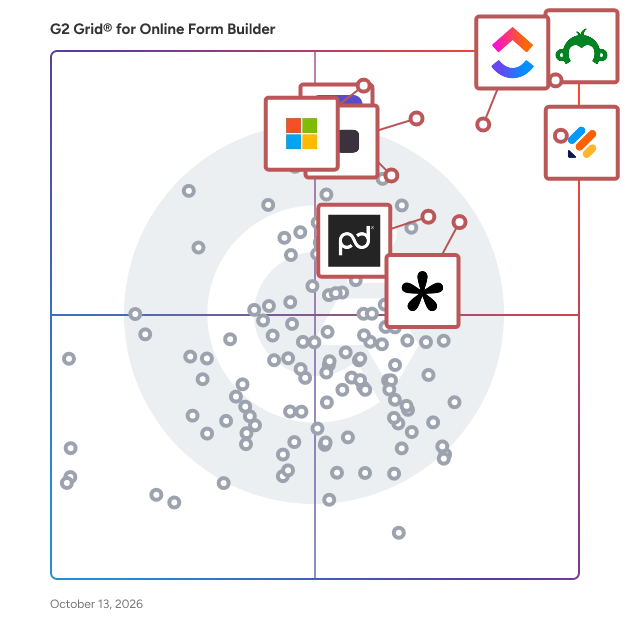
G2 Grid® for Online Form Builder Software

G2 Grid® for Online Form Builder Software plotting products by satisfaction and market presence

Highlighted products: SurveyMonkey, Jotform, ClickUp, Typeform, Microsoft Forms, Tally, Adobe Acrobat Sign, and PandaDoc.

Underlying data: [Grid® JSON](https://www.g2.com/categories/online-form-builder/grids.json?focus%5B%5D=surveymonkey&focus%5B%5D=jotform&focus%5B%5D=clickup&focus%5B%5D=typeform&focus%5B%5D=microsoft-forms&focus%5B%5D=tally-forms-tally&focus%5B%5D=adobe-acrobat-sign&focus%5B%5D=pandadoc)

forms.app

forms.app is an online form builder for teams. The platform enables businesses to create online forms, invite unlimited members to manage the forms, and collect unlimited responses, even on its free plan. forms.app is an obvious choice for businesses of all sizes, from start-ups, small businesses, agencies, to government organizations and large enterprises who are looking for a reliable form building tool that they can use as a team and collect responses with no limits.

Average Rating: 4.5/5.0

Total Reviews: 495

G2 Deal: Get an additional 30% off on our annual subscriptions

Get an additional 30% off on any forms.app package and take your forms to another level by creating both functional and visually appealing online forms.

Price: ~~$9-59/user/month~~

View this exclusive G2 deal

How Do G2 Users Rate forms.app?

  • Has the product been a good partner in doing business?: 8.9/10 (Category avg: 9.1/10)
  • CMS Support: 9.1/10 (Category avg: 8.5/10)
  • Design: 8.8/10 (Category avg: 8.7/10)
  • Embedded Forms: 8.7/10 (Category avg: 8.9/10)

Who Is the Company Behind forms.app?

  • Seller: forms.app
  • Year Founded: 2018
  • HQ Location: London, UK
  • Twitter: @formsapp
    1,479 Twitter followers
  • LinkedIn® Page: www.linkedin.com
    23 employees on LinkedIn®

Who Uses This Product?

  • Who Uses This: CEO, Student
  • Top Industries: Education Management, Information Technology and Services
  • Company Size: 77% Small, 18% Medium

What Do G2 Reviewers Say About forms.app?

AI-generated summary from verified user reviews

Pros
  • Users value the ease of use of forms.app, finding both the website and app intuitive and user-friendly.
  • I appreciate the excellent customer service of forms.app, making the experience smooth and user-friendly.
  • Users enjoy the ease of creation with forms.app, seamlessly managing multiple forms and submissions in one place.
  • Users appreciate the convenience of a single tool for creating, monitoring, and storing all their forms efficiently.
  • Users appreciate the intuitive interface of forms.app, enabling seamless creation and management of multiple forms in one place.
Cons
  • Users find the form complexity of forms.app challenging compared to other systems, despite its overall quality.

What Are Recent G2 Reviews of forms.app?

What Are G2 Users Discussing About forms.app?

Pipedrive

What is Pipedrive? Pipedrive is a sales CRM for small and medium-sized businesses, built around how salespeople actually work. It brings pipelines, customer context, sales automation, reporting, and AI into one easy-to-use system, without the cost or complexity of an enterprise platform. Reps see what needs attention, prepare for conversations, and follow through. Managers get a shared view of what’s moving, what’s stuck, and where to help. Pipedrive is built by salespeople and used by more than 100,000 companies worldwide. It treats sales as a craft: listening closely, reading the room, and earning trust one conversation at a time. Pipedrive’s approach to AI is to support salespeople, not replace them. Its AI takes on more of the work around selling, while people bring the judgment, empathy, and relationships. 🧑🏽‍💼 Who should use Pipedrive? - Sales reps managing multiple deals at once who want to see which deals need attention without digging through records. - Sales managers building a consistent process across the team and spotting stalled deals early. - Small and mid-sized teams that want an AI CRM that people actually use every day. - Businesses outgrowing spreadsheets or a basic CRM that want pipelines and workflows that scale with them. 💳 Is there a free trial? Yes. Pipedrive offers a free 14-day trial, no credit card required. KEY FEATURES ✅ Pipeline management and sales automation Pipedrive’s visual pipelines show where deals stand and what needs attention. Teams can customize stages, fields, and workflows around how they actually sell. Contacts, emails, and deal history stay connected, so picking up a conversation doesn’t start with a search through five tabs. Email sync, reminders, and automation keep follow-ups on track and repetitive tasks off the to-do list. More than 500 Marketplace integrations connect Pipedrive with other business tools. ✅ Reporting and revenue forecasting Pipedrive’s shared dashboards, customizable reports, and revenue forecasting help managers see what’s working, where deals are slowing down, and who could use support. ✅ Pipedrive Nova: AI meeting intelligence inside the CRM Pipedrive Nova is AI meeting intelligence built into Pipedrive, working around every sales conversation. Before a meeting, Nova prepares a brief from deal history, emails, and past conversations. During the meeting, it records and transcribes, so salespeople can focus on the customer instead of taking notes. Afterward, it summarizes the discussion, highlights next steps, and suggests CRM updates that salespeople review, edit, and approve before anything changes. ✅ AI Sales Assistant: deal summaries, win/loss patterns, and next actions While Nova works around meetings, Pipedrive’s AI Sales Assistant works across deals and pipeline data. It summarizes deals, surfaces patterns in won and lost opportunities, and recommends next actions. Salespeople can get up to speed on a deal quickly, and managers can ask questions about sales data, compare performance, and spot bottlenecks without leaving the CRM. ✅ Pipedrive MCP: connect ChatGPT, Claude, and other AI assistants to your CRM Pipedrive’s Model Context Protocol (MCP) server connects ChatGPT, Claude, and other compatible AI assistants to live CRM data. Teams can find deals, update contacts, and schedule follow-ups through plain-language requests. Existing Pipedrive permissions govern what each assistant can access and change. ✅ Customer conversations: WhatsApp integration and lead capture Pipedrive’s native WhatsApp integration brings messages into the CRM and links conversations to contacts, leads, and deals. The LeadBooster add-on captures leads through web forms, chatbots, and live chat. ✅ Projects: connecting sales and delivery The Pipedrive Projects add-on connects post-sale work to customer and deal history, so delivery teams can pick up where sales left off. AI-generated project briefs bring together commitments, notes, and files from the sales process, while project insights and Gantt timelines help teams track progress, workloads, and deadlines. ✅ Security and permissions: SOC 2, GDPR, and AES-256 encryption Pipedrive is SOC 2 and GDPR compliant. Customer data is protected with AES-256 encryption, 2FA, SAML SSO, and hourly backups. Visibility options and permissions control who can see and edit what, including custom visibility groups and permission sets. Security alerts, security rules, and a device history and audit log add further oversight.

Average Rating: 4.3/5.0

Total Reviews: 4,833

How Do G2 Users Rate Pipedrive?

  • Has the product been a good partner in doing business?: 8.7/10 (Category avg: 9.1/10)
  • CMS Support: 7.6/10 (Category avg: 8.5/10)
  • Design: 7.7/10 (Category avg: 8.7/10)
  • Embedded Forms: 8.2/10 (Category avg: 8.9/10)

Who Is the Company Behind Pipedrive?

  • Seller: Pipedrive
  • Company Website:
  • Year Founded: 2010
  • HQ Location: New York
  • Twitter: @pipedrive
    14,355 Twitter followers
  • LinkedIn® Page: www.linkedin.com
    1,124 employees on LinkedIn®

Who Uses This Product?

  • Who Uses This: CEO, Sales Manager
  • Top Industries: Computer Software, Information Technology and Services
  • Company Size: 74% Small, 22% Medium

What Do G2 Reviewers Say About Pipedrive?

AI-generated summary from verified user reviews

Pros
  • Users appreciate the ease of use of Pipedrive, finding it intuitive and customizable for their evolving business needs.
  • Users praise the intuitive interface of Pipedrive, making it easy for anyone to customize and use effectively.
  • Users appreciate the simple and user-friendly interface of Pipedrive, making navigation and task management effortless.
  • Users appreciate the ease of customization in Pipedrive, enabling them to tailor the CRM to their specific needs.
  • Users value the seamless integrations of Pipedrive, enhancing their sales process and automating essential tasks.
Cons
  • Users express concerns about missing features in Pipedrive, including limited automation options and customization difficulties.
  • Users express frustration over limited features in Pipedrive, such as automation setup and customization options.
  • Users find the learning curve steep with Pipedrive, requiring significant time and training for effective use.
  • Users experience integration issues with Pipedrive, notably missing meeting details in Google Calendar events.
  • Users find Pipedrive expensive, especially the add-ons, making it challenging for solo practices and small businesses.

What Are Recent G2 Reviews of Pipedrive?

What Are G2 Users Discussing About Pipedrive?

EngageBay

EngageBay is an all-in-one customer engagement platform designed for small and mid-sized businesses that want to manage marketing, sales, and support from a unified system. Positioned as a cost-conscious alternative to platforms like HubSpot and ActiveCampaign, it focuses on delivering essential CRM and automation capabilities without the overhead typically associated with enterprise software. The platform combines contact and deal management, marketing automation, email marketing, landing pages, forms, live chat, and help desk functionality within a single interface. By consolidating these functions, EngageBay provides teams with a centralized view of customer interactions across the lifecycle and reduces the need for multiple disconnected tools. EngageBay also incorporates AI-assisted features to streamline common tasks and improve productivity. These capabilities include AI-powered email and content generation, subject line suggestions, and workflow assistance that help teams create campaigns and communications more efficiently. The AI tools are designed to support everyday execution rather than replace core strategy, making them accessible to smaller teams that may not have dedicated automation specialists. On the marketing side, users can build email campaigns, design automation workflows, capture leads through forms and landing pages, and run A/B tests. The CRM module supports pipeline tracking, contact management, task automation, and appointment scheduling to help sales teams manage opportunities in a structured way. For post-purchase engagement, the service suite includes ticketing, knowledge base tools, and live chat to manage customer support conversations from one place. A key design principle of EngageBay is accessibility for growing businesses. The platform offers a free tier with core functionality and scales through bundled paid plans rather than numerous add-ons, helping teams adopt automation without significant upfront investment. EngageBay integrates with a range of third-party tools and provides reporting dashboards to monitor campaign performance, deal progress, and support activity. While it is not positioned as a deep enterprise platform, it is built to meet the day-to-day operational needs of SMB revenue teams looking for an integrated, AI-assisted, and budget-aware solution. The platform is built with a focus on simplicity and performance, integrating advanced marketing automation, sales CRM, and customer support software into one cohesive system. EngageBay leverages cutting-edge AI intelligence to enhance productivity and decision-making across various teams. This integration allows businesses to streamline their operations and improve customer interactions, making it an ideal choice for organizations that require a robust yet user-friendly solution. EngageBay's AI capabilities are particularly noteworthy, providing users with tools that help create content quickly, predict outcomes intelligently, and deliver personalized experiences at scale. The AI Email & Content Generator allows users to craft engaging emails and campaigns in seconds, while the AI Lead & Deal Scoring feature helps identify and prioritize leads most likely to convert. Additionally, AI Insights & Recommendations offer actionable suggestions to enhance engagement and productivity, making it easier for businesses to navigate their customer journeys effectively. The platform also boasts a suite of key features that add significant value to its users. EngageBay's marketing automation capabilities include email marketing workflows, landing page and form builders, and social media integration, which collectively enhance outreach efforts. The sales CRM component provides tools for contact and deal management, visual sales pipelines, and team collaboration, ensuring that sales processes are efficient and transparent. Furthermore, the customer support features, such as a helpdesk and ticketing system, live chat, and a unified customer view, facilitate seamless communication and service delivery. EngageBay is particularly well-suited for small to mid-sized businesses, startups, and growing teams that seek an affordable yet powerful alternative to fragmented tools. It is designed for organizations aiming to automate customer interactions, align marketing and sales efforts, and improve support efficiency through the use of AI. This comprehensive approach not only enhances operational efficiency but also positions businesses to compete effectively in their respective markets. What is this product? EngageBay is an all-in-one CRM software platform built for small and mid-sized businesses to manage marketing automation, sales pipelines, and customer support in a single system. It combines email marketing, marketing automation, landing pages, contact management, deal tracking, helpdesk, and live chat—eliminating the need for multiple disconnected tools. Designed as an affordable alternative to HubSpot and ActiveCampaign, EngageBay helps growing businesses attract leads, convert deals, and support customers without enterprise-level costs or complexity. It centralizes customer data, automates workflows, and improves visibility across the entire customer lifecycle.

Average Rating: 4.6/5.0

Total Reviews: 776

G2 Deal: 30% Off EngageBay

Marketing automation software to automate all your marketing & sales tasks, customer service workflows, lead generation & lead nurturing.

View this exclusive G2 deal

How Do G2 Users Rate EngageBay?

  • Has the product been a good partner in doing business?: 9.5/10 (Category avg: 9.1/10)
  • CMS Support: 9.1/10 (Category avg: 8.5/10)
  • Design: 8.6/10 (Category avg: 8.7/10)
  • Embedded Forms: 9.0/10 (Category avg: 8.9/10)

Who Is the Company Behind EngageBay?

  • Seller: EngageBay Inc
  • Company Website:
  • Year Founded: 2018
  • HQ Location: Wilmington, Delaware
  • Twitter: @engagebay
    16,866 Twitter followers
  • LinkedIn® Page: www.linkedin.com
    54 employees on LinkedIn®

Who Uses This Product?

  • Who Uses This: Marketing Manager, Marketing Analyst
  • Top Industries: Information Technology and Services, Staffing and Recruiting
  • Company Size: 71% Small, 30% Medium

What Do G2 Reviewers Say About EngageBay?

AI-generated summary from verified user reviews

Pros
  • Users appreciate the ease of use of EngageBay, which streamlines their workflow and enhances daily productivity.
  • Users value the time-saving automation of EngageBay, enhancing organization and streamlining workflow with integrated tools.
  • Users appreciate the amazing customer support of EngageBay, consistently receiving quick and helpful responses from the team.
  • Users appreciate the seamless integration of CRM, email, and automation features in EngageBay, enhancing their workflow significantly.
  • Users value the sophisticated automation features of EngageBay, enhancing workflow efficiency and simplifying daily operations.
Cons
  • Users find the missing features like email threading and advanced reporting options frustrating and limit usability.
  • Users experience limited features with EngageBay, feeling constraints in mobile functionality and essential support tools.
  • Users find the reporting features limited and lacking detail, affecting their ability to fully utilize EngageBay.
  • Users experience limited customization for key features like landing pages and workflows, hindering their effectiveness.
  • Users note poor reporting capabilities in EngageBay, hindering deeper analysis and advanced customization for specific needs.

What Are Recent G2 Reviews of EngageBay?

What Are G2 Users Discussing About EngageBay?
AI can help you find the answers. G2 helps you trust them.

Connect G2 to Claude or ChatGPT for answers grounded in G2's trusted reviews, comparisons, and pricing from real user insights.

How it works

Intuit Mailchimp All-in-One Marketing Platform

Mailchimp is a marketing automation platform trusted by 11 million+ users worldwide to personalize every email and SMS for every customer using AI-powered insights and content creation tools. With a 99% delivery rate and over 300 integrations, Mailchimp helps businesses connect with their customers, foster repeat business, and build lasting brand loyalty while seamlessly fitting into their existing workflows. Our platform puts data-backed recommendations at the heart of your marketing so you can find and engage customers with multichannel campaigns. In 2021, Mailchimp was acquired by Intuit Inc. (Nasdaq: INTU), the global financial technology platform that makes Intuit TurboTax, Credit Karma, QuickBooks, and Mailchimp. Since then, we’ve released 100+ new features to help our customers continue to grow. Find out why more than 11+ million businesses trust Intuit Mailchimp to help them turn insights into action and their emails into revenue. Visit Mailchimp.com to get started today.

Average Rating: 4.4/5.0

Total Reviews: 5,209

How Do G2 Users Rate Intuit Mailchimp All-in-One Marketing Platform?

  • Has the product been a good partner in doing business?: 8.8/10 (Category avg: 9.1/10)
  • CMS Support: 7.6/10 (Category avg: 8.5/10)
  • Design: 8.8/10 (Category avg: 8.7/10)
  • Embedded Forms: 7.8/10 (Category avg: 8.9/10)

Who Is the Company Behind Intuit Mailchimp All-in-One Marketing Platform?

  • Seller: Intuit Mailchimp
  • Company Website:
  • Year Founded: 2001
  • HQ Location: Atlanta, GA
  • Twitter: @MailChimp
    238,536 Twitter followers
  • LinkedIn® Page: www.linkedin.com
    1,346 employees on LinkedIn®

Who Uses This Product?

  • Who Uses This: Owner, Marketing Manager
  • Top Industries: Marketing and Advertising, Information Technology and Services
  • Company Size: 72% Small, 20% Medium

What Do G2 Reviewers Say About Intuit Mailchimp All-in-One Marketing Platform?

AI-generated summary from verified user reviews

Pros
  • Users value the ease of use of Intuit Mailchimp, finding campaign creation and management remarkably straightforward.
  • Users appreciate the intuitive and easy-to-use email marketing platform of Mailchimp, boosting campaign success and revenue.
  • Users value the easy-to-use email management features of Mailchimp, simplifying the marketing process for businesses.
  • Users appreciate the intuitive and user-friendly interface of Mailchimp, simplifying campaign management and performance tracking.
  • Users love the easy creation features of Mailchimp, allowing for simple campaign building and performance tracking.
Cons
  • Users find Mailchimp increasingly expensive, especially for advanced features and growing contact lists, impacting small businesses.
  • Users find the platform has limited features for advanced automations, restricting scalability and customization.
  • Users find the missing features in Intuit Mailchimp frustrating, complicating the setup and familiarization process.
  • Users find the learning curve challenging, suggesting improvements like interactive training for better understanding.
  • Users find limited customization options in Intuit Mailchimp, limiting their ability to tailor campaigns effectively.

What Are Recent G2 Reviews of Intuit Mailchimp All-in-One Marketing Platform?

What Are G2 Users Discussing About Intuit Mailchimp All-in-One Marketing Platform?

SurveyMars

SurveyMars is a completely free survey and poll maker platform. With unlimited surveys, questions, and responses, you can gather insights quickly and effortlessly. Get started for free and there is no credit card required.

Average Rating: 4.7/5.0

Total Reviews: 135

How Do G2 Users Rate SurveyMars?

  • Has the product been a good partner in doing business?: 9.0/10 (Category avg: 9.1/10)
  • CMS Support: 9.0/10 (Category avg: 8.5/10)
  • Design: 9.2/10 (Category avg: 8.7/10)
  • Embedded Forms: 9.0/10 (Category avg: 8.9/10)

Who Is the Company Behind SurveyMars?

Who Uses This Product?

  • Top Industries: Information Technology and Services, Computer Software
  • Company Size: 68% Small, 19% Medium

What Do G2 Reviewers Say About SurveyMars?

AI-generated summary from verified user reviews

Pros
  • Users find it incredibly easy to create surveys with varied question types and helpful AI hints on SurveyMars.
  • Users value the fast and easy experience of SurveyMars, appreciating its secure and attractive UX/UI design.
  • Users love the simple and fast survey creation in SurveyMars, allowing quick feedback collection without needing technical skills.
  • Users find SurveyMars incredibly user-friendly, allowing even non-technical teams to efficiently create and send surveys.
  • Users praise the easy setup of SurveyMars, enabling immediate survey creation without complicated onboarding processes.
Cons
  • Users desire more advanced customization options in SurveyMars for enhanced survey design flexibility.
  • Users find the limited data analysis capabilities of SurveyMars restrictive for comprehensive audience segmentation and reporting.
  • Users report export limitations and mobile formatting issues that hinder efficient survey experiences and data handling.
  • Users point out the missing advanced security and customization features, limiting suitability for sensitive enterprise surveys.
  • Users find the poor visualization in SurveyMars limits data analysis and sharing of insights effectively.

What Are Recent G2 Reviews of SurveyMars?

Outgrow

Outgrow allows you to better acquire, qualify and engage leads by making it easy to build personalized quizzes, calculators, assessments, contests, forms/surveys, recommendations, polls & chatbots. No developers or designers required! Outgrow has a host of design templates which are fully optimized for mobile, desktop, and tablet, and are easily embeddable into your advertising, websites, mobile apps, social media, SMS and email communication. In addition, there are over 1000 pre-made content pieces and funnels that are optimized to improve conversion so you can change the questions, make a few tweaks so it's consistent with your brand and have your own interactive content ready in minutes.

Average Rating: 4.7/5.0

Total Reviews: 319

G2 Deal: 20% off annual plan for new users

20% Discount on Freelancer, Essentials, Business plans

Price: ~~$14-600/mo~~ → $11-480/mo

View this exclusive G2 deal

How Do G2 Users Rate Outgrow?

  • Has the product been a good partner in doing business?: 9.4/10 (Category avg: 9.1/10)
  • CMS Support: 8.9/10 (Category avg: 8.5/10)
  • Design: 9.4/10 (Category avg: 8.7/10)
  • Embedded Forms: 9.4/10 (Category avg: 8.9/10)

Who Is the Company Behind Outgrow?

  • Seller: Outgrow
  • Company Website:
  • Year Founded: 2012
  • HQ Location: New York, NY
  • Twitter: @OutgrowCo
    3,719 Twitter followers
  • LinkedIn® Page: www.linkedin.com
    48 employees on LinkedIn®

Who Uses This Product?

  • Who Uses This: Founder, CEO
  • Top Industries: Marketing and Advertising, Computer Software
  • Company Size: 79% Small, 17% Medium

What Do G2 Reviewers Say About Outgrow?

AI-generated summary from verified user reviews

Pros
  • Users praise the ease of use of Outgrow, appreciating its intuitive design and quick setup for effective solutions.
  • Users commend the exceptional customer support of Outgrow, highlighting their responsiveness and helpfulness throughout the experience.
  • Users value Outgrow's comprehensive tools for quizzes and calculators, enhancing lead generation and user engagement effectively.
  • Users find Outgrow to be quick and easy to use, facilitating fast implementation and effective lead generation.
  • Users appreciate the easy setup of Outgrow, allowing for quick implementation and immediate engagement with customers.
Cons
  • Users find the learning curve of Outgrow challenging, particularly with navigation and various quiz types for new users.
  • Users find limited features in Outgrow, with basic designs and lacking advanced options for effective lead generation.
  • Users find the missing features in Outgrow's basic plan limit their functionality and customization options.
  • Users find the pricing of Outgrow to be expensive, making it hard to justify its value for low usage.
  • Users find limited customization options in Outgrow, leading to extra costs and basic-looking outputs.

What Are Recent G2 Reviews of Outgrow?

Constant Contact Advanced Automation

Constant Contact Advanced Automation helps you send the right message at the right time. From Social to SMS and email to ecommerce, we deliver tools to help you build deeper relationships with your audience. Our powerful digital marketing platform helps you be more efficient with your marketing so you can focus on your building your business. Engage Your Audience where They are with Multi-Channel Campaigns - Create comprehensive marketing campaigns with just a few clicks. Our Campaign Builder tool will help you launch a multi-channel campaign across email, social, and SMS to help you achieve your goals. Get Started Fast With Pre-Built Automation Templates - Setup your automations quickly with pre-built automation templates to help you send timely SMS and email messages. Easily Manage Your Contacts - Manage customer segments automatically using customer tags. Then, trigger automations based on how customers engage with your businesses. Automate Your Messaging - Deliver timely, relevant content with SMS and email marketing automation using our drag-and-drop Automation Path Builder. Make sure that your audience receives the right message, at the right time: automatically. Learn more at www.constantcontact.com

Average Rating: 4.4/5.0

Total Reviews: 939

How Do G2 Users Rate Constant Contact Advanced Automation?

  • Has the product been a good partner in doing business?: 9.2/10 (Category avg: 9.1/10)
  • CMS Support: 7.9/10 (Category avg: 8.5/10)
  • Design: 8.0/10 (Category avg: 8.7/10)
  • Embedded Forms: 8.0/10 (Category avg: 8.9/10)

Who Is the Company Behind Constant Contact Advanced Automation?

  • Seller: Constant Contact
  • Year Founded: 1995
  • HQ Location: Waltham, US
  • Twitter: @ConstantContact
    67,137 Twitter followers
  • LinkedIn® Page: www.linkedin.com
    1,156 employees on LinkedIn®

Who Uses This Product?

  • Who Uses This: Owner, President
  • Top Industries: Marketing and Advertising, Information Technology and Services
  • Company Size: 80% Small, 17% Medium

What Do G2 Reviewers Say About Constant Contact Advanced Automation?

AI-generated summary from verified user reviews

Pros
  • Users appreciate the ease of use of Constant Contact Advanced Automation, making email marketing simple and efficient.
  • Users appreciate the advanced automation of Constant Contact, simplifying email management during busy times with ease.
  • Users appreciate the ease of automating emails and newsletters with Constant Contact Advanced Automation, enhancing productivity effortlessly.
  • Users value the advanced automation features of Constant Contact for seamless lead nurturing and efficient outreach campaigns.
  • Users find Constant Contact's advanced automation to be easy to create personalized campaigns, even without technical skills.
Cons
  • Users find the limited customization options restrictive, impacting the flexibility of their automation workflows.
  • Users face missing features in Constant Contact Advanced Automation, such as limited customization and editing difficulties.
  • Users find the limited features of Constant Contact Advanced Automation restrict their customization and effectiveness.
  • Users are frustrated by editing issues that hinder email customization and lead to inconsistent formatting during creation.
  • Users find it challenging to manage email performance reports and often face difficulties with email templates and automation.

What Are Recent G2 Reviews of Constant Contact Advanced Automation?

What Are G2 Users Discussing About Constant Contact Advanced Automation?

DocHub

DocHub is a browser-based solution for editing, signing, filling out, and sharing documents, built to replace the scattered mix of scanners, printers, and disconnected apps that everyday paperwork often requires. With DocHub, any lease can be finalized, a school form completed, or a client agreement reviewed in a single sitting, from first edit to final signature, without installing any software on your computer, tablet, or phone. DocHub is designed to fit directly into the tools that people are already using. Through native integrations with well-known services like Google Drive and Gmail, DocHub lets documents move from inbox to completed form without leaving a familiar workspace. There is no need to download a file, open a separate program, and re-upload it elsewhere. DocHub meets people where their documents already are, which is why it has become a natural part of how millions of users handle everyday paperwork. DocHub is trusted by more than one hundred million users, spanning from individuals completing simple personal forms to mid-sized and larger organizations running well- structured & high-volume document processes. To serve both audiences, DocHub maintains compliance with GDPR, HIPAA, and SOC 2 Type II. DocHub naturally applies artificial intelligence in a focused and practical way rather than as a separate, general-purpose chat experience layered on top. DocHub's offers built-in intelligence support for the most specific tasks: locating a clause within a large text, clarifying dense language, reorganizing a file as such, moving a delayed document forward. Such level of AI support lets DocHub function less like an added, separate tool and more like a capable, truly “smart” assistant, already familiar with all your daily tasks. DocHub serves a broad base of individuals and independent professionals. Freelancers use DocHub to send polished, signable invoices along with contracts, application forms and tax documentation. Contractors and business owners across multiple sectors use DocHub to prepare and finalize agreements on site, in the office or even while commuting between both. Solo practitioners, consultants, and service providers rely on DocHub for client-facing paperwork that needs to look professional without having a dedicated back office. DocHub is also capable of supporting other routine paperwork that has nothing to do with running business. Students use DocHub to complete enrollment forms, permission slips, and financial aid documents without hunting for a printer. Job seekers use DocHub to fill out applications and survey forms and then sign offer letters quickly. People handling routine personal administration tasks, from medical intake forms to rental applications and leases, confirm that DocHub turns a multi-step exhausting chore into an easy, doable task which does not require much time or effort.

Average Rating: 4.6/5.0

Total Reviews: 296

How Do G2 Users Rate DocHub?

  • Has the product been a good partner in doing business?: 9.2/10 (Category avg: 9.1/10)
  • CMS Support: 7.3/10 (Category avg: 8.5/10)
  • Design: 9.4/10 (Category avg: 8.7/10)

Who Is the Company Behind DocHub?

  • Seller: airSlate
  • Company Website:
  • Year Founded: 2006
  • HQ Location: Brookline, Massachusetts
  • Twitter: @airSlate
    1,234 Twitter followers
  • LinkedIn® Page: www.linkedin.com
    816 employees on LinkedIn®

Who Uses This Product?

  • Who Uses This: Owner, President
  • Top Industries: Real Estate, Construction
  • Company Size: 82% Small, 15% Medium

What Do G2 Reviewers Say About DocHub?

AI-generated summary from verified user reviews

Pros
  • Users find DocHub to be incredibly easy to use, making document management and signing a straightforward process.
  • Users value the signature functionality of DocHub, appreciating its ease of use for signing and managing PDFs.
  • Users appreciate the simplicity and straightforwardness of DocHub, making document editing and signing effortless.
  • Users value the signature features of DocHub, appreciating its ease of use and reliability for PDF management.
  • Users appreciate the intuitive design of DocHub, making PDF editing and signing refreshingly simple and efficient.
Cons
  • Users often find signature issues in DocHub, particularly with editing documents after sending them for signatures.
  • Users find that the missing features hinder advanced editing and document management, impacting their overall experience.
  • Users find DocHub not user-friendly, especially on mobile, making tasks like editing and sending documents cumbersome.
  • Users find difficult editing in DocHub, struggling with limitations on advanced features and document management.
  • Users find DocHub not user-friendly, particularly on mobile, often facing confusion and clunkiness in navigation.

What Are Recent G2 Reviews of DocHub?

What Are G2 Users Discussing About DocHub?

Wrike

Wrike is the trusted work delivery platform where AI extends what people can accomplish. By centralizing all work in one governed, context-rich environment, Wrike helps organizations streamline collaboration, project planning, and task execution while maintaining the control and accountability that complex work demands. Wrike serves project managers, team leaders, and organizations of all sizes across marketing, IT, product development, professional services, and beyond. Teams use Wrike to track work progress, assign tasks, set deadlines, and facilitate communication, eliminating silos and fostering a culture of transparency and accountability that is crucial for successful delivery. Key features include AI Agents, Wrike Copilot, Wrike MCP Server, workflow automations, customizable dashboards, real-time collaboration tools, and advanced reporting capabilities. Teams can build and automate tailored workflows that reflect their unique processes, visualize timelines through Gantt charts and Kanban boards, and integrate seamlessly with tools like Slack, Google Drive, and Microsoft Teams. Wrike's MCP server extends this further, allowing AI assistants to connect directly to the platform where execution actually happens so AI-driven actions become part of the auditable record of how work gets done, not disconnected outputs living outside the system. And powered by the Wrike Work Intelligence® Graph, the platform gives AI the structured context it needs to act reliably inside the same roles, permissions, and access controls as your people. The result goes far beyond task management. Wrike reduces time spent on administrative work, scales alongside growing organizations, and gives teams the governed foundation they need to put AI to work on their most consequential workflows without losing control. With more than 20,000 organizations worldwide, including Siemens, Walmart, NVIDIA, and The Estée Lauder Companies, trusting Wrike to deliver their most important work, the platform has earned its place as a reliable partner for organizations to deliver without doubt

Average Rating: 4.2/5.0

Total Reviews: 4,472

How Do G2 Users Rate Wrike?

  • Has the product been a good partner in doing business?: 8.5/10 (Category avg: 9.1/10)
  • CMS Support: 7.1/10 (Category avg: 8.5/10)
  • Design: 7.9/10 (Category avg: 8.7/10)
  • Embedded Forms: 8.5/10 (Category avg: 8.9/10)

Who Is the Company Behind Wrike?

  • Seller: Wrike, Inc.
  • Company Website:
  • Year Founded: 2006
  • HQ Location: San Diego, CA
  • Twitter: @wrike
    13,574 Twitter followers
  • LinkedIn® Page: www.linkedin.com
    1,257 employees on LinkedIn®

Who Uses This Product?

  • Who Uses This: Project Manager, Marketing Manager
  • Top Industries: Marketing and Advertising, Information Technology and Services
  • Company Size: 43% Medium, 35% Small

What Do G2 Reviewers Say About Wrike?

AI-generated summary from verified user reviews

Pros
  • Users value the effective project tracking capabilities of Wrike, enhancing organization and teamwork for successful project management.
  • Users value team collaboration in Wrike, facilitating seamless workflow and enhancing productivity across diverse projects.
  • Users value the customizable dashboards and real-time tracking features of Wrike for improved team collaboration and efficiency.
  • Users appreciate the organization and clarity that Wrike provides, enhancing team collaboration and task management effectively.
  • Users praise the ease of use of Wrike, enabling efficient task management and streamlined team collaboration.
Cons
  • Users find the learning curve steep with Wrike, struggling with complexity and navigation challenges initially.
  • Users find Wrike not intuitive, making training and navigation difficult, especially for less quick learners.
  • Users note a lack of built-in templates and user-friendly design in Wrike, making it challenging for newcomers.
  • Users note the limited features of Wrike, finding it less effective for comprehensive project management compared to competitors.
  • Users find Wrike's interface initially overwhelming and complex, making it challenging to navigate and utilize effectively.

What Are Recent G2 Reviews of Wrike?

What Are G2 Users Discussing About Wrike?

Poltio

Poltio offers no-code, embeddable, responsive and white-label, interactive solutions that help brands humanize product discovery in e-commerce and gather data. Guiding shoppers through interactive experiences elevates the journey with AI-powered guided selling that understands intent and leads them to the right product with confidence. Businesses can also capture real-time zero-party data, generate unbiased customer insights and improve ROI while automatically building actionable segments and personas.easily deploy the right experience for their goals, such as smart surveys, engaging tests, product recommendation quizzes, or gift finders.

Average Rating: 4.7/5.0

Total Reviews: 28

How Do G2 Users Rate Poltio?

  • Has the product been a good partner in doing business?: 9.7/10 (Category avg: 9.1/10)
  • Design: 8.7/10 (Category avg: 8.7/10)
  • Embedded Forms: 9.4/10 (Category avg: 8.9/10)

Who Is the Company Behind Poltio?

  • Seller: Poltio
  • Year Founded: 2014
  • HQ Location: İstanbul, TR
  • Twitter: @poltio
    2,521 Twitter followers
  • LinkedIn® Page: www.linkedin.com
    24 employees on LinkedIn®

Who Uses This Product?

  • Top Industries: Retail
  • Company Size: 36% Small, 32% Large

What Do G2 Reviewers Say About Poltio?

AI-generated summary from verified user reviews

Pros
  • Users value the ease of use of Poltio for seamless setup and effective customer engagement.
  • Users value the customer satisfaction achieved through Poltio's effective quiz and dedicated team support, enhancing their purchasing confidence.
  • Users appreciate the easy setup of Poltio, allowing seamless integration and customization for their websites.
  • Users value the impact on conversion and returns, leading to enhanced customer experience and operational efficiency.
  • Users appreciate the helpfulness of Poltio's AI quiz, enhancing customer confidence and boosting conversion rates effectively.
Cons
  • Users find the tracking implementation complex, especially due to difficult documentation and challenging adaptability for non-developers.
  • Users find the developer dependency of Poltio challenging, especially with complex documentation and limited adaptability for non-developers.
  • Users find the difficult onboarding process of Poltio challenging, especially due to unclear documentation for non-developers.
  • Users find a lack of guidance in Poltio's documentation, making tracking implementation particularly challenging for non-developers.
  • Users find the learning curve steep due to challenging documentation and assumptions about the starting point.

What Are Recent G2 Reviews of Poltio?

Alchemer Survey

Alchemer Survey is a professional survey platform that helps organizations collect feedback, analyze results, and turn insights into action across customer experience, employee engagement, and market research programs. Designed for teams that need more power and flexibility than basic survey tools — without the complexity of enterprise research platforms — Alchemer Survey scales from a single project to organization-wide feedback programs. What is Alchemer Survey used for? Alchemer Survey is used to run customer satisfaction (CSAT) surveys, Net Promoter Score (NPS) programs, market research studies, employee engagement surveys, product feedback loops, and academic or organizational research. It supports both one-off surveys and ongoing, multi-wave feedback programs across industries including technology, healthcare, education, financial services, and retail. Who is Alchemer Survey for? Alchemer Survey is built for researchers, CX professionals, HR teams, marketers, and product managers who need advanced survey logic and reporting without requiring dedicated IT or data science support. It serves organizations of all sizes — from small teams running targeted studies to enterprises managing global, multi-language feedback programs. Key capabilities: - Advanced survey building with branching logic, piping, randomization, and skip patterns — enabling highly tailored respondent experiences - Pre-built templates for common use cases alongside full custom-build options, so teams can launch fast or go deep - Omnichannel distribution via email, web, SMS, embedded links, QR codes, and social media — maximizing reach and response rates - Real-time reporting and analytics with live dashboards, response filtering, cross-tabulation, and exportable reports for easy stakeholder sharing - Multi-language support for global research programs, with role-based permissions to manage access and data governance at scale - Scalable architecture that grows with organizational needs — from a single survey to enterprise-wide feedback operations How does Alchemer Survey compare to other survey platforms? Alchemer Survey sits between simple tools like SurveyMonkey and Google Forms and enterprise platforms like Qualtrics. It offers research-grade features — advanced logic, robust reporting, and flexible distribution — at a price point and implementation complexity accessible to mid-market teams. Organizations that have outgrown basic tools but don't need (or want to pay for) a full enterprise suite consistently cite Alchemer Survey as a preferred alternative. Bottom line: Alchemer Survey gives organizations the tools to ask smarter questions, reach the right audiences, and act on what they learn — whether running a quick pulse survey or a comprehensive global research program.

Average Rating: 4.4/5.0

Total Reviews: 942

How Do G2 Users Rate Alchemer Survey?

  • Has the product been a good partner in doing business?: 8.9/10 (Category avg: 9.1/10)
  • CMS Support: 7.0/10 (Category avg: 8.5/10)
  • Design: 7.9/10 (Category avg: 8.7/10)
  • Embedded Forms: 10.0/10 (Category avg: 8.9/10)

Who Is the Company Behind Alchemer Survey?

  • Seller: Alchemer
  • Company Website:
  • HQ Location: Louisville, CO
  • Twitter: @AlchemerHQ
    7,024 Twitter followers
  • LinkedIn® Page: www.linkedin.com
    232 employees on LinkedIn®

Who Uses This Product?

  • Who Uses This: Owner, Founder
  • Top Industries: Market Research, Information Technology and Services
  • Company Size: 42% Small, 32% Medium

What Do G2 Reviewers Say About Alchemer Survey?

AI-generated summary from verified user reviews

Pros
  • Users appreciate the ease of use of Alchemer Survey, making survey creation and customization effortless for everyone.
  • Users value the reliable customer support of Alchemer Survey, enhancing their confidence and overall experience with the platform.
  • Users appreciate the helpful support provided by Alchemer Survey, enhancing their confidence and experience with the platform.
  • Users find Alchemer's intuitive design simplifies survey creation and enhances functionality for diverse feedback needs.
  • Users value the ease of creation with Alchemer Survey, facilitating effortless survey design and integration into workflows.
Cons
  • Users face a steep learning curve with Alchemer Survey, particularly when navigating complex features and bugs.
  • Users face a clunky mobile survey experience that complicates complex designs and limits options for diverse survey needs.
  • Users note that Alchemer Survey is quite expensive, and extra costs can limit access to essential features.
  • Users find the interface not intuitive, with a steep learning curve that complicates navigation and feature discovery.
  • Users criticize the poor design of Alchemer Survey, highlighting navigation difficulties and a need for better user experience.

What Are Recent G2 Reviews of Alchemer Survey?

What Are G2 Users Discussing About Alchemer Survey?

Knack

Knack is an AI-powered no-code platform for building custom, database-driven applications, internal tools, and portals. Businesses use Knack to create systems that manage data, automate workflows, and support day-to-day operations, all in one place. The platform combines a built-in relational database, AI app builder, customizable forms, and workflow automation. Users can define their data model, create user roles, and control access with granular permissions. Applications can be deployed as internal tools or external portals, and embedded into existing websites. Knack supports a wide range of use cases, including customer and vendor portals, custom CRMs, project and task management systems, inventory tracking, logistics and supply chain tools, membership and volunteer management, and government operations. Teams can start from scratch, from a template, or use AI to build fully custom applications tailored to their processes. Knack's healthcare-specific offering, Knack Health, allows organizations to build secure, HIPAA-compliant applications for patient intake, scheduling, care coordination, and operational workflows. The platform supports role-based permissions, record history logs, and secure data handling for protected health information (PHI), with a signed business associate agreement (BAA) available for covered entities. For more advanced use cases, developers can extend applications using a REST API, custom CSS, and JavaScript. Knack also supports integrations with 500+ third-party tools to fit into existing workflows. Knack is designed for flexibility and scale, making it a fit for SMBs, nonprofits, and enterprise teams that need systems tailored to how their business actually operates.

Average Rating: 4.3/5.0

Total Reviews: 111

How Do G2 Users Rate Knack?

  • Has the product been a good partner in doing business?: 8.5/10 (Category avg: 9.1/10)
  • CMS Support: 8.1/10 (Category avg: 8.5/10)
  • Design: 9.2/10 (Category avg: 8.7/10)
  • Embedded Forms: 9.1/10 (Category avg: 8.9/10)

Who Is the Company Behind Knack?

  • Seller: Knack
  • Year Founded: 2010
  • HQ Location: New York, NY
  • Twitter: @knackhq
    1,923 Twitter followers
  • LinkedIn® Page: www.linkedin.com
    89 employees on LinkedIn®

Who Uses This Product?

  • Top Industries: Construction, Information Technology and Services
  • Company Size: 57% Small, 31% Medium

What Do G2 Reviewers Say About Knack?

AI-generated summary from verified user reviews

Pros
  • Users value Knack for its user-friendliness, making it accessible even for those with basic coding knowledge.
  • Users love Knack's intuitive interface, making app development quick and easy without the complexities of Excel.
  • Users appreciate the quick responses from customer support, enhancing their overall experience with Knack.
  • Users find Knack's ease of learning impressive, enjoying intuitive design and quick onboarding support to get started.
  • Users value Knack's simplicity, finding it easy to configure and user-friendly for various tasks.
Cons
  • Users find the missing features like duplicate removal and user field limitations very challenging and frustrating.
  • Users find limited customization options in Knack, making it challenging to manage larger apps and enhance layouts.
  • Users find feature limitations in Knack, including issues with duplicate removal, page organization, and performance in advanced applications.
  • Users find the limited features of Knack hinder customization and integration with advanced analytics tools.
  • Users encounter feature issues with Knack, such as limited developer tools and inadequate filtering for page management.

What Are Recent G2 Reviews of Knack?

What Are G2 Users Discussing About Knack?

SurveyLab

SurveyLab is a professional survey tool. It has all the required features for conducting great quality research and even more. That's why it is so flexible and is being used by many companies and individuals for different purposes: Customer Experience, NPS, Market Research, HR, 360 Feedback, UX, website intercept, knowledge tests, and more. Surveys may be created in any language, including right-to-left written languages. Our distinguishing feature is providing dedicated customer support and on-demand development for our clients. Our system provides integrations with other tools. We also provide access to one of the biggest online survey panels, with over 250 M panellists in 150 countries.

Average Rating: 4.5/5.0

Total Reviews: 145

How Do G2 Users Rate SurveyLab?

  • Has the product been a good partner in doing business?: 9.2/10 (Category avg: 9.1/10)
  • CMS Support: 8.7/10 (Category avg: 8.5/10)
  • Design: 8.8/10 (Category avg: 8.7/10)
  • Embedded Forms: 8.8/10 (Category avg: 8.9/10)

Who Is the Company Behind SurveyLab?

  • Seller: 7 Points
  • Year Founded: 2009
  • HQ Location: Warsaw, Poland
  • LinkedIn® Page: www.linkedin.com
    13 employees on LinkedIn®

Who Uses This Product?

  • Top Industries: Information Technology and Services, Education Management
  • Company Size: 54% Small, 29% Medium

What Do G2 Reviewers Say About SurveyLab?

AI-generated summary from verified user reviews

Pros
  • Users value the ease of use of SurveyLab, appreciating its straightforward interface and quick survey setup.
  • Users appreciate the easy setup of SurveyLab, making it simple and quick to start creating surveys.
  • Users appreciate the advanced survey logic of SurveyLab, enabling the creation of personalized and adaptive surveys effortlessly.
  • Users enjoy the simple interface of SurveyLab, appreciating its ease of use for creating professional surveys effortlessly.
  • Users value the helpful customer support and appreciate the ease of setting up surveys with SurveyLab.
Cons
  • Users find SurveyLab expensive, especially with restrictive free plans and high upgrade costs for essential features.
  • Users wish for more customization options and specific templates to enhance their survey creation experience.
  • Users experience slow loading issues, particularly with complex surveys, affecting overall user experience and completion rates.
  • Users experience filtering issues that complicate detailed analysis and affect user efficiency in data management.
  • Users find inadequate filtering frustrating, often requiring extra steps and limiting deep data analysis capabilities.

What Are Recent G2 Reviews of SurveyLab?

SuperOffice CRM

SuperOffice is a leading European CRM provider, guided by our mission to be Europe’s most loved CRM. We help growing businesses build valuable, effortless customer relationships with our award-winning CRM platform for sales, marketing and customer service. Tailored specifically for B2B professionals, SuperOffice equips organizations with the necessary tools and insights to effectively understand and respond to customer needs. Available on both desktop and mobile platforms, this CRM solution streamlines the customer journey, enhances personalized communication, and ultimately boosts customer satisfaction, regardless of location. SuperOffice CRM is particularly beneficial for sales teams, marketing departments, and customer service representatives. These professionals require a centralized platform to manage interactions and data, making SuperOffice an ideal choice for organizations aiming to improve productivity and prioritize customer engagement. The software supports a wide range of use cases, including tracking sales leads, managing marketing campaigns, providing customer support, and analyzing customer feedback, making it an essential tool for any organization focused on a customer-centric approach. Key features of SuperOffice CRM include robust contact management, sales automation, and advanced reporting capabilities. The contact management system allows users to efficiently store and organize customer information, ensuring easy access to crucial data when needed. Sales automation tools streamline the sales process by automating repetitive tasks, enabling sales professionals to concentrate on relationship-building rather than administrative duties. Additionally, the reporting features deliver valuable insights into customer behavior and sales performance, empowering teams to make informed, data-driven decisions. The Board view feature allows sales representatives and managers to maintain an overview of all sales activities, facilitating quicker sales cycles. For marketers, SuperOffice CRM enhances the customer journey through automated lead management and workflows, utilizing smart triggers to optimize marketing efforts. The platform also supports AI-powered content creation, enabling users to generate personalized images, copy, and calls-to-action (CTAs). This capability allows marketers to strengthen relationships and maintain effective communication at every customer touchpoint. Service teams can leverage SuperOffice CRM to provide efficient and consistent support by unifying customer information and interaction history. The organized request management system categorizes inquiries clearly, speeding up response times. Features such as autoreplies and response templates further enhance communication efficiency, while built-in reporting and analytics offer insights to continuously improve service quality. SuperOffice CRM stands out as a versatile and powerful tool that addresses the diverse needs of businesses looking to enhance their customer relationships.

Average Rating: 4.4/5.0

Total Reviews: 209

How Do G2 Users Rate SuperOffice CRM?

  • Has the product been a good partner in doing business?: 9.0/10 (Category avg: 9.1/10)
  • CMS Support: 6.3/10 (Category avg: 8.5/10)
  • Design: 7.5/10 (Category avg: 8.7/10)
  • Embedded Forms: 7.9/10 (Category avg: 8.9/10)

Who Is the Company Behind SuperOffice CRM?

  • Seller: SuperOffice AS
  • Company Website:
  • Year Founded: 1990
  • HQ Location: Oslo, Oslo
  • Twitter: @SuperOffice
    779 Twitter followers
  • LinkedIn® Page: www.linkedin.com
    321 employees on LinkedIn®

Who Uses This Product?

  • Who Uses This: Managing Director
  • Top Industries: Wholesale, Computer Software
  • Company Size: 58% Small, 36% Medium

What Do G2 Reviewers Say About SuperOffice CRM?

AI-generated summary from verified user reviews

Pros
  • Users appreciate the intuitive ease of use of SuperOffice CRM, enjoying its user-friendly interface and custom solutions.
  • Users appreciate the intuitive design of SuperOffice CRM, making it easy to navigate and get started.
  • Users value the friendly and professional customer support from SuperOffice CRM, enhancing their overall experience and implementation process.
  • Users appreciate the helpful support from SuperOffice CRM, which enhances their overall experience and satisfaction.
  • Users commend SuperOffice CRM for being user-friendly, making it easy to manage and access customer information seamlessly.
Cons
  • Users report persistent bugs in SuperOffice CRM, causing delays and issues, especially on Android devices.
  • Users experience time-consuming updates for data entry and support, slowing down their overall productivity with SuperOffice CRM.
  • Users struggle with integration issues, particularly lacking connections to ERP systems for essential data access.
  • Users feel that SuperOffice CRM lacks essential features like enhanced marketing tools, limiting overall growth potential.
  • Users often experience connectivity issues that hinder functionality and can lead to unexpected disruptions in usage.

What Are Recent G2 Reviews of SuperOffice CRM?

FormAssembly

FormAssembly is an enterprise data collection and automation platform that enables organizations to capture clean, compliant data from the start. FormAssembly turns secure web forms into governed data collection workflows. From the moment information is submitted, it is validated, structured, and routed reliably into systems of record, like Salesforce. With AI-assisted guidance from Fai, teams can design sophisticated workflows faster without sacrificing control or compliance.

Average Rating: 4.4/5.0

Total Reviews: 414

How Do G2 Users Rate FormAssembly?

  • Has the product been a good partner in doing business?: 8.8/10 (Category avg: 9.1/10)
  • CMS Support: 8.4/10 (Category avg: 8.5/10)
  • Design: 8.0/10 (Category avg: 8.7/10)
  • Embedded Forms: 8.5/10 (Category avg: 8.9/10)

Who Is the Company Behind FormAssembly?

  • Seller: FormAssembly Inc.
  • Company Website:
  • Year Founded: 2006
  • HQ Location: Bloomington, IN
  • Twitter: @formassembly
    1,472 Twitter followers
  • LinkedIn® Page: www.linkedin.com
    148 employees on LinkedIn®

Who Uses This Product?

  • Who Uses This: Salesforce Administrator, Salesforce Consultant
  • Top Industries: Non-Profit Organization Management, Higher Education
  • Company Size: 56% Small, 35% Medium

What Do G2 Reviewers Say About FormAssembly?

AI-generated summary from verified user reviews

Pros
  • Users love the user-friendly interface of FormAssembly, making form building and customization effortless and efficient.
  • Users praise FormAssembly's exceptional customer support, highlighting their helpfulness, responsiveness, and pleasant interactions.
  • Users praise the seamless Salesforce integration of FormAssembly, enhancing efficiency and ease in form management.
  • Users appreciate the easy integrations with Salesforce, enabling seamless form building and efficient data collection.
  • Users admire the user-friendly interface and seamless Salesforce integration of FormAssembly, enhancing real-time form updates.
Cons
  • Users experience limited customization options, restricting flexibility and branding in confirmation emails and PDFs.
  • Users feel the missing features like built-in CRM connectors and customizable notifications hinder their experience with FormAssembly.
  • Users find FormAssembly expensive, with essential features often locked behind high-tier plans and additional costs.
  • Users experience limitations with advanced features, sometimes hindering flexibility and efficiency, especially for smaller teams.
  • Users often face pricing issues with FormAssembly, as essential features are locked behind higher-tier plans.

What Are Recent G2 Reviews of FormAssembly?

What Are G2 Users Discussing About FormAssembly?

Neeraja Prakash
NP
Researched and written by Neeraja Prakash
Updated April 9, 2026