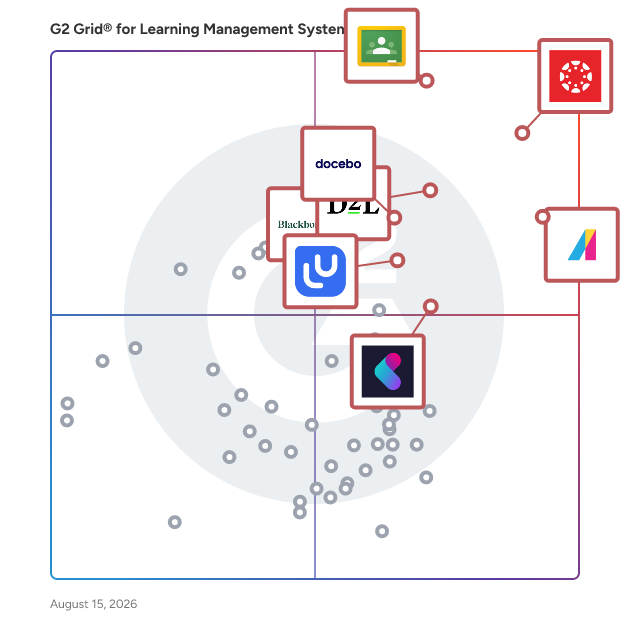
Best Learning Management Systems - Page 2

Emma Stein
ES
Researched and written by Emma Stein

NOTE: Solutions in this category are designed to be used by educational institutions, such as K-12 schools, colleges, universities, and professional schools. If you are looking for an LMS to use in a business or corporate setting, please visit our Corporate LMS software category.

Learning management systems (LMSs) are platforms designed to help instructors manage educational coursework online. They provide educators with a single platform for making course material accessible online, including lesson content, assignments, and assessments. LMSs are used to help streamline the delivery of online learning for educational institutions, allowing for a more connected and accessible educational experience for students.

An LMS enables instructors to build digital courses that include various types of content, such as syllabi, lectures, multimedia files, and readings, as well as distribute assignments to students. LMSs also offer online assessment functionality, such as quizzes and tests. Communication features enable instructors to communicate with students and parents via direct messages, mobile notifications, and discussion forums.

Although there are similarities between education-focused LMSs and corporate LMS software products, platforms designed for K-12 or higher education typically include features specific to educational environments, such as grading functionality and individualized feedback on student assignments. LMSs work in concert with other education software, such as student information systems (SIS), to streamline student data management.

To qualify for inclusion in the Learning Management System (LMS) category, a product must:

Provide a platform for educators to deliver online course content to students
Distribute assignments to students and allow instructors to grade student work
Administer digital assessments to students
Facilitate individualized feedback on student work, such as through written comments or grading rubrics
Generate performance dashboards for tracking student progress
Contain gradebook functionality or integrate with third-party gradebooks
Show More
Show Less

Best Learning Management Systems At A Glance

Leader:
Highest Performer:
Easiest to Use:
Top Trending:
Best Free Software:
Show LessShow More
Easiest to Use:
Top Trending:
Best Free Software:

G2 takes pride in showing unbiased reviews on user satisfaction in our ratings and reports. We do not allow paid placements in any of our ratings, rankings, or reports. Learn about our scoring methodologies.

No filters applied
275 Listings in Learning Management System (LMS) Available
(292)4.8 out of 5
Optimized for quick response
Entry Level Price:Free
  • Overview
    Expand/Collapse Overview
  • Product Description
    How are these determined?Information
    This description is provided by the seller.

    GoSkills is a leading online learning platform dedicated to delivering interactive, personalized, and irresistible learning experiences. By combining a powerful Learning Management System (LMS) wit

    Users
    No information available
    Industries
    • Hospital & Health Care
    • Accounting
    Market Segment
    • 60% Small-Business
    • 25% Mid-Market
    User Sentiment
    How are these determined?Information
    These insights, currently in beta, are compiled from user reviews and grouped to display a high-level overview of the software.
    • GoSkills is a learning platform that offers a variety of courses and features a gamification aspect to enhance the learning experience.
    • Reviewers like the intuitive setup process, the well-designed reports and layout, the option to learn alongside the instructor, the flexibility in use of licenses, and the pre-prepared Microsoft Office courses.
    • Users reported limited control for administrators, a desire for more courses in other fields, lack of course certifications for career advancement, difficulty in navigation between users and managers, and inability to change the language to Australian English.
  • Pros and Cons
    Expand/Collapse Pros and Cons
  • GoSkills Pros and Cons
    How are these determined?Information
    Pros and Cons are compiled from review feedback and grouped into themes to provide an easy-to-understand summary of user reviews.
    Pros
    Ease of Use
    73
    Courses
    48
    Content Quality
    41
    Ease of Learning
    40
    Course Quality
    26
    Cons
    Limited Courses
    12
    Limited Content
    11
    Limited Course Variety
    8
    Expensive
    7
    High Subscription Cost
    6
  • User Satisfaction
    Expand/Collapse User Satisfaction
  • GoSkills features and usability ratings that predict user satisfaction
    9.6
    Ease of Use
    Average: 8.7
    9.3
    Has the product been a good partner in doing business?
    Average: 9.1
    9.3
    Quality of Support
    Average: 8.8
    9.2
    Ease of Admin
    Average: 8.7
  • Seller Details
    Expand/Collapse Seller Details
  • Seller Details
    Seller
    GoSkills
    Company Website
    Year Founded
    2013
    HQ Location
    Palo Alto, CA
    Twitter
    @getgoskills
    4,153 Twitter followers
    LinkedIn® Page
    www.linkedin.com
    25 employees on LinkedIn®
Product Description
How are these determined?Information
This description is provided by the seller.

GoSkills is a leading online learning platform dedicated to delivering interactive, personalized, and irresistible learning experiences. By combining a powerful Learning Management System (LMS) wit

Users
No information available
Industries
  • Hospital & Health Care
  • Accounting
Market Segment
  • 60% Small-Business
  • 25% Mid-Market
User Sentiment
How are these determined?Information
These insights, currently in beta, are compiled from user reviews and grouped to display a high-level overview of the software.
  • GoSkills is a learning platform that offers a variety of courses and features a gamification aspect to enhance the learning experience.
  • Reviewers like the intuitive setup process, the well-designed reports and layout, the option to learn alongside the instructor, the flexibility in use of licenses, and the pre-prepared Microsoft Office courses.
  • Users reported limited control for administrators, a desire for more courses in other fields, lack of course certifications for career advancement, difficulty in navigation between users and managers, and inability to change the language to Australian English.
GoSkills Pros and Cons
How are these determined?Information
Pros and Cons are compiled from review feedback and grouped into themes to provide an easy-to-understand summary of user reviews.
Pros
Ease of Use
73
Courses
48
Content Quality
41
Ease of Learning
40
Course Quality
26
Cons
Limited Courses
12
Limited Content
11
Limited Course Variety
8
Expensive
7
High Subscription Cost
6
GoSkills features and usability ratings that predict user satisfaction
9.6
Ease of Use
Average: 8.7
9.3
Has the product been a good partner in doing business?
Average: 9.1
9.3
Quality of Support
Average: 8.8
9.2
Ease of Admin
Average: 8.7
Seller Details
Seller
GoSkills
Company Website
Year Founded
2013
HQ Location
Palo Alto, CA
Twitter
@getgoskills
4,153 Twitter followers
LinkedIn® Page
www.linkedin.com
25 employees on LinkedIn®
(111)4.5 out of 5
11th Easiest To Use in Learning Management System (LMS) software
Entry Level Price:Contact Us
  • Overview
    Expand/Collapse Overview
  • Product Description
    How are these determined?Information
    This description is provided by the seller.

    The Edsby® digital learning platform for K-12 is built specifically for school districts, regional governments and independent schools. They love Edsby for its modern, pedagogically sound K-12 assessm

    Users
    • Teacher
    Industries
    • Education Management
    • Primary/Secondary Education
    Market Segment
    • 54% Mid-Market
    • 34% Small-Business
  • Pros and Cons
    Expand/Collapse Pros and Cons
  • Edsby Pros and Cons
    How are these determined?Information
    Pros and Cons are compiled from review feedback and grouped into themes to provide an easy-to-understand summary of user reviews.
    Pros
    Ease of Use
    26
    Communication
    21
    Communication Efficiency
    18
    Features
    16
    Parent Communication
    15
    Cons
    Limited Features
    10
    Technical Issues
    8
    Difficulty
    7
    Limited Functionality
    7
    Software Bugs
    7
  • User Satisfaction
    Expand/Collapse User Satisfaction
  • Edsby features and usability ratings that predict user satisfaction
    8.7
    Ease of Use
    Average: 8.7
    8.8
    Has the product been a good partner in doing business?
    Average: 9.1
    8.3
    Quality of Support
    Average: 8.8
    8.4
    Ease of Admin
    Average: 8.7
  • Seller Details
    Expand/Collapse Seller Details
  • Seller Details
    Seller
    Edsby
    Company Website
    Year Founded
    2010
    HQ Location
    Andover, Massachusetts
    Twitter
    @edsby
    4,065 Twitter followers
    LinkedIn® Page
    www.linkedin.com
    41 employees on LinkedIn®
Product Description
How are these determined?Information
This description is provided by the seller.

The Edsby® digital learning platform for K-12 is built specifically for school districts, regional governments and independent schools. They love Edsby for its modern, pedagogically sound K-12 assessm

Users
  • Teacher
Industries
  • Education Management
  • Primary/Secondary Education
Market Segment
  • 54% Mid-Market
  • 34% Small-Business
Edsby Pros and Cons
How are these determined?Information
Pros and Cons are compiled from review feedback and grouped into themes to provide an easy-to-understand summary of user reviews.
Pros
Ease of Use
26
Communication
21
Communication Efficiency
18
Features
16
Parent Communication
15
Cons
Limited Features
10
Technical Issues
8
Difficulty
7
Limited Functionality
7
Software Bugs
7
Edsby features and usability ratings that predict user satisfaction
8.7
Ease of Use
Average: 8.7
8.8
Has the product been a good partner in doing business?
Average: 9.1
8.3
Quality of Support
Average: 8.8
8.4
Ease of Admin
Average: 8.7
Seller Details
Seller
Edsby
Company Website
Year Founded
2010
HQ Location
Andover, Massachusetts
Twitter
@edsby
4,065 Twitter followers
LinkedIn® Page
www.linkedin.com
41 employees on LinkedIn®
G2 Advertising
Sponsored
G2 Advertising
Get 2x conversion than Google Ads with G2 Advertising!
G2 Advertising places your product in premium positions on high-traffic pages and on targeted competitor pages to reach buyers at key comparison moments.
  • Overview
    Expand/Collapse Overview
  • Product Description
    How are these determined?Information
    This description is provided by the seller.

    iSpring LMS is a feature-rich platform that helps companies accelerate their business momentum through ROI-efficient training. The LMS enables the entire training cycle with clarity and consistency, f

    Users
    No information available
    Industries
    • E-Learning
    • Information Technology and Services
    Market Segment
    • 51% Mid-Market
    • 38% Small-Business
    User Sentiment
    How are these determined?Information
    These insights, currently in beta, are compiled from user reviews and grouped to display a high-level overview of the software.
    • iSpring LMS is a platform that provides options for both eLearning and virtual online learning, allowing users to create tests and quizzes, track employee progression, and manage training profiles.
    • Users frequently mention the user-friendly interface, the ability to create custom tests and quizzes, the gamification process, the ability to print certificates, and the responsive customer and technical support.
    • Users reported issues with the lack of option for ungraded learner feedback, difficulty in correcting mistakes in uploaded quizzes, limited reporting capabilities, and the need for better integration with HR systems and other software tools.
  • Pros and Cons
    Expand/Collapse Pros and Cons
  • iSpring LMS Pros and Cons
    How are these determined?Information
    Pros and Cons are compiled from review feedback and grouped into themes to provide an easy-to-understand summary of user reviews.
    Pros
    Ease of Use
    48
    Course Creation
    34
    User-Friendly
    32
    Customer Support
    30
    Intuitive
    28
    Cons
    Limited Features
    19
    Missing Features
    18
    Integration Issues
    13
    Limited Customization
    12
    Limited Functionality
    12
  • User Satisfaction
    Expand/Collapse User Satisfaction
  • iSpring LMS features and usability ratings that predict user satisfaction
    9.0
    Ease of Use
    Average: 8.7
    9.2
    Has the product been a good partner in doing business?
    Average: 9.1
    9.3
    Quality of Support
    Average: 8.8
    8.9
    Ease of Admin
    Average: 8.7
  • Seller Details
    Expand/Collapse Seller Details
  • Seller Details
    Seller
    iSpring
    Company Website
    Year Founded
    2001
    HQ Location
    Alexandria, VA
    Twitter
    @iSpringPro
    6,528 Twitter followers
    LinkedIn® Page
    www.linkedin.com
    260 employees on LinkedIn®
Product Description
How are these determined?Information
This description is provided by the seller.

iSpring LMS is a feature-rich platform that helps companies accelerate their business momentum through ROI-efficient training. The LMS enables the entire training cycle with clarity and consistency, f

Users
No information available
Industries
  • E-Learning
  • Information Technology and Services
Market Segment
  • 51% Mid-Market
  • 38% Small-Business
User Sentiment
How are these determined?Information
These insights, currently in beta, are compiled from user reviews and grouped to display a high-level overview of the software.
  • iSpring LMS is a platform that provides options for both eLearning and virtual online learning, allowing users to create tests and quizzes, track employee progression, and manage training profiles.
  • Users frequently mention the user-friendly interface, the ability to create custom tests and quizzes, the gamification process, the ability to print certificates, and the responsive customer and technical support.
  • Users reported issues with the lack of option for ungraded learner feedback, difficulty in correcting mistakes in uploaded quizzes, limited reporting capabilities, and the need for better integration with HR systems and other software tools.
iSpring LMS Pros and Cons
How are these determined?Information
Pros and Cons are compiled from review feedback and grouped into themes to provide an easy-to-understand summary of user reviews.
Pros
Ease of Use
48
Course Creation
34
User-Friendly
32
Customer Support
30
Intuitive
28
Cons
Limited Features
19
Missing Features
18
Integration Issues
13
Limited Customization
12
Limited Functionality
12
iSpring LMS features and usability ratings that predict user satisfaction
9.0
Ease of Use
Average: 8.7
9.2
Has the product been a good partner in doing business?
Average: 9.1
9.3
Quality of Support
Average: 8.8
8.9
Ease of Admin
Average: 8.7
Seller Details
Seller
iSpring
Company Website
Year Founded
2001
HQ Location
Alexandria, VA
Twitter
@iSpringPro
6,528 Twitter followers
LinkedIn® Page
www.linkedin.com
260 employees on LinkedIn®
(77)4.6 out of 5
Optimized for quick response
Entry Level Price:Contact Us
  • Overview
    Expand/Collapse Overview
  • Product Description
    How are these determined?Information
    This description is provided by the seller.

    Acorn PLMS (Performance Learning Management System) is a dynamic AI-powered platform that connects performance and learning. It’s the only solution that shows learners how to be successful in their ro

    Users
    No information available
    Industries
    • Government Administration
    • Education Management
    Market Segment
    • 53% Mid-Market
    • 25% Enterprise
    User Sentiment
    How are these determined?Information
    These insights, currently in beta, are compiled from user reviews and grouped to display a high-level overview of the software.
    • Acorn is a Learning Management System (LMS) that provides a platform for learning and development, with features such as customizable homepages, report generation, workflow creation, and catalog building.
    • Users frequently mention the high level of customization, the user-friendly interface, the performance module, and the exceptional customer support, with dedicated representatives like Jenny and Andrew who are responsive, knowledgeable, and supportive throughout the implementation process.
    • Users experienced some difficulties with the setup of workflows, the integration with ADP, the limitations of form question templates, and some reporting functions, and some found the platform's visual appeal lacking compared to other platforms.
  • Pros and Cons
    Expand/Collapse Pros and Cons
  • Acorn PLMS Pros and Cons
    How are these determined?Information
    Pros and Cons are compiled from review feedback and grouped into themes to provide an easy-to-understand summary of user reviews.
    Pros
    Ease of Use
    30
    Customer Support
    24
    Helpful
    19
    User-Friendly
    19
    User Interface
    16
    Cons
    Limited Features
    9
    Missing Features
    7
    Limitations
    6
    Integration Issues
    5
    Not User-Friendly
    5
  • User Satisfaction
    Expand/Collapse User Satisfaction
  • Acorn PLMS features and usability ratings that predict user satisfaction
    8.9
    Ease of Use
    Average: 8.7
    9.6
    Has the product been a good partner in doing business?
    Average: 9.1
    9.6
    Quality of Support
    Average: 8.8
    8.7
    Ease of Admin
    Average: 8.7
  • Seller Details
    Expand/Collapse Seller Details
  • Seller Details
    Seller
    Acorn
    Company Website
    Year Founded
    2014
    HQ Location
    Canberra, AU
    Twitter
    @acornplms
    62 Twitter followers
    LinkedIn® Page
    www.linkedin.com
    95 employees on LinkedIn®
Product Description
How are these determined?Information
This description is provided by the seller.

Acorn PLMS (Performance Learning Management System) is a dynamic AI-powered platform that connects performance and learning. It’s the only solution that shows learners how to be successful in their ro

Users
No information available
Industries
  • Government Administration
  • Education Management
Market Segment
  • 53% Mid-Market
  • 25% Enterprise
User Sentiment
How are these determined?Information
These insights, currently in beta, are compiled from user reviews and grouped to display a high-level overview of the software.
  • Acorn is a Learning Management System (LMS) that provides a platform for learning and development, with features such as customizable homepages, report generation, workflow creation, and catalog building.
  • Users frequently mention the high level of customization, the user-friendly interface, the performance module, and the exceptional customer support, with dedicated representatives like Jenny and Andrew who are responsive, knowledgeable, and supportive throughout the implementation process.
  • Users experienced some difficulties with the setup of workflows, the integration with ADP, the limitations of form question templates, and some reporting functions, and some found the platform's visual appeal lacking compared to other platforms.
Acorn PLMS Pros and Cons
How are these determined?Information
Pros and Cons are compiled from review feedback and grouped into themes to provide an easy-to-understand summary of user reviews.
Pros
Ease of Use
30
Customer Support
24
Helpful
19
User-Friendly
19
User Interface
16
Cons
Limited Features
9
Missing Features
7
Limitations
6
Integration Issues
5
Not User-Friendly
5
Acorn PLMS features and usability ratings that predict user satisfaction
8.9
Ease of Use
Average: 8.7
9.6
Has the product been a good partner in doing business?
Average: 9.1
9.6
Quality of Support
Average: 8.8
8.7
Ease of Admin
Average: 8.7
Seller Details
Seller
Acorn
Company Website
Year Founded
2014
HQ Location
Canberra, AU
Twitter
@acornplms
62 Twitter followers
LinkedIn® Page
www.linkedin.com
95 employees on LinkedIn®
(1,078)4.3 out of 5
Optimized for quick response
Entry Level Price:$2.00
  • Overview
    Expand/Collapse Overview
  • Product Description
    How are these determined?Information
    This description is provided by the seller.

    Workleap is the people management platform that builds engaged and high-performing teams, one step at a time. With Workleap, smaller HR teams punch above their weight. We bring engagement, performa

    Users
    • Operations Manager
    • Software Engineer
    Industries
    • Computer Software
    • Information Technology and Services
    Market Segment
    • 59% Mid-Market
    • 24% Small-Business
  • Pros and Cons
    Expand/Collapse Pros and Cons
  • Workleap Pros and Cons
    How are these determined?Information
    Pros and Cons are compiled from review feedback and grouped into themes to provide an easy-to-understand summary of user reviews.
    Pros
    Ease of Use
    31
    Communication
    16
    Employee Engagement
    14
    Helpful
    14
    Intuitive
    12
    Cons
    Limited Features
    7
    Missing Features
    7
    Reporting Issues
    6
    Integration Issues
    4
    Learning Curve
    4
  • User Satisfaction
    Expand/Collapse User Satisfaction
  • Workleap features and usability ratings that predict user satisfaction
    9.2
    Ease of Use
    Average: 8.7
    8.9
    Has the product been a good partner in doing business?
    Average: 9.1
    8.7
    Quality of Support
    Average: 8.8
    8.8
    Ease of Admin
    Average: 8.7
  • Seller Details
    Expand/Collapse Seller Details
  • Seller Details
    Seller
    Workleap
    Company Website
    Year Founded
    2006
    HQ Location
    Montréal, Québec, Canada
    Twitter
    @WorkleapHQ
    1,134 Twitter followers
    LinkedIn® Page
    www.linkedin.com
    411 employees on LinkedIn®
Product Description
How are these determined?Information
This description is provided by the seller.

Workleap is the people management platform that builds engaged and high-performing teams, one step at a time. With Workleap, smaller HR teams punch above their weight. We bring engagement, performa

Users
  • Operations Manager
  • Software Engineer
Industries
  • Computer Software
  • Information Technology and Services
Market Segment
  • 59% Mid-Market
  • 24% Small-Business
Workleap Pros and Cons
How are these determined?Information
Pros and Cons are compiled from review feedback and grouped into themes to provide an easy-to-understand summary of user reviews.
Pros
Ease of Use
31
Communication
16
Employee Engagement
14
Helpful
14
Intuitive
12
Cons
Limited Features
7
Missing Features
7
Reporting Issues
6
Integration Issues
4
Learning Curve
4
Workleap features and usability ratings that predict user satisfaction
9.2
Ease of Use
Average: 8.7
8.9
Has the product been a good partner in doing business?
Average: 9.1
8.7
Quality of Support
Average: 8.8
8.8
Ease of Admin
Average: 8.7
Seller Details
Seller
Workleap
Company Website
Year Founded
2006
HQ Location
Montréal, Québec, Canada
Twitter
@WorkleapHQ
1,134 Twitter followers
LinkedIn® Page
www.linkedin.com
411 employees on LinkedIn®
  • Overview
    Expand/Collapse Overview
  • Product Description
    How are these determined?Information
    This description is provided by the seller.

    Open LMS is a highly configurable learning management system (LMS) designed to help organizations achieve their educational and training goals. It serves a diverse range of users, from corporate train

    Users
    No information available
    Industries
    • Higher Education
    • Education Management
    Market Segment
    • 51% Mid-Market
    • 32% Enterprise
  • Pros and Cons
    Expand/Collapse Pros and Cons
  • Open LMS Pros and Cons
    How are these determined?Information
    Pros and Cons are compiled from review feedback and grouped into themes to provide an easy-to-understand summary of user reviews.
    Pros
    Helpful
    7
    Ease of Learning
    4
    Responsive Support
    4
    Ease of Use
    3
    Excellent Support
    3
    Cons
    Feature Issues
    5
    Navigation Issues
    3
    Performance Issues
    2
    Poor Customer Support
    2
    Poor Design/Functionality
    2
  • User Satisfaction
    Expand/Collapse User Satisfaction
  • Open LMS features and usability ratings that predict user satisfaction
    7.4
    Ease of Use
    Average: 8.7
    8.0
    Has the product been a good partner in doing business?
    Average: 9.1
    7.6
    Quality of Support
    Average: 8.8
    7.6
    Ease of Admin
    Average: 8.7
  • Seller Details
    Expand/Collapse Seller Details
  • Seller Details
    Company Website
    Year Founded
    2013
    HQ Location
    London, England
    LinkedIn® Page
    www.linkedin.com
    147 employees on LinkedIn®
Product Description
How are these determined?Information
This description is provided by the seller.

Open LMS is a highly configurable learning management system (LMS) designed to help organizations achieve their educational and training goals. It serves a diverse range of users, from corporate train

Users
No information available
Industries
  • Higher Education
  • Education Management
Market Segment
  • 51% Mid-Market
  • 32% Enterprise
Open LMS Pros and Cons
How are these determined?Information
Pros and Cons are compiled from review feedback and grouped into themes to provide an easy-to-understand summary of user reviews.
Pros
Helpful
7
Ease of Learning
4
Responsive Support
4
Ease of Use
3
Excellent Support
3
Cons
Feature Issues
5
Navigation Issues
3
Performance Issues
2
Poor Customer Support
2
Poor Design/Functionality
2
Open LMS features and usability ratings that predict user satisfaction
7.4
Ease of Use
Average: 8.7
8.0
Has the product been a good partner in doing business?
Average: 9.1
7.6
Quality of Support
Average: 8.8
7.6
Ease of Admin
Average: 8.7
Seller Details
Company Website
Year Founded
2013
HQ Location
London, England
LinkedIn® Page
www.linkedin.com
147 employees on LinkedIn®
  • Overview
    Expand/Collapse Overview
  • Product Description
    How are these determined?Information
    This description is provided by the seller.

    MeltingSpot is the first Digital Adoption & User Training Platform built to help every user master software and AI faster, with less friction, and with guidance and training that actually drives l

    Users
    No information available
    Industries
    • Computer Software
    Market Segment
    • 52% Small-Business
    • 36% Mid-Market
  • Pros and Cons
    Expand/Collapse Pros and Cons
  • MeltingSpot Pros and Cons
    How are these determined?Information
    Pros and Cons are compiled from review feedback and grouped into themes to provide an easy-to-understand summary of user reviews.
    Pros
    Ease of Use
    13
    User-Friendly
    10
    Intuitive Experience
    8
    Feature Diversity
    7
    Responsive Support
    7
    Cons
    Limited Customization
    8
    Limited Features
    7
    Lack of Intuitiveness
    3
    Integration Issues
    2
    Notification Issues
    2
  • User Satisfaction
    Expand/Collapse User Satisfaction
  • MeltingSpot features and usability ratings that predict user satisfaction
    9.2
    Ease of Use
    Average: 8.7
    9.0
    Has the product been a good partner in doing business?
    Average: 9.1
    9.5
    Quality of Support
    Average: 8.8
    8.6
    Ease of Admin
    Average: 8.7
  • Seller Details
    Expand/Collapse Seller Details
  • Seller Details
    Year Founded
    2021
    HQ Location
    Paris , FR
    Twitter
    @MeltingSpot_EU
    44 Twitter followers
    LinkedIn® Page
    www.linkedin.com
    21 employees on LinkedIn®
Product Description
How are these determined?Information
This description is provided by the seller.

MeltingSpot is the first Digital Adoption & User Training Platform built to help every user master software and AI faster, with less friction, and with guidance and training that actually drives l

Users
No information available
Industries
  • Computer Software
Market Segment
  • 52% Small-Business
  • 36% Mid-Market
MeltingSpot Pros and Cons
How are these determined?Information
Pros and Cons are compiled from review feedback and grouped into themes to provide an easy-to-understand summary of user reviews.
Pros
Ease of Use
13
User-Friendly
10
Intuitive Experience
8
Feature Diversity
7
Responsive Support
7
Cons
Limited Customization
8
Limited Features
7
Lack of Intuitiveness
3
Integration Issues
2
Notification Issues
2
MeltingSpot features and usability ratings that predict user satisfaction
9.2
Ease of Use
Average: 8.7
9.0
Has the product been a good partner in doing business?
Average: 9.1
9.5
Quality of Support
Average: 8.8
8.6
Ease of Admin
Average: 8.7
Seller Details
Year Founded
2021
HQ Location
Paris , FR
Twitter
@MeltingSpot_EU
44 Twitter followers
LinkedIn® Page
www.linkedin.com
21 employees on LinkedIn®
(18)4.9 out of 5
13th Easiest To Use in Learning Management System (LMS) software
Entry Level Price:$6,000.00
  • Overview
    Expand/Collapse Overview
  • Product Description
    How are these determined?Information
    This description is provided by the seller.

    Chamilo is an Libre/Open Source e-learning management system (LMS) focused on ease of use and speed. It offers a broad spectrum of features including SCORM and xAPI support, complex exams configuratio

    Users
    No information available
    Industries
    • Information Technology and Services
    Market Segment
    • 67% Small-Business
    • 22% Mid-Market
  • Pros and Cons
    Expand/Collapse Pros and Cons
  • Chamilo LMS Pros and Cons
    How are these determined?Information
    Pros and Cons are compiled from review feedback and grouped into themes to provide an easy-to-understand summary of user reviews.
    Pros
    Community Engagement
    1
    Continuous Development
    1
    Ease of Use
    1
    Flexibility
    1
    Flexible Tools
    1
    Cons
    This product has not yet received any negative sentiments.
  • User Satisfaction
    Expand/Collapse User Satisfaction
  • Chamilo LMS features and usability ratings that predict user satisfaction
    10.0
    Ease of Use
    Average: 8.7
    9.2
    Has the product been a good partner in doing business?
    Average: 9.1
    9.6
    Quality of Support
    Average: 8.8
    9.6
    Ease of Admin
    Average: 8.7
  • Seller Details
    Expand/Collapse Seller Details
  • Seller Details
    Year Founded
    2010
    HQ Location
    Brussels, Belgium
    Twitter
    @chamilonoticias
    797 Twitter followers
    LinkedIn® Page
    www.linkedin.com
    7 employees on LinkedIn®
Product Description
How are these determined?Information
This description is provided by the seller.

Chamilo is an Libre/Open Source e-learning management system (LMS) focused on ease of use and speed. It offers a broad spectrum of features including SCORM and xAPI support, complex exams configuratio

Users
No information available
Industries
  • Information Technology and Services
Market Segment
  • 67% Small-Business
  • 22% Mid-Market
Chamilo LMS Pros and Cons
How are these determined?Information
Pros and Cons are compiled from review feedback and grouped into themes to provide an easy-to-understand summary of user reviews.
Pros
Community Engagement
1
Continuous Development
1
Ease of Use
1
Flexibility
1
Flexible Tools
1
Cons
This product has not yet received any negative sentiments.
Chamilo LMS features and usability ratings that predict user satisfaction
10.0
Ease of Use
Average: 8.7
9.2
Has the product been a good partner in doing business?
Average: 9.1
9.6
Quality of Support
Average: 8.8
9.6
Ease of Admin
Average: 8.7
Seller Details
Year Founded
2010
HQ Location
Brussels, Belgium
Twitter
@chamilonoticias
797 Twitter followers
LinkedIn® Page
www.linkedin.com
7 employees on LinkedIn®
(41)5.0 out of 5
6th Easiest To Use in Learning Management System (LMS) software
Entry Level Price:$89.00
  • Overview
    Expand/Collapse Overview
  • Product Description
    How are these determined?Information
    This description is provided by the seller.

    Teachfloor is a social learning platform designed to enhance engagement and boost knowledge retention through interactive features. Intuitive course creation tools and a flexible learning management s

    Users
    No information available
    Industries
    • Education Management
    • E-Learning
    Market Segment
    • 61% Small-Business
    • 32% Mid-Market
  • Pros and Cons
    Expand/Collapse Pros and Cons
  • Teachfloor Pros and Cons
    How are these determined?Information
    Pros and Cons are compiled from review feedback and grouped into themes to provide an easy-to-understand summary of user reviews.
    Pros
    Customer Support
    5
    Excellent Support
    4
    Feature Diversity
    4
    Feedback
    3
    Intuitive Experience
    3
    Cons
    Limited Features
    2
    Course Issues
    1
    Expensive
    1
    Integration Issues
    1
    Limited Customization
    1
  • User Satisfaction
    Expand/Collapse User Satisfaction
  • Teachfloor features and usability ratings that predict user satisfaction
    9.8
    Ease of Use
    Average: 8.7
    10.0
    Has the product been a good partner in doing business?
    Average: 9.1
    9.8
    Quality of Support
    Average: 8.8
    10.0
    Ease of Admin
    Average: 8.7
  • Seller Details
    Expand/Collapse Seller Details
  • Seller Details
    Year Founded
    2021
    HQ Location
    San Francisco, US
    Twitter
    @teachfloor
    777 Twitter followers
    LinkedIn® Page
    www.linkedin.com
    11 employees on LinkedIn®
Product Description
How are these determined?Information
This description is provided by the seller.

Teachfloor is a social learning platform designed to enhance engagement and boost knowledge retention through interactive features. Intuitive course creation tools and a flexible learning management s

Users
No information available
Industries
  • Education Management
  • E-Learning
Market Segment
  • 61% Small-Business
  • 32% Mid-Market
Teachfloor Pros and Cons
How are these determined?Information
Pros and Cons are compiled from review feedback and grouped into themes to provide an easy-to-understand summary of user reviews.
Pros
Customer Support
5
Excellent Support
4
Feature Diversity
4
Feedback
3
Intuitive Experience
3
Cons
Limited Features
2
Course Issues
1
Expensive
1
Integration Issues
1
Limited Customization
1
Teachfloor features and usability ratings that predict user satisfaction
9.8
Ease of Use
Average: 8.7
10.0
Has the product been a good partner in doing business?
Average: 9.1
9.8
Quality of Support
Average: 8.8
10.0
Ease of Admin
Average: 8.7
Seller Details
Year Founded
2021
HQ Location
San Francisco, US
Twitter
@teachfloor
777 Twitter followers
LinkedIn® Page
www.linkedin.com
11 employees on LinkedIn®
  • Overview
    Expand/Collapse Overview
  • Product Description
    How are these determined?Information
    This description is provided by the seller.

    Showbie is the teacher-preferred digital learning platform empowering educators to quickly and easily deliver personalized feedback and assessment to students of all learning abilities on any device.

    Users
    No information available
    Industries
    • Education Management
    • Primary/Secondary Education
    Market Segment
    • 76% Mid-Market
    • 24% Small-Business
  • User Satisfaction
    Expand/Collapse User Satisfaction
  • Showbie features and usability ratings that predict user satisfaction
    9.5
    Ease of Use
    Average: 8.7
    9.4
    Has the product been a good partner in doing business?
    Average: 9.1
    9.5
    Quality of Support
    Average: 8.8
    8.5
    Ease of Admin
    Average: 8.7
  • Seller Details
    Expand/Collapse Seller Details
  • Seller Details
    Seller
    Showbie
    Year Founded
    2012
    HQ Location
    Edmonton, CA
    Twitter
    @Showbie
    11,722 Twitter followers
    LinkedIn® Page
    www.linkedin.com
    65 employees on LinkedIn®
Product Description
How are these determined?Information
This description is provided by the seller.

Showbie is the teacher-preferred digital learning platform empowering educators to quickly and easily deliver personalized feedback and assessment to students of all learning abilities on any device.

Users
No information available
Industries
  • Education Management
  • Primary/Secondary Education
Market Segment
  • 76% Mid-Market
  • 24% Small-Business
Showbie features and usability ratings that predict user satisfaction
9.5
Ease of Use
Average: 8.7
9.4
Has the product been a good partner in doing business?
Average: 9.1
9.5
Quality of Support
Average: 8.8
8.5
Ease of Admin
Average: 8.7
Seller Details
Seller
Showbie
Year Founded
2012
HQ Location
Edmonton, CA
Twitter
@Showbie
11,722 Twitter followers
LinkedIn® Page
www.linkedin.com
65 employees on LinkedIn®
(16)4.3 out of 5
12th Easiest To Use in Learning Management System (LMS) software
Entry Level Price:$100.00
  • Overview
    Expand/Collapse Overview
  • Product Description
    How are these determined?Information
    This description is provided by the seller.

    Classe365 is your all-in-one educational management software suite, designed to simplify and enhance administration and learning for schools, universities, and academies. Trusted by over 6,500 custome

    Users
    No information available
    Industries
    • Higher Education
    Market Segment
    • 44% Small-Business
    • 25% Mid-Market
  • Pros and Cons
    Expand/Collapse Pros and Cons
  • Classe365 Pros and Cons
    How are these determined?Information
    Pros and Cons are compiled from review feedback and grouped into themes to provide an easy-to-understand summary of user reviews.
    Pros
    Ease of Use
    8
    User-Friendly
    8
    Customer Support
    7
    Excellent Support
    6
    Student Management
    6
    Cons
    Slow Performance
    3
    Technical Issues
    3
    Limited Features
    2
    Performance Issues
    2
    Access Limitations
    1
  • User Satisfaction
    Expand/Collapse User Satisfaction
  • Classe365 features and usability ratings that predict user satisfaction
    8.5
    Ease of Use
    Average: 8.7
    10.0
    Has the product been a good partner in doing business?
    Average: 9.1
    8.8
    Quality of Support
    Average: 8.8
    9.4
    Ease of Admin
    Average: 8.7
  • Seller Details
    Expand/Collapse Seller Details
  • Seller Details
    Seller
    Classe365
    Year Founded
    2013
    HQ Location
    Sydney, NSW
    Twitter
    @classe365
    1,149 Twitter followers
    LinkedIn® Page
    www.linkedin.com
    9 employees on LinkedIn®
Product Description
How are these determined?Information
This description is provided by the seller.

Classe365 is your all-in-one educational management software suite, designed to simplify and enhance administration and learning for schools, universities, and academies. Trusted by over 6,500 custome

Users
No information available
Industries
  • Higher Education
Market Segment
  • 44% Small-Business
  • 25% Mid-Market
Classe365 Pros and Cons
How are these determined?Information
Pros and Cons are compiled from review feedback and grouped into themes to provide an easy-to-understand summary of user reviews.
Pros
Ease of Use
8
User-Friendly
8
Customer Support
7
Excellent Support
6
Student Management
6
Cons
Slow Performance
3
Technical Issues
3
Limited Features
2
Performance Issues
2
Access Limitations
1
Classe365 features and usability ratings that predict user satisfaction
8.5
Ease of Use
Average: 8.7
10.0
Has the product been a good partner in doing business?
Average: 9.1
8.8
Quality of Support
Average: 8.8
9.4
Ease of Admin
Average: 8.7
Seller Details
Seller
Classe365
Year Founded
2013
HQ Location
Sydney, NSW
Twitter
@classe365
1,149 Twitter followers
LinkedIn® Page
www.linkedin.com
9 employees on LinkedIn®
(17)4.7 out of 5
15th Easiest To Use in Learning Management System (LMS) software
Entry Level Price:Free
  • Overview
    Expand/Collapse Overview
  • Product Description
    How are these determined?Information
    This description is provided by the seller.

    Masteriyo is a WordPress LMS plugin for creating and selling courses online. It includes all LMS features needed to start an eLearning platform, including a course builder, quiz builder, certificate b

    Users
    No information available
    Industries
    No information available
    Market Segment
    • 88% Small-Business
  • Pros and Cons
    Expand/Collapse Pros and Cons
  • Masteriyo LMS Pros and Cons
    How are these determined?Information
    Pros and Cons are compiled from review feedback and grouped into themes to provide an easy-to-understand summary of user reviews.
    Pros
    Ease of Use
    10
    Customer Support
    9
    Excellent Support
    7
    Simple
    6
    Helpful
    5
    Cons
    Limited Features
    2
    Missing Features
    2
    Enrollment Issues
    1
    Lack of Intuitiveness
    1
    Limited Customization
    1
  • User Satisfaction
    Expand/Collapse User Satisfaction
  • Masteriyo LMS features and usability ratings that predict user satisfaction
    9.5
    Ease of Use
    Average: 8.7
    9.1
    Has the product been a good partner in doing business?
    Average: 9.1
    9.7
    Quality of Support
    Average: 8.8
    9.3
    Ease of Admin
    Average: 8.7
  • Seller Details
    Expand/Collapse Seller Details
  • Seller Details
    Year Founded
    2014
    HQ Location
    Kathmandu, NP
    LinkedIn® Page
    www.linkedin.com
    44 employees on LinkedIn®
Product Description
How are these determined?Information
This description is provided by the seller.

Masteriyo is a WordPress LMS plugin for creating and selling courses online. It includes all LMS features needed to start an eLearning platform, including a course builder, quiz builder, certificate b

Users
No information available
Industries
No information available
Market Segment
  • 88% Small-Business
Masteriyo LMS Pros and Cons
How are these determined?Information
Pros and Cons are compiled from review feedback and grouped into themes to provide an easy-to-understand summary of user reviews.
Pros
Ease of Use
10
Customer Support
9
Excellent Support
7
Simple
6
Helpful
5
Cons
Limited Features
2
Missing Features
2
Enrollment Issues
1
Lack of Intuitiveness
1
Limited Customization
1
Masteriyo LMS features and usability ratings that predict user satisfaction
9.5
Ease of Use
Average: 8.7
9.1
Has the product been a good partner in doing business?
Average: 9.1
9.7
Quality of Support
Average: 8.8
9.3
Ease of Admin
Average: 8.7
Seller Details
Year Founded
2014
HQ Location
Kathmandu, NP
LinkedIn® Page
www.linkedin.com
44 employees on LinkedIn®
  • Overview
    Expand/Collapse Overview
  • Product Description
    How are these determined?Information
    This description is provided by the seller.

    Blackbaud Learning Management System is fully integrated with Blackbaud SIS—not a separate tool—providing a holistic view of each student. Empower those students with a centralized assignment center,

    Users
    No information available
    Industries
    • Education Management
    • Primary/Secondary Education
    Market Segment
    • 77% Mid-Market
    • 7% Small-Business
  • Pros and Cons
    Expand/Collapse Pros and Cons
  • Blackbaud Learning Management System Pros and Cons
    How are these determined?Information
    Pros and Cons are compiled from review feedback and grouped into themes to provide an easy-to-understand summary of user reviews.
    Pros
    Ease of Use
    10
    Assignment Management
    9
    User-Friendly
    5
    Grading System
    4
    Navigation Ease
    4
    Cons
    Poor Design/Functionality
    7
    Poor Support
    6
    Lack of Intuitiveness
    5
    Limited Features
    5
    Grading Issues
    4
  • User Satisfaction
    Expand/Collapse User Satisfaction
  • Blackbaud Learning Management System features and usability ratings that predict user satisfaction
    7.5
    Ease of Use
    Average: 8.7
    7.4
    Has the product been a good partner in doing business?
    Average: 9.1
    7.3
    Quality of Support
    Average: 8.8
    7.6
    Ease of Admin
    Average: 8.7
  • Seller Details
    Expand/Collapse Seller Details
  • Seller Details
    Seller
    Blackbaud
    Company Website
    Year Founded
    1981
    HQ Location
    Charleston, South Carolina
    Twitter
    @blackbaud
    32,613 Twitter followers
    LinkedIn® Page
    www.linkedin.com
    3,168 employees on LinkedIn®
Product Description
How are these determined?Information
This description is provided by the seller.

Blackbaud Learning Management System is fully integrated with Blackbaud SIS—not a separate tool—providing a holistic view of each student. Empower those students with a centralized assignment center,

Users
No information available
Industries
  • Education Management
  • Primary/Secondary Education
Market Segment
  • 77% Mid-Market
  • 7% Small-Business
Blackbaud Learning Management System Pros and Cons
How are these determined?Information
Pros and Cons are compiled from review feedback and grouped into themes to provide an easy-to-understand summary of user reviews.
Pros
Ease of Use
10
Assignment Management
9
User-Friendly
5
Grading System
4
Navigation Ease
4
Cons
Poor Design/Functionality
7
Poor Support
6
Lack of Intuitiveness
5
Limited Features
5
Grading Issues
4
Blackbaud Learning Management System features and usability ratings that predict user satisfaction
7.5
Ease of Use
Average: 8.7
7.4
Has the product been a good partner in doing business?
Average: 9.1
7.3
Quality of Support
Average: 8.8
7.6
Ease of Admin
Average: 8.7
Seller Details
Seller
Blackbaud
Company Website
Year Founded
1981
HQ Location
Charleston, South Carolina
Twitter
@blackbaud
32,613 Twitter followers
LinkedIn® Page
www.linkedin.com
3,168 employees on LinkedIn®
  • Overview
    Expand/Collapse Overview
  • Product Description
    How are these determined?Information
    This description is provided by the seller.

    DrivEd is a cutting-edge Learning Management System (LMS) https://drived.space/ that brings a unique twist to the table! We've incorporated groundbreaking features to infuse learning with excitement t

    Users
    • Marketing Manager
    Industries
    • Information Technology and Services
    • Marketing and Advertising
    Market Segment
    • 68% Small-Business
    • 32% Mid-Market
  • User Satisfaction
    Expand/Collapse User Satisfaction
  • DrivEd features and usability ratings that predict user satisfaction
    10.0
    Ease of Use
    Average: 8.7
    10.0
    Has the product been a good partner in doing business?
    Average: 9.1
    10.0
    Quality of Support
    Average: 8.8
    10.0
    Ease of Admin
    Average: 8.7
  • Seller Details
    Expand/Collapse Seller Details
  • Seller Details
    Seller
    DrivEd
    Year Founded
    2017
    HQ Location
    Vancouver, CA
    LinkedIn® Page
    www.linkedin.com
    9 employees on LinkedIn®
Product Description
How are these determined?Information
This description is provided by the seller.

DrivEd is a cutting-edge Learning Management System (LMS) https://drived.space/ that brings a unique twist to the table! We've incorporated groundbreaking features to infuse learning with excitement t

Users
  • Marketing Manager
Industries
  • Information Technology and Services
  • Marketing and Advertising
Market Segment
  • 68% Small-Business
  • 32% Mid-Market
DrivEd features and usability ratings that predict user satisfaction
10.0
Ease of Use
Average: 8.7
10.0
Has the product been a good partner in doing business?
Average: 9.1
10.0
Quality of Support
Average: 8.8
10.0
Ease of Admin
Average: 8.7
Seller Details
Seller
DrivEd
Year Founded
2017
HQ Location
Vancouver, CA
LinkedIn® Page
www.linkedin.com
9 employees on LinkedIn®
  • Overview
    Expand/Collapse Overview
  • Product Description
    How are these determined?Information
    This description is provided by the seller.

    MapleLMS along its growth journey over the years has served more than 2 million users in 20+ countries globally, who use our smart products. MapleLMS is an integrated, cost-effective, and highly scala

    Users
    No information available
    Industries
    • Information Technology and Services
    Market Segment
    • 88% Mid-Market
    • 6% Enterprise
  • Pros and Cons
    Expand/Collapse Pros and Cons
  • MapleLMS Pros and Cons
    How are these determined?Information
    Pros and Cons are compiled from review feedback and grouped into themes to provide an easy-to-understand summary of user reviews.
    Pros
    Ease of Use
    2
    Accessibility/Remote Access
    1
    Assessment Tools
    1
    Assignment Management
    1
    Course Variety
    1
    Cons
    User Interface
    2
    Lack of Intuitiveness
    1
    Learning Difficulty
    1
    Limited Customization
    1
    Limited Features
    1
  • User Satisfaction
    Expand/Collapse User Satisfaction
  • MapleLMS features and usability ratings that predict user satisfaction
    9.3
    Ease of Use
    Average: 8.7
    10.0
    Has the product been a good partner in doing business?
    Average: 9.1
    9.6
    Quality of Support
    Average: 8.8
    10.0
    Ease of Admin
    Average: 8.7
  • Seller Details
    Expand/Collapse Seller Details
  • Seller Details
    Seller
    MapleLMS
    Year Founded
    2020
    HQ Location
    Bethesda, US
    LinkedIn® Page
    www.linkedin.com
    70 employees on LinkedIn®
Product Description
How are these determined?Information
This description is provided by the seller.

MapleLMS along its growth journey over the years has served more than 2 million users in 20+ countries globally, who use our smart products. MapleLMS is an integrated, cost-effective, and highly scala

Users
No information available
Industries
  • Information Technology and Services
Market Segment
  • 88% Mid-Market
  • 6% Enterprise
MapleLMS Pros and Cons
How are these determined?Information
Pros and Cons are compiled from review feedback and grouped into themes to provide an easy-to-understand summary of user reviews.
Pros
Ease of Use
2
Accessibility/Remote Access
1
Assessment Tools
1
Assignment Management
1
Course Variety
1
Cons
User Interface
2
Lack of Intuitiveness
1
Learning Difficulty
1
Limited Customization
1
Limited Features
1
MapleLMS features and usability ratings that predict user satisfaction
9.3
Ease of Use
Average: 8.7
10.0
Has the product been a good partner in doing business?
Average: 9.1
9.6
Quality of Support
Average: 8.8
10.0
Ease of Admin
Average: 8.7
Seller Details
Seller
MapleLMS
Year Founded
2020
HQ Location
Bethesda, US
LinkedIn® Page
www.linkedin.com
70 employees on LinkedIn®