Top Free Learning Management Systems

How Many Learning Management Systems Products Does G2 Track?

Total Products under this Category: 459

Category Stats (Nov 2026)

  • Average Rating: 4.44/5 The average rating of products in this category, based on all submitted ratings
  • Top Trending Product: Softbook (+0.36%) - Among all products in this category, Softbook recorded the largest rating increase compared to last month

Last updated: November 01, 2026

How Does G2 Rank Learning Management Systems Products?

Why You Can Trust G2's Software Rankings:

  • 30 Analysts and Data Experts
  • 16,900+ Authentic Reviews
  • 459+ Products
  • Unbiased Rankings

G2's software rankings are built on verified user reviews, rigorous moderation, and a consistent research methodology maintained by a team of analysts and data experts. Each product is measured using the same transparent criteria, with no paid placement or vendor influence. While reviews reflect real user experiences, which can be subjective, they offer valuable insight into how software performs in the hands of professionals. Together, these inputs power the G2 Score, a standardized way to compare tools within every category.

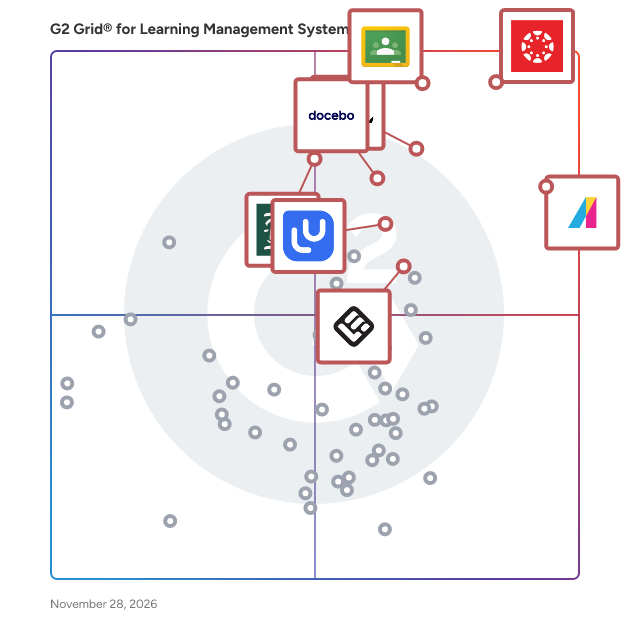
G2 Grid® for Learning Management Systems

G2 Grid® for Learning Management Systems plotting products by satisfaction and market presence

Highlighted products: Canvas LMS, Absorb LMS, Google Classroom, D2L Brightspace, Docebo, LearnUpon, Blackboard, and LearnWorlds.

Underlying data: [Grid® JSON](https://www.g2.com/categories/learning-management-system-lms/grids.json?focus%5B%5D=canvas-lms&focus%5B%5D=absorb-software-absorb-lms&focus%5B%5D=google-classroom&focus%5B%5D=d2l-brightspace&focus%5B%5D=docebo&focus%5B%5D=learnupon&focus%5B%5D=blackboard&focus%5B%5D=learnworlds)

Canvas LMS

Canvas by Instructure is a versatile, cloud-based learning management system (LMS) designed to transform online learning across every stage of education. Since its launch in 2011, Canvas has become the foundational hub for digital classrooms, empowering institutions to deliver high-quality instruction from K-12 to Corporate Training. Trusted by millions worldwide, Canvas remains the #1 educational software and the core of the Instructure ecosystem. Comprehensive Instructor Tools for Every Environment Canvas is built with flexibility at its core, allowing organizations to tailor the platform to their unique goals. Whether you are managing complex curricula in Higher Education or streamlining Primary/Secondary Education (K-12), our robust instructor tools ensure that every learning experience is impactful and learner-centered. From educational initiatives to professional development, Canvas adapts to your mission by providing a seamless interface to: -Create and manage online courses and high-quality learning materials. -Deliver assignments, quizzes, and assessments that meet diverse learning standards. -Enable collaboration through integrated discussions and messaging to boost student engagement. -Track student progress and learning outcomes through real-time data. -Integrate with third-party education tools, with over 900+ partners to choose from. Empowering Success Through Virtual Learning The platform provides a scalable, secure environment for virtual learning that goes beyond the traditional classroom. By combining course management with advanced assessments and grading features, Canvas reduces administrative friction and allows educators to focus on what matters most: student success. Key Features & Benefits Intuitive Design: An easy-to-use interface reduces overhead and ensures learners stay focused on their goals. Mobile Accessibility: The top-rated Canvas mobile app keeps learners connected, even offline. Advanced Analytics: Gain actionable insights to monitor student engagement and improve institutional outcomes. Scalable Ecosystem: With 500+ third-party integrations, Canvas connects with your existing tech stack to build a truly dynamic learning environment. Industries We Serve Canvas by Instructure is the trusted partner for organizations aiming to unlock the full potential of their learners across: -Higher Education -Primary/Secondary Education (K-12) -Corporate Training

Average Rating: 4.5/5.0

Total Reviews: 1,734

How Do G2 Users Rate Canvas LMS?

  • Ease of Use: 8.5/10 (Category avg: 8.7/10)
  • Has the product been a good partner in doing business?: 8.6/10 (Category avg: 9.1/10)
  • Quality of Support: 8.5/10 (Category avg: 8.9/10)
  • Ease of Admin: 8.3/10 (Category avg: 8.7/10)

Who Is the Company Behind Canvas LMS?

  • Seller: Instructure
  • Year Founded: 2008
  • HQ Location: Salt Lake City, Utah
  • LinkedIn® Page: www.linkedin.com
    2,279 employees on LinkedIn®
  • Ownership: NYSE: INST

Who Uses This Product?

  • Who Uses This: Teacher, Student
  • Top Industries: Higher Education, Education Management
  • Company Size: 45% Medium, 42% Large

What Do G2 Reviewers Say About Canvas LMS?

AI-generated summary from verified user reviews

Pros
  • Users praise the ease of use of Canvas LMS, enjoying its intuitive navigation and user-friendly interface.
  • Users appreciate the user-friendly interface of Canvas LMS, making navigation and course management effortless.
  • Users praise the intuitive experience of Canvas LMS, noting its user-friendly interface and helpful guides.
  • Users value the diverse features of Canvas LMS, enhancing both teaching creativity and student engagement effectively.
  • Users appreciate Canvas LMS for its intuitive interface, making course setup and navigation effortless for all users.
Cons
  • Users often find limited features in Canvas LMS, making navigation and course setup challenging and non-intuitive.
  • Users find Canvas LMS to have a lack of intuitiveness, requiring frequent relearning and struggle with user roles.
  • Users express frustration with poor support, often facing delays and incorrect guidance from the Canvas support team.
  • Users feel that the limited customization in Canvas LMS restricts creativity and personal expression in course design.
  • Users frequently struggle with navigation issues on Canvas LMS, leading to confusion and difficulty locating course materials.

What Are Recent G2 Reviews of Canvas LMS?

What Are G2 Users Discussing About Canvas LMS?

Absorb LMS

Absorb is an agentic AI-powered learning platform designed to deliver results for all learners — employees, partners, and customers alike. With AI agents that handle the heavy lifting across administration, content creation, and learner guidance, Absorb goes beyond traditional LMS capabilities to actively drive learning outcomes at scale. Seamless integrations across your tech stack, native content authoring, and advanced reporting and analytics simplify learning management while AI handles the routine. Personalized learning paths, automated workflows, and white-labeled experiences let your team focus on high-impact learning initiatives rather than managing the system. Absorb helps organizations improve time-to-productivity, ensure compliance, and scale training programs efficiently — whether you’re onboarding employees, training partners, or educating customers.

Average Rating: 4.6/5.0

Total Reviews: 1,001

How Do G2 Users Rate Absorb LMS?

  • Ease of Use: 8.8/10 (Category avg: 8.7/10)
  • Has the product been a good partner in doing business?: 9.4/10 (Category avg: 9.1/10)
  • Quality of Support: 9.6/10 (Category avg: 8.9/10)
  • Ease of Admin: 8.6/10 (Category avg: 8.7/10)

Who Is the Company Behind Absorb LMS?

  • Seller: Absorb Software
  • Company Website:
  • Year Founded: 2003
  • HQ Location: Calgary
  • LinkedIn® Page: www.linkedin.com
    675 employees on LinkedIn®
  • Phone: 1 (877) 920-2575

Who Uses This Product?

  • Who Uses This: Instructional Designer, Training Manager
  • Top Industries: Hospital & Health Care, Non-Profit Organization Management
  • Company Size: 45% Medium, 37% Large

What Do G2 Reviewers Say About Absorb LMS?

AI-generated summary from verified user reviews

Pros
  • Users find the platform intuitive and easy to navigate for both administrators and learners, with little experience needed.
  • Users value responsive, knowledgeable support that answers questions quickly and helps resolve issues.
  • Users value flexible configuration that lets them tailor the learner experience and platform setup to organizational needs.
  • Users value detailed, accessible reporting and customization that make training data easy to retrieve and learner progress clear.
  • Users find setup and implementation easy and appreciate the supportive onboarding that helps them transition smoothly to launch.
Cons
  • Users say limited customization and settings flexibility make it difficult to tailor the platform to their needs.
  • Users find the admin interface unintuitive and overwhelming, with a steep learning curve that often requires extensive training.
  • Users find reporting limited in detail and flexibility, with missing data and customization options.
  • Users find reports difficult to create and navigate, and often need manual work to update or consolidate data.
  • Users struggle to find features and navigate between areas, with menus and labels often feeling unintuitive.

What Are Recent G2 Reviews of Absorb LMS?

What Are G2 Users Discussing About Absorb LMS?

D2L Brightspace

Learning That Transforms Lives D2L Brightspace is a powerful, flexible learning platform designed to put learners first. Whether you’re supporting students, employees, or members, Brightspace helps you create personalized, engaging, and measurable learning experiences that drive success. Built for Your World Brightspace adapts to the needs of every learning environment: K–12: Empower teachers and inspire every learner Higher Education: Deliver personalized learning at scale Corporate: Drive business results through smarter learning Associations: Turn training into a competitive advantage Training Providers: Deliver scalable, high-impact learning programs Modernize with Confidence Easily digitize your courses and adopt intuitive tools designed to enhance engagement, accessibility, and outcomes—no technical background required. Scale Personalized Learning Automate routine tasks, unlock actionable insights, and build learning paths that adapt to each learner’s needs. Brightspace helps you save time while improving outcomes. Support Advanced Learning Models From mastery-based progressions to competency-based learning, Brightspace has the power and flexibility to support even the most advanced online and blended strategies. A True Partner in Your Success More than a platform, Brightspace comes with a team dedicated to helping you succeed. From onboarding to optimization, we align our support and services to your goals—every step of the way.

Average Rating: 4.4/5.0

Total Reviews: 676

How Do G2 Users Rate D2L Brightspace?

  • Ease of Use: 8.4/10 (Category avg: 8.7/10)
  • Has the product been a good partner in doing business?: 8.9/10 (Category avg: 9.1/10)
  • Quality of Support: 8.5/10 (Category avg: 8.9/10)
  • Ease of Admin: 8.2/10 (Category avg: 8.7/10)

Who Is the Company Behind D2L Brightspace?

  • Seller: Desire2Learn
  • Company Website:
  • Year Founded: 1999
  • HQ Location: Kitchener, ON
  • LinkedIn® Page: www.linkedin.com
    1,271 employees on LinkedIn®
  • Ownership: TSX: DTOL

Who Uses This Product?

  • Who Uses This: Instructional Designer, Teacher
  • Top Industries: Higher Education, Education Management
  • Company Size: 45% Medium, 40% Large

What Do G2 Reviewers Say About D2L Brightspace?

AI-generated summary from verified user reviews

Pros
  • Users value the ease of use of D2L Brightspace, noting its intuitive design and straightforward navigation for all users.
  • Users appreciate the user-friendly interface of D2L Brightspace, which simplifies course management and enhances the learning experience.
  • Users appreciate the intuitive interface of D2L Brightspace, enabling students to engage in learning with ease.
  • Users value the feature diversity of D2L Brightspace, enhancing their administrative control and content creation efficiently.
  • Users appreciate the powerful toolkit of D2L Brightspace, enhancing usability and administrative efficiency across platforms.
Cons
  • Users are frustrated with course creation inefficiencies that hinder project timelines and complicate overall user experience.
  • Users report challenges with grading issues, including manual grading of anonymous posts and a clunky grading tool.
  • Users face limited customization options that complicate navigation and require more administrative involvement than desired.
  • Users find the limited features of Brightspace hinder collaboration and create an inflexible learning environment.
  • Users face integration issues that complicate tool implementation and navigation, creating challenges for administrators and instructors.

What Are Recent G2 Reviews of D2L Brightspace?

What Are G2 Users Discussing About D2L Brightspace?

AI can help you find the answers. G2 helps you trust them.

Connect G2 to Claude or ChatGPT for answers grounded in G2's trusted reviews, comparisons, and pricing from real user insights.

How it works

LearnUpon

LearnUpon’s Agentic Learning Platform is the LMS of the future, built to elevate human capability in the AI era. By pairing human ingenuity with specialized AI agents, our platform automates heavy administrative workflows to deliver hyper-personalized learning experiences, empowering learning leaders to recapture energy and elevate strategic impact.

Average Rating: 4.5/5.0

Total Reviews: 255

How Do G2 Users Rate LearnUpon?

  • Ease of Use: 9.0/10 (Category avg: 8.7/10)
  • Has the product been a good partner in doing business?: 9.5/10 (Category avg: 9.1/10)
  • Quality of Support: 9.4/10 (Category avg: 8.9/10)
  • Ease of Admin: 9.1/10 (Category avg: 8.7/10)

Who Is the Company Behind LearnUpon?

  • Seller: LearnUpon
  • Company Website:
  • Year Founded: 2012
  • HQ Location: Dublin , Ireland
  • LinkedIn® Page: www.linkedin.com
    327 employees on LinkedIn®

Who Uses This Product?

  • Top Industries: Non-Profit Organization Management, E-Learning
  • Company Size: 45% Medium, 26% Large

What Do G2 Reviewers Say About LearnUpon?

AI-generated summary from verified user reviews

Pros
  • Users appreciate the ease of use of LearnUpon, finding course creation and report setup intuitive and efficient.
  • Users appreciate the timely and responsive customer support from LearnUpon, enhancing their overall experience and satisfaction.
  • Users love the user-friendly design of LearnUpon, enhancing professional learning and engagement within their organizations.
  • Users commend the ease of course creation on LearnUpon, appreciating its intuitive interface and flexible content options.
  • Users find LearnUpon intuitive and easy to use, enhancing their online learning experiences and engagement significantly.
Cons
  • Users find the limited forum features of LearnUpon outdated and lacking important navigation options for better interaction.
  • Users desire limited customization options in LearnUpon, affecting flexibility and user experience across various features.
  • Users face navigation difficulties due to limited forum options and confusing mobile app requirements, impacting usability.
  • Users find that missing features, like customizable reporting and streamlined integrations, hinder their overall experience with LearnUpon.
  • Users encounter difficulties in course management, including enrollment issues and limited viewing options for course deadlines.

What Are Recent G2 Reviews of LearnUpon?

What Are G2 Users Discussing About LearnUpon?

Blackboard

Every day, millions of students around the world learn, collaborate, and grow with Blackboard. More than an LMS, Blackboard is where learning comes to life—where students build skills, gain confidence, and prepare for what’s next. It supports modern teaching and learning by helping institutions deliver engaging instruction, improve accessibility, and better understand learner progress. Used by learners, instructors, and administrators across more than 70 countries, Blackboard is designed in close partnership with educators, helping ensure innovation is grounded in proven teaching practices and aligned with what institutions need most. Blackboard supports the full teaching lifecycle, from course and content creation to assessment, grading, and ongoing engagement—across online, in-person, and hybrid learning models. A key priority for Blackboard is reducing the administrative burden on instructors so they can spend more time on teaching and student support. With native AI capabilities, Blackboard helps streamline practical course-building and assessment tasks by offering a strong starting point that instructors can tailor to their own teaching style. Blackboard also includes accessibility support that helps instructors create more inclusive learning experiences, while giving institutions a clearer path toward measurable progress at scale. Blackboard is evolving quickly. It has delivered the fastest rate of innovation in the LMS market for four years in a row, releasing frequent updates informed directly by the global learning community. Combined with deep integrations across the broader education ecosystem, mobile-first access, and actionable insights, Blackboard helps institutions continuously improve teaching and learning. Visit www.anthology.com/why-choose-blackboard to see what sets Blackboard apart.

Average Rating: 4.0/5.0

Total Reviews: 1,016

How Do G2 Users Rate Blackboard?

  • Ease of Use: 7.8/10 (Category avg: 8.7/10)
  • Has the product been a good partner in doing business?: 7.9/10 (Category avg: 9.1/10)
  • Quality of Support: 7.5/10 (Category avg: 8.9/10)
  • Ease of Admin: 7.4/10 (Category avg: 8.7/10)

Who Is the Company Behind Blackboard?

  • Seller: Blackboard
  • Year Founded: 1997
  • HQ Location: Washington, DC
  • LinkedIn® Page: www.linkedin.com
    2,829 employees on LinkedIn®
  • Phone: 800.483.9106

Who Uses This Product?

  • Who Uses This: Student, Teacher
  • Top Industries: Higher Education, Education Management
  • Company Size: 46% Large, 38% Medium

What Do G2 Reviewers Say About Blackboard?

AI-generated summary from verified user reviews

Pros
  • Users appreciate the ease of use of Blackboard, benefiting from its organized and integrated digital classroom.
  • Users find the navigation ease of Blackboard beneficial, making course access seamless for both students and faculty.
  • Users appreciate the user-friendly interface of Blackboard, making course management easy and intuitive for both students and faculty.
  • Users appreciate the variety of tools in Blackboard, enhancing course creation and learning experiences for all.
  • Users appreciate Blackboard Learn's intuitive course setup and extensive integration options, enhancing teaching and learning experiences.
Cons
  • Users express frustration over the limited features of Blackboard, missing critical tools and intuitive navigation options.
  • Users are frustrated by the missing features in Blackboard, such as wikis, comprehensive tools, and intuitive grading.
  • Users find limited customization in Blackboard, which restricts their ability to tailor the experience to specific needs.
  • Users struggle with a lack of intuitiveness in Blackboard, finding navigation and the gradebook setup challenging.
  • Users find the interface not intuitive, feeling overwhelmed by buried information and the inability to prioritize course elements.

What Are Recent G2 Reviews of Blackboard?

What Are G2 Users Discussing About Blackboard?

LearnWorlds

LearnWorlds is an online course platform and corporate LMS that helps training businesses deliver professional learning programs from one flexible setup, whether they're launching a new academy, scaling customer training, or connecting learning into an existing tech stack. Most learning management software is built for one use case. LearnWorlds is built for training businesses that have several. A single platform for branded academies, B2B client programs, corporate education, and paid learning, with user groups, roles, ecommerce, reporting, and automation tools that let you configure each program differently without starting from scratch. AI content creation, integrations like HubSpot and Stripe, and scheduled reporting mean less time on the work that doesn't need a human, and more time on the work that does. When you outgrow a basic online course platform or a standard learning management solution, the problem is rarely just course creation or course authoring. Every new client brings new learner groups, access rules, seats, reports, certificates, stakeholder visibility, and rollout work. LearnWorlds gives training businesses the delivery, reporting, commerce, and operational control to run programs across multiple client organizations without rebuilding from scratch or adding more manual work. One core offer, adapted for every client, built on: - Branded academies - User roles and access rules - Certificates - Ecommerce, analytics, and scheduled reports Teams can configure repeatable training experiences that serve different clients, cohorts, partners, customers, employees, members, and paid learners. Most training teams already have the content, it just lives across documents, slide decks, notes, and existing materials. LearnWorlds AI helps turn that knowledge into course-ready material, including outlines, activities, assessments, pages, emails, and visuals, while allowing teams to refine specific sections and keep content consistent across the academy. LearnWorlds helps commercial training businesses launch new clients faster, prove impact clearly, support more complex delivery models, and scale operations without scaling headcount.

Average Rating: 4.7/5.0

Total Reviews: 396

How Do G2 Users Rate LearnWorlds?

  • Ease of Use: 8.8/10 (Category avg: 8.7/10)
  • Has the product been a good partner in doing business?: 9.3/10 (Category avg: 9.1/10)
  • Quality of Support: 9.6/10 (Category avg: 8.9/10)
  • Ease of Admin: 8.8/10 (Category avg: 8.7/10)

Who Is the Company Behind LearnWorlds?

  • Seller: LearnWorlds
  • Company Website:
  • Year Founded: 2014
  • HQ Location: Limassol, Greece
  • LinkedIn® Page: www.linkedin.com
    195 employees on LinkedIn®

Who Uses This Product?

  • Who Uses This: CEO, Owner
  • Top Industries: E-Learning, Professional Training & Coaching
  • Company Size: 87% Small, 11% Medium

What Do G2 Reviewers Say About LearnWorlds?

AI-generated summary from verified user reviews

Pros
  • Users rave about LearnWorlds' exceptional customer support, always timely and resourceful in addressing questions and issues.
  • Users love the ease of use of LearnWorlds, praising its intuitive design and organized features for seamless navigation.
  • Users value the feature diversity of LearnWorlds, consistently discovering new functionalities that enhance their learning experience.
  • Users praise the excellent support of LearnWorlds, highlighting prompt responses and detailed assistance for any inquiry.
  • Users rave about the exceptional support from LearnWorlds, highlighting quick responses and personalized assistance.
Cons
  • Users find the limited features of LearnWorlds frustrating, wishing for enhancements in functionality and user experience.
  • Users find limited customization options in LearnWorlds, wishing for enhanced flexibility in design and course management.
  • Users highlight missing features like improved design tools and auto-save options for a smoother editing experience.
  • Users find the interface not intuitive, struggling with navigation and editing features that complicate their experience.
  • Users find LearnWorlds' interface not user-friendly, facing challenges with navigation and editing functionalities.

What Are Recent G2 Reviews of LearnWorlds?

What Are G2 Users Discussing About LearnWorlds?

iSpring LMS

iSpring LMS is a feature-rich platform that helps companies accelerate their business momentum through ROI-efficient training. The LMS enables the entire training cycle with clarity and consistency, from structured onboarding to continuous employee development. It helps reduce employee turnover, improve performance, and ensure that teams stay aligned, skilled, and ready to support the company’s long-term growth. iSpring LMS gives managers and trainers a simple way to organize training, guide employees through skill-building, and see exactly how their learners are progressing. Employees get a clear path to follow, and leaders get the visibility they need to support growth, maintain standards, and keep performance on track. Here are the core capabilities that make this possible: - The mirrored organizational structure reflects how your company works, so training stays aligned with roles and teams. - Specified learning tracks guide learners step by step through required courses and programs. - Detailed reporting highlights progress, deadlines, and knowledge gaps with actionable insights. - The Supervisor Dashboard gives managers instant visibility into team performance without extra admin work. - Automated workflows handle enrollments, reminders, and assignments, saving time and reducing manual tasks. - The corporate portal and newsfeed centralize updates and announcements to keep everyone aligned. - 360-Degree Reviews gather well-rounded performance feedback from peers and supervisors. - On-The-Job Training validates real-world skills with structured checklists. - Knowledge Base gives employees quick access to SOPs, product info, and internal documentation. - Development Plans build personalized growth paths that connect training to long-term skill development.

Average Rating: 4.5/5.0

Total Reviews: 186

How Do G2 Users Rate iSpring LMS?

  • Ease of Use: 9.1/10 (Category avg: 8.7/10)
  • Has the product been a good partner in doing business?: 9.3/10 (Category avg: 9.1/10)
  • Quality of Support: 9.4/10 (Category avg: 8.9/10)
  • Ease of Admin: 8.9/10 (Category avg: 8.7/10)

Who Is the Company Behind iSpring LMS?

  • Seller: iSpring
  • Company Website:
  • Year Founded: 2001
  • HQ Location: Alexandria, VA
  • LinkedIn® Page: www.linkedin.com
    270 employees on LinkedIn®

Who Uses This Product?

  • Top Industries: E-Learning, Construction
  • Company Size: 55% Medium, 36% Small

What Do G2 Reviewers Say About iSpring LMS?

AI-generated summary from verified user reviews

Pros
  • Users appreciate the ease of use of iSpring LMS, finding it intuitive and straightforward for training management.
  • Users appreciate the intuitive course creation tools in iSpring LMS, streamlining training management for small businesses effectively.
  • Users appreciate the user-friendly interface of iSpring LMS, enhancing training efficiency and simplifying course management.
  • Users value the excellent customer support of iSpring LMS, enhancing their overall experience with the platform.
  • Users find iSpring LMS to be simple and intuitive, making it ideal for small businesses and easy to manage.
Cons
  • Users feel that iSpring LMS has limited features, lacking advanced authoring tools and necessary feedback options.
  • Users find the missing features in iSpring LMS hinder usability, such as inadequate integration and feedback options.
  • Users note that integration issues hinder ease of use, with gaps requiring impractical workarounds for better compatibility.
  • Users desire more limited customization options within iSpring LMS, hoping for enhanced integration and authoring tools.
  • Users desire more advanced features in iSpring LMS, especially for authoring tools and report integration.

What Are Recent G2 Reviews of iSpring LMS?

Toddle

Toddle is an AI-powered learning management system (LMS) for K-12 schools and districts, built by teachers for teachers. Planning, teaching, assessment, reporting and family communication happen in one connected platform, so schools typically replace 3 to 5 separate tools with Toddle. More than 2,500 schools in over 100 countries use it: 1,000+ schools following Cambridge, British, American, Australian curricula, and 1,500+ IB World Schools, including over half of all PYP schools. Who it's for: K-12 international schools following IB, Cambridge, British, American, and other curricula; independent and private schools; public school districts; charter schools; faith-based schools; and school groups, from Pre-K to Grade 12. What schools use it for: • Curriculum planning and mapping, with standards alignment and accreditation • Assignments, online worksheets and exams with timed tests, lockdown browser and proctoring • A standards-based or score-based gradebook, student portfolios, progress reports and transcripts • Attendance, timetables and calendars • Behavior management, pastoral care and student support plans • Announcements and messaging with families • Analytics for teachers and school leaders Toddle AI: AI is built into each workflow rather than offered as a separate tool. • Tools include a curriculum design assistant, assessment builder, grading assistant, report writing assistant, AI insights on school data, AI Tutors and a writing assistant • Because Toddle already holds each school's curriculum and a record of every student's learning, its AI is designed to fit each school's context • Teachers review every output, set the rules for each AI Tutor and can see every student conversation • School data is never used to train AI models • Toddle is certified to ISO/IEC 42001 for responsible AI Languages: The platform is available in English, Spanish, French, Portuguese, Turkish, Arabic, Chinese and Japanese. Toddle AI works in more than 40 languages, family messages translate automatically into more than 190 languages, and text fields accept any language. Integrations: More than 50, including PowerSchool, Veracross, Blackbaud, iSAMS, Compass, Clever, ClassLink, Wonde, Google Workspace, Microsoft 365, Turnitin and LTI 1.3 tools. Support: Every school is paired with a dedicated Toddle Buddy, an experienced educator who leads the entire rollout. From managing data migration end to end to planning implementation and providing hands-on teacher training, Toddle Buddies work around each school's schedule. Dedicated support continues free of charge well beyond onboarding, throughout the school's journey with Toddle. Security: SOC 2 Type II; ISO/IEC 27001 and 27701; FERPA and COPPA certified by iKeepSafe; GDPR compliant; regional data hosting. Pricing: Custom quote.

Average Rating: 4.7/5.0

Total Reviews: 64

How Do G2 Users Rate Toddle?

  • Ease of Use: 9.0/10 (Category avg: 8.7/10)
  • Has the product been a good partner in doing business?: 9.4/10 (Category avg: 9.1/10)
  • Quality of Support: 9.2/10 (Category avg: 8.9/10)
  • Ease of Admin: 7.8/10 (Category avg: 8.7/10)

Who Is the Company Behind Toddle?

  • Seller: Toddle
  • Year Founded: 2019
  • HQ Location: Bengaluru, India
  • LinkedIn® Page: www.linkedin.com
    693 employees on LinkedIn®

Who Uses This Product?

  • Who Uses This: Teacher
  • Top Industries: Education Management, Primary/Secondary Education
  • Company Size: 60% Medium, 38% Small

What Do G2 Reviewers Say About Toddle?

AI-generated summary from verified user reviews

Pros
  • Users value the effective communication features of Toddle, facilitating seamless interactions with parents and supporting lesson planning.
  • Users value the comprehensive educational tools of Toddle for lesson planning, tracking, and parent communication.
  • Users value the effective parent engagement provided by Toddle, enhancing communication and involvement in student progress.
  • Users appreciate the reporting capabilities of Toddle, facilitating lesson planning and effective student communication.
  • Users value the student monitoring feature for effective lesson planning and communication with parents.
Cons
  • Users are concerned about the security of access restrictions in Toddle, impacting student safety during assessments.
  • Users express concerns about the security of assessments, noting it may not fully protect students' data.

What Are Recent G2 Reviews of Toddle?

GoSkills

GoSkills is a modern, AI-first Learning Management System (LMS) and Learning Experience Platform (LXP) that helps organizations create, deliver, track, and scale employee training quickly, easily, and affordably. The #1-rated LMS for growing startups, SMBs, and mid-market organizations that want to launch training fast, without the complexity of a traditional LMS. Easy to implement, easy to manage, and comes with a free plan and flexible pricing. Key capabilities • Built-in course library: 500+ expert-led courses in business, technology, software, soft skills, leadership, and professional development, continuously updated. • Gamified microlearning: 3–7 minute lessons with quizzes, exercises, and reference materials that drive engagement and retention. • Course builder: Build custom courses with an intuitive block-based editor; import SCORM, xAPI, AICC, and CMI5 content; export courses to other LMS platforms. • AI course creation (Genie AI): Generate full courses with a conversational AI assistant, or turn PDFs and PowerPoints into structured training in minutes, in multiple languages. • Learning paths: Curated sequences that take learners from novice to expert, or guide them through skills needed for career advancement and role transitions. • AI tutor and recommender: On-demand 24/7 learner support and personalized course suggestions based on goals. • Reporting and analytics: Granular tracking from learner progress to individual lesson level; identify and close skills gaps; collect feedback with customizable review forms. • Automated workflows: Manage learners by role or team, assign courses, set due dates, and schedule reminders. • Certification and compliance: Issue certificates on completion; log offline and live training; maintain audit-ready records. • Custom branding: Personalize your platform with custom logos, login pages, and certificates. • SSO and integrations: Google, Microsoft, and Okta SSO; SCIM 2.0; REST API and Zapier; SOC 2 compliant. Use cases Employee onboarding, upskilling and reskilling, leadership development, compliance training, and partner or customer training. Who GoSkills is for L&D professionals, HR teams, operations managers, team managers, and company owners. Its intuitive design makes it easy for roles outside of L&D to deploy and manage a successful training program. Used across technology, professional services, retail, construction, manufacturing, healthcare, nonprofits, government, and more. Problems GoSkills solves GoSkills replaces the fragmented combination of a learning library, authoring tool, and LMS with one intuitive platform launchable in minutes. Its microlearning format drives completion rates above 40% — more than 3x the industry average — tackling the engagement challenges most organizations face. Built-in AI tools and simple admin workflows significantly reduce course creation and management time. Why teams choose GoSkills GoSkills uniquely combines two essentials in one platform: a built-in library of 500+ expert-led courses, with a modern LMS for creating and managing custom training. Teams can get started fast with ready-made content, then build their own onboarding, compliance, SOP, customer education, and role-specific training in the same system. Unlike traditional LMS platforms, GoSkills is fast to set up, genuinely enjoyable to use, and priced for teams of any size, including small teams that other platforms won’t serve. Trusted by 10,000+ teams worldwide, GoSkills is consistently rated #1 on G2 for Ease of Use, Setup, and Support.

Average Rating: 4.7/5.0

Total Reviews: 340

How Do G2 Users Rate GoSkills?

  • Ease of Use: 9.6/10 (Category avg: 8.7/10)
  • Has the product been a good partner in doing business?: 9.5/10 (Category avg: 9.1/10)
  • Quality of Support: 9.4/10 (Category avg: 8.9/10)
  • Ease of Admin: 9.4/10 (Category avg: 8.7/10)

Who Is the Company Behind GoSkills?

  • Seller: GoSkills
  • Company Website:
  • Year Founded: 2013
  • HQ Location: Palo Alto, CA
  • LinkedIn® Page: www.linkedin.com
    24 employees on LinkedIn®

Who Uses This Product?

  • Who Uses This: Student, Administrative Assistant
  • Top Industries: Accounting, Hospital & Health Care
  • Company Size: 63% Small, 23% Medium

What Do G2 Reviewers Say About GoSkills?

AI-generated summary from verified user reviews

Pros
  • Users appreciate the ease of use in GoSkills, finding structured lessons and a clean interface helpful for learning.
  • Users value the variety and quality of courses offered by GoSkills, enhancing learning and skill development effectively.
  • Users appreciate the high-quality and structured lessons of GoSkills, making learning efficient and rewarding.
  • Users appreciate the ease of learning with GoSkills, enjoying structured lessons that fit well into busy schedules.
  • Users appreciate the high-quality and structured courses offered by GoSkills, enhancing their learning experiences significantly.
Cons
  • Users often find limited courses in GoSkills, lacking advanced content and variety in practical assignments.
  • Users find the limited content in GoSkills insufficient for advanced learners seeking deeper knowledge and practical experience.
  • Users find the limited course variety of GoSkills insufficient for those seeking advanced or diverse learning experiences.
  • Users find the pricing for GoSkills to be slightly too high, especially considering the functionality of the free version.
  • Users feel the high subscription cost of GoSkills is excessive compared to other platforms, impacting value perception.

What Are Recent G2 Reviews of GoSkills?

What Are G2 Users Discussing About GoSkills?

Moodle

Moodle is an open source, feature-rich, secure and scalable learning management system that integrates seamlessly with other platforms and can be customised for any teaching or training method you choose. With fresh and intuitive interfaces, Moodle has solutions suitable for K-12, higher education, vocational training, corporates, and all types of enterprise learning. From improving your teaching and student outcomes to streamlining training, onboarding, and compliance management, you'll build more active and engaging online learning spaces with Moodle. When you choose Moodle, you benefit from Moodle's 20+ years of expertise in educational technology and you become part of a global community of people who love our online learning platform and our values. You can get support from our active community forums, access Moodle's certified integrations, and explore over 2000 open source plugins. Or, for expert advice, end-to-end support, and services, including site setup and hosting, customisations, and training, unlock unparalleled expertise and dedicated 24/7 support through our global network of Moodle Certified Partners and Service Providers.

Average Rating: 4.1/5.0

Total Reviews: 440

How Do G2 Users Rate Moodle?

  • Ease of Use: 7.7/10 (Category avg: 8.7/10)
  • Has the product been a good partner in doing business?: 8.6/10 (Category avg: 9.1/10)
  • Quality of Support: 7.6/10 (Category avg: 8.9/10)
  • Ease of Admin: 7.8/10 (Category avg: 8.7/10)

Who Is the Company Behind Moodle?

  • Seller: Moodle
  • Company Website:
  • Year Founded: 2001
  • HQ Location: West Perth, Western Australia
  • LinkedIn® Page: www.linkedin.com
    480 employees on LinkedIn®

Who Uses This Product?

  • Who Uses This: Teacher, Assistant Professor
  • Top Industries: Higher Education, Education Management
  • Company Size: 47% Medium, 29% Small

What Do G2 Reviewers Say About Moodle?

AI-generated summary from verified user reviews

Pros
  • Users love the ease of use in Moodle, facilitating smooth access to learning materials and course organization.
  • Users appreciate the flexibility and user-friendliness of Moodle, which enhances course design and teaching effectiveness.
  • Users value the ease of course creation in Moodle, facilitating seamless sharing of resources and organization.
  • Users value the customizability of Moodle, allowing tailored training solutions to effectively meet diverse employee needs.
  • Users appreciate the flexibility and customization of Moodle, enabling tailored training solutions for diverse employee needs.
Cons
  • Users are frustrated by Moodle's limited features, lacking crucial plugins and support for better customization.
  • Users find Moodle not user-friendly, citing a cluttered interface and excessive clicks that hinder efficient course management.
  • Users find Moodle's complexity overwhelming, requiring significant technical skill and navigation through intricate menus for effective use.
  • Users face a steep learning curve with Moodle, complicated by a cluttered interface and poor documentation.
  • Users experience a lack of intuitiveness in Moodle, finding the interface cluttered and features hard to navigate.

What Are Recent G2 Reviews of Moodle?

What Are G2 Users Discussing About Moodle?

TalentLMS

TalentLMS is an AI-powered, cloud-based learning management system (LMS) for growing businesses that want to launch training fast, prove ROI sooner, and turn learning into a driver of business growth. With built-in AI tools and an intuitive design, TalentLMS helps teams create and manage training without the time and complexity of traditional systems. Based on G2 data, companies using TalentLMS enjoy: * Ease of setup * Fast time to launch * Achieving ROI in less than a year One platform to train employees, partners, and customers TalentLMS supports employee onboarding and development, partner enablement, and customer training in one intuitive platform. As your business grows, training scales with you, without added complexity. The features you need to run training that delivers results TalentLMS combines intuitive design with AI-powered tools to help you create content faster and reduce admin time. Seamless integrations connect your existing tools, while built-in reporting helps you track progress, measure impact, and prove the value of training. How teams use TalentLMS * Create structured Learning Paths for employee, customer, and partner training. * Use AI tools such as the AI course creator to build and update courses and assessments faster. Use AI Coach for Learners to reinforce knowledge and Skills to personalize upskilling for specific roles. * Connect TalentLMS to your tech stack through enhanced integrations, including HubSpot, LTI 1.3, and more. * Access plug-and-play, ready-made courses from TalentLibrary to launch training instantly. * Scale training programs by automating routine tasks, managing multiple groups or departments with Branches, and using advanced reporting tools to understand progress and training outcomes. Organizations including Google, Amazon, Meta, and more use TalentLMS to improve training efficiency and support measurable results. More than 70,000 teams across 12,000+ organizations rely on the platform to see results sooner without the hassle of complicated systems or high costs.

Average Rating: 4.6/5.0

Total Reviews: 773

How Do G2 Users Rate TalentLMS?

  • Ease of Use: 9.0/10 (Category avg: 8.7/10)
  • Has the product been a good partner in doing business?: 9.1/10 (Category avg: 9.1/10)
  • Quality of Support: 8.8/10 (Category avg: 8.9/10)
  • Ease of Admin: 8.8/10 (Category avg: 8.7/10)

Who Is the Company Behind TalentLMS?

Who Uses This Product?

  • Who Uses This: CEO, Director
  • Top Industries: E-Learning, Education Management
  • Company Size: 48% Small, 40% Medium

What Do G2 Reviewers Say About TalentLMS?

AI-generated summary from verified user reviews

Pros
  • Users appreciate the ease of use of TalentLMS, finding it user-friendly for learners, instructors, and admins.
  • Users appreciate the ease of course creation in TalentLMS, streamlining training delivery for busy schedules.
  • Users value the user-friendly interface of TalentLMS, enabling seamless navigation for learners, instructors, and admins alike.
  • Users commend the great customer service and support provided by TalentLMS, ensuring a smooth user experience.
  • Users appreciate the easy setup of TalentLMS, enhancing their onboarding experience with smooth transitions and dedicated support.
Cons
  • Users express frustration with limited features, feeling that basic issues need resolution before new updates are introduced.
  • Users are frustrated by the missing features in TalentLMS, feeling basic issues need resolution before new additions are made.
  • Users desire more customization options in TalentLMS, particularly for reporting and course creation functionalities.
  • Users find the reporting issues in TalentLMS challenging, needing better knowledge and customization options for effective use.
  • Users report feature issues with TalentLMS, citing glitches and limited integration, complicating their overall experience.

What Are Recent G2 Reviews of TalentLMS?

What Are G2 Users Discussing About TalentLMS?

CustomGuide

CustomGuide helps associations, governments, nonprofits, and public libraries train their staff and communities. CustomGuide is an all-in-one online learning platform that makes staff training easy to create, deliver, and track. It combines interactive eLearning courses, skill assessments, and AI-powered course creation tools to help organizations build effective training programs. Choose from over 300 LMS-ready courses on Microsoft, Google, and business skills, or create your own in minutes using the AI Course Builder. Measure progress, award certificates, and reinforce learning with branded cheat sheets. Recognized by G2 as a Top 50 Education Software product and trusted by more than 3,000 organizations worldwide, CustomGuide provides simple, flexible, and measurable online training solutions for every team and community.

Average Rating: 4.9/5.0

Total Reviews: 69

How Do G2 Users Rate CustomGuide?

  • Ease of Use: 9.9/10 (Category avg: 8.7/10)
  • Has the product been a good partner in doing business?: 9.8/10 (Category avg: 9.1/10)
  • Quality of Support: 9.9/10 (Category avg: 8.9/10)
  • Ease of Admin: 9.8/10 (Category avg: 8.7/10)

Who Is the Company Behind CustomGuide?

  • Seller: CustomGuide, Inc.
  • Company Website:
  • Year Founded: 1999
  • HQ Location: Plymouth, US
  • LinkedIn® Page: www.linkedin.com
    29 employees on LinkedIn®

Who Uses This Product?

  • Top Industries: Accounting, Computer Software
  • Company Size: 61% Small, 23% Medium

What Do G2 Reviewers Say About CustomGuide?

AI-generated summary from verified user reviews

Pros
  • Users value the ease of use of CustomGuide, making learning straightforward and enjoyable for teams.
  • Users value the efficient progress tracking of CustomGuide, enhancing their learning experience and team engagement.
  • Users appreciate the great variety of courses offered by CustomGuide, making it easy to meet training needs.
  • Users highlight the significant skill improvement achieved through CustomGuide’s engaging and well-structured courses.
  • Users love the self-paced learning of CustomGuide, enabling personalized skill-building and effective knowledge acquisition.
Cons
  • Users feel that the limited course offerings of CustomGuide hinder their ability to learn advanced topics effectively.
  • Users report inconsistent answer quality, experiencing errors that lead to incorrect responses during the course.
  • Users note the lack of multi-language subtitles, which would enhance understanding for non-native speakers.
  • Users report encountering video playback issues that hinder their experience with CustomGuide's learning modules.

What Are Recent G2 Reviews of CustomGuide?

What Are G2 Users Discussing About CustomGuide?

ProProfs Training Maker

ProProfs Training Maker is an AI-powered LMS and course builder for employee training, compliance, and skill assessment, built so teams can create and manage courses without switching tools or hiring instructional designers. Organizations use it to run onboarding programs, compliance and safety training, skill assessments, and sales enablement courses, all from one workspace, cutting course-build time and keeping training audit-ready as regulations and teams change. Popular use cases: • Employee onboarding and new-hire training • Compliance and regulatory training (sexual harassment, HIPAA, OSHA) • Skill assessments and certification programs • Sales, product, and soft-skills training • Courses sold to external learners or clients ProProfs AI: The Engine Behind Course Creation ProProfs AI takes a course from an idea to a fully built one, then keeps improving it as learners move through it. It powers: • AI Course Builder - describe a topic, and AI generates a full course, with chapters, content, and structure, ready for learners right away • AI Course Assistant - refine a generated course on demand: add chapters, improve section titles, rewrite content, or restructure it entirely, without starting over • AI Learning Path Automation - AI designs personalized learning paths for each learner based on job role, department, or current progress • AI Voiceovers & Accessibility - converts written content into natural-sounding narration (powered by Google Text-to-Speech) across multiple languages, in one click • AI Reports & Insights - surfaces completion rates and engagement patterns across a team, flagging knowledge gaps before they become problems • AI Report Summary - the moment a report is opened, AI delivers a summary of the key takeaways up front Everything else you'd expect from a modern LMS: • Course templates and a library of 500+ expert-built courses (compliance, DEI, safety, leadership, soft skills) • Gamification and leaderboards to drive completion • Custom certificates, branding, and custom domains • Learner paths with sequential progress requirements • Mobile learning on any device • SSO/SAML/LDAP, SCORM, TinCan, and API access • HRIS and payroll integrations (BambooHR, Workday, ADP, and more) with auto-enrollment • Detailed reporting, compliance-ready exports, and automated reminders • Course monetization via Stripe or the ProProfs payment gateway Whether the goal is onboarding new hires faster, staying audit-ready for compliance training, or building courses to sell to external learners, ProProfs Training Maker brings it all together in one platform.

Average Rating: 4.6/5.0

Total Reviews: 36

How Do G2 Users Rate ProProfs Training Maker?

  • Ease of Use: 9.6/10 (Category avg: 8.7/10)
  • Has the product been a good partner in doing business?: 8.5/10 (Category avg: 9.1/10)
  • Quality of Support: 9.3/10 (Category avg: 8.9/10)
  • Ease of Admin: 8.3/10 (Category avg: 8.7/10)

Who Is the Company Behind ProProfs Training Maker?

  • Seller: ProProfs
  • Year Founded: 2009
  • HQ Location: Los Angeles, CA
  • LinkedIn® Page: www.linkedin.com
    213 employees on LinkedIn®

Who Uses This Product?

  • Top Industries: Marketing and Advertising, Information Technology and Services
  • Company Size: 53% Medium, 53% Small

What Do G2 Reviewers Say About ProProfs Training Maker?

AI-generated summary from verified user reviews

Pros
  • Users appreciate the simplicity and affordability of ProProfs Training Maker, enabling easy course creation and management.
  • Users value the measurable impact on knowledge retention and performance from ProProfs Training Maker's effective courses.
  • Users value the customization options of ProProfs Training Maker, enabling tailored learning experiences for diverse needs.
  • Users highlight the ease of use of ProProfs Training Maker, allowing quick course creation without technical expertise.
  • Users appreciate the assignment management features of ProProfs Training Maker, which enhance organization and tracking efficiency.
Cons
  • Users find the initial learning curve of ProProfs Training Maker challenging, requiring significant time to become proficient.
  • Users face a steep learning curve initially, requiring significant time investment to master ProProfs Training Maker.
  • Users feel that additional options in structuring modules could address the complexity issues faced in intricate courses.
  • Users face a difficult setup initially, requiring significant time to learn ProProfs Training Maker effectively.
  • Users face a significant learning difficulty initially, requiring extensive time to become proficient with ProProfs Training Maker.

What Are Recent G2 Reviews of ProProfs Training Maker?

What Are G2 Users Discussing About ProProfs Training Maker?

Teachfloor

Teachfloor is a social learning platform designed to enhance engagement and boost knowledge retention through interactive features. Intuitive course creation tools and a flexible learning management system make it easy to build and deliver dynamic training programs. Benefits: - Increased Engagement: Foster collaboration and knowledge sharing through social features. - Streamlined Course Creation: Intuitive tools allow for efficient development of engaging content. - Personalized Learning: Cater to diverse learning styles with multimedia and interactive elements. - Unwavering Support: Dedicated customer support ensures a smooth learning journey. Teachfloor empowers you to: - Deliver impactful training programs that resonate with learners. - Cultivate a collaborative learning environment for knowledge retention. - Achieve your learning objectives with a comprehensive and user-friendly platform. Unleash the power of social learning with Teachfloor!

Average Rating: 5.0/5.0

Total Reviews: 41

How Do G2 Users Rate Teachfloor?

  • Ease of Use: 9.8/10 (Category avg: 8.7/10)
  • Has the product been a good partner in doing business?: 10.0/10 (Category avg: 9.1/10)
  • Quality of Support: 9.8/10 (Category avg: 8.9/10)
  • Ease of Admin: 10.0/10 (Category avg: 8.7/10)

Who Is the Company Behind Teachfloor?

  • Seller: Teachfloor
  • Year Founded: 2021
  • HQ Location: San Francisco, US
  • LinkedIn® Page: www.linkedin.com
    10 employees on LinkedIn®

Who Uses This Product?

  • Top Industries: Education Management, E-Learning
  • Company Size: 62% Small, 29% Medium

What Do G2 Reviewers Say About Teachfloor?

AI-generated summary from verified user reviews

Pros
  • Users praise the exceptional customer support of Teachfloor, highlighting quick and helpful responses throughout their experience.
  • Users commend the excellent support from Teachfloor, praising responsiveness and helpfulness throughout their learning experience.
  • Users value the diverse features of Teachfloor, enabling effective training management across multiple departments seamlessly.
  • Users appreciate the outstanding support from Teachfloor, with responsive teams and effective feedback mechanisms enhancing their experience.
  • Users praise Teachfloor for its intuitive experience, making course design and management seamless across multiple teams.
Cons
  • Users desire deeper native integrations with HR systems, as current options feel limited for automation and syncing.
  • Users note the need for improved course organization features, such as tagging and folder options for better sorting.
  • Users feel Teachfloor is a bit expensive compared to some other alternatives on the market.
  • Users desire deeper native integrations with HR systems, though current options like Zapier provide some flexibility.
  • Users find the limited customization in Teachfloor frustrating, wishing for easier export of segmented reports.

What Are Recent G2 Reviews of Teachfloor?

Classe365

Classe365 is your all-in-one educational management software suite, designed to simplify and enhance administration and learning for schools, universities, and academies. Trusted by over 6,500 customers in 130 countries, our platform is co-created with the invaluable input of our loyal users, who have helped shape our company into what it is today. Educational institutions can streamline their entire administration process with our comprehensive software suite. From capturing leads and managing enrollments with our CRM and admission modules to seamlessly enrolling students into our Student Information System, administrators can efficiently handle daily operations such as attendance, grading, scheduling, communication, resource management, and library services. Our integrated Financial Accounting modules simplify invoicing and online payment management. The Degree Audit module helps students stay on track with their learning goals, while the Graduation and Alumni modules ensure continued alumni engagement. Additionally, our newest AI module connects across all our modules to provide instant interactions with the data. At Classe365, we are committed to making education better, easier, and more inclusive. Contact Classe365 sales at sales@classe365.com for a demo session.

Average Rating: 4.4/5.0

Total Reviews: 26

How Do G2 Users Rate Classe365?

  • Ease of Use: 8.9/10 (Category avg: 8.7/10)
  • Has the product been a good partner in doing business?: 9.9/10 (Category avg: 9.1/10)
  • Quality of Support: 9.2/10 (Category avg: 8.9/10)
  • Ease of Admin: 9.3/10 (Category avg: 8.7/10)

Who Is the Company Behind Classe365?

Who Uses This Product?

  • Top Industries: Education Management, Higher Education
  • Company Size: 46% Small, 35% Medium

What Do G2 Reviewers Say About Classe365?

AI-generated summary from verified user reviews

Pros
  • Users find Classe365's ease of use remarkable, enhancing daily academic and administrative activities seamlessly.
  • Users highlight the fantastic support of Classe365, making it easy to manage student journeys efficiently.
  • Users commend the fantastic customer support of Classe365, appreciating prompt assistance and effective problem resolution.
  • Users commend the excellent support of Classe365, highlighting the team's responsiveness and expertise in resolving issues promptly.
  • Users appreciate the comprehensive management tools of Classe365, which streamline the entire student journey seamlessly.
Cons
  • Users experience slow performance with Classe365, including long loading times and server lags during peak usage.
  • Users face technical issues such as slow loading times and server lag during peak usage, affecting overall experience.
  • Users feel frustrated with the limited features of Classe365, particularly regarding assignment deadlines and report card flexibility.
  • Users experience performance issues with occasional lags and server slowdowns during peak usage times.
  • Users experience access limitations with Classe365, facing pricing inconsistencies and server lag for larger student groups.

What Are Recent G2 Reviews of Classe365?

What Are G2 Users Discussing About Classe365?

Reviews of Learning Management System (LMS) products
Emma Stein
ES
Researched and written by Emma Stein
Updated October 3, 2024