  # Best Invoice Management Software - Page 4

  *By [Nathan Calabrese](https://research.g2.com/insights/author/nathan-calabrese)*

   Invoice management software helps companies automate invoice processing workflows, scanning and extracting data from received invoices, routing them through approval processes, matching them against purchase and sales orders, and transferring payments electronically to eliminate paper records and manual data entry.

### Core Capabilities of Invoice Management Software

To qualify for inclusion in the Invoice Management category, a product must:

- Pull invoices from other software or through scanning and OCR
- Store invoice files along with approval and payment history
- Consolidate multiple invoices or split an invoice into multiple
- Provide standard approval workflows that can be customized by users
- Match invoices with purchases and sales orders as well as with payments
- Sync with company accounts to transfer payments for approved invoices
- Track different types of payment such as deposits or partial payments
- Apply multiple payments to one invoice or one payment to multiple invoices
- Monitor due dates and late payments for AR and AP invoices

### Common Use Cases for Invoice Management Software

Accounting and finance departments use invoice management software to streamline the full accounts payable workflow. Common use cases include:

- Automating invoice capture via scanning, OCR, and integrations with supplier systems
- Routing invoices through customizable approval workflows with mobile access for remote review
- Reconciling invoices against purchase orders and managing partial or multi-payment tracking

### How Invoice Management Software Differs from Other Tools

Invoice management software focuses on the inbound processing and approval of received invoices, while [billing software](https://www.g2.com/categories/billing) handles the outbound creation and sending of invoices to customers. Many invoice management tools also integrate with or provide features of [procurement software](https://www.g2.com/categories/procurement) and [accounting software](https://www.g2.com/categories/accounting) to support end-to-end payables management.

### Insights from G2 on Invoice Management Software

Based on category trends on G2, automated invoice capture and customizable approval workflows stand out as the most valued capabilities. These platforms deliver reductions in manual processing time and improved visibility into payment status as primary outcomes of adoption.


## How Many Invoice Management Software Products Does G2 Track?
**Total Products under this Category:** 478

### Category Stats (May 2026)
- **Average Rating**: 4.45/5 (↑0.01 vs Apr 2026)
- **New Reviews This Quarter**: 334
- **Buyer Segments**: Small-Business 55% │ Mid-Market 34% │ Enterprise 11%
- **Top Trending Product**: Tungsten ReadSoft Invoices (+0.214)
*Last updated: May 18, 2026*

  
## How Does G2 Rank Invoice Management Software Products?

**Why You Can Trust G2's Software Rankings:**

- 30 Analysts and Data Experts
- 35,300+ Authentic Reviews
- 478+ Products
- Unbiased Rankings

G2's software rankings are built on verified user reviews, rigorous moderation, and a consistent research methodology maintained by a team of analysts and data experts. Each product is measured using the same transparent criteria, with no paid placement or vendor influence. While reviews reflect real user experiences, which can be subjective, they offer valuable insight into how software performs in the hands of professionals. Together, these inputs power the G2 Score, a standardized way to compare tools within every category.

  
## Top Invoice Management Software at a Glance
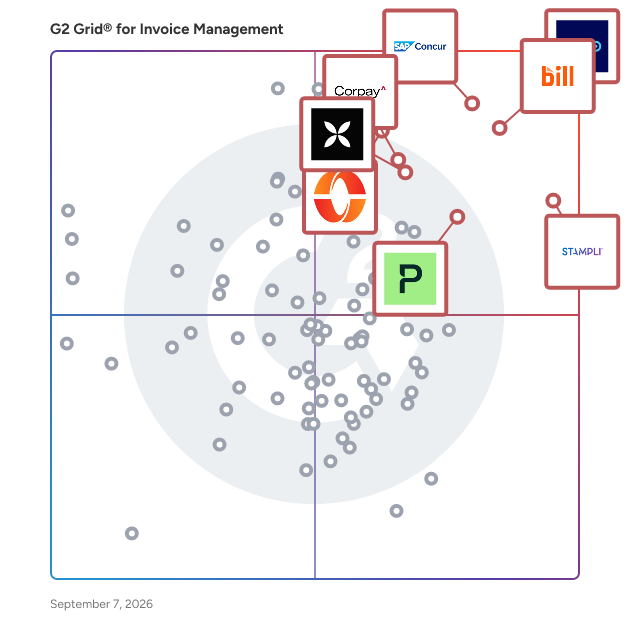
| # | Product | Rating | Best For | What Users Say |
|---|---------|--------|----------|----------------|
| 1 | [Xero](https://www.g2.com/products/xero/reviews) | 4.4/5.0 (1,549 reviews) | Cloud-native invoicing with automated bank reconciliation | "[Effortless Bookkeeping on the Go with Xero](https://www.g2.com/survey_responses/xero-review-12766773)" |
| 2 | [BILL AP/AR](https://www.g2.com/products/bill-ap-ar/reviews) | 4.4/5.0 (1,778 reviews) | AP automation with QuickBooks sync and approval routing | "[Great Bill Payment Platform](https://www.g2.com/survey_responses/bill-ap-ar-review-12713619)" |
| 3 | [SAP Concur](https://www.g2.com/products/sap-concur/reviews) | 4.0/5.0 (6,923 reviews) | SAP-native invoice capture-to-pay automation | "[Simple UI Makes Expense Claims and Approval Notifications Effortless](https://www.g2.com/survey_responses/sap-concur-review-12697881)" |
| 4 | [Stampli](https://www.g2.com/products/stampli/reviews) | 4.6/5.0 (1,918 reviews) | AI-coded AP approvals with invoice-level collaboration | "[Makes Approving Invoices Easy!](https://www.g2.com/survey_responses/stampli-review-11764454)" |
| 5 | [Paylocity](https://www.g2.com/products/paylocity/reviews) | 4.4/5.0 (5,230 reviews) | AP automation with AI-powered invoice capture | "[User-Friendly, Cost-Effective HR &amp; Payroll with First-Class Paylocity Support](https://www.g2.com/survey_responses/paylocity-review-12780521)" |
| 6 | [Payhawk](https://www.g2.com/products/payhawk/reviews) | 4.5/5.0 (884 reviews) | AP automation with ERP-native invoice workflows | "[Effortless Expense Management with Payhawk](https://www.g2.com/survey_responses/payhawk-review-8884872)" |
| 7 | [SAP Cloud ERP (SAP S/4HANA Cloud)](https://www.g2.com/products/sap-cloud-erp-sap-s-4hana-cloud/reviews) | 4.4/5.0 (927 reviews) | Integrated purchase-to-invoice processing with real-time posting | "[Real-Time Reporting Speed and Unified Integration with Continuous Updates](https://www.g2.com/survey_responses/sap-cloud-erp-sap-s-4hana-cloud-review-12569221)" |
| 8 | [Qonto](https://www.g2.com/products/qonto/reviews) | 4.7/5.0 (161 reviews) | Invoicing with bank-native transaction reconciliation | "[Seamless Business Banking with English Support](https://www.g2.com/survey_responses/qonto-review-12837072)" |
| 9 | [SAP Ariba](https://www.g2.com/products/sap-ariba/reviews) | 4.1/5.0 (737 reviews) | Procure-to-pay automation with SAP ERP integration | "[SAP Ariba is user friendly and Recommended](https://www.g2.com/survey_responses/sap-ariba-review-4773604)" |
| 10 | [Corpay Cross-Border](https://www.g2.com/products/corpay-cross-border/reviews) | 4.5/5.0 (928 reviews) | Multi-currency invoice payment with FX hedging | "[A One-Stop Shop for International Payments—Bulk Wires in 15 Minutes](https://www.g2.com/survey_responses/corpay-cross-border-review-12247081)" |

  
## Which Invoice Management Software Is Best for Your Use Case?

- **Leader:** [Xero](https://www.g2.com/products/xero/reviews)
- **Highest Performer:** [Hyperbots A/P suite](https://www.g2.com/products/hyperbots-a-p-suite/reviews)
- **Easiest to Use:** [Qonto](https://www.g2.com/products/qonto/reviews)
- **Top Trending:** [Anchor](https://www.g2.com/products/anchor-anchor/reviews)
- **Best Free Software:** [Paylocity](https://www.g2.com/products/paylocity/reviews)

  
## Which Type of Invoice Management Software Tools Are You Looking For?
  - [Invoice Management Software](https://www.g2.com/categories/invoice-management) *(current)*
  - [Purchasing Software](https://www.g2.com/categories/purchasing-software)
  - [Billing Software](https://www.g2.com/categories/billing)
  - [Expense Management Software](https://www.g2.com/categories/expense-management)
  - [Accounts Payable Automation Software](https://www.g2.com/categories/ap-automation)
  - [Spend Management Software](https://www.g2.com/categories/spend-management)
  - [Procure to Pay Software](https://www.g2.com/categories/procure-to-pay)
  - [Accounts Payable (AP) &amp; Spend Analysis Software](https://www.g2.com/categories/accounts-payable-ap-and-spend-analysis)

  
---

**Sponsored**

### Paymode

Paymode, Bottomline’s business payments network, is a provider of secure, streamlined payments for businesses in North America. Working with businesses from the mid-market to enterprise level and partnering with some of the largest banks in America, we work to make every step of traditionally manual and cumbersome payment processes simple, secure, and streamlined. We automate business payments for more than 600,000 businesses, allowing for greater efficiency, security and savings. We do this by: o Automating and digitizing payments by switching from checks to ACH and virtual card o Enrolling vendors in our network and ensuring you&#39;re not stuck holding sensitive bank account information o Reducing payment fraud risk through technology and expertise Paymode offers a truly comprehensive way to solve traditional accounts payable and accounts receivable challenges for payers and vendors alike. By utilizing Paymode to process payments to your suppliers, your business can save time, save money, realize rebates on your AP spend, and forge stronger relationships with your key suppliers. Your vendors, in turn, will receive enhanced remittance, quicker payments and advanced fraud protection.


[Visit website](https://www.g2.com/external_clickthroughs/record?secure%5Bad_program%5D=ppc&amp;secure%5Bad_slot%5D=category_product_list&amp;secure%5Bcategory_id%5D=1200&amp;secure%5Bdisplayable_resource_id%5D=1200&amp;secure%5Bdisplayable_resource_type%5D=Category&amp;secure%5Bmedium%5D=sponsored&amp;secure%5Bplacement_reason%5D=page_category&amp;secure%5Bplacement_resource_ids%5D%5B%5D=1200&amp;secure%5Bprioritized%5D=false&amp;secure%5Bproduct_id%5D=114196&amp;secure%5Bresource_id%5D=1200&amp;secure%5Bresource_type%5D=Category&amp;secure%5Bsource_type%5D=category_page&amp;secure%5Bsource_url%5D=https%3A%2F%2Fwww.g2.com%2Fcategories%2Finvoice-management%2Ff%2Frecurring-invoices&amp;secure%5Btoken%5D=1e326cf6e2b0bcdd210886f55e470cf02d31677dd63404734952689d2de5fc1d&amp;secure%5Burl%5D=https%3A%2F%2Fwww.bottomline.com%2Fget-demo%3Futm_source%3DG2%26utm_medium%3Ddisplay%26utm_campaign%3DFY26-X-NAcorporate-G2-Advertising-Paymode-PD&amp;secure%5Burl_type%5D=book_demo)

---

  
  ## What Are the Top-Rated Invoice Management Software Products in 2026?
### 1. [Glean.ai](https://www.g2.com/products/glean-ai/reviews)
  **Average Rating:** 4.8/5.0
  **Total Reviews:** 27
  **Product Description:** Unlock the power of intelligent financial control with Glean.ai, the cutting-edge AP software that offers unparalleled strategic insights. Harness the advanced capabilities of artificial intelligence to gain a deep understanding of your vendor spend. Identify areas of overspending and optimize your purchasing decisions to maximize your ROI. Leverage Glean.ai&#39;s unique line-item analysis to automate prepaid amortizations, accruals, and GL coding, streamlining your accounts payable processes. Collaborate effortlessly with your team, negotiate better pricing with vendors, and drive cost efficiencies across your organization. Experience the future of AP software with Glean.ai and take your financial management to new heights. Key benefits: • Unmatched Intelligence &amp; Visibility: See hard-to-detect trends, get deep insights into core drivers, and uncover areas of overspending to increase your ROI with vendors. • Time-Saving Automation: Eliminate manual tasks with automated data extraction, GL coding, bill approvals &amp; payments, prepaid amortizations, automated accruals, and more. • Robust Data Benchmarking: Leverage Glean.ai&#39;s proprietary benchmarking data to negotiate better deals with your vendors and drive increased spend efficiency for your company.


### What Do G2 Reviewers Say About Glean.ai?
*AI-generated summary from verified user reviews*

**Pros:**

- Users praise the **quick and helpful customer support** of Glean.ai, enhancing their overall experience with the product.
- Users praise Glean.ai for its **ease of use** , highlighting seamless integration and reliable support when needed.
- Users praise the **seamless integrations** of Glean.ai, finding them easy to use and highly reliable.
- Users praise Glean.ai for its **simple and effective AP integration** , highlighting ease of use and exceptional support.

**Cons:**

- Users face challenges with **foreign currency invoices** , requiring more effort to manage compared to USD invoices.
  #### What Are Recent G2 Reviews of Glean.ai?

**"[Makes AP easy](https://www.g2.com/survey_responses/glean-ai-review-9181147)"**

**Rating:** 5.0/5.0 stars
*— Bram S.*

[Read full review](https://www.g2.com/survey_responses/glean-ai-review-9181147)

---

**"[Quick and efficient](https://www.g2.com/survey_responses/glean-ai-review-8202045)"**

**Rating:** 5.0/5.0 stars
*— Marshall P.*

[Read full review](https://www.g2.com/survey_responses/glean-ai-review-8202045)

---

### 2. [Fidesic](https://www.g2.com/products/fidesic/reviews)
  **Average Rating:** 4.8/5.0
  **Total Reviews:** 12
  **Product Description:** Fidesic AP is Accounts Payable Automation for Microsoft D365 Business Central and Dynamics GP (Great Plains). Fidesic delivers seamless integration and performance for Dynamics BC and GP and makes it easier to capture invoice data, process invoices and pay vendors for accounts payable pros using Dynamics ERP. Fidesic is a people-first organization with expertise in AI for accounting and payables. People who care. Software that works. www.fidesic.com How is Fidesic AP Automation Different than others? \* Quickest Set-Up \* Simple Per-User Pricing \* Unmatched Multi-Location Capabilities \* Unparalleled Technical Support \* No Implementation Fees \* Unlimited Document Storage \* Full Free Version Available Spend Less Time on Clerical Work &amp; More Time on Strategic Processes for Accounts Payable Features: \* MagiCapture: Invoice Data Capture with 96% of invoices requiring no manual entry \* RouteWise: Easy to Build Approval Workflows for Invoice and Payment Approval \* JustPay: Vendor payments fulfillment made easy (Secure check &amp; ACH with Positive Pay) \* VendorVault: Vendor Portal with Your Branding (Vendors Submit Invoices Directly) Fidesic specializes in supporting service-based organizations with low PO volume including: \* Managed Service Organizations \* Health &amp; Dental Support Organizations \* Hospitality \* Moving &amp; Storage \* Rapidly Growing Businesses \* Multi-location / Multi-entity / Franchises \* Businesses Needing to scale invoice processing \* Businesses Needing to modernize AP processes Simplify Centralized Invoice Processing for Multi-Location &amp; Multi-Entity: \* Simplify payables reporting and invoice processing across locations and entities \* Empower trusted managers at locations to approve their own invoices \* Location-based matching for approval routing \* Easy to create workflow rules to wrangle invoices across the organization Fidesic continuously strives to provide users with the most reliable, efficient and easy-to-use accounts payable (AP) automation solution for Dynamics GP and Business Central. Fidesic strives to help businesses by simplifying invoice processing with future-facing technology. Fidesic works to enable AP accounting managers to focus on big-picture organizational goals and build a job they love and a department key stakeholders value. Fidesic is designed to work with both single and multi-location businesses using GP or BC. We work with accounting professionals to help reduce manual processes, increase productivity, and increase visibility. With accounts payable automation for Dynamics GP and Business Central, businesses can improve their entire accounting process. The customer service team is available via live chat, phone or email to provide you with the necessary information and assistance you need to succeed and overcome any challenges you may face.


### What Do G2 Reviewers Say About Fidesic?
*AI-generated summary from verified user reviews*

**Pros:**

- Users appreciate the **ease of learning** with Fidesic, finding it simple to navigate and respond quickly.
- Users find the **ease of use** of Fidesic beneficial for quick responses and a smooth experience.
- Users appreciate the **intuitive design** of Fidesic, finding it easy to navigate and quick in response times.
- Users appreciate the **navigation ease** of Fidesic, finding it straightforward and quick to get responses.

  #### What Are Recent G2 Reviews of Fidesic?

**"[simplifies processes](https://www.g2.com/survey_responses/fidesic-review-7611077)"**

**Rating:** 4.0/5.0 stars
*— Wayne S.*

[Read full review](https://www.g2.com/survey_responses/fidesic-review-7611077)

---

**"[Easy way to get information and submit statements](https://www.g2.com/survey_responses/fidesic-review-11627722)"**

**Rating:** 5.0/5.0 stars
*— Verified User in Health, Wellness and Fitness*

[Read full review](https://www.g2.com/survey_responses/fidesic-review-11627722)

---

  #### What Are G2 Users Discussing About Fidesic?

- [What is Fidesic used for?](https://www.g2.com/discussions/what-is-fidesic-used-for)
### 3. [PF 360 Capture](https://www.g2.com/products/pf-360-capture/reviews)
  **Average Rating:** 4.4/5.0
  **Total Reviews:** 15
  **Product Description:** PF 360 Capture is a highly scalable cloud-based document workflow platform that intelligently captures, classifies and transmits critical data from documents and faxes to the right process workflows. Our purpose is to help organizations eliminate costly, time-consuming manual processes and traditional document workflows so users can focus on tasks that require their attention. Our mission is to create and integrate the best cloud technologies to simplify digital transformation experiences for our customers. PF 360 Capture is ISO 27001 and SOC 2 Type II certified and HIPAA compliant. Organizations have the flexibility to decide the best deployment scenario for their environment with enterprise-grade SLAs and 24/7 support.


### What Do G2 Reviewers Say About PF 360 Capture?
*AI-generated summary from verified user reviews*

**Pros:**

- Users value the **excellent customer support** from PF 360 Capture, ensuring a smooth implementation and ongoing assistance.
- Users value the **efficiency** of PF 360 Capture, noting its seamless integration and smooth implementation adapted to their needs.
- Users find PF 360 Capture to be **really easy to use** , streamlining their workflows and enhancing collaboration.
- Users find the **implementation ease** of PF 360 Capture exceptional, enhancing daily work with minimal learning curve.
- Users value the **seamless integration and ease of use** of PF 360 Capture, enhancing collaboration and efficiency.

**Cons:**

- Users experience occasional **communication disruptions** , but can easily return to correct the situation.
- Users experience **connection issues** that lead to frustration and disrupt the functionality of PF 360 Capture.
- Users often experience **connectivity issues** with PF 360 Capture, leading to frustration during use.
- Users find that obtaining **support and development** for PF 360 Capture can be challenging and time-consuming.
- Users find **limited customization** with PF 360 Capture, often wishing for more adaptable options to suit their needs.
  #### What Are Recent G2 Reviews of PF 360 Capture?

**"[Reduce Paper with a simple use software well supported!](https://www.g2.com/survey_responses/pf-360-capture-review-11059934)"**

**Rating:** 5.0/5.0 stars
*— Vanessa V.*

[Read full review](https://www.g2.com/survey_responses/pf-360-capture-review-11059934)

---

**"[Personalized AP automation software](https://www.g2.com/survey_responses/pf-360-capture-review-10743689)"**

**Rating:** 4.0/5.0 stars
*— Christian H.*

[Read full review](https://www.g2.com/survey_responses/pf-360-capture-review-10743689)

---

### 4. [Peakflo](https://www.g2.com/products/peakflo/reviews)
  **Average Rating:** 4.5/5.0
  **Total Reviews:** 68
  **Product Description:** Peakflo AI-powered automation with SOC 2 Type II compliance allows businesses to streamline their finance operations processes. 100+ finance teams, use Peakflo each to: ✅ Save 2000 man-hours/month on finance ops ✅ Get paid faster on customer invoices by 15-25 days ✅ Cut vendor bill payment time by 50% ✅ Streamline travel and expense reimbursements


### What Do G2 Reviewers Say About Peakflo?
*AI-generated summary from verified user reviews*

**Pros:**

- Users find Peakflo&#39;s **ease of use** invaluable, streamlining tasks and enhancing payment tracking with user-friendly features.
- Users value the **automation** features of Peakflo, significantly reducing manual tasks and improving accounts receivable management.
- Users commend the **prompt and responsive customer support** from Peakflo, enhancing their overall experience and satisfaction.
- Users value the **flexibility** of Peakflo, enabling tailored workflows for efficient accounts receivable management.
- Users praise the **customizable workflows** of Peakflo, enhancing efficiency in managing accounts receivables with tailored communication.

**Cons:**

- Users report a lack of a **consolidated view and bulk upload options** , complicating their invoicing process with Peakflo.
- Users report **slow performance** with Peakflo, particularly during high-volume tasks, affecting workflow efficiency.
- Users experience **implementation issues** with Peakflo, including misclassifications and cumbersome reporting requirements needing manual interventions.
- Users report **integration issues** with invoicing and accounting systems, leading to data handling challenges.
- Users find the **slow loading times** of Peakflo can hinder efficiency, especially with numerous outstanding invoices.
  #### What Are Recent G2 Reviews of Peakflo?

**"[Worth considering for hyperscalers](https://www.g2.com/survey_responses/peakflo-review-12358519)"**

**Rating:** 5.0/5.0 stars
*— Verified User in Information Technology and Services*

[Read full review](https://www.g2.com/survey_responses/peakflo-review-12358519)

---

**"[My satisfaction in using the Peakflo application for the invoicing process](https://www.g2.com/survey_responses/peakflo-review-11756242)"**

**Rating:** 5.0/5.0 stars
*— Verified User in Manufacturing*

[Read full review](https://www.g2.com/survey_responses/peakflo-review-11756242)

---

### 5. [Docyt](https://www.g2.com/products/docyt/reviews)
  **Average Rating:** 4.7/5.0
  **Total Reviews:** 35
  **Product Description:** Experience AI bookkeeping with Docyt, saving 500 hours and $2,000 annually on average. Our AI automation software offers real-time insights into expenses and profitability, eliminating manual data entry and tedious tasks. Docyt learns your business intricacies, automating back-office and bookkeeping duties. It handles time-consuming tasks. Gain instant financial status visibility through real-time reports, ensuring constant financial control. Generate consolidated roll-up and individual financial statements for all business locations effortlessly, aiding in strategic decision-making. Embrace the revolution of AI bookkeeping with Docyt, saving time and gaining real-time insights to boost your business success. Use Docyt on top of your existing Quickboooks Online or Desktop solution to manage expenses, corporate credit cards and real time revenue reconciliation for one or many locations. We integrate with all major POS and PMS systems and provide industry specific reporting.


### What Do G2 Reviewers Say About Docyt?
*AI-generated summary from verified user reviews*

**Pros:**

- Users praise the **reliable and supportive customer service** from the Docyt team, enhancing their overall experience.
- Users find Docyt to be **very easy to learn and use** , facilitating efficient small business bookkeeping and decision-making.
- Users value the **automation features** of Docyt, appreciating its ease of use and seamless integration with systems.
- Users value the **efficiency improvements** of Docyt, claiming it simplifies bookkeeping and enhances productivity for small businesses.
- Users benefit from **seamless integrations** with existing systems, enhancing efficiency and access to real-time data.

**Cons:**

- Users experience **significant delays** with Docyt, leading to frustration and a lack of real-time functionality.
- Users face **project delays** due to unfamiliarity and frequent changes in team members, impacting reliability and frustration levels.
- Users experience **delays with check processing** and inconsistency in vendor relations due to team changes.
- Users face a **bug-riddled experience** with Docyt, leading to frustration and consideration of alternative options.
- Users experience **communication issues** due to unfamiliarity with vendors and inconsistent postings from team member changes.
  #### What Are Recent G2 Reviews of Docyt?

**"[User friendly software and great back end team](https://www.g2.com/survey_responses/docyt-review-10873067)"**

**Rating:** 5.0/5.0 stars
*— Viren P.*

[Read full review](https://www.g2.com/survey_responses/docyt-review-10873067)

---

**"[Met or Exceeded My Expectations](https://www.g2.com/survey_responses/docyt-review-11014187)"**

**Rating:** 4.5/5.0 stars
*— Verified User in Retail*

[Read full review](https://www.g2.com/survey_responses/docyt-review-11014187)

---

### 6. [Fiverr Workspace](https://www.g2.com/products/fiverr-workspace/reviews)
  **Average Rating:** 3.9/5.0
  **Total Reviews:** 19
  **Product Description:** AND.CO from Fiverr is a business management software designed to help freelancers, solopreneurs, entrepreneurs, studios and so on, save time on running their business. With its entire suite of features, AND.CO from Fiverr solves many of the problems that plague the modern freelancer. It’s your one-stop-app for proposals, contracts, projects, time tracking, invoicing, scheduled invoicing, payments, recurring payments, task management, income &amp; expense tracking and reporting. Phew—that sounds like a lot of features. Did we mention they’re all in one place? But what else makes us better than using 8 apps to run your business? Our software intelligently integrates each aspect of business management so you can eliminate inefficiencies across your business. That means proposals and contracts once approved automatically creates your projects. Set up scheduled invoicing for automated invoicing &amp; recurring billing so you are notified when it&#39;s time to invoice. It means time tracking that speaks to your projects and invoices, Automated overdue invoice reminders that talk to your task list. It means payments that know to automatically file your income and online payment processing fees as an expense so all your books are in order. Every feature talks to the next so that you can do things faster and focus on the work you love. AND.CO helps with the rest! Yeah, that’s what it means. With less time spent managing the business, you get more time to operate in your genius zone!


### What Do G2 Reviewers Say About Fiverr Workspace?
*AI-generated summary from verified user reviews*

**Pros:**

- Users value the **all-in-one solutions** of Fiverr Workspace, combining proposals, contracts, invoicing, and more seamlessly.
- Users appreciate Fiverr Workspace&#39;s **comprehensive features** , consolidating proposals, contracts, invoices, timekeeping, and financial dashboards seamlessly.
- Users value the **all-in-one contract management** capability of Fiverr Workspace, streamlining their project management process.
- Users appreciate the **all-in-one document management** capability of Fiverr Workspace for seamless project oversight.
- Users appreciate the **ease of use** of Fiverr Workspace for managing proposals, contracts, and invoicing seamlessly.

**Cons:**

- Users report significant **delays** in issue resolution and support since Fiverr acquired And.co, affecting overall satisfaction.
- Users report significant **email issues** with Fiverr Workspace, leading to delays in support and unresolved urgent problems.
- Users express frustration over the **lack of communication features** in Fiverr Workspace, impacting timely support and responsiveness.
- Users express frustration with **limited features** of Fiverr Workspace, noting a lack of investment and support since acquisition.
- Users express concern over the **lack of new features** in Fiverr Workspace, indicating a decline in overall quality and support.
  #### What Are Recent G2 Reviews of Fiverr Workspace?

**"[I use this for everything!](https://www.g2.com/survey_responses/fiverr-workspace-review-4055353)"**

**Rating:** 5.0/5.0 stars
*— Kayla S.*

[Read full review](https://www.g2.com/survey_responses/fiverr-workspace-review-4055353)

---

**"[AND.CO is an all-in-one essential for business owners!](https://www.g2.com/survey_responses/fiverr-workspace-review-4844365)"**

**Rating:** 4.5/5.0 stars
*— Verified User in Design*

[Read full review](https://www.g2.com/survey_responses/fiverr-workspace-review-4844365)

---

  #### What Are G2 Users Discussing About Fiverr Workspace?

- [What is Fiverr Workspace used for?](https://www.g2.com/discussions/what-is-fiverr-workspace-used-for)
### 7. [Compleat Software](https://www.g2.com/products/compleat-software/reviews)
  **Average Rating:** 4.5/5.0
  **Total Reviews:** 28
  **Product Description:** Founded in 2008 by Neil Robertson &amp; Phillip Douglas, Compleat Software has rapidly grown to become one of the leading providers of Accounts Payable (AP) automation &amp; Purchase to Pay software across the globe. We have one goal, to help businesses of all shapes &amp; sizes, globally, achieve the extraordinary through automation. To do this, we have developed simple &amp; affordable solutions that allow our customers to automate each part of the purchase to pay process. Our tools are easy to use, require minimal set up &amp; can be taken on step by step. Meaning you &amp; your team don&#39;t have to take on more than you can handle. Starting with low-cost digital invoice automation, your business can remove one of the biggest burdens on your AP team in just a few days. Follow this with cutting-edge approval automation, simple online buying &amp; integration with most leading Accounting Software / ERPs, you can fully automate the AP &amp; Finance process. The ultimate result is allowing our customers to make significant savings (with Savings as a Service) on what they buy, simply by making use of the data &amp; information that is being captured &amp; automatically processed. Serving more than 500 customers &amp; numerous partners, our system processes thousands of e-invoices a day &amp; billions of $’s in spend data. Combined, this provides our customers with real returns. Not just in time, but also in money. Compleat Software has offices in the United Kingdom, United States &amp; Australia, with our HQ in London. Follow us on: LinkedIn &amp; YouTube #TheFutureIsNow


  #### What Are Recent G2 Reviews of Compleat Software?

**"[Great invoiceing and order management application](https://www.g2.com/survey_responses/compleat-software-review-4669505)"**

**Rating:** 4.5/5.0 stars
*— Conor S.*

[Read full review](https://www.g2.com/survey_responses/compleat-software-review-4669505)

---

**"[Very easy to use](https://www.g2.com/survey_responses/compleat-software-review-4960507)"**

**Rating:** 5.0/5.0 stars
*— Vicki L.*

[Read full review](https://www.g2.com/survey_responses/compleat-software-review-4960507)

---

  #### What Are G2 Users Discussing About Compleat Software?

- [What is Compleat Software used for?](https://www.g2.com/discussions/what-is-compleat-software-used-for)
### 8. [Ascend](https://www.g2.com/products/ascend-software-inc-ascend/reviews)
  **Average Rating:** 4.4/5.0
  **Total Reviews:** 59
  **Product Description:** Ascend: Native Workday AP Automation Built for Enterprise Complexity Ascend transforms accounts payable for medium and large enterprises using Workday Financial Management, delivering effortless automation that adapts to your unique business processes rather than forcing you to change them. Our mission is to automate the full surface area and complexity of accounts payable, empowering organizations to achieve scalable growth without compromise. As a Workday Certified Select Partner, Ascend provides native integration with real-time ERP synchronization that feels intuitive to users. Our comprehensive AI ecosystem, AVA, combines our proprietary Dynamic Prediction Engine with advanced capabilities including AI Recognizer for custom prompting on complex scenarios and AI Suggested Rules that proactively identify automation opportunities within your existing workflows. What Sets Ascend Apart: • High Complexity Workflows: Purpose-built for enterprises with complex AP requirements including multi-entity processing, intricate coding rules, and sophisticated approval hierarchies. We excel in the nuanced details that other solutions overlook, delivering powerful customization at scale through AI-powered technology. • Customer-Driven Innovation: Our roadmap reflects real customer needs, delivering solutions for actual operational challenges rather than theoretical features. We build based on existing customer requirements, ensuring every enhancement addresses real-world scenarios and drives meaningful outcomes. • ERP Depth Over Breadth: We prioritize deep, specialized integration with Workday rather than shallow connections across multiple ERPs. This focus results in more reliable, intuitive end-to-end processes that extend Workday&#39;s native capabilities seamlessly. • Scalable Customization: Our platform doesn&#39;t obscure complexity—it empowers users to control it. Extensive feature customization, supplier-specific configurations, and flexible coding requirements accommodate unique enterprise needs without requiring process reengineering. Complete Solution: Beyond invoice automation achieving 80%+ touchless processing, Ascend Payments transforms AP into a profit center through virtual card rebates, comprehensive supplier payment automation, and seamless integration with your existing Workday settlement processes. Experience accounts payable automation that scales with enterprise complexity while maintaining the Workday user experience your teams already know and trust. Join industry leaders who&#39;ve chosen Ascend to achieve effortless accounts payable operations.


  #### What Are Recent G2 Reviews of Ascend?

**"[An Agile Solution for Accounts Payable Automation](https://www.g2.com/survey_responses/ascend-review-8239445)"**

**Rating:** 4.5/5.0 stars
*— ReshamL C.*

[Read full review](https://www.g2.com/survey_responses/ascend-review-8239445)

---

**"[Ascend Review](https://www.g2.com/survey_responses/ascend-review-5301688)"**

**Rating:** 4.5/5.0 stars
*— Verified User in Food &amp; Beverages*

[Read full review](https://www.g2.com/survey_responses/ascend-review-5301688)

---

### 9. [EleVia Electronic Invoicing](https://www.g2.com/products/elevia-electronic-invoicing/reviews)
  **Average Rating:** 4.4/5.0
  **Total Reviews:** 19
  **Product Description:** Electronic Invoicing (EI) software for Architecture, Engineering, and Construction firms, integrated with Deltek Vision and Vantagepoint. Automate the review process to invoice faster, improve productivity, and increase cash flow.


### What Do G2 Reviewers Say About EleVia Electronic Invoicing?
*AI-generated summary from verified user reviews*


**Cons:**

- Users face challenges due to a **lack of communication features** regarding upgrades, leading to confusion and dissatisfaction.
- Users experience a **lack of transparency** during upgrades, leading to confusion and communication issues related to the updates.
  #### What Are Recent G2 Reviews of EleVia Electronic Invoicing?

**"[Solid Platform Delivering Accurate, Useful Information](https://www.g2.com/survey_responses/elevia-electronic-invoicing-review-12349766)"**

**Rating:** 4.5/5.0 stars
*— Daniel M.*

[Read full review](https://www.g2.com/survey_responses/elevia-electronic-invoicing-review-12349766)

---

**"[Electronic Invoicing is a good solution for processing invoices](https://www.g2.com/survey_responses/elevia-electronic-invoicing-review-4674007)"**

**Rating:** 5.0/5.0 stars
*— Stacey J.*

[Read full review](https://www.g2.com/survey_responses/elevia-electronic-invoicing-review-4674007)

---

  #### What Are G2 Users Discussing About EleVia Electronic Invoicing?

- [How does digital invoicing work?](https://www.g2.com/discussions/how-does-digital-invoicing-work)
- [What is electronic invoice for?](https://www.g2.com/discussions/what-is-electronic-invoice-for)
- [What is e-invoicing software?](https://www.g2.com/discussions/what-is-e-invoicing-software)
### 10. [Nimbello](https://www.g2.com/products/nimbello/reviews)
  **Average Rating:** 4.7/5.0
  **Total Reviews:** 17
  **Product Description:** Nimbello is the expert in automating PO based invoices. The company delivers an accounts payable automation solution that enables organizations to deliver an effortless purchase-to-pay experience. With over 20 million invoices processed, Nimbello helps its customers put their AP process on autopilot, saving time and money, while improving accuracy and on-time payments.


  #### What Are Recent G2 Reviews of Nimbello?

**"[Nimbello shortened our invoice processing by multiple days and allowed us to keep a smaller staff.](https://www.g2.com/survey_responses/nimbello-review-7967419)"**

**Rating:** 4.5/5.0 stars
*— Gary E.*

[Read full review](https://www.g2.com/survey_responses/nimbello-review-7967419)

---

**"[Accounts Payable use of Nimbello](https://www.g2.com/survey_responses/nimbello-review-8027123)"**

**Rating:** 5.0/5.0 stars
*— Angel M.*

[Read full review](https://www.g2.com/survey_responses/nimbello-review-8027123)

---

  #### What Are G2 Users Discussing About Nimbello?

- [What is Easy Access used for?](https://www.g2.com/discussions/what-is-easy-access-used-for) - 1 comment
### 11. [inmatic](https://www.g2.com/products/inmatic/reviews)
  **Average Rating:** 4.9/5.0
  **Total Reviews:** 12
  **Product Description:** ¿Desbordado por la avalancha de facturas que te llegan? Inmatic es un software que contabiliza automáticamente facturas, con una tasa de aciertos sin precedente, gracias a su potente tecnología basada en Inteligencia Artificial. Con él, podrás disminuir el coste y el tiempo de contabilización a la mitad. Con Inmatic podrás contabilizar todo tipo de facturas de manera automática, conectando con tu programa contable habitual. Además, Inmatic es un potente gestor documental, que te permite sacar listados de forma muy rápida. Sin coste de instalación ni mantenimiento. Basado en Inteligencia Artificial. No funciona con plantillas.


  #### What Are Recent G2 Reviews of inmatic?

**"[AI BASED TOOL](https://www.g2.com/survey_responses/inmatic-review-8525631)"**

**Rating:** 5.0/5.0 stars
*— RONIT  S.*

[Read full review](https://www.g2.com/survey_responses/inmatic-review-8525631)

---

**"[Developer](https://www.g2.com/survey_responses/inmatic-review-8550313)"**

**Rating:** 4.5/5.0 stars
*— Cross M.*

[Read full review](https://www.g2.com/survey_responses/inmatic-review-8550313)

---

### 12. [InvoiceASAP](https://www.g2.com/products/invoiceasap/reviews)
  **Average Rating:** 4.4/5.0
  **Total Reviews:** 11
  **Product Description:** InvoiceASAP provides easy mobile invoicing and mobile payments, so busy professionals can create, pay, and send estimates, orders and invoices on the go


  #### What Are Recent G2 Reviews of InvoiceASAP?

**"[ASAP feedback](https://www.g2.com/survey_responses/invoiceasap-review-8280462)"**

**Rating:** 4.5/5.0 stars
*— KADIR T.*

[Read full review](https://www.g2.com/survey_responses/invoiceasap-review-8280462)

---

**"[Easy to use and user friendly](https://www.g2.com/survey_responses/invoiceasap-review-8291127)"**

**Rating:** 4.5/5.0 stars
*— Bimal B.*

[Read full review](https://www.g2.com/survey_responses/invoiceasap-review-8291127)

---

  #### What Are G2 Users Discussing About InvoiceASAP?

- [What is InvoiceASAP used for?](https://www.g2.com/discussions/what-is-invoiceasap-used-for)
### 13. [Tungsten InvoiceAgility](https://www.g2.com/products/tungsten-invoiceagility/reviews)
  **Average Rating:** 3.5/5.0
  **Total Reviews:** 12
  **Product Description:** Advance invoicing with AI-powered automation that simplifies AP and AR processes, empowering your financial teams to work smarter, faster, and more securely. Invoicing should be simple—but for too many organizations, it’s a maze of paper forms, PDFs, emails, and compliance challenges. InvoiceAgility transforms these complexities with intelligent automation, streamlining accounts payable and receivable processes from invoice to receipt. By eliminating manual work, ensuring global compliance, and delivering unmatched accuracy, our solution empowers financial teams to focus on strategic priorities instead of chasing errors or managing inefficiencies. Move from invoice chaos to intelligent automation—streamline invoice processing, automate workflows, eliminate bottlenecks, and ensure global compliance empowering financial teams to work smarter, faster, and more securely.​ Key Features and Functionality: \* Universal Invoice Acceptance: Processes invoices in various formats, including paper, PDF, and electronic, from any supplier globally. \* AI-Driven Data Capture: Utilizes advanced optical character recognition (OCR) and machine learning to extract invoice data accurately, even from complex scripts and handwritten documents. \* Compliance Management: Automates validation and reporting to meet e-invoicing regulations across over 100 countries, ensuring adherence to local mandates. \* Seamless ERP Integration: Offers pre-built connectors and APIs for major ERP systems like SAP, Oracle, and Microsoft Dynamics, facilitating smooth data synchronization. \* Supplier Self-Service Portals: Provides portals for suppliers to submit invoices and track their status in real-time, reducing inquiries and enhancing transparency. \* AI-Powered Insights: Delivers actionable analytics on supplier invoice trends and cash flow optimization through Tungsten Copilot. Primary Value and User Benefits: InvoiceAgility addresses the complexities of modern AP processes by automating invoice handling, thereby reducing manual intervention and processing times from days to minutes. This leads to significant cost savings, improved accuracy, and compliance with global e-invoicing regulations. Organizations benefit from enhanced cash flow management, strengthened supplier relationships due to transparent and timely payments, and the ability to adapt swiftly to changing regulatory environments. By transforming AP operations into efficient, touchless workflows, InvoiceAgility empowers businesses to focus on strategic initiatives rather than administrative tasks.


### What Do G2 Reviewers Say About Tungsten InvoiceAgility?
*AI-generated summary from verified user reviews*


**Cons:**

- Users report **connectivity issues** that hinder the saving process, risking data loss during invoice management.
- Users find the **manual deletion problematic** , risking loss of data as drafts cannot be saved in the cloud.
- Users find Tungsten InvoiceAgility to be **not user-friendly** , especially with its cloud-based setup and draft-saving limitations.
  #### What Are Recent G2 Reviews of Tungsten InvoiceAgility?

**"[Easy Invoice Viewing and Approvals in a User-Friendly Platform](https://www.g2.com/survey_responses/tungsten-invoiceagility-review-12712702)"**

**Rating:** 5.0/5.0 stars
*— Verified User in Food Production*

[Read full review](https://www.g2.com/survey_responses/tungsten-invoiceagility-review-12712702)

---

**"[Very quick and effective invoicing solution](https://www.g2.com/survey_responses/tungsten-invoiceagility-review-9034793)"**

**Rating:** 4.0/5.0 stars
*— Verified User in Legal Services*

[Read full review](https://www.g2.com/survey_responses/tungsten-invoiceagility-review-9034793)

---

  #### What Are G2 Users Discussing About Tungsten InvoiceAgility?

- [What does Kofax Invoice Processing Agility do?](https://www.g2.com/discussions/what-does-kofax-invoice-processing-agility-do)
- [What is Kofax ReadSoft?](https://www.g2.com/discussions/kofax-invoice-processing-agility-what-is-kofax-readsoft)
- [What is Kofax invoice?](https://www.g2.com/discussions/what-is-kofax-invoice)
### 14. [Spenmo](https://www.g2.com/products/spenmo/reviews)
  **Average Rating:** 4.5/5.0
  **Total Reviews:** 60
  **Product Description:** Spenmo is the go-to payments software for growing businesses. We are an end-to-end payables software that brings internal spend management, corporate cards, automated bill payments, approval workflows, and accounting reconciliation into an integrated view. Companies that use Spenmo save over 50 hours and $10,000 every month. Upon completing the Y-Combinator program in 2020, Spenmo has since grown to over 200 employees and raised over US$85M in venture capital from leading investors such as Y Combinator, Insight Partners, Addition, Salesforce, Global Founders&#39; Capital and Alpha JWC.


  #### What Are Recent G2 Reviews of Spenmo?

**"[All you need for your payables and employees&#39; claim](https://www.g2.com/survey_responses/spenmo-review-7649612)"**

**Rating:** 4.0/5.0 stars
*— Pheng Soon T.*

[Read full review](https://www.g2.com/survey_responses/spenmo-review-7649612)

---

**"[Great improvement to the claims process in my company](https://www.g2.com/survey_responses/spenmo-review-7058371)"**

**Rating:** 5.0/5.0 stars
*— Hans C.*

[Read full review](https://www.g2.com/survey_responses/spenmo-review-7058371)

---

  #### What Are G2 Users Discussing About Spenmo?

- [What is Spenmo used for?](https://www.g2.com/discussions/what-is-spenmo-used-for)
### 15. [ActiveCollab](https://www.g2.com/products/activecollab/reviews)
  **Average Rating:** 4.2/5.0
  **Total Reviews:** 93
  **Product Description:** ActiveCollab is a simple, yet powerful productivity and collaboration workspace built for agencies, creatives, and consultancies looking for an all-in-one project management tool. ActiveCollab offers a fantastic blend of features designed to support service businesses at every stage of their journey. From project and workload management, time tracking, and capacity planning, to budgeting, invoicing, and client communications: ActiveCollab&#39;s got all you need to boost efficiency and profitability. And it&#39;s so practical. Teams of all sizes rely on ActiveCollab to manage their projects, time, and money. It&#39;s their go-to tool that helps them streamline their workflows, simplify daily activities, and improve teamwork in such an easy way.


### What Do G2 Reviewers Say About ActiveCollab?
*AI-generated summary from verified user reviews*

**Pros:**

- Users find the **automation features** of ActiveCollab easy to implement and beneficial for team management.
- Users appreciate the **comprehensive features** of ActiveCollab, facilitating easy implementation and seamless integration with tools like Hubstaff.
- Users find ActiveCollab to be **very easy to use** , appreciating its seamless integration and extensive features.
- Users find **ease of management** with ActiveCollab due to its simple implementation and seamless integration with other tools.
- Users find ActiveCollab&#39;s **ease of use** enhances team collaboration and simplifies integration with tools like Hubstaff.

**Cons:**

- Users find the **bulk deletion of old files challenging** , requiring individual selection for deletion, which is time-consuming.
- Users find the **deletion process cumbersome** , as removing old files requires selecting them individually instead of in bulk.
- Users find the **limited functionality** for bulk file deletion in ActiveCollab to be cumbersome and time-consuming.
- Users find the **bulk deletion option inadequate** , making it tedious to manage old files in ActiveCollab.
- Users find **limited storage management** challenging, as bulk deletion of old files is not easily achievable.
  #### What Are Recent G2 Reviews of ActiveCollab?

**"[Simple and useful tool for managing team projects](https://www.g2.com/survey_responses/activecollab-review-12725763)"**

**Rating:** 4.0/5.0 stars
*— Krishan K.*

[Read full review](https://www.g2.com/survey_responses/activecollab-review-12725763)

---

**"[ActiveCollab’s User-Friendly Recurring Tasks Keep Me On Track](https://www.g2.com/survey_responses/activecollab-review-12636775)"**

**Rating:** 4.5/5.0 stars
*— Muhammad Umar A.*

[Read full review](https://www.g2.com/survey_responses/activecollab-review-12636775)

---

  #### What Are G2 Users Discussing About ActiveCollab?

- [What do you recommend for those considering ActiveCollab for project management?](https://www.g2.com/discussions/what-do-you-recommend-for-those-considering-activecollab-for-project-management)
- [What is ActiveCollab used for?](https://www.g2.com/discussions/what-is-activecollab-used-for)
### 16. [Upland Objectif Lune - OL Connect](https://www.g2.com/products/upland-objectif-lune-ol-connect/reviews)
  **Average Rating:** 4.3/5.0
  **Total Reviews:** 12
  **Product Description:** Upland Objectif Lune helps companies automate business communications processes with its digital transformation solutions. With OL Connect technology, customers can create, personalize, and distribute transactional and promotional documents without changes to existing business systems. OL® Connect vastly improves transactional and promotional document processes and communications with its robust automation and optimization capabilities. Organizations will be able to create, manage, distribute, and automate transactional documents—and deliver multi-channel, personalized, and interactive customer communications. Eliminate manual, paper-based procedures, and transition from paper to digital without overhauling or replacing their current systems. Learn more about our product at: https://uplandsoftware.com/objectiflune/


  #### What Are Recent G2 Reviews of Upland Objectif Lune - OL Connect?

**"[Have been using PlanetPress by Objectif lune for the last decade](https://www.g2.com/survey_responses/upland-objectif-lune-ol-connect-review-4689174)"**

**Rating:** 4.0/5.0 stars
*— Yew Jin H.*

[Read full review](https://www.g2.com/survey_responses/upland-objectif-lune-ol-connect-review-4689174)

---

**"[Great software, easy to install, configure and operate](https://www.g2.com/survey_responses/upland-objectif-lune-ol-connect-review-5210518)"**

**Rating:** 5.0/5.0 stars
*— Suresh N.*

[Read full review](https://www.g2.com/survey_responses/upland-objectif-lune-ol-connect-review-5210518)

---

  #### What Are G2 Users Discussing About Upland Objectif Lune - OL Connect?

- [What does Planetpress Connect do?](https://www.g2.com/discussions/what-does-planetpress-connect-do)
- [What is the use of Planetpress Connect?](https://www.g2.com/discussions/what-is-the-use-of-planetpress-connect)
- [What does PlanetPress do?](https://www.g2.com/discussions/what-does-planetpress-do)
### 17. [Tofu](https://www.g2.com/products/get-paid-inc-tofu/reviews)
  **Average Rating:** 4.8/5.0
  **Total Reviews:** 29
  **Product Description:** Light field service management software for solo contractors and small teams (2-10 people). Built specifically for field work realities, it handles scheduling, invoicing, payments and customer tracking without the complexity of enterprise software. Whether you&#39;re responding to service calls or planning next week&#39;s appointments, Tofu keeps your business organized. Tofu is best for: ・Solo HVAC technicians and small heating/cooling crews ・Independent plumbers and electrical contractors ・Landscaping and lawn care professionals ・Handyman services and general contractors ・Any trade professional managing multiple job sites daily Key features: ・Job management: Create and track jobs from start to finish with notes, photos, and status updates ・Simple scheduling: See your upcoming jobs in calendar view and manage your workload ・Quick estimates: Build professional estimates on-site with line items, labor, and materials ・Mobile invoicing: Generate invoices from estimates or from scratch, right from the field ・Instant payments: Accept credit cards and bank payments through Stripe, get paid on the spot ・Customer records: Keep client contact info, job history, and notes all in one place ・Offline mode: Keep working when signal drops, everything syncs when you&#39;re back online Why Tofu? Tofu keeps it simple. It&#39;s made for real field conditions – bad reception, tight schedules, dirty hands. The app is easy to use, so you focus on the work, not the admin, and get your evenings back.


  #### What Are Recent G2 Reviews of Tofu?

**"[User-Friendly Invoicing for Solo Entrepreneurs](https://www.g2.com/survey_responses/tofu-review-12800817)"**

**Rating:** 5.0/5.0 stars
*— Cole H.*

[Read full review](https://www.g2.com/survey_responses/tofu-review-12800817)

---

**"[Effortless Financial Tracking and Invoice Management](https://www.g2.com/survey_responses/tofu-review-12802090)"**

**Rating:** 5.0/5.0 stars
*— Valeria S.*

[Read full review](https://www.g2.com/survey_responses/tofu-review-12802090)

---

### 18. [Kloo](https://www.g2.com/products/kloo/reviews)
  **Average Rating:** 4.5/5.0
  **Total Reviews:** 62
  **Product Description:** Kloo is the definitive solution for modernising accounts payable operations, including expense management and invoice payments. Powered by cutting-edge AI technology, Kloo enables businesses to reduce manual processes by up to 80%, creating a more streamlined and efficient workflow. Automate Accounts Payable with Kloo: Kloo&#39;s AI-driven platform simplifies the entire accounts payable process, from invoice approval to payment execution. Its intelligent design can effortlessly adapt to your unique business needs. Unparalleled Expense Management: Efficiently manage employee expenses with Kloo&#39;s user-friendly interface. Track, report, and reconcile expenses quickly and with complete transparency, offering better control over your financial operations. Revolutionise Invoice Payments: Kloo’s approach to invoice payments is designed to seamlessly integrate with any ERP system. The platform&#39;s flexibility and AI capabilities ensure that it fits within your existing infrastructure, regardless of the specific ERP you utilise. Key Benefits Reduce Manual Efforts: Trim manual tasks by 80%, allowing your team to focus on growth and strategic initiatives rather than time-consuming financial operations. Scalable Solutions Without Adding Staff: Kloo&#39;s end-to-end automation in accounts payable offers a robust foundation for growth without the constant need for additional resources. Enhance Compliance and Reduce Risks: With features like audit trails and role-based views, Kloo helps minimise financial risk and ensures that your operations remain compliant with relevant regulations. Improve Vendor Relationships: Kloo delivers a seamless payment experience for your vendors, emphasising transparent processing and multiple payment methods. Modernise your accounts payable, expense management, and invoice payment processes with Kloo. Its ability to integrate effortlessly with any ERP system, powered by advanced AI, means you can implement Kloo within your existing framework. This allows your business to evolve at the pace of today&#39;s dynamic market. By adopting Kloo, you invest in technology that automates crucial financial functions, empowering your company to be more agile and responsive.


### What Do G2 Reviewers Say About Kloo?
*AI-generated summary from verified user reviews*

**Pros:**

- Users appreciate the **invoice and PO management systems** for their efficiency and ease of use in Kloo.

**Cons:**

- Users find that **glitches** significantly disrupt the gaming experience despite a well-designed management and navigation dashboard.
- Users like the management dashboard, but frequent **glitches** significantly hinder the gaming experience with Kloo.
- Users report that **glitches** in Kloo spoil the experience despite the good management and navigation dashboard.
- Users experience **glitches** in Kloo that hinder gameplay, despite having a well-designed management and navigation dashboard.
  #### What Are Recent G2 Reviews of Kloo?

**"[Simple and efficient expenses with great support](https://www.g2.com/survey_responses/kloo-review-9624947)"**

**Rating:** 5.0/5.0 stars
*— Richard K.*

[Read full review](https://www.g2.com/survey_responses/kloo-review-9624947)

---

**"[Efficient and Clear Tool](https://www.g2.com/survey_responses/kloo-review-8418628)"**

**Rating:** 5.0/5.0 stars
*— Alexander C.*

[Read full review](https://www.g2.com/survey_responses/kloo-review-8418628)

---

### 19. [Invoicera](https://www.g2.com/products/invoicera/reviews)
  **Average Rating:** 4.6/5.0
  **Total Reviews:** 12
  **Product Description:** Invoicera is a powerful online invoicing solution designed to meet the needs of freelancers, small businesses, and large enterprises alike. As a fully automated invoicing platform, it enables you to create professional invoices, automate recurring billing, manage expenses, and track payments—all from a single, user-friendly dashboard. Tailored for flexibility, Invoicera offers customizable invoice templates, supports multiple languages and currencies, and includes robust client management and time-tracking tools. Its automation capabilities significantly reduce manual work, so you can focus more on scaling your business. Perfect for small businesses seeking efficient online billing, Invoicera accelerates cash flow with automated payment reminders and seamless integration with gateways like PayPal, Stripe, and many more.


### What Do G2 Reviewers Say About Invoicera?
*AI-generated summary from verified user reviews*

**Pros:**

- Users value the **comprehensive features** of Invoicera, enhancing their invoicing experience and financial management.
- Users value the **customizable invoices** in Invoicera, enhancing their invoicing experience with personal touches.
- Users appreciate the **ease of use** of Invoicera, which simplifies billing and enhances invoicing efficiency.
- Users value the **easy access** to invoicing features, simplifying their billing and financial management processes.
- Users appreciate the **easy integrations** of Invoicera, making invoicing and payment processes seamless and efficient.

**Cons:**

- Users find the **data management** cumbersome due to limited mobile app functionality and occasional syncing delays.
- Users experience **occasional delays** in syncing with third-party tools, hindering efficiency and workflow integration.
- Users face **integration issues** , including syncing delays with third-party tools and a complex initial setup process.
- Users find the **steep learning curve** of Invoicera challenges initial setup and customization exploration.
- Users report **limited customization** options in Invoicera, which can hinder their experience and setup process.
  #### What Are Recent G2 Reviews of Invoicera?

**"[Suitable for all business sizes and industries](https://www.g2.com/survey_responses/invoicera-review-5399322)"**

**Rating:** 4.0/5.0 stars
*— Verified User in Marketing and Advertising*

[Read full review](https://www.g2.com/survey_responses/invoicera-review-5399322)

---

**"[Invoicera: A Seamless Invoicing Tool That Saves Time](https://www.g2.com/survey_responses/invoicera-review-10360901)"**

**Rating:** 5.0/5.0 stars
*— Shruti G.*

[Read full review](https://www.g2.com/survey_responses/invoicera-review-10360901)

---

  #### What Are G2 Users Discussing About Invoicera?

- [What does Invoicera do?](https://www.g2.com/discussions/what-does-invoicera-do)
- [What do you mean by invoice?](https://www.g2.com/discussions/what-do-you-mean-by-invoice)
- [Is Invoicera legit?](https://www.g2.com/discussions/is-invoicera-legit)
### 20. [InvoiceSherpa](https://www.g2.com/products/invoicesherpa/reviews)
  **Average Rating:** 3.1/5.0
  **Total Reviews:** 10
  **Product Description:** Enhance your cash flow by streamlining your accounting processes. InvoiceSherpa offers a sophisticated invoice reminder and collection system that efficiently follows up on overdue invoices and seamlessly integrates with all major accounting software platforms. Packed with comprehensive management features, InvoiceSherpa automates your accounts receivable, accelerating your cash flow cycle and enabling you to enhance your bottom line, business performance, and customer satisfaction.


  #### What Are Recent G2 Reviews of InvoiceSherpa?

**"[InvoiceSherpa](https://www.g2.com/survey_responses/invoicesherpa-review-4847457)"**

**Rating:** 4.0/5.0 stars
*— Verified User in Non-Profit Organization Management*

[Read full review](https://www.g2.com/survey_responses/invoicesherpa-review-4847457)

---

**"[Strong software for cash flow](https://www.g2.com/survey_responses/invoicesherpa-review-4299769)"**

**Rating:** 4.0/5.0 stars
*— Harrison P.*

[Read full review](https://www.g2.com/survey_responses/invoicesherpa-review-4299769)

---

  #### What Are G2 Users Discussing About InvoiceSherpa?

- [What is InvoiceSherpa used for?](https://www.g2.com/discussions/what-is-invoicesherpa-used-for)
### 21. [OneSuite](https://www.g2.com/products/onesuite/reviews)
  **Average Rating:** 4.8/5.0
  **Total Reviews:** 14
  **Product Description:** OneSuite is a complete client work management platform designed specifically for service agencies and independent professionals. Instead of juggling multiple tools for projects, clients, and communication, everything you need is in one place. From onboarding new clients to offboarding them properly, the entire client journey is managed smoothly inside OneSuite. At the core, OneSuite gives you powerful project management tools that keep your team organized and clients in the loop. You can plan projects with boards or lists, assign tasks, set deadlines, and track progress without losing sight of priorities. It goes beyond task tracking by connecting your work directly with the clients it’s for. The built-in CRM is tailored for agencies that sell services, not products. Capture leads, nurture opportunities, and move deals through your pipeline until they become long-term clients. Proposals, contracts, and agreements can be created and shared directly in the platform, with e-signatures included so you close deals faster without chasing paperwork. Billing is also handled with client work in mind. You can create one-time or recurring invoices, perfect for agencies that sell monthly retainers or ongoing service packages. Clients can pay online through trusted providers like Stripe, PayPal, Razorpay, or QuickPay. Recurring invoices mean you spend less time on admin and more time delivering value. OneSuite also includes a secure client portal that carries your own branding. Clients log in to see project updates, approve deliverables, pay invoices, or sign documents. This not only saves you endless back-and-forth emails but also creates a professional experience that builds trust. Team management is built in too. Assign roles, balance workloads, and track performance so your agency operates smoothly. Everything is designed around collaboration between your team and your clients, not just internal work. The real value of OneSuite is that it replaces a messy toolkit of disconnected apps with a single system built specifically for agencies and service professionals. You save money by not paying for multiple subscriptions. You save time by keeping your projects, communication, documents, and billing all connected. And most importantly, you deliver a seamless, professional experience that keeps clients happy and coming back. With OneSuite, agencies can finally run their business end-to-end in one platform, reduce overhead, and focus on growing instead of managing chaos.


### What Do G2 Reviewers Say About OneSuite?
*AI-generated summary from verified user reviews*

**Pros:**

- Users value the **intuitive task management** features of OneSuite, enabling efficient navigation and project organization.
- Users love the **intuitive interface** of OneSuite, finding it easy to navigate and manage multiple projects efficiently.
- Users value the **ease of management for multiple client projects** on OneSuite, enhancing their overall productivity.
- Users value the **time-saving features** of OneSuite, simplifying task management and boosting productivity.
- Users value the **automation features** of OneSuite, simplifying invoicing and lead management processes efficiently.

**Cons:**

- Users feel the lack of **essential features** like time tracking hinders their overall experience with OneSuite.
- Users find the **lack of time tracking features** in OneSuite frustrating and time-consuming to manage effectively.
- Users highlight the **lack of time tracking functionality** in OneSuite, requiring manual entry instead of automation.
- Users indicate that while there’s much to like, **cost issues** could be improved for better value.
- Users note the service is great, but they suggest reducing the **overall cost** for better value.
  #### What Are Recent G2 Reviews of OneSuite?

**"[Easy to Use, Now with Improved File Saving](https://www.g2.com/survey_responses/onesuite-review-11834167)"**

**Rating:** 5.0/5.0 stars
*— carlos c.*

[Read full review](https://www.g2.com/survey_responses/onesuite-review-11834167)

---

**"[Only getting better!](https://www.g2.com/survey_responses/onesuite-review-11837767)"**

**Rating:** 5.0/5.0 stars
*— Jacquelyn L.*

[Read full review](https://www.g2.com/survey_responses/onesuite-review-11837767)

---

### 22. [Prokraya](https://www.g2.com/products/prokraya-tech-private-limited-prokraya/reviews)
  **Average Rating:** 4.9/5.0
  **Total Reviews:** 12
  **Product Description:** Prokraya is a comprehensive procurement and supplier management platform designed to automate and streamline the entire procurement lifecycle. By eliminating manual processes and reducing human errors, Prokraya accelerates procurement operations, making them up to five times faster than traditional methods. The platform offers a suite of integrated solutions, including Budget Management, Purchase Requisition, eSourcing, Catalogue Management, eInvoicing, Contract Lifecycle Management, and Spend Analytics. Prokraya seamlessly integrates with existing ERP systems, ensuring smooth data flow and providing a complete audit trail for enhanced transparency and compliance. Key Features and Functionality: - Supplier Management: Centralized system for effective risk management, performance monitoring, and supplier communication. - Purchase Requisition: Automates the creation and approval of purchase requisitions, streamlining the process and ensuring compliance. - Contract Management: Facilitates the generation, storage, and monitoring of contracts, enhancing efficiency and reducing risk. - Spend Analytics: Provides data-driven insights into organizational spending, enabling informed decisions and proactive cost control. - eSourcing: Offers a unified platform for online sourcing events, such as RFPs and auctions, improving procurement processes and reducing costs. - eInvoicing: Automates the invoicing process, minimizing human error, accelerating payment cycles, and enhancing financial management. Primary Value and Solutions Provided: Prokraya addresses the challenges of traditional procurement by automating and integrating various procurement functions into a single platform. This integration leads to significant cost savings through process automation and smoother supplier collaboration. The platform enhances efficiency by managing a growing supplier base with robust evaluation and enrollment tools. Increased transparency is achieved through streamlined data management, providing better visibility into supplier relationships. Prokraya also aids in risk mitigation by identifying supplier risks and implementing timely mitigation measures. Additionally, it offers performance insights by tracking supplier performance and compliance, ensuring adherence to service level agreements (SLAs). Overall, Prokraya empowers organizations to improve visibility, enhance collaboration, and make informed procurement decisions, transforming procurement into a strategic driver of business growth.


### What Do G2 Reviewers Say About Prokraya?
*AI-generated summary from verified user reviews*

**Pros:**

- Users appreciate the **smooth interface** of Prokraya, effectively managing their entire supplier network and purchases.
- Users value the **comprehensive solutions** of Prokraya, effectively managing supplier networks and purchase tracking.
- Users find the **ease of use** of Prokraya enhances their experience, streamlining the sourcing process effectively.
- Users value the **intuitive interface** of Prokraya, making supplier onboarding and purchase tracking effortless.
- Users value the **navigation ease** of Prokraya, allowing for effortless tracking of purchases and supplier management.

**Cons:**

- Users feel that **poor documentation** of Prokraya hinders usability, although support provides valuable knowledge transfer.
  #### What Are Recent G2 Reviews of Prokraya?

**"[Supplier Discovery made easy](https://www.g2.com/survey_responses/prokraya-review-10821457)"**

**Rating:** 4.5/5.0 stars
*— Verified User in Consulting*

[Read full review](https://www.g2.com/survey_responses/prokraya-review-10821457)

---

**"[Amazing tool](https://www.g2.com/survey_responses/prokraya-review-10364331)"**

**Rating:** 4.5/5.0 stars
*— Verified User in Entertainment*

[Read full review](https://www.g2.com/survey_responses/prokraya-review-10364331)

---

### 23. [ProSpend](https://www.g2.com/products/prospend-g2/reviews)
  **Average Rating:** 4.4/5.0
  **Total Reviews:** 17
  **Product Description:** We’re ProSpend, the Australian-built spend management platform designed for ANZ finance teams. Since 2015, we’ve helped more than 1,000 ANZ businesses automate their spend processes across accounts payable, expenses, virtual cards, purchase orders and budgets — all in one unified solution. 1. Everything in One Place: Manage expenses, invoices, purchase orders, budgets and virtual cards in one unified platform. No more spreadsheet chaos means no more wasted time. 2. Real Visibility and Control: Track every dollar of spend in real time. Stay on-policy, flag duplicates instantly and reduce budget blowouts before they happen. 3. Compliance Made Simple: Automatically calculate FBT and GST, streamline e-Invoicing, and generate audit-ready reports in just a few clicks. 4. No Need to Rip and Replace: ProSpend connects seamlessly with Xero, MYOB, NetSuite, Sage and over 30 leading Australian ERPs, so you can automate without disrupting your finance stack 5. Fast Setup with People Who Get It: Go live quickly with our Sydney-based onboarding team. No offshore queues, no handoffs, just real support from people who understand ANZ finance. 6. Ai-powered Fraud Prevention: Protect your business from payment fraud with automated invoice scanning, supplier ABN checks and bank account validation, all before funds leave your business.


### What Do G2 Reviewers Say About ProSpend?
*AI-generated summary from verified user reviews*

**Pros:**

- Users love the **ease of use** with ProSpend, allowing direct sending of bills and receipts from Outlook effortlessly.
- Users love the **seamless upload** feature, allowing direct sending of bills and receipts from Outlook to ProSpend.
- Users value the **seamless integration** with Outlook, enabling effortless bill and receipt management via ProSpend.

**Cons:**

- Users report frequent **delays** in support and software integration, leading to significant frustration and workflow disruptions.
- Users report significant **integration difficulties** with ProSpend, leading to frustrations and delayed bill processing.
- Users face **integration issues** with ProSpend, experiencing delays that hinder smooth transactions and overall satisfaction.
- Users express concerns over the **lack of communication features** , leading to frustration with support and integration issues.
- Users express frustration with **poor customer support** , citing slow response times and difficulties in reaching assistance.
  #### What Are Recent G2 Reviews of ProSpend?

**"[ProSpend is making credit card reconciliations easier](https://www.g2.com/survey_responses/prospend-review-9191965)"**

**Rating:** 4.0/5.0 stars
*— Kate N.*

[Read full review](https://www.g2.com/survey_responses/prospend-review-9191965)

---

**"[ProSpend Review](https://www.g2.com/survey_responses/prospend-review-9007090)"**

**Rating:** 4.0/5.0 stars
*— Andrew C.*

[Read full review](https://www.g2.com/survey_responses/prospend-review-9007090)

---

### 24. [QuickBooks Bill Pay](https://www.g2.com/products/quickbooks-bill-pay/reviews)
  **Average Rating:** 4.5/5.0
  **Total Reviews:** 22
  **Product Description:** QuickBooks Bill Pay is an AI-powered accounts payable (A/P) automation tool built into QuickBooks Online. Manage bills, vendor records, and 1099s in one place. Pay vendors by ACH or check, automate bill entry with AI, and sync payments with your books in real time. Streamline your bill pay in QuickBooks. QuickBooks Bill Pay is built exclusively for QuickBooks Online users, providing native integration with AI-powered bill creation, automated approval workflows, and real-time transaction syncing. Manage bills, vendor records, and 1099s in one place to optimize cash flow and stay in control.


### What Do G2 Reviewers Say About QuickBooks Bill Pay?
*AI-generated summary from verified user reviews*

**Pros:**

- Users find QuickBooks Bill Pay notably **easy to use** , facilitating efficient billing and financial management for all skill levels.
- Users value the **easy integrations** with QuickBooks tools, enhancing both billing and cash flow management seamlessly.
- Users value the **easy integration with QuickBooks tools** , enhancing their payment processing efficiency and overall management.
- Users value the **variety of reports** available in QuickBooks Bill Pay, aiding effective decision-making and management.
- Users value the **instant payment feature** of QuickBooks Bill Pay, enhancing financial flexibility for small businesses and freelancers.

**Cons:**

- Users find QuickBooks Bill Pay to be **expensive** , which can be a challenge for budget-conscious businesses.
- Users find the **missing check writing feature** in QuickBooks Bill Pay to be a significant drawback.
- Users express frustration with **poor customer support** , noting it&#39;s restricted to chat, lacking more personalized assistance.
  #### What Are Recent G2 Reviews of QuickBooks Bill Pay?

**"[User-Friendly Bill Pay with Strong Approvals and Real-Time Status Updates](https://www.g2.com/survey_responses/quickbooks-bill-pay-review-12714033)"**

**Rating:** 5.0/5.0 stars
*— Tammy S.*

[Read full review](https://www.g2.com/survey_responses/quickbooks-bill-pay-review-12714033)

---

**"[Solid AP workflow for a small consulting firm](https://www.g2.com/survey_responses/quickbooks-bill-pay-review-12776523)"**

**Rating:** 4.5/5.0 stars
*— Verified User in Mechanical or Industrial Engineering*

[Read full review](https://www.g2.com/survey_responses/quickbooks-bill-pay-review-12776523)

---

### 25. [Total Synergy](https://www.g2.com/products/synergy-aec/reviews)
  **Average Rating:** 4.4/5.0
  **Total Reviews:** 26
  **Product Description:** Founded in Australia in 1999, Total Synergy is an Australian-built project management platform created specifically for architecture and engineering (A&amp;E) firms. What began as a simple idea to simplify project management for A&amp;E firms, has grown into a globally trusted platform supporting A&amp;E businesses across Australia, New Zealand, the UK and beyond. Total Synergy brings project delivery and business management into one connected system. Designed for the way architects and engineers actually work, our all-in-one platform includes: • Project management and job tracking • Resource planning and capacity management • Timesheets and time tracking • Stage-based and discipline-based invoicing • Budget tracking and cost management • Work in progress (WIP) visibility • Real-time reporting and dashboards • Revenue forecasting • Document management • Client and contact management (CRM) • Expense tracking • Accounting integrations (including Xero and MYOB) • Business intelligence and performance insights By connecting operational and financial data in real time, Total Synergy gives A&amp;E leaders complete visibility across projects, people, and profitability. We help firms reduce manual processes, eliminate spreadsheets, improve cash flow, and make confident commercial decisions earlier. Trusted by hundreds of architecture and engineering practices worldwide, Total Synergy continues to evolve with one clear goal: to provide the clearest path to project profitability. Find out more: www.totalsynergy.com


### What Do G2 Reviewers Say About Total Synergy?
*AI-generated summary from verified user reviews*

**Pros:**

- Users appreciate the **ease of use** of Total Synergy, enjoying its friendly interface and seamless functionality.
- Users praise the **amazing customer support** of Total Synergy, which greatly enhances their experience and project management.
- Users value the **user-friendly project management** features of Total Synergy, enhancing efficiency in budgeting and support.
- Users value the **efficient project tracking** in Total Synergy, simplifying management tasks and boosting productivity.
- Users value the **effective task tracking** in Total Synergy, which simplifies project management and reduces workload.

**Cons:**

- Users note **high billing issues** , particularly regarding the Enterprise version&#39;s cost, which may hinder future use.
- Users find the **high cost** of Total Synergy&#39;s Enterprise version a potential barrier for continued use.
- Users note the **high cost** of Total Synergy&#39;s Enterprise version may hinder long-term usage after the first year.
- Users face **integration issues** with Total Synergy and Xero, impacting their overall experience and functionality.
- Users experience a **lack of integration** between Total Synergy and Xero, limiting seamless data exchange.
  #### What Are Recent G2 Reviews of Total Synergy?

**"[Quick, Easy Revenue Forecasting with Incredible Help Desk Support](https://www.g2.com/survey_responses/total-synergy-review-12611012)"**

**Rating:** 4.0/5.0 stars
*— Jennifer C.*

[Read full review](https://www.g2.com/survey_responses/total-synergy-review-12611012)

---

**"[Quicker, More Efficient Processes with Incredible Support](https://www.g2.com/survey_responses/total-synergy-review-12670081)"**

**Rating:** 5.0/5.0 stars

[Read full review](https://www.g2.com/survey_responses/total-synergy-review-12670081)

---


    ## What Is Invoice Management Software?
  [Accounting &amp; Finance Software](https://www.g2.com/categories/accounting-finance)
  ## What Software Categories Are Similar to Invoice Management Software?
    - [Purchasing Software](https://www.g2.com/categories/purchasing-software)
    - [Billing Software](https://www.g2.com/categories/billing)
    - [Expense Management Software](https://www.g2.com/categories/expense-management)
    - [Accounts Payable Automation Software](https://www.g2.com/categories/ap-automation)
    - [Spend Management Software](https://www.g2.com/categories/spend-management)
    - [Procure to Pay Software](https://www.g2.com/categories/procure-to-pay)
    - [Accounts Payable (AP) &amp; Spend Analysis Software](https://www.g2.com/categories/accounts-payable-ap-and-spend-analysis)

  
---

## How Do You Choose the Right Invoice Management Software?

### What You Should Know About Invoice Management Software

### What is Invoice Management Software?

Invoice management software is responsible for processing, managing, and paying invoice documents from suppliers and vendors. This software helps to automate the processes of extracting invoice information, verifying and validating the information, approving or processing payments, and securely storing all relevant information either in the cloud, or on the vendors’ servers. It is important to have this data easily accessible for audits, compliance, and forecasting. Invoice management software sometimes provides [features of finance and accounting software](https://www.g2.com/categories/invoice-management/f/accounting), including billing, procurement, accounts payable (AP) automation, and accounting software; integration with these other software types is also common.

Key Benefits of Invoice Management Software

- Extracts relevant data from invoices, such as amount due, supplier names, invoice and PO numbers, and [due dates](https://www.g2.com/categories/invoice-management/f/due-dates)
- Provides standard [approval workflows](https://www.g2.com/categories/invoice-management/f/approvals) that can be customized by users
- [Consolidates multiple invoices](https://www.g2.com/categories/invoice-management/f/consolidation) or splits one into multiple invoices
- [Matches invoices](https://www.g2.com/categories/invoice-management/f/match-invoices) with purchases and sales orders as well as with payments
- [Syncs with company accounts](https://www.g2.com/categories/invoice-management/f/account-sync) to transfer payments for approved invoices
- Stores invoice files along with approval and payment history

### Why Use Invoice Management Software?

**Faster** [**invoice processing**](https://www.g2.com/categories/invoice-management/f/batch-processing) **—** Invoice management systems can speed up invoice processing times, reduce accounts payable expenses, and minimize human error. This can lead to lower costs per invoice, improved supplier relations, and fewer vendor payments issues. This can be accomplished by digitizing invoice processing, such as scanning or emailing invoices, and automatically matching purchase orders (POs) to invoices.

**Quicker approvals —** When an invoice is digitized and added to a predetermined workflow, invoice management software can confirm which manager has the authority to approve the payment. This cuts down on wasted time from invoices being sent to supervisors who aren’t authorized to approve them and streamlines the approval process.

**Real-time reporting —** Another value-added feature of invoice management software is its ability for managers to create and view analytical reports for further visibility into the volume of invoices, statuses, and any bottlenecks in the process. These reports can give teams insight into overdue payments, productivity, supplier payment tracking, and audit-related information.

**Rapid PO reconciliation —** Invoice management technology tracks down missing invoices, receipts, shipping orders, etc., making it easier to reconcile multiple invoices, credit memos, and receipts from the same supplier. This software can also flag fraudulent invoices and incorrect pricing.

**Document capture and storage —** This software sometimes allows the user to scan, fax, or take pictures of invoices for documentation and storage. It is helpful to have all documents digitized before any processing takes place, allowing easy access to all stakeholders.

**Security —** Cloud-based invoice management software stores all documents and data in the cloud so everything is accessible from anywhere and data is not lost or misplaced. User access is customizable, ensuring only authorized employees can view confidential documents.

### Who Uses Invoice Management Software?

Invoice management software can be used by any employee or team involved with receiving, approving, or paying invoices. This software can also be used by teams associated with items or services that the invoices are referencing. The teams that use this invoice the most are listed below.

**Accounting/finance departments —** Accounting departments usually receive invoices and put them through an approval process, which includes matching the invoice information with the correct sales and purchase orders as well as making the payment. Invoice management software helps this workflow by scanning invoices, analyzing and importing data into the system, and transferring payments electronically. It also eliminates the need for paper records, manual data entry, and mailing checks.

**Procurement —** Procurement teams are involved in purchasing items for their company, and therefore need to be involved with approving POs related to their purchases. Invoice management software helps to reduce the time and effort spent managing tasks such as receiving and matching orders and invoices, making payments and improving relations with vendors.

**Accounts payable teams —** Sometimes part of the accounting team, AP teams are involved in managing invoices and financial transactions between a company and its suppliers. These teams can deal with large volumes of invoices, and invoice management software can assist them in not only monitoring AP processing activities, but also in reducing manual work and avoiding human errors.

### Kinds of Invoice Management Software

**Mobile —** Mobile invoice management software is an application designed to be downloaded and accessed on a smart device. It gives employees the functionality to access data on the go and also enables managers to review and approve payments, and run various reports outside of working hours and an office environment.

**Online (or cloud-based) —** Online software requires users to access the software dashboard via the vendor’s website so they can obtain information and leverage the functionalities offered by the vendor. This type of interface is good for companies and employees that can easily access a computer with internet to add or edit data, approve or reject payments, and run various reports.

### Invoice Management Software Features

Invoice management software provides numerous features and functions. These systems automate most of the unproductive and costly steps in invoice processing, which help streamline processes, increase employee productivity and efficiency, and lower processing costs. Below are some of the most important features of this software.

**Intelligent capture and digitalization of invoice receipts —** Users leverage invoice management software to automatically capture and [digitize invoices](https://www.g2.com/categories/invoice-management/f/digital-invoices). The software also includes features for downloading emails and attachments, while obtaining relevant information such as supplier names, invoice numbers, and PO numbers. This process reduces paperwork and eliminates the chore of manually downloading attachments and extracting data from the documents.

[**Payment facilitation**](https://www.g2.com/categories/invoice-management/f/payments) **—** With invoicing platforms, managing and processing payments has become easier as organizations have the option to pay via credit card, or integrate with online payment platforms. Invoicing software usually has features to handle multiple languages, multiple currencies, and tax adjustments. There is also the functionality to track offline payments.

**Reports generation —** Invoice management software can generate reports that assist companies in tracking their finances and monitor which invoices are currently outstanding. Employees can also automate reports generation, export them as PDF files, and share or receive them by email. Reports are generated and data is analyzed to get relevant insights from invoicing operations, such as the number of outstanding invoices, average time for a payment cycle, and how many payments are late.

**Workflow management —** Companies use invoice management software to route invoices to the appropriate department or manager within a company for approval or denial, or flag for further research. This software also allows managers to create an approval workflow that will electronically confirm whether a manager has the authority to approve a specific invoice. If not, the workflow will route the invoice to a more senior supervisor.

Other features of invoice management software: [Cashflow](https://www.g2.com/categories/invoice-management/f/cashflow), [ERP Capabilities](https://www.g2.com/categories/invoice-management/f/erp), [KPI Capabilities](https://www.g2.com/categories/invoice-management/f/kpis), [Recurring Invoices](https://www.g2.com/categories/invoice-management/f/recurring-invoices), and [Templates](https://www.g2.com/categories/invoice-management/f/templates).

### Software and Services Related to Invoice Management Software

There are a number of software solutions that benefit accounting departments, which also integrate with, or provide similar features of invoice management software. A few examples of these software categories are listed below.

[**Billing software**](https://www.g2.com/categories/billing) **—** Companies use invoice and billing software to create and send invoices to customers to request payment for the products and services that they deliver. By using this type of software, companies can reduce the time and effort required to manage invoices and improve the accuracy of their billing processes.

[**Procurement software**](https://www.g2.com/categories/procurement) **—** Procurement software helps organizations automate their purchasing efforts. Businesses are able to handle most procurement-related activities online, including raising and approving purchase orders, selecting and ordering products, receiving and matching orders and invoices, and making payments. Procurement departments leverage procurement products to coordinate order shipments for optimal capacity, or to engage with suppliers bidding for business.

[**Accounting software**](https://www.g2.com/categories/accounting) **—** Accounting software helps businesses streamline and automate finance management processes, ensuring accurate records and increasing operational efficiency across recurring processes such as invoicing and reconciliation. Depending on the scale of the product, accounting software can include features for payroll processing, invoicing, reconciliation, bill and expense management, and financial reporting.

### Invoice Management Software FAQs

### Most Popular FAQs

#### Which Invoice Management Software has the best reviews?

Reviewers consistently highlight accuracy, workflow automation, and integration depth as the defining traits of top-rated invoice management platforms. Based on verified user reviews, the following solutions stand out for overall satisfaction:

- [Xero](https://www.g2.com/products/xero/reviews) — A cloud-based accounting and invoicing platform praised for its intuitive interface, deep ecosystem of integrations, and strong fit across both small businesses and growing mid-market teams.
- [Stampli](https://www.g2.com/products/stampli/reviews) — An AI-powered accounts payable solution that centralizes invoice communication and approvals, earning high marks for ease of use and collaboration features.
- [Qonto](https://www.g2.com/products/qonto/reviews) — A business finance platform built for SMBs and freelancers that combines invoicing, expense management, and a business account in one streamlined experience.
- [ApprovalMax](https://www.g2.com/products/approvalmax/reviews) — A multi-step approval workflow tool designed to add financial controls and accountability on top of existing accounting systems like Xero and QuickBooks.

#### How do I choose vendor invoice management software?

The right vendor invoice management software depends on the complexity of your approval workflows, the accounting systems already in your stack, and whether you need functionality like three-way matching or purchase order reconciliation. Start by auditing your current pain points — whether that&#39;s manual data entry, delayed approvals, or limited visibility into outstanding payables — and shortlist tools that directly address those gaps. User reviews frequently mention the importance of evaluating integration depth with existing ERP or accounting systems before committing to a platform.

#### What is the top solution for processing high-volume invoices?

Platforms built for high-volume invoice processing typically combine OCR-based data capture, automated coding, and parallel approval routing to reduce manual touchpoints at scale. Reviewers working in high-volume environments most frequently highlight these solutions:

- [SAP Concur](https://www.g2.com/products/sap-concur/reviews) — An enterprise-grade spend management suite with robust invoice processing capabilities, widely used across large organizations that manage thousands of transactions monthly.
- [BILL AP/AR](https://www.g2.com/products/bill-com/reviews) — A dedicated accounts payable and receivable automation platform that streamlines invoice ingestion, approval, and payment at volume, particularly popular with mid-sized businesses.
- [Stampli](https://www.g2.com/products/stampli/reviews) — Uses AI to learn vendor and coding patterns over time, which accelerates processing speed and reduces errors as invoice volume grows.
- [Procurify](https://www.g2.com/products/procurify/reviews) — An enterprise procure-to-pay platform with deep invoice automation capabilities suited to complex, high-volume procurement environments.

#### What platform integrates invoice management with accounting systems?

Accounting system integration is one of the most frequently cited priorities in invoice management software reviews, with users consistently evaluating how seamlessly a tool syncs with platforms like QuickBooks, NetSuite, Xero, and Sage. The following tools receive the strongest recognition for integration depth:

- [Xero](https://www.g2.com/products/xero/reviews) — Natively handles invoicing and accounting in one platform, and connects to hundreds of third-party apps through its marketplace, making it a hub rather than a point solution.
- [BILL AP/AR](https://www.g2.com/products/bill-com/reviews) — Known for its robust two-way sync with major accounting platforms, reducing duplicate data entry and keeping payables and receivables in lock-step with the general ledger.
- [ApprovalMax](https://www.g2.com/products/approvalmax/reviews) — Designed to layer approval workflows directly onto Xero and QuickBooks Online, making it a strong choice for teams that want tighter financial controls without replacing their existing accounting stack.
- [SAP Ariba](https://www.g2.com/products/sap-ariba/reviews) — A procurement and invoicing platform built for deep integration with SAP&#39;s broader ERP ecosystem, favored by enterprises already invested in SAP infrastructure.

#### What&#39;s the best way to keep track of invoices?

Consistent invoice tracking comes down to centralizing records, automating status updates, and creating clear approval trails so nothing falls through the cracks. Reviewers across company sizes point to three core habits: using a platform that provides a real-time dashboard of outstanding invoices, setting up automated reminders for due dates, and ensuring your invoicing tool syncs with your accounting software to eliminate manual reconciliation. Cloud-based platforms that support mobile access and role-based permissions tend to perform best for teams managing invoices across departments or locations.

### Small Business FAQs

#### What is the most affordable Invoice Management Software for SMBs?

Affordability for small businesses means low per-user pricing, minimal implementation overhead, and the ability to handle core invoicing needs without paying for enterprise features. For teams exploring[](https://www.g2.com/categories/invoice-management?segment=small-business)[small business invoice management software](https://www.g2.com/categories/invoice-management/small-business), these options offer strong value at accessible price points:

- [Xero](https://www.g2.com/products/xero/reviews) — Offers tiered subscription pricing that scales with business size, with core invoicing and reconciliation features available at entry-level plans.
- [QuickBooks Bill Pay](https://www.g2.com/products/quickbooks-bill-pay/reviews) — A bill payment add-on tightly integrated with the QuickBooks ecosystem, providing cost-effective AP management for small businesses already on the platform.
- [Qonto](https://www.g2.com/products/qonto/reviews) — Combines a business bank account with invoicing and expense tools in a single subscription, reducing the need for multiple paid tools.
- [BILL AP/AR](https://www.g2.com/products/bill-com/reviews) — Provides small business-friendly pricing with automation features that reduce manual work, making it cost-effective relative to the time it saves.

#### What is the best Invoice Management Software for startups?

Startups need invoice management tools that are fast to set up, easy to operate without a dedicated finance team, and flexible enough to grow with them. For[](https://www.g2.com/categories/invoice-management?segment=small-business)[startup-focused invoice management solutions](https://www.g2.com/categories/invoice-management/small-business), reviewers consistently recommend platforms that prioritize simplicity and quick time-to-value:

- [Xero](https://www.g2.com/products/xero/reviews) — A perennial favorite for early-stage companies due to its clean interface, strong onboarding experience, and ability to handle both invoicing and bookkeeping in one tool.
- [ApprovalMax](https://www.g2.com/products/approvalmax/reviews) — Ideal for startups building out financial controls early, offering structured approval workflows that integrate directly with Xero or QuickBooks.
- [Payhawk](https://www.g2.com/products/payhawk/reviews) — A spend management platform with invoicing capabilities that suits fast-growing teams needing card payments, expense tracking, and accounts payable in one place.

#### Which Invoice Management Software is the most user-friendly for startups?

Ease of use is among the top-rated attributes in startup-oriented reviews, where teams often lack the time or resources for complex software implementations. For[](https://www.g2.com/categories/invoice-management?segment=small-business)[startup invoice management](https://www.g2.com/categories/invoice-management/small-business), reviewers give the highest usability scores to:

- [Xero](https://www.g2.com/products/xero/reviews) — Consistently praised for its intuitive layout and minimal learning curve, allowing non-accountants to manage invoices confidently from day one.
- [Stampli](https://www.g2.com/products/stampli/reviews) — Stands out for its collaborative design, which keeps invoice-related communication directly inside the platform and dramatically reduces onboarding friction.
- [Payhawk](https://www.g2.com/products/payhawk/reviews) — Reviewers frequently cite its clean UX and streamlined approval flows as key differentiators, particularly for teams managing cross-border payments.

#### What is the best Invoice Management Software for freelancers and solo operators?

Solo professionals and freelancers need tools that are lightweight, low-cost, and effective for sending invoices and tracking payments without administrative overhead. Reviewers working independently most frequently highlight these platforms:

- [Qonto](https://www.g2.com/products/qonto/reviews) — Designed with sole traders and micro-businesses in mind, offering invoicing, quoting, and business banking in one app.
- [QuickBooks Bill Pay](https://www.g2.com/products/quickbooks-bill-pay/reviews) — A practical choice for freelancers already using QuickBooks, adding bill pay and payment scheduling without needing a separate tool.
- [Xero](https://www.g2.com/products/xero/reviews) — Offers a solo-tier plan with core invoicing features, making it accessible for independent professionals who want clean records and client-facing invoices.

#### How long does it take to set up invoice management software for a small business?

Setup time varies significantly depending on how many accounting integrations you need to configure and whether you&#39;re migrating historical data from a previous tool. For most[](https://www.g2.com/categories/invoice-management?segment=small-business)[small business invoice management](https://www.g2.com/categories/invoice-management/small-business) deployments, reviewers report going live within a day to a few weeks. Cloud-based platforms like Xero, BILL AP/AR, and ApprovalMax are frequently cited for quick, low-friction onboarding — particularly when no legacy system migration is involved. Teams that connect to existing accounting software report faster go-live times than those setting up ERP integrations from scratch.

### Enterprise FAQs

#### What is the best-rated Invoice Management Software for tech enterprises?

Technology companies managing high invoice volumes across distributed teams need platforms that support complex approval hierarchies, strong integrations with engineering and finance stacks, and scalable automation. For[](https://www.g2.com/categories/invoice-management?segment=enterprise)[enterprise invoice management in the tech sector](https://www.g2.com/categories/invoice-management/enterprise), reviewers from IT and software companies most frequently recommend:

- [SAP Concur](https://www.g2.com/products/sap-concur/reviews) — A dominant choice in enterprise tech environments for its comprehensive spend management capabilities, compliance controls, and deep ERP integration.
- [Xero](https://www.g2.com/products/xero/reviews) — Preferred by tech companies that value API-first architecture and a large integration marketplace, particularly among scaling companies pre-ERP.
- [Stampli](https://www.g2.com/products/stampli/reviews) — Earns strong marks from tech-sector reviewers for its AI-powered invoice coding and collaborative AP workflow that keeps approvals moving without constant follow-up.

#### What is the most reliable Invoice Management Software tool for enterprises?

Reliability for enterprise invoice management means consistent uptime, predictable processing at scale, and audit-ready documentation that holds up to compliance scrutiny. For[](https://www.g2.com/categories/invoice-management?segment=enterprise)[enterprise-grade invoice management platforms](https://www.g2.com/categories/invoice-management/enterprise), reviewers with large-org experience most frequently cite:

- [SAP Concur](https://www.g2.com/products/sap-concur/reviews) — The most widely deployed enterprise invoice solution in this dataset, recognized for its robust compliance framework, policy enforcement capabilities, and global support infrastructure.
- [SAP Ariba](https://www.g2.com/products/sap-ariba/reviews) — Offers end-to-end procure-to-pay reliability for enterprises running complex supplier networks, with strong audit trails and supplier portal functionality.
- [Paylocity](https://www.g2.com/products/paylocity/reviews) — Earns high reliability scores from enterprise reviewers, particularly for its consistent performance in multi-entity and multi-currency environments.
- [SAP Cloud ERP (SAP S/4HANA Cloud)](https://www.g2.com/products/sap-s-4hana-cloud/reviews) — A full ERP platform with native invoice management built in, offering enterprise-grade reliability and deep financial process integration for organizations running SAP infrastructure.

#### What is the best-reviewed Invoice Management Software for enterprise app integration?

For enterprise teams, integration quality is often the deciding factor — platforms that connect cleanly to ERPs, procurement systems, and financial reporting tools reduce manual reconciliation and create a single source of truth across the finance stack. For[](https://www.g2.com/categories/invoice-management?segment=enterprise)[enterprise invoice management with deep integrations](https://www.g2.com/categories/invoice-management/enterprise), reviewers in large organizations most frequently recommend:

- [SAP Concur](https://www.g2.com/products/sap-concur/reviews) — Leads the dataset in integration mentions from enterprise users, with proven connectivity across SAP, Oracle, Workday, and other major enterprise platforms.
- [Xero](https://www.g2.com/products/xero/reviews) — Recognized by enterprise and mid-market reviewers alike for its open API and expansive app marketplace, enabling custom integrations with ERP, CRM, and procurement tools.
- [Stampli](https://www.g2.com/products/stampli/reviews) — Designed to integrate into existing ERP workflows rather than replace them, making it a strong fit for enterprises that want AP automation without a full system migration.
- [SAP Ariba](https://www.g2.com/products/sap-ariba/reviews) — Purpose-built for enterprise procurement ecosystems, with native connectivity to SAP backends and strong support for global supplier data exchange.

#### What is the best Invoice Management Software for large enterprises with complex approval workflows?

Large enterprises managing multi-department invoice approvals need platforms that support conditional routing, delegation rules, policy enforcement, and full audit trails across every transaction. For[](https://www.g2.com/categories/invoice-management?segment=enterprise)[enterprise invoice management with advanced approval capabilities](https://www.g2.com/categories/invoice-management/enterprise), reviewers highlight these as top performers:

- [SAP Concur](https://www.g2.com/products/sap-concur/reviews) — Offers configurable approval hierarchies and policy rules at enterprise scale, with robust reporting to give finance teams full visibility across all pending and processed invoices.
- [Stampli](https://www.g2.com/products/stampli/reviews) — Uses AI to reduce approval bottlenecks and keeps all communication tied directly to the invoice, making complex workflows significantly more transparent.
- [SAP Ariba](https://www.g2.com/products/sap-ariba/reviews) — Supports sophisticated purchase order and invoice matching workflows for large procurement organizations, with strong supplier collaboration tools built in.

#### How do enterprises manage invoice compliance and audit readiness?

Compliance and audit readiness require platforms that maintain immutable audit trails, enforce approval policies automatically, and produce documentation that satisfies both internal and external auditors. Enterprise reviewers consistently highlight the need for tools that log every touchpoint — who approved what, when, and under which policy — without requiring manual documentation. Platforms like SAP Concur and SAP Ariba are frequently mentioned for their built-in compliance controls and reporting infrastructure, while solutions like Stampli are praised for keeping approval evidence centralized and searchable. Enterprises operating across multiple jurisdictions should also evaluate a platform&#39;s ability to handle multi-currency invoices and country-specific tax compliance natively.

**Last updated on April 22, 2026**