Best Integration Platform as a Service (iPaaS) Solutions

How Many iPaaS Software Products Does G2 Track?

Total Products under this Category: 354

Category Stats (Sep 2026)

  • Average Rating: 4.54/5 (↑0.01 vs Aug 2026) The average rating of products in this category, based on all submitted ratings
  • Top Trending Product: Palantir Foundry (+1.8%) - Among all products in this category, Palantir Foundry recorded the largest rating increase compared to last month

Last updated: September 15, 2026

How Does G2 Rank iPaaS Software Products?

Why You Can Trust G2's Software Rankings:

  • 30 Analysts and Data Experts
  • 28,600+ Authentic Reviews
  • 354+ Products
  • Unbiased Rankings

G2's software rankings are built on verified user reviews, rigorous moderation, and a consistent research methodology maintained by a team of analysts and data experts. Each product is measured using the same transparent criteria, with no paid placement or vendor influence. While reviews reflect real user experiences, which can be subjective, they offer valuable insight into how software performs in the hands of professionals. Together, these inputs power the G2 Score, a standardized way to compare tools within every category.

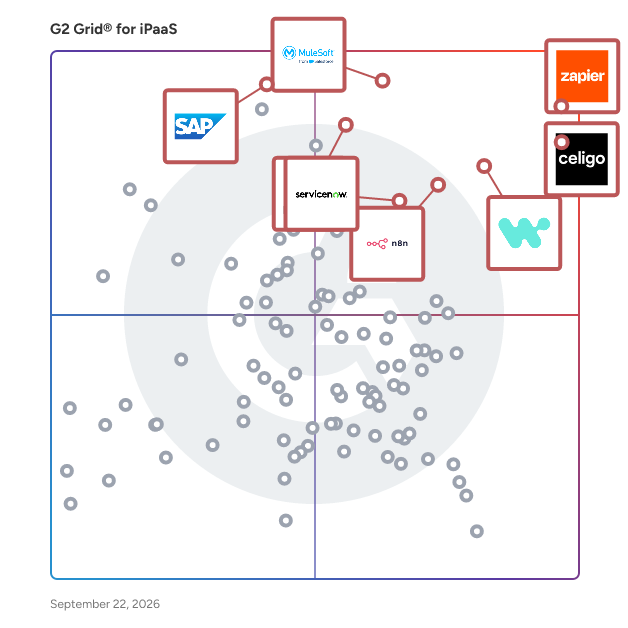
G2 Grid® for iPaaS Software

G2 Grid® for iPaaS Software plotting products by satisfaction and market presence

Highlighted products: Zapier, Celigo, Workato, MuleSoft Anypoint Platform, n8n, HubSpot Data Hub, ServiceNow Integration Hub, and SAP Integration Suite.

Underlying data: [Grid® JSON](https://www.g2.com/categories/ipaas/grids.json?focus%5B%5D=zapier&focus%5B%5D=celigo&focus%5B%5D=workato&focus%5B%5D=mulesoft-anypoint-platform&focus%5B%5D=n8n&focus%5B%5D=hubspot-data-hub&focus%5B%5D=servicenow-integration-hub&focus%5B%5D=sap-integration-suite)

Zapier

Zapier is the #1 workflow automation platform for businesses that want to grow faster by maximizing the efficiency of their teams, tools, and processes without relying on development teams. With our new visual editor, free Filter and Formatter tasks for more control, and reduced task-based pricing, you're going love automating with Zapier. It's free to sign up — no credit card required — and creating your first workflow, what we call a "Zap," is just a few clicks away. Since 2011, over 2 million business have turned to Zapier for their automation needs, including: lead management, sales pipeline, marketing campaigns, customer support, data management, project management, and tickets and incidents.

Average Rating: 4.5/5.0

Total Reviews: 2,064

How Do G2 Users Rate Zapier?

  • Has the product been a good partner in doing business?: 8.8/10 (Category avg: 9.1/10)
  • API Management: 8.4/10 (Category avg: 8.6/10)
  • Reusable connectors: 8.7/10 (Category avg: 9.0/10)
  • Cloud to Cloud: 8.6/10 (Category avg: 8.9/10)

Who Is the Company Behind Zapier?

  • Seller: Zapier
  • Company Website:
  • Year Founded: 2011
  • HQ Location: San Francisco, CA
  • Twitter: @zapier
    95,859 Twitter followers
  • LinkedIn® Page: www.linkedin.com
    1,521 employees on LinkedIn®

Who Uses This Product?

  • Who Uses This: Owner, CEO
  • Top Industries: Marketing and Advertising, Information Technology and Services
  • Company Size: 70% Small, 24% Medium

What Do G2 Reviewers Say About Zapier?

AI-generated summary from verified user reviews

Pros
  • Users find Zapier's ease of use remarkable, simplifying automation and app integrations without the need for technical skills.
  • Users value Zapier's seamless automation, effectively connecting apps and streamlining workflows for increased efficiency.
  • Users value the extensive integrations Zapier offers, streamlining tasks across their essential tools effortlessly.
  • Users love the easy integrations of Zapier, allowing seamless connections between tools for efficient automation.
  • Users enjoy time-saving automation with Zapier, seamlessly connecting apps and streamlining repetitive tasks efficiently.
Cons
  • Users find the cost of Zapier to be high, especially for accessing advanced features and integrations.
  • Users find the complexity of setup and feature navigation challenging, complicating their ability to test effectively.
  • Users find pricing issues with Zapier, as premium features come at a much higher cost than expected for small projects.
  • Users find the learning curve overwhelming due to the extensive integrations, making it challenging to build efficient zaps.
  • Users express frustration with Zapier's limited features, making it challenging for smaller teams and specific use cases.

What Are Recent G2 Reviews of Zapier?

What Are G2 Users Discussing About Zapier?

Celigo

Celigo puts intelligent automation in the hands of every team, unifying workflows from the predictable to the fully agentic in a single platform through a first-of-its-kind natural language interface. The platform is recognized by G2 as #1 in iPaaS and a Leader in API Management, API Marketplace, and EDI and is the only vendor named a 2025 Gartner® Peer Insights™ Customers’ Choice for iPaaS. Learn more at: celigo.com.

Average Rating: 4.6/5.0

Total Reviews: 1,068

How Do G2 Users Rate Celigo?

  • Has the product been a good partner in doing business?: 9.2/10 (Category avg: 9.1/10)
  • API Management: 9.2/10 (Category avg: 8.6/10)
  • Reusable connectors: 9.3/10 (Category avg: 9.0/10)
  • Cloud to Cloud: 9.4/10 (Category avg: 8.9/10)

Who Is the Company Behind Celigo?

  • Seller: Celigo
  • Company Website:
  • Year Founded: 2011
  • HQ Location: Redwood City, California
  • Twitter: @celigoinc
    1,418 Twitter followers
  • LinkedIn® Page: www.linkedin.com
    786 employees on LinkedIn®

Who Uses This Product?

  • Who Uses This: IT Manager, NetSuite Administrator
  • Top Industries: Retail, Consumer Goods
  • Company Size: 58% Medium, 37% Small

What Do G2 Reviewers Say About Celigo?

AI-generated summary from verified user reviews

Pros
  • Users value the ease of use in Celigo, appreciating its intuitive interface and effective connectivity options.
  • Users value the comprehensive integrations offered by Celigo, enabling seamless connections with various business systems effortlessly.
  • Users appreciate the comprehensive integration capabilities of Celigo, facilitating connections with various partners seamlessly.
  • Users praise the easy integrations offered by Celigo, especially with NetSuite, appreciating the prebuilt connectors and solid support.
  • Users praise the responsive and helpful customer support from Celigo, making issue resolution seamless.
Cons
  • Users find that error handling is unclear, making it challenging to resolve issues and track discrepancies efficiently.
  • Users note that Celigo can be expensive, especially for small businesses needing multiple managed modules.
  • Users face a notable learning curve with Celigo, making initial navigation and understanding of flows challenging.
  • Users report that Celigo’s complexity can lead to frustration, especially when debugging and understanding data flows.
  • Users find pricing issues with Celigo, noting that costs increase with additional features and managed modules.

What Are Recent G2 Reviews of Celigo?

What Are G2 Users Discussing About Celigo?

Workato

Workato is the #1-rated iPaaS and the leader in Enterprise MCP — the platform enterprises trust to unify integration, automation, and AI in one secure, cloud-native runtime. Trusted by over 12,000 customers including half the Fortune 500, Workato connects every system, process, and data source with 14,000+ pre-built connectors. What sets Workato apart: Enterprise MCP turns proven business processes into governed, agent-ready skills that any AI agent — Claude, ChatGPT, Cursor, or custom-built — can execute safely and predictably. No rip-and-replace required. Whether modernizing legacy integrations or deploying agentic AI at scale, Workato delivers the orchestration, governance, and trust needed in the enterprise.

Average Rating: 4.7/5.0

Total Reviews: 750

How Do G2 Users Rate Workato?

  • Has the product been a good partner in doing business?: 9.4/10 (Category avg: 9.1/10)
  • API Management: 8.8/10 (Category avg: 8.6/10)
  • Reusable connectors: 9.1/10 (Category avg: 9.0/10)
  • Cloud to Cloud: 9.0/10 (Category avg: 8.9/10)

Who Is the Company Behind Workato?

  • Seller: Workato
  • Company Website:
  • Year Founded: 2013
  • HQ Location: Mountain View, California
  • Twitter: @Workato
    3,641 Twitter followers
  • LinkedIn® Page: www.linkedin.com
    1,466 employees on LinkedIn®

Who Uses This Product?

  • Who Uses This: Software Engineer, Senior Software Engineer
  • Top Industries: Computer Software, Information Technology and Services
  • Company Size: 43% Medium, 33% Large

What Do G2 Reviewers Say About Workato?

AI-generated summary from verified user reviews

Pros
  • Users appreciate the ease of use of Workato, enabling quick automation without needing technical expertise.
  • Users love the easy integrations with Workato, allowing quick automation of tools like Salesforce and Slack.
  • Users love how Workato's easy integrations simplify automation, saving them hours and making processes seamless.
  • Users value the user-friendly and low-code interface of Workato, making business process automation seamless and efficient.
  • Users appreciate the ease of automation with Workato, enabling seamless integrations and saving significant time on repetitive tasks.
Cons
  • Users often find the complexity of Workato overwhelming, particularly regarding pricing and onboarding, leading to confusion.
  • Users find the learning curve steep, with complexity and confusion hindering smooth onboarding and workflow management.
  • Users are frustrated by data limitations in Workato, impacting email sends, job reporting, and large file transfers.
  • Users find the missing features in Workato's connector library limit their integration capabilities with lesser-known applications.
  • Users find the steep learning curve of Workato daunting, especially during onboarding and initial usage.

What Are Recent G2 Reviews of Workato?

What Are G2 Users Discussing About Workato?

MuleSoft Anypoint Platform

MuleSoft Anypoint Platform is the industry-leading integration and governance solution designed to connect any application, API, and AI agent across hybrid and multi-cloud environments. For nearly two decades, we have served as the integration backbone for the world’s most complex enterprises. Today, we are extending to the AI era. We allow organizations to move beyond AI sprawl into a unified architecture where legacy systems, modern APIs, and autonomous agents interact securely on a single, trusted foundation. Key capabilities and components include: Hybrid integration and connectivity, utilizing a library of hundreds of pre-built connectors and support for new AI protocols like MCP and A2A to provide AI agents with the tools they need to access and act within legacy ERPs, CRMs, and on-premise databases. MuleSoft Agent Fabric: Unified API and agent governance, applying the same rigorous security policies, cost controls, and traffic enforcement to AI models and agents that organizations already trust for their global API ecosystems through a single, federated control plane. Fabric also includes agent visibility and registry, offering a single source of truth to discover and observe any cross-ecosystem agent, ensuring complete transparency and the elimination of shadow AI. MuleSoft Vibes: Natural language design and management, providing a revamped experience where teams can use native natural language prompts to scaffold integrations, manage lifecycles, and stay ahead of technical sprawl using the AI tools they already prefer. Trusted runtime and compliance, delivering a fully managed, hybrid, or on-prem foundation that has been proven at scale for years, ensuring that every interaction is backed by enterprise-grade monitoring and human-in-the-loop security. Overall, MuleSoft Anypoint Platform is the enterprise platform for organizations seeking to bring visibility, trust, and orchestration to their APIs and AI agents.

Average Rating: 4.4/5.0

Total Reviews: 763

How Do G2 Users Rate MuleSoft Anypoint Platform?

  • Has the product been a good partner in doing business?: 8.8/10 (Category avg: 9.1/10)
  • API Management: 9.6/10 (Category avg: 8.6/10)
  • Reusable connectors: 9.3/10 (Category avg: 9.0/10)
  • Cloud to Cloud: 9.2/10 (Category avg: 8.9/10)

Who Is the Company Behind MuleSoft Anypoint Platform?

  • Seller: Salesforce
  • Company Website:
  • Year Founded: 1999
  • HQ Location: San Francisco, CA
  • Twitter: @salesforce
    579,511 Twitter followers
  • LinkedIn® Page: www.linkedin.com
    89,711 employees on LinkedIn®

Who Uses This Product?

  • Who Uses This: Software Engineer, Senior Software Engineer
  • Top Industries: Information Technology and Services, Computer Software
  • Company Size: 54% Large, 31% Medium

What Do G2 Reviewers Say About MuleSoft Anypoint Platform?

AI-generated summary from verified user reviews

Pros
  • Users appreciate the ease of use of MuleSoft Anypoint Platform, finding it ideal for their data loading needs.
  • Users value the integration capabilities of MuleSoft Anypoint Platform, enabling seamless connections across various systems and APIs.
  • Users value the ease of integration with MuleSoft Anypoint Platform, benefiting from its comprehensive API management features.
  • Users appreciate the clean UI and comprehensive features of MuleSoft Anypoint Platform for efficient API management.
  • Users value the easy integrations of MuleSoft Anypoint Platform, simplifying the connection of various systems seamlessly.
Cons
  • Users express concern over the high cost of MuleSoft Anypoint Platform, making it less accessible for smaller projects.
  • Users express concern over the high pricing issues of MuleSoft Anypoint Platform, making it less accessible for smaller organizations.
  • Users find the learning curve steep for MuleSoft Anypoint Platform, especially for those transitioning from other tools.
  • Users find learning difficulty with MuleSoft Anypoint Platform, requiring advanced skills and complicating transitions from familiar tools.
  • Users experience a steep learning curve with MuleSoft Anypoint, often requiring extensive training and adjustment time.

What Are Recent G2 Reviews of MuleSoft Anypoint Platform?

What Are G2 Users Discussing About MuleSoft Anypoint Platform?

n8n

n8n is a workflow automation platform built for technical teams operationalizing AI. Built for technical teams, it offers 500+ integrations, custom code flexibility, and self-hosting options. With 180k+ Github Stars and a thriving community, n8n enables teams to build production-ready automation workflows that bridge AI with real business processes.

Average Rating: 4.7/5.0

Total Reviews: 306

How Do G2 Users Rate n8n?

  • Has the product been a good partner in doing business?: 8.5/10 (Category avg: 9.1/10)
  • API Management: 8.5/10 (Category avg: 8.6/10)
  • Reusable connectors: 8.7/10 (Category avg: 9.0/10)
  • Cloud to Cloud: 8.3/10 (Category avg: 8.9/10)

Who Is the Company Behind n8n?

  • Seller: n8n GmbH
  • Company Website:
  • Year Founded: 2019
  • HQ Location: Berlin, Berlin
  • Twitter: @n8n_io
    81,824 Twitter followers
  • LinkedIn® Page: linkedin.com
    1,275 employees on LinkedIn®

Who Uses This Product?

  • Who Uses This: CEO, Founder
  • Top Industries: Computer Software, Information Technology and Services
  • Company Size: 78% Small, 18% Medium

What Do G2 Reviewers Say About n8n?

AI-generated summary from verified user reviews

Pros
  • Users value the ease of use of n8n, enjoying intuitive designs that simplify complex workflow automation.
  • Users value the flexible automation capabilities of n8n, enhancing productivity through easy and extensive workflow management.
  • Users appreciate the extensive integrations of n8n, enabling seamless connections between various tools within workflows.
  • Users value the intuitive visual editor of n8n, enabling easy creation of complex workflows and automations.
  • Users enjoy the efficient workflow management of n8n, streamlining tasks and enhancing productivity through automation.
Cons
  • Users note a significant learning curve with n8n, requiring time and tutorials to optimize workflows effectively.
  • Users find n8n's difficult learning curve challenging, especially for non-developers managing complex workflows effectively.
  • Users note the absence of essential features in self-hosted n8n, hindering functionality and ease of use.
  • Users struggle with the poor interface design of n8n, finding it unresponsive and difficult to navigate effectively.
  • Users find the limitations in debugging and handling large workflows a significant challenge when using n8n.

What Are Recent G2 Reviews of n8n?

What Are G2 Users Discussing About n8n?

HubSpot Data Hub

Data Hub connects, cleanses, and automates customer data across the HubSpot CRM, providing operations teams with tools to maintain data quality, ensure system integration, and streamline business processes. Core Value Proposition: Data Hub addresses critical operational challenges: disconnected data across applications, manual data entry consuming team time, data quality issues undermining business decisions, and complex automation requirements existing tools cannot handle. The platform offers native integrations with other applications to create a more efficient, aligned, and agile business. Key Capabilities: Data Integration: Data Hub connects contacts, leads, and company data between HubSpot and external applications bidirectionally and in real-time. This creates a unified customer data foundation rather than requiring manual data transfer. Data Quality Management: The platform includes tools that maintain a clean database, allowing operations teams to save hours of manual data validation and correction work. Process Automation: Data Hub enables complex business process automation across systems, connecting trigger events in one application to automated actions in another. This streamlines internal workflows and reduces manual coordination. Unified Customer View: By connecting all customer data sources to the HubSpot CRM platform, Data Hub creates a single source of truth that sales, marketing, and service teams can reference for customer interactions. Data Hub vs. Alternatives: Unlike standalone integration platforms (iPaaS) requiring technical expertise to configure and maintain, Data Hub provides native HubSpot integration with a visual interface designed for operations professionals rather than developers. This reduces implementation time and ongoing maintenance requirements. Data Hub eliminates manual data entry and data validation by automating these workflows. The platform guarantees up-to-date data and maintains a clean database without constant manual intervention. Who Should Use Data Hub: Data Hub serves operations teams managing data across multiple systems, organizations experiencing data quality issues affecting business decisions, and companies needing to automate complex cross-system workflows without extensive technical resources. The platform enables business agility as organizations grow. Outcome: Data Hub supercharges your HubSpot CRM with a complete toolkit to connect, clean, and automate customer data, uniting all customer data into one connected platform that results in a friction-free customer experience.

Average Rating: 4.5/5.0

Total Reviews: 619

How Do G2 Users Rate HubSpot Data Hub?

  • Has the product been a good partner in doing business?: 9.1/10 (Category avg: 9.1/10)
  • API Management: 8.2/10 (Category avg: 8.6/10)
  • Reusable connectors: 8.0/10 (Category avg: 9.0/10)
  • Cloud to Cloud: 8.3/10 (Category avg: 8.9/10)

Who Is the Company Behind HubSpot Data Hub?

  • Seller: HubSpot
  • Company Website:
  • Year Founded: 2006
  • HQ Location: Cambridge, Massachusetts, United States
  • Twitter: @HubSpot
    784,270 Twitter followers
  • LinkedIn® Page: www.linkedin.com
    17,628 employees on LinkedIn®

Who Uses This Product?

  • Who Uses This: CEO, Owner
  • Top Industries: Information Technology and Services, Marketing and Advertising
  • Company Size: 64% Small, 32% Medium

What Do G2 Reviewers Say About HubSpot Data Hub?

AI-generated summary from verified user reviews

Pros
  • Users appreciate the user-friendly interface of HubSpot Data Hub, making information easily accessible and operations efficient.
  • Users value the two-way data sync of HubSpot Data Hub, enhancing efficiency and collaboration across teams.
  • Users benefit from automation capabilities in HubSpot Data Hub, significantly streamlining tasks and enhancing overall efficiency.
  • Users value the two-way data sync across platforms, enhancing efficiency and ensuring accurate, consistent information for teams.
  • Users appreciate the efficiency of HubSpot Data Hub, streamlining data management and reducing workflow complexities.
Cons
  • Users find the limitations in data handling frustrating, particularly regarding external data integration and processing capabilities.
  • Users find the missing features in HubSpot Data Hub limit their ability to manage complex contact data effectively.
  • Users find the learning curve steep, especially when unfamiliar with workflow automation, affecting overall usability.
  • Users find HubSpot Data Hub fairly expensive, particularly for small teams wanting advanced features and customization.
  • Users find the complexity of reporting and data tracking in HubSpot Data Hub to be challenging and frustrating.

What Are Recent G2 Reviews of HubSpot Data Hub?

What Are G2 Users Discussing About HubSpot Data Hub?

ServiceNow Integration Hub

ServiceNow Integration Hub is a comprehensive solution designed to seamlessly connect ServiceNow workflows with a wide array of external systems, applications, and data sources. By leveraging pre-built spokes and a no-code development environment, Integration Hub enables organizations to automate processes, enhance productivity, and reduce integration complexities. Key Features and Functionality: - Out-of-the-Box Spokes: Access over 220 pre-built spokes that facilitate integration with numerous enterprise applications, allowing for rapid deployment and reduced development time. - Spoke Generator: Utilize a no-code, AI-powered tool to create custom spokes quickly by leveraging OpenAPI specifications, enabling tailored integrations without extensive coding. - Flow Templates: Accelerate automation development with starter flows that include built-in integrations, streamlining the creation of complex workflows. - Stream Connect for Apache Kafka: Integrate your Kafka environment with ServiceNow workflows at scale, ensuring efficient data streaming and processing. - Remote Tables: View and manipulate external data temporarily without the need for importing or storing it within ServiceNow, maintaining data integrity and reducing storage requirements. - Custom Spokes: Develop powerful custom integrations tailored to specific use cases, providing flexibility to meet unique business needs. - Connections Dashboard: Manage integrations and credentials through a centralized dashboard, simplifying administration and enhancing security. - REST API Trigger: Initiate flows from inbound API calls or webhooks without writing any code, facilitating real-time data processing and automation. - Integration Hub Import: Simplify the process of importing and mapping large datasets, reducing manual effort and potential errors. Primary Value and Solutions Provided: Integration Hub addresses the challenges of connecting disparate systems by offering a unified platform that simplifies and accelerates the integration process. By eliminating the need for specialized integration resources and reducing technical debt, organizations can achieve faster time-to-value and lower total cost of ownership. The solution empowers teams to automate workflows across the enterprise, enhancing operational efficiency and allowing employees to focus on strategic initiatives. With its intuitive, no-code interface, Integration Hub democratizes the integration process, enabling a broader range of users to build and manage integrations effectively.

Average Rating: 4.8/5.0

Total Reviews: 18

How Do G2 Users Rate ServiceNow Integration Hub?

  • Has the product been a good partner in doing business?: 9.4/10 (Category avg: 9.1/10)
  • API Management: 9.4/10 (Category avg: 8.6/10)
  • Reusable connectors: 9.4/10 (Category avg: 9.0/10)
  • Cloud to Cloud: 9.4/10 (Category avg: 8.9/10)

Who Is the Company Behind ServiceNow Integration Hub?

  • Seller: ServiceNow
  • Year Founded: 2004
  • HQ Location: Santa Clara, CA
  • Twitter: @servicenow
    55,548 Twitter followers
  • LinkedIn® Page: www.linkedin.com
    35,078 employees on LinkedIn®
  • Ownership: NYSE:NOW

Who Uses This Product?

  • Top Industries: Information Technology and Services
  • Company Size: 67% Large, 29% Medium

What Do G2 Reviewers Say About ServiceNow Integration Hub?

AI-generated summary from verified user reviews

Pros
  • Users love the customization options in ServiceNow, allowing for a personalized and cohesively branded experience.
Cons
  • Users are frustrated with poor notifications regarding ticket assignments, missing automatic updates that enhance usability.

What Are Recent G2 Reviews of ServiceNow Integration Hub?

SAP Integration Suite

SAP Integration Suite (formerly SAP Cloud Platform Integration Suite) is an integration platform as a service (iPaaS) that allows the user to integrate on-premise and cloud-based applications and processes with tools and prebuilt content managed by SAP. With SAP Integration Suite, you can become future ready and scale up your integration capabilities to connect and contextualize experiences for customers, partners, and employees across the enterprise and extended ecosystems.

Average Rating: 4.3/5.0

Total Reviews: 261

How Do G2 Users Rate SAP Integration Suite?

  • Has the product been a good partner in doing business?: 8.3/10 (Category avg: 9.1/10)
  • API Management: 7.4/10 (Category avg: 8.6/10)
  • Reusable connectors: 7.5/10 (Category avg: 9.0/10)
  • Cloud to Cloud: 8.0/10 (Category avg: 8.9/10)

Who Is the Company Behind SAP Integration Suite?

  • Seller: SAP
  • Company Website:
  • Year Founded: 1972
  • HQ Location: Walldorf
  • Twitter: @SAP
    297,052 Twitter followers
  • LinkedIn® Page: www.linkedin.com
    149,349 employees on LinkedIn®

Who Uses This Product?

  • Who Uses This: Senior Consultant, Consultant
  • Top Industries: Information Technology and Services, Computer Software
  • Company Size: 51% Large, 25% Medium

What Do G2 Reviewers Say About SAP Integration Suite?

AI-generated summary from verified user reviews

Pros
  • Users appreciate the ease of use of SAP Integration Suite, enabling quick setup and seamless integrations effortlessly.
  • Users value the seamless integration capabilities of SAP Integration Suite, enhancing efficiency through centralized API and process management.
  • Users commend the easy integrations of SAP Integration Suite, enabling seamless connections across various applications and systems.
  • Users laud the integration capabilities of SAP Integration Suite, which streamline processes and enhance B2B management significantly.
  • Users love the ease of API integration with SAP Integration Suite, simplifying system connectivity across different platforms.
Cons
  • Users find the complexity of SAP Integration Suite overwhelming, making it difficult for new users to adapt quickly.
  • Users find the licensing costs of SAP Integration Suite to be high, especially for smaller organizations or projects.
  • Users find the steep learning curve of SAP Integration Suite challenging, especially for those new to SAP integration tools.
  • Users find the learning curve challenging, often feeling overwhelmed and requiring significant time to master the SAP Integration Suite.
  • Users face difficult debugging issues in SAP Integration Suite, leading to inefficiencies and frustrating troubleshooting experiences.

What Are Recent G2 Reviews of SAP Integration Suite?

What Are G2 Users Discussing About SAP Integration Suite?

Boomi

Boomi, the data activation company for AI, powers the agentic enterprise by bringing data to life across the business. The Boomi Enterprise Platform is the active data foundation that delivers essential agentic infrastructure to drive agentic transformation. By unifying agent design and governance, API and MCP management, integration and automation, and data management into a single platform, Boomi enables organizations to harness the power of AI with secure, scalable connectivity. Trusted by over 30,000 customers and supported by a network of 800+ partners, Boomi helps organizations of all sizes achieve agility, efficiency, and innovation at scale.

Average Rating: 4.4/5.0

Total Reviews: 454

How Do G2 Users Rate Boomi?

  • Has the product been a good partner in doing business?: 8.8/10 (Category avg: 9.1/10)
  • API Management: 8.8/10 (Category avg: 8.6/10)
  • Reusable connectors: 9.4/10 (Category avg: 9.0/10)
  • Cloud to Cloud: 9.3/10 (Category avg: 8.9/10)

Who Is the Company Behind Boomi?

  • Seller: Boomi
  • Company Website:
  • Year Founded: 2000
  • HQ Location: Conshohocken, PA
  • Twitter: @boomi
    101,014 Twitter followers
  • LinkedIn® Page: www.linkedin.com
    3,071 employees on LinkedIn®

Who Uses This Product?

  • Who Uses This: Software Engineer, Senior Software Engineer
  • Top Industries: Information Technology and Services, Computer Software
  • Company Size: 45% Large, 39% Medium

What Do G2 Reviewers Say About Boomi?

AI-generated summary from verified user reviews

Pros
  • Users value the powerful integrations Boomi provides, enabling seamless connectivity with multiple cloud providers and tools.
  • Users appreciate the ease of use of Boomi, making integrations quick and straightforward with strong support.
  • Users value the easy integrations Boomi offers, simplifying connections with multiple systems and enhancing overall functionality.
  • Users value Boomi's seamless integration features, enhanced documentation, and robust support for deployment and monitoring.
  • Users value the robust integration capabilities of Boomi, facilitating seamless connections with multiple systems and tools.
Cons
  • Users find that complexity in implementation leads to increased effort and performance issues with Boomi's integrations.
  • Users report that Boomi can be difficult to learn initially, especially with complex scenarios and intricacies.
  • Users find the initial learning curve of Boomi challenging, particularly with complex scenarios before implementation.
  • Users face integration issues with Boomi, highlighting the need for more connectors and improved user interface simplicity.
  • Users face complex coding challenges with Boomi, requiring significant effort for integrating intricate business logic.

What Are Recent G2 Reviews of Boomi?

What Are G2 Users Discussing About Boomi?

IBM webMethods Hybrid Integration

IBM webMethods is an enterprise integration platform from IBM, a global technology company headquartered in Armonk, New York, with decades of experience supporting mission‑critical systems for organizations worldwide. Originally developed by webMethods and now part of IBM’s broader software portfolio, webMethods is used by enterprises of all sizes to modernize and connect complex IT ecosystems across on‑premises, cloud, and hybrid environments. webMethods provides a comprehensive set of integration capabilities within a single, unified platform. Key features include application and data integration, API management, event‑driven architecture, B2B and EDI integration, managed file transfer, messaging, and workflow automation. With low‑code and no‑code tooling, prebuilt connectors, and centralized governance and monitoring, teams can design, deploy, and manage integrations efficiently across distributed systems. The primary value of webMethods is enabling organizations to break down data silos, streamline business processes, and accelerate digital transformation. It solves the challenge of integrating diverse applications, partners, and data sources by providing a scalable, secure, and hybrid‑ready integration solution. With webMethods, users gain end‑to‑end visibility, improved operational efficiency, and the flexibility to adapt quickly to changing business and technology needs.

Average Rating: 4.3/5.0

Total Reviews: 257

How Do G2 Users Rate IBM webMethods Hybrid Integration?

  • Has the product been a good partner in doing business?: 8.3/10 (Category avg: 9.1/10)
  • API Management: 8.4/10 (Category avg: 8.6/10)
  • Reusable connectors: 8.3/10 (Category avg: 9.0/10)
  • Cloud to Cloud: 8.6/10 (Category avg: 8.9/10)

Who Is the Company Behind IBM webMethods Hybrid Integration?

  • Seller: IBM
  • Company Website:
  • Year Founded: 1911
  • HQ Location: Armonk, New York, United States
  • Twitter: @IBMSecurity
    74,660 Twitter followers
  • LinkedIn® Page: www.linkedin.com
    344,328 employees on LinkedIn®

Who Uses This Product?

  • Who Uses This: Senior Software Engineer, Software Engineer
  • Top Industries: Information Technology and Services, Computer Software
  • Company Size: 62% Large, 23% Medium

What Do G2 Reviewers Say About IBM webMethods Hybrid Integration?

AI-generated summary from verified user reviews

Pros
  • Users value the seamless integrations of IBM webMethods Hybrid Integration, appreciating its ease and reliability across platforms.
  • Users appreciate the easy integrations of IBM webMethods Hybrid Integration, enabling smooth connections without altering existing workflows.
  • Users value the seamless connectivity of IBM webMethods Hybrid Integration, enabling smooth data sharing across diverse systems.
  • Users find the ease of use of IBM webMethods Hybrid Integration enhances their integration and migration projects significantly.
  • Users appreciate the reliable integration capabilities of IBM webMethods, streamlining complex connections without workflow disruptions.
Cons
  • Users find the steep learning curve challenging for advanced integrations, requiring time to become comfortable with the UI.
  • Users find IBM webMethods Hybrid Integration to be expensive and note that better documentation could enhance usability.
  • Users find the complexity of setup and interface challenges, especially for beginners, impacting their overall experience.
  • Users find the difficult learning curve of IBM webMethods Hybrid Integration challenges newcomers and complicates initial setup.
  • Users find the steep learning curve of IBM webMethods Hybrid Integration challenging, especially for newcomers to the platform.

What Are Recent G2 Reviews of IBM webMethods Hybrid Integration?

What Are G2 Users Discussing About IBM webMethods Hybrid Integration?

Skyvia

Skyvia is a no-code cloud data integration and data pipeline platform that enables ETL, ELT, Reverse ETL, data migration, one-way and bi-directional data sync, workflow automation, real-time connectivity, and much more. Benefits of Using Skyvia: • Cost efficiency: With affordable, flexible pricing plans for each product, Skyvia suites for businesses of any size. • Ease of Use: Based on extensive customer feedback, ease of use is Skyvia's strongest quality. • Flexibility: Skyvia provides adaptable, no-code integration tools for both basic and advanced business scenarios. • Trust: Skyvia is trusted by thousands of data-driven organizations around the globe. With a vast library of 200+ connectors, Skyvia provides seamless integration among various cloud applications, databases, and data warehouses, including Salesforce, Dynamics CRM, QuickBooks Online, SQL Server, Amazon Redshift, Google BigQuery, and others.

Average Rating: 4.8/5.0

Total Reviews: 320

How Do G2 Users Rate Skyvia?

  • Has the product been a good partner in doing business?: 9.3/10 (Category avg: 9.1/10)
  • API Management: 9.4/10 (Category avg: 8.6/10)
  • Reusable connectors: 9.6/10 (Category avg: 9.0/10)
  • Cloud to Cloud: 9.4/10 (Category avg: 8.9/10)

Who Is the Company Behind Skyvia?

  • Seller: Devart
  • Year Founded: 1997
  • HQ Location: Wilmington, Delaware, USA
  • Twitter: @DevartSoftware
    1,736 Twitter followers
  • LinkedIn® Page: www.linkedin.com
    251 employees on LinkedIn®

Who Uses This Product?

  • Who Uses This: CEO, CTO
  • Top Industries: Information Technology and Services, Marketing and Advertising
  • Company Size: 52% Small, 41% Medium

What Do G2 Reviewers Say About Skyvia?

AI-generated summary from verified user reviews

Pros
  • Users value the intuitive interface of Skyvia, making data integration tasks quick and straightforward.
  • Users appreciate the easy integrations provided by Skyvia, enhancing their workflow across multiple platforms effortlessly.
  • Users find the easy setup of Skyvia invaluable, making data integration straightforward and hassle-free for teams.
  • Users laud the easy setup of Skyvia, making integration fast and user-friendly without any coding required.
  • Users value the easy integrations provided by Skyvia, making complex connections simple and efficient.
Cons
  • Users note an information deficiency in Skyvia, citing a lack of detailed documentation and insufficient logging for troubleshooting.
  • Users find the difficult setup of Skyvia challenging, especially with large datasets and complex integrations.
  • Users find the learning curve steep initially, needing time to fully grasp the platform's functionalities.
  • Users find the poor documentation of Skyvia limits effective use, suggesting improvements for clarity and real-world examples.
  • Users face setup difficulties with large datasets and field mapping, which may require extra time and effort.

What Are Recent G2 Reviews of Skyvia?

What Are G2 Users Discussing About Skyvia?

Prismatic

Prismatic is the AI-enabled embedded iPaaS for B2B SaaS companies, the foundation for product extensibility. It brings productized integrations, embedded workflows, and agentic interactions together on one platform that handles everything that breaks at scale: authentication, deployment, monitoring, security, and compliance. Developers build and ship integrations 10x faster with code-native development and AI coding assistants. Customers build the workflows they need with embedded, white-labeled tools. And AI agents act across connected systems. Used by Fortune 500s and high-growth startups alike, Prismatic turns integrations from a bottleneck into a growth driver. Learn more at prismatic.io.

Average Rating: 4.8/5.0

Total Reviews: 270

How Do G2 Users Rate Prismatic?

  • Has the product been a good partner in doing business?: 9.8/10 (Category avg: 9.1/10)
  • API Management: 9.0/10 (Category avg: 8.6/10)
  • Reusable connectors: 9.5/10 (Category avg: 9.0/10)
  • Cloud to Cloud: 9.1/10 (Category avg: 8.9/10)

Who Is the Company Behind Prismatic?

  • Seller: Prismatic
  • Company Website:
  • Year Founded: 2019
  • HQ Location: Sioux Falls, US
  • Twitter: @prismatic_io
    3,075 Twitter followers
  • LinkedIn® Page: www.linkedin.com
    74 employees on LinkedIn®

Who Uses This Product?

  • Who Uses This: Founder, Software Engineer
  • Top Industries: Computer Software, Information Technology and Services
  • Company Size: 60% Small, 34% Medium

What Do G2 Reviewers Say About Prismatic?

AI-generated summary from verified user reviews

Pros
  • Users appreciate the easy integrations with Prismatic, making it simple to build robust solutions tailored to clients.
  • Users appreciate the simplicity of building integrations with Prismatic, enhancing focus on design and client solutions.
  • Users commend the exceptional customer support from Prismatic, highlighting quick responses and dedicated assistance throughout onboarding.
  • Users highlight Prismatic's seamless integration capabilities, which significantly enhance their development and support processes.
  • Users appreciate the ease of use of Prismatic, making integration development straightforward and enjoyable.
Cons
  • Users find the learning curve steep with Prismatic, requiring extensive documentation navigation for effective use.
  • Users find the documentation and configuration features lacking, wishing for improved clarity and functionality in Prismatic.
  • Users find the limited integrations frustrating, wishing for better filtering and more built-in templates for efficiency.
  • Users find the difficult learning curve of Prismatic challenging, especially when training clients on workflows and integrations.
  • Users find the complexity of integrations in Prismatic challenging, often preferring simpler coding solutions.

What Are Recent G2 Reviews of Prismatic?

What Are G2 Users Discussing About Prismatic?

IBM App Connect

IBM App Connect allows businesses to easily connect applications and build integration flows with no-code approach, a catalog of pre-built connectors and common templates. It provides rapid access to business-critical information, while also securing and protecting, enabling businesses to more easily create new and engaging user experiences for their customers. Built-in AI with suggestive data mapping and transformation also speed up development and testing of hybrid integrations. IBM App Connect is available on AWS Marketplace.

Average Rating: 4.4/5.0

Total Reviews: 231

How Do G2 Users Rate IBM App Connect?

  • Has the product been a good partner in doing business?: 8.3/10 (Category avg: 9.1/10)
  • API Management: 9.1/10 (Category avg: 8.6/10)
  • Reusable connectors: 9.5/10 (Category avg: 9.0/10)
  • Cloud to Cloud: 9.5/10 (Category avg: 8.9/10)

Who Is the Company Behind IBM App Connect?

  • Seller: IBM
  • Year Founded: 1911
  • HQ Location: Armonk, New York, United States
  • Twitter: @IBMSecurity
    74,660 Twitter followers
  • LinkedIn® Page: www.linkedin.com
    344,328 employees on LinkedIn®
  • Ownership: SWX:IBM

Who Uses This Product?

  • Who Uses This: Cloud Architect, Software Engineer
  • Top Industries: Information Technology and Services, Computer Software
  • Company Size: 42% Large, 40% Medium

What Do G2 Reviewers Say About IBM App Connect?

AI-generated summary from verified user reviews

Pros
  • Users appreciate the ease of automation with IBM App Connect, enabling seamless integration and streamlined workflows.
  • Users value the flexibility of deploying integrations across various environments, benefiting from a modernized architecture and extensive connectors.
  • Users appreciate the customization capabilities of IBM App Connect, enabling personalized solutions through an open and extensible design.
  • Users value the easy integrations offered by IBM App Connect, enabling flexible deployment across various environments.
  • Users value the affordability of IBM App Connect, enjoying its cost-effective solution for application integration.
Cons
  • Users find the steep learning curve challenging, especially for onboarding new developers and managing workflows.
  • Users find a high complexity in workflow configuration requiring expertise, indicating a need for better documentation and guidance.
  • Users find a high dependency on workflow configuration knowledge necessary to effectively manage their flows in IBM App Connect.
  • Users face a difficult learning curve with IBM App Connect, making it challenging for new developers to begin.
  • Users find the pricing to be quite expensive, which may deter potential users and limit community support.

What Are Recent G2 Reviews of IBM App Connect?

What Are G2 Users Discussing About IBM App Connect?

SnapLogic Agentic Integration and Applied AI Platform

The SnapLogic Platform is an agentic integration and automation solution designed to assist enterprise teams in connecting applications, data sources, and APIs while orchestrating AI-powered workflows across both cloud and on-premises environments. Established in 2006 and headquartered in San Mateo, California, SnapLogic serves a diverse range of industries, including financial services, pharmaceuticals, manufacturing, software, and higher education, with a global presence across North America, Europe, and Asia Pacific. Targeted primarily at IT teams, data engineers, and integration specialists, the SnapLogic Platform addresses the critical need for seamless data movement between systems, automation of business processes, and governance of AI agent activities at scale. The platform supports various use cases, including application integration, data pipeline management, API lifecycle management, legacy system modernization, and enterprise AI orchestration. This versatility makes it a valuable tool for organizations looking to enhance their operational efficiency and data accessibility. Key features of the SnapLogic Platform include a visual, low-code pipeline builder that allows teams to create, test, and deploy integrations without the need for extensive coding knowledge. This drag-and-drop designer significantly reduces reliance on developer resources, enabling quicker project turnaround. Additionally, the platform boasts a pre-built Snaps connector library, offering over 1,000 reusable connectors for various enterprise applications, databases, cloud services, and data platforms. This extensive library supports both simple and complex integration patterns, streamlining the integration process. Another notable feature is SnapGPT, an AI co-pilot integrated into the platform that assists users in generating integration pipelines, suggesting data mappings, and troubleshooting issues using natural language inputs. This innovative tool enhances user experience and efficiency, making it easier for teams to navigate the complexities of integration. The platform also includes robust API management tools for creating, publishing, securing, and monitoring APIs, facilitating the exposure and consumption of data services across internal and external systems. Moreover, SnapLogic enables agentic workflow automation, allowing users to design and orchestrate AI agents that execute multi-step business processes. With built-in support for the Model Context Protocol (MCP), organizations can effectively manage agent interactions across various models and tools. The platform also supports data integration and transformation for batch, real-time, and streaming data pipelines, equipped with capabilities for mapping, enrichment, and transformation of both structured and unstructured data. Centralized monitoring and governance features provide a unified dashboard for tracking pipeline performance, managing access controls, and ensuring auditability across all integration and automation activities. The SnapLogic Platform addresses common challenges organizations face when scaling their technology operations: fragmented data across disconnected systems, high integration development costs, and the complexity of deploying AI in regulated or mission-critical environments. By providing a unified platform for both traditional integration and agentic automation, it reduces reliance on custom-coded connectors and enables teams to build and manage integrations without requiring deep software engineering expertise.

Average Rating: 4.4/5.0

Total Reviews: 380

How Do G2 Users Rate SnapLogic Agentic Integration and Applied AI Platform?

  • Has the product been a good partner in doing business?: 8.8/10 (Category avg: 9.1/10)
  • API Management: 8.4/10 (Category avg: 8.6/10)
  • Reusable connectors: 8.9/10 (Category avg: 9.0/10)
  • Cloud to Cloud: 8.5/10 (Category avg: 8.9/10)

Who Is the Company Behind SnapLogic Agentic Integration and Applied AI Platform?

  • Seller: SnapLogic
  • Company Website:
  • Year Founded: 2006
  • HQ Location: San Mateo, CA
  • Twitter: @SnapLogic
    7,348 Twitter followers
  • LinkedIn® Page: www.linkedin.com
    306 employees on LinkedIn®

Who Uses This Product?

  • Who Uses This: Data Engineer, Consultant
  • Top Industries: Information Technology and Services, Computer Software
  • Company Size: 46% Large, 36% Medium

What Do G2 Reviewers Say About SnapLogic Agentic Integration and Applied AI Platform?

AI-generated summary from verified user reviews

Pros
  • Users appreciate the ease of use of SnapLogic IIP, enabling quick connections and streamlined workflows without extensive coding.
  • Users highly value the easy integrations offered by SnapLogic, making complex data management tasks simple and efficient.
  • Users appreciate the easy integration capability of SnapLogic, enabling seamless connections between various tools and systems.
  • Users appreciate the intuitive user interface of SnapLogic IIP, enabling easy and efficient complex integrations.
  • Users value the automation capabilities of SnapLogic IIP, streamlining complex integrations and enhancing workflow efficiency.
Cons
  • Users face performance issues with slow loading and frequent memory problems when handling large datasets in SnapLogic.
  • Users find technical difficulties with SnapLogic, including complex transformations, debugging challenges, and performance issues.
  • Users experience poor performance when processing large workloads, leading to frustration and inefficiency during integration tasks.
  • Users find the debugging complexity challenging, leading to confusion and impacting their overall experience with SnapLogic IIP.
  • Users find that error reporting lacks detail, making troubleshooting a time-consuming and confusing process.

What Are Recent G2 Reviews of SnapLogic Agentic Integration and Applied AI Platform?

What Are G2 Users Discussing About SnapLogic Agentic Integration and Applied AI Platform?

Azure Logic Apps

Azure Logic Apps is a cloud-based integration platform as a service (iPaaS) that enables organizations to automate and orchestrate workflows, integrating applications, data, systems, and services across enterprises or organizations. It provides a visual designer for building workflows without writing code, facilitating the creation of complex processes that connect disparate systems seamlessly. Key Features and Functionality: - Extensive Connector Library: Offers over 1,400 pre-built connectors for various services, including Salesforce, Office 365, SQL Server, and SAP, allowing easy integration with both cloud-based and on-premises applications. - Visual Workflow Designer: Provides a drag-and-drop interface for designing workflows, enabling users to build and manage processes without extensive coding knowledge. - Hybrid Connectivity: Supports integration across cloud and on-premises environments, ensuring secure and efficient data flow between systems. - Scalability and Reliability: Built on Azure's robust infrastructure, Logic Apps ensures high availability and scalability to meet varying business demands. - AI Integration: Facilitates the incorporation of AI capabilities into workflows through connectors like Azure OpenAI and Azure AI Search, enabling intelligent automation and decision-making processes. Primary Value and Solutions Provided: Azure Logic Apps addresses the challenge of integrating diverse systems and automating complex workflows without the need for extensive coding. By offering a comprehensive set of connectors and a user-friendly design interface, it empowers organizations to streamline operations, enhance productivity, and respond swiftly to changing business needs. The platform's scalability and hybrid connectivity ensure that businesses can build resilient and adaptable integration solutions, facilitating seamless communication between various applications and services.

Average Rating: 4.3/5.0

Total Reviews: 89

How Do G2 Users Rate Azure Logic Apps?

  • Has the product been a good partner in doing business?: 8.7/10 (Category avg: 9.1/10)
  • API Management: 8.0/10 (Category avg: 8.6/10)
  • Reusable connectors: 7.9/10 (Category avg: 9.0/10)
  • Cloud to Cloud: 8.6/10 (Category avg: 8.9/10)

Who Is the Company Behind Azure Logic Apps?

  • Seller: Microsoft
  • Year Founded: 1975
  • HQ Location: Redmond, Washington
  • Twitter: @microsoft
    13,091,739 Twitter followers
  • LinkedIn® Page: www.linkedin.com
    232,750 employees on LinkedIn®
  • Ownership: MSFT

Who Uses This Product?

  • Who Uses This: Software Engineer
  • Top Industries: Information Technology and Services, Computer Software
  • Company Size: 41% Large, 32% Small

What Do G2 Reviewers Say About Azure Logic Apps?

AI-generated summary from verified user reviews

Pros
  • Users find the ease of learning in Azure Logic Apps enhanced by excellent Microsoft resources and connectors.
  • Users find the implementation ease of Azure Logic Apps impressive, enjoying quick setup and valuable learning resources.
  • Users find the quick setup of Azure Logic Apps efficient, enabling rapid implementation and access to extensive resources.
Cons
  • Users find the complexity in deployment and functionality access of Azure Logic Apps to be a significant drawback.
  • Users find the slow processing of Azure Logic Apps frustrating, especially when compared to faster alternatives like Function Apps.

What Are Recent G2 Reviews of Azure Logic Apps?

What Are G2 Users Discussing About Azure Logic Apps?

Shalaka Joshi
SJ
Researched and written by Shalaka Joshi
Updated April 9, 2026

Learn More About iPaaS Software

iPaaS software buying insights at a glance

iPaaS(Integration Platform as a Service) software connects applications, systems, and data across cloud and on-premise environments, helping businesses automate workflows, reduce manual effort, and maintain data consistency at scale. These platforms offer features like prebuilt connectors, low-code design tools, real-time sync, and built-in monitoring.

Organizations use iPaaS to streamline operations by integrating CRM, ERP, e-commerce, marketing automation, and accounting platforms. Common use cases include automating order-to-cash workflows, syncing customer data between tools, and enabling non-technical users to build custom integrations.

iPaaS pricing varies widely by product and use case. Plans may be user-based or usage-based (e.g., by task volume or API calls). G2 data shows average annual pricing is approximately $558 per license, with starter tiers beginning as low as $9.60 per year and advanced enterprise editions reaching $1,560+ annually.

If you’re evaluating iPaaS software, consider your current tech stack, integration complexity, internal technical resources, and long-term scalability. Key questions to ask include:

  • What pricing model is used—per user, per connector, or task-based?
  • How intuitive is the platform for non-developers or business users?
  • Which third-party integrations are natively supported?
  • What support, onboarding, or documentation is included?
  • Does the platform offer real-time sync, automation triggers, or API management?

G2’s top-rated iPaaS platforms currently include Celigo, Workato, Zapier, Albato, and DBSync Cloud Workflow.

What is iPaaS software?

Integration Platform as a Service (iPaaS) software is categorized on G2 as cloud-based platforms that connect applications, systems, and data across diverse environments—whether on-premises or in the cloud—without custom coding or middleware. These tools are built to streamline application and data integration by providing preconfigured connectors, low-code workflow builders, and centralized orchestration capabilities. iPaaS platforms enable both technical and non-technical users to create, deploy, and manage integrations that support everything from internal workflows to external partner ecosystems.

Modern organizations depend on a growing mix of SaaS and legacy systems to run operations across departments like marketing, finance, HR, and customer support. This growing technology stack increases the risk of data silos and operational inefficiencies. iPaaS tools resolve these challenges by serving as an intermediary integration layer that automates data flows, syncs processes, and accelerates digital transformation across the enterprise. Integration use cases typically include connecting CRMs to marketing platforms, syncing customer support data with order management systems, and aggregating data for analytics and reporting.

As companies adopt more specialized cloud applications, their need for robust, scalable integration solutions continues to grow. iPaaS platforms help future-proof operations by enabling reusable workflows, API-based connections, and real-time data movement. These platforms often include built-in monitoring, error handling, and security compliance features, ensuring performance and governance at scale. 

The global iPaaS market is experiencing significant growth, driven by the need for efficient integration solutions in a multi-cloud environment. According to MarketsandMarkets, the market size is projected to reach $13.9 billion by 2026, growing at a compound annual growth rate (CAGR) of 30.3% from 2021. (Source 1)

G2 lists 236 iPaaS products, with 3888 verified reviews submitted over the past year, making it one of the platform's most actively explored and strategically important software categories. (Source 2)

What are the top reviewed iPaaS tools on G2?

G2 evaluates iPaaS software solutions using a proprietary scoring model that blends real-user feedback with market-level indicators. The result is a data-driven ranking system that helps software buyers identify top-performing tools based on the popularity of satisfaction ratings from review data. According to the most recent analysis, the following iPaaS solutions rank among the highest performers:

1. Celigo

  • Number of Reviews: 417
  • Satisfaction: 91
  • Market Presence: 90
  • G2 Score: 90

2. Workato

  • Number of Reviews: 338
  • Satisfaction: 87
  • Market Presence: 89
  • G2 Score: 88

3. Zapier

  • Number of Reviews: 739
  • Satisfaction: 78
  • Market Presence: 97
  • G2 Score: 88

4. Albato

  • Number of Reviews: 460
  • Satisfaction: 100
  • Market Presence: 61
  • G2 Score: 81

5. DBSync Cloud Workflow

  • Number of Reviews: 251
  • Satisfaction: 98
  • Market Presence: 62
  • G2 Score: 80

These rankings are calculated by combining authentic user reviews with external market signals to reflect both customer experience and product reach:

  • User Satisfaction Score: This metric captures how users rate a product based on usage and experience. It factors in the number and freshness of reviews, overall star ratings, and detailed feedback across key dimensions like ease of setup, reliability, support responsiveness, and integration capabilities. The score provides insight into how well a platform delivers on user expectations and advertised features. (Source 2)
  • Market Presence Score: This component measures an iPaaS product's footprint in the software market. It includes company size, employee count, online visibility, domain authority, and brand engagement across digital channels. These indicators reflect the platform’s momentum and adoption across industries. (Source 2)
  • G2 Score: The G2 Score is a weighted 0–100 index that combines User Satisfaction and Market Presence into a single benchmark. It forms the basis for each iPaaS product’s position in G2’s Grid® Reports and allows software buyers to compare tools through a balanced lens of qualitative experience and quantitative reach. (Source 2)

iPaaS software pricing and cost considerations

iPaaS software pricing differs based on provider, product depth, infrastructure requirements, and usage complexity. Typical pricing tiers include:

  • Free tier: Entry-level plans at no cost, often designed for small teams testing limited integrations or managing lightweight workflows.
  • Standard and mid-market tiers: More robust functionality with scalable pricing structures that may depend on users, integrations, or data volume. These editions are designed for growing businesses looking to connect multiple systems and automate routine processes.
  • Enterprise-level tiers: Full-featured plans offering advanced capabilities like custom API integrations, governance controls, higher throughput, and dedicated onboarding. These options are built for large organizations with complex environments and regulatory needs.

While some iPaaS platforms are priced per user, others follow consumption-based pricing, factoring in metrics like the number of connectors, integration tasks, or API calls. G2 data from 13 iPaaS software editions shows an average annual license cost of $558.41, with paid plans starting at just $9.60 per year. High-end solutions may reach up to $1,560 annually, depending on configuration and usage requirements. Several vendors also offer free versions with limited features.

Buyers should assess total cost considerations beyond license fees, such as integration development time, setup resources, support levels, and ongoing training. For hybrid environments or highly customized implementations, the need for additional IT staffing or professional services may also impact overall cost.

Types of iPaaS software on G2

iPaaS solutions on G2 fall into several distinct types, each built to address specific integration challenges and business requirements:

  • Application-centric iPaaS: These platforms connect widely used business systems such as CRM, ERP, and marketing automation tools. These solutions often overlap with application integration software, where users can automate workflows and eliminate manual data transfers between siloed platforms.
  • Data integration iPaaS: Supports organizations handling large-scale data movement and transformation across analytics environments, data warehouses, and reporting tools. This category shares functionality with ETL tools and data integration software, which are commonly used for consolidating customer or operational data from multiple sources.
  • API-focused iPaaS: These are designed for developer-centric environments, enabling teams to build, publish, and manage APIs as part of their integration strategies. These tools frequently align with API management solutions and support organisations building extensible, microservice-based architectures.
  • Low-code/no-code iPaaS: This platform makes integration accessible to non-technical users by offering drag-and-drop workflow builders and visual interface tools. It is often compared with products in no-code development platforms and workflow automation, especially among small teams and business operations users.
  • Vertical-specific iPaaS solutions: Address industry-level needs such as compliance, security, and domain-specific connectors. For example, e-commerce integration software may benefit e-commerce teams, while finance departments may explore integration tools related to finance automation.
  • Enterprise-grade iPaaS: These platforms serve complex, high-scale use cases involving multi-cloud infrastructure, custom development, and strict data governance. These solutions often intersect with adjacent categories like cloud data integration and master data management, where organizations require higher control and performance.

Best iPaaS software features rated by G2 reviewers

Buyers evaluating iPaaS platforms on G2 can expect most leading solutions to include the following foundational capabilities:

  • Reusable and prebuilt connectors: Offers a library of pre-configured connectors and templates to simplify the process of linking commonly used applications. These built-in options reduce development time and promote faster deployment across systems.
  • Visual flow designer: This tool enables users to build integration workflows through a visual interface with drag-and-drop functionality. It is especially useful for teams without coding expertise who need to automate processes quickly and intuitively.
  • Custom connector Creation: For unique or less common systems, users can create custom connectors using existing APIs, enabling more tailored and flexible integration setups.
  • API design and Testing Tools: Provides integrated tools to build, document, and test APIs within the platform itself. These capabilities support teams managing custom integrations or working with API-first architectures.
  • Real-time integration support: Enables workflows to react instantly to events or data changes across systems. This helps maintain up-to-date records and supports time-sensitive business processes.
  • Multi-tenant architecture: This architecture supports multiple users, departments, or business units on a shared infrastructure while keeping data securely segmented. It is ideal for large organizations with layered structures or external partners.

Top iPaaS software benefits identified by G2 reviewers

Implementing an iPaaS solution effectively can enhance how organizations connect systems, automate workflows, and scale operations. Key advantages include:

Flexibility, scalability, and expert support: Users praise the ability to build complex automation with ease, supported by intuitive design and helpful customer success teams.

“It’s an incredibly flexible and scalable platform that allows us to build tailored automation solutions with ease. The user-friendly interface makes it simple to work with, even for complex workflows. Additionally, the support from our Customer Success Manager has been fantastic! Whether it's setting up workshops or helping us refine our processes, they've been instrumental in improving our ways of working.”- Christoffer A., Technical Implementation Engineer.

Seamless integration between ERP, CRM, and e-commerce platforms: iPaaS solutions are widely praised for connecting complex systems like NetSuite, Salesforce, and Shopify—allowing data to sync smoothly between storefronts, CRMs, and finance tools.

“The tool’s integrator system is super helpful in getting all our Shopify & Amazon orders into Netsuite properly. They also have amazing support, which has been a lifesaver as their app is very robust and complicated if you are new to middleware.”- Trey D., Senior Web Designer & Shopify Expert

Quick automation of routine tasks with minimal setup: Many users love how iPaaS tools handle repetitive tasks in the background—automating day-to-day processes with little configuration required.

“What I appreciate most about the tool is its ease of use and intuitive interface. The most remarkable aspect is that you can build even very complex automation scenarios without any coding or development skills. This makes it a true game-changer for anyone looking to automate their workflows, regardless of their technical background.”– Luca R., Co-Founder 

Affordability and accessibility for small teams

Some platforms stand out for making automation accessible to startups and small businesses without compromising on functionality.

“Cost-effective and handles workflow integrations well.”- Andrew R., ME

Top iPaaS systems challenges identified by G2 reviewers

G2 user reviews reveal several recurring challenges associated with iPaaS platforms that can impact long-term success. While these tools are valued for their automation and integration capabilities, users have also flagged concerns around batch processing inefficiencies, complexity in interface logic, transparency of documentation, system limitations, and advanced workflow errors. Here's a breakdown of the most reported issues, with actionable ways to address them:

1. Batch processing inefficiencies and overuse of tasks; Reviewers mention that frequent task execution, particularly in batch processing, can result in higher costs or processing delays.

  • Essential questions to ask your iPaaS vendor: How does your platform handle batch processing and task allocation? Are there controls to minimize unnecessary executions?
  • How to overcome the challenge: Ask the vendor to walk you through task triggers and volume management. Choose platforms that allow conditional task logic and usage reporting to avoid task inflation.

2. Unclear error messages and limited troubleshooting context: Several users note that when workflows break, the system doesn’t always make it obvious what went wrong or how to fix it.

  • Essential questions to ask your iPaaS vendor: Do your logs include detailed error messages and troubleshooting hints? Can errors trigger alerts or recommendations?
  • How to overcome the challenge: Prioritize platforms with centralized error dashboards, detailed logs, and contextual help when failures occur.

3. Performance lag or slowness during execution: Some integrations experience delays when processing large amounts of data or handling high-traffic periods, slowing down business workflows.

  • Essential questions to ask your iPaaS vendor: How does your platform handle large-volume data loads? Are there benchmarks or performance SLAs?
  • How to overcome the challenge: Test your largest use cases during the trial period. Ask vendors for system capacity specs and examples from high-volume clients.

4. User role confusion and limited permission management: Users in larger organizations note that it's difficult to assign the right level of access or manage role-based permissions effectively.

  •  Essential questions to ask your iPaaS vendor: Does your platform offer granular role-based access control? Can roles be customized across departments?
  •  How to overcome the challenge: Request a demo of the permissions module. Ensure your vendor supports audit logging and access restrictions for sensitive workflows.

What is iPaaS software used for?

Insights from iPaaS user reviews highlight several core business applications:

  • Automating cross-platform workflows: Companies use iPaaS tools to replace manual handoffs between software systems. Reviewers describe setting up event-based automation that triggers actions across tools without human involvement.
  • Linking back-end systems with customer-facing platforms: iPaaS software helps bridge operational systems like ERPs with e-commerce and CRM platforms. Users often reference use cases where order data, customer info, or billing details are automatically synced between tools like Shopify, NetSuite, and Salesforce.
  • Maintaining consistent records across tools: Organizations rely on iPaaS to keep multiple systems in sync—ensuring that customer, employee, or financial data stays accurate as it moves between departments or business units.
  • Enabling teams to manage integrations independently: Many reviews mention that business users outside of IT, such as those in operations or finance, can set up and manage integrations through visual interfaces, reducing dependency on developers.
  • Standardizing internal processes across departments: iPaaS platforms help unify data flow between different tools used across teams, minimizing disconnects and streamlining how information is shared and processed company-wide.

Who uses iPaaS solutions?

Users of iPaaS platforms come from a variety of professional backgrounds, often playing key roles in managing digital operations, automation strategies, or cross-platform integrations. G2 review data shows that frequent users include individuals in leadership and growth roles, such as founders, company heads, marketing leads, and business owners. These users are typically involved in shaping system workflows or improving operational efficiency across departments.

The software is especially common among companies operating in dynamic, tool-heavy environments. Prominent industries include digital marketing, SaaS development, IT consulting, retail commerce, and financial technology. These organizations often depend on multiple platforms to run day-to-day operations and turn to iPaaS solutions to connect them with minimal technical overhead.

Common iPaaS software integrations

Our analysis of G2 user reviews surfaced key software categories that are frequently integrated through iPaaS platforms to streamline operations, reduce manual work, and unify business systems:

  • Enterprise resource planning (ERP) systems: ERP integrations allow companies to automate the exchange of data related to orders, inventory, and billing, reducing manual intervention and improving cross-departmental coordination.
  • Customer relationship management (CRM) platforms: Integrating iPaaS with CRM software helps businesses synchronize contact records, deal updates, and customer activity across sales and support platforms, ensuring consistency across the customer lifecycle. 
  • E-commerce platforms and online storefronts: Retail businesses integrate iPaaS with e-commerce platforms to automate order syncing, update inventory in real-time, and manage fulfilment workflows without manual effort.
  • Accounting platforms: Many users integrate accounting software to automatically sync invoices, payments, and revenue records across finance, sales, and operations. View products in the Accounting Software category.
  • Marketing automation tools: Integrating iPaaS with marketing automation software supports real-time syncing of campaign data, audience segments, and lead intelligence across marketing and CRM systems.
  • Project and task management systems: iPaaS users commonly connect with project management software to route tasks, update statuses, and align project workflows across product, support, and engineering teams.
  • Spreadsheets and reporting tools: Integrations with spreadsheet tools allow teams to feed data into reports, build dashboards, or log key events without manual data entry.

Future of iPaaS software

The Integration Platform as a Service (iPaaS) landscape is evolving rapidly as businesses increase their reliance on digital tools, cloud infrastructure, and automation. Based on recent market analysis and expert commentary, several key trends are shaping the future of iPaaS:

  • Wider adoption of AI and machine learning: Modern iPaaS platforms are beginning to embed AI and ML capabilities to enhance data mapping, error detection, and process optimization. These technologies can identify patterns in integration workflows and suggest automation opportunities, enabling smarter and more proactive integration management. (Source 3)
  • The rise of low-code and no-code integration tools: As businesses aim to democratize integration development, iPaaS vendors are increasingly offering low-code or no-code tools. These features allow business users to create integrations using visual interfaces, reducing reliance on developers and speeding up deployment. (Source 3)
  • Support for hybrid and multi-cloud environments: With the shift toward distributed IT infrastructure, organizations are embracing hybrid and multi-cloud strategies. iPaaS platforms are evolving to provide flexible deployment options, supporting data and process flows across various cloud providers and on-prem systems. (Source 4)
  • Enhanced focus on security and compliance: Data protection remains a top priority for businesses integrating across platforms. iPaaS vendors are strengthening their offerings with built-in encryption, identity management, and compliance frameworks to meet standards like GDPR, HIPAA, and SOC 2. (Source 3)
Sources

  1. Integration Platform as a Service Market, Markets And Markets
  2. G2 reviews data: Rankings in this guide are based on feedback from verified G2 users—people with direct experience using the software. Each product is evaluated using three core factors: user satisfaction scores, market presence, and real-time popularity. Only reviews published within the past 12 months are considered to ensure the data reflects current user sentiment. For a complete overview of the scoring process, see G2’s full scoring methodology.
  3. The Future of iPaaS: Trends and Predictions for 2024 and Beyond, Aonflow
  4. Latest Global Market Insights, The Business Research Company