Top Free File Transfer Protocol (FTP) Software

How Many File Transfer Protocol (FTP) Software Products Does G2 Track?

Total Products under this Category: 125

Category Stats (Sep 2026)

  • Average Rating: 4.33/5 (↑0.01 vs Aug 2026) The average rating of products in this category, based on all submitted ratings
  • Top Trending Product: Informatica Operational Integration (+3.23%) - Among all products in this category, Informatica Operational Integration recorded the largest rating increase compared to last month

Last updated: September 15, 2026

How Does G2 Rank File Transfer Protocol (FTP) Software Products?

Why You Can Trust G2's Software Rankings:

  • 30 Analysts and Data Experts
  • 5,400+ Authentic Reviews
  • 125+ Products
  • Unbiased Rankings

G2's software rankings are built on verified user reviews, rigorous moderation, and a consistent research methodology maintained by a team of analysts and data experts. Each product is measured using the same transparent criteria, with no paid placement or vendor influence. While reviews reflect real user experiences, which can be subjective, they offer valuable insight into how software performs in the hands of professionals. Together, these inputs power the G2 Score, a standardized way to compare tools within every category.

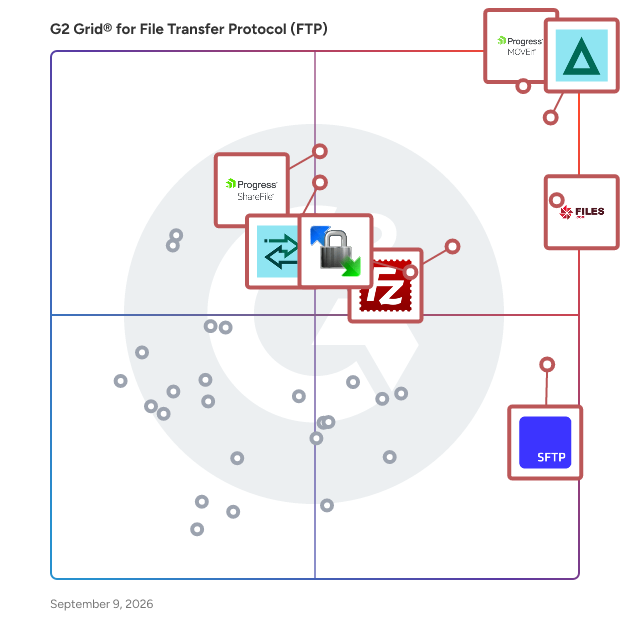
G2 Grid® for File Transfer Protocol (FTP) Software

G2 Grid® for File Transfer Protocol (FTP) Software plotting products by satisfaction and market presence

Highlighted products: Progress MOVEit, GoAnywhere MFT, Files.com, FileZilla, SFTP To Go, Progress ShareFile, Globalscape, and WinSCP.

Underlying data: [Grid® JSON](https://www.g2.com/categories/file-transfer-protocol-ftp/grids.json?focus%5B%5D=progress-moveit&focus%5B%5D=goanywhere-mft&focus%5B%5D=files-com&focus%5B%5D=filezilla&focus%5B%5D=sftp-to-go&focus%5B%5D=progress-sharefile&focus%5B%5D=globalscape&focus%5B%5D=winscp)

Progress MOVEit

Progress MOVEit software helps IT operations, enterprise architecture, security and compliance teams automate and secure enterprise file transfers while supporting strict regulatory requirements such as HIPAA, PCI DSS and GDPR. When file transfer volumes grow and oversight requirements tighten, fragmented tools and manual processes can increase operational risk, cause productivity fire drills and add complexity to audit preps. Progress MOVEit Transfer centralizes managed file transfer activity into a single, controlled environment to improve visibility, governance and reliability of mission-critical data flows. Progress MOVEit Cloud extends these capabilities through a fully managed, auditor-certified SaaS deployment that leverages the same documented controls, encryption, detailed audit logging and role-based access without the burden of infrastructure management or software upgrades. Progress MOVEit Automation adds no-code, policy-driven file transfer orchestration that replaces manual scripting, reducing errors that lead to missed SLAs and delays in downstream workflows. MOVEit Automation supports the protocols businesses use today (SFTP, FTPS, HTTPS and more) and seamlessly connects to legacy and cloud endpoints with native connectors. Together, MOVEit Transfer, MOVEit Cloud and MOVEit Automation help regulated organizations or businesses with private data reduce risk, improve operational efficiency and maintain consistent control over data movement. Start your 30-day trial, get a quote, or request more information at www.progress.com/moveit

Average Rating: 4.4/5.0

Total Reviews: 520

How Do G2 Users Rate Progress MOVEit?

  • File Transfer: 9.3/10 (Category avg: 9.1/10)
  • Performance: 8.9/10 (Category avg: 8.5/10)
  • File Management: 9.0/10 (Category avg: 9.1/10)
  • Has the product been a good partner in doing business?: 9.0/10 (Category avg: 8.8/10)

Who Is the Company Behind Progress MOVEit?

  • Seller: Progress Software
  • Company Website:
  • Year Founded: 1981
  • HQ Location: Burlington, MA.
  • Twitter: @ProgressSW
    48,773 Twitter followers
  • LinkedIn® Page: www.linkedin.com
    4,242 employees on LinkedIn®

Who Uses This Product?

  • Who Uses This: Software Engineer, System Administrator
  • Top Industries: Information Technology and Services, Financial Services
  • Company Size: 40% Medium, 39% Large

What Do G2 Reviewers Say About Progress MOVEit?

AI-generated summary from verified user reviews

Pros
  • Users admire the ease of use of Progress MOVEit, finding it simple to manage and send files effortlessly.
  • Users appreciate the easy file sharing with MOVEit, enjoying seamless transfers and excellent vendor support.
  • Users value the powerful automation capabilities of MOVEit, greatly enhancing efficiency and reducing manual effort.
  • Users value the robust security features of Progress MOVEit, ensuring safe and reliable file transfers.
Cons
  • Users find the installation and maintenance complexity of Progress MOVEit can lead to future issues and headaches.
  • Users find the difficult learning curve for advanced features to be time-consuming, impacting overall user experience.
  • Users face authentication and connectivity problems with MOVEit, particularly when integrating with SharePoint, causing workflow delays.
  • Users report security issues with Progress MOVEit, particularly concerning authentication problems and disaster recovery readiness.
  • Users find the slow performance frustrating, especially with long loading times for the dashboard and document transfers.

What Are Recent G2 Reviews of Progress MOVEit?

What Are G2 Users Discussing About Progress MOVEit?

GoAnywhere MFT

GoAnywhere MFT is a secure managed file transfer solution that automates and secures file transfers between systems, employees, and partners. Keep sensitive data safe—in transit or at rest—with built-in security features and enterprise-level control that meets compliance requirements. GoAnywhere MFT easily allows organizations to connect to internal and external systems, as well as exchange encrypted data using industry standard protocols (e.g., OpenPGP, AES, FTPS, SFTP, HTTPS, AS2/AS3/AS4,and GPG). GoAnywhere MFT goes beyond securing file transfers to seamlessly work with the applications you need daily such as EDI and cloud integration. GoAnywhere is proud to be part of Fortra’s comprehensive portfolio. Fortra simplifies today’s complex automation landscape by bringing products together to solve problems in innovative ways. These solutions address the fast-changing challenges you face in streamlining and securing your organization. With the help of GoAnywhere MFT, Fortra is here for you every step of the way throughout your automation journey.

Average Rating: 4.6/5.0

Total Reviews: 449

How Do G2 Users Rate GoAnywhere MFT?

  • File Transfer: 9.5/10 (Category avg: 9.1/10)
  • Performance: 9.1/10 (Category avg: 8.5/10)
  • File Management: 9.2/10 (Category avg: 9.1/10)
  • Has the product been a good partner in doing business?: 9.1/10 (Category avg: 8.8/10)

Who Is the Company Behind GoAnywhere MFT?

  • Seller: Fortra
  • Company Website:
  • Year Founded: 1982
  • HQ Location: Eden Prairie, Minnesota
  • Twitter: @fortraofficial
    2,773 Twitter followers
  • LinkedIn® Page: www.linkedin.com
    1,784 employees on LinkedIn®

Who Uses This Product?

  • Who Uses This: System Administrator, DevOps Engineer
  • Top Industries: Information Technology and Services, Hospital & Health Care
  • Company Size: 42% Medium, 35% Large

What Do G2 Reviewers Say About GoAnywhere MFT?

AI-generated summary from verified user reviews

Pros
  • Users appreciate the integration of secure transfers, automation, and monitoring in GoAnywhere MFT, enhancing workflow efficiency.
  • Users value the automation capabilities of GoAnywhere MFT, enhancing efficiency and simplifying workflow management.
  • Users find GoAnywhere MFT's ease of use invaluable, enhancing installation, configuration, and troubleshooting efficiency.
  • Users appreciate the workflow automation of GoAnywhere MFT, enhancing file transfer efficiency and security seamlessly.
  • Users appreciate the secure file transfers of GoAnywhere MFT, benefiting from its automation and reliable monitoring features.
Cons
  • Users find the complexity of GoAnywhere MFT challenging due to a steep learning curve and confusing UI.
  • Users find difficult learning curves for beginners frustrating, with complex workflows and outdated UI hindering usability.
  • Users experience integration issues with GoAnywhere MFT, facing unclear error messages and time-consuming setup challenges.
  • Users criticize the poor interface design of GoAnywhere MFT, noting issues with usability and outdated aesthetics.
  • Users report poor customer support, with slow response times and unhelpful assistance during technical issues.

What Are Recent G2 Reviews of GoAnywhere MFT?

What Are G2 Users Discussing About GoAnywhere MFT?

Files.com

Files.com is the secure, cloud-native File Orchestration Platform built to replace the patchwork of legacy file infrastructure: aging SFTP servers, heavy MFT suites, separate file-sharing tools, and the custom scripts holding them together, all with one system. IT teams stop losing hours to patching servers and chasing failed transfers, while business users get a clean interface that works for technical and non-technical teams alike. Files.com consolidates every file flow into a single platform with centralized access controls, policy enforcement, and complete audit visibility. It presents every storage system (AWS, Azure, Google Cloud, on-premises NAS, and 50+ other connectors) as one governed namespace, so multiple clouds and on-prem storage work as one. Automate mission-critical flows with no-code workflows, or build against a full REST API, SDKs, and a Terraform provider. Files.com speaks SFTP, FTPS, FTP, WebDAV, and AS2, exposes an S3-compatible endpoint, and supports OpenPGP and GPG, connecting modern apps, multiple clouds, and legacy partners without middleware. AES-256 encryption in transit and at rest, fine-grained role-based access, SSO, SCIM, and MFA, and immutable audit trails support SOC 2 Type II, HIPAA, GDPR, and ITAR requirements. Built cloud-native with elastic scaling, there are no servers to patch or manage. Files.com is ranked #1 for Managed File Transfer in Gartner Peer Insights and scores #1 across every attribute on G2's MFT grid. More than 4,000 organizations trust it, including Equifax, Rag & Bone, Cognizant, and Michelin, with over 15 years of operation and zero breaches. Go live fast with expert-led onboarding included.

Average Rating: 4.6/5.0

Total Reviews: 298

How Do G2 Users Rate Files.com?

  • File Transfer: 9.7/10 (Category avg: 9.1/10)
  • Performance: 9.4/10 (Category avg: 8.5/10)
  • File Management: 9.5/10 (Category avg: 9.1/10)
  • Has the product been a good partner in doing business?: 9.5/10 (Category avg: 8.8/10)

Who Is the Company Behind Files.com?

  • Seller: Files.com
  • Company Website:
  • Year Founded: 2008
  • HQ Location: Scottsdale, Arizona
  • LinkedIn® Page: www.linkedin.com
    82 employees on LinkedIn®

Who Uses This Product?

  • Who Uses This: IT Manager, CTO
  • Top Industries: Information Technology and Services, Computer Software
  • Company Size: 44% Medium, 37% Small

What Do G2 Reviewers Say About Files.com?

AI-generated summary from verified user reviews

Pros
  • Users find Files.com to be easy to navigate, making daily tasks straightforward and efficient for team collaboration.
  • Users commend Files.com for its responsive customer support, providing valuable assistance and enhancing the onboarding experience.
  • Users appreciate the robust integrations and ease of use offered by Files.com, enhancing their file distribution capabilities.
  • Users love the easy integrations with Files.com, enhancing flexibility and automating file-sharing across organizations.
  • Users appreciate the easy integrations of Files.com, simplifying connections between various applications and enhancing functionality.
Cons
  • Users find complexity in navigating multiple options on Files.com, making it challenging to locate files efficiently.
  • Users find the cost of Files.com to be high, particularly with certain configurations and usage patterns.
  • Users are concerned about recurring costs and frequent changes in Files.com's pricing plans affecting budget predictability.
  • Users face a difficult learning curve due to the abundance of features, which may complicate initial usage.
  • Users face integration issues with Files.com, stemming from limited app availability and implementation challenges.

What Are Recent G2 Reviews of Files.com?

What Are G2 Users Discussing About Files.com?

SFTP To Go

SFTP To Go is a cloud-native Managed File Transfer (MFT) solution designed to replace traditional file servers, manual scripting, and fragile legacy setups. Built on highly available AWS infrastructure, it gives IT and security teams a secure, scalable way to centralize file transfers, automate workflows, and maintain visibility over sensitive data exchange. The platform supports compliance requirements including SOC 2, GDPR, HIPAA, GLBA, DORA, and FERPA, with AES-256 encryption, detailed audit logs, SAML SSO, granular directory-level permissions, and flexible data residency options including Bring-Your-Own-Bucket (BYOB). SFTP To Go supports SFTP, FTPS, HTTPS, and Amazon S3, making it easy to connect legacy partner workflows with modern cloud applications. Native File Automations let teams build scheduled or event-driven workflows to move, copy, delete, encrypt, or decrypt files, send notifications, and trigger webhooks without relying on separate scripts. Automatic webhook retries improve the reliability of event-driven integrations, while near real-time audit log streaming to SIEM and observability platforms gives security teams greater operational visibility. Expanded usage metrics also help teams track uploaded, downloaded, deleted, and expired files alongside existing storage and bandwidth data. With flexible APIs, a custom-branded web portal, enterprise-grade SLAs, and expert support, SFTP To Go helps businesses reduce IT overhead, automate file operations, and secure file transfers at scale.

Average Rating: 4.7/5.0

Total Reviews: 168

How Do G2 Users Rate SFTP To Go?

  • File Transfer: 9.9/10 (Category avg: 9.1/10)
  • Performance: 9.3/10 (Category avg: 8.5/10)
  • File Management: 9.4/10 (Category avg: 9.1/10)
  • Has the product been a good partner in doing business?: 9.6/10 (Category avg: 8.8/10)

Who Is the Company Behind SFTP To Go?

  • Seller: Crazy Ant Labs
  • Company Website:
  • Year Founded: 2019
  • HQ Location: Madrid, Community of Madrid
  • Twitter: @ant_labs
    49 Twitter followers
  • LinkedIn® Page: www.linkedin.com
    7 employees on LinkedIn®

Who Uses This Product?

  • Who Uses This: CTO
  • Top Industries: Information Technology and Services, Computer Software
  • Company Size: 59% Small, 25% Medium

What Do G2 Reviewers Say About SFTP To Go?

AI-generated summary from verified user reviews

Pros
  • Users value the ease of use of SFTP To Go, making file transfers simple and accessible for everyone.
  • Users find the easy setup of SFTP To Go highly convenient, enabling self-management without assistance.
  • Users appreciate the easy setup of SFTP To Go, allowing for quick and independent configuration without support.
  • Users appreciate the responsive customer support from Crazy Ant Labs, making implementation and customization seamless.
  • Users love the intuitive user interface of SFTP To Go, highlighting its ease of navigation and management.
Cons
  • Users find the poor interface design limits efficiency, complicating directory navigation and missing essential features like logs.
  • Users feel the pricing issues are significant, especially with high costs and limited user accounts per tier.
  • Users find SFTP To Go to be expensive as costs rise significantly with growth and international pricing disparities.
  • Users find the difficult learning curve challenging, requiring extra time and support to navigate the interface effectively.
  • Users note limited functionality, expressing concerns over insufficient features and user account restrictions in lower pricing tiers.

What Are Recent G2 Reviews of SFTP To Go?

Progress ShareFile

Progress® ShareFile® AI-powered document collaboration platform is designed to help businesses run client work from start to finish—securely, efficiently and with less friction. Built for organizations that handle sensitive information—such as accounting, legal and financial services—ShareFile software goes beyond traditional file transfer tools to support a more connected, end-to-end client experience. From document collection and collaboration to approvals, e-signatures and secure storage, ShareFile unifies key stages of client work in a single, secure platform. With ShareFile, teams can securely share files, manage document workflows and collaborate with clients through branded client portals—while helping maintain visibility into documents, requests and client interactions. Instead of juggling disconnected tools, businesses can streamline processes, reduce manual work and create more consistent, professional client experiences. ShareFile combines secure file transfer, client portals, document workflow automation and e-signature capabilities into one solution, helping teams move work faster, while helping organizations manage sensitive data. Key capabilities include: • Secure file sharing and large file transfer with encrypted email and attachments • Client portals for structured, branded collaboration and document exchange • Document workflow automation for intake, approvals, onboarding and repeatable processes • Built-in e-signature, forms and approvals to help complete work without switching tools • AI-powered document automation, including intake, summarization and instant Q&A • Granular permissions, audit trails and governance controls to help improve visibility and support compliance efforts • Advanced security features, including encryption in transit and at rest, plus tools that support secure client interactions By unifying people, processes and data into a single platform, ShareFile helps reduce tool sprawl and enables teams to scale client work without increasing complexity. Benefits can include improved efficiency, more consistent client experiences and stronger operational outcomes. ShareFile is a modern alternative to legacy FTP systems and basic file-sharing tools—purpose-built to help organizations run client work end-to-end, improve client experiences and operate with greater confidence.

Average Rating: 4.2/5.0

Total Reviews: 1,476

How Do G2 Users Rate Progress ShareFile?

  • File Transfer: 8.8/10 (Category avg: 9.1/10)
  • Performance: 8.5/10 (Category avg: 8.5/10)
  • File Management: 8.9/10 (Category avg: 9.1/10)
  • Has the product been a good partner in doing business?: 8.5/10 (Category avg: 8.8/10)

Who Is the Company Behind Progress ShareFile?

  • Seller: Progress Software
  • Company Website:
  • Year Founded: 1981
  • HQ Location: Burlington, MA.
  • Twitter: @ProgressSW
    48,773 Twitter followers
  • LinkedIn® Page: www.linkedin.com
    4,242 employees on LinkedIn®

Who Uses This Product?

  • Who Uses This: Owner, Office Manager
  • Top Industries: Accounting, Information Technology and Services
  • Company Size: 37% Small, 32% Medium

What Do G2 Reviewers Say About Progress ShareFile?

AI-generated summary from verified user reviews

Pros
  • Users appreciate the ease of use of ShareFile, noting its efficient setup and smooth document management.
  • Users value the exceptional security of ShareFile, ensuring safe and reliable file sharing and management across devices.
  • Users value the secure and easy file sharing of Progress ShareFile, enhancing collaboration and document management efforts.
  • Users appreciate the sharing ease of Progress ShareFile, highlighting its functionality for secure and efficient file management.
  • Users appreciate the secure sharing of Progress ShareFile, enabling smooth collaboration with internal and external teams.
Cons
  • Users find the pricing to be expensive, particularly challenging for small teams or startups needing flexibility.
  • Users experience slow performance with Progress ShareFile, including lag in syncing, navigation, and connectivity issues.
  • Users find the learning curve steep with ShareFile, particularly for advanced features and initial setup challenges.
  • Users find it difficult to access shared folders and experience issues with file duplication and account requirements.
  • Users face login issues with Progress ShareFile, citing difficulties accessing shared folders and frequent automatic logouts.

What Are Recent G2 Reviews of Progress ShareFile?

What Are G2 Users Discussing About Progress ShareFile?

Globalscape

Fortra’s Globalscape EFT is a sophisticated Managed File Transfer (MFT) solution built to facilitate the secure, efficient, and automated movement of business-critical or sensitive data within Windows-centric enterprises. The platform is tailored for organizations prioritizing reliability and control in their data transfer processes, with flexible deployment options. By replacing legacy scripts with an intuitive, script-less automation framework, Globalscape EFT significantly reduces manual intervention while ensuring military-grade security for every file transfer. The target audience for Globalscape EFT includes IT departments and data management teams in various industries, particularly those that handle sensitive information and must comply with stringent regulatory standards. The solution is also beneficial for organizations looking to modernize their internal file exchanges, secure communications with third parties, and eliminate risky manual processes. With built-in compliance support for standards such as PCI DSS and HIPAA, Globalscape EFT helps organizations streamline governance and mitigate risks associated with data handling. One of the core standout features of Globalscape EFT is its DMZ Gateway, which enforces true zero-data-at-rest protection, ensuring that sensitive data never resides in the demilitarized zone. This capability is crucial for maintaining data integrity and security during transfers. Additionally, the platform supports a wide range of protocols, including SFTP, FTPS, and HTTPS, along with granular role-based access controls and centralized auditing. These features simplify enterprise integration and enhance compliance efforts, making it easier for organizations to demonstrate adherence to regulatory requirements. Globalscape EFT also offers high availability and clustering options, allowing organizations to scale their operations across hybrid environments without sacrificing performance. The platform’s extensive APIs and connectors facilitate integration with IT Service Management (ITSM), Security Information and Event Management (SIEM), and various data platforms. Furthermore, the inclusion of built-in templates accelerates onboarding and standardizes best practices, making it easier for teams to implement effective file transfer processes. In addition, zero downtime capabilities allow updates, maintenance, and configuration changes with minimal disruption to keep critical operations available. In tandem with its robust technical features, Globalscape EFT emphasizes human oversight in automated workflows, providing visibility, alerting, and intervention points to ensure accuracy and trust. For organizations seeking expert assistance, Globalscape’s Professional Services delivers implementation, optimization, and ongoing success planning, to help ensure users can maximize the value of their MFT solution. Overall, Globalscape EFT stands out as a comprehensive file transfer and business process solution that meets the security, scalability, and operational resilience needs of today’s enterprises.

Average Rating: 4.6/5.0

Total Reviews: 74

How Do G2 Users Rate Globalscape?

  • File Transfer: 9.8/10 (Category avg: 9.1/10)
  • Performance: 6.7/10 (Category avg: 8.5/10)
  • File Management: 9.4/10 (Category avg: 9.1/10)
  • Has the product been a good partner in doing business?: 8.9/10 (Category avg: 8.8/10)

Who Is the Company Behind Globalscape?

  • Seller: Fortra
  • Company Website:
  • Year Founded: 1982
  • HQ Location: Eden Prairie, Minnesota
  • Twitter: @fortraofficial
    2,773 Twitter followers
  • LinkedIn® Page: www.linkedin.com
    1,784 employees on LinkedIn®

Who Uses This Product?

  • Top Industries: Financial Services, Information Technology and Services
  • Company Size: 49% Large, 32% Medium

What Do G2 Reviewers Say About Globalscape?

AI-generated summary from verified user reviews

Pros
  • Users commend the excellent customer support of Globalscape, ensuring quick resolutions and a positive user experience.
  • Users appreciate the ease of use of Globalscape, finding its interface intuitive and support exceptional.
  • Users commend the secure transfer features of Globalscape, ensuring efficient, reliable, and safe file management.
  • Users appreciate the user-friendly interface of Globalscape, noting its ease of navigation and visual appeal.
  • Users commend Globalscape for its impressive security functions, ensuring safe and reliable file transfers and management.
Cons
  • Users experience complexity in upgrades and migrations, facing challenges with bugs and confusing changes over time.
  • Users find the difficult learning curve daunting due to extensive features and confusing changes over time.
  • Users find the cost of Globalscape to be high compared to other MFT solutions, impacting overall value.
  • Users face significant integration issues during upgrades and migrations, complicating their overall experience with Globalscape.
  • Users often face technical issues with Globalscape, including bugs, missing features, and migration challenges that disrupt functionality.

What Are Recent G2 Reviews of Globalscape?

What Are G2 Users Discussing About Globalscape?

JSCAPE MFT Server

JSCAPE by Redwood is a secure managed file transfer (MFT) software designed for enterprise IT and security teams that need to consolidate file transfer infrastructure, meet strict compliance requirements and maintain full visibility over every file movement. It replaces fragmented tools and manual processes with one automated, scalable solution across internal systems, trading partners and cloud environments. The solution is primarily used at large enterprises in financial services, healthcare, manufacturing, government and other regulated industries. JSCAPE supports the broadest range of file transfer protocols available in a single MFT solution — SFTP, FTP/S, HTTP/S, AS2, OFTP2, WebDAV and more — and deploys on any platform in any environment: on-premises, cloud, hybrid, containerized or SaaS. Key features and capabilities include: – Security posture backed by active third-party certifications other MFT providers don't typically hold, including SOC 2 Type 1 and Type 2, ISO 27001, Drummond Certified™, and FIPS 140-2 and 140-3 validated encryption. – Quarterly penetration testing, annual third-party audits, full audit trails, MFA, SSO/SAML and DMZ proxy capabilities. – 100+ no-code and low-code workflow templates for trigger-based, event-driven and time-based automations. – Native integrations for AWS, Microsoft Azure, Google Cloud, IBM Cloud, CyberArk, Dropbox, RunMyJobs and more. REST API and Open API support extend connectivity to any enterprise system. – Automated failover, load balancing and active-active server redundancy, with proactive load testing and network scanning. – 24/7/365 technical support via phone, email and web, with a 95.9% customer satisfaction rating and 8-minute median response time across all priority levels, included in every plan at no additional cost. JSCAPE is also part of Redwood Software, the leading orchestration platform for the enterprise, driving business transformation at the lowest total cost of ownership. Backed by 30 years of experience, the trust of more than 50% of the Fortune 50 and a culture of customer obsession, Redwood unleashes the human potential in your enterprise to focus on innovation, growth and what’s next.

Average Rating: 4.5/5.0

Total Reviews: 96

How Do G2 Users Rate JSCAPE MFT Server?

  • File Transfer: 9.4/10 (Category avg: 9.1/10)
  • Performance: 8.9/10 (Category avg: 8.5/10)
  • File Management: 8.3/10 (Category avg: 9.1/10)
  • Has the product been a good partner in doing business?: 9.1/10 (Category avg: 8.8/10)

Who Is the Company Behind JSCAPE MFT Server?

  • Seller: Redwood Software
  • Company Website:
  • Year Founded: 1993
  • HQ Location: Frisco, US
  • Twitter: @RedwoodSoftware
    826 Twitter followers
  • LinkedIn® Page: www.linkedin.com
    815 employees on LinkedIn®

Who Uses This Product?

  • Top Industries: Information Technology and Services, Banking
  • Company Size: 50% Medium, 46% Large

What Do G2 Reviewers Say About JSCAPE MFT Server?

AI-generated summary from verified user reviews

Pros
  • Users value the customizable transfer speeds of JSCAPE MFT Server, enhancing both efficiency and security for sensitive files.
  • Users appreciate the seamless cloud integration of JSCAPE MFT Server, enhancing flexibility and ease of use.
  • Users love the stress-free file transfers with JSCAPE MFT Server, ensuring seamless, secure, and automatic file management.
  • Users value the reliable performance of JSCAPE MFT Server, ensuring secure and automated file transfers without stress.
  • Users value the robust security of JSCAPE MFT Server, ensuring safe and timely file transfers effortlessly.
Cons
  • Users highlight the complexity of options and settings in JSCAPE, which can lead to a challenging learning curve.
  • Users find that JSCAPE MFT Server has a difficult learning curve, requiring time to master its options and settings.
  • Users find the interface design poor, making it challenging to navigate and understand the numerous settings efficiently.
  • Users feel that JSCAPE MFT Server has become very costly over the years, impacting overall value.
  • Users face integration issues with JSCAPE MFT Server, struggling with PGP key compatibility and slow support for troubleshooting.

What Are Recent G2 Reviews of JSCAPE MFT Server?

What Are G2 Users Discussing About JSCAPE MFT Server?

Thru

From the beginning, Thru’s cloud-native MFT solutions have been designed for businesses with the principles of security, integration, flexibility and scalability at heart. The no-code, web-based configuration and management application simplifies and speeds up integrations. Recently, Thru completed a SOC 2 Type 1 audit, building on years of rigorous third-party assessments to ensure the highest standards of security and compliance for our users. Learn More: https://trust.thruinc.com/ The key points of our focus in data security are: - Data Protection: End-to-end encryption (e.g., AES-256) ensures data is secure during transfer and at rest. - Authentication Controls: Features like multi-factor authentication (MFA) and role-based access controls (RBAC) enhance security by managing and monitoring access to sensitive information. - Audit Trails: Thru’s MFT solution provides comprehensive logging and reporting for accountability and compliance purposes. - Compliance: Thru adheres to stringent compliance standards, helping businesses meet requirements like SOC 2, GDPR, HIPAA and others. In addition to our enterprise-grade zero trust security approach, Thru’s distributed microservices design offers these key benefits: - Infinite Scalability: A Thru instance expands dynamically to accommodate ever-growing file transfer needs. It is not tethered to a single virtual machine. - Continuous Updates with Zero Downtime: Constant, seamless feature and security updates bolster defenses against emerging threats, without disrupting operations. - API-Centric: Every feature has an API so can be completely programmatic for a connected IT landscape. - Hybrid Distributed Architecture Option: On-premises MFT agents are controlled by the cloud. Experience the best of both worlds: Scalability of the cloud, with the assurance that sensitive data remains on your private network. With usage-based pricing enabling a more efficient use of budget, Thru serves everyone from small businesses to the largest global enterprise customers.

Average Rating: 4.6/5.0

Total Reviews: 96

How Do G2 Users Rate Thru?

  • File Transfer: 9.6/10 (Category avg: 9.1/10)
  • Performance: 8.3/10 (Category avg: 8.5/10)
  • File Management: 9.4/10 (Category avg: 9.1/10)
  • Has the product been a good partner in doing business?: 9.4/10 (Category avg: 8.8/10)

Who Is the Company Behind Thru?

  • Seller: Thru
  • Year Founded: 2002
  • HQ Location: Irving, TX
  • Twitter: @ThruInc
    1,773 Twitter followers
  • LinkedIn® Page: www.linkedin.com
    51 employees on LinkedIn®

Who Uses This Product?

  • Top Industries: Luxury Goods & Jewelry, Information Technology and Services
  • Company Size: 51% Large, 32% Medium

What Do G2 Reviewers Say About Thru?

AI-generated summary from verified user reviews

Pros
  • Users praise the responsive customer support of Thru, noting quick assistance and acceptance of feature requests.
  • Users value the easy-to-use UI of Thru, which simplifies file transferring and processing options efficiently.
  • Users value the easy and quick setup of Thru, thanks to its friendly and responsive team.
  • Users value the versatile file transfer options and appreciate the responsive customer support and user-friendly interface.
  • Users value the versatile file transfer options of Thru and praise its user-friendly interface and responsive support.

What Are Recent G2 Reviews of Thru?

What Are G2 Users Discussing About Thru?

Cerberus FTP Server

Cerberus FTP Server provides a secure and reliable file transfer solution for the demanding IT professional. Supporting SFTP, FTP/S, and HTTP/S, Cerberus is able to authenticate against Active Directory and LDAP, run as a Windows service, has native x64 support, includes a robust set of integrity and security features and offers an easy-to-use manager for controlling user access to files and file operations. Powerful SFTP Server | Managed File Transfer Solution: - FTP, FTP/S, SSH SFTP, and HTTP/S web client access plus Event Notification, Automated Processing, Auditing and Reporting, Ad Hoc File Transfers, and File Retention Policies. - Synchronization manager to replicate all users and settings from a master server to any number of backup or clustered servers - Web-based secure file access and file management using a web browser with no software or plugins required - Automated security and performance testing solutions Full feature list: https://www.cerberusftp.com/products/features/ Cerberus is part of Redwood Software, the leading orchestration platform for the autonomous enterprise. We empower customers to drive business transformation at the lowest TCO, intelligently automating critical business and IT processes across complex ERP, hybrid cloud, data management and agentic AI systems.

Average Rating: 4.7/5.0

Total Reviews: 42

How Do G2 Users Rate Cerberus FTP Server?

  • File Transfer: 9.8/10 (Category avg: 9.1/10)
  • Performance: 9.6/10 (Category avg: 8.5/10)
  • File Management: 9.4/10 (Category avg: 9.1/10)
  • Has the product been a good partner in doing business?: 9.3/10 (Category avg: 8.8/10)

Who Is the Company Behind Cerberus FTP Server?

  • Seller: Redwood Software
  • Company Website:
  • Year Founded: 1993
  • HQ Location: Frisco, US
  • Twitter: @RedwoodSoftware
    826 Twitter followers
  • LinkedIn® Page: www.linkedin.com
    815 employees on LinkedIn®

Who Uses This Product?

  • Top Industries: Computer Software
  • Company Size: 58% Medium, 23% Large

What Do G2 Reviewers Say About Cerberus FTP Server?

AI-generated summary from verified user reviews

Pros
  • Users love the easy setup of Cerberus FTP Server, allowing hassle-free use once installed.
  • Users admire the reliability of Cerberus FTP Server, appreciating the minimal maintenance after initial setup.
Cons
  • Users find the poor interface design of Cerberus FTP Server makes it less user-friendly and confusing to navigate.

What Are Recent G2 Reviews of Cerberus FTP Server?

Kiteworks

Kiteworks’ mission is to empower organizations to effectively manage risk in every send, share, receive, and save of sensitive content. To this end, we created a platform that delivers content governance, compliance, and protection to customers. The platform unifies, tracks, controls, and secures sensitive content moving within, into, and out of their organization, significantly improving risk management and ensuring regulatory compliance on all sensitive content communications. Any professional or organization who sends, shares, receives or saves sensitive content should govern and protect it with Kiteworks. It’s as simple as that. With Kiteworks, CIOs and CISOs gain complete visibility, compliance and control over IP, PII, PHI, and other sensitive content across all 3rd party communication channels, including email, file sharing, mobile, enterprise apps, web portals, SFTP, and MFT. When users click the Kiteworks button, they know it’s the safe, secure way to share sensitive information with the outside world. With on-premise, private cloud, hybrid and FedRAMP deployment options, the Kiteworks platform provides the security and governance CISOs need to protect their organizations, mitigate risk, and adhere to rigorous compliance regulations such as NIST 800-171, HIPAA, SOX, GDPR, GLBA, FISMA, and others.

Average Rating: 4.4/5.0

Total Reviews: 119

How Do G2 Users Rate Kiteworks?

  • File Transfer: 8.8/10 (Category avg: 9.1/10)
  • Performance: 8.8/10 (Category avg: 8.5/10)
  • File Management: 8.8/10 (Category avg: 9.1/10)
  • Has the product been a good partner in doing business?: 8.1/10 (Category avg: 8.8/10)

Who Is the Company Behind Kiteworks?

  • Seller: Kiteworks
  • Year Founded: 1999
  • HQ Location: Palo Alto, CA
  • Twitter: @Kiteworks
    3,460 Twitter followers
  • LinkedIn® Page: www.linkedin.com
    380 employees on LinkedIn®
  • Phone: 650-485-4300

Who Uses This Product?

  • Top Industries: Information Technology and Services, Marketing and Advertising
  • Company Size: 26% Small, 22% Large

What Do G2 Reviewers Say About Kiteworks?

AI-generated summary from verified user reviews

Pros
  • Users appreciate the strong security and encryption of Kiteworks, confidently sharing sensitive files without worry.
  • Users value the secure sharing features of Kiteworks, enabling confident file transfer without fears of data breaches.
  • Users appreciate the strong security and encryption of Kiteworks, enabling safe sharing of sensitive files with confidence.
  • Users value the strong security features of Kiteworks, enabling safe sharing of sensitive files with peace of mind.
  • Users appreciate the strong security features of Kiteworks, ensuring safe and compliant file sharing for sensitive information.
Cons
  • Users find the complex usability of Kiteworks challenging, especially for new users struggling with navigation and workflows.
  • Users find the interface overly complex, making it challenging for new users to navigate and utilize effectively.
  • Users find the poor interface design of Kiteworks makes it difficult to navigate and utilize effectively.
  • Users find the user interface complex, expressing a desire for a more intuitive and streamlined experience.
  • Users find the poor UI design of Kiteworks overwhelming and clunky, complicating navigation and usability.

What Are Recent G2 Reviews of Kiteworks?

What Are G2 Users Discussing About Kiteworks?

Thorn Technologies SFTP Gateway

SFTP Gateway is a managed file transfer solution designed to help users securely and efficiently access cloud storage locations through SFTP (Secure File Transfer Protocol). This innovative server facilitates seamless integration with popular cloud storage services such as Amazon S3, Azure Blob, Google Cloud Storage, and Alibaba Object Storage Service (OSS). By enabling organizations to leverage the advantages of cloud storage while adhering to stringent security protocols, SFTP Gateway addresses the growing need for secure data management in a cloud-centric world. Targeted primarily at businesses and IT professionals, SFTP Gateway is particularly advantageous for organizations that prioritize data security and compliance. By deploying the SFTP Gateway within a private cloud environment, users can ensure that their data remains protected and isolated from external threats. This capability is increasingly important in today’s landscape, where data breaches and unauthorized access pose significant risks. Unlike many other managed file transfer solutions, SFTP Gateway empowers organizations to maintain complete control over their data and infrastructure, which is crucial for industries that handle sensitive information. Key features of SFTP Gateway include compatibility with multiple cloud storage providers, robust security measures, and a user-friendly interface. The solution supports secure file transfers through SFTP, ensuring that data is encrypted during transit to safeguard against interception. Additionally, the deployment in a private cloud environment allows organizations to customize their security settings according to specific requirements, enhancing their overall data protection strategy. The ease of integration with various cloud storage services streamlines workflows, enabling users to manage files more effectively and efficiently. Another notable aspect of SFTP Gateway is its commitment to customer support. Users benefit from free email support provided by Thorn Technologies, the company behind the product. This responsive support team is available to assist with any inquiries or issues that may arise, ensuring that users can maximize the value of their investment. Furthermore, the combination of SFTP Gateway with Thorn Technologies' other product, StorageLink, enhances the file transfer experience by offering a web-based tool that simplifies the process of moving files to private cloud storage through a drag-and-drop interface. SFTP Gateway distinguishes itself in the managed file transfer category by providing a secure, private, and user-friendly solution for organizations looking to utilize cloud storage while adhering to rigorous security protocols. Its unique deployment model, coupled with robust features and dedicated support, positions it as a valuable tool for businesses seeking to enhance their file transfer capabilities and ensure the integrity of their data.

Average Rating: 4.9/5.0

Total Reviews: 33

How Do G2 Users Rate Thorn Technologies SFTP Gateway?

  • File Transfer: 10.0/10 (Category avg: 9.1/10)
  • File Management: 10.0/10 (Category avg: 9.1/10)
  • Has the product been a good partner in doing business?: 9.8/10 (Category avg: 8.8/10)

Who Is the Company Behind Thorn Technologies SFTP Gateway?

  • Seller: Thorn Technologies
  • Company Website:
  • Year Founded: 2008
  • HQ Location: Columbia, US
  • Twitter: @thorntech
    3,169 Twitter followers
  • LinkedIn® Page: www.linkedin.com
    12 employees on LinkedIn®

Who Uses This Product?

  • Top Industries: Hospital & Health Care
  • Company Size: 42% Medium, 33% Small

What Do G2 Reviewers Say About Thorn Technologies SFTP Gateway?

AI-generated summary from verified user reviews

Pros
  • Users praise the responsive customer support, highlighting its availability and helpfulness during setup and troubleshooting.
  • Users appreciate the ease of use of Thorn Technologies SFTP Gateway, highlighting its simple installation and helpful support.
  • Users highlight the setup ease of Thorn Technologies SFTP Gateway, enjoying a straightforward installation and user-friendly experience.
  • Users value the seamless integration with cloud infrastructure, enabling quick and hassle-free service setup.
  • Users find the ease of management with Thorn Technologies SFTP Gateway enhances their operational efficiency and troubleshooting capabilities.
Cons
  • Users face a steep learning curve, requiring time to grasp all aspects of the SFTP Gateway.
  • Users find the difficult learning curve challenging, taking time to understand all aspects of Thorn Technologies SFTP Gateway.
  • Users are frustrated by the high costs associated with Thorn Technologies SFTP Gateway after recent licensing changes.
  • Users are disappointed by the expensive licensing changes that increased costs unexpectedly after upgrades.
  • Users express concern over unexpected pricing issues due to a sudden increase in the licensing model costs.

What Are Recent G2 Reviews of Thorn Technologies SFTP Gateway?

Diplomat Managed File Transfer

Diplomat MFT by Coviant Software delivers secure-by-design managed file transfer (MFT) that easily integrates with existing business applications and processes. With 20+ years of breach-free performance, Diplomat MFT securely and reliably automates the transfer of sensitive files, reducing business risk. With built-in PGP encryption and SFTP transport, Diplomat MFT is ideal for supporting global data security standards such as HIPAA/HITECH, GLBA, PCI/DSS, GDPR and DORA. Diplomat MFT supports most standard file transfer protocols and works with all the cloud service and storage vendors, including Amazon S3, Azure Files, Google Cloud Storage, Oracle Cloud Storage, Citrix ShareFile, Box, Dropbox, and more. Leading organizations in healthcare, financial services, retail, government, manufacturing, and other industries rely on Coviant Software to send, receive, archive, and retrieve business-critical files across multiple integrations, helping them secure their digital supply chains. With easy no-code integration and a simple user interface, Diplomat MFT incorporates two decades of experience in delivering solutions to happy and loyal customers worldwide. Coviant Software delivers enterprise-grade performance at the best value, thanks to ethical pricing and being privately owned. If you need to securely and reliably send, receive, host, and retrieve business critical files, you will find that—for the price—no other MFT vendor can do what Diplomat MFT does.

Average Rating: 4.7/5.0

Total Reviews: 45

How Do G2 Users Rate Diplomat Managed File Transfer?

  • File Transfer: 10.0/10 (Category avg: 9.1/10)
  • Performance: 10.0/10 (Category avg: 8.5/10)
  • File Management: 10.0/10 (Category avg: 9.1/10)
  • Has the product been a good partner in doing business?: 9.7/10 (Category avg: 8.8/10)

Who Is the Company Behind Diplomat Managed File Transfer?

  • Seller: Coviant Software
  • Company Website:
  • Year Founded: 2004
  • HQ Location: San Antonio, US
  • Twitter: @coviantsoftware
    89 Twitter followers
  • LinkedIn® Page: www.linkedin.com
    11 employees on LinkedIn®

Who Uses This Product?

  • Top Industries: Hospital & Health Care
  • Company Size: 47% Medium, 27% Small

What Do G2 Reviewers Say About Diplomat Managed File Transfer?

AI-generated summary from verified user reviews

Pros
  • Users find the ease of use of Diplomat Managed File Transfer exceptional, simplifying complex file transfer tasks seamlessly.
  • Users praise the fantastic customer support of Diplomat MFT, ensuring reliable assistance for seamless file transfers.
  • Users value the ease of secure file transfers with Diplomat MFT, highlighting its automation and reliability.
  • Users commend Diplomat MFT for its reliable secure file transfers, enhancing efficiency with automation and detailed logging.
  • Users praise Diplomat for its secure and efficient file transfer capabilities, enhancing data sharing and reporting effortlessly.
Cons
  • Users find the complexity of the interface and setup process requires significant trial and error for effective use.
  • Users find the complex setup requires trial and error, which can be frustrating for new users.
  • Users find the expensive pricing of Diplomat Managed File Transfer to be a significant drawback impacting value for money.
  • Users feel that expensive licensing restricts basic file transfer functions, which should be available on standard licenses.
  • Users find the interface design lacking, wishing for a more modern look and improved initial setup processes.

What Are Recent G2 Reviews of Diplomat Managed File Transfer?

Couchdrop

Couchdrop enables businesses to send, receive, and automate secure file transfers in one simple platform. As a modern, cloud-native platform, Couchdrop automatically scales to meet the needs of businesses from startups to enterprises. Organizations can securely transfer millions of files and terabytes of data with automatic scaling that can meet the most intense file transfer requirements, all without having any infrastructure management. Supporting, simple, direct connections to storage like SharePoint, Dropbox, Azure, and more, Couchdrop integrates with over 20 platforms and growing. Couchdrop does not store data at any stage of the process and acts as a secure pipe between systems, leaving you in full control at all times. Couchdrop aims to be simple and easy enough for anyone to use. An SFTP server is created immediately at sign-up, and all admin and management tasks are done through a modern, uncomplicated web interface where users can connect platforms, add external users, and build workflows using the no-code automation builder. Both transfer automation and file actions are created with this visual builder. Transfer automations push or pull files from external sources, while file actions can move, copy, rename, encrypt/decrypt, compress/decompress, and more, including firing external webhooks. Automations can be scheduled to happen at set times or based on events like uploads, downloads, or a trigger from one of Couchdrop's file intake methods. These ingestion options include mailboxes for email attachments, upload links as a secure client-facing brandable web portal, and secure shared links with optional password protection and expiration. Couchdrop is suitable for organizations of all sizes, with simple, transparent monthly pricing and plans set for businesses at different stages and transfer requirements. All plans are backed by award-winning support from product experts with typical responses within half a day. While simple to use, Couchdrop has enterprise-grade security controls available to everyone. Features and protocols can be restricted at the user or organization level, and users can be isolated to a specific directory as their root with granular access controls. Couchdrop's already comprehensive auditing can also be enhanced by integrating with SIEM providers to send logs and events. Join the thousands of private and public sector organizations that use Couchdrop for all their secure file transfer needs. All new accounts include a 14-day free trial with no credit card or demo required.

Average Rating: 4.8/5.0

Total Reviews: 30

How Do G2 Users Rate Couchdrop?

  • File Transfer: 9.2/10 (Category avg: 9.1/10)
  • Performance: 10.0/10 (Category avg: 8.5/10)
  • File Management: 10.0/10 (Category avg: 9.1/10)
  • Has the product been a good partner in doing business?: 10.0/10 (Category avg: 8.8/10)

Who Is the Company Behind Couchdrop?

  • Seller: Couchdrop
  • Company Website:
  • Year Founded: 2017
  • HQ Location: Christchurch, NZ
  • Twitter: @couchdrop_
    842 Twitter followers
  • LinkedIn® Page: www.linkedin.com
    25 employees on LinkedIn®

Who Uses This Product?

  • Top Industries: Information Technology and Services
  • Company Size: 58% Small, 35% Medium

What Do G2 Reviewers Say About Couchdrop?

AI-generated summary from verified user reviews

Pros
  • Users value the ease of use of Couchdrop, facilitating efficient data management with excellent support throughout the process.
  • Users value the easy setup of Couchdrop, allowing for quick implementation and efficient data handling.
  • Users highlight the quick setup of Couchdrop, allowing rapid implementation and efficient data management.
  • Users find the setup ease of Couchdrop incredibly efficient, enabling quick implementation and seamless onboarding support.
  • Users find Couchdrop to be an affordable solution, saving costs on pen tests and engineering overhead.
Cons
  • Users desire more resources for insufficient training on API user auto-provisioning and secure webhook features.
  • Users desire more comprehensive documentation for API user provisioning and secure webhook features for better verification.
  • Users desire better notification features for webhooks to ensure authenticity and improved automation guidance.

What Are Recent G2 Reviews of Couchdrop?

What Are G2 Users Discussing About Couchdrop?

Sharetru

Elevate Your Business with Sharetru: FedRAMP Authorized. Compliance Ready. When your organization’s reputation, contracts, and security depend on getting compliance right, Sharetru is more than just a Managed File Transfer (MFT) solution—it’s your compliance-ready command center. We’re one of the few MFT providers that operates as a FedRAMP Moderate Authorized Cloud Service Provider (CSP)—not just “equivalent,” but fully authorized—giving you built-in reciprocity for CMMC Advanced (Level 2) requirements and the peace of mind that comes with the most rigorous federal security review available. From DFARS/NIST SP 800-171 to ITAR, from HIPAA/HITECH to CJIS and beyond, Sharetru helps regulated industries meet and exceed the standards that keep sensitive information safe—whether that’s Controlled Unclassified Information (CUI), ePHI, financial data, or trade secrets. Why Organizations Choose Sharetru Compliance at the Core – We don’t just meet the letter of the law; we build to its highest standards. Every transfer and stored file inherits our compliance posture for FedRAMP Moderate, CMMC, HIPAA, ITAR, DFARS, and more. Proven Security Architecture – FIPS 140-2 certified encryption modules, TLS 1.3 in transit, AES-256 at rest, role-based access, and SIEM integration come standard—no bolt-ons required. Industry Expertise – Our team lives and breathes compliance. From onboarding to audits, we help you configure, document, and maintain a secure environment that passes the toughest scrutiny. Cost Predictability – Enterprise-grade compliance shouldn’t be an enterprise-only privilege. Our unlimited-user plans and scalable storage keep costs in check while security stays uncompromised. Built for defense and aerospace, healthcare and life sciences, financial services, and AEC firms handling sensitive client data, Sharetru supports the way you need to work—securely, compliantly, and without compromise. Whether you’re sending a single confidential file or running automated SFTP workflows that move terabytes daily, Sharetru is the platform trusted to protect what matters most. Your compliance is our baseline. Your security is our promise.

Average Rating: 4.8/5.0

Total Reviews: 13

How Do G2 Users Rate Sharetru?

  • File Transfer: 9.3/10 (Category avg: 9.1/10)
  • Performance: 9.2/10 (Category avg: 8.5/10)
  • File Management: 9.3/10 (Category avg: 9.1/10)
  • Has the product been a good partner in doing business?: 9.8/10 (Category avg: 8.8/10)

Who Is the Company Behind Sharetru?

  • Seller: Sharetru
  • Year Founded: 1999
  • HQ Location: Las Vegas, NV
  • Twitter: @sharetru1
    1,893 Twitter followers
  • LinkedIn® Page: www.linkedin.com
    13 employees on LinkedIn®

Who Uses This Product?

  • Company Size: 77% Medium, 15% Small

What Do G2 Reviewers Say About Sharetru?

AI-generated summary from verified user reviews

Pros
  • Users highlight the exceptional ITAR compliance capabilities of Sharetru, ensuring seamless and secure file transfers effortlessly.
  • Users value Sharetru's strong security focus and the ongoing development of innovative features enhancing their experience.
  • Users value Sharetru for its affordable ITAR compliance, making secure file transfers seamless and essential for daily operations.
  • Users value the secure file transfer provided by Sharetru, enabling effortless ITAR compliance and enhancing operational efficiency.
  • Users value Sharetru for its secure ITAR compliance, ensuring efficient and reliable file transfers without regulatory stress.

What Are Recent G2 Reviews of Sharetru?

What Are G2 Users Discussing About Sharetru?

Quatrix

Quatrix is trusted by UK Central Government and global corporate enterprises in 65 industries including finance, healthcare, retail and banking to provide secure file transfers and automated workflows. With a focus on being easy to deploy, manage and use, Quatrix offers advanced security and compliance (including GDPR, HIPAA and ISO 27001) for Managed File Transfer (MFT / Automation), user to user file sharing and secure data acquisition. It integrates with third party systems through an API and IPAAS / ESB integrations to provide pre-configured connections that benefit from it's in-built compliance. security and automation capabilities. It offers a reduced total cost of ownership when compared with in-house, legacy or on-premises products, is backed by world-class customer support and is consistently recommended by customers (96% would or have already recommended it according to the 2021 annual customer satisfaction survey). A free 14 day trial is available at Maytech.net.

Average Rating: 4.4/5.0

Total Reviews: 77

How Do G2 Users Rate Quatrix?

  • File Transfer: 9.4/10 (Category avg: 9.1/10)
  • Performance: 9.1/10 (Category avg: 8.5/10)
  • File Management: 9.4/10 (Category avg: 9.1/10)
  • Has the product been a good partner in doing business?: 9.4/10 (Category avg: 8.8/10)

Who Is the Company Behind Quatrix?

  • Seller: Kiteworks
  • Year Founded: 1999
  • HQ Location: Palo Alto, CA
  • Twitter: @Kiteworks
    3,460 Twitter followers
  • LinkedIn® Page: www.linkedin.com
    380 employees on LinkedIn®
  • Phone: 650-485-4300

Who Uses This Product?

  • Top Industries: Computer Software, Higher Education
  • Company Size: 34% Small, 34% Medium

What Do G2 Reviewers Say About Quatrix?

AI-generated summary from verified user reviews

Pros
  • Users value the robust security features of Quatrix, ensuring safe and private file sharing with ease.
  • Users value the ease of use of Quatrix, finding setup and secure file sharing straightforward and efficient.
  • Users value the easy and secure file sharing capabilities of Quatrix, making data exchange efficient and straightforward.
  • Users value the secure sharing capabilities of Quatrix, enabling effortless management of sensitive files with robust security features.
  • Users find the initial setup very easy, allowing them to quickly start utilizing Quatrix's secure features.
Cons
  • Users find the complexity of integration and interface challenging, especially without development support or technical experience.
  • Users find difficult learning due to complex setups and overwhelming interface, especially for first-time users of Quatrix.
  • Users find Quatrix lacking features, wishing for better editing tools, advanced task options, and proactive alerts integration.
  • Users find Quatrix has limited functionality for advanced reporting and co-authoring documents directly within the platform.
  • Users find the interface design poor, feeling overwhelmed and desiring more customization and modern features.

What Are Recent G2 Reviews of Quatrix?

What Are G2 Users Discussing About Quatrix?

Shalaka Joshi
SJ
Researched and written by Shalaka Joshi
Updated October 3, 2024