# Best Expense Management Software for Medium-Sized Businesses

*By [Nathan Calabrese](https://research.g2.com/insights/author/nathan-calabrese)*


Products classified in the overall Expense Management category are similar in many regards and help companies of all sizes solve their business problems. However, medium-sized business features, pricing, setup, and installation differ from businesses of other sizes, which is why we match buyers to the right Medium-Sized Business Expense Management to fit their needs. Compare product ratings based on reviews from enterprise users or connect with one of G2&#39;s buying advisors to find the right solutions within the Medium-Sized Business Expense Management category.

In addition to qualifying for inclusion in the Expense Management Software category, to qualify for inclusion in the Medium-Sized Business Expense Management Software category, a product must have at least 10 reviews left by a reviewer from a medium-sized business.


## Top Expense Management Software at a Glance
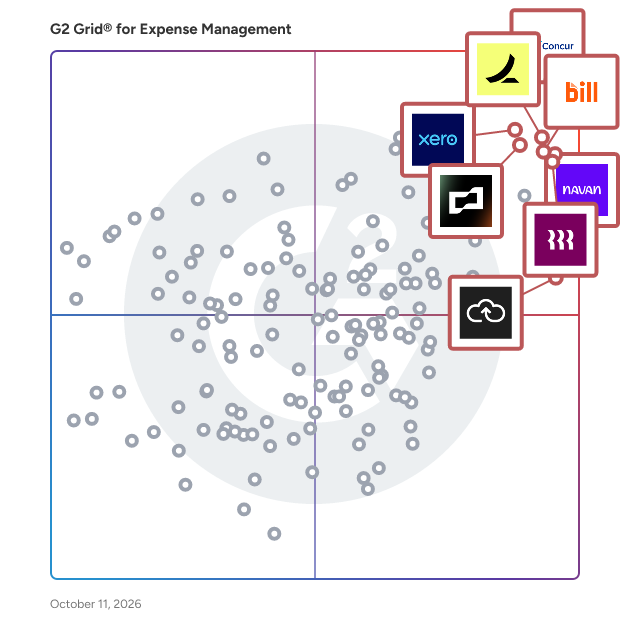
| # | Product | Rating | Best For | What Users Say |
|---|---------|--------|----------|----------------|
| 1 | [SAP Concur](https://www.g2.com/products/sap-concur/reviews) | 4.0/5.0 (6,983 reviews) | Enterprise travel and expense in one platform | "[Powerful Expense &amp; Travel Management with Strong Controls and SAP Integration](https://www.g2.com/survey_responses/sap-concur-review-12991827)" |
| 2 | [Rippling Spend](https://www.g2.com/products/rippling-spend/reviews) | 4.7/5.0 (1,756 reviews) | Spend management connected to HR and IT | "[Real time visibility into company expenses without checking receipts manually.](https://www.g2.com/survey_responses/rippling-spend-review-12992461)" |
| 3 | [Navan (Formerly TripActions)](https://www.g2.com/products/navan-formerly-tripactions/reviews) | 4.7/5.0 (8,951 reviews) | Unified booking and expense for traveling employees | "[Best Corporate Travel Expense Management Softwares](https://www.g2.com/survey_responses/tripactions-review-7304880)" |
| 4 | [BILL Spend &amp; Expense (Formerly Divvy)](https://www.g2.com/products/bill-spend-expense-formerly-divvy/reviews) | 4.5/5.0 (2,093 reviews) | Per diem and budget control with corporate cards | "[Amazing Virtual Card Platform](https://www.g2.com/survey_responses/bill-spend-expense-formerly-divvy-review-10862929)" |
| 5 | [Ramp](https://www.g2.com/products/ramp-financial-ramp/reviews) | 4.8/5.0 (2,435 reviews) | AI-driven spend automation with corporate cards | "[Easiest Way to Issue Funds and Track Receipts in a User-Friendly Interface](https://www.g2.com/survey_responses/ramp-review-12888437)" |
| 6 | [Brex](https://www.g2.com/products/brex/reviews) | 4.8/5.0 (1,565 reviews) | Unified spend platform with corporate cards | "[Clean, Fast, and Intelligent Expense Management with Brex](https://www.g2.com/survey_responses/brex-review-12993770)" |
| 7 | [Xero](https://www.g2.com/products/xero/reviews) | 4.4/5.0 (1,615 reviews) | Cloud accounting with integrated expense tracking | "[Perfect for Sole Traders – Simple, Intuitive and Stress-Free](https://www.g2.com/survey_responses/xero-review-12985482)" |
| 8 | [Expensify](https://www.g2.com/products/expensify/reviews) | 4.5/5.0 (5,651 reviews) | Streamlined expense submission for individuals and small teams | "[Effortless Expense Reporting That Saves Me Tons of Time](https://www.g2.com/survey_responses/expensify-review-12745100)" |
| 9 | [Zoho Expense](https://www.g2.com/products/zoho-expense/reviews) | 4.5/5.0 (1,494 reviews) | Travel and expense management for the Zoho ecosystem | "[Very Helpful for Managing Daily Work Expenses, Reports and Business Activities](https://www.g2.com/survey_responses/zoho-expense-review-12819543)" |
| 10 | [Paylocity](https://www.g2.com/products/paylocity/reviews) | 4.4/5.0 (5,456 reviews) | HR and payroll suite with expense tracking | "[Streamlined Interface with Easy to Navigate Payroll and Onboarding Processes](https://www.g2.com/survey_responses/paylocity-review-12915309)" |

---
## What Are the Most Common Questions About Expense Management Software?
*AI-generated · Last updated: May 11, 2026*
### What reliable expense management platforms that keep approval workflows fast and prevent reimbursement delays?
Based on G2 reviews, buyers looking for reliable expense management software often prioritize fast approvals, easy receipt submission, and clear visibility into reimbursement status. According to verified users, several products help reduce back-and-forth by centralizing receipts, approvals, and spend tracking in one place. G2 reviewers mention that employees value simple submission flows, while finance teams benefit from better visibility and fewer manual follow-ups. Reviews also show that reliability is tied to mobile capture, automated reminders, and straightforward workflows that keep claims moving. Recent feedback most often highlights tools that make reimbursements easier to submit, review, and process without relying on scattered emails or paper trails.

- [SAP Concur](https://www.g2.com/products/sap-concur) – used for centralized expense reporting, receipt capture, approvals, and reimbursement tracking across travel and employee claims
- [Rippling Spend](https://www.g2.com/products/rippling-spend) – praised for simple reimbursements, centralized approvals, and easy expense tracking across teams
- [Ramp](https://www.g2.com/products/ramp-financial-ramp) – frequently cited for fast receipt collection, automated categorization, and smoother approval workflows


### What highest rated expense management software for automating receipt processing and cutting approval time?
Based on G2 reviews, the strongest theme in this category is automation around receipt capture and faster approvals. According to verified users, leading products reduce manual typing by pulling details from uploaded receipts, emailed receipts, or phone photos, while also helping managers review and approve spend more quickly. G2 reviewers mention that these tools are especially valuable when teams want to avoid chasing receipts or waiting on manual reconciliations. Reviews consistently point to systems that combine receipt scanning, mobile capture, and approval visibility in one workflow. In this recent review set, Ramp appears most often as a strong fit for automating receipts and speeding up review and reimbursement steps for finance teams and employees.

**Here are some of the top-rated products on G2:**

- [Ramp](https://www.g2.com/products/ramp-financial-ramp) – highlighted for AI-assisted receipt matching, text and email capture, and faster reviews and approvals
- [SAP Concur](https://www.g2.com/products/sap-concur) – commonly used for receipt upload, auto-filled expense details, and policy-aware approval workflows
- [Brex](https://www.g2.com/products/brex) – reviewed positively for instant receipt capture, automated documentation, and easier expense submissions


### What most trusted expense management software by finance managers at mid-market professional services firms based on reviews?
Based on G2 reviews, finance managers in professional services often value visibility, coding accuracy, approval control, and easier month-end reconciliation. According to verified users, trusted tools in this category tend to centralize receipts, claims, approvals, and spend records so finance teams can reduce manual tracking and improve consistency. G2 reviewers mention benefits such as faster reimbursement processing, easier reporting, and fewer issues with missing documentation. In the recent reviews provided, users also emphasize support for project-based or department-based spend tracking, especially where multiple approvers or cross-functional teams are involved. The most trusted options are those reviewers describe as dependable for day-to-day finance operations, not just employee submission.


### What expense management software designed for non-technical staff that&#39;s easy to adopt without IT training?
Based on G2 reviews, ease of use is one of the most repeated decision factors in expense management software. According to verified users, non-technical teams benefit most from products with intuitive interfaces, simple receipt upload, and minimal setup or training requirements. G2 reviewers mention that adoption improves when employees can snap a receipt, submit an expense, and track status without learning a complex process. Reviews also point to clean dashboards, straightforward mobile experiences, and clear categories as key strengths. Across this dataset, buyers should look for products repeatedly described as simple, user-friendly, and quick to learn, especially when finance teams want broad employee adoption without depending heavily on IT support.


### What expense management platforms with straightforward approval workflows that won&#39;t delay employee reimbursement?
Based on G2 reviews, straightforward approval workflows matter because they directly affect how quickly employees get reimbursed. According to verified users, the most effective platforms reduce manual handoffs, show where an expense sits in the process, and make it easy for approvers to act quickly. G2 reviewers mention that delays often come from unclear status tracking or extra back-and-forth, so software with clean routing and centralized documentation stands out. Reviews in this dataset consistently praise systems that let managers approve easily while giving employees visibility into the process. Buyers evaluating expense management software should prioritize products reviewers describe as simple, transparent, and efficient from submission through reimbursement.


### What is the best expense management software for teams submitting receipts on mobile and tracking travel costs in real-time?
Based on G2 reviews, SAP Concur stands out in this dataset for teams that need mobile receipt capture and real-time visibility into travel-related expenses. According to verified users, it helps employees upload receipts on the go, submit travel and mileage expenses, and track approvals and reimbursement status in one place. G2 reviewers mention mobile receipt photos, connected travel workflows, and centralized reporting as major strengths. At the same time, reviews note that some users still want a more modern interface or smoother mobile performance. Even with those trade-offs, verified users repeatedly describe it as a dependable option for handling travel expenses, receipt uploads, and reimbursement workflows in a unified system.

**Here are some of the top-rated products on G2:**

- [SAP Concur](https://www.g2.com/products/sap-concur) – frequently used for travel booking, mobile receipt upload, mileage tracking, and expense reporting in one workflow
- [Navan (Formerly TripActions)](https://www.g2.com/products/navan-formerly-tripactions) – reviewed for combining travel booking, receipt capture, and trip-based expense management
- [Ramp](https://www.g2.com/products/ramp-financial-ramp) – noted for mobile receipt submission, text reminders, and real-time tracking of travel-related spend


### Which expense management software has the best mobile app for on-the-go receipt capture and reporting?
Based on G2 reviews, Rippling Spend is the best fit in this dataset for buyers focused specifically on mobile usability for receipt capture and reporting. According to verified users, it is easy to use on both mobile and desktop, supports convenient receipt uploads, and makes reimbursements and expense tracking simple to manage in one place. G2 reviewers mention helpful reminders, clear visibility into expenses, and easy navigation as standout strengths. Some reviews note that reporting flexibility could improve, but the mobile experience itself is frequently described as user-friendly and efficient. For teams prioritizing simple on-the-go receipt submission, recent review volume and sentiment make Rippling Spend the clearest winner here.


### What expense management platforms with automatic receipt scanning that eliminate manual data entry and paper?
Based on G2 reviews, buyers wanting to eliminate manual entry and paper processes should focus on platforms with strong receipt scanning, OCR, and direct upload workflows. According to verified users, these products reduce the need to store paper receipts, manually type expense data, or chase employees for missing backup. G2 reviewers mention that automatic extraction of merchant, amount, date, and category details saves meaningful time and helps keep submissions organized. Reviews also highlight the value of mobile capture and emailed receipts for staying current while traveling or working remotely. In this review set, the strongest recurring signals point to tools that combine receipt automation with simple workflows and centralized records.


### What expense management systems avoid approval backlogs that frustrate employees waiting for reimbursement?
Based on G2 reviews, expense management systems that avoid approval backlogs usually share a few traits: simple submission, visible workflow status, automated routing, and fewer manual touchpoints. According to verified users, these capabilities help finance teams and managers move expenses forward without long delays or repeated follow-up. G2 reviewers mention that when receipts, coding, and approval paths are all centralized, reimbursement timelines become easier to manage and employees are less likely to get stuck waiting. Reviews also show that reminder notifications and mobile-friendly approvals help reduce stalls in the process. Buyers should prioritize software that reviewers describe as fast, transparent, and easy for both employees and approvers to use.


### What top expense management software that simplifies approvals and accelerates reimbursement cycles from submission?
Based on G2 reviews, top expense management software in this category helps shorten the path from receipt submission to reimbursement by combining easy capture, automated routing, and clear approval tracking. According to verified users, the best tools reduce friction for employees while giving finance teams stronger control over documentation and policy checks. G2 reviewers mention that centralized workflows, receipt scanning, and better visibility into approval status are key to keeping reimbursements moving. Recent reviews also emphasize that buyers benefit when software minimizes paper handling and prevents missed or delayed submissions. Strong options in this dataset are repeatedly described as making approvals easier, reducing manual work, and helping reimbursements happen more quickly.

**Here are some of the top-rated products on G2:**

- [SAP Concur](https://www.g2.com/products/sap-concur) – supports receipt capture, policy checks, and approval workflows that help speed reimbursement processing
- [Rippling Spend](https://www.g2.com/products/rippling-spend) – simplifies reimbursements and centralizes approvals, receipts, and employee spending records
- [BILL Spend &amp; Expense (Formerly Divvy)](https://www.g2.com/products/bill-spend-expense-formerly-divvy) – helps teams manage receipts, approvals, and expense tracking with less manual reconciliation


## How Many Expense Management Software Products Does G2 Track?
**Total Products under this Category:** 418

### Category Stats (Jun 2026)
- **Average Rating**: 4.43/5 The average rating of products in this category, based on all submitted ratings
- **Top Trending Product**: Gorilla Expense (+0.292) - Among all products in this category, Gorilla Expense recorded the largest rating increase compared to last month
*Last updated: June 01, 2026*


## How Does G2 Rank Expense Management Software Products?

**Why You Can Trust G2's Software Rankings:**

- 30 Analysts and Data Experts
- 93,900+ Authentic Reviews
- 418+ Products
- Unbiased Rankings

G2's software rankings are built on verified user reviews, rigorous moderation, and a consistent research methodology maintained by a team of analysts and data experts. Each product is measured using the same transparent criteria, with no paid placement or vendor influence. While reviews reflect real user experiences, which can be subjective, they offer valuable insight into how software performs in the hands of professionals. Together, these inputs power the G2 Score, a standardized way to compare tools within every category.


---

**Sponsored**

### Emburse Expense Professional (formerly Certify Expense)

Emburse brings together some of the world’s most powerful and trusted spend optimization solutions. As part of our product portfolio, Emburse Professional carries a promise to humanize work while delivering expense, accounts payable, and business travel solutions for growing organizations. Emburse Expense Professional simplifies expense management by replacing manual tasks with time-saving automation and greater spend control and visibility while providing great administrative and end-user support. With Emburse Professional&#39;s automated expense report creation, integrated spend request and card issuing workflow, embedded audit capabilities, and mobile receipt capture, expense reporting has never been so easy. Employees, managers, and accountants can create, submit, and approve expense reports, check the status of expense reports, and access reports on demand. Emburse Professional offers a broad range of integrations, seamless travel booking, on-demand support for all users, and much more.


[Visit website](https://www.g2.com/external_clickthroughs/record?secure%5Bad_program%5D=ppc&amp;secure%5Bad_slot%5D=category_product_list&amp;secure%5Bcategory_id%5D=246&amp;secure%5Bdisplayable_resource_id%5D=246&amp;secure%5Bdisplayable_resource_type%5D=Category&amp;secure%5Bmedium%5D=sponsored&amp;secure%5Bplacement_reason%5D=page_category&amp;secure%5Bplacement_resource_ids%5D%5B%5D=246&amp;secure%5Bprioritized%5D=false&amp;secure%5Bproduct_id%5D=3256&amp;secure%5Bresource_id%5D=246&amp;secure%5Bresource_type%5D=Category&amp;secure%5Bsource_type%5D=category_page&amp;secure%5Bsource_url%5D=https%3A%2F%2Fwww.g2.com%2Fcategories%2Fexpense-management%2Fmid-market&amp;secure%5Btoken%5D=4c5e032fa791e692a97455351c3e611ed4c17d275aa1c27b918e3edacce6b0d3&amp;secure%5Burl%5D=https%3A%2F%2Fwww.emburse.com%2Fg2%2Fexpense-management-demo%3Futm_campaign%3D2026-02-NA-LandingPage-G2Campaign-ALL-Others%26utm_medium%3Dcpc%26utm_source%3DG2%26utm_content%3DcategoryExpMngt&amp;secure%5Burl_type%5D=custom_url)

---


## Expense Management Software Features & Capabilities

### What are the Best Expense Management Software with Travel Itinerary and Flight Status Updates?
Mobile application can store travel itineraries, electronic documents, and updates user of travel delays/changes

**Top-rated Expense Management Software for Travel Itinerary and Flight Status Updates:**
- [SAP Concur](https://www.g2.com/products/sap-concur/reviews)
- [Navan (Formerly TripActions)](https://www.g2.com/products/navan-formerly-tripactions/reviews)
- [Brex](https://www.g2.com/products/brex/reviews)
[Explore Expense Management Software with Travel Itinerary and Flight Status Updates](https://www.g2.com/categories/expense-management/f/travel-itinerary-and-flight-status-updates)

### What are the Best Expense Management Software with Itinerary Management?
Creates travel itineraries based on booking

**Top-rated Expense Management Software for Itinerary Management:**
- [SAP Concur](https://www.g2.com/products/sap-concur/reviews)
- [Navan (Formerly TripActions)](https://www.g2.com/products/navan-formerly-tripactions/reviews)
- [BILL Spend &amp; Expense (Formerly Divvy)](https://www.g2.com/products/bill-spend-expense-formerly-divvy/reviews)
[Explore Expense Management Software with Itinerary Management](https://www.g2.com/categories/expense-management/f/itinerary-management)

### What are the Best Expense Management Software with Complex Approval Workflow?
Provides workflow for complex approval structures

**Top-rated Expense Management Software for Complex Approval Workflow:**
- [SAP Concur](https://www.g2.com/products/sap-concur/reviews)
- [Navan (Formerly TripActions)](https://www.g2.com/products/navan-formerly-tripactions/reviews)
- [BILL Spend &amp; Expense (Formerly Divvy)](https://www.g2.com/products/bill-spend-expense-formerly-divvy/reviews)
[Explore Expense Management Software with Complex Approval Workflow](https://www.g2.com/categories/expense-management/f/complex-approval-workflow)

### What are the Best Expense Management Software with Business Tool Integration?
Provides standard connectors for popular Finance, Payroll, HRMS and CRM systems

**Top-rated Expense Management Software for Business Tool Integration:**
- [SAP Concur](https://www.g2.com/products/sap-concur/reviews)
- [Navan (Formerly TripActions)](https://www.g2.com/products/navan-formerly-tripactions/reviews)
- [BILL Spend &amp; Expense (Formerly Divvy)](https://www.g2.com/products/bill-spend-expense-formerly-divvy/reviews)
[Explore Expense Management Software with Business Tool Integration](https://www.g2.com/categories/expense-management/f/business-tool-integration)

### What are the Best Expense Management Software with Receipt Capture?
Can easily capture receipts, parse receipts and convert/assign them to a report from mobile device

**Top-rated Expense Management Software for Receipt Capture:**
- [SAP Concur](https://www.g2.com/products/sap-concur/reviews)
- [Navan (Formerly TripActions)](https://www.g2.com/products/navan-formerly-tripactions/reviews)
- [BILL Spend &amp; Expense (Formerly Divvy)](https://www.g2.com/products/bill-spend-expense-formerly-divvy/reviews)
[Explore Expense Management Software with Receipt Capture](https://www.g2.com/categories/expense-management/f/receipt-capture)


## What Are the Top-Rated Expense Management Software Products in 2026?
### 1. [SAP Concur](https://www.g2.com/products/sap-concur/reviews)
SAP Concur is a leading cloud-based spend management solution that helps small, medium, and large businesses automate and simplify expense reporting, travel booking, and invoice processing. It’s designed to give organizations better control over their business spend by integrating near real-time data and using AI to audit 100% of transactions. Employees can snap a picture of a receipt, book a business trip, or submit an expense report right from their phone. Meanwhile, finance teams can track spending in real time, automate approvals, and make sure everything follows company policies. Stay organized and save time, cut down errors and keep things moving without getting buried in paperwork. Integrated AI-enabled solutions help you enforce travel and expense policies, stay compliant and make more informed decisions with up to date spend data.


**Average Rating:** 4.0/5.0
**Total Reviews:** 6,983
**How Do G2 Users Rate SAP Concur?**

- **Has the product been a good partner in doing business?:** 8.1/10 (Category avg: 8.9/10)
- **Workflow:** 8.5/10 (Category avg: 8.7/10)
- **Performance and Reliability:** 8.3/10 (Category avg: 8.7/10)
- **Ease of Creating Expense Reports:** 8.5/10 (Category avg: 8.7/10)

**Who Is the Company Behind SAP Concur?**

- **Seller:** [SAP Concur](https://www.g2.com/sellers/sap-concur)
- **Company Website:** https://www.concur.com
- **Year Founded:** 1993
- **HQ Location:** Bellevue, WA
- **LinkedIn® Page:** https://www.linkedin.com/company/5822/ (6,616 employees on LinkedIn®)

**Who Uses This Product?**
- **Who Uses This:** Software Engineer, Executive Assistant
- **Top Industries:** Information Technology and Services, Computer Software
- **Company Size:** 55% Enterprise, 36% Mid-Market


#### What Are SAP Concur's Pros and Cons?

**Pros:**

- Ease of Use (519 reviews)
- Expense Management (425 reviews)
- Efficiency (271 reviews)
- Easy Upload (220 reviews)
- Customer Support (187 reviews)

**Cons:**

- Not Intuitive (106 reviews)
- Learning Curve (98 reviews)
- Poor Interface Design (78 reviews)
- Slow Loading (77 reviews)
- Complexity (73 reviews)


### What Do G2 Reviewers Say About SAP Concur?
*AI-generated summary from verified user reviews*

**Pros:**

- Users find SAP Concur easy to use, especially for **quick receipt scanning and organized expense tracking**.
- Users appreciate the **efficient expense tracking** features of SAP Concur, enhancing organization and simplifying reimbursement processes.
- Users value the **efficiency** of SAP Concur for organizing receipts and managing expenses seamlessly on the go.
- Users appreciate the **easy upload feature** of SAP Concur, allowing for quick receipt scanning and organized expense management.
- Users value the **fast and comprehensive customer support** of SAP Concur, enhancing their overall experience with the software.

**Cons:**

- Users find the **interface not intuitive** , as constant updates complicate menu navigation and hinder usability.
- Users find the **learning curve steep** due to initial setup complexities and overwhelming features in SAP Concur.
- Users find the **poor interface design** of SAP Concur frustrating, complicating navigation and usability over time.
- Users experience **slow loading** times and performance issues that hinder efficient use of SAP Concur.
- Users find the **complexity** of SAP Concur frustrating, citing slow operations and limited control over automated workflows.

#### What Are Recent G2 Reviews of SAP Concur?

**"[Powerful Expense &amp; Travel Management with Strong Controls and SAP Integration](https://www.g2.com/survey_responses/sap-concur-review-12991827)"**

**Rating:** 4.0/5.0 stars
*— Kuldip B.*

[Read full review](https://www.g2.com/survey_responses/sap-concur-review-12991827)

---

**"[SAP Concur Makes Reimbursements and Mileage Tracking Effortless](https://www.g2.com/survey_responses/sap-concur-review-12906855)"**

**Rating:** 5.0/5.0 stars
*— Caitlin N.*

[Read full review](https://www.g2.com/survey_responses/sap-concur-review-12906855)

---


#### What Are G2 Users Discussing About SAP Concur?

- [What efficiencies has SAP Concur brought to travel and expense management in large organizations?](https://www.g2.com/discussions/what-efficiencies-has-sap-concur-brought-to-travel-and-expense-management-in-large-organizations) - 1 comment, 2 upvotes
- [What is SAP Concur used for?](https://www.g2.com/discussions/what-is-sap-concur-used-for) - 6 comments, 2 upvotes
- [How much does SAP concur cost?](https://www.g2.com/discussions/how-much-does-sap-concur-cost) - 2 comments
- [How does SAP concur work?](https://www.g2.com/discussions/how-does-sap-concur-work)
- [What is SAP concur?](https://www.g2.com/discussions/what-is-sap-concur)

### 2. [Rippling Spend](https://www.g2.com/products/rippling-spend/reviews)
Rippling Spend is an all-in-one platform for managing expenses, corporate cards, bill pay, business travel, and payroll—powered by AI that handles your busywork automatically. Finance teams use Rippling Spend to close their books up to 7x faster, cut spending by ~5% through better controls and cash back, and 10x their output without adding headcount. Companies of all sizes have switched to Rippling Spend to eliminate manual work, gain real-time financial visibility, and focus on growth instead of chasing receipts.


**Average Rating:** 4.7/5.0
**Total Reviews:** 1,756
**How Do G2 Users Rate Rippling Spend?**

- **Has the product been a good partner in doing business?:** 9.1/10 (Category avg: 8.9/10)
- **Workflow:** 9.0/10 (Category avg: 8.7/10)
- **Performance and Reliability:** 9.1/10 (Category avg: 8.7/10)
- **Ease of Creating Expense Reports:** 9.1/10 (Category avg: 8.7/10)

**Who Is the Company Behind Rippling Spend?**

- **Seller:** [Rippling](https://www.g2.com/sellers/rippling)
- **Company Website:** https://www.rippling.com
- **Year Founded:** 2016
- **HQ Location:** San Francisco, CA
- **Twitter:** @Rippling (12,402 Twitter followers)
- **LinkedIn® Page:** https://www.linkedin.com/company/17988315/ (7,523 employees on LinkedIn®)

**Who Uses This Product?**
- **Who Uses This:** Software Engineer, Account Executive
- **Top Industries:** Computer Software, Information Technology and Services
- **Company Size:** 61% Mid-Market, 31% Small-Business


#### What Are Rippling Spend's Pros and Cons?

**Pros:**

- Ease of Use (1399 reviews)
- Intuitive (1002 reviews)
- Simple (852 reviews)
- User Interface (795 reviews)
- Easy Access (725 reviews)

**Cons:**

- Missing Features (357 reviews)
- Learning Curve (233 reviews)
- Limited Features (232 reviews)
- Not User-Friendly (206 reviews)
- Limited Customization (190 reviews)


### What Do G2 Reviewers Say About Rippling Spend?
*AI-generated summary from verified user reviews*

**Pros:**

- Users appreciate the **ease of use** in Rippling Spend, benefiting from automated processes and intuitive navigation.
- Users appreciate the **intuitive navigation** of Rippling Spend, making HR tasks easy and efficient through a single portal.
- Users love the **easy-to-use and intuitive interface** of Rippling Spend, simplifying administration and HR management.
- Users value the **user-friendly interface** of Rippling Spend, making information access efficient and straightforward.
- Users appreciate the **easy access** of Rippling Spend, finding it user-friendly and efficient for managing tasks.

**Cons:**

- Users find the **missing features** on Rippling Spend frustrating, including limited reporting and lack of calendar views.
- Users find the **learning curve steep** , as navigating the timesheet and handling updates can be cumbersome and disruptive.
- Users express concerns about **limited features** in Rippling Spend, particularly regarding app functionality and reporting tools.
- Users find the **user interface lacking** , with unclear navigation and confusing report creation impacting their experience.
- Users note the **limited customization options** in Rippling Spend, hindering flexibility in designing workflows and reports.

#### What Are Recent G2 Reviews of Rippling Spend?

**"[Centralized expense and approval management that saves time](https://www.g2.com/survey_responses/rippling-spend-review-12928934)"**

**Rating:** 5.0/5.0 stars
*— Tanu J.*

[Read full review](https://www.g2.com/survey_responses/rippling-spend-review-12928934)

---

**"[Real time visibility into company expenses without checking receipts manually.](https://www.g2.com/survey_responses/rippling-spend-review-12992461)"**

**Rating:** 4.5/5.0 stars
*— sarthak k.*

[Read full review](https://www.g2.com/survey_responses/rippling-spend-review-12992461)

---


### 3. [Navan (Formerly TripActions)](https://www.g2.com/products/navan-formerly-tripactions/reviews)
Navan is the global AI-powered business travel and expense platform that makes travel easy for frequent travelers. From finding flights and hotels, to automating expense reconciliation, with 24/7 support along the way, Navan delivers an intuitive experience travelers love and finance teams rely on. See how Navan customers benefit and learn more at navan.com.


**Average Rating:** 4.7/5.0
**Total Reviews:** 8,951
**How Do G2 Users Rate Navan (Formerly TripActions)?**

- **Has the product been a good partner in doing business?:** 9.2/10 (Category avg: 8.9/10)
- **Workflow:** 9.2/10 (Category avg: 8.7/10)
- **Performance and Reliability:** 9.4/10 (Category avg: 8.7/10)
- **Ease of Creating Expense Reports:** 9.4/10 (Category avg: 8.7/10)

**Who Is the Company Behind Navan (Formerly TripActions)?**

- **Seller:** [Navan](https://www.g2.com/sellers/navan)
- **Company Website:** https://navan.com/
- **Year Founded:** 2015
- **HQ Location:** Palo Alto, California
- **Twitter:** @Navan (65,757 Twitter followers)
- **LinkedIn® Page:** https://www.linkedin.com/company/navan/ (3,396 employees on LinkedIn®)

**Who Uses This Product?**
- **Who Uses This:** Account Executive, Customer Success Manager
- **Top Industries:** Computer Software, Information Technology and Services
- **Company Size:** 60% Mid-Market, 30% Enterprise


#### What Are Navan (Formerly TripActions)'s Pros and Cons?

**Pros:**

- Ease of Use (1513 reviews)
- Easy Booking (645 reviews)
- Convenience (559 reviews)
- Simple (505 reviews)
- Intuitive (444 reviews)

**Cons:**

- Booking Confusion (185 reviews)
- Limited Options (185 reviews)
- Booking Issues (179 reviews)
- Hotel Issues (169 reviews)
- Approval Issues (135 reviews)


### What Do G2 Reviewers Say About Navan (Formerly TripActions)?
*AI-generated summary from verified user reviews*

**Pros:**

- Users highlight the **ease of use** of Navan, allowing quick navigation and seamless expense management on the go.
- Users value the **easy booking** process with Navan, streamlining travel without needing a travel department&#39;s involvement.
- Users value the **convenience** of Navan for quick travel bookings and easy expense submissions on a single platform.
- Users love the **user-friendly interface** of Navan, making travel planning and flight comparisons effortless.
- Users appreciate the **intuitive interface** , finding it easy to navigate and complete bookings effortlessly.

**Cons:**

- Users experience **booking confusion** with unnecessary steps and irrelevant suggestions, leading to frustration and distrust in the process.
- Users find **limited options** for specific needs like dining and venues, leading to frustration during bookings.
- Users often face **booking issues** with complicated steps and irrelevant hotel suggestions, complicating their experience with Navan.
- Users face **hotel booking flexibility issues** with Navan, leading to frustration during unexpected travel or room arrangements.
- Users face **approval issues** with Navan, causing delays and complications in booking confirmations and transactions.

#### What Are Recent G2 Reviews of Navan (Formerly TripActions)?

**"[Excellent reimbursement tool!](https://www.g2.com/survey_responses/navan-formerly-tripactions-review-7786168)"**

**Rating:** 4.5/5.0 stars
*— Rahul B.*

[Read full review](https://www.g2.com/survey_responses/navan-formerly-tripactions-review-7786168)

---

**"[Best Corporate Travel Expense Management Softwares](https://www.g2.com/survey_responses/tripactions-review-7304880)"**

**Rating:** 5.0/5.0 stars
*— Manoj T.*

[Read full review](https://www.g2.com/survey_responses/tripactions-review-7304880)

---


#### What Are G2 Users Discussing About Navan (Formerly TripActions)?

- [In what ways has Navan transformed corporate travel and expense management for modern businesses?](https://www.g2.com/discussions/in-what-ways-has-navan-transformed-corporate-travel-and-expense-management-for-modern-businesses) - 4 comments

### 4. [Paylocity](https://www.g2.com/products/paylocity/reviews)
Paylocity delivers the most innovative technology bringing HR, Finance, and IT together in one modern, easy-to-use platform to empower teams, simplify processes, and deliver real results. Run payroll, benefits, talent and workforce management while also managing all non-payroll spend including expenses, accounts payable, corporate cards, procurement, and headcount planning. Anchored to a single employee record, policy, limit, and approval workflows stay in lockstep as people join, move, and grow. We&#39;re more than a platform, we’re the partner helping you shape the future of work.


**Average Rating:** 4.4/5.0
**Total Reviews:** 5,456
**How Do G2 Users Rate Paylocity?**

- **Has the product been a good partner in doing business?:** 8.7/10 (Category avg: 8.9/10)
- **Workflow:** 8.4/10 (Category avg: 8.7/10)
- **Performance and Reliability:** 8.9/10 (Category avg: 8.7/10)
- **Ease of Creating Expense Reports:** 9.0/10 (Category avg: 8.7/10)

**Who Is the Company Behind Paylocity?**

- **Seller:** [Paylocity](https://www.g2.com/sellers/paylocity)
- **Company Website:** https://www.paylocity.com
- **Year Founded:** 1997
- **HQ Location:** Schaumburg, IL
- **Twitter:** @Paylocity (4,577 Twitter followers)
- **LinkedIn® Page:** https://www.linkedin.com/company/24614/ (6,978 employees on LinkedIn®)

**Who Uses This Product?**
- **Who Uses This:** HR Manager, Controller
- **Top Industries:** Computer Software, Information Technology and Services
- **Company Size:** 72% Mid-Market, 20% Small-Business


#### What Are Paylocity's Pros and Cons?

**Pros:**

- Ease of Use (1400 reviews)
- Helpful (681 reviews)
- Customer Support (627 reviews)
- Intuitive (569 reviews)
- Simple (558 reviews)

**Cons:**

- Poor Customer Support (502 reviews)
- Missing Features (323 reviews)
- Learning Curve (315 reviews)
- Limited Features (256 reviews)
- Time-Consuming (239 reviews)


### What Do G2 Reviewers Say About Paylocity?
*AI-generated summary from verified user reviews*

**Pros:**

- Users find Paylocity&#39;s **ease of use** exemplary, with a straightforward interface and helpful guides enhancing the experience.
- Users appreciate Paylocity&#39;s **excellent customer service** , noting responsive support and knowledgeable assistance throughout their experience.
- Users highly value the **helpful customer support** of Paylocity, appreciating easy access to live assistance and timely follow-ups.
- Users appreciate the **intuitive design** of Paylocity, enjoying easy navigation and helpful features like the check calculator.
- Users appreciate **Paylocity&#39;s automated and user-friendly system** , enhancing efficiency in HR management and onboarding processes.

**Cons:**

- Users express frustration with **poor customer support** , highlighting long wait times and insufficient assistance for issues encountered.
- Users note that **missing features** can hinder flexibility and customization, occasionally complicating workflows with unexpected changes.
- Users report an initial **learning curve** with Paylocity, which may delay full utilization and comfort with the system.
- Users express frustration over **limited admin controls and customization features** that hinder effective onboarding and troubleshooting.
- Users find Paylocity to be **time-consuming** and prone to errors, complicating their overall user experience.

#### What Are Recent G2 Reviews of Paylocity?

**"[Streamlined Interface with Easy to Navigate Payroll and Onboarding Processes](https://www.g2.com/survey_responses/paylocity-review-12915309)"**

**Rating:** 4.0/5.0 stars
*— Elizabeth R.*

[Read full review](https://www.g2.com/survey_responses/paylocity-review-12915309)

---

**"[HR manger](https://www.g2.com/survey_responses/paylocity-review-11808274)"**

**Rating:** 5.0/5.0 stars
*— paul A.*

[Read full review](https://www.g2.com/survey_responses/paylocity-review-11808274)

---


#### What Are G2 Users Discussing About Paylocity?

- [I&#39;m having trouble understanding how to use Airbase for managing company-wide spend. Could someone explain the best practices?](https://www.g2.com/discussions/i-m-having-trouble-understanding-how-to-use-airbase-for-managing-company-wide-spend-could-someone-explain-the-best-practices)
- [How is Paylocity transforming payroll and human capital management for businesses?](https://www.g2.com/discussions/how-is-paylocity-transforming-payroll-and-human-capital-management-for-businesses)
- [What is Paylocity used for?](https://www.g2.com/discussions/what-is-paylocity-used-for) - 1 comment
- [What is Airbase used for?](https://www.g2.com/discussions/what-is-airbase-used-for) - 3 comments
- [Why is paylocity not working?](https://www.g2.com/discussions/why-is-paylocity-not-working) - 3 comments

### 5. [Ramp](https://www.g2.com/products/ramp-financial-ramp/reviews)
Ramp is the ultimate platform for modern finance teams. From corporate cards and expense management software to bill payments and vendor management, Ramp is the all-in-one solution designed to automate finance operations and build healthier businesses. Over 50,000 businesses—including Shopify, Notion, The University of Tennessee, and Glossier—have saved $10 billion and 27.5 million hours by switching to Ramp.


**Average Rating:** 4.8/5.0
**Total Reviews:** 2,435
**How Do G2 Users Rate Ramp?**

- **Has the product been a good partner in doing business?:** 9.5/10 (Category avg: 8.9/10)
- **Workflow:** 9.3/10 (Category avg: 8.7/10)
- **Performance and Reliability:** 9.5/10 (Category avg: 8.7/10)
- **Ease of Creating Expense Reports:** 9.1/10 (Category avg: 8.7/10)

**Who Is the Company Behind Ramp?**

- **Seller:** [Ramp Financial](https://www.g2.com/sellers/ramp-financial)
- **Company Website:** https://ramp.com
- **Year Founded:** 2019
- **HQ Location:** New York
- **Twitter:** @tryramp (37,469 Twitter followers)
- **LinkedIn® Page:** https://www.linkedin.com/company/ramp/ (2,269 employees on LinkedIn®)

**Who Uses This Product?**
- **Who Uses This:** CEO, Controller
- **Top Industries:** Computer Software, Information Technology and Services
- **Company Size:** 55% Small-Business, 39% Mid-Market


#### What Are Ramp's Pros and Cons?

**Pros:**

- Ease of Use (241 reviews)
- Easy Submission (203 reviews)
- Easy Upload (199 reviews)
- Customer Support (173 reviews)
- Easy Setup (154 reviews)

**Cons:**

- Receipt Issues (69 reviews)
- Inconvenience (58 reviews)
- Expense Management (46 reviews)
- Missing Features (34 reviews)
- Credit Limitations (33 reviews)


### What Do G2 Reviewers Say About Ramp?
*AI-generated summary from verified user reviews*

**Pros:**

- Users appreciate the **ease of use** of Ramp, enjoying its intuitive process for expense reporting and receipt submission.
- Users appreciate the **easy submission process** in Ramp, significantly speeding up expense management and improving organization.
- Users love the **easy upload feature** of Ramp, simplifying receipt management and boosting compliance effortlessly.
- Users commend the **exceptional customer support** from Ramp, noting how helpful and responsive the team is.
- Users find the **easy setup** of Ramp to be a game-changer for expense management and integration.

**Cons:**

- Users face **receipt issues** with Ramp, including difficulties in voiding transactions and unusable CSV exports.
- Users face **inconvenience due to reimbursement processes** and variable limits that complicate expense management and reconciliations.
- Users find the **expense management setup unintuitive** and note high costs for upgraded features not suited for small budgets.
- Users feel that Ramp is missing essential **security features** like transaction PINs and robust rewards programs.
- Users find **credit limitations** restrictive, impacting small businesses due to strict cash balance requirements and automatic debits.

#### What Are Recent G2 Reviews of Ramp?

**"[Intuitive, Customizable Cards with Smart Policy Checks and 1% Cash Back](https://www.g2.com/survey_responses/ramp-review-12943564)"**

**Rating:** 5.0/5.0 stars
*— Colette F.*

[Read full review](https://www.g2.com/survey_responses/ramp-review-12943564)

---

**"[Easiest Way to Issue Funds and Track Receipts in a User-Friendly Interface](https://www.g2.com/survey_responses/ramp-review-12888437)"**

**Rating:** 5.0/5.0 stars
*— Alejandro L.*

[Read full review](https://www.g2.com/survey_responses/ramp-review-12888437)

---


### 6. [Brex](https://www.g2.com/products/brex/reviews)
Brex is a unified spend platform that makes it easy to control every type of spend. Control your spend worldwide with corporate cards, expense management, reimbursements, travel, bill pay, and business accounts — all in one unified system. 95% of customers say switching to Brex is easy. And tens of thousands of companies including Indeed, SeatGeek, DoorDash and thousands more choose Brex for customizable workflows that can handle complex and diverse types of spend and enable the highest levels of compliance with the least amount of friction for employees. This saves time and money through better, proactive controls.


**Average Rating:** 4.8/5.0
**Total Reviews:** 1,565
**How Do G2 Users Rate Brex?**

- **Has the product been a good partner in doing business?:** 9.5/10 (Category avg: 8.9/10)
- **Workflow:** 9.2/10 (Category avg: 8.7/10)
- **Performance and Reliability:** 9.5/10 (Category avg: 8.7/10)
- **Ease of Creating Expense Reports:** 9.2/10 (Category avg: 8.7/10)

**Who Is the Company Behind Brex?**

- **Seller:** [Brex](https://www.g2.com/sellers/brex)
- **Company Website:** https://brex.com/
- **Year Founded:** 2017
- **HQ Location:** San Francisco, California
- **Twitter:** @brexHQ (24,030 Twitter followers)
- **LinkedIn® Page:** https://www.linkedin.com/company/brexhq/ (1,800 employees on LinkedIn®)

**Who Uses This Product?**
- **Who Uses This:** CEO, Founder
- **Top Industries:** Computer Software, Information Technology and Services
- **Company Size:** 55% Small-Business, 38% Mid-Market


#### What Are Brex's Pros and Cons?

**Pros:**

- Ease of Use (376 reviews)
- Expense Management (133 reviews)
- Customer Support (121 reviews)
- Easy Upload (100 reviews)
- Efficiency (99 reviews)

**Cons:**

- Approval Issues (55 reviews)
- Approval Process (26 reviews)
- Manual Entry (25 reviews)
- Upload Issues (25 reviews)
- Card Issues (24 reviews)


### What Do G2 Reviewers Say About Brex?
*AI-generated summary from verified user reviews*

**Pros:**

- Users appreciate the **ease of use** of Brex, highlighting its intuitive platform and seamless expense tracking.
- Users appreciate the **intuitive expense tracking** of Brex, making financial management seamless and efficient.
- Users commend Brex for its **excellent customer support** , enhancing the overall experience with responsive assistance.
- Users love the **easy upload** feature of Brex, making receipt management fast and efficient.
- Users appreciate the **efficiency** of Brex, finding it simple to manage finances and track expenses seamlessly.

**Cons:**

- Users face **approval issues** with Brex, experiencing denials due to miscategorized spending and slow onboarding processes.
- Users face challenges with the **approval process** , as it may exclude smaller businesses and lacks transparent criteria.
- Users find the **manual entry process cumbersome** , wishing for easier integrations and a friendlier web version.
- Users express frustration with **upload issues** , citing ineffective receipt scanning and challenges with virtual card payments.
- Users face **card issues** with Brex, including payment problems and spending category misclassifications that hinder transactions.

#### What Are Recent G2 Reviews of Brex?

**"[Effortless Expense Management with Brex](https://www.g2.com/survey_responses/brex-review-11384772)"**

**Rating:** 4.5/5.0 stars
*— Robert G.*

[Read full review](https://www.g2.com/survey_responses/brex-review-11384772)

---

**"[Clean, Fast, and Intelligent Expense Management with Brex](https://www.g2.com/survey_responses/brex-review-12993770)"**

**Rating:** 4.5/5.0 stars
*— Joe F.*

[Read full review](https://www.g2.com/survey_responses/brex-review-12993770)

---


#### What Are G2 Users Discussing About Brex?

- [What is Brex used for?](https://www.g2.com/discussions/what-is-brex-used-for) - 1 comment

### 7. [Expensify](https://www.g2.com/products/expensify/reviews)
Expensify is the easiest way to do your expenses, travel, and corporate cards. Built for businesses of all sizes and trusted by 15 million members worldwide. Don&#39;t believe us? Even G2 uses Expensify!


**Average Rating:** 4.5/5.0
**Total Reviews:** 5,651
**How Do G2 Users Rate Expensify?**

- **Has the product been a good partner in doing business?:** 8.4/10 (Category avg: 8.9/10)
- **Workflow:** 9.0/10 (Category avg: 8.7/10)
- **Performance and Reliability:** 9.2/10 (Category avg: 8.7/10)
- **Ease of Creating Expense Reports:** 9.2/10 (Category avg: 8.7/10)

**Who Is the Company Behind Expensify?**

- **Seller:** [Expensify](https://www.g2.com/sellers/expensify)
- **Company Website:** https://www.expensify.com
- **Year Founded:** 2008
- **HQ Location:** San Francisco, CA
- **Twitter:** @Expensify (14,060 Twitter followers)
- **LinkedIn® Page:** https://www.linkedin.com/company/238481/ (223 employees on LinkedIn®)

**Who Uses This Product?**
- **Who Uses This:** Account Executive, Customer Success Manager
- **Top Industries:** Computer Software, Information Technology and Services
- **Company Size:** 49% Mid-Market, 35% Small-Business


#### What Are Expensify's Pros and Cons?

**Pros:**

- Ease of Use (244 reviews)
- Expense Tracking (112 reviews)
- Efficiency (108 reviews)
- Expense Management (91 reviews)
- Convenience (84 reviews)

**Cons:**

- Receipt Management (36 reviews)
- Manual Entry (34 reviews)
- Not Intuitive (29 reviews)
- Upload Issues (29 reviews)
- Learning Curve (21 reviews)


### What Do G2 Reviewers Say About Expensify?
*AI-generated summary from verified user reviews*

**Pros:**

- Users appreciate the **ease of use** of Expensify, as it simplifies expense management and integrates seamlessly into workflows.
- Users love the **automated expense tracking** by Expensify, greatly reducing manual work and boosting efficiency in managing expenses.
- Users appreciate the **efficiency** of Expensify, simplifying expense management and reducing administrative burdens significantly.
- Users appreciate the **expense management** in Expensify, enjoying its simplicity and efficiency in organizing financial records.
- Users love the **convenience** of Expensify, streamlining expense management and simplifying the reimbursement process.

**Cons:**

- Users find **receipt management lacks flexibility** , often requiring manual entries and facing delays in reimbursement processes.
- Users find the **manual entry requirement frustrating** , as it hampers efficiency and slows down the reimbursement process.
- Users find the **mobile interface not intuitive** , with hidden features complicating navigation and learning for new users.
- Users experience **upload issues** , with receipts taking time to process, affecting their efficiency and user experience.
- Users note a **significant learning curve** with Expensify, which can be challenging for newcomers to navigate effectively.

#### What Are Recent G2 Reviews of Expensify?

**"[Effortless Expense Reporting That Saves Me Tons of Time](https://www.g2.com/survey_responses/expensify-review-12745100)"**

**Rating:** 5.0/5.0 stars
*— Angela C.*

[Read full review](https://www.g2.com/survey_responses/expensify-review-12745100)

---

**"[Efficient and fast reimbursement tool, great for everyday business expenses](https://www.g2.com/survey_responses/expensify-review-12936825)"**

**Rating:** 5.0/5.0 stars
*— Ana B.*

[Read full review](https://www.g2.com/survey_responses/expensify-review-12936825)

---


#### What Are G2 Users Discussing About Expensify?

- [What unique features of Expensify simplify expense reporting and management for businesses?](https://www.g2.com/discussions/what-unique-features-of-expensify-simplify-expense-reporting-and-management-for-businesses) - 1 comment
- [How is Expensify being used to enhance operational efficiency and user experience in its specific field?](https://www.g2.com/discussions/how-is-expensify-being-used-to-enhance-operational-efficiency-and-user-experience-in-its-specific-field) - 1 comment
- [What is Expensify used for?](https://www.g2.com/discussions/expensify-what-is-expensify-used-for) - 3 comments
- [Is there a free version of expensify?](https://www.g2.com/discussions/is-there-a-free-version-of-expensify) - 9 comments
- [How much does it cost to use Expensify?](https://www.g2.com/discussions/how-much-does-it-cost-to-use-expensify) - 1 comment

### 8. [Xero](https://www.g2.com/products/xero/reviews)
Xero is a cloud-based accounting software solution designed to help small business owners and accounting professionals manage their financial operations efficiently. With a user-friendly interface and a focus on automation, Xero enables users to streamline their bookkeeping processes, allowing them to concentrate on growing their businesses rather than getting bogged down by administrative tasks. Targeted primarily at small businesses, Xero caters to a diverse audience that includes entrepreneurs, freelancers, and accounting firms. The platform is particularly beneficial for those who seek to simplify financial management while ensuring compliance with regional tax regulations. Xero&#39;s innovative features, such as JAX (Just Ask Xero), an AI financial superagent, enhance the user experience by providing real-time insights and automating routine tasks. This allows users to create quotes, send invoices, and reconcile bank transactions through natural language commands, making financial management more accessible and efficient. One of the key features of Xero is its ability to automate data ingestion from various sources, including banks and e-commerce platforms. This functionality significantly reduces the time spent on manual data entry, with many users reporting an average savings of six hours per month. Additionally, Xero&#39;s smart bank reconciliation adapts to user patterns, simplifying the bookkeeping process to a straightforward click-to-confirm operation. This level of efficiency not only saves time but also enhances accuracy in financial reporting. Xero also prioritizes cash flow management, a critical aspect for any business. Users can create customizable online invoices equipped with integrated &quot;Pay Now&quot; buttons, which facilitate faster payments. Coupled with automated payment reminders, Xero helps businesses reduce the time spent on collections, allowing them to focus on revenue generation. Furthermore, Xero&#39;s tools are designed to simplify tax compliance across various jurisdictions, making it easier for users to navigate the complexities of tax regulations. The platform is supported by a robust ecosystem of over 1,000 third-party applications and a global directory of certified accountants and bookkeepers. This connectivity ensures that users have access to specialized tools for inventory management, customer relationship management, and financial advice tailored to their specific needs. With a customer support team rated highly by new users, Xero provides the assurance and assistance necessary for businesses to operate confidently in their financial endeavors.


**Average Rating:** 4.4/5.0
**Total Reviews:** 1,615
**How Do G2 Users Rate Xero?**

- **Has the product been a good partner in doing business?:** 8.6/10 (Category avg: 8.9/10)
- **Workflow:** 8.3/10 (Category avg: 8.7/10)
- **Performance and Reliability:** 9.0/10 (Category avg: 8.7/10)
- **Ease of Creating Expense Reports:** 8.6/10 (Category avg: 8.7/10)

**Who Is the Company Behind Xero?**

- **Seller:** [Xero](https://www.g2.com/sellers/xero-390f429b-8d4b-4170-a85d-f071f0cc536d)
- **Company Website:** https://www.xero.com
- **Year Founded:** 2006
- **HQ Location:** Wellington
- **Twitter:** @Xero (77,493 Twitter followers)
- **LinkedIn® Page:** https://www.linkedin.com/company/50780/ (6,186 employees on LinkedIn®)

**Who Uses This Product?**
- **Who Uses This:** Owner, Director
- **Top Industries:** Accounting, Information Technology and Services
- **Company Size:** 72% Small-Business, 33% Mid-Market


#### What Are Xero's Pros and Cons?

**Pros:**

- Ease of Use (840 reviews)
- Invoice Management (363 reviews)
- Transactions (314 reviews)
- Efficiency (302 reviews)
- Simple (275 reviews)

**Cons:**

- Missing Features (314 reviews)
- Limited Options (172 reviews)
- Limited Customization (138 reviews)
- Accounting Limitations (132 reviews)
- Poor Customer Support (119 reviews)


### What Do G2 Reviewers Say About Xero?
*AI-generated summary from verified user reviews*

**Pros:**

- Users appreciate the **ease of use** of Xero, valuing its automatic invoicing and compatibility with other systems.
- Users love Xero&#39;s **automatic invoice generation** , simplifying operations and reducing time spent on billing and payments.
- Users value the **efficient transaction handling** in Xero, enabling easy reconciliations and smooth financial workflows.
- Users appreciate Xero’s **efficiency** , as it simplifies invoicing, reporting, and streamlines financial management effectively.
- Users find Xero&#39;s **simplicity in invoicing and payment tracking** invaluable for maintaining an efficient financial workflow.

**Cons:**

- Users find Xero has **missing features** and lacks flexibility, making it challenging and time-consuming to use effectively.
- Users find the **limited features** of Xero hinder customization and basic reporting and forecasting capabilities.
- Users find Xero has **limited customization** in reporting, making it challenging to analyze data thoroughly.
- Users find the **reporting limitations** in Xero restrictive, impacting workflow and making detailed analysis more cumbersome.
- Users express frustration with the **poor customer support** , particularly due to the absence of immediate telephone assistance.

#### What Are Recent G2 Reviews of Xero?

**"[Xero Brings Clear Financial Visibility and Organized Accounting in One Place](https://www.g2.com/survey_responses/xero-review-12992762)"**

**Rating:** 4.5/5.0 stars
*— Dar F.*

[Read full review](https://www.g2.com/survey_responses/xero-review-12992762)

---

**"[Perfect for Sole Traders – Simple, Intuitive and Stress-Free](https://www.g2.com/survey_responses/xero-review-12985482)"**

**Rating:** 5.0/5.0 stars
*— Philip D.*

[Read full review](https://www.g2.com/survey_responses/xero-review-12985482)

---


#### What Are G2 Users Discussing About Xero?

- [What is Xero used for?](https://www.g2.com/discussions/what-is-xero-used-for) - 4 comments
- [Is Xero easy to use?](https://www.g2.com/discussions/is-xero-easy-to-use) - 3 comments, 2 upvotes
- [What are the features of accounting software?](https://www.g2.com/discussions/xero-what-are-the-features-of-accounting-software)
- [Is XERO a good accounting software?](https://www.g2.com/discussions/is-xero-a-good-accounting-software) - 4 comments, 1 upvote
- [What is Xero software used for?](https://www.g2.com/discussions/what-is-xero-software-used-for) - 4 comments

### 9. [BILL Spend &amp; Expense (Formerly Divvy)](https://www.g2.com/products/bill-spend-expense-formerly-divvy/reviews)
BILL Spend &amp; Expense is an expense management and spend tracking platform that enables businesses to control, automate, and gain real-time visibility into company spending through smart corporate cards and centralized expense management workflows. This expense management and corporate card software is designed for small to midsize businesses that want to simplify employee purchasing, enforce spending policies, and reduce manual reconciliation tasks. BILL Spend &amp; Expense equips finance teams, controllers, and department managers with tools to issue corporate cards, monitor spending in real time, and streamline the process of submitting, reviewing, and approving expenses. Key features of BILL Spend &amp; Expense include: - Instant corporate card issuance with customizable spending limits by user, team, or category - Real-time expense tracking with transaction-level visibility and automatic receipt matching - Policy enforcement and approvals built into the spend workflow to support compliance - Mobile and desktop access for employees to request funds, upload receipts, and categorize transactions - Accounting integration with systems like QuickBooks, Xero, and NetSuite to reduce reconciliation time BILL Spend &amp; Expense helps companies proactively manage employee-initiated spending and reduce end-of-month surprises. With automated controls and flexible card issuance, businesses can empower teams to spend responsibly while maintaining clear oversight. The platform is often deployed alongside accounts payable automation tools to deliver a comprehensive view of both discretionary and non-discretionary spend. By combining corporate cards with expense management in one solution, BILL Spend &amp; Expense allows finance leaders to better forecast spend, improve accountability, and close the books faster.


**Average Rating:** 4.5/5.0
**Total Reviews:** 2,093
**How Do G2 Users Rate BILL Spend &amp; Expense (Formerly Divvy)?**

- **Has the product been a good partner in doing business?:** 9.1/10 (Category avg: 8.9/10)
- **Workflow:** 8.3/10 (Category avg: 8.7/10)
- **Performance and Reliability:** 8.9/10 (Category avg: 8.7/10)
- **Ease of Creating Expense Reports:** 8.5/10 (Category avg: 8.7/10)

**Who Is the Company Behind BILL Spend &amp; Expense (Formerly Divvy)?**

- **Seller:** [BILL (previously Bill.com)](https://www.g2.com/sellers/bill-previously-bill-com)
- **Company Website:** https://www.bill.com/
- **Year Founded:** 2006
- **HQ Location:** San Jose, CA
- **Twitter:** @billcom (17,263 Twitter followers)
- **LinkedIn® Page:** https://www.linkedin.com/company/bill/ (3,407 employees on LinkedIn®)

**Who Uses This Product?**
- **Who Uses This:** Controller, CFO
- **Top Industries:** Non-Profit Organization Management, Construction
- **Company Size:** 62% Small-Business, 32% Mid-Market


#### What Are BILL Spend &amp; Expense (Formerly Divvy)'s Pros and Cons?

**Pros:**

- Ease of Use (435 reviews)
- Expense Management (224 reviews)
- Convenience (161 reviews)
- Easy Setup (159 reviews)
- Time-saving (158 reviews)

**Cons:**

- Integration Issues (89 reviews)
- Approval Issues (87 reviews)
- Poor Customer Support (61 reviews)
- Syncing Issues (59 reviews)
- Budget Management (55 reviews)


### What Do G2 Reviewers Say About BILL Spend &amp; Expense (Formerly Divvy)?
*AI-generated summary from verified user reviews*

**Pros:**

- Users love the **easy-to-use interface** of BILL Spend &amp; Expense, enjoying seamless mobile access and hassle-free expense tracking.
- Users appreciate the **user-friendly interface** of BILL Spend &amp; Expense, simplifying setup and enhancing expense tracking efficiency.
- Users value the **convenience** of BILL Spend &amp; Expense for managing expenses and tracking receipts effortlessly.
- Users appreciate the **easy setup** of BILL Spend &amp; Expense, highlighting its quick and straightforward implementation process.
- Users value the **time-saving capabilities** of BILL Spend &amp; Expense, streamlining expense management and administrative tasks.

**Cons:**

- Users face significant **integration issues** with BILL Spend &amp; Expense, negatively impacting functionality and usability.
- Users experience **approval issues** with BILL Spend &amp; Expense, affecting efficiency and integration with other tools.
- Users report **poor customer support** and lack of helpful resources, complicating their overall experience with BILL Spend &amp; Expense.
- Users experience **syncing issues** with classes and vendors, complicating the approval process and data management.
- Users find **budget management challenging** due to unclear processes and lack of comprehensive manuals for support.

#### What Are Recent G2 Reviews of BILL Spend &amp; Expense (Formerly Divvy)?

**"[Amazing Virtual Card Platform](https://www.g2.com/survey_responses/bill-spend-expense-formerly-divvy-review-10862929)"**

**Rating:** 5.0/5.0 stars
*— Sarah P.*

[Read full review](https://www.g2.com/survey_responses/bill-spend-expense-formerly-divvy-review-10862929)

---

**"[Effortless Expense Management with User-Friendly Interface](https://www.g2.com/survey_responses/bill-spend-expense-formerly-divvy-review-12717648)"**

**Rating:** 5.0/5.0 stars
*— Ana O.*

[Read full review](https://www.g2.com/survey_responses/bill-spend-expense-formerly-divvy-review-12717648)

---


#### What Are G2 Users Discussing About BILL Spend &amp; Expense (Formerly Divvy)?

- [Is Getdivvy legit?](https://www.g2.com/discussions/is-getdivvy-legit) - 1 comment
- [How do you use divvy?](https://www.g2.com/discussions/how-do-you-use-divvy) - 2 comments
- [Is divvy free?](https://www.g2.com/discussions/is-divvy-free) - 2 comments
- [How does divvy expense work?](https://www.g2.com/discussions/how-does-divvy-expense-work)

### 10. [Payhawk](https://www.g2.com/products/payhawk/reviews)
Payhawk is an AI-native spend management platform that orchestrates company spending across Bills, Cards, Expenses, Travel, and Procurement to give finance teams maximum control, automation, and visibility. The platform combines a global money account with powerful automation and AI agents that enforce policies, budgets, and approval flows on every payment while giving employees a seamless spending experience. Payhawk includes specialized AI agents designed to streamline different areas of company spending: • Finance Controller Agent – automates routine finance operations and reduces manual reconciliation work. It also includes Agent Fetch, an AI-powered capability that automatically retrieves missing receipts and invoices directly from supplier portal attaching them to transactions so finance teams no longer need to chase employees or suppliers for documentation. • Payments Agent – helps employees resolve card and expense-related issues in real time. It enables instant self-service support for problems like failed or blocked transactions, provides real-time updates on reimbursements, per diems, and mileage status, and answers policy-related questions. • Procurement Agent – manages purchase requests, approvals, and purchase orders in one place, helping companies ensure spend is approved before it happens and aligned with company budgets. • Travel Agent – simplifies business travel by integrating booking, payment, and expense management into a single workflow, reducing manual expense reporting and improving policy compliance. Payhawk allows companies to manage all types of business spend in one platform, transforming processes around Travel, Cards &amp; Expenses, Accounts Payable, and Procurement. Companies can adopt these modules gradually or implement them together to create a unified spend management system. The platform also provides a global money account that enables companies to operate internationally with ease. Customers can issue corporate cards, manage multi-currency accounts, and make supplier payments in over 150 countries and 115 currencies. Payhawk supports dedicated IBANs, local payment rails such as SEPA, ACH and Faster Payments, and highly competitive FX rates. A key differentiator of Payhawk is its deep accounting and ERP integrations. The platform is built with strong accounting logic, enabling seamless syncing with systems such as Microsoft Dynamics, NetSuite, Exact, Xero, Sage, Pennylane and QuickBooks. This allows finance teams to automate reconciliation, maintain accurate financial records, and reduce manual data entry. Headquartered in London with offices across Europe and the US, Payhawk serves mid-market and enterprise companies globally, including brands such as Luxair, Babbel, and Vinted. By combining automation, global payments infrastructure, and AI-powered finance agents, Payhawk helps organizations reduce manual work, improve financial control, and give finance teams more time to focus on strategic decisions.


**Average Rating:** 4.5/5.0
**Total Reviews:** 887
**How Do G2 Users Rate Payhawk?**

- **Has the product been a good partner in doing business?:** 8.9/10 (Category avg: 8.9/10)
- **Workflow:** 8.3/10 (Category avg: 8.7/10)
- **Performance and Reliability:** 8.7/10 (Category avg: 8.7/10)
- **Ease of Creating Expense Reports:** 8.6/10 (Category avg: 8.7/10)

**Who Is the Company Behind Payhawk?**

- **Seller:** [Payhawk](https://www.g2.com/sellers/payhawk)
- **Company Website:** https://Payhawk.com
- **Year Founded:** 2018
- **HQ Location:** London, England
- **Twitter:** @payhawk (566 Twitter followers)
- **LinkedIn® Page:** https://www.linkedin.com/company/payhawk-com/ (458 employees on LinkedIn®)

**Who Uses This Product?**
- **Who Uses This:** Accountant, Finance Manager
- **Top Industries:** Computer Software, Information Technology and Services
- **Company Size:** 57% Mid-Market, 30% Small-Business


#### What Are Payhawk's Pros and Cons?

**Pros:**

- Ease of Use (361 reviews)
- Time-saving (185 reviews)
- Efficiency (181 reviews)
- Expense Management (173 reviews)
- Customer Support (166 reviews)

**Cons:**

- Integration Issues (53 reviews)
- Approval Issues (46 reviews)
- Missing Features (44 reviews)
- Approval Process (42 reviews)
- Card Issues (41 reviews)


### What Do G2 Reviewers Say About Payhawk?
*AI-generated summary from verified user reviews*

**Pros:**

- Users value the **ease of use** of Payhawk, enjoying its intuitive interface for seamless expense management.
- Users find that Payhawk&#39;s **time-saving features** and easy navigation enhance their overall experience significantly.
- Users value the **efficiency** of Payhawk, praising its intuitive interface and fast tracking of business expenses.
- Users find that **expense management** with Payhawk is super easy and user-friendly, making tracking a breeze.
- Users appreciate the **great customer support** from Payhawk, highlighting helpful responses and prompt assistance from the team.

**Cons:**

- Users face **integration issues** with Payhawk, including ERP links, API adaptation, and minor bugs affecting usability.
- Users face **approval issues** with Payhawk, finding the workflow rigid and the process not intuitive enough.
- Users highlight **missing features** in Payhawk, including limited reporting options and complex user experience.
- Users find the **approval process confusing** , leading to uncertainty about request submissions and complicating workflow management.
- Users report challenges with **card approval processes** and integration issues, affecting overall usability and flexibility.

#### What Are Recent G2 Reviews of Payhawk?

**"[Strong Spend Controls, Intuitive Workflows, and Excellent Support](https://www.g2.com/survey_responses/payhawk-review-12976794)"**

**Rating:** 5.0/5.0 stars
*— Matt S.*

[Read full review](https://www.g2.com/survey_responses/payhawk-review-12976794)

---

**"[Expense submission after category selection.](https://www.g2.com/survey_responses/payhawk-review-12300037)"**

**Rating:** 4.5/5.0 stars
*— R K B.*

[Read full review](https://www.g2.com/survey_responses/payhawk-review-12300037)

---


#### What Are G2 Users Discussing About Payhawk?

- [What is Payhawk used for?](https://www.g2.com/discussions/what-is-payhawk-used-for) - 1 upvote

### 11. [Webexpenses](https://www.g2.com/products/signifo-webexpenses/reviews)
Webexpenses is a comprehensive spend management solution designed to assist organizations in effectively managing their financial expenditures. This platform integrates smart Expense Cards with cloud-based software, enabling businesses to gain complete control over their spending activities. Catering to finance teams across various industries and company sizes, Webexpenses automates expense management processes, enforces financial policies, and helps control costs, ultimately allowing companies to allocate resources more efficiently towards growth initiatives. The target audience for Webexpenses includes finance professionals and teams within organizations that seek to streamline their expense management processes. With over 2,000 finance teams utilizing the platform in more than 70 countries, it is evident that Webexpenses addresses a critical need for businesses looking to enhance their financial oversight. The solution is particularly beneficial for organizations that experience high travel and entertainment (T&amp;E) expenses, as it provides tools to reduce spending by up to 30%. Webexpenses offers a range of specific use cases that enhance operational efficiency. For direct company spending, the integrated Expense Cards automate transaction processing, feeding data into the platform in real-time. This feature not only simplifies expense tracking but also ensures that finance teams have immediate access to spending data. For out-of-pocket expenses, users can conveniently create claims by scanning receipts using the intuitive mobile app. This functionality enhances visibility for finance teams and ensures compliance with company policies at the point of sale, significantly improving the overall expense management experience. In addition to expense tracking, Webexpenses provides a unified platform for total spend management, which includes features for invoice processing, payments, and advanced auditing of all transactions. The platform&#39;s robust tools are designed to detect errors, prevent fraudulent activities, and maximize tax reclaims. By offering these capabilities, Webexpenses helps organizations achieve compliance while simultaneously saving money and reducing administrative burdens associated with financial management. The combination of automation, policy enforcement, and cost control makes Webexpenses a valuable asset for any organization looking to optimize its spend management processes. By leveraging this platform, businesses can streamline their financial operations, improve visibility into spending patterns, and ultimately drive better financial outcomes.


**Average Rating:** 4.4/5.0
**Total Reviews:** 2,075
**How Do G2 Users Rate Webexpenses?**

- **Has the product been a good partner in doing business?:** 8.8/10 (Category avg: 8.9/10)
- **Workflow:** 8.0/10 (Category avg: 8.7/10)
- **Performance and Reliability:** 8.4/10 (Category avg: 8.7/10)
- **Ease of Creating Expense Reports:** 8.6/10 (Category avg: 8.7/10)

**Who Is the Company Behind Webexpenses?**

- **Seller:** [Signifo](https://www.g2.com/sellers/signifo)
- **Company Website:** https://www.webexpenses.com
- **Year Founded:** 2000
- **HQ Location:** Witney
- **Twitter:** @webexpenses (2,139 Twitter followers)
- **LinkedIn® Page:** https://www.linkedin.com/company/342064/ (137 employees on LinkedIn®)

**Who Uses This Product?**
- **Who Uses This:** Manager, Account Manager
- **Top Industries:** Construction, Financial Services
- **Company Size:** 53% Mid-Market, 28% Enterprise


#### What Are Webexpenses's Pros and Cons?

**Pros:**

- Ease of Use (313 reviews)
- Simple (118 reviews)
- Easy Upload (93 reviews)
- Expense Management (91 reviews)
- Simplicity (82 reviews)

**Cons:**

- Receipt Management (72 reviews)
- Receipt Scanning Issues (71 reviews)
- Upload Issues (42 reviews)
- Not Intuitive (40 reviews)
- Design Improvement (31 reviews)


### What Do G2 Reviewers Say About Webexpenses?
*AI-generated summary from verified user reviews*

**Pros:**

- Users find Webexpenses to be **fast and easy to use** , enhancing efficiency in managing company expenses.
- Users appreciate the **easy navigation** and straightforward features of Webexpenses for quick expense claims submission.
- Users appreciate the **easy upload functionality** of Webexpenses, streamlining expense claims and enhancing overall efficiency.
- Users appreciate the **user-friendly interface and efficient expense tracking** , significantly streamlining the entire claims process.
- Users appreciate the **simplicity** of Webexpenses, highlighting its ease of navigation and efficient claims submission.

**Cons:**

- Users report **slow uploading and glitches** with receipt management, complicating the viewing and linking process.
- Users face challenges with **receipt scanning issues** , including slow uploads and glitches when viewing submitted receipts.
- Users find the **upload issues** challenging, with difficulties in attaching documents and navigating the web version.
- Users find the **web version not intuitive** , struggling with navigation and receipt uploads compared to the app.
- Users suggest that the **design could be more modern** and user-friendly, to enhance overall usability.

#### What Are Recent G2 Reviews of Webexpenses?

**"[Intuitive Expense Management with Powerful Automation and Reporting](https://www.g2.com/survey_responses/webexpenses-review-12606386)"**

**Rating:** 4.0/5.0 stars
*— Sayf Rahman r.*

[Read full review](https://www.g2.com/survey_responses/webexpenses-review-12606386)

---

**"[Mileage Reports Made Easy with Built-In Mapping](https://www.g2.com/survey_responses/webexpenses-review-12575515)"**

**Rating:** 4.0/5.0 stars
*— Zak .*

[Read full review](https://www.g2.com/survey_responses/webexpenses-review-12575515)

---


### 12. [Sage Expense Management](https://www.g2.com/products/sage-expense-management/reviews)
Sage Expense Management (formerly Fyle) is an AI-powered expense management software built to automate and simplify how businesses handle employee expenses and corporate credit card transactions. Works with your existing credit cards: Sage Expense Management connects directly to credit card networks (Visa, Mastercard, American Express). This means that as soon as a card is swiped, the transaction data is sent to our platform. Users instantly receive a&amp;nbsp;text notification&amp;nbsp;and can simply&amp;nbsp;reply with a picture of the receipt&amp;nbsp;for instant, automated reconciliation. Effortless expense submission: Employees can submit expenses from everyday apps, including Text Messages, Gmail, Outlook, or our easy-to-use mobile and web app. Our AI-powered OCR engine automatically extracts, codes, and categorizes data from receipts and allocates it to the right projects &amp; cost centers. Automated, compliant workflows: Transactions appear the moment they occur, with instant policy checks that flag errors or out-of-policy spend. Further, you can set up multi-level approval workflows and track expense approvals in real time. Seamless accounting integrations: Sage Expense Management offers two-way integrations with QuickBooks Online, QuickBooks Desktop, Xero, NetSuite, Sage Intacct, and Sage 300 CRE. It automatically exports your expense data to your accounting software, mapping all key dimensions, including your Chart of Accounts, GL codes, projects, and employees. This ensures that every expense is accurately coded, eliminating the need for manual data entry. 2,000+ teams trust Sage Expense Management to simplify expense management. Learn more at www.fylehq.com


**Average Rating:** 4.6/5.0
**Total Reviews:** 1,724
**How Do G2 Users Rate Sage Expense Management?**

- **Has the product been a good partner in doing business?:** 9.3/10 (Category avg: 8.9/10)
- **Workflow:** 8.7/10 (Category avg: 8.7/10)
- **Performance and Reliability:** 9.0/10 (Category avg: 8.7/10)
- **Ease of Creating Expense Reports:** 9.2/10 (Category avg: 8.7/10)

**Who Is the Company Behind Sage Expense Management?**

- **Seller:** [Sage Software](https://www.g2.com/sellers/sage-software-d61a780c-4fb3-4781-9519-baa772f5ea91)
- **Company Website:** https://www.sage.com/
- **Year Founded:** 1981
- **HQ Location:** Newcastle
- **LinkedIn® Page:** https://www.linkedin.com/company/2802/ (15,579 employees on LinkedIn®)
- **Ownership:** SGE.L

**Who Uses This Product?**
- **Who Uses This:** Operations Manager, Project Manager
- **Top Industries:** Computer Software, Information Technology and Services
- **Company Size:** 53% Mid-Market, 31% Small-Business


#### What Are Sage Expense Management's Pros and Cons?

**Pros:**

- Ease of Use (145 reviews)
- Easy Upload (61 reviews)
- Mobile App (45 reviews)
- Easy Submission (39 reviews)
- Speed (37 reviews)

**Cons:**

- Deletion Difficulties (21 reviews)
- Receipt Management (19 reviews)
- Manual Entry (14 reviews)
- Time-Consuming (14 reviews)
- Approval Issues (12 reviews)


### What Do G2 Reviewers Say About Sage Expense Management?
*AI-generated summary from verified user reviews*

**Pros:**

- Users appreciate the **ease of use** of Sage Expense Management, simplifying receipt uploads and expense tracking effortlessly.
- Users love the **easy upload process** for receipts, making expense management quick and hassle-free.
- Users love the **ease of transaction management** on the Sage Expense Management mobile app, simplifying expense reconciliation.
- Users highlight the **easy submission process** of Sage Expense Management, making expense tracking quick and convenient.
- Users appreciate the **speed** of Sage Expense Management, making reporting and receipt capture effortless and efficient.

**Cons:**

- Users face challenges with **deletion difficulties** , particularly in managing multiple profiles and pending charges.
- Users struggle with **inability to pre-save expenses without downloading receipts** , causing delays in expense reporting.
- Users express frustration with **manual entry constraints** that prevent saving incomplete expense data, hindering convenience.
- Users find the **time-consuming data entry process** frustrating, as incomplete fields hinder immediate expense saving.
- Users face **approval issues** with Sage Expense Management, complicating expense visibility and management amid technical glitches.

#### What Are Recent G2 Reviews of Sage Expense Management?

**"[Proactive Text Receipt Capture Makes Expense Tracking Effortless](https://www.g2.com/survey_responses/sage-expense-management-review-12973353)"**

**Rating:** 4.5/5.0 stars
*— Verified User in Events Services*

[Read full review](https://www.g2.com/survey_responses/sage-expense-management-review-12973353)

---

**"[Effortless Expense Management with Seamless Receipts](https://www.g2.com/survey_responses/sage-expense-management-review-10882264)"**

**Rating:** 5.0/5.0 stars
*— Sarah W.*

[Read full review](https://www.g2.com/survey_responses/sage-expense-management-review-10882264)

---


#### What Are G2 Users Discussing About Sage Expense Management?

- [What is Fyle used for?](https://www.g2.com/discussions/what-is-fyle-used-for)

### 13. [Pleo](https://www.g2.com/products/pleo/reviews)
Pleo is a comprehensive spending solution designed to streamline expense management for companies of all sizes. This innovative platform provides employees with smart company cards, enabling them to make necessary purchases without the hassle of tracking down receipts or managing reimbursements. With Pleo, organizations can gain real-time visibility into their spending, reduce administrative burdens, and foster a culture of trust and autonomy among team members. Targeted primarily at businesses looking to enhance their financial processes, Pleo caters to a diverse audience, including finance teams, HR departments, and employees across various sectors. The solution is particularly beneficial for companies that want to empower their staff while maintaining control over expenditures. By simplifying the expense management process, Pleo allows teams to focus on their core responsibilities rather than getting bogged down by paperwork and manual tracking. One of the key features of Pleo is its automated expense management system, which eliminates the need for tedious paperwork and manual entry. As soon as a purchase is made using a Pleo card, notifications are sent to administrators, ensuring that there are no unexpected expenses at the end of the month. This level of transparency is a significant advantage, as it allows companies to monitor spending in real-time and adjust budgets as necessary. Many users report that this feature has increased their overall productivity and enhanced their understanding of financial flows within the organization. Pleo also offers customizable spending limits for each cardholder, giving businesses the flexibility to manage their budgets effectively. This feature allows organizations to set individual limits based on roles or departments, ensuring that spending aligns with company policies. The ability to adjust these limits as needed further enhances control over finances, making it easier for administrators to respond to changing business needs. Ultimately, Pleo empowers teams by removing the constraints of traditional expense management. By providing employees with the tools they need to make purchases directly, companies can save significant time and resources. On average, Pleo admins report saving up to 138 hours annually, allowing them to redirect their efforts toward more strategic initiatives. This combination of efficiency, transparency, control, and freedom makes Pleo a valuable asset for organizations aiming to optimize their financial operations.


**Average Rating:** 4.7/5.0
**Total Reviews:** 1,417
**How Do G2 Users Rate Pleo?**

- **Has the product been a good partner in doing business?:** 8.9/10 (Category avg: 8.9/10)
- **Workflow:** 8.5/10 (Category avg: 8.7/10)
- **Performance and Reliability:** 9.0/10 (Category avg: 8.7/10)
- **Ease of Creating Expense Reports:** 8.7/10 (Category avg: 8.7/10)

**Who Is the Company Behind Pleo?**

- **Seller:** [Pleo](https://www.g2.com/sellers/pleo)
- **Company Website:** https://www.pleo.io
- **Year Founded:** 2015
- **HQ Location:** København N, Hovedstaden
- **LinkedIn® Page:** https://www.linkedin.com/company/10275909/ (937 employees on LinkedIn®)

**Who Uses This Product?**
- **Who Uses This:** CEO, Managing Director
- **Top Industries:** Computer Software, Information Technology and Services
- **Company Size:** 59% Small-Business, 33% Mid-Market


#### What Are Pleo's Pros and Cons?

**Pros:**

- Ease of Use (253 reviews)
- Simple (105 reviews)
- Expense Management (95 reviews)
- Easy Upload (86 reviews)
- Efficiency (82 reviews)

**Cons:**

- Receipt Scanning Issues (37 reviews)
- Card Issues (34 reviews)
- Approval Issues (33 reviews)
- Upload Issues (26 reviews)
- Poor Customer Support (23 reviews)


### What Do G2 Reviewers Say About Pleo?
*AI-generated summary from verified user reviews*

**Pros:**

- Users love the **ease of use** of Pleo, highlighting its intuitive interface and seamless navigation.
- Users love the **user-friendly interface** of Pleo, making it simple to navigate and manage expenses effortlessly.
- Users find **expense management effortless** with Pleo, praising its simplicity, efficiency, and effective integrations.
- Users love the **easy upload** feature of Pleo, which simplifies expense management and saves valuable time.
- Users revel in Pleo&#39;s **efficiency** , which simplifies expense management and saves valuable time during record-keeping.

**Cons:**

- Users experience occasional **receipt scanning issues** that can delay the processing of expenses in Pleo.
- Users report **card issues** , including delivery delays, budget limits, and frequent malfunctions affecting usability.
- Users face **approval issues** with inconsistent authentication, high fraud risk, and unhelpful customer support during problems.
- Users face **upload issues** with receipts, including difficulty selecting categories and manual data entry due to missing features.
- Users report that **customer support is often slow** , causing frustration during peak periods and hindering issue resolution.

#### What Are Recent G2 Reviews of Pleo?

**"[Simple, Intuitive Expense Submissions with a Smooth, Hassle-Free Login](https://www.g2.com/survey_responses/pleo-review-12693914)"**

**Rating:** 4.5/5.0 stars
*— Mathilde L.*

[Read full review](https://www.g2.com/survey_responses/pleo-review-12693914)

---

**"[Effortless, End-to-End Spend Management with Real-Time Expense Visibility](https://www.g2.com/survey_responses/pleo-review-12651931)"**

**Rating:** 5.0/5.0 stars
*— Noxy P.*

[Read full review](https://www.g2.com/survey_responses/pleo-review-12651931)

---


#### What Are G2 Users Discussing About Pleo?

- [What is Pleo used for?](https://www.g2.com/discussions/what-is-pleo-used-for) - 2 comments

### 14. [myBiz by MakeMyTrip](https://www.g2.com/products/mybiz-by-makemytrip/reviews)
myBiz by MakeMyTrip is a comprehensive travel management solution designed to meet the business travel needs of organizations ranging from small to large enterprises. As a trusted travel partner for over 75,000 organizations, myBiz provides a robust platform that streamlines the booking process and enhances the overall travel experience for corporate clients. This platform caters to a diverse audience, including travel managers, HR professionals, and employees who frequently travel for business purposes. The mobile-first, self-booking tool is accessible on both mobile devices and desktops, ensuring that users can easily book flights and accommodations at their convenience. With access to MakeMyTrip&#39;s extensive inventory, users can explore a wide range of options tailored to their travel preferences and requirements. One of the standout features of myBiz is its personalized booking experience, powered by artificial intelligence (AI) and machine learning (ML). This technology allows the platform to adapt to individual user preferences, making recommendations that align with corporate travel policies. Additionally, myBiz facilitates stronger compliance through seamless integration with over 100+ Human Resource Management Systems (HRMS), enabling instant policy updates and ensuring that all travel arrangements adhere to organizational guidelines. The platform also offers a smart analytics dashboard that provides real-time reporting on travel expenditures. This feature empowers organizations to gain better control over their travel budgets, allowing for informed decision-making and strategic planning. By analyzing travel data, businesses can identify trends and optimize their travel spending, ultimately enhancing cost-efficiency. Furthermore, myBiz extends its services beyond standard travel management by offering comprehensive corporate solutions, including Meetings, Incentives, Conferences, and Events (MICE) services, as well as Corporate Gifting options. This breadth of services positions myBiz as a versatile partner for organizations looking to streamline their travel processes while also enhancing employee engagement through thoughtful gifting solutions. With its focus on innovation and user-centric design, myBiz by MakeMyTrip stands out as a valuable tool for modern business travel management.


**Average Rating:** 4.5/5.0
**Total Reviews:** 1,066
**How Do G2 Users Rate myBiz by MakeMyTrip?**

- **Has the product been a good partner in doing business?:** 8.8/10 (Category avg: 8.9/10)
- **Workflow:** 8.8/10 (Category avg: 8.7/10)
- **Performance and Reliability:** 9.2/10 (Category avg: 8.7/10)
- **Ease of Creating Expense Reports:** 9.1/10 (Category avg: 8.7/10)

**Who Is the Company Behind myBiz by MakeMyTrip?**

- **Seller:** [MakemyTrip](https://www.g2.com/sellers/makemytrip)
- **Company Website:** https://www.makemytrip.com/
- **Year Founded:** 2000
- **HQ Location:** Gurugram, IN
- **Twitter:** @makemytrip (136,610 Twitter followers)
- **LinkedIn® Page:** https://www.linkedin.com/company/makemytrip.com/ (7,327 employees on LinkedIn®)

**Who Uses This Product?**
- **Who Uses This:** Director, CEO
- **Top Industries:** Information Technology and Services, Computer Software
- **Company Size:** 64% Small-Business, 23% Mid-Market


#### What Are myBiz by MakeMyTrip's Pros and Cons?

**Pros:**

- Ease of Use (242 reviews)
- Easy Booking (209 reviews)
- Convenience (141 reviews)
- Customer Support (103 reviews)
- Experience (97 reviews)

**Cons:**

- Pricing Issues (98 reviews)
- Poor Discounts (69 reviews)
- High Prices (65 reviews)
- Limited Options (49 reviews)
- Poor Customer Support (40 reviews)


### What Do G2 Reviewers Say About myBiz by MakeMyTrip?
*AI-generated summary from verified user reviews*

**Pros:**

- Users find **myBiz by MakeMyTrip extremely user-friendly** , simplifying bookings and enhancing convenience for business travel.
- Users find the **easy booking process** of myBiz by MakeMyTrip to be user-friendly and efficient for travel planning.
- Users value the **convenience** of myBiz by MakeMyTrip for simplifying business travel management and booking processes.
- Users value the **swift and responsive customer support** of myBiz by MakeMyTrip, enhancing their booking experience significantly.
- Users value the **seamless booking experience** of myBiz by MakeMyTrip, enjoying convenience and competitive rates for business travels.

**Cons:**

- Users find **pricing issues** with myBiz, often facing variable rates and limited discounts compared to regular MMT bookings.
- Users find the **poor discounts** on myBiz by MakeMyTrip disappointing, as coupon options are limited compared to regular apps.
- Users experience **high prices** with myBiz by MakeMyTrip, often finding cheaper options on competitors&#39; platforms.
- Users find the **limited options** for pricing and add-ons inadequate, impacting the overall value and experience.
- Users experience **poor customer support** , struggling with slow response times and difficulty reaching human representatives.

#### What Are Recent G2 Reviews of myBiz by MakeMyTrip?

**"[Fast, Transparent, and Convenient for Business Travel](https://www.g2.com/survey_responses/mybiz-by-makemytrip-review-9177628)"**

**Rating:** 5.0/5.0 stars
*— Akshat G.*

[Read full review](https://www.g2.com/survey_responses/mybiz-by-makemytrip-review-9177628)

---

**"[Reliable Solution for Managing Business Travel](https://www.g2.com/survey_responses/mybiz-by-makemytrip-review-12890227)"**

**Rating:** 4.0/5.0 stars
*— Prakash R.*

[Read full review](https://www.g2.com/survey_responses/mybiz-by-makemytrip-review-12890227)

---


#### What Are G2 Users Discussing About myBiz by MakeMyTrip?

- [What is myBiz by MakeMyTrip used for?](https://www.g2.com/discussions/what-is-mybiz-by-makemytrip-used-for) - 2 comments, 1 upvote

### 15. [Perk (formerly TravelPerk)](https://www.g2.com/products/perk-formerly-travelperk/reviews)
Perk is the intelligent platform for travel, spend and events. Perk’s powerful platform automates time-consuming tasks like travel bookings, expenses, and invoice processing. So your people can focus on real work, with real impact. Employees get simple, easy-to-use tools for everything from booking and managing travel to claiming expenses, processing invoices, and making payments. Finance teams get end-to-end control with customisable policies and permissions as well as full visibility into spend across the company with real time reporting across travel, expenses, invoices, and card payments. The result? Simpler, faster workflows that free up time for your teams to focus on real work, with real impact.


**Average Rating:** 4.6/5.0
**Total Reviews:** 1,945
**How Do G2 Users Rate Perk (formerly TravelPerk)?**

- **Has the product been a good partner in doing business?:** 9.2/10 (Category avg: 8.9/10)
- **Workflow:** 9.3/10 (Category avg: 8.7/10)
- **Performance and Reliability:** 9.2/10 (Category avg: 8.7/10)
- **Ease of Creating Expense Reports:** 9.7/10 (Category avg: 8.7/10)

**Who Is the Company Behind Perk (formerly TravelPerk)?**

- **Seller:** [Perk](https://www.g2.com/sellers/perk)
- **Company Website:** https://www.perk.com/
- **Year Founded:** 2015
- **HQ Location:** London
- **LinkedIn® Page:** https://www.linkedin.com/company/perk/ (2,193 employees on LinkedIn®)

**Who Uses This Product?**
- **Who Uses This:** Office Manager, Software Engineer
- **Top Industries:** Information Technology and Services, Computer Software
- **Company Size:** 60% Mid-Market, 19% Small-Business


#### What Are Perk (formerly TravelPerk)'s Pros and Cons?

**Pros:**

- Ease of Use (149 reviews)
- Easy Booking (93 reviews)
- Customer Support (68 reviews)
- Setup Ease (58 reviews)
- Easy Setup (55 reviews)

**Cons:**

- Booking Issues (44 reviews)
- Booking Confusion (36 reviews)
- Limited Options (30 reviews)
- Hotel Issues (29 reviews)
- Poor Customer Support (25 reviews)


### What Do G2 Reviewers Say About Perk (formerly TravelPerk)?
*AI-generated summary from verified user reviews*

**Pros:**

- Users appreciate the **ease of use** of Perk, simplifying logistics and centralizing all travel bookings effortlessly.
- Users love the **easy booking** process of Perk, finding it convenient and hassle-free for business travel.
- Users highlight the **excellent customer support** from TravelPerk, noting responsiveness and proactive assistance from account representatives.
- Users find the **setup ease** of Perk highly convenient, allowing for quick account creation and seamless integration.
- Users highlight the **easy setup** of Perk, making account creation and trip documentation a breeze.

**Cons:**

- Users often face **booking issues** that hinder efficiency, especially with flight availability and support delays.
- Users experience **booking confusion** due to unreliable flight availability, leading to wasted time and uncertainty during reservations.
- Users note the **limited options** on Perk, experiencing challenges with availability and flexibility in bookings.
- Users often face **hotel issues** with TravelPerk, including poor support response times and booking discrepancies.
- Users experience **poor customer support** , leading to frustration with delays in assistance and difficulty managing travel issues.

#### What Are Recent G2 Reviews of Perk (formerly TravelPerk)?

**"[Good solution for managing business trips. All-in-one (almost)](https://www.g2.com/survey_responses/perk-formerly-travelperk-review-12913295)"**

**Rating:** 4.5/5.0 stars
*— Jordi M.*

[Read full review](https://www.g2.com/survey_responses/perk-formerly-travelperk-review-12913295)

---

**"[Streamlined Global Travel Management :)](https://www.g2.com/survey_responses/perk-formerly-travelperk-review-1927056)"**

**Rating:** 5.0/5.0 stars
*— Sofia M.*

[Read full review](https://www.g2.com/survey_responses/perk-formerly-travelperk-review-1927056)

---


#### What Are G2 Users Discussing About Perk (formerly TravelPerk)?

- [I&#39;m having difficulty understanding TravelPerk&#39;s expense reporting feature. Can someone explain how to use it for business travel?](https://www.g2.com/discussions/i-m-having-difficulty-understanding-travelperk-s-expense-reporting-feature-can-someone-explain-how-to-use-it-for-business-travel)
- [What is TravelPerk used for?](https://www.g2.com/discussions/what-is-travelperk-used-for)

### 16. [Circula](https://www.g2.com/products/circula/reviews)
Circula is the flexible spend management solution for German finance teams, built natively around German tax law rather than adapted to it. From employee and travel expenses to corporate cards, employee benefits, and accounts payable, Circula combines all company spend in one modular platform with deep DATEV integration across both accounting and payroll. With Circula, your finance team can: - Eliminate manual accounting work: 54% of all expenses are ready for DATEV export upon submission, with no human intervention required - Close the books on time every month: compliance gaps are caught automatically before they reach the review queue, not during an audit - Consolidate all spend in one place: expenses, cards, benefits, and AP in a single platform, without switching vendors or retraining your team


**Average Rating:** 4.6/5.0
**Total Reviews:** 1,053
**How Do G2 Users Rate Circula?**

- **Has the product been a good partner in doing business?:** 9.0/10 (Category avg: 8.9/10)
- **Workflow:** 8.5/10 (Category avg: 8.7/10)
- **Performance and Reliability:** 8.6/10 (Category avg: 8.7/10)
- **Ease of Creating Expense Reports:** 9.0/10 (Category avg: 8.7/10)

**Who Is the Company Behind Circula?**

- **Seller:** [Circula GmbH](https://www.g2.com/sellers/circula-gmbh)
- **Year Founded:** 2017
- **HQ Location:** Berlin
- **LinkedIn® Page:** https://www.linkedin.com/company/circula-tech/ (129 employees on LinkedIn®)

**Who Uses This Product?**
- **Who Uses This:** Consultant, Analyst
- **Top Industries:** Computer Software, Consulting
- **Company Size:** 64% Mid-Market, 23% Small-Business


#### What Are Circula's Pros and Cons?

**Pros:**

- Ease of Use (188 reviews)
- Simple (96 reviews)
- Intuitive (75 reviews)
- Simplicity (63 reviews)
- Speed (60 reviews)

**Cons:**

- Missing Features (22 reviews)
- Unclear Instructions (19 reviews)
- Limited Customization (18 reviews)
- Difficulty (15 reviews)
- Not User-Friendly (15 reviews)


### What Do G2 Reviewers Say About Circula?
*AI-generated summary from verified user reviews*

**Pros:**

- Users find Circula **very user-friendly** , making expense tracking quick, easy, and even enjoyable.
- Users love the **clean design** of Circula, finding it intuitive and easy to use for expense reimbursement.
- Users appreciate the **intuitive design** of Circula, making tasks easy and enjoyable to complete.
- Users appreciate the **simplicity** of Circula, enjoying its clear design and user-friendly interface for an effortless experience.
- Users love the **speed and simplicity** of Circula, making expense management quick and hassle-free.

**Cons:**

- Users feel the **limited features** in Circula restrict customization, such as missing fields for order numbers.
- Users find the **instructions unclear** , leading to confusion and difficulties in navigating the app effectively.
- Users express frustration with **limited customization** , finding the process rigid and not accommodating unique team needs.
- Users find the **difficulty in understanding distinctions** between benefits and expenses leads to initial confusion.
- Users find the **interface not user-friendly** , noting confusion in features and lack of language options.

#### What Are Recent G2 Reviews of Circula?

**"[Circula Streamlines Global Expense Workflows with Powerful Analytics](https://www.g2.com/survey_responses/circula-review-12299949)"**

**Rating:** 5.0/5.0 stars
*— NIRANJANA R.*

[Read full review](https://www.g2.com/survey_responses/circula-review-12299949)

---

**"[Fast, Intuitive Receipt Uploads with Smart AI Parsing](https://www.g2.com/survey_responses/circula-review-12700343)"**

**Rating:** 4.5/5.0 stars
*— Michael F.*

[Read full review](https://www.g2.com/survey_responses/circula-review-12700343)

---


#### What Are G2 Users Discussing About Circula?

- [What is Circula used for?](https://www.g2.com/discussions/what-is-circula-used-for)

### 17. [Zoho Expense](https://www.g2.com/products/zoho-expense/reviews)
Zoho Expense is a leading travel and expense management solution that has helped businesses streamline corporate travel, automate expense reporting, and gain complete control over spend. &amp;nbsp; We’ve primarily built the software to cut overspending at its source, minimize manual intervention, prevent policy breaches and fraudulent claims, and provide insights into discretionary spending to improve your business’s productivity, cash flow, and overall financial health. &amp;nbsp; Zoho Expense has helped businesses in over 150 countries automate every aspect of T&amp;E management, from expense report submission and approval to compliance, fraud detection, card reconciliation, and expense&amp;nbsp;accounting. &amp;nbsp; Available as both a web-based and mobile application, Zoho Expense fits your existing workflow by seamlessly integrating with other applications in your current software ecosystem. Additionally, a high degree of customization ensures organizations can implement Zoho Expense quickly, effectively, and without changing existing processes. &amp;nbsp; Organizations including startups, unicorns, and enterprises, including Zoho itself, use Zoho Expense for their T&amp;E management.&amp;nbsp;The best way to find out why is by signing up for a free trial now!


**Average Rating:** 4.5/5.0
**Total Reviews:** 1,494
**How Do G2 Users Rate Zoho Expense?**

- **Has the product been a good partner in doing business?:** 8.7/10 (Category avg: 8.9/10)
- **Workflow:** 8.4/10 (Category avg: 8.7/10)
- **Performance and Reliability:** 8.7/10 (Category avg: 8.7/10)
- **Ease of Creating Expense Reports:** 8.7/10 (Category avg: 8.7/10)

**Who Is the Company Behind Zoho Expense?**

- **Seller:** [Zoho](https://www.g2.com/sellers/zoho-b00ca9d5-bca8-41b5-a8ad-275480841704)
- **Company Website:** https://www.zoho.com
- **Year Founded:** 1996
- **HQ Location:** Austin, TX
- **Twitter:** @Zoho (137,880 Twitter followers)
- **LinkedIn® Page:** https://www.linkedin.com/company/38373/ (30,766 employees on LinkedIn®)

**Who Uses This Product?**
- **Who Uses This:** CEO, Director
- **Top Industries:** Information Technology and Services, Computer Software
- **Company Size:** 82% Small-Business, 15% Mid-Market


#### What Are Zoho Expense's Pros and Cons?

**Pros:**

- Ease of Use (169 reviews)
- Expense Tracking (99 reviews)
- Simple (67 reviews)
- Expense Management (62 reviews)
- Intuitive (60 reviews)

**Cons:**

- Not Intuitive (32 reviews)
- Learning Curve (25 reviews)
- Limited Customization (19 reviews)
- Pricing Issues (19 reviews)
- Confusing Interface (18 reviews)


### What Do G2 Reviewers Say About Zoho Expense?
*AI-generated summary from verified user reviews*

**Pros:**

- Users find Zoho Expense&#39;s **ease of use** exceptional, highlighting its quick setup and seamless integration capabilities.
- Users find **expense tracking easy and cost-effective** with Zoho Expense, simplifying the management of trips and expenses.
- Users love the **simplicity and ease of use** of Zoho Expense, allowing for quick expense management and uploads.
- Users value the **streamlined expense management** of Zoho Expense, enhancing efficiency in receipt recording and reimbursement processes.
- Users value the **intuitive interface** of Zoho Expense, noting its simplicity and ease of use across devices.

**Cons:**

- Users find the **interface not intuitive** , leading to confusion with features and navigation within Zoho Expense.
- Users find the **learning curve challenging** initially, but the system operates well once familiarized.
- Users find the **limited customization** of reports in Zoho Expense frustrating, hindering more complex data analysis.
- Users find the **pricing issues** of Zoho Expense to be high, especially for small teams and startups.
- Users find the **interface confusing** , especially for beginners, leading to errors and navigational difficulties.

#### What Are Recent G2 Reviews of Zoho Expense?

**"[Zoho Expense Makes Expense Tracking Fast, Intuitive, and Startup-Friendly](https://www.g2.com/survey_responses/zoho-expense-review-12931223)"**

**Rating:** 4.5/5.0 stars
*— Verified User in Information Technology and Services*

[Read full review](https://www.g2.com/survey_responses/zoho-expense-review-12931223)

---

**"[Very Helpful for Managing Daily Work Expenses, Reports and Business Activities](https://www.g2.com/survey_responses/zoho-expense-review-12819543)"**

**Rating:** 5.0/5.0 stars
*— Ishan S.*

[Read full review](https://www.g2.com/survey_responses/zoho-expense-review-12819543)

---


#### What Are G2 Users Discussing About Zoho Expense?

- [What is Zoho Expense used for?](https://www.g2.com/discussions/zoho-expense-what-is-zoho-expense-used-for) - 1 comment, 1 upvote
- [Does Zoho expense integration with QuickBooks?](https://www.g2.com/discussions/does-zoho-expense-integration-with-quickbooks) - 1 comment
- [How do I use Zoho expense app?](https://www.g2.com/discussions/how-do-i-use-zoho-expense-app) - 1 comment
- [Is Zoho expense free?](https://www.g2.com/discussions/is-zoho-expense-free) - 1 comment
- [What is Zoho expense?](https://www.g2.com/discussions/what-is-zoho-expense) - 1 comment

### 18. [Moss | Spend smarter](https://www.g2.com/products/moss-spend-smarter/reviews)
Moss is Europe’s premier SMB spend management solution, providing real-time visibility and control over company spending. By automating credit card issuance, invoice management, and employee reimbursements, Moss streamlines workflows and reduces manual, administrative burdens on finance teams. Beyond just cost savings, Moss aims to be the go-to tool for finance professionals, freeing them to focus on more forward-thinking decisions. Integrations with common ERP, HRIS, and accounting solutions such as DATEV, Xero, Exact Online and many more, allow Moss to fit seamlessly into existing finance team processes.


**Average Rating:** 4.7/5.0
**Total Reviews:** 234
**How Do G2 Users Rate Moss | Spend smarter?**

- **Has the product been a good partner in doing business?:** 9.0/10 (Category avg: 8.9/10)
- **Workflow:** 8.8/10 (Category avg: 8.7/10)
- **Performance and Reliability:** 9.4/10 (Category avg: 8.7/10)
- **Ease of Creating Expense Reports:** 8.9/10 (Category avg: 8.7/10)

**Who Is the Company Behind Moss | Spend smarter?**

- **Seller:** [Moss](https://www.g2.com/sellers/moss-f6947b94-3a5e-4d25-a794-94bd30c813f3)
- **Company Website:** https://en.getmoss.com/
- **Year Founded:** 2019
- **HQ Location:** Berlin, Germany
- **LinkedIn® Page:** https://www.linkedin.com/company/mosscredit/ (460 employees on LinkedIn®)

**Who Uses This Product?**
- **Top Industries:** Computer Software, Information Technology and Services
- **Company Size:** 49% Mid-Market, 41% Small-Business


#### What Are Moss | Spend smarter's Pros and Cons?

**Pros:**

- Ease of Use (38 reviews)
- Expense Management (25 reviews)
- Convenience (21 reviews)
- Efficiency (19 reviews)
- Time-saving (16 reviews)

**Cons:**

- Approval Issues (7 reviews)
- Learning Curve (5 reviews)
- Limited Options (5 reviews)
- Receipt Management (5 reviews)
- Upload Issues (5 reviews)


### What Do G2 Reviewers Say About Moss | Spend smarter?
*AI-generated summary from verified user reviews*

**Pros:**

- Users find Moss to be incredibly **user-friendly and easy to use** , making financial management effortless and convenient.
- Users value the **seamless integration** of Moss for effortless expense reporting and management across devices.
- Users value the **seamless integration and convenience** of Moss, enhancing expense management and minimizing communication with Finance.
- Users appreciate the **efficiency** of Moss, benefiting from streamlined expense management and real-time reporting features.
- Users value the **time-saving features** of Moss, making business expense management efficient and effortless.

**Cons:**

- Users face **approval issues** with Moss, reporting inflexible workflows and declines in certain regions impacting usability.
- Users note a **learning curve** with Moss, requiring additional education for smoother adoption across the team.
- Users find Moss has **limited options** , particularly with country availability and restricted feature flexibility for organizations.
- Users find **receipt management slow** , wishing for offline capabilities and improved automatic scanning accuracy.
- Users face **upload issues** , particularly with slow processes and the lack of batch upload functionality for receipts.

#### What Are Recent G2 Reviews of Moss | Spend smarter?

**"[Super easy accounting](https://www.g2.com/survey_responses/moss-spend-smarter-review-11298430)"**

**Rating:** 4.5/5.0 stars
*— Owen H.*

[Read full review](https://www.g2.com/survey_responses/moss-spend-smarter-review-11298430)

---

**"[Efficient, uncomplicated, and a real relief in the workday](https://www.g2.com/survey_responses/moss-spend-smarter-review-12715107)"**

**Rating:** 5.0/5.0 stars
*— André B.*

[Read full review](https://www.g2.com/survey_responses/moss-spend-smarter-review-12715107)

---


### 19. [Alaan](https://www.g2.com/products/alaan/reviews)
Alaan is the largest and most comprehensive corporate cards and spend management platform in the Middle East, trusted by top companies like G42, Lulu, Dubai Holding Group, Al Barari, Rivoli, and Washmen and more. Alaan helps companies save time and money while enabling them to: - Automate expense management with AI automation - Track company spending in real time - Optimize budgets using advanced analytics - Integrate effortlessly with all ERP &amp; accounting software Backed by Y Combinator and multiple global investors, Alaan is dedicated to helping finance teams save time, money, and effort.


**Average Rating:** 4.7/5.0
**Total Reviews:** 715
**How Do G2 Users Rate Alaan?**

- **Has the product been a good partner in doing business?:** 9.2/10 (Category avg: 8.9/10)
- **Workflow:** 8.9/10 (Category avg: 8.7/10)
- **Performance and Reliability:** 9.0/10 (Category avg: 8.7/10)
- **Ease of Creating Expense Reports:** 8.9/10 (Category avg: 8.7/10)

**Who Is the Company Behind Alaan?**

- **Seller:** [Alaan Pay](https://www.g2.com/sellers/alaan-pay)
- **Company Website:** https://www.alaan.com
- **Year Founded:** 2021
- **HQ Location:** Dubai, UAE
- **LinkedIn® Page:** https://www.linkedin.com/company/79116635 (305 employees on LinkedIn®)

**Who Uses This Product?**
- **Who Uses This:** Accountant, Finance Manager
- **Top Industries:** Information Technology and Services, Accounting
- **Company Size:** 52% Small-Business, 44% Mid-Market


#### What Are Alaan's Pros and Cons?

**Pros:**

- Ease of Use (199 reviews)
- Expense Management (61 reviews)
- Convenience (54 reviews)
- Customer Support (52 reviews)
- Tracking Ease (46 reviews)

**Cons:**

- Approval Issues (24 reviews)
- Upload Issues (20 reviews)
- Limited Options (18 reviews)
- Card Issues (16 reviews)
- Purchasing Issues (16 reviews)


### What Do G2 Reviewers Say About Alaan?
*AI-generated summary from verified user reviews*

**Pros:**

- Users find Alaan to be **hassle-free and easy to use** , making expense reporting quick and efficient.
- Users value the **real-time expense tracking** feature of Alaan, enhancing financial control and management.
- Users find Alaan remarkably **convenient** , benefiting from instant receipt uploads and user-friendly portal access.
- Users praise Alaan for its **excellent customer support** , enhancing their overall experience with the application.
- Users value the **real-time expense tracking** of Alaan, enhancing financial control and simplifying bill management.

**Cons:**

- Users face **approval issues** with Alaan, requiring admin approval and causing delays when limits are reached.
- Users experience **upload issues** with Alaan, facing delays and incomplete receipt scans affecting their workflow.
- Users find the **limited options** on Alaan restrict customizations essential for their unique expense management needs.
- Users face issues with **card limitations** , including inadequate ID verification and a lack of support for Saudi MADA.
- Users face **purchasing issues** with Alaan, including balance visibility problems and limited payment methods.

#### What Are Recent G2 Reviews of Alaan?

**"[Excellent Expense Management, But Setup Can Be Demanding for Small Businesses](https://www.g2.com/survey_responses/alaan-review-11864527)"**

**Rating:** 4.5/5.0 stars
*— Ifeoma E.*

[Read full review](https://www.g2.com/survey_responses/alaan-review-11864527)

---

**"[Experience about alaan](https://www.g2.com/survey_responses/alaan-review-10054793)"**

**Rating:** 5.0/5.0 stars
*— Girlie O.*

[Read full review](https://www.g2.com/survey_responses/alaan-review-10054793)

---


### 20. [Teampay](https://www.g2.com/products/teampay/reviews)
Teampay by Paystand is an all-in-one spend management platform designed to help organizations efficiently manage their purchasing processes. This solution provides built-in controls that enforce company policies upfront, allowing finance teams to maintain oversight while enabling managers and employees to have real-time visibility into actual spending. By streamlining the purchasing experience, Teampay by Paystand empowers users to make compliant purchases quickly and effectively, ensuring that all company spending is managed in one centralized location. The platform is particularly beneficial for finance teams and organizations that require a robust system for tracking and controlling expenditures. Teampay by Paystand caters to a diverse range of industries, making it suitable for companies of various sizes that seek to enhance their financial management practices. The user-friendly interface allows employees to navigate purchasing with ease, while finance teams can rest assured that all transactions are pre-coded and pre-approved, significantly reducing the risk of unauthorized spending. One of the key features of Teampay by Paystand is its ability to manage all types of purchasing from end-to-end. This includes everything from office supplies to software subscriptions, ensuring that employees have the tools they need to perform their jobs effectively. The platform&#39;s automated purchasing workflows simplify the approval process, allowing for a seamless experience that minimizes delays and enhances productivity. Additionally, the reconciliation process is automated, which helps finance teams save time and reduce errors associated with manual data entry. Teampay by Paystand also offers direct integration with popular accounting software such as QuickBooks Online, Xero, Intacct, NetSuite, and Microsoft Dynamics 365 Business Central and Finance &amp; Operations. This integration ensures that all financial data is synchronized across platforms, providing a comprehensive view of company spending. By leveraging these integrations, organizations can streamline their financial reporting and analysis, leading to more informed decision-making. Overall, Teampay by Paystand stands out in the spend management category by combining ease of use with powerful controls and integrations. Its focus on empowering employees while providing finance teams with the necessary oversight creates a balanced approach to managing company expenditures. This makes Teampay by Paystand an essential tool for organizations looking to enhance their financial processes and maintain compliance in their purchasing activities.


**Average Rating:** 4.4/5.0
**Total Reviews:** 558
**How Do G2 Users Rate Teampay?**

- **Has the product been a good partner in doing business?:** 9.0/10 (Category avg: 8.9/10)
- **Workflow:** 8.6/10 (Category avg: 8.7/10)
- **Performance and Reliability:** 8.8/10 (Category avg: 8.7/10)
- **Ease of Creating Expense Reports:** 8.6/10 (Category avg: 8.7/10)

**Who Is the Company Behind Teampay?**

- **Seller:** [Paystand](https://www.g2.com/sellers/paystand)
- **Company Website:** https://paystand.com
- **Year Founded:** 2013
- **HQ Location:** Santa Cruz, California
- **Twitter:** @paystand (9,571 Twitter followers)
- **LinkedIn® Page:** https://www.linkedin.com/company/paystand (232 employees on LinkedIn®)

**Who Uses This Product?**
- **Who Uses This:** Practice Coordinator, Senior Accountant
- **Top Industries:** Computer Software, Hospital &amp; Health Care
- **Company Size:** 57% Mid-Market, 19% Small-Business


#### What Are Teampay's Pros and Cons?

**Pros:**

- Ease of Use (221 reviews)
- Time-saving (70 reviews)
- Efficiency (69 reviews)
- Intuitive (65 reviews)
- Simplicity (59 reviews)

**Cons:**

- Approval Issues (57 reviews)
- Approval Process (42 reviews)
- Card Issues (25 reviews)
- Not Intuitive (22 reviews)
- Upload Issues (22 reviews)


### What Do G2 Reviewers Say About Teampay?
*AI-generated summary from verified user reviews*

**Pros:**

- Users appreciate the **ease of use** of Teampay, highlighting its simplicity and intuitive navigation for effortless transactions.
- Users love Teampay for its **time-saving efficiency** , transforming hours of work into just minutes of effort.
- Users value the **efficiency** of Teampay, greatly reducing time spent on financial tasks and simplifying budgeting.
- Users appreciate the **intuitive design** of Teampay, finding it user-friendly and easy to learn.
- Users appreciate the **simplicity** of Teampay, enjoying an easy and stress-free process for workplace spending.

**Cons:**

- Users experience **approval issues** with Teampay, as lengthy processes can hinder urgent purchasing and collaboration.
- Users find the **approval process lengthy and unclear** , especially regarding permissions and sharing POs.
- Users face challenges with **card issues** , as not all vendors accept virtual cards and ApplePay integration is lacking.
- Users find Teampay **not intuitive** , facing difficulties with the complicated interface and various bugs affecting usability.
- Users experience **upload issues** with receipts and categories, causing delays and extra steps in the process.

#### What Are Recent G2 Reviews of Teampay?

**"[Streamlined Budget Management with Minor Hiccups](https://www.g2.com/survey_responses/teampay-review-11706957)"**

**Rating:** 4.5/5.0 stars
*— Michelle B.*

[Read full review](https://www.g2.com/survey_responses/teampay-review-11706957)

---

**"[Customer Education Specialist](https://www.g2.com/survey_responses/teampay-review-12680031)"**

**Rating:** 5.0/5.0 stars
*— Sarah L.*

[Read full review](https://www.g2.com/survey_responses/teampay-review-12680031)

---


#### What Are G2 Users Discussing About Teampay?

- [How do you use Teampay?](https://www.g2.com/discussions/how-do-you-use-teampay)
- [How does team pay work?](https://www.g2.com/discussions/how-does-team-pay-work)
- [Is Teampay secure?](https://www.g2.com/discussions/is-teampay-secure)
- [What does Teampay do?](https://www.g2.com/discussions/what-does-teampay-do)

### 21. [TriNet](https://www.g2.com/products/trinet/reviews)
TriNet has been a trusted leader in the Professional Employer Organization (PEO) industry for over 30 years, providing comprehensive HR solutions tailored specifically for small and midsize businesses. This longevity in the market reflects deep expertise and a proven track record of helping companies streamline their human resources functions, mitigate risks, and enhance employee satisfaction. TriNet helps simplify complex HR challenges by offering a unified platform that integrates payroll processing, benefits administration, risk mitigation, and compliance support. This consolidates the need for multiple vendors, reducing administrative burden and allows business leaders to focus on growth and strategic priorities. Key areas of service include industry-specific HR expertise, access to premium employee benefits through national and regional carriers or ability to sponsor your own benefits, and advanced proprietary technology. The TriNet platform delivers an intuitive user experience with capabilities spanning payroll, benefits administration, time tracking, performance management, learning and development, and workforce analytics. This comprehensive platform empowers clients with real-time insights and streamlined processes. TriNet’s dedicated service model combines personalized support from assigned HR professionals and relationship managers with access to specialized HR experts via multiple communication channels. This helps deliver timely, expert best practices guidance tailored to each client’s unique needs. TriNet also provides instructor-led trainings and expert consultations to help clients build HR processes in key areas, like performance management, hiring/onboarding, and compensation.


**Average Rating:** 4.2/5.0
**Total Reviews:** 1,706
**How Do G2 Users Rate TriNet?**

- **Has the product been a good partner in doing business?:** 8.2/10 (Category avg: 8.9/10)
- **Workflow:** 7.5/10 (Category avg: 8.7/10)
- **Performance and Reliability:** 8.0/10 (Category avg: 8.7/10)
- **Ease of Creating Expense Reports:** 8.2/10 (Category avg: 8.7/10)

**Who Is the Company Behind TriNet?**

- **Seller:** [TriNet](https://www.g2.com/sellers/trinet)
- **Company Website:** https://www.trinet.com
- **Year Founded:** 1988
- **HQ Location:** Dublin , CA
- **Twitter:** @TriNet (24,429 Twitter followers)
- **LinkedIn® Page:** https://www.linkedin.com/company/9438/ (4,423 employees on LinkedIn®)

**Who Uses This Product?**
- **Who Uses This:** Controller, CFO
- **Top Industries:** Information Technology and Services, Computer Software
- **Company Size:** 50% Small-Business, 47% Mid-Market


#### What Are TriNet's Pros and Cons?

**Pros:**

- Customer Support (118 reviews)
- Helpful (117 reviews)
- Ease of Use (104 reviews)
- Payroll (66 reviews)
- Response Time (40 reviews)

**Cons:**

- Poor Customer Support (61 reviews)
- High Fees (31 reviews)
- Not Intuitive (28 reviews)
- Navigation Difficulty (22 reviews)
- Limited Features (21 reviews)


### What Do G2 Reviewers Say About TriNet?
*AI-generated summary from verified user reviews*

**Pros:**

- Users praise the **responsive customer support** of TriNet, ensuring timely resolutions and a seamless HR experience.
- Users commend TriNet for its **responsive support** and friendly customer service, enhancing overall user experience.
- Users praise the **ease of use** of TriNet, highlighting smooth implementation and excellent customer support for streamlined HR management.
- Users value the **reliable payroll processing** of TriNet, enjoying automatic payroll with excellent support and ancillary benefits.
- Users value the **immediate response times** of TriNet&#39;s support, ensuring prompt assistance whenever needed.

**Cons:**

- Users express frustration with TriNet&#39;s **poor customer support** , citing unhelpful responses and slow issue resolution.
- Users note that TriNet&#39;s **high fees** can be a drawback, despite the valuable services offered.
- Users find TriNet&#39;s interface **not intuitive** , citing clunky navigation and complicated features that hinder usability.
- Users find the **navigation difficult** , with a clunky interface and excessive redirects complicating their experience.
- Users are frustrated by TriNet&#39;s **limited features** , highlighting the need for improved salary history visibility and dashboard customization.

#### What Are Recent G2 Reviews of TriNet?

**"[TriNet’s HR Expertise and Support Make Payroll, Benefits, and Compliance Easy](https://www.g2.com/survey_responses/trinet-review-12939906)"**

**Rating:** 5.0/5.0 stars
*— Nanci R.*

[Read full review](https://www.g2.com/survey_responses/trinet-review-12939906)

---

**"[TriNet Simplifies HR So SMBs Can Focus on Growth](https://www.g2.com/survey_responses/trinet-review-12967209)"**

**Rating:** 5.0/5.0 stars
*— Tiffany V.*

[Read full review](https://www.g2.com/survey_responses/trinet-review-12967209)

---


#### What Are G2 Users Discussing About TriNet?

- [What is TriNet used for?](https://www.g2.com/discussions/what-is-trinet-used-for) - 1 comment, 1 upvote
- [How much does TriNet cost?](https://www.g2.com/discussions/how-much-does-trinet-cost)
- [Is TriNet a good company to work for?](https://www.g2.com/discussions/is-trinet-a-good-company-to-work-for)
- [What is TriNet passport?](https://www.g2.com/discussions/what-is-trinet-passport) - 1 comment, 1 upvote
- [What is a TriNet?](https://www.g2.com/discussions/what-is-a-trinet) - 1 comment

### 22. [Stampli](https://www.g2.com/products/stampli/reviews)
Stampli delivers stress-free finance with Procure-to-Pay that works for you. The platform spans procurement, accounts payable, vendor management, payments, and Stampli Card, with Stampli AI embedded directly into ERP-integrated workflows. Stampli AI performs on average 87% of finance work across 2,700+ unique fields, with all suggested entries subject to human review and approval before posting to the ERP. With Stampli, finance teams control spend, move work faster, and turn operational data into smarter decisions. Founded in 2015, Stampli serves 1,800+ unique customers operating inside their ERP ecosystem across 2,800+ entities, with 400k+ invoices processed per week and $390B+ in cumulative spend processed. Stampli is backed by $148 million in funding from top investors including Blackstone, Insight Venture Partners, SignalFire, and Bloomberg Beta.


**Average Rating:** 4.6/5.0
**Total Reviews:** 1,936
**How Do G2 Users Rate Stampli?**

- **Has the product been a good partner in doing business?:** 9.6/10 (Category avg: 8.9/10)
- **Workflow:** 9.2/10 (Category avg: 8.7/10)
- **Performance and Reliability:** 9.1/10 (Category avg: 8.7/10)
- **Ease of Creating Expense Reports:** 8.5/10 (Category avg: 8.7/10)

**Who Is the Company Behind Stampli?**

- **Seller:** [Stampli](https://www.g2.com/sellers/stampli)
- **Company Website:** https://www.stampli.com
- **Year Founded:** 2015
- **HQ Location:** Mountain View, California
- **Twitter:** @stampli (9,159 Twitter followers)
- **LinkedIn® Page:** https://www.linkedin.com/company/5273577/ (305 employees on LinkedIn®)

**Who Uses This Product?**
- **Who Uses This:** Controller, Staff Accountant
- **Top Industries:** Accounting, Hospital &amp; Health Care
- **Company Size:** 61% Mid-Market, 28% Small-Business


#### What Are Stampli's Pros and Cons?

**Pros:**

- Ease of Use (669 reviews)
- Invoicing (350 reviews)
- Intuitive (307 reviews)
- Efficiency (300 reviews)
- Customer Support (289 reviews)

**Cons:**

- Invoice Issues (159 reviews)
- Missing Features (130 reviews)
- Approval Issues (119 reviews)
- Technical Issues (106 reviews)
- Invoicing Issues (104 reviews)


### What Do G2 Reviewers Say About Stampli?
*AI-generated summary from verified user reviews*

**Pros:**

- Users find Stampli&#39;s platform **extremely easy to use** , simplifying invoice processing and enhancing team communication.
- Users value Stampli for its **user-friendly invoicing process** , making invoice approval and expense management efficient and straightforward.
- Users commend Stampli for its **intuitive interface** , making invoice approval and management exceptionally easy and efficient.
- Users appreciate the **efficiency** of Stampli, significantly reducing manual entry and streamlining the invoice processing experience.
- Users value the **prompt and helpful customer support** , enhancing their experience with Stampli significantly.

**Cons:**

- Users encounter **invoice issues** with Stampli, facing delays and manual adjustments that hamper efficiency and workflow.
- Users face **missing features** in Stampli, lacking batch processing for edits and payment functionalities for efficiency.
- Users experience **approval issues** , noting delays and restrictive functionality that complicate invoice management.
- Users experience **technical issues** with Stampli, including inaccuracies in invoice payment recognition and automation faults.
- Users face **invoicing issues** with delays and the need for manual edits, complicating transaction management in Stampli.

#### What Are Recent G2 Reviews of Stampli?

**"[Makes Approving Invoices Easy!](https://www.g2.com/survey_responses/stampli-review-11764454)"**

**Rating:** 5.0/5.0 stars
*— sam j.*

[Read full review](https://www.g2.com/survey_responses/stampli-review-11764454)

---

**"[Fast, Efficient Invoicing that&#39;s also easy](https://www.g2.com/survey_responses/stampli-review-13020349)"**

**Rating:** 4.5/5.0 stars
*— Jason Z.*

[Read full review](https://www.g2.com/survey_responses/stampli-review-13020349)

---


#### What Are G2 Users Discussing About Stampli?

- [What is Stampli used for?](https://www.g2.com/discussions/what-is-stampli-used-for)

### 23. [Soldo](https://www.g2.com/products/soldo/reviews)
Soldo is the proactive spend management solution that frees progressive businesses to accomplish more. Over 25,000 organisations across 31 countries use Soldo to end slow, messy, and inefficient spending, bringing financial agility and control over every expense. Soldo frees finance with a uniquely proactive approach to managing decentralised spending. By combining a powerful spend management platform, user-friendly app, and versatile payment methods, Soldo automates expense admin to eliminates the inefficiency in managing business spending. By proactively managing decentralised spend, organisations empower employees to spend when and where it&#39;s needed, keeping productivity high while avoiding month-end surprises.


**Average Rating:** 4.5/5.0
**Total Reviews:** 188
**How Do G2 Users Rate Soldo?**

- **Has the product been a good partner in doing business?:** 9.0/10 (Category avg: 8.9/10)
- **Workflow:** 8.3/10 (Category avg: 8.7/10)
- **Performance and Reliability:** 8.8/10 (Category avg: 8.7/10)
- **Ease of Creating Expense Reports:** 7.9/10 (Category avg: 8.7/10)

**Who Is the Company Behind Soldo?**

- **Seller:** [Soldo](https://www.g2.com/sellers/soldo)
- **Company Website:** https://www.soldo.com/
- **Year Founded:** 2014
- **HQ Location:** London, England
- **Twitter:** @SoldoBusiness (4 Twitter followers)
- **LinkedIn® Page:** https://www.linkedin.com/company/10151678/ (398 employees on LinkedIn®)

**Who Uses This Product?**
- **Who Uses This:** Director, Accountant
- **Top Industries:** Non-Profit Organization Management, Accounting
- **Company Size:** 47% Small-Business, 43% Mid-Market


#### What Are Soldo's Pros and Cons?

**Pros:**

- Ease of Use (23 reviews)
- Customer Support (16 reviews)
- Virtual Cards (12 reviews)
- Time Saving (8 reviews)
- Expense Management (7 reviews)

**Cons:**

- Approval Issues (9 reviews)
- Inadequate Reporting (5 reviews)
- Geographical Limitations (3 reviews)
- Limited Acceptance (3 reviews)
- Manual Entry (3 reviews)


### What Do G2 Reviewers Say About Soldo?
*AI-generated summary from verified user reviews*

**Pros:**

- Users appreciate the **ease of use** of Soldo, enabling quick and efficient fund distribution and monitoring.
- Users praise Soldo&#39;s **excellent customer support** , highlighting helpful assistance during implementation and ongoing usage.
- Users value the **real-time visibility and control** Soldo provides for streamlined expense management and spending oversight.
- Users value Soldo for its **time-saving capabilities** , streamlining expense management and enabling efficient real-time tracking.
- Users value Soldo for its **real-time visibility and control over spending** , making expense management straightforward and stress-free.

**Cons:**

- Users face **approval issues** with Soldo, such as payment declines and limited card acceptance for certain services.
- Users find Soldo&#39;s **inadequate reporting** lacking, especially in currency visibility and consolidated data across accounts.
- Users express frustration over **geographical limitations** preventing usage of Soldo in areas like Mauritius for payment processing.
- Users are frustrated with the **limited acceptance** of Soldo, especially for transactions like car rentals.
- Users highlight the **need for manual entry** due to lack of integration with ERP, complicating financial processes.

#### What Are Recent G2 Reviews of Soldo?

**"[Fast transfers, flexible usage, excellent customer service](https://www.g2.com/survey_responses/soldo-review-12874091)"**

**Rating:** 4.5/5.0 stars
*— Melvyn B.*

[Read full review](https://www.g2.com/survey_responses/soldo-review-12874091)

---

**"[A very powerful managing tool](https://www.g2.com/survey_responses/soldo-review-11494367)"**

**Rating:** 4.5/5.0 stars
*— Sandra M.*

[Read full review](https://www.g2.com/survey_responses/soldo-review-11494367)

---


#### What Are G2 Users Discussing About Soldo?

- [What is Soldo used for?](https://www.g2.com/discussions/what-is-soldo-used-for)

### 24. [Paycom](https://www.g2.com/products/paycom/reviews)
Paycom is the most automated HCM platform and the only HR and payroll software built on a truly single, unique database that automates the entire employee life cycle. Designed as a unified system, Paycom eliminates inefficiencies and errors caused by integrating multiple platforms by using command driven AI and full solution automation. Built on a single data source, Paycom enables uninterrupted data flow across HR and payroll, streamlining performance, communication and compliance. Frequently recognized by third party reviewers as one of the best payroll and HR software solutions, Paycom is used by organizations of all sizes across the U.S. and internationally to simplify workforce management and free HR teams to focus on strategic initiatives.


**Average Rating:** 4.5/5.0
**Total Reviews:** 4,479
**How Do G2 Users Rate Paycom?**

- **Has the product been a good partner in doing business?:** 8.3/10 (Category avg: 8.9/10)
- **Workflow:** 8.6/10 (Category avg: 8.7/10)
- **Performance and Reliability:** 8.9/10 (Category avg: 8.7/10)
- **Ease of Creating Expense Reports:** 8.8/10 (Category avg: 8.7/10)

**Who Is the Company Behind Paycom?**

- **Seller:** [Paycom](https://www.g2.com/sellers/paycom)
- **Company Website:** https://www.paycom.com/
- **Year Founded:** 1998
- **HQ Location:** Oklahoma City, OK
- **Twitter:** @Paycom (33,252 Twitter followers)
- **LinkedIn® Page:** https://www.linkedin.com/company/37759/ (5,844 employees on LinkedIn®)

**Who Uses This Product?**
- **Who Uses This:** HR Manager, Human Resources Manager
- **Top Industries:** Hospital &amp; Health Care, Non-Profit Organization Management
- **Company Size:** 19% Mid-Market, 4% Small-Business


#### What Are Paycom's Pros and Cons?

**Pros:**

- Ease of Use (451 reviews)
- Helpful (326 reviews)
- Payroll Management (308 reviews)
- Customer Support (291 reviews)
- Simple (240 reviews)

**Cons:**

- Learning Curve (134 reviews)
- Poor Customer Support (128 reviews)
- Limited Features (115 reviews)
- Not Intuitive (115 reviews)
- Not User-Friendly (109 reviews)


### What Do G2 Reviewers Say About Paycom?
*AI-generated summary from verified user reviews*

**Pros:**

- Users appreciate the **ease of use** of Paycom, highlighting its straightforward navigation and employee-friendly interface.
- Users find Paycom&#39;s software **very helpful** for time management and appreciate its ease of use and responsiveness.
- Users appreciate the **efficiency of Paycom&#39;s payroll management** , simplifying processes and enhancing employee autonomy in time tracking.
- Users commend the **responsive customer support** of Paycom, making processes faster and enhancing user experience.
- Users love the **user-friendly interface** of Paycom, making payroll and HR tasks straightforward and efficient.

**Cons:**

- Users find the **learning curve steep** , requiring time to navigate Paycom&#39;s complex interface effectively.
- Users express frustration with **poor customer support** , feeling unassisted and ignored in resolving critical issues.
- Users criticize Paycom for its **limited features** , feeling it lacks essential tools and modern functionality.
- Users find Paycom **not intuitive** , as navigation can be complex and time-consuming for key tasks like PTO requests.
- Users find Paycom to be **not user-friendly** , often struggling with navigation and PTO request submissions.

#### What Are Recent G2 Reviews of Paycom?

**"[Comprehensive, Easy-to-Access HR Solution with Helpful AI Support](https://www.g2.com/survey_responses/paycom-review-12625703)"**

**Rating:** 4.5/5.0 stars
*— Jeremy H.*

[Read full review](https://www.g2.com/survey_responses/paycom-review-12625703)

---

**"[User-Friendly and Makes Time-Off Balances Easy to Track](https://www.g2.com/survey_responses/paycom-review-12608350)"**

**Rating:** 5.0/5.0 stars
*— Victoria K.*

[Read full review](https://www.g2.com/survey_responses/paycom-review-12608350)

---


### 25. [AmTrav](https://www.g2.com/products/amtrav/reviews)
AmTrav is a U.S. business travel management company that is centered on connecting people to collaborate. AmTrav aims to enhance the productivity of corporate travelers through its all-in-one technology platform, a2b and personalized support. The a2b by AmTrav platform combines online booking for flights, hotels, and rental cars, with travel policy enforcement, approval workflows, real-time reporting, and 24/7 traveler support - providing a seamless, integrated experience across all aspects of business travel management. AmTrav assigns a dedicated Relationship Manager to work one-on-one with every client. The Relationship Manager helps Travel Administrators with onboarding, setting up company details, building travel policies, inviting travel coordinators and arrangers, and so much more. The Relationship Manager takes the time to understand the client&#39;s goals and provides expert advice to enhance the overall travel program. Unlike many travel management companies that rely on third-party software, AmTrav has developed its own proprietary booking tool and technology stack. This allows the company to rapidly implement new features, customize solutions for specific client needs, and ensure tight integration between booking, support, and reporting functions. AmTrav&#39;s online booking experience is designed to be fast and user-friendly, comparable to popular leisure travel sites, driving high online adoption rates (95% of bookings made online), increased traveler satisfaction, and reduced need for agent assistance. The platform also automatically applies company travel policies, approval workflows, negotiated rates and discounts, as well as unused ticket tracking, helping to maximize savings and policy compliance without manual intervention. Additionally, AmTrav offers comprehensive data analytics, including 19+ customizable reports, real-time data on spending and travel activities, data export and integration options, and a Travel Reports Dashboard for visualizing trends.


**Average Rating:** 4.8/5.0
**Total Reviews:** 27
**How Do G2 Users Rate AmTrav?**

- **Has the product been a good partner in doing business?:** 10.0/10 (Category avg: 8.9/10)

**Who Is the Company Behind AmTrav?**

- **Seller:** [AmTrav Corporate Travel](https://www.g2.com/sellers/amtrav-corporate-travel)
- **Year Founded:** 1989
- **HQ Location:** Chicago, Illinois
- **Twitter:** @AmTrav (197 Twitter followers)
- **LinkedIn® Page:** https://www.linkedin.com/company/111702/ (141 employees on LinkedIn®)

**Who Uses This Product?**
- **Company Size:** 70% Mid-Market, 11% Enterprise


#### What Are AmTrav's Pros and Cons?

**Pros:**

- Customer Support (5 reviews)
- Experience (5 reviews)
- Ease of Use (4 reviews)
- Simplicity (3 reviews)
- Easy Booking (2 reviews)

**Cons:**

- Booking Issues (2 reviews)
- Lack of Flexibility (2 reviews)
- Time Issues (2 reviews)
- Cancellation Issues (1 reviews)
- Flight Issues (1 reviews)


### What Do G2 Reviewers Say About AmTrav?
*AI-generated summary from verified user reviews*

**Pros:**

- Users commend the **dependable customer support** of AmTrav, appreciating their quick resolution of booking issues and inquiries.
- Users appreciate the **reliable support** from AmTrav, ensuring effortless travel management and issue resolution.
- Users appreciate the **ease of use** of AmTrav, simplifying reservations and streamlining traveler management effectively.
- Users value the **ease of use** of AmTrav, simplifying travel planning and enhancing overall user experience.
- Users love the **easy booking process** with AmTrav, praising its user-friendly and efficient A2B tool.

**Cons:**

- Users face **booking issues** with AmTrav, finding it challenging to make changes to existing reservations.
- Users find it challenging to make changes to trips due to a **lack of flexibility** from hotels and airlines.
- Users report **time issues** with reservations, experiencing delays in updates and occasional glitches in visibility.
- Users often face **cancellation issues** with AmTrav, leading to delays and frustration in resolving reservations.
- Users experience occasional **flight issues** with lag in updates, leading to discrepancies in visibility among colleagues.

#### What Are Recent G2 Reviews of AmTrav?

**"[AmTrav Is Always There When I Need Them](https://www.g2.com/survey_responses/amtrav-review-12508565)"**

**Rating:** 5.0/5.0 stars
*— Paula B.*

[Read full review](https://www.g2.com/survey_responses/amtrav-review-12508565)

---

**"[Effortless Business Travel Management and Unmatched Support](https://www.g2.com/survey_responses/amtrav-review-12575988)"**

**Rating:** 5.0/5.0 stars
*— Bree W.*

[Read full review](https://www.g2.com/survey_responses/amtrav-review-12575988)

---


#### What Are G2 Users Discussing About AmTrav?

- [What is AmTrav used for?](https://www.g2.com/discussions/what-is-amtrav-used-for)


## What Is Expense Management Software?

[Travel &amp; Expense Software](https://www.g2.com/categories/travel-expense)

## What Software Categories Are Similar to Expense Management Software?

- [Invoice Management Software](https://www.g2.com/categories/invoice-management)
- [Accounts Payable Automation Software](https://www.g2.com/categories/ap-automation)
- [Spend Management Software](https://www.g2.com/categories/spend-management)


---

## How Do You Choose the Right Expense Management Software?

### What You Should Know About Expense Management Software

### What is Expense Management Software?

Expense management software refers to solutions that process, pay, and audit employee-initiated expenses, such as flights, car rental, lodging, meals, laundry, business calls, and shipping of work-related items. This type of software shares some similarities with spend management—which plans and monitors procurement expenses such as raw materials, business services, or investments.

Employees can manage expenses in multiple ways, from receipt scanning mobile apps to enterprise software that covers travel policies, approvals, expense tracking, and travel cost management.

#### What Types of Expense Management Software Exist?

Some accounting software and ERP systems include basic features for expense management, which are usually insufficient for companies with many mobile employees. These systems can be used to consolidate expense management data but aren’t a good option for expense approvals, tracking, and monitoring.

**Standalone**

Standalone expense management software exists separately from other systems. This type of software focuses exclusively on managing expenses and provides little or no functionality for travel management. Vendors usually offer [integration](https://www.g2.com/categories/expense-management/f/apis-integration) with travel management software, ERP systems, and accounting software.

**Travel and expense**

Expense management software can be part of travel and expense solutions, either as a separate module or delivered as a package that can only be bought and used as one system. Vendors who provide separate modules or products for travel and expense management also tend to combine them in suites for companies that need both types of features.

### What are the Common Features of Expense Management Software?

The following are some core features within expense management software that can help users categorize their expenses, finetune their workflows, and create expense reports, to name a few.

[**Expense reports**](https://www.g2.com/categories/expense-management/f/ease-of-creating-expense-reports) **:** To get reimbursed, employees need to create expense reports and provide information on each type of expense, the amount, and the date. Receipts need to be included in expense reporting so that managers and accountants can have proof that the employee spent the money they request reimbursement for. Expense report forms typically have predefined fields that allocate expenses by type, department, or business unit.

[**Expense categories**](https://www.g2.com/categories/expense-management/f/smart-categorization) **:** Companies need to categorize business expenses to better organize company spend, such as travel, office supplies, and team outings, while also optimizing the tracking of these costs. The main categories used by companies are transportation, meals, accommodation, moving expenses, and work-related services (such as business calls or laundry cleaning). Companies also need to differentiate between tax-deductible and non-deductible expenses. According to the IRS, expenses are deductible if they are used for business and work. The portion of the expenses used for personal purposes is usually nondeductible. Sometimes companies may decide to cover some personal expenses to improve employee satisfaction.

[**Approval workflows**](https://www.g2.com/categories/expense-management/f/complex-approval-workflow) **:** Travel expenses need to be approved by managers to be processed and reimbursed. In some cases, accountants also need to approve expenses (for instance, a moving expense of $10,000 will need to be approved by managers and accountants before being processed). To define who needs to approve what types of expenses, expense management software provides workflows for determining the steps of the approval process. Standard approval workflows are usually delivered out of the box but can be modified by companies according to their specific needs.

[**Payment integration**](https://www.g2.com/categories/expense-management/f/electronic-payments) **:** Expense reimbursements are made through money transfers directly to the bank account of the employee. Companies need to manage various types of payments, such as cash advances and partial payments. It is also essential to adjust payments when errors occur and employees are reimbursed the incorrect amount. Since most expense management systems do not provide advanced features for payments, it is critical to integrate with payment gateway software and other payment processing solutions.

**Analytics:** Expenses transactions generate a lot of data that needs to be analyzed to determine inaccuracies and trends. Expense analytics helps managers monitor travel spending at different levels of the company. Accountants also use analytics to forecast future amounts and take them into account when creating budgets.

Other expense management software features: [Automated Reminders](https://www.g2.com/categories/expense-management/f/automated-reminders), [Credit Card Integrations](https://www.g2.com/categories/expense-management/f/credit-card-integration), [Currency Conversion](https://www.g2.com/categories/expense-management/f/currency-conversions), [Itinerary Management](https://www.g2.com/categories/expense-management/f/itinerary-management), [Offline Capabilities](https://www.g2.com/categories/expense-management/f/offline), [PCI Regulation Compliance](https://www.g2.com/categories/expense-management/f/pci-regulation-compliant), [Policy Compliance](https://www.g2.com/categories/expense-management/f/policy-compliance-management), [Receipt Capture](https://www.g2.com/categories/expense-management/f/receipt-capture), and [Trip Notifications](https://www.g2.com/categories/expense-management/f/trip-notifications).

### What are the Benefits of Expense Management Software?

**Decrease travel costs and processing business expenses:** Expense management software streamlines the reporting and approval process, which allows companies to easily track employee expenses. This in turn allows organizations to ensure that they are getting the best value from their travel and employee-related expenses.

**Reduce expense errors:** This software automates several of the steps involved in the tracking, reporting, and submitting of expenses, which reduces the amount of human involvement. Even though it’s probably in a company’s best interest to still review work completed throughout the workflow, this automation reduces common errors that are committed by humans.

**Ensure employee and manager expense-related accountability:** The tracking of expenses and the “paper trail” that is created, allows companies to make sure their employees are held accountable for their purchases and that expenses are in compliance with company policies. This feature also helps to prevent employee overspending and unauthorized reimbursements.

**Facilitate transparency of expense policies for employees, managers, customers, and investors:** The reporting and analysis capabilities of this software allow all stakeholders an instantaneous view into employee-related expenses and the policies that they should abide by.

### Who Uses Expense Management Software?

Expense management software can be used by a variety of employees within a wide range of industries. From employees who travel, to accountants, and contractors, the following list explains how different employees can benefit from this software.

**Employees:** Employees, mostly the ones who travel frequently, are the biggest users of expense management software. Occasional travel expenses can also be managed using this type of software, but it does not justify investing in expense management software. While employees use expense management software mostly to submit expenses they already incurred, they may also use the system to ask for approval before booking travel.

**Managers:** Managers are responsible for approving expenses and reimbursements. Depending on the expense policies and rules of the company, some types of expenses do not require approval, while others can only be processed with approval by one or more managers. Managers also track the total expenses by team or department and try to find opportunities to reduce spending.

**Contractors:** Contractors, consultants, freelancers, or project managers who collaborate with the company but are not full-time employees may also use this type of software to submit and track travel expenses. An alternative to expense management software is to add travel costs to the invoices for services provided by contractors.

**Accountants:** Accountants may not always use expense management software directly but require expense information to reflect it in their books accurately.

#### Software Related to Expense Management Software

The following are solutions that can be used together with or are closely related to Expense Management software:

[Travel management software](https://www.g2.com/categories/travel-management) **:** Travel management software helps employees with finding the best travel options, as well as with the [booking process](https://www.g2.com/categories/expense-management/f/ease-of-booking). Booking confirmations and [electronic invoices](https://www.g2.com/categories/expense-management/f/invoice-creation-and-delivery) or receipts can be used by employees to submit expense reports. It is also crucial that travel expenses match reservations to avoid inaccurate reimbursements.

[Accounting software](https://www.g2.com/categories/accounting) **and** [ERP systems](https://www.g2.com/categories/erp-systems) **:** Accounting software and ERP systems track and manage travel costs. Companies need to know how much they spend on travel, which can be an essential part of their total costs and impact their profitability.

[Mileage tracking software](https://www.g2.com/categories/mileage-tracking) **:** Mileage tracking software focuses on transportation costs incurred using personal vehicles. Employees may use their cars for their daily commute or longer trips. Since companies reimburse an amount per mile, employees need to track and submit accurate mileage.

[Business travel management services](https://www.g2.com/categories/business-travel-management-services) **:** Travel arrangement services are beneficial for companies that prefer not to use software to manage travel. Travel agencies can provide services to book travel for the company and its employees. This helps companies save money by not investing in travel management software. Also, travel agencies have more experience in the market and oftentimes partner with tour operators, airlines, or hotel chains, which allows them to reduce travel costs.

### Challenges with Expense Management Software

Even though expense management software offers a variety of features that can benefit any organization that has a significant number of employees’ expenses to track and reimburse, they can still come with their own set of challenges.&amp;nbsp;

**Integration:** Integration with travel management and accounting systems is critical to transfer data between systems. Information on travel booking needs to match with actual expenses, which are then consolidated and assigned to various cost centers in accounting. If the data isn’t accurate and consistent across all systems, the company or employee may lose money.

**Bring your own software:** Bring your own software and apps is a trend that allows employees to use their own software that is not authorized by the company. While employers usually provide expense management software, employees may use other tools and apps for booking travel, [managing receipts](https://www.g2.com/categories/expense-management/f/digital-receipt-management), or for loyalty programs.

**Privacy:** Privacy is a significant concern because employees may use their credit cards for payments, and they provide personal banking information for reimbursements. Also, employees may mix business and personal travel, which means that they may use their credit card for both. Finally, personal information that is required for booking a flight or a hotel room may be included in expense reports. Employers need to make sure that only certain employees and managers can access private data. Protection against external threats is also necessary.

### How to Buy Expense Management Software

#### Requirements Gathering (RFI/RFP) for Expense Management Software

When selecting expense management software, it is important to first look at how travel and expense within the business operates, and then familiarize oneself with the different types of software available. There are a variety of options when it comes to expense management software products, including those designed for the business needs of small and medium-sized businesses.

#### Compare Expense Management Software Products

**Create a long list**

The main purpose of expense management software is to make everyone&#39;s life easier; this includes the employee who is submitting an expense report, the manager who is approving the expenses, and the finance and accounting team member who is tracking expenses. It’s important to first create a long list of solutions that bring all of these functionalities and tasks together in one dashboard. Buyers may consider including software that offers a mobile app for managing expenses on the go.

Another factor to consider when creating this list is how user friendly the software is in capturing and submitting expenses. Oftentimes, expense management software built for small businesses are more user friendly but have fewer features than enterprise software.

**Create a short list**

After reviewing and researching the software on the long list, the buyer can whittle down this list based on the available budget. Expense management software is available to suit all budgets, while some general expense management applications could be even downloaded for free or bought off the shelf at a lower price.

Buyers must keep in mind, however, that the more specialized a software is, the more expensive it gets. This is the case because the user base for specialized software is usually relatively small. If the company wants something specific to their industry or customized for the business, they should be prepared to pay a premium.

**Conduct demos**

As a rule of thumb, companies should make sure to demo all of the products that end up on their short list. During demos, buyers should ask specific questions related to the functionalities they care most about. For example, one might ask to be walked through how to track expenses, how to run expense reports, or how to import and submit receipts for reimbursement.

#### Selection of Expense Management software

**Choose a selection team**

The employees and managers who will be using this software must be involved in the selection process. Every business is different and the users are most likely in the best position to offer an educated opinion about which one is the best choice for the particular needs of the business.

After choosing a software, buyers must remember that they don’t have to be stuck with this selection forever; most platforms allow for add-ons or modifications. However, this decision shouldn’t be made lightly because no matter what software is chosen, it will be a big time and money commitment. To see a return on investment (ROI), buyers can’t change their minds a few months later and switch software again.

**Negotiation**

Negotiating a software contract is important to minimize risk, whether it is in terms of performance protection, security protection, or simply making sure that both parties are in complete agreement with what to expect from each other. If the business has enough cash on hand, they could ask for a discount in return for annual upfront payment, and many software providers are happy to make that deal. Other times, a software provider may offer unlimited usage if the buyers pay upfront instead of paying a monthly or quarterly package price.

Buyers should also determine if they will need help implementing the expense management software or integrating with another system. Usually, a software provider&#39;s first offer will include some implementation services in a given timeframe. Buyers can ask for these services to be removed if they can manage it themselves, or if a third party can do it at a lower fee. They also need to decide for how long they will need this software. If the company will use the software for years to come, the buyer can negotiate longer terms which sometimes results in more favorable pricing.

**Final decision**

The final decision should be based on all the information gathered previously. Businesses should try to prioritize needs and select the solution that meets most of, if not all of, their requirements. Companies must remember that there is no one perfect software, but there is likely one that is best for their business.

### Expense Management Software Trends

**Travel and expense consolidation**

Consolidation with travel management allows employees to book flights and accommodation while complying with the expense rules and policies of the company. Depending on their roles, employees have limited options when it comes to the amount of their travel expenses. For instance, a company may decide that the maximum per diem amount is $50, which means that any expense that exceeds the limit will not be reimbursed.

**New technologies&amp;nbsp;**

Cloud and mobile are mainstream technologies used by software providers and employees. The cloud can reduce IT costs and allows employees to use the system from any computer or device connected to the internet. Most expense management vendors also provide native mobile apps for their products to increase the user experience. The cloud also simplifies integration with other solutions such as ERP, accounting, or travel management.

**Artificial intelligence&amp;nbsp;**

[Artificial intelligence (AI)](https://www.g2.com/categories/expense-management/f/embedded-ai-machine-learning) in expense management is still in its early stages, but it can provide substantial benefits for users of these solutions. The main advantage is that AI can analyze large volumes of data from thousands or tens of thousands of expenses and identify errors and trends more accurately than traditional software.

### **Expense Management Software FAQs**

### Most Popular FAQs

#### Which Expense Management Software has the best reviews?

Based on thousands of verified G2 reviews, these expense management tools consistently earn the highest ratings across real user experiences:

- [Ramp](https://www.g2.com/products/ramp/reviews) — A corporate card and spend management platform built for modern finance teams, praised for its intuitive interface, automated receipt matching, and real-time spend controls.
- [Brex](https://www.g2.com/products/brex/reviews) — A corporate financial OS combining cards, expense management, and reimbursements in a single platform, especially popular among fast-scaling tech companies.
- [Rippling Spend](https://www.g2.com/products/rippling-spend/reviews) — An all-in-one spend management solution that integrates directly with Rippling&#39;s HR and IT infrastructure, enabling tightly automated expense policy enforcement.
- [Navan (Formerly TripActions)](https://www.g2.com/products/navan-formerly-tripactions/reviews) — A combined travel and expense platform that automates booking compliance and expense reporting, making it a go-to for companies managing frequent business travel alongside daily spend.

#### How does expense management software work?

Expense management software centralizes the full lifecycle of business spend—from purchase to reimbursement—replacing manual processes like paper receipts, spreadsheet tracking, and disconnected approval chains. Employees submit expenses digitally (via mobile receipt scan, card feed, or direct upload), which then route through configurable approval workflows before syncing to a company&#39;s accounting or ERP system.&amp;nbsp;

Most modern platforms also combine corporate card issuance with real-time transaction monitoring, allowing finance teams to set spending limits, flag policy violations, and generate reports without waiting for month-end reconciliation. The result is faster reimbursements, tighter spend visibility, and a significant reduction in the manual effort required from both employees and finance teams.

#### Best expense management platform for growing companies

Companies scaling quickly need expense tools that grow with their headcount and complexity—without requiring heavy IT lift. These platforms stand out for teams in a growth phase:

- [Expensify](https://www.g2.com/products/expensify/reviews) — A widely adopted expense platform known for its SmartScan receipt capture and streamlined approval workflows, making it easy to onboard new employees as teams expand.
- [Payhawk](https://www.g2.com/products/payhawk/reviews) — A spend management solution combining company cards, reimbursements, and accounts payable in one platform, built to scale across multiple subsidiaries and international markets.
- [Zoho Expense](https://www.g2.com/products/zoho-expense/reviews) — A flexible, affordably priced expense management tool that integrates tightly with the broader Zoho ecosystem, making it a practical choice for growing businesses already in that stack.
- [Mesh Payments](https://www.g2.com/products/mesh-payments/reviews) — A corporate payments platform offering granular spend controls and virtual card provisioning, well-suited to companies managing a rapidly growing vendor and employee base.

#### Best software for organizing business expenses

When the core need is bringing order to business spending—clean categorization, reliable receipt storage, and clear audit trails—these tools are consistently top-rated:

- [Xero](https://www.g2.com/products/xero/reviews) — A cloud accounting platform with strong native expense features, praised for keeping invoices, payments, and expense data in one organized, accessible place.
- [FreshBooks](https://www.g2.com/products/freshbooks/reviews) — An intuitive platform designed for smaller businesses and freelancers that centralizes invoicing, expense tracking, and project billing with minimal setup.
- [Emburse Expense Enterprise (formerly Chrome River Expense)](https://www.g2.com/products/emburse-expense-enterprise-formerly-chrome-river-expense/reviews) — An enterprise-grade expense platform offering highly configurable workflows and deep ERP integrations for organizations that need structured control over large volumes of expense data.
- [Stampli](https://www.g2.com/products/stampli/reviews) — An AP automation tool that layers AI-assisted coding and approval collaboration on top of existing accounting systems, making it easier to organize and track business expenses at scale.

#### What is the best software for keeping track of expenses?

The best expense tracking software makes it easy to capture, categorize, and monitor every dollar—whether you&#39;re a solo operator or a finance team managing thousands of transactions. These tools earn strong marks for tracking accuracy and usability:

- [Sage Expense Management](https://www.g2.com/products/sage-expense-management/reviews) — A robust expense tracking solution that integrates with Sage&#39;s broader accounting suite, offering detailed reporting and real-time visibility into company spend.
- [Circula](https://www.g2.com/products/circula/reviews) — A European-focused expense platform that automates receipt capture and VAT recovery, making it particularly effective for teams that need precise, audit-ready expense records.
- [Pluto](https://www.g2.com/products/pluto/reviews) — A spend management platform built for MENA-region businesses that combines corporate cards with real-time expense tracking and budget enforcement in a single interface.
- [BILL Spend &amp; Expense (Formerly Divvy)](https://www.g2.com/products/bill-spend-expense-formerly-divvy/reviews) — A free spend management platform that pairs corporate cards with real-time budget tracking, helping teams keep expenses visible and controlled without extra cost.

### Small Business FAQs

#### What is the most affordable Expense Management Software for SMBs?

[Small businesses need expense tools that deliver real value](https://www.g2.com/categories/expense-management/small-business) without enterprise-level price tags. Based on G2 review data from companies with under 200 employees, these platforms offer strong functionality at accessible price points:

- [BILL Spend &amp; Expense (Formerly Divvy)](https://www.g2.com/products/bill-spend-expense-formerly-divvy/reviews) — A free-to-use spend and expense platform that issues corporate cards and provides real-time budget tracking, making it one of the most cost-effective options for small business expense management.
- [Zoho Expense](https://www.g2.com/products/zoho-expense/reviews) — A competitively priced expense management tool with a generous free tier and scalable paid plans, well-suited to small teams already using Zoho&#39;s business software suite.
- [FreshBooks](https://www.g2.com/products/freshbooks/reviews) — An affordable, easy-to-use platform that bundles invoicing, expense tracking, and payments in one place—popular with freelancers and small business owners who want financial visibility without complexity.
- [Xero](https://www.g2.com/products/xero/reviews) — A small-business accounting platform with built-in expense capabilities at a predictable monthly price, frequently cited by SMBs for its clean interface and strong value relative to cost.

#### What is the best Expense Management Software for startups?

Startups need expense tools that are fast to deploy, easy for non-finance employees to use, and capable of growing alongside the company. The following platforms earn the highest marks from startup-size teams on G2:

- [Ramp](https://www.g2.com/products/ramp/reviews) — A corporate card and expense automation platform built with startups in mind, offering no-fee cards, automated receipt matching, and spend analytics that replace spreadsheet-based tracking from day one.
- [Brex](https://www.g2.com/products/brex/reviews) — A startup-native financial platform combining corporate cards, expense management, and reimbursements, with underwriting that doesn&#39;t require a personal guarantee—designed specifically for early-stage and high-growth companies.
- [Expensify](https://www.g2.com/products/expensify/reviews) — A lightweight but powerful expense app with receipt scanning, approval workflows, and accounting integrations that work well for lean teams without a dedicated finance function.
- [Alaan](https://www.g2.com/products/alaan/reviews) — A fast-growing spend management platform popular with startups in the Middle East and South Asia, offering AI-powered expense automation and corporate cards with granular spending controls.

#### Which Expense Management Software is the most user-friendly for startups?

Ease of use is a top priority for startup teams where employees submit expenses on the go and finance isn&#39;t always a dedicated role. These platforms consistently earn the highest ease-of-use scores from small and startup-stage reviewers on G2:

- [Ramp](https://www.g2.com/products/ramp/reviews) — Reviewers frequently cite Ramp&#39;s clean, intuitive interface and near-zero learning curve as one of its defining strengths, making it easy for non-finance employees to adopt immediately.
- [Rippling Spend](https://www.g2.com/products/rippling-spend/reviews) — Praised for seamlessly embedding expense management into Rippling&#39;s broader HR workflow, so employees interact with a single platform they already know for onboarding, payroll, and benefits.
- [Navan (Formerly TripActions)](https://www.g2.com/products/navan-formerly-tripactions/reviews) — Consistently highlighted for its polished UI and receipt scan feature that makes submitting travel and daily expenses nearly effortless for employees at all tech comfort levels.
- [Moss | Spend smarter](https://www.g2.com/products/moss-spend-smarter/reviews) — A European spend management platform known for a simple, guided user experience that gets employees submitting expenses correctly without requiring finance team hand-holding.

#### What is the best expense management software for remote teams?

Remote teams face unique expense challenges—employees spending across geographies, currencies, and time zones without a centralized office. Explore the top options on G2&#39;s[expense management software for small businesses](https://www.g2.com/categories/expense-management/small-business) page. These platforms are consistently top-rated by distributed teams:

- [Navan (Formerly TripActions)](https://www.g2.com/products/navan-formerly-tripactions/reviews) — A travel and expense platform built around distributed work, with mobile-first receipt capture, multi-currency support, and automated policy enforcement that keeps remote employees compliant regardless of location.
- [Expensify](https://www.g2.com/products/expensify/reviews) — A remotely accessible expense platform with a strong mobile app, SmartScan receipt capture, and global reimbursement capabilities that make it well-suited for geographically dispersed teams.
- [Payhawk](https://www.g2.com/products/payhawk/reviews) — A multi-entity spend management solution designed for international operations, enabling remote teams to submit expenses, get card approvals, and manage reimbursements across borders in a single system.
- [Alaan](https://www.g2.com/products/alaan/reviews) — A spend management platform with strong mobile functionality and real-time visibility features that help finance leaders stay on top of distributed team spending without requiring in-office oversight.

#### How do small businesses track employee expenses without a dedicated finance team?

Small businesses without a full finance function need expense software that automates the work that would otherwise fall on a generalist—typically the founder, operations lead, or office manager. The best tools for this use case combine automated receipt capture, pre-built approval workflows, and direct accounting sync to minimize manual intervention.&amp;nbsp;

Platforms like[](https://www.g2.com/products/ramp/reviews)[Ramp](https://www.g2.com/products/ramp/reviews),[](https://www.g2.com/products/bill-spend-expense-formerly-divvy/reviews)[BILL Spend &amp; Expense](https://www.g2.com/products/bill-spend-expense-formerly-divvy/reviews), and[](https://www.g2.com/products/freshbooks/reviews)[FreshBooks](https://www.g2.com/products/freshbooks/reviews) are frequently cited by small business reviewers for exactly this reason: they&#39;re built to run with minimal finance oversight, surfacing exceptions automatically rather than requiring someone to review every transaction manually. For an overview of purpose-built tools, G2&#39;s[small business expense management](https://www.g2.com/categories/expense-management/small-business) page is a useful starting point.

### Enterprise FAQs

#### What is the best-rated Expense Management Software for tech enterprises?

Technology companies at scale have distinct needs: tight API integrations, SSO and identity management, high transaction volumes, and real-time spend visibility across global teams. Based on G2 review data from IT and software companies at enterprise scale, these platforms earn the strongest ratings:

- [Expensify](https://www.g2.com/products/expensify/reviews) — A widely deployed enterprise expense platform with deep integration support, automated audit trails, and high ease-of-use scores from tech enterprise reviewers who value a low-friction employee experience at scale.
- [Rippling Spend](https://www.g2.com/products/rippling-spend/reviews) — An enterprise spend management tool that integrates natively with Rippling&#39;s HRIS and IT management systems, enabling automated expense policy enforcement triggered by employee role, department, or location.
- [Brex](https://www.g2.com/products/brex/reviews) — A finance operating system purpose-built for tech companies, offering programmable spend controls, deep ERP connectivity, and AI-powered expense management that tech enterprise finance teams consistently rate highly.
- [Navan (Formerly TripActions)](https://www.g2.com/products/navan-formerly-tripactions/reviews) — A unified travel and expense platform with broad enterprise adoption in the tech sector, praised for real-time compliance enforcement and the ability to manage complex global travel programs alongside everyday expense reporting.

#### What is the most reliable Expense Management Software tool for enterprises?

Enterprise reliability means consistent uptime, predictable audit workflows, and enterprise-grade security and compliance standards. The following tools earn strong trust signals from large organization reviewers on G2, particularly around approval accuracy, ERP integration stability, and long-term deployability:

- [SAP Concur](https://www.g2.com/products/sap-concur/reviews) — One of the most broadly deployed enterprise expense management platforms globally, with deep SAP ERP integration, robust compliance reporting, and mature audit controls trusted by large organizations across industries.
- [Emburse Expense Enterprise (formerly Chrome River Expense)](https://www.g2.com/products/emburse-expense-enterprise-formerly-chrome-river-expense/reviews) — An enterprise expense platform known for highly configurable approval workflows, multi-entity support, and strong ERP integration reliability across complex organizational structures.
- [Navan (Formerly TripActions)](https://www.g2.com/products/navan-formerly-tripactions/reviews) — A travel and expense system with a strong enterprise track record, particularly for companies managing high volumes of both travel bookings and daily business expenses within a single compliance framework.
- [Workday Financial Management](https://www.g2.com/products/workday-financial-management/reviews) — An enterprise financial platform with native expense management capabilities built directly into Workday&#39;s broader HCM and finance suite, offering seamless data consistency for organizations already running on Workday.

#### What is the best-reviewed Expense Management Software for enterprise app integration?

Integration depth is a defining factor for enterprise buyers—expense software needs to talk to ERP systems, HRIS platforms, SSO providers, procurement tools, and accounting stacks without manual data bridges. These platforms are consistently highlighted by enterprise reviewers for their integration capabilities:

- [Rippling Spend](https://www.g2.com/products/rippling-spend/reviews) — Natively integrated with Rippling&#39;s full platform stack—including HR, IT, payroll, and benefits—enabling automated expense policy enforcement based on live employee data without any middleware.
- [SAP Concur](https://www.g2.com/products/sap-concur/reviews) — A deeply integrated enterprise expense platform with pre-built connectors to SAP ERP, major HR systems, and a broad third-party app ecosystem, making it a default choice for enterprises standardized on SAP infrastructure.
- [Emburse Expense Enterprise (formerly Chrome River Expense)](https://www.g2.com/products/emburse-expense-enterprise-formerly-chrome-river-expense/reviews) — An enterprise expense solution with API-first integration architecture and certified connectors to leading ERPs including Oracle, Workday, and NetSuite, frequently chosen by enterprises with complex multi-system environments.
- [Payhawk](https://www.g2.com/products/payhawk/reviews) — A modern spend management platform with a growing library of ERP and accounting integrations, praised by enterprise reviewers for bi-directional sync reliability and reducing reconciliation overhead across tools.

#### What is the best expense management software for large multinational enterprises?

Multinational enterprises require expense tools that handle multi-currency reimbursements, country-specific compliance requirements, multi-entity accounting structures, and global travel policy enforcement without fragmentation. Explore how top solutions compare on G2&#39;s[enterprise expense management](https://www.g2.com/categories/expense-management/enterprise) page. The following platforms are most frequently adopted and highly rated at enterprise scale with international operations:

- [SAP Concur](https://www.g2.com/products/sap-concur/reviews) — The most widely deployed enterprise expense solution for global organizations, with localized compliance support across more than 150 countries and robust multi-entity and multi-currency capabilities built for complex international structures.
- [Emburse Expense Enterprise (formerly Chrome River Expense)](https://www.g2.com/products/emburse-expense-enterprise-formerly-chrome-river-expense/reviews) — An enterprise expense platform built for multi-entity, multi-currency deployments with configurable compliance rules that can be tailored to regional regulatory requirements across global operations.
- [Navan (Formerly TripActions)](https://www.g2.com/products/navan-formerly-tripactions/reviews) — A globally deployed travel and expense platform with multinational policy enforcement, real-time cross-border spend visibility, and multi-currency reimbursement capabilities that enterprise reviewers cite as key differentiators for international teams.
- [Payhawk](https://www.g2.com/products/payhawk/reviews) — A multi-entity spend management solution purpose-built for scaling international operations, offering consolidated spend visibility across subsidiaries with localized card issuance and VAT compliance support in European and global markets.

#### What should enterprises evaluate when selecting expense management software?

Enterprise expense software selection goes well beyond feature checklists—it involves assessing long-term total cost of ownership, implementation complexity, and how well the platform integrates into an existing financial systems architecture. Key evaluation dimensions that emerge consistently in G2 enterprise reviews include: ERP and HRIS integration depth, configurability of approval workflows for complex org structures, multi-entity and multi-currency support, completeness of audit trails for SOX or internal compliance requirements, mobile adoption rates among non-finance employees, and customer support quality during and after implementation.&amp;nbsp;

Enterprise buyers should also evaluate vendor roadmap alignment and the quality of implementation support—reviewers of tools like[](https://www.g2.com/products/sap-concur/reviews)[SAP Concur](https://www.g2.com/products/sap-concur/reviews) and[](https://www.g2.com/products/emburse-expense-enterprise-formerly-chrome-river-expense/reviews)[Emburse Expense Enterprise](https://www.g2.com/products/emburse-expense-enterprise-formerly-chrome-river-expense/reviews) frequently cite implementation experience as a significant differentiator in long-term satisfaction. For a structured comparison of enterprise-tier options, G2&#39;s[enterprise expense management software](https://www.g2.com/categories/expense-management/enterprise) grid provides side-by-side ratings across these dimensions.

Last updated on April 23, 2026


