Best Document Creation Software - Page 6

How Many Document Creation Software Products Does G2 Track?

Total Products under this Category: 337

Category Stats (Oct 2026)

  • Average Rating: 4.38/5 The average rating of products in this category, based on all submitted ratings
  • Top Trending Product: VisibleThread (+2.08%) - Among all products in this category, VisibleThread recorded the largest rating increase compared to last month

Last updated: October 26, 2026

How Does G2 Rank Document Creation Software Products?

Why You Can Trust G2's Software Rankings:

  • 30 Analysts and Data Experts
  • 157,700+ Authentic Reviews
  • 337+ Products
  • Unbiased Rankings

G2's software rankings are built on verified user reviews, rigorous moderation, and a consistent research methodology maintained by a team of analysts and data experts. Each product is measured using the same transparent criteria, with no paid placement or vendor influence. While reviews reflect real user experiences, which can be subjective, they offer valuable insight into how software performs in the hands of professionals. Together, these inputs power the G2 Score, a standardized way to compare tools within every category.

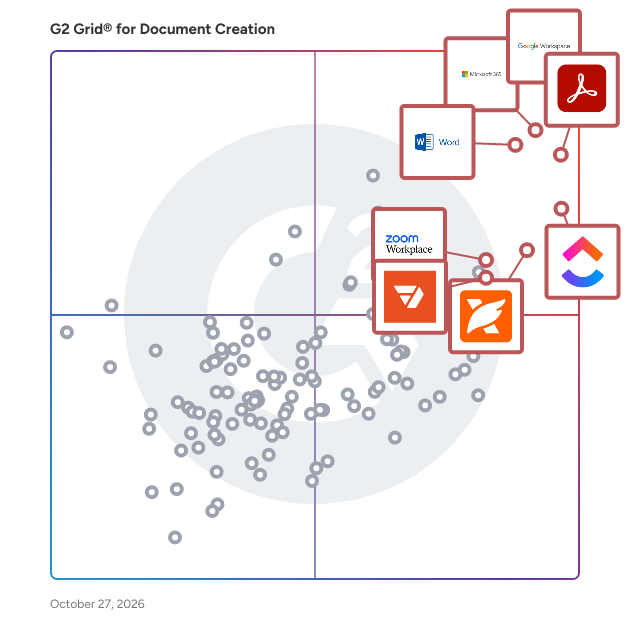
G2 Grid® for Document Creation Software

G2 Grid® for Document Creation Software plotting products by satisfaction and market presence

Highlighted products: Google Workspace, Microsoft 365, Adobe Acrobat, Microsoft Word, ClickUp, Foxit PDF Editor, Zoom Workplace, and pdfFiller.

Underlying data: [Grid® JSON](https://www.g2.com/categories/document-creation/grids.json?focus%5B%5D=google-workspace&focus%5B%5D=microsoft365&focus%5B%5D=adobe-acrobat&focus%5B%5D=microsoft-word&focus%5B%5D=clickup&focus%5B%5D=foxit-pdf-editor&focus%5B%5D=zoom-workplace&focus%5B%5D=pdffiller)

PrizmDoc

Founded in 1991, Accusoft is a software development company specializing in content processing, conversion, and automation solutions. From configurable applications to APIs built for developers, Accusoft software enables users to solve their most complex workflow challenges and gain insights from content in any format, on any device. The company's flagship product, PrizmDoc Viewer, is an HTML5 document viewer and collection of content manipulation APIs that help web developers embed document viewing, processing, and conversion into their applications with ease. PrizmDoc Viewer is a browser-based solution that renders and displays 100+ document and image formats without the need to open native applications. Users can view, search, annotate, redact, e-sign, print, and download using one common interface, which increases productivity and saves on licensing costs. Accusoft's zero-footprint viewer is fully customizable, from quick integrations with minimal configuration to complete programmatic control using our extensive Javascript API. Developers can augment and automate their end users’ viewing experience with key features that can be turned on or off depending on your business needs.

Average Rating: 4.6/5.0

Total Reviews: 58

How Do G2 Users Rate PrizmDoc?

  • Has the product been a good partner in doing business?: 9.2/10 (Category avg: 9.0/10)
  • Quality of Support: 8.8/10 (Category avg: 8.6/10)
  • Ease of Use: 9.0/10 (Category avg: 8.9/10)
  • Ease of Admin: 8.3/10 (Category avg: 8.9/10)

Who Is the Company Behind PrizmDoc?

  • Seller: Apryse
  • Year Founded: 1998
  • HQ Location: Denver, CO
  • Twitter: @aprysesolutions
    381 Twitter followers
  • LinkedIn® Page: www.linkedin.com
    569 employees on LinkedIn®

Who Uses This Product?

  • Top Industries: Information Technology and Services, Marketing and Advertising
  • Company Size: 45% Large, 40% Medium

What Are Recent G2 Reviews of PrizmDoc?

What Are G2 Users Discussing About PrizmDoc?

Scrivener

Scrivener is an integrated writing, outlining and research app that is tailor made for long writing projects. Since its launch in 2007 it has become the go-to for writers of all types. The project outline makes it easy to get an overview of your work and flip between sections. You can also split the screen and refer to research alongside your writing and drag and drop to rearrange your work. Write in any order, in sections as large or small as you like, and let Scrivener stitch it all together before submitting or publishing. However you write or whatever you're writing, Scrivener contains everything you need to get writing and keep writing. Scrivener is available for Mac, Windows and iPhone.

Average Rating: 4.5/5.0

Total Reviews: 87

How Do G2 Users Rate Scrivener?

  • Has the product been a good partner in doing business?: 8.6/10 (Category avg: 9.0/10)
  • Quality of Support: 8.6/10 (Category avg: 8.6/10)
  • Ease of Use: 7.9/10 (Category avg: 8.9/10)
  • Ease of Admin: 9.2/10 (Category avg: 8.9/10)

Who Is the Company Behind Scrivener?

Who Uses This Product?

  • Who Uses This: Author, Writer
  • Top Industries: Writing and Editing, Higher Education
  • Company Size: 83% Small, 9% Medium

What Do G2 Reviewers Say About Scrivener?

AI-generated summary from verified user reviews

Pros
  • Users find Scrivener easy to use for organizing research, manuscripts, and tracking progress seamlessly in one place.
  • Users love the organizational features of Scrivener, making research and manuscript management seamless and efficient.
  • Users appreciate the organization capabilities of Scrivener, effectively managing manuscripts and tracking essential writing components.
  • Users love the easy implementation of Scrivener, seamlessly organizing their writing tasks from outline to final draft.
  • Users value the flexibility of Scrivener, enabling them to manage writing tasks seamlessly across devices.
Cons
  • Users find the steep learning curve challenging due to Scrivener's extensive features, but it can be manageable.
  • Users note the limited collaboration features in Scrivener, making it less suitable for team projects and smaller documents.
  • Users find missing collaboration tools in Scrivener limiting, especially for teamwork and smaller document projects.

What Are Recent G2 Reviews of Scrivener?

What Are G2 Users Discussing About Scrivener?

AbleWord

AbleWord is a word processing and PDF editing application.

Average Rating: 4.3/5.0

Total Reviews: 10

How Do G2 Users Rate AbleWord?

  • Has the product been a good partner in doing business?: 10.0/10 (Category avg: 9.0/10)
  • Quality of Support: 9.3/10 (Category avg: 8.6/10)
  • Ease of Use: 9.3/10 (Category avg: 8.9/10)
  • Ease of Admin: 8.3/10 (Category avg: 8.9/10)

Who Is the Company Behind AbleWord?

  • Seller: Ableword
  • Year Founded: 2001
  • HQ Location: Nantwich, GB
  • LinkedIn® Page: www.linkedin.com
    100 employees on LinkedIn®

Who Uses This Product?

  • Company Size: 50% Small, 30% Large

What Are Recent G2 Reviews of AbleWord?

What Are G2 Users Discussing About AbleWord?

AI can help you find the answers. G2 helps you trust them.

Connect G2 to Claude or ChatGPT for answers grounded in G2's trusted reviews, comparisons, and pricing from real user insights.

How it works

Easy PDF

Easy PDF is 15 tools in one. It's totally free and anonymous, you can convert files without limits and email registration. Convert PDF to most popular file formats and vice versa. Merge, compress and split PDFs.

Average Rating: 4.5/5.0

Total Reviews: 378

How Do G2 Users Rate Easy PDF?

  • Has the product been a good partner in doing business?: 9.4/10 (Category avg: 9.0/10)
  • Quality of Support: 8.8/10 (Category avg: 8.6/10)
  • Ease of Use: 9.3/10 (Category avg: 8.9/10)
  • Ease of Admin: 9.4/10 (Category avg: 8.9/10)

Who Is the Company Behind Easy PDF?

  • Seller: Easy PDF
  • Year Founded: 2020
  • HQ Location: Bath, Somerset
  • LinkedIn® Page: www.linkedin.com
    1 employees on LinkedIn®

Who Uses This Product?

  • Who Uses This: Marketing Staff, Sales And Marketing Specialist
  • Top Industries: Marketing and Advertising, Information Technology and Services
  • Company Size: 44% Medium, 35% Large

What Do G2 Reviewers Say About Easy PDF?

AI-generated summary from verified user reviews

Pros
  • Users praise the ease of use of Easy PDF, noting its intuitive interface for daily tasks.
  • Users find Easy PDF to be very easy to use, making it perfect for daily tasks and productivity.
  • Users appreciate the easy editing features of Easy PDF, enabling seamless text, image, and link modifications.
  • Users find the intuitive UI of Easy PDF very easy to use, enhancing their daily productivity.
Cons
  • Users experience file corruption issues if files aren't fully downloaded, complicating usage and access to documents.

What Are Recent G2 Reviews of Easy PDF?

What Are G2 Users Discussing About Easy PDF?

Lasernet

Lasernet is an end-to-end document management platform: giving you the ability to generate, design, distribute, archive, and retrieve documents within your ERP, core banking platform or other business systems. The platform has a built-in editor and design tool that gives you the ability to design business-ready, branded documents enriched with account specific information directly from your business systems. After your documents are created, by storing them in Lasernet’s archive you can retrieve and store your documents for a fraction of the price of traditional data storage.

Average Rating: 4.4/5.0

Total Reviews: 42

How Do G2 Users Rate Lasernet?

  • Has the product been a good partner in doing business?: 9.0/10 (Category avg: 9.0/10)
  • Quality of Support: 8.6/10 (Category avg: 8.6/10)
  • Ease of Use: 8.5/10 (Category avg: 8.9/10)
  • Ease of Admin: 9.0/10 (Category avg: 8.9/10)

Who Is the Company Behind Lasernet?

  • Seller: Lasernet Group
  • Company Website:
  • Year Founded: 2004
  • HQ Location: Stockholm, Sweden
  • Twitter: @lasernetgroup
    377 Twitter followers
  • LinkedIn® Page: www.linkedin.com
    42 employees on LinkedIn®

Who Uses This Product?

  • Top Industries: Information Technology and Services
  • Company Size: 40% Large, 35% Small

What Are Recent G2 Reviews of Lasernet?

What Are G2 Users Discussing About Lasernet?

Pdfcrowd

Pdfcrowd offers API's for PDF generation.

Average Rating: 4.4/5.0

Total Reviews: 23

How Do G2 Users Rate Pdfcrowd?

  • Has the product been a good partner in doing business?: 5.0/10 (Category avg: 9.0/10)
  • Quality of Support: 8.2/10 (Category avg: 8.6/10)
  • Ease of Use: 9.4/10 (Category avg: 8.9/10)
  • Ease of Admin: 8.3/10 (Category avg: 8.9/10)

Who Is the Company Behind Pdfcrowd?

  • Seller: pdfcrowd
  • HQ Location: Nymburk, CZ
  • Twitter: @pdfcrowd
    128 Twitter followers
  • LinkedIn® Page: www.linkedin.com
    1 employees on LinkedIn®

Who Uses This Product?

  • Company Size: 67% Large, 33% Small

What Are Recent G2 Reviews of Pdfcrowd?

What Are G2 Users Discussing About Pdfcrowd?

PDF Studio Viewer

PDF Studio Viewer, Qoppa by Apryse’s friendly and reliable PDF reader / annotator / form filler, is now available on the Mac App store, and it is completely free to download, without any in-app purchases! If you are a Mac user unable to markup a PDF document, fill tax forms, or simply need more features than available in the Preview application, try downloading Qoppa’s Free PDF Reader from Itunes App store. PDF Studio Viewer allows you to: - Display PDFs with high fidelity - Annotate & Markup PDFs - Fill & Save Forms - Render Digital Signatures & Layers - Advanced User Interface - Advanced Print & Search Options - Integration with Docusign, DropBox, Google Drive, OneDrive - PDF Studio Viewer uses Qoppa Software's proprietary technology to view and modify PDF files. It is platform independent and can run on Windows, Mac OS X, and Linux. Simply download, install, and start working with PDF files immediately. Platforms: - Windows: Windows 10, Windows 8 & 8.1, Windows 7, Vista, XP, Server, NT, etc. - MAC OS X: 10.14 Mojave, 10.13 (High Sierra), 10.12 (Sierra), 10.11, 10.10, 10.9, 10.8, 10.7 - Linux: Ubuntu (18.04, 16.04, 14.04...), Fedora, Linux Mint, Debian... - Unix: Raspbian (Raspberry Pi), AIX, Solaris Intel, Solaris Sparc, HP-UX Keywords: - PDF Reader - PDF Viewer - Free PDF Software - PDF Application - PDF Annotator - Free PDF Form Filler Customer Support Online Step-by-step tutorials as well as answers to most common questions on just about anything you would need. – Help Tab -> Online User Guide: https://www.qoppa.com/files/pdfstudioviewer/guide/ – Help Tab -> Knowledge Base: https://kbpdfstudio.qoppa.com Within PDF Studio Contact us from within PDF Studio by going to Help Tab > Email Support and sending us an email or question. This is the most effective way for us to assist you as it will provide us a copy of the PDF Studio error logs which will help us to resolve any problems you may have. Email Feedback, comments or issues? Contact us directly at studiosupport@qoppa.com Mac Versions PDF Studio Viewer works on macOS 10.14 Mojave, macOS 10.13 High Sierra, macOS 10.12 Sierra, Mac OS X 10.11 (El Capitan), 10.10 (Yosemite), 10.9 (Mavericks), 10.8 (Mountain Lion), 10.7 (Lion).

Average Rating: 4.2/5.0

Total Reviews: 24

How Do G2 Users Rate PDF Studio Viewer?

  • Has the product been a good partner in doing business?: 8.3/10 (Category avg: 9.0/10)
  • Quality of Support: 7.2/10 (Category avg: 8.6/10)
  • Ease of Use: 9.4/10 (Category avg: 8.9/10)
  • Ease of Admin: 8.3/10 (Category avg: 8.9/10)

Who Is the Company Behind PDF Studio Viewer?

  • Seller: Apryse
  • Year Founded: 1998
  • HQ Location: Denver, CO
  • Twitter: @aprysesolutions
    381 Twitter followers
  • LinkedIn® Page: www.linkedin.com
    569 employees on LinkedIn®

Who Uses This Product?

  • Company Size: 42% Medium, 42% Small

What Are Recent G2 Reviews of PDF Studio Viewer?

What Are G2 Users Discussing About PDF Studio Viewer?

SuiteFiles

SuiteFiles is an intelligent workspace solution specifically designed for professional service firms, aimed at streamlining the way teams manage their documents and client interactions. This comprehensive platform integrates essential functions such as document creation, review, approval, client collaboration, and digital signing into a single, cohesive system. By eliminating the need to juggle multiple folders, emails, and manual follow-ups, SuiteFiles provides a structured environment that enhances productivity and ensures efficient completion of work. The target audience for SuiteFiles encompasses a diverse range of professional service firms, including accounting firms, law firms, and consultancy agencies. These organizations often handle extensive documentation and require effective communication with clients. SuiteFiles addresses these challenges by creating a centralized workspace where all relevant documents, conversations, and approvals are easily accessible. This organization reduces the likelihood of important information being overlooked or lost, ultimately fostering better collaboration among team members and clients. Key features of SuiteFiles include seamless integration with widely-used tools such as Microsoft 365, Xero, Karbon, WorkflowMax, HubSpot, and QuickBooks Online. This compatibility allows firms to enhance their existing tech stack rather than complicate it with additional software. By connecting these tools, SuiteFiles helps create a more efficient workflow, enabling users to manage their tasks and client interactions without the hassle of switching between different applications. The platform’s ability to consolidate various functions into one interface simplifies the user experience and promotes a more streamlined approach to document management. The benefits of using SuiteFiles extend beyond mere organization; it empowers professional service firms to focus on their core competencies by minimizing busy work. With everything living in context, teams can spend less time chasing down documents or coordinating approvals and more time on delivering quality service to their clients. The platform promotes clarity and control, ensuring that all team members are aligned and that client confidence is maintained throughout the process. SuiteFiles is designed for firms that prioritize efficiency and client satisfaction. By providing an intelligent workspace that consolidates essential functions and integrates with existing tools, it enables professional service firms to work smarter, not harder, ultimately leading to more finished work and enhanced client relationships. This solution not only supports the operational needs of these firms but also contributes to a more collaborative and productive work environment.

Average Rating: 4.5/5.0

Total Reviews: 66

How Do G2 Users Rate SuiteFiles?

  • Has the product been a good partner in doing business?: 9.2/10 (Category avg: 9.0/10)
  • Quality of Support: 9.0/10 (Category avg: 8.6/10)
  • Ease of Use: 9.1/10 (Category avg: 8.9/10)
  • Ease of Admin: 9.2/10 (Category avg: 8.9/10)

Who Is the Company Behind SuiteFiles?

  • Seller: SuiteFiles
  • Company Website:
  • Year Founded: 2012
  • HQ Location: Wellington, NZ
  • Twitter: @SuiteFiles
    681 Twitter followers
  • LinkedIn® Page: www.linkedin.com
    28 employees on LinkedIn®

Who Uses This Product?

  • Who Uses This: Director
  • Top Industries: Accounting
  • Company Size: 94% Small, 6% Medium

What Do G2 Reviewers Say About SuiteFiles?

AI-generated summary from verified user reviews

Pros
  • Users find that SuiteFiles enhances document organization, streamlining collaboration and providing easy access to necessary information.
  • Users find SuiteFiles to be incredibly easy to use, streamlining workflows and enhancing collaboration effortlessly.
  • Users appreciate the centralization of documents in SuiteFiles, enhancing collaboration and efficiency for teams and clients.
  • Users value the efficient email filing in SuiteFiles, ensuring important communications are securely organized and easily accessible.
  • Users appreciate the quick and reliable customer support of SuiteFiles, enhancing their overall experience and efficiency.
Cons
  • Users find the accessibility issues of SuiteFiles can make document retrieval somewhat frustrating and cumbersome.
  • Users find the difficult learning curve challenging, impacting their ability to adapt quickly to SuiteFiles.
  • Users find the difficult navigation in SuiteFiles can be cumbersome when accessing documents, affecting overall efficiency.
  • Users find the document access to be a bit chunky, which can hinder their efficiency and ease of use.
  • Users find the access to documents can be a bit chunky, leading to a less smooth experience.

What Are Recent G2 Reviews of SuiteFiles?

Ulysses

Ulysses is your one-stop writing environment for Mac, iPhone and iPad. Its pleasant, focused writing experience, combined with effective document management, seamless sync, and flexible export, make Ulysses the first choice for writers of all kinds.

Average Rating: 4.5/5.0

Total Reviews: 25

How Do G2 Users Rate Ulysses?

  • Has the product been a good partner in doing business?: 10.0/10 (Category avg: 9.0/10)
  • Quality of Support: 9.2/10 (Category avg: 8.6/10)
  • Ease of Use: 9.2/10 (Category avg: 8.9/10)
  • Ease of Admin: 8.3/10 (Category avg: 8.9/10)

Who Is the Company Behind Ulysses?

  • Seller: Ulysses
  • Year Founded: 2011
  • HQ Location: Leipzig, DE
  • Twitter: @ulyssesapp
    11,867 Twitter followers
  • LinkedIn® Page: www.linkedin.com
    21 employees on LinkedIn®

Who Uses This Product?

  • Company Size: 76% Small, 16% Large

What Do G2 Reviewers Say About Ulysses?

AI-generated summary from verified user reviews

Pros
  • Users find Ulysses to be easy to use for organizing documents and setting writing goals effectively.
  • Users love the easy integrations in Ulysses, allowing seamless exports and effective organization of their writing projects.
  • Users value the excellent organization tools in Ulysses for efficient text management and precise planning.
  • Users appreciate the clean and minimalistic interface of Ulysses, which enhances their focus on writing.
Cons
  • Users find the sheet/group hierarchy confusing, causing initial uncertainty about document organization and structure.
  • Users find the sheet/group hierarchy confusing initially, struggling to understand document organization within Ulysses.
  • Users find the sheet/group hierarchy confusing at first, leading to uncertainty about document organization.
  • Some users find the unique interface and features overwhelming, which can complicate the overall experience with Ulysses.

What Are Recent G2 Reviews of Ulysses?

What Are G2 Users Discussing About Ulysses?

Resmume - resume builder

No more time consuming and confusing resume writing from scratch. Resmume gives you power to create a professional resume with just a few minutes.

Average Rating: 4.3/5.0

Total Reviews: 22

How Do G2 Users Rate Resmume - resume builder?

  • Has the product been a good partner in doing business?: 9.4/10 (Category avg: 9.0/10)
  • Quality of Support: 8.4/10 (Category avg: 8.6/10)
  • Ease of Use: 8.6/10 (Category avg: 8.9/10)
  • Ease of Admin: 9.4/10 (Category avg: 8.9/10)

Who Is the Company Behind Resmume - resume builder?

Who Uses This Product?

  • Top Industries: Computer Software
  • Company Size: 57% Small, 35% Medium

What Do G2 Reviewers Say About Resmume - resume builder?

AI-generated summary from verified user reviews

Pros
  • Users value the ease of use of Resmume, as it offers diverse templates tailored to their needs.
  • Users love the varied and beautiful templates offered by Resmume, making resume building easy and customizable.
  • Users appreciate the user-friendly design and customization options of Resmume, enhancing their resume-building experience.
  • Users value the high level of customization in Resmume, enabling personalized and aesthetically pleasing resumes.
  • Users appreciate the intuitive interface of Resmume, making resume creation easy for everyone, regardless of skill level.
Cons
  • Users feel that Resmume lacks affordable features, as many essential tools require payment to access.
  • Users find the limited free features of Resmume restrict their ability to create effective resumes without an upgrade.
  • Users are frustrated by the add-on costs for printing or saving resumes, limiting their access to essential features.
  • Users dislike that they cannot recover deleted resumes, limiting their options for resume management on Resmume.
  • Users experience difficulties exporting or editing their resumes later, complicating the overall usability of Resmume.

What Are Recent G2 Reviews of Resmume - resume builder?

SmartOffice

Work on the go with robust mobile productivity With SmartOffice you can easily view, edit, create, print, present, and share Microsoft Office and PDF documents via your mobile device. The SmartOffice PDF functionality allows you to view, annotate, redact, highlight, form-fill, digitally sign, and share PDF documents. Convert Office documents to PDF, save locally to your mobile device or to a cloud account, and print wirelessly to thousands of supported printers. SmartOffice is designed for today’s mobile devices. The small download size ensures fast loading and high-quality performance. SmartOffice Mobile App A full-featured app that serves as a faster, lighter alternative to MS Office 365. SmartOffice can be downloaded for free from the AppStore or GooglePlay for personal use. Upgrade to our PRO version to access premium features. SmartOffice is not dependent on Internet connectivity and can be used while offline. SmartOffice SDK and Enterprise SmartOffice offers a variety of solutions that can be securely incorporated into your enterprise document workflow platform. The SmartOffice SDK seamlessly and securely integrates with your EFSS, MDM, or EMM environment, while the SmartOffice for Enterprise mobile app can be wrapped in an organization's security platform. Enterprise IT departments can prevent data breaches via SmartOffice SDK controlled access permission tools and customizable document editing controls, that extend down to the user or document level.

Average Rating: 4.1/5.0

Total Reviews: 35

How Do G2 Users Rate SmartOffice?

  • Has the product been a good partner in doing business?: 9.2/10 (Category avg: 9.0/10)
  • Quality of Support: 8.1/10 (Category avg: 8.6/10)
  • Ease of Use: 8.3/10 (Category avg: 8.9/10)
  • Ease of Admin: 9.2/10 (Category avg: 8.9/10)

Who Is the Company Behind SmartOffice?

  • Seller: Artifex Software
  • Year Founded: 1993
  • HQ Location: San Francisco, US
  • Twitter: @Artifex
    211 Twitter followers
  • LinkedIn® Page: www.linkedin.com
    21 employees on LinkedIn®

Who Uses This Product?

  • Company Size: 49% Small, 37% Medium

What Do G2 Reviewers Say About SmartOffice?

AI-generated summary from verified user reviews

Pros
  • Users love the ease of automation for daily tasks, requiring no coding skills to streamline processes.
  • Users love the automation of daily tasks with SmartOffice, easily managing their workflow without coding skills.
  • Users find SmartOffice's ease of use exceptional, enabling task management without coding skills.

What Are Recent G2 Reviews of SmartOffice?

Docufiller

Docufiller is an online brand portal for B2B. Easily create, publish and share brochures, e-mailings, flyers etc. by yourself, 100% according to your corporate identity! - All in one product. Create tool, DAM, E-mailing software. - Save precious time: No more correction meetings, do it all by yourself. - Save money: direct savings on your marketing budget, unlimited resources for a fixed amount per year. - Corporate identity monitoring: whether you have one corporate identity or multiple brands or labels, they are all guaranteed in your templates.

Average Rating: 4.4/5.0

Total Reviews: 15

How Do G2 Users Rate Docufiller?

  • Has the product been a good partner in doing business?: 10.0/10 (Category avg: 9.0/10)
  • Quality of Support: 9.0/10 (Category avg: 8.6/10)
  • Ease of Use: 9.8/10 (Category avg: 8.9/10)
  • Ease of Admin: 9.4/10 (Category avg: 8.9/10)

Who Is the Company Behind Docufiller?

Who Uses This Product?

  • Company Size: 60% Small, 40% Medium

What Are Recent G2 Reviews of Docufiller?

What Are G2 Users Discussing About Docufiller?

Ideagen Please Review

Ideagen Please Review is document review, co-authoring and redaction software built for regulated industries including life sciences, pharma, aerospace and defense, government and financial services. Teams of 2 to 200+ reviewers work on the same document at the same time in a secure, web-based environment, with Word, PDF, PowerPoint and Excel files kept in their original format. Every comment, change and decision is tracked, and audit reports are generated in one click. Paragraph-level permissions control who can view, comment on or edit each section, and external partners can review through secure, time-limited links without VPN access. Redaction tools support EMA Policy 70 requirements. Ideagen Please Review integrates with Veeva Vault, Documentum D2 and Intelinotion, and connects to the wider Ideagen Quality platform for document control, CAPA, audit and training. Customers see up to 65% faster review cycles and around 35% lower review costs. It is trusted by four of the top five global CROs and 85% of the top 25 global pharma companies.

Average Rating: 4.3/5.0

Total Reviews: 76

How Do G2 Users Rate Ideagen Please Review?

  • Has the product been a good partner in doing business?: 8.5/10 (Category avg: 9.0/10)
  • Quality of Support: 8.5/10 (Category avg: 8.6/10)
  • Ease of Use: 8.4/10 (Category avg: 8.9/10)
  • Ease of Admin: 8.5/10 (Category avg: 8.9/10)

Who Is the Company Behind Ideagen Please Review?

  • Seller: Ideagen
  • Company Website:
  • Year Founded: 2000
  • HQ Location: Ruddington, GB
  • Twitter: @Ideagen_Plc
    2,172 Twitter followers
  • LinkedIn® Page: www.linkedin.com
    1,445 employees on LinkedIn®

Who Uses This Product?

  • Top Industries: Pharmaceuticals, Biotechnology
  • Company Size: 43% Medium, 31% Large

What Do G2 Reviewers Say About Ideagen Please Review?

AI-generated summary from verified user reviews

Pros
  • Users appreciate the collaborative review feature of Please Review, enhancing teamwork across various departments effectively.
  • Users appreciate the collaborative review feature of Please Review, facilitating seamless teamwork across departments.
  • Users find Please Review very easy to use, appreciating its intuitive design and collaborative review features.
  • Users love the customizability of Ideagen Please Review, appreciating its user-friendly and seamless integration into workflows.
  • Users find Please Review's intuitive document management features enhance collaboration and streamline the review process effectively.
Cons
  • Users find the software difficult to use, especially when making formatting changes and managing comments effectively.
  • Users struggle with editing issues in Please Review, including difficulties in formatting and managing tracked changes effectively.
  • Users express frustration with the missing features in Ideagen Please Review, limiting customization and reporting capabilities.
  • Users find the software difficult to use, despite educational resources provided to assist them.
  • Users find formatting issues with PleaseReview, complicating document reviews and making navigation challenging.

What Are Recent G2 Reviews of Ideagen Please Review?

AbiWord

AbiWord is a free, open-source word processor designed to be lightweight and efficient, making it ideal for users seeking a straightforward and functional text editing solution. Developed in C++, AbiWord operates across multiple platforms, including Linux, ReactOS, and Solaris. Its name is derived from the Spanish word "abierto," meaning "open," reflecting its commitment to open-source principles. Key Features and Functionality: - User-Friendly Interface: AbiWord offers a clean and intuitive interface, reminiscent of classic versions of Microsoft Word, facilitating ease of use for both new and experienced users. - Cross-Platform Compatibility: The application runs natively on various operating systems, including Linux, ReactOS, and Solaris, ensuring flexibility and accessibility for a diverse user base. - Comprehensive Word Processing Tools: AbiWord supports essential features such as lists, indents, character formatting, tables, styles, headers and footers, footnotes, templates, multiple views, page columns, spell checking, and grammar checking. - Collaborative Editing: Through the GOCollab system, AbiWord enables real-time collaboration over networks using protocols like TCP and XMPP, allowing multiple users to work on the same document simultaneously. - Extensive File Format Support: AbiWord includes import and export filters for various formats, including HTML, Microsoft Word (.doc), Office Open XML (.docx), OpenDocument Text (.odt), Rich Text Format (.rtf), and plain text (.txt). Its native file format, .abw, utilizes XML to promote interoperability and ease of access. Primary Value and User Solutions: AbiWord's primary value lies in its lightweight design and cross-platform support, making it an excellent choice for users with older hardware or those requiring a simple yet effective word processing tool. Its open-source nature ensures continuous development and community-driven improvements. The collaborative editing feature addresses the need for real-time document sharing and teamwork, enhancing productivity for users who require cooperative work environments. Additionally, its broad compatibility with various file formats ensures seamless document exchange and integration with other office applications.

Average Rating: 4.2/5.0

Total Reviews: 19

How Do G2 Users Rate AbiWord?

  • Quality of Support: 8.5/10 (Category avg: 8.6/10)
  • Ease of Use: 9.7/10 (Category avg: 8.9/10)

Who Is the Company Behind AbiWord?

Who Uses This Product?

  • Company Size: 37% Small, 37% Medium

What Do G2 Reviewers Say About AbiWord?

AI-generated summary from verified user reviews

Pros
  • Users appreciate the automations in AbiWord, enhancing productivity with features like auto-saving and text synthesis.
  • Users appreciate the reliable customer support of AbiWord, enhancing their overall experience and satisfaction with the product.
  • Users appreciate the ease of use of AbiWord, benefiting from smooth performance and seamless file support.
  • Users appreciate the user-friendly interface of AbiWord, which enhances smooth operation and supports multiple formats seamlessly.
Cons
  • Users find the limited customization of AbiWord frustrating, especially regarding its grammar checker in multiple languages.

What Are Recent G2 Reviews of AbiWord?

FormSwift

FormSwift is an online platform that enables users to create, edit, sign, and manage a wide array of documents directly from their web browser. Catering to individuals, small businesses, and professionals, FormSwift offers a comprehensive library of over 1,100 customizable templates, including legal forms, business documents, and personal agreements. Its intuitive interface simplifies the document creation process, eliminating the need for complex software installations. Key Features and Functionality: - Extensive Template Library: Access to a vast collection of templates covering various categories such as legal, business, personal, real estate, and tax documents. - Online PDF Editor: Edit PDFs, Word documents, and images directly within the platform without requiring additional software. - Electronic Signatures: Digitally sign documents and request signatures from others, streamlining the approval process. - Document Sharing: Easily share documents via email, allowing recipients to view, edit, or sign as needed. - Mobile Accessibility: Convert paper documents to digital format using mobile devices, facilitating on-the-go document management. Primary Value and User Solutions: FormSwift addresses the challenges associated with traditional document handling by providing a seamless, cloud-based solution for document creation and management. Users can efficiently generate and customize documents, reducing the time and effort typically required. The platform's electronic signature capability eliminates the need for physical paperwork, expediting the signing process. Additionally, FormSwift's online accessibility ensures that documents can be created, edited, and shared from anywhere, enhancing productivity and collaboration for individuals and businesses alike.

Average Rating: 4.0/5.0

Total Reviews: 29

How Do G2 Users Rate FormSwift?

  • Has the product been a good partner in doing business?: 7.7/10 (Category avg: 9.0/10)
  • Quality of Support: 8.3/10 (Category avg: 8.6/10)
  • Ease of Use: 9.0/10 (Category avg: 8.9/10)
  • Ease of Admin: 6.3/10 (Category avg: 8.9/10)

Who Is the Company Behind FormSwift?

Who Uses This Product?

  • Top Industries: Marketing and Advertising
  • Company Size: 100% Small, 13% Medium

What Do G2 Reviewers Say About FormSwift?

AI-generated summary from verified user reviews

Pros
  • Users appreciate the easy-to-use interface of FormSwift, enabling intuitive form creation and editing.
  • Users love the ease of creation with FormSwift, thanks to its intuitive interface for form editing.
  • Users praise the intuitive interface of FormSwift, making form creation and editing a breeze.
  • Users love the intuitive interface of FormSwift, simplifying the process of creating and editing forms.
  • Users love the easy signing feature of FormSwift, simplifying the process of signing and requesting signatures.
Cons
  • Users are frustrated by the expensive auto-renewals and unexpected charges after free trials, complicating their experience.
  • Users express frustration over inadequate notifications regarding auto-renewals and unexpected charges after free trials.
  • Users face insufficient training in using FormSwift, leading to confusion and difficulty navigating the product effectively.
  • Users face licensing issues with unexpected charges and frustrating customer support, complicating their experience with FormSwift.
  • Users are frustrated by payment issues due to hidden charges and poor customer service response times.

What Are Recent G2 Reviews of FormSwift?

What Are G2 Users Discussing About FormSwift?

Neeraja Prakash
NP
Researched and written by Neeraja Prakash
Updated April 10, 2026