Best Document Creation Software for Medium-Sized Businesses - Page 2

How Many Document Creation Software Products Does G2 Track?

Total Products under this Category: 334

Category Stats (Sep 2026)

  • Average Rating: 4.37/5 The average rating of products in this category, based on all submitted ratings
  • Top Trending Product: DocNexus (+2.22%) - Among all products in this category, DocNexus recorded the largest rating increase compared to last month

Last updated: September 26, 2026

How Does G2 Rank Document Creation Software Products?

Why You Can Trust G2's Software Rankings:

  • 30 Analysts and Data Experts
  • 156,900+ Authentic Reviews
  • 334+ Products
  • Unbiased Rankings

G2's software rankings are built on verified user reviews, rigorous moderation, and a consistent research methodology maintained by a team of analysts and data experts. Each product is measured using the same transparent criteria, with no paid placement or vendor influence. While reviews reflect real user experiences, which can be subjective, they offer valuable insight into how software performs in the hands of professionals. Together, these inputs power the G2 Score, a standardized way to compare tools within every category.

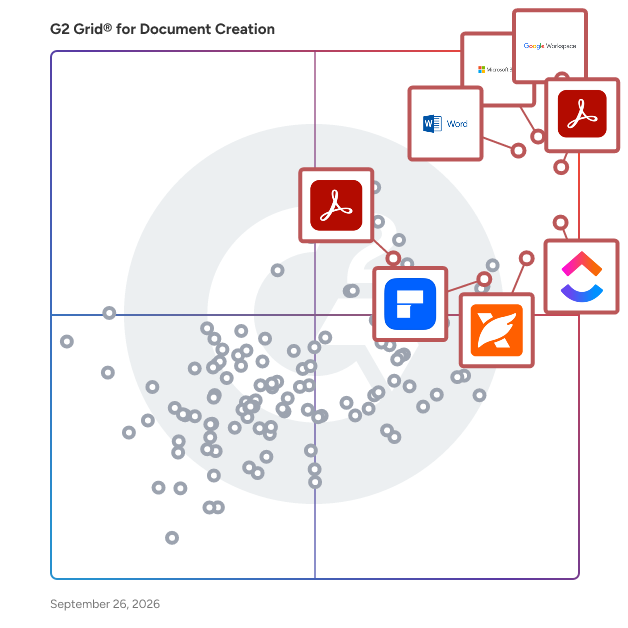
G2 Grid® for Document Creation Software

G2 Grid® for Document Creation Software plotting products by satisfaction and market presence

Highlighted products: Google Workspace, Microsoft 365, Adobe Acrobat, Microsoft Word, ClickUp, Wondershare PDFelement, Adobe PDF Pack, and Foxit PDF Editor.

Underlying data: [Grid® JSON](https://www.g2.com/categories/document-creation/grids.json?focus%5B%5D=google-workspace&focus%5B%5D=microsoft365&focus%5B%5D=adobe-acrobat&focus%5B%5D=microsoft-word&focus%5B%5D=clickup&focus%5B%5D=wondershare-wondershare-pdfelement&focus%5B%5D=adobe-pdf-pack&focus%5B%5D=foxit-pdf-editor&segment=mid-market)

FineReader PDF for Windows and Mac

FineReader is an all-in-one OCR and PDF software application designed to increase business productivity. It provides easy-to-use tools to access and modify information locked in paper-based documents and PDFs. ABBYY FineReader PDF 16 for Windows Digitize, retrieve, edit, protect, share, and collaborate on all kinds of documents in the same workflow. Edit digital and scanned PDFs with a newfound ease: correct whole sentences and paragraphs or even adjust the layout. Incorporate paper documents into a digital workplace with AI-based OCR technology to simplify daily work. ABBYY FineReader PDF for Mac® Manage your documents more easily and perform all document tasks quicker in digital workflows. Convert PDFs, document images and scans with unmatched accuracy Achieve new levels of productivity when converting documents with the latest OCR technology and view and reuse content from PDFs of any kind with ease. ABBYY FineReader PDF for iOS - The first smart AI-powered scanner that turns your mobile device into an all-purpose tool to quickly capture docs and books, create electronic copies in PDF and JPEG, and extract texts from scans for further editing and sharing.

Average Rating: 4.5/5.0

Total Reviews: 293

How Do G2 Users Rate FineReader PDF for Windows and Mac?

  • Has the product been a good partner in doing business?: 8.9/10 (Category avg: 9.0/10)
  • Quality of Support: 8.4/10 (Category avg: 8.6/10)
  • Ease of Use: 8.9/10 (Category avg: 8.9/10)
  • Ease of Admin: 9.1/10 (Category avg: 8.9/10)

Who Is the Company Behind FineReader PDF for Windows and Mac?

  • Seller: ABBYY
  • Company Website:
  • Year Founded: 1989
  • HQ Location: Milpitas, CA
  • Twitter: @ABBYY_Software
    3,018 Twitter followers
  • LinkedIn® Page: www.linkedin.com
    947 employees on LinkedIn®

Who Uses This Product?

  • Who Uses This: Owner, President
  • Top Industries: Translation and Localization, Information Technology and Services
  • Company Size: 74% Small, 18% Medium

What Do G2 Reviewers Say About FineReader PDF for Windows and Mac?

AI-generated summary from verified user reviews

Pros
  • Users find FineReader PDF to offer exceptional ease of use, making document editing and conversion straightforward and efficient.
  • Users value the accurate document conversion of FineReader PDF, enabling efficient edits and maintaining original layouts effortlessly.
  • Users value the easy conversion capabilities of FineReader PDF, praising its accuracy and editing flexibility for professional use.
  • Users appreciate the high accuracy of OCR in FineReader PDF, ensuring minimal errors when converting scanned documents.
  • Users appreciate the easy editing feature of FineReader PDF, simplifying document management and enhancing productivity.
Cons
  • Users find the high pricing of FineReader PDF to be a significant drawback compared to alternatives.
  • Users report a steep learning curve that can hinder productivity and complicate the initial experience with FineReader.
  • Users face difficulty with OCR accuracy and inconsistent usage between Windows and Mac, complicating the experience.
  • Users highlight missing features like limited cloud integration and inconsistent functionality between Windows and Mac versions.
  • Users frequently encounter OCR errors, particularly with low-quality scans, complicating their experience on Mac versus Windows.

What Are Recent G2 Reviews of FineReader PDF for Windows and Mac?

What Are G2 Users Discussing About FineReader PDF for Windows and Mac?

Nitro PDF

1. What is Nitro PDF? Nitro PDF is a full-featured PDF editor that enables you to create, edit, convert, sign, and secure PDF documents. It is designed for individuals, small businesses, and enterprises as a cost-effective alternative to Adobe Acrobat, combining powerful functionality with an intuitive interface that works across devices. 2. What are the main features of Nitro PDF? Nitro PDF is a comprehensive solution for creating, editing, and securing documents across Windows, Mac, iOS, and web browsers. It includes powerful AI productivity tools and is built with an intuitive interface mirroring the Microsoft Office and Apple toolbars. Key features of Nitro PDF include: • Core Editing: Tools to create, edit, convert, combine, and annotate PDFs, including advanced OCR and secure signing capabilities. • AI Smart Tools: Enhances productivity via smart data extraction, automated form creation, and intelligent document redaction. • Nitro Analytics: Real-time visibility into PDF usage, allowing organizations to measure productivity, prove ROI, and track sustainability. • Nitro Workspace: A centralized cloud hub for accessing PDF and eSign tools, AI assistants, and administration from any device. • Advanced Editing: Create PDFs from any file type and convert PDFs into editable Microsoft Word, Excel, and PowerPoint files while maintaining original layouts. • Powerful OCR (Optical Character Recognition): Turn scanned paper documents and images into fully searchable and editable PDFs with high-accuracy text recognition. Nitro PDF is available in multiple plans to suit different business needs. 3. What support options does Nitro offer? Whether you're a five-person team or a global enterprise, our dedicated support is available 24/7. • Human Support: Nitro offers dedicated customer support, including onboarding, training, and troubleshooting resources, to ensure a smooth experience for your team. • Knowledge Base and Guides: Access hundreds of detailed articles covering product features, integrations, workflows, and best practices. • Video Tutorials: Step-by-step walkthroughs and demonstrations to help you learn and master Nitro tools quickly. • Community Forum: Connect with other Nitro users, share feedback, ask questions, and discover tips and solutions. • Knowledge Assistant: A 24/7 in-app AI assistant providing instant, context-aware guidance on features, workflows, and troubleshooting. 4. Does Nitro PDF support integrations with other business tools? Yes. Nitro PDF integrates with software such as Microsoft Office suite, OneDrive, Dropbox, and other platforms. These integrations simplify document workflows and make it easy to create, edit, and share PDFs directly within your existing environment. 5. How does Nitro ensure document security and compliance? Nitro protects sensitive information with advanced encryption, password protection, granular access controls, and tamper-evident audit trails. Nitro's solutions are designed to meet enterprise and mid-market compliance requirements, including ISO 27001, SOC 2, HIPAA, GDPR, eIDAS, UETA, and the ESIGN Act.

Average Rating: 4.4/5.0

Total Reviews: 381

How Do G2 Users Rate Nitro PDF?

  • Has the product been a good partner in doing business?: 8.9/10 (Category avg: 9.0/10)
  • Quality of Support: 8.1/10 (Category avg: 8.6/10)
  • Ease of Use: 8.8/10 (Category avg: 8.9/10)
  • Ease of Admin: 8.9/10 (Category avg: 8.9/10)

Who Is the Company Behind Nitro PDF?

  • Seller: Nitro, Inc
  • Company Website:
  • Year Founded: 2005
  • HQ Location: San Francisco, CA
  • LinkedIn® Page: www.linkedin.com
    382 employees on LinkedIn®

Who Uses This Product?

  • Who Uses This: IT Manager
  • Top Industries: Information Technology and Services, Construction
  • Company Size: 48% Small, 35% Medium

What Do G2 Reviewers Say About Nitro PDF?

AI-generated summary from verified user reviews

Pros
  • Users find Nitro PDF's ease of use remarkable, appreciating its intuitive interface and minimal learning curve.
  • Users love the easy editing features of Nitro PDF, ensuring quick and accurate document management for all skill levels.
  • Users praise Nitro PDF for its exceptional security features and comprehensive editing tools, enhancing overall productivity.
  • Users appreciate the easy conversion feature of Nitro PDF, enabling quick and accurate file management for everyone.
  • Users value the robust PDF processing capabilities of Nitro PDF, enhancing document management and streamlining workflows effectively.
Cons
  • Users report performance issues with Nitro PDF, facing slow processing and uninstallation problems with large documents.
  • Users find the pricing too high, making Nitro PDF less accessible for casual and individual users.
  • Users experience slow performance with Nitro PDF, especially when handling large documents, affecting overall efficiency.
  • Users note the limited features of Nitro PDF, particularly when compared to high-end PDF tools for complex tasks.
  • Users report significant performance issues with Nitro PDF, especially when handling large files or after updates.

What Are Recent G2 Reviews of Nitro PDF?

What Are G2 Users Discussing About Nitro PDF?

Conga Composer

Flexible. Scalable. Embedded. Conga Composer transforms how businesses generate documents Disconnected systems and manual workflows make document generation slow, error-prone, and costly. Conga Composer streamlines this by embedding automated document creation into your existing tools. It supports multiple formats, merges data from any source, and scales effortlessly, empowering teams to deliver accurate, beautifully branded documents faster, with less effort and greater control. Conga Composer excels in document generation with key advantages: Launch Anywhere – Trigger document generation from buttons, flows, Apex, or external systems- no custom code needed. Multi-Format Support – Create Word, PDF, Excel, PowerPoint, and HTML email templates. Dynamic Content – Use conditional logic, charts, dashboards, rich text, and global currencies. High-Volume Ready – Supports large templates (25MB), merged outputs (250MB), and batch processing. Enterprise Scalability – Reusable templates and behaviors across departments and use cases. eSignature Integration – Seamless pairing with Conga Sign for end-to-end agreement workflows. Revenue Lifecycle Alignment – Only vendor that integrates doc gen into CLM, CPQ, and full revenue processes. Admin-Friendly Setup – Built for Salesforce admins and business users—no developer dependency. Proven Performance – Trusted by 8,000+ businesses; millions of documents generated monthly. Future-Ready – Monitoring AI trends to invest when enterprise-grade reliability is guaranteed. With these strengths, Conga Composer delivers a scalable, flexible, and automated solution for efficient document generation.

Average Rating: 4.4/5.0

Total Reviews: 847

How Do G2 Users Rate Conga Composer?

  • Has the product been a good partner in doing business?: 8.7/10 (Category avg: 9.0/10)
  • Quality of Support: 8.7/10 (Category avg: 8.6/10)
  • Ease of Use: 8.3/10 (Category avg: 8.9/10)
  • Ease of Admin: 8.1/10 (Category avg: 8.9/10)

Who Is the Company Behind Conga Composer?

  • Seller: Conga
  • Company Website:
  • Year Founded: 2006
  • HQ Location: 3200 Kirby Dr., Suite 500, Houston, TX 77098
  • LinkedIn® Page: www.linkedin.com
    2,159 employees on LinkedIn®
  • Phone: (303) 465-1616

Who Uses This Product?

  • Who Uses This: Salesforce Administrator, Business Analyst
  • Top Industries: Information Technology and Services, Computer Software
  • Company Size: 47% Medium, 28% Large

What Do G2 Reviewers Say About Conga Composer?

AI-generated summary from verified user reviews

Pros
  • Users value the powerful API of Conga Composer for efficient bulk document generation and seamless integration.
  • Users value the easy document customization and excellent support from Conga Composer for efficient document management.
  • Users value the ease of use of Conga Composer, finding it straightforward for document configuration and template launching.
  • Users value the time-saving capabilities of Conga Composer, streamlining document creation and delivery processes effortlessly.
  • Users value the seamless integration with Salesforce that enhances efficiency and reduces errors in document creation.
Cons
  • Users find the learning curve steep, making it challenging to resolve issues independently, leading to frustration.
  • Users find the steep learning curve of Conga Composer challenging, requiring time to master templates and queries.
  • Users find the difficult learning curve and complex steps hinder their experience with Conga Composer.
  • Users find that tasks are time-consuming due to the complex setup and steep learning curve of Conga Composer.
  • Users face a complex setup for Conga Composer, making issue resolution tedious and time-consuming with many unresolved tickets.

What Are Recent G2 Reviews of Conga Composer?

What Are G2 Users Discussing About Conga Composer?

Dropbox Paper

Dropbox Paper is a collaborative document-editing service developed by Dropbox, designed to facilitate seamless teamwork and idea sharing. Launched in January 2017, Paper provides a flexible workspace where teams can create, review, and organize content in real-time, enhancing productivity and collaboration. Key Features and Functionality: - Real-Time Collaboration: Multiple users can simultaneously edit documents, with changes instantly visible to all participants. - Rich Media Integration: Embed images, videos, audio files, and even code snippets directly into documents, supporting a wide range of content types. - Task Management: Assign tasks, set due dates, and track progress within documents, streamlining project management. - Commenting and Annotation: Add comments and annotations to specific sections of a document, facilitating clear communication and feedback. - Version History: Access previous versions of documents to track changes and revert to earlier iterations if necessary. - Integration with Third-Party Tools: Connect with popular design and productivity tools like InVision, Figma, and Sketch, allowing for seamless workflow integration. Primary Value and User Solutions: Dropbox Paper addresses the need for a unified platform where teams can collaboratively create and manage content without the constraints of traditional document editors. By combining document creation, media embedding, and task management in a single interface, Paper eliminates the need to switch between multiple applications, thereby reducing workflow fragmentation. Its real-time collaboration features ensure that team members stay aligned, while the integration with various tools enhances versatility. Overall, Dropbox Paper simplifies the collaborative process, making it more efficient and effective for teams of all sizes.

Average Rating: 4.1/5.0

Total Reviews: 4,380

How Do G2 Users Rate Dropbox Paper?

  • Has the product been a good partner in doing business?: 8.6/10 (Category avg: 9.0/10)
  • Quality of Support: 8.4/10 (Category avg: 8.6/10)
  • Ease of Use: 8.7/10 (Category avg: 8.9/10)
  • Ease of Admin: 8.5/10 (Category avg: 8.9/10)

Who Is the Company Behind Dropbox Paper?

  • Seller: Dropbox
  • Year Founded: 2007
  • HQ Location: San Francisco, California
  • Twitter: @Dropbox
    3,279,477 Twitter followers
  • LinkedIn® Page: www.linkedin.com
    4,183 employees on LinkedIn®
  • Ownership: NASDAQ: DBX

Who Uses This Product?

  • Who Uses This: Teacher, Owner
  • Top Industries: Education Management, Higher Education
  • Company Size: 50% Small, 27% Medium

What Do G2 Reviewers Say About Dropbox Paper?

AI-generated summary from verified user reviews

Pros
  • Users find Dropbox Paper to have a clean and easy-to-use interface, enhancing collaboration and productivity.
  • Users praise the seamless team collaboration capabilities of Dropbox Paper, enhancing teamwork and efficiency in projects.
  • Users love the seamless Dropbox integration, enhancing their workflow by effortlessly incorporating files into their documents.
  • Users love the easy editing capabilities of Dropbox Paper, enhancing collaborative efforts and simplifying document organization.
  • Users enjoy the real-time collaboration of Dropbox Paper, allowing seamless teamwork and idea sharing.
Cons
  • Users feel the limited features of Dropbox Paper restrict document creation and organization, hindering overall productivity.
  • Users find Dropbox Paper's missing features problematic, such as limited formatting and export options, affecting overall usability.
  • Users experience integration issues with Dropbox Paper, noting limitations in third-party app connectivity and functionality.
  • Users find internet dependency challenging, as offline functionality is limited and affects overall experience.
  • Users find the costs to be very high, especially due to limited free storage options with Dropbox Paper.

What Are Recent G2 Reviews of Dropbox Paper?

What Are G2 Users Discussing About Dropbox Paper?

Pages

Pages is a word processor developed by Apple, designed to create stunning documents with ease. It comes pre-installed on most Apple devices, including Mac, iPad, and iPhone, and is also accessible via iCloud on a PC. With real-time collaboration features, teams can work together seamlessly from anywhere. Key Features and Functionality: - Templates: Over 90 Apple-designed templates for reports, letters, resumes, and more. - Media Integration: Easily add images, videos, audio clips, and customizable shapes to documents. - Apple Pencil Support: On iPad, use Apple Pencil to draw, annotate, and convert handwriting to text. - Real-Time Collaboration: Work simultaneously with others, with automatic saving and change tracking. - Cross-Device Compatibility: Seamlessly transition between Mac, iPad, iPhone, and even PC via iCloud. - Advanced Formatting: Customize fonts, text styles, and utilize features like Smart Annotation. - Multimedia Support: Embed YouTube and Vimeo videos directly into documents. Primary Value and User Solutions: Pages empowers users to produce professional-quality documents effortlessly, catering to both personal and professional needs. Its intuitive design and robust features streamline the document creation process, while real-time collaboration and cross-device compatibility enhance productivity and flexibility. Whether drafting a simple letter or designing an interactive digital book, Pages provides the tools necessary to bring ideas to life.

Average Rating: 4.3/5.0

Total Reviews: 371

How Do G2 Users Rate Pages?

  • Has the product been a good partner in doing business?: 8.6/10 (Category avg: 9.0/10)
  • Quality of Support: 8.7/10 (Category avg: 8.6/10)
  • Ease of Use: 8.9/10 (Category avg: 8.9/10)
  • Ease of Admin: 8.7/10 (Category avg: 8.9/10)

Who Is the Company Behind Pages?

  • Seller: Apple
  • Year Founded: 1976
  • HQ Location: Cupertino, CA
  • Twitter: @Apple
    9,935,357 Twitter followers
  • LinkedIn® Page: www.linkedin.com
    187,339 employees on LinkedIn®
  • Ownership: NASDAQ:AAPL

Who Uses This Product?

  • Who Uses This: Owner, Teacher
  • Top Industries: Education Management, Marketing and Advertising
  • Company Size: 66% Small, 18% Medium

What Do G2 Reviewers Say About Pages?

AI-generated summary from verified user reviews

Pros
  • Users love the integrations with Apple Intelligence, enhancing their writing experience with powerful tools and templates.
  • Users love the variety of templates available for documents, enhancing presentation and usability in writing tasks.
  • Users appreciate the ease of use in Pages, enabling simple real-time collaboration and rich digital content creation.
  • Users value the easy editing features in Pages, enhancing collaboration and allowing seamless real-time updates.
  • Users enjoy the sharing ease of Pages, allowing real-time collaboration and seamless interactive content creation.
Cons
  • Users find collaboration difficulties due to the Apple ecosystem, limiting file accessibility for non-Apple users.
  • Users experience missing features when exporting files, leading to lost layout and formatting inconsistencies with tables.

What Are Recent G2 Reviews of Pages?

What Are G2 Users Discussing About Pages?

Summize

As a Contract Lifecycle Management (CLM) solution, Summize is the AI contracting layer that powers the business with embedded knowledge in the tools where work happens. At its core is the contract operations layer, which manages the full lifecycle - intake, generation, review, collaboration and storage - all in one connected journey. Built on top is the agentic activation layer, which transforms contract data into actionable business intelligence. By embedding directly into Outlook, Teams, Slack, Gmail, Salesforce, and HubSpot, Summize meets teams where they already work, driving adoption across the business while giving legal teams the control, structure and efficiency they need.

Average Rating: 4.7/5.0

Total Reviews: 114

How Do G2 Users Rate Summize?

  • Has the product been a good partner in doing business?: 9.6/10 (Category avg: 9.0/10)
  • Quality of Support: 9.7/10 (Category avg: 8.6/10)
  • Ease of Use: 8.9/10 (Category avg: 8.9/10)
  • Ease of Admin: 8.6/10 (Category avg: 8.9/10)

Who Is the Company Behind Summize?

  • Seller: Summize
  • Company Website:
  • Year Founded: 2018
  • HQ Location: Manchester, GB
  • LinkedIn® Page: www.linkedin.com
    119 employees on LinkedIn®

Who Uses This Product?

  • Who Uses This: Legal Counsel, General Counsel
  • Top Industries: Computer Software, Information Technology and Services
  • Company Size: 64% Medium, 20% Large

What Do G2 Reviewers Say About Summize?

AI-generated summary from verified user reviews

Pros
  • Users find Summize exceptionally user-friendly, enhancing efficiency in contract workflows and collaboration for both teams.
  • Users appreciate the responsive customer support from the Summize team, ensuring satisfaction and effective communication.
  • Users value Summize for its efficient contract review and customizable workflows, enhancing both speed and compliance in processes.
  • Users commend the implementation ease of Summize, finding it seamlessly integrates into their daily operations.
  • Users commend the excellent integrations with Microsoft, enhancing efficiency while allowing seamless workflows within existing systems.
Cons
  • Users express a need for limited customization options, particularly for the user interface and task management features.
  • Users note missing features like robust reporting, enhanced integrations, and more customization options for improved usability.
  • Users find the learning curve steep, especially for non-tech savvy individuals, but it becomes manageable with practice.
  • Users experience complex workflows in Summize, making the process cumbersome and less efficient with inconsistent features.
  • Users note that repository limitations and workflow challenges hinder the efficiency of Summize for document management.

What Are Recent G2 Reviews of Summize?

What Are G2 Users Discussing About Summize?

Zoho Sheet

Zoho Sheet is an online spreadsheet app from Zoho's Office Suite, built for businesses of all sizes. It lets teams create, edit, and most importantly, collaborate on spreadsheets in real time. Offering all the core spreadsheet features in a clean, intuitive interface—at no cost—it delivers both productivity and value. Key features: 1. Import data or existing spreadsheets from cloud drives or devices in your preferred format (XLS, XLSX, XLSM, CSV, PDF, and more) and continue where you left off. 2. Remove duplicates, fix inconsistencies, and fill in missing values—all in no time using Zia, our in-house AI. 3. Crunch numbers with 450+ built-in functions; ask Zia for suggestions. Even better, create and use functions unique to your use cases using Deluge, our own programming language for non-developers. 4. Analyze your data further with pivot tables and slicers. Watch Zia automatically generate different pivot tables based on different aspects of your dataset. 5. Visualize your data with a variety of charts and embed them on your website or blog with full control. Not sure which chart suits your dataset best? Don't worry! Zia automatically generates relevant options at the click of a button. 6. Share your spreadsheets with different permissions, edit and chat with collaborators in real time, @mention them in comment threads, and more. 7. Maximize clarity for collaborators and maintain data integrity by setting up review and approval workflows, locking different parts of your spreadsheets, and preserving audit trails and version histories for transparency. 8. Automate repetitive tasks with VBA macros. 9. Create invoices, employee records, sales quotes, and more from within your spreadsheets using merge templates. 10. Work on the go with apps for your iOS and Android devices with instant and automatic data synchronization with the web. Have important questions you'd like to ask before you try Zoho Sheet? Please get in touch with us at support@zohosheet.com, and our product experts will assist you promptly.

Average Rating: 4.4/5.0

Total Reviews: 154

How Do G2 Users Rate Zoho Sheet?

  • Has the product been a good partner in doing business?: 9.1/10 (Category avg: 9.0/10)
  • Quality of Support: 8.7/10 (Category avg: 8.6/10)
  • Ease of Use: 9.1/10 (Category avg: 8.9/10)
  • Ease of Admin: 8.7/10 (Category avg: 8.9/10)

Who Is the Company Behind Zoho Sheet?

  • Seller: Zoho
  • Year Founded: 1996
  • HQ Location: Austin, TX
  • Twitter: @Zoho
    137,880 Twitter followers
  • LinkedIn® Page: www.linkedin.com
    30,913 employees on LinkedIn®
  • Phone: +1 (888) 900-9646

Who Uses This Product?

  • Top Industries: Computer Software, Information Technology and Services
  • Company Size: 52% Small, 36% Medium

What Do G2 Reviewers Say About Zoho Sheet?

AI-generated summary from verified user reviews

Pros
  • Users find Zoho Sheet to be incredibly easy to use, facilitating smooth integration and intuitive functionality.
  • Users find Zoho Sheet intuitive and easy to use, enhancing their workflow and simplifying data management seamlessly.
  • Users value the easy integrations of Zoho Sheet, enhancing workflow efficiency and accessibility across platforms.
  • Users admire the easy setup of Zoho Sheet, making integration and implementation into workflows swift and efficient.
  • Users value the efficiency of Zoho Sheet, benefiting from seamless integration and quick setup for enhanced productivity.
Cons
  • Users find internet dependency frustrating with Zoho Sheet, wishing for a desktop application to enhance usability.
  • Users dislike the mandatory Zoho Mail access, requiring alternate logins for those without a Zoho email.
  • Users experience slow performance and internet dependency with Zoho Sheet, hindering their productivity and efficiency.
  • Users dislike the mandatory Zoho Mail requirement, limiting login options and creating inconvenience for non-Zoho users.
  • Users wish for a desktop application to enhance offline functionality of Zoho Sheet, improving usability and access.

What Are Recent G2 Reviews of Zoho Sheet?

What Are G2 Users Discussing About Zoho Sheet?

Superhuman Docs

Superhuman Docs (formerly Coda) gets your team and AI on the same page. Most AI tools are built for solo work, so the work ends up trapped in chats. Docs brings your team and AI together in a familiar space, reimagining what a doc can do. Drafts happen faster, projects stay on task, and decisions don’t stall. Ask for what you need and Docs helps your team build and run with it. Docs is part of Superhuman, the AI productivity platform on a mission to unlock the superhuman potential in everyone. AI is everywhere, but what it creates stays disconnected from where your team actually works. Superhuman Docs fixes that. Instead of generating alone and copy-pasting results somewhere else, your whole team works with AI in one shared place—asking, editing, and building on one another’s work without context switching or silos. And you can create docs, trackers, and workflows in plain language. Just say what you need and Docs AI builds it with you. No code. No writing formulas. No learning curve. Superhuman Docs supports real-time multi-user collaboration, rich content editing, AI generation, and text summarization, so your team can ask for a first draft, meeting notes, or a project tracker and build on it together, instantly. Docs features templates, task creation and assignment mapping, GANTT charts, revision history, in-line comments, notifications, and knowledge sharing—all in one shared doc. No switching between tools to generate, organize, and move work forward. And since Docs connects to over 1,000 tools, including Slack, Jira, and Salesforce, you’ll always have access to the latest data so due dates for your team’s OKRs are always current.

Average Rating: 4.6/5.0

Total Reviews: 477

How Do G2 Users Rate Superhuman Docs?

  • Has the product been a good partner in doing business?: 9.3/10 (Category avg: 9.0/10)
  • Quality of Support: 9.1/10 (Category avg: 8.6/10)
  • Ease of Use: 8.5/10 (Category avg: 8.9/10)
  • Ease of Admin: 8.5/10 (Category avg: 8.9/10)

Who Is the Company Behind Superhuman Docs?

  • Seller: Superhuman
  • Company Website:
  • HQ Location: San Francisco, California
  • LinkedIn® Page: www.linkedin.com
    7,182 employees on LinkedIn®

Who Uses This Product?

  • Who Uses This: Founder, CEO
  • Top Industries: Computer Software, Information Technology and Services
  • Company Size: 54% Small, 31% Medium

What Do G2 Reviewers Say About Superhuman Docs?

AI-generated summary from verified user reviews

Pros
  • Users love the ease of use of Superhuman Docs, making project management and collaboration effortless and efficient.
  • Users love the flexibility and efficiency of Superhuman Docs, seamlessly integrating docs, data, and workflows together.
  • Users value the flexibility of Superhuman Docs, appreciating its ability to customize and streamline various workflows effortlessly.
  • Users love the automation features of Superhuman Docs for efficient project management and task assignment.
  • Users love the customization options of Coda, allowing them to tailor the platform to meet their specific needs.
Cons
  • Users find the steep learning curve of Superhuman Docs challenging, feeling overwhelmed and needing more time to adapt.
  • Users note a steep learning curve with Superhuman Docs, especially when mastering advanced features and functionalities.
  • Users find the complexity of the authors system to be a learning curve, which can be frustrating.
  • Users find the limited and unattractive canvas layout options hinder usability and functionality in Superhuman Docs.
  • Users find the learning curve difficult, especially with complex features and initial intimidation affecting usability.

What Are Recent G2 Reviews of Superhuman Docs?

What Are G2 Users Discussing About Superhuman Docs?

UpSlide

UpSlide is a document production solution specifically designed for the financial services sector, enabling firms to create and manage high-stakes documents within the Microsoft 365 environment. With over 15 years of experience, UpSlide focuses on enhancing the accuracy, consistency, and control of document creation, ensuring that financial professionals can deliver polished and compliant materials efficiently. Targeted primarily at finance firms, UpSlide caters to a diverse audience that includes investment banks, asset managers, and consulting firms. The platform is particularly beneficial for teams involved in the production of pitchbooks, investment memorandums (IMs), and financial reports. By streamlining the document creation process, UpSlide allows users to focus on the content and strategy rather than the formatting and compliance aspects, which are critical in the financial industry. One of the standout features of UpSlide is its ability to bridge the gap between AI-generated drafts and client-ready documents. The solution integrates AI agents with Microsoft 365, enabling seamless orchestration and deterministic workflows. This ensures that all documents remain on-brand and are thoroughly verified from the initial draft to the final version. The platform's robust capabilities help finance teams maintain high standards of quality while reducing the time spent on document production. UpSlide is trusted by over 900 teams, including prominent firms such as KPMG, Deloitte, PwC, and Rothschild & Co. The platform boasts a remarkable 98% renewal rate, reflecting its effectiveness and reliability in the industry. Additionally, UpSlide has earned a reputation as a Leader on G2, underscoring its strong market presence. The in-house implementation team provides comprehensive support throughout the rollout process, ensuring a smooth transition for new users. With an impressive customer satisfaction score of 4.9 out of 5 and an average deployment time of under six weeks, UpSlide demonstrates its commitment to delivering value to its clients. In summary, UpSlide stands out in the document production landscape for financial services by offering a powerful combination of AI integration, workflow automation, and dedicated support. This enables finance professionals to produce high-quality documents that meet the rigorous demands of their industry while enhancing overall productivity and efficiency.

Average Rating: 4.6/5.0

Total Reviews: 69

How Do G2 Users Rate UpSlide?

  • Has the product been a good partner in doing business?: 9.4/10 (Category avg: 9.0/10)
  • Quality of Support: 9.6/10 (Category avg: 8.6/10)
  • Ease of Use: 8.7/10 (Category avg: 8.9/10)
  • Ease of Admin: 8.7/10 (Category avg: 8.9/10)

Who Is the Company Behind UpSlide?

  • Seller: UpSlide
  • Company Website:
  • Year Founded: 2009
  • HQ Location: Paris, Ile-de-France
  • Twitter: @Up_Slide
    3,510 Twitter followers
  • LinkedIn® Page: www.linkedin.com
    183 employees on LinkedIn®

Who Uses This Product?

  • Top Industries: Financial Services, Accounting
  • Company Size: 48% Medium, 38% Large

What Do G2 Reviewers Say About UpSlide?

AI-generated summary from verified user reviews

Pros
  • Users appreciate the ease of use with UpSlide, enabling efficient document creation and enhancing productivity significantly.
  • Users praise the responsive customer support of UpSlide, ensuring seamless integration and efficient content management.
  • Users find UpSlide to be a major time-saver, streamlining document preparation and boosting overall productivity.
  • Users appreciate the seamless integration with Microsoft Office, enhancing productivity and streamlining document creation.
  • Users rave about UpSlide as a significant time-saver, streamlining document creation and enhancing productivity effortlessly.
Cons
  • Users report that complex features in UpSlide can lead to muddled functions and decreased usability, impacting efficiency.
  • Users feel the lack of features in UpSlide limits customization and slows down content management processes.
  • Users express concerns about missing features, like slow content addition and lack of flexibility in slide management.
  • Users experience significant performance issues with slow loading times and efficiency interruptions in UpSlide functionalities.
  • Users experience slow performance with UpSlide, facing delays while updating the library and navigating content.

What Are Recent G2 Reviews of UpSlide?

Webdocs

A Key Part of Fortra (the new face of HelpSystems) Webdocs is proud to be part of Fortra’s comprehensive cybersecurity portfolio. Fortra simplifies today’s complex cybersecurity landscape by bringing complementary products together to solve problems in innovative ways. These integrated, scalable solutions address the fast-changing challenges you face in safeguarding your organization. With the help of the powerful protection from Webdocs and others, Fortra is your relentless ally, here for you every step of the way throughout your cybersecurity journey.

Average Rating: 4.4/5.0

Total Reviews: 87

How Do G2 Users Rate Webdocs?

  • Has the product been a good partner in doing business?: 8.9/10 (Category avg: 9.0/10)
  • Quality of Support: 8.7/10 (Category avg: 8.6/10)
  • Ease of Use: 8.8/10 (Category avg: 8.9/10)
  • Ease of Admin: 8.6/10 (Category avg: 8.9/10)

Who Is the Company Behind Webdocs?

  • Seller: Fortra
  • Year Founded: 1982
  • HQ Location: Eden Prairie, Minnesota
  • Twitter: @fortraofficial
    2,773 Twitter followers
  • LinkedIn® Page: www.linkedin.com
    1,784 employees on LinkedIn®

Who Uses This Product?

  • Top Industries: Information Technology and Services, Computer Software
  • Company Size: 47% Medium, 27% Small

What Do G2 Reviewers Say About Webdocs?

AI-generated summary from verified user reviews

Pros
  • Users value the ease of use of Webdocs, finding document management efficient and stress-free in a centralized platform.
  • Users appreciate the seamless organization of Webdocs, enhancing collaboration and streamlining their document management experience.
  • Users appreciate the efficiency and centralization of Webdocs, enhancing document management and collaboration across teams.
  • Users appreciate the easy collaboration features of Webdocs, enhancing team efficiency and streamlining workflow significantly.
  • Users appreciate the secure and user-friendly document management of Webdocs, facilitating efficient collaboration and streamlined workflows.
Cons
  • Users find limited customization in Webdocs, hindering the creation of complex documents and advanced formatting options.
  • Users experience slow performance with Webdocs, particularly when handling large documents or high volumes of files.
  • Users note significant integration issues and limited customization in Webdocs, impacting complex document handling and formatting.
  • Users experience performance issues with Webdocs, particularly when handling large documents, impacting overall efficiency.
  • Users experience integration difficulties with Webdocs, especially when uploading documents and connecting to third-party applications.

What Are Recent G2 Reviews of Webdocs?

UPDF

This leading alternative to Adobe® Acrobat® and Foxit® offers enterprise-grade PDF functionalities and perpetual licensing at a fraction of the price.UPDF is an all-in-one PDF solution that allows you to view,OCR,edit, sign,annotate, convert, protect, organize, crop, split, and share PDF files effortlessly.We support SSO and Online management portal to manage your licenses. It is compatible with Windows, macOS, iOS, and Android systems. With UPDF, you can easily process your PDF files wherever you go. One license can be used across Windows, macOS, iOS, and Android systems.

Average Rating: 4.5/5.0

Total Reviews: 484

How Do G2 Users Rate UPDF?

  • Has the product been a good partner in doing business?: 9.1/10 (Category avg: 9.0/10)
  • Quality of Support: 9.0/10 (Category avg: 8.6/10)
  • Ease of Use: 9.0/10 (Category avg: 8.9/10)
  • Ease of Admin: 9.3/10 (Category avg: 8.9/10)

Who Is the Company Behind UPDF?

Who Uses This Product?

  • Who Uses This: Student, CEO
  • Top Industries: Consulting, Higher Education
  • Company Size: 82% Small, 8% Medium

What Do G2 Reviewers Say About UPDF?

AI-generated summary from verified user reviews

Pros
  • Users find UPDF's interface incredibly easy to use, making document management and editing simple and efficient.
  • Users love UPDF for its versatile features, enabling efficient editing and seamless access across various devices.
  • Users value the ease of use of UPDF, allowing for quick editing without overwhelming complexity.
  • Users love the easy editing capabilities of UPDF, transforming PDF tasks into a simple and enjoyable experience.
  • Users love the user-friendly interface of UPDF, enhancing their efficiency and enjoyment while working with PDFs.
Cons
  • Users find the missing features in UPDF limit its functionality compared to competitors like Adobe Acrobat.
  • Users encounter PDF issues like limited simultaneous viewing, tool navigation difficulties, and lack of JavaScript support.
  • Users note a slow learning curve due to initial menu un-intuitiveness and the need for trial and error.
  • Users express a desire for more available features in UPDF, citing limitations for advanced and professional use cases.
  • Users find the interface not user-friendly, making it difficult to locate essential functions like signing and stamping.

What Are Recent G2 Reviews of UPDF?

Lumin

Lumin is a document and agreement workflow solution trusted by more than 100 million people worldwide. Create, edit and collaborate on documents with AI assistance, then send them for signing, all in one place. Standardize how agreements get done, close them faster and keep the work inside the systems your team already uses. Create and collaborate - Generate documents from reusable templates, populated with data from your existing systems or CRM - Describe the agreement you need in plain language and generate it with an AI assistant, then refine it by continuing the conversation or editing the document directly - Draft together in real time, comment, tag teammates and resolve feedback without leaving the document Work with PDFs - Edit PDF text, images and pages directly and annotate with highlights, comments, shapes and images, no conversion or re-uploading - Flexible PDF management, including merging, splitting, compressing and reordering pages - Share PDFs with colleagues for review, with comments and mentions keeping feedback attached to the document Send and sign - Send for legally binding eSignatures and follow progress from sent to signed - Every request carries a full audit trail covering who opened it, who signed and when - Verified Digital Signing adds an extra layer of security by confirming each signer's identity before they sign, so the signature is tied to a verified person rather than an email address Integrations - Work directly from the storage you already use, including Google Drive, Microsoft OneDrive and Dropbox - Connect Lumin to Salesforce, HubSpot, Slack and Claude to keep documents moving with the rest of your work - API and SDKs for teams building Lumin into their own products Lumin is free to start, with Business and Enterprise plans that scale with your team. Available in the browser, on desktop and on mobile.

Average Rating: 4.5/5.0

Total Reviews: 772

How Do G2 Users Rate Lumin?

  • Has the product been a good partner in doing business?: 9.1/10 (Category avg: 9.0/10)
  • Quality of Support: 9.0/10 (Category avg: 8.6/10)
  • Ease of Use: 9.0/10 (Category avg: 8.9/10)
  • Ease of Admin: 9.4/10 (Category avg: 8.9/10)

Who Is the Company Behind Lumin?

  • Seller: Lumin PDF
  • Company Website:
  • Year Founded: 2014
  • HQ Location: Christchurch, Canterbury
  • Twitter: @LuminPdf
    1,249 Twitter followers
  • LinkedIn® Page: www.linkedin.com
    61 employees on LinkedIn®

Who Uses This Product?

  • Who Uses This: Student, Teacher
  • Top Industries: Primary/Secondary Education, Higher Education
  • Company Size: 59% Small, 26% Medium

What Do G2 Reviewers Say About Lumin?

AI-generated summary from verified user reviews

Pros
  • Users find Lumin for G Suite to have a clear and easy layout, making document management a breeze.
  • Users find Lumin PDF's easy editing features perfect for quick and efficient office tasks, enhancing their productivity.
  • Users love the ease of use of Lumin for G Suite, making document editing a simple and familiar experience.
  • Users appreciate the easy-to-use editing capabilities of Lumin for G Suite, making it ideal for office tasks.
  • Users appreciate the convenience of sending faxes from anywhere, making work on-the-go easy and efficient.
Cons
  • Users find the learning curve somewhat steep, requiring time to adapt compared to other PDF editors.
  • Users experience editing difficulties with lag on large files, making small layout changes less smooth.
  • Users experience difficult editing, as large files open slowly and text editing features can glitch and frustrate efficiency.
  • Users experience editing issues with Lumin for G Suite, affecting efficiency and the document's professional appearance.
  • Users find the limited editing options in Lumin for G Suite frustrating, affecting efficiency and document quality.

What Are Recent G2 Reviews of Lumin?

What Are G2 Users Discussing About Lumin?

Zoho Writer

Zoho Writer is an online word processor that allows you to write, edit, and collaborate on documents, as well as publish them on multiple platforms. With powerful editing tools, an AI-powered, multilingual writing assistant, and a multi-stage approval workflow, Writer is just the right tool for all your content-writing needs. Writer is a powerful, cloud-based word processor that allows you to easily and efficiently create online documents. With Writer you can: Collaborate with your team in real-time and leverage their collective knowledge to build informative and engaging documents Receive writing and style suggestions from the smart writing assistant Instantly check for plagiarized and duplicated content in your document Automate document creation and simplify business processes with mail merge, fillable forms, and e-signature collection Confidently finalize all documents with multi-stage document approval workflows Publish and distribute documents in multiple channels directly from the Writer platform Maximize your productivity with extensions Create and edit documents from anywhere, on any device with apps for iOS and Android and mobile web browser support Create, edit, and collaborate on documents from the comfort of your PC with desktop app Writer's compatibility with popular platforms like MS Word and OpenOffice, along with its integration with over 25 productivity apps and document platforms including Zoho CRM, Zoho Creator, Adobe Sign, WordPress, Google Drive, Dropbox, and OneDrive make it the ideal document creation application.

Average Rating: 4.4/5.0

Total Reviews: 96

How Do G2 Users Rate Zoho Writer?

  • Has the product been a good partner in doing business?: 9.4/10 (Category avg: 9.0/10)
  • Quality of Support: 8.8/10 (Category avg: 8.6/10)
  • Ease of Use: 9.2/10 (Category avg: 8.9/10)
  • Ease of Admin: 9.8/10 (Category avg: 8.9/10)

Who Is the Company Behind Zoho Writer?

  • Seller: Zoho
  • Year Founded: 1996
  • HQ Location: Austin, TX
  • Twitter: @Zoho
    137,880 Twitter followers
  • LinkedIn® Page: www.linkedin.com
    30,913 employees on LinkedIn®
  • Phone: +1 (888) 900-9646

Who Uses This Product?

  • Who Uses This: Professor
  • Top Industries: Higher Education, Computer Software
  • Company Size: 67% Small, 32% Medium

What Do G2 Reviewers Say About Zoho Writer?

AI-generated summary from verified user reviews

Pros
  • Users appreciate the easy access offered by Zoho Writer, seamlessly integrating with OneDrive for smooth document management.
  • Users appreciate the easy integrations of Zoho Writer, seamlessly accessing and importing documents from OneDrive.
  • Users appreciate the clean interface and excellent export options of Zoho Writer, enhancing their writing experience.
  • Users appreciate the seamless integrations in Zoho Writer, enhancing document accessibility and streamlining workflow efficiency.
  • Users love the reliability of Zoho Writer, appreciating its organized interface and seamless integration with OneDrive.

What Are Recent G2 Reviews of Zoho Writer?

What Are G2 Users Discussing About Zoho Writer?

PDF-XChange Editor

Our business began in 1997 as ‘Tracker Software Products Ltd’ to develop document management and imaging-related software. These products included TIFF and PDF digital conversion utilities that enabled the conversion of many document formats to TIFF and PDF for subsequent archiving within document management products. These standalone conversion applications quickly proved their worth and we made the decision to concentrate on the development of these utilities for the end-user and third-party software developer markets. During the intervening years we have become a global leader in the PDF software market. Our offices are located in Canada, the U.K., Bulgaria and Ukraine. Our corporate headquarters relocated to Vancouver Island, British Columbia, in 2008. At 2016 we incorporated PDF-XChange Co Ltd in the U.K. to tie together all of our interests worldwide. In the coming months it is our intention to rebrand all of our sales and marketing under this one common brand worldwide. Our vision is to provide dynamic and powerful software for the creation, editing, manipulation and conversion of PDF documents, and our applications can convert a huge range of document formats to and from PDF. Our dedicated team of developers strive continually to improve the quality and functionality of our products. We aim to create applications that are flexible enough to meet the needs of all practitioners from novice users to professional document creators. Our software creates files that conform to the internationally-recognized ISO PDF standard, which means they are compatible with all major PDF document viewers/editors worldwide.

Average Rating: 4.6/5.0

Total Reviews: 149

How Do G2 Users Rate PDF-XChange Editor?

  • Has the product been a good partner in doing business?: 8.6/10 (Category avg: 9.0/10)
  • Quality of Support: 8.7/10 (Category avg: 8.6/10)
  • Ease of Use: 9.0/10 (Category avg: 8.9/10)
  • Ease of Admin: 8.5/10 (Category avg: 8.9/10)

Who Is the Company Behind PDF-XChange Editor?

Who Uses This Product?

  • Top Industries: Information Technology and Services, Accounting
  • Company Size: 38% Large, 36% Small

What Do G2 Reviewers Say About PDF-XChange Editor?

AI-generated summary from verified user reviews

Pros
  • Users praise the ease of use of PDF-XChange Editor, enabling smooth file viewing, editing, and collaboration effortlessly.
  • Users highlight the easy editing capabilities of PDF-XChange Editor, praising its intuitive tools and efficient workflow.
  • Users praise the document editing capabilities of PDF-XChange Editor for its smooth performance and powerful annotation tools.
  • Users find the easy conversion feature of PDF-XChange Editor to be highly beneficial for managing PDF documents.
  • Users commend the robust feature set of PDF-XChange Editor, facilitating easy editing, annotation, and integration with other tools.
Cons
  • Users find the interface not user friendly, noting it feels outdated and lacks modern design elements.
  • Users feel the UI design is outdated and would greatly benefit from a more modern and appealing interface.
  • Users find user adoption challenging, often requiring additional efforts to gain acceptance of PDF-XChange Editor.
  • Users express frustration over the lack of integration with cloud services, hindering seamless workflow and accessibility.
  • Users find the lack of integrations with popular cloud services limits their workflow and efficiency.

What Are Recent G2 Reviews of PDF-XChange Editor?

What Are G2 Users Discussing About PDF-XChange Editor?

CloudFiles

CloudFiles is an all-in-one document operations platform for Salesforce and HubSpot that helps organizations manage, generate, process, share, and automate documents directly from their CRM. Built for document-intensive business processes, CloudFiles combines document management, AI-powered document processing, document generation, secure sharing, external storage integrations, and workflow automation into a single platform. Organizations use CloudFiles to connect Salesforce and HubSpot with SharePoint, Google Drive, OneDrive, Dropbox, Amazon S3, and other enterprise storage platforms while maintaining structured document organization, centralized visibility, and secure access across teams. With CloudFiles, teams can: • Manage files and folders directly inside Salesforce and HubSpot • Automate document generation for agreements, proposals, onboarding forms, financial documents, and client communications • Extract and process data from documents using AI • Build secure datarooms and external document-sharing workflows • Automate document-heavy processes like client onboarding, loan processing, document verification, intake forms, and operational workflows • Configure CRM-native automations using flows, widgets, and custom actions CloudFiles helps organizations reduce manual work, centralize document operations, streamline document-heavy workflows, and improve productivity without leaving Salesforce or HubSpot. CloudFiles supports enterprise security and compliance requirements with SOC 2, HIPAA, GDPR, and ISO 27001 aligned practices. Data residency is supported across the US, EU, UK, and AU, while files remain securely stored within customers’ external storage platforms and are never used to train AI models. Trusted by teams across financial services, healthcare, insurance, legal, real estate, technology, and professional services, CloudFiles enables businesses to modernize document workflows with enterprise-grade security, flexible storage integrations, and AI-powered automation.

Average Rating: 4.5/5.0

Total Reviews: 223

How Do G2 Users Rate CloudFiles?

  • Has the product been a good partner in doing business?: 8.8/10 (Category avg: 9.0/10)
  • Quality of Support: 8.7/10 (Category avg: 8.6/10)
  • Ease of Use: 9.1/10 (Category avg: 8.9/10)
  • Ease of Admin: 9.0/10 (Category avg: 8.9/10)

Who Is the Company Behind CloudFiles?

  • Seller: CloudFiles
  • Year Founded: 2021
  • HQ Location: Fremont, US
  • Twitter: @cloudfilesapp
    54 Twitter followers
  • LinkedIn® Page: www.linkedin.com
    30 employees on LinkedIn®
  • Ownership: Venture-backed

Who Uses This Product?

  • Who Uses This: Manager
  • Top Industries: Information Technology and Services, Computer Software
  • Company Size: 44% Small, 29% Medium

What Do G2 Reviewers Say About CloudFiles?

AI-generated summary from verified user reviews

Pros
  • Users enjoy the ease of use of CloudFiles, praising its seamless setup and centralized file management.
  • Users value the robust security of CloudFiles, ensuring their sensitive files remain safe and compliant while being easily accessible.
  • Users value the efficient cloud storage of CloudFiles, allowing seamless access and management of documents across platforms.
  • Users love the easy access to files from anywhere with an internet connection, enhancing convenience and productivity.
  • Users appreciate the easy setup of CloudFiles, finding it user-friendly and efficient for daily file management.
Cons
  • Users have noted the slow loading times for downloads and uploads, impacting their overall experience with CloudFiles.
  • Users find that the training required for CloudFiles can slow down initial usage and frustrate new members.
  • Users desire limited customization options in CloudFiles, wishing for features like custom tags and color coding.
  • Users experience slow performance with CloudFiles, noting glitches and delays in response time during specific actions.
  • Users often face slow upload speeds with CloudFiles, leading to a frustrating and time-consuming experience.

What Are Recent G2 Reviews of CloudFiles?

What Are G2 Users Discussing About CloudFiles?

Neeraja Prakash
NP
Researched and written by Neeraja Prakash
Updated