# Best Enterprise CRM Software

*By [Julie Jung](https://research.g2.com/insights/author/julie-jung)*


Products classified in the overall CRM category are similar in many regards and help companies of all sizes solve their business problems. However, enterprise business features, pricing, setup, and installation differ from businesses of other sizes, which is why we match buyers to the right Enterprise Business CRM to fit their needs. Compare product ratings based on reviews from enterprise users or connect with one of G2&#39;s buying advisors to find the right solutions within the Enterprise Business CRM category.

In addition to qualifying for inclusion in the CRM Software category, to qualify for inclusion in the Enterprise Business CRM Software category, a product must have at least 10 reviews left by a reviewer from an enterprise business.


## Top CRM Software at a Glance
| # | Product | Rating | Best For | What Users Say |
|---|---------|--------|----------|----------------|
| 1 | [Agentforce Sales (formerly Salesforce Sales Cloud)](https://www.g2.com/products/agentforce-sales-formerly-salesforce-sales-cloud/reviews) | 4.4/5.0 (24,652 reviews) | AI-automated pipeline-to-close CRM workflows | "[Powerful, Customizable Sales Platform—But Needs Onboarding to Tame Complexity](https://www.g2.com/survey_responses/agentforce-sales-formerly-salesforce-sales-cloud-review-12936463)" |
| 2 | [HubSpot Sales Hub](https://www.g2.com/products/hubspot-sales-hub/reviews) | 4.4/5.0 (13,253 reviews) | Pipeline visibility with automated sales sequencing | "[A CRM That Helps Me Focus on My Clients](https://www.g2.com/survey_responses/hubspot-sales-hub-review-13051897)" |
| 3 | [Pipedrive](https://www.g2.com/products/pipedrive/reviews) | 4.3/5.0 (3,033 reviews) | Visual sales pipeline with deal-stage automation | "[Simple, Cost-Effective CRM with an Easy-to-Use Visual Pipeline](https://www.g2.com/survey_responses/pipedrive-review-13043351)" |
| 4 | [Zoho CRM](https://www.g2.com/products/zoho-crm/reviews) | 4.1/5.0 (2,830 reviews) | Centralized lead-to-deal pipeline with workflow automation | "[A Cost-Effective, Turnkey CRM Solution](https://www.g2.com/survey_responses/zoho-crm-review-13048297)" |
| 5 | [Close](https://www.g2.com/products/close/reviews) | 4.7/5.0 (2,029 reviews) | High-velocity outbound sales with built-in dialer | "[Lightweight CRM with Strong Lead Gen, Needs Reporting Enhancement](https://www.g2.com/survey_responses/close-review-9339114)" |
| 6 | [Bigin by Zoho CRM](https://www.g2.com/products/bigin-by-zoho-crm/reviews) | 4.6/5.0 (836 reviews) | Pipeline-centric sales CRM for spreadsheet-to-CRM migration | "[Simple, Intuitive CRM with Great Value and Zoho Ecosystem Integration](https://www.g2.com/survey_responses/bigin-by-zoho-crm-review-13042628)" |
| 7 | [ActiveCampaign](https://www.g2.com/products/activecampaign/reviews) | 4.4/5.0 (14,165 reviews) | Behavior-triggered CRM with automation workflows | "[Powerful, Intuitive Automations That Streamline Email and CRM in ActiveCampaign](https://www.g2.com/survey_responses/activecampaign-review-13041580)" |
| 8 | [monday CRM](https://www.g2.com/products/monday-crm/reviews) | 4.6/5.0 (1,187 reviews) | Visual pipeline tracking with no-code automation | "[Great tool for keeping our intake process organised](https://www.g2.com/survey_responses/monday-crm-review-13058342)" |
| 9 | [HighLevel](https://www.g2.com/products/highlevel/reviews) | 4.6/5.0 (630 reviews) | Omnichannel CRM with white-label automation workflows | "[Outstanding C ***** 5 stars for Mari Aguilar. she needs a raise I will be sending her boss an email](https://www.g2.com/survey_responses/highlevel-review-12853292)" |
| 10 | [SAP Sales Cloud](https://www.g2.com/products/sap-sap-sales-cloud/reviews) | 4.2/5.0 (890 reviews) | SAP-native lead-to-cash pipeline visibility | "[A great and powerful software with a learning curve](https://www.g2.com/survey_responses/sap-sales-cloud-review-11746761)" |


## How Many CRM Software Products Does G2 Track?
**Total Products under this Category:** 1,053

### Category Stats (Jul 2026)
- **Average Rating**: 4.38/5 The average rating of products in this category, based on all submitted ratings
- **Top Trending Product**: Gincore (+9.08%) - Among all products in this category, Gincore recorded the largest rating increase compared to last month
*Last updated: July 03, 2026*


## How Does G2 Rank CRM Software Products?

**Why You Can Trust G2's Software Rankings:**

- 30 Analysts and Data Experts
- 121,000+ Authentic Reviews
- 1,053+ Products
- Unbiased Rankings

G2's software rankings are built on verified user reviews, rigorous moderation, and a consistent research methodology maintained by a team of analysts and data experts. Each product is measured using the same transparent criteria, with no paid placement or vendor influence. While reviews reflect real user experiences, which can be subjective, they offer valuable insight into how software performs in the hands of professionals. Together, these inputs power the G2 Score, a standardized way to compare tools within every category.


---

**Sponsored**

### Zoho CRM

Zoho CRM is a cloud-based 360° customer relationship management tool that caters to business needs of mid-scale businesses to large-scale enterprises. Key features include contact management, sales funnels, pipeline management, workflow automation, AI-powered conversational assistant, task management, managing marketing campaigns, sales forecasting, customer support &amp; service, inventory management, reporting &amp; analytics, and seamlessly integrating with 500+ popular business apps in a single business system.


[Visit website](https://www.g2.com/external_clickthroughs/record?secure%5Bad_program%5D=ppc&amp;secure%5Bad_slot%5D=category_product_list&amp;secure%5Bcategory_id%5D=179&amp;secure%5Bchosen_at%5D=2026-07-04T21%3A25%3A25Z&amp;secure%5Bdisplayable_resource_id%5D=179&amp;secure%5Bdisplayable_resource_type%5D=Category&amp;secure%5Bmedium%5D=sponsored&amp;secure%5Bplacement_reason%5D=page_category&amp;secure%5Bplacement_resource_ids%5D%5B%5D=179&amp;secure%5Bprioritized%5D=false&amp;secure%5Bproduct_id%5D=576&amp;secure%5Bresource_id%5D=179&amp;secure%5Bresource_type%5D=Category&amp;secure%5Bsource_type%5D=category_page&amp;secure%5Bsource_url%5D=https%3A%2F%2Fwww.g2.com%2Fcategories%2Fcrm%2Fenterprise%3Fpage%3D2&amp;secure%5Btoken%5D=3be39c66bd8c2a26dbabd327431ac867b411e7f2170e6bef35ca80cac53c4af1&amp;secure%5Burl%5D=https%3A%2F%2Fwww.zoho.com%2Fcrm%2Fsignup.html%3Fplan%3Denterprise&amp;secure%5Burl_type%5D=free_trial)

---


## CRM Software Features & Capabilities

### What are the Best CRM Software with Campaign Management?
Optimizes the process for organizations to develop and deploy multiple-channel marketing campaigns to target groups or individuals and track the effect of those campaigns, by customer segment, over time.

**Top-rated CRM Software for Campaign Management:**
- [Agentforce Sales (formerly Salesforce Sales Cloud)](https://www.g2.com/products/agentforce-sales-formerly-salesforce-sales-cloud/reviews)
- [HubSpot Sales Hub](https://www.g2.com/products/hubspot-sales-hub/reviews)
- [Pipedrive](https://www.g2.com/products/pipedrive/reviews)
[Explore CRM Software with Campaign Management](https://www.g2.com/categories/crm/f/campaign-management)

### What are the Best CRM Software with Social Collaboration Features?
Enables multiple users to interact by sharing information to achieve a common goal.  Social collaboration focus&#39;s on the identification of groups and collaboration spaces in which messages are explicitly directed at the group and the group activity feed is seen the same way by everyone

**Top-rated CRM Software for Social Collaboration Features:**
- [Agentforce Sales (formerly Salesforce Sales Cloud)](https://www.g2.com/products/agentforce-sales-formerly-salesforce-sales-cloud/reviews)
- [HubSpot Sales Hub](https://www.g2.com/products/hubspot-sales-hub/reviews)
- [Pipedrive](https://www.g2.com/products/pipedrive/reviews)
[Explore CRM Software with Social Collaboration Features](https://www.g2.com/categories/crm/f/social-collaboration-features)

### What are the Best CRM Software with Marketing ROI Analytics?
Enables analysis of effectiveness of an organizations various marketing activities

**Top-rated CRM Software for Marketing ROI Analytics:**
- [Agentforce Sales (formerly Salesforce Sales Cloud)](https://www.g2.com/products/agentforce-sales-formerly-salesforce-sales-cloud/reviews)
- [HubSpot Sales Hub](https://www.g2.com/products/hubspot-sales-hub/reviews)
- [Pipedrive](https://www.g2.com/products/pipedrive/reviews)
[Explore CRM Software with Marketing ROI Analytics](https://www.g2.com/categories/crm/f/marketing-roi-analytics)

### What are the Best CRM Software with Document &amp; Content Mgmt.?
Allows consuming, publishing and editing content from a central interface.  Content management for CRM systems might include presentations, documents, images and other related electronic files.

**Top-rated CRM Software for Document &amp; Content Mgmt.:**
- [Agentforce Sales (formerly Salesforce Sales Cloud)](https://www.g2.com/products/agentforce-sales-formerly-salesforce-sales-cloud/reviews)
- [HubSpot Sales Hub](https://www.g2.com/products/hubspot-sales-hub/reviews)
- [Pipedrive](https://www.g2.com/products/pipedrive/reviews)
[Explore CRM Software with Document &amp; Content Mgmt.](https://www.g2.com/categories/crm/f/document-content-mgmt)

### What are the Best CRM Software with Social Network Integration?
Use public social networks to listen and engage with customers.  Allows users to filter what’s important and respond quickly.  Often this functionality allows questions and requests from customers on social networks to case management.

**Top-rated CRM Software for Social Network Integration:**
- [Agentforce Sales (formerly Salesforce Sales Cloud)](https://www.g2.com/products/agentforce-sales-formerly-salesforce-sales-cloud/reviews)
- [HubSpot Sales Hub](https://www.g2.com/products/hubspot-sales-hub/reviews)
- [Pipedrive](https://www.g2.com/products/pipedrive/reviews)
[Explore CRM Software with Social Network Integration](https://www.g2.com/categories/crm/f/social-network-integration)


## What Are the Top-Rated CRM Software Products in 2026?
### 1. [Agentforce Sales (formerly Salesforce Sales Cloud)](https://www.g2.com/products/agentforce-sales-formerly-salesforce-sales-cloud/reviews)
Accelerate revenue from pipeline to paycheck with Salesforce Sales Cloud - your complete growth platform that brings together the power of humans with agents at every step of the sales cycle. Boost productivity with automation and drive revenue with an integrated growth platform. The future of sales is here, and with Agentforce, we’re helping teams unlock their full potential - making them limitless. Build Pipeline Faster with AI Agents: Sales Agents Sales AI Sales Engagement Sales Programs Buyer Engagement Accelerate Productivity with Automation: Sales Data Sales Analytics Sales Team Productivity Revenue Intelligence Drive Revenue on an Integrated Platform: Revenue Lifecycle Management and CPQ Sales Performance Management Partner Relationship Management


**Average Rating:** 4.4/5.0
**Total Reviews:** 24,652
**How Do G2 Users Rate Agentforce Sales (formerly Salesforce Sales Cloud)?**

- **Has the product been a good partner in doing business?:** 8.4/10 (Category avg: 8.9/10)
- **Workflow Capability:** 8.5/10 (Category avg: 8.5/10)
- **Contact &amp; Account Management:** 8.8/10 (Category avg: 8.7/10)
- **Opportunity &amp; Pipeline Mgmt.:** 8.7/10 (Category avg: 8.6/10)

**Who Is the Company Behind Agentforce Sales (formerly Salesforce Sales Cloud)?**

- **Seller:** [Salesforce](https://www.g2.com/sellers/salesforce)
- **Company Website:** https://www.salesforce.com/
- **Year Founded:** 1999
- **HQ Location:** San Francisco, CA
- **Twitter:** @salesforce (579,511 Twitter followers)
- **LinkedIn® Page:** https://www.linkedin.com/company/3185/ (83,223 employees on LinkedIn®)

**Who Uses This Product?**
- **Who Uses This:** Account Executive, Account Manager
- **Top Industries:** Computer Software, Information Technology and Services
- **Company Size:** 46% Mid-Market, 34% Enterprise


#### What Are Agentforce Sales (formerly Salesforce Sales Cloud)'s Pros and Cons?

**Pros:**

- Features (3167 reviews)
- Ease of Use (2065 reviews)
- Lead Management (2051 reviews)
- Salesforce Integration (1615 reviews)
- Efficiency (1214 reviews)

**Cons:**

- Limitations (1412 reviews)
- Limited Features (1126 reviews)
- Learning Curve (1092 reviews)
- Not Intuitive (791 reviews)
- Steep Learning Curve (717 reviews)


### What Do G2 Reviewers Say About Agentforce Sales (formerly Salesforce Sales Cloud)?
*AI-generated summary from verified user reviews*

**Pros:**

- Users appreciate the **feature-rich capabilities** of Agentforce Sales, facilitating seamless customer interactions and efficient workflows.
- Users value the **ease of use** of Agentforce Sales, enabling seamless access to customer data and improved productivity.
- Users value the **effective lead management** in Agentforce Sales, enhancing customer interactions and team collaboration.
- Users highlight the **seamless Salesforce integration** that enhances productivity by providing vital information in one place.
- Users value the **efficiency** of Agentforce Sales, seamlessly connecting sales performance tracking for enhanced productivity.

**Cons:**

- Users find the **setup complexity** and limitations on customization challenging, particularly for smaller teams with simpler needs.
- Users find the **limited features** of Agentforce Sales requires time and expertise to set up effectively.
- Users find the **learning curve steep** with complex setups and insufficient guidance on utilizing Sales Cloud effectively.
- Users find Salesforce Sales Cloud to be **not intuitive** , leading to challenges in navigation and management for new users.
- Users note a **steep learning curve** for configuration, making initial setup and building agents more difficult.

#### What Are Recent G2 Reviews of Agentforce Sales (formerly Salesforce Sales Cloud)?

**"[Make Sales Management Simple and Efficient](https://www.g2.com/survey_responses/agentforce-sales-formerly-salesforce-sales-cloud-review-13046068)"**

**Rating:** 4.5/5.0 stars
*— DEVIL u.*

[Read full review](https://www.g2.com/survey_responses/agentforce-sales-formerly-salesforce-sales-cloud-review-13046068)

---

**"[Powerful, Customizable Sales Platform—But Needs Onboarding to Tame Complexity](https://www.g2.com/survey_responses/agentforce-sales-formerly-salesforce-sales-cloud-review-12936463)"**

**Rating:** 4.0/5.0 stars
*— Samiksha R.*

[Read full review](https://www.g2.com/survey_responses/agentforce-sales-formerly-salesforce-sales-cloud-review-12936463)

---


#### What Are G2 Users Discussing About Agentforce Sales (formerly Salesforce Sales Cloud)?

- [What is Salesforce Maps used for?](https://www.g2.com/discussions/salesforce-maps-what-is-salesforce-maps-used-for) - 2 comments
- [What is the benefit of Salesforce CRM?](https://www.g2.com/discussions/what-is-the-benefit-of-salesforce-crm) - 7 comments
- [What is Salesforce and CRM?](https://www.g2.com/discussions/what-is-salesforce-and-crm) - 3 comments
- [What makes high velocity sales more powerful than ever?](https://www.g2.com/discussions/what-makes-high-velocity-sales-more-powerful-than-ever) - 1 comment
- [How do I enable Inbox in Salesforce?](https://www.g2.com/discussions/how-do-i-enable-inbox-in-salesforce) - 4 comments

### 2. [HubSpot Sales Hub](https://www.g2.com/products/hubspot-sales-hub/reviews)
Sales Hub combines sales engagement tools, AI-powered productivity features, and workflow automation into a unified platform designed to help growing teams close deals faster. Core Value Proposition: Sales Hub addresses common sales challenges: inefficient manual processes that slow deal velocity, fragmented customer information creating incomplete context, and complex software requiring extensive training and ongoing administration. Built on the HubSpot Smart CRM, Sales Hub connects customer data and sales tools in a single unified system. Key Capabilities Sales Engagement Tools: Sales Hub provides email tracking, meeting scheduling, document sharing, and communication templates that streamline prospect interactions and eliminate administrative friction in the sales process. AI-Powered Productivity: The platform includes AI features that automate repetitive tasks, suggest next actions based on deal context, and surface relevant customer insights, helping representatives focus on selling rather than administrative work. Unified Customer View: Because all customer data, communication history, and deal information exists within the Smart CRM, sales representatives see complete context without toggling between systems. This includes visibility into marketing interactions, service tickets, and prior sales conversations. Workflow Automation: Sales Hub automates routine sales processes, ensuring consistent execution without manual coordination. Sales Hub vs. Alternatives: Unlike legacy CRM systems functioning primarily as databases requiring extensive customization, Sales Hub includes engagement tools, automation, and AI capabilities as native features rather than add-ons requiring integration. This eliminates the complexity of purchasing separate tools for email tracking, meeting scheduling, document management, and sales analytics. Sales Hub&#39;s intuitive interface reduces training time for new team members compared to traditional sales platforms requiring extensive technical knowledge. Teams benefit from fast onboarding, seamless alignment through shared data visibility, and flexible scaling. Who Should Use Sales Hub Sales Hub serves growing sales teams needing to increase productivity without adding headcount, sales representatives requiring complete customer context during buyer conversations, and sales leaders seeking pipeline visibility through unified reporting. The platform scales from small sales teams to enterprise organizations. Outcome Sales Hub helps teams sell smarter, not harder, enabling reps to get richer context and better insights at every step of the buyer journey.


**Average Rating:** 4.4/5.0
**Total Reviews:** 13,253
**How Do G2 Users Rate HubSpot Sales Hub?**

- **Has the product been a good partner in doing business?:** 8.7/10 (Category avg: 8.9/10)
- **Workflow Capability:** 8.3/10 (Category avg: 8.5/10)
- **Contact &amp; Account Management:** 8.7/10 (Category avg: 8.7/10)
- **Opportunity &amp; Pipeline Mgmt.:** 8.6/10 (Category avg: 8.6/10)

**Who Is the Company Behind HubSpot Sales Hub?**

- **Seller:** [HubSpot](https://www.g2.com/sellers/hubspot)
- **Company Website:** https://hubspot.com
- **Year Founded:** 2006
- **HQ Location:** Cambridge, Massachusetts, United States
- **Twitter:** @HubSpot (784,270 Twitter followers)
- **LinkedIn® Page:** https://www.linkedin.com/company/68529/ (12,158 employees on LinkedIn®)

**Who Uses This Product?**
- **Who Uses This:** Account Executive, Sales Development Representative
- **Top Industries:** Computer Software, Information Technology and Services
- **Company Size:** 60% Small-Business, 35% Mid-Market


#### What Are HubSpot Sales Hub's Pros and Cons?

**Pros:**

- Ease of Use (1430 reviews)
- Features (831 reviews)
- Helpful (760 reviews)
- Lead Management (671 reviews)
- Intuitive (617 reviews)

**Cons:**

- Missing Features (500 reviews)
- Limited Features (472 reviews)
- Learning Curve (447 reviews)
- Expensive (344 reviews)
- Limited Customization (319 reviews)


### What Do G2 Reviewers Say About HubSpot Sales Hub?
*AI-generated summary from verified user reviews*

**Pros:**

- Users find HubSpot Sales Hub to be **very user-friendly** , making customer management and sales processes effortless and efficient.
- Users value HubSpot Sales Hub&#39;s **automation features** , enhancing efficiency and streamlining processes for sales teams.
- Users praise HubSpot Sales Hub for its **excellent product support** and intuitive setup for email campaigns and metrics.
- Users value the **intuitive lead management** of HubSpot Sales Hub, praising its automation and effective tracking capabilities.
- Users appreciate the **intuitive design** of HubSpot Sales Hub, enhancing ease of use and efficiency in sales processes.

**Cons:**

- Users feel the **missing features** in HubSpot Sales Hub hinder functionality and require better development and updates.
- Users find the **limited features** of HubSpot Sales Hub basic and often necessitate upgrades for better functionality.
- Users find the **learning curve steep** , especially for advanced features and complex workflows, complicating the overall experience.
- Users find the pricing model of HubSpot Sales Hub to be **expensive** , especially for growing companies needing advanced features.
- Users find the **limited customization** in HubSpot Sales Hub restrictive, especially for advanced sales needs on a budget.

#### What Are Recent G2 Reviews of HubSpot Sales Hub?

**"[A CRM That Helps Me Focus on My Clients](https://www.g2.com/survey_responses/hubspot-sales-hub-review-13051897)"**

**Rating:** 4.0/5.0 stars
*— AMBER N.*

[Read full review](https://www.g2.com/survey_responses/hubspot-sales-hub-review-13051897)

---

**"[Comprehensive and User-Friendly CRM for Streamlined Sales Processes](https://www.g2.com/survey_responses/hubspot-sales-hub-review-9655871)"**

**Rating:** 4.5/5.0 stars
*— Raj K.*

[Read full review](https://www.g2.com/survey_responses/hubspot-sales-hub-review-9655871)

---


#### What Are G2 Users Discussing About HubSpot Sales Hub?

- [How has HubSpot Sales Hub impacted the sales pipeline management in small to mid-sized businesses?](https://www.g2.com/discussions/how-has-hubspot-sales-hub-impacted-the-sales-pipeline-management-in-small-to-mid-sized-businesses) - 4 comments
- [What is HubSpot Sales Hub used for?](https://www.g2.com/discussions/what-is-hubspot-sales-hub-used-for) - 5 comments
- [What is HubSpot good for?](https://www.g2.com/discussions/what-is-hubspot-good-for) - 2 comments
- [How do I use HubSpot for sales?](https://www.g2.com/discussions/how-do-i-use-hubspot-for-sales) - 3 comments
- [What can you do with free HubSpot?](https://www.g2.com/discussions/what-can-you-do-with-free-hubspot) - 2 comments

### 3. [SAP Sales Cloud](https://www.g2.com/products/sap-sap-sales-cloud/reviews)
SAP Sales Cloud is a cutting-edge sales automation platform / CRM that helps organizations make intelligent selling simple, through connection, insight, and adaptability. Leveraging SAP Sales Cloud, organizations can connect and optimize sales processes. Connect data and sales processes: Unite data, processes, and people to deliver effective sales engagements that drive revenue and customer loyalty Leverage insight to accelerate sales: Guide sales actions through intelligent recommendations that remove guesswork and help sellers focus on the right business Adapt and capture new opportunities: Provide the flexibility to overcome challenges and unique requirements as they shift with new market opportunities


**Average Rating:** 4.2/5.0
**Total Reviews:** 890
**How Do G2 Users Rate SAP Sales Cloud?**

- **Has the product been a good partner in doing business?:** 8.5/10 (Category avg: 8.9/10)
- **Workflow Capability:** 8.3/10 (Category avg: 8.5/10)
- **Contact &amp; Account Management:** 8.3/10 (Category avg: 8.7/10)
- **Opportunity &amp; Pipeline Mgmt.:** 8.3/10 (Category avg: 8.6/10)

**Who Is the Company Behind SAP Sales Cloud?**

- **Seller:** [SAP](https://www.g2.com/sellers/sap)
- **Company Website:** https://www.sap.com/
- **Year Founded:** 1972
- **HQ Location:** Walldorf
- **Twitter:** @SAP (297,052 Twitter followers)
- **LinkedIn® Page:** https://www.linkedin.com/company/sap/ (141,955 employees on LinkedIn®)

**Who Uses This Product?**
- **Who Uses This:** Consultant, Associate Consultant
- **Top Industries:** Information Technology and Services, Computer Software
- **Company Size:** 45% Enterprise, 36% Mid-Market


#### What Are SAP Sales Cloud's Pros and Cons?

**Pros:**

- Ease of Use (92 reviews)
- Integrations (62 reviews)
- Integration (57 reviews)
- Lead Management (54 reviews)
- Analytics (47 reviews)

**Cons:**

- Learning Curve (75 reviews)
- Limited Customization (47 reviews)
- Complexity (35 reviews)
- Not Intuitive (34 reviews)
- Expensive (33 reviews)


### What Do G2 Reviewers Say About SAP Sales Cloud?
*AI-generated summary from verified user reviews*

**Pros:**

- Users value the **ease of use** of SAP Sales Cloud, enhancing performance and facilitating smooth business operations.
- Users appreciate the **easy integration with other SAP software** , enhancing workflow efficiency and data management in sales processes.
- Users value the **seamless integration** capabilities of SAP Sales Cloud with other SAP products, enhancing productivity and efficiency.
- Users praise the **effective lead management** of SAP Sales Cloud, enhancing productivity and enabling real-time insights.
- Users value the **detailed analytics** of SAP Sales Cloud for simplifying decision-making and enhancing customer engagement.

**Cons:**

- Users find the **learning curve steep** , requiring extensive adjustments and making navigation frustrating and cumbersome.
- Users find **limited customization** frustrating, as it hampers efficiency and complicates day-to-day sales execution.
- Users find SAP Sales Cloud&#39;s **complexity challenging** , leading to difficulties with user adoption and training requirements.
- Users find SAP Sales Cloud **not intuitive** , struggling with a steep learning curve and occasional performance lags.
- Users find SAP Sales Cloud to be **expensive** , with high implementation costs and premium per-user licensing.

#### What Are Recent G2 Reviews of SAP Sales Cloud?

**"[High volume task handler](https://www.g2.com/survey_responses/sap-sales-cloud-review-11157624)"**

**Rating:** 4.5/5.0 stars
*— Carlos Q.*

[Read full review](https://www.g2.com/survey_responses/sap-sales-cloud-review-11157624)

---

**"[A great and powerful software with a learning curve](https://www.g2.com/survey_responses/sap-sales-cloud-review-11746761)"**

**Rating:** 4.5/5.0 stars
*— Alexander C.*

[Read full review](https://www.g2.com/survey_responses/sap-sales-cloud-review-11746761)

---


#### What Are G2 Users Discussing About SAP Sales Cloud?

- [What is SAP CRM used for?](https://www.g2.com/discussions/what-is-sap-crm-used-for)
- [What SAP components are included in SAP CRM?](https://www.g2.com/discussions/sap-cloud-for-customer-what-sap-components-are-included-in-sap-crm) - 1 comment
- [What SAP components are included in SAP CRM?](https://www.g2.com/discussions/what-sap-components-are-included-in-sap-crm) - 1 comment
- [Is SAP CRM cloud based?](https://www.g2.com/discussions/is-sap-crm-cloud-based) - 1 comment
- [What is CRM system in SAP?](https://www.g2.com/discussions/what-is-crm-system-in-sap) - 1 comment

### 4. [Oracle Sales Cloud](https://www.g2.com/products/oracle-sales-cloud/reviews)
Oracle Sales Cloud offers an array of capabilities built to meet the essential needs of sales organizations. Easy-to-use productivity tools empowers sales with the information and guidance they need to close more deals quickly; “always-on” access even when on the go increases sales teams’ effectiveness and “right-time” insights engenders sales performance. The key elements of Oracle Sales Cloud&#39;s SFA solution are vast. They include: • Core foundational sales force automation tools such as account, opportunity and lead management and productivity tools • A comprehensive partner relationship management offering to manage channel sales and partner management • Extensive sales performance management encompassing the science of managing territories, quota management and sales incentive compensation • Advanced analytics consisting of pre-built analytic reports, data visualization and adaptive intelligence • A customer data management system to ensure clean, consolidated and complete customer information. With rich functional capabilities and a comprehensive feature set, Oracles Sales Cloud provides a more modern approach to sales execution.


**Average Rating:** 3.9/5.0
**Total Reviews:** 140
**How Do G2 Users Rate Oracle Sales Cloud?**

- **Has the product been a good partner in doing business?:** 7.1/10 (Category avg: 8.9/10)
- **Workflow Capability:** 7.2/10 (Category avg: 8.5/10)
- **Contact &amp; Account Management:** 7.8/10 (Category avg: 8.7/10)
- **Opportunity &amp; Pipeline Mgmt.:** 7.6/10 (Category avg: 8.6/10)

**Who Is the Company Behind Oracle Sales Cloud?**

- **Seller:** [Oracle](https://www.g2.com/sellers/oracle)
- **Year Founded:** 1977
- **HQ Location:** Austin, TX
- **Twitter:** @Oracle (827,997 Twitter followers)
- **LinkedIn® Page:** https://www.linkedin.com/company/1028/ (208,078 employees on LinkedIn®)
- **Ownership:** NYSE:ORCL

**Who Uses This Product?**
- **Top Industries:** Information Technology and Services, Computer Software
- **Company Size:** 49% Enterprise, 39% Mid-Market


#### What Are Oracle Sales Cloud's Pros and Cons?

**Pros:**

- Integration (4 reviews)
- Feature Richness (3 reviews)
- User-Friendly (3 reviews)
- Customer Support (2 reviews)
- Ease of Use (2 reviews)

**Cons:**

- Learning Curve (5 reviews)
- High Complexity (3 reviews)
- Not User-Friendly (2 reviews)
- Slow Performance (2 reviews)
- Bugs (1 reviews)


### What Do G2 Reviewers Say About Oracle Sales Cloud?
*AI-generated summary from verified user reviews*

**Pros:**

- Users value the **seamless integration** of Oracle Sales Cloud with other Oracle systems, enhancing data consistency and user experience.
- Users value the **rich feature set** of Oracle Sales Cloud, enhancing productivity through flexible customization and intuitive design.
- Users find Oracle Sales Cloud **extremely user-friendly** , with an intuitive interface and excellent mobile access for convenience.
- Users value the **responsive customer support** of Oracle Sales Cloud, ensuring smooth operations and quick issue resolution.
- Users find Oracle Sales Cloud to have a **simple and intuitive interface** , making it easy to navigate and use.

**Cons:**

- Users face a **steep learning curve** , making initial navigation and understanding of Oracle Sales Cloud challenging for newcomers.
- Users find the **high complexity** of Oracle Sales Cloud challenging, especially during initial implementation and with large datasets.
- Users find Oracle Sales Cloud to have a **not user-friendly** interface that complicates workflows and slows down performance.
- Users experience **slow performance** with Oracle Sales Cloud, especially when dealing with larger datasets and complex reports.
- Users face **bugs with data availability and unpredictable system behavior** , particularly during JPEG file uploads.

#### What Are Recent G2 Reviews of Oracle Sales Cloud?

**"[Centralized Sales Visibility and Automation with Strong Analytics in Oracle Sales Cloud](https://www.g2.com/survey_responses/oracle-sales-cloud-review-12830276)"**

**Rating:** 4.5/5.0 stars
*— Natalie H.*

[Read full review](https://www.g2.com/survey_responses/oracle-sales-cloud-review-12830276)

---

**"[Excellent Pipeline Visibility Helps Easily Track Customer Interactions to Improve Conversion Rates](https://www.g2.com/survey_responses/oracle-sales-cloud-review-12944962)"**

**Rating:** 5.0/5.0 stars
*— Kayla E.*

[Read full review](https://www.g2.com/survey_responses/oracle-sales-cloud-review-12944962)

---


#### What Are G2 Users Discussing About Oracle Sales Cloud?

- [Is Salesforce an Oracle product?](https://www.g2.com/discussions/is-salesforce-an-oracle-product) - 2 comments
- [Is Oracle CRM cloud based?](https://www.g2.com/discussions/is-oracle-crm-cloud-based)
- [What is Oracle Sales Cloud?](https://www.g2.com/discussions/what-is-oracle-sales-cloud) - 1 comment
- [What is Oracle engagement cloud?](https://www.g2.com/discussions/what-is-oracle-engagement-cloud) - 1 comment

### 5. [Zoho CRM](https://www.g2.com/products/zoho-crm/reviews)
Zoho CRM is a cloud-based 360° customer relationship management tool that caters to business needs of mid-scale businesses to large-scale enterprises. Key features include contact management, sales funnels, pipeline management, workflow automation, AI-powered conversational assistant, task management, managing marketing campaigns, sales forecasting, customer support &amp; service, inventory management, reporting &amp; analytics, and seamlessly integrating with 500+ popular business apps in a single business system.


**Average Rating:** 4.1/5.0
**Total Reviews:** 2,830
**How Do G2 Users Rate Zoho CRM?**

- **Has the product been a good partner in doing business?:** 8.0/10 (Category avg: 8.9/10)
- **Workflow Capability:** 8.2/10 (Category avg: 8.5/10)
- **Contact &amp; Account Management:** 8.5/10 (Category avg: 8.7/10)
- **Opportunity &amp; Pipeline Mgmt.:** 8.2/10 (Category avg: 8.6/10)

**Who Is the Company Behind Zoho CRM?**

- **Seller:** [Zoho](https://www.g2.com/sellers/zoho-b00ca9d5-bca8-41b5-a8ad-275480841704)
- **Year Founded:** 1996
- **HQ Location:** Austin, TX
- **Twitter:** @Zoho (137,880 Twitter followers)
- **LinkedIn® Page:** https://www.linkedin.com/company/38373/ (30,766 employees on LinkedIn®)
- **Phone:** +1 (888) 900-9646 

**Who Uses This Product?**
- **Who Uses This:** Owner, CEO
- **Top Industries:** Information Technology and Services, Computer Software
- **Company Size:** 62% Small-Business, 33% Mid-Market


#### What Are Zoho CRM's Pros and Cons?

**Pros:**

- Ease of Use (261 reviews)
- Features (169 reviews)
- Integrations (137 reviews)
- Easy Integrations (113 reviews)
- Lead Management (113 reviews)

**Cons:**

- Learning Curve (112 reviews)
- Integration Issues (71 reviews)
- Limited Features (71 reviews)
- Complexity (68 reviews)
- Poor Customer Support (64 reviews)


### What Do G2 Reviewers Say About Zoho CRM?
*AI-generated summary from verified user reviews*

**Pros:**

- Users love the **intuitive interface** of Zoho CRM, making navigation and daily tasks feel effortless and user-friendly.
- Users appreciate the **powerful integration and ease of use** in Zoho CRM, enhancing sales, marketing, and support efforts.
- Users praise the **seamless integrations** of Zoho CRM, enhancing alignment between Marketing and Sales processes effectively.
- Users greatly value the **easy integrations** in Zoho CRM, which enhance workflow efficiency and overall usability.
- Users value the **seamless integration and enhanced workflow capabilities** of Zoho CRM for efficient lead management.

**Cons:**

- Users find the **learning curve challenging** , especially with advanced features requiring significant effort to master.
- Users face **integration issues** with Zoho CRM, making it challenging to connect with other systems effectively.
- Users find the **limited features** of Zoho CRM restrictive, impacting integration and automation capabilities.
- Users find **Zoho CRM&#39;s complexity** challenging for beginners, making it difficult to navigate and utilize effectively.
- Users report **poor customer support** with Zoho CRM, leading to frustration during integration and bug resolution.

#### What Are Recent G2 Reviews of Zoho CRM?

**"[Zoho is the read deal](https://www.g2.com/survey_responses/zoho-crm-review-13048075)"**

**Rating:** 5.0/5.0 stars
*— Joan Pablo F.*

[Read full review](https://www.g2.com/survey_responses/zoho-crm-review-13048075)

---

**"[A Cost-Effective, Turnkey CRM Solution](https://www.g2.com/survey_responses/zoho-crm-review-13048297)"**

**Rating:** 5.0/5.0 stars
*— Rohit B.*

[Read full review](https://www.g2.com/survey_responses/zoho-crm-review-13048297)

---


#### What Are G2 Users Discussing About Zoho CRM?

- [What are the key strengths of Zoho CRM in managing customer relationships compared to other CRM platforms?](https://www.g2.com/discussions/zoho-crm-what-are-the-key-strengths-of-zoho-crm-in-managing-customer-relationships-compared-to-other-crm-platf) - 3 comments, 1 upvote
- [What are the key strengths of Zoho CRM in managing customer relationships compared to other CRM platforms?](https://www.g2.com/discussions/what-are-the-key-strengths-of-zoho-crm-in-managing-customer-relationships-compared-to-other-crm-platforms) - 3 comments
- [What is Zoho CRM used for?](https://www.g2.com/discussions/zoho-crm-what-is-zoho-crm-used-for) - 2 comments, 2 upvotes
- [Is Zoho CRM really free?](https://www.g2.com/discussions/is-zoho-crm-really-free) - 4 comments, 5 upvotes
- [What are the features of CRM software?](https://www.g2.com/discussions/zoho-crm-what-are-the-features-of-crm-software) - 2 comments, 1 upvote

### 6. [monday CRM](https://www.g2.com/products/monday-crm/reviews)
The only AI-first CRM your team will love monday CRM is the AI-powered CRM built for speed, visibility, and simplicity — empowering revenue teams to move faster, forecast better, and never miss a deal. It’s easy to set up, requires no coding, and adapts to any workflow so teams can get started fast and focus on selling. From lead capture to post-sale handoff: your tools, data, and teams stay aligned in one connected, intuitive workspace. With built-in AI and code-free automations, monday CRM doesn’t just help you manage work — it does the work for you. AI sales agents identify and qualify leads, the AI Notetaker summarizes calls and suggests next steps, and automations handle updates, follow-ups, and data entry, reducing manual work across the board. From pipelines and dashboards to emails, docs, and customer conversations, your entire revenue process runs on one unified platform. Sellers get clarity to close, and leaders get the real-time insights they need to forecast with confidence. And with monday campaigns, marketing and sales teams can plan, launch, and optimize branded email campaigns directly from their CRM without the need for integrations or extra tools. Key features Simple no-code setup Custom dashboards and reporting AI sales agents AI Notetaker Deal insights and prioritization No-code automations Sequences and mass emails monday campaigns Shared inbox Mobile app Lead enrichment Quotes and invoices 500+ integrations


**Average Rating:** 4.6/5.0
**Total Reviews:** 1,187
**How Do G2 Users Rate monday CRM?**

- **Has the product been a good partner in doing business?:** 8.9/10 (Category avg: 8.9/10)
- **Workflow Capability:** 8.7/10 (Category avg: 8.5/10)
- **Contact &amp; Account Management:** 8.6/10 (Category avg: 8.7/10)
- **Opportunity &amp; Pipeline Mgmt.:** 8.6/10 (Category avg: 8.6/10)

**Who Is the Company Behind monday CRM?**

- **Seller:** [monday.com](https://www.g2.com/sellers/monday-com-d88207e4-9e92-412d-903b-61cd13ca592b)
- **Company Website:** https://monday.com/
- **Year Founded:** 2012
- **HQ Location:** Tel Aviv
- **Twitter:** @mondaydotcom (40,761 Twitter followers)
- **LinkedIn® Page:** https://www.linkedin.com/company/mondaydotcom (3,837 employees on LinkedIn®)

**Who Uses This Product?**
- **Who Uses This:** Project Manager, CEO
- **Top Industries:** Marketing and Advertising, Information Technology and Services
- **Company Size:** 78% Small-Business, 18% Mid-Market


#### What Are monday CRM's Pros and Cons?

**Pros:**

- Ease of Use (190 reviews)
- Integrations (107 reviews)
- Customizability (104 reviews)
- Automation (103 reviews)
- Intuitive (82 reviews)

**Cons:**

- Missing Features (78 reviews)
- Learning Curve (76 reviews)
- Limited Features (66 reviews)
- Limited Customization (53 reviews)
- Expensive (45 reviews)


### What Do G2 Reviewers Say About monday CRM?
*AI-generated summary from verified user reviews*

**Pros:**

- Users find monday CRM&#39;s **ease of use** exceptional, benefiting from its user-friendly design and helpful features.
- Users appreciate the **efficient integrations** of monday CRM, enhancing flexibility and ease of use with multiple tools.
- Users highly value the **incredible customizability** of monday CRM, enabling tailored solutions for unique business needs.
- Users love the **efficiency of automation** in monday CRM, streamlining workflows and minimizing manual tasks.
- Users enjoy the **intuitive design** of monday CRM, making it easy to navigate and implement customized solutions.

**Cons:**

- Users experience **missing features** in monday CRM, especially in automation and access to advanced tools without upgrading.
- Users find the **learning curve steep** for new teammates, complicating initial integration and usability.
- Users find the **limited features** of monday CRM challenging, especially regarding automation and communication options.
- Users find **limited customization** in monday CRM, feeling it lacks depth compared to traditional dedicated tools.
- Users find monday CRM **expensive** , especially for smaller teams, limiting its cost-effectiveness and accessibility.

#### What Are Recent G2 Reviews of monday CRM?

**"[Great tool for keeping our intake process organised](https://www.g2.com/survey_responses/monday-crm-review-13058342)"**

**Rating:** 4.5/5.0 stars
*— Donna L.*

[Read full review](https://www.g2.com/survey_responses/monday-crm-review-13058342)

---

**"[Intuitive, Flexible monday CRM That Boosts Productivity](https://www.g2.com/survey_responses/monday-crm-review-13041948)"**

**Rating:** 4.0/5.0 stars
*— Dharamveer p.*

[Read full review](https://www.g2.com/survey_responses/monday-crm-review-13041948)

---


#### What Are G2 Users Discussing About monday CRM?

- [What is monday sales CRM used for?](https://www.g2.com/discussions/what-is-monday-sales-crm-used-for) - 1 comment

### 7. [Bitrix24](https://www.g2.com/products/bitrix24/reviews)
Bitrix24 is an all-in-one business workspace that combines CRM, collaboration, and management tools in a single, easy-to-use platform – free for unlimited users. Whether you&#39;re a small team or a growing business, Bitrix24 helps you to: — Track leads and manage customer relationships with a built-in CRM — Stay on top of projects and tasks with Kanban boards, timelines, and time tracking — Communicate easily via team messenger, video calls, and shared calendars — Create and edit documents, manage files, and collect e-signatures — Run marketing campaigns and manage customer interactions through email, calls, and WhatsApp Bitrix24’s AI-powered assistant CoPilot helps automate routine tasks, write emails, analyze data, and suggest next steps, saving time and boosting productivity. What makes Bitrix24 a great solution for businesses: — Free forever for unlimited users, with access to core features and 5 GB storage — No per-user fees – upgrade only when you need more storage or advanced tools — Accessible anywhere via web, desktop, and mobile apps — Scalable – grow your business without switching platforms or juggling tools Over 15 million companies trust Bitrix24 to simplify operations, cut costs, and get more done – all in one place.


**Average Rating:** 4.1/5.0
**Total Reviews:** 575
**How Do G2 Users Rate Bitrix24?**

- **Has the product been a good partner in doing business?:** 7.9/10 (Category avg: 8.9/10)
- **Workflow Capability:** 7.7/10 (Category avg: 8.5/10)
- **Contact &amp; Account Management:** 8.5/10 (Category avg: 8.7/10)
- **Opportunity &amp; Pipeline Mgmt.:** 8.6/10 (Category avg: 8.6/10)

**Who Is the Company Behind Bitrix24?**

- **Seller:** [Bitrix24](https://www.g2.com/sellers/bitrix24)
- **Company Website:** https://www.bitrix24.com/
- **Year Founded:** 1998
- **HQ Location:** Alexandria, Virginia
- **LinkedIn® Page:** https://www.linkedin.com/company/8812020/ (252 employees on LinkedIn®)

**Who Uses This Product?**
- **Who Uses This:** Project Manager, Marketing Manager
- **Top Industries:** Information Technology and Services, Marketing and Advertising
- **Company Size:** 55% Small-Business, 35% Mid-Market


#### What Are Bitrix24's Pros and Cons?

**Pros:**

- Ease of Use (22 reviews)
- Team Collaboration (21 reviews)
- Communication (17 reviews)
- Features (16 reviews)
- Intuitive (14 reviews)

**Cons:**

- Learning Curve (10 reviews)
- Performance Issues (9 reviews)
- Lacking Features (8 reviews)
- Not User-Friendly (8 reviews)
- Slow Performance (8 reviews)


### What Do G2 Reviewers Say About Bitrix24?
*AI-generated summary from verified user reviews*

**Pros:**

- Users appreciate the **ease of use** of Bitrix24, facilitating streamlined processes and enhanced customer experience effortlessly.
- Users value the **effective team collaboration** features of Bitrix24, enhancing productivity through streamlined communication and task management.
- Users value the **superior communication features** of Bitrix24, enhancing collaboration and improving customer interactions.
- Users appreciate the **versatile features** of Bitrix24, enhancing organization, automation, and customer experience remarkably.
- Users find Bitrix24 **intuitive** , enabling seamless communication and collaboration for enhanced productivity and customer experiences.

**Cons:**

- Users find the **learning curve steep** , requiring training and time to fully utilize Bitrix24&#39;s features.
- Users experience **performance issues** with Bitrix24, citing lag and slowdowns, especially with complex workflows.
- Users are frustrated by Bitrix24&#39;s **lack of essential features** , feeling misled about the value promised in the past.
- Users find Bitrix24&#39;s interface **not user-friendly** , with tools often hidden and challenging to navigate initially.
- Users experience **slow performance** with Bitrix24, particularly affecting businesses with complex workflows and heavy usage.

#### What Are Recent G2 Reviews of Bitrix24?

**"[Straightforward, Turnkey CRM with Everything We Need. Has a free version!](https://www.g2.com/survey_responses/bitrix24-review-12708521)"**

**Rating:** 4.5/5.0 stars
*— Luis P.*

[Read full review](https://www.g2.com/survey_responses/bitrix24-review-12708521)

---

**"[Fast, Flexible Indiamart-to-Bitrix24 Automation with Excellent Support](https://www.g2.com/survey_responses/bitrix24-review-12592514)"**

**Rating:** 5.0/5.0 stars
*— Ajay P.*

[Read full review](https://www.g2.com/survey_responses/bitrix24-review-12592514)

---


#### What Are G2 Users Discussing About Bitrix24?

- [What is Bitrix24 used for?](https://www.g2.com/discussions/what-is-bitrix24-used-for) - 2 comments
- [What is CRM for Nonprofits by Bitrix24 used for?](https://www.g2.com/discussions/what-is-crm-for-nonprofits-by-bitrix24-used-for)
- [How does bitrix24 make money?](https://www.g2.com/discussions/how-does-bitrix24-make-money) - 2 comments
- [Is bitrix24 really free?](https://www.g2.com/discussions/is-bitrix24-really-free) - 2 comments, 1 upvote
- [Is bitrix24 any good?](https://www.g2.com/discussions/is-bitrix24-any-good) - 1 comment, 1 upvote

### 8. [ActiveCampaign](https://www.g2.com/products/activecampaign/reviews)
ActiveCampaign is the autonomous marketing platform built to transform how marketers, agencies, and business owners work. Use Active Intelligence to power goal-aware automations and orchestrate personalized experiences across email, SMS, and WhatsApp. Effortlessly integrate with 1000+ apps, uncover deep performance insights, and optimize your workflows so you win every day. - Autonomous marketing Built on the foundation of marketing automation, fuel your marketing strategy and customer journeys with AI-driven execution, optimization, and insight at every step. - AI agents Run entire marketing campaigns through simple prompts, backed by Active Intelligence. - Cross-channel marketing Reach prospects and customers wherever they are, with email, SMS, WhatsApp, and more. - On-brand, personalized content Creative tools that deliver professional, conversion-ready designs for email and landing pages. - CRM Track, manage, and automate your sales process. - 1000+ apps &amp; integrations Connect ActiveCampaign to your favorite tools.


**Average Rating:** 4.4/5.0
**Total Reviews:** 14,165
**How Do G2 Users Rate ActiveCampaign?**

- **Has the product been a good partner in doing business?:** 8.8/10 (Category avg: 8.9/10)
- **Workflow Capability:** 8.0/10 (Category avg: 8.5/10)
- **Contact &amp; Account Management:** 8.2/10 (Category avg: 8.7/10)
- **Opportunity &amp; Pipeline Mgmt.:** 7.9/10 (Category avg: 8.6/10)

**Who Is the Company Behind ActiveCampaign?**

- **Seller:** [ActiveCampaign](https://www.g2.com/sellers/activecampaign)
- **Company Website:** https://www.activecampaign.com
- **Year Founded:** 2003
- **HQ Location:** Chicago, IL
- **Twitter:** @ActiveCampaign (13,203 Twitter followers)
- **LinkedIn® Page:** https://www.linkedin.com/company/221390/ (848 employees on LinkedIn®)

**Who Uses This Product?**
- **Who Uses This:** Owner, CEO
- **Top Industries:** Marketing and Advertising, Health, Wellness and Fitness
- **Company Size:** 92% Small-Business, 7% Mid-Market


#### What Are ActiveCampaign's Pros and Cons?

**Pros:**

- Ease of Use (1270 reviews)
- Automation (1254 reviews)
- Automations (987 reviews)
- Automation Features (944 reviews)
- Features (823 reviews)

**Cons:**

- Learning Curve (601 reviews)
- Missing Features (535 reviews)
- Expensive (506 reviews)
- Limited Features (400 reviews)
- Not Intuitive (376 reviews)


### What Do G2 Reviewers Say About ActiveCampaign?
*AI-generated summary from verified user reviews*

**Pros:**

- Users value the **ease of use** in ActiveCampaign, enjoying seamless automation and effective segmentation for tailored communication.
- Users love the **seamless automation** in ActiveCampaign, making email management and segmentation effortless and effective.
- Users love the **powerful and user-friendly automations** of ActiveCampaign, significantly streamlining their business processes.
- Users love the **phenomenal automation features** of ActiveCampaign, enhancing email campaigns and segmentation for targeted communication.
- Users appreciate ActiveCampaign for its **all-in-one capabilities** , making email marketing and contact management seamless and efficient.

**Cons:**

- Users find a **steep learning curve** with ActiveCampaign, requiring assistance and training to navigate its complexities effectively.
- Users find the **missing features** of ActiveCampaign, like simple form builders, to be a limitation in usability.
- Users find the **pricing steep** for newer plans, making it a potential barrier for some businesses.
- Users find the **limited features** of ActiveCampaign hinder effective usage, particularly in testing automations and reporting customization.
- Users find the interface **not intuitive** , as creating content and managing automations can be frustratingly complex.

#### What Are Recent G2 Reviews of ActiveCampaign?

**"[Strong Automation Features With Some Scaling Challenges](https://www.g2.com/survey_responses/activecampaign-review-12798717)"**

**Rating:** 4.5/5.0 stars
*— alka m.*

[Read full review](https://www.g2.com/survey_responses/activecampaign-review-12798717)

---

**"[Powerful, Intuitive Automations That Streamline Email and CRM in ActiveCampaign](https://www.g2.com/survey_responses/activecampaign-review-13041580)"**

**Rating:** 4.5/5.0 stars
*— Dharamveer p.*

[Read full review](https://www.g2.com/survey_responses/activecampaign-review-13041580)

---


#### What Are G2 Users Discussing About ActiveCampaign?

- [What are some creative ways businesses are using ActiveCampaign to automate their marketing efforts?](https://www.g2.com/discussions/what-are-some-creative-ways-businesses-are-using-activecampaign-to-automate-their-marketing-efforts) - 1 comment
- [How much does ActiveCampaign cost?](https://www.g2.com/discussions/how-much-does-activecampaign-cost) - 1 comment
- [What is ActiveCampaign CRM?](https://www.g2.com/discussions/what-is-activecampaign-crm) - 1 comment
- [Does ActiveCampaign have a CRM?](https://www.g2.com/discussions/does-activecampaign-have-a-crm) - 7 comments
- [What is ActiveCampaign used for?](https://www.g2.com/discussions/what-is-activecampaign-used-for) - 20 comments

### 9. [LeadSquared Sales CRM](https://www.g2.com/products/leadsquared-sales-crm/reviews)
LeadSquared is a Sales Automation SaaS platform helping 2000+ organizations globally to drive sales efficiency at scale. LeadSquared has built a global, best-in-class CRM platform that takes away the guesswork from sales execution and makes efficiency the focus of every customer interaction, no matter how complex the customer journey is. The software automatically captures leads from all your channels, manages them intelligently, and transfers them to the right teams (and people), ensuring zero lead leakage and zero missed opportunities. Businesses that have achieved growth with LeadSquared include higher education institutes, edtech, financial services, healthcare, and marketplaces, among others. The company is headquartered in Bengaluru, India, with a local presence, in the United States, the Philippines, South Africa, Australia, Singapore and Indonesia.


**Average Rating:** 4.5/5.0
**Total Reviews:** 291
**How Do G2 Users Rate LeadSquared Sales CRM?**

- **Has the product been a good partner in doing business?:** 9.1/10 (Category avg: 8.9/10)
- **Workflow Capability:** 8.7/10 (Category avg: 8.5/10)
- **Contact &amp; Account Management:** 8.9/10 (Category avg: 8.7/10)
- **Opportunity &amp; Pipeline Mgmt.:** 9.1/10 (Category avg: 8.6/10)

**Who Is the Company Behind LeadSquared Sales CRM?**

- **Seller:** [LeadSquared](https://www.g2.com/sellers/leadsquared)
- **Year Founded:** 2011
- **HQ Location:** Bangalore
- **Twitter:** @LeadSquared (1,470 Twitter followers)
- **LinkedIn® Page:** https://www.linkedin.com/company/2502171/ (1,114 employees on LinkedIn®)
- **Phone:** 848-248-4002

**Who Uses This Product?**
- **Who Uses This:** Inside sales specialist, Business Analyst
- **Top Industries:** Education Management, Financial Services
- **Company Size:** 54% Mid-Market, 28% Enterprise


#### What Are LeadSquared Sales CRM's Pros and Cons?

**Pros:**

- Lead Management (36 reviews)
- Ease of Use (29 reviews)
- Lead Generation (22 reviews)
- Efficiency (17 reviews)
- Intuitive (16 reviews)

**Cons:**

- Slow Loading (12 reviews)
- Slow Performance (11 reviews)
- Learning Curve (10 reviews)
- Missing Features (9 reviews)
- Slow Speed (9 reviews)


### What Do G2 Reviewers Say About LeadSquared Sales CRM?
*AI-generated summary from verified user reviews*

**Pros:**

- Users praise LeadSquared for its **efficient lead management** , streamlining workflows and improving focus on priority leads.
- Users find LeadSquared Sales CRM to be highly **user-friendly** , simplifying lead management and enhancing productivity effortlessly.
- Users appreciate the **lead generation capabilities** of LeadSquared, effectively capturing and organizing leads seamlessly.
- Users value the **efficiency** of LeadSquared Sales CRM, as it streamlines workflows and automates tasks seamlessly.
- Users love the **intuitive interface** of LeadSquared, making lead management and follow-ups effortless and efficient.

**Cons:**

- Users experience **slow loading** times and delays during implementation, which can hinder overall efficiency and satisfaction.
- Users often experience **slow performance** with LeadSquared, particularly when managing large lists or navigating the interface.
- Users report a **steep learning curve** with LeadSquared, finding the system slow and certain features unintuitive.
- Users feel the **missing features** in LeadSquared hinder its competitiveness and can complicate usability and efficiency.
- Users find the **slow speed** of LeadSquared Sales CRM frustrating, particularly during extensive information loading and automation fixes.

#### What Are Recent G2 Reviews of LeadSquared Sales CRM?

**"[Streamlined Lead Management and Automation](https://www.g2.com/survey_responses/leadsquared-sales-crm-review-12892488)"**

**Rating:** 4.5/5.0 stars
*— Verified User in Oil &amp; Energy*

[Read full review](https://www.g2.com/survey_responses/leadsquared-sales-crm-review-12892488)

---

**"[Simplifies Lead Tracking Across Multiple Channels](https://www.g2.com/survey_responses/leadsquared-sales-crm-review-13040013)"**

**Rating:** 4.5/5.0 stars
*— Megha A.*

[Read full review](https://www.g2.com/survey_responses/leadsquared-sales-crm-review-13040013)

---


#### What Are G2 Users Discussing About LeadSquared Sales CRM?

- [What is LeadSquared Sales + Mobile CRM used for?](https://www.g2.com/discussions/what-is-leadsquared-sales-mobile-crm-used-for) - 3 comments
- [Is LeadSquared a good company?](https://www.g2.com/discussions/is-leadsquared-a-good-company) - 2 comments
- [What is Mobile CRM and why is it important?](https://www.g2.com/discussions/what-is-mobile-crm-and-why-is-it-important) - 1 comment
- [How much is LeadSquared?](https://www.g2.com/discussions/how-much-is-leadsquared)
- [What is CRM in LeadSquared?](https://www.g2.com/discussions/what-is-crm-in-leadsquared)

### 10. [Planhat](https://www.g2.com/products/planhat/reviews)
Planhat is a customer platform that provides software and services to help organizations grow lifelong customers. Our platform powers sales, service and customer success products that scale with our customers’ needs all the way from startup to household name and beyond. Each day worldwide, over 2.6 million customers are attracted, engaged and delighted with our intuitive yet flexible system of action. The Planhat platform empowers everyone in your organization to consolidate, analyze and act on all your data, becoming more customer-centric and data-driven than ever before. From rolling out autonomous transport systems to distributing new medicines, we’re proud to help make our customers better at what they do best. Alongside our customers, we’re building at the forefront of healthcare &amp; life sciences, finance, connected business, and more. And we need curious, daring minds to help us.


**Average Rating:** 4.5/5.0
**Total Reviews:** 928
**How Do G2 Users Rate Planhat?**

- **Has the product been a good partner in doing business?:** 9.3/10 (Category avg: 8.9/10)
- **Workflow Capability:** 8.3/10 (Category avg: 8.5/10)
- **Contact &amp; Account Management:** 8.4/10 (Category avg: 8.7/10)
- **Opportunity &amp; Pipeline Mgmt.:** 7.5/10 (Category avg: 8.6/10)

**Who Is the Company Behind Planhat?**

- **Seller:** [Planhat](https://www.g2.com/sellers/planhat)
- **Company Website:** https://www.planhat.com
- **Year Founded:** 2015
- **HQ Location:** Stockholm, Stockholm County
- **Twitter:** @planhat (1,045 Twitter followers)
- **LinkedIn® Page:** https://www.linkedin.com/company/10168756/ (232 employees on LinkedIn®)

**Who Uses This Product?**
- **Who Uses This:** Customer Success Manager, Head of Customer Success
- **Top Industries:** Computer Software, Information Technology and Services
- **Company Size:** 59% Mid-Market, 32% Small-Business


#### What Are Planhat's Pros and Cons?

**Pros:**

- Ease of Use (172 reviews)
- Customer Support (122 reviews)
- Customization (88 reviews)
- Automation (83 reviews)
- Efficiency (82 reviews)

**Cons:**

- Learning Curve (92 reviews)
- Complexity (63 reviews)
- Integration Issues (45 reviews)
- Steep Learning Curve (45 reviews)
- Limitations (42 reviews)


### What Do G2 Reviewers Say About Planhat?
*AI-generated summary from verified user reviews*

**Pros:**

- Users value the **ease of use** of Planhat, appreciating its intuitive interface and seamless integration for effective management.
- Users praise Planhat&#39;s **excellent customer support** , highlighting responsive and knowledgeable assistance that enhances the overall experience.
- Users value Planhat&#39;s **deep customization** , enabling tailored workflows and configurations that align with their specific business needs.
- Users value the **automation capabilities** of Planhat, significantly reducing manual work and enhancing workflow efficiency.
- Users appreciate the **efficiency** of Planhat, enjoying streamlined workflows and significant time savings through powerful automation capabilities.

**Cons:**

- Users find the **learning curve steep** due to complex setup and insufficient documentation for Planhat&#39;s extensive features.
- Users find Planhat to have a **complexity** that makes data retrieval and navigation challenging for new users.
- Users experience **integration issues** with customer product usage data, complicating the overall effectiveness of Planhat.
- Users find the **steep learning curve** initially challenging, requiring time and effort to master the platform&#39;s features.
- Users find the **reporting functionality limited** , wishing for better options like field summation and easier navigation.

#### What Are Recent G2 Reviews of Planhat?

**"[Flexible enough to build what our business actually needs](https://www.g2.com/survey_responses/planhat-review-13060808)"**

**Rating:** 5.0/5.0 stars
*— Adrian D.*

[Read full review](https://www.g2.com/survey_responses/planhat-review-13060808)

---

**"[A Game-Changer for CSMs with Powerful Automations](https://www.g2.com/survey_responses/planhat-review-13032622)"**

**Rating:** 4.5/5.0 stars
*— Kateryna K.*

[Read full review](https://www.g2.com/survey_responses/planhat-review-13032622)

---


#### What Are G2 Users Discussing About Planhat?

- [What is Planhat used for?](https://www.g2.com/discussions/what-is-planhat-used-for)

### 11. [Nutshell](https://www.g2.com/products/nutshell/reviews)
Founded in 2010, Nutshell is an all-in-one sales, marketing and engagement platform that helps B2B organizations work together to win more deals. Simple enough for any user and sophisticated enough for any business, Nutshell is built for teams who are tired of juggling separate sales and marketing tools and don’t want to pay a full-time admin to manage their software. If you&#39;re aiming to boost revenue, streamline your sales process, or craft engaging marketing messages, Nutshell could be the solution. Every Nutshell subscription includes unlimited CRM contacts and data storage, fully customizable reporting tools, free data migration assistance, and world-class live support, all at an extremely affordable price. In 2024, Nutshell introduced Nutshell Marketing and Nutshell Engagement. Nutshell Marketing helps businesses create compelling email campaigns and landing pages to drive audience engagement, while Nutshell Engagement connects you with leads and customers throughout the sales journey via web chat and text messaging. Nutshell also integrates with popular tools like Google Workspace/Gmail, Microsoft Office/Outlook, QuickBooks Online, Intercom, and Slack. Nutshell also offers a mobile version, allowing sales reps to create, search, and edit contact information while in the field. Nutshell serves thousands of businesses around the world and has been named a top CRM for both user-friendliness and affordability. Nutshell has been honored as a &quot;Leader&quot; in G2&#39;s Grid® Report for CRM every quarter since Fall 2020.


**Average Rating:** 4.3/5.0
**Total Reviews:** 1,409
**How Do G2 Users Rate Nutshell?**

- **Has the product been a good partner in doing business?:** 8.8/10 (Category avg: 8.9/10)
- **Workflow Capability:** 7.9/10 (Category avg: 8.5/10)
- **Contact &amp; Account Management:** 8.5/10 (Category avg: 8.7/10)
- **Opportunity &amp; Pipeline Mgmt.:** 8.3/10 (Category avg: 8.6/10)

**Who Is the Company Behind Nutshell?**

- **Seller:** [Nutshell](https://www.g2.com/sellers/nutshell)
- **Company Website:** https://www.nutshell.com
- **Year Founded:** 2009
- **HQ Location:** Ann Arbor, Michigan
- **Twitter:** @nutshell (2,794 Twitter followers)
- **LinkedIn® Page:** https://www.linkedin.com/company/webfxinc/ (1,238 employees on LinkedIn®)

**Who Uses This Product?**
- **Who Uses This:** CEO, Owner
- **Top Industries:** Marketing and Advertising, Computer Software
- **Company Size:** 74% Small-Business, 18% Mid-Market


#### What Are Nutshell's Pros and Cons?

**Pros:**

- Ease of Use (358 reviews)
- Helpful (201 reviews)
- Customer Support (171 reviews)
- Features (170 reviews)
- Intuitive (156 reviews)

**Cons:**

- Missing Features (168 reviews)
- Limited Features (110 reviews)
- Limited Customization (79 reviews)
- Learning Curve (77 reviews)
- Email Management (70 reviews)


### What Do G2 Reviewers Say About Nutshell?
*AI-generated summary from verified user reviews*

**Pros:**

- Users appreciate the **ease of use** of Nutshell, finding it simplifies organization and enhances productivity.
- Users find Nutshell **extremely helpful** for managing admissions effectively, thanks to its intuitive interface and robust tools.
- Users commend Nutshell&#39;s **responsive customer support** , appreciating their promptness and helpfulness in resolving issues.
- Users love the **intuitive interface and customizable features** of Nutshell, making organization and tracking effortless.
- Users appreciate the **intuitive design** of Nutshell, finding it easy to learn and user-friendly for managing interactions.

**Cons:**

- Users find the **missing features** of Nutshell, like limited automations and report options, hinder their overall experience.
- Users find Nutshell&#39;s features **limited** , desiring more customization, integrations, and advanced automation for enhanced functionality.
- Users express disappointment over **limited customization** in Nutshell, particularly for mobile features and email templates.
- Users find the **learning curve challenging** due to frequent feature changes that disrupt their workflow.
- Users experience occasional **email integration failures** and issues with incorrect lead associations, requiring additional cleanup effort.

#### What Are Recent G2 Reviews of Nutshell?

**"[Reliable, User-Friendly CRM with Strong Automation and Support](https://www.g2.com/survey_responses/nutshell-review-12833911)"**

**Rating:** 4.5/5.0 stars
*— Konjengbam  M.*

[Read full review](https://www.g2.com/survey_responses/nutshell-review-12833911)

---

**"[It Keeps My Workflow Organized with Easy Contact and Follow Up Management](https://www.g2.com/survey_responses/nutshell-review-12825860)"**

**Rating:** 5.0/5.0 stars
*— Ishan S.*

[Read full review](https://www.g2.com/survey_responses/nutshell-review-12825860)

---


### 12. [Creatio](https://www.g2.com/products/creatio/reviews)
Creatio is an AI CRM and workflow platform where people and AI agents work together -with no limits on users, agents, or scale. Creatio helps midsize and large organizations run customer workflows in the AI era. This innovative platform enables organizations to create and manage workflows effortlessly, allowing users to focus on their core business activities while automating routine tasks. With millions of workflows operating daily, Creatio supports a diverse clientele across 100 countries, emphasizing a commitment to genuine care for its clients and partners. The platform is particularly beneficial for businesses seeking to enhance their operational efficiency without requiring extensive technical expertise. Its target audience includes small to large enterprises across various industries, particularly those looking to leverage technology to improve customer engagement and internal processes. Creatio&#39;s offerings cater to a wide range of use cases, from marketing automation and sales management to customer service optimization, making it a versatile solution for businesses aiming to adapt to the evolving market landscape. Key features of Creatio include the Creatio Studio, a no-code platform that allows users to build custom applications and AI agents using intuitive visual designers and natural language processing. This empowers users to create tailored solutions that meet their specific business needs without relying on traditional coding methods. Additionally, the CRM suite integrates embedded AI agents across Creatio Marketing, Sales, and Service, enhancing user experience and providing actionable insights to drive decision-making. Creatio also offers a specialized Financial Services CRM platform and industry-specific workflows across 19 verticals, ensuring that businesses can find solutions that resonate with their unique operational requirements. The availability of a marketplace with various add-ons further extends the platform&#39;s capabilities, allowing organizations to customize their experience and enhance functionality as needed. Recognized as a Leader and Strong Performer in prestigious Gartner and Forrester reports, Creatio stands out in its category by combining user-friendly design with powerful automation and AI-driven insights, making it an attractive option for businesses aiming to elevate their customer relationship management efforts. With its headquarters in Boston, MA, and a global presence of 850 employees across ten offices in 25 countries, Creatio has established long-lasting relationships with thousands of customers and over 500 partners worldwide. This extensive network underscores the platform&#39;s reliability and commitment to delivering value to its users, positioning Creatio as a trusted partner in the realm of AI agents, CRM, and workflow automation.


**Average Rating:** 4.6/5.0
**Total Reviews:** 314
**How Do G2 Users Rate Creatio?**

- **Has the product been a good partner in doing business?:** 9.2/10 (Category avg: 8.9/10)
- **Workflow Capability:** 9.1/10 (Category avg: 8.5/10)
- **Contact &amp; Account Management:** 9.0/10 (Category avg: 8.7/10)
- **Opportunity &amp; Pipeline Mgmt.:** 8.9/10 (Category avg: 8.6/10)

**Who Is the Company Behind Creatio?**

- **Seller:** [Creatio](https://www.g2.com/sellers/creatio)
- **Company Website:** https://www.creatio.com
- **Year Founded:** 2014
- **HQ Location:** Boston, Massachusetts
- **Twitter:** @Creatio_Global (3,977 Twitter followers)
- **LinkedIn® Page:** https://www.linkedin.com/company/creatioglobal/ (1,150 employees on LinkedIn®)

**Who Uses This Product?**
- **Who Uses This:** CEO
- **Top Industries:** Information Technology and Services, Computer Software
- **Company Size:** 43% Small-Business, 42% Mid-Market


#### What Are Creatio's Pros and Cons?

**Pros:**

- Ease of Use (32 reviews)
- Efficiency (21 reviews)
- Customizability (19 reviews)
- Customization (19 reviews)
- Customization Options (17 reviews)

**Cons:**

- Learning Curve (10 reviews)
- Missing Features (10 reviews)
- Limited Features (8 reviews)
- Limited Customization (6 reviews)
- Limited Options (5 reviews)


### What Do G2 Reviewers Say About Creatio?
*AI-generated summary from verified user reviews*

**Pros:**

- Users find Sales Creatio to be **easy to use** , facilitating a seamless experience and effective sales operations.
- Users find Creatio to greatly enhance **efficiency** by balancing power and usability while offering excellent sales guidance.
- Users appreciate the **adaptable customizability** of Creatio, allowing for tailored solutions without extensive technical skills.
- Users appreciate the **unlimited customization options** of Creatio, enhancing functionality without requiring technical expertise.
- Users appreciate the **unlimited customization options** of Creatio, making it adaptable for various business needs without technical expertise.

**Cons:**

- Users note a **learning curve** with Creatio, but resources are available to overcome initial challenges smoothly.
- Users find the **limited features** of Creatio constrain efficiency, especially in contact uploading and tool selection.
- Users find the **limited selection of features** in Creatio Marketplace restricts their options for customized solutions.
- Users struggle with **limited customization** options in Creatio, hindering their ability to tailor the product effectively.
- Users find the **limited options** in Creatio&#39;s Marketplace restrictive, impacting efficiency and functionality for service businesses.

#### What Are Recent G2 Reviews of Creatio?

**"[Empowers Customer Focus with Flexible, Bank-Ready Workflows](https://www.g2.com/survey_responses/creatio-review-12953782)"**

**Rating:** 4.5/5.0 stars
*— Tanner W.*

[Read full review](https://www.g2.com/survey_responses/creatio-review-12953782)

---

**"[Quick Setup, No-Code Magic, But ALM Needs Improvement](https://www.g2.com/survey_responses/creatio-review-12953072)"**

**Rating:** 5.0/5.0 stars
*— Jarema P.*

[Read full review](https://www.g2.com/survey_responses/creatio-review-12953072)

---


#### What Are G2 Users Discussing About Creatio?

- [What is Creatio used for?](https://www.g2.com/discussions/what-is-creatio-used-for) - 1 comment

### 13. [Dynamics 365 Sales](https://www.g2.com/products/dynamics-365-sales/reviews)
Microsoft Dynamics CRM is our customer relationship management (CRM) business solution that drives sales productivity and marketing effectiveness through social insights, business intelligence, and campaign management in the cloud, on-premises, or with a hybrid combination. Customer relationship management (CRM) can help reduce costs and increase profitability by organizing and automating business processes that nurture customer satisfaction and loyalty in the sales, marketing, and customer service fields. CRM solutions can deliver ROI through marketing automation, customer service, and sales force automation. We also offer mobile CRM apps and platforms that enable you to manage your customer relationships on your mobile devices, along with tools that integrate data and reporting from social media directly into your CRM application. With Microsoft Dynamics CRM, you get powerful CRM software delivered on cloud, hosted or on premises. Our CRM Online service providing instant-on anywhere access, predictable pay-as-you-go pricing, and a financially backed service level agreement (SLA).


**Average Rating:** 3.8/5.0
**Total Reviews:** 1,461
**How Do G2 Users Rate Dynamics 365 Sales?**

- **Has the product been a good partner in doing business?:** 7.8/10 (Category avg: 8.9/10)
- **Workflow Capability:** 8.1/10 (Category avg: 8.5/10)
- **Contact &amp; Account Management:** 8.1/10 (Category avg: 8.7/10)
- **Opportunity &amp; Pipeline Mgmt.:** 7.9/10 (Category avg: 8.6/10)

**Who Is the Company Behind Dynamics 365 Sales?**

- **Seller:** [Microsoft](https://www.g2.com/sellers/microsoft)
- **Year Founded:** 1975
- **HQ Location:** Redmond, Washington
- **Twitter:** @microsoft (13,091,739 Twitter followers)
- **LinkedIn® Page:** https://www.linkedin.com/company/microsoft/ (231,632 employees on LinkedIn®)
- **Ownership:** MSFT

**Who Uses This Product?**
- **Who Uses This:** Account Executive, Account Manager
- **Top Industries:** Information Technology and Services, Computer Software
- **Company Size:** 40% Mid-Market, 31% Small-Business


#### What Are Dynamics 365 Sales's Pros and Cons?

**Pros:**

- Ease of Use (18 reviews)
- Integrations (11 reviews)
- Helpful (10 reviews)
- Lead Management (10 reviews)
- Automation (8 reviews)

**Cons:**

- Learning Curve (12 reviews)
- Complexity (7 reviews)
- Not Intuitive (7 reviews)
- Time-Consuming (6 reviews)
- Cluttered Interface (5 reviews)


### What Do G2 Reviewers Say About Dynamics 365 Sales?
*AI-generated summary from verified user reviews*

**Pros:**

- Users find **Dynamics 365 Sales easy to use** , benefiting from its intuitive design and seamless Microsoft integration.
- Users appreciate the **seamless integration** with various apps, enhancing organization and productivity in their workflows.
- Users value the **unification of the sales process** in Dynamics 365 Sales, enhancing productivity and efficiency significantly.
- Users appreciate the **unified lead management** in Dynamics 365 Sales, enhancing efficiency and streamlining the sales process.
- Users praise the **automation capabilities** of Dynamics 365 Sales, significantly enhancing productivity and streamlining sales processes.

**Cons:**

- Users find the **steep learning curve** of Dynamics 365 Sales challenging, especially for newcomers unfamiliar with CRM systems.
- Users find the **complexity** of Dynamics 365 Sales challenging, particularly with options, user roles, and navigation issues.
- Users find the system **not intuitive** , leading to a complex user experience and slower daily operations.
- Users find the **time-consuming nature** of setup and customization in Dynamics 365 Sales frustrating, especially for non-technical users.
- Users find the **cluttered interface** of Dynamics 365 Sales confusing and non-intuitive, complicating navigation and usability.

#### What Are Recent G2 Reviews of Dynamics 365 Sales?

**"[Strong Microsoft integration and 360° customer view with compelling sales automation](https://www.g2.com/survey_responses/dynamics-365-sales-review-12927697)"**

**Rating:** 5.0/5.0 stars
*— Andreas S.*

[Read full review](https://www.g2.com/survey_responses/dynamics-365-sales-review-12927697)

---

**"[Zero-Context Switching: Track Emails and Opportunities Directly in Outlook](https://www.g2.com/survey_responses/dynamics-365-sales-review-12909687)"**

**Rating:** 5.0/5.0 stars
*— Wenming L.*

[Read full review](https://www.g2.com/survey_responses/dynamics-365-sales-review-12909687)

---


#### What Are G2 Users Discussing About Dynamics 365 Sales?

- [I&#39;m new to Dynamics 365 Sales and struggling to set up and customize the sales pipeline. Can someone guide me through this process?](https://www.g2.com/discussions/i-m-new-to-dynamics-365-sales-and-struggling-to-set-up-and-customize-the-sales-pipeline-can-someone-guide-me-through-this-process) - 2 comments
- [What is Dynamics 365 Sales used for?](https://www.g2.com/discussions/what-is-dynamics-365-sales-used-for) - 1 comment
- [Is Dynamics 365 any good?](https://www.g2.com/discussions/is-dynamics-365-any-good)
- [What Dynamics 365 application can be used for point of sales?](https://www.g2.com/discussions/what-dynamics-365-application-can-be-used-for-point-of-sales) - 1 comment
- [What is the difference between Dynamics CRM and Dynamics 365?](https://www.g2.com/discussions/what-is-the-difference-between-dynamics-crm-and-dynamics-365)

### 14. [Oracle Siebel](https://www.g2.com/products/oracle-siebel/reviews)
The world&#39;s most complete customer relationship management (CRM) solution, Oracle&#39;s Siebel CRM helps organizations differentiate their businesses to achieve maximum top-and bottom-line growth. Why Oracle? Siebel delivers a combination of transactional, analytical, and engagement features to manage all customer-facing operations. With solutions tailored to more than 20 industries, Siebel CRM delivers comprehensive on premise and on demand CRM solutions that are tailored industry solutions with ole-based customer intelligence and pre-built integration.


**Average Rating:** 3.5/5.0
**Total Reviews:** 419
**How Do G2 Users Rate Oracle Siebel?**

- **Has the product been a good partner in doing business?:** 7.2/10 (Category avg: 8.9/10)
- **Workflow Capability:** 7.8/10 (Category avg: 8.5/10)
- **Contact &amp; Account Management:** 7.6/10 (Category avg: 8.7/10)
- **Opportunity &amp; Pipeline Mgmt.:** 7.3/10 (Category avg: 8.6/10)

**Who Is the Company Behind Oracle Siebel?**

- **Seller:** [Oracle](https://www.g2.com/sellers/oracle)
- **Year Founded:** 1977
- **HQ Location:** Austin, TX
- **Twitter:** @Oracle (827,997 Twitter followers)
- **LinkedIn® Page:** https://www.linkedin.com/company/1028/ (208,078 employees on LinkedIn®)
- **Ownership:** NYSE:ORCL

**Who Uses This Product?**
- **Who Uses This:** Consultant, Customer Service Representative
- **Top Industries:** Information Technology and Services, Computer Software
- **Company Size:** 63% Enterprise, 26% Mid-Market


#### What Are Oracle Siebel's Pros and Cons?

**Pros:**

- Ease of Use (6 reviews)
- Easy Setup (4 reviews)
- Integration (4 reviews)
- Customer Support (3 reviews)
- Feature Richness (3 reviews)

**Cons:**

- Learning Curve (3 reviews)
- Connectivity Issues (2 reviews)
- Bugs (1 reviews)
- Expensive (1 reviews)
- Expertise Required (1 reviews)


### What Do G2 Reviewers Say About Oracle Siebel?
*AI-generated summary from verified user reviews*

**Pros:**

- Users appreciate the **intuitive ease of use** of Oracle Siebel, facilitating efficient management and setup for customer accounts.
- Users highlight the **easy setup** of Oracle Siebel, enhancing efficiency and usability for better business management.
- Users value the **seamless integration** of Oracle Siebel, enhancing daily operations and improving customer management efficiency.
- Users appreciate the **responsive customer support** of Oracle Siebel, enhancing their efficiency and overall sales experience.
- Users value the **extensive features** of Oracle Siebel, making customer management efficient and highly customizable.

**Cons:**

- Users find the **steep learning curve** of Oracle Siebel challenging, especially for newcomers trying to navigate the software.
- Users often face **connectivity issues** with Oracle Siebel, impacting data access and system performance in the field.
- Users experience **rare bugs** that momentarily hinder usability, but overall satisfaction remains.
- Users find Oracle Siebel&#39;s pricing to be **expensive for small enterprises** , leading to concerns about accessibility and cost-efficiency.
- Users find the **steep learning curve** of Oracle Siebel challenging, requiring significant expertise and resources for effective use.

#### What Are Recent G2 Reviews of Oracle Siebel?

**"[Powerful, Flexible CRM for Complex Workflows and Large Data Volumes](https://www.g2.com/survey_responses/oracle-siebel-review-13041588)"**

**Rating:** 4.5/5.0 stars
*— Dharamveer p.*

[Read full review](https://www.g2.com/survey_responses/oracle-siebel-review-13041588)

---

**"[Unmatched Data Integrity and Robust Architecture for Enterprise Workflows](https://www.g2.com/survey_responses/oracle-siebel-review-12918458)"**

**Rating:** 5.0/5.0 stars
*— Anup A.*

[Read full review](https://www.g2.com/survey_responses/oracle-siebel-review-12918458)

---


#### What Are G2 Users Discussing About Oracle Siebel?

- [What is Oracle Siebel used for?](https://www.g2.com/discussions/what-is-oracle-siebel-used-for) - 1 comment

### 15. [Pipedrive](https://www.g2.com/products/pipedrive/reviews)
Pipedrive is an easy-to-use sales CRM (customer relationship management) tool that empowers teams of all sizes to close more deals. With its customizable sales pipelines, real-time insights and powerful AI features, it’s no wonder 100,000 companies worldwide use Pipedrive for smarter, faster sales.


**Average Rating:** 4.3/5.0
**Total Reviews:** 3,033
**How Do G2 Users Rate Pipedrive?**

- **Has the product been a good partner in doing business?:** 8.7/10 (Category avg: 8.9/10)
- **Workflow Capability:** 8.3/10 (Category avg: 8.5/10)
- **Contact &amp; Account Management:** 8.6/10 (Category avg: 8.7/10)
- **Opportunity &amp; Pipeline Mgmt.:** 8.9/10 (Category avg: 8.6/10)

**Who Is the Company Behind Pipedrive?**

- **Seller:** [Pipedrive](https://www.g2.com/sellers/pipedrive)
- **Company Website:** https://www.pipedrive.com
- **Year Founded:** 2010
- **HQ Location:** New York
- **Twitter:** @pipedrive (14,355 Twitter followers)
- **LinkedIn® Page:** https://www.linkedin.com/company/1876917/ (1,045 employees on LinkedIn®)

**Who Uses This Product?**
- **Who Uses This:** CEO, Sales Manager
- **Top Industries:** Computer Software, Information Technology and Services
- **Company Size:** 71% Small-Business, 23% Mid-Market


#### What Are Pipedrive's Pros and Cons?

**Pros:**

- Ease of Use (527 reviews)
- Intuitive (255 reviews)
- Simple (222 reviews)
- Helpful (218 reviews)
- Integrations (194 reviews)

**Cons:**

- Missing Features (215 reviews)
- Limited Features (133 reviews)
- Learning Curve (108 reviews)
- Expensive (97 reviews)
- Integration Issues (97 reviews)


### What Do G2 Reviewers Say About Pipedrive?
*AI-generated summary from verified user reviews*

**Pros:**

- Users appreciate the **ease of use** of Pipedrive, finding it simple to navigate and customize for their needs.
- Users appreciate the **intuitive interface** of Pipedrive, making customization and usage easy even for non-tech users.
- Users appreciate the **easy-to-use interface** of Pipedrive, making navigation and task management straightforward and efficient.
- Users find Pipedrive&#39;s **customization options** helpful, enabling easy adaptation to their specific needs without technical expertise.
- Users love the **seamless integrations** of Pipedrive, simplifying lead management and enhancing campaign tracking efficiency.

**Cons:**

- Users experience **missing features** in Pipedrive, including limitations in automations and lack of client tracking capabilities.
- Users find the **limited features** of Pipedrive, especially for automation and client tracking, to be frustrating.
- Users find the **learning curve steep** , requiring extensive setup and training to effectively navigate Pipedrive&#39;s features.
- Users find Pipedrive&#39;s **subscription costs** to be prohibitively expensive, especially for solo practices needing affordable features.
- Users face **integration issues** with calendar syncing, lacking essential meeting details that complicate usage.

#### What Are Recent G2 Reviews of Pipedrive?

**"[Simple, Cost-Effective CRM with an Easy-to-Use Visual Pipeline](https://www.g2.com/survey_responses/pipedrive-review-13043351)"**

**Rating:** 5.0/5.0 stars
*— Mark (Max) D.*

[Read full review](https://www.g2.com/survey_responses/pipedrive-review-13043351)

---

**"[A great visual and customizable CRM with Room for Label Improvements](https://www.g2.com/survey_responses/pipedrive-review-13019176)"**

**Rating:** 4.0/5.0 stars
*— Pasi R.*

[Read full review](https://www.g2.com/survey_responses/pipedrive-review-13019176)

---


#### What Are G2 Users Discussing About Pipedrive?

- [What features of Pipedrive are most beneficial for new sales professionals to track and optimize their sales pipeline?](https://www.g2.com/discussions/what-features-of-pipedrive-are-most-beneficial-for-new-sales-professionals-to-track-and-optimize-their-sales-pipeline) - 2 comments
- [What is Pipedrive used for?](https://www.g2.com/discussions/pipedrive-what-is-pipedrive-used-for) - 2 comments
- [Is Pipedrive free?](https://www.g2.com/discussions/is-pipedrive-free) - 2 comments
- [What is Pipedrive software?](https://www.g2.com/discussions/what-is-pipedrive-software) - 2 comments
- [What is Pipedrive used for?](https://www.g2.com/discussions/what-is-pipedrive-used-for) - 1 comment

### 16. [Oracle EBS CRM](https://www.g2.com/products/oracle-ebs-crm/reviews)
Oracle E-Business Suite (EBS) Customer Relationship Management (CRM) is a comprehensive suite of applications designed to manage and enhance customer interactions across various channels. It integrates sales, marketing, and service functionalities to provide a unified approach to customer relationship management. By leveraging Oracle EBS CRM, organizations can streamline business processes, improve customer satisfaction, and drive revenue growth. Key Features and Functionality: - Sales Management: Automates the sales process, from lead generation to order fulfillment, ensuring efficient tracking and management of sales activities. - Marketing Automation: Facilitates the planning, execution, and analysis of marketing campaigns, enabling targeted outreach and improved marketing ROI. - Service Management: Provides tools for managing customer service operations, including call centers and field service, to deliver timely and effective support. - Order Capture and Quoting: Streamlines the order management process by integrating quoting and order capture functionalities, reducing errors and accelerating order processing. - Customer Data Management: Maintains a centralized repository of customer information, ensuring data consistency and providing a 360-degree view of customer interactions. Primary Value and Solutions Provided: Oracle EBS CRM addresses the need for a cohesive and integrated approach to managing customer relationships. By unifying sales, marketing, and service processes, it enables organizations to: - Enhance Customer Satisfaction: Deliver personalized and timely interactions, leading to improved customer loyalty and retention. - Increase Operational Efficiency: Automate and streamline business processes, reducing manual efforts and operational costs. - Drive Revenue Growth: Optimize sales and marketing strategies through data-driven insights, leading to increased sales opportunities and higher conversion rates. - Ensure Data Consistency: Maintain accurate and up-to-date customer information across all departments, facilitating informed decision-making and strategic planning. By implementing Oracle EBS CRM, organizations can achieve a holistic view of their customer interactions, leading to more effective engagement strategies and a competitive edge in the marketplace.


**Average Rating:** 3.9/5.0
**Total Reviews:** 239
**How Do G2 Users Rate Oracle EBS CRM?**

- **Has the product been a good partner in doing business?:** 8.5/10 (Category avg: 8.9/10)
- **Workflow Capability:** 8.4/10 (Category avg: 8.5/10)
- **Contact &amp; Account Management:** 8.5/10 (Category avg: 8.7/10)
- **Opportunity &amp; Pipeline Mgmt.:** 8.2/10 (Category avg: 8.6/10)

**Who Is the Company Behind Oracle EBS CRM?**

- **Seller:** [Oracle](https://www.g2.com/sellers/oracle)
- **Year Founded:** 1977
- **HQ Location:** Austin, TX
- **Twitter:** @Oracle (827,997 Twitter followers)
- **LinkedIn® Page:** https://www.linkedin.com/company/1028/ (208,078 employees on LinkedIn®)
- **Ownership:** NYSE:ORCL

**Who Uses This Product?**
- **Top Industries:** Retail, Information Technology and Services
- **Company Size:** 46% Enterprise, 31% Mid-Market


#### What Are Oracle EBS CRM's Pros and Cons?

**Pros:**

- Integration (3 reviews)
- Customer Management (2 reviews)
- Customer Support (2 reviews)
- Efficiency (2 reviews)
- Seamless Integration (2 reviews)

**Cons:**

- Learning Curve (2 reviews)
- Limited Features (2 reviews)
- Not User-Friendly (2 reviews)
- Connectivity Issues (1 reviews)
- Expertise Required (1 reviews)


### What Do G2 Reviewers Say About Oracle EBS CRM?
*AI-generated summary from verified user reviews*

**Pros:**

- Users value the **seamless integration** of Oracle EBS CRM, enhancing efficiency and providing a unified view of customer data.
- Users appreciate the **comprehensive management tools** in Oracle EBS CRM, fostering strong customer relationships across various functions.
- Users appreciate the **comprehensive customer support** of Oracle EBS CRM, fostering strong relationships with clients seamlessly.
- Users value the **efficiency of Oracle EBS CRM** , benefiting from streamlined processes and reduced manual work.
- Users value the **seamless integration** of Oracle EBS CRM, providing a unified view for improved business processes.

**Cons:**

- Users find the **learning curve steep** , compounded by an outdated interface and the need for technical assistance.
- Users find the **limited features** of Oracle EBS CRM can hinder usability and complicate the user experience.
- Users find the **user-friendliness lacking** in Oracle EBS CRM, leading to frustration with its outdated and clunky interface.
- Users often face **connectivity issues** with Oracle EBS CRM, requiring third-party solutions for remote access.
- Users experience significant **expertise requirements** for customization, making the software feel frustrating and outdated.

#### What Are Recent G2 Reviews of Oracle EBS CRM?

**"[Centralized Customer Data and Strong Oracle Integration for Efficient CRM Management](https://www.g2.com/survey_responses/oracle-ebs-crm-review-12639434)"**

**Rating:** 4.5/5.0 stars
*— Jalakh B.*

[Read full review](https://www.g2.com/survey_responses/oracle-ebs-crm-review-12639434)

---

**"[Fast, Extensive Support But a little costly.](https://www.g2.com/survey_responses/oracle-ebs-crm-review-12650358)"**

**Rating:** 4.5/5.0 stars
*— Jithin G.*

[Read full review](https://www.g2.com/survey_responses/oracle-ebs-crm-review-12650358)

---


#### What Are G2 Users Discussing About Oracle EBS CRM?

- [What is Oracle EBS CRM used for?](https://www.g2.com/discussions/what-is-oracle-ebs-crm-used-for) - 1 comment
- [Is NetSuite a CRM?](https://www.g2.com/discussions/is-netsuite-a-crm)
- [What CRM does Oracle use?](https://www.g2.com/discussions/oracle-ebs-crm-what-crm-does-oracle-use) - 2 comments
- [What is Oracle EBS system?](https://www.g2.com/discussions/what-is-oracle-ebs-system) - 2 comments
- [Does Oracle have a CRM?](https://www.g2.com/discussions/does-oracle-have-a-crm) - 2 comments

### 17. [Oracle CRM On Demand](https://www.g2.com/products/oracle-crm-on-demand/reviews)
Oracle&#39;s Complete CRM solutions offer the broadest and deepest capabilities that help organizations drive sales, marketing, loyalty, and service effectiveness.


**Average Rating:** 3.8/5.0
**Total Reviews:** 98
**How Do G2 Users Rate Oracle CRM On Demand?**

- **Has the product been a good partner in doing business?:** 6.7/10 (Category avg: 8.9/10)
- **Workflow Capability:** 7.6/10 (Category avg: 8.5/10)
- **Contact &amp; Account Management:** 7.8/10 (Category avg: 8.7/10)
- **Opportunity &amp; Pipeline Mgmt.:** 7.7/10 (Category avg: 8.6/10)

**Who Is the Company Behind Oracle CRM On Demand?**

- **Seller:** [Oracle](https://www.g2.com/sellers/oracle)
- **Year Founded:** 1977
- **HQ Location:** Austin, TX
- **Twitter:** @Oracle (827,997 Twitter followers)
- **LinkedIn® Page:** https://www.linkedin.com/company/1028/ (208,078 employees on LinkedIn®)
- **Ownership:** NYSE:ORCL

**Who Uses This Product?**
- **Top Industries:** Information Technology and Services, Computer Software
- **Company Size:** 52% Enterprise, 47% Mid-Market


#### What Are Oracle CRM On Demand's Pros and Cons?

**Pros:**

- Ease of Use (2 reviews)
- Easy Integration (2 reviews)
- Customer Support (1 reviews)
- Easy Access (1 reviews)
- Easy Implementation (1 reviews)

**Cons:**

- Limited Customization (2 reviews)
- Not Intuitive (2 reviews)
- Integration Issues (1 reviews)
- Not User-Friendly (1 reviews)
- Slow Performance (1 reviews)


### What Do G2 Reviewers Say About Oracle CRM On Demand?
*AI-generated summary from verified user reviews*

**Pros:**

- Users find Oracle CRM On Demand to be **extremely easy to use** , facilitating frequent access and seamless integration.
- Users appreciate the **easy integration** of Oracle CRM On Demand, streamlining their experience and boosting productivity.
- Users commend the **accessible customer support** of Oracle CRM On Demand, facilitating easier problem resolution and integration.
- Users value the **easy access** of Oracle CRM On Demand, enabling convenient usage from anywhere without server maintenance hassle.
- Users find Oracle CRM On Demand&#39;s **easy implementation** seamless, enhancing the overall experience with quick integration.

**Cons:**

- Users find the **limited customization** options in Oracle CRM On Demand restrict their ability to tailor the application effectively.
- Users find Oracle CRM On Demand&#39;s interface **not intuitive** , leading to inefficiencies and a steeper learning curve.
- Users experience **integration issues** with Oracle CRM On Demand due to limited customization and search functionality.
- Users find Oracle CRM On Demand **not user-friendly** , leading to frustrations with efficiency and navigation delays.
- Users find Oracle CRM On Demand to have **slow performance** , making tasks take longer than necessary.

#### What Are Recent G2 Reviews of Oracle CRM On Demand?

**"[&quot;A Heavyweight Enterprise CRM Built for Deep Analytics&quot;](https://www.g2.com/survey_responses/oracle-crm-on-demand-review-12877400)"**

**Rating:** 5.0/5.0 stars
*— kaushal p.*

[Read full review](https://www.g2.com/survey_responses/oracle-crm-on-demand-review-12877400)

---

**"[Oracle CRM: Rock-Solid Hierarchies, RBAC, and Workflow Automation](https://www.g2.com/survey_responses/oracle-crm-on-demand-review-12933372)"**

**Rating:** 5.0/5.0 stars
*— Anup A.*

[Read full review](https://www.g2.com/survey_responses/oracle-crm-on-demand-review-12933372)

---


#### What Are G2 Users Discussing About Oracle CRM On Demand?

- [What do you like most about Oracle CRM On Demand, and how does it compare to other CRM solutions?](https://www.g2.com/discussions/what-do-you-like-most-about-oracle-crm-on-demand-and-how-does-it-compare-to-other-crm-solutions)
- [What is Oracle CRM On Demand used for?](https://www.g2.com/discussions/what-is-oracle-crm-on-demand-used-for)
- [Is Salesforce better than Oracle?](https://www.g2.com/discussions/is-salesforce-better-than-oracle)
- [What CRM does Oracle use?](https://www.g2.com/discussions/what-crm-does-oracle-use)
- [Does Oracle have a CRM?](https://www.g2.com/discussions/oracle-crm-on-demand-does-oracle-have-a-crm)

### 18. [Scoro](https://www.g2.com/products/scoro/reviews)
Scoro is a professional services automation (PSA) software purpose-built for consultancies, agencies, IT firms, architecture companies, and other professional services businesses. It unites projects, resources, and finances in one system, so you don’t need to juggle multiple tools for planning, tracking, and billing for your work. Core features include: - CRM &amp; pipeline – Get a complete overview of your sales funnel and upcoming work - Quote-to-cash – Estimate scope, track progress and budget burn, and bill for work in one system - Capacity &amp; resource planning – Plan ahead with live heatmaps and utilization forecasts - Time &amp; expense tracking – Log time with built-in timers and auto-populated timesheets - Cost &amp; profit forecasts – Understand margins with role or service-level insights - Billing &amp; invoicing – Automate time &amp; material, fixed-fee, and retainer billing - Revenue forecasting – Track project income based on pipeline and committed work - AI-powered insights &amp; actions – Save time with automation and data-driven suggestions - Live dashboards – Monitor progress, profitability, and capacity in real time By uniting this data, Scoro gives you end-to-end visibility across your business. Helping you spot risks sooner, allocate resources smarter, and protect profitability as you scale.


**Average Rating:** 4.5/5.0
**Total Reviews:** 480
**How Do G2 Users Rate Scoro?**

- **Has the product been a good partner in doing business?:** 9.0/10 (Category avg: 8.9/10)
- **Workflow Capability:** 8.5/10 (Category avg: 8.5/10)
- **Contact &amp; Account Management:** 8.7/10 (Category avg: 8.7/10)
- **Opportunity &amp; Pipeline Mgmt.:** 8.6/10 (Category avg: 8.6/10)

**Who Is the Company Behind Scoro?**

- **Seller:** [Scoro](https://www.g2.com/sellers/scoro)
- **Company Website:** https://www.scoro.com
- **Year Founded:** 2013
- **HQ Location:** London
- **Twitter:** @ScoroSoftware (8,204 Twitter followers)
- **LinkedIn® Page:** https://www.linkedin.com/company/294623/ (144 employees on LinkedIn®)

**Who Uses This Product?**
- **Who Uses This:** Project Manager, CEO
- **Top Industries:** Marketing and Advertising, Information Technology and Services
- **Company Size:** 66% Small-Business, 25% Mid-Market


#### What Are Scoro's Pros and Cons?

**Pros:**

- Ease of Use (55 reviews)
- Project Management (49 reviews)
- Project Tracking (44 reviews)
- Time Tracking (38 reviews)
- Task Management (35 reviews)

**Cons:**

- Learning Curve (28 reviews)
- Missing Features (13 reviews)
- Not Intuitive (13 reviews)
- Steep Learning Curve (12 reviews)
- Complexity (11 reviews)


### What Do G2 Reviewers Say About Scoro?
*AI-generated summary from verified user reviews*

**Pros:**

- Users find Scoro&#39;s **ease of use** invaluable for managing projects, tasks, and finances efficiently in one platform.
- Users value the **clarity and integration** Scoro provides, enhancing project management and streamlining team operations effortlessly.
- Users value the **intuitive project tracking** in Scoro, enhancing team organization and resource management effectively.
- Users value the **intuitive time tracking** features of Scoro, enhancing organization and resource planning for projects.
- Users value the **clarity and integration** Scoro provides for managing tasks, projects, and finances seamlessly.

**Cons:**

- Users find the **learning curve steep** , needing time to adapt to Scoro&#39;s structured features and processes.
- Users find the **lack of expandable subsections** in Scoro frustrating, hindering their workflow and review process.
- Users find Scoro&#39;s interface **not intuitive** , requiring training and setup to avoid a confusing experience.
- Users experience a **steep learning curve** with Scoro, requiring training and time to configure workflows effectively.
- Users find **Scoro&#39;s complexity** can lead to a lengthy learning curve, making initial usage challenging for new users.

#### What Are Recent G2 Reviews of Scoro?

**"[All-in-One Solution That Enhances Agency Efficiency](https://www.g2.com/survey_responses/scoro-review-12668796)"**

**Rating:** 4.5/5.0 stars
*— Heather E.*

[Read full review](https://www.g2.com/survey_responses/scoro-review-12668796)

---

**"[Scoro for the win!](https://www.g2.com/survey_responses/scoro-review-9631281)"**

**Rating:** 4.5/5.0 stars
*— Cheryl H.*

[Read full review](https://www.g2.com/survey_responses/scoro-review-9631281)

---


#### What Are G2 Users Discussing About Scoro?

- [What is Scoro used for?](https://www.g2.com/discussions/what-is-scoro-used-for)
- [What features and benefits does project management software provide?](https://www.g2.com/discussions/what-features-and-benefits-does-project-management-software-provide)
- [What are the features of a project?](https://www.g2.com/discussions/what-are-the-features-of-a-project)
- [How much does Scoro cost?](https://www.g2.com/discussions/how-much-does-scoro-cost)
- [What are some unique features of project management software?](https://www.g2.com/discussions/scoro-what-are-some-unique-features-of-project-management-software)

### 19. [NetSuite](https://www.g2.com/products/oracle-netsuite/reviews)
As the world&#39;s #1 AI Cloud ERP solution for more than 25 years, NetSuite has helped businesses gain the visibility, control, and agility to build and grow a successful business. First focused on financials and ERP, we now provide an AI-powered integrated system that also includes inventory management, HR, professional services automation, and commerce, and is used by more than 43,000 customers in 220 countries.


**Average Rating:** 4.1/5.0
**Total Reviews:** 4,692
**How Do G2 Users Rate NetSuite?**

- **Has the product been a good partner in doing business?:** 7.4/10 (Category avg: 8.9/10)
- **Workflow Capability:** 7.7/10 (Category avg: 8.5/10)
- **Contact &amp; Account Management:** 7.6/10 (Category avg: 8.7/10)
- **Opportunity &amp; Pipeline Mgmt.:** 7.1/10 (Category avg: 8.6/10)

**Who Is the Company Behind NetSuite?**

- **Seller:** [Oracle](https://www.g2.com/sellers/oracle)
- **Company Website:** https://www.oracle.com/middleware/technologies/api-manager.html
- **Year Founded:** 1977
- **HQ Location:** Austin, TX
- **Twitter:** @Oracle (827,997 Twitter followers)
- **LinkedIn® Page:** https://www.linkedin.com/company/1028/ (208,078 employees on LinkedIn®)

**Who Uses This Product?**
- **Who Uses This:** Controller, Accounting Manager
- **Top Industries:** Computer Software, Accounting
- **Company Size:** 57% Mid-Market, 31% Small-Business


#### What Are NetSuite's Pros and Cons?

**Pros:**

- Ease of Use (521 reviews)
- Customizability (342 reviews)
- Functionality (318 reviews)
- Customization Options (304 reviews)
- Customization (278 reviews)

**Cons:**

- Learning Curve (354 reviews)
- Improvement Needed (306 reviews)
- Missing Features (265 reviews)
- Limited Customization (229 reviews)
- Not User-Friendly (227 reviews)


### What Do G2 Reviewers Say About NetSuite?
*AI-generated summary from verified user reviews*

**Pros:**

- Users find NetSuite&#39;s **ease of use** beneficial, appreciating its smooth functionality and customizable features.
- Users value the **customizability** of NetSuite, enhancing operations through tailored reporting and seamless integration across processes.
- Users appreciate the **seamless integration and customization** in NetSuite, enhancing user experience and reporting capabilities.
- Users value the **extensive customization options** in NetSuite, enhancing business impact and user experience significantly.
- Users value the **customization capabilities** of NetSuite, allowing impactful changes tailored to their business needs.

**Cons:**

- Users often struggle with the **steep learning curve** of NetSuite, finding it time-consuming to navigate and customize.
- Users feel that NetSuite requires **significant improvements** in reporting complexity and user interface for better usability.
- Users find **missing features** in NetSuite frustrating, impacting usability and functionality across various modules.
- Users express frustration over **limited customization** options in NetSuite, impacting usability and overall satisfaction.
- Users find the **interface unintuitive** , complicating report creation and integration, resulting in a frustrating experience.

#### What Are Recent G2 Reviews of NetSuite?

**"[Real-Time Visibility Across Finance, Inventory, Purchasing, and Sales](https://www.g2.com/survey_responses/netsuite-review-12905951)"**

**Rating:** 5.0/5.0 stars
*— David K.*

[Read full review](https://www.g2.com/survey_responses/netsuite-review-12905951)

---

**"[NetSuite Unifies Core Processes with Powerful Visibility and Reporting](https://www.g2.com/survey_responses/netsuite-review-12967208)"**

**Rating:** 4.5/5.0 stars
*— Abhishek G.*

[Read full review](https://www.g2.com/survey_responses/netsuite-review-12967208)

---


#### What Are G2 Users Discussing About NetSuite?

- [Is NetSuite an accounting software?](https://www.g2.com/discussions/is-netsuite-an-accounting-software) - 4 comments
- [What is NetSuite built on?](https://www.g2.com/discussions/what-is-netsuite-built-on) - 1 comment
- [Is NetSuite a good ERP system?](https://www.g2.com/discussions/is-netsuite-a-good-erp-system) - 3 comments, 1 upvote
- [What is a NetSuite software?](https://www.g2.com/discussions/what-is-a-netsuite-software) - 3 comments

### 20. [Infor Customer Relationship Management (CRM)](https://www.g2.com/products/infor-customer-relationship-management-crm/reviews)
Your customer relationships are the driving force of your business. By offering a complete view of every customer touch point across your sales, marketing, customer service, and support teams, Infor CRM enables you to maximize the impact of every interaction—across the entire customer lifecycle—whether in the office or out in the field. The best part about Infor CRM is that it’s built for your business. Industry-specific capabilities, deep integration, and unparalleled flexibility and control in how you deploy, use, and pay for your solution offers a best-of-breed CRM solution without compromise.


**Average Rating:** 3.3/5.0
**Total Reviews:** 76
**How Do G2 Users Rate Infor Customer Relationship Management (CRM)?**

- **Has the product been a good partner in doing business?:** 6.9/10 (Category avg: 8.9/10)
- **Workflow Capability:** 5.8/10 (Category avg: 8.5/10)
- **Contact &amp; Account Management:** 7.4/10 (Category avg: 8.7/10)
- **Opportunity &amp; Pipeline Mgmt.:** 6.6/10 (Category avg: 8.6/10)

**Who Is the Company Behind Infor Customer Relationship Management (CRM)?**

- **Seller:** [Infor](https://www.g2.com/sellers/infor)
- **Year Founded:** 2002
- **HQ Location:** New York
- **Twitter:** @Infor (18,472 Twitter followers)
- **LinkedIn® Page:** https://www.linkedin.com/company/1711/ (22,257 employees on LinkedIn®)
- **Phone:** 800-260-2640

**Who Uses This Product?**
- **Top Industries:** Computer Software, Information Technology and Services
- **Company Size:** 57% Mid-Market, 29% Small-Business


#### What Are Infor Customer Relationship Management (CRM)'s Pros and Cons?

**Pros:**

- Customer Management (1 reviews)
- Ease of Use (1 reviews)
- Easy Navigation (1 reviews)
- User-Friendly (1 reviews)

**Cons:**

- Missing Features (1 reviews)
- Slow Loading (1 reviews)


### What Do G2 Reviewers Say About Infor Customer Relationship Management (CRM)?
*AI-generated summary from verified user reviews*

**Pros:**

- Users appreciate the **ease of access** for staying connected with customers, leading to high satisfaction levels.
- Users benefit from the **ease of scheduling** sales calls using the integrated calendar feature in Infor CRM.
- Users appreciate the **easy navigation** of Infor CRM, making it simple to log in and maintain customer satisfaction.
- Users praise the **user-friendly login** of Infor CRM, allowing seamless access and customer satisfaction.

**Cons:**

- Users express a desire for a mobile app, noting the **absence of mobile accessibility** for on-the-go management.
- Users often face **slow loading times** due to the large amount of data, impacting efficiency and user experience.

#### What Are Recent G2 Reviews of Infor Customer Relationship Management (CRM)?

**"[Strong Infor Integrations for a Unified Customer Management Platform](https://www.g2.com/survey_responses/infor-customer-relationship-management-crm-review-12917088)"**

**Rating:** 5.0/5.0 stars
*— jamsheed I.*

[Read full review](https://www.g2.com/survey_responses/infor-customer-relationship-management-crm-review-12917088)

---

**"[Easy to Use, Reliable, and Great for Daily Clock-Ins, excellent product!](https://www.g2.com/survey_responses/infor-customer-relationship-management-crm-review-12700737)"**

**Rating:** 5.0/5.0 stars
*— Reed B.*

[Read full review](https://www.g2.com/survey_responses/infor-customer-relationship-management-crm-review-12700737)

---


#### What Are G2 Users Discussing About Infor Customer Relationship Management (CRM)?

- [What is CRM customer Relationship Management What are the key features of CRM system?](https://www.g2.com/discussions/infor-cloudsuite-customer-relationship-management-crm-what-is-crm-customer-relationship-management-what-are-the-key-features-of-crm-system)
- [What are the 3 main elements of CRM software?](https://www.g2.com/discussions/infor-cloudsuite-customer-relationship-management-crm-what-are-the-3-main-elements-of-crm-software)
- [What does Infor CRM do?](https://www.g2.com/discussions/what-does-infor-crm-do)
- [What are some features of CRM?](https://www.g2.com/discussions/infor-cloudsuite-customer-relationship-management-crm-what-are-some-features-of-crm)

### 21. [Floww.ai](https://www.g2.com/products/floww-ai/reviews)
Floww.ai is an GenAI powered software suite enabling High Velocity sales for B2C &amp; B2B2C businesses. Floww.ai’s integrated sales platform offers Sales Execution CRM, NoCode Instant Analytics, Marketing &amp; Workflow Automations integrated with modern communication stack. Floww.ai&#39;s advanced Generative AI tools, Sales Co-Pliot and Analytics Co-Pliot, are enabling efficient &amp; high quality sales approaches enabled with instant analytics and indepth-insights. Majority of the CRMs are built primarily for B2B use cases and fail to accommodate effectively for B2C and B2B2C businesses. The high velocity and volume of modern B2C sales, necessitates an integrated sales platform enabling agile sales management for swiftly adapting to dynamic market environments.


**Average Rating:** 4.7/5.0
**Total Reviews:** 141
**How Do G2 Users Rate Floww.ai?**

- **Has the product been a good partner in doing business?:** 9.5/10 (Category avg: 8.9/10)
- **Workflow Capability:** 9.3/10 (Category avg: 8.5/10)
- **Contact &amp; Account Management:** 9.3/10 (Category avg: 8.7/10)
- **Opportunity &amp; Pipeline Mgmt.:** 9.4/10 (Category avg: 8.6/10)

**Who Is the Company Behind Floww.ai?**

- **Seller:** [Floww.ai](https://www.g2.com/sellers/floww-ai)
- **Year Founded:** 2023
- **HQ Location:** Hyderabad, Telangana
- **Twitter:** @letsflowwai (90 Twitter followers)
- **LinkedIn® Page:** https://www.linkedin.com/company/flowwai/ (14 employees on LinkedIn®)

**Who Uses This Product?**
- **Who Uses This:** Business Development Manager
- **Top Industries:** Education Management, E-Learning
- **Company Size:** 50% Enterprise, 37% Mid-Market


#### What Are Floww.ai's Pros and Cons?

**Pros:**

- Ease of Use (2 reviews)
- Helpful (2 reviews)
- User-Friendly (2 reviews)
- User Interface (2 reviews)
- Easy Creation (1 reviews)

**Cons:**

- Performance Issues (2 reviews)
- Technical Issues (2 reviews)
- Lack of Guidance (1 reviews)
- Learning Curve (1 reviews)
- Slow Loading (1 reviews)


### What Do G2 Reviewers Say About Floww.ai?
*AI-generated summary from verified user reviews*

**Pros:**

- Users commend the **ease of use** of Floww.ai, boosting productivity with its user-friendly interface and accessibility.
- Users find the **smart boards extremely helpful** , significantly saving time and enhancing usability for team collaboration.
- Users find Floww.ai to be **user-friendly** , allowing easy flow creation even without technical knowledge.
- Users find the **amazing UI** of Floww.ai easy to navigate, allowing seamless flow creation without technical knowledge.
- Users love the **easy creation** feature of Floww.ai, allowing anyone to build flows effortlessly, regardless of technical skill.

**Cons:**

- Users report occasional **performance issues** , such as slow workflows and system hangs during stage changes.
- Users experience **technical issues** , including slow workflows and system hangs during stage changes, affecting usability.
- Users highlight the **lack of guidance** , suggesting more tutorials are needed to help resolve loading time issues.
- Users experience **high loading times** when handling large data sets and desire more tutorials for better understanding.
- Users experience **slow loading times** when handling large data volumes, requiring additional tutorials for better understanding.

#### What Are Recent G2 Reviews of Floww.ai?

**"[Aanandhu&#39;s Insights](https://www.g2.com/survey_responses/floww-ai-review-8867880)"**

**Rating:** 5.0/5.0 stars
*— Anandhu K.*

[Read full review](https://www.g2.com/survey_responses/floww-ai-review-8867880)

---

**"[Versatile and Best UI](https://www.g2.com/survey_responses/floww-ai-review-10399393)"**

**Rating:** 5.0/5.0 stars
*— Suresh B.*

[Read full review](https://www.g2.com/survey_responses/floww-ai-review-10399393)

---


### 22. [Copper](https://www.g2.com/products/copper/reviews)
Copper is the only client and project management tool that&#39;s a Recommended for Google Workspace app. Built for agencies, consultants and professional services, Copper helps you connect with leads, win deals, deliver projects and create repeat clients. All in one easy-to-use tool. Join 30,000+ professional services businesses in building more valuable, longer-lasting relationships. Collect leads with website contact forms or scan business cards from our mobile app. Leads flow effortlessly into your sales pipeline. Pipeline flags and reports help you keep things moving. Transition new clients over to your onboarding or project delivery pipelines with one click. Manage next steps and tasks directly on your pipeline without needing to click into projects. Copper’s integration with Google works seamlessly with your Gmail, Calendar and Drive, you never have to switch tabs to add leads, track email conversations, find files and manage tasks in your marketing and sales process. Talking to a new person? Add new contacts directly from Gmail through our Chrome Extension. Hover over any Copper contact for rich, contextualized communication and activity details. Surface your CRM reminders and tasks alongside your Gmail inbox. Speed up your email responses with email templates, automations and merge fields. Add new leads and update old ones based on your email interactions, Google Contacts and Copper suggestions. Manual data entry is a thing of the past. Your Google Calendar gets a makeover too. You can look up event details, customer interactions, and materials directly from Google Calendar without breaking your workflow. Stop hunting for files, they&#39;re right where you need them. Files and Google docs sync to your Copper contact records automatically. Quickly surface customer files across company and deal records, and easily attach suggested files in Gmail based on your email activity. Export any data from Copper directly to Google Sheets via the custom report builder, or connect to Looker Studio to visualize Copper data longside other data sources.


**Average Rating:** 4.5/5.0
**Total Reviews:** 1,126
**How Do G2 Users Rate Copper?**

- **Has the product been a good partner in doing business?:** 9.0/10 (Category avg: 8.9/10)
- **Workflow Capability:** 8.4/10 (Category avg: 8.5/10)
- **Contact &amp; Account Management:** 8.9/10 (Category avg: 8.7/10)
- **Opportunity &amp; Pipeline Mgmt.:** 8.8/10 (Category avg: 8.6/10)

**Who Is the Company Behind Copper?**

- **Seller:** [Copper](https://www.g2.com/sellers/copper)
- **Company Website:** https://www.copper.com
- **Year Founded:** 2012
- **HQ Location:** San Francisco, CA
- **Twitter:** @CopperInc (2,379 Twitter followers)
- **LinkedIn® Page:** https://www.linkedin.com/company/copper-inc/ (305 employees on LinkedIn®)

**Who Uses This Product?**
- **Who Uses This:** CEO, Owner
- **Top Industries:** Marketing and Advertising, Information Technology and Services
- **Company Size:** 79% Small-Business, 18% Mid-Market


#### What Are Copper's Pros and Cons?

**Pros:**

- Ease of Use (27 reviews)
- Gmail Integration (17 reviews)
- Integration (17 reviews)
- Integrations (14 reviews)
- Seamless Integration (13 reviews)

**Cons:**

- Expensive (10 reviews)
- Limited Features (10 reviews)
- Integration Issues (9 reviews)
- Missing Features (9 reviews)
- Limited Customization (8 reviews)


### What Do G2 Reviewers Say About Copper?
*AI-generated summary from verified user reviews*

**Pros:**

- Users enjoy the **ease of use** of Copper, appreciating its seamless integration with Google Workspace and user-friendly interface.
- Users value the **seamless Gmail integration** that enhances their productivity and simplifies contact management directly from their inbox.
- Users appreciate the **seamless integration** with Google Workspace, enhancing ease of use and productivity across tools.
- Users praise Copper&#39;s **seamless integrations** , enhancing productivity and simplifying interactions with existing tools like Gmail.
- Users love Copper&#39;s **seamless integration** with Google Workspace, enhancing productivity and simplifying workflow effortlessly.

**Cons:**

- Users note that Copper&#39;s pricing is **expensive** , especially considering the number of features and complexity in usage.
- Users are frustrated with the **limited features** , lacking advanced tools like automation and detailed reporting.
- Users often face **integration issues** with Copper, limiting third-party tool connectivity and automation options.
- Users find the **missing advanced features** like automation and better support limit Copper&#39;s functionality and usability.
- Users express concerns about **limited customization** , making processes unnecessarily time-consuming and reducing overall efficiency.

#### What Are Recent G2 Reviews of Copper?

**"[Copper CRM Streamlined Our Workflow with Fast Search, Smart Automations, and Great Visibility](https://www.g2.com/survey_responses/copper-review-12822250)"**

**Rating:** 5.0/5.0 stars
*— Matt M.*

[Read full review](https://www.g2.com/survey_responses/copper-review-12822250)

---

**"[Clean, Intuitive CRM with Excellent Google Workspace Integration](https://www.g2.com/survey_responses/copper-review-13060414)"**

**Rating:** 4.5/5.0 stars
*— Dharamveer p.*

[Read full review](https://www.g2.com/survey_responses/copper-review-13060414)

---


#### What Are G2 Users Discussing About Copper?

- [What is Copper used for?](https://www.g2.com/discussions/what-is-copper-used-for)
- [What is copper app?](https://www.g2.com/discussions/what-is-copper-app) - 1 comment
- [How is copper used in CRM?](https://www.g2.com/discussions/how-is-copper-used-in-crm) - 1 comment
- [What is copper CRM?](https://www.g2.com/discussions/what-is-copper-crm) - 2 comments

### 23. [EngageBay](https://www.g2.com/products/engagebay/reviews)
EngageBay is an all-in-one customer engagement platform designed for small and mid-sized businesses that want to manage marketing, sales, and support from a unified system. Positioned as a cost-conscious alternative to platforms like HubSpot and ActiveCampaign, it focuses on delivering essential CRM and automation capabilities without the overhead typically associated with enterprise software. The platform combines contact and deal management, marketing automation, email marketing, landing pages, forms, live chat, and help desk functionality within a single interface. By consolidating these functions, EngageBay provides teams with a centralized view of customer interactions across the lifecycle and reduces the need for multiple disconnected tools. EngageBay also incorporates AI-assisted features to streamline common tasks and improve productivity. These capabilities include AI-powered email and content generation, subject line suggestions, and workflow assistance that help teams create campaigns and communications more efficiently. The AI tools are designed to support everyday execution rather than replace core strategy, making them accessible to smaller teams that may not have dedicated automation specialists. On the marketing side, users can build email campaigns, design automation workflows, capture leads through forms and landing pages, and run A/B tests. The CRM module supports pipeline tracking, contact management, task automation, and appointment scheduling to help sales teams manage opportunities in a structured way. For post-purchase engagement, the service suite includes ticketing, knowledge base tools, and live chat to manage customer support conversations from one place. A key design principle of EngageBay is accessibility for growing businesses. The platform offers a free tier with core functionality and scales through bundled paid plans rather than numerous add-ons, helping teams adopt automation without significant upfront investment. EngageBay integrates with a range of third-party tools and provides reporting dashboards to monitor campaign performance, deal progress, and support activity. While it is not positioned as a deep enterprise platform, it is built to meet the day-to-day operational needs of SMB revenue teams looking for an integrated, AI-assisted, and budget-aware solution. The platform is built with a focus on simplicity and performance, integrating advanced marketing automation, sales CRM, and customer support software into one cohesive system. EngageBay leverages cutting-edge AI intelligence to enhance productivity and decision-making across various teams. This integration allows businesses to streamline their operations and improve customer interactions, making it an ideal choice for organizations that require a robust yet user-friendly solution. EngageBay&#39;s AI capabilities are particularly noteworthy, providing users with tools that help create content quickly, predict outcomes intelligently, and deliver personalized experiences at scale. The AI Email &amp; Content Generator allows users to craft engaging emails and campaigns in seconds, while the AI Lead &amp; Deal Scoring feature helps identify and prioritize leads most likely to convert. Additionally, AI Insights &amp; Recommendations offer actionable suggestions to enhance engagement and productivity, making it easier for businesses to navigate their customer journeys effectively. The platform also boasts a suite of key features that add significant value to its users. EngageBay&#39;s marketing automation capabilities include email marketing workflows, landing page and form builders, and social media integration, which collectively enhance outreach efforts. The sales CRM component provides tools for contact and deal management, visual sales pipelines, and team collaboration, ensuring that sales processes are efficient and transparent. Furthermore, the customer support features, such as a helpdesk and ticketing system, live chat, and a unified customer view, facilitate seamless communication and service delivery. EngageBay is particularly well-suited for small to mid-sized businesses, startups, and growing teams that seek an affordable yet powerful alternative to fragmented tools. It is designed for organizations aiming to automate customer interactions, align marketing and sales efforts, and improve support efficiency through the use of AI. This comprehensive approach not only enhances operational efficiency but also positions businesses to compete effectively in their respective markets. What is this product? EngageBay is an all-in-one CRM software platform built for small and mid-sized businesses to manage marketing automation, sales pipelines, and customer support in a single system. It combines email marketing, marketing automation, landing pages, contact management, deal tracking, helpdesk, and live chat—eliminating the need for multiple disconnected tools. Designed as an affordable alternative to HubSpot and ActiveCampaign, EngageBay helps growing businesses attract leads, convert deals, and support customers without enterprise-level costs or complexity. It centralizes customer data, automates workflows, and improves visibility across the entire customer lifecycle.


**Average Rating:** 4.6/5.0
**Total Reviews:** 688
**How Do G2 Users Rate EngageBay?**

- **Has the product been a good partner in doing business?:** 9.5/10 (Category avg: 8.9/10)
- **Workflow Capability:** 8.9/10 (Category avg: 8.5/10)
- **Contact &amp; Account Management:** 9.3/10 (Category avg: 8.7/10)
- **Opportunity &amp; Pipeline Mgmt.:** 8.9/10 (Category avg: 8.6/10)

**Who Is the Company Behind EngageBay?**

- **Seller:** [EngageBay Inc](https://www.g2.com/sellers/engagebay-inc)
- **Company Website:** https://www.engagebay.com/
- **Year Founded:** 2018
- **HQ Location:** Wilmington, Delaware
- **Twitter:** @engagebay (16,866 Twitter followers)
- **LinkedIn® Page:** https://www.linkedin.com/company/13655085/ (54 employees on LinkedIn®)

**Who Uses This Product?**
- **Who Uses This:** Marketing Manager, Business Development Manager
- **Top Industries:** Information Technology and Services, Staffing and Recruiting
- **Company Size:** 69% Small-Business, 32% Mid-Market


#### What Are EngageBay's Pros and Cons?

**Pros:**

- Ease of Use (244 reviews)
- Automation (170 reviews)
- Customer Support (167 reviews)
- Features (167 reviews)
- Automations (141 reviews)

**Cons:**

- Missing Features (108 reviews)
- Limited Features (85 reviews)
- Reporting Issues (74 reviews)
- Limited Customization (69 reviews)
- Poor Reporting (64 reviews)


### What Do G2 Reviewers Say About EngageBay?
*AI-generated summary from verified user reviews*

**Pros:**

- Users find EngageBay to be remarkably **user-friendly** , enhancing efficiency by unifying various tools into one platform.
- Users value the **streamlined automation** of EngageBay, which enhances organization and saves significant time in daily tasks.
- Users commend the **responsive customer support** at EngageBay, highlighting the quick assistance and helpfulness of the support staff.
- Users love the **seamless integration** of CRM, email, and automation in EngageBay, enhancing workflow efficiency.
- Users appreciate the **streamlined automation features** of EngageBay, enhancing efficiency and organization in their daily tasks.

**Cons:**

- Users express frustration over **missing advanced features** like email threading and data analysis options in EngageBay.
- Users find EngageBay&#39;s **limited features** frustrating, particularly regarding mobile functionality and email threading capabilities.
- Users find the **reporting features limited** and lacking detail, especially for specific industry needs like manufacturing.
- Users find the **limited customization options** for features like landing pages and workflows frustrating and restrictive.
- Users express concerns over **poor reporting** options, citing limited flexibility for in-depth analysis and segmentation needs.

#### What Are Recent G2 Reviews of EngageBay?

**"[All-in-One Contact Management — View Full History, Emails, Notes &amp; Reminders](https://www.g2.com/survey_responses/engagebay-review-13046393)"**

**Rating:** 4.5/5.0 stars
*— Hilary H.*

[Read full review](https://www.g2.com/survey_responses/engagebay-review-13046393)

---

**"[Effortless Drag-and-Drop Pipeline with Unified Contact Management](https://www.g2.com/survey_responses/engagebay-review-13048520)"**

**Rating:** 4.5/5.0 stars
*— Christine D.*

[Read full review](https://www.g2.com/survey_responses/engagebay-review-13048520)

---


#### What Are G2 Users Discussing About EngageBay?
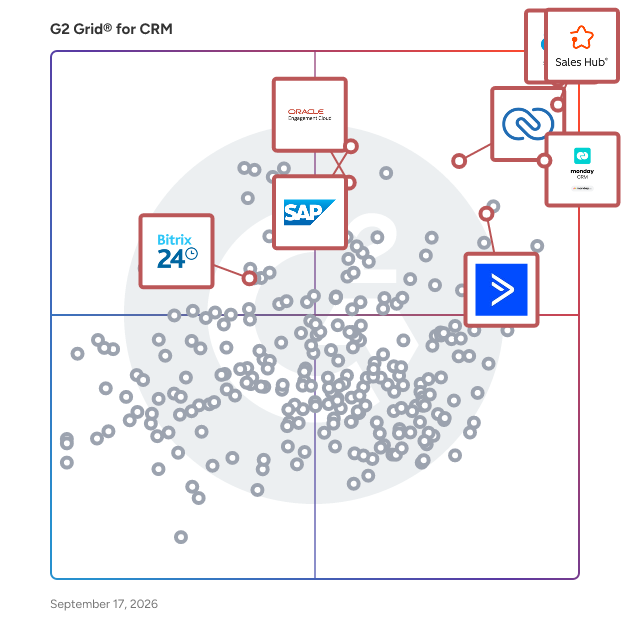
- [What is EngageBay All-in-One Suite used for?](https://www.g2.com/discussions/what-is-engagebay-all-in-one-suite-used-for)

### 24. [Vtiger All-In-One CRM](https://www.g2.com/products/vtiger-all-in-one-crm/reviews)
Vtiger’s mission is to build software that gives customer-facing teams at small- and medium-sized businesses the ability to create fruitful and enduring relationships with customers. Vtiger CRM provides you a 360-degree view of all your customer information in one place and helps you optimize your sales, support, and marketing touch-points with real-time actions and conversational Insights. Vtiger CRM helps teams create delightful experiences across the entire customer lifecycle - AI-powered CRM and robust automation tools help sales teams to focus on the right deals and deliver growth. With Vtiger, get a unified CRM to break silos and get marketing, sales, and support on the same page with a single source of truth. Deliver exceptional customer experience and support by engaging with your customers across multiple channels. Manage your work on the go with our mobile applications for both Android and iOS.


**Average Rating:** 4.3/5.0
**Total Reviews:** 389
**How Do G2 Users Rate Vtiger All-In-One CRM?**

- **Has the product been a good partner in doing business?:** 8.6/10 (Category avg: 8.9/10)
- **Workflow Capability:** 8.4/10 (Category avg: 8.5/10)
- **Contact &amp; Account Management:** 8.7/10 (Category avg: 8.7/10)
- **Opportunity &amp; Pipeline Mgmt.:** 8.1/10 (Category avg: 8.6/10)

**Who Is the Company Behind Vtiger All-In-One CRM?**

- **Seller:** [Vtiger](https://www.g2.com/sellers/vtiger)
- **Year Founded:** 2004
- **HQ Location:** Cupertino, California
- **Twitter:** @vtigercrm (2,678 Twitter followers)
- **LinkedIn® Page:** https://www.linkedin.com/company/1270573/ (248 employees on LinkedIn®)
- **Phone:** 1-877-784-9277

**Who Uses This Product?**
- **Who Uses This:** CEO, Managing Director
- **Top Industries:** Information Technology and Services, Computer Software
- **Company Size:** 68% Small-Business, 30% Mid-Market


#### What Are Vtiger All-In-One CRM's Pros and Cons?

**Pros:**

- Affordable (1 reviews)
- Call Management (1 reviews)
- Customizability (1 reviews)
- Customization (1 reviews)
- Ease of Use (1 reviews)

**Cons:**

- Missing Features (2 reviews)
- Bugs (1 reviews)
- CRM Issues (1 reviews)
- Not Intuitive (1 reviews)
- Not User-Friendly (1 reviews)


### What Do G2 Reviewers Say About Vtiger All-In-One CRM?
*AI-generated summary from verified user reviews*

**Pros:**

- Users value the **affordability** of Vtiger All-In-One CRM, making it accessible for small organizations.
- Users value the **customizable call management** features in Vtiger, enhancing tracking and organization of customer interactions.
- Users find the **customizability** of Vtiger All-In-One CRM invaluable for tracking unique fields like employee certifications.
- Users value the **customization options** in Vtiger All-In-One CRM, allowing tailored fields for unique business needs.
- Users love the **ease of use** of Vtiger All-In-One CRM, requiring minimal training for efficient operation.

**Cons:**

- Users find the **lack of necessary features** in Vtiger limits its effectiveness compared to other CRM systems.
- Users report enduring **persistent bugs** during data migration and poor customer service, leading to a frustrating experience.
- Users report **persistent CRM issues** with Vtiger, including poor migration support and frustrating customer service experiences.
- Users find Vtiger&#39;s interface **not intuitive** , leading to frustrating migration experiences and inadequate customer support.
- Users find Vtiger difficult due to **poor customer support** , leading to frustrating and prolonged setup challenges.

#### What Are Recent G2 Reviews of Vtiger All-In-One CRM?

**"[All-in-One Vtiger Platform That Boosts Productivity and Team Coordination](https://www.g2.com/survey_responses/vtiger-all-in-one-crm-review-12792429)"**

**Rating:** 4.0/5.0 stars
*— Verified User in Oil &amp; Energy*

[Read full review](https://www.g2.com/survey_responses/vtiger-all-in-one-crm-review-12792429)

---

**"[Easy to use](https://www.g2.com/survey_responses/vtiger-all-in-one-crm-review-6885870)"**

**Rating:** 5.0/5.0 stars
*— Mbuso H.*

[Read full review](https://www.g2.com/survey_responses/vtiger-all-in-one-crm-review-6885870)

---


#### What Are G2 Users Discussing About Vtiger All-In-One CRM?

- [What is Vtiger All-In-One CRM used for?](https://www.g2.com/discussions/what-is-vtiger-all-in-one-crm-used-for)
- [What is CRM in management?](https://www.g2.com/discussions/vtiger-all-in-one-crm-what-is-crm-in-management)
- [Is vtiger free?](https://www.g2.com/discussions/is-vtiger-free)
- [How do CRM systems work?](https://www.g2.com/discussions/how-do-crm-systems-work)
- [What is the use of vtiger CRM?](https://www.g2.com/discussions/vtiger-all-in-one-crm-what-is-the-use-of-vtiger-crm)

### 25. [Less Annoying CRM](https://www.g2.com/products/less-annoying-crm/reviews)
We built Less Annoying CRM in 2009 for the thousands of independent consultants, agents, and small business owners who are hitting the limits of their spreadsheets, but nowhere near needing the complexity of big CRMs. Less Annoying CRM is for you if you’ve ever wished you could attach a to-do list to a contact, keep all your notes and emails for a client in one place, or just get a simple nudge so a follow-up never slips through the cracks again. We&#39;re the middle ground between the spreadsheet you&#39;re manually updating, and all those complicated, expensive, overwhelming CRMs on top 10 lists. We&#39;re built to be more than a spreadsheet, less than a CRM. You get a simple contact list, a calendar that syncs with Google and Outlook, and an easy-to-read report of your leads and tasks. All your team members can collaborate without the chaos of a shared spreadsheet, and you&#39;ll get a daily email agenda of everything on your plate. What you \*won’t\* get are confusing features you’ll never use, a consultant to set it all up, or a surprise bill because you needed an extra feature. We believe in one simple price ($15/month/user), no long-term contracts, and free phone and email support from real, happy humans. See why we are ranked G2&#39;s #1 easiest-to-use CRM. Start your no-hassle, 30-day free trial today -- no credit card needed.


**Average Rating:** 4.9/5.0
**Total Reviews:** 655
**How Do G2 Users Rate Less Annoying CRM?**

- **Has the product been a good partner in doing business?:** 9.9/10 (Category avg: 8.9/10)
- **Workflow Capability:** 9.0/10 (Category avg: 8.5/10)
- **Contact &amp; Account Management:** 9.6/10 (Category avg: 8.7/10)
- **Opportunity &amp; Pipeline Mgmt.:** 9.1/10 (Category avg: 8.6/10)

**Who Is the Company Behind Less Annoying CRM?**

- **Seller:** [Less Annoying Software](https://www.g2.com/sellers/less-annoying-software)
- **Company Website:** https://www.lessannoyingcrm.com/
- **Year Founded:** 2009
- **HQ Location:** St. Louis, MO
- **Twitter:** @LessAnnoyingCRM (1,125 Twitter followers)
- **LinkedIn® Page:** https://www.linkedin.com/company/2444991/ (27 employees on LinkedIn®)

**Who Uses This Product?**
- **Who Uses This:** Owner, President
- **Top Industries:** Insurance, Financial Services
- **Company Size:** 88% Small-Business, 8% Mid-Market


#### What Are Less Annoying CRM's Pros and Cons?

**Pros:**

- Ease of Use (28 reviews)
- Customer Support (18 reviews)
- Simplicity (18 reviews)
- User-Friendly (15 reviews)
- Affordable (12 reviews)

**Cons:**

- Missing Features (12 reviews)
- Integration Issues (6 reviews)
- Limited Features (5 reviews)
- Feature Issues (3 reviews)
- Limited Customization (3 reviews)


### What Do G2 Reviewers Say About Less Annoying CRM?
*AI-generated summary from verified user reviews*

**Pros:**

- Users appreciate the **simplicity and ease of use** of Less Annoying CRM, enabling stress-free management of contacts and tasks.
- Users praise the **fantastic customer support** from Less Annoying CRM, appreciating their helpful and responsive team.
- Users love the **simplicity and ease of use** of Less Annoying CRM, making contact management stress-free and efficient.
- Users appreciate the **user-friendly design** of Less Annoying CRM, making it easy to learn and navigate.
- Users value the **affordability** of Less Annoying CRM, finding it perfect for small businesses needing essential features.

**Cons:**

- Users express a desire for **missing features** , indicating a need for more robust capabilities beyond basic functions.
- Users find **integration issues** significant, preferring a more seamless experience without needing external platforms.
- Users find the **limited features** of Less Annoying CRM a constraint as their needs grow for advanced options.
- Users find the **reporting and automation features lacking** , needing more sophistication to meet growing business demands.
- Users find the **limited customization** options frustrating, wishing for more advanced features and personalization capabilities.

#### What Are Recent G2 Reviews of Less Annoying CRM?

**"[Straightforward and Easy to Integrate Into My Routine](https://www.g2.com/survey_responses/less-annoying-crm-review-12875409)"**

**Rating:** 4.0/5.0 stars
*— Carolyn D.*

[Read full review](https://www.g2.com/survey_responses/less-annoying-crm-review-12875409)

---

**"[Managing Nutrition Follow-ups and Daily Tasks More Professionally](https://www.g2.com/survey_responses/less-annoying-crm-review-12865757)"**

**Rating:** 5.0/5.0 stars
*— Ishan S.*

[Read full review](https://www.g2.com/survey_responses/less-annoying-crm-review-12865757)

---


#### What Are G2 Users Discussing About Less Annoying CRM?

- [What is Less Annoying CRM used for?](https://www.g2.com/discussions/what-is-less-annoying-crm-used-for) - 1 comment


## What Is CRM Software?

[Sales Tools](https://www.g2.com/categories/sales-tools)

## What Software Categories Are Similar to CRM Software?

- [Marketing Automation Software](https://www.g2.com/categories/marketing-automation)
- [Sales Analytics Software](https://www.g2.com/categories/sales-analytics)
- [Online Form Builder Software](https://www.g2.com/categories/online-form-builder)


---

## How Do You Choose the Right CRM Software?

### Everything  About CRMs

### CRM software buying insights at a glance

[Customer relationship management (CRM) software](https://www.g2.com/categories/crm) strategically manages customer interactions across marketing, sales, service, and analytics functions, using capabilities such as customer data aggregation, workflow automation, and analytics-driven insights.

Organizations primarily use CRM software to manage leads, track customer interactions, automate sales pipelines, and centralize customer data. CRM systems range from sales automation tools to specialized solutions tailored for industries such as real estate, finance, or nonprofits.

Most CRM solutions are priced per user monthly or annually, averaging approximately $35 per user/month, with free plans for small businesses and premium enterprise solutions reaching up to $3,960 per user/year.

If you’re evaluating CRM software, consider your organization&#39;s size, desired integrations, pricing transparency, ease of use, feature availability, vendor support quality, and AI capabilities. Essential questions include:

- How transparent and scalable is the pricing structure?
- What training and onboarding resources are provided?
- What integrations are supported, and how user-friendly are they?
- How responsive is the vendor to customer support issues?
- Does the CRM utilize AI to automate interactions or insights?

G2&#39;s top-rated CRM systems currently include Salesforce Sales Cloud, HubSpot Sales Hub, ActiveCampaign, ClickUp, and Close.

### What is CRM software?

G2 defines [CRM software](https://www.g2.com/categories/crm) as platforms and applications designed to strategically manage and optimize customer interactions across marketing, sales, service, and analytics functions. Effective CRM systems aggregate multiple data sources, automate customer-facing workflows, and offer insights to accelerate sales conversions.

Organizations typically source first-party customer data through call center interactions, web-based lead forms, social media engagements, and targeted marketing campaigns. CRM modules then organize this information systematically by demographic attributes, customer interactions, purchasing signals, and conversion potential.

CRM tools further simplify sales processes by automating lead nurturing, prospect outreach, and campaign management. These applications provide a centralized system to track deal progression, customer interactions, financial transactions, and post-sale support, delivering a unified, real-time view of the entire customer journey.

The CRM market is projected to reach $96.39 billion by 2026, growing at a compound annual growth rate (CAGR) of 10.6% between 2021 and 2026. ([_Source 1_](https://www.g2.com/articles/sales-statistics))

G2 currently covers 785 CRM products, with 9963 reviews published in the last 12 months, making it one of the most reviewed and comprehensive software categories on our platform. ([_Source 2_](https://documentation.g2.com/docs/research-scoring-methodologies))

### What are the top reviewed CRM systems on G2?

G2 scores the top-rated CRM systems based on a [proprietary algorithm](https://documentation.g2.com/docs/research-scoring-methodologies) that factors in real-user satisfaction ratings and popularity from review data. Here are the five highest-rated CRM products G2 for this category:

#### 1. [Salesforce Sales Cloud](https://www.g2.com/products/salesforce-salesforce-sales-cloud/reviews)

- Number of Reviews: 20,244
- Satisfaction: 99
- Market Presence: 99
- G2 Score: 99

#### 2. [HubSpot Sales Hub](https://www.g2.com/products/hubspot-sales-hub/reviews)

- Number of Reviews: 9,685
- Satisfaction: 99
- Market Presence: 87
- G2 Score: 93

#### 3. [ActiveCampaign](https://www.g2.com/products/activecampaign/reviews)

- Number of Reviews: 3,503
- Satisfaction: 94
- Market Presence: 70
- G2 Score: 82

#### 4. [ClickUp](https://www.g2.com/products/clickup/reviews)

- Number of Reviews: 1,507
- Satisfaction: 93
- Market Presence: 70
- G2 Score: 81

#### 5. [Close](https://www.g2.com/products/close/reviews)

- Number of Reviews: 1,346
- Satisfaction: 98
- Market Presence: 63
- G2 Score: 81

These rankings are determined by combining verified user ratings and publicly available web search popularity data:

- The **Satisfaction Score** measures user satisfaction with software products based on user feedback, review quality, quantity, and recency. It helps buyers easily understand how well a product meets user expectations.([_Source 2_](https://documentation.g2.com/docs/research-scoring-methodologies))
- The **Market Presence Score** measures a product&#39;s prominence in its market. It combines data from G2 user reviews and external sources, focusing primarily on product-specific factors to reflect real-world popularity and vendor influence.([_Source 2_](https://documentation.g2.com/docs/research-scoring-methodologies))
- G2 ranks products using a unique scoring system called the **G2 Score** , calculated from real user reviews, online data, and social signals. This score makes it easy to compare and evaluate different software products within each G2 category.([_Source 2_](https://documentation.g2.com/docs/research-scoring-methodologies))

### CRM software pricing and cost considerations

CRM software pricing varies significantly depending on the vendor, scale, complexity, and deployment model. Pricing categories typically include:

- Free tier: Basic functionality suitable for startups or small businesses requiring minimal CRM capabilities.
- Entry-level and mid-market Tiers: Moderate feature sets with per-user subscription pricing targeted at mid-sized businesses.
- Enterprise-level tiers: Comprehensive, highly customizable solutions with extensive support, integrations, advanced analytics, and strategic implementation support.

Most CRM software solutions on the market are priced per–user per month, but they can also be offered at annual rates. According to G2 data covering 86 CRM products (245 editions), the average annual license cost is about $415.95, roughly $35 per user per month when paid yearly. Some products offer [free versions](https://www.g2.com/categories/crm/free), while high-end, enterprise-level solutions can cost up to $3,960 per user per year.

Organizations should carefully evaluate Total Cost of Ownership (TCO), including hidden costs such as onboarding, integrations, training, and ongoing technical support. For on-premises solutions, factor in hardware, IT resources, and ongoing maintenance.

### Types of CRM software on G2

CRM software solutions typically fall into the following categories, each with distinctive functionalities suited to specific organizational needs:

- Sales Automation CRM: Focuses primarily on automating sales processes, enhancing productivity, and streamlining pipeline management.
- Analytical CRM: Provides deep data-driven insights, predictive analytics, and customer segmentation through advanced AI-driven reporting.
- Industry-Specific CRM: This type of CRM offers specialized features tailored to industry-specific operational requirements. This includes [real estate CRM software](https://www.g2.com/categories/real-estate-crm), [construction CRM software](https://www.g2.com/categories/construction-crm), [financial services CRM software](https://www.g2.com/categories/financial-services-crm), [mortgage CRM software](https://www.g2.com/categories/mortgage-crm), [legal CRM software](https://www.g2.com/categories/legal-crm), [PR CRM software](https://www.g2.com/categories/pr-crm), and [nonprofit CRM software](https://www.g2.com/categories/nonprofit-crm).
- [Social CRM](https://www.g2.com/categories/crm/f/social-network-integration): Captures and manages customer interactions from social media channels, facilitating seamless cross-platform engagement.
- [Mobile CRM](https://learn.g2.com/mobile-crm): Enables sales and marketing teams to access CRM capabilities via mobile apps, supporting productivity on the go.
- [All-in-One CRM](https://www.g2.com/categories/crm/f/all-in-one): Combines multiple CRM functions into a unified platform, eliminating the need for disparate applications. This software supplants the need for broken software chains like standalone [ERPs](https://www.g2.com/categories/erp-systems) or [human capital management systems (HCMs)](https://www.g2.com/categories/hcm-software).
- [Standalone CRM](https://www.g2.com/categories/crm/f/standalone): Operates independently without requiring extensive integration into an existing tech ecosystem. Often found in small or mid-sized businesses that prefer simpler setups.
- Cloud-based CRM: Delivers scalable and secure solutions through cloud infrastructure, reducing IT complexity and promoting agile growth.
- [Small Business CRM](https://www.g2.com/categories/crm/small-business): This type of CRM provides accessible, intuitive CRM tools specifically designed for smaller organizations with straightforward deployment and lower costs.

### Top CRM software features rated by G2 reviewers

There is no [best CRM software](https://learn.g2.com/best-customer-relationship-management-software-tools) for everyone. Different CRM features within CRM software can help users in a few ways:

- Contact &amp; account management: Store customer data and manage interactions centrally.
- Opportunity &amp; pipeline management: Track sales deals through each stage from lead to close.
- Task &amp; activity management: Schedule tasks, assign deadlines, and track activities.
- Lead management: Capture, qualify, and manage leads throughout the sales process
- Email marketing &amp; campaign management: Create, launch, and measure email and multi-channel campaigns.
- Reporting &amp; dashboards: Visualize performance and trends through intuitive dashboards and customizable reports.
- Mobile &amp; social integration: Access CRM on mobile devices; engage customers through social media channels.
- Workflow automation: Automate repetitive tasks and streamline business processes.
- Customer support &amp; case management: Track and resolve customer inquiries and issues effectively.
- Integration capabilities: Seamlessly integrate CRM with other essential software and business systems.
- AI capabilities: Use generative AI to automate text creation and enhance customer interactions.

### Top CRM software benefits identified by G2 reviewers

Effective CRM implementation can yield multiple strategic business benefits, including:

**Enhanced customer insights:** CRM systems consolidate interaction data for deeper customer understanding, enabling personalized engagements and proactive sales efforts.

_“It consolidates all customer data onto a single platform, tracking the entire customer journey within our system through a single interface. This includes all interactions from the initial point of contact, whether inbound or outbound, through marketing or direct sales, to the final outcome of either a closed win or closed loss.”_ - [Akshay S., Sales Development Manager](https://www.g2.com/products/salesforce-salesforce-sales-cloud/reviews/salesforce-sales-cloud-review-10680560).

**Improved revenue growth:** CRM tools support targeted marketing campaigns, streamline lead management, and accelerate sales processes that drive increased revenue.

_“The tool helps me keep track of leads, follow-ups, and client interactions without things slipping through the cracks.”_ - [Chelsea D., CEO](https://www.g2.com/products/hubspot-sales-hub/reviews/hubspot-sales-hub-review-10856634).

**Optimized productivity and efficiency:** CRM software automates repetitive tasks, minimizing manual intervention and freeing staff to focus on high-value strategic activities.

“_The automation features save us a ton of time by cutting out manual data entry and follow-ups. This means we can focus more on growing the business and less on chasing details, which has definitely helped our team stay more productive and organized._” - [Byron S., VP, SFDC &amp; Data Administration](https://www.g2.com/products/salesforce-salesforce-sales-cloud/reviews/salesforce-sales-cloud-review-10275142).

**Improved collaboration and transparency:** CRM solutions offer centralized visibility into customer journeys, facilitating cross-functional collaboration and aligning sales and marketing efforts.

_“The tool allows us to have transparency and a centralized location for all of our staff to store the information we need to help the customers.”_ - [Ryan L](https://www.g2.com/products/close/reviews/close-review-8802552).

### Top CRM systems challenges identified by G2 reviewers

Implementing CRM software often presents specific challenges that can impact overall success. Analyzing G2 user reviews reveals frequent issues, including pricing concerns, complexity of user experience, limited or underdeveloped features, inadequate customer support, and integration limitations. Here are the most common hurdles users face, along with practical advice to address them:

**1. Cost concerns:** Reviewers frequently identify high or unclear pricing as a barrier, particularly with enterprise-level CRM systems, making affordability an ongoing concern, especially for small or mid-sized businesses.

- **Essential questions to ask your CRM vendor:** How is your pricing structured, and what exactly is included in each tier? Are there additional costs for adding users, premium features, or customer support?
- **How to overcome the challenge:** Seek transparency from vendors upfront and consider scalable solutions or tiered pricing options that align costs with your business growth.

**2. Steep learning curve:** CRM software often introduces unfamiliar workflows, resulting in slow adoption or even resistance within teams accustomed to different processes.

- **Essential questions to ask your CRM vendor:** What training programs or onboarding resources do you provide? How do you help teams transition smoothly from their existing processes?
- **How to overcome the challenge:** To facilitate an easier transition, opt for CRM solutions that offer comprehensive onboarding materials, continuous training, and strong vendor support.

**3. Limited or underdeveloped features:** Many CRM users express disappointment regarding missing or insufficiently developed functionality, limiting effectiveness in critical business scenarios.

- **Essential questions to ask your CRM vendor:** Can you outline your current features and upcoming development roadmap? How responsive are you to customer feedback when prioritizing new features?
- **How to overcome the challenge:** Prioritize CRM providers who are transparent about feature availability and future development, ensuring alignment with your essential business needs.

**4. Support and reliability issues:** Users commonly cite inadequate customer support, slow response times, or unreliable systems as major pain points negatively affecting daily operations.

- **Essential questions to ask your CRM vendor:** What support channels are available, and what are your average response and resolution times? Do you provide clearly defined Service Level Agreements (SLAs)?
- **How to overcome the challenge:** Evaluate vendors based on proven reliability and responsive customer support. Clarify expectations with detailed SLAs.

**5. Integration limitations:** CRM solutions can become less effective when integration with existing tools is difficult, limited, or complex, reducing overall productivity.

- **Essential questions to ask your CRM vendor:** What integrations do you currently support, and how complex is the setup process? Do you assist customers with integrations and troubleshooting?
- **How to overcome the challenge:** Choose CRM software with robust, user-friendly integrations. Confirm compatibility with essential tools early in the evaluation process.

### What is CRM software used for?

Analysis of CRM software reviews reveals the following common scenarios:

- **Lead management &amp; tracking:** Businesses use CRM tools to capture, qualify, assign, and monitor leads throughout the sales funnel, ensuring leads never slip through the cracks.
- **Centralized customer &amp; contact data:** Reviewers say CRM solutions help store all customer interactions and communications in one centralized system, ensuring multiple departments access accurate, up-to-date records without duplication.
- **Pipeline &amp; deal management:** CRM applications organize sales opportunities clearly by stage, value, and timeline, allowing sales teams to prioritize deals and forecast revenue effectively
- **Collaborative account &amp; case management:** Reviewers say CRM platforms simplify customer support by enabling multiple stakeholders to collaborate on customer inquiries, case management, and issue resolution, keeping all communication records linked and up-to-date.

### Who uses CRM systems?

CRM software users span various roles, from senior executives to frontline sales and marketing professionals. Based on G2 reviewer demographics, typical users include CEOs, owners, founders, account executives, directors, and managers. Common industries include computer software, marketing and advertising, information technology, financial services, and real estate.

### Common CRM software integrations

We analyzed extensive user-review data to identify common software categories users frequently integrate with CRM:

- **Marketing automation software:** Integrating CRM software with [marketing automation tools](https://www.g2.com/categories/marketing-automation) allows businesses to automate email campaigns, streamline lead nurturing, and enhance lead scoring capabilities.
- **Email &amp; calendar tools:** CRM integrations with [popular email](https://www.g2.com/categories/email) and [calendar platforms](https://www.g2.com/categories/calendar-software) help centralize communication, appointments, and contact management, providing a unified view of customer interactions.
- **Workflow and custom integration tools:** Flexible integrations using APIs and [workflow automation tools](https://www.g2.com/categories/workflow-management) enable businesses to synchronize CRM data seamlessly across multiple applications, enhancing operational efficiency.
- **Collaboration &amp; communication platforms:** Connecting CRM tools with [internal collaboration and messaging platforms](https://www.g2.com/categories/internal-communications) facilitates instant communication, simplifies meeting scheduling, and enhances internal team coordination.
- **Website and lead capture software:** Integrating CRM apps with website and [form-building software](https://www.g2.com/categories/online-form-builder) allows real-time lead capture, automated follow-ups, and personalized customer engagement directly from web-based interactions.

### What&#39;s the best CRM app for small business owners?

For [small business owners](https://www.g2.com/categories/crm/small-business), I recommend exploring CRM apps specifically designed for small and medium-sized businesses (SMBs) as they focus on ease of use and cost-effectiveness, such as:&amp;nbsp;

1. [Microsoft Dynamics CRM](https://www.g2.com/products/dynamics-365-sales/reviews)&amp;nbsp;offers a robust solution to boost sales productivity and marketing effectiveness with social insights, business intelligence, and campaign management. It provides both on-premises and cloud solutions, with mobile CRM apps for on-the-go management.
2. [Vtiger All-In-One CRM](https://www.g2.com/products/vtiger-all-in-one-crm/reviews)&amp;nbsp;is tailored for small to medium-sized businesses, providing a 360-degree customer view. It optimizes sales, support, and marketing touch-points with AI-powered tools and robust automation to enhance customer experiences across various channels.
3. [BSI Software](https://www.g2.com/products/bsi-software/reviews)&amp;nbsp;delivers a comprehensive platform for the digitalization of customer relationships, with a strong CRM system supporting industries like banking, insurance, and energy. It emphasizes a 360° customer view and uses AI to improve processes and customer interactions.

### What CRM is the best for e-commerce platforms?

The best CRM software for eCommerce platforms depends on your business size, sale volume, and integration needs. With that in mind, here are some top choices to support your business based on G2 reviews:

1. [HighLevel](https://www.g2.com/products/highlevel/reviews): An all-in-one Sales &amp; Marketing CRM with CRM, Email, 2-way SMS, consolidated messaging, outbound calling, and more.
2. [Close](https://www.g2.com/products/close/reviews): A CRM designed to help small, scaling businesses close deals fast with built-in communication, automation, and reporting tools.
3. [Agile CRM](https://www.g2.com/products/agile-crm/reviews): A fully integrated CRM with sales tracking, contact management, marketing automation, and telephony.

### Future of CRM software

- **AI-driven insights and predictive analytics:** CRM platforms increasingly leverage AI and machine learning to process vast customer data, predict behaviors, and recommend the next best actions. ([_Source 3_](https://www.sap.com/india/products/crm/what-is-crm/crm-technology-trends.html)) This helps teams identify high-value leads, reduce churn, and personalize communications. Predictive analytics accelerate sales cycles and improve marketing campaign targeting. AI-powered insights also automate manual tasks, allowing teams to focus on strategic interactions rather than data entry.
- **Omnichannel engagement and conversational interfaces:** Businesses are meeting customers on their terms, whether via chat, social media, or voice assistants. CRMs of the future will integrate new channels effortlessly and use conversational AI to streamline interactions. ([_Source 4_](https://solutionsmetrix.com/article/top-crm-trends-2024/))
- **Deeper IoT integration for real-time engagement:** With the rise of IoT (smart devices, wearables, sensors), next-generation CRMs will sync with real-time data streams. ([_Source 3_](https://www.sap.com/india/products/crm/what-is-crm/crm-technology-trends.html)) This will enable proactive customer service, automated triggers for maintenance or support, and personalized product recommendations based on real-world usage.

### CRM Software FAQs

### Most Popular FAQs

#### **Which CRM Software has the best reviews?**

Based on verified user ratings across thousands of reviews, these CRM platforms consistently earn top marks for overall satisfaction:

- [HubSpot Sales Hub](https://www.g2.com/products/hubspot-sales-hub/reviews) — A widely adopted CRM known for its clean interface, cross-team collaboration tools, and strong alignment between sales and marketing workflows.
- [HighLevel](https://www.g2.com/products/highlevel/reviews) — An all-in-one platform built for agencies and small businesses, praised for its automation capabilities, multi-channel communication tools, and competitive pricing.
- [Close](https://www.g2.com/products/close/reviews) — A sales-focused CRM built for speed and simplicity, highly rated by outbound teams for its integrated calling, SMS, email, and intuitive lead management.
- [Pipedrive](https://www.g2.com/products/pipedrive/reviews) — A pipeline-centric CRM recognized for its visual deal management, ease of use, and robust integration ecosystem.

#### **What is CRM software used for?**

CRM (Customer Relationship Management) software is a tool that helps businesses organize, track, and manage their interactions with leads, prospects, and customers in one centralized platform. At its core, CRM software solves the problem of scattered customer data by consolidating contact records, communication history, sales pipeline stages, and task management into a single system. Users across industries rely on CRM software to automate follow-up sequences, reduce manual data entry, manage deal pipelines, generate performance reports, and improve response times. Beyond basic contact management, modern CRM platforms increasingly incorporate email and SMS marketing, AI-powered assistants, chatbots, and workflow automation — making them the operational backbone of sales, marketing, and customer support teams alike.

#### **What is the best cloud-based CRM for the service industry?**

Cloud-based CRM tools built for service-oriented businesses prioritize scheduling, client communication, and workflow visibility. The following options earn strong marks from service industry users:

- [HubSpot Sales Hub](https://www.g2.com/products/hubspot-sales-hub/reviews) — A cloud-native CRM that centralizes client outreach, deal tracking, and email sequences, making it a practical choice for service teams managing ongoing client relationships.
- [HighLevel](https://www.g2.com/products/highlevel/reviews) — A cloud-based platform popular with service-based agencies that need integrated appointment booking, reputation management, and automated client follow-up under one subscription.
- [OctopusPro](https://www.g2.com/products/octopuspro/reviews) — A field service management and CRM platform designed for mobile and on-site service businesses, offering ticketing, scheduling, and customizable workflow tracking.
- [Pipedrive](https://www.g2.com/products/pipedrive/reviews) — A hosted CRM with strong pipeline visualization tools, activity reminders, and integration capabilities suited for service businesses managing multiple client engagements.

#### **What is the best CRM solution with marketing automation features?**

The strongest CRM platforms with embedded marketing automation go beyond basic contact management to support full campaign execution, lead nurturing, and cross-channel outreach. Top options include:

- [HubSpot Sales Hub](https://www.g2.com/products/hubspot-sales-hub/reviews) — Offers tightly integrated sales and marketing tools including email sequences, deal tracking, and web visit tracking, with an interface designed for non-technical users.
- [ActiveCampaign](https://www.g2.com/products/activecampaign/reviews) — A CRM and marketing automation platform built around flexible workflow builders, enabling businesses to automate complex multi-step email and SMS campaigns with conditional logic.
- [HighLevel](https://www.g2.com/products/highlevel/reviews) — An all-in-one platform that combines CRM, email, SMS, social media automation, funnel building, and AI voice agents, purpose-built for marketing agencies managing multiple clients.
- [EngageBay All-in-One Suite](https://www.g2.com/products/engagebay-all-in-one-suite/reviews) — An affordable CRM suite that consolidates email marketing, contact management, landing page creation, and support ticketing in a single interface.

#### **What is the best CRM for beginners?**

New CRM users consistently prioritize ease of setup, guided onboarding, and an interface that doesn&#39;t require technical expertise. The following platforms earn high marks for accessibility among first-time CRM users:

- [Pipedrive](https://www.g2.com/products/pipedrive/reviews) — Frequently cited by new users for its intuitive visual pipeline, clean drag-and-drop interface, and short onboarding curve — users routinely describe going live within a day.
- [CRMOne](https://www.g2.com/products/crmone/reviews) — A straightforward CRM praised for quick setup and a responsive support team that helps new teams get organized with minimal friction.
- [Nutshell](https://www.g2.com/products/nutshell/reviews) — Known for its simple, navigable interface, extensive learning resources, and live webinars that help users new to CRM get up to speed quickly.
- [Bigin by Zoho CRM](https://www.g2.com/products/bigin-by-zoho-crm/reviews) — A lightweight CRM designed as an entry point into the Zoho ecosystem, offering pipeline management and contact organization with minimal setup complexity.

### Small Business FAQs

#### **What is the most affordable CRM software for SMBs?**

For small and medium-sized businesses, the best CRM at an affordable price point balances essential functionality with low total cost of ownership. These platforms consistently earn recognition from SMB users on a budget:

- [EngageBay All-in-One Suite](https://www.g2.com/products/engagebay-all-in-one-suite/reviews) — One of the most cost-effective all-in-one platforms for small businesses, offering CRM, email marketing, and support features at a price point that rivals far more limited tools.
- [CRMOne](https://www.g2.com/products/crmone/reviews) — Frequently highlighted by SMB users for delivering core CRM and automation features at a price that competes favorably with enterprise-tier alternatives.
- [Bigin by Zoho CRM](https://www.g2.com/products/bigin-by-zoho-crm/reviews) — A purposefully lean and affordable CRM built for small teams, offering pipeline management, contact tracking, and the ability to scale into the broader Zoho ecosystem as needs grow.
- [Nutshell](https://www.g2.com/products/nutshell/reviews) — A moderately priced CRM that small businesses frequently choose for its clean UI, fast implementation, and value relative to more expensive mid-market platforms.

#### **What is the best CRM software for startups?**

Startups need a CRM that can be implemented quickly, scales with growth, and doesn&#39;t require a dedicated admin to maintain. These platforms are well-suited for early-stage teams, and you can explore the full [SMB CRM software](https://www.g2.com/categories/crm?segment=small-business) category on G2 for a complete view of top-rated options:

- [HubSpot Sales Hub](https://www.g2.com/products/hubspot-sales-hub/reviews) — A popular choice among startups for its free tier, ease of use, and the ability to grow into more advanced sales and marketing automation as the team scales.
- [Pipedrive](https://www.g2.com/products/pipedrive/reviews) — Startup founders and small sales teams frequently cite Pipedrive&#39;s visual pipeline and quick setup as a practical way to get deal tracking in place immediately.
- [Close](https://www.g2.com/products/close/reviews) — Built specifically for sales-first startups, Close consolidates calling, emailing, and SMS in one interface with a fast onboarding experience and no-bloat feature set.
- [EngageBay All-in-One Suite](https://www.g2.com/products/engagebay-all-in-one-suite/reviews) — Startup users appreciate its low cost and all-in-one approach to managing contacts, automating outreach, and handling support tickets without adding additional tools.

#### **Which CRM software is the most user-friendly for startups?**

Ease of use is critical for lean startup teams where no one has the bandwidth for weeks of onboarding. Among the CRM platforms reviewed, these earn the highest usability marks from small-team users:

- [Pipedrive](https://www.g2.com/products/pipedrive/reviews) — Consistently cited for its visual, drag-and-drop pipeline and minimal learning curve, making it one of the most accessible CRMs for teams adopting their first dedicated sales tool.
- [CRMOne](https://www.g2.com/products/crmone/reviews) — Startup users highlight how quickly their teams got comfortable with the interface, with most reporting same-day or next-day adoption without formal training.
- [Nutshell](https://www.g2.com/products/nutshell/reviews) — Praised for a clean, distraction-free interface and a responsive support team that guides new users through setup and configuration challenges.
- [folk](https://www.g2.com/products/folk-folk/reviews) — A CRM built around a modern, Notion-inspired interface that resonates strongly with startup founders and small teams who find traditional CRMs overly complex.

#### **What is the best CRM for small teams in financial services?**

Financial services firms at the small business level need a CRM that can reliably track client accounts, log correspondence, and support compliance-adjacent record-keeping. You can browse the full [small business CRM software](https://www.g2.com/categories/crm?segment=small-business) landscape on G2 to compare options by industry:

- [Maximizer](https://www.g2.com/products/maximizer/reviews) — A CRM used by financial advisors and insurance professionals, valued for its robust contact-to-account lifecycle tracking, task scheduling for renewals, and detailed client record storage.
- [HubSpot Sales Hub](https://www.g2.com/products/hubspot-sales-hub/reviews) — Widely used in financial services SMBs for managing client outreach, tracking deal pipelines, and aligning sales and marketing communication in a single platform.
- [Close](https://www.g2.com/products/close/reviews) — Used by small financial services sales teams for its speed of entry, multi-channel outreach, and streamlined lead management without unnecessary complexity.
- [Pipedrive](https://www.g2.com/products/pipedrive/reviews) — Adopted by small financial services teams for its intuitive pipeline management and integration flexibility with quoting and productivity tools.

#### **What CRM tools are best suited for solo business owners and freelancers?**

Solo operators and freelancers need a CRM that&#39;s fast to set up, low-maintenance, and handles the essential tasks of contact management and follow-up without requiring a team to administer it. The following platforms see strong adoption among single-person operations, and you can explore the full [small business CRM](https://www.g2.com/categories/crm?segment=small-business) category for additional options:

- [Pipedrive](https://www.g2.com/products/pipedrive/reviews) — A top pick among freelancers and solo sales professionals for keeping deal pipelines organized without requiring daily admin overhead.
- [Less Annoying CRM](https://www.g2.com/products/less-annoying-crm/reviews) — Built explicitly for solopreneurs and micro-businesses, prioritizing simplicity and a flat-rate pricing model that avoids the per-feature upgrade cycle common in larger platforms.
- [folk](https://www.g2.com/products/folk-folk/reviews) — A modern, lightweight CRM designed around relationship management that resonates strongly with founders and freelancers who rely heavily on LinkedIn and email for outreach.
- [Nutshell](https://www.g2.com/products/nutshell/reviews) — Solo users highlight Nutshell&#39;s ease of implementation and task-based reminders as core value drivers for staying organized without dedicated CRM support.

### Enterprise FAQs

#### **What is the best-rated CRM software for tech enterprises?**

Technology enterprises require a CRM with deep customization, scalable architecture, and strong developer ecosystems. These platforms earn the highest marks from enterprise tech buyers, and you can explore the full [enterprise CRM software](https://www.g2.com/categories/crm?segment=enterprise) category on G2:

- [Agentforce Sales (formerly Salesforce Sales Cloud)](https://www.g2.com/products/agentforce-sales-formerly-salesforce-sales-cloud/reviews) — The market&#39;s most recognized enterprise CRM, built for large tech organizations that require custom objects, complex automation, AI-driven sales assistance, and broad ecosystem integrations.
- [HubSpot Sales Hub](https://www.g2.com/products/hubspot-sales-hub/reviews) — Increasingly adopted by mid-to-large tech companies for its accessible interface, cross-functional deal visibility, and tight alignment between marketing and sales data.
- [Creatio](https://www.g2.com/products/creatio/reviews) — A no-code-first CRM platform valued by enterprise tech teams for its powerful marketing suite, flexible workflow automation, and deep customization without requiring developer resources.
- [NetSuite](https://www.g2.com/products/netsuite/reviews) — An enterprise-grade platform that combines CRM capabilities with ERP, finance, and inventory management, making it a strong fit for tech companies that need unified business operations.

#### **What is the most reliable CRM software tool for enterprises?**

Enterprise buyers prioritize uptime, data integrity, and consistent performance at scale. Among platforms with significant enterprise user bases in this review dataset, the following earn recognition for reliability:

- [Agentforce Sales (formerly Salesforce Sales Cloud)](https://www.g2.com/products/agentforce-sales-formerly-salesforce-sales-cloud/reviews) — Long the enterprise reliability benchmark, Salesforce is recognized for centralized data management, extensive uptime infrastructure, and a mature ecosystem of support and implementation partners.
- [HubSpot Sales Hub](https://www.g2.com/products/hubspot-sales-hub/reviews) — Enterprise teams frequently cite HubSpot&#39;s consistent platform availability, predictable performance, and strong user permissions and admin controls.
- [Creatio](https://www.g2.com/products/creatio/reviews) — Enterprise users highlight Creatio&#39;s stability across large user deployments, noting its hosted and on-premise options and continuous platform enhancements as drivers of long-term confidence.
- [NetSuite](https://www.g2.com/products/netsuite/reviews) — Trusted by enterprises for housing critical business data across CRM, financials, and operations in a single auditable system, with robust case-based support infrastructure.

#### **What is the best-reviewed CRM software for enterprise app integration?**

Integration depth is a top evaluation criterion for enterprise CRM buyers managing complex tech stacks. These platforms stand out for their integration ecosystems, and you can explore the [enterprise CRM software](https://www.g2.com/categories/crm?segment=enterprise) category on G2 for in-depth comparison:

- [Agentforce Sales (formerly Salesforce Sales Cloud)](https://www.g2.com/products/agentforce-sales-formerly-salesforce-sales-cloud/reviews) — Salesforce&#39;s AppExchange and native API infrastructure make it a top choice for enterprises requiring integration with ERP, marketing, service, and analytics platforms at scale.
- [HubSpot Sales Hub](https://www.g2.com/products/hubspot-sales-hub/reviews) — Enterprise users praise HubSpot&#39;s native integrations and marketplace ecosystem for connecting sales data across business intelligence, email, and communication tools.
- [ActiveCampaign](https://www.g2.com/products/activecampaign/reviews) — Recognized for strong third-party integrations including Salesforce and Zapier, making it a practical choice for enterprises embedding CRM and marketing automation into broader workflows.
- [Creatio](https://www.g2.com/products/creatio/reviews) — Enterprise reviewers highlight Creatio&#39;s flexible integration framework and no-code tooling as differentiators for connecting CRM processes with legacy and third-party systems.

#### **What is the best enterprise CRM for customer success teams?**

Customer success functions within enterprise organizations require a CRM layer that goes beyond pipeline management — one that tracks client health, onboarding progress, and renewal timelines. You can browse the full [enterprise CRM software](https://www.g2.com/categories/crm?segment=enterprise) category on G2 for a complete list of top-rated options:

- [Planhat](https://www.g2.com/products/planhat/reviews) — Purpose-built for enterprise customer success teams, Planhat manages the full post-sale lifecycle from onboarding through renewal with health scoring, timeline management, and proactive account planning tools.
- [HubSpot Sales Hub](https://www.g2.com/products/hubspot-sales-hub/reviews) — Enterprise customer success teams use HubSpot for cross-department deal visibility and contact management, particularly in environments where CS and sales operate from shared data.
- [Agentforce Sales (formerly Salesforce Sales Cloud)](https://www.g2.com/products/agentforce-sales-formerly-salesforce-sales-cloud/reviews) — Used by enterprise CS teams that need deep customization and integration to map complex customer journeys, connect service records, and track success metrics across accounts.
- [SuperOffice CRM](https://www.g2.com/products/superoffice-crm/reviews) — An enterprise CRM that centralizes account information, customer contracts, and support requests, earning high marks from administrators for its configurability and clean information architecture.

#### **What is the best enterprise CRM with AI capabilities?**

AI functionality in enterprise CRM has moved from differentiator to expectation, spanning predictive analytics, automated outreach, intelligent forecasting, and virtual sales assistants. The following platforms lead on AI maturity within the enterprise segment reviewed here, and you can explore the [enterprise CRM](https://www.g2.com/categories/crm?segment=enterprise) category on G2 for the latest AI feature comparisons:

- [Agentforce Sales (formerly Salesforce Sales Cloud)](https://www.g2.com/products/agentforce-sales-formerly-salesforce-sales-cloud/reviews) — Salesforce&#39;s native AI layer, Einstein, delivers predictive lead scoring, automated data capture, and conversational AI for enterprise sales teams operating at scale.
- [Creatio](https://www.g2.com/products/creatio/reviews) — Enterprise users highlight Creatio&#39;s rapidly expanding AI capabilities integrated within its no-code workflow environment, enabling smarter automation without developer dependency.
- [HubSpot Sales Hub](https://www.g2.com/products/hubspot-sales-hub/reviews) — HubSpot has embedded AI across email tracking, deal predictions, and content assistance — features enterprise teams are actively incorporating into daily sales workflows.
- [HighLevel](https://www.g2.com/products/highlevel/reviews) — Reviewers in tech-oriented agencies highlight HighLevel&#39;s AI voice employee and AI-driven workflow features as a meaningful competitive advantage, particularly for teams managing high volumes of inbound and outbound communication.

### Sources

1. [73+ Sales Statistics To Achieve Business Targets in 2024](https://www.g2.com/articles/sales-statistics), G2
2. G2 reviews data: G2 reviews are sourced from verified software users and factor in satisfaction ratings, market presence, and real-time popularity data. Rankings in this guide are based on an analysis of G2 user reviews published within the last 12 months. For more details, read [G2’s full scoring methodology](https://documentation.g2.com/docs/research-scoring-methodologies).
3. [CRM technology trends](https://www.sap.com/india/products/crm/what-is-crm/crm-technology-trends.html), SAP
4. [Keeping Up to Date with CRM Trends in 2025: Here’s What to Expect](https://solutionsmetrix.com/article/top-crm-trends-2024/)​, Solutions Metrix

Last Updated on 04/20/2026

_﻿Written and researched by&amp;nbsp;_[_Blue Bowen_](https://research.g2.com/insights/author/blue-bowen)

_Reviewed and edited by&amp;nbsp;_[_Sinchana Mistry_](https://www.linkedin.com/in/sinchana-mistry95/)


---
## What Are the Most Common Questions About CRM Software?
*AI-generated · Last updated: June  3, 2026*
### What&#39;s the best CRM app for small business owners
Based on G2 reviews, these CRM products are frequently mentioned by recent reviewers for helping small teams stay organized, manage pipelines, and reduce manual follow-up work.

- [HubSpot Sales Hub](https://www.g2.com/products/hubspot-sales-hub) — easy navigation and pipeline reviews.
- [Pipedrive](https://www.g2.com/products/pipedrive) — visual pipeline and follow-up reminders.
- [HubSpot Sales Hub](https://www.g2.com/products/hubspot-sales-hub) — simple setup and contact management.
- [Pipedrive](https://www.g2.com/products/pipedrive) — straightforward CRM for growing teams.


### Best CRM solution with marketing automation features
Based on G2 reviews, these CRM products are often highlighted by recent users for combining contact management with email automation, campaign workflows, and follow-up support.

- [HubSpot Sales Hub](https://www.g2.com/products/hubspot-sales-hub) — sales workflows with marketing alignment.
- [ActiveCampaign](https://www.g2.com/products/activecampaign) — automated journeys and contact segmentation.
- [Zoho CRM](https://www.g2.com/products/zoho-crm) — lead tracking and workflow automation.
- [ActiveCampaign](https://www.g2.com/products/activecampaign) — CRM plus email automation workflows.


### What CRM is the best for e-commerce platforms
Based on G2 reviews, these CRM products are commonly cited by recent users for organizing customer data, syncing communications, and supporting sales workflows tied to online channels.

- [HubSpot Sales Hub](https://www.g2.com/products/hubspot-sales-hub) — centralized deals and outreach tracking.
- [ActiveCampaign](https://www.g2.com/products/activecampaign) — customer journeys and campaign automation.
- [Agentforce Sales (formerly Salesforce Sales Cloud)](https://www.g2.com/products/agentforce-sales-formerly-salesforce-sales-cloud) — integrations and pipeline visibility.
- [Zoho CRM](https://www.g2.com/products/zoho-crm) — organized leads and follow-up workflows.


### What should buyers look for in crm software
According to verified users, the most consistent buying themes in recent CRM reviews are ease of use, clear pipeline visibility, centralized customer records, and reminders that keep follow-ups from being missed. Buyers also repeatedly mention reporting dashboards, task management, and workflow automation as practical time-savers. Integrations matter too, especially for email, calendars, and other business tools teams already use. Reviewers also flag common tradeoffs to evaluate during selection, including learning curve, mobile experience, reporting depth, and how well the system handles customization as processes become more complex. In short, buyers tend to value software that keeps sales activity organized without making daily work harder.


### How do teams use CRM for follow-ups
According to verified users, teams mainly use CRM to keep follow-ups consistent and visible across the whole sales process. Recent reviews repeatedly mention reminders, task tracking, activity history, and pipeline stages as the tools that prevent outreach from slipping through the cracks. Users describe using CRM to log calls, emails, notes, and next steps in one place so any teammate can quickly understand account context. Automation is another recurring theme, with teams using it to trigger reminders, route leads, and reduce repetitive admin work. The practical outcome reviewers highlight most often is better organization: less time spent chasing updates manually and more confidence that important prospects and customers are being contacted on time.


