Introducing G2.ai, the future of software buying.Try now

Best Enterprise Cloud Infrastructure Monitoring Software

Tian Lin
TL
Researched and written by Tian Lin

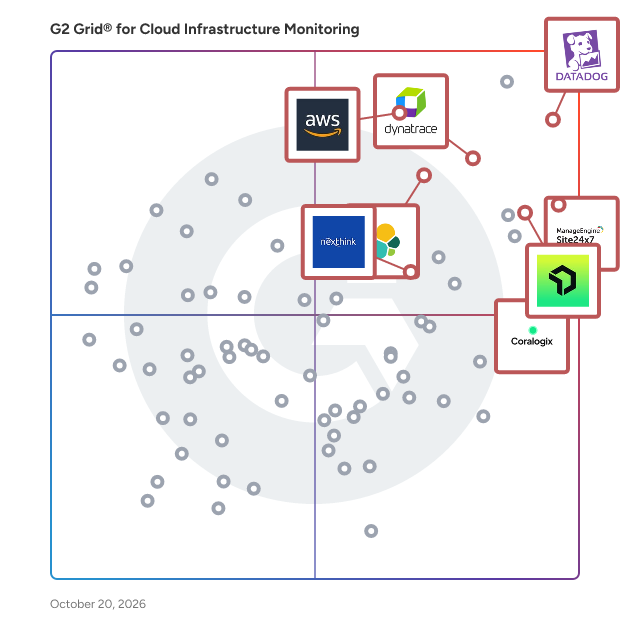
Products classified in the overall Cloud Infrastructure Monitoring category are similar in many regards and help companies of all sizes solve their business problems. However, enterprise business features, pricing, setup, and installation differ from businesses of other sizes, which is why we match buyers to the right Enterprise Business Cloud Infrastructure Monitoring to fit their needs. Compare product ratings based on reviews from enterprise users or connect with one of G2's buying advisors to find the right solutions within the Enterprise Business Cloud Infrastructure Monitoring category.

In addition to qualifying for inclusion in the Cloud Infrastructure Monitoring Software category, to qualify for inclusion in the Enterprise Business Cloud Infrastructure Monitoring Software category, a product must have at least 10 reviews left by a reviewer from an enterprise business.

Show More
Show Less

G2 takes pride in showing unbiased reviews on user satisfaction in our ratings and reports. We do not allow paid placements in any of our ratings, rankings, or reports. Learn about our scoring methodologies.

Coming Soon
Get Trending Cloud Infrastructure Monitoring Products in Your Inbox

A weekly snapshot of rising stars, new launches, and what everyone's buzzing about.

Sample Trending Products Newsletter
1 filter applied
Clear All

36 Listings in Enterprise Cloud Infrastructure Monitoring Software Available

  • Overview
    Expand/Collapse Overview
  • Product Description
    How are these determined?Information
    This description is provided by the seller.

    Dynatrace is advancing observability for today’s digital businesses, helping to transform the complexity of modern digital ecosystems into powerful business assets. By leveraging AI-powered insights,

    Users
    • Software Engineer
    • Senior Software Engineer
    Industries
    • Information Technology and Services
    • Financial Services
    Market Segment
    • 69% Enterprise
    • 23% Mid-Market
  • Pros and Cons
    Expand/Collapse Pros and Cons
  • Dynatrace Pros and Cons
    How are these determined?Information
    Pros and Cons are compiled from review feedback and grouped into themes to provide an easy-to-understand summary of user reviews.
    Pros
    Ease of Use
    37
    Insights
    37
    Monitoring
    33
    Analytics
    31
    Features
    31
    Cons
    Learning Curve
    30
    Learning Difficulty
    22
    Expensive
    21
    Complex Configuration
    18
    Complexity
    14
  • User Satisfaction
    Expand/Collapse User Satisfaction
  • Dynatrace features and usability ratings that predict user satisfaction
    9.0
    Usage Monitoring
    Average: 9.1
    8.3
    Ease of Use
    Average: 8.7
    8.6
    Dashboards and Visualizations
    Average: 8.9
    8.3
    Reporting
    Average: 8.6
  • Seller Details
    Expand/Collapse Seller Details
  • Seller Details
    Seller
    Dynatrace
    Year Founded
    2005
    HQ Location
    Boston, MA
    Twitter
    @Dynatrace
    18,585 Twitter followers
    LinkedIn® Page
    www.linkedin.com
    5,802 employees on LinkedIn®
    Ownership
    NYSE: DT
Product Description
How are these determined?Information
This description is provided by the seller.

Dynatrace is advancing observability for today’s digital businesses, helping to transform the complexity of modern digital ecosystems into powerful business assets. By leveraging AI-powered insights,

Users
  • Software Engineer
  • Senior Software Engineer
Industries
  • Information Technology and Services
  • Financial Services
Market Segment
  • 69% Enterprise
  • 23% Mid-Market
Dynatrace Pros and Cons
How are these determined?Information
Pros and Cons are compiled from review feedback and grouped into themes to provide an easy-to-understand summary of user reviews.
Pros
Ease of Use
37
Insights
37
Monitoring
33
Analytics
31
Features
31
Cons
Learning Curve
30
Learning Difficulty
22
Expensive
21
Complex Configuration
18
Complexity
14
Dynatrace features and usability ratings that predict user satisfaction
9.0
Usage Monitoring
Average: 9.1
8.3
Ease of Use
Average: 8.7
8.6
Dashboards and Visualizations
Average: 8.9
8.3
Reporting
Average: 8.6
Seller Details
Seller
Dynatrace
Year Founded
2005
HQ Location
Boston, MA
Twitter
@Dynatrace
18,585 Twitter followers
LinkedIn® Page
www.linkedin.com
5,802 employees on LinkedIn®
Ownership
NYSE: DT
(675)4.4 out of 5
Optimized for quick response
9th Easiest To Use in Cloud Infrastructure Monitoring software
View top Consulting Services for Datadog
Save to My Lists
Entry Level Price:$0 Per host, per month
  • Overview
    Expand/Collapse Overview
  • Product Description
    How are these determined?Information
    This description is provided by the seller.

    Datadog is the monitoring, security and analytics platform for developers, IT operations teams, security engineers and business users in the cloud age. The SaaS platform integrates and automates infra

    Users
    • Software Engineer
    • DevOps Engineer
    Industries
    • Information Technology and Services
    • Computer Software
    Market Segment
    • 47% Mid-Market
    • 34% Enterprise
  • Pros and Cons
    Expand/Collapse Pros and Cons
  • Datadog Pros and Cons
    How are these determined?Information
    Pros and Cons are compiled from review feedback and grouped into themes to provide an easy-to-understand summary of user reviews.
    Pros
    Ease of Use
    158
    Monitoring
    138
    Real-time Monitoring
    120
    Features
    93
    Integrations
    88
    Cons
    Expensive
    96
    Pricing Issues
    76
    Learning Curve
    74
    Cost
    66
    Learning Difficulty
    57
  • User Satisfaction
    Expand/Collapse User Satisfaction
  • Datadog features and usability ratings that predict user satisfaction
    8.9
    Usage Monitoring
    Average: 9.1
    8.2
    Ease of Use
    Average: 8.7
    8.9
    Dashboards and Visualizations
    Average: 8.9
    8.5
    Reporting
    Average: 8.6
  • Seller Details
    Expand/Collapse Seller Details
  • Seller Details
    Seller
    Datadog
    Company Website
    Year Founded
    2010
    HQ Location
    New York
    Twitter
    @datadoghq
    50,509 Twitter followers
    LinkedIn® Page
    www.linkedin.com
    10,373 employees on LinkedIn®
Product Description
How are these determined?Information
This description is provided by the seller.

Datadog is the monitoring, security and analytics platform for developers, IT operations teams, security engineers and business users in the cloud age. The SaaS platform integrates and automates infra

Users
  • Software Engineer
  • DevOps Engineer
Industries
  • Information Technology and Services
  • Computer Software
Market Segment
  • 47% Mid-Market
  • 34% Enterprise
Datadog Pros and Cons
How are these determined?Information
Pros and Cons are compiled from review feedback and grouped into themes to provide an easy-to-understand summary of user reviews.
Pros
Ease of Use
158
Monitoring
138
Real-time Monitoring
120
Features
93
Integrations
88
Cons
Expensive
96
Pricing Issues
76
Learning Curve
74
Cost
66
Learning Difficulty
57
Datadog features and usability ratings that predict user satisfaction
8.9
Usage Monitoring
Average: 9.1
8.2
Ease of Use
Average: 8.7
8.9
Dashboards and Visualizations
Average: 8.9
8.5
Reporting
Average: 8.6
Seller Details
Seller
Datadog
Company Website
Year Founded
2010
HQ Location
New York
Twitter
@datadoghq
50,509 Twitter followers
LinkedIn® Page
www.linkedin.com
10,373 employees on LinkedIn®

This is how G2 Deals can help you:

  • Easily shop for curated – and trusted – software
  • Own your own software buying journey
  • Discover exclusive deals on software
(328)4.6 out of 5
Optimized for quick response
2nd Easiest To Use in Cloud Infrastructure Monitoring software
Save to My Lists
Entry Level Price:$1.50
  • Overview
    Expand/Collapse Overview
  • Product Description
    How are these determined?Information
    This description is provided by the seller.

    Coralogix is a modern, full-stack observability platform transforming how businesses process and understand their data. Our unique architecture powers in-stream analytics without reliance on indexing

    Users
    • Software Engineer
    • DevOps Engineer
    Industries
    • Computer Software
    • Information Technology and Services
    Market Segment
    • 54% Mid-Market
    • 33% Enterprise
  • Pros and Cons
    Expand/Collapse Pros and Cons
  • Coralogix Pros and Cons
    How are these determined?Information
    Pros and Cons are compiled from review feedback and grouped into themes to provide an easy-to-understand summary of user reviews.
    Pros
    Ease of Use
    92
    Log Management
    77
    Customer Support
    74
    User Interface
    64
    Features
    59
    Cons
    Missing Features
    36
    Learning Curve
    30
    Difficult Learning
    28
    Learning Difficulty
    26
    Poor UI
    25
  • User Satisfaction
    Expand/Collapse User Satisfaction
  • Coralogix features and usability ratings that predict user satisfaction
    9.1
    Usage Monitoring
    Average: 9.1
    8.7
    Ease of Use
    Average: 8.7
    8.7
    Dashboards and Visualizations
    Average: 8.9
    8.6
    Reporting
    Average: 8.6
  • Seller Details
    Expand/Collapse Seller Details
  • Seller Details
    Seller
    Coralogix
    Company Website
    Year Founded
    2014
    HQ Location
    San Francisco, CA
    Twitter
    @Coralogix
    4,073 Twitter followers
    LinkedIn® Page
    www.linkedin.com
    549 employees on LinkedIn®
Product Description
How are these determined?Information
This description is provided by the seller.

Coralogix is a modern, full-stack observability platform transforming how businesses process and understand their data. Our unique architecture powers in-stream analytics without reliance on indexing

Users
  • Software Engineer
  • DevOps Engineer
Industries
  • Computer Software
  • Information Technology and Services
Market Segment
  • 54% Mid-Market
  • 33% Enterprise
Coralogix Pros and Cons
How are these determined?Information
Pros and Cons are compiled from review feedback and grouped into themes to provide an easy-to-understand summary of user reviews.
Pros
Ease of Use
92
Log Management
77
Customer Support
74
User Interface
64
Features
59
Cons
Missing Features
36
Learning Curve
30
Difficult Learning
28
Learning Difficulty
26
Poor UI
25
Coralogix features and usability ratings that predict user satisfaction
9.1
Usage Monitoring
Average: 9.1
8.7
Ease of Use
Average: 8.7
8.7
Dashboards and Visualizations
Average: 8.9
8.6
Reporting
Average: 8.6
Seller Details
Seller
Coralogix
Company Website
Year Founded
2014
HQ Location
San Francisco, CA
Twitter
@Coralogix
4,073 Twitter followers
LinkedIn® Page
www.linkedin.com
549 employees on LinkedIn®
  • Overview
    Expand/Collapse Overview
  • Product Description
    How are these determined?Information
    This description is provided by the seller.

    Amazon CloudWatch is a monitoring service for AWS cloud resources and the applications you run on AWS.

    Users
    • Software Engineer
    • Senior Software Engineer
    Industries
    • Information Technology and Services
    • Computer Software
    Market Segment
    • 41% Enterprise
    • 31% Mid-Market
  • Pros and Cons
    Expand/Collapse Pros and Cons
  • Amazon CloudWatch Pros and Cons
    How are these determined?Information
    Pros and Cons are compiled from review feedback and grouped into themes to provide an easy-to-understand summary of user reviews.
    Pros
    Log Management
    8
    Cloud Services
    4
    Integrations
    4
    Metrics Monitoring
    4
    Monitoring
    4
    Cons
    Pricing Issues
    5
    Expensive
    4
    Cost Management
    2
    Dashboard Issues
    2
    Slow Performance
    2
  • User Satisfaction
    Expand/Collapse User Satisfaction
  • Amazon CloudWatch features and usability ratings that predict user satisfaction
    8.9
    Usage Monitoring
    Average: 9.1
    8.1
    Ease of Use
    Average: 8.7
    8.0
    Dashboards and Visualizations
    Average: 8.9
    8.1
    Reporting
    Average: 8.6
  • Seller Details
    Expand/Collapse Seller Details
  • Seller Details
    Year Founded
    2006
    HQ Location
    Seattle, WA
    Twitter
    @awscloud
    2,217,364 Twitter followers
    LinkedIn® Page
    www.linkedin.com
    143,584 employees on LinkedIn®
    Ownership
    NASDAQ: AMZN
Product Description
How are these determined?Information
This description is provided by the seller.

Amazon CloudWatch is a monitoring service for AWS cloud resources and the applications you run on AWS.

Users
  • Software Engineer
  • Senior Software Engineer
Industries
  • Information Technology and Services
  • Computer Software
Market Segment
  • 41% Enterprise
  • 31% Mid-Market
Amazon CloudWatch Pros and Cons
How are these determined?Information
Pros and Cons are compiled from review feedback and grouped into themes to provide an easy-to-understand summary of user reviews.
Pros
Log Management
8
Cloud Services
4
Integrations
4
Metrics Monitoring
4
Monitoring
4
Cons
Pricing Issues
5
Expensive
4
Cost Management
2
Dashboard Issues
2
Slow Performance
2
Amazon CloudWatch features and usability ratings that predict user satisfaction
8.9
Usage Monitoring
Average: 9.1
8.1
Ease of Use
Average: 8.7
8.0
Dashboards and Visualizations
Average: 8.9
8.1
Reporting
Average: 8.6
Seller Details
Year Founded
2006
HQ Location
Seattle, WA
Twitter
@awscloud
2,217,364 Twitter followers
LinkedIn® Page
www.linkedin.com
143,584 employees on LinkedIn®
Ownership
NASDAQ: AMZN
(633)4.5 out of 5
Optimized for quick response
14th Easiest To Use in Cloud Infrastructure Monitoring software
View top Consulting Services for LogicMonitor
Save to My Lists
Entry Level Price:Contact Us
  • Overview
    Expand/Collapse Overview
  • Product Description
    How are these determined?Information
    This description is provided by the seller.

    LogicMonitor® offers hybrid observability powered by AI. The company’s SaaS-based platform, LM Envision, enables observability across on-prem and multi-cloud environments. We provide IT and business t

    Users
    • Infrastructure Manager
    • IT Manager
    Industries
    • Information Technology and Services
    • Computer Software
    Market Segment
    • 52% Mid-Market
    • 30% Enterprise
  • Pros and Cons
    Expand/Collapse Pros and Cons
  • LogicMonitor Pros and Cons
    How are these determined?Information
    Pros and Cons are compiled from review feedback and grouped into themes to provide an easy-to-understand summary of user reviews.
    Pros
    Monitoring
    68
    Ease of Use
    67
    Real-time Monitoring
    43
    Integrations
    42
    Alerting System
    41
    Cons
    Missing Features
    36
    Poor UI
    30
    Limited Features
    26
    Poor UI Design
    26
    Complexity
    25
  • User Satisfaction
    Expand/Collapse User Satisfaction
  • LogicMonitor features and usability ratings that predict user satisfaction
    8.5
    Usage Monitoring
    Average: 9.1
    8.6
    Ease of Use
    Average: 8.7
    8.4
    Dashboards and Visualizations
    Average: 8.9
    8.0
    Reporting
    Average: 8.6
  • Seller Details
    Expand/Collapse Seller Details
  • Seller Details
    Company Website
    Year Founded
    2007
    HQ Location
    Santa Barbara, CA
    Twitter
    @logicmonitor
    12,556 Twitter followers
    LinkedIn® Page
    www.linkedin.com
    1,180 employees on LinkedIn®
Product Description
How are these determined?Information
This description is provided by the seller.

LogicMonitor® offers hybrid observability powered by AI. The company’s SaaS-based platform, LM Envision, enables observability across on-prem and multi-cloud environments. We provide IT and business t

Users
  • Infrastructure Manager
  • IT Manager
Industries
  • Information Technology and Services
  • Computer Software
Market Segment
  • 52% Mid-Market
  • 30% Enterprise
LogicMonitor Pros and Cons
How are these determined?Information
Pros and Cons are compiled from review feedback and grouped into themes to provide an easy-to-understand summary of user reviews.
Pros
Monitoring
68
Ease of Use
67
Real-time Monitoring
43
Integrations
42
Alerting System
41
Cons
Missing Features
36
Poor UI
30
Limited Features
26
Poor UI Design
26
Complexity
25
LogicMonitor features and usability ratings that predict user satisfaction
8.5
Usage Monitoring
Average: 9.1
8.6
Ease of Use
Average: 8.7
8.4
Dashboards and Visualizations
Average: 8.9
8.0
Reporting
Average: 8.6
Seller Details
Company Website
Year Founded
2007
HQ Location
Santa Barbara, CA
Twitter
@logicmonitor
12,556 Twitter followers
LinkedIn® Page
www.linkedin.com
1,180 employees on LinkedIn®
(569)4.4 out of 5
Optimized for quick response
10th Easiest To Use in Cloud Infrastructure Monitoring software
Save to My Lists
Entry Level Price:Free
  • Overview
    Expand/Collapse Overview
  • Product Description
    How are these determined?Information
    This description is provided by the seller.

    New Relic invented cloud APM for application engineers. Today it is a leader in observability and source of truth for all engineers to make decisions with data across their entire software stack and t

    Users
    • Software Engineer
    • Senior Software Engineer
    Industries
    • Information Technology and Services
    • Computer Software
    Market Segment
    • 43% Mid-Market
    • 30% Enterprise
  • Pros and Cons
    Expand/Collapse Pros and Cons
  • New Relic Pros and Cons
    How are these determined?Information
    Pros and Cons are compiled from review feedback and grouped into themes to provide an easy-to-understand summary of user reviews.
    Pros
    Real-time Monitoring
    59
    Ease of Use
    56
    Monitoring
    48
    Insights
    42
    User Interface
    38
    Cons
    Expensive
    41
    Pricing Issues
    35
    Learning Curve
    23
    Complex Setup
    21
    Complexity
    20
  • User Satisfaction
    Expand/Collapse User Satisfaction
  • New Relic features and usability ratings that predict user satisfaction
    8.9
    Usage Monitoring
    Average: 9.1
    8.4
    Ease of Use
    Average: 8.7
    9.3
    Dashboards and Visualizations
    Average: 8.9
    8.8
    Reporting
    Average: 8.6
  • Seller Details
    Expand/Collapse Seller Details
  • Seller Details
    Seller
    New Relic
    Company Website
    Year Founded
    2008
    HQ Location
    San Francisco, CA
    Twitter
    @newrelic
    66,098 Twitter followers
    LinkedIn® Page
    www.linkedin.com
    3,016 employees on LinkedIn®
Product Description
How are these determined?Information
This description is provided by the seller.

New Relic invented cloud APM for application engineers. Today it is a leader in observability and source of truth for all engineers to make decisions with data across their entire software stack and t

Users
  • Software Engineer
  • Senior Software Engineer
Industries
  • Information Technology and Services
  • Computer Software
Market Segment
  • 43% Mid-Market
  • 30% Enterprise
New Relic Pros and Cons
How are these determined?Information
Pros and Cons are compiled from review feedback and grouped into themes to provide an easy-to-understand summary of user reviews.
Pros
Real-time Monitoring
59
Ease of Use
56
Monitoring
48
Insights
42
User Interface
38
Cons
Expensive
41
Pricing Issues
35
Learning Curve
23
Complex Setup
21
Complexity
20
New Relic features and usability ratings that predict user satisfaction
8.9
Usage Monitoring
Average: 9.1
8.4
Ease of Use
Average: 8.7
9.3
Dashboards and Visualizations
Average: 8.9
8.8
Reporting
Average: 8.6
Seller Details
Seller
New Relic
Company Website
Year Founded
2008
HQ Location
San Francisco, CA
Twitter
@newrelic
66,098 Twitter followers
LinkedIn® Page
www.linkedin.com
3,016 employees on LinkedIn®
(370)4.6 out of 5
Optimized for quick response
Save to My Lists
  • Overview
    Expand/Collapse Overview
  • Product Description
    How are these determined?Information
    This description is provided by the seller.

    Nexthink is the leader in digital employee experience management software. The company provides IT leaders with unprecedented insight allowing them to see, diagnose and fix at scale issues impacting e

    Users
    • Project Manager
    Industries
    • Information Technology and Services
    • Financial Services
    Market Segment
    • 83% Enterprise
    • 11% Mid-Market
  • Pros and Cons
    Expand/Collapse Pros and Cons
  • Nexthink Pros and Cons
    How are these determined?Information
    Pros and Cons are compiled from review feedback and grouped into themes to provide an easy-to-understand summary of user reviews.
    Pros
    Ease of Use
    48
    Positive Experience
    43
    Insights
    38
    Issue Detection
    30
    Customer Support
    29
    Cons
    Difficult Learning
    27
    Complexity
    25
    Learning Curve
    24
    Expensive
    14
    Feature Deficiency
    10
  • User Satisfaction
    Expand/Collapse User Satisfaction
  • Nexthink features and usability ratings that predict user satisfaction
    8.5
    Usage Monitoring
    Average: 9.1
    8.5
    Ease of Use
    Average: 8.7
    8.7
    Dashboards and Visualizations
    Average: 8.9
    8.6
    Reporting
    Average: 8.6
  • Seller Details
    Expand/Collapse Seller Details
  • Seller Details
    Seller
    Nexthink
    Company Website
    Year Founded
    2004
    HQ Location
    Prilly, CH
    Twitter
    @NexthinkNews
    3,287 Twitter followers
    LinkedIn® Page
    www.linkedin.com
    1,138 employees on LinkedIn®
Product Description
How are these determined?Information
This description is provided by the seller.

Nexthink is the leader in digital employee experience management software. The company provides IT leaders with unprecedented insight allowing them to see, diagnose and fix at scale issues impacting e

Users
  • Project Manager
Industries
  • Information Technology and Services
  • Financial Services
Market Segment
  • 83% Enterprise
  • 11% Mid-Market
Nexthink Pros and Cons
How are these determined?Information
Pros and Cons are compiled from review feedback and grouped into themes to provide an easy-to-understand summary of user reviews.
Pros
Ease of Use
48
Positive Experience
43
Insights
38
Issue Detection
30
Customer Support
29
Cons
Difficult Learning
27
Complexity
25
Learning Curve
24
Expensive
14
Feature Deficiency
10
Nexthink features and usability ratings that predict user satisfaction
8.5
Usage Monitoring
Average: 9.1
8.5
Ease of Use
Average: 8.7
8.7
Dashboards and Visualizations
Average: 8.9
8.6
Reporting
Average: 8.6
Seller Details
Seller
Nexthink
Company Website
Year Founded
2004
HQ Location
Prilly, CH
Twitter
@NexthinkNews
3,287 Twitter followers
LinkedIn® Page
www.linkedin.com
1,138 employees on LinkedIn®
(434)4.4 out of 5
Optimized for quick response
13th Easiest To Use in Cloud Infrastructure Monitoring software
Save to My Lists
30% Off: 14.00 USD
  • Overview
    Expand/Collapse Overview
  • Product Description
    How are these determined?Information
    This description is provided by the seller.

    Instana’s Enterprise Observability Platform, powered by automated Application Performance Monitoring, discovers and maps all services, infrastructure, and their inter-dependencies automatically. Insta

    Users
    • Software Engineer
    • System Engineer
    Industries
    • Information Technology and Services
    • Computer Software
    Market Segment
    • 41% Mid-Market
    • 39% Enterprise
  • Pros and Cons
    Expand/Collapse Pros and Cons
  • IBM Instana Pros and Cons
    How are these determined?Information
    Pros and Cons are compiled from review feedback and grouped into themes to provide an easy-to-understand summary of user reviews.
    Pros
    Ease of Use
    103
    Monitoring
    82
    Real-time Monitoring
    77
    Monitoring Capabilities
    66
    Monitoring Services
    45
    Cons
    Expensive
    32
    Missing Features
    28
    User Interface Issues
    28
    Difficult Learning
    24
    Learning Curve
    24
  • User Satisfaction
    Expand/Collapse User Satisfaction
  • IBM Instana features and usability ratings that predict user satisfaction
    8.9
    Usage Monitoring
    Average: 9.1
    8.6
    Ease of Use
    Average: 8.7
    8.5
    Dashboards and Visualizations
    Average: 8.9
    8.5
    Reporting
    Average: 8.6
  • Seller Details
    Expand/Collapse Seller Details
  • Seller Details
    Seller
    IBM
    Company Website
    Year Founded
    1911
    HQ Location
    Armonk, NY
    Twitter
    @IBM
    709,117 Twitter followers
    LinkedIn® Page
    www.linkedin.com
    339,241 employees on LinkedIn®
Product Description
How are these determined?Information
This description is provided by the seller.

Instana’s Enterprise Observability Platform, powered by automated Application Performance Monitoring, discovers and maps all services, infrastructure, and their inter-dependencies automatically. Insta

Users
  • Software Engineer
  • System Engineer
Industries
  • Information Technology and Services
  • Computer Software
Market Segment
  • 41% Mid-Market
  • 39% Enterprise
IBM Instana Pros and Cons
How are these determined?Information
Pros and Cons are compiled from review feedback and grouped into themes to provide an easy-to-understand summary of user reviews.
Pros
Ease of Use
103
Monitoring
82
Real-time Monitoring
77
Monitoring Capabilities
66
Monitoring Services
45
Cons
Expensive
32
Missing Features
28
User Interface Issues
28
Difficult Learning
24
Learning Curve
24
IBM Instana features and usability ratings that predict user satisfaction
8.9
Usage Monitoring
Average: 9.1
8.6
Ease of Use
Average: 8.7
8.5
Dashboards and Visualizations
Average: 8.9
8.5
Reporting
Average: 8.6
Seller Details
Seller
IBM
Company Website
Year Founded
1911
HQ Location
Armonk, NY
Twitter
@IBM
709,117 Twitter followers
LinkedIn® Page
www.linkedin.com
339,241 employees on LinkedIn®
(64)4.9 out of 5
1st Easiest To Use in Cloud Infrastructure Monitoring software
Save to My Lists
30% Off: 69
  • Overview
    Expand/Collapse Overview
  • Product Description
    How are these determined?Information
    This description is provided by the seller.

    Cloudshot is a SaaS-based CloudOps platform designed to optimize cloud infrastructure management. Its patented algorithm offers real-time monitoring, providing instant insights into resource performan

    Users
    • Cloud Architect
    • MD
    Industries
    • Information Technology and Services
    Market Segment
    • 88% Enterprise
    • 22% Mid-Market
    User Sentiment
    How are these determined?Information
    These insights, currently in beta, are compiled from user reviews and grouped to display a high-level overview of the software.
    • Cloudshot is a cloud management platform that provides security, cost visibility, and infrastructure management across multiple cloud providers.
    • Users like Cloudshot's ability to automatically detect security misconfigurations, provide clear cost visibility, generate Terraform scripts, and centralize visualization of multi-cloud setups.
    • Users experienced no significant issues with Cloudshot, with most feedback indicating satisfaction with the platform's features and performance.
  • Pros and Cons
    Expand/Collapse Pros and Cons
  • Cloudshot Pros and Cons
    How are these determined?Information
    Pros and Cons are compiled from review feedback and grouped into themes to provide an easy-to-understand summary of user reviews.
    Pros
    Cloud Services
    36
    Cloud Management
    34
    Ease of Use
    34
    Features
    17
    Security
    15
    Cons
    Lack of GCP Support
    2
    Missing Features
    2
    Complexity
    1
    Migration Issues
    1
    Steep Learning Curve
    1
  • User Satisfaction
    Expand/Collapse User Satisfaction
  • Cloudshot features and usability ratings that predict user satisfaction
    10.0
    Usage Monitoring
    Average: 9.1
    9.6
    Ease of Use
    Average: 8.7
    9.5
    Dashboards and Visualizations
    Average: 8.9
    10.0
    Reporting
    Average: 8.6
  • Seller Details
    Expand/Collapse Seller Details
  • Seller Details
    Year Founded
    2023
    HQ Location
    Pune, IN
    LinkedIn® Page
    www.linkedin.com
    28 employees on LinkedIn®
Product Description
How are these determined?Information
This description is provided by the seller.

Cloudshot is a SaaS-based CloudOps platform designed to optimize cloud infrastructure management. Its patented algorithm offers real-time monitoring, providing instant insights into resource performan

Users
  • Cloud Architect
  • MD
Industries
  • Information Technology and Services
Market Segment
  • 88% Enterprise
  • 22% Mid-Market
User Sentiment
How are these determined?Information
These insights, currently in beta, are compiled from user reviews and grouped to display a high-level overview of the software.
  • Cloudshot is a cloud management platform that provides security, cost visibility, and infrastructure management across multiple cloud providers.
  • Users like Cloudshot's ability to automatically detect security misconfigurations, provide clear cost visibility, generate Terraform scripts, and centralize visualization of multi-cloud setups.
  • Users experienced no significant issues with Cloudshot, with most feedback indicating satisfaction with the platform's features and performance.
Cloudshot Pros and Cons
How are these determined?Information
Pros and Cons are compiled from review feedback and grouped into themes to provide an easy-to-understand summary of user reviews.
Pros
Cloud Services
36
Cloud Management
34
Ease of Use
34
Features
17
Security
15
Cons
Lack of GCP Support
2
Missing Features
2
Complexity
1
Migration Issues
1
Steep Learning Curve
1
Cloudshot features and usability ratings that predict user satisfaction
10.0
Usage Monitoring
Average: 9.1
9.6
Ease of Use
Average: 8.7
9.5
Dashboards and Visualizations
Average: 8.9
10.0
Reporting
Average: 8.6
Seller Details
Year Founded
2023
HQ Location
Pune, IN
LinkedIn® Page
www.linkedin.com
28 employees on LinkedIn®
  • Overview
    Expand/Collapse Overview
  • Product Description
    How are these determined?Information
    This description is provided by the seller.

    Azure Monitor is a platform capability for monitoring your Azure resources. Azure Monitor allows you to collect granular performance and utilization data, activity and diagnostics logs, and notificati

    Users
    No information available
    Industries
    • Computer Software
    • Information Technology and Services
    Market Segment
    • 38% Enterprise
    • 31% Mid-Market
  • Pros and Cons
    Expand/Collapse Pros and Cons
  • Azure Monitor Pros and Cons
    How are these determined?Information
    Pros and Cons are compiled from review feedback and grouped into themes to provide an easy-to-understand summary of user reviews.
    Pros
    Alerting Systems
    2
    Insights
    2
    Log Management
    2
    Metrics Analysis
    2
    Monitoring
    2
    Cons
    Complex Debugging
    2
    Complexity
    2
    Alert System
    1
    Complex Interface
    1
    Complex Setup
    1
  • User Satisfaction
    Expand/Collapse User Satisfaction
  • Azure Monitor features and usability ratings that predict user satisfaction
    8.8
    Usage Monitoring
    Average: 9.1
    8.5
    Ease of Use
    Average: 8.7
    8.7
    Dashboards and Visualizations
    Average: 8.9
    8.6
    Reporting
    Average: 8.6
  • Seller Details
    Expand/Collapse Seller Details
  • Seller Details
    Seller
    Microsoft
    Year Founded
    1975
    HQ Location
    Redmond, Washington
    Twitter
    @microsoft
    13,133,301 Twitter followers
    LinkedIn® Page
    www.linkedin.com
    220,934 employees on LinkedIn®
    Ownership
    MSFT
Product Description
How are these determined?Information
This description is provided by the seller.

Azure Monitor is a platform capability for monitoring your Azure resources. Azure Monitor allows you to collect granular performance and utilization data, activity and diagnostics logs, and notificati

Users
No information available
Industries
  • Computer Software
  • Information Technology and Services
Market Segment
  • 38% Enterprise
  • 31% Mid-Market
Azure Monitor Pros and Cons
How are these determined?Information
Pros and Cons are compiled from review feedback and grouped into themes to provide an easy-to-understand summary of user reviews.
Pros
Alerting Systems
2
Insights
2
Log Management
2
Metrics Analysis
2
Monitoring
2
Cons
Complex Debugging
2
Complexity
2
Alert System
1
Complex Interface
1
Complex Setup
1
Azure Monitor features and usability ratings that predict user satisfaction
8.8
Usage Monitoring
Average: 9.1
8.5
Ease of Use
Average: 8.7
8.7
Dashboards and Visualizations
Average: 8.9
8.6
Reporting
Average: 8.6
Seller Details
Seller
Microsoft
Year Founded
1975
HQ Location
Redmond, Washington
Twitter
@microsoft
13,133,301 Twitter followers
LinkedIn® Page
www.linkedin.com
220,934 employees on LinkedIn®
Ownership
MSFT
  • Overview
    Expand/Collapse Overview
  • Product Description
    How are these determined?Information
    This description is provided by the seller.

    Powered by Cisco, AppDynamics is on a mission to help companies see their technology through the lens of the business so they can work as one to prioritize what matters most. We’re reinventing the obs

    Users
    • Senior Software Engineer
    • Software Engineer
    Industries
    • Information Technology and Services
    • Computer Software
    Market Segment
    • 58% Enterprise
    • 35% Mid-Market
  • Pros and Cons
    Expand/Collapse Pros and Cons
  • Splunk AppDynamics Pros and Cons
    How are these determined?Information
    Pros and Cons are compiled from review feedback and grouped into themes to provide an easy-to-understand summary of user reviews.
    Pros
    Ease of Use
    3
    Automation
    2
    Cloud Services
    2
    Easy Integrations
    2
    Features
    2
    Cons
    Expensive
    2
    Pricing Issues
    2
    Billing Issues
    1
    Cost Increase
    1
    Inefficient Alert System
    1
  • User Satisfaction
    Expand/Collapse User Satisfaction
  • Splunk AppDynamics features and usability ratings that predict user satisfaction
    8.8
    Usage Monitoring
    Average: 9.1
    8.5
    Ease of Use
    Average: 8.7
    8.9
    Dashboards and Visualizations
    Average: 8.9
    8.9
    Reporting
    Average: 8.6
  • Seller Details
    Expand/Collapse Seller Details
  • Seller Details
    Seller
    Cisco
    Year Founded
    1984
    HQ Location
    San Jose, CA
    Twitter
    @Cisco
    721,900 Twitter followers
    LinkedIn® Page
    www.linkedin.com
    95,148 employees on LinkedIn®
    Ownership
    NASDAQ:CSCO
Product Description
How are these determined?Information
This description is provided by the seller.

Powered by Cisco, AppDynamics is on a mission to help companies see their technology through the lens of the business so they can work as one to prioritize what matters most. We’re reinventing the obs

Users
  • Senior Software Engineer
  • Software Engineer
Industries
  • Information Technology and Services
  • Computer Software
Market Segment
  • 58% Enterprise
  • 35% Mid-Market
Splunk AppDynamics Pros and Cons
How are these determined?Information
Pros and Cons are compiled from review feedback and grouped into themes to provide an easy-to-understand summary of user reviews.
Pros
Ease of Use
3
Automation
2
Cloud Services
2
Easy Integrations
2
Features
2
Cons
Expensive
2
Pricing Issues
2
Billing Issues
1
Cost Increase
1
Inefficient Alert System
1
Splunk AppDynamics features and usability ratings that predict user satisfaction
8.8
Usage Monitoring
Average: 9.1
8.5
Ease of Use
Average: 8.7
8.9
Dashboards and Visualizations
Average: 8.9
8.9
Reporting
Average: 8.6
Seller Details
Seller
Cisco
Year Founded
1984
HQ Location
San Jose, CA
Twitter
@Cisco
721,900 Twitter followers
LinkedIn® Page
www.linkedin.com
95,148 employees on LinkedIn®
Ownership
NASDAQ:CSCO
(383)4.6 out of 5
6th Easiest To Use in Cloud Infrastructure Monitoring software
Save to My Lists
Entry Level Price:$9/month 11 monitors
  • Overview
    Expand/Collapse Overview
  • Product Description
    How are these determined?Information
    This description is provided by the seller.

    ManageEngine Site24x7 offers unified cloud monitoring for DevOps and IT operations within small to large organizations. The solution monitors the experience of real users accessing websites and applic

    Users
    • CEO
    • CTO
    Industries
    • Information Technology and Services
    • Computer Software
    Market Segment
    • 46% Mid-Market
    • 42% Small-Business
  • Pros and Cons
    Expand/Collapse Pros and Cons
  • Site24x7 Pros and Cons
    How are these determined?Information
    Pros and Cons are compiled from review feedback and grouped into themes to provide an easy-to-understand summary of user reviews.
    Pros
    Monitoring
    134
    Ease of Use
    129
    Real-time Monitoring
    110
    Monitoring Services
    104
    Monitoring Features
    98
    Cons
    Alert Issues
    39
    Missing Features
    35
    Learning Curve
    34
    Complex Configuration
    29
    Expensive
    28
  • User Satisfaction
    Expand/Collapse User Satisfaction
  • Site24x7 features and usability ratings that predict user satisfaction
    9.2
    Usage Monitoring
    Average: 9.1
    8.9
    Ease of Use
    Average: 8.7
    8.8
    Dashboards and Visualizations
    Average: 8.9
    8.8
    Reporting
    Average: 8.6
  • Seller Details
    Expand/Collapse Seller Details
  • Seller Details
    Year Founded
    2002
    HQ Location
    Del Valle, Texas
    Twitter
    @manageengine
    7,869 Twitter followers
    LinkedIn® Page
    www.linkedin.com
    550 employees on LinkedIn®
Product Description
How are these determined?Information
This description is provided by the seller.

ManageEngine Site24x7 offers unified cloud monitoring for DevOps and IT operations within small to large organizations. The solution monitors the experience of real users accessing websites and applic

Users
  • CEO
  • CTO
Industries
  • Information Technology and Services
  • Computer Software
Market Segment
  • 46% Mid-Market
  • 42% Small-Business
Site24x7 Pros and Cons
How are these determined?Information
Pros and Cons are compiled from review feedback and grouped into themes to provide an easy-to-understand summary of user reviews.
Pros
Monitoring
134
Ease of Use
129
Real-time Monitoring
110
Monitoring Services
104
Monitoring Features
98
Cons
Alert Issues
39
Missing Features
35
Learning Curve
34
Complex Configuration
29
Expensive
28
Site24x7 features and usability ratings that predict user satisfaction
9.2
Usage Monitoring
Average: 9.1
8.9
Ease of Use
Average: 8.7
8.8
Dashboards and Visualizations
Average: 8.9
8.8
Reporting
Average: 8.6
Seller Details
Year Founded
2002
HQ Location
Del Valle, Texas
Twitter
@manageengine
7,869 Twitter followers
LinkedIn® Page
www.linkedin.com
550 employees on LinkedIn®
  • Overview
    Expand/Collapse Overview
  • Product Description
    How are these determined?Information
    This description is provided by the seller.

    ManageEngine Applications Manager is an application performance & IT infrastructure monitoring solution that is designed to combat modern infrastructure problems and ensure that your business and

    Users
    No information available
    Industries
    • Information Technology and Services
    • Computer Software
    Market Segment
    • 44% Enterprise
    • 44% Mid-Market
  • Pros and Cons
    Expand/Collapse Pros and Cons
  • ManageEngine Applications Manager Pros and Cons
    How are these determined?Information
    Pros and Cons are compiled from review feedback and grouped into themes to provide an easy-to-understand summary of user reviews.
    Pros
    Monitoring
    18
    Monitoring Capabilities
    14
    Ease of Use
    12
    Monitoring Ease
    10
    Real-time Monitoring
    10
    Cons
    Limited Features
    7
    Feature Limitations
    5
    Insufficient Knowledge
    4
    Limited Customization
    4
    Complexity
    3
  • User Satisfaction
    Expand/Collapse User Satisfaction
  • ManageEngine Applications Manager features and usability ratings that predict user satisfaction
    9.4
    Usage Monitoring
    Average: 9.1
    9.3
    Ease of Use
    Average: 8.7
    9.4
    Dashboards and Visualizations
    Average: 8.9
    9.0
    Reporting
    Average: 8.6
  • Seller Details
    Expand/Collapse Seller Details
  • Seller Details
    Year Founded
    2002
    HQ Location
    Del Valle, Texas
    Twitter
    @manageengine
    7,869 Twitter followers
    LinkedIn® Page
    www.linkedin.com
    550 employees on LinkedIn®
Product Description
How are these determined?Information
This description is provided by the seller.

ManageEngine Applications Manager is an application performance & IT infrastructure monitoring solution that is designed to combat modern infrastructure problems and ensure that your business and

Users
No information available
Industries
  • Information Technology and Services
  • Computer Software
Market Segment
  • 44% Enterprise
  • 44% Mid-Market
ManageEngine Applications Manager Pros and Cons
How are these determined?Information
Pros and Cons are compiled from review feedback and grouped into themes to provide an easy-to-understand summary of user reviews.
Pros
Monitoring
18
Monitoring Capabilities
14
Ease of Use
12
Monitoring Ease
10
Real-time Monitoring
10
Cons
Limited Features
7
Feature Limitations
5
Insufficient Knowledge
4
Limited Customization
4
Complexity
3
ManageEngine Applications Manager features and usability ratings that predict user satisfaction
9.4
Usage Monitoring
Average: 9.1
9.3
Ease of Use
Average: 8.7
9.4
Dashboards and Visualizations
Average: 8.9
9.0
Reporting
Average: 8.6
Seller Details
Year Founded
2002
HQ Location
Del Valle, Texas
Twitter
@manageengine
7,869 Twitter followers
LinkedIn® Page
www.linkedin.com
550 employees on LinkedIn®
  • Overview
    Expand/Collapse Overview
  • Product Description
    How are these determined?Information
    This description is provided by the seller.

    SolarWinds® Observability is a comprehensive full-stack observability solution designed to meet the diverse needs of modern organizations, regardless of their size. This solution provides deep visibil

    Users
    • Network Engineer
    • Network Administrator
    Industries
    • Information Technology and Services
    • Hospital & Health Care
    Market Segment
    • 46% Enterprise
    • 37% Mid-Market
  • Pros and Cons
    Expand/Collapse Pros and Cons
  • SolarWinds Observability Pros and Cons
    How are these determined?Information
    Pros and Cons are compiled from review feedback and grouped into themes to provide an easy-to-understand summary of user reviews.
    Pros
    Ease of Use
    62
    Monitoring
    59
    Monitoring Performance
    51
    Monitoring Capabilities
    48
    Easy Monitoring
    37
    Cons
    Expensive
    33
    Integration Issues
    19
    Learning Curve
    18
    Complex Setup
    15
    Configuration Difficulty
    14
  • User Satisfaction
    Expand/Collapse User Satisfaction
  • SolarWinds Observability features and usability ratings that predict user satisfaction
    9.1
    Usage Monitoring
    Average: 9.1
    8.3
    Ease of Use
    Average: 8.7
    8.9
    Dashboards and Visualizations
    Average: 8.9
    8.8
    Reporting
    Average: 8.6
  • Seller Details
    Expand/Collapse Seller Details
  • Seller Details
    Company Website
    Year Founded
    1999
    HQ Location
    Austin, TX
    Twitter
    @solarwinds
    19,714 Twitter followers
    LinkedIn® Page
    www.linkedin.com
    2,796 employees on LinkedIn®
Product Description
How are these determined?Information
This description is provided by the seller.

SolarWinds® Observability is a comprehensive full-stack observability solution designed to meet the diverse needs of modern organizations, regardless of their size. This solution provides deep visibil

Users
  • Network Engineer
  • Network Administrator
Industries
  • Information Technology and Services
  • Hospital & Health Care
Market Segment
  • 46% Enterprise
  • 37% Mid-Market
SolarWinds Observability Pros and Cons
How are these determined?Information
Pros and Cons are compiled from review feedback and grouped into themes to provide an easy-to-understand summary of user reviews.
Pros
Ease of Use
62
Monitoring
59
Monitoring Performance
51
Monitoring Capabilities
48
Easy Monitoring
37
Cons
Expensive
33
Integration Issues
19
Learning Curve
18
Complex Setup
15
Configuration Difficulty
14
SolarWinds Observability features and usability ratings that predict user satisfaction
9.1
Usage Monitoring
Average: 9.1
8.3
Ease of Use
Average: 8.7
8.9
Dashboards and Visualizations
Average: 8.9
8.8
Reporting
Average: 8.6
Seller Details
Company Website
Year Founded
1999
HQ Location
Austin, TX
Twitter
@solarwinds
19,714 Twitter followers
LinkedIn® Page
www.linkedin.com
2,796 employees on LinkedIn®
(111)4.5 out of 5
Optimized for quick response
Save to My Lists
  • Overview
    Expand/Collapse Overview
  • Product Description
    How are these determined?Information
    This description is provided by the seller.

    The Internet relies on Catchpoint Global 5000 companies, top online retailers, financial services, cloud infrastructure and services companies, and xSPs trust Catchpoint’s Internet Performance Mo

    Users
    • Software Engineer
    Industries
    • Information Technology and Services
    • Financial Services
    Market Segment
    • 65% Enterprise
    • 23% Mid-Market
  • Pros and Cons
    Expand/Collapse Pros and Cons
  • Catchpoint Pros and Cons
    How are these determined?Information
    Pros and Cons are compiled from review feedback and grouped into themes to provide an easy-to-understand summary of user reviews.
    Pros
    Customer Support
    4
    Issue Detection
    4
    Alerting Features
    3
    Alerting Systems
    3
    Alert Notifications
    3
    Cons
    Expensive
    4
    Difficult Learning
    3
    Learning Curve
    3
    Not User-Friendly
    3
    Poor UI
    3
  • User Satisfaction
    Expand/Collapse User Satisfaction
  • Catchpoint features and usability ratings that predict user satisfaction
    7.5
    Usage Monitoring
    Average: 9.1
    8.4
    Ease of Use
    Average: 8.7
    8.7
    Dashboards and Visualizations
    Average: 8.9
    8.3
    Reporting
    Average: 8.6
  • Seller Details
    Expand/Collapse Seller Details
  • Seller Details
    Company Website
    Year Founded
    2008
    HQ Location
    New York
    Twitter
    @Catchpoint
    4,712 Twitter followers
    LinkedIn® Page
    www.linkedin.com
    278 employees on LinkedIn®
Product Description
How are these determined?Information
This description is provided by the seller.

The Internet relies on Catchpoint Global 5000 companies, top online retailers, financial services, cloud infrastructure and services companies, and xSPs trust Catchpoint’s Internet Performance Mo

Users
  • Software Engineer
Industries
  • Information Technology and Services
  • Financial Services
Market Segment
  • 65% Enterprise
  • 23% Mid-Market
Catchpoint Pros and Cons
How are these determined?Information
Pros and Cons are compiled from review feedback and grouped into themes to provide an easy-to-understand summary of user reviews.
Pros
Customer Support
4
Issue Detection
4
Alerting Features
3
Alerting Systems
3
Alert Notifications
3
Cons
Expensive
4
Difficult Learning
3
Learning Curve
3
Not User-Friendly
3
Poor UI
3
Catchpoint features and usability ratings that predict user satisfaction
7.5
Usage Monitoring
Average: 9.1
8.4
Ease of Use
Average: 8.7
8.7
Dashboards and Visualizations
Average: 8.9
8.3
Reporting
Average: 8.6
Seller Details
Company Website
Year Founded
2008
HQ Location
New York
Twitter
@Catchpoint
4,712 Twitter followers
LinkedIn® Page
www.linkedin.com
278 employees on LinkedIn®