Best Billing Software

How Many Billing Software Products Does G2 Track?

Total Products under this Category: 875

Category Stats (Sep 2026)

  • Average Rating: 4.41/5 The average rating of products in this category, based on all submitted ratings
  • Top Trending Product: Billbooks (+16.67%) - Among all products in this category, Billbooks recorded the largest rating increase compared to last month

Last updated: September 01, 2026

How Does G2 Rank Billing Software Products?

Why You Can Trust G2's Software Rankings:

  • 30 Analysts and Data Experts
  • 33,700+ Authentic Reviews
  • 875+ Products
  • Unbiased Rankings

G2's software rankings are built on verified user reviews, rigorous moderation, and a consistent research methodology maintained by a team of analysts and data experts. Each product is measured using the same transparent criteria, with no paid placement or vendor influence. While reviews reflect real user experiences, which can be subjective, they offer valuable insight into how software performs in the hands of professionals. Together, these inputs power the G2 Score, a standardized way to compare tools within every category.

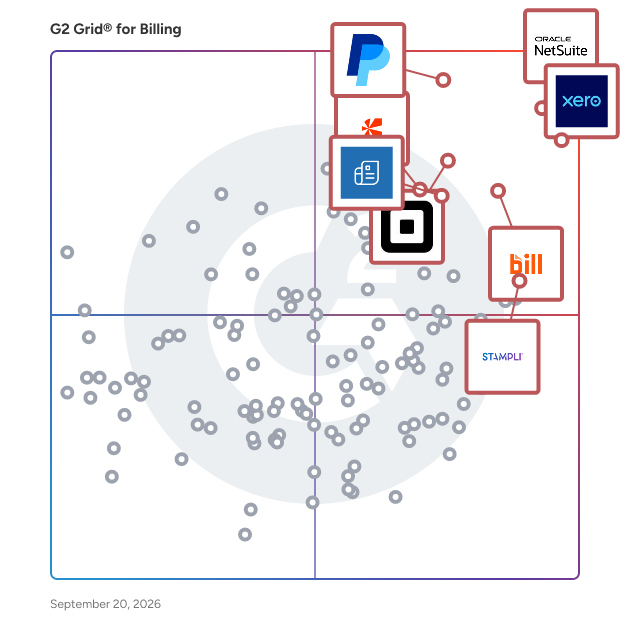
G2 Grid® for Billing Software

G2 Grid® for Billing Software plotting products by satisfaction and market presence

Highlighted products: NetSuite, Xero, PayPal Invoicing, BILL AP/AR, Square Point of Sale, Zoho Invoice, Stampli, and Chargebee.

Underlying data: [Grid® JSON](https://www.g2.com/categories/billing/grids.json?focus%5B%5D=oracle-netsuite&focus%5B%5D=xero&focus%5B%5D=paypal-invoicing&focus%5B%5D=bill-ap-ar&focus%5B%5D=square-point-of-sale&focus%5B%5D=zoho-invoice&focus%5B%5D=stampli&focus%5B%5D=chargebee)

NetSuite

NetSuite is the #1 AI cloud ERP, helping organizations streamline operations, improve visibility, and accelerate growth. For more than 28 years, NetSuite has enabled businesses of all sizes—from startups and high-growth companies to global enterprises—to run their entire business on a single, integrated platform. Today, more than 44,000 organizations across a wide range of industries use NetSuite to run their business in over 220 countries and territories. Built natively in the cloud, NetSuite eliminates the need for on-premises infrastructure and complex upgrades, giving organizations continuous access to the latest innovations, security enhancements, and AI capabilities. Originally built to transform financial management, NetSuite has evolved into a comprehensive business management suite that brings together accounting, financial management, inventory and order management, supply chain, procurement, human resources, CRM, professional services automation, and commerce. NetSuite supports organizations across industries including software and technology, manufacturing, wholesale distribution, retail, services, nonprofit, healthcare, advertising and media, and more, with industry-specific capabilities, workflows, dashboards, KPIs, and reports designed to address unique business requirements. With AI embedded throughout the platform, organizations can automate routine tasks, generate insights faster, and make more informed decisions. Ask Oracle, a conversational AI assistant, enables users to interact with NetSuite through natural language by answering questions, analyzing business data, surfacing insights, and providing guidance—all within the security, roles, permissions, and controls already established in NetSuite. Embedded directly into everyday workflows, Ask Oracle helps users make faster, more informed decisions and take action without disrupting their work. Agents and agentic workflows extend these AI capabilities by helping users complete specific tasks and coordinate work across multiple steps. Built-in analytics, AI-powered insights, and customizable reporting provide teams with everything they need to make solid decisions. NetSuite is highly configurable and extensible, allowing businesses to adapt the platform to their unique processes while supporting growth across multiple subsidiaries, currencies, languages, and geographies. By connecting business-critical data and processes in a single cloud platform, NetSuite provides a real-time, unified view of the business, eliminating disconnected systems, manual spreadsheets, and information silos. Organizations gain a single source of truth that improves collaboration across finance, operations, sales, inventory, HR, and customer service while simplifying compliance and reporting. Whether managing rapid growth, expanding internationally, improving financial close processes, optimizing inventory, or gaining deeper operational insights, NetSuite provides the flexibility, automation, and intelligence organizations need to adapt and scale with confidence. By making trusted data readily available and automating core business processes, NetSuite empowers leaders to respond quickly to changing market conditions and make faster, more informed decisions.

Average Rating: 4.1/5.0

Total Reviews: 4,805

How Do G2 Users Rate NetSuite?

  • Has the product been a good partner in doing business?: 7.5/10 (Category avg: 9.0/10)
  • Accounting: 8.0/10 (Category avg: 8.7/10)
  • Payments: 7.7/10 (Category avg: 8.6/10)
  • Management: 7.4/10 (Category avg: 8.8/10)

Who Is the Company Behind NetSuite?

  • Seller: Oracle
  • Company Website:
  • Year Founded: 1977
  • HQ Location: Austin, TX
  • Twitter: @Oracle
    827,997 Twitter followers
  • LinkedIn® Page: www.linkedin.com
    207,576 employees on LinkedIn®

Who Uses This Product?

  • Who Uses This: Controller, Accounting Manager
  • Top Industries: Computer Software, Accounting
  • Company Size: 57% Medium, 31% Small

What Do G2 Reviewers Say About NetSuite?

AI-generated summary from verified user reviews

Pros
  • Users appreciate the ease of use of NetSuite, finding it smooth and customizable for their needs.
  • Users value the customizability of NetSuite, enabling tailored reporting and improved inventory management across various locations.
  • Users appreciate the robust functionality of NetSuite, enjoying seamless integrations and customizable reporting capabilities.
  • Users value the extensive customization options of NetSuite, significantly enhancing business adaptability and efficiency.
  • Users value the extensive customization options in NetSuite, enhancing their business processes and reporting flexibility.
Cons
  • Users find the learning curve steep, requiring significant time and resources to navigate and customize effectively.
  • Users find the complex reports and interface of NetSuite challenging, leading to time-consuming navigation and customization.
  • Users find missing features in NetSuite, such as integration issues and inadequate project functionalities frustratingly limiting.
  • Users find the limited customization options of NetSuite frustrating, hindering their ability to tailor the system effectively.
  • Users find NetSuite's interface not user-friendly, with complex configurations and a challenging report creation process.

What Are Recent G2 Reviews of NetSuite?

What Are G2 Users Discussing About NetSuite?

Xero

Xero is a cloud-based accounting software solution designed to help small business owners and accounting professionals manage their financial operations efficiently. With a user-friendly interface and a focus on automation, Xero enables users to streamline their bookkeeping processes, allowing them to concentrate on growing their businesses rather than getting bogged down by administrative tasks. Targeted primarily at small businesses, Xero caters to a diverse audience that includes entrepreneurs, freelancers, and accounting firms. The platform is particularly beneficial for those who seek to simplify financial management while ensuring compliance with regional tax regulations. Xero's innovative features, such as JAX (Just Ask Xero), an AI financial superagent, enhance the user experience by providing real-time insights and automating routine tasks. This allows users to create quotes, send invoices, and reconcile bank transactions through natural language commands, making financial management more accessible and efficient. One of the key features of Xero is its ability to automate data ingestion from various sources, including banks and e-commerce platforms. This functionality significantly reduces the time spent on manual data entry, with many users reporting an average savings of six hours per month. Additionally, Xero's smart bank reconciliation adapts to user patterns, simplifying the bookkeeping process to a straightforward click-to-confirm operation. This level of efficiency not only saves time but also enhances accuracy in financial reporting. Xero also prioritizes cash flow management, a critical aspect for any business. Users can create customizable online invoices equipped with integrated "Pay Now" buttons, which facilitate faster payments. Coupled with automated payment reminders, Xero helps businesses reduce the time spent on collections, allowing them to focus on revenue generation. Furthermore, Xero's tools are designed to simplify tax compliance across various jurisdictions, making it easier for users to navigate the complexities of tax regulations. The platform is supported by a robust ecosystem of over 1,000 third-party applications and a global directory of certified accountants and bookkeepers. This connectivity ensures that users have access to specialized tools for inventory management, customer relationship management, and financial advice tailored to their specific needs. With a customer support team rated highly by new users, Xero provides the assurance and assistance necessary for businesses to operate confidently in their financial endeavors.

Average Rating: 4.4/5.0

Total Reviews: 1,804

G2 Deal: 90% off Xero for 6 months

Simplify your business with Xero: access apps, banks, and financial tools in one place. Start now and enjoy 90% off for six months!

View this exclusive G2 deal

How Do G2 Users Rate Xero?

  • Has the product been a good partner in doing business?: 8.6/10 (Category avg: 9.0/10)
  • Accounting: 8.8/10 (Category avg: 8.7/10)
  • Payments: 8.6/10 (Category avg: 8.6/10)
  • Management: 8.6/10 (Category avg: 8.8/10)

Who Is the Company Behind Xero?

  • Seller: Xero
  • Company Website:
  • Year Founded: 2006
  • HQ Location: Wellington
  • Twitter: @Xero
    77,493 Twitter followers
  • LinkedIn® Page: www.linkedin.com
    6,086 employees on LinkedIn®

Who Uses This Product?

  • Who Uses This: Owner, Director
  • Top Industries: Accounting, Information Technology and Services
  • Company Size: 73% Small, 31% Medium

What Do G2 Reviewers Say About Xero?

AI-generated summary from verified user reviews

Pros
  • Users appreciate the ease of use of Xero, enjoying its automatic invoicing and seamless data integration.
  • Users love the automatic invoice generation in Xero, which streamlines operations and minimizes manual work.
  • Users value Xero for its efficient transaction management, simplifying reconciliation and enhancing overall financial workflow.
  • Users value the efficiency of Xero, appreciating its smooth integration and effortless reconciliation process for financial management.
  • Users find Xero to be incredibly simple for invoicing and tracking payments, streamlining financial workflows effectively.
Cons
  • Users feel Xero lacks missing features that hinder usability and require extensive experience to navigate effectively.
  • Users find Xero has limited options, noting a need for more features and better customization in reporting.
  • Users experience limited customization in Xero's reporting, leading to interruptions in their workflow for deeper insights.
  • Users find the reporting limitations in Xero restrict their ability to analyze data efficiently, disrupting workflow.
  • Users are frustrated by Xero's poor customer support, especially due to the absence of immediate phone assistance.

What Are Recent G2 Reviews of Xero?

What Are G2 Users Discussing About Xero?

PayPal Invoicing

PayPal Invoicing is a specialized invoicing solution designed to assist users in creating and managing professional invoices efficiently. This tool caters to businesses and freelancers who require a streamlined process for billing clients, regardless of whether those clients have a PayPal account. By simplifying the invoicing process, PayPal Invoicing allows users to focus on their core activities while ensuring timely payments. Targeted primarily at small to medium-sized businesses, freelancers, and service providers, PayPal Invoicing serves a diverse audience that values efficiency and professionalism in their billing practices. It is particularly beneficial for those who manage multiple clients or projects and need a reliable way to track payments and outstanding invoices. The platform supports various use cases, including one-time services, recurring billing for ongoing contracts, and customizable invoicing for unique client needs. One of the key features of PayPal Invoicing is its ability to create customizable templates and data fields. This flexibility allows users to tailor invoices to their specific requirements, making it easier for clients to understand the charges and for users to maintain accurate records for tax reporting purposes. Additionally, the option to set up recurring invoices simplifies the billing process for ongoing services, ensuring that users do not miss out on payments for regular work. Another significant advantage of PayPal Invoicing is its efficiency in facilitating payments. According to PayPal data, 78% of all payments made through PayPal Invoicing are completed within one day of the invoice being sent. This rapid payment turnaround can significantly enhance cash flow for businesses, allowing them to reinvest in their operations or manage expenses more effectively. Furthermore, the service is free to create and send invoices, with fees only applicable when payments are received, making it a cost-effective solution for managing invoicing needs. Overall, PayPal Invoicing stands out in the invoicing category due to its user-friendly interface, customizable options, and rapid payment processing capabilities. By providing a comprehensive invoicing solution that caters to the needs of various users, it helps streamline financial transactions and improve overall business efficiency.

Average Rating: 4.4/5.0

Total Reviews: 238

How Do G2 Users Rate PayPal Invoicing?

  • Has the product been a good partner in doing business?: 8.5/10 (Category avg: 9.0/10)
  • Accounting: 7.9/10 (Category avg: 8.7/10)
  • Payments: 8.3/10 (Category avg: 8.6/10)
  • Management: 8.6/10 (Category avg: 8.8/10)

Who Is the Company Behind PayPal Invoicing?

  • Seller: PayPal
  • Company Website:
  • Year Founded: 1998
  • HQ Location: San Jose, CA
  • Twitter: @PayPal
    1,112,487 Twitter followers
  • LinkedIn® Page: www.linkedin.com
    38,773 employees on LinkedIn®

Who Uses This Product?

  • Who Uses This: Owner, CEO
  • Top Industries: Information Technology and Services, Apparel & Fashion
  • Company Size: 76% Small, 14% Medium

What Do G2 Reviewers Say About PayPal Invoicing?

AI-generated summary from verified user reviews

Pros
  • Users appreciate the ease of use of PayPal Invoicing, facilitating quick and professional invoice management and payments.
  • Users love the fast and simple invoicing process, enhancing professionalism and speeding up payment collection.
  • Users value the fast and simple invoicing process of PayPal Invoicing, leading to quicker payments and enhanced professionalism.
  • Users value the fast and simple invoicing process of PayPal Invoicing, enabling quick payments and enhanced professionalism.
  • Users value the ease and efficiency of payment processing with PayPal Invoicing, enhancing business operations significantly.
Cons
  • Users find the transaction fees of PayPal Invoicing burdensome, especially impacting small businesses and freelancers financially.
  • Users find the transaction fees too high, especially for small businesses, complicating cost justification for invoices.
  • Users desire greater customization options for PayPal Invoicing to enhance invoice appearance and align with branding.
  • Users find payment issues with high transaction fees and unfavorable currency conversion rates impacting their profits significantly.
  • Users find invoicing issues with PayPal, citing limitations compared to dedicated invoicing solutions and transaction requirements.

What Are Recent G2 Reviews of PayPal Invoicing?

What Are G2 Users Discussing About PayPal Invoicing?

BILL AP/AR

BILL is a financial operations platform that provides intelligent accounts payable and accounts receivable automation for businesses. This software solution is designed to help small and midsize businesses streamline and manage their financial workflows by digitizing and automating manual processes. By centralizing financial tasks, BILL AP/AR provides greater efficiency, visibility, and control over a company’s cash flow. The AP automation software helps users manage invoice processing, approvals, and payments, while also offering tools for expense management. BILL AP/AR belongs is accounts payable automation software that serves a broad audience, including business owners, finance managers, accounting firms, accounts payable specialists, and controllers. Typical use cases for BILL AP/AR involve digitization and automation of invoice capture, routing bills for approval, scheduling and executing payments, reconciling transactions, and managing expense reports and reimbursements. The platform also integrates with popular accounting systems to facilitate accurate bookkeeping and financial reporting. Key features and benefits of BILL AP/AR include: - Comprehensive AP automation software capabilities including electronic invoice receipt, automated data extraction, customizable approval workflows, and multi-method payment processing (ACH, wire transfers, checks) - Corporate cards integration through BILL Spend & Expense (formerly Divvy) that offers credit limits from $500-$5M and automated expense management software with real-time spending controls and budget management - Expense management automation featuring receipt capture, automatic categorization, policy compliance monitoring, and seamless integration with accounting systems for streamlined reconciliation - Accounts receivable optimization tools that automate invoice delivery, payment processing, collections management, and customer communication to accelerate cash flow - Advanced security and compliance measures with bank-level encryption, fraud protection, and audit trails that meet industry standards for financial data protection - Two-way sync with accounting software such as QuickBooks, Xero, NetSuite, and others to reduce manual data entry By bringing together accounts payable automation, corporate cards, and expense management in a single platform, BILL AP/AR helps finance teams reduce payment cycle time, minimize human error, and improve vendor relationships by ensuring timely and accurate transactions.

Average Rating: 4.4/5.0

Total Reviews: 1,785

G2 Deal: 20% Discount on BILL AP/AR Subscription

Enjoy our special G2 rate! A 20% discount on your BILL AP/AR subscription.

View this exclusive G2 deal

How Do G2 Users Rate BILL AP/AR?

  • Has the product been a good partner in doing business?: 8.6/10 (Category avg: 9.0/10)
  • Accounting: 8.8/10 (Category avg: 8.7/10)
  • Payments: 8.8/10 (Category avg: 8.6/10)
  • Management: 8.5/10 (Category avg: 8.8/10)

Who Is the Company Behind BILL AP/AR?

  • Seller: BILL (previously Bill.com)
  • Company Website:
  • Year Founded: 2006
  • HQ Location: San Jose, CA
  • Twitter: @billcom
    17,263 Twitter followers
  • LinkedIn® Page: www.linkedin.com
    3,145 employees on LinkedIn®

Who Uses This Product?

  • Who Uses This: Controller, Accountant
  • Top Industries: Accounting, Non-Profit Organization Management
  • Company Size: 62% Small, 28% Medium

What Do G2 Reviewers Say About BILL AP/AR?

AI-generated summary from verified user reviews

Pros
  • Users love the ease of use of BILL AP/AR, streamlining internal processes and enhancing efficiency in workflows.
  • Users value the easy payments process of Bill.com, enhancing efficiency in managing AP workflows and billing tasks.
  • Users appreciate the easy integrations of Bill AP/AR, enhancing efficiency and streamlining financial operations seamlessly.
  • Users appreciate the time-saving features of BILL AP/AR, enhancing efficiency and reducing manual workload significantly.
  • Users appreciate the simplicity and ease of use of BILL AP/AR, notably for its efficient invoice processing.
Cons
  • Users experience payment issues with complexities in workflows, syncing errors, and frustrations with international transactions.
  • Users find the missing features in BILL AP/AR frustrating, particularly with search limitations and approval workflows.
  • Users experience technical issues with invoice dates and syncing glitches, leading to occasional manual adjustments.
  • Users report invoicing problems related to syncing issues and difficulties in managing invoice information effectively.

What Are Recent G2 Reviews of BILL AP/AR?

What Are G2 Users Discussing About BILL AP/AR?

Square Point of Sale

Square Point of Sale is a powerful, flexible POS system built for every kind of business—from restaurants and retailers to salons and professional services. With Square POS, you can manage your entire operation from one place. Accept payments in person, online, or on the go. Track sales, inventory, and customer preferences in real time, and use built-in analytics to understand how your business is performing across every location and channel. Tailored solutions of every business. Square POS includes seven industry modes: Quick Service, Full Service, Bar, Retail, Bookings, Services, and Standard. Each mode includes features designed for your business type, including order management, KDS, and pre-authorized tabs for restaurants, appointment scheduling for beauty providers, invoices and estimates for service professionals, and inventory and vendor management for retailers. A POS that grows with your business. As your business evolves, Square POS adapts with you. Easily switch modes, add locations, or manage multiple concepts within one app. Square hardware works across every mode, from countertop setups to mobile readers, so you can take payments wherever your customers are. Simplify your operations. Square combines payments, hardware, and software in one unified platform. Accept all major payment types, including tap, chip, swipe, and digital wallets like Apple Pay and Google Pay. Get paid as soon as the next business day, with transparent pricing, no hidden fees, and no long-term contracts. Insights and tools that drive growth. Square POS includes built-in reports that track sales, customers, staff, and inventory in real time. Square AI delivers smart insights to help you make more informed business decisions. And with integrated tools like Square Marketing, Payroll, Banking, and Square Online, you can manage your entire business from one connected platform. Get started in minutes. Square POS is free to download and simple to set up. Train your team quickly and start accepting payments right away. Explore advanced features with a 30-day free trial, and upgrade anytime. Transparent pricing means you always know what you’ll pay—with no contracts or surprises.

Average Rating: 4.6/5.0

Total Reviews: 1,184

How Do G2 Users Rate Square Point of Sale?

  • Has the product been a good partner in doing business?: 9.1/10 (Category avg: 9.0/10)
  • Accounting: 8.6/10 (Category avg: 8.7/10)
  • Payments: 8.9/10 (Category avg: 8.6/10)
  • Management: 9.0/10 (Category avg: 8.8/10)

Who Is the Company Behind Square Point of Sale?

  • Seller: Block
  • Company Website:
  • Year Founded: 2009
  • HQ Location: Oakland, California
  • Twitter: @Square
    309,691 Twitter followers
  • LinkedIn® Page: www.linkedin.com
    11,860 employees on LinkedIn®

Who Uses This Product?

  • Who Uses This: Owner, Business Owner
  • Top Industries: Retail, Food & Beverages
  • Company Size: 89% Small, 7% Medium

What Do G2 Reviewers Say About Square Point of Sale?

AI-generated summary from verified user reviews

Pros
  • Users highlight the ease of use of Square Point of Sale, appreciating its simple setup and intuitive interface.
  • Users appreciate the easy payment processing of Square Point of Sale, making transactions simple and efficient across devices.
  • Users appreciate the robust reporting tools of Square Point of Sale, enabling smarter business decisions with ease.
  • Users love the ease of use of Square Point of Sale, making it perfect for beginners and efficient for all.
  • Users highlight the simple setup of Square Point of Sale, appreciating its quick and seamless integration process.
Cons
  • Users express concern over high fees, which can accumulate and impact the cost-effectiveness of Square Point of Sale.
  • Users find the fees to be overly expensive, particularly for credit card processing and integrations with QBO.
  • Users find the access limitations frustrating, especially with connectivity issues impacting overall functionality and usability.
  • Users find the missing features of Square Point of Sale limit its effectiveness for e-commerce and usability.
  • Users report payment issues with Square Point of Sale, citing high fees and slow account verification processes.

What Are Recent G2 Reviews of Square Point of Sale?

What Are G2 Users Discussing About Square Point of Sale?

Zoho Invoice

Zoho Invoice is a 100% free cloud-based invoicing solution designed to help small businesses with invoicing, tracking expenses, and accepting online payments. Key features include project billing, time tracking, reporting, customizable templates, and a client portaI. Teams using Zoho Invoice can track estimates, convert them to invoices, and send reminders to clients to complete their outstanding payments. Additionally, users can create tasks, collect advance payments for projects, and keep track of their invoice history. - Managing customers and item information Zoho Invoice helps you maintain all of your customer and item information in one place. Details such as basic contact information, billing and shipping addresses, and tax information can be added to each customer. Similarly, details such as the selling price and product description can be added for each item. When you create transactions, all you have to do is select the right customer and items, and the system takes care of the rest. - Seamless invoicing Zoho Invoice makes managing and monitoring invoices easy. With its intuitive interface, you can create and send invoices with just a few clicks. It gives you the ability to personalize and brand your invoices with pre-designed templates. All the invoices you create are stored and can be referenced or used later as you need them. Besides invoices, you can use Zoho Invoice to create quotes, retainers for advance payments, credit notes for sales returns, and more. - Time tracking Zoho Invoice lets you track time effortlessly and bill your clients for hours spent on your projects. Once you invite users to your projects, they can log hours from their mobile device or desktop. - Payment collection Zoho Invoice offers integrations with 10+ payment gateways to help you collect payments on time. Payments collected through offline payment modes such as cash or checks can be recorded easily too. Payment reminders can be sent automatically, and your users can always keep track of their customers' payments. - Expense tracking Zoho Invoice makes it easier for you to track your expenses—whether they're regular office expenses, mileage expenses, or reimbursable expenses incurred on behalf of customers. You can classify the expenses under different categories to make it easier to review them, and capture expense receipts right from your mobile device and attach them to your expenses. - Client portal The Client portal in Zoho Invoice is a self-service area where your customers can view and update their billing information, view and accept estimates, pay for your invoices, and download statements. If you offer live chat support, your customers can initiate a chat request right from the portal. The whole experience is designed to make it as easy as possible for your customers to get what they need, leaving you free to focus on your business. - Reports Zoho Invoice supports over 30 reports to give you detailed insights into the financial health of your business. With these real-time reports, you can track key metrics such as best-selling products, invoice statuses, pending payments, and more.

Average Rating: 4.7/5.0

Total Reviews: 361

How Do G2 Users Rate Zoho Invoice?

  • Has the product been a good partner in doing business?: 9.5/10 (Category avg: 9.0/10)
  • Accounting: 8.7/10 (Category avg: 8.7/10)
  • Payments: 8.8/10 (Category avg: 8.6/10)
  • Management: 9.1/10 (Category avg: 8.8/10)

Who Is the Company Behind Zoho Invoice?

  • Seller: Zoho
  • Year Founded: 1996
  • HQ Location: Austin, TX
  • Twitter: @Zoho
    137,880 Twitter followers
  • LinkedIn® Page: www.linkedin.com
    30,913 employees on LinkedIn®
  • Phone: +1 (888) 900-9646

Who Uses This Product?

  • Who Uses This: CEO, Owner
  • Top Industries: Information Technology and Services, Marketing and Advertising
  • Company Size: 87% Small, 9% Medium

What Do G2 Reviewers Say About Zoho Invoice?

AI-generated summary from verified user reviews

Pros
  • Users find Zoho Invoice incredibly easy to use, enabling quick invoice creation and effortless client distribution.
  • Users enjoy the ease of generating invoices with Zoho Invoice, streamlining their invoicing and expense tracking tasks.
  • Users appreciate the invoicing ease of Zoho Invoice, finding it simple, quick, and customizable for their needs.
  • Users value the simplicity and ease of use of Zoho Invoice, facilitating a smooth invoicing experience.
  • Users appreciate the neat and functional user interface of Zoho Invoice, enhancing their invoicing experience significantly.
Cons
  • Users find the missing features in Zoho Invoice problematic, such as limited currency options and templates.
  • Users note the limited customization options in Zoho Invoice, wishing for more flexibility in invoice design.
  • Users are frustrated by Zoho Invoice's poor customer support, especially regarding the essential multi-currency feature now locked behind an upgrade.
  • Users face significant challenges with approval process issues as necessary multi-currency support is now restricted to an upgrade.
  • Users face billing issues with Zoho Invoice, particularly regarding refunds for incorrect subscriptions.

What Are Recent G2 Reviews of Zoho Invoice?

What Are G2 Users Discussing About Zoho Invoice?

Stampli

Stampli delivers stress-free finance with Procure-to-Pay that works for you. The platform spans procurement, accounts payable, vendor management, payments, and Stampli Card, with Stampli AI embedded directly into ERP-integrated workflows. Stampli AI performs on average 87% of finance work across 2,700+ unique fields, with all suggested entries subject to human review and approval before posting to the ERP. With Stampli, finance teams control spend, move work faster, and turn operational data into smarter decisions. Founded in 2015, Stampli serves 1,800+ unique customers operating inside their ERP ecosystem across 2,800+ entities, with 400k+ invoices processed per week and $390B+ in cumulative spend processed. Stampli is backed by $148 million in funding from top investors including Blackstone, Insight Venture Partners, SignalFire, and Bloomberg Beta.

Average Rating: 4.6/5.0

Total Reviews: 2,008

How Do G2 Users Rate Stampli?

  • Has the product been a good partner in doing business?: 9.5/10 (Category avg: 9.0/10)
  • Accounting: 9.0/10 (Category avg: 8.7/10)
  • Payments: 8.9/10 (Category avg: 8.6/10)
  • Management: 9.0/10 (Category avg: 8.8/10)

Who Is the Company Behind Stampli?

  • Seller: Stampli
  • Company Website:
  • Year Founded: 2015
  • HQ Location: Mountain View, California
  • Twitter: @stampli
    9,159 Twitter followers
  • LinkedIn® Page: www.linkedin.com
    310 employees on LinkedIn®

Who Uses This Product?

  • Who Uses This: Controller, Staff Accountant
  • Top Industries: Accounting, Hospital & Health Care
  • Company Size: 61% Medium, 27% Small

What Do G2 Reviewers Say About Stampli?

AI-generated summary from verified user reviews

Pros
  • Users find Stampli's platform to be extremely user-friendly, significantly streamlining the invoice review and coding process.
  • Users find Stampli’s user-friendly invoicing system simplifies vendor invoice approvals and enhances overall efficiency.
  • Users praise Stampli for its efficiency, significantly reducing manual entry and streamlining the invoice processing experience.
  • Users value Stampli's intuitive interface, which streamlines invoice approval and enhances overall efficiency in expense management.
  • Users value the streamlined approval process in Stampli, enhancing efficiency and collaboration in managing invoices.
Cons
  • Users face invoice issues with Stampli, including slow approvals and challenges with handling vendor name edits and date changes.
  • Users find missing features in Stampli frustrating, particularly lacking bulk editing options and payment integration capabilities.
  • Users experience approval issues with Stampli, particularly due to slow invoice processing and restricted user roles.
  • Users face significant invoicing issues with Stampli, causing delays in approvals and complications with vendor name edits.
  • Users face technical issues with invoice recognition and automation, leading to frustration during the payment process.

What Are Recent G2 Reviews of Stampli?

What Are G2 Users Discussing About Stampli?

Chargebee

Chargebee is the billing and monetization platform built for the AI economy. From fast-scaling startups to global enterprises, we help companies capture, optimize, and scale revenue — no matter their GTM strategy or pricing model. Whether you’re experimenting with usage-based pricing, launching AI-powered products, or expanding globally, Chargebee gives you the flexibility and automation to grow with confidence. Chargebee is trusted by businesses of all sizes, including Zapier, Freshworks, DeepL, Condé Nast, and Pret A Manger, and is proud to have been consistently recognized by customers as a Leader in Subscription Management on G2. To learn more about how Chargebee can help unlock and maximize revenue growth, visit Chargebee.com.

Average Rating: 4.4/5.0

Total Reviews: 978

How Do G2 Users Rate Chargebee?

  • Has the product been a good partner in doing business?: 8.6/10 (Category avg: 9.0/10)
  • Accounting: 10.0/10 (Category avg: 8.7/10)
  • Payments: 10.0/10 (Category avg: 8.6/10)
  • Management: 10.0/10 (Category avg: 8.8/10)

Who Is the Company Behind Chargebee?

  • Seller: Chargebee
  • Company Website:
  • Year Founded: 2011
  • HQ Location: North Bethesda, MD
  • Twitter: @chargebee
    7,333 Twitter followers
  • LinkedIn® Page: www.linkedin.com
    1,303 employees on LinkedIn®

Who Uses This Product?

  • Who Uses This: CEO, Founder
  • Top Industries: Computer Software, Information Technology and Services
  • Company Size: 72% Small, 23% Medium

What Do G2 Reviewers Say About Chargebee?

AI-generated summary from verified user reviews

Pros
  • Users appreciate the ease of use of Chargebee, highlighting its intuitive interface and efficient payment management.
  • Users appreciate the comprehensive subscription management features of Chargebee, enhancing efficiency and productivity in their operations.
  • Users praise the responsive support team at Chargebee, providing quick solutions and enhancing user experience.
  • Users value the user-friendly billing management of Chargebee, which streamlines payment processes and enhances productivity.
  • Users love the seamless integrations with payment gateways and smooth setup, enhancing the overall billing experience.
Cons
  • Users report access limitations due to sudden changes and unresolved bugs that disrupt their workflow and integration.
  • Users experience poor customer support from Chargebee, with slow responses and unresolved issues impacting their workflow.
  • Users report limited customization options in Chargebee, expressing the need for more flexibility in functionality.
  • Users find the missing features in Chargebee frustrating, leading to confusion and inefficiencies in their workflow.
  • Users find access restrictions frustrating, particularly when adjusting existing subscriptions or enabling certain features.

What Are Recent G2 Reviews of Chargebee?

What Are G2 Users Discussing About Chargebee?

FreshBooks

FreshBooks is software that simplifies the complicated world of bookkeeping and accounting. With FreshBooks, you can run your billing, books, and payroll all from one platform—no complicated spreadsheets or convoluted software. With FreshBooks, you’ll save time and get peace of mind. • Run your billing, books, and payroll on the same platform. • Build invoices in seconds and get paid twice as fast. • Create reports that allow you to see the health of your business instantly. • Stay organized for tax time and compliant with tax regulations. • Collaborate with clients, manage billing, and track project profitability.

Average Rating: 4.5/5.0

Total Reviews: 961

G2 Deal: Exclusive Offer: Get 90% Off for 4 Months

Get 90% off a Lite, Plus, or Premium Plan for 4 months. After the 4-month promotional period, you will be billed at full price for the plan you have selected.

View this exclusive G2 deal

How Do G2 Users Rate FreshBooks?

  • Has the product been a good partner in doing business?: 9.2/10 (Category avg: 9.0/10)
  • Accounting: 7.9/10 (Category avg: 8.7/10)
  • Payments: 8.4/10 (Category avg: 8.6/10)
  • Management: 8.3/10 (Category avg: 8.8/10)

Who Is the Company Behind FreshBooks?

  • Seller: FreshBooks
  • Company Website:
  • Year Founded: 2003
  • HQ Location: Toronto
  • Twitter: @freshbooks
    28,085 Twitter followers
  • LinkedIn® Page: www.linkedin.com
    383 employees on LinkedIn®

Who Uses This Product?

  • Who Uses This: Owner, Founder
  • Top Industries: Marketing and Advertising, Information Technology and Services
  • Company Size: 80% Small, 9% Medium

What Do G2 Reviewers Say About FreshBooks?

AI-generated summary from verified user reviews

Pros
  • Users value the ease of use of FreshBooks, appreciating its simplicity and user-friendly design for small businesses.
  • Users highlight the exceptional customer support of FreshBooks, noting quick responses and helpful assistance for any issues.
  • Users love the simplicity of FreshBooks, streamlining invoicing and making accounting hassle-free for small business owners.
  • Users praise FreshBooks for its efficient client and project management, making invoicing and time tracking effortless.
  • Users appreciate the ease of time tracking and reporting in FreshBooks, enhancing productivity and efficiency.
Cons
  • Users face significant invoicing issues with FreshBooks, including incorrect dates and limited attachment options, complicating their experience.
  • Users are frustrated by limited features in FreshBooks, as updates often remove functionality and add restrictions.
  • Users find the high fees of FreshBooks burdensome, particularly for freelancers and small businesses on a budget.
  • Users are frustrated by missing features in FreshBooks, including inadequate invoice options and limited customization.
  • Users find limited customization options in FreshBooks frustrating, particularly with templates and reporting features.

What Are Recent G2 Reviews of FreshBooks?

What Are G2 Users Discussing About FreshBooks?

Refrens Accounting

Refrens is an AI-powered accounting software that connects invoicing, bookkeeping, receivables, purchases, expenses, GST compliance, payments, inventory accounting, bank reconciliation, and financial reporting in one system. Create GST and non-GST invoices, quotations, estimates, proforma invoices, credit notes, debit notes, sales orders, delivery notes, purchase orders, e-invoices, e-way bills, and payment receipts. Customize document templates, branding, fields, columns, and formulas; share documents through email, WhatsApp, PDF, or secure links; track payments; and automate recurring invoices, payment reminders, and quotation follow-ups. Automate bill capture with Refrens Eagle Refrens Eagle reduces the manual work involved in recording vendor bills and expenses. Forward purchase invoices, bills, and expense receipts received through WhatsApp or email, and Refrens AI scans the documents, extracts transaction details, and prepares Purchase or Expense entries for review. Teams can verify and save transactions without repeatedly downloading, organizing, and uploading documents into the accounting system. Manage double-entry accounting Refrens supports double-entry accounting with automated ledgers, vouchers, journals, chart of accounts, opening balances, audit trails, and connected bookkeeping. Transactions created through invoices, purchases, expenses, payments, credit notes, debit notes, and other accounting documents automatically flow into the relevant books, helping reduce duplicate data entry and keep records consistent. Reconcile bank transactions Upload bank statements and reconcile transactions against entries already recorded in Refrens. Automatically identify possible matches, review suggested matches, detect duplicates, and create missing accounting entries directly during reconciliation. This helps finance teams keep the Bank Book and accounting records aligned without maintaining separate reconciliation spreadsheets. Manage receivables and payables Track unpaid and overdue invoices, customer balances, vendor balances, due dates, receipts, payments, advances, and ageing. Record full or partial payments, manage Credit Notes, record customer refunds against Credit Notes, generate Refund Receipts, reverse incorrect refunds, and keep refund transactions synchronized with the Books of Accounts. Record expenses and control approvals Record purchases, business expenses, employee reimbursements, petty cash, recurring expenses, and other costs. Configure multi-stage approval workflows with roles, permissions, reminders, escalation rules, super-approvers, and complete activity history so transactions can be reviewed before being finalized. Manage GST compliance Handle GST-related workflows including GSTR-1, QRMP and IFF views, GSTR-2B reconciliation, GSTR-3B summaries, e-invoicing, e-way bills, GST verification, and GST reports. Refrens Trust Score helps review customer and vendor GST filing history, GSTIN status, registration information, and compliance behaviour before extending credit or deciding payment terms. Get accounting insights with AI Freya, Refrens’ AI accounting assistant, helps users get answers and insights from their financial data without manually navigating multiple reports. Refrens MCP also allows teams to work with accounting data through ChatGPT or Claude. Users can create invoices, record payments and expenses, check overdue receivables, review financial information, and perform supported accounting tasks using conversational instructions. Track inventory with accounting Track stock across warehouses with automatic updates from purchases and sales. Manage batches, serial numbers, expiry dates, stock transfers, package items, barcode scanning, valuation, ageing, and stock movement. Credit Notes and Debit Notes can update inventory where applicable, helping keep stock quantities and financial records aligned. Generate financial reports Generate Trial Balance, Balance Sheet, Profit and Loss, Cash Flow, Daybook, ledger reports, receivables and payables ageing, outstanding reports, GST reports, TDS reports, payment reports, inventory valuation, and profitability reports. Refrens also supports customizable Roles and Permissions, custom accounting email templates, bulk uploads, custom formulas, APIs, audit trails, Global Search, and web and mobile access. Businesses can explore selected capabilities through limited Basic access. Accounts Lite starts at $130 per year and includes invoicing, document customization, recurring billing, payment reminders, multi-currency support, reports, contact management, bulk uploads, and higher AI OCR limits. The full Accounts plan starts at $250 per year and adds double-entry accounting, automated bookkeeping, bank reconciliation, financial statements, advanced reports, roles, permissions, and bulk OCR. Pricing may vary by billing period, taxes, usage, optional add-ons, and additional users.

Average Rating: 4.7/5.0

Total Reviews: 157

How Do G2 Users Rate Refrens Accounting?

  • Has the product been a good partner in doing business?: 9.1/10 (Category avg: 9.0/10)
  • Accounting: 9.2/10 (Category avg: 8.7/10)
  • Payments: 8.7/10 (Category avg: 8.6/10)
  • Management: 9.4/10 (Category avg: 8.8/10)

Who Is the Company Behind Refrens Accounting?

  • Seller: Naman Sarawagi
  • Year Founded: 2018
  • HQ Location: Bengaluru, IN
  • Twitter: @RefrensApp
    1,619 Twitter followers
  • LinkedIn® Page: www.linkedin.com
    109 employees on LinkedIn®

Who Uses This Product?

  • Who Uses This: Founder, CEO
  • Top Industries: Information Technology and Services, Marketing and Advertising
  • Company Size: 95% Small, 2% Medium

What Do G2 Reviewers Say About Refrens Accounting?

AI-generated summary from verified user reviews

Pros
  • Users find Refrens Accounting easy to use, facilitating quick invoicing and client management without technical expertise.
  • Users find the seamless invoicing and GST features of Refrens Accounting enhance efficiency and save valuable time.
  • Users appreciate the simplicity and efficiency of Refrens Accounting for invoicing and financial management.
  • Users value the simple and efficient invoicing features of Refrens Accounting, enhancing their record-keeping experience.
  • Users value the outstanding customer support provided by Refrens Accounting, making their experience seamless and efficient.
Cons
  • Users find the missing features in Refrens Accounting limiting, especially in the free plan and mobile app experience.
  • Users find that customization options are limited, affecting the overall flexibility and advanced functionality of Refrens Accounting.
  • Users find the pricing to be high, especially for very small businesses compared to other software options.
  • Users find the difficult customization options in Refrens Accounting limit branding and document flexibility significantly.
  • Users find inadequate reporting options in Refrens Accounting, which limits advanced insights and customization for growing businesses.

What Are Recent G2 Reviews of Refrens Accounting?

Zoho Books

Zoho Books is a robust accounting platform designed for growing businesses, offering a comprehensive suite of features to streamline your financial management. With Zoho Books, you can efficiently track payables and receivables, customise invoices, and set up automated payment reminders for your clients. The platform allows you to connect and reconcile bank accounts, fetching and matching transactions seamlessly. Zoho Books also includes customer and vendor portals, making it easy for all parties to keep track of their transactions with you. Payment gateways integrated within the platform provide your customers with multiple reliable payment methods, ensuring hassle-free payments. The user-friendly interface simplifies navigation for you and your team, enhancing productivity. With over 70 detailed reports, Zoho Books offers valuable insights into your financial health. Security is a top priority, and Zoho Books safeguards your data and privacy with stringent access controls, ensuring only authorized users can access your information. The free mobile app keeps you updated with your financial transactions on the go, providing flexibility and convenience. Zoho Books is an all-in-one platform equipped with every feature a business needs to manage its accounting tasks and organise transactions effectively.

Average Rating: 4.4/5.0

Total Reviews: 322

How Do G2 Users Rate Zoho Books?

  • Has the product been a good partner in doing business?: 9.0/10 (Category avg: 9.0/10)
  • Accounting: 9.0/10 (Category avg: 8.7/10)
  • Payments: 8.9/10 (Category avg: 8.6/10)
  • Management: 8.8/10 (Category avg: 8.8/10)

Who Is the Company Behind Zoho Books?

  • Seller: Zoho
  • Year Founded: 1996
  • HQ Location: Austin, TX
  • Twitter: @Zoho
    137,880 Twitter followers
  • LinkedIn® Page: www.linkedin.com
    30,913 employees on LinkedIn®
  • Phone: +1 (888) 900-9646

Who Uses This Product?

  • Who Uses This: Owner, Account Executive
  • Top Industries: Accounting, Information Technology and Services
  • Company Size: 71% Small, 22% Medium

What Do G2 Reviewers Say About Zoho Books?

AI-generated summary from verified user reviews

Pros
  • Users praise the ease of use of Zoho Books, allowing quick navigation and management of business tasks.
  • Users value the efficient invoice management in Zoho Books, enhancing productivity and accuracy in accounting tasks.
  • Users value the intuitive integration of Zoho Books with other ZOHO products, simplifying accounting processes effectively.
  • Users value the efficient tax management in Zoho Books, enhancing compliance and saving valuable time during GST filing.
  • Users commend the easy user interface of Zoho Books, facilitating seamless accounting and management of finances.
Cons
  • Users find the missing features in Zoho Books limiting, especially for payroll and inventory management needs.
  • Users report poor customer support, with slow response times making complex issues harder to resolve efficiently.
  • Users find the pricing of Zoho Books expensive, particularly for essential features and multi-entity support.
  • Users face data management challenges as scalability issues and integration complications hinder efficiency during expansion.
  • Users desire more customization options in Zoho Books, particularly for reports and payroll features.

What Are Recent G2 Reviews of Zoho Books?

What Are G2 Users Discussing About Zoho Books?

Anchor

Anchor is billing and payments automation software for accounting firms, bookkeepers, and professional service businesses. It combines proposals, engagement letters, agreements, automated billing, and payment collection in one platform Helping service businesses get paid on time, every time effortlessly. With no subscription fees. Syncing proposals, agreements, billing, and payments into one seamless workflow. Clients are auto-billed and auto-charged based on dynamic agreements, and everything syncs in real time with your general ledger. Designed for accountants, consultants, agencies, and service providers, Anchor eliminates manual billing tasks, reduces human error, and helps prevent revenue leakage. • Close deals faster with branded online proposals • Send flexible agreements that evolve with scope and terms • Automate billing: recurring, hourly, fixed, or one-time • Accept ACH or credit cards with adjustable fee settings • Collaborate via roles, permissions, and audit trails • Give clients a self-serve portal and automated reminders • Sync with QuickBooks Online, Xero and 5,000+ apps via Zapier Just $5 per payment. No subscriptions. No limits.

Average Rating: 4.9/5.0

Total Reviews: 125

How Do G2 Users Rate Anchor?

  • Has the product been a good partner in doing business?: 9.9/10 (Category avg: 9.0/10)
  • Accounting: 9.6/10 (Category avg: 8.7/10)
  • Payments: 8.5/10 (Category avg: 8.6/10)
  • Management: 9.2/10 (Category avg: 8.8/10)

Who Is the Company Behind Anchor?

  • Seller: Anchor
  • Company Website:
  • Year Founded: 2021
  • HQ Location: New York, US
  • Twitter: @Say_anchor_
    169 Twitter followers
  • LinkedIn® Page: www.linkedin.com
    124 employees on LinkedIn®

Who Uses This Product?

  • Who Uses This: Owner, CEO
  • Top Industries: Accounting, Consulting
  • Company Size: 98% Small, 2% Medium

What Do G2 Reviewers Say About Anchor?

AI-generated summary from verified user reviews

Pros
  • Users appreciate the time-saving features of Anchor, allowing easy billing and proposal management without hassle.
  • Users find Anchor to be incredibly easy to use, enhancing efficiency for both service providers and their clients.
  • Users appreciate the automation of billing in Anchor, simplifying processes and enhancing overall efficiency in managing finances.
  • Users value the efficiency of Anchor, as it simplifies processes and saves time in managing proposals and billing.
  • Users value the flexibility of Anchor, enhancing their professional processes and streamlining proposals and billing integration.
Cons
  • Users find payment issues frustrating, such as unclear payment plans and the need for improved funding speed.
  • Users note occasional processing delays for funds, but improvements have been made making wait times shorter overall.
  • Users express frustration over the limited customization options in Anchor, impacting flexibility and personalization in agreements.
  • Users note a steep learning curve with Anchor, requiring time to master its features despite excellent support.
  • Users experience occasional delays in fund payouts, especially with ACH payments, impacting their cash flow slightly.

What Are Recent G2 Reviews of Anchor?

Agentforce Revenue Management (formerly Salesforce Revenue Cloud)

Agentforce Revenue Management, formerly Salesforce Revenue Cloud, is Salesforce’s revenue lifecycle management solution for managing pricing, quoting, contracts, billing, and revenue operations on the Salesforce platform. It helps companies automate quote-to-cash workflows, support complex pricing and hybrid revenue models, and keep sales and finance teams aligned from quote through invoice. Agentforce Revenue Management is built for businesses that need more than basic quote or proposal creation. Teams use it to configure products, apply pricing and discount rules, manage approvals, generate accurate quotes, connect contract terms, and support downstream billing and invoicing. It is designed for small business to enterprise companies with complex product catalogs, subscriptions, usage-based pricing, renewals, partner selling, self-service buying, and governed revenue processes. Because it is built on Salesforce, Agentforce Revenue Management connects revenue workflows with customer data, sales processes, reporting, approvals, and automation across the Salesforce platform. Its headless capabilities also allow companies to expose revenue workflows through APIs, agents, and digital channels — so pricing, quoting, approvals, and billing processes can run wherever customers, sellers, and partners work. Agentforce Revenue Management differs from lightweight quoting or proposal tools because it manages the revenue workflow behind the quote. It is designed to govern the full quote-to-cash process, including product configuration, pricing, approvals, contracts, billing alignment, renewals, and revenue operations. The solution is best suited for growing businesses, mid-market companies, and enterprises that sell through multiple sales channels and use more than one pricing model, often called hybrid pricing. Smaller teams with simple pricing or one-off proposals may prefer lightweight quoting or proposal software. Companies with complex pricing, subscriptions, usage-based models, approvals, renewals, multi-channel selling, or billing handoffs are better suited for a revenue lifecycle management platform like Agentforce Revenue Management. FAQ: What is Agentforce Revenue Management? Agentforce Revenue Management, formerly Salesforce Revenue Cloud, is Salesforce’s solution for managing the revenue lifecycle, including pricing, quoting, contracts, billing, and quote-to-cash workflows. Is Agentforce Revenue Management the same as Salesforce CPQ? Agentforce Revenue Management includes CPQ capabilities but goes beyond CPQ. Salesforce CPQ focuses on configuring products, pricing deals, and generating quotes. Agentforce Revenue Management supports a broader revenue lifecycle, including quoting, contracts, orders, billing, invoicing, and revenue operations. Who uses Agentforce Revenue Management? Sales, revenue operations, finance, IT, and operations teams use Agentforce Revenue Management to manage complex pricing, quote approvals, contract terms, billing handoffs, renewals, and revenue workflows. What problems does Agentforce Revenue Management solve? It helps companies reduce manual quote-to-cash work, improve quote accuracy, enforce pricing and approval rules, connect sales and finance processes, and manage complex revenue models such as subscriptions, renewals, usage-based pricing, and multi-channel selling. How is Agentforce Revenue Management different from Proposify, Quoter, or PandaDoc? Proposify, Quoter, and PandaDoc are lighter-weight tools for creating, sending, tracking, or signing quotes and proposals. Agentforce Revenue Management is built for governed revenue execution, including pricing rules, product configuration, approvals, contracts, billing alignment, and quote-to-cash operations.

Average Rating: 4.2/5.0

Total Reviews: 1,564

How Do G2 Users Rate Agentforce Revenue Management (formerly Salesforce Revenue Cloud)?

  • Has the product been a good partner in doing business?: 8.6/10 (Category avg: 9.0/10)
  • Accounting: 8.5/10 (Category avg: 8.7/10)
  • Payments: 8.4/10 (Category avg: 8.6/10)
  • Management: 8.4/10 (Category avg: 8.8/10)

Who Is the Company Behind Agentforce Revenue Management (formerly Salesforce Revenue Cloud)?

  • Seller: Salesforce
  • Company Website:
  • Year Founded: 1999
  • HQ Location: San Francisco, CA
  • Twitter: @salesforce
    579,511 Twitter followers
  • LinkedIn® Page: www.linkedin.com
    89,711 employees on LinkedIn®

Who Uses This Product?

  • Who Uses This: Account Executive, Salesforce Developer
  • Top Industries: Computer Software, Information Technology and Services
  • Company Size: 44% Medium, 33% Large

What Do G2 Reviewers Say About Agentforce Revenue Management (formerly Salesforce Revenue Cloud)?

AI-generated summary from verified user reviews

Pros
  • Users appreciate the ease of use of Agentforce Revenue Management, streamlining processes and enhancing collaboration effortlessly.
  • Users value the streamlined quote-to-cash process of Agentforce Revenue Management, enhancing collaboration and efficiency across teams.
  • Users value the efficiency of Salesforce Revenue Cloud, which streamlines revenue processes and enhances collaboration across teams.
  • Users value the automation capabilities of Agentforce Revenue Management, simplifying and enhancing their revenue lifecycle processes.
  • Users value the rich features and customization in Agentforce Revenue Management, simplifying product and pricing management.
Cons
  • Users find the learning difficulty significant, often struggling with the platform's extensive features and customization options.
  • Users find the complexity of Agentforce Revenue Management frustrating, making straightforward tasks cumbersome and slowing down processes.
  • Users find the complex setup of Agentforce Revenue Management burdensome, hindering agility and requiring specialized knowledge for changes.
  • Users find the learning curve steep due to niche skills required and complex features for new admins.
  • Users find the steep learning curve of Agentforce Revenue Management challenging, requiring significant time and effort to master.

What Are Recent G2 Reviews of Agentforce Revenue Management (formerly Salesforce Revenue Cloud)?

Wave Invoicing

Wave Invoicing is a comprehensive, user-friendly invoicing solution tailored for small business owners, freelancers, and entrepreneurs. It enables users to create, customize, and send professional invoices effortlessly, ensuring timely payments and efficient cash flow management. Integrated seamlessly with Wave's suite of financial tools, this platform offers a holistic approach to managing business finances. Key Features and Functionality: - Professional Invoicing: Design and dispatch customized invoices featuring your business logo and colors, enhancing your brand's professionalism. - Recurring Billing: Automate invoicing for repeat clients by setting up recurring invoices and automatic credit card payments, reducing manual tasks. - Online Payments: Accept payments via credit cards, bank transfers, and Apple Pay directly through the invoice, facilitating faster transactions. - Mobile Accessibility: Manage invoices on-the-go with Wave's mobile app, available for both iOS and Android devices. - Automated Reminders: Set up automatic payment reminders to notify clients of upcoming or overdue payments, minimizing delays. - Integrated Accounting: Invoicing data syncs with Wave's accounting features, providing a unified view of your financials. Primary Value and User Solutions: Wave Invoicing addresses the common challenges faced by small business owners in managing billing processes. By offering a streamlined, automated invoicing system, it reduces administrative overhead, ensures timely payments, and enhances cash flow management. The integration with Wave's broader financial ecosystem allows users to have a comprehensive understanding of their business finances, all within a single platform. This holistic approach empowers users to focus more on growing their business and less on manual financial tasks.

Average Rating: 4.6/5.0

Total Reviews: 14

How Do G2 Users Rate Wave Invoicing?

  • Has the product been a good partner in doing business?: 9.7/10 (Category avg: 9.0/10)
  • Accounting: 9.7/10 (Category avg: 8.7/10)
  • Payments: 9.3/10 (Category avg: 8.6/10)
  • Management: 8.7/10 (Category avg: 8.8/10)

Who Is the Company Behind Wave Invoicing?

  • Seller: H&R Block
  • Year Founded: 1955
  • HQ Location: Kansas City, MO
  • Twitter: @HRBlock
    37,024 Twitter followers
  • LinkedIn® Page: www.linkedin.com
    16,116 employees on LinkedIn®
  • Ownership: HRB

Who Uses This Product?

  • Company Size: 87% Small, 7% Large

What Are Recent G2 Reviews of Wave Invoicing?

What Are G2 Users Discussing About Wave Invoicing?

Mercury

Mercury is the fintech that brings all the ways people and businesses use money into a single product that feels extraordinary to use. With banking*, credit cards, and software, Mercury helps more than 200K ambitious companies and entrepreneurs make better decisions and build their businesses. To learn more, visit Mercury.com. - Used by founders, finance leads, and operators at startups and SMBs - Common use cases: paying vendors and contractors, managing team spend, and reconciliation - Suitable for multi-entity structures that need shared controls and permissions - Supports companies seeking operational efficiency without expanding headcount - Up to $5M in FDIC insurance* on deposits through our partner banks’ sweep networks Mercury combines checking & savings accounts with payments, spend control, and finance ops automation in one place. - Business checking and savings with digital onboarding and a streamlined web/mobile interface - ACH, free domestic and international USD wires from Mercury, low-fee non-USD transfers, and mailed checks - Debit and credit cards** with customizable limits, merchant/category controls, real-time visibility, and cashback - Automated tools for billing, invoicing, and approvals with accounting integrations - Cash management options, including venture debt Mercury addresses the inefficiencies of legacy banking and the fragmentation of multiple finance tools by centralizing workflows and reducing payment friction. - Automates manual tasks like bill pay, invoicing, approvals, and reconciliation to speed up month-end close - Replaces branch visits and opaque fees with transparent, smooth money movement - Compliant onboarding and monitoring designed to protect businesses and reduce surprises - Fast, knowledgeable customer support across multiple channels The data: - Raised $500M in primary and secondary funding from top-tier venture capital firms and angel investors, athletes, entertainers, and 2.5K Mercury customers - $3.5B valuation in March ‘25 - 11 consecutive quarters of profitability based on both EBITDA and GAAP net-income (as of April ‘25) - $500M in revenue in 2024 - More than 200K customers - 40% growth in customers in 2024 - $156B in annual transaction volume in 2024, up 64% year-over-year - Customer NPS of 75*** (compared to banking industry average of 34) - 1 in 3 startups use Mercury**** - More than 50% of YC cohorts choose Mercury *Mercury is a fintech company, not an FDIC-insured bank. Checking and savings accounts are provided through our bank partners Choice Financial Group, Column N.A., and Evolve Bank & Trust; Members FDIC. Deposit insurance covers the failure of an insured bank. Checking and savings account deposits may be held by sweep network banks. Certain conditions must be satisfied for pass-through insurance to apply. Learn more here. **The Mercury Debit Cards are issued by Choice Financial Group, Column N.A., and Evolve Bank & Trust, Members FDIC, pursuant to licenses from Mastercard®. The IO Card is issued by Patriot Bank, Member FDIC, pursuant to a license from Mastercard®. ***Net Promoter Score (NPS) information and ratings are available at https://customergauge.com/benchmarks/blog/financial-services-nps-benchmarks. ****Calculation based on US-based companies that received an angel, pre-seed, seed, or Series A investment reported on Crunchbase in the most recent year.

Average Rating: 4.4/5.0

Total Reviews: 122

How Do G2 Users Rate Mercury?

  • Has the product been a good partner in doing business?: 8.4/10 (Category avg: 9.0/10)

Who Is the Company Behind Mercury?

  • Seller: Mercury
  • Company Website:
  • Year Founded: 2017
  • HQ Location: San Francisco, CA
  • Twitter: @mercury
    42,985 Twitter followers
  • LinkedIn® Page: www.linkedin.com
    1,785 employees on LinkedIn®

Who Uses This Product?

  • Who Uses This: CEO, Founder
  • Top Industries: Computer Software, Information Technology and Services
  • Company Size: 84% Small, 7% Medium

What Do G2 Reviewers Say About Mercury?

AI-generated summary from verified user reviews

Pros
  • Users love the ease of use of Mercury, making tasks like invoicing and managing users simple and intuitive.
  • Users highlight the easy setup of Mercury, enabling quick and efficient management of LLC banking needs.
  • Users appreciate the modern and user-friendly interface of Mercury, enhancing their experience with easy navigation and accessibility.
  • Users appreciate Mercury for its efficiency, enabling seamless banking processes that streamline financial management and save costs.
  • Users find the interface extremely easy to use, enhancing daily operations with a clear and modern design.
Cons
  • Users face approval issues with Mercury, especially when trying to update business information or during setup challenges.
  • Users experience poor customer support, facing delays and difficulties that hinder effective communication and service resolution.
  • Users express dissatisfaction with card issues, citing lack of a physical card and poor design options.
  • Users find credit issues with Mercury, citing low cash back and lack of immediate credit card options.
  • Users dislike Mercury's currency fees and find exchange rates less favorable compared to traditional banks like J.P. Morgan.

What Are Recent G2 Reviews of Mercury?

Nathan Calabrese
NC
Researched and written by Nathan Calabrese
Updated April 9, 2026