
Access PeopleHR Reviews & Product Details

Pricing

Pricing provided by Access PeopleHR.

Starter

£3.00

Access PeopleHR Media

Access PeopleHR Demo - Access PeopleHR
Access PeopleHR
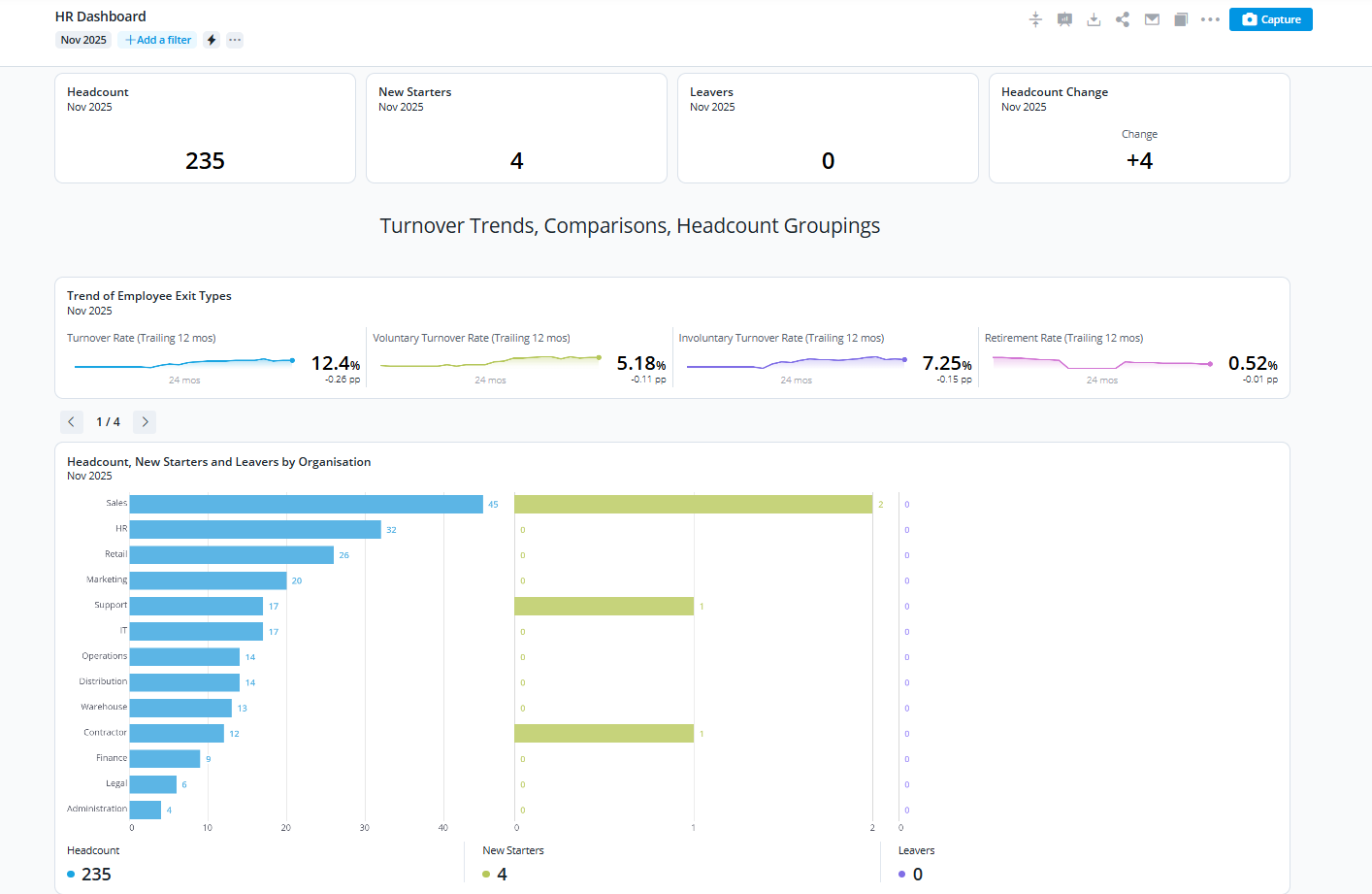
Access PeopleHR Demo - Access PeopleHR - People Analytics
People Analytics
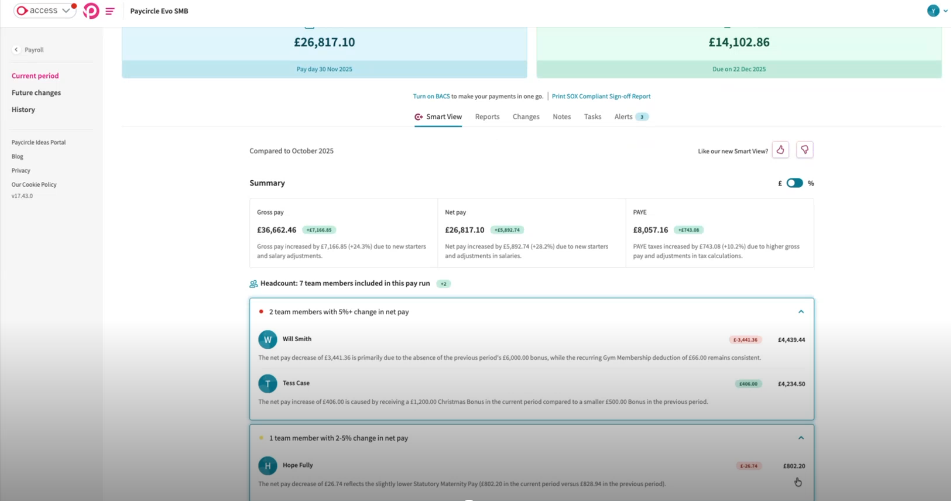
Access PeopleHR Demo - Access PeopleHR - Payroll Smartview
Access PeopleHR
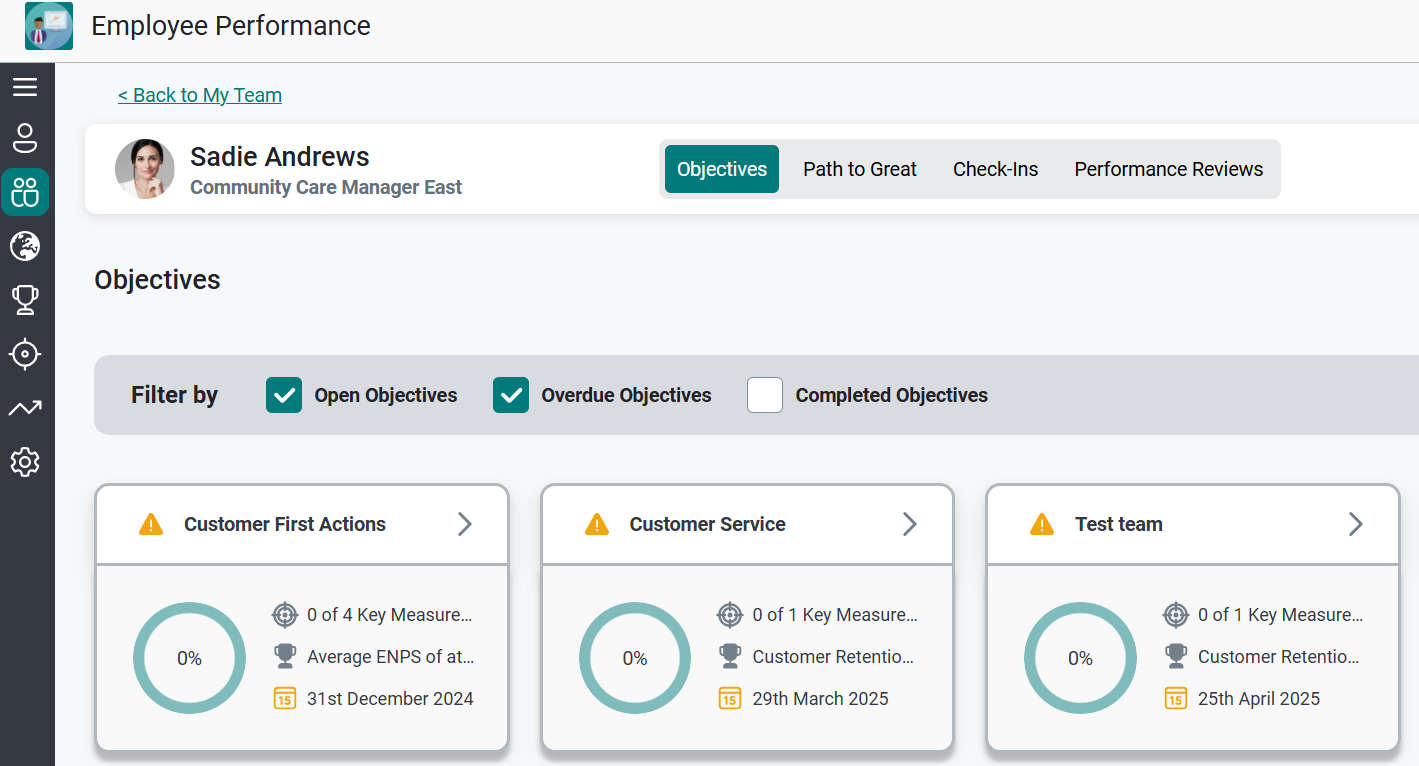
Access PeopleHR Demo - Access PeopleHR - Employee Performance
Access PeopleHR
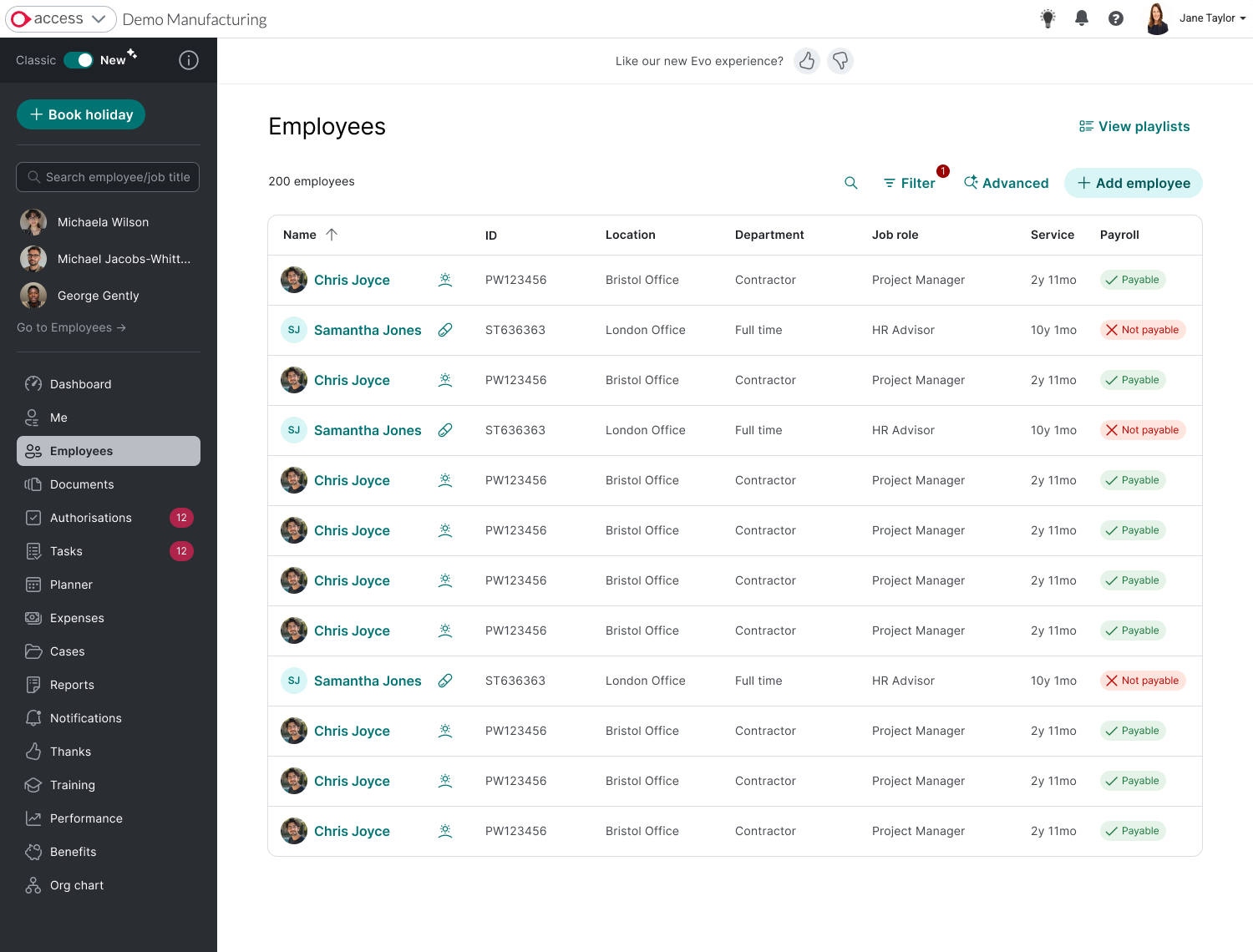
Access PeopleHR Demo - Access PeopleHR - Employee Lists
Access PeopleHR
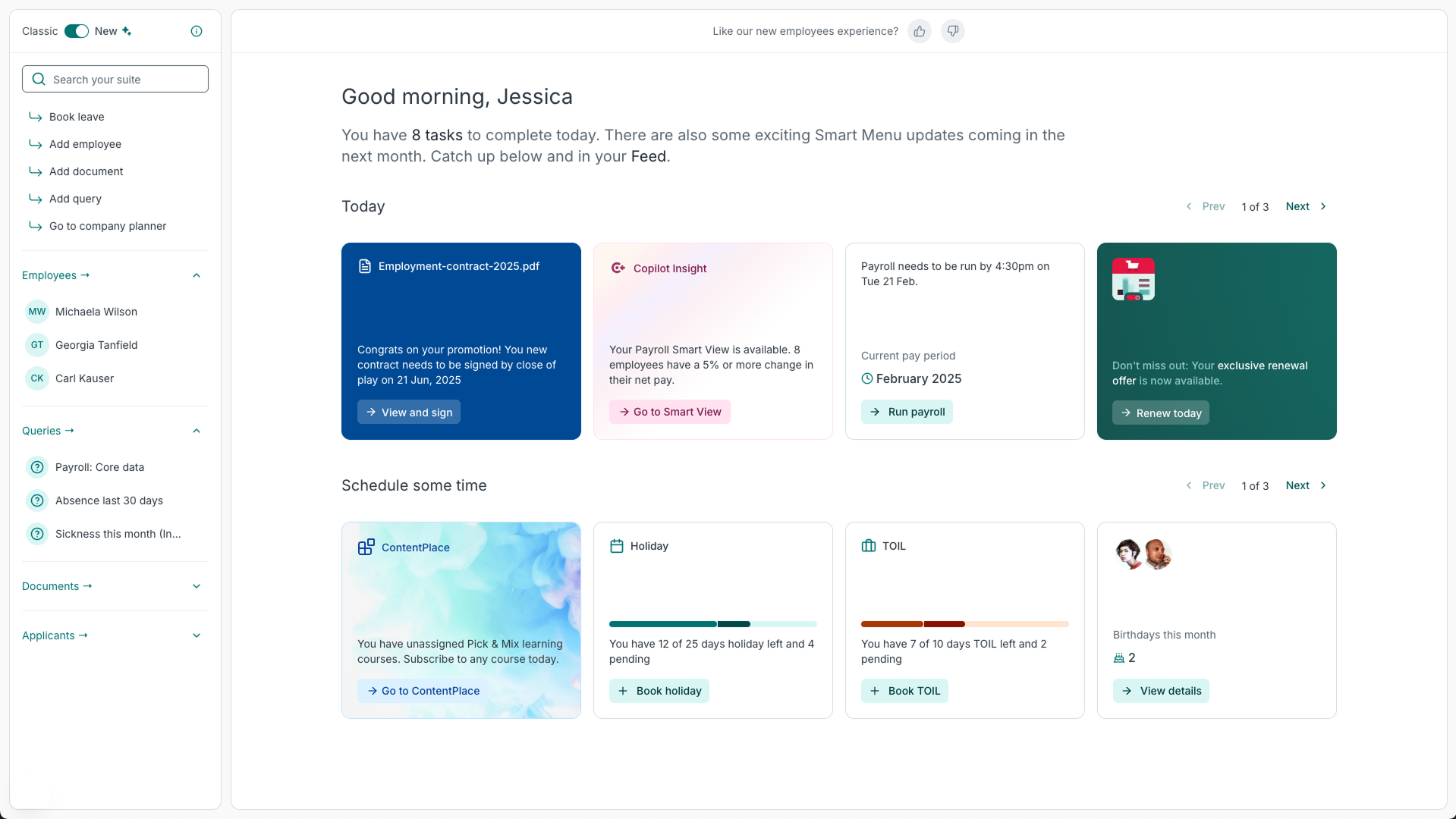
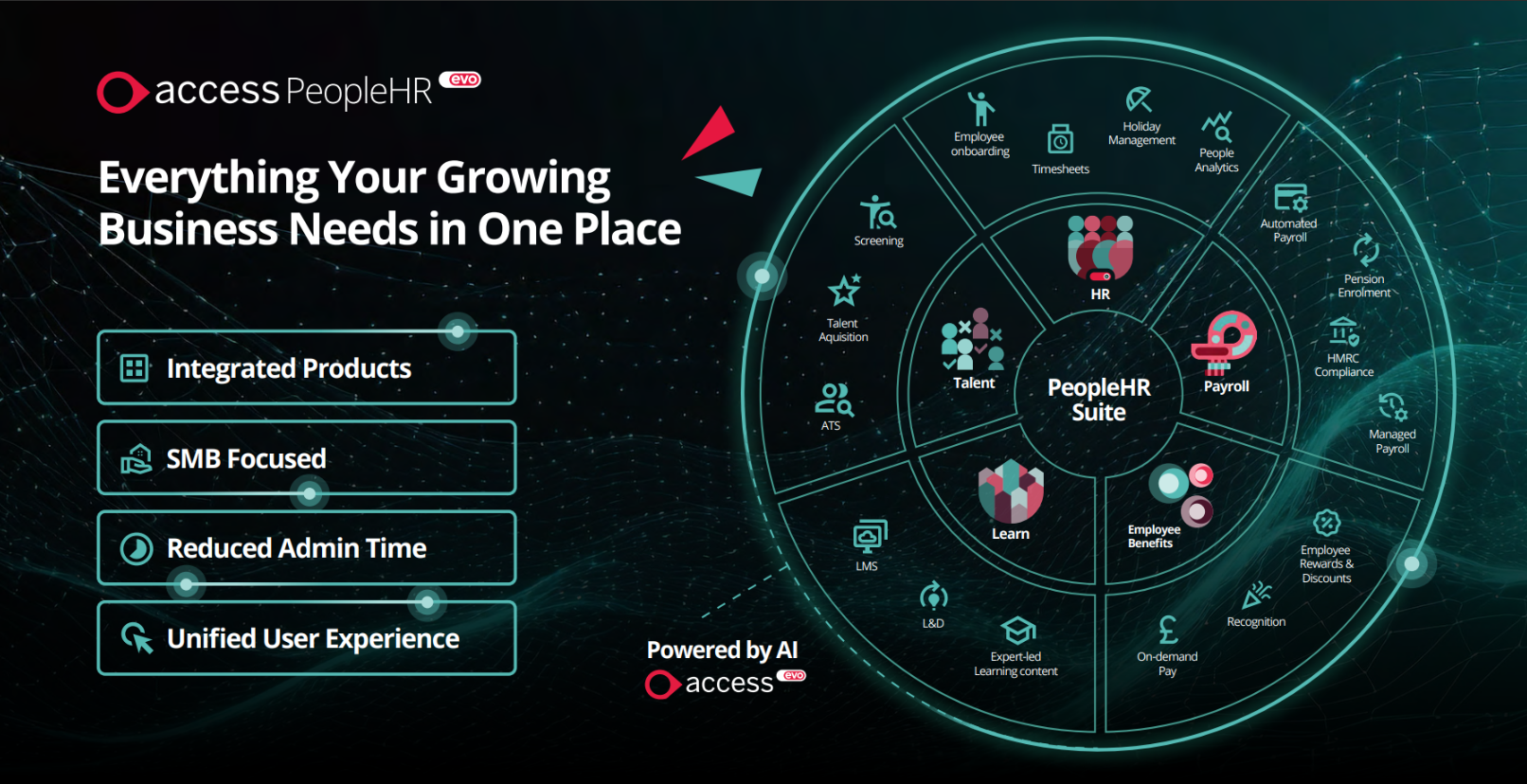
Access PeopleHR Demo - Access PeopleHR - Suite
Everything your growing business needs in one place.
Next-Gen HR: How PeopleHR Evo's using AI-Powered Tools for Faster, Smarter People Management
Play Access PeopleHR Video
Next-Gen HR: How PeopleHR Evo's using AI-Powered Tools for Faster, Smarter People Management
Access Evo: Discover the AI-Powered Payroll Solution That Saves Time and Money
Play Access PeopleHR Video
Access Evo: Discover the AI-Powered Payroll Solution That Saves Time and Money
Official Downloads
(1)
Product Avatar Image

Have you used Access PeopleHR before?

Answer a few questions to help the Access PeopleHR community

Access PeopleHR Reviews (322)

View 1 Video Reviews
Reviews

Access PeopleHR Reviews (322)

View 1 Video Reviews
4.1
322 reviews

Review Summary

Generated using AI from real user reviews
Users consistently praise the ease of use and intuitive interface of Access PeopleHR, highlighting how it simplifies HR tasks like leave management and document storage. Many appreciate having all necessary information centralized, which enhances efficiency and reduces administrative burdens. However, some users note that the navigation can be confusing at times, particularly when accessing certain features.

Pros & Cons

Generated from real user reviews
View All Pros and Cons
Search reviews
Filter Reviews
Clear Results
G2 reviews are authentic and verified.
Sherolyne F.
SF
People and Culture Manager
Mid-Market (51-1000 emp.)
"Powerful People Analytics and Seamless Payroll Integration"
What do you like best about Access PeopleHR?

The new people analytics feature is an excellent tool that enables you to explore a wide range of data. Additionally, the PHR system serves as an effective solution for maintaining employee records and integrating payroll processes. Review collected by and hosted on G2.com.

What do you dislike about Access PeopleHR?

There are currently many system changes happening, and while these are all positive, the guides are only truly helpful once you already know what you need to find. During the initial stages of a rollout, things can be a bit confusing, making it challenging for administrators to get up to speed and feel confident before introducing the changes to the wider business. Review collected by and hosted on G2.com.

Response from Taryn Schutzler of Access PeopleHR

Thanks for your feedback Sherolyne. It’s great to hear the new people analytics, payroll integration and Ripples are driving efficiency for your team. We appreciate your point on rollout guidance, which is shaping how we improve onboarding and in-product support. You can follow updates via our PeopleHR roadmap hub.

See how Access PeopleHR improved
Kate L.
KL
Administration Team Co-ordinator
Small-Business (50 or fewer emp.)
"Great for Remote Staff Tracking, but Confusing Time Formats and Inaccurate Calculations"
What do you like best about Access PeopleHR?

It’s better than using paper, and it makes it much easier for me to keep track of remote staff. Overall, it helps me stay organized and monitor things more consistently without relying on paperwork. Review collected by and hosted on G2.com.

What do you dislike about Access PeopleHR?

We track time in hours, but PeopleHR seems split: part of it records time in minutes, while another part uses decimal fractions of an hour. This inconsistency gets very confusing, and the resulting calculations aren’t always accurate. Review collected by and hosted on G2.com.

Response from Taryn Schutzler of Access PeopleHR

Thanks for your feedback, Kate. We’re sorry to hear about the confusion around time formats and calculations, and we understand how frustrating that can be when managing remote teams. Your comments are helping shape improvements around consistency and accuracy. You can follow upcoming updates via our PeopleHR roadmap hub.

See how Access PeopleHR improved
AG
Mid-Market (51-1000 emp.)
"Efficient Data Management with Report Customization"
What do you like best about Access PeopleHR?

I really like the ribbon feature where I can search for employees and have the last 3 viewed profiles readily accessible instead of going back to the employee dashboard each time. It's intuitive to use, allowing me to store all documents in one place and update personal details easily when needed. It's also really easy to run reports and filter through options to get the exact information required. Review collected by and hosted on G2.com.

What do you dislike about Access PeopleHR?

I don't like the new update when creating a new employee's profile. I find the layout to be odd and some of the fields that used to be required are now optional, which means when I am going back, I am having to input the information again. I also don't like the way it calculates annual leave and inputting the salary information. When typing in addresses, it only gives you the UK home addresses and as we are a global company, it means I have to input this information manually once the profile is created for someone who is in another country. Review collected by and hosted on G2.com.

Response from Taryn Schutzler of Access PeopleHR

Thanks for your detailed feedback, Aimee. It’s great to hear the ribbon feature and reporting tools are helping you work more efficiently, especially with quick profile access and document management.

We’re sorry to hear the new employee profile layout and annual leave calculations have caused some frustration, and we understand the challenge around international address entry for global teams. Feedback like this is incredibly valuable as we continue refining usability and global functionality.

You can follow upcoming updates via our PeopleHR roadmap hub.

See how Access PeopleHR improved
EA
People Director
Mid-Market (51-1000 emp.)
"User-Friendly Platform That Empowers Employees"
What do you like best about Access PeopleHR?

User-Friendly & Accessible

We use the platform on a daily basis and find the interface is widely regarded as intuitive and straightforward, making it easy for even non-technical staff to use. This simplicity helps minimize the learning curve for both HR teams and employees. The employee self-service portal, along with the mobile app, empowers staff to handle their own information, such as submitting leave requests and accessing payslips, without needing to involve HR every time. Easy to set up and implement and the support team was always there if we needed help. Integrates seamlessly with our payroll provider Review collected by and hosted on G2.com.

What do you dislike about Access PeopleHR?

The reporting module can occasionally feel a bit unintuitive, but in most cases, this is more due to user error than any issue with the platform itself. Review collected by and hosted on G2.com.

Response from Taryn Schutzler of Access PeopleHR

Thanks for the detailed feedback Elizabeth. It’s great to hear PeopleHR’s intuitive interface, self-service tools and payroll integration are empowering your team day to day. Your comments on reporting are appreciated and are helping shape ongoing usability improvements. You can follow updates via our PeopleHR roadmap hub.

See how Access PeopleHR improved
LC
Office Manager (including HR)
Small-Business (50 or fewer emp.)
"Frustrating Support Access and Ignored User Feedback"
What do you like best about Access PeopleHR?

The system is fairly straightforward, making it easy for staff to understand and navigate. Review collected by and hosted on G2.com.

What do you dislike about Access PeopleHR?

A new process was introduced on 1 December 2025, requiring users to raise cases only from within the App. However, this raises concerns about what to do if the system is down. The suggested alternative is to call the provided number, but that number is not valid. Additionally, their website at https://status.peoplehr.com/ claims there are no issues, even though there is a Cloudflare problem affecting access.

I have also repeatedly requested, along with many others, that the default view under tasks should show only open tasks. This feedback has been ignored, and I am forced to manually select the option to hide completed tasks every single time. It is frustrating to have to see all my closed tasks from years ago when I only want to focus on what is currently open.

There are many many items suggested for improvement on their site but nothing seems to be forthcoming Review collected by and hosted on G2.com.

Response from Paula QuinteroRubio of Access PeopleHR

Thank you for your honest feedback, Lynsey. We're sorry about the support access frustrations and system issues you've experienced. Our phone lines are active during business hours, and our team is always ready to help.

Your feedback on default task views and other improvements is valuable – we're actively working on these priorities. Please monitor our roadmap hub for updates on features shaped by customer input like yours:

See how Access PeopleHR improved
Ian B.
IB
"Cost-Effective HR Solution with Room for Improvement"
What do you like best about Access PeopleHR?

I love that Access PeopleHR provides a simple and self-service solution to annual leave and annual review processes all in one place. It's easy for the team to use. I also find our appraisals process straightforward with the opportunity for 360 feedback. It allows for good quality anonymous feedback and offers an element of customization so I can ask the questions I feel are important. Additionally, switching from Sage, I thought Access PeopleHR was a simple and cost-effective solution. The initial setup was straightforward and simple. Review collected by and hosted on G2.com.

What do you dislike about Access PeopleHR?

The goals section in the annual review form could be improved. We have also had some challenges with costing for licenses. I would like the ability to see all the goals in one place rather than having to open them up individually. Review collected by and hosted on G2.com.

Response from Taryn Schutzler of Access PeopleHR

Thanks for your feedback, Ian. It’s great to hear PeopleHR supports simple self-service leave and reviews, with flexible 360 feedback. We appreciate your comments on goal visibility and licensing costs, which are feeding into ongoing improvements. You can follow upcoming updates via our PeopleHR roadmap hub.

See how Access PeopleHR improved
Leanne G.
LG
Sales Operations Manager
Mid-Market (51-1000 emp.)
"Streamlines HR Tasks with Intuitive Interface"
What do you like best about Access PeopleHR?

I use Access PeopleHR as our central HR management platform. It helps me track time and attendance, including annual leave requests, so I no longer need spreadsheets. PeopleHR has a user-friendly interface that removes a lot of manual admin work. Key functions like employee records, reporting, document uploads, and approvals are clearly structured and easy to access, which really speeds up day-to-day tasks. The initial setup was relatively straightforward, especially for a system of its scale. Review collected by and hosted on G2.com.

What do you dislike about Access PeopleHR?

I think reporting and analytics could be improved. Greater flexibility and a more user-friendly report builder would add significant value. A more intuitive custom report builder would be valuable. At the moment, it feels slightly technical. Review collected by and hosted on G2.com.

Response from Taryn Schutzler of Access PeopleHR

Thanks for sharing your feedback, Leanne. It’s great to hear that PeopleHR is helping streamline your HR processes and providing a central place to manage employee records, time and attendance, and annual leave without relying on spreadsheets. We’re pleased that the platform’s structure and user-friendly interface are helping reduce manual admin and making day-to-day tasks quicker and easier.

We also appreciate your comments about reporting and analytics. Feedback around making the report builder more flexible and intuitive is really valuable, and it’s something we’re continually working to improve so users can access insights more easily.

It’s great to hear that overall the system is supporting your HR processes and helping save time across routine tasks.

You can follow upcoming updates via our PeopleHR roadmap hub.

See how Access PeopleHR improved
AH
Operations Manager
Small-Business (50 or fewer emp.)
"Intuitive, Feature-Rich, and Seamlessly Integrated into Daily Workflow"
What do you like best about Access PeopleHR?

The entire system is easy to use, and very intuitive, it is full of features and was easily integrated into our work life implementing easily into everything we do, making it used every day. and if there is a problem the customer service is really easy and quick to respond. Review collected by and hosted on G2.com.

What do you dislike about Access PeopleHR?

some times when doing something we have not done for a while it is a little difficult to find the correct place, but it only takes a few minuets to get on the right track. Review collected by and hosted on G2.com.

Response from Taryn Schutzler of Access PeopleHR

Thanks for your feedback Anthony. Great to hear PeopleHR fits smoothly into your daily workflow and supports clear holiday and absence tracking. Your point on locating less-used features is helpful and aligns with our ongoing UX improvements. You can follow updates via our PeopleHR roadmap hub.

See how Access PeopleHR improved
LG
"Intuitive and Well-Structured HR Solution"
What do you like best about Access PeopleHR?

I love that Access PeopleHR is easy to use and the navigation around the portal is straightforward. It makes managing my team and requests through the system simple. I appreciate the clear navigation which makes it quick to find exactly what I need. Managing holidays, sickness, and approvals in one place gives me a good overview of my team at all times. Having documentation stored centrally adds real value as everything is consistent, accessible, and well-organized. The initial setup was straightforward and easy to follow, making it simple to get the system up and running. Access PeopleHR supports day-to-day people management effectively with its well-structured features. Review collected by and hosted on G2.com.

What do you dislike about Access PeopleHR?

Reporting and customization could be improved as more flexibility would be helpful when extracting data. Reporting could be improved by offering more customizable report templates. Having greater control over fields, workflows, and approval steps would make the system better suited to different team structures and processes. Review collected by and hosted on G2.com.

Response from Taryn Schutzler of Access PeopleHR

Thanks for your detailed feedback. It’s great to hear PeopleHR’s clear navigation and centralised documentation support effective day-to-day team management. We appreciate your comments on reporting and customisation, which are helping shape future flexibility and workflow enhancements. You can follow upcoming updates via our PeopleHR roadmap hub.

See how Access PeopleHR improved
KH
"Effortless HR Management with Comprehensive Features"
What do you like best about Access PeopleHR?

I like how everything I need is all in one place on Access PeopleHR. It allows me to track sick days and holiday requests easily. It also helps us know how many days off people have had and identify any patterns, which prevents us from being understaffed. I appreciate that it lets other managers see if someone is on annual leave or sick. I use the employee section, ATS, and Access EVO. I find ATS really good for managing job vacancies as they are all under one tab. It's easy to view resumes and sort them for interviews or rejections. The initial setup was very simple and easy. Review collected by and hosted on G2.com.

What do you dislike about Access PeopleHR?

When putting out a job vacancy, it would be more beneficial to have templates to click through or when you have an interview, there should be a list of agendas to follow. If there was a dropdown list of each job description to go by and modify as needed, it would help. Similarly, having interview agendas to guide you through the process would make it easier to lead the interview confidently. Review collected by and hosted on G2.com.

Response from Taryn Schutzler of Access PeopleHR

Thanks for your feedback, Kirsty. It’s great to hear PeopleHR brings HR, ATS and leave tracking together so effectively and supports better staffing visibility. Your suggestions around vacancy templates and interview agendas are really helpful and are informing future ATS enhancements. You can follow upcoming updates via our PeopleHR roadmap hub.

See how Access PeopleHR improved

Pricing Options

Pricing provided by Access PeopleHR.

Starter

£3.00

Core+

£7.00

Pro+

£9.50
Access PeopleHR Comparisons
Product Avatar Image
BambooHR
Compare Now
Product Avatar Image
Breathe
Compare Now
Product Avatar Image
BrightHR
Compare Now
Access PeopleHR Features
Organization Management
Time, Attendance, and PTO
Salary Structures
Customization
Integration APIs
Internationalization
Time & Attendance Tracking
Absence & Leave Management
Self-Service Capabilities
Product Avatar Image
Access PeopleHR