

Introducing G2.ai, the future of software buying.Try now
Trumba
Sponsored
Trumba
Visit Website
Product Avatar Image
Cal ID

By OneHash

4.7 out of 5 stars

How would you rate your experience with Cal ID?

Trumba
Sponsored
Trumba
Visit Website

Cal ID Reviews & Product Details

Profile Status

This profile is currently managed by Cal ID but has limited features.

Are you part of the Cal ID team? Upgrade your plan to enhance your branding and engage with visitors to your profile!

Pricing

Pricing provided by Cal ID.

Individual Plan

Free
1 Users Per Month

Team Plan

Free
100 Users Per Month

Cal ID Media

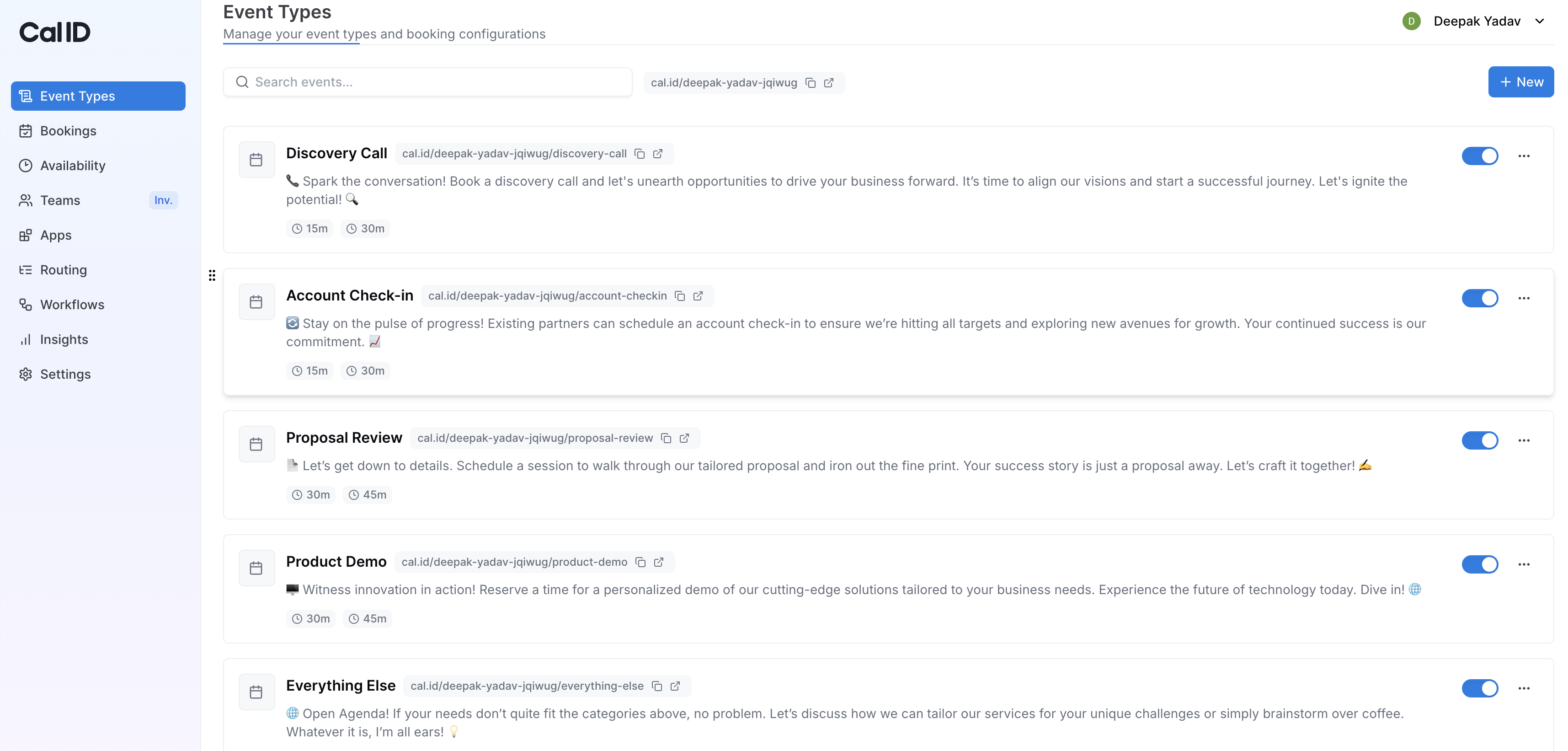
Cal ID Demo -  Event types
Cal ID let you create and customize different kinds of meetings, each with its own duration, availability, and settings to simplify scheduling for every scenario.
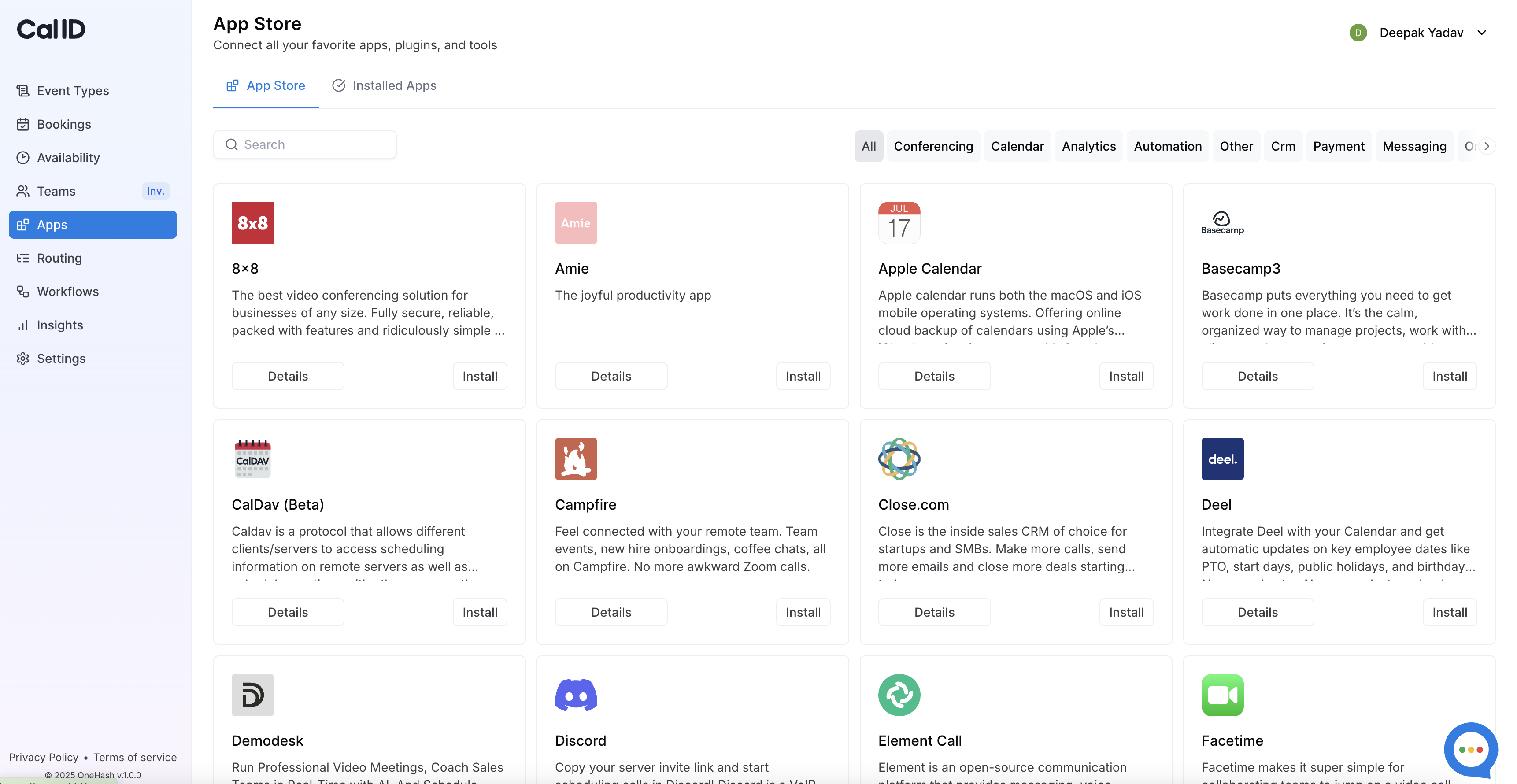
Cal ID Demo - Apps
Cal ID lets you seamlessly connect your favourite tools like Zoom, Google Meet, and Slack to automate scheduling and streamline your workflow.
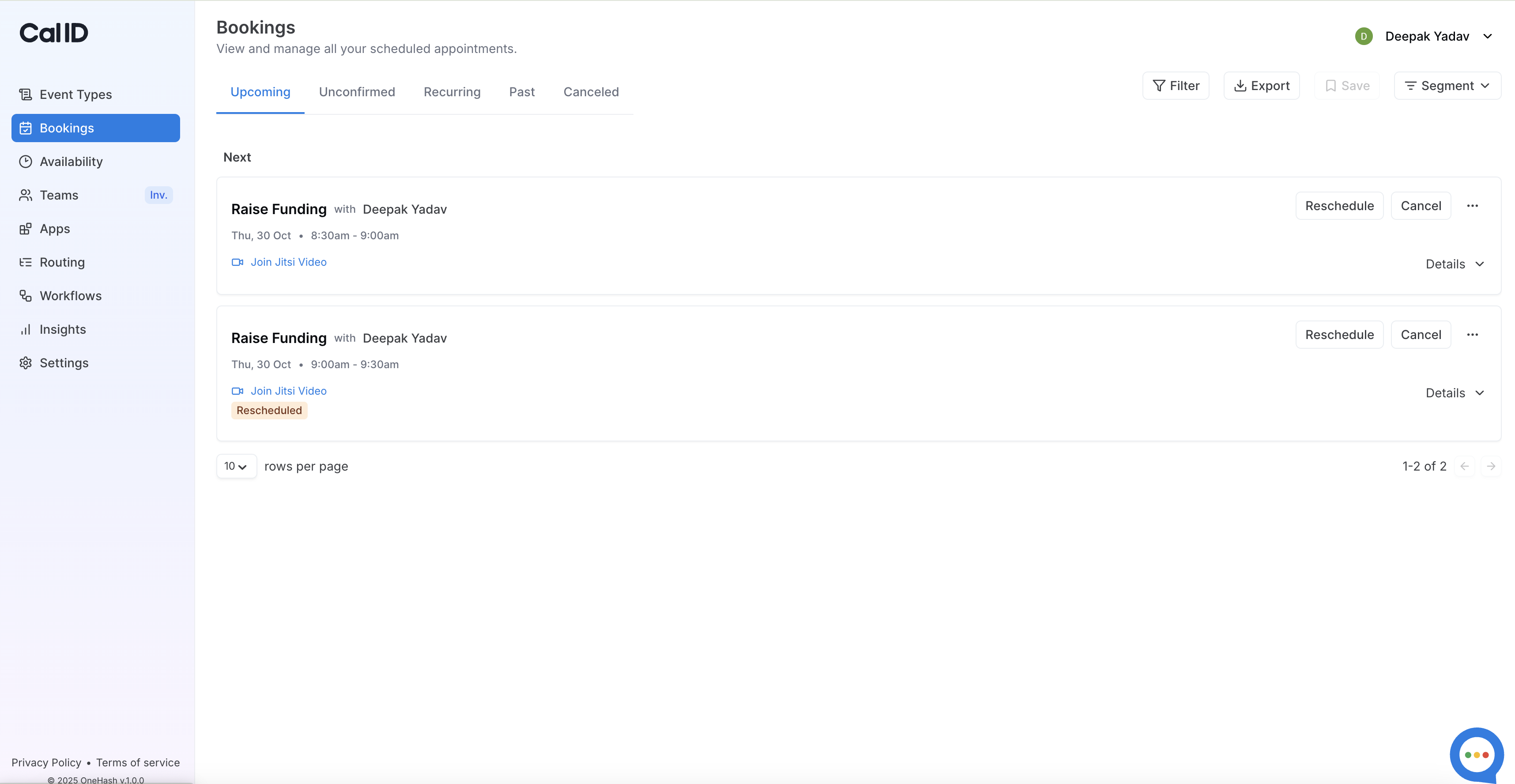
Cal ID Demo - Bookings page
Bookings feature in Cal ID lets you effortlessly manage, track, and confirm all your scheduled meetings in one organized dashboard.
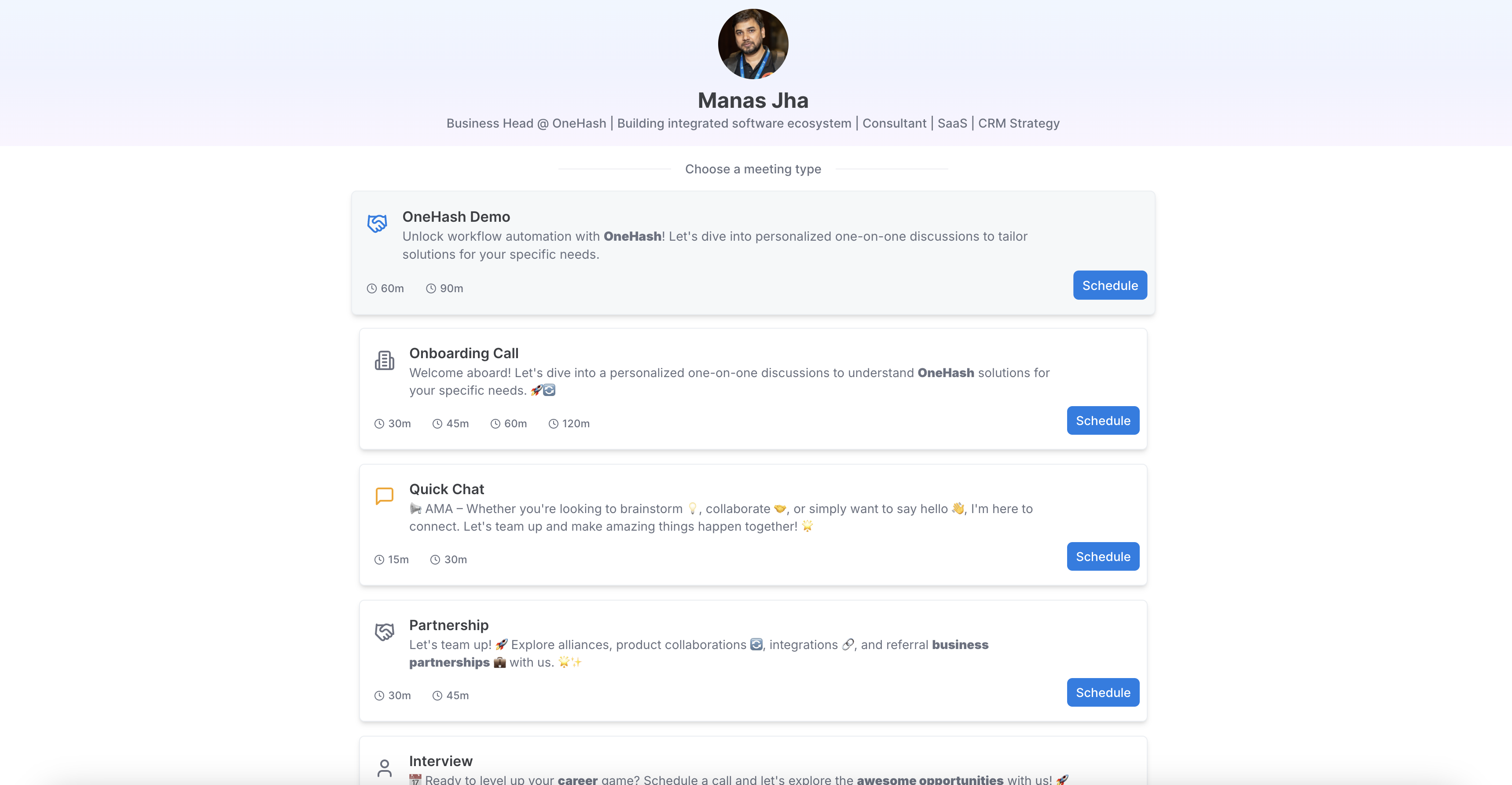
Cal ID Demo - Meeting types
Cal ID allows you to set up multiple meeting options with personalized durations, rules, and availability, so clients can easily book the right session.
Product Avatar Image

Have you used Cal ID before?

Answer a few questions to help the Cal ID community

Cal ID Reviews (76)

Reviews

Cal ID Reviews (76)

4.7
76 reviews

Pros & Cons

Generated from real user reviews
View All Pros and Cons
Search reviews
Filter Reviews
Clear Results
G2 reviews are authentic and verified.
Ravi P.
RP
Senior Software Engineer
Computer Software
Small-Business (50 or fewer emp.)
"The Most Effortless and Scalable Scheduling Tool for Modern Teams"
What do you like best about Cal ID?

What I like best about Cal ID is how it combines ease of use with a surprisingly deep number of features that usually cost a premium elsewhere. The ease of implementation was impressive; I had my first booking link live and synced with my Google Calendar in under five minutes without needing a tutorial.

In my daily frequency of use, the ease of integration with tools like Zoom and Razorpay has been a game-changer, allowing me to automate both the meeting link generation and payment collection in one go. Even when I had a minor question about setting up a complex round-robin workflow, their customer support was responsive and knowledgeable. Overall, it’s a rare tool that feels both powerful for a team and simple enough for an individual to manage without any technical friction. Review collected by and hosted on G2.com.

What do you dislike about Cal ID?

While the core functionality is excellent, the user interface (UI) can occasionally feel a bit less polished compared to older competitors like Calendly. I have noticed minor lag when saving complex workflow automations, and I would love to see more advanced customization options for the booking page branding in the future. Better documentation for some of the more niche integrations would also be a helpful addition for technical users. Review collected by and hosted on G2.com.

Karthik K.
KK
CEO
Small-Business (50 or fewer emp.)
"Effortless Scheduling and Professional Experience with Cal ID"
What do you like best about Cal ID?

What impresses me most about Cal ID is how efficiently it transforms the typical back-and-forth of scheduling into a streamlined, single-link booking process that maintains a professional feel for everyone involved. The interface is user-friendly, and features like calendar synchronization and automated reminders help minimize no-shows and cut down on the need for manual coordination. All in all, it makes scheduling seem effortless, yet still offers enough customization to suit various needs and client preferences. Review collected by and hosted on G2.com.

What do you dislike about Cal ID?

The main drawback I've noticed so far is that some of the advanced customization and workflow features seem somewhat limited, especially when attempting to configure complex routing or address more specialized needs. Additionally, certain settings are buried deeper within the interface than anticipated, which can make fine-tuning configurations more time-consuming than necessary. I've also experienced occasional delays with calendar synchronization, requiring me to manually verify availability to ensure everything is accurate. Review collected by and hosted on G2.com.

Saikat D.
SD
CEO
Small-Business (50 or fewer emp.)
"Intuitive Scheduling with Great Integrations, Minor Room for Improvement"
What do you like best about Cal ID?

Cal ID stands out for its clean, intuitive interface and the way it removes friction from scheduling. Setting up availability, connecting calendars, and sharing booking links feels straightforward, even for teammates who aren’t very technical. The platform feels lightweight but still powerful, and it streamlines coordination in a way that noticeably reduces back-and-forth messaging. Review collected by and hosted on G2.com.

What do you dislike about Cal ID?

The main drawback is that some advanced customization options feel a bit limited, especially for more complex workflows. While the interface is clean, certain settings are nested deeper than expected, which sometimes slows down configuration. Additionally, occasional sync delays can require manual refreshes to verify availability. Review collected by and hosted on G2.com.

RD
CEO
Small-Business (50 or fewer emp.)
"Perfect Free Tool for Managing Appointments Online for my team"
What do you like best about Cal ID?

CalID is extremely easy to use and completely free, which makes it stand out from many other scheduling tools. The interface is clean and intuitive, and setting up availability takes only a few minutes. Live chat support also helped with configurations, which helps to use it fluently. I really like how quickly clients can book appointments online without any back-and-forth emails. My team use CalID for daily meeting schedules and reminders. Review collected by and hosted on G2.com.

What do you dislike about Cal ID?

So far, I haven’t faced any major issues. Since the product is still growing, there is room for more advanced features and integrations in the future, but for a free scheduling tool, it works very well. Review collected by and hosted on G2.com.

GC
CEO & Founder
Small-Business (50 or fewer emp.)
"Effortless Scheduling and Seamless Calendar Sync"
What do you like best about Cal ID?

What I like most about Cal ID is how simple it makes scheduling. The interface is clean, fast, and easy to understand for both me and the people booking time with me. I also appreciate that it syncs smoothly with my existing calendars, which helps avoid double-bookings and keeps everything organized in one place. Creating different event types is intuitive, and the booking links look professional. Overall, it really reduces the back-and-forth that usually happens when trying to find a meeting time. Review collected by and hosted on G2.com.

What do you dislike about Cal ID?

The main downside is that some settings and customizations still feel limited or require extra steps to get right. Occasionally the interface can be a bit slow or unintuitive when adjusting availability or creating more complex event rules. Review collected by and hosted on G2.com.

Igor B.
IB
CIO
Small-Business (50 or fewer emp.)
"Effortless Identity Management with a Clean, User-Friendly Interface"
What do you like best about Cal ID?

Cal ID provides a clean and well-organized interface for managing identity-related information in one place. The onboarding is simple, and all key sections are easy to navigate without unnecessary steps. I find it useful that the tool supports structured profiles and quick sharing formats, which helps keep everything consistent. Overall, it’s a straightforward solution that reduces routine administrative work. Review collected by and hosted on G2.com.

What do you dislike about Cal ID?

The core functionality works well, but some parts still feel limited. I would appreciate more customization options for the profile layout and additional integrations with external services. Occasionally the navigation between sections could be faster. These are not critical issues, but improvements here would make the product more flexible for different use cases. Review collected by and hosted on G2.com.

Andrew V.
AV
CEO
Small-Business (50 or fewer emp.)
"The Ultimate Invisible Assistant for Effortless Scheduling"
What do you like best about Cal ID?

As a communication consultant, most of my work revolves around one-on-one coaching with founders, facilitating leadership offsites, and running small team workshops. Cal ID has quietly become my "invisible assistant," seamlessly keeping everything organized and on track.

What I appreciate most is the ability to create different event types tailored to my workflow—whether it's a brief chemistry call, a 60-minute coaching session, or a 90-minute deep-dive workshop with built-in buffer time for notes. Each event type comes with its own link, rules, and availability, yet all of them are consolidated into a single, streamlined booking page.

Setting everything up was incredibly quick. I connected both my Google and Outlook calendars, and my booking page was live within minutes. Real users often mention how smooth the onboarding and integrations are, and that has definitely been my experience as well.

From a communication standpoint, I really value the thoughtful details. Clients can book in their own time zone, which eliminates any confusion about scheduling. Automatic reminders have significantly reduced no-shows for longer sessions. Plus, I can accept payments for paid sessions directly through the booking flow, using providers that are more affordable than Stripe in some regions.

Finally, the short “cal.id/…” link is a nice touch. It’s easy to share in slides or mention verbally during workshops, and people actually remember it. Review collected by and hosted on G2.com.

What do you dislike about Cal ID?

Most of my concerns fall into the "nice to have" category rather than being true deal-breakers.

When it comes to branding and customization, I find the options somewhat limited. I would appreciate having greater control over fonts and layout, as well as the ability to use a fully custom domain instead of being restricted to the Cal ID URL. This desire for more design flexibility and custom domains is echoed by several other reviewers as well.

The interface itself is clean, but at times it feels almost too minimal. I found that understanding some of the more advanced workflow options required a bit of trial and error, and I've noticed that other users have also mentioned that workflows can initially seem confusing.

There are moments when calendar sync seems a bit slow, with a slight delay of a few seconds when updating availability. However, I haven't experienced any actual double-booking issues—it's more a matter of wishing updates were instantaneous rather than encountering a real functional problem. This matches feedback from other reviewers, who also point out minor syncing or UI/UX quirks rather than significant bugs. Review collected by and hosted on G2.com.

Saraswati  P.
SP
Founder, CEO & Director
Small-Business (50 or fewer emp.)
"Effortless Event Creation and Outstanding Support"
What do you like best about Cal ID?

I really appreciate how simple it is to create events and customize everything in one place. Setting it up took me less than ten minutes. The ability to add unlimited questions is especially useful for my client workflow. The reminder emails function smoothly, and I am excited about the upcoming WhatsApp reminders. I also enjoy the clean design of the booking page and the option to redirect people after they book. Their customer support has been excellent whenever I needed quick assistance. I’m also impressed by the seamless automation and integration with other apps, which is essential for my business now. This has definitely become my go-to tool for frequent scheduling ongoing client and lead calls. Review collected by and hosted on G2.com.

What do you dislike about Cal ID?

As someone who is still new to the platform, I find that certain aspects, especially on the backend, can be somewhat technical. If the interface were a bit more straightforward, I think the overall experience would be even more enjoyable. Review collected by and hosted on G2.com.

Deepak Kumar P.
DP
Chief Executive Officer
Small-Business (50 or fewer emp.)
"Essential Scheduler for Remote Teams and Entrepreneurs"
What do you like best about Cal ID?

Perfect Tool for Remote Teams and Entrepreneurs

As a startup founder, I used to struggle with the chaos of managing meetings across different time zones. That changed when I found Cal ID. This tool is more than just a scheduler; it genuinely enhances productivity. Its seamless integration with various calendars and easy syncing have made it essential for remote teams. I also value the strong emphasis on UI/UX—it’s minimalistic but highly effective. Review collected by and hosted on G2.com.

What do you dislike about Cal ID?

To be honest, I haven't encountered any drawbacks with this online tool so far. Their team is always proactive in addressing any challenges, from the onboarding process to managing the tool itself. Review collected by and hosted on G2.com.

Kurt F.
KF
Technical Director
Small-Business (50 or fewer emp.)
"Effortless Setup and Seamless Integration"
What do you like best about Cal ID?

The ease of setup and integration with my existing services (Google Calendar, and Microsoft Teams). I was up and running with my calendar page within only a few seconds (literally). Review collected by and hosted on G2.com.

What do you dislike about Cal ID?

Only a small thing, but it is prepopulated with services when you get started, which helps you to get a good understanding of how it works and how it will appear, but I then had to go and remove those services before I could put my own in place. Review collected by and hosted on G2.com.

Discussions related to Cal ID

Discussions for this product are not available at this time. Be the first one to Start a discussion

Pricing Options

Pricing provided by Cal ID.

Individual Plan

Free
1 Users Per Month

Team Plan

Free
100 Users Per Month
Cal ID Features
Multi-Calendar View
Customizable Viewing
Calendar Collaboration
Multiple Calendar Management
Screen Reader Compatibility
Keyboard Shortcuts
Sync Multiple Calendars
Import Events
Software Integrations
Product Avatar Image
Cal ID
View Alternatives