Introducing G2.ai, the future of software buying.Try now

Best Text to Speech Software

Shalaka Joshi
SJ
Researched and written by Shalaka Joshi

Text-to-speech (TTS) software is a cutting-edge technology that helps convert text formats into voice outputs. Also known as speech synthesis, text-to-speech is an assistive technology that accurately interprets any form of text document and web page. Businesses widely employ it to enhance the user experience, increase engagement, and make the data more accessible. The advancement of artificial intelligence has allowed for more natural-sounding voices that often sound almost indistinguishable from authentic voices.

Modern TTS software offers diverse features that cater to various needs and preferences. It includes one or more of the following functions: voice selection, speed and pitch adjustment, multilingual support, and voice customization. With TTS software, users can modulate and tailor the reading experience to the desired pace and vocal tone, break down language barriers, and enhance comprehension. They can also add synthesized voices to their websites or applications, typically via an application programming interface (API).

TTS software differs from voice recognition software or speech-to-text software as the latter transforms speech data to text. In addition, natural language understanding (NLU) software helps in produce pauses, phrases, and more for text-to-speech software to produce natural-sounding speech.

To qualify for inclusion in the Text-To-Speech (TTS) category, a product must:

Convert written text to natural-sounding speech
Integrate with applications and websites via a connector such as an API
Control aspects of the synthesized voice, such as volume, pitch, and emotion
Show More
Show Less

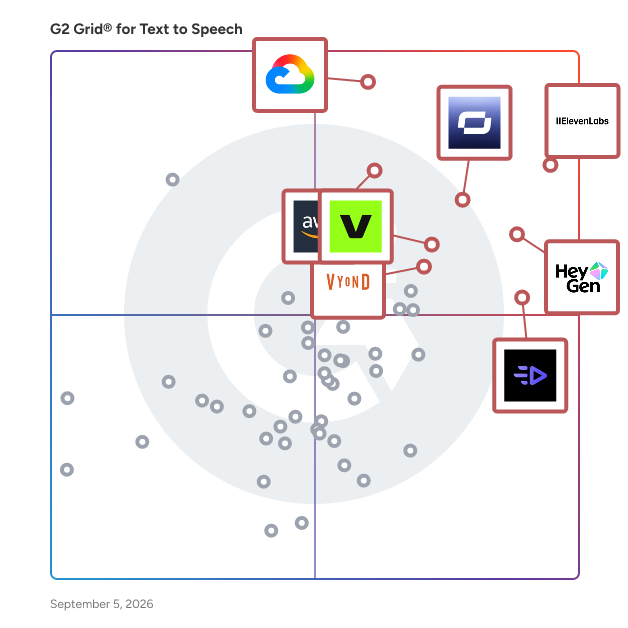
Featured Text to Speech Software At A Glance

Free Plan Available:
ElevenLabs
Sponsored
Leader:
Highest Performer:
Easiest to Use:
Top Trending:
Show LessShow More
Highest Performer:
Easiest to Use:
Top Trending:

G2 takes pride in showing unbiased reviews on user satisfaction in our ratings and reports. We do not allow paid placements in any of our ratings, rankings, or reports. Learn about our scoring methodologies.

Coming Soon
Get Trending Text to Speech Products in Your Inbox

A weekly snapshot of rising stars, new launches, and what everyone's buzzing about.

Sample Trending Products Newsletter
No filters applied
166 Listings in Text to Speech Available
(981)4.5 out of 5
Optimized for quick response
11th Easiest To Use in Text to Speech software
View top Consulting Services for ElevenLabs
Save to My Lists
Entry Level Price:Free
  • Overview
    Expand/Collapse Overview
  • Product Description
    How are these determined?Information
    This description is provided by the seller.

    ElevenLabs is the world’s most advanced generative media and voice AI company, powering creation, localization, and intelligent interaction across every medium. Built around two core platforms—Creativ

    Users
    • CEO
    • Founder
    Industries
    • Entertainment
    • Marketing and Advertising
    Market Segment
    • 71% Small-Business
    • 6% Mid-Market
    User Sentiment
    How are these determined?Information
    These insights, currently in beta, are compiled from user reviews and grouped to display a high-level overview of the software.
    • ElevenLabs is a software that provides text-to-speech and voice cloning functionalities, primarily used for creating voiceovers and personalized audio content.
    • Users frequently mention the high-quality voice generation, the variety of voice options, and the unique text-to-speech feature that allows easy creation of speech without needing other applications.
    • Users experienced difficulty in the setup process, particularly for non-technical users, and found the pricing structure to be a concern, wishing for it to be cheaper or to receive more credits for the price.
  • Pros and Cons
    Expand/Collapse Pros and Cons
  • ElevenLabs Pros and Cons
    How are these determined?Information
    Pros and Cons are compiled from review feedback and grouped into themes to provide an easy-to-understand summary of user reviews.
    Pros
    Ease of Use
    213
    Quality
    150
    Speed
    115
    Voice Cloning
    112
    Natural Voices
    99
    Cons
    Expensive
    88
    Needs Improvement
    81
    Pricing Issues
    79
    Credit Limitations
    69
    Pronunciation Issues
    64
  • User Satisfaction
    Expand/Collapse User Satisfaction
  • ElevenLabs features and usability ratings that predict user satisfaction
    8.7
    Has the product been a good partner in doing business?
    Average: 8.9
    8.0
    Pitch
    Average: 8.5
    8.7
    AI Text-to-Speech
    Average: 8.8
    7.8
    Application Integration
    Average: 8.5
  • Seller Details
    Expand/Collapse Seller Details
  • Seller Details
    Company Website
    Year Founded
    2022
    HQ Location
    New York, US
    Twitter
    @elevenlabsio
    148,561 Twitter followers
    LinkedIn® Page
    www.linkedin.com
    498 employees on LinkedIn®
Product Description
How are these determined?Information
This description is provided by the seller.

ElevenLabs is the world’s most advanced generative media and voice AI company, powering creation, localization, and intelligent interaction across every medium. Built around two core platforms—Creativ

Users
  • CEO
  • Founder
Industries
  • Entertainment
  • Marketing and Advertising
Market Segment
  • 71% Small-Business
  • 6% Mid-Market
User Sentiment
How are these determined?Information
These insights, currently in beta, are compiled from user reviews and grouped to display a high-level overview of the software.
  • ElevenLabs is a software that provides text-to-speech and voice cloning functionalities, primarily used for creating voiceovers and personalized audio content.
  • Users frequently mention the high-quality voice generation, the variety of voice options, and the unique text-to-speech feature that allows easy creation of speech without needing other applications.
  • Users experienced difficulty in the setup process, particularly for non-technical users, and found the pricing structure to be a concern, wishing for it to be cheaper or to receive more credits for the price.
ElevenLabs Pros and Cons
How are these determined?Information
Pros and Cons are compiled from review feedback and grouped into themes to provide an easy-to-understand summary of user reviews.
Pros
Ease of Use
213
Quality
150
Speed
115
Voice Cloning
112
Natural Voices
99
Cons
Expensive
88
Needs Improvement
81
Pricing Issues
79
Credit Limitations
69
Pronunciation Issues
64
ElevenLabs features and usability ratings that predict user satisfaction
8.7
Has the product been a good partner in doing business?
Average: 8.9
8.0
Pitch
Average: 8.5
8.7
AI Text-to-Speech
Average: 8.8
7.8
Application Integration
Average: 8.5
Seller Details
Company Website
Year Founded
2022
HQ Location
New York, US
Twitter
@elevenlabsio
148,561 Twitter followers
LinkedIn® Page
www.linkedin.com
498 employees on LinkedIn®
(2,430)4.7 out of 5
8th Easiest To Use in Text to Speech software
Save to My Lists
Entry Level Price:Free
  • Overview
    Expand/Collapse Overview
  • Product Description
    How are these determined?Information
    This description is provided by the seller.

    Synthesia is the best AI video generation platform for business. By turning text into professional AI-generated videos in minutes, Synthesia replaces static documents and slide decks with dynamic,

    Users
    • CEO
    • Founder
    Industries
    • Computer Software
    • E-Learning
    Market Segment
    • 70% Small-Business
    • 18% Mid-Market
    User Sentiment
    How are these determined?Information
    These insights, currently in beta, are compiled from user reviews and grouped to display a high-level overview of the software.
    • Synthesia is a video creation platform that uses AI avatars to generate interactive and realistic videos for various purposes such as training, marketing, and education.
    • Users frequently mention the ease of use, the quality of the AI avatars, the ability to create videos quickly and efficiently, and the platform's continuous innovation and frequent updates as significant advantages.
    • Users reported issues with the limited customization options for avatars, the difficulty in adjusting the speaking speed and tone of the AI voices, the platform's pricing model, and the time-consuming process of ensuring correct phrasing and pronunciation.
  • Pros and Cons
    Expand/Collapse Pros and Cons
  • Synthesia Pros and Cons
    How are these determined?Information
    Pros and Cons are compiled from review feedback and grouped into themes to provide an easy-to-understand summary of user reviews.
    Pros
    Ease of Use
    1,218
    Quality
    754
    Realistic Avatars
    730
    Easy Creation
    684
    Video Creation
    602
    Cons
    Avatar Limitations
    420
    Limited Avatars
    362
    Avatar Quality
    339
    AI Limitations
    338
    Limited Customization
    278
  • User Satisfaction
    Expand/Collapse User Satisfaction
  • Synthesia features and usability ratings that predict user satisfaction
    9.0
    Has the product been a good partner in doing business?
    Average: 8.9
    8.0
    Pitch
    Average: 8.5
    8.4
    AI Text-to-Speech
    Average: 8.8
    7.8
    Application Integration
    Average: 8.5
  • Seller Details
    Expand/Collapse Seller Details
  • Seller Details
    Seller
    Synthesia
    Company Website
    Year Founded
    2017
    HQ Location
    London
    Twitter
    @synthesiaIO
    27,522 Twitter followers
    LinkedIn® Page
    www.linkedin.com
    548 employees on LinkedIn®
Product Description
How are these determined?Information
This description is provided by the seller.

Synthesia is the best AI video generation platform for business. By turning text into professional AI-generated videos in minutes, Synthesia replaces static documents and slide decks with dynamic,

Users
  • CEO
  • Founder
Industries
  • Computer Software
  • E-Learning
Market Segment
  • 70% Small-Business
  • 18% Mid-Market
User Sentiment
How are these determined?Information
These insights, currently in beta, are compiled from user reviews and grouped to display a high-level overview of the software.
  • Synthesia is a video creation platform that uses AI avatars to generate interactive and realistic videos for various purposes such as training, marketing, and education.
  • Users frequently mention the ease of use, the quality of the AI avatars, the ability to create videos quickly and efficiently, and the platform's continuous innovation and frequent updates as significant advantages.
  • Users reported issues with the limited customization options for avatars, the difficulty in adjusting the speaking speed and tone of the AI voices, the platform's pricing model, and the time-consuming process of ensuring correct phrasing and pronunciation.
Synthesia Pros and Cons
How are these determined?Information
Pros and Cons are compiled from review feedback and grouped into themes to provide an easy-to-understand summary of user reviews.
Pros
Ease of Use
1,218
Quality
754
Realistic Avatars
730
Easy Creation
684
Video Creation
602
Cons
Avatar Limitations
420
Limited Avatars
362
Avatar Quality
339
AI Limitations
338
Limited Customization
278
Synthesia features and usability ratings that predict user satisfaction
9.0
Has the product been a good partner in doing business?
Average: 8.9
8.0
Pitch
Average: 8.5
8.4
AI Text-to-Speech
Average: 8.8
7.8
Application Integration
Average: 8.5
Seller Details
Seller
Synthesia
Company Website
Year Founded
2017
HQ Location
London
Twitter
@synthesiaIO
27,522 Twitter followers
LinkedIn® Page
www.linkedin.com
548 employees on LinkedIn®

This is how G2 Deals can help you:

  • Easily shop for curated – and trusted – software
  • Own your own software buying journey
  • Discover exclusive deals on software
(1,411)4.7 out of 5
Optimized for quick response
5th Easiest To Use in Text to Speech software
Save to My Lists
Entry Level Price:Free
  • Overview
    Expand/Collapse Overview
  • Product Description
    How are these determined?Information
    This description is provided by the seller.

    Murf AI is a cloud-based realistic text-to-speech platform that can be used to create voiceovers for their content (YouTube videos, podcasts, advertisements/ commercials, e-learning content, presenta

    Users
    • CEO
    Industries
    • E-Learning
    • Marketing and Advertising
    Market Segment
    • 77% Small-Business
    • 14% Mid-Market
    User Sentiment
    How are these determined?Information
    These insights, currently in beta, are compiled from user reviews and grouped to display a high-level overview of the software.
    • Murf.ai is a tool that converts text into voiceovers, offering features such as voice customization, multilingual support, and integration with various applications.
    • Users frequently mention the realistic voice quality, the wide range of voices and languages, and the ease of use, which significantly reduces the time and effort required for creating professional voiceovers.
    • Reviewers mentioned that some voices can sound robotic, the pronunciation is not always perfect, and the free plan is limited in features and usage, which restricts exploring all capabilities before committing to a paid plan.
  • Pros and Cons
    Expand/Collapse Pros and Cons
  • Murf.ai Pros and Cons
    How are these determined?Information
    Pros and Cons are compiled from review feedback and grouped into themes to provide an easy-to-understand summary of user reviews.
    Pros
    Ease of Use
    353
    Natural Sound
    239
    Natural Voices
    229
    Voice Customization
    217
    Quality
    215
    Cons
    Limited Voices
    112
    Expensive
    101
    Voice Quality
    88
    Pricing Issues
    86
    Pronunciation Issues
    69
  • User Satisfaction
    Expand/Collapse User Satisfaction
  • Murf.ai features and usability ratings that predict user satisfaction
    9.4
    Has the product been a good partner in doing business?
    Average: 8.9
    8.4
    Pitch
    Average: 8.5
    8.3
    AI Text-to-Speech
    Average: 8.8
    8.4
    Application Integration
    Average: 8.5
  • Seller Details
    Expand/Collapse Seller Details
  • Seller Details
    Seller
    Murf Inc.
    Company Website
    Year Founded
    2020
    HQ Location
    Salt Lake City, US
    Twitter
    @MURFAISTUDIO
    3,811 Twitter followers
    LinkedIn® Page
    www.linkedin.com
    125 employees on LinkedIn®
Product Description
How are these determined?Information
This description is provided by the seller.

Murf AI is a cloud-based realistic text-to-speech platform that can be used to create voiceovers for their content (YouTube videos, podcasts, advertisements/ commercials, e-learning content, presenta

Users
  • CEO
Industries
  • E-Learning
  • Marketing and Advertising
Market Segment
  • 77% Small-Business
  • 14% Mid-Market
User Sentiment
How are these determined?Information
These insights, currently in beta, are compiled from user reviews and grouped to display a high-level overview of the software.
  • Murf.ai is a tool that converts text into voiceovers, offering features such as voice customization, multilingual support, and integration with various applications.
  • Users frequently mention the realistic voice quality, the wide range of voices and languages, and the ease of use, which significantly reduces the time and effort required for creating professional voiceovers.
  • Reviewers mentioned that some voices can sound robotic, the pronunciation is not always perfect, and the free plan is limited in features and usage, which restricts exploring all capabilities before committing to a paid plan.
Murf.ai Pros and Cons
How are these determined?Information
Pros and Cons are compiled from review feedback and grouped into themes to provide an easy-to-understand summary of user reviews.
Pros
Ease of Use
353
Natural Sound
239
Natural Voices
229
Voice Customization
217
Quality
215
Cons
Limited Voices
112
Expensive
101
Voice Quality
88
Pricing Issues
86
Pronunciation Issues
69
Murf.ai features and usability ratings that predict user satisfaction
9.4
Has the product been a good partner in doing business?
Average: 8.9
8.4
Pitch
Average: 8.5
8.3
AI Text-to-Speech
Average: 8.8
8.4
Application Integration
Average: 8.5
Seller Details
Seller
Murf Inc.
Company Website
Year Founded
2020
HQ Location
Salt Lake City, US
Twitter
@MURFAISTUDIO
3,811 Twitter followers
LinkedIn® Page
www.linkedin.com
125 employees on LinkedIn®
(1,659)4.6 out of 5
Optimized for quick response
4th Easiest To Use in Text to Speech software
Save to My Lists
Entry Level Price:$12.00
  • Overview
    Expand/Collapse Overview
  • Product Description
    How are these determined?Information
    This description is provided by the seller.

    VEED is the all-in-one platform for businesses that want to scale video production. Customers across 200+ countries in marketing, sales, L&D, and social media are creating video 30x faster than

    Users
    • Owner
    • Founder
    Industries
    • Marketing and Advertising
    • Computer Software
    Market Segment
    • 84% Small-Business
    • 8% Mid-Market
    User Sentiment
    How are these determined?Information
    These insights, currently in beta, are compiled from user reviews and grouped to display a high-level overview of the software.
    • VEED is a video editing tool that offers features such as AI-generated subtitles, voiceovers, and video avatars, and is used for creating content for various platforms including YouTube, Instagram, and TikTok.
    • Reviewers appreciate VEED's user-friendly interface, its ability to accurately generate subtitles, and the time-saving aspect of its AI features, which streamline the content creation process.
    • Reviewers noted issues with VEED's AI features not always functioning as expected, occasional software bugs, and limitations in the stock media library.
  • Pros and Cons
    Expand/Collapse Pros and Cons
  • VEED Pros and Cons
    How are these determined?Information
    Pros and Cons are compiled from review feedback and grouped into themes to provide an easy-to-understand summary of user reviews.
    Pros
    Ease of Use
    1,090
    Features
    727
    Easy Editing
    645
    Video Editing
    613
    Quality
    572
    Cons
    Limited Features
    236
    Slow Performance
    235
    Expensive
    197
    AI Limitations
    176
    Limited Customization
    157
  • User Satisfaction
    Expand/Collapse User Satisfaction
  • VEED features and usability ratings that predict user satisfaction
    9.0
    Has the product been a good partner in doing business?
    Average: 8.9
    7.8
    Pitch
    Average: 8.5
    8.5
    AI Text-to-Speech
    Average: 8.8
    7.4
    Application Integration
    Average: 8.5
  • Seller Details
    Expand/Collapse Seller Details
  • Seller Details
    Seller
    VEED
    Company Website
    Year Founded
    2018
    HQ Location
    London, GB
    Twitter
    @veedstudio
    16,561 Twitter followers
    LinkedIn® Page
    www.linkedin.com
    175 employees on LinkedIn®
Product Description
How are these determined?Information
This description is provided by the seller.

VEED is the all-in-one platform for businesses that want to scale video production. Customers across 200+ countries in marketing, sales, L&D, and social media are creating video 30x faster than

Users
  • Owner
  • Founder
Industries
  • Marketing and Advertising
  • Computer Software
Market Segment
  • 84% Small-Business
  • 8% Mid-Market
User Sentiment
How are these determined?Information
These insights, currently in beta, are compiled from user reviews and grouped to display a high-level overview of the software.
  • VEED is a video editing tool that offers features such as AI-generated subtitles, voiceovers, and video avatars, and is used for creating content for various platforms including YouTube, Instagram, and TikTok.
  • Reviewers appreciate VEED's user-friendly interface, its ability to accurately generate subtitles, and the time-saving aspect of its AI features, which streamline the content creation process.
  • Reviewers noted issues with VEED's AI features not always functioning as expected, occasional software bugs, and limitations in the stock media library.
VEED Pros and Cons
How are these determined?Information
Pros and Cons are compiled from review feedback and grouped into themes to provide an easy-to-understand summary of user reviews.
Pros
Ease of Use
1,090
Features
727
Easy Editing
645
Video Editing
613
Quality
572
Cons
Limited Features
236
Slow Performance
235
Expensive
197
AI Limitations
176
Limited Customization
157
VEED features and usability ratings that predict user satisfaction
9.0
Has the product been a good partner in doing business?
Average: 8.9
7.8
Pitch
Average: 8.5
8.5
AI Text-to-Speech
Average: 8.8
7.4
Application Integration
Average: 8.5
Seller Details
Seller
VEED
Company Website
Year Founded
2018
HQ Location
London, GB
Twitter
@veedstudio
16,561 Twitter followers
LinkedIn® Page
www.linkedin.com
175 employees on LinkedIn®
(1,280)4.8 out of 5
6th Easiest To Use in Text to Speech software
View top Consulting Services for HeyGen Video Agent
Save to My Lists
Entry Level Price:Free
  • Overview
    Expand/Collapse Overview
  • Product Description
    How are these determined?Information
    This description is provided by the seller.

    HeyGen is the leading AI video generation platform designed to assist users in creating visually engaging videos effortlessly. This innovative solution caters to a wide range of users, from small busi

    Users
    • CEO
    • Owner
    Industries
    • Marketing and Advertising
    • Education Management
    Market Segment
    • 87% Small-Business
    • 9% Mid-Market
    User Sentiment
    How are these determined?Information
    These insights, currently in beta, are compiled from user reviews and grouped to display a high-level overview of the software.
    • HeyGen is a tool that allows users to create AI-generated videos in multiple languages and tailor messages to their community.
    • Reviewers like the realistic AI avatars, the ability to create videos on the go, the multilingual support, and the user-friendly interface that HeyGen offers.
    • Reviewers noted issues with video glitches counting against their monthly minutes, limitations on video size, the need for more realistic voice clones, outdated tutorials, and a confusing credit system.
  • Pros and Cons
    Expand/Collapse Pros and Cons
  • HeyGen Video Agent Pros and Cons
    How are these determined?Information
    Pros and Cons are compiled from review feedback and grouped into themes to provide an easy-to-understand summary of user reviews.
    Pros
    Ease of Use
    552
    Realistic Avatars
    390
    Quality
    388
    Video Creation
    341
    Easy Creation
    258
    Cons
    Expensive
    172
    Expensive Cost
    149
    Pricing Issues
    144
    Cost Issue
    130
    Avatar Limitations
    118
  • User Satisfaction
    Expand/Collapse User Satisfaction
  • HeyGen Video Agent features and usability ratings that predict user satisfaction
    9.2
    Has the product been a good partner in doing business?
    Average: 8.9
    8.9
    Pitch
    Average: 8.5
    9.2
    AI Text-to-Speech
    Average: 8.8
    8.8
    Application Integration
    Average: 8.5
  • Seller Details
    Expand/Collapse Seller Details
  • Seller Details
    Seller
    HeyGen
    Company Website
    Year Founded
    2020
    HQ Location
    Los Angeles, California
    Twitter
    @HeyGen_Official
    86,057 Twitter followers
    LinkedIn® Page
    www.linkedin.com
    269 employees on LinkedIn®
Product Description
How are these determined?Information
This description is provided by the seller.

HeyGen is the leading AI video generation platform designed to assist users in creating visually engaging videos effortlessly. This innovative solution caters to a wide range of users, from small busi

Users
  • CEO
  • Owner
Industries
  • Marketing and Advertising
  • Education Management
Market Segment
  • 87% Small-Business
  • 9% Mid-Market
User Sentiment
How are these determined?Information
These insights, currently in beta, are compiled from user reviews and grouped to display a high-level overview of the software.
  • HeyGen is a tool that allows users to create AI-generated videos in multiple languages and tailor messages to their community.
  • Reviewers like the realistic AI avatars, the ability to create videos on the go, the multilingual support, and the user-friendly interface that HeyGen offers.
  • Reviewers noted issues with video glitches counting against their monthly minutes, limitations on video size, the need for more realistic voice clones, outdated tutorials, and a confusing credit system.
HeyGen Video Agent Pros and Cons
How are these determined?Information
Pros and Cons are compiled from review feedback and grouped into themes to provide an easy-to-understand summary of user reviews.
Pros
Ease of Use
552
Realistic Avatars
390
Quality
388
Video Creation
341
Easy Creation
258
Cons
Expensive
172
Expensive Cost
149
Pricing Issues
144
Cost Issue
130
Avatar Limitations
118
HeyGen Video Agent features and usability ratings that predict user satisfaction
9.2
Has the product been a good partner in doing business?
Average: 8.9
8.9
Pitch
Average: 8.5
9.2
AI Text-to-Speech
Average: 8.8
8.8
Application Integration
Average: 8.5
Seller Details
Seller
HeyGen
Company Website
Year Founded
2020
HQ Location
Los Angeles, California
Twitter
@HeyGen_Official
86,057 Twitter followers
LinkedIn® Page
www.linkedin.com
269 employees on LinkedIn®
(148)4.4 out of 5
View top Consulting Services for Google Cloud Text-to-Speech
Save to My Lists
  • Overview
    Expand/Collapse Overview
  • Product Description
    How are these determined?Information
    This description is provided by the seller.

    Google Cloud Text-to-Speech enables developers to synthesize natural-sounding speech with 30 voices, available in multiple languages and variants. It applies DeepMind's groundbreaking research in Wave

    Users
    • Data Engineer
    • Software Engineer
    Industries
    • Information Technology and Services
    • Computer Software
    Market Segment
    • 51% Small-Business
    • 29% Mid-Market
  • Pros and Cons
    Expand/Collapse Pros and Cons
  • Google Cloud Text-to-Speech Pros and Cons
    How are these determined?Information
    Pros and Cons are compiled from review feedback and grouped into themes to provide an easy-to-understand summary of user reviews.
    Pros
    Cloud Storage
    1
    Data Security
    1
    Features
    1
    Global Access
    1
    Pricing Transparency
    1
    Cons
    Limited Features
    1
  • User Satisfaction
    Expand/Collapse User Satisfaction
  • Google Cloud Text-to-Speech features and usability ratings that predict user satisfaction
    8.9
    Has the product been a good partner in doing business?
    Average: 8.9
    8.6
    Pitch
    Average: 8.2
    9.0
    AI Text-to-Speech
    Average: 8.7
    8.8
    Application Integration
    Average: 8.2
  • Seller Details
    Expand/Collapse Seller Details
  • Seller Details
    Seller
    Google
    Year Founded
    1998
    HQ Location
    Mountain View, CA
    Twitter
    @google
    31,497,617 Twitter followers
    LinkedIn® Page
    www.linkedin.com
    325,307 employees on LinkedIn®
    Ownership
    NASDAQ:GOOG
Product Description
How are these determined?Information
This description is provided by the seller.

Google Cloud Text-to-Speech enables developers to synthesize natural-sounding speech with 30 voices, available in multiple languages and variants. It applies DeepMind's groundbreaking research in Wave

Users
  • Data Engineer
  • Software Engineer
Industries
  • Information Technology and Services
  • Computer Software
Market Segment
  • 51% Small-Business
  • 29% Mid-Market
Google Cloud Text-to-Speech Pros and Cons
How are these determined?Information
Pros and Cons are compiled from review feedback and grouped into themes to provide an easy-to-understand summary of user reviews.
Pros
Cloud Storage
1
Data Security
1
Features
1
Global Access
1
Pricing Transparency
1
Cons
Limited Features
1
Google Cloud Text-to-Speech features and usability ratings that predict user satisfaction
8.9
Has the product been a good partner in doing business?
Average: 8.9
8.6
Pitch
Average: 8.2
9.0
AI Text-to-Speech
Average: 8.7
8.8
Application Integration
Average: 8.2
Seller Details
Seller
Google
Year Founded
1998
HQ Location
Mountain View, CA
Twitter
@google
31,497,617 Twitter followers
LinkedIn® Page
www.linkedin.com
325,307 employees on LinkedIn®
Ownership
NASDAQ:GOOG
  • Overview
    Expand/Collapse Overview
  • Product Description
    How are these determined?Information
    This description is provided by the seller.

    Amazon Polly is a service that turns text into lifelike speech, allowing you to create applications that talk, and build entirely new categories of speech-enabled products.

    Users
    No information available
    Industries
    • Information Technology and Services
    • Computer Software
    Market Segment
    • 49% Small-Business
    • 31% Mid-Market
  • Pros and Cons
    Expand/Collapse Pros and Cons
  • Amazon Polly Pros and Cons
    How are these determined?Information
    Pros and Cons are compiled from review feedback and grouped into themes to provide an easy-to-understand summary of user reviews.
    Pros
    Quality
    2
    Voice Realism
    2
    Affordable
    1
    API Integration
    1
    Data Visibility
    1
    Cons
    Expensive
    2
    Cost Concerns
    1
    Error Handling
    1
    Limited Customization
    1
    Poor Documentation
    1
  • User Satisfaction
    Expand/Collapse User Satisfaction
  • Amazon Polly features and usability ratings that predict user satisfaction
    8.8
    Has the product been a good partner in doing business?
    Average: 8.9
    8.5
    Pitch
    Average: 8.2
    8.9
    AI Text-to-Speech
    Average: 8.7
    8.1
    Application Integration
    Average: 8.2
  • Seller Details
    Expand/Collapse Seller Details
  • Seller Details
    Year Founded
    2006
    HQ Location
    Seattle, WA
    Twitter
    @awscloud
    2,217,364 Twitter followers
    LinkedIn® Page
    www.linkedin.com
    143,584 employees on LinkedIn®
    Ownership
    NASDAQ: AMZN
Product Description
How are these determined?Information
This description is provided by the seller.

Amazon Polly is a service that turns text into lifelike speech, allowing you to create applications that talk, and build entirely new categories of speech-enabled products.

Users
No information available
Industries
  • Information Technology and Services
  • Computer Software
Market Segment
  • 49% Small-Business
  • 31% Mid-Market
Amazon Polly Pros and Cons
How are these determined?Information
Pros and Cons are compiled from review feedback and grouped into themes to provide an easy-to-understand summary of user reviews.
Pros
Quality
2
Voice Realism
2
Affordable
1
API Integration
1
Data Visibility
1
Cons
Expensive
2
Cost Concerns
1
Error Handling
1
Limited Customization
1
Poor Documentation
1
Amazon Polly features and usability ratings that predict user satisfaction
8.8
Has the product been a good partner in doing business?
Average: 8.9
8.5
Pitch
Average: 8.2
8.9
AI Text-to-Speech
Average: 8.7
8.1
Application Integration
Average: 8.2
Seller Details
Year Founded
2006
HQ Location
Seattle, WA
Twitter
@awscloud
2,217,364 Twitter followers
LinkedIn® Page
www.linkedin.com
143,584 employees on LinkedIn®
Ownership
NASDAQ: AMZN
(450)4.8 out of 5
2nd Easiest To Use in Text to Speech software
Save to My Lists
  • Overview
    Expand/Collapse Overview
  • Product Description
    How are these determined?Information
    This description is provided by the seller.

    Vyond is an all-in-one AI video platform designed to empower organizations in creating secure, compliant, and engaging business content at scale. With a history spanning over 15 years, Vyond has estab

    Users
    • Instructional Designer
    • Learning Experience Designer
    Industries
    • E-Learning
    • Hospital & Health Care
    Market Segment
    • 52% Enterprise
    • 27% Small-Business
    User Sentiment
    How are these determined?Information
    These insights, currently in beta, are compiled from user reviews and grouped to display a high-level overview of the software.
    • Vyond is a software tool that allows users to create custom animations and videos for various purposes such as training content, marketing, and more.
    • Reviewers like the ease of use, the vast assets for creating animations, the AI-based voiceover, the gradual learning curve, and the exceptional customer support that Vyond provides.
    • Users reported issues such as the website freezing up, limitations in animation styles, difficulties in creating unique animations, and inconsistencies in the text-to-speech feature.
  • Pros and Cons
    Expand/Collapse Pros and Cons
  • Vyond Pros and Cons
    How are these determined?Information
    Pros and Cons are compiled from review feedback and grouped into themes to provide an easy-to-understand summary of user reviews.
    Pros
    Ease of Use
    177
    Video Creation
    119
    Features
    101
    Easy Creation
    94
    Versatility
    87
    Cons
    Limited Customization
    37
    Limited Features
    28
    Limited Options
    27
    Learning Curve
    26
    Limited Selection
    24
  • User Satisfaction
    Expand/Collapse User Satisfaction
  • Vyond features and usability ratings that predict user satisfaction
    9.2
    Has the product been a good partner in doing business?
    Average: 8.9
    8.4
    Pitch
    Average: 8.5
    9.0
    AI Text-to-Speech
    Average: 8.8
    8.8
    Application Integration
    Average: 8.5
  • Seller Details
    Expand/Collapse Seller Details
  • Seller Details
    Seller
    Vyond
    Company Website
    Year Founded
    2007
    HQ Location
    San Mateo, California
    Twitter
    @VyondVideo
    136 Twitter followers
    LinkedIn® Page
    www.linkedin.com
    269 employees on LinkedIn®
Product Description
How are these determined?Information
This description is provided by the seller.

Vyond is an all-in-one AI video platform designed to empower organizations in creating secure, compliant, and engaging business content at scale. With a history spanning over 15 years, Vyond has estab

Users
  • Instructional Designer
  • Learning Experience Designer
Industries
  • E-Learning
  • Hospital & Health Care
Market Segment
  • 52% Enterprise
  • 27% Small-Business
User Sentiment
How are these determined?Information
These insights, currently in beta, are compiled from user reviews and grouped to display a high-level overview of the software.
  • Vyond is a software tool that allows users to create custom animations and videos for various purposes such as training content, marketing, and more.
  • Reviewers like the ease of use, the vast assets for creating animations, the AI-based voiceover, the gradual learning curve, and the exceptional customer support that Vyond provides.
  • Users reported issues such as the website freezing up, limitations in animation styles, difficulties in creating unique animations, and inconsistencies in the text-to-speech feature.
Vyond Pros and Cons
How are these determined?Information
Pros and Cons are compiled from review feedback and grouped into themes to provide an easy-to-understand summary of user reviews.
Pros
Ease of Use
177
Video Creation
119
Features
101
Easy Creation
94
Versatility
87
Cons
Limited Customization
37
Limited Features
28
Limited Options
27
Learning Curve
26
Limited Selection
24
Vyond features and usability ratings that predict user satisfaction
9.2
Has the product been a good partner in doing business?
Average: 8.9
8.4
Pitch
Average: 8.5
9.0
AI Text-to-Speech
Average: 8.8
8.8
Application Integration
Average: 8.5
Seller Details
Seller
Vyond
Company Website
Year Founded
2007
HQ Location
San Mateo, California
Twitter
@VyondVideo
136 Twitter followers
LinkedIn® Page
www.linkedin.com
269 employees on LinkedIn®
(45)4.7 out of 5
8th Easiest To Use in Text to Speech software
Save to My Lists
  • Overview
    Expand/Collapse Overview
  • Product Description
    How are these determined?Information
    This description is provided by the seller.

    Voices is the world’s leading enterprise-class voice solutions platform, blending innovation in Voice AI and Voice Data with a robust traditional voice over marketplace. With a community of over 4

    Users
    No information available
    Industries
    • Marketing and Advertising
    • Media Production
    Market Segment
    • 67% Small-Business
    • 16% Mid-Market
    User Sentiment
    How are these determined?Information
    These insights, currently in beta, are compiled from user reviews and grouped to display a high-level overview of the software.
    • Voices is a platform that connects voice actors with clients for various voiceover work such as commercials, audiobooks, animations, and more.
    • Users like the abundance of auditions provided by Voices, the guaranteed payment system, the variety in types of auditions, and the platform's user-friendly interface that makes it easy to find talent and process payment.
    • Reviewers mentioned issues such as inconsistent audio specifications, difficulty in getting hired by new clients, high-cost talent, and a lack of lower-cost talent available on the site.
  • Pros and Cons
    Expand/Collapse Pros and Cons
  • Voices Pros and Cons
    How are these determined?Information
    Pros and Cons are compiled from review feedback and grouped into themes to provide an easy-to-understand summary of user reviews.
    Pros
    Ease of Use
    14
    Quick
    6
    Variety
    6
    Quality
    5
    Affordable
    4
    Cons
    UX Improvement
    2
    Expensive
    1
  • User Satisfaction
    Expand/Collapse User Satisfaction
  • Voices features and usability ratings that predict user satisfaction
    9.4
    Has the product been a good partner in doing business?
    Average: 8.9
    8.2
    Pitch
    Average: 8.2
    7.9
    AI Text-to-Speech
    Average: 8.7
    8.6
    Application Integration
    Average: 8.2
  • Seller Details
    Expand/Collapse Seller Details
  • Seller Details
    Seller
    Voices
    Year Founded
    2005
    HQ Location
    London, CA
    Twitter
    @voices
    21,080 Twitter followers
    LinkedIn® Page
    www.linkedin.com
    819 employees on LinkedIn®
Product Description
How are these determined?Information
This description is provided by the seller.

Voices is the world’s leading enterprise-class voice solutions platform, blending innovation in Voice AI and Voice Data with a robust traditional voice over marketplace. With a community of over 4

Users
No information available
Industries
  • Marketing and Advertising
  • Media Production
Market Segment
  • 67% Small-Business
  • 16% Mid-Market
User Sentiment
How are these determined?Information
These insights, currently in beta, are compiled from user reviews and grouped to display a high-level overview of the software.
  • Voices is a platform that connects voice actors with clients for various voiceover work such as commercials, audiobooks, animations, and more.
  • Users like the abundance of auditions provided by Voices, the guaranteed payment system, the variety in types of auditions, and the platform's user-friendly interface that makes it easy to find talent and process payment.
  • Reviewers mentioned issues such as inconsistent audio specifications, difficulty in getting hired by new clients, high-cost talent, and a lack of lower-cost talent available on the site.
Voices Pros and Cons
How are these determined?Information
Pros and Cons are compiled from review feedback and grouped into themes to provide an easy-to-understand summary of user reviews.
Pros
Ease of Use
14
Quick
6
Variety
6
Quality
5
Affordable
4
Cons
UX Improvement
2
Expensive
1
Voices features and usability ratings that predict user satisfaction
9.4
Has the product been a good partner in doing business?
Average: 8.9
8.2
Pitch
Average: 8.2
7.9
AI Text-to-Speech
Average: 8.7
8.6
Application Integration
Average: 8.2
Seller Details
Seller
Voices
Year Founded
2005
HQ Location
London, CA
Twitter
@voices
21,080 Twitter followers
LinkedIn® Page
www.linkedin.com
819 employees on LinkedIn®
(993)4.2 out of 5
10th Easiest To Use in Text to Speech software
Save to My Lists
Entry Level Price:Free
  • Overview
    Expand/Collapse Overview
  • Product Description
    How are these determined?Information
    This description is provided by the seller.

    Generate Videos from Text is an innovative AI-powered video creation platform designed to streamline the video production process for users across various industries. This solution enables individuals

    Users
    • Founder
    Industries
    • Animation
    • Education Management
    Market Segment
    • 50% Small-Business
    • 4% Mid-Market
    User Sentiment
    How are these determined?Information
    These insights, currently in beta, are compiled from user reviews and grouped to display a high-level overview of the software.
    • AI Studios is a platform that allows users to generate videos using AI avatars and voice cloning options.
    • Users like the ease of use, the ability to create high-quality videos quickly, and the option to personalize their videos with a variety of tools and features.
    • Reviewers mentioned issues with the lip-sync feature, robotic sounding voices, and limitations in customization options, as well as difficulties with unusual names or technical terms.
  • Pros and Cons
    Expand/Collapse Pros and Cons
  • AI Studios Pros and Cons
    How are these determined?Information
    Pros and Cons are compiled from review feedback and grouped into themes to provide an easy-to-understand summary of user reviews.
    Pros
    Ease of Use
    231
    Video Creation
    163
    Quality
    114
    Realistic Avatars
    111
    AI Excellence
    105
    Cons
    Avatar Limitations
    56
    AI Limitations
    53
    Slow Performance
    52
    Expensive
    45
    Slow Rendering
    42
  • User Satisfaction
    Expand/Collapse User Satisfaction
  • AI Studios features and usability ratings that predict user satisfaction
    8.6
    Has the product been a good partner in doing business?
    Average: 8.9
    8.8
    Pitch
    Average: 8.5
    8.5
    AI Text-to-Speech
    Average: 8.8
    8.4
    Application Integration
    Average: 8.5
  • Seller Details
    Expand/Collapse Seller Details
  • Seller Details
    Company Website
    Year Founded
    2016
    HQ Location
    Palo Alto, US
    Twitter
    @DeepBrainai_kr
    368 Twitter followers
    LinkedIn® Page
    www.linkedin.com
    79 employees on LinkedIn®
Product Description
How are these determined?Information
This description is provided by the seller.

Generate Videos from Text is an innovative AI-powered video creation platform designed to streamline the video production process for users across various industries. This solution enables individuals

Users
  • Founder
Industries
  • Animation
  • Education Management
Market Segment
  • 50% Small-Business
  • 4% Mid-Market
User Sentiment
How are these determined?Information
These insights, currently in beta, are compiled from user reviews and grouped to display a high-level overview of the software.
  • AI Studios is a platform that allows users to generate videos using AI avatars and voice cloning options.
  • Users like the ease of use, the ability to create high-quality videos quickly, and the option to personalize their videos with a variety of tools and features.
  • Reviewers mentioned issues with the lip-sync feature, robotic sounding voices, and limitations in customization options, as well as difficulties with unusual names or technical terms.
AI Studios Pros and Cons
How are these determined?Information
Pros and Cons are compiled from review feedback and grouped into themes to provide an easy-to-understand summary of user reviews.
Pros
Ease of Use
231
Video Creation
163
Quality
114
Realistic Avatars
111
AI Excellence
105
Cons
Avatar Limitations
56
AI Limitations
53
Slow Performance
52
Expensive
45
Slow Rendering
42
AI Studios features and usability ratings that predict user satisfaction
8.6
Has the product been a good partner in doing business?
Average: 8.9
8.8
Pitch
Average: 8.5
8.5
AI Text-to-Speech
Average: 8.8
8.4
Application Integration
Average: 8.5
Seller Details
Company Website
Year Founded
2016
HQ Location
Palo Alto, US
Twitter
@DeepBrainai_kr
368 Twitter followers
LinkedIn® Page
www.linkedin.com
79 employees on LinkedIn®
  • Overview
    Expand/Collapse Overview
  • Product Description
    How are these determined?Information
    This description is provided by the seller.

    Build apps and services that speak to users naturally, improving accessibility and usability.

    Users
    • Software Engineer
    Industries
    • Information Technology and Services
    • Computer Software
    Market Segment
    • 51% Small-Business
    • 25% Mid-Market
  • Pros and Cons
    Expand/Collapse Pros and Cons
  • Azure Text to Speech API Pros and Cons
    How are these determined?Information
    Pros and Cons are compiled from review feedback and grouped into themes to provide an easy-to-understand summary of user reviews.
    Pros
    Affordable
    1
    AI Voices
    1
    Ease of Use
    1
    Language Support
    1
    Natural Voices
    1
    Cons
    Expensive
    1
  • User Satisfaction
    Expand/Collapse User Satisfaction
  • Azure Text to Speech API features and usability ratings that predict user satisfaction
    7.8
    Has the product been a good partner in doing business?
    Average: 8.9
    8.8
    Pitch
    Average: 8.2
    9.0
    AI Text-to-Speech
    Average: 8.7
    8.8
    Application Integration
    Average: 8.2
  • Seller Details
    Expand/Collapse Seller Details
  • Seller Details
    Seller
    Microsoft
    Year Founded
    1975
    HQ Location
    Redmond, Washington
    Twitter
    @microsoft
    13,133,301 Twitter followers
    LinkedIn® Page
    www.linkedin.com
    220,934 employees on LinkedIn®
    Ownership
    MSFT
Product Description
How are these determined?Information
This description is provided by the seller.

Build apps and services that speak to users naturally, improving accessibility and usability.

Users
  • Software Engineer
Industries
  • Information Technology and Services
  • Computer Software
Market Segment
  • 51% Small-Business
  • 25% Mid-Market
Azure Text to Speech API Pros and Cons
How are these determined?Information
Pros and Cons are compiled from review feedback and grouped into themes to provide an easy-to-understand summary of user reviews.
Pros
Affordable
1
AI Voices
1
Ease of Use
1
Language Support
1
Natural Voices
1
Cons
Expensive
1
Azure Text to Speech API features and usability ratings that predict user satisfaction
7.8
Has the product been a good partner in doing business?
Average: 8.9
8.8
Pitch
Average: 8.2
9.0
AI Text-to-Speech
Average: 8.7
8.8
Application Integration
Average: 8.2
Seller Details
Seller
Microsoft
Year Founded
1975
HQ Location
Redmond, Washington
Twitter
@microsoft
13,133,301 Twitter followers
LinkedIn® Page
www.linkedin.com
220,934 employees on LinkedIn®
Ownership
MSFT
  • Overview
    Expand/Collapse Overview
  • Product Description
    How are these determined?Information
    This description is provided by the seller.

    With Watson Text to Speech, you can generate human-like audio from written text. Improve the customer experience and engagement by interacting with users in multiple languages and tones. Increase cont

    Users
    No information available
    Industries
    • Computer Software
    • Information Technology and Services
    Market Segment
    • 41% Small-Business
    • 30% Enterprise
  • User Satisfaction
    Expand/Collapse User Satisfaction
  • IBM Watson Text to Speech features and usability ratings that predict user satisfaction
    7.9
    Has the product been a good partner in doing business?
    Average: 8.9
    9.2
    Pitch
    Average: 8.2
    8.8
    AI Text-to-Speech
    Average: 8.7
    8.1
    Application Integration
    Average: 8.2
  • Seller Details
    Expand/Collapse Seller Details
  • Seller Details
    Seller
    IBM
    Year Founded
    1911
    HQ Location
    Armonk, NY
    Twitter
    @IBM
    709,117 Twitter followers
    LinkedIn® Page
    www.linkedin.com
    339,241 employees on LinkedIn®
    Ownership
    SWX:IBM
Product Description
How are these determined?Information
This description is provided by the seller.

With Watson Text to Speech, you can generate human-like audio from written text. Improve the customer experience and engagement by interacting with users in multiple languages and tones. Increase cont

Users
No information available
Industries
  • Computer Software
  • Information Technology and Services
Market Segment
  • 41% Small-Business
  • 30% Enterprise
IBM Watson Text to Speech features and usability ratings that predict user satisfaction
7.9
Has the product been a good partner in doing business?
Average: 8.9
9.2
Pitch
Average: 8.2
8.8
AI Text-to-Speech
Average: 8.7
8.1
Application Integration
Average: 8.2
Seller Details
Seller
IBM
Year Founded
1911
HQ Location
Armonk, NY
Twitter
@IBM
709,117 Twitter followers
LinkedIn® Page
www.linkedin.com
339,241 employees on LinkedIn®
Ownership
SWX:IBM
(822)4.6 out of 5
3rd Easiest To Use in Text to Speech software
View top Consulting Services for Descript
Save to My Lists
Entry Level Price:Free
  • Overview
    Expand/Collapse Overview
  • Product Description
    How are these determined?Information
    This description is provided by the seller.

    In Descript you can make any video you want, any way you want. All you need is an idea; it helps if you know how to type. With the world’s first only AI co-editor, Underlord, you can make a video j

    Users
    • Founder
    • Owner
    Industries
    • Marketing and Advertising
    • Media Production
    Market Segment
    • 87% Small-Business
    • 7% Mid-Market
    User Sentiment
    How are these determined?Information
    These insights, currently in beta, are compiled from user reviews and grouped to display a high-level overview of the software.
    • Descript is a video editing and transcription tool that allows users to edit videos, generate transcripts, and remove filler words using AI technology.
    • Reviewers like the ease of use, the accurate transcription feature, the ability to edit directly in the transcript, and the time-saving AI features that remove filler words and silence gaps.
    • Reviewers experienced issues with video quality degradation after applying tools, difficulty in adding multiple videos together, occasional system lag with large projects, and challenges in navigating all the features due to the tool's extensive capabilities.
  • Pros and Cons
    Expand/Collapse Pros and Cons
  • Descript Pros and Cons
    How are these determined?Information
    Pros and Cons are compiled from review feedback and grouped into themes to provide an easy-to-understand summary of user reviews.
    Pros
    Easy Editing
    294
    Ease of Use
    263
    Video Editing
    204
    Editing Features
    196
    Quality
    194
    Cons
    Learning Curve
    82
    Slow Performance
    76
    Difficulty/Complexity
    74
    Learning Difficulty
    72
    Editing Issues
    57
  • User Satisfaction
    Expand/Collapse User Satisfaction
  • Descript features and usability ratings that predict user satisfaction
    8.7
    Has the product been a good partner in doing business?
    Average: 8.9
    9.4
    Pitch
    Average: 8.5
    8.0
    AI Text-to-Speech
    Average: 8.8
    7.8
    Application Integration
    Average: 8.5
  • Seller Details
    Expand/Collapse Seller Details
  • Seller Details
    Seller
    Descript
    Company Website
    Year Founded
    2017
    HQ Location
    San Francisco, CA
    Twitter
    @DescriptApp
    30,734 Twitter followers
    LinkedIn® Page
    www.linkedin.com
    182 employees on LinkedIn®
Product Description
How are these determined?Information
This description is provided by the seller.

In Descript you can make any video you want, any way you want. All you need is an idea; it helps if you know how to type. With the world’s first only AI co-editor, Underlord, you can make a video j

Users
  • Founder
  • Owner
Industries
  • Marketing and Advertising
  • Media Production
Market Segment
  • 87% Small-Business
  • 7% Mid-Market
User Sentiment
How are these determined?Information
These insights, currently in beta, are compiled from user reviews and grouped to display a high-level overview of the software.
  • Descript is a video editing and transcription tool that allows users to edit videos, generate transcripts, and remove filler words using AI technology.
  • Reviewers like the ease of use, the accurate transcription feature, the ability to edit directly in the transcript, and the time-saving AI features that remove filler words and silence gaps.
  • Reviewers experienced issues with video quality degradation after applying tools, difficulty in adding multiple videos together, occasional system lag with large projects, and challenges in navigating all the features due to the tool's extensive capabilities.
Descript Pros and Cons
How are these determined?Information
Pros and Cons are compiled from review feedback and grouped into themes to provide an easy-to-understand summary of user reviews.
Pros
Easy Editing
294
Ease of Use
263
Video Editing
204
Editing Features
196
Quality
194
Cons
Learning Curve
82
Slow Performance
76
Difficulty/Complexity
74
Learning Difficulty
72
Editing Issues
57
Descript features and usability ratings that predict user satisfaction
8.7
Has the product been a good partner in doing business?
Average: 8.9
9.4
Pitch
Average: 8.5
8.0
AI Text-to-Speech
Average: 8.8
7.8
Application Integration
Average: 8.5
Seller Details
Seller
Descript
Company Website
Year Founded
2017
HQ Location
San Francisco, CA
Twitter
@DescriptApp
30,734 Twitter followers
LinkedIn® Page
www.linkedin.com
182 employees on LinkedIn®
(871)4.8 out of 5
Optimized for quick response
1st Easiest To Use in Text to Speech software
Save to My Lists
  • Overview
    Expand/Collapse Overview
  • Product Description
    How are these determined?Information
    This description is provided by the seller.

    Creatify — Fast, Simple AI Video Content Creation That Works Forget juggling multiple tools. Creatify is the all-in-one AI video generator and content creation platform that helps you create, test,

    Users
    • Owner
    • CEO
    Industries
    • Marketing and Advertising
    • Retail
    Market Segment
    • 81% Small-Business
    • 3% Mid-Market
    User Sentiment
    How are these determined?Information
    These insights, currently in beta, are compiled from user reviews and grouped to display a high-level overview of the software.
    • Creatify AI is a software tool designed to create user-generated content videos and advertisements for various platforms.
    • Users frequently mention the ease of use, the speed of video production, the quality of the output, and the helpful customer support as key benefits of Creatify AI.
    • Reviewers experienced issues with the user interface, limitations in avatar movements and realism, and confusion over the cost model and subscription pricing.
  • Pros and Cons
    Expand/Collapse Pros and Cons
  • Creatify AI Pros and Cons
    How are these determined?Information
    Pros and Cons are compiled from review feedback and grouped into themes to provide an easy-to-understand summary of user reviews.
    Pros
    Ease of Use
    325
    Realistic Avatars
    175
    Time-Saving
    140
    Quality
    123
    Speed
    121
    Cons
    Avatar Limitations
    50
    Expensive
    34
    Slow Rendering
    33
    Cost Issue
    29
    Expensive Cost
    27
  • User Satisfaction
    Expand/Collapse User Satisfaction
  • Creatify AI features and usability ratings that predict user satisfaction
    9.2
    Has the product been a good partner in doing business?
    Average: 8.9
    9.4
    Pitch
    Average: 8.5
    9.4
    AI Text-to-Speech
    Average: 8.8
    9.0
    Application Integration
    Average: 8.5
  • Seller Details
    Expand/Collapse Seller Details
  • Seller Details
    Company Website
    Year Founded
    2023
    HQ Location
    Mountain View, California
    LinkedIn® Page
    www.linkedin.com
    47 employees on LinkedIn®
Product Description
How are these determined?Information
This description is provided by the seller.

Creatify — Fast, Simple AI Video Content Creation That Works Forget juggling multiple tools. Creatify is the all-in-one AI video generator and content creation platform that helps you create, test,

Users
  • Owner
  • CEO
Industries
  • Marketing and Advertising
  • Retail
Market Segment
  • 81% Small-Business
  • 3% Mid-Market
User Sentiment
How are these determined?Information
These insights, currently in beta, are compiled from user reviews and grouped to display a high-level overview of the software.
  • Creatify AI is a software tool designed to create user-generated content videos and advertisements for various platforms.
  • Users frequently mention the ease of use, the speed of video production, the quality of the output, and the helpful customer support as key benefits of Creatify AI.
  • Reviewers experienced issues with the user interface, limitations in avatar movements and realism, and confusion over the cost model and subscription pricing.
Creatify AI Pros and Cons
How are these determined?Information
Pros and Cons are compiled from review feedback and grouped into themes to provide an easy-to-understand summary of user reviews.
Pros
Ease of Use
325
Realistic Avatars
175
Time-Saving
140
Quality
123
Speed
121
Cons
Avatar Limitations
50
Expensive
34
Slow Rendering
33
Cost Issue
29
Expensive Cost
27
Creatify AI features and usability ratings that predict user satisfaction
9.2
Has the product been a good partner in doing business?
Average: 8.9
9.4
Pitch
Average: 8.5
9.4
AI Text-to-Speech
Average: 8.8
9.0
Application Integration
Average: 8.5
Seller Details
Company Website
Year Founded
2023
HQ Location
Mountain View, California
LinkedIn® Page
www.linkedin.com
47 employees on LinkedIn®
(455)4.7 out of 5
Optimized for quick response
Save to My Lists
  • Overview
    Expand/Collapse Overview
  • Product Description
    How are these determined?Information
    This description is provided by the seller.

    AKOOL is a complete AI Video Generation Suite, transforming how professional video content is created. Our multimodal platform combines cutting-edge generation tools with enterprise-grade production i

    Users
    • Marketing Manager
    • Manager
    Industries
    • Marketing and Advertising
    • Information Technology and Services
    Market Segment
    • 78% Small-Business
    • 19% Mid-Market
    User Sentiment
    How are these determined?Information
    These insights, currently in beta, are compiled from user reviews and grouped to display a high-level overview of the software.
    • Akool is a video creation tool that uses AI to generate realistic faces and avatars, and offers features such as face swapping, video translation, and automatic scene setup.
    • Reviewers like the realistic avatar feature for creating safety training videos, the time-saving aspect of the tool for creating outreach videos, and the user-friendly interface that is easy to navigate even for beginners.
    • Reviewers mentioned issues such as the tool being laggy at times, especially when editing or rendering longer videos, the rendering time for 4K being noticeably slower, and the avatars appearing somewhat generic and having a westernized look.
  • Pros and Cons
    Expand/Collapse Pros and Cons
  • AKOOL Pros and Cons
    How are these determined?Information
    Pros and Cons are compiled from review feedback and grouped into themes to provide an easy-to-understand summary of user reviews.
    Pros
    Ease of Use
    234
    Quality
    223
    Features
    185
    Video Creation
    185
    High Quality
    130
    Cons
    Slow Performance
    66
    Expensive
    61
    Slow Rendering
    57
    Expensive Cost
    52
    Pricing Issues
    48
  • User Satisfaction
    Expand/Collapse User Satisfaction
  • AKOOL features and usability ratings that predict user satisfaction
    9.5
    Has the product been a good partner in doing business?
    Average: 8.9
    9.2
    Pitch
    Average: 8.2
    0.0
    No information available
    9.2
    Application Integration
    Average: 8.2
  • Seller Details
    Expand/Collapse Seller Details
  • Seller Details
    Company Website
    HQ Location
    471 Emerson St Palo Alto, CA 94301
    Twitter
    @AkoolInc
    66,593 Twitter followers
    LinkedIn® Page
    www.linkedin.com
    103 employees on LinkedIn®
Product Description
How are these determined?Information
This description is provided by the seller.

AKOOL is a complete AI Video Generation Suite, transforming how professional video content is created. Our multimodal platform combines cutting-edge generation tools with enterprise-grade production i

Users
  • Marketing Manager
  • Manager
Industries
  • Marketing and Advertising
  • Information Technology and Services
Market Segment
  • 78% Small-Business
  • 19% Mid-Market
User Sentiment
How are these determined?Information
These insights, currently in beta, are compiled from user reviews and grouped to display a high-level overview of the software.
  • Akool is a video creation tool that uses AI to generate realistic faces and avatars, and offers features such as face swapping, video translation, and automatic scene setup.
  • Reviewers like the realistic avatar feature for creating safety training videos, the time-saving aspect of the tool for creating outreach videos, and the user-friendly interface that is easy to navigate even for beginners.
  • Reviewers mentioned issues such as the tool being laggy at times, especially when editing or rendering longer videos, the rendering time for 4K being noticeably slower, and the avatars appearing somewhat generic and having a westernized look.
AKOOL Pros and Cons
How are these determined?Information
Pros and Cons are compiled from review feedback and grouped into themes to provide an easy-to-understand summary of user reviews.
Pros
Ease of Use
234
Quality
223
Features
185
Video Creation
185
High Quality
130
Cons
Slow Performance
66
Expensive
61
Slow Rendering
57
Expensive Cost
52
Pricing Issues
48
AKOOL features and usability ratings that predict user satisfaction
9.5
Has the product been a good partner in doing business?
Average: 8.9
9.2
Pitch
Average: 8.2
0.0
No information available
9.2
Application Integration
Average: 8.2
Seller Details
Company Website
HQ Location
471 Emerson St Palo Alto, CA 94301
Twitter
@AkoolInc
66,593 Twitter followers
LinkedIn® Page
www.linkedin.com
103 employees on LinkedIn®

Learn More About Text to Speech Software

What is text-to-speech software?

Text-to-speech (TTS) software converts written text into natural-sounding speech. It utilizes advanced artificial intelligence and deep learning algorithms to generate voices resembling human speech. 

This software is designed to enhance user experiences by providing audio content in various formats, like WAV. and mp3 files, to increase engagement and improve accessibility. With TTS, text files of any type, including Microsoft Word, Google Docs, and Pages documents, can be read aloud.

The key features of TTS software empower businesses to control and create custom voices according to their specific needs. This software allows users to adjust the speech output's volume, pitch, and speed to ensure optimal clarity and comprehension. 

For example, a company developing an e-learning platform can utilize TTS tools to transform written course materials into spoken words, allowing learners to listen to the content instead of reading it. This feature makes the material more accessible, particularly for visually impaired individuals or those who prefer auditory learning.

Furthermore, TTS software enables businesses to modify the pronunciation of specific words, customize the accent of the voice, and even control the emotion conveyed by the synthesized speech. For instance, an interactive storytelling application can use TTS tools to bring characters to life with unique voices, accents, and emotional expressions, enhancing the immersive storytelling experience for the audience.

Who uses text-to-speech software?

  • Content creators and writers: Content creators and writers can utilize this software to proofread their written content by listening to the synthesized voice. This can help identify errors, inconsistencies, or awkward phrasings that may have been missed during editing. It can also help refine and improve the quality of their written content, ultimately enhancing the overall user experience.
  • E-learning professionals and educators: E-learning professionals and educators can leverage TTS tools to enhance their online courses and educational materials. Converting written course content into spoken words makes the content more accessible to learners with visual impairments or reading difficulties. Additionally, the software enables them to create engaging and interactive learning experiences by incorporating audio components, such as voice-overs for instructional videos or narration for multimedia presentations.
  • Customer support and call center representatives: Customer and call center representatives can benefit from TTS software in their daily interactions. The software allows them to access written customer queries or support tickets and convert them into spoken words. This capability enables representatives to listen to the content, providing real-time assistance and improving response times. It also helps ensure accuracy and consistency in their responses, enhancing the overall customer experience and satisfaction.
  • Mobile app and game developers: Mobile app and game developers can utilize TTS software to enhance the audio experience within their applications. By incorporating synthesized voices for character dialogues, narrations, or in-game instructions, they can create immersive and interactive experiences for their users. This software enables developers to add voice-based functionalities, such as voice commands or voice-activated features, making their applications or games more engaging and user-friendly.
  • Audiobook producers and narrators: Audiobook producers and narrators can benefit from TTS software in their production processes. The software can help them streamline the recording process by generating initial voice recordings based on the written book content. Narrators can then use these recordings as a reference or starting point for their narration, saving time and effort. This tool also allows them to experiment with different voice styles, pitches, or accents to find the most suitable audiobook voice.

What types of text-to-speech software exist? 

Different types of text-to-speech software are available, each catering to specific needs and use cases. Here are some common types:

Built-in text-to-speech

Several devices come with TTS tools preinstalled. This includes Chrome, digital tablets, smartphones, and desktop and laptop PCs. Built-in TTS cover read-aloud and dictation features. 

Text-to-speech API

This type of software provides an application programming interface (API) that allows developers to integrate TTS capabilities into their applications or websites. It is commonly used by developers and businesses who want to incorporate synthesized voices into their software products or services.

E-learning text-to-speech

This software is designed explicitly for e-learning use cases. It enables the conversion of written course materials, textbooks, or educational content into spoken words. E-learning platforms, educational institutions, and online course providers can utilize this software to make their content more accessible and engaging for learners.

Accessibility text-to-speech

This software provides TTS functionality for accessibility purposes. It makes digital content, such as websites, documents, or ebooks, accessible to individuals with visual impairments or reading difficulties.

For example, one may use a website's "reading assist" option to have a webpage read aloud to them. Organizations, including government agencies, educational institutions, and businesses, can use this software to ensure their content is inclusive and accessible to all users.

Multilingual text-to-speech

Multilingual TTS software supports the conversion of text into spoken words in multiple languages. It is valuable for businesses operating in global markets or those catering to diverse linguistic audiences. This software enables localized content creation and enhances the user experience for individuals who prefer consuming content in their native language.

What are the common features of text-to-speech software?

The following are some core features within text-to-speech software that can help users add text-to-speech to their applications or business processes:

  • Integration with existing applications or devices: TTS software that supports integration with existing applications or devices allows businesses to incorporate synthesized voices into their workflows seamlessly. This feature enables the software to connect with and leverage the functionalities of other systems, such as content management systems, chatbots, or voice-controlled devices. By integrating this software into their existing infrastructure, businesses can enhance their applications, improve accessibility and interactive user experiences, and personalize content delivery.
  • Real-time streaming via API: Real-time streaming enables instant conversion of written text into spoken words, allowing businesses to deliver synthesized voices to their applications in real-time. Through an API, companies can seamlessly stream the synthesized voices to their applications or websites, eliminating delays in generating the speech output. Real-time streaming enhances user engagement and enables applications to respond dynamically to user inputs or changes in content. For example, a language learning app can provide real-time pronunciation feedback to learners by instantly converting their typed text into spoken words.
  • Voice customization: TTS software offers extensive voice customization options, allowing businesses to tailor the synthesized voice to their needs and user experiences. Users can adjust the voice generator's volume, pitch, and speed for optimal audibility, tone, and pace. Precise pronunciation customization ensures accuracy and clarity for specific words.

Accent customization aligns the voice with regional preferences or brand identity. Emotion customization conveys specific emotions through the voice, such as happiness or sadness. Speaking style customization offers different delivery styles, such as newscaster or conversational. These voice customization features allow businesses to create unique and personalized audio experiences.

Text-to-speech software pricing

When considering the costs of TTS software, it is essential to consider factors such as implementation costs (e.g., customization, training), ongoing licenses or subscription fees, maintenance and support costs, and potential additional expenses for consultation, customization, or integration with other systems.

Pricing may vary based on factors like the number of users, usage volume, or the organization's specific requirements.

Return on investment (ROI)

Calculating the ROI for TTS software involves considering various factors. These can include the license cost of the software, additional fees such as customization or integration, productivity gains through time saved on manual tasks, improved accessibility leading to a broader user base, enhanced user experiences, and potential cost savings in areas like customer support or content creation. 

To calculate ROI, organizations should assess the financial impact of the software in terms of cost savings or revenue generation, as well as the intangible benefits such as improved customer satisfaction or increased engagement. Consider leveraging ROI calculators provided by the software vendor or consulting with financial experts to estimate the potential return on investment.

What are the benefits of text-to-speech software?

Text-to-speech software offers several benefits that can make people's jobs easier and improve sales or profitability. Here are some key benefits:

  • Enhanced accessibility and inclusivity: TTS solutions improve accessibility by converting written content into spoken words. This feature enables individuals with visual impairments or reading difficulties to access information more effectively. By making content accessible to a broader audience, businesses can increase their reach and create a more inclusive environment. This accessibility also extends to individuals who prefer audio-based learning or those who are multitasking and prefer listening to content rather than reading it.
  • Increased user engagement and interaction: By adding synthesized voices to applications, websites, or interactive experiences, businesses can significantly enhance user engagement. The dynamic and interactive nature of speech output can capture users' attention and increase their interaction with the content. This increased engagement can lead to improved user retention, higher conversion rates, and increased sales or profitability.
  • Time and resource optimization: TTS software automates converting written text into spoken words, saving significant time and resources. Instead of manually recording voiceovers or hiring voice actors, businesses can leverage the software to generate synthesized voices instantly. This automation streamlines content production workflows, allowing companies to allocate resources more efficiently and focus on other critical tasks.
  • Customization and personalization: TTS tools provide extensive customization options, allowing businesses to tailor the synthesized voices to their needs. Customization features like volume, pitch, speed, and emotion enable enterprises to create personalized and engaging user experiences. This customization adds a human-like touch to the synthesized voices, making the content more relatable and resonating with the audience.
  • Multilingual capabilities: TTS software solutions with multilingual capabilities are invaluable for businesses operating in global markets. It allows them to cater to diverse linguistic audiences by converting text into spoken words in multiple languages. This capability enables localized content delivery and improves the overall customer experience, ultimately driving sales and profitability in international markets.

What are the challenges with text-to-speech software?

TTS solutions can come with their own set of challenges. 

  • Naturalness and intelligibility: One of the challenges with TTS software is achieving a balance between naturalness and intelligibility in the AI voice output. While advancements in neural networks have improved voice quality, some synthesized voices may still lack the natural cadence, prosody, or pronunciation needed for optimal user experience. To overcome this challenge, businesses can explore options for voice customization within the software, such as adjusting pitch, speed, or emphasis, to make the speech output sound more natural and intelligible. Additionally, conducting user testing and gathering feedback can help identify areas for improvement and refine the synthesized voice output.
  • Language-specific nuances and accents: TTS solutions may face challenges when dealing with language-specific nuances, accents, or dialects. Different languages have unique speech patterns, phonetics, and pronunciation rules, which can affect the accuracy and naturalness of the synthesized voice. Overcoming this challenge may involve developing language-specific models or acquiring high-quality linguistic data to improve speech synthesis for specific languages or accents. Collaborating with linguists or experts in the target language can help address these challenges and refine the synthesized voice to match the linguistic characteristics of the intended audience.
  • Integration and compatibility: Integrating TTS software into existing Android or Apple applications, platforms, or workflows can present challenges. Compatibility issues, differences in programming languages or frameworks, and the need for seamless data exchange between systems can complicate the integration process. To overcome this challenge, businesses should ensure that this software provides robust integration capabilities, such as well-documented APIs and compatibility with commonly used programming languages. Collaborating with experienced developers can help address integration challenges and ensure a smooth integration process.
  • Compliance requirements: Certain industries, such as healthcare or finance, have specific regulations for handling sensitive data. TTS software may encounter challenges in meeting these compliance requirements, especially when dealing with confidential or personal information. To overcome this challenge, businesses should carefully assess the security and data protection measures the TTS provider implements. Seeking software solutions that offer encryption, data anonymization, and compliance with industry-specific regulations can help address compliance challenges and ensure the safe and secure handling of sensitive data.

How to choose the best text-to-speech software?

Requirements gathering (RFI/RFP) for text-to-speech software

To gather requirements for TTS software, it is essential to identify the specific needs and objectives of the organization. Buyers should engage stakeholders from relevant departments such as content development, customer support, or e-learning to understand their requirements, prioritizing them based on their importance and impact on achieving the company’s goals. 

Once the requirements are defined, buyers must prepare a request for information (RFI) or request for proposal (RFP) document detailing the organization's needs, desired features, integration requirements, and any industry-specific compliance requirements. Then, they can distribute the RFI/RFP to potential TTS program providers to gather information and evaluate their solutions.

Compare text-to-speech software products

Create a long list

To create a long list of potential TTS software products, buyers should start by researching and identifying reputable vendors in the market. They can consult industry reports, online directories, and review platforms like G2 to find a comprehensive list of software providers in the text-to-speech category.

Buyers must evaluate each vendor based on their features, customer reviews, commercial use, and compatibility with the company’s requirements, considering factors such as voice quality, language support, customization options, integration capabilities, and scalability. 

Create a short list

Buyers must narrow down options and create a short list by conducting a more in-depth evaluation of the software products from the long list. They should evaluate each product's user interface, ease of use, documentation, support, and customer service.

Buyers should consider scheduling demos or requesting a free TTS trial access to test the software's functionality and performance. They can review tutorials, case studies, customer testimonials, and references to gauge the vendor's track record and reliability. 

Conduct demos

When conducting demos for TTS software, buyers must prepare a set of relevant questions to ask the vendor. Inquire about the free versions, customization options available, supported languages, voice quality, integration possibilities with Windows and iOS, and scalability. They should assess the software's user interface and workflow to ensure it aligns with the team's needs and capabilities and consider the vendor's responsiveness, technical support, and willingness to address concerns or specific requirements.

Conducting demos allows the company to gain hands-on experience with the software and make a more informed decision based on its usability, performance, and alignment with the organization's goals.

Selection of text-to-speech software

Choose a selection team

The selection team for TTS software should include key stakeholders from departments that will be using the software, such as social media content developers, customer support representatives, or e-learning professionals. Additionally, they should involve IT personnel or technical experts who can assess the software's integration capabilities and compatibility with their existing infrastructure. The team should represent diverse perspectives and have the authority to make decisions regarding software selection.

Negotiation

Buyers must carefully review the licensing terms, pricing structure, and any additional costs associated with the TTS tools during the negotiation process. They should try to negotiate for favorable pricing, discounts, or bundled services based on the organization's needs and budget.

Buyers should also discuss implementation support, training, and ongoing maintenance agreements to ensure a smooth and successful deployment. They can seek clarity on any customization options or future upgrades that may be required and understand the vendor's support policies, including response times and issue resolution processes.

Final decision

The final decision-making process for TTS software can vary depending on the organization. Sometimes, it may be made at a team or business unit level, especially if the software is specific to a particular department's needs. In other cases, the decision may be made company-wide, considering the overall organizational requirements and budget. The decision-maker should thoroughly understand the organization's goals, technical requirements, budget constraints, and input from the selection team. It is crucial to consider factors such as alignment with the organization's strategy, potential for scalability, and long-term support when making the final decision.

What are the alternatives to text-to-speech software?

Alternatives to TTS software can replace this type of software, either partially or entirely:

  • Voice recognition software: Voice recognition software can convert text from spoken language. This alternative category is suitable for applications primarily transcribing speech and AI text or enabling voice-controlled applications. Voice recognition software can be used with TTS tools to create a complete voice-based interaction system.
  • Video editing software: Video editing software allows users to create and edit videos, incorporating voiceovers, captions, and subtitles. While not directly replacing TTS, video editing software can produce multimedia content that combines visual elements with synthesized voices or natural speech recordings. This category is suitable for applications where visual content plays a significant role alongside audio.
  • Audio editing software: Audio editing software provides tools for recording, editing, and manipulating audio files. While not a direct replacement for TTS tools, audio editing software can help fine-tune voice recordings or integrate natural speech recordings into multimedia content. This category is beneficial for applications where high-quality audio production or customization is a priority.

Which companies should buy text-to-speech software?

Text-to-speech software can benefit companies across various industries. Its versatility and customizable voice output make it valuable for enhancing user experiences, improving accessibility, and enabling interactive applications. Below are some company types that can benefit from incorporating TTS software:

  • E-learning platforms: E-learning platforms can benefit from this software as it allows them to convert written course content into spoken words, making it more accessible for learners with visual impairments or reading difficulties. The software enhances the learning experience by enabling interactive audio components and supporting voice-controlled interactions, ensuring inclusive and engaging educational content.
  • Customer service centers: Customer service centers can utilize TTS tools to streamline operations and improve customer interactions. By converting written customer queries or support tickets into spoken words, representatives can access and respond to customer inquiries more efficiently, reducing response times and improving overall customer satisfaction. The software also enables personalized voice interactions, enhancing the quality and effectiveness of customer support services.
  • Content creation and media production companies: They can leverage TTS tools to enhance their multimedia content. Incorporating synthesized voices into videos, podcasts, or audio presentations can efficiently add narration, voice-overs, or character dialogues. This software allows for the customization of voice characteristics, ensuring a seamless integration of synthesized voices with the overall content.
  • Accessibility and inclusion initiatives: Companies or organizations focusing on accessibility and inclusion can benefit from TTS software. By incorporating synthesized voices into their websites, applications, or assistive technologies, they can make their content accessible to individuals with visual impairments or reading difficulties.
  • Language learning platforms: They can enhance their offerings by integrating TTS solutions. The software enables the conversion of written text into spoken words, allowing learners to practice pronunciation and listening skills. With customizable voice characteristics and multilingual capabilities, TTS software provides a valuable tool for language learning platforms to offer realistic and engaging language learning experiences.

Implementation of text-to-speech software

How is text-to-speech software implemented?

TTS software can be implemented through various approaches. Organizations can work directly with the software vendor for implementation, engage a third-party implementation partner or consultant, or handle the implementation in-house with internal resources.

The chosen approach depends on factors such as the organization's technical capabilities, resource availability, and complexity of the implementation process. The software vendor or implementation partner often provides guidance, documentation, and support to ensure a smooth implementation process.

Who is responsible for text-to-speech software implementation?

Implementing this software typically involves collaboration among various individuals and teams. This may include project managers, IT personnel, content development teams, customer support representatives, and relevant subject matter experts (SMEs) from the vendor or partner and the customer organization. 

Project managers oversee the implementation process, ensuring that milestones are met, resources are allocated effectively, and communication channels remain open between all parties involved. IT personnel are critical in integrating the software with existing systems and infrastructure. Content development teams and SMEs provide insights and guidance for customizing the software to meet specific content requirements or industry standards.

What does the implementation process look like for text-to-speech software?

The implementation process for TTS software solutions typically involves several stages. These stages may include initial planning and scoping, data migration if applicable, customization, and software configuration to align with specific requirements. Other steps will also include pilot testing to evaluate functionality and performance, user training to ensure proper software utilization, and a go-live phase where the software is deployed for production.

Throughout the implementation process, regular communication, collaboration, and feedback between the implementation team and the software vendor are essential to ensure a successful and smooth transition to using TTS solutions.

When should you implement text-to-speech software?

The timing of implementing TTS software depends on the organization's specific needs, goals, and readiness. Factors such as data migration requirements, availability of resources, and the impact on existing workflows must be considered. Conducting a pilot phase to test the software in a controlled environment and gather feedback before full deployment is often beneficial.

Additionally, adequate training and change management processes should be in place to support users during the transition. The implementation process may involve stages such as data migration, pilot testing, training, and ongoing change management, and the timing for each stage should be carefully planned to ensure a smooth implementation experience.